- Application Inspection and Control for SMTP
- Cisco IOS Firewall H.323 Support
- Cisco IOS Firewall Support for Skinny Local Traffic and CME
- H.323 RAS Support in Cisco IOS Firewall
- Cisco IOS Firewall: SIP Enhancements: ALG and AIC
- Subscription-based Cisco IOS Content Filtering
- Zone-Based Policy Firewall
- Finding Feature Information
- Contents
- Prerequisites for Subscription-Based Cisco IOS Content Filtering
- Information About Subscription-Based Cisco IOS Content Filtering
- How to Configure Subscription-Based Cisco IOS Content Filtering
- Example: Configuring Class Maps for Local URL Filtering
- Example: Configuring Class Maps for Trend Micro URL Filtering
- Example: Configuring Parameter Maps for Trend Micro URL Filtering
- Example: Attaching a URL Filtering Policy
- Example: Subscription-Based Content Filtering Sample Configuration
- Example: Configuring URL Filtering with a Websense Server
- Example: Configuring URL Filtering with a SmartFilter Server
Subscription-Based Cisco IOS Content Filtering
The Subscription-based Cisco IOS Content Filtering feature interacts with the Trend Micro URL filtering service so that HTTP requests can be allowed or blocked, and logged, based on a content filtering policy. The content filtering policy specifies how to handle items such as web categories, reputations (or security ratings), trusted domains, untrusted domains, and keywords. URLs are cached on the router, so that subsequent requests for the same URL do not require a lookup request, thus improving performance.
Support for third-party URL filtering servers SmartFilter (previously N2H2) and Websense, which was introduced with Cisco IOS Release 12.2(11)YU and integrated into Cisco IOS Release 12.2(15)T, continues to be available.
Finding Feature Information
Your software release may not support all the features documented in this module. For the latest feature information and caveats, see the release notes for your platform and software release. To find information about the features documented in this module, and to see a list of the releases in which each feature is supported, see the "Feature Information for Subscription-Based Cisco IOS Content Filtering" section.
Use Cisco Feature Navigator to find information about platform support and Cisco software image support. To access Cisco Feature Navigator, go to http://www.cisco.com/go/cfn. An account on Cisco.com is not required.
Contents
• Prerequisites for Subscription-Based Cisco IOS Content Filtering
•Information About Subscription-Based Cisco IOS Content Filtering
•How to Configure Subscription-Based Cisco IOS Content Filtering
•Configuration Examples for Cisco IOS Content Filtering
•Feature Information for Subscription-Based Cisco IOS Content Filtering
Prerequisites for Subscription-Based Cisco IOS Content Filtering
Cisco IOS Firewalls and Zone-Based Policy Firewall
You should have an understanding of how to configure Cisco IOS firewalls and understand the concepts of traffic filtering, traffic inspection, and zone-based policy.
Trend Micro Requirements
Before you can configure the Subscription-Based Cisco IOS Content Filtering feature on the router, you must:
•Purchase the Cisco IOS Content Filtering Subscription Service from Cisco.
•Receive the Product Authorization Key (PAK) in the mail.
•Activate your license at www.cisco.com/go/license. You will need the serial number for the router and the PAK.
•Download and install the security certificate as described here:
Install Trusted Authority Certificates on Cisco IOS Routers for Trend URL Filtering Support
•Use the trm register command in privileged EXEC mode to register the router with the Trend Router Provisioning Server (TRPS).
Information About Subscription-Based Cisco IOS Content Filtering
•Overview of Subscription-Based Cisco IOS Content Filtering
•Overview of URL Filtering Policies
•Cisco IOS Content Filtering Modes
•Benefits of Subscription-Based Cisco IOS Content Filtering
•Support for SmartFilter and Websense URL Filtering Servers
Overview of Subscription-Based Cisco IOS Content Filtering
The Subscription-Based Cisco IOS Content Filtering service interacts with the Trend Micro filtering service URL requests based on URL filtering policy. Figure 1 and the following steps provide a brief overview of Cisco IOS content filtering.
Figure 1 Subscription-Based Cisco IOS Content Filtering Sample Topology
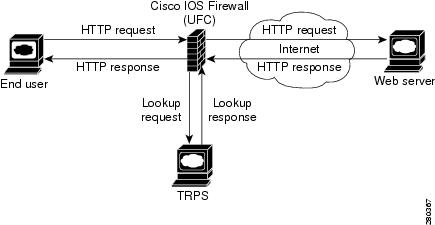
1. The end user opens a web browser and browses to a web page.
2. The browser sends an HTTP request to the Cisco IOS content filtering service.
3. The Cisco IOS content filtering service receives the request, forwards the request to the web server while simultaneously extracting the URL and sending a lookup request to the TRPS.
4. The TRPS receives the lookup request and retrieves the URL category for the requested URL from its database.
5. The TRPS sends the lookup response to the Cisco IOS content filtering service.
6. The Cisco IOS content filtering service receives the lookup response and permits or denies the URL as specified by a Trend Micro URL filtering policy on the router.
7. The Cisco IOS content filtering service caches the URL and lookup response.
Overview of URL Filtering Policies
A URL filtering policy contains an association of classes and actions and a set of URL filtering parameters that specify how the system handles URL requests.
•A class is a set of match criteria that identifies traffic based on its content. Classes are specified by class maps.
•An action is a specific function associated with a given traffic class. For URL traffic, the actions include allow, log, and reset.
•Classes and actions are associated with one another in a policy map.
•URL filtering parameters specify information about the URL filtering server. URL filtering parameters are specified in a parameter map.
•A URL filtering policy goes into effect when it is attached to a zone pair with the service-policy command.
•You can configure multiple URL filtering policies on the system.
Cisco IOS Content Filtering Modes
Subscription-based Cisco IOS content filtering operates in one of three modes: local filtering mode, URL database filtering mode, and allow mode.
Local Filtering Mode
In this mode, the Cisco IOS content filtering service first tries to match the requested URL with the local lists of trusted domains (white list), untrusted domains (black list), and blocked keywords. If a match is not found, the Cisco IOS content filtering service forwards the lookup request to the URL filtering server as specified in the policy. If the Cisco IOS content filtering service cannot establish communication with the URL filtering server, the system enters allow mode.
The system is in local filtering mode when a URL filtering policy for a URL filtering server has not been specified and when the system cannot establish a connection with the URL filtering server.
URL Database Filtering Mode
In this mode, the Cisco IOS content filtering service has connectivity with the URL filtering server; it can send URL lookup requests to and receive URL lookup responses from the URL filtering server.
In the case of a TRPS, the Cisco IOS content filtering service sends a URL category lookup request to the TRPS and the TRPS responds with the URL category and the URL reputation. Based on the policy set for the URL category and reputation, the HTTP request is allowed, denied, or logged. If a policy has not been configured for the URL category or reputation, the default is to permit the HTTP response.
In the case of SmartFilter and Websense servers, the Cisco IOS content filtering service sends a URL lookup request to the URL database server and the server responds with either a permit or deny message. URL filtering policies for SmartFilter and Websense servers specify a server-based action.
Allow Mode
When the Cisco IOS content filtering service is unable to communicate with the URL filtering server, the system enters allow mode. The default setting for allow mode is off, and all HTTP requests that pass through local filtering mode are blocked. When allow mode is on, all HTTP requests that passed through local filtering mode are allowed.
When both local filtering and URL database filtering modes fail, the system goes into allow mode. If the allow mode action is set to on, all URL requests are allowed. Otherwise, all HTTP requests are blocked.
Benefits of Subscription-Based Cisco IOS Content Filtering
The Subscription-Based Cisco IOS Content Filtering feature allows you to control web traffic based on a particular policy. This following sections describe available with this feature:
•White Lists, Black Lists, and Blocked Keyword Lists
White Lists, Black Lists, and Blocked Keyword Lists
This function, which supports the local filtering mode, provides a means of specifying per-policy lists of trusted domain names (white lists), untrusted domain names (black lists), and URL keywords to be blocked (blocked keywords).
When the domain name in a URL request matches an item on the white list, the Cisco IOS content filtering service sends the URL response to the end user's browser directly without sending a lookup request to the TRPS. When the domain name in a URL request matches an item on the black list, the Cisco IOS content filtering service blocks the URL response to the end user's browser. You can specify complete domain names or use the wildcard character * to specify partial domain names.
When a URL contains a keyword, the Cisco IOS content filtering service blocks the URL response directly without sending a lookup request to the URL filtering server. The content filtering service looks at the content of the URL beyond the domain name when making keyword comparisons. For example, if the keyword list contains the word "example," the URL "www.example1.com/example" matches on the keyword example, whereas the URL "www.example.com/example1' does not. You can specify complete words or use the wildcard character * to specify a word pattern.
Caching Recent Requests
This function provides a cache table that contains information about the most recently requested URLs. As a result, a subsequent request for the same URL can be handled by the system without sending a lookup request to the URL filtering server, thus keeping response time to a minimum. In the case of a Trend Micro filtering server, the cache table includes category information for the requested URL. In the case of SmartFilter and Websense filtering servers, the cache table specifies whether the requested URL is allowed or denied.
You can configure the size of the cache table and the length of time an entry remains in the cache table before it expires.
Packet Buffering
This buffering scheme allows the Cisco IOS content filtering service to store HTTP responses while waiting for the URL lookup response from the URL filtering server. The responses remain in the buffer until the response is received from the URL filtering server. If the response indicates that the URL is allowed, the content filtering service releases the HTTP response in the buffer to the end user's browser; if the status indicates that the URL is blocked, the content filtering service discards the HTTP responses in the buffer and closes the connection to both ends. This function prevents numerous HTTP responses from overwhelming your system.
You can specify the number of responses that can be held in the buffer. The default is 200.
Support for SmartFilter and Websense URL Filtering Servers
The Cisco IOS content filtering service provides support for SmartFilter and Websense URL filtering servers. In the case of these third-party URL filtering servers, you configure the URL filtering policy on the router to perform the action specified by the URL filtering server—that is, to allow or deny access to the requested URL.
How to Configure Subscription-Based Cisco IOS Content Filtering
•Configuring Class Maps for Local URL Filtering (required)
•Configuring Class Maps for Trend Micro URL Filtering (required)
•Configuring Parameter Maps for Trend Micro URL Filtering (required)
•Configuring URL Filtering Policies (required)
•Attaching a URL Filtering Policy (required)
Configuring Class Maps for Local URL Filtering
The Cisco IOS content filtering service filters URL requests on the basis of match criteria in class maps. To enable local URL filtering, you must specify at least one class map each for trusted domains, untrusted domains, and blocked keywords. The match criteria for these class maps are specified in a parameter map, which must be configured before the class map is configured.
SUMMARY STEPS
1. enable
2. configure terminal
3. parameter-map type urlf-glob parameter-map-name
4. pattern expression
5. exit
6. Repeat Steps 3 through 5.
7. class-map type urlfilter match-any class-map-name
8. match server-domain urlf-glob parameter-map-name
9. exit
10. Repeat Steps 7 through 9.
11. class-map type urlfilter match-any class-map-name
12. match url-keyword urlf-glob parameter-map-name
13. exit
DETAILED STEPS
Configuring Class Maps for Trend Micro URL Filtering
To enable Trend Micro URL filtering, you must configure one or more class maps that specify the match criteria for URL categories. As an option, you can configure one or more class match that specify match criteria for URL reputations.
SUMMARY STEPS
1. enable
2. configure terminal
3. class-map type urlfilter trend [match-any] class-map-name
4. match url category category-name
5. Repeat Step 4 until all categories for the class map have been specified.
6. exit
7. Repeat Steps 3 through 6.
8. class-map type urlfilter trend [match-any] class-map-name
9. match url reputation reputation-name
10. Repeat Step 9 until all reputations for the class map have been specified.
11. exit
12. Repeat Steps 8 through 11 until all classes for Trend Micro URL reputation filtering have been configured.
DETAILED STEPS
Configuring Parameter Maps for Trend Micro URL Filtering
To enable Trend Micro URL filtering, you must configure the global parameters for the TRPS in a parameter map. You can configure only one global Trend Micro parameter map. As an option, you can configure per-policy TRPS parameters in a per-policy parameter map.
SUMMARY STEPS
1. enable
2. configure terminal
3. parameter-map type trend-global parameter-map-name
4. server {server-name | ip-address} [http-port port-number] [https-port port-number]
[retrans retransmission-count] [timeout seconds]
5. alert {on | off}
6. cache-entry-lifetime hours
7. cache-size maximum-memory kilobyte
8. exit
9. parameter-map type urlfpolicy trend parameter-map-name
10. allow-mode {on | off}
11. block-page {message string | redirect-url url}
12. max-request number-requests
13. max-resp-pak number-responses
14. truncate hostname
15. exit
DETAILED STEPS
Configuring URL Filtering Policies
URL filtering policies are configured by associating classes with actions and specifying the URL filtering parameters for the URL filtering server. To enable subscription-based Cisco IOS content filtering, you must configure a Trend Micro URL filtering policy. To enable SmartFilter or Websense URL filtering, you must configure a SmartFilter or Websense URL filtering policy.
Prerequisites
Before you can configure a URL filter policy, you must have previously configured the URL filter classes to which the policy applies and have specified a parameter map for the filtering server.
SUMMARY STEPS
1. enable
2. configure terminal
3. policy-map type inspect urlfilter policy-map-name
4. parameter type urlfpolicy [local | trend | n2h2 | websense] parameter-map-name
5. class type urlfilter [trend | n2h2 | websense] class-map-name
6. allow | reset | server-specified-action
7. exit
8. Repeat Steps 4 through 8 for the remaining classes of traffic to which the policy applies.
9. exit
DETAILED STEPS
Attaching a URL Filtering Policy
After you have configured a URL filtering policy, you attach the policy to an inspect type policy map that defines the traffic to be inspected and the actions to be taken based on the characteristics of the traffic. Then, you attach the inspect type policy map as a service policy to a particular target (zone-pair). After you attach the policy, you must configure the interfaces that belong to the zone. See the Cisco IOS Security Configuration Guide for more information.
Prerequisites
If you do not want to use the default parameters for inspecting traffic, use the parameter-map type inspect command to configure the parameters related to the inspect action.
SUMMARY STEPS
1. enable
2. configure terminal
3. class-map type inspect match-all class-map-name
4. match protocol http
5. exit
6. policy-map type inspect policy-map-name
7. class type inspect class-map-name
8. inspect parameter-map-name
9. service-policy urlfilter policy-map-name
10. exit
11. class class-default
12. drop
13. exit
14. exit
15. zone-pair security zone-pair-name {source source-zone-name | self} destination [self | destination-zone-name]
16. service-policy type inspect policy-map-name
17. exit
DETAILED STEPS
Configuration Examples for Cisco IOS Content Filtering
•Example: Configuring Class Maps for Local URL Filtering
•Example: Configuring Class Maps for Trend Micro URL Filtering
•Example: Configuring Parameter Maps for Trend Micro URL Filtering
•Example: Attaching a URL Filtering Policy
•Example: Subscription-Based Content Filtering Sample Configuration
•Example: Configuring URL Filtering with a Websense Server
•Example: Configuring URL Filtering with a SmartFilter Server
Example: Configuring Class Maps for Local URL Filtering
The following example shows class maps for trusted domains, untrusted domains, and URL keywords. The required parameter maps are configured first.
parameter-map type urlf-glob trusted-domain-param
pattern www.example1.com
pattern *.example2.com
!
parameter-map type urlf-glob untrusted-domain-param
pattern www.example3.com
pattern www.example4.com
!
parameter-map type urlf-glob keyword-param
pattern mp3
pattern jobs
class-map type urlfilter match-any untrusted-domain-class
match server-domain urlf-glob untrusted-domain-param
class-map type urlfilter match-any trusted-domain-class
match server-domain urlf-glob trusted-domain-param
class-map type urlfilter match-any keyword-class
match url-keyword urlf-glob keyword-param
Example: Configuring Class Maps for Trend Micro URL Filtering
The following example shows a class map that defines the class drop-category, which specifies traffic that matches the defined URL categories:
class-map type urlfilter trend match-any drop-category
match url category Gambling
match url category Personals-Dating
Example: Configuring Parameter Maps for Trend Micro URL Filtering
The following example shows a parameter map for global Trend Micro parameters and a parameter map for per-policy Trend Micro parameters:
parameter-map type trend-global global-param-map
server trps1.trendmicro.com retrans 5 timeout 200
cache-entry-lifetime 1
cache-size maximum-memory 128000
parameter-map type urlfpolicy trend trend-param-map
block-page message "group2 is blocked by trend"
max-request 2147483647
max-resp-pak 20000
truncate hostname
Example: Attaching a URL Filtering Policy
The following example configures an HTTP traffic class and an inspect type policy map that inspects all HTTP traffic, applies the URL filtering policy to that traffic, and ignores all other traffic. Finally, the inspect policy is attached as a service policy to the target zone pair.
class-map type inspect match-all http-class
match protocol http
policy-map type inspect urlfilter trend-global-policy
class type inspect http-class
inspect global
service-policy urlfilter trend-policy
class class-default
drop
zone-pair security zp-in source zone-in destination zone-out
service-policy type inspect trend-global-policy
Example: Subscription-Based Content Filtering Sample Configuration
The following sample subscription-based content filtering configuration specifies two different URL filtering policies—one for group one and one for group two:
! port map to indicate FW that all 8080 connections are http connections
ip port-map http port 8080
! Trend global parameter-map to specify the TRPS server and cache-sizes
parameter-map type trend-global hello
server trps1.trendmicro.com
cache-size maximum-memory 300
! Trend Policy parameter map for group one.
! If server is down, allow the HTTP connections
parameter-map type urlfpolicy trend trend-g1-param
allow-mode on
block-page message "You are prohibited from accessing this web page"
! Trend Policy parameter map for group two.
! If the server is down block the HTTP connections
parameter-map type urlfpolicy trend trend-g2-params
block-page message "Restricted access. Please contact your administrator"
! Trend class map for group one
! Just match bad reputation sites
class-map type urlfilter trend trend-g1-c
match url reputation ADWARE
match url reputation DIALER
! Trend class map for group two
! Match on bad reputation sites and on Gambling and Personals-Dating sites
class-map type urlfilter trend trend-g2-c
match url reputation ADWARE
match url reputation PHISHING
match url category Gambling
match url category Personals-Dating
! Local filtering class to permit certain domains
parameter-map type urlf-glob p-domains
pattern "www.example.com"
pattern "www.example1.com"
class-map type urlfilter p-domains
match server-domain urlf-glob p-domains
! Local filtering class to deny certain domains
parameter-map type urlf-glob d-domains
pattern "*.example2.com"
pattern "www.example3.com"
class-map type urlfilter d-domains
match server-domain urlf-glob d-domains
! Urlfilter Policy map for group one.
! Don't block any of the domains locally
policy-map type inspect urlfilter g1-pol
parameter type urlfpolicy trend trend-g1-param
class type urlfilter p-domains
allow
class type urlfilter d-domains
reset
class type urlfilter trend trend-g1-c
reset
! Url filter policy map for group two
! Block the deny domains locally
policy-map type inspect urlfilter g2-pol
parameter type urlfpolicy trend trend-g2-param
class type urlfilter p-domains
allow
class type urlfilter d-domains
log
reset
class type urlfilter trend trend-g2-c
reset
! First level class to prevent content filtering for websites that are local to the
enterprise
! The first deny line is to make the http connections going to the proxy to not match this
class
ip access-list extended 101
deny tcp any host 192.168.1.10 eq 8080
permit tcp any 192.168.0.0 0.0.255.255 eq 80 8080
permit tcp any 10.0.0.0 0.255.255.255 eq 80 8080
class-map type inspect no-urlf-c
match access-group 101
! First level class map to support url-filtering for group one
ip access-list extended 102
permit tcp 192.168.1.0 0.0.0.255 any
class-map type inspect urlf-g1-c
match protocol http
match access-group 102
! First level class map to support url-filtering for group two
ip access-list extended 103
permit tcp 192.168.2.0 0.0.0.255 any
class-map type inspect urlf-g1-c
match protocol http
match access-group 103
! First level class map to allow ICMP from protected network to outside
class-map type inspect icmp-c
match protocol icmp
! First level policy map that brings everything together
! Always configure the class with most restrictions first
policy-map type inspect fw-pol
class type inspect icmp
inspect
class type inspect no-urlf-c
inspect
class type inspect urlf-g2-c
inspect
service-policy urlfilter g2-pol
class type inspect urlf-g1-c
inspect
service-policy urlfilter g1-pol
! Create targets to which the FW policy is applied
zone security z1
zone security z2
zone-pair security z1z2 source z1 destination z2
service-policy type inspect fw-pol
! inside interface
interface FastEthernet 0/0
ip address 10.1.1.1 255.255.0.0
zone-member security z1
!outside interface
interface FastEthernet 1/0
ip address 209.165.200.225 255.255.255.224
zone-member security z2
Example: Configuring URL Filtering with a Websense Server
The following example configures URL filtering with a Websense server:
parameter-map type urlfpolicy websense websense-param-map
/* define vendor related info */
server 192.168.3.1
port 5000 retrans 3 timeout 200
/* define global info related with URL filtering */
alert on
allow-mode off
urlf-server-log on
max-request 2000
max-resp-pak 200
truncate hostname
cache-size 256
cache-entry-lifetime 2
block-page "This page has been blocked."
/* define trusted-domain lists */
! Local filtering class to permit certain domains
parameter-map type urlf-glob p-domains
pattern "www.example.com"
pattern "www.example1.com"
class-map type urlfilter p-domains
match server-domain urlf-glob p-domains
! Local filtering class to deny certain domains
parameter-map type urlf-glob d-domains
pattern "*.example2.com"
pattern "www.example3.com"
class-map type urlfilter d-domains
match server-domain urlf-glob d-domains
class-map type urlfilter websense match-any websense-map
match server-response any
policy-map type inspect urlfilter url-websense-policy
parameter-map urlfpolicy websense websense-param-map
class type urlfilter trusted-domain-lists
allow
class type urlfilter untrusted-domain-lists
reset
class type urlfilter block-url-keyword-lists
reset
class type urlfilter websense websense-map
server-specified-action
/* define customer group */
access-list 101 permit ip 192.168.1.0 0.0.0.255 any
class-map type inspect match-all urlf-traffic
match protocol http
match access-list 101
policy-map type inspect urlfilter-policy
class type inspect urlf-traffic
inspect
service-policy urlfilter url-websense-policy
Example: Configuring URL Filtering with a SmartFilter Server
The following example configures URL filtering with a SmartFilter server:
parameter-map type urlfpolicy n2h2 n2h2-param-map
/* define vendor related info */
server 192.168.3.1
port 5000 retrans 3 timeout 200
/* define global info related with URL filtering */
alert on
allow-mode off
urlf-server-log on
max-request 2000
max-resp-pak 200
truncate hostname
cache-size 256
cache-entry-lifetime 2
block-page "This page has been blocked."
/* define trusted-domain lists */
! Local filtering class to permit certain domains
parameter-map type urlf-glob p-domains
pattern "www.example.com"
pattern "www.example1.com"
class-map type urlfilter p-domains
match server-domain urlf-glob p-domains
! Local filtering class to deny certain domains
parameter-map type urlf-glob d-domains
pattern "*.example2.com"
pattern "www.example3.com"
class-map type urlfilter d-domains
match server-domain urlf-glob d-domains
class-map type urlfilter websense match-any n2h2-map
match server-response any
policy-map type inspect urlfilter url-n2h2-policy
parameter-map urlfpolicy n2h2 n2h2-param-map
class type urlfilter trusted-domain-lists
allow
class type urlfilter untrusted-domain-lists
reset
class type urlfilter block-url-keyword-lists
reset
class type urlfilter n2h2 n2h2-map
server-specified-action
/* define customer group */
access-list 101 permit ip 192.168.1.0 0.0.0.255 any
class-map type inspect match-all urlf-traffic
match protocol http
match access-list 101
policy-map type inspect urlfilter-policy
class type inspect urlf-traffic
inspect
service-policy urlfilter url-n2h2-policy
Additional References
Related Documents
|
|
|
|---|---|
Cisco IOS commands |
|
Security commands: complete command syntax, command mode, command history, defaults, usage guidelines, and examples |
|
The Cisco IOS firewall solution |
Standards
|
|
|
|---|---|
None |
— |
MIBs
|
|
|
|---|---|
None |
To locate and download MIBs for selected platforms, Cisco IOS releases, and feature sets, use Cisco MIB Locator found at the following URL: |
RFCs
|
|
|
|---|---|
RFC 1945 |
Hypertext Transfer Protocol—HTTP/1.0 |
RFC 2616 |
Hypertext Transfer Protocol—HTTP/1.1 |
Technical Assistance
Feature Information for Subscription-Based Cisco IOS Content Filtering
Table 1 lists the features in this module and provides links to specific configuration information.
Use Cisco Feature Navigator to find information about platform support and software image support. Cisco Feature Navigator enables you to determine which software images support a specific software release, feature set, or platform. To access Cisco Feature Navigator, go to http://www.cisco.com/go/cfn. An account on Cisco.com is not required.

Note Table 1 lists only the software release that introduced support for a given feature in a given software release train. Unless noted otherwise, subsequent releases of that software release train also support that feature.
 Feedback