- MPLS Traffic Engineering and Enhancements
- MPLS Traffic Engineering�Configurable Path Calculation Metric for Tunnels
- MPLS Traffic Engineering�Scalability Enhancements
- MPLS Traffic Engineering�LSP Attributes
- MPLS Traffic Engineering�Verbatim Path Support
- MPLS Traffic Engineering�RSVP Hello State Timer
- MPLS Traffic Engineering Forwarding Adjacency
- MPLS Traffic Engineering�Automatic Bandwidth Adjustment for TE Tunnels
- RSVP Refresh Reduction and Reliable Messaging
MPLS: Traffic Engineering: Path Calculation and Setup Configuration Guide, Cisco IOS XE Release 3S
Bias-Free Language
The documentation set for this product strives to use bias-free language. For the purposes of this documentation set, bias-free is defined as language that does not imply discrimination based on age, disability, gender, racial identity, ethnic identity, sexual orientation, socioeconomic status, and intersectionality. Exceptions may be present in the documentation due to language that is hardcoded in the user interfaces of the product software, language used based on RFP documentation, or language that is used by a referenced third-party product. Learn more about how Cisco is using Inclusive Language.
- Updated:
- March 12, 2009
Chapter: MPLS Traffic Engineering—Automatic Bandwidth Adjustment for TE Tunnels
- Finding Feature Information
- Contents
- Prerequisites for MPLS TE—Automatic Bandwidth Adjustment for TE Tunnels
- Restrictions for MPLS TE—Automatic Bandwidth Adjustment for TE Tunnels
- Information About MPLS TE—Automatic Bandwidth Adjustment for TE Tunnels
- How to Configure MPLS TE—Automatic Bandwidth Adjustment for TE Tunnels
- Configuring a Platform to Support Traffic Engineering Tunnels
- Configuring IS-IS for MPLS Traffic Engineering
- Configuring OSPF for MPLS Traffic Engineering
- Configuring an MPLS Traffic Engineering Tunnel
- Configuring Bandwidth on Each Link That the Tunnels Cross
- Configuring a Platform to Support Automatic Bandwidth Adjustment
- Configuring Automatic Bandwidth Adjustment for a Tunnel
- Configuring the Interval for Computing Tunnel Average Output Rate
- Verifying the Automatic Bandwidth Configuration
- Configuration Examples for MPLS TE—Automatic Bandwidth Adjustments for TE Tunnels
- Additional References
- Feature Information for MPLS TE—Automatic Bandwidth Adjustment for TE Tunnels
MPLS Traffic Engineering (TE)—Automatic Bandwidth Adjustment for TE Tunnels
The MPLS Traffic Engineering (TE)—Automatic Bandwidth Adjustment for TE Tunnels feature allows you to automatically adjust the bandwidth allocation for traffic engineering tunnels based on the tunnel's measured traffic load. The configured bandwidth in the running configuration is changed due to the automatic bandwidth behavior.
Finding Feature Information
For the latest feature information and caveats, see the release notes for your platform and software release. To find information about the features documented in this module, and to see a list of the releases in which each feature is supported, see the "Feature Information for MPLS TE—Automatic Bandwidth Adjustment for TE Tunnels" section.
Use Cisco Feature Navigator to find information about platform support and Cisco IOS XE software image support. To access Cisco Feature Navigator, go to http://www.cisco.com/go/cfn. An account on Cisco.com is not required.
Contents
• Prerequisites for MPLS TE—Automatic Bandwidth Adjustment for TE Tunnels
•Restrictions for MPLS TE—Automatic Bandwidth Adjustment for TE Tunnels
•Information About MPLS TE—Automatic Bandwidth Adjustment for TE Tunnels
•How to Configure MPLS TE—Automatic Bandwidth Adjustment for TE Tunnels
•Configuration Examples for MPLS TE—Automatic Bandwidth Adjustments for TE Tunnels
•Feature Information for MPLS TE—Automatic Bandwidth Adjustment for TE Tunnels
Prerequisites for MPLS TE—Automatic Bandwidth Adjustment for TE Tunnels
Your network must support the following Cisco IOS XE features before configure the MPLS TE—Automatic Bandwidth Adjustment for TE Tunnels feature:
•Multiprotocol Label Switching (MPLS) traffic engineering tunnels
•Cisco Express Forwarding
•Intermediate System-to-Intermediate System (IS-IS) or Open Shortest Path First (OSPF)
Restrictions for MPLS TE—Automatic Bandwidth Adjustment for TE Tunnels
•The automatic bandwidth adjustment feature treats each tunnel for which it has been enabled independently. That is, it adjusts the bandwidth for each such tunnel according to the adjustment frequency configured for the tunnel and the sampled output rate for the tunnel since the last adjustment without regard for any adjustments previously made or pending for other tunnels.
•If a tunnel is brought down to calculate a new label switched path (LSP) because the LSP is not operational, the configured bandwidth is not saved. If the router is reloaded, the last saved automatic bandwidth value is used.
•You cannot configure MPLS TE over the logical generic routing encapsulation (GRE) tunnel interface.
•MPLS traffic engineering supports only a single IGP process/instance. Multiple IGP processes/instances are not supported and MPLS traffic engineering should not be configured in more than one IGP process/instance.
Information About MPLS TE—Automatic Bandwidth Adjustment for TE Tunnels
•MPLS TE—Automatic Bandwidth Adjustment for TE Tunnels Overview
•MPLS TE—Automatic Bandwidth Adjustment for TE Tunnels Benefits
MPLS TE—Automatic Bandwidth Adjustment for TE Tunnels Overview
Traffic engineering autobandwidth samples the average output rate for each tunnel marked for automatic bandwidth adjustment. For each marked tunnel, the feature periodically (for example, once per day) adjusts the tunnel's allocated bandwidth to be the largest sample for the tunnel since the last adjustment.
The frequency with which tunnel bandwidth is adjusted and the allowable range of adjustments is configurable on a per-tunnel basis. In addition, the sampling interval and the interval over which to average tunnel traffic to obtain the average output rate is user-configurable on a per-tunnel basis.
MPLS TE—Automatic Bandwidth Adjustment for TE Tunnels Benefits
The automatic bandwidth feature makes it easy to configure and monitor the bandwidth for MPLS TE tunnels. If automatic bandwidth is configured for a tunnel, TE automatically adjusts the tunnel's bandwidth.
How to Configure MPLS TE—Automatic Bandwidth Adjustment for TE Tunnels
•Configuring a Platform to Support Traffic Engineering Tunnels (required)
•Configuring IS-IS for MPLS Traffic Engineering (required)
•Configuring an MPLS Traffic Engineering Tunnel (required)
•Configuring Bandwidth on Each Link That the Tunnels Cross (required)
•Configuring a Platform to Support Automatic Bandwidth Adjustment (required)
•Configuring Automatic Bandwidth Adjustment for a Tunnel (required)
•Configuring the Interval for Computing Tunnel Average Output Rate (optional)
•Verifying the Automatic Bandwidth Configuration
Configuring a Platform to Support Traffic Engineering Tunnels
SUMMARY STEPS
1. enable
2. configure terminal
3. ip cef distributed
4. mpls traffic-eng tunnels
5. exit
DETAILED STEPS
Configuring IS-IS for MPLS Traffic Engineering

Note MPLS traffic engineering supports only a single IGP process/instance. Multiple IGP processes/instances are not supported and MPLS traffic engineering should not be configured in more than one IGP process/instance.
SUMMARY STEPS
1. enable
2. configure terminal
3. router isis
4. mpls traffic-eng level-1
5. mpls traffic-eng router-id loopback0
6. metric-style wide
7. exit
8. exit
DETAILED STEPS
Configuring OSPF for MPLS Traffic Engineering
Note MPLS traffic engineering supports only a single IGP process/instance. Multiple IGP processes/instances are not supported and MPLS traffic engineering should not be configured in more than one IGP process/instance.
SUMMARY STEPS
1. enable
2. configure terminal
3. router ospf process-id
4. mpls traffic-eng area number
5. mpls traffic-eng router-id loopback0
6. exit
7. exit
DETAILED STEPS
Configuring an MPLS Traffic Engineering Tunnel
The MPLS TE tunnel has two path setup options: a preferred explicit path and a backup dynamic path.
SUMMARY STEPS
1. enable
2. configure terminal
3. interface tunnel number
4. ip unnumbered interface-type interface-number
5. tunnel destination ip-address
6. tunnel mode mpls traffic-eng
7. tunnel mpls traffic-eng bandwidth bandwidth
8. tunnel mpls traffic-eng path-option [protect] number {dynamic | explicit
{name path-name | identifier path-number}} [lockdown]
9. exit
10. exit
DETAILED STEPS
Troubleshooting Tips
Each tunnel mpls traffic-eng auto-bw command supersedes the previous one. Therefore, if you want to specify multiple options for a tunnel, you must specify them all in a single tunnel mpls traffic-eng auto-bw command.
Configuring Bandwidth on Each Link That the Tunnels Cross
SUMMARY STEPS
1. enable
2. configure terminal
3. interface type slot/subslot/port[.subinterface-number]
4. mpls traffic-eng tunnels
5. ip rsvp bandwidth [interface-kbps] [single-flow-kbps] [sub-pool kbps]
6. exit
7. exit
DETAILED STEPS
Configuring a Platform to Support Automatic Bandwidth Adjustment
To enable automatic bandwidth adjustment on a platform and initiate sampling the output rate for tunnels configured for bandwidth adjustment, perform the following task.
SUMMARY STEPS
1. enable
2. configure terminal
3. mpls traffic-eng auto-bw timers [frequency seconds]
4. no mpls traffic-eng auto-bw timers
5. exit
DETAILED STEPS
Configuring Automatic Bandwidth Adjustment for a Tunnel
To enable automatic bandwidth adjustment for a tunnel and constrain the range of automatic bandwidth adjustments applied to the tunnel, perform the following task.
SUMMARY STEPS
1. enable
2. configure terminal
3. interface tunnel number
4. tunnel mpls traffic-eng auto-bw [max-bw number] [min-bw number]
5. exit
6. exit
DETAILED STEPS
Configuring the Interval for Computing Tunnel Average Output Rate
To specify the interval for computing the average output rate for an MPLS traffic engineering tunnel, perform the following task.
SUMMARY STEPS
1. enable
2. configure terminal
3. interface tunnel number
4. load-interval seconds
5. exit
6. exit
DETAILED STEPS
Verifying the Automatic Bandwidth Configuration
SUMMARY STEPS
1. enable
2. show mpls traffic-eng tunnels
3. show running-config
4. exit
DETAILED STEPS
Step 1 enable
Use this command to enter privileged EXEC mode. Enter you password if prompted. For example:
Router> enable
Router#
Step 2 show mpls traffic-eng tunnels
Use this command to show information about tunnels, including automatic bandwidth information for tunnels that have the feature enabled. For example:
Router# show mpls traffic-eng tunnels
Name:tagsw4500-9_t1 (Tunnel1) Destination:10.0.0.11
Status:
Admin:up Oper:up Path:valid Signalling:connected
path option 1, type explicit pbr_south (Basis for Setup, path weight 30)
path option 2, type dynamic
Config Parameters:
Bandwidth:5000 kbps (Global) Priority:7 7 Affinity:0x0/0xFFFF
AutoRoute: disabled LockDown:disabled Loadshare:5000 bw-based
auto-bw:(86400/85477) 5347 Bandwidth Requested:5000
In the command output:
•The auto-bw line indicates that automatic bandwidth adjustment is enabled for the tunnel.
•86400 is the time, in seconds, between bandwidth adjustments.
•85477 is the time, in seconds, remaining until the next bandwidth adjustment.
•5347 is the largest bandwidth sample since the last bandwidth adjustment.
•5000 is the last bandwidth adjustment and the bandwidth currently requested for the tunnel.
Step 3 show running-config
Use this command to verify that the MPLS TE automatic bandwidth command is as you expected. For example:
Router# show running-config
.
.
.
interface tunnel1
ip unnumbered loopback 0
tunnel destination 192.168.17.17 255.255.255.0
tunnel mode mpls traffic-eng
tunnel mpls traffic-eng bandwidth 1500
tunnel mpls traffic-eng priority 1 1
tunnel mpls traffic-eng path-option 1 dynamic
tunnel mpls traffic-eng auto bw max-bw 2000 min-bw 1000 !Enable automatic bandwidth
.
.
.
The sample output from the show running-config command shows that the value 1500, in the tunnel mpls traffic-eng bandwidth 1500 command, changes after an adjustment is made.
Step 4 exit
Use this command to exit to user EXEC mode. For example:
Router# exit
Router>
Configuration Examples for MPLS TE—Automatic Bandwidth Adjustments for TE Tunnels
Figure 1 illustrates a sample MPLS topology. The following sections contain sample configuration examples to configure automatic bandwidth adjustment for MPLS traffic engineering tunnels originating on Router 1 and to enable automatic bandwidth adjustment for Tunnel1.
Figure 1 Sample MPLS Traffic Engineering Tunnel Configuration
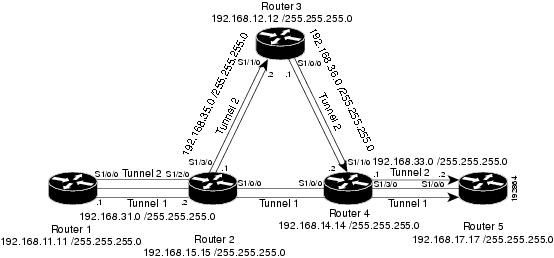
This section provides the following configuration examples based on Figure 1:
•Example: Configuring MPLS Traffic Engineering Automatic Bandwidth
•Example: Tunnel Configuration for Automatic Bandwidth
The examples omit some configuration required for MPLS traffic engineering, such as the required RSVP and Interior Gateway Protocol (IGP) (IS-IS or OSPF) configuration, because the purpose of these examples is to illustrate the configuration for automatic bandwidth adjustment.
Example: Configuring MPLS Traffic Engineering Automatic Bandwidth
The following example shows how to use the mpls traffic-eng auto-bw timers command to enable automatic bandwidth adjustment for Router 1. The command specifies that the output rate is to be sampled every 10 minutes for tunnels configured for automatic bandwidth adjustment.
configure terminal
!
ip cef distributed
mpls traffic-eng tunnels
mpls traffic-eng auto-bw timers frequency 600 !Enable automatic bandwidth adjustment
interface loopback 0
ip address 192.168.11.11 255.255.255.0
Example: Tunnel Configuration for Automatic Bandwidth
The following example shows how to use the tunnel mpls traffic-eng auto-bw command to enable automatic bandwidth adjustment for Tunnel1. The command specifies a maximum allowable bandwidth of 2000 kbps, a minimum allowable bandwidth of 1000 kbps, and that the default automatic bandwidth adjustment frequency of once a day be used.
interface tunnel1
ip unnumbered loopback 0
tunnel destination 192.168.17.17 255.255.255.0
tunnel mode mpls traffic-eng
tunnel mpls traffic-eng bandwidth 1500
tunnel mpls traffic-eng priority 1 1
tunnel mpls traffic-eng path-option 1 dynamic
tunnel mpls traffic-eng auto bw max-bw 2000 min-bw 1000 !Enable automatic bandwidth
!adjustment for Tunnel1
Additional References
Related Documents
|
|
|
|---|---|
Cisco IOS commands |
|
IS-IS and OSPF commands |
|
MPLS commands |
|
Quality of service solutions commands |
|
Quality of service solutions configuration |
Standards
|
|
|
|---|---|
No new or modified standards are supported by this feature, and support for existing standards has not been modified by this feature. |
— |
MIBs
|
|
|
|---|---|
MPLS Traffic Engineering MIB |
To locate and download MIBs for selected platforms, Cisco software releases, and feature sets, use Cisco MIB Locator found at the following URL: |
RFCs
|
|
|
|---|---|
No new or modified RFCs are supported by this feature, and support for existing RFCs has not been modified. |
— |
Technical Assistance
Feature Information for MPLS TE—Automatic Bandwidth Adjustment for TE Tunnels
Table 1 lists the features in this module and provides links to specific configuration information.
Use Cisco Feature Navigator to find information about platform support and software image support. Cisco Feature Navigator enables you to determine which software images support a specific software release, feature set, or platform. To access Cisco Feature Navigator, go to http://www.cisco.com/go/cfn. An account on Cisco.com is not required.
Note Table 1 lists only the software release that introduced support for a given feature in a given software release train. Unless noted otherwise, subsequent releases of that software release train also support that feature.
|
|
|
|
|---|---|---|
MPLS Traffic Engineering (TE)—Automatic Bandwidth Adjustment for TE Tunnels |
Cisco IOS XE Release 2.3 |
The MPLS Traffic Engineering (TE)—Automatic Bandwidth Adjustment for TE Tunnels feature provides the means to automatically adjust the bandwidth allocation for traffic engineering tunnels based on their measured traffic load. The configured bandwidth in the running configuration is changed due to the automatic bandwidth behavior. In Cisco IOS XE Release 2.1, this feature was introduced on the Cisco ASR 1000 Series Aggregation Services Routers. The following sections provide information about this feature: • • • • • • • |
• • The following commands were introduced or modified: clear mpls traffic-eng auto-bw timers, mpls traffic-eng auto-bw timers, tunnel mpls traffic-eng auto-bw. |
 Feedback