Contents

Automatic Signature Extraction

The Automatic Signature Extraction (ASE) feature helps shorten the response time for identifying malware by dynamically extracting signatures of unknown viruses and worms traversing the network without the need for human intervention.

Before Cisco IOS Release 12.4(15)T, network protection from malware such as botnets, viruses, and worms was accomplished by deploying solutions that rely on manual signatures to identify the malware. Normally, security professionals require approximately 8 to 12 hours to generate a signature for a new piece of malware. This time interval had been acceptable for thwarting malware, but is no longer acceptable nor scalable due to the exponential increase in malware that is seen on networks.

Finding Feature Information

Your software release may not support all the features documented in this module. For the latest caveats and feature information, see Bug Search Tool and the release notes for your platform and software release. To find information about the features documented in this module, and to see a list of the releases in which each feature is supported, see the feature information table at the end of this module.

Use Cisco Feature Navigator to find information about platform support and Cisco software image support. To access Cisco Feature Navigator, go to www.cisco.com/​go/​cfn. An account on Cisco.com is not required.

Prerequisites for Automatic Signature Extraction

  • The ASE collector runs on an x86-based Linux PC and must have IP connectivity to the network and ASE sensors. Threat Information Distribution Protocol (TIDP) is the communication protocol used between the Linux-based ASE collector and Cisco IOS-based ASE sensors.

  • It is recommended that the ASE collector software image run on RedHat Enterprise Linux AS Release 3 or a later release.


Note


Contact your Cisco representative for more information about installing the ASE collector functionality on your network.


Information About Automatic Signature Extraction

Automatic Signature Extraction Overview

The Automatic Signature Extraction feature is used to identify and define potential worms and viruses found in network traffic based on the following characteristics:

  • Content invariance identifies that all worms have some code that remains unchanged through the infection.

  • Content prevalence identifies if packet payloads were observed frequently in the network. Because worms are designed to spread, the unchanged portion of a worm’s content appears frequently on a network as it spreads or attempts to spread.

  • Address dispersion identifies whether the same payload is sent to and from a large number of source and destination IP address pairs.


Note


The ASE feature can detect e-mail viruses but is disabled by default. This feature can be enabled on the ASE collector. Contact your Cisco representative for more information.


When the ASE sensor extracts a malware signature, the ASE sensor sends the signature to the collector using the TIDP Threat Mitigation Service (TMS) to contain and mitigate the malware outbreak among TMS consumers spread across the network. The TMS framework rapidly and efficiently distributes threat information to devices on the network and generates actions to TMS consumers to either drop or redirect the packets containing the malware signature.


Note


See the "Automatic Signature Extraction Sensor Operation" for more information on this feature.


Automatic Signature Extraction Sensor Operation

The ASE feature has two main components: a sensor and collector. The ASE sensor sifts through the contents of network traffic to reduce the number of different source and destination addresses seen in packets. To minimize the impact on the device, sensing can be enabled or disabled on a per-interface basis and traffic designated as ASE traffic can be specified. The ASE sensor observes the same traffic as the router can observe after an access list is applied.


Note


The sensor is unable to extract signatures from within encrypted traffic passing through a router.


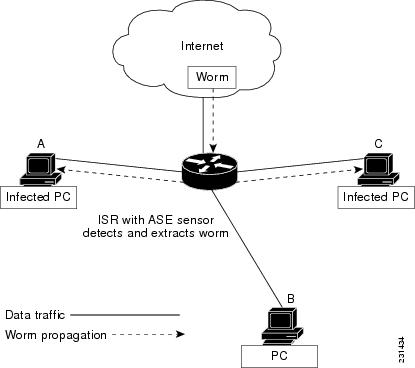
The figure below shows that devices A and C are infected with the same worm. As traffic crosses the Cisco IOS router running the ASE sensor, the router extracts the worm’s signature based on its address dispersion and content prevalence. Then the router sends this information to the ASE collector for further processing.


Automatic Signature Extraction Collector Operation

The ASE collector, which runs on a Linux-based PC, performs the following functions:

  • Processes signatures it receives from the ASE sensor.

  • Initiates the mitigation of signatures.

  • Coordinates detection between multiple ASE sensors.

  • Manages and distributes entry information and files on the network.

  • Collects signatures and packets sent by the sensor.

  • Analyzes extracted signatures to determine what the best signature is for a malicious packet to correctly identify a threat.

  • Performs post processing of signatures to reduce false alarms.

  • Maintains a signature database.

  • Reduces false positives in signatures through classification.

  • Manages sensor configuration such as thresholds, scanning criteria, and other parameters.

  • Generates a report or reports on collected signatures.


Note


Contact your Cisco representative for more information about installing the ASE collector functionality on your network.


Automatic Signature Extraction Implementation on a Network

Self-propagating worms continue to grow and affect the security of hosts and networks. These malicious malware attacks often target specific victims or subnets within an enterprise organization. Specifically, a worm can affect and saturate the local network (including all hosts), the branch router, and the local WAN connection or both. The optimal location to detect, contain, and mitigate these worms is on the gateway network connection to prevent the worms from spreading to the entire network, including all connected branches.

Using the WAN Aggregation Model to Contain Malware

The ASE sensor is typically deployed on the Customer Premises Equipment (CPE) WAN so that worms closest to the source can be extracted and prevented from spreading to other areas of the enterprise network.

The WAN aggregation model refers to the traditional deployment scenario in which CPEs are terminated over WAN links to an aggregation HUB. In this model, the CPEs would serve as ASE sensors, and the aggregation HUB would provide ASE Collector functionality. The figure below shows how worm signatures are extracted at the CPEs and the HUB site with the ASE sensor and shows how the ASE sensor uses this signature information with the ASE collector to contain the outbreak.


How to Configure the Automatic Signature Extraction Sensor

Configuring Automatic Signature Extraction Sensor

SUMMARY STEPS

    1.    enable

    2.    configure terminal

    3.    ase group TIDP-group-number

    4.    ase collector ip-address

    5.    ase signature extraction

    6.    interface interface-type number

    7.    ase enable

    8.    end

    9.    show ase


DETAILED STEPS
     Command or ActionPurpose
    Step 1 enable


    Example:
    Router> enable
     

    Enables privileged EXEC mode.

    • Enter your password if prompted.

     
    Step 2 configure terminal


    Example:
    Router# configure terminal
     

    Enters global configuration mode.

     
    Step 3 ase group TIDP-group-number

    Example:
    Router(config)# ase group 10
     

    The group number range is between 1 and 65535, which identifies the TIDP group number used for exchange between the ASE sensor and ASE collector.

     
    Step 4 ase collector ip-address

    Example:
    Router(config)# ase collector 10.10.10.3
     

    Enters the destination IP address of the ASE collector server so that the ASE sensor has IP connectivity to the ASE collector.

     
    Step 5 ase signature extraction


    Example:
    Router(config)# ase signature extraction
     

    Enables the ASE feature globally on the router.

     
    Step 6 interface interface-type number

    Example:
    Router(config)# interface GigabitEthernet0/1
     

    Enters the interface for the ASE feature, and enters interface configuration mode.

     
    Step 7 ase enable


    Example:
    Router(config-if)# ase enable
     

    Enables the ASE feature on this interface.

     
    Step 8 end


    Example:
    Router(config-if)# end
     

    Returns to privileged EXEC mode.

     
    Step 9 show ase


    Example:
    Router# show ase
     

    Displays the ASE run-time status.

    The four states are:

    • Not Enabled --(Not displayed) The ASE feature is not enabled in global configuration mode.

    • Enabled --The ASE feature is enabled in global configuration mode, but the ASE sensor has not connected with the ASE collector.

    • Connected --The ASE sensor has connected with the ASE collector, but it has not completed initialization.

    • Online --The ASE is ready for inspecting traffic.


    What to Do Next

    Start the ASE collector. The ASE collector, which runs on a Linux-based PC, provides the ASE sensor software on the Cisco IOS with entries and analysis on extracted signatures.


    Note


    Contact your Cisco representative for more information about installing the ASE collector on your network.


    After the ASE collector is started, the ASE run-time status information can be displayed by using the show ase command, as shown below:


    Note


    The ASE collector must be started in order for the ASE run-time status information to be displayed.


    Router# show ase
    ASE Information:
    Collector IP: 10.10.10.3
    TIDP Group  : 10
    Status      : Online
    Packets inspected: 1105071
    Address Dispersion Threshold: 20
    Prevalence Threshold: 10
    Sampling set to: 1 in 64
    Address Dispersion Inactivity Timer: 3600s
    Prevalence Table Refresh Time: 60s

    Additional References

    Related Documents

    Related Topic

    Document Title

    Cisco IOS commands

    Cisco IOS Master Commands List, All Releases

    Technical Assistance

    Description

    Link

    The Cisco Support and Documentation website provides online resources to download documentation, software, and tools. Use these resources to install and configure the software and to troubleshoot and resolve technical issues with Cisco products and technologies. Access to most tools on the Cisco Support and Documentation website requires a Cisco.com user ID and password.

    http:/​/​www.cisco.com/​cisco/​web/​support/​index.html

    Feature Information for Automatic Signature Extraction

    The following table provides release information about the feature or features described in this module. This table lists only the software release that introduced support for a given feature in a given software release train. Unless noted otherwise, subsequent releases of that software release train also support that feature.

    Use Cisco Feature Navigator to find information about platform support and Cisco software image support. To access Cisco Feature Navigator, go to www.cisco.com/​go/​cfn. An account on Cisco.com is not required.

    Table 1 Feature Information for Automatic Signature Extraction

    Feature Name

    Releases

    Feature Information

    Automatic Signature Extraction

    12.4(15)T

    The Automatic Signature Extraction feature helps shorten the response time for identifying malware by dynamically extracting signatures for unknown viruses and worms traversing the network without the need for human intervention.

    This feature was introduced on the Cisco 1800, 2800, and 7200 series routers, Cisco 7301 router, and Integrated Services Routers (ISRs) as ASE sensors.

    The following commands were introduced or modified: ase collector , ase enable , ase group , ase signature extraction , clear ase signatures , debug ase , show ase

    Glossary

    botnet --Slang term for a collection of software robots, or bots, which run autonomously or to a network of compromised “zombie” computers running distributed programs, which are usually referred to as worms, Trojan horses, or backdoors, under a common command and control infrastructure.

    CPE --Customer Premises Equipment. Terminating equipment, such as a router installed at a customer site, and connected to a WAN.

    ISR --Integrated Services Router. Router that supports integrated or multimedia services, including traffic management mechanisms.

    malware --Detrimental software designed to infiltrate or damage a computer system without the owner's informed consent. Examples of malware include viruses, worms, botnets, spam, adware, etc.

    signature --The 40 bytes of packet data that can be used to identify a piece of malware.

    TIDP --Threat Information Distribution Protocol. Communication protocol used between the Linux-based Automatic Signature Extraction collector and Cisco IOS-based ASE sensors.

    TMS --Threat Mitigation Service. TMS is used with the TIDP protocol to contain and mitigate the malware outbreak among TMS consumers on a network.

    Virus --Hidden, self-replicating section of computer software, usually malicious logic, that propagates by infecting--that is, inserting a copy of itself into and becoming part of--another program. A virus cannot run by itself; it requires that its host program be run to make the virus active.

    WAN --wide-area network. Data communications network that serves users across a broad geographic area and often uses transmission devices provided by common carriers. Frame Relay, SMDS, and X.25 are examples of WANs.

    worm --Computer program that can run independently, can propagate a complete working version of itself onto other hosts on a network, and can consume computer resources destructively.

    Any Internet Protocol (IP) addresses and phone numbers used in this document are not intended to be actual addresses and phone numbers. Any examples, command display output, network topology diagrams, and other figures included in the document are shown for illustrative purposes only. Any use of actual IP addresses or phone numbers in illustrative content is unintentional and coincidental. © 2011 Cisco Systems, Inc. All rights reserved.


    Automatic Signature Extraction

    Automatic Signature Extraction

    The Automatic Signature Extraction (ASE) feature helps shorten the response time for identifying malware by dynamically extracting signatures of unknown viruses and worms traversing the network without the need for human intervention.

    Before Cisco IOS Release 12.4(15)T, network protection from malware such as botnets, viruses, and worms was accomplished by deploying solutions that rely on manual signatures to identify the malware. Normally, security professionals require approximately 8 to 12 hours to generate a signature for a new piece of malware. This time interval had been acceptable for thwarting malware, but is no longer acceptable nor scalable due to the exponential increase in malware that is seen on networks.

    Finding Feature Information

    Your software release may not support all the features documented in this module. For the latest caveats and feature information, see Bug Search Tool and the release notes for your platform and software release. To find information about the features documented in this module, and to see a list of the releases in which each feature is supported, see the feature information table at the end of this module.

    Use Cisco Feature Navigator to find information about platform support and Cisco software image support. To access Cisco Feature Navigator, go to www.cisco.com/​go/​cfn. An account on Cisco.com is not required.

    Prerequisites for Automatic Signature Extraction

    • The ASE collector runs on an x86-based Linux PC and must have IP connectivity to the network and ASE sensors. Threat Information Distribution Protocol (TIDP) is the communication protocol used between the Linux-based ASE collector and Cisco IOS-based ASE sensors.

    • It is recommended that the ASE collector software image run on RedHat Enterprise Linux AS Release 3 or a later release.


    Note


    Contact your Cisco representative for more information about installing the ASE collector functionality on your network.


    Information About Automatic Signature Extraction

    Automatic Signature Extraction Overview

    The Automatic Signature Extraction feature is used to identify and define potential worms and viruses found in network traffic based on the following characteristics:

    • Content invariance identifies that all worms have some code that remains unchanged through the infection.

    • Content prevalence identifies if packet payloads were observed frequently in the network. Because worms are designed to spread, the unchanged portion of a worm’s content appears frequently on a network as it spreads or attempts to spread.

    • Address dispersion identifies whether the same payload is sent to and from a large number of source and destination IP address pairs.


    Note


    The ASE feature can detect e-mail viruses but is disabled by default. This feature can be enabled on the ASE collector. Contact your Cisco representative for more information.


    When the ASE sensor extracts a malware signature, the ASE sensor sends the signature to the collector using the TIDP Threat Mitigation Service (TMS) to contain and mitigate the malware outbreak among TMS consumers spread across the network. The TMS framework rapidly and efficiently distributes threat information to devices on the network and generates actions to TMS consumers to either drop or redirect the packets containing the malware signature.


    Note


    See the "Automatic Signature Extraction Sensor Operation" for more information on this feature.


    Automatic Signature Extraction Sensor Operation

    The ASE feature has two main components: a sensor and collector. The ASE sensor sifts through the contents of network traffic to reduce the number of different source and destination addresses seen in packets. To minimize the impact on the device, sensing can be enabled or disabled on a per-interface basis and traffic designated as ASE traffic can be specified. The ASE sensor observes the same traffic as the router can observe after an access list is applied.


    Note


    The sensor is unable to extract signatures from within encrypted traffic passing through a router.


    The figure below shows that devices A and C are infected with the same worm. As traffic crosses the Cisco IOS router running the ASE sensor, the router extracts the worm’s signature based on its address dispersion and content prevalence. Then the router sends this information to the ASE collector for further processing.


    Automatic Signature Extraction Collector Operation

    The ASE collector, which runs on a Linux-based PC, performs the following functions:

    • Processes signatures it receives from the ASE sensor.

    • Initiates the mitigation of signatures.

    • Coordinates detection between multiple ASE sensors.

    • Manages and distributes entry information and files on the network.

    • Collects signatures and packets sent by the sensor.

    • Analyzes extracted signatures to determine what the best signature is for a malicious packet to correctly identify a threat.

    • Performs post processing of signatures to reduce false alarms.

    • Maintains a signature database.

    • Reduces false positives in signatures through classification.

    • Manages sensor configuration such as thresholds, scanning criteria, and other parameters.

    • Generates a report or reports on collected signatures.


    Note


    Contact your Cisco representative for more information about installing the ASE collector functionality on your network.


    Automatic Signature Extraction Implementation on a Network

    Self-propagating worms continue to grow and affect the security of hosts and networks. These malicious malware attacks often target specific victims or subnets within an enterprise organization. Specifically, a worm can affect and saturate the local network (including all hosts), the branch router, and the local WAN connection or both. The optimal location to detect, contain, and mitigate these worms is on the gateway network connection to prevent the worms from spreading to the entire network, including all connected branches.

    Using the WAN Aggregation Model to Contain Malware

    The ASE sensor is typically deployed on the Customer Premises Equipment (CPE) WAN so that worms closest to the source can be extracted and prevented from spreading to other areas of the enterprise network.

    The WAN aggregation model refers to the traditional deployment scenario in which CPEs are terminated over WAN links to an aggregation HUB. In this model, the CPEs would serve as ASE sensors, and the aggregation HUB would provide ASE Collector functionality. The figure below shows how worm signatures are extracted at the CPEs and the HUB site with the ASE sensor and shows how the ASE sensor uses this signature information with the ASE collector to contain the outbreak.


    How to Configure the Automatic Signature Extraction Sensor

    Configuring Automatic Signature Extraction Sensor

    SUMMARY STEPS

      1.    enable

      2.    configure terminal

      3.    ase group TIDP-group-number

      4.    ase collector ip-address

      5.    ase signature extraction

      6.    interface interface-type number

      7.    ase enable

      8.    end

      9.    show ase


    DETAILED STEPS
       Command or ActionPurpose
      Step 1 enable


      Example:
      Router> enable
       

      Enables privileged EXEC mode.

      • Enter your password if prompted.

       
      Step 2 configure terminal


      Example:
      Router# configure terminal
       

      Enters global configuration mode.

       
      Step 3 ase group TIDP-group-number

      Example:
      Router(config)# ase group 10
       

      The group number range is between 1 and 65535, which identifies the TIDP group number used for exchange between the ASE sensor and ASE collector.

       
      Step 4 ase collector ip-address

      Example:
      Router(config)# ase collector 10.10.10.3
       

      Enters the destination IP address of the ASE collector server so that the ASE sensor has IP connectivity to the ASE collector.

       
      Step 5 ase signature extraction


      Example:
      Router(config)# ase signature extraction
       

      Enables the ASE feature globally on the router.

       
      Step 6 interface interface-type number

      Example:
      Router(config)# interface GigabitEthernet0/1
       

      Enters the interface for the ASE feature, and enters interface configuration mode.

       
      Step 7 ase enable


      Example:
      Router(config-if)# ase enable
       

      Enables the ASE feature on this interface.

       
      Step 8 end


      Example:
      Router(config-if)# end
       

      Returns to privileged EXEC mode.

       
      Step 9 show ase


      Example:
      Router# show ase
       

      Displays the ASE run-time status.

      The four states are:

      • Not Enabled --(Not displayed) The ASE feature is not enabled in global configuration mode.

      • Enabled --The ASE feature is enabled in global configuration mode, but the ASE sensor has not connected with the ASE collector.

      • Connected --The ASE sensor has connected with the ASE collector, but it has not completed initialization.

      • Online --The ASE is ready for inspecting traffic.


      What to Do Next

      Start the ASE collector. The ASE collector, which runs on a Linux-based PC, provides the ASE sensor software on the Cisco IOS with entries and analysis on extracted signatures.


      Note


      Contact your Cisco representative for more information about installing the ASE collector on your network.


      After the ASE collector is started, the ASE run-time status information can be displayed by using the show ase command, as shown below:


      Note


      The ASE collector must be started in order for the ASE run-time status information to be displayed.


      Router# show ase
      ASE Information:
      Collector IP: 10.10.10.3
      TIDP Group  : 10
      Status      : Online
      Packets inspected: 1105071
      Address Dispersion Threshold: 20
      Prevalence Threshold: 10
      Sampling set to: 1 in 64
      Address Dispersion Inactivity Timer: 3600s
      Prevalence Table Refresh Time: 60s

      Additional References

      Related Documents

      Related Topic

      Document Title

      Cisco IOS commands

      Cisco IOS Master Commands List, All Releases

      Technical Assistance

      Description

      Link

      The Cisco Support and Documentation website provides online resources to download documentation, software, and tools. Use these resources to install and configure the software and to troubleshoot and resolve technical issues with Cisco products and technologies. Access to most tools on the Cisco Support and Documentation website requires a Cisco.com user ID and password.

      http:/​/​www.cisco.com/​cisco/​web/​support/​index.html

      Feature Information for Automatic Signature Extraction

      The following table provides release information about the feature or features described in this module. This table lists only the software release that introduced support for a given feature in a given software release train. Unless noted otherwise, subsequent releases of that software release train also support that feature.

      Use Cisco Feature Navigator to find information about platform support and Cisco software image support. To access Cisco Feature Navigator, go to www.cisco.com/​go/​cfn. An account on Cisco.com is not required.

      Table 1 Feature Information for Automatic Signature Extraction

      Feature Name

      Releases

      Feature Information

      Automatic Signature Extraction

      12.4(15)T

      The Automatic Signature Extraction feature helps shorten the response time for identifying malware by dynamically extracting signatures for unknown viruses and worms traversing the network without the need for human intervention.

      This feature was introduced on the Cisco 1800, 2800, and 7200 series routers, Cisco 7301 router, and Integrated Services Routers (ISRs) as ASE sensors.

      The following commands were introduced or modified: ase collector , ase enable , ase group , ase signature extraction , clear ase signatures , debug ase , show ase

      Glossary

      botnet --Slang term for a collection of software robots, or bots, which run autonomously or to a network of compromised “zombie” computers running distributed programs, which are usually referred to as worms, Trojan horses, or backdoors, under a common command and control infrastructure.

      CPE --Customer Premises Equipment. Terminating equipment, such as a router installed at a customer site, and connected to a WAN.

      ISR --Integrated Services Router. Router that supports integrated or multimedia services, including traffic management mechanisms.

      malware --Detrimental software designed to infiltrate or damage a computer system without the owner's informed consent. Examples of malware include viruses, worms, botnets, spam, adware, etc.

      signature --The 40 bytes of packet data that can be used to identify a piece of malware.

      TIDP --Threat Information Distribution Protocol. Communication protocol used between the Linux-based Automatic Signature Extraction collector and Cisco IOS-based ASE sensors.

      TMS --Threat Mitigation Service. TMS is used with the TIDP protocol to contain and mitigate the malware outbreak among TMS consumers on a network.

      Virus --Hidden, self-replicating section of computer software, usually malicious logic, that propagates by infecting--that is, inserting a copy of itself into and becoming part of--another program. A virus cannot run by itself; it requires that its host program be run to make the virus active.

      WAN --wide-area network. Data communications network that serves users across a broad geographic area and often uses transmission devices provided by common carriers. Frame Relay, SMDS, and X.25 are examples of WANs.

      worm --Computer program that can run independently, can propagate a complete working version of itself onto other hosts on a network, and can consume computer resources destructively.

      Any Internet Protocol (IP) addresses and phone numbers used in this document are not intended to be actual addresses and phone numbers. Any examples, command display output, network topology diagrams, and other figures included in the document are shown for illustrative purposes only. Any use of actual IP addresses or phone numbers in illustrative content is unintentional and coincidental. © 2011 Cisco Systems, Inc. All rights reserved.