- MPLS Traffic Engineering and Enhancements
- MPLS Traffic Engineering Configurable Path Calculation Metric for Tunnels
- MPLS Traffic Engineering--Scalability Enhancements
- MPLS Traffic Engineering--LSP Attributes
- MPLS Traffic Engineering AutoTunnel Mesh Groups
- MPLS Traffic Engineering Verbatim Path Support
- MPLS Traffic Engineering--RSVP Hello State Timer
- MPLS Traffic Engineering Forwarding Adjacency
- MPLS Traffic Engineering Class-based Tunnel Selection
- MPLS Traffic Engineering Interarea Tunnels
- MPLS Traffic Engineering Static IPv6 Routes over MPLS TE IPv4 Tunnels
- MPLS Traffic Engineering Automatic Bandwidth Adjustment for TE Tunnels
- MPLS Traffic Engineering – Bundled Interface Support
- RSVP Refresh Reduction and Reliable Messaging
- Finding Feature Information
- Prerequisites for MPLS Traffic Engineering Forwarding Adjacency
- Restrictions for MPLS Traffic Engineering Forwarding Adjacency
- Information About MPLS Traffic Engineering Forwarding Adjacency
- How to Configure MPLS Traffic Engineering Forwarding Adjacency
- Configuration Examples for MPLS Traffic Engineering Forwarding Adjacency
- Additional References
- Glossary
- Feature Information for MPLS Traffic Engineering Forwarding Adjacency
MPLS Traffic Engineering Forwarding Adjacency
The MPLS Traffic Engineering Forwarding Adjacency feature allows a network administrator to handle a traffic engineering (TE) label switched path (LSP) tunnel as a link in an Interior Gateway Protocol (IGP) network based on the Shortest Path First (SPF) algorithm.
Both Intermediate System-to-Intermediate System (IS-IS) and Open Shortest Path First (OSPF) are supported.
- Finding Feature Information
- Prerequisites for MPLS Traffic Engineering Forwarding Adjacency
- Restrictions for MPLS Traffic Engineering Forwarding Adjacency
- Information About MPLS Traffic Engineering Forwarding Adjacency
- How to Configure MPLS Traffic Engineering Forwarding Adjacency
- Configuration Examples for MPLS Traffic Engineering Forwarding Adjacency
- Additional References
- Glossary
- Feature Information for MPLS Traffic Engineering Forwarding Adjacency
Finding Feature Information
Your software release may not support all the features documented in this module. For the latest caveats and feature information, see Bug Search Tool and the release notes for your platform and software release. To find information about the features documented in this module, and to see a list of the releases in which each feature is supported, see the feature information table.
Use Cisco Feature Navigator to find information about platform support and Cisco software image support. To access Cisco Feature Navigator, go to www.cisco.com/go/cfn. An account on Cisco.com is not required.
Prerequisites for MPLS Traffic Engineering Forwarding Adjacency
Your network must support the following Cisco IOS XE features:
Multiprotocol Label Switching (MPLS)
IP Cisco Express Forwarding
IS-IS
Restrictions for MPLS Traffic Engineering Forwarding Adjacency
Using the MPLS Traffic Engineering Forwarding Adjacency feature increases the size of the IGP database by advertising a TE tunnel as a link.
When the MPLS Traffic Engineering Forwarding Adjacency feature is enabled on a TE tunnel, the link is advertised in the IGP network as a type, length, value (TLV) 22 object without any TE sub-TLV.
You must configure MPLS TE forwarding adjacency tunnels bidirectionally.
Information About MPLS Traffic Engineering Forwarding Adjacency
- MPLS Traffic Engineering Forwarding Adjacency Functionality
- MPLS Traffic Engineering Forwarding Adjacency Benefits
MPLS Traffic Engineering Forwarding Adjacency Functionality
The MPLS Traffic Engineering Forwarding Adjacency feature allows a network administrator to handle a TE LSP tunnel as a link in an IGP network based on the SPF algorithm. A forwarding adjacency can be created between routers regardless of their location in the network. The routers can be located multiple hops from each other, as shown in the figure below.
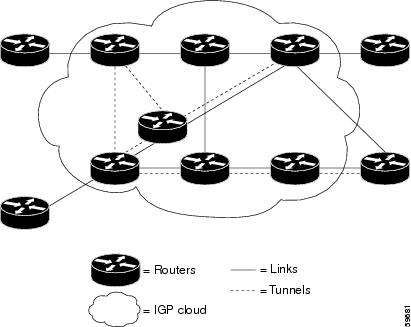
As a result, a TE tunnel is advertised as a link in an IGP network with the link’s cost associated with it.
Routers outside of the TE domain see the TE tunnel and use it to compute the shortest path for routing traffic throughout the network.
MPLS Traffic Engineering Forwarding Adjacency Benefits
TE tunnel interfaces advertised for SPF--TE tunnel interfaces are advertised in the IGP network just like any other links. Routers can then use these advertisements in their IGPs to compute the SPF even if they are not the headend of any TE tunnels.
How to Configure MPLS Traffic Engineering Forwarding Adjacency
- Configuring a Tunnel Interface for MPLS TE Forwarding Adjacency
- Configuring MPLS TE Forwarding Adjacency on Tunnels
- Verifying MPLS TE Forwarding Adjacency
Configuring a Tunnel Interface for MPLS TE Forwarding Adjacency
1.
enable
2.
configure
terminal
3.
interface
tunnel
number
4.
exit
5.
exit
DETAILED STEPS
Configuring MPLS TE Forwarding Adjacency on Tunnels
 Note | You must configure a forwarding adjacency on two LSP tunnels bidirectionally, from A to B and B to A. Otherwise, the forwarding adjacency is advertised, but not used in the IGP network. |
1.
enable
2.
configure
terminal
3.
interface
tunnel
number
4.
tunnel
mpls
traffic-eng
forwarding-adjacency
[holdtime
value]
5.
isis
metric
{metric-value|
maximum} {level-1|
level-2}
DETAILED STEPS
Verifying MPLS TE Forwarding Adjacency
1.
enable
2.
show
mpls
traffic-eng
forwarding-adjacency
[ip-address]
3.
show
isis
[process-tag] database [level-1] [level-2] [l1] [l2] [detail] [lspid]
4.
exit
DETAILED STEPS
| Step 1 |
enable
Use this command to enable privileged EXEC mode. Enter your password if prompted. For example: Example: Router> enable Router# |
| Step 2 |
show
mpls
traffic-eng
forwarding-adjacency
[ip-address] Use this command to see the current tunnels. For example: Example:
Router# show mpls traffic-eng forwarding-adjacency

 destination 0168.0001.0007.00 has 1 tunnels
  Tunnel7     (traffic share 100000, nexthop 192.168.1.7)
                (flags:Announce Forward-Adjacency, holdtime 0)
Router# show mpls traffic-eng forwarding-adjacency 192.168.1.7
 destination 0168.0001.0007.00 has 1 tunnels
  Tunnel7     (traffic share 100000, nexthop 192.168.1.7)
                (flags:Announce Forward-Adjacency, holdtime 0)
|
| Step 3 |
show
isis
[process-tag] database [level-1] [level-2] [l1] [l2] [detail] [lspid] Use this command to display information about the IS-IS link-state database. For example: Example: Router# show isis database IS-IS Level-1 Link State Database LSPID LSP Seq Num LSP Checksum LSP Holdtime ATT/P/OL 0000.0C00.0C35.00-00 0x0000000C 0x5696 792 0/0/0 0000.0C00.40AF.00-00 0x00000009 0x8452 1077 1/0/0 0000.0C00.62E6.00-00 0x0000000A 0x38E7 383 0/0/0 0000.0C00.62E6.03-00 0x00000006 0x82BC 384 0/0/0 0800.2B16.24EA.00-00 0x00001D9F 0x8864 1188 1/0/0 0800.2B16.24EA.01-00 0x00001E36 0x0935 1198 1/0/0 IS-IS Level-2 Link State Database LSPID LSP Seq Num LSP Checksum LSP Holdtime ATT/P/OL 0000.0C00.0C35.03-00 0x00000005 0x04C8 792 0/0/0 0000.0C00.3E51.00-00 0x00000007 0xAF96 758 0/0/0 0000.0C00.40AF.00-00 0x0000000A 0x3AA9 1077 0/0/0 |
| Step 4 |
exit
Use this command to exit to user EXEC. For example: Example: Router# exit Router> |
Configuration Examples for MPLS Traffic Engineering Forwarding Adjacency
This section provides a configuration example for the MPLS Traffic Engineering Forwarding Adjacency feature using an IS-IS metric.
Example MPLS TE Forwarding Adjacency
The following output shows the configuration of a tunnel interface, a forwarding adjacency, and an IS-IS metric:
Router# configure terminal
Enter configuration commands, one per line.  End with CNTL/Z.
Router(config)# interface tunnel 7
Router(config-if)# tunnel mpls traffic-eng forwarding-adjacency
Router(config-if)# isis metric 2 level-1
Following is sample command output when a forwarding adjacency has been configured:
Router# show running-config
Building configuration...
Current configuration :364 bytes
!
interface Tunnel7
 ip unnumbered Loopback0
 no ip directed-broadcast
 tunnel destination 192.168.1.7
 tunnel mode mpls traffic-eng
 tunnel mpls traffic-eng forwarding-adjacency
 tunnel mpls traffic-eng priority 7 7
 tunnel mpls traffic-eng path-option 10 explicit name short
 isis metric 2 level 1
Note | Do not specify the tunnel mpls traffic-eng autoroute announce command in your configuration when you are using forwarding adjacency. |
Following is an example where forwarding adjacency is configured with OFPF:
Router# configure terminal

Router# show running-config

Building configuration...
Current configuration : 310 bytes
interface tunnel 1
!
interface Tunnel1
 ip unnumbered Loopback0
 ip ospf cost 6
 tunnel destination 172.16.255.5
 tunnel mode mpls traffic-eng
 tunnel mpls traffic-eng forwarding-adjacency  tunnel mpls
 traffic-eng priority 7 7
 tunnel mpls traffic-eng bandwidth 1000
 tunnel mpls traffic-eng path-option 10 dynamic
 end
Router# show mpls traffic-eng forwarding-adjacency

 destination 172.16.255.5, area ospf 172  area 0, has 1 tunnels
  Tunnel1      (load balancing metric 2000000, nexthop 172.16.255.5)
               (flags:  Forward-Adjacency, holdtime 0)
Router#
Usage Tips
In the figure below, if you have no forwarding adjacencies configured for the TE tunnels between Band F and C and F, all the traffic that A must forward to F goes through B because B is the shortest path from A to F. (The cost from A to F is 15 through B and 20 through C.)
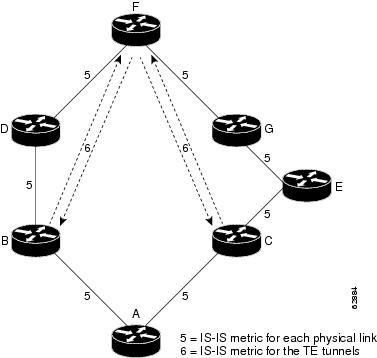
If you have forwarding adjacencies configured on the TE tunnels between B and F and C and F and also on the TE tunnels between F and B and F and C, then when A computes the SPF algorithm, A sees two equal cost paths of 11 to F. As a result, traffic across the A-B and A-C links is shared.
Additional References
Related Documents
|
Related Topic |
Document Title |
|---|---|
|
Cisco IOS commands |
|
|
MPLS traffic engineering commands |
Cisco IOS Multiprotocol Label Switching Command Reference |
|
IP switching commands |
Cisco IOS IP Switching Command Reference |
|
IS-IS TLVs |
Intermediate System-to-Intermediate System (IS-IS) TLVs (white paper) |
Standards
|
Standard |
Title |
|---|---|
|
No new or modified standards are supported by this feature, and support for existing standards has not been modified by this feature. |
-- |
MIBs
|
MIB |
MIBs Link |
|---|---|
|
No new or modified MIBs are supported by this feature, and support for existing standards has not been modified by this feature. |
To locate and download MIBs for selected platforms, Cisco software releases, and feature sets, use Cisco MIB Locator found at the following URL: |
RFCs
|
RFC |
Title |
|---|---|
|
No new or modified RFCs are supported by this feature, and support for existing RFCs has not been modified by this feature. |
-- |
Technical Assistance
|
Description |
Link |
|---|---|
|
The Cisco Support and Documentation website provides online resources to download documentation, software, and tools. Use these resources to install and configure the software and to troubleshoot and resolve technical issues with Cisco products and technologies. Access to most tools on the Cisco Support and Documentation website requires a Cisco.com user ID and password. |
Glossary
Cisco Express Forwarding --A scalable, distributed, Layer 3 switching solution designed to meet the future performance requirements of the Internet and enterprise networks.
forwarding adjacency --A traffic engineering link (or LSP) into an IS-IS/OSPF network.
IGP --Interior Gateway Protocol. Internet protocol used to exchange routing information within an autonomous system. Examples of common IGPs include Interior Gateway Routing Protocol (IGRP), Open Shortest Path First ( OSPF), and Routing Information Protocol (RIP).
IS-IS --Intermediate System-to-Intermediate System. Open System Interconnection (OSI) link-state hierarchical routing protocol whereby Intermediate System (IS) routers exchange routing information based on a single metric to determine network topology.
label switched path (LSP) --A sequence of hops (R0...Rn ) in which a packet travels from R0 to Rn through label switching mechanisms. A switched path can be chosen dynamically, based on normal routing mechanisms, or through configuration.
label switched path (LSP) tunnel --A configured connection between two routers, using label switching to carry the packets.
MPLS-- Multiprotocol Label Switching. A switching method that forwards IP traffic using a label. This label instructs the routers and the switches in the network where to forward the packets based on preestablished IP routing information.
OSPF --Open Shortest Path First. A link-state, hierarchical IGP routing algorithm proposed as a successor to RIP in the Internet community. OSPF features include least-cost routing, multipath routing, and load balancing. OSPF was derived from an early version of the IS-IS protocol. See also IS-IS.
SPF --Shortest Path First. A routing algorithm used as the basis for OSPF operations. When an SPF router is powered up, it initializes its routing-protocol data structures and then waits for indications from lower-layer protocols that its interfaces are functional.
TLV --type, length, value. A block of information embedded in Cisco Discovery Protocol advertisements.
traffic engineering --The techniques and processes used to cause routed traffic to travel through the network on a path other than the one that would have been chosen if standard routing methods had been applied.
traffic engineering tunnel --A label switched tunnel that is used for traffic engineering. Such a tunnel is set up through means other than normal Layer 3 routing; it is used to direct traffic over a path different from the one that Layer 3 routing would cause the tunnel to take.
Feature Information for MPLS Traffic Engineering Forwarding Adjacency
The following table provides release information about the feature or features described in this module. This table lists only the software release that introduced support for a given feature in a given software release train. Unless noted otherwise, subsequent releases of that software release train also support that feature.
Use Cisco Feature Navigator to find information about platform support and Cisco software image support. To access Cisco Feature Navigator, go to www.cisco.com/go/cfn. An account on Cisco.com is not required.
|
Feature Name |
Releases |
Feature Information |
|---|---|---|
|
MPLS Traffic Engineering Forwarding Adjacency |
12.0(15)S 12.0(16)ST 12.2(18)S 12.2(18)SXD 12.2(27)SBC 12.2(28)SB 12.4(20)T Cisco IOS XE Release 2.3 |
The MPLS Traffic Engineering Forwarding Adjacency feature allows a network administrator to handle a TE LSP tunnel as a link in an IGP network based on the SPF algorithm. In 12.0(15)S, this feature was introduced. In 12.0(16)ST, this feature was integrated. In 12.2(18)S, this feature was integrated. In 12.2(18)SXD, this feature was integrated. In 12.2(27)SBC, this feature was integrated. In 12.2(28)SB, this feature was integrated. In 12.4(20)T, this feature was integrated. In Cisco IOS XE Release 2.3, this feature was implemented on the Cisco ASR 1000 Series Aggregation Services Routers. The following commands were modified: debug mpls traffic-eng forwarding-adjacency, show mpls traffic-eng forwarding-adjacency, and tunnel mpls traffic-eng forwarding-adjacency. |
 Feedback