- Finding Feature Information
- Information About Cisco Performance Monitor
- How to Configure Troubleshoot and Maintain Cisco Performance Monitor
- Configuring a Flow Exporter for Cisco Performance Monitor
- Configuring a Flow Record for Cisco Performance Monitor
- Configuring a Flow Monitor for Cisco Performance Monitor
- Configuring a Flow Class for Cisco Performance Monitor
- Configuring a Flow Policy for Cisco Performance Monitor Using an Existing Flow Monitor
- Configuring a Flow Policy for Cisco Performance Monitor Without Using an Existing Flow Monitor
- Applying a Cisco Performance Monitor Policy to an Interface Using an Existing Flow Policy
- Applying a Cisco Performance Monitor Policy to an Interface Without Using an Existing Flow Policy
- Verifying That Cisco Performance Monitor Is Collecting Data
- Displaying Information Specific to the Catalyst 6500 Platform
- Displaying the Performance Monitor Cache and Clients
- Displaying the Clock Rate for Cisco Performance Monitor Classes
- Displaying the Current Status of a Flow Monitor
- Verifying the Flow Monitor Configuration
- Verifying That Cisco IOS Flexible NetFlow and Cisco Performance Monitor Is Enabled on an Interface
- Displaying the Flow Monitor Cache
- Displaying the Current Status of a Flow Exporter
- Verifying the Flow Exporter Configuration
- Enabling Debugging
- Configuration Example for Cisco Performance Monitor
- Where to Go Next
- Additional References
- Feature Information for Cisco Performance Monitor
Configuring Cisco Performance Monitor
This document contains information about and instructions for configuring Cisco Performance Monitor.
- Finding Feature Information
- Information About Cisco Performance Monitor
- How to Configure Troubleshoot and Maintain Cisco Performance Monitor
- Configuration Example for Cisco Performance Monitor
- Where to Go Next
- Additional References
- Feature Information for Cisco Performance Monitor
Finding Feature Information
Your software release may not support all the features documented in this module. For the latest feature information and caveats, see the release notes for your platform and software release. To find information about the features documented in this module, and to see a list of the releases in which each feature is supported, see the Feature Information Table at the end of this document.
Use Cisco Feature Navigator to find information about platform support and Cisco software image support. To access Cisco Feature Navigator, go to www.cisco.com/go/cfn. An account on Cisco.com is not required.
Information About Cisco Performance Monitor
- Overview of Cisco Performance Monitor
- Prerequisites for Configuring Cisco Performance Monitor
- Configuration Components of Cisco Performance Monitor
- Data That You Can Monitor Using Cisco Performance Monitor
- SNMP MIB Support for Cisco Performance Monitor
- Limitations for the Catalyst 6500 Platform
Overview of Cisco Performance Monitor
Cisco Performance Monitor enables you to monitor the flow of packets in your network and become aware of any issues that might impact the flow before it starts to significantly impact the performance of the application in question. Performance monitoring is especially important for video traffic because high quality interactive video traffic is highly sensitive to network issues. Even minor issues that may not affect other applications can have dramatic effects on video quality.
Because Cisco Performance Monitor uses similar software components and commands as Cisco NetFlow and Cisco Flexible NetFlow, familiarity with these products will help you to understand how to configure Cisco Performance Monitor. These products provide statistics on packets flowing through a router and are the standard for acquiring IP operational data from IP networks. They provide data to support network and security monitoring, network planning, traffic analysis, and IP accounting. For more information about Cisco NetFlow and Cisco Flexible NetFlow, see the documents listed in the Additional References section.
For more information about the design, configuration, and troubleshooting of Performance Monitor and other Cisco Medianet products, including a Quick Start Guide and Deployment Guide, see the Cisco Medianet Knowledge Base Portal, located at http://www.cisco.com/web/solutions/medianet/knowledgebase/index.html.
Prerequisites for Configuring Cisco Performance Monitor
The following prerequisites must be met before you can configure Cisco Performance Monitor:
IPv4 Traffic
- The networking device must be configured for IPv4 routing.
- One of the following must be enabled on your router and on any interfaces on which you want to enable Cisco Performance Monitor: Cisco Express Forwarding or distributed Cisco Express Forwarding.
Configuration Components of Cisco Performance Monitor
To configure Cisco Performance Monitor, configure many of the same basic elements that you normally configure for Flexible NetFlow:
The figure below shows how these elements are related to each other. The elements at the bottom of the figure are configured first.
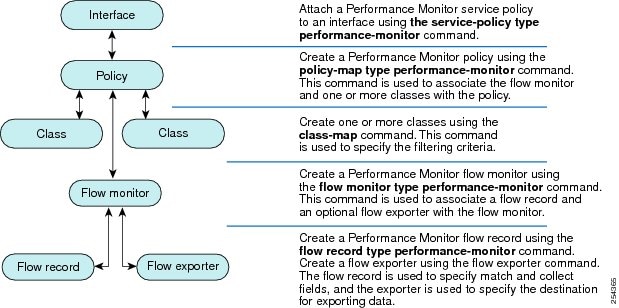
As shown above, a policy includes one or more classes. Each class has a flow monitor associated with it, and each flow monitor has a flow record and an optional flow exporter associated with it. These elements are configured in the following order:
- Configure a flow record to specify the key and non-key fields that you want to monitor. This is configured using match and collect commands. You can also optimally configure a flow exporter to specify the export destination. For Cisco Performance Monitor, you must configure a performance-monitor type flow record.
- Configure a flow monitor that includes the flow record and flow exporter. For Cisco Performance Monitor, you must configure a performance-monitor type flow monitor.
- Configure a class to specify the filtering criteria using the class-map command.
- Configure a policy to include one or more classes and one or more performance-monitor type flow monitors using the policy-map command. For Cisco Performance Monitor, you must configure performance-monitor type policies.
- Associate a performance-monitor type policy to the appropriate interface using the service-policy type performance-monitor command.
Data That You Can Monitor Using Cisco Performance Monitor
You can monitor the following information by configuring a flow record with collect or match commands for the corresponding non-key fields:
 Tip |
For more information about these statistics, see the show performance monitor statuscommand in theCisco Media Monitoring Command Reference. |
- IP Packet Count
- IP TTL
- IP TTL minimum
- IP TTL maximum
- Flow to Interface Mapping
- IP Flow destination address and port, source address and port, and protocol
- RTP Synchronization Source (SSRC)
- IP Octets Count
- Media Stream Packet Count
- Media Stream Octect Count
- Media Byte Rate
- Media Byte Count
- Media Packet Rate
- Media Packet Loss Count
- Media Packet Loss Rate
- Packets Expected Count
- Measured Rate
- Media Loss Event Count
- Round Trip Time (RTT)
- Interarrival Jitter (RFC3550) max
- Interarrival Jitter (RFC3550) min 2
- Interarrival Jitter (RFC3550) mean
- Media Rate Variation
- Monitor Event
- Media Error
- Media Stop
- IP Byte Count
- IP Byte Rate
- IP Source Mask
- IP Destination Mask
- Epoch of A Monitoring Interval
- Packet Forwarding Status
- Packet Drops
- DSCP and IPv6 Traffic Class
SNMP MIB Support for Cisco Performance Monitor
Cisco Performance Monitor provides support for the use of the industry-standard Simple Network Management Protocol (SNMP) to monitor media streams. This support is implemented with the addition of the following Cisco proprietary SNMP Management Information Base (MIB) modules:
- CISCO-FLOW-MONITOR-TC-MIB—Defines the textual conventions common to the following MIB modules.
- CISCO-FLOW-MONITOR-MIB—Defines the framework that describes the flow monitors supported by a system, the flows that it has learned, and the flow metrics collected for those flows.
- CISCO-RTP-METRICS-MIB—Defines objects that describe the quality metrics collected for RTP streams, similar to those described by an RTCP Receiver Report packet (RFC 3550).
- CISCO-IP-CBR-METRICS-MIB—Defines objects that describe the quality metrics collected for IP streams that have a Constant Bit Rate (CBR).
For detailed information about these MIBs, and to locate and download MIBs for selected platforms, Cisco IOS releases, and feature sets, use Cisco MIB Locator found at http://www.cisco.com/go/mibs .
This feature also includes two new command-line interface (CLI) commands and one modified CLI command. The commands are as follows:
- snmp-server host—Enables the delivery of flow monitoring SNMP notifications to a recipient.
- snmp-server enable traps flowmon—Enables flow monitoring SNMP notifications. By default, flow monitoring SNMP notifications are disabled.
- snmp mib flowmon alarm history—Sets the maximum number of entries maintained by the flow monitor alarm history log.
For more information about these commands, see the Cisco IOS Master Command List .
Limitations for the Catalyst 6500 Platform
Cisco Performance Monitor has the following limitations on the Catalyst 6000 platform:
- There are some limitations on which types of interfaces can be monitored. The next two tables list which types of interfaces are supported for ingress and egress monitoring on the Catalyst 6500 platform.
| Interface Type |
Support |
|---|---|
| Layer 3 Routed Port |
Yes |
| Layer 3 Sub-interface (a) |
No |
| Layer 3 port channels |
Yes |
| Layer 3 port-channel sub-interface (a) |
No |
| Layer 3 SVI (b) |
Partial (see the third bullet below) |
| L3 Tunnels |
No |
| Layer 2 Physical (Switched) Ports |
Yes |
| Layer 2 Port-channels |
Yes |
| Layer 2 Vlans |
Yes |
| Interface Type |
Support |
|---|---|
| Layer 3 Routed Port |
Yes |
| Layer 3 Sub-interface (a) |
Yes |
| Layer 3 port channels |
Yes |
| Layer 3 port-channel sub-interface (a) |
Yes |
| Layer 3 SVI (b) |
Yes |
| L3 Tunnels |
No |
| Layer 2 Physical (Switched) Ports |
No |
| Layer 2 Port-channels |
No |
| Layer 2 Vlans |
Yes |
- Performance monitoring on VRFs is not supported.
- Performance Monitoring of multicast flows is not supported.
- Routed traffic from a trunk port on a VLAN interface cannot not be monitored because it is not possible to identify the source VLAN interface for the traffic. You will see the following syslog message: “Routed traffic from trunk ports will not be monitored by ingress policy on VLAN interface.” For a workaround, you can configure a performance monitoring policy on a trunk interface. This monitoring will result in additional CPU usage.
- You cannot use match all type Class maps. Only match any type of lookups are supported. If you configure performance monitoring to use match-all type class maps, it will result in the cloning of packet to the CPU. Packets will then again be classified in the CPU when match-all classes are properly applied and packet are dropped if required. This causes higher than expected CPU usage.
- Performance monitoring policy on the egress of a VLAN interface will not monitor traffic getting bridged within the VLAN. This is due to hardware limitation. Workaround is to apply the policy at the ingress of VLAN interface as well as egress. Policy on the ingress of the VLAN interface will monitor bridged packets.
- Cloned packets from Egress policies can only be software rate-limited. No hardware-based protection is available for these packets. Therefore, you might see high interrupt CPU usage during scenarios when many flows are being monitored.
- Egress performance monitoring makes use of a recirculation mechanism on the Catalyst 6500 platform. This introduces several microseconds of additional latency to the frame switching.
- Performance monitoring is not supported for the packets switched using the Fast (CEF) Path.
- Lawful intercept and performance monitoring makes use of the same mechanism for cloning the packets. The Lawful Intercept feature takes precedence over performance monitoring. Therefore, performance monitoring does not function when the Lawful Intercept feature is enabled. When this occurs, a syslog message is created.
- Performance monitoring makes use of same mechanism as other features, such as Optimized ACL logging, VACL Capture, IPv6 Copy, and so on. The feature that is enabled first takes precedence. The other features are blocked from being configured and a syslog message is created.
How to Configure Troubleshoot and Maintain Cisco Performance Monitor
 Note |
Many of the Flexible NetFlow commands, keywords, and arguments used in used in these tasks are available in previous releases. For more information about these existing Flexible NetFlow commands, keywords, and arguments, refer to the Cisco IOS Flexible NetFlow Command Reference. |
- Configuring a Flow Exporter for Cisco Performance Monitor
- Configuring a Flow Record for Cisco Performance Monitor
- Configuring a Flow Monitor for Cisco Performance Monitor
- Configuring a Flow Class for Cisco Performance Monitor
- Configuring a Flow Policy for Cisco Performance Monitor Using an Existing Flow Monitor
- Configuring a Flow Policy for Cisco Performance Monitor Without Using an Existing Flow Monitor
- Applying a Cisco Performance Monitor Policy to an Interface Using an Existing Flow Policy
- Applying a Cisco Performance Monitor Policy to an Interface Without Using an Existing Flow Policy
- Verifying That Cisco Performance Monitor Is Collecting Data
- Displaying Information Specific to the Catalyst 6500 Platform
- Displaying the Performance Monitor Cache and Clients
- Displaying the Clock Rate for Cisco Performance Monitor Classes
- Displaying the Current Status of a Flow Monitor
- Verifying the Flow Monitor Configuration
- Verifying That Cisco IOS Flexible NetFlow and Cisco Performance Monitor Is Enabled on an Interface
- Displaying the Flow Monitor Cache
- Displaying the Current Status of a Flow Exporter
- Verifying the Flow Exporter Configuration
- Enabling Debugging
Configuring a Flow Exporter for Cisco Performance Monitor
Flow exporters are used to send the data that you collect with Cisco Performance Monitor to a remote system such as a NetFlow Collection Engine. Flow exporters use user datagram protocol (UDP) as the transport protocol and use the Version 9 export format.
To configure a flow exporter for the flow monitor, in order to export the data that is collected by Cisco Performance Monitor to a remote system for further analysis and storage, perform the following optional task. For Cisco Performance Monitor, flow exporters are configured the same way as they are configured for Cisco IOS Flexible NetFlow. For more information. see Configuring Data Export for Cisco IOS Flexible NetFlow with Flow Exporters.
Note |
Each flow exporter supports only one destination. If you want to export the data to multiple destinations, you must configure multiple flow exporters and assign them to the flow monitor. |
1. enable
2. configure terminal
3. flow exporter exporter-name
4. description description
5. destination {ip-address | hostname} [vrf vrf-name]
6. export-protocol netflow-v9
7. dscp dscp
8. source interface-type interface-number
9. option {exporter-stats | interface-table | sampler-table} [timeout seconds]
10. output-features
11. template data timeout seconds
12. transport udp udp-port
13. ttl seconds
14. end
DETAILED STEPS
Troubleshooting Tips
To check the configuration and status of your flow exporter, use the show flow exporter command.
Configuring a Flow Record for Cisco Performance Monitor
The basic concepts and techniques for configuring a flow record for Cisco Performance Monitor are the same as flow records for Flexible NetFlow. The flow record specifies how the data collected data is aggregated and presented. The only significant difference is that, for Cisco Performance Monitor, the command includes type performance-monitor.
1. enable
2. configure terminal
3. flow record type performance-monitor record-name
4. match ipv4 {destination{address | prefix[minimum-mask mask]}| protocol| source{address | prefix[minimum-mask mask]}
5. match transport {destination-port| rtp [ssrc]| source-port}
6. collect application media {bytes{rate| counter}| packets{rate| counter}| events}
7. collect counter {bytes[long| rate]| packets[dropped[long]| long]}
8. collect interface {input| output}
9. collect ipv4 {destination mask[minimum-mask mask]}| dscp| source mask[minimum-mask mask] | ttl[minimum | maximum]}
10. collect monitor event
11. collect routing forwarding-status [reason]
12. collect timestamp internal
13. collect transport {event packet-loss counter | packets{expected counter| lost{counter| rate}}| round-trip-time| rtp jitter{minimum| mean| maximum}}
14. collect flow direction
15. end
DETAILED STEPS
Troubleshooting Tips
To check the configuration and status of your flow record, use the show flow record type performance-monitor command.
Configuring a Flow Monitor for Cisco Performance Monitor
The basic concepts for configuring a flow monitor for Cisco Performance Monitor are the same as flow monitors for Flexible NetFlow. Each flow monitor has a separate cache assigned to it and requires a record to define the contents and layout of its cache entries.
When you configure a flow monitor, you must use either:
Note |
To modify a flow record, you must remove it from all flow monitors it is associated with. |
1. enable
2. configure terminal
3. flow monitor type performance-monitor monitor-name
4. description description
5. cache {entries| timeout| type}
6. statistics {packet}
7. exporter exporter-name
8. record {record-name| default-rtp| default-tcp|netflow ipv4 original-input}
9. end
DETAILED STEPS
Troubleshooting Tips
To check the configuration and status of your flow monitor, use the show flow monitor type performance-monitor command and the show running-config flow monitor command.
Configuring a Flow Class for Cisco Performance Monitor
The basic concepts and techniques for configuring a class for Cisco Performance Monitor are the same as for any other type of class. The class specifies the filter that determines which flow traffic to monitor. The filter is configured using various match commands in class-map mode.
If you do not already have a flow monitor configured, you can either:
Note |
Nested class maps are not supported. In other words, you cannot use the class-map command while in class-map configuration mode (config-cmap). |
1. enable
2. configure terminal
3. class-map class-name
4. description description
5. match {access-group {access-group | name access-group-name} | any | class-map class-map-name | cos cos-value | destination-address mac address | discard-class class-number | dscp dscp-value | flow {direction | sampler} | fr-de | fr-dlci dlci-number | input-interface interface-name | ip {rtp starting-port-number port-range | precedence | dscp} | mpls experimental topmost number | not match-criterion| packet length {max maximum-length-value [min minimum-length-value] | min minimum-length-value [max maximum-length-value]} | precedence {precedence-criteria1 | precedence-criteria2 | precedence-criteria3 | precedence-criteria4} | protocol protocol-name | qos-group qos-group-value | source-address mac address-destination| vlan {vlan-id | vlan-range | vlan-combination}}
6. rename class-name
7. end
DETAILED STEPS
Troubleshooting Tips
To check the configuration and status of your flow class, use the show policy-map type performance-monitor or show class-map command.
Configuring a Flow Policy for Cisco Performance Monitor Using an Existing Flow Monitor
The basic concepts and techniques for configuring a class for Cisco Performance Monitor are the same as for any other type of class. The class specifies which flow monitor is included. The only significant difference is that, for Cisco Performance Monitor, the policy-map command includes type performance-monitor.
If you do not already have a flow monitor configured or do not want to use any of your existing flow monitors for a new class, you can configure it using the flow monitor inline option and specifying which flow record and flow exporter are included.
1. enable
2. configure terminal
3. policy-map type performance-monitor policy-name
4. parameter-map type performance-monitor system-default-aor
5. class {class-name | class-default}
6. flow monitor monitor-name
7. monitor metric ip-cbr
8. rate layer3 {byte-rate {bps | kbps | mbps | gbps} | packet}
9. exit
10. monitor metric rtp
11. clock-rate {type-number | type-name | default} rate
12. max-dropout number
13. max-reorder number
14. min-sequential number
15. ssrc maximum number
16. exit
17. monitor parameters
18. flows number
19. interval duration number
20. history number
21. timeout number
22. exit
23. react ID {media-stop | mrv | rtp-jitter-average | transport-packets-lost-rate}
24. action {snmp | syslog}
25. alarm severity {alert | critical | emergency | error | info}
26. alarm type {discrete | grouped {count number | percent number}
27. threshold value {ge number | gt number | le number | lt number | range rng-start rng-end}
28. description description
29. end
DETAILED STEPS
| Command or Action | Purpose | |
|---|---|---|
| Step 1 | enable Example: Device> enable |
Enables privileged EXEC mode. |
| Step 2 | configure terminal Example: Device# configure terminal |
Enters global configuration mode. |
| Step 3 | policy-map type performance-monitor policy-name Example: Device(config)# policy-map type performance-monitor FLOW-MONITOR-4 |
Creates a policy and enters policy configuration mode. |
| Step 4 | parameter-map type performance-monitor system-default-aor Example: Device(config-pmap)# parameter-map type performance-monitor system-default-aor |
Creates a parameter map for Performance Monitor. The only map available is the system-default -aor map |
| Step 5 | class {class-name | class-default} Example: Device(config-pmap)# class class-4 |
Specifies a class to include in the policy. Repeat this command for each class that you want to include in the policy. |
| Step 6 | flow monitor monitor-name Example: Device(config-pmap-c)# flow monitor FLOW-MONITOR-4 |
Enters flow monitor configuration mode. If you do not want to use an existing flow monitor, you can use the inline option to configure a new one, as described in the Configuring a Flow Policy for Cisco Performance Monitor Without Using an Existing Flow Monitor. |
| Step 7 | monitor metric ip-cbr Example: Device(config-pmap-c)# monitor metric ip-cbr |
(Optional) Enters IP-CBR monitor metric configuration mode. |
| Step 8 | rate layer3 {byte-rate {bps | kbps | mbps | gbps} | packet} Example: Device(config-pmap-c-mipcbr)# rate layer3 248 mbps |
(Optional) Specifies the rate for monitoring the metrics. |
| Step 9 | exit Example: Device(config-pmap-c-mipcbr)# exit |
Returns to policy class configuration mode. |
| Step 10 | monitor metric rtp Example: Device(config-pmap-c)# monitor metric rtp |
Enters RTP monitor metric configuration mode. |
| Step 11 | clock-rate {type-number | type-name | default} rate Example: Device(config-pmap-c-mrtp)# clock-rate 8 9600 |
Specifies the clock rate used to sample RTP video-monitoring metrics. For more information about the clock-type numbers and names, see the Cisco Media Monitoring Command Reference. The range for rate is 1 kHz to 192 kHz. |
| Step 12 | max-dropout number Example: Device(config-pmap-c-mrtp)# max-dropout 2 |
Specifies the maximum number of dropouts allowed when sampling RTP video-monitoring metrics. |
| Step 13 | max-reorder number Example: Device(config-pmap-c-mrtp)# max-reorder 4 |
Specifies the maximum number of reorders allowed when sampling RTP video-monitoring metrics. |
| Step 14 | min-sequential number Example: Device(config-pmap-c-mrtp)# min-sequential 2 |
Specifies the minimum number of sequential packets required to identify a stream as being an RTP flow. |
| Step 15 | ssrc maximum number Example: Device(config-pmap-c-mrtp)# ssrc maximum 20 |
Specifies the maximum number of SSRCs that can be monitored within the same flow. A flow is defined by the protocol, source/destination address, and source/destination port). |
| Step 16 | exit Example: Device(config-pmap-c-mrtp)# exit |
Returns to policy class configuration mode. |
| Step 17 | monitor parameters Example: Device(config-pmap-c)# monitor parameters |
Enters monitor parameters configuration mode. |
| Step 18 | flows number Example: Device(config-pmap-c-mparam)# flows 40 |
Specifies the maximum number of flows for each monitor cache. |
| Step 19 | interval duration number Example: Device(config-pmap-c-mparam)# interval duration 40 |
Specifies the interval, in seconds, between samples taken of video-monitoring metrics. |
| Step 20 | history number Example: Device(config-pmap-c-mparam)# history 4 |
Specifies the number of historical buckets of collected video-monitoring metrics. |
| Step 21 | timeout number Example: Device(config-pmap-c-mparam)# timeout 20 |
Specifies the number of intervals before a stopped flow is removed from the database. |
| Step 22 | exit Example: Device(config-pmap-c-mparam)# exit |
Returns to policy class configuration mode. |
| Step 23 | react ID {media-stop | mrv | rtp-jitter-average | transport-packets-lost-rate} Example: Device(config-pmap-c)# react 41 rtp-jitter-average |
Enters a mode where you can specify what reaction occurs when a threshold is violated for the following metrics:
|
| Step 24 | action {snmp | syslog} Example: Device(config-pmap-c-react)# action syslog |
Specifies how violations of the thresholds with be reported. |
| Step 25 | alarm severity {alert | critical | emergency | error | info} Example: Device(config-pmap-c-react)# alarm severity critical |
Specifies which level of alarm will be reported. The default setting is info. |
| Step 26 | alarm type {discrete | grouped {count number | percent number} Example: Device(config-pmap-c-react)# alarm type discrete |
Specifies which types of levels are considered alarms that require reporting. The default setting is discrete. |
| Step 27 | threshold value {ge number | gt number | le number | lt number | range rng-start rng-end} Example: Device(config-pmap-c-react)# threshold value ge 20 |
Specifies which types of threshold values are considered alarms that require reporting. If no value is set but the application name is configured as a key field, then the system uses the value for the threshold that it finds in the default map. If no value is set and the application name is not configured as a key field, then the default value is used for the threshold. If more than one react command is configured for the same policy and class but only one of the react configurations has threshold values set, then the values of the configured react take precedence and the rest of the threshold values are ignored. If more than one react command is configured for the same policy and none of them have the threshold value configured, then the default threshold value is applied for the configuration with the lowest react ID. |
| Step 28 | description description Example: Device(config-cmap-c-react)# description rtp-jitter-average above 40 |
(Optional) Creates a description for the reaction. |
| Step 29 | end Example: Device(config-pmap-c-react)# end |
Exits the current configuration mode and returns to privileged EXEC mode. |
Troubleshooting Tips
To check the configuration and status of your flow policy, use the show policy-map type performance-monitor command.
Configuring a Flow Policy for Cisco Performance Monitor Without Using an Existing Flow Monitor
The basic concepts and techniques for configuring a class for Cisco Performance Monitor are the same as for any other type of class. The class specifies which flow monitor is included. The only significant difference is that, for Cisco Performance Monitor, the policy-mapcommand includes type performance-monitor.
If you do not already have a flow monitor configured or do not want to use any of your existing flow monitors for a new class, you can configure it under the class configuration mode, by specifying which flow record and flow exporter are included.
1. enable
2. configure terminal
3. policy-map type performance-monitor policy-name class class-name
4. class {class-name | class-default}
5. flow monitor inline
6. record {record-name| default-rtp| default-tcp}
7. exporter exporter-name
8. exit
9. monitor metric ip-cbr
10. rate layer3 {byte-rate {bps | kbps | mbps | gbps} | packet}
11. exit
12. monitor metric rtp
13. clock-rate {type-number| type-name} rate
14. max-dropout number
15. max-reorder number
16. min-sequential number
17. ssrc maximum number
18. exit
19. monitor parameters
20. flows number
21. interval duration number
22. history number
23. timeout number
24. exit
25. react ID {media-stop | mrv | rtp-jitter-average | transport-packets-lost-rate}
26. action {snmp | syslog}
27. alarm severity {alert| critical| emergency| error| info}
28. alarm type {discrete| grouped {count number | percent number}
29. threshold value {ge number | gt number | le number | lt number | range rng-start rng-end
30. description description
31. end
DETAILED STEPS
Troubleshooting Tips
To check the configuration and status of your flow policy, use the show policy-map type performance-monitor command.
Applying a Cisco Performance Monitor Policy to an Interface Using an Existing Flow Policy
Before it can be activated, a Cisco Performance Monitor policy must be applied to at least one interface. To activate a Cisco Performance Monitor policy, perform the following required task.
1. enable
2. configure terminal
3. interface type number
4. service-policy type performance-monitor {input | output} policy-name
5. end
DETAILED STEPS
Troubleshooting Tips
To check the configuration and status of your service policy, use the following commands:
Applying a Cisco Performance Monitor Policy to an Interface Without Using an Existing Flow Policy
Before it can be activated, a Cisco Performance Monitor policy must be applied to at least one interface. To activate a Cisco Performance Monitor policy, perform the following required task.
1. enable
2. configure terminal
3. interface type number
4. service-policy type performance-monitor inline {input | output}
5. match {access-group {access-group | name access-group-name} | any | class-mapclass-map-name | cos cos-value | destination-address mac address | discard-class class-number | dscp dscp-value | flow {direction | sampler} | fr-de | fr-dlci dlci-number | input-interface interface-name | ip {rtp starting-port-number port-range | precedence | dscp} | mpls experimental topmost number | not match-criterion| packet length {max maximum-length-value [min minimum-length-value] | min minimum-length-value [max maximum-length-value]} | precedence {precedence-criteria1 | precedence-criteria2 | precedence-criteria3 | precedence-criteria4} | protocol protocol-name | qos-group qos-group-value | source-address mac address-destination| vlan {vlan-id| vlan-range | vlan-combination}}
6. flow monitor {monitor-name| inline}
7. record {record-name| default-rtp| default-tcp}
8. exporter exporter-name
9. exit
10. monitor metric ip-cbr
11. rate layer3 {byte-rate {bps | kbps | mbps | gbps} | packet}
12. exit
13. monitor metric rtp
14. clock-rate {type-number| type-name} rate
15. max-dropout number
16. max-reorder number
17. min-sequential number
18. ssrc maximum number
19. exit
20. monitor parameters
21. flows number
22. interval duration number
23. history number
24. timeout number
25. exit
26. react ID {media-stop | mrv | rtp-jitter-average | transport-packets-lost-rate}
27. action {snmp | syslog}
28. alarm severity {alert| critical| emergency| error | info}
29. alarm type {discrete| grouped{count number | percent number}}
30. threshold value {ge number | gt number | le number | lt number | range rng-start rng-end}
31. end
DETAILED STEPS
To check the configuration and status of your service policy, use the show performance monitor statuscommand and show performance monitor historycommand.
Verifying That Cisco Performance Monitor Is Collecting Data
To verify that Cisco Performance Monitor is collecting data, perform the following optional task.
If no data is being collected, complete the remaining tasks in this section.
The interface to which you applied the input flow monitor must be receiving traffic that meets the criteria defined by the original flow record before you can display the flows in the flow monitor cache.
where filter = {ip {source-addr source-prefix | any} {dst-addr dst-prefix | any} | {tcp | udp} {source-addr source-prefix | any} {[eq| lt| gt number| range min max| ssrc {ssrc-number | any} | {{dst-addr dst-prefix | any} eq| lt| gt number| range min max| ssrc {ssrc-number | any}}
1. enable
2. show policy-map type performance-monitor [interface interface-name][class class-name][input | output]
3. show performance monitor status [interface interface name[filter] | policy policy-map-name class class-map-name[filter]} | filter | sort {bitrate-max | loss-event | rtt-max}]
4. show performance monitor history [interval{all| number[start number]} | interface interface name[filter] | policy policy-map-name class class-map-name[filter]} | filter ]
DETAILED STEPS
Displaying Information Specific to the Catalyst 6500 Platform
To display or clear information for the Feature Manager and other functionality specific to the Catalyst 6500 platform, perform the following optional task.
1. enable
2. clear fm performance-monitor counters
3. debug fm performance-monitor {all | dynamic | event | unusual | verbose | vmr}
4. platform performance-monitor rate-limit pps number
5. show platform software feature-manager performance-monitor {all | counters | interface interface-type interface-number | rdt-indices }
6. show platform software feature-manager tcam dynamic performance-monitor {handle ip ip-address | interface interface-type interface-number }
7. show platform hardware acl entry interface interface-type interface-number security {in | out } {ip | ipv6 } [ detail ]
8. show platform software ccm interface interface-type interface-number security {interface interface-type interface-number | class-group class-group-ID }
DETAILED STEPS
| Step 1 |
enable The enable command enters privileged EXEC mode (enter the password if prompted). Example: Device> enable Device# |
| Step 2 |
clear fm performance-monitor counters The clearfm performance-monitor counters command clears counters for the Performance Monitor component of Feature Monitor. Example: Device# clear fm performance-monitor counters Device# |
| Step 3 |
debug fm performance-monitor {all | dynamic | event | unusual | verbose | vmr} This command enables all levels of debugging for the Performance Monitor component of Feature Manager. Example: Device# debug fm performance-monitor all Device# |
| Step 4 |
platform performance-monitor rate-limit pps number This command sets the rate limit for the Performance Monitor component of Feature Monitor. Example: Device# platform performance-monitor rate-limit pps 2000 Device# |
| Step 5 |
show platform software feature-manager performance-monitor {all | counters | interface interface-type interface-number | rdt-indices } This command displays information about the Performance Monitor component of Feature Manager. Example:
Device# show platform software feature-manager performance-monitor all
Device#

Interface: FastEthernet2/3
Policy: video-flow-test          Group ID: A0000001
-----------------------------------------------------------------------------
Feature: VM Ingress L3
=============================================================================
DPort  - Destination Port  SPort  - Source Port       Pro    - Protocol
RFTCM  - R-Recirc. Flag    MRLCS  - M-Multicast Flag  Res    - VMR Result
       - F-Fragment flag          - R-Reflexive flag  Prec   - Drop Precedence
       - T-Trailing Fragments     - L-Layer 3 only    GrpId  - Qos Group Id
       - C-From CPU               - C-Capture Flag    Adj.   - Adj. Index
       - M-L2 Lookup Miss         - S-RPF suppress    Pid    - NF Profile Index
+-----+--+-----------------+-------------------+-------+-------+----+---------+------+---------+-----+--------+
| Indx | T |   Dest Ip Addr | Source Ip Addr | DPort | SPort | Pro | RFTCM | Prec | MRLCS | Pid | Stats Id|
+-----+--+-----------------+-------------------+-------+-------+----+---------+------+---------+-----+--------+

     1 V       224.0.0.0         0.0.0.0                  0          0      0         -----       0       -----
       M       240.0.0.0         0.0.0.0                   0          0      0         00000    0         0
      PERMIT_RESULT

     2 V         0.0.0.0          0.0.0.0                  0          0      0         -----        0      -----
       M          0.0.0.0         0.0.0.0                   0          0      0         00000     0        0
      L3_DENY_RESULT

+-----+--+-----------------+-------------------+-------+-------+----+---------+------+---------+-----+--------+
| Indx | T |   Dest Ip Addr | Source Ip Addr | DPort | SPort | Pro | RFTCM | Prec | MRLCS | Pid | Stats Id|
+-----+--+-----------------+-------------------+-------+-------+----+---------+------+---------+-----+--------+

     1 V         0.0.0.0          10.10.10.0            0          0      17        -----        0      ---C-
       M          0.0.0.0          255.255.255 0      0          0      255      00000     0        0
      PERMIT_RESULT

     2 V         0.0.0.0          10.10.20.0            0          0      17        -----        0      ---C-
       M          0.0.0.0          255.255.255 0      0          0      255      00000     0        0
      PERMIT_RESULT

     3 V         0.0.0.0          0.0.0.0                  0          0      0         -----        0      -----
       M          0.0.0.0         0.0.0.0                   0          0      0         00000     0        0
L3_DENY_RESULT

+-----+--+-----------------+-------------------+-------+-------+----+---------+------+---------+-----+--------+
| Indx | T |   Dest Ip Addr | Source Ip Addr | DPort | SPort | Pro | RFTCM | Prec | MRLCS | Pid | Stats Id|
+-----+--+-----------------+-------------------+-------+-------+----+---------+------+---------+-----+--------+

     1 V         0.0.0.0          0.0.0.0                  0          0      0         -----        0      -----
       M          0.0.0.0         0.0.0.0                   0          0      0         00000     0        0
      PERMIT_RESULT


Interface: FastEthernet2/3
Policy: video-flow-test          Group ID: A0000001
-----------------------------------------------------------------------------
Feature: VM Egress L3
=============================================================================
+-----+--+-----------------+-------------------+-------+-------+----+---------+------+---------+-----+--------+
| Indx | T |   Dest Ip Addr | Source Ip Addr | DPort | SPort | Pro | RFTCM | Prec | MRLCS | Pid | Stats Id|
+-----+--+-----------------+-------------------+-------+-------+----+---------+------+---------+-----+--------+

     1 V         0.0.0.0          0.0.0.0                  0          0      0         -----        0      -----
       M          0.0.0.0         0.0.0.0                   0          0      0         00000     0        0
PERMIT_RESULT

     2 V         0.0.0.0          0.0.0.0                  0          0      0         -----        0      -----
       M          0.0.0.0         0.0.0.0                   0          0      0         00000     0        0
      L3_DENY_RESULT

+-----+--+-----------------+-------------------+-------+-------+----+---------+------+---------+-----+--------+
| Indx | T |   Dest Ip Addr | Source Ip Addr | DPort | SPort | Pro | RFTCM | Prec | MRLCS | Pid | Stats Id|
+-----+--+-----------------+-------------------+-------+-------+----+---------+------+---------+-----+--------+

     1 V         0.0.0.0          10.10.10.0            0          0      17        -----        0      -----
       M          0.0.0.0          255.255.255 0      0          0      255      00000     0        0
      PERMIT_RESULT Adjacency: 0x5512D8F4

     2 V         0.0.0.0          10.10.20.0            0          0      17        -----        0      -----
       M          0.0.0.0          255.255.255 0      0          0      255      00000     0        0
      PERMIT_RESULT Adjacency: 0x5512D8F4

     3 V         0.0.0.0          0.0.0.0                  0          0      0         -----        0      -----
       M          0.0.0.0         0.0.0.0                   0          0      0         00000     0        0
       L3_DENY_RESULT

+-----+--+-----------------+-------------------+-------+-------+----+---------+------+---------+-----+--------+
| Indx | T |   Dest Ip Addr | Source Ip Addr | DPort | SPort | Pro | RFTCM | Prec | MRLCS | Pid | Stats Id|
+-----+--+-----------------+-------------------+-------+-------+----+---------+------+---------+-----+--------+

     3 V         0.0.0.0          0.0.0.0                  0          0      0         -----        0      -----
       M          0.0.0.0         0.0.0.0                   0          0      0         00000     0        0
     PERMIT_RESULT Adjacency: 0x5512D8F4


Adjacency: 0x5512D8F4
        FeatureId: 0x84  AdjId: 0xFFFFFFFF Flags: RecirculationAdj|

        Cause: 0x0 Priority: 0xC Device#

Interface: FastEthernet2/3
Policy: video-flow-test          Group ID: A0000001
-----------------------------------------------------------------------------
Feature: VM Ingress L3
=============================================================================
DPort  - Destination Port  SPort  - Source Port       Pro    - Protocol
RFTCM  - R-Recirc. Flag    MRLCS  - M-Multicast Flag  Res    - VMR Result
       - F-Fragment flag          - R-Reflexive flag  Prec   - Drop Precedence
       - T-Trailing Fragments     - L-Layer 3 only    GrpId  - Qos Group Id
       - C-From CPU               - C-Capture Flag    Adj.   - Adj. Index
       - M-L2 Lookup Miss         - S-RPF suppress    Pid    - NF Profile Index
+-----+--+-----------------+-------------------+-------+-------+----+---------+------+---------+-----+--------+
| Indx | T |   Dest Ip Addr | Source Ip Addr | DPort | SPort | Pro | RFTCM | Prec | MRLCS | Pid | Stats Id|
+-----+--+-----------------+-------------------+-------+-------+----+---------+------+---------+-----+--------+

     1 V       224.0.0.0         0.0.0.0                  0          0      0         -----       0       -----
       M       240.0.0.0         0.0.0.0                   0          0      0         00000    0         0
      PERMIT_RESULT

     2 V         0.0.0.0          0.0.0.0                  0          0      0         -----        0      -----
       M          0.0.0.0         0.0.0.0                   0          0      0         00000     0        0
      L3_DENY_RESULT

+-----+--+-----------------+-------------------+-------+-------+----+---------+------+---------+-----+--------+
| Indx | T |   Dest Ip Addr | Source Ip Addr | DPort | SPort | Pro | RFTCM | Prec | MRLCS | Pid | Stats Id|
+-----+--+-----------------+-------------------+-------+-------+----+---------+------+---------+-----+--------+

     1 V         0.0.0.0          10.10.10.0            0          0      17        -----        0      ---C-
       M          0.0.0.0          255.255.255 0      0          0      255      00000     0        0
      PERMIT_RESULT

     2 V         0.0.0.0          10.10.20.0            0          0      17        -----        0      ---C-
       M          0.0.0.0          255.255.255 0      0          0      255      00000     0        0
      PERMIT_RESULT

     3 V         0.0.0.0          0.0.0.0                  0          0      0         -----        0      -----
       M          0.0.0.0         0.0.0.0                   0          0      0         00000     0        0
L3_DENY_RESULT

+-----+--+-----------------+-------------------+-------+-------+----+---------+------+---------+-----+--------+
| Indx | T |   Dest Ip Addr | Source Ip Addr | DPort | SPort | Pro | RFTCM | Prec | MRLCS | Pid | Stats Id|
+-----+--+-----------------+-------------------+-------+-------+----+---------+------+---------+-----+--------+

     1 V         0.0.0.0          0.0.0.0                  0          0      0         -----        0      -----
       M          0.0.0.0         0.0.0.0                   0          0      0         00000     0        0
      PERMIT_RESULT


Interface: FastEthernet2/3
Policy: video-flow-test          Group ID: A0000001
-----------------------------------------------------------------------------
Feature: VM Egress L3
=============================================================================
+-----+--+-----------------+-------------------+-------+-------+----+---------+------+---------+-----+--------+
| Indx | T |   Dest Ip Addr | Source Ip Addr | DPort | SPort | Pro | RFTCM | Prec | MRLCS | Pid | Stats Id|
+-----+--+-----------------+-------------------+-------+-------+----+---------+------+---------+-----+--------+

     1 V         0.0.0.0          0.0.0.0                  0          0      0         -----        0      -----
       M          0.0.0.0         0.0.0.0                   0          0      0         00000     0        0
PERMIT_RESULT

     2 V         0.0.0.0          0.0.0.0                  0          0      0         -----        0      -----
       M          0.0.0.0         0.0.0.0                   0          0      0         00000     0        0
      L3_DENY_RESULT

+-----+--+-----------------+-------------------+-------+-------+----+---------+------+---------+-----+--------+
| Indx | T |   Dest Ip Addr | Source Ip Addr | DPort | SPort | Pro | RFTCM | Prec | MRLCS | Pid | Stats Id|
+-----+--+-----------------+-------------------+-------+-------+----+---------+------+---------+-----+--------+

     1 V         0.0.0.0          10.10.10.0            0          0      17        -----        0      -----
       M          0.0.0.0          255.255.255 0      0          0      255      00000     0        0
      PERMIT_RESULT Adjacency: 0x5512D8F4

     2 V         0.0.0.0          10.10.20.0            0          0      17        -----        0      -----
       M          0.0.0.0          255.255.255 0      0          0      255      00000     0        0
      PERMIT_RESULT Adjacency: 0x5512D8F4

     3 V         0.0.0.0          0.0.0.0                  0          0      0         -----        0      -----
       M          0.0.0.0         0.0.0.0                   0          0      0         00000     0        0
       L3_DENY_RESULT

+-----+--+-----------------+-------------------+-------+-------+----+---------+------+---------+-----+--------+
| Indx | T |   Dest Ip Addr | Source Ip Addr | DPort | SPort | Pro | RFTCM | Prec | MRLCS | Pid | Stats Id|
+-----+--+-----------------+-------------------+-------+-------+----+---------+------+---------+-----+--------+

     3 V         0.0.0.0          0.0.0.0                  0          0      0         -----        0      -----
       M          0.0.0.0         0.0.0.0                   0          0      0         00000     0        0
     PERMIT_RESULT Adjacency: 0x5512D8F4


Adjacency: 0x5512D8F4
        FeatureId: 0x84  AdjId: 0xFFFFFFFF Flags: RecirculationAdj|

        Cause: 0x0 Priority: 0xC
|
| Step 6 |
show platform software feature-manager tcam dynamic performance-monitor {handle ip ip-address | interface interface-type interface-number } This command displays information about dynamic and static policies for a specific host. Example: Device# show platform software feature-manager tcam dynamic performance-monitor handle ip 10.1.1.0 ----------------------------------------------------------------------------- HANDLE Feature ID No of entries MD5 ----------------------------------------------------------------------------- 10.1.1.0 VM Ingress L3 2 |
| Step 7 |
show platform hardware acl entry interface interface-type interface-number security {in | out } {ip | ipv6 } [ detail ] This command displays inbound access control list (ACL) entries for IP on an interface. Example: Device# show platform hardware acl entry interface fastEthernet 1/1 security in ip detail mls_if_index:2000400A dir:0 feature:0 proto:0 pass#0 features UAPRSF: U-urg, A-ack, P-psh, R-rst, S-syn, F-fin MLGFI: M-mpls_plus_ip_pkt, L-L4_hdr_vld, G-gpid_present,F-global_fmt_match, I-ife/ofe 's' means set; 'u' means unset; '-' means don't care --------------------------------------------------------------------------------------------------------------------------------------------------- INDEX LABEL FS ACOS AS IP_SA SRC_PORT IP_DA DST_PORT F FF L4PROT TCP-F:UAPRSF MLGFI OtherL4OPs RSLT CNT -------------------------------------------------------------------------------------------------------------------------------------------------- fno:0 tcam:B, bank:0, prot:0 Aces I V 16375 2049 0 0 0 0.0.0.0 - 0.0.0.0 - 0 0 0 - ----- - 0x0000000800000038 10331192<- I M 16375 0x1FFF 0 0x00 0x000 0.0.0.0 - 0.0.0.0 - 0 0 0x0 |
| Step 8 |
show platform software ccm interface interface-type interface-number security {interface interface-type interface-number | class-group class-group-ID } This command displays information about ternary content addressable memory (TCAM) Cisco CallManager (CCM) entries on an interface. Example: Device# show platform software ccm interface fastEthernet 2/3 in Target-Class : id 0xA0000000, dir CCM_INPUT, if_type 1, if_info 0x14823998 Class-Group List: 0xA0000001 b1-cs217# b1-cs217#sh platform software ccm interface fastEthernet 2/3 out Target-Class : id 0xA0000002, dir CCM_OUTPUT, if_type 1, if_info 0x14823998 Class-Group List: 0xA0000001 This command displays information about ternary content addressable memory (TCAM) Cisco CallManager (CCM) entries for a class group Example:
Device# show platform software ccm class-group A0000001
 Class-group    : video-flow-test, id 0xA0000001
 Target input   : 0xA0000000
 Target Output  : 0xA0000002
        Class   : video-flow, id 0xA98681, type 1
                Filter          : type MATCH_NUMBERED_ACCESS_GROUP, id 0xF0000002
                Filter params   : ACL Index: 101 Linktype: 7

                Feature         : PERFORMANCE_MONITOR
                Params          :
                  Feature Object : 0x54224218
                    Name           :
                    Meter context  : 0x54264440
                    Sibling        : 0x0
                    Dynamic        : FALSE
                  Feature Object : 0x54221170
                    Name           :
                    Meter context  : 0x54263858
                    Sibling        : 0x0
                    Dynamic        : FALSE
                Intf List       : 0xA0000000  0xA0000002
        Class   : class-default, id 0xADA3F1, type 39
                Filter          : type MATCH_ANY, id 0xF0000003
                Filter params   : any

                Feature         : FEATURE_EMPTY
                Params          :
                  Feature Object : 0x1741629C
                    Name           :
                    Meter context  : 0x0
                    Sibling        : 0x0
                    Dynamic        : FALSE
                Intf List       : 0xA0000000  0xA0000002
|
Displaying the Performance Monitor Cache and Clients
To display the cache and the clients for Cisco Performance Monitor, perform the following optional task.
1. enable
2. show performance monitor cache [policy policy-map-name class class-map-name][interface interface name]
3. show performance monitor clients detail all
DETAILED STEPS
| Step 1 |
enable The enable command enters privileged EXEC mode (enter the password if prompted). Example: Device> enable Device# |
| Step 2 |
show performance monitor cache [policy policy-map-name class class-map-name][interface interface name] Example: MMON Metering Layer Stats: static pkt cnt: 3049 static cce sb cnt: 57 dynamic pkt cnt: 0 Cache type: Permanent Cache size: 2000 Current entries: 8 High Watermark: 9 Flows added: 9 Updates sent ( 1800 secs) 0 IPV4 SRC ADDR IPV4 DST ADDR IP PROT TRNS SRC PORT TRNS DST PORT ipv4 ttl ipv4 ttl min ipv4 ttl max ipv4 dscp bytes long perm pktslong perm user space vm ========================================================================================== 10.1.1.1 10.1.2.3 17 4000 1967 0 0 0 0x00 80 1 0x00000000 0x00000000 0x00000000 0x00000000 0x00000000 0x00000000 0x00000000 0x00000000 0x00000000 0x00000000 0x00000000 0x00000000 0x00000000 0x00000000 0x00000000 0x00000000 0x00000000 0x00000000 0x00000000 0x00000000 0x00000000 0x00000000 0x00000000 0x00000000 0x00000000 0x00000000 0x00000000 0x00000000 0x00000000 0x00000000 0x00000000 0x00000000 0x00000000 0x00000000 0x00000000 0x00000000 0x00000000 0x00000000 0x00000000 0x00000000 0x00000000 0x00000000 10.1.1.1 10.1.2.3 17 6000 1967 0 0 0 0x00 80 1 0x00000000 0x00000000 0x00000000 0x00000000 0x00000000 0x00000000 0x00000000 0x00000000 0x00000000 0x00000000 0x00000000 0x00000000 0x00000000 0x00000000 0x00000000 0x00000000 0x00000000 0x00000000 0x00000000 0x00000000 0x00000000 0x00000000 0x00000000 0x00000000 0x00000000 0x00000000 0x00000000 0x00000000 0x00000000 0x00000000 0x00000000 0x00000000 0x00000000 0x00000000 0x00000000 0x00000000 0x00000000 0x00000000 0x00000000 0x00000000 0x00000000 0x00000000 10.1.1.1 10.1.2.3 17 4000 2000 0 0 0 0x00 44 1 0x00000000 0x00000000 0x00000000 0x00000000 0x00000000 0x00000000 0x00000000 0x00000000 0x00000000 0x00000000 0x00000000 0x00000000 0x00000000 0x00000000 0x00000000 0x00000000 0x00000000 0x00000000 0x00000000 0x00000000 0x00000000 0x00000000 0x00000000 0x00000000 0x00000000 0x00000000 0x00000000 0x00000000 0x00000000 0x00000000 0x00000000 0x00000000 0x00000000 0x00000000 0x00000000 0x00000000 0x00000000 0x00000000 0x00000000 0x00000000 0x00000000 0x00000000 10.1.1.1 10.1.2.3 6 6000 3000 0 0 0 0x00 84 2 0x00000000 0x00000000 0x00000000 0x00000000 0x00000000 0x00000000 0x00000000 0x00000000 0x00000000 0x00000000 0x00000000 0x00000000 0x00000000 0x00000000 0x00000000 0x00000000 0x00000000 0x00000000 0x00000000 0x00000000 0x00000000 0x00000000 0x00000000 0x00000000 0x00000000 0x00000000 0x00000000 0x00000000 0x00000000 0x00000000 0x00000000 0x00000000 0x00000000 0x00000000 0x00000000 0x00000000 0x00000000 0x00000000 0x00000000 0x00000000 0x00000000 0x00000000 10.1.1.1 10.1.2.3 17 1967 6001 0 0 0 0x00 36 1 0x00000000 0x00000000 0x00000000 0x00000000 0x00000000 0x00000000 0x00000000 0x00000000 0x00000000 0x00000000 0x00000000 0x00000000 0x00000000 0x00000000 0x00000000 0x00000000 0x00000000 0x00000000 0x00000000 0x00000000 0x00000000 0x00000000 0x00000000 0x00000000 0x00000000 0x00000000 0x00000000 0x00000000 0x00000000 0x00000000 0x00000000 0x00000000 0x00000000 0x00000000 0x00000000 0x00000000 0x00000000 0x00000000 0x00000000 0x00000000 0x00000000 0x00000000 10.1.1.1 10.1.2.3 17 1967 4001 0 0 0 0x00 36 1 0x00000000 0x00000000 0x00000000 0x00000000 0x00000000 0x00000000 0x00000000 0x00000000 0x00000000 0x00000000 0x00000000 0x00000000 0x00000000 0x00000000 0x00000000 0x00000000 0x00000000 0x00000000 0x00000000 0x00000000 0x00000000 0x00000000 0x00000000 0x00000000 0x00000000 0x00000000 0x00000000 0x00000000 0x00000000 0x00000000 0x00000000 0x00000000 0x00000000 0x00000000 0x00000000 0x00000000 0x00000000 0x00000000 0x00000000 0x00000000 0x00000000 0x00000000 10.1.1.1 10.1.2.3 6 3001 6001 0 0 0 0x00 124 3 0x00000000 0x00000000 0x00000000 0x00000000 0x00000000 0x00000000 0x00000000 0x00000000 0x00000000 0x00000000 0x00000000 0x00000000 0x00000000 0x00000000 0x00000000 0x00000000 0x00000000 0x00000000 0x00000000 0x00000000 0x00000000 0x00000000 0x00000000 0x00000000 0x00000000 0x00000000 0x00000000 0x00000000 0x00000000 0x00000000 0x00000000 0x00000000 0x00000000 0x00000000 0x00000000 0x00000000 0x00000000 0x00000000 0x00000000 0x00000000 0x00000000 0x00000000 10.1.1.1 10.1.2.3 17 2001 4001 0 0 0 0x00 44 1 0x00000000 0x00000000 0x00000000 0x00000000 0x00000000 0x00000000 0x00000000 0x00000000 0x00000000 0x00000000 0x00000000 0x00000000 0x00000000 0x00000000 0x00000000 0x00000000 0x00000000 0x00000000 0x00000000 0x00000000 0x00000000 0x00000000 0x00000000 0x00000000 0x00000000 0x00000000 0x00000000 0x00000000 0x00000000 0x00000000 0x00000000 0x00000000 0x00000000 0x00000000 0x00000000 0x00000000 0x00000000 0x00000000 0x00000000 0x00000000 0x00000000 0x00000000 |
| Step 3 |
show performance monitor clients detail all Example:
Client name for ID 1 : Mediatrace-131419052
   Type: Mediatrace
   Age: 443 seconds
   Monitor Object: _MMON_DYN_-class-map-69
        Flow spec: (dvmc-acl#47) 10.10.130.2 1000 10.10.132.2 2000 17
        monitor parameters
                interval duration 60
                timeout 2
                history 1
                flows 100
        monitor metric rtp
                min-sequential 10
                max-dropout 5
                max-reorder 5
                clock-rate 112 90000
                clock-rate default 90000
                ssrc maximum 20
        monitor metric ip-cbr
                rate layer3 packet 20
        Flow record: dvmc_fnf_fdef_47
                Key fields:
                        ipv4 source address
                        ipv4 destination address
                        transport source-port
                        transport destination-port
                        ip protocol
                Non-key fields:
                        monitor event
                        application media event
                        routing forwarding-status
                        ip dscp
                        ip ttl
                        counter bytes rate
                        application media bytes rate
                        transport rtp jitter mean
                        transport packets lost counter
                        transport packets expected counter
                        transport event packet-loss counter
                        transport packets lost rate
                        timestamp interval
                        counter packets dropped
                        counter bytes
                        counter packets
                        application media bytes counter
                        application media packets counter
        Monitor point: _MMON_DYN_-policy-map-70 GigabitEthernet0/3 output
        Classification Statistic:
                matched packet: 545790
                matched byte: 64403220
|
Displaying the Clock Rate for Cisco Performance Monitor Classes
To display the clock rate for one or more classes, perform the following optional task.
1. enable
2. show performance monitor clock rate [policy policy-map-name class class-map-name]
DETAILED STEPS
| Step 1 |
enable The enable command enters privileged EXEC mode (enter the password if prompted). Example: Device> enable Device# |
| Step 2 |
show performance monitor clock rate [policy policy-map-name class class-map-name] If no class name is specified, information for all classes are displayed. Example:
Device# show performance monitor clock rate policy all-apps class telepresence-CS4
Load for five secs: 6%/2%; one minute: 5%; five minutes: 5% Time source is NTP, 17:41:35.508 EST Wed Feb 16 2011
RTP clock rate for Policy: all-apps, Class: telepresence-CS4
     Payload type     Clock rate(Hz)
     pcmu    (0  )     8000
     gsm     (3  )     8000
     g723    (4  )     8000
     dvi4    (5  )     8000
     dvi4-2  (6  )     16000
     lpc     (7  )     8000
     pcma    (8  )     8000
     g722    (9  )     8000
     l16-2   (10 )     44100
     l16     (11 )     44100
     qcelp   (12 )     8000
     cn      (13 )     8000
     mpa     (14 )     90000
     g728    (15 )     8000
     dvi4-3  (16 )     11025
     dvi4-4  (17 )     22050
     g729    (18 )     8000
     celb    (25 )     90000
     jpeg    (26 )     90000
     nv      (28 )     90000
     h261    (31 )     90000
     mpv     (32 )     90000
     mp2t    (33 )     90000
     h263    (34 )     90000
             (96 )     48000
             (112)     90000
     default           90000
|
Displaying the Current Status of a Flow Monitor
To display the current status of a flow monitor, perform the following optional task.
The interface to which you applied the input flow monitor must be receiving traffic that meets the criteria defined by the original flow record before you can display the flows in the flow monitor cache.
1. enable
2. show flow monitor type performance-monitor
DETAILED STEPS
| Step 1 |
enable The enable command enters privileged EXEC mode (enter the password if prompted). Example: Device> enable Device# |
| Step 2 |
show flow monitor type performance-monitor The show flow monitor type performance-monitor command shows the current status of the flow monitor that you specify. Example: Device# show flow monitor type performance-monitor Flow Monitor type performance-monitor monitor-4: Description: User defined Flow Record: record-4 Flow Exporter: exporter-4 No. of Inactive Users: 0 No. of Active Users: 0 |
Verifying the Flow Monitor Configuration
To verify the configuration commands that you entered, perform the following optional task.
The interface to which you applied the input flow monitor must be receiving traffic that meets the criteria defined by the original flow record before you can display the flows in the flow monitor cache.
1. enable
2. show running-config flow monitor
DETAILED STEPS
| Step 1 |
enable The enable command enters privileged EXEC mode (enter the password if prompted). Example: Device> enable Device# |
| Step 2 |
show running-config flow monitor The show running-config flow monitor command shows the configuration commands of the flow monitor that you specify. Example: Device# show running-config flow monitor Current configuration: ! flow monitor FLOW-MONITOR-1 description Used for basic IPv4 traffic analysis record netflow ipv4 original-input ! ! flow monitor FLOW-MONITOR-2 description Used for basic IPv6 traffic analysis record netflow ipv6 original-input ! |
Verifying That Cisco IOS Flexible NetFlow and Cisco Performance Monitor Is Enabled on an Interface
To verify that Flexible NetFlow and Cisco Performance Monitor is enabled on an interface, perform the following optional task.
1. enable
2. show flow interface type number
DETAILED STEPS
| Step 1 |
enable The enable command enters privileged EXEC mode (enter the password if prompted). Example: Router> enable Router# |
| Step 2 |
show flow interface type number The show flow interface command verifies that Flexible NetFlow and Cisco Performance Monitor is enabled on an interface. Example:
Router# show flow interface ethernet 0/0
Interface Ethernet0/0
  FNF:  monitor:         FLOW-MONITOR-1
        direction:       Input
        traffic(ip):     on
  FNF:  monitor:         FLOW-MONITOR-2
        direction:       Input
        traffic(ipv6):   on
|
Displaying the Flow Monitor Cache
To display the data in the flow monitor cache, perform the following optional task.
The interface to which you applied the input flow monitor must be receiving traffic that meets the criteria defined by the original flow record before you can display the flow data in the flow monitor cache.
1. enable
2. show flow monitor name monitor-name cache format record
DETAILED STEPS
| Step 1 |
enable The enable command enters privileged EXEC mode (enter the password if prompted). Example: Device> enable Device# |
| Step 2 |
show flow monitor name monitor-name cache format record The show flow monitor name monitor-name cache format record command string displays the status, statistics, and the flow data in the cache for a flow monitor. Example:
Device# show flow monitor name FLOW-MONITOR-1 cache format record
Cache type:                            Normal
  Cache size:                              4096
  Current entries:                            8
  High Watermark:                             8
  Flows added:                               24
  Flows aged:                                16
    - Active timeout   (  1800 secs)          0
    - Inactive timeout (    15 secs)         16
    - Event aged                              0
    - Watermark aged                          0
    - Emergency aged                          0
IPV4 SOURCE ADDRESS:       10.251.10.1
IPV4 DESTINATION ADDRESS:  172.16.10.2
TRNS SOURCE PORT:          0
TRNS DESTINATION PORT:     2048
INTERFACE INPUT:           Et0/0
FLOW SAMPLER ID:           0
IP TOS:                    0x00
IP PROTOCOL:               1
ip source as:              0
ip destination as:         0
ipv4 next hop address:     172.16.7.2
ipv4 source mask:          /0
ipv4 destination mask:     /24
tcp flags:                 0x00
interface output:          Et1/0
counter bytes:             733500
counter packets:           489
timestamp first:           720892
timestamp last:            975032
.
.
.
IPV4 SOURCE ADDRESS:       172.16.6.1
IPV4 DESTINATION ADDRESS:  224.0.0.9
TRNS SOURCE PORT:          520
TRNS DESTINATION PORT:     520
INTERFACE INPUT:           Et0/0
FLOW SAMPLER ID:           0
IP TOS:                    0xC0
IP PROTOCOL:               17
ip source as:              0
ip destination as:         0
ipv4 next hop address:     0.0.0.0
ipv4 source mask:          /24
ipv4 destination mask:     /0
tcp flags:                 0x00
interface output:          Null
counter bytes:             52
counter packets:           1
timestamp first:           973804
timestamp last:            973804
Device# show flow monitor name FLOW-MONITOR-2 cache format record
Cache type:                            Normal
  Cache size:                              4096
  Current entries:                            6
  High Watermark:                             8
  Flows added:                             1048
  Flows aged:                              1042
    - Active timeout   (  1800 secs)         11
    - Inactive timeout (    15 secs)       1031
    - Event aged                              0
    - Watermark aged                          0
    - Emergency aged                          0
IPV6 FLOW LABEL:           0
IPV6 EXTENSION MAP:        0x00000040
IPV6 SOURCE ADDRESS:       2001:DB8:1:ABCD::1
IPV6 DESTINATION ADDRESS:  2001:DB8:4:ABCD::2
TRNS SOURCE PORT:          3000
TRNS DESTINATION PORT:     55
INTERFACE INPUT:           Et0/0
FLOW DIRECTION:            Input
FLOW SAMPLER ID:           0
IP PROTOCOL:               17
IP TOS:                    0x00
ip source as:              0
ip destination as:         0
ipv6 next hop address:     ::
ipv6 source mask:          /48
ipv6 destination mask:     /0
tcp flags:                 0x00
interface output:          Null
counter bytes:             521192
counter packets:           9307
timestamp first:           9899684
timestamp last:            11660744
.
.
.
IPV6 FLOW LABEL:           0
IPV6 EXTENSION MAP:        0x00000000
IPV6 SOURCE ADDRESS:       FE80::A8AA:BBFF:FEBB:CC03
IPV6 DESTINATION ADDRESS:  FF02::9
TRNS SOURCE PORT:          521
TRNS DESTINATION PORT:     521
INTERFACE INPUT:           Et0/0
FLOW DIRECTION:            Input
FLOW SAMPLER ID:           0
IP PROTOCOL:               17
IP TOS:                    0xE0
ip source as:              0
ip destination as:         0
ipv6 next hop address:     ::
ipv6 source mask:          /10
ipv6 destination mask:     /0
tcp flags:                 0x00
interface output:          Null
counter bytes:             92
counter packets:           1
timestamp first:           11653832
timestamp last:            11653832
|
Displaying the Current Status of a Flow Exporter
To display the current status of a flow exporter, perform the following optional task.
1. enable
2. show flow exporter [exporter-name]
DETAILED STEPS
| Step 1 |
enable The enable command enters privileged EXEC mode (enter the password if prompted). Example: Device> enable Device# |
| Step 2 |
show flow exporter [exporter-name] The show flow exporter command shows the current status of the flow exporter that you specify. Example:
Device# show flow exporter EXPORTER-1
Flow Exporter EXPORTER-1:
  Description:              Exports to Chicago datacenter
  Transport Configuration:
    Destination IP address: 172.16.10.2
    Source IP address:      172.16.7.1
    Transport Protocol:     UDP
    Destination Port:       65
    Source Port:            56041
    DSCP:                   0x0
    TTL:                    255
|
Verifying the Flow Exporter Configuration
To verify the configuration commands that you entered to configure the flow exporter, perform the following optional task.
1. enable
2. show running-config flow exporter exporter-name
DETAILED STEPS
| Step 1 |
enable The enable command enters privileged EXEC mode (enter the password if prompted). Example: Device> enable Device# |
| Step 2 |
show running-config flow exporter exporter-name The show running-config flow exporter command shows the configuration commands of the flow exporter that you specify. Example: Device# show running-config flow exporter EXPORTER-1 Building configuration... ! flow exporter EXPORTER-1 description Exports to datacenter destination 172.16.10.2 transport udp 65 ! |
Enabling Debugging
To enable debugging for Cisco Performance Monitor, perform the following optional task in privileged EXEC mode.
1. debug performance monitor {database | dynamic | event | export | flow-monitor | metering | provision | sibling | snmp | tca | timer}
DETAILED STEPS
|
The debug performance monitor command enables debugging for the following performance monitor components:
The following example shows how to enable debugging for dynamic monitoring: Example: Device# debug performance monitor dynamic |
Configuration Example for Cisco Performance Monitor
Example Monitor for Lost RTP Packets and RTP Jitter
This example show a configuration that monitors the number of lost RTP packets, the amount of RTP jitter, and other basic statistics for the gig1 interface. In this example, Cisco Performance Monitor is also configured to make an entry in the syslog when the any of the following events occur on the interface:
- The percentage of lost RTP packets is between 5 percent and 9 percent.
- The percentage of lost RTP packets is greater than 10 percent.
- A media stop event has occurred.
! Set the filter spec for the flows to monitor.
access-list 101 ip permit host 10.10.2.20 any
! Use the flow record to define the flow keys and metric to collect.
flow record type performance-monitor video-monitor-record
 match ipv4 source
 match ipv4 destination
 match transport source-port
 match transport destination-port
 match rtp ssrc
 collect timestamp
 collect counter byte
 collect counter packet
 collect mse
 collect media-error
 collect counter rtp interval-jitter
 collect counter rtp packet lost
 collect counter rtp lost event
! Set the exporting server. The export message format is based on FNFv.9.
flow export video-nms-server
 export-protocol netflow-v9
 destination cisco-video-management
 transport udp 32001
! Set the flow filter in the class-map.
class-map match-all video-class
 access-group  ipv4 101
! Set the policy map with the type performance-monitor for video monitor.
policy-map type performance-monitor video-monitor
 ! Set the video monitor actions.
 class video-class
  ! Specify where the metric data is being exported to.
  export  flow video-nms-server
  flow monitor inline
   record video-monitor-record
! Set the monitoring modeling parameters.
monitor parameters
 ! Set the measurement timeout to 10 secs.
 interval duration 10
 ! Set the timeout to 10 minutes.
 timeout 10
 ! Specify that 30 flow intervals can be kept in performance database.
 history 30
 priority 7
 ! Set rtp flow verification criteria.
 monitor metric rtp
 ! Configure a RTP flow criteria: at least 10 packets in sequence.
 min-sequential   10
 ! Ignore packets that are more than 5 packet ahead in terms of seq  number.  max-dropout  5
 ! Ignore packets that are more than 5 packets behind in terms of seq  number.
 max-reorder 5
 ! Set the clock rate frequency for rtp packet timestamp clock.
 clock-rate 89000
 ! Set the maximum number of ssrc allowed within this class.
 ssrc maximum  100
 ! Set TCA for alarm.
 react 100 transport-packets-lost-rate
  description critical  TCA
  ! Set the threshold to greater than 10%.
  threshold gt 10
  ! Set the threshold to the average number based on the last five intervals.
  threshold type average 5
  action  syslog
  alarm severity critical
 react 110 transport-packets-lost-rate
  description medium TCA
  ! Set the threshold to between 5% and 9% of packet lost.
  threshold range gt 5 le 9
  threshold type average 10
  action  syslog
  alarm type grouped percent 30
 react 3000 media-stop
  action syslog
  alarm severity critical
  alarm type grouped percent 30

interface gig1
 service-policy type performance-monitor video-mon in
Where to Go Next
For more information about configuring the products in the Medianet product family, see the other chapter in this guide or see the Cisco Media Monitoring Configuration Guide.
Additional References
Related Documents
| Related Topic |
Document Title |
|---|---|
| Design, configuration, and troubleshooting resources for Performance Monitor and other Cisco Medianet products, including a Quick Start Guide and Deployment Guide. |
See the Cisco Medianet Knowledge Base Portal, located at http://www.cisco.com/web/solutions/medianet/knowledgebase/index.html |
| IP addressing commands: complete command syntax, command mode, command history, defaults, usage guidelines, and examples |
Cisco Media Monitoring Command Reference |
| Cisco IOS commands |
|
| Configuration commands for Flexible NetFlow |
Cisco IOS Flexible NetFlow Command Reference |
| Overview of Flexible NetFlow |
“Cisco IOS Flexible NetFlow Overview” |
| Flexible NetFlow Feature Roadmap |
“Cisco IOS Flexible NetFlow Features Roadmap” |
| Configuring flow exporters to export Flexible NetFlow data. |
“Configuring Data Export for Cisco IOS Flexible NetFlow with Flow Exporters” |
| Customizing Flexible NetFlow |
“Customizing Cisco IOS Flexible NetFlow Flow Records and Flow Monitors” |
| Configuring flow sampling to reduce the overhead of monitoring traffic with Flexible NetFlow |
“Using Cisco IOS Flexible NetFlow Flow Sampling to Reduce the CPU Overhead of Analyzing Traffic” |
| Configuring Flexible NetFlow using predefined records |
“Configuring Cisco IOS Flexible NetFlow with Predefined Records” |
| Using Flexible NetFlow Top N Talkers to analyze network traffic |
“Using Cisco IOS Flexible NetFlow Top N Talkers to Analyze Network Traffic” |
| Configuring IPv4 multicast statistics support for Flexible NetFlow |
“Configuring IPv4 Multicast Statistics Support for Cisco IOS Flexible NetFlow” |
Standards
| Standard |
Title |
|---|---|
| None |
— |
MIBs
| MIB |
MIBs Link |
|---|---|
|
|
To locate and download MIBs for selected platforms, Cisco IOS releases, and feature sets, use Cisco MIB Locator found at the following URL: |
RFCs
| RFC |
Title |
|---|---|
| RFC 3954 |
Cisco Systems NetFlow Services Export Version 9 |
| RFC 3550 |
RTP: A Transport Protocol for Real-Time Applications |
Technical Assistance
| Description |
Link |
|---|---|
| The Cisco Support and Documentation website provides online resources to download documentation, software, and tools. Use these resources to install and configure the software and to troubleshoot and resolve technical issues with Cisco products and technologies. Access to most tools on the Cisco Support and Documentation website requires a Cisco.com user ID and password. |
Feature Information for Cisco Performance Monitor
The following table provides release information about the feature or features described in this module. This table lists only the software release that introduced support for a given feature in a given software release train. Unless noted otherwise, subsequent releases of that software release train also support that feature.
Use Cisco Feature Navigator to find information about platform support and Cisco software image support. To access Cisco Feature Navigator, go to www.cisco.com/go/cfn. An account on Cisco.com is not required.
| Feature Name |
Releases |
Feature Information |
|---|---|---|
| Cisco Performance Monitor 1.0 |
15.1(3)T 12.2(58)SE 15.1(4)M1 15.0(1)SY 15.0(1)SY1 15.1(1)SY |
This feature enables you to monitor the flow of packets in your network and become aware of any issues that might impact the flow before it starts to significantly impact your applications’ performance. The following commands were introduced or modified by this feature: action(policy react and policy inline react), alarm severity (policy react and policy inline react), alarm type(policy react and policy inline react), class-map, clock-rate(policy RTP), collect application media,clear fm performance-monitor counters, collect counter, collect flow direction, collect interface, collect ipv4, collect ipv4 destination, collect ipv4 source, collect ipv4 ttl, collect monitor event, collect routing, collect timestamp interval, collect transport event packet-loss counter, collect transport packets, collect transport rtp jitter,debug fm performance-monitor counters, debug performance-monitor counters, description (Performance Monitor), destination, dscp (Flexible NetFlow), export-protocol, exporter, flow monitor type performance-monitor, flow record type performance-monitor, flows, history (monitor parameters), interval duration, match access-group, match any, match class-map, match cos, match destination-address mac, match discard-class, match dscp, match flow, match fr-de, match fr-dlci, match input-interface, match ip dscp, match ip precedence, match ip rtp, match ipv4, match ipv4 destination, match ipv4 source, match mpls experimental topmost, match not, match packet length (class-map), match precedence, match protocol, match qos-group, match source-address mac, match transport destination-port, match transport rtp ssrc, match transport source-port, match vlan, max-dropout (policy RTP), max-reorder (policy RTP), min-sequential (policy RTP), monitor metric ip-cbr, monitor metric rtp, monitor parameters, option (Flexible NetFlow), output-features,platform performance-monitor rate-limit, policy-map type performance-monitor, rate layer3, react (policy), record (Performance Monitor), rename (policy), service-policy type performance-monitor, show performance monitor history, show performance monitor status,show platform hardware acl entry interface,show platform software ccm,show platform software feature-manager performance-monitor,show platform software feature-manager tcam, show policy-map type performance-monitor, snmp-server host, snmp-server enable traps flowmon, snmp mib flowmon alarm history, source (Flexible NetFlow), ssrc maximum, template data timeout, threshold value (policy react and policy inline react), timeout (monitor parameters), transport (Flexible NetFlow), and ttl (Flexible NetFlow). |
 Feedback