- IPv6 Addressing and Basic Connectivity
- IPv6 Switching: Cisco Express Forwarding Support
- Unicast Reverse Path Forwarding for IPv6
- ICMP for IPv6
- IPv6 MTU Path Discovery
- IPv6 ICMP Rate Limiting
- ICMP for IPv6 Redirect
- IPv6 Neighbor Discovery
- IPv6 Neighbor Discovery Cache
- IPv6 Stateless Autoconfiguration
- IPv6 RFCs
- Configuration of an IPv6 Access Control List
IPv6 Stateless Autoconfiguration
The IPv6 stateless autoconfiguration feature can be used to manage link, subnet, and site addressing changes.
- Information About IPv6 Stateless Autoconfiguration
- How to Configure IPv6 Stateless Autoconfiguration
- Configuration Examples for IPv6 Stateless Autoconfiguration
- Additional References
Information About IPv6 Stateless Autoconfiguration
IPv6 Stateless Autoconfiguration
All interfaces on IPv6 nodes must have a link-local address, which is usually automatically configured from the identifier for an interface and the link-local prefix FE80::/10. A link-local address enables a node to communicate with other nodes on the link and can be used to further configure the node.
Nodes can connect to a network and automatically generate global IPv6 addresses without the need for manual configuration or help of a server, such as a Dynamic Host Configuration Protocol (DHCP) server. With IPv6, a device on the link advertises any global prefixes in Router Advertisement (RA) messages, as well as its willingness to function as a default device for the link. RA messages are sent periodically and in response to device solicitation messages, which are sent by hosts at system startup.
A node on the link can automatically configure global IPv6 addresses by appending its interface identifier (64 bits) to the prefixes (64 bits) included in the RA messages. The resulting 128-bit IPv6 addresses configured by the node are then subjected to duplicate address detection to ensure their uniqueness on the link. If the prefixes advertised in the RA messages are globally unique, then the IPv6 addresses configured by the node are also guaranteed to be globally unique. Device solicitation messages, which have a value of 133 in the Type field of the ICMP packet header, are sent by hosts at system startup so that the host can immediately autoconfigure without needing to wait for the next scheduled RA message.
Simplified Network Renumbering for IPv6 Hosts
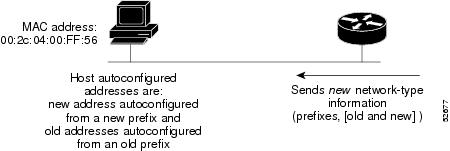
The strict aggregation of the global routing table requires that networks be renumbered when the service provider for the network is changed. When the stateless autoconfiguration functionality in IPv6 is used to renumber a network, the prefix from a new service provider is added to RA messages that are sent on the link. (The RA messages contain both the prefix from the old service provider and the prefix from the new service provider.) Nodes on the link automatically configure additional addresses by using the prefix from the new service provider. The nodes can then use the addresses created from the new prefix and the existing addresses created from the old prefix on the link. Configuration of the lifetime parameters associated with the old and new prefixes means that nodes on the link can make the transition to using only addresses created from the new prefix. During a transition period, the old prefix is removed from RA messages and only addresses that contain the new prefix are used on the link (the renumbering is complete) (see the figure below).
How to Configure IPv6 Stateless Autoconfiguration
Enabling IPv6 Stateless Autoconfiguration
1.
enable
2.
configure
terminal
3.
interface
type
number
4.
ipv6 address autoconfig
DETAILED STEPS
Configuration Examples for IPv6 Stateless Autoconfiguration
Example: Displaying IPv6 Interface Statistics
In the following example, the show ipv6 interface command is used to verify that IPv6 addresses are configured correctly for GigabitEthernet interface 0/0/0. Information is also displayed about the status of IPv6 neighbor redirect messages, IPv6 neighbor discovery messages, and stateless autoconfiguration.
Device# show ipv6 interface gigabitethernet 0/0/0

GigabitEthernet0/0/0 is up, line protocol is up
  IPv6 is stalled, link-local address is FE80::1
  Global unicast address(es):
    2001:DB8:2000::1, subnet is 2001:DB8:2000::/64
    2001:DB8:3000::1, subnet is 2001:DB8:3000::/64
  Joined group address(es):
    FF02::1
    FF02::2
    FF02::1:FF00:1
  MTU is 1500 bytes
  ICMP error messages limited to one every 100 milliseconds
  ICMP redirects are enabled
  ND DAD is enabled, number of DAD attempts: 1
  ND reachable time is 30000 milliseconds
  ND advertised reachable time is 0 milliseconds
  ND advertised retransmit interval is 0 milliseconds
  ND router advertisements are sent every 200 seconds
  ND router advertisements live for 1800 seconds
  Hosts use stateless autoconfig for addresses.
Additional References
Related Documents
Related Topic |
Document Title |
|---|---|
|
IPv6 addressing and connectivity |
IPv6 Configuration Guide |
|
Cisco IOS commands |
|
|
IPv6 commands |
Cisco IOS IPv6 Command Reference |
|
Cisco IOS IPv6 features |
Standards and RFCs
Standard/RFC |
Title |
|---|---|
|
RFCs for IPv6 |
IPv6 RFCs |
MIBs
|
MIB |
MIBs Link |
|---|---|
|
No new or modified MIBs are supported by this feature, and support for existing MIBs has not been modified by this feature. |
To locate and download MIBs for selected platforms, Cisco IOS releases, and feature sets, use Cisco MIB Locator found at the following URL: |
Technical Assistance
Description |
Link |
|---|---|
|
The Cisco Support and Documentation website provides online resources to download documentation, software, and tools. Use these resources to install and configure the software and to troubleshoot and resolve technical issues with Cisco products and technologies. Access to most tools on the Cisco Support and Documentation website requires a Cisco.com user ID and password. |
 Feedback