- IP Multicast Technology Overview
- Configuring Basic IP Multicast
- Using MSDP to Interconnect Multiple PIM-SM Domains
- Configuring Source Specific Multicast
- Implementing Multicast Stub Routing
- Tunneling to Connect Non-IP Multicast Areas
- Verifying IP Multicast Operation
- SNMP Traps for IP Multicast
- Monitoring and Maintaining IP Multicast
- Finding Feature Information
- Prerequisites for Multicast Stub Routing
- Restrictions for Multicast Stub Routing
- Information About Multicast Stub Routing
- How to Implement Multicast Stub Routing
Implementing Multicast Stub Routing
This module describes the concepts and configuration tasks used to implement multicast stub routing. Multicast stub routing can be used for the following purposes:
- To prevent multicast transit when it is enforced by unicast stub routing.
- To eliminate periodic flooding and pruning of dense mode traffic on low bandwidth links.
- To reduce overall processing of Protocol Indendent Multicast (PIM) control traffic; and protect against multicast spoofing of PIM Designated Router (DR) messages and PIM assert messages.
- Finding Feature Information
- Prerequisites for Multicast Stub Routing
- Restrictions for Multicast Stub Routing
- Information About Multicast Stub Routing
- How to Implement Multicast Stub Routing
- Configuration Examples for Implementing Multicast Stub Routing
- Additional References
- Feature Information for Implementing Multicast Stub Routing
Finding Feature Information
Your software release may not support all the features documented in this module. For the latest feature information and caveats, see the release notes for your platform and software release. To find information about the features documented in this module, and to see a list of the releases in which each feature is supported, see the Feature Information Table at the end of this document.
Use Cisco Feature Navigator to find information about platform support and Cisco software image support. To access Cisco Feature Navigator, go to www.cisco.com/go/cfn. An account on Cisco.com is not required.
Prerequisites for Multicast Stub Routing
- Before performing the tasks in this module, you should be familiar with the concepts explained in the " IP Multicast Technology Overview " module.
- The tasks in this module assume that IP multicast has been enabled and that the PIM interfaces have been configured using the tasks described in the " Configuring Basic IP Multicast " module.
Restrictions for Multicast Stub Routing
- Multicast stub routing does not prevent the configuration of other Interior Gateway Protocols (IGPs) that do not support stub routing, such as Routing Information Protocol (RIP), Open Shortest Path First (OSPF), and Intermediate System-to-Intermediate System (IS-IS) to bypass this restriction. Multicast stub routing also does not prevent the configuration of static routing to bypass this restriction. Multicast stub routing is enforced by unicast stub routing. The proper unicast Enhanced Interior Gateway Routing Protocol (EIGRP) stub routing configuration will assist in multicast stub routing.
 Note |
For more information about unicast EIGRP stub routing, see the "Configuring EIGRP" module. |
Information About Multicast Stub Routing
Multicast Stub Networks
Multicast stub networks are those segments that receivers are directly connected to for any multicast group, even though there are receivers interested in multicast traffic beyond those segments. The Cisco IOS software allows only the configuration of nonredundant multicast stub networks with the use of multicast stub routing.
Multicast Stub Routing
Multicast stub routing can be used on two types of links for multicast stub networks:
- Upstream link between the stub and distribution router--The stub router's interface facing the distribution router has full PIM functionality; a distribution router's interface facing the stub router does not and relies on a PIM neighbor filter or operates in PIM passive mode.
- Downstream link between the stub router and interested receiver--Downstream links are connected to Layer 2 access domains, such as VLANs, or Layer 3 routed interfaces. The downstream link operates in PIM passive mode and assumes that it is the only interface on that access domain, making it the Designated Router (DR). In Cisco IOS releases that do not support PIM passive mode, the downstream link relies on a PIM neighbor filter to prevent the stub router from discovering other PIM neighbors on that interface. In addition, an Interior Group Management Protocol (IGMP) helper is used to proxy IGMP reports to the distribution router's link facing the stub router.
- Multicast Stub Routing Between Stub and Distribution Routers
- Multicast Stub Routing Between the Stub Router and Interested Receivers
Multicast Stub Routing Between Stub and Distribution Routers
Implementing multicast stub routing between the stub and distribution router is useful in PIM dense mode (PIM-DM) where periodic flooding and subsequent pruning of multicast traffic occurs for unwanted multicast groups. Multicast stub routing in this scenario prevents periodic flooding and pruning and also allows multicast traffic to be forwarded for groups in which receivers are available on the stub network.
Implementing multicast stub routing between the stub and distribution router in PIM sparse mode (PIM-SM) and bidirectional PIM (bidir-PIM) environments eliminates the need to maintain the group-to-Rendezvous Point (RP) mapping cache on the stub router, and saves periodic update bandwidth--if Auto-RP or PIM bootstrap router (BSR) is used for distributing the RP information.
Multicast stub routing is intended to forward multicast traffic from the distribution to the stub router. Although it is possible to have sources directly connected to the stub network, it would only work in a PIM-DM environment. It is not possible in PIM-SM, Source Specific Multicast (SSM), and bidirectional PIM (bidir-PIM) environments because the first hop router will be filtered by the PIM neighbor filter applied on the distribution router, resulting in reverse path forwarding (RPF) failures. Furthermore, receivers must be directly connected to the stub router and cannot be further downstream.
Multicast Stub Routing Between the Stub Router and Interested Receivers
Implementing multicast stub routing between the stub router and interested receivers is used to reduce the overall processing of PIM control traffic, especially as the number of stub links increases on the stub router, and to protect against DoS attacks targeted at the PIM DR.
Benefits of Multicast Stub Routing
Multicast stub routing allows such stub networks to be configured easily for multicast connectivity and provides the following benefits:
- Prevents stub networks from being used for multicast transit when they are enforced by unicast stub routing (EIGRP).
- Eliminates periodic flooding and pruning of dense mode traffic on low bandwidth links.
- Reduces overall processing of PIM control traffic.
- Protects against multicast spoofing of PIM DR messages and PIM assert messages.
Note |
Multicast stub routing can only be implemented in nonredundant stub network topologies. |
How to Implement Multicast Stub Routing
Implementing Multicast Stub Routing
Perform the following tasks to implement multicast stub routing:
- Prerequisites
- Restrictions
- Configuring the Stub Router for Multicast Stub Routing
- Configuring the Distribution Router for Multicast Stub Routing
Prerequisites
- The tasks in this section assume that IP multicast has been enabled and that the PIM interfaces have been configured using the tasks described in the " Configuring Basic IP Multicast " module.
Restrictions
- Multicast stub routing does not prevent the configuration of other IGPs that do not support stub routing, such as RIP, OSPF, and IS-IS to bypass this restriction. Multicast stub routing also does not prevent the configuration of static routing to bypass this restriction. Multicast stub routing is enforced by unicast stub routing. The proper unicast EIGRP stub routing configuration will assist in multicast stub routing.
Note |
For more information about configuring unicast EIGRP stub routing, see the "Configuring EIGRP" module. |
- Multicast stub routing can only be implemented in nonredundant stub network topologies.
Configuring the Stub Router for Multicast Stub Routing
Perform this task to configure a stub router for multicast stub routing.
- ip pim passive
- ip pim neighbor-filter access-list
DETAILED STEPS
Configuring the Distribution Router for Multicast Stub Routing
Perform the following task to configure the distribution router for multicast stub routing.
- ip pim passive
- ip pim neighbor-filter access-list
DETAILED STEPS
| Command or Action | Purpose | |||||||
|---|---|---|---|---|---|---|---|---|
|
|
Example: Router> enable |
Enables privileged EXEC mode.
|
||||||
|
|
Example: Router# configure terminal |
Enters global configuration mode. |
||||||
|
|
Example: Router(config)# interface GigabitEthernet0/0 |
Enters interface configuration mode. |
||||||
|
|
Example: Router(config-if)# ip pim passive Example:
Example: Router(config-if)# ip pim neighbor-filter 1 |
Configures the interface to operate in PIM passive mode. or Restricts a PIM neighbor from participating in PIM.
|
||||||
|
|
Example: Router(config-if)# end |
Ends the current configuration session and returns to privileged EXEC mode. |
||||||
|
|
Example: Router# show ip pim interface |
Displays information about interfaces configured for PIM.
|
Configuration Examples for Implementing Multicast Stub Routing
Examples Implementing Multicast Stub Routing
This section contains the following examples for implementing multicast stub routing. The examples provide the configurations for both multicast stub routing using a PIM neighbor filter and an IGMP helper and using a PIM passive interface.
- Example Implementing Multicast Stub Routing - PIM-DM
- Example Implementing Multicast Stub Routing - PIM-SM Static RP
- Example Implementing Multicast Stub Routing - PIM-SSM
- Example Implementing Multicast Stub Routing - Bidir-PIM
Example Implementing Multicast Stub Routing - PIM-DM
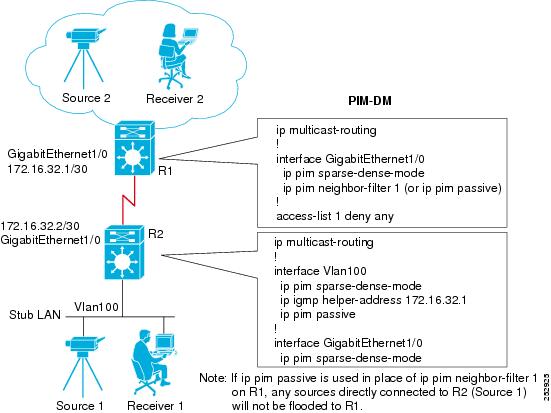
The following example shows the configuration of multicast stub routing in a PIM-DM environment. The example is based on the topology shown in the figure.
| Figure 1 | Multicast Stub Routing Example Topology (PIM-DM) |
Distribution Router Configuration
ip multicast-routing
!
interface GigabitEthernet1/0
  ip pim sparse-dense-mode
  ip pim neighbor-filter 1 (or ip pim passive)
!
access-list 1 deny any
Stub Router Configuration
ip multicast-routing
!
interface Vlan100
  ip pim sparse-dense-mode
  ip igmp helper-address 172.16.32.1
  ip pim passive
!
interface GigabitEthernet1/0
  ip pim sparse-dense-mode
Example Implementing Multicast Stub Routing - PIM-SM Static RP
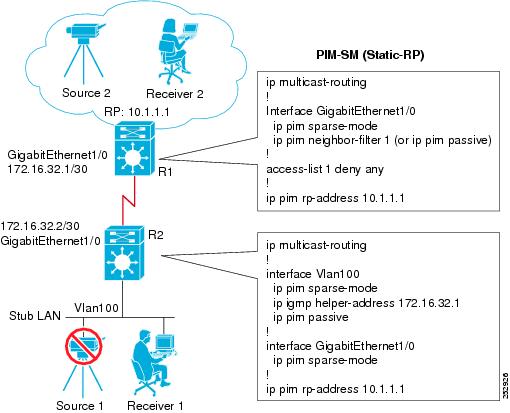
The following example shows the configuration of multicast stub routing in a PIM-SM environment using static RP. The example is based on the topology shown in the figure.
| Figure 2 | Multicast Stub Routing Example Topology (PIM-SM, Static RP) |
Distribution Router Configuration
ip multicast-routing
!
Interface GigabitEthernet1/0
  ip pim sparse-mode
  ip pim neighbor-filter 1 (or ip pim passive)
!
access-list 1 deny any
!
ip pim rp-address 10.1.1.1
Stub Router Configuration
ip multicast-routing
!
interface Vlan100
  ip pim sparse-mode
  ip igmp helper-address 172.16.32.1
  ip pim passive
!
interface GigabitEthernet1/0
  ip pim sparse-mode
!
ip pim rp-address 10.1.1.1
Example Implementing Multicast Stub Routing - PIM-SSM
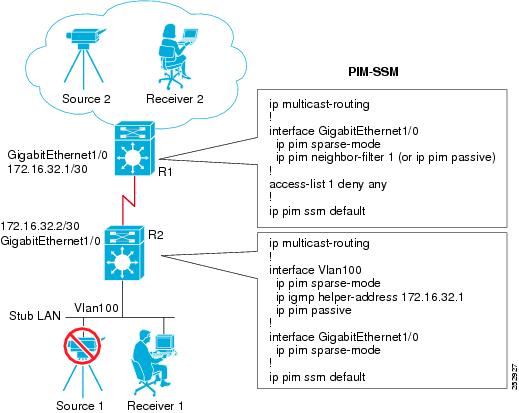
The following example shows the configuration of multicast stub routing in a PIM-SSM environment. The example is based on the topology shown in the figure.
| Figure 3 | Multicast Stub Routing Example Topology (PIM-SSM) |
Distribution Router Configuration
ip multicast-routing
!
interface GigabitEthernet1/0
  ip pim sparse-mode
  ip pim neighbor-filter 1 (or ip pim passive)
!
access-list 1 deny any
!
ip pim ssm default
Stub Router Configuration
ip multicast-routing
!
interface Vlan100
  ip pim sparse-mode
  ip igmp helper-address 172.16.32.1
  ip pim passive
!
interface GigabitEthernet1/0
  ip pim sparse-mode
!
ip pim ssm default
Example Implementing Multicast Stub Routing - Bidir-PIM
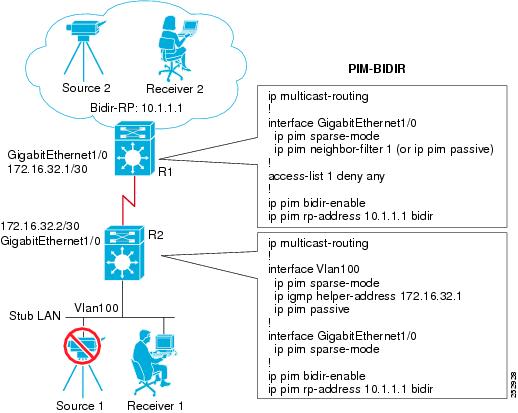
The following example shows the configuration of multicast stub routing in a bidir-PIM environment using static RP. The example is based on the topology shown in the figure.
| Figure 4 | Multicast Stub Routing Example Topology (Bidir-PIM) |
Distribution Router Configuration
ip multicast-routing
!
interface GigabitEthernet1/0
  ip pim sparse-mode
  ip pim neighbor-filter 1 (or ip pim passive)
!
access-list 1 deny any
!
ip pim bidir-enable
ip pim rp-address 10.1.1.1 bidir
Stub Router Configuration
ip multicast-routing
!
interface Vlan100
  ip pim sparse-mode
  ip igmp helper-address 172.16.32.1
  ip pim passive
!
interface GigabitEthernet1/0
  ip pim sparse-mode
!
ip pim bidir-enable
ip pim rp-address 10.1.1.1 bidir
Additional References
Related Documents
| Related Topic |
Document Title |
|---|---|
| Overview of the IP multicast technology area |
" IP Multicast Technology Overview " module |
| Concepts, tasks, and examples for configuring an IP multicast network using PIM |
" Configuring a Basic IP Multicast Network " module |
| IP multicast commands: complete command syntax, command mode, defaults, command history, usage guidelines, and examples |
Cisco IOS IP Multicast Command Reference |
Standards
| Standard |
Title |
|---|---|
| No new or modified standards are supported by this feature, and support for existing standards has not been modified by this feature. |
-- |
MIBs
| MIB |
MIBs Link |
|---|---|
| No new or modified MIBs are supported by this feature, and support for existing standards has not been modified by this feature. |
To locate and download MIBs for selected platforms, Cisco software releases, and feature sets, use Cisco MIB Locator found at the following URL: |
RFCs
| RFC |
Title |
|---|---|
| No new or modified RFCs are supported by this feature, and support for existing standards has not been modified by this feature. |
-- |
Technical Assistance
| Description |
Link |
|---|---|
| The Cisco Support website provides extensive online resources, including documentation and tools for troubleshooting and resolving technical issues with Cisco products and technologies. To receive security and technical information about your products, you can subscribe to various services, such as the Product Alert Tool (accessed from Field Notices), the Cisco Technical Services Newsletter, and Really Simple Syndication (RSS) Feeds. Access to most tools on the Cisco Support website requires a Cisco.com user ID and password. |
Feature Information for Implementing Multicast Stub Routing
The following table provides release information about the feature or features described in this module. This table lists only the software release that introduced support for a given feature in a given software release train. Unless noted otherwise, subsequent releases of that software release train also support that feature.
Use Cisco Feature Navigator to find information about platform support and Cisco software image support. To access Cisco Feature Navigator, go to www.cisco.com/go/cfn. An account on Cisco.com is not required.
| Table 1 | Feature Information for Implementing Multicast Stub Routing |
| Feature Name |
Releases |
Feature Information |
|---|---|---|
| PIM Stub |
12.2(37)SE 15.0(1)M 12.2(33)SRE Cisco IOS XE 3.1.0SG |
The PIM Stub feature introduces the capability to configure an interface to operate in PIM passive mode, which means that the router will not send PIM messages on the interface nor will it accept PIM messages from other routers across this interface. The router will instead consider that is is the only PIM router on the network and thus act as the DR and also as the DF (for all bidir-PIM group ranges). This mode is used primarily in multicast stub routing scenarios. The following commands were introduced or modified: ip pim passive. |
Cisco and the Cisco logo are trademarks or registered trademarks of Cisco and/or its affiliates in the U.S. and other countries. To view a list of Cisco trademarks, go to this URL: www.cisco.com/go/trademarks. Third-party trademarks mentioned are the property of their respective owners. The use of the word partner does not imply a partnership relationship between Cisco and any other company. (1110R)
Any Internet Protocol (IP) addresses and phone numbers used in this document are not intended to be actual addresses and phone numbers. Any examples, command display output, network topology diagrams, and other figures included in the document are shown for illustrative purposes only. Any use of actual IP addresses or phone numbers in illustrative content is unintentional and coincidental.
 Feedback