- Communications, Services, Bias-free Language, and Additional Information
- Cisco HyperFlex Kubernetes Support
- Kubernetes Support in HyperFlex Connect
- Configuring HyperFlex FlexVolume Storage Integration for Cisco Container Platform
- Configuring HyperFlex FlexVolume Storage Integration for RedHat OpenShift Container Platform
Kubernetes Support in HyperFlex Connect
Kubernetes Integration Prerequisites
-
Enable Kubernetes Integration on HX Release 3.5(x) during a maintenance window. Enabling the feature on a running cluster may impact storage IO operations.
Preventing FlexVolume Traffic Disruption
After you upgrade your Kubernetes cluster from an older HXDP release to 3.5(2a) or later, ensure that the following configuration changes are completed on all the storage controller VM nodes. This will avoid incorrect FlexVolume configuration on Kubernetes nodes.
Procedure
| Step 1 |
Open the application.conf file located at /opt/springpath/storfs-mgmt/stMgr-1.0/conf. Search for iscsiTargetAddress. Modify the value for this parameter from 169.254.254.1 to 169.254.1.1. |
| Step 2 |
Open the application.conf file located at /opt/springpath/storfs-mgmt/hxSvcMgr-1.0/conf/. Search for istgtConfTargetAddress. Modify the value for this parameter from 169.254.254.1 to 169.254.1.1. |
| Step 3 |
Run the following commands on all the storage controller VM nodes: |
Enabling Kubernetes Integration
The following procedure details the steps that are required to enable Kubernetes support in HyperFlex Connect:
-
Navigate to the HyperFlex cluster by using a supported web browser (for example, https://<hyperflex_cluster_management_IP_address).
-
Log in to HyperFlex Connect using a VMware SSO account and password with administrative privileges (that is, administrator@vsphere.local).
-
In the upper right-hand corner of HyperFlex Connect, click the Settings menu icon (represented by a Gear icon).
Figure 1. HyperFlex Connect Settings Menu 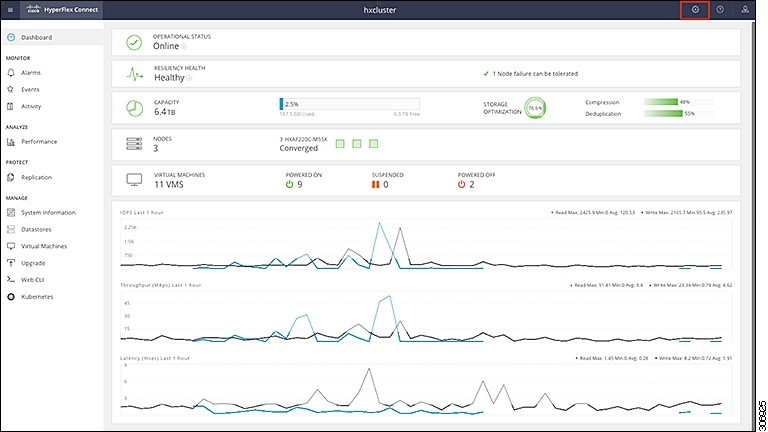
-
Under Integrations, click Kubernetes.
Figure 2. Selecting Integrations > Kubernetes 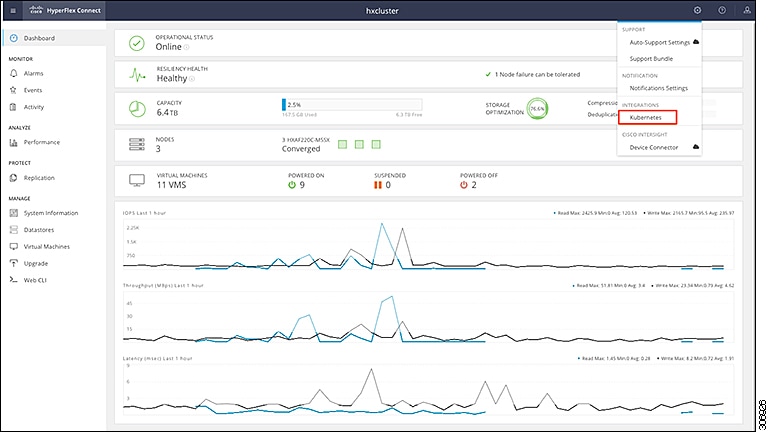
-
On the Enable Persistent Volumes for Kubernetes page, the Current Status: value is Disabled for a new cluster. Click Enable to configure the HyperFlex cluster to support Persistent Volumes for Kubernetes.
Figure 3. Enable Persistent Volumes for Kubernetes Page 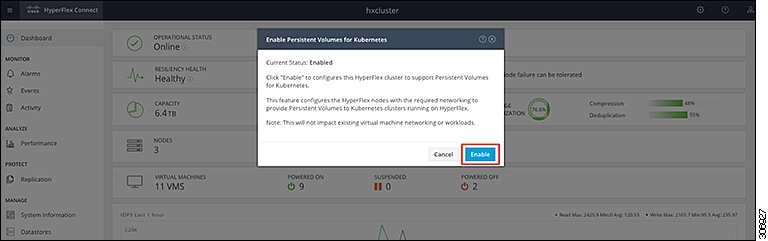
Partially Enabled Cluster Status
There are certain circumstances where a previously enabled cluster may show a current status of Partially Enabled. This status typically appears when one of the following scenarios occur:
-
Expansion of the HyperFlex cluster
-
Change to required ESXi networking for iSCSI
In either of the preceding scenarios, perform the procedure outlined in Enabling Kubernetes Integration to reenable Kubernetes support in HyperFlex Connect. HyperFlex will ensure that all hosts are properly enabled and configured.
After reenabling Kubernetes support, the current status should change to Enabled.
 Feedback