Preinstallation Checklist

Select the preinstallation checklist for your deployment:

Single Switch Configuration

Single switch configuration provides a simple topology requiring only a single switch, and two 1GE ports per server. Link or switch redundancy is not provided. Access ports and trunk ports are the two supported network port configurations.

Network Topology
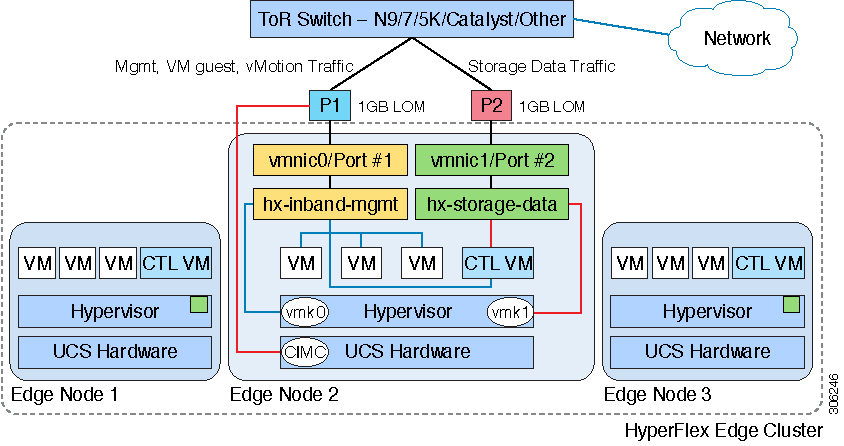
Single Switch Configuration Network Topology

Upstream Network Requirements

  • A managed switch with VLAN capability

  • Six physical 1GE ports for three HyperFlex nodes

  • Jumbo frames are not required to be configured

  • Portfast or portfast trunk should be configured on all ports to ensure uninterrupted access to Cisco Integrated Management Controller (CIMC)

Virtual Network Requirements

The recommended configuration for each ESXi host calls for the following networks to be separated:

  • Management traffic network

  • Data traffic network

  • vMotion network

  • VM network

The minimum network configuration requires at least two separate networks:

  • Management network (includes vMotion and VM network)

  • Data network (for storage traffic)

Two vSwitches each carrying different networks are required:

  • vswitch-hx-inband-mgmtESXi management (vmk0), storage controller management, vMotion (vmk2), VM guest portgroups

  • vswitch-hx-storage-dataHyperFlex storage data network, Hypervisor storage interface (vmk1)


Note

After some HyperFlex Edge deployments using the single switch configuration, it is normal to see the storage data vSwitch and associated portgroup failover order with only a standby adapter populated. The missing active adapter does not cause any functional issue with the cluster and we recommend leaving the failover order as configured by the installation process.

Port Requirements

Two 1GE ports are required per server:

  • Port 1—management (ESXi and CIMC), vMotion traffic, and VM guest traffic

  • Port 2—HyperFlex storage traffic

  • There are two supported network port configurations: access ports or trunk ports.

  • Spanning tree portfast (access ports) or portfast trunk (trunk ports) must be enabled for all network ports connected to HyperFlex servers.

    • Failure to configure portfast causes intermittent CIMC disconnects during ESXi bootup and longer than necessary network re-convergence during physical link failure.

  • To decide if your deployment will use access ports or trunk ports, see the following section "About Access and Trunk Ports".

Physical network topology guidance:
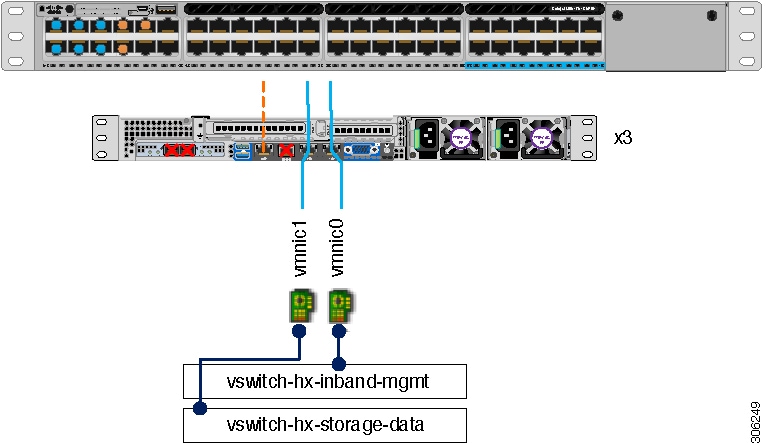
Physical Network Topology - Single Switch
  • Cable both integrated LOM ports to the same ToR switch.

  • If desired, cable the dedicated CIMC port to the same switch or to an out-of-band management switch.

  • Do no use the 10GE ports on the VIC.

About Access and Trunk Ports

Ethernet interfaces can be configured either as access ports or trunk ports, as follows:

  • An access port can have only one VLAN configured on the interface; it can carry traffic for only one VLAN.

  • A trunk port can have one or more VLANs configured on the interface; it can carry traffic for several VLANs simultaneously.

The following table summarizes the differences between access and trunk ports. You can use the details described in this table to determine which ports to use for your deployment.


Important

Trunk ports are assumed in this guide, and is highly recommended for your deployment.

Trunk Ports

Access Ports

Requires more setup and definition of VLAN tags within CIMC, ESXi, and HX Data Platform Installer.

Provides a simpler deployment process than trunk ports.

Provides the ability to logically separate management, vMotion, and VM guest traffic on separate subnets.

Requires that management, vMotion, and VM guest traffic must share a single subnet.

Provides flexibility to bring in additional L2 networks to ESXi.

Requires a managed switch to configure ports 1 and 2 on discrete VLANs; storage traffic must use a dedicated VLAN, no exceptions.


Note

Both trunk and access ports require a managed switch to configure ports 1 and 2 on discrete VLANs.

See Sample Network Configurations for more details.
Dual Switch Configuration

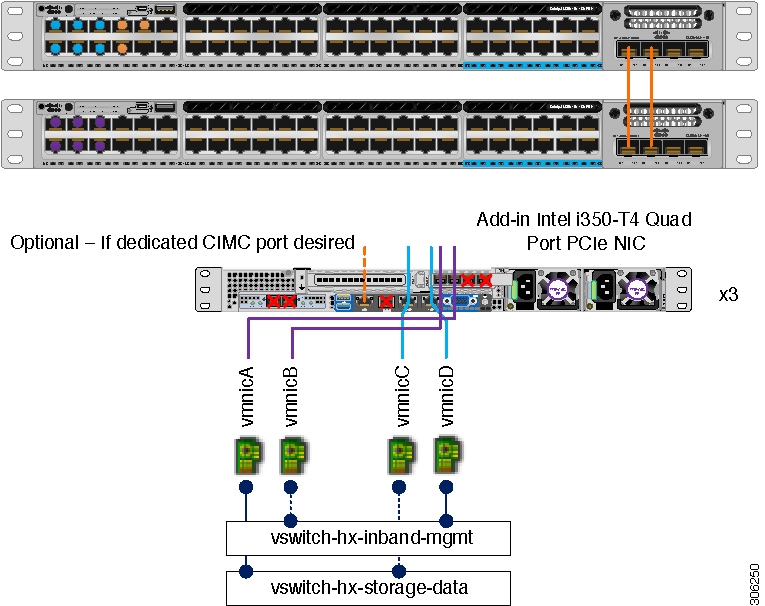
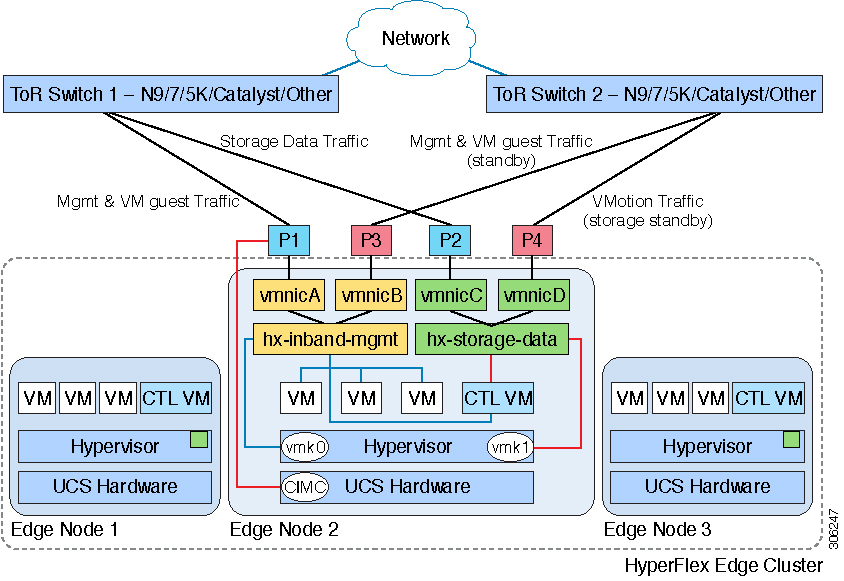
Dual switch configuration provides a slightly more complex topology with full redundancy that protects against: switch failure, link and port failure, and LOM/PCIe NIC HW failures. It requires two switches that may be standalone or stacked, and four 1GE ports and one additional PCIe NIC per server. Trunk ports are the only supported network port configuration.

Network Topology

Dual Switch Network Topology

Upstream Network Requirements

  • Two managed switches with VLAN capability (standalone or stacked)

  • 12 physical 1GE ports for three HyperFlex nodes

    All 12 ports must trunk and allow all applicable VLANs.

  • Jumbo frames are not required to be configured

  • Portfast trunk should be configured on all ports to ensure uninterrupted access to Cisco Integrated Management Controller (CIMC)

Virtual Network Requirements

The recommended configuration for each ESXi host calls for the following networks to be separated:

  • Management traffic network

  • Data traffic network

  • vMotion network

  • VM network

The minimum network configuration requires at least two separate networks:

  • Management network (includes vMotion and VM network)

  • Data network (for storage traffic)

Two vSwitches each carrying different networks are required:

  • vswitch-hx-inband-mgmtESXi management (vmk0), storage controller management, VM guest portgroups

  • vswitch-hx-storage-dataHyperFlex storage data network, Hypervisor storage interface (vmk1), vMotion (vmk2)

Failover order:

  • vswitch-hx-inband-mgmt—entire vSwitch is set for active/standby. All services by default consume a single uplink port and failover when needed. Failover order for VM portgroups may be overridden as needed.

  • vswitch-hx-storage-dataHyperFlex storage data network and vmk1 are set to the same active/standby order. The vMotion VMKernel port is set to use the opposite order when configured using the post_install script.

Port Requirements

Four 1GE ports are required per server:

  • Port 1—management (ESXi, HyperFlex controller, and CIMC) and VM guest traffic

  • Port 2—HyperFlex storage traffic (and vMotion standby)

  • Port 3—VM guest traffic (and management standby)

  • Port 4—vMotion traffic (and storage standby)

  • Two ports using LOM and two ports from a PCIe add-in NIC:

    • 1 LOM and 1 PCIe port serve management and VM guest traffic in a redundant configuration

    • 1 LOM and 1 PCIe port serve storage data and vMotion traffic in a redundant and load balanced configuration

  • The Intel i350 quad port NIC (UCSC-PCIE-IRJ45) must be installed for this topology:

    • The NIC may be selected at ordering time and shipped preinstalled from the factory.

    • The NIC may also be field-installed if ordered separately. Either riser #1 or #2 may be used, although riser #1 is recommended.

  • Only trunk ports are supported in the dual switch configuration.

  • Spanning tree portfast trunk must be enabled for all network ports connected to HyperFlex servers.

    • Failure to configure portfast causes intermittent CIMC disconnects during ESXi bootup and longer than necessary network re-convergence during physical link failure.

Physical network topology guidance:


Warning

Proper cabling is important to ensure full network redundancy.


Physical Network Topology - Dual Switch
  • Cable both integrated LOM ports to the same ToR switch.

  • Cable any two out of four PCIe NIC ports to the same ToR switch. Do not connect more than two PCIe NIC ports prior to installation. Post cluster installation, you may freely use the remaining ports.

  • Redundancy occurs at the vSwitch level and includes one uplink port from the onboard LOM and one uplink port from PCIe NIC for each vSwitch

  • If desired, cable the dedicated CIMC port to the same switch or to an out-of-band management switch.

  • Do no use the 10GE ports on the VIC.

Common Network Requirements

Before you begin installation, confirm that your environment meets the following specific software and hardware requirements.


Attention

On HyperFlex M5 nodes, when using a 1GE topology manually configure the port speed to 1000/full on all switch ports. See the Common Network Requirements.


VLAN Requirements

Single Switch Network Topology

Single Switch Network Topology

Dual Switch Network Topology

Dual Switch Network Topology

Network

VLAN ID

Description

Use a separate subnet and VLANs for each of the following networks:

VLAN for VMware ESXi, and Cisco HyperFlex management

Used for management traffic among ESXi, HyperFlex, and VMware vCenter, and must be routable.

Note 

This VLAN must have access to Intersight.

CIMC VLAN

Can be same or different from the Management VLAN.

Note 

This VLAN must have access to Intersight.

VLAN for HX storage traffic

Used for storage traffic and requires only L2 connectivity.

VLAN for VMware vMotion

Used for vMotion VLAN, if applicable.

Note 

Can be the same as the management VLAN but not recommended.

VLAN(s) for VM network(s)

Used for VM/application network.

Note 

Can be multiple VLANs separated by a VM portgroup in ESXi.

Inband versus Out-of-Band CIMC

This guides assume the use of inband CIMC using Shared LOM Ext mode. The result is CIMC management traffic multiplexed with vSphere traffic onto the LOM ports, reducing cabling, switchports, and additional configuration.

Customers may opt to use the dedicated CIMC management port for out-of-band use. Users should account for this third 1GE port when planning their upstream switch configuration. Additionally, the user should set the CIMC to dedicated mode during CIMC configuration. Follow Cisco UCS C-series documentation to configure the CIMC in dedicated NIC mode. Under NIC properties, set the NIC mode to dedicated before saving the configuration.

In either case, CIMC must have network access to Intersight.

Supported vCenter Topologies

Use the following table to determine the topology supported for vCenter.

Topology

Description

Recommendation

Single vCenter

Virtual or physical vCenter that runs on an external server and is local to the site. A management rack mount server can be used for this purpose.

Highly recommended

Centralized vCenter

vCenter that manages multiple sites across a WAN.

Highly recommended

Nested vCenter

vCenter that runs within the cluster you plan to deploy.

Installation for a HyperFlex Edge cluster may be performed without a vCenter. Alternatively, you may deploy with an external vCenter and migrate it into the cluster.

For the latest information, see the How to Deploy vCenter on the HX Data Platform tech note.

Customer Deployment Information

A typical three-node HyperFlex Edge deployment requires 13 IP addresses – 10 IP addresses for the management network and 3 IP addresses for the vMotion network.

CIMC Management IP Addresses

Server

CIMC Management IP Addresses

Server 1

Server 2

Server 3

Subnet mask

Gateway

DNS Server

NTP Server

Note 

NTP configuration on CIMC is required for proper Intersight connectivity.

Network IP Addresses


Note

By default, the HX Installer automatically assigns IP addresses in the 169.254.1.X range, to the Hypervisor Data Network and the Storage Controller Data Network.


Management Network IP Addresses

(must be routable)

Hypervisor Management Network

Storage Controller Management Network

Server 1:

Server 1:

Server 2:

Server 2:

Server 3:

Server 3:

Storage Cluster Management IP address

Subnet mask

Default gateway

VMware vMotion Network IP Addresses

For vMotion services, you may configure a unique VMkernel port or, if necessary, reuse the vmk0 if you are using the management VLAN for vMotion (not recommended).

Server

vMotion Network IP Addresses (configured using the post_install script)

Server 1

Server 2

Server 3

Subnet mask

Gateway

Port Requirements


Important

Ensure that the following port requirements are met in addition to the prerequistes listed for Intersight Connectivity.

If your network is behind a firewall, in addition to the standard port requirements, VMware recommends ports for VMware ESXi and VMware vCenter.

  • CIP-M is for the cluster management IP.

  • SCVM is the management IP for the controller VM.

  • ESXi is the management IP for the hypervisor.

Verify that the following firewall ports are open:

Time Server

Port Number

Service/Protocol

Source

Port Destinations

Essential Information

123

NTP/UDP

Each ESXi Node

Each SVCM Node

CIMC

HX Data Platform Installer

Time Server

Bidirectional

HX Data Platform Installer

Port Number

Service/Protocol

Source

Port Destinations

Essential Information

22

SSH/TCP

HX Data Platform Installer

Each ESXi Node

Management addresses

Each SVCM Node

Management addresses

CIP-M

Cluster management

CIMC

CIMC addresses

80

HTTP/TCP

HX Data Platform Installer

Each ESXi Node

Management addresses

Each SVCM Node

Management addresses

CIP-M

Cluster management

CIMC

CIMC addresses

443

HTTPS/TCP

HX Data Platform Installer

Each ESXi Node

Management addresses

Each SVCM Node

Management addresses

CIP-M

Cluster management

CIMC

CIMC addresses

8089

vSphere SDK/TCP

HX Data Platform Installer

Each ESXi Node

Management addresses

902

Heartbeat/UDP/TCP

HX Data Platform Installer

vCenter

7444

ICMP

HX Data Platform Installer

ESXi IPs

CVM IPs

Management addresses

9333 UDP/TCP

HX Data Platform Installer

CIP-M

Cluster management

2400

TCP

HX Data Platform Installer

CIMC SoL

Direct Serial over LAN port that allows you to by-pass the Cisco IMC shell to provide direct access to SoL.

Mail Server

Optional for email subscription to cluster events.

Port Number

Service/Protocol

Source

Port Destinations

Essential Information

25

SMTP/TCP

Each SVCM Node

CIP-M

CIMC

Mail Server

Optional

Monitoring

Optional for monitoring UCS infrastructure.

Port Number

Service/Protocol

Source

Port Destinations

Essential Information

161

SNMP Poll/UDP

Monitoring Server

CIMC

Optional

162

SNMP Trap/UDP

CIMC

Monitoring Server

Optional

DNS Server

Port Number

Service/Protocol

Source

Port Destinations

Essential Information

53 (external lookups)

DNS/TCP/UDP

Each ESXi Node

DNS

Management addresses

Each SVCM Node

DNS

Management addresses

CIP-M

DNS

Cluster management

Each CIMC Address

DNS

vCenter

Port Number

Service/Protocol

Source

Port Destinations

Essential Information

80

HTTP/TCP

vCenter

Each SCVM Node

CIP-M

Bidirectional

443

HTTPS (Plug-in)/TCP

vCenter

Each ESXi Node

Each SVCM Node

CIP-M

Bidirectional

7444

HTTPS (VC SSO)/TCP

vCenter

Each ESXi Node

Each SVCM Node

CIP-M

Bidirectional

9443

HTTPS (Plug-in)/TCP

vCenter

Each ESXi Node

Each SVCM Node

CIP-M

Bidirectional

5989

CIM Server/TCP

vCenter

Each ESXi Node

902

Heartbeat/TCP/UDP

vCenter

HX Data Platform Installer

ESXi servers

This port must be accessible from each host. Installation will result in errors if the port is not open from the HX Installer to the ESXi hosts.

User

Port Number

Service/Protocol

Source

Port Destinations

Essential Information

22

SSH/TCP

User

Each ESXi Node

Management addresses

Each SVCM Node

Management addresses

CIP-M

Cluster management

HX Data Platform Installer

Each CIMC Address

Each CIMC Address

vCenter

SSO Server

80

HTTP/TCP

User

Each SVCM Node

Management addresses

CIP-M

Cluster management

CIMC

HX Data Platform Installer

vCenter

443

HTTPS/TCP

User

Each SVCM Node

CIP-M

Each CIMC Address

Each CIMC Address

HX Data Platform Installer

vCenter

7444

HTTPS (SSO)/TCP

User

vCenter

SSO Server

9443

HTTPS (Plug-in)/TCP

User

vCenter

SSO Server

Port Number

Service/Protocol

Source

Port Destinations

Essential Information

7444

HTTPS (SSO)/TCP

SSO Server

Each ESXi Node

Each SCVM Node

CIP-M

Bidirectional

Replication

Required only when configuring native HX asynchronous cluster to cluster replication.

Port Number

Service/Protocol

Source

Port Destinations

Essential Information

9338

Data Services Manager Peer/TCP

Each CVM Node

Each CVM Node

Bidirectional, include cluster management IP addresses

9339

Data Services Manager/TCP

Each CVM Node

Each CVM Node

Bidirectional, include cluster management IP addresses

3049

Replication for CVM/TCP

Each CVM Node

Each CVM Node

Bidirectional, include cluster management IP addresses

4049

Cluster Map/TCP

Each CVM Node

Each CVM Node

Bidirectional, include cluster management IP addresses

4059

NR NFS/TCP

Each CVM Node

Each CVM Node

Bidirectional, include cluster management IP addresses

9098

Replication Service

Each CVM Node

Each CVM Node

Bidirectional, include cluster management IP addresses

8889

NR Master for Coordination/TCP

Each CVM Node

Each CVM Node

Bidirectional, include cluster management IP addresses

9350

Hypervisor Service/TCP

Each CVM Node

Each CVM Node

Bidirectional, include cluster management IP addresses

443

HTTPS/TCP

Each CVM Node

Each CVM Node

Bidirectional, include cluster management IP addresses


Tip

If you do not have standard configurations and need different port settings, refer to Table C-5 Port Literal Values for customizing your environment.


Hypervisor Credentials

root username

root

root password

Cisco123

Important 

Deployments based on Cisco HX Data Platform Release, 3.0 and higher, require a new custom password if you have not changed the default factory password prior to starting installation.

VMware vCenter Configuration


Note

HyperFlex communicates with vCenter through standard ports. Port 80 is used for reverse HTTP proxy and may be changed with TAC assistance. Port 443 is used for secure communication to the vCenter SDK and may not be changed.


vCenter admin username

username@domain

vCenter admin password

vCenter data center name

VMware vSphere compute cluster and storage cluster name

Network Services


Note

  • DNS and NTP servers should reside outside of the HX storage cluster.

  • Use an internally-hosted NTP server to provide a reliable source for the time.

  • All DNS servers should be pre-configured with forward (A) and reverse (PTR) DNS records for each ESXi host before starting deployment. When DNS is configured correctly in advance, the ESXi hosts are added to vCenter via FQDN rather than IP address.

    Skipping this step will result in the hosts being added to the vCenter inventory via IP address and require users to change to FQDN using the following procedure: Changing Node Identification Form in vCenter Cluster from IP to FQDN.


DNS Servers

<Primary DNS Server IP address, Secondary DNS Server IP address, …>

NTP servers

<Primary NTP Server IP address, Secondary NTP Server IP address, …>

Time zone

Example: US/Eastern, US/Pacific

Connected Services

Enable Connected Services (Recommended)

Yes or No required

Email for service request notifications

Example: name@company.com

Supported VMware vSphere Versions and Editions

Confirm that a compatible version of vSphere is preinstalled on all HyperFlex servers.

HyperFlex Version

VMware vSphere Versions

VMware vSphere Editions

4.0

6.0 U1b, 6.0 U2, 6.0 U2 patch 3, 6.0 U2 patch 4, 6.0 U3, 6.5 U1, 6.7 U2

Enterprise, Enterprise Plus, Standard, Essentials Plus, ROBO

3.5(x)

Enterprise, Enterprise Plus, Standard, Essentials Plus, ROBO

3.0

6.0 U3, 6.5 U1, 6.5 U2

Enterprise, Enterprise Plus, Standard, Essentials Plus, ROBO

Physical Requirements

HX220c nodes are 1 RU each. For a three-node cluster, 3 RU are required.

Reinstallation

To perform reinstallation of a HyperFlex Edge System, contact Cisco TAC.

HyperFlex Edge and Firmware Compatibility Matrix for 3.x Deployments

Cisco HX Data Platform, Release 3.x based Deployments

Confirm the component firmware on the server meets the minimum versions listed in the following tables.


Important

HyperFlex Edge does not support Cisco IMC versions 4.0(4a), 4.0(4b), 4.0(4c), 4.0(4d), and 4.0(4e).
Table 1. HX220c M4 / HXAF220c M4 Cluster

Component

Minimum Firmware Version - HXDP 3.x

*(be sure to review important note(s) above)

Recommended Firmware Version - HXDP 3.x

*(be sure to review important note(s) above)

Cisco Integrated Management Controller (CIMC)

3.0(3f)

4.0(2f)

Host Upgrade Utility (HUU) Download Link

3.0(3f)

Download Software

4.0(2f)

Download Software

Table 2. HX220c M5 / HXAF220c M5 Cluster

Component

Minimum Firmware Version - HXDP 3.x

*(be sure to review important note(s) above)

Recommended Firmware Version - HXDP 3.x

*(be sure to review important note(s) above)

Cisco Integrated Management Controller (CIMC)

3.1(2d)

4.0(4k)

Host Upgrade Utility (HUU) Download Link

3.1(2d)

Download Software

4.0(4k)

Download Software

Intersight Connectivity

Consider the following prerequisites pertaining to Intersight connectivity:

  • Before installing the HX cluster on a set of HX servers, make sure that the device connector on the corresponding UCS Manager instance is properly configured to connect to Cisco Intersight and claimed.

  • All device connectors must properly resolve svc.ucs-connect.com and allow outbound initiated HTTPS connections on port 443. The current version of the HX Installer supports the use of an HTTP proxy, except when the cluster is redeployed and is not new from the factory.

  • All controller VM management interfaces must properly resolve download.intersight.com and allow outbound initiated HTTPS connections on port 443. The current version of HX Installer supports the use of an HTTP proxy if direct Internet connectivity is unavailable, except when the cluster is redeployed and is not new from the factory.

  • The intended ESX server, HX Controller network, and vCenter host must be accessible through UCS Fabric Interconnect management interfaces.

  • Starting with HXDP release 3.5(2a), the Intersight installer does not require a factory installed controller VM to be present on the HyperFlex servers.

In addition, on post-cluster deployment the new HX cluster is automatically claimed in Intersight for ongoing management.