WebEx System Requirements
This document provides system requirements for Cisco WebEx Meetings Server, Release 1.5.
- General System Requirements
- WebEx Productivity Tools
- Minimum Hardware Requirements
- System Capacity Matrix
General System Requirements
Cisco WebEx Meetings Server is compatible with Cisco UCS servers that meet or exceed the specifications presented in this section.
 Note | The table suggests that you deploy your internal storage in a RAID configuration. For further information, see the "Installing VMware vSphere ESXi and Configuring Storage" section of the Cisco WebEx Meetings Server Planning Guide at Configuration Guides. |
When you perform an upgrade to Cisco WebEx Meeting Server Release 2.0 from Release 1.x, the ESXi hosts (Cisco UCS server) where the Admin virtual machine is located requires 1.5 TB of disk space. Refer to the section in this document that describes the different size user systems, which begins with the 50 User System. For the upgrade, there will be two sets of virtual machines on your network at the same time; the original virtual machines running Release 1.x and the upgrade virtual machines to support Release 2.0. For more details, see "Upgrading the System" in the Administration Guide.
|
Network interfaces |
|
||
|
Internal (DAS) Storage for ESXi hosts where internal virtual machines are deployed |
|
||
|
Internal (DAS) storage for ESXi hosts where IRP virtual machines are deployed |
|||
|
SAN storage |
|
||
|
Hypervisor |
|
||
|
Email server |
WebEx Productivity Tools
Cisco WebEx Meetings Server supports the latest version of WebEx Productivity Tools, which is available on the Downloads page of your WebEx site. If users are running an older version of WebEx Productivity Tools after you perform a system upgrade, they can schedule, start, and join meetings, but the latest features are not available. We recommend that you silently push the latest WebEx Productivity Tools .msi for an optimal experience.
Minimum Hardware Requirements
This section lists many of the Cisco UCS servers you can use for each size system. For specific requirements for each system, refer to the following sections:
|
Deployment Size |
Example of UCS Model |
Virtual Support |
|---|---|---|
|
50 Users |
||
|
250 Users |
||
|
800 Users |
||
|
2000 Users |
Note | Co-residency with vCenter is supported with 50 and 250 user system deployments only. Co-residency with Cisco Unified Communications products on the same physical host is not supported. |
Note | You can use older models of the UCS hardware with your system, but for a better user experience use the hardware listed in the table. For example, you can use the UCS C220 M3 for a 250 user system if you already have that hardware available. |
Note | When upgrading to Cisco WebEx Meetings Server Release 2.0, it's possible to use Cisco UCS B200 M3 blade servers with 2x local hard drives as long as the upgraded system uses SAN storage for its virtual machines. Using SAN storage with B-series blade servers allows your system to meet the 4 hard disk drives in a RAID 5 or RAID 10 configuration requirement for Cisco WebEx Meetings Server Release 2.0. |
The supported co-resident configurations are described in these sections:
- Resources Consumed by Cisco WebEx Meetings Server and the ESXi Host
- 50 User System
- 250 User System
- 800 User System
- 2000 User System
Resources Consumed by Cisco WebEx Meetings Server and the ESXi Host
Cisco WebEx Meetings Server is deployed on one or more virtual machines on ESXi hosts. CPU and memory resources, and storage space, is consumed by Cisco WebEx Meetings Server and by ESXi (VMware component that enables virtualization on the physical Cisco UCS Server). Depending on your system size, vCenter and multiple virtual machines may run on the same Cisco UCS server.
Cisco WebEx Meetings Server uses resource reservation for its virtual machines to guarantee system scalability. Other VMware workloads do not take CPU and other resources away from the virtual machines. The minimum requirements for each system size includes enough resources to support:
- Continued quality of service for Cisco WebEx Meeting Server at peak system usage (maximum capacity).
- VMware ESXi.
- VMware vCenter (when co-resident). For the requirements for vCenter Server, see Knowledge Base and search for "Installing vCenter Server 5.0 best practices" or "Installing vCenter Server 5.1 best practices", respectively.
- VMware snapshots of the virtual machine (delete these as soon as possible otherwise you may experience severe performance degradation). Extra disk space is required for snapshots, as some snapshots may be as large as the original virtual machine. In some cases, vSphere may delete snapshots to create storage space, compromising the ability to roll back to previous snapshots.
- Use of the Cisco UCS Server over the typical life cycle of the server.
The hardware requirements specified in the OVA file are the minimum requirements that are needed to deploy Cisco WebEx Meetings Server. These requirements do not include any CPU, memory, or storage requirements for VMware vCenter or ESXi.
The requirements for the Cisco UCS Servers, as listed in the following tables, include requirements for Cisco WebEx Meetings Server 1.x, VMware ESXi 5.0 and 5.1, and vCenter 5.0 and 5.1 (in supported co-residency configurations). Be sure to purchase hardware with the specifications defined in the following tables.
 Caution | Co-residency, other than the configurations listed in the following tables, is not supported. If you disregard our system requirements, your virtual machines may not be able to boot. The deployment of the virtual machines may stall from within the earliest product screens during the vCenter OVA deployment. |
50 User System
This is a schematic diagram of a 50 user system. The diagram illustrates two versions of a 50 user deployment. If you plan to add an HA system, those virtual machines are shown as the "redundant" virtual machines. If you do not want HA, then only deploy the primary system.
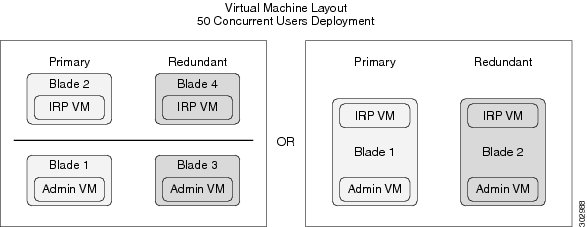
The following table lists the minimum hardware requirements for the ESXi hosts (Cisco UCS servers) in your system. For more information, see General System Requirements.
For more information about the bandwidth requirements, see Network Bandwidth Requirements.
Note | Because the resource requirements for ESXi 5.1 is greater than that for ESXi 5.0, Cisco requires additional CPU cores for a system deployed on vSphere ESXi 5.1. |
Note | Co-residency with vCenter is supported with a 50 user system deployment as configured in the following table. |
Note | For IOPS information, see Advantages of Deploying Your System on VMware vSphere. |
Note | For brevity, we use the acronym IRP for the Internet Reverse Proxy in the following table. |
| Admin | 24 | |||
| Admin and vCenter (co-resident) | 36 | |||
| IRP | 12 | |||
| Admin and IRP (co-resident) | 8 | 36 | ||
| Admin and IRP and vCenter (all co-resident) | 12 | 40 |
Note | If you plan to use an HA system, purchase the same hardware requirements and quantities as the primary system. |
Resources Reserved by the Virtual Machines in a 50 User System
This section illustrates how much media the virtual machines use and is intended for those with expert knowledge of VMware. CPU resources are specified as vCPUs (cores) and MHz (CPU cycles). The VMware VMkernel uses MHz cycles to control CPU scheduling.
Memory resources are specified by maximum memory and reserved memory. Reserved memory is not shared with other virtual machines on the same physical Cisco UCS Server.
Disk resources (storage) are controlled in two separate areas. During the OVA build, the CentOS filesystem partition sizes determine the minimum disk size. Secondly, vCenter controls the maximum disk space available.
The numbers in this table do not include resources for VMware ESXi or vCenter. See Resources Consumed by Cisco WebEx Meetings Server and the ESXi Host.
| Virtual Machine Type | Virtual CPU (vCPU) | CPU1 (MHz) | Reserved Memory/Total Memory2 (GB) | Disks (GB) |
|---|---|---|---|---|
|
Admin |
4 |
8000 |
12/14 |
418 |
|
Internet Reverse Proxy |
4 |
8000 |
4/4 |
128 |
Note | If you attempt to deploy a virtual machine without the minimum number of vCPUs, then the OVA deployment of the virtual machine will fail. If you attempt to deploy a virtual machine without the minimum total MHz, then the virtual machine will not power on. |
250 User System
This is a schematic diagram of a 250 user system. If you plan to add an HA system, those virtual machines are shown as the "redundant" virtual machines. If you do not want HA, then only deploy the primary system.
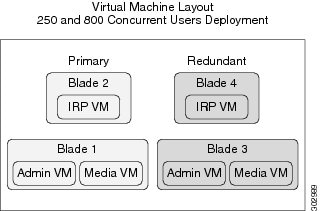
The following table lists the minimum hardware requirements for the ESXi hosts (Cisco UCS servers) in your system. For more information, see General System Requirements.
For more information about the bandwidth requirements, see the Network Bandwidth Requirements.
Note | Co-residency with vCenter is supported with a 250 user system deployment as configured in the following table. |
Note | For IOPS information, see Advantages of Deploying Your System on VMware vSphere. |
Note | For brevity, we use the acronym IRP for the Internet Reverse Proxy in the following table. |
| Admin and Media | 12 | 52 | 1.0 TB; minimum of 7200 RPM | |
| (Admin and Media) and vCenter (co-resident) | 16 | 56 | 1.0 TB; minimum of 7200 RPM | |
| IRP | 12 | 36 | 300 GB; minimum of 7200 RPM |
Note | If you plan to use a HA system, purchase the same hardware requirements and quantities as the primary system. |
Resources Reserved by the Virtual Machines in a 250 User System
This section illustrates how much media the virtual machines use and is intended for those with expert knowledge of VMware. CPU resources are specified as vCPUs (cores) and MHz (CPU cycles). The VMware VMkernel uses MHz cycles to control CPU scheduling.
Memory resources are specified by maximum memory and reserved memory. Reserved memory is not shared with other virtual machines on the same physical Cisco UCS Server.
Disk resources (storage) are controlled in two separate areas. During the OVA build, the CentOS filesystem partition sizes determine the minimum disk size. Secondly, vCenter controls the maximum disk space available.
The numbers in this table do not include resources for VMware ESXi or vCenter. See Resources Consumed by Cisco WebEx Meetings Server and the ESXi Host.
| Virtual Machine Type | Virtual CPU (vCPU) | CPU3 (MHz) | Reserved Memory/Total Memory4 (GB) | Disks (GB) |
|---|---|---|---|---|
|
Admin |
4 |
8000 |
16/16 |
418 |
|
Media |
8 |
16,480 |
13/23 |
128 |
|
Internet Reverse Proxy |
8 |
16,480 |
6/6 |
128 |
Note | If you attempt to deploy a virtual machine without the minimum number of vCPUs, the OVA deployment of the virtual machine will fail. If you attempt to deploy a virtual machine without the minimum total MHz processor speed, then the virtual machine will not power on. |
800 User System
This is a schematic diagram of an 800 user system. If you plan to add a HA system, those virtual machines are shown as the "redundant" virtual machines. If you do not want HA, then only deploy the primary system.
The following table lists the minimum hardware requirements for the ESXi hosts (Cisco UCS servers) in your system. For more information, see General System Requirements.
For more information about the bandwidth requirements, see Network Bandwidth Requirements.
Note | Co-residency with vCenter is not supported with an 800 user system deployment. |
Note | For IOPS information, see Advantages of Deploying Your System on VMware vSphere. |
Note | For brevity, we use the acronym IRP for the Internet Reverse Proxy in the following table. |
| Admin and Media (combined) | 40 | 80 | 1.0 TB; minimum of 10,000 RPM | |
| IRP | 40 | 36 | 300 GB; minimum of 10,000 RPM |
Note | If you plan to use an HA system, purchase the same hardware requirements and quantities as the primary system. |
Resources Reserved by the Virtual Machines in a 800 User System
This section illustrates how much media the virtual machines use and is intended for those with expert knowledge of VMware. CPU resources are specified as vCPUs (cores) and MHz (CPU cycles). The VMware VMkernel uses MHz cycles to control CPU scheduling.
Memory resources are specified by maximum memory and reserved memory. Reserved memory is not shared with other virtual machines on the same physical Cisco UCS Server.
Disk resources (storage) are controlled in two separate areas. During the OVA build, the CentOS filesystem partition sizes determine the minimum disk size. Secondly, vCenter controls the maximum disk space available.
The numbers in this table do not include resources for VMware ESXi. See Resources Consumed by Cisco WebEx Meetings Server and the ESXi Host.
| Virtual Machine Type | Virtual CPU (vCPU) | CPU5 (MHz) | Reserved Memory/Total Memory6 (GB) | Disks (GB) |
|---|---|---|---|---|
|
Admin |
10 |
20,600 |
16/16 |
418 |
|
Media |
30 |
61,800 |
14/44 |
128 |
|
Internet Reverse Proxy |
20 |
41,200 |
10/10 |
128 |
Note | If you attempt to deploy a virtual machine without the minimum number of vCPUs, then the OVA deployment of the virtual machine will fail. If you attempt to deploy a virtual machine without the minimum total MHz, then the virtual machine will not power on. |
2000 User System
This is a schematic diagram of a 2000 user system.
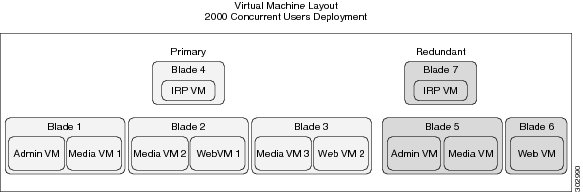
The following table lists the minimum hardware requirements for the ESXi hosts (Cisco UCS servers) in your system. For more information, see General System Requirements.
For more information about the bandwidth requirements, see Network Bandwidth Requirements.
If you plan to add a HA system, those virtual machines are shown as the "redundant" virtual machines. If you do not want HA, then only deploy the primary system.
Note | Co-residency with vCenter is not supported with a 2000 user system deployment. |
Note | For IOPS information, see Advantages of Deploying Your System on VMware vSphere. |
Note | For brevity, we use the acronym IRP for the Internet Reverse Proxy in the following table. |
| 40 | 80 | 1.0 TB; minimum of 10,000 RPM | ||
| Media2 and Web1 (combined) | 40 | 80 | 1 TB; minimum of 10,000 RPM | |
| Media3 and Web2 (combined) | 40 | 80 | 1 TB; minimum of 10,000 RPM | |
| IRP | 40 | 36 | 300 GB; minimum of 10,000 RPM | |
| Media and Admin (combined) for HA | 40 | 80 | 1.0 TB; minimum of 10,000 RPM | |
| Web for HA | 40 | 80 | 1 TB; minimum of 10,000 RPM | |
| IRP for HA | 40 | 36 | 300 GB; minimum of 10,000 RPM |
Resources Reserved by the Virtual Machines in a 2000 User System
This section illustrates how much media the virtual machines use and is intended for those with expert knowledge of VMware. CPU resources are specified as vCPUs (cores) and MHz (CPU cycles). The VMware VMkernel uses MHz cycles to control CPU scheduling.
Memory resources are specified by maximum memory and reserved memory. Reserved memory is not shared with other virtual machines on the same physical Cisco UCS Server.
Disk resources (storage) are controlled in two separate areas. During the OVA build, the CentOS file system partition sizes determine the minimum disk size. Secondly, vCenter controls the maximum disk space available.
The numbers in this table do not include resources for VMware ESXi. See Resources Consumed by Cisco WebEx Meetings Server and the ESXi Host.
| Virtual Machine Type | Virtual CPU (vCPU) | CPU7 (MHz) | Reserved Memory/Total Memory8 (GB) | Disks (GB) |
|---|---|---|---|---|
|
Admin |
10 |
20,600 |
16/16 |
418 |
|
Media |
30 |
61,800 |
14/44 |
128 |
|
Web |
10 |
20,600 |
16/16 |
128 |
|
Internet Reverse Proxy |
20 |
41,200 |
10/10 |
128 |
Note | If you attempt to deploy a virtual machine without the minimum number of vCPUs, then the OVA deployment of the virtual machine will fail. If you attempt to deploy a virtual machine without the minimum total MHz, then the virtual machine will not power on. |
System Capacity Matrix
The numbers in the table below represent the design capacity for the Cisco WebEx Meetings Server system. Operating the system at a capacity higher than these specifications can result in a degraded user experience and may result in system instability. Cisco reserves the right to enforce capacity limits at these levels.
|
System Capacity |
2000 user system |
800 user system |
250 user system |
50 user system |
Notes |
|---|---|---|---|---|---|
|
Maximum Simultaneous Audio Connections (Teleconference Phone Calls and Voice Connection Using Computer From Meeting Clients) |
2000 |
800 |
250 |
50 |
|
|
Maximum Call Rate (calls/per second) |
20 |
8 |
3 |
1 |
|
|
Maximum Concurrent Meetings |
1000 |
400 |
125 |
25 |
|
|
Maximum Total Participants on the System for Concurrently Sharing or Receiving Video |
100 |
100 |
100 |
50 |
|
|
Maximum Concurrent Video and Video File Sharing Users |
1000 |
400 |
125 |
25 |
|
|
Maximum Concurrent Meeting Connections (Desktop, Application, or File Sharing Users) |
2000 |
800 |
250 |
50 |
This number includes hosts and participants. |
|
Maximum Meetings That Can be Recorded Simultaneously |
100 |
40 |
13 |
3 |
|
|
Maximum Concurrent Recording Playback Sessions |
500 |
200 |
63 |
12 |
|
|
Maximum User Profiles in Database |
400,000 |
400,000 |
400,000 |
400,000 |
This number includes active and deactivated users. |
|
Maximum Concurrent Sign-in |
20 people per second |
8 people per second |
3 people per second |
1 person per second |
|
|
Maximum Aggregate Bandwidth Utilization |
5 Gbps |
2 Gbps |
625 Mbps |
125 Mbps |
 Feedback