VAS Configuration Example
Revised: November 8, 2010, OL-23843-01
The following is an example illustrating the steps in configuring VAS traffic forwarding, first on the SCE platform and then from the SCA BB console. This example shows how to configure one VAS group. This group will forward traffic to VAS servers for content filtering.
Configuring the SCE Platform
In configuring the SCE platform for VAS traffic forwarding, the purpose of the traffic forwarding is irrelevant. It is only necessary to know how many servers there are, how many server groups, and which servers should be assigned to which groups.
SUMMARY STEPS
1.  enable authorization-level
2. configure
interface range gigabitethernet 3/0/0-1
3. pseudo-ip ip-address [mask]
4. exit
interface linecard 0
5. shutdown
6. VAS-traffic-forwarding
7. VAS-traffic-forwarding traffic-link
8. VAS-traffic-forwarding VAS server-id id-number VLAN vlan-id
VAS-traffic-forwarding VAS server-id id-number VLAN vlan-id
VAS-traffic-forwarding VAS server-id id-number VLAN vlan-id
9. VAS-traffic-forwarding VAS server-group group-number server-id id-number
VAS-traffic-forwarding VAS server-group group-number server-id id-number
VAS-traffic-forwarding VAS server-group group-number server-id id-number
10. VAS-traffic-forwarding VAS server-id id-number health-check UDP ports source source-portnumber destination destination-portnumber
VAS-traffic-forwarding VAS server-id id-number health-check UDP ports source source-portnumber destination destination-portnumber
VAS-traffic-forwarding VAS server-id id-number health-check UDP ports source source-portnumber destination destination-portnumber
11. VAS-traffic-forwarding VAS server-group group-number failure minimum-active-servers min-number
12. VAS-traffic-forwarding VAS server-group group-number failure action block
13. no shutdown
DETAILED STEPS
| |
|
|
Step 1 |
enable authorization-level Example:
SCE> enable 15 |
Enables privileged EXEC mode at root level to configure the pseudo IP address. |
Step 2 |
configure
interface range gigabitethernet 3/0/0-1 Example:
SCE#> configure
SCE(config-if)#> interface range GigabitEthernet 3/0/0-1 |
Enters Gigabit Ethernet Interface configuration mode for the relevant range of GBE interfaces. |
Step 3 |
pseudo-ip ip-address [mask] Example:
SCE(config-if)#> pseudo-ip 1.1.1.1 255.255.255.252 |
Configures the pseudo IP address for the health check. |
Step 4 |
exit interface linecard 0 Example:
SCE(config-if)#> exit
SCE(config)#> interface linecard 0 |
Enters Interface linecard configuration mode. |
Step 5 |
shutdown Example:
SCE(config-if)#> shutdown |
Shuts down the linecard when configuring VAS servers and groups. |
Step 6 |
VAS-traffic-forwarding Example:
SCE(config-if)#> VAS-traffic-forwarding |
Sets the SCE platform to forward VAS traffic (enable VAS traffic forwarding). |
Step 7 |
VAS-traffic-forwarding traffic-link {link-0 | link-1}
Example:
SCE(config-if)#> VAS-traffic-forwarding traffic-link link-0 |
Sets the VAS traffic forwarding link to link-0. |
Step 8 |
VAS-traffic-forwarding VAS server-id id-number VLAN vlan-id
VAS-traffic-forwarding VAS server-id id-number VLAN vlan-id
VAS-traffic-forwarding VAS server-id id-number VLAN vlan-id Example:
SCE(config-if)#> VAS-traffic-forwarding VAS server-id 0 VLAN 600
SCE(config-if)#> VAS-traffic-forwarding VAS server-id 1 VLAN 601
SCE(config-if)#> VAS-traffic-forwarding VAS server-id 2 VLAN 602 |
Assigns VAS servers 0 to 2 to VLAN 600 to 602 respectively. |
Step 9 |
VAS-traffic-forwarding VAS server-group group-number server-id id-number
VAS-traffic-forwarding VAS server-group group-number server-id id-number
VAS-traffic-forwarding VAS server-group group-number server-id id-number Example:
SCE(config-if)#> VAS-traffic-forwarding VAS server-group 0 server-id 0
SCE(config-if)#> VAS-traffic-forwarding VAS server-group 0 server-id 1
SCE(config-if)#> VAS-traffic-forwarding VAS server-group 0 server-id 2 |
Maps VAS servers to server group 0, allowing server redundancy within the group. |
Step 10 |
VAS-traffic-forwarding VAS server-id id-number health-check UDP ports source source-portnumber destination destination-portnumber
VAS-traffic-forwarding VAS server-id id-number health-check UDP ports source source-portnumber destination destination-portnumber
VAS-traffic-forwarding VAS server-id id-number health-check UDP ports source source-portnumber destination destination-portnumber Example:
SCE(config-if)#> VAS-traffic-forwarding VAS server-id 0 health-check UDP ports source 63154 destination 63155
SCE(config-if)#> VAS-traffic-forwarding VAS server-id 1 health-check UDP ports source 63156 destination 63157
SCE(config-if)#> VAS-traffic-forwarding VAS server-id 2 health-check UDP ports source 63158 destination 63159 |
Defines UDP ports for health check on VAS servers. |
Step 11 |
VAS-traffic-forwarding VAS server-group group-number failure minimum-active-servers min-number Example:
SCE(config-if)#> VAS-traffic-forwarding VAS server-group 0 failure minimum-active-servers 2 |
Configures the minimum number of servers required as 2. |
Step 12 |
VAS-traffic-forwarding VAS server-group group-number failure action {block | pass} Example:
SCE(config-if)#> VAS-traffic-forwarding VAS server-group 0 failure action block |
Configures the failure action to "block". |
Step 13 |
no shutdown Example:
SCE(config-if)#> no shutdown |
Restarts the linecard. |
Configuring the SCA BB Application for VAS Traffic Forwarding
After the SCE platform has been configured, open the SCA BB console to configure VAS traffic forwarding in the SCA BB application. In configuring the the SCA BB application for VAS traffic forwarding, the purpose of the traffic forwarding is relevant, so that you can assign meaningful names to the VAS server groups and traffic forwarding tables.
This example illustrates how to configure the SCA BB application to forward traffic for content filtering. The VAS server group and the traffic forwarding table are both named `Content Filtering'. A package is created, named `VAS Package', and the Content Filtering table is assigned to that package.
To configure VAS traffic forwarding in the SCA BB application, complete the following steps. See Chapter 3, "Configuring the SCA BB Application to Support VAS Traffic Forwarding" for a full description of these steps.
Step 1 Enable VAS in SCA BB.
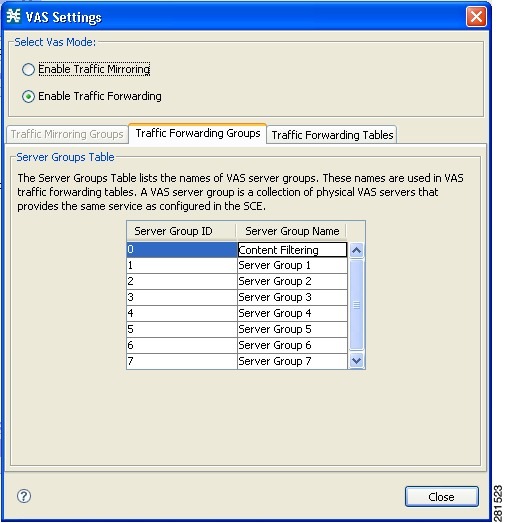
Step 2 Rename the VAS server group to `Content Filtering'.
Figure 5-1 Renaming the Traffic Forwarding Group
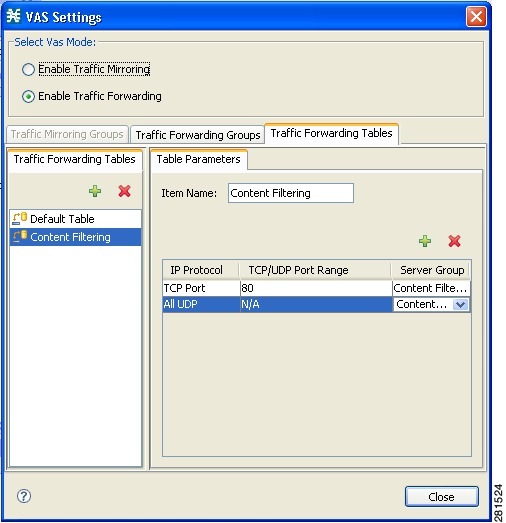
Step 3 Create and configure the `Content Filtering' VAS forwarding table.
Figure 5-2 Configuring the VAS Forwarding Table
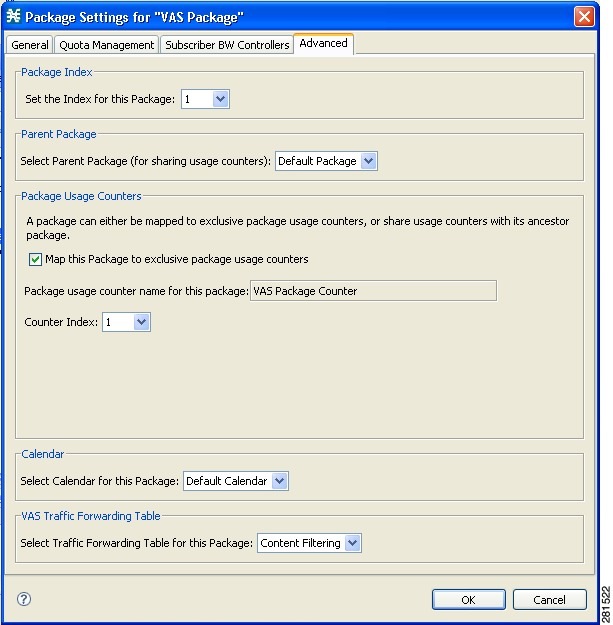
Step 4 Create the `VAS Package' package and assign the `Content Filtering' VAS forwarding table to it.
Figure 5-3 Assigning the VAS Forwarding Table to a Package
 Feedback