Configure Offline (Air-gapped) Licensing on 9800 WLC
Available Languages
Introduction
This document describes how to configure offline (air-gapped) licensing on Catalyst 9800 Wireless LAN Controller (WLC).
Prerequisites
Requirements
Recommended knowledge of 9800 WLC and Cisco License Central portal basic operation.
Components Used
The information in this document is based on these software and hardware versions but applies to all versions after 17.3:
- Virtual 9800-CL WLC version 17.9.5
The information in this document was created from the devices in a specific lab environment. All of the devices used in this document started with a cleared (default) configuration. If your network is live, ensure that you understand the potential impact of any command.
Configure
Network Diagram
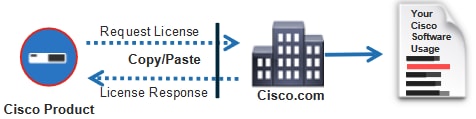
Configurations
Step 1. On the WLC
1. Set Licensing connection mode to Air Gap and AirGap Feature to Enabled:
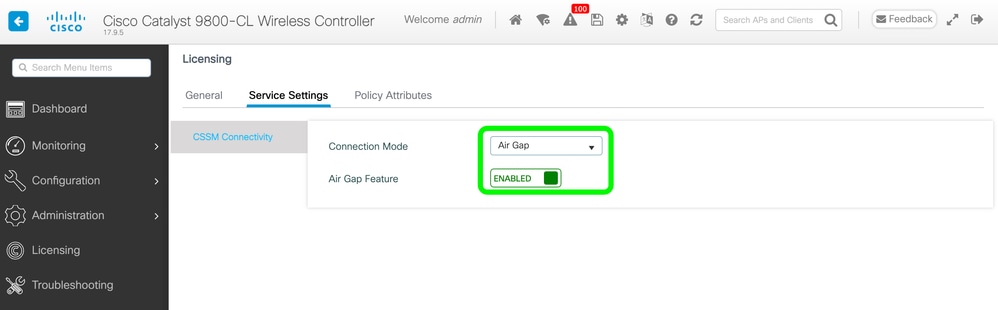
The CLI equivalent is:
9800-17-09-05(config)#license smart transport off
2. Export the RUM report from the WLC. This saves your current license consumption to a file:
9800-17-09-05#license smart save usage all file bootflash:rum.txtStep 2. On the Cisco License Central
1. Log into your Cisco License Central account.
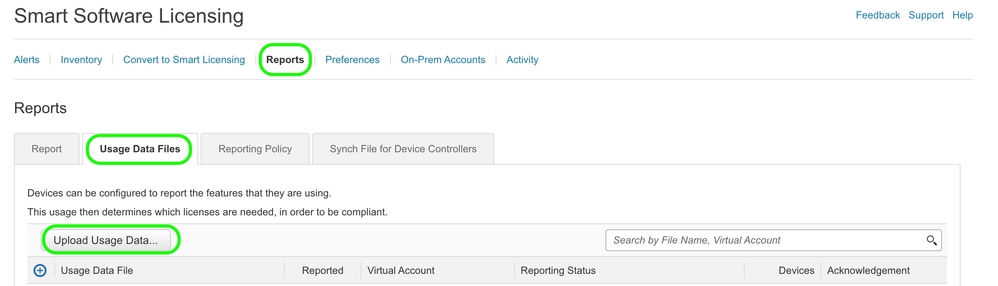
2. Navigate to Reports tab, then Usage Data Files. Click Usage Data Files:
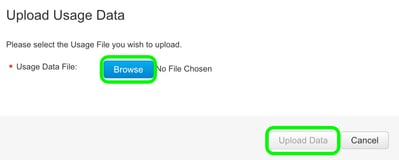
3. Click Browse, then select the RUM report that was obtained from the WLC. Click Upload Data:
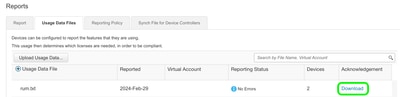
4. Once the RUM report is uploaded to the Cisco License Central, the Download button appears under the Acknowledgement column. Click Download:
Step 3. On the WLC
Import the ACK on the WLC:
9800-17-09-05#license smart import bootflash:ACK_rum.txt
Import Data Successful
Note: After a license factory reset, you must wait at least 1 hour to generate the RUM report.
Verify
After applying the configuration steps above, the WLC appears on the Cisco License Central under Inventory > Product Instances.
If an active WLC from the HA pair was registered, both active and standby WLCs are shown under the Product Instances tab on Cisco License Central.
Example of an output from a successfully configured WLC:
------------------ show license status ------------------


Utility:
Status: DISABLED

Smart Licensing Using Policy:
Status: ENABLED

Account Information:
Smart Account: <Organization_Name> As of Feb 29 15:24:40 2024 UTC
Virtual Account: <Account_Name>

Data Privacy:
Sending Hostname: yes
Callhome hostname privacy: DISABLED
Smart Licensing hostname privacy: DISABLED
Version privacy: DISABLED

Transport:
Type: Transport Off

Policy:
Policy in use: Merged from multiple sources.
Reporting ACK required: yes (CISCO default)
Unenforced/Non-Export Perpetual Attributes:
First report requirement (days): 365 (CISCO default)
Reporting frequency (days): 0 (CISCO default)
Report on change (days): 90 (CISCO default)
Unenforced/Non-Export Subscription Attributes:
First report requirement (days): 90 (CISCO default)
Reporting frequency (days): 90 (CISCO default)
Report on change (days): 90 (CISCO default)
Enforced (Perpetual/Subscription) License Attributes:
First report requirement (days): 0 (CISCO default)
Reporting frequency (days): 0 (CISCO default)
Report on change (days): 0 (CISCO default)
Export (Perpetual/Subscription) License Attributes:
First report requirement (days): 0 (CISCO default)
Reporting frequency (days): 0 (CISCO default)
Report on change (days): 0 (CISCO default)

Miscellaneous:
Custom Id: <empty>

Usage Reporting:
Last ACK received: Feb 29 15:27:53 2024 UTC
Next ACK deadline: May 29 15:27:54 2024 UTC
Reporting push interval: 30 days
Next ACK push check: <none>
Next report push: Mar 30 15:27:54 2024 UTC
Last report push: Feb 29 15:27:54 2024 UTC
Last report file write: <none>

Trust Code Installed:
Active: PID:C9800-CL-K9,SN:<Serial_Number>
INSTALLED on Feb 29 15:27:53 2024 UTC
Standby: PID:C9800-CL-K9,SN:<Serial_Number_Stbdy>
INSTALLED on Feb 29 15:27:53 2024 UTC
Troubleshoot
If the RUM upload to the Cisco License Central portal fails, it can be because your WLC is already registered through direct connection on the portal. Delete the device from the Cisco License Central inventory. You can then upload the RUM report.
References
Revision History
| Revision | Publish Date | Comments |
|---|---|---|
4.0 |
27-May-2026
|
Replace references to "Cisco Smart Software Manager (SSM)" with "Cisco License Central." |
3.0 |
28-Jul-2025
|
Added note. |
2.0 |
16-Apr-2025
|
Formatting, GUI path styles. |
1.0 |
01-Mar-2024
|
Initial Release |

 Feedback
Contact Cisco
- Open a Support Case

- (Requires a Cisco Service Contract)