Clear Transient DIMM UECC Errors on Cisco UCS

Available Languages
Introduction
This document describes how to clear transient Uncorrectable Error Correction Code (UECC) memory errors on Cisco Unified Computing Systems (UCS).
Prerequisites
Requirements
There are no specific requirements for this document.
Components Used
This document is valid for all M5, M6 and M7 generation servers.
The information in this document was created from the devices in a specific lab environment. All of the devices used in this document started with a cleared (default) configuration. If your network is live, ensure that you understand the potential impact of any command.
Background Information
When servers do not display prior instances of Error Correction Code (ECC) or Uncorrectable Error Correction Code (UECC) errors, certain memory modules can exhibit UECC memory errors in the BIOS POST during a reboot in normal operations. The affected Dual In-Line Memory Modules (DIMM) are shown as block listed, however, no new errors are reported when clearing the Block Listing data or, during a Failure Analysis after a Return Materials Authorization (RMA). This indicates the potential transient nature of UCS Memory Errors and DIMMs can continue to be used after clearing the Block Listing Error data.
Transient or non-persistent errors can occur without warning. Correctable Errors do not always occur within a DIMM prior to the occurrence of a DIMM Training Error or a Multibit Error. The scope of what occurs during memory training greatly differs from what occurs when memory is used at runtime. Therefore, the stability of the memory modules does not necessarily correlate between server POST and Runtime.
Known Defects
The behavior previously described is outlined by the listed Cisco bugs:
- Cisco bug ID CSCwa75339
- Cisco bug ID CSCwk28210
- Cisco bug ID CSCwo62396
Steps to Clear POST UECC Errors
Blade Server

Note: Select the correct Chassis ID and Server ID required for your specific environment. The image displayed is for demonstration purposes.
Power Off the Server
The server must be physically powered off, otherwise UECC errors can persist upon reboot.
Note: DIMM SPD data is not updated as CIMC polls the DIMM SPD data only upon server power on and CIMC controller reset. If there is a problematic DIMM, the error returns upon reboot and Cisco Support can provide an RMA for the DIMM.
GUI Method for UCS Manager
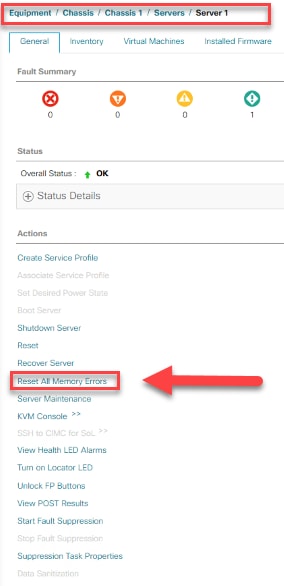
1. Navigate to Equipment > Chassis > Chassis ID > Servers > Server ID > Actions > System > Reset All Memory Errors / Reset CIMC.
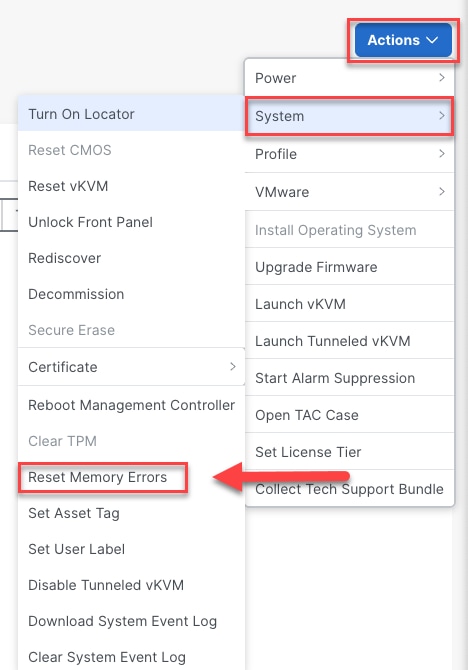

GUI Method for Intersight Managed Mode (IMM)

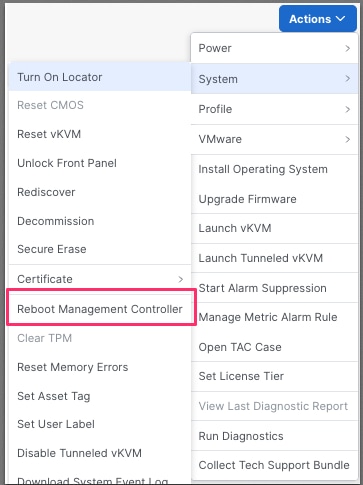
Note: These steps are also applicable to Integrated C-Series Servers.
Rack Server
Power Off the Server
The server must be physically powered off, otherwise UECC errors can persist upon reboot.
Note: DIMM SPD data is not updated as CIMC polls the DIMM SPD data only upon server power on and CIMC controller reset. If there is a problematic DIMM, the error returns upon reboot and Cisco Support can provide an RMA for the DIMM.
GUI Method
If the Server is not managed with Intersight Managed Mode (IMM), the Command Line Interface (CLI) method is required. Otherwise, the previous steps are applicable.
CLI Method
Note: The image displayed is for demonstration purposes.
1. Launch an SSH Session to the Server CIMC IP Address. Ensure the server in question is powered off prior to proceeding with the steps outlined.

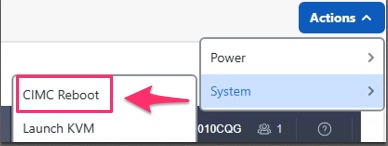
2. Once complete, verify no new errors increment within the system. After Powering on, you can reset the CIMC controller from the GUI, which causes a temporary loss of access to the CIMC.
Revision History
| Revision | Publish Date | Comments |
|---|---|---|
2.0 |
30-Sep-2026
|
Updated spelling, grammar, inserted horizontal lines to separate sections for readability, fixed CCW errors, updated alt text. |
1.0 |
10-Sep-2025
|
Initial Release |
 Feedback