Crosswork Workflow Manager 2.1 Data Sheet
Available Languages
Bias-Free Language
The documentation set for this product strives to use bias-free language. For the purposes of this documentation set, bias-free is defined as language that does not imply discrimination based on age, disability, gender, racial identity, ethnic identity, sexual orientation, socioeconomic status, and intersectionality. Exceptions may be present in the documentation due to language that is hardcoded in the user interfaces of the product software, language used based on RFP documentation, or language that is used by a referenced third-party product. Learn more about how Cisco is using Inclusive Language.
Bringing Automation Engineering and Operations closer together
Planning and applying changes in a large network has become increasingly complex. Many factors come into play. Devices vary in capability, role, and vendor. The automation process must support the customer through the entire process. The customer change management process typically requires validation of base assumptions, such as a network scan to confirm the types and compliance of deployed devices, validation of readiness for the planned changes, and archiving the status of the network before and after the changes. All these are critical to a successful network update, requiring an automation tool that can allow a customer to automate and manage the steps. The objective: automate the process and make it low risk.
Crosswork Workflow Manager (CWM) offers a highly reliable platform for executing and managing workflow activities. The ability to recover workflows for failures is core to the system.
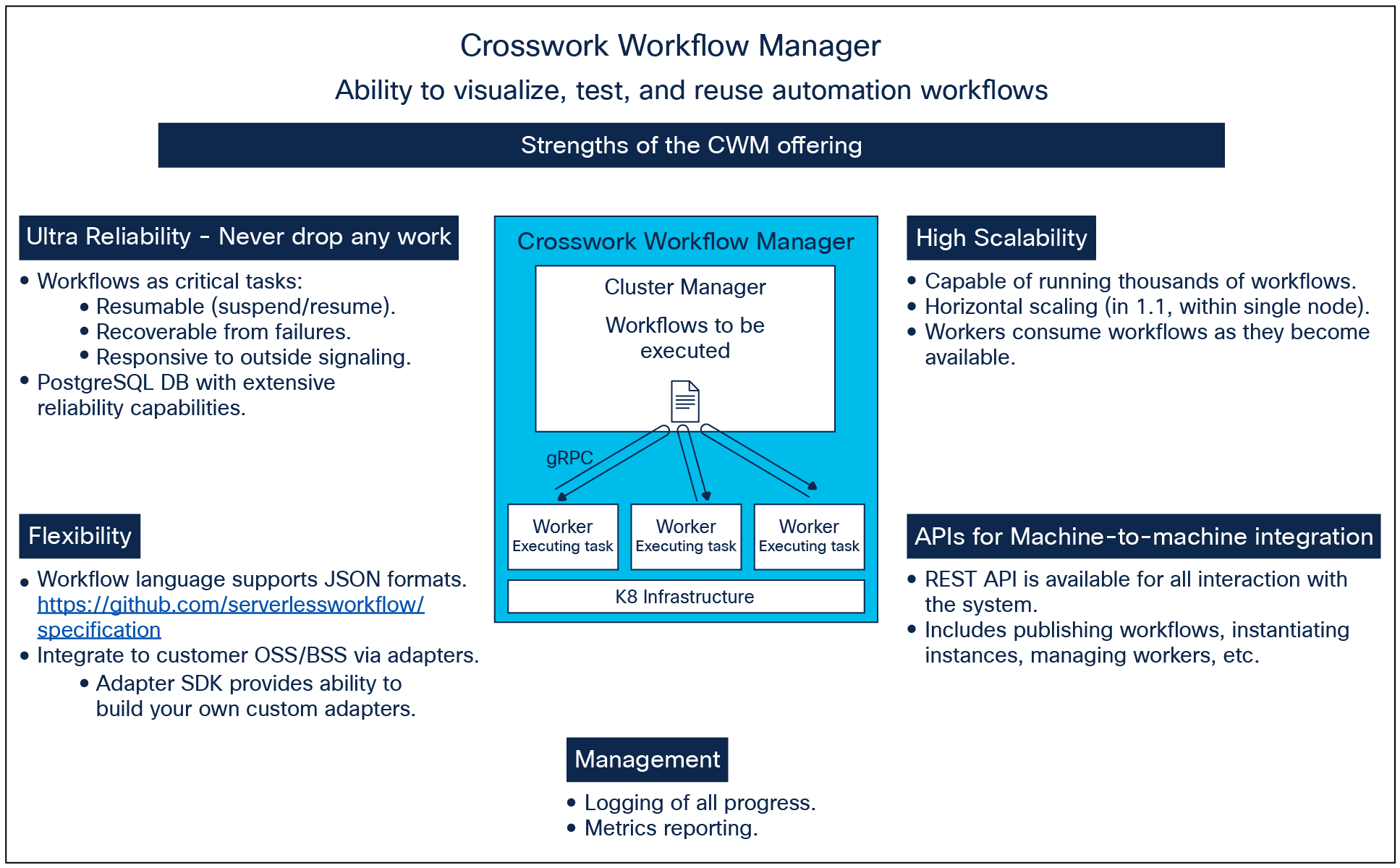
Crosswork Workflow Manager - at a glance
Crosswork Workflow Manager enables customers to build their own automation workflows, with capabilities to integrate to existing Operations Support Systems (OSS) and Business Support Systems (BSS) within their environment. These integrations are achieved through the use of adapters. Cisco® provides a set of baseline adapters. For custom integrations, Cisco provides also a Software Development Kit (SDK) to allow customers or partners to build additional adapters to fit their environment, and the CWM XDK (extended development kit) which can auto-generate adapters from Swagger definitions and NSO Yang models.
In addition to the facilities enabling customers to build custom workflows, the product offers optional pre-built usecases, providing the customer with immediate out-of-the-box automation capabilities for their network. These usecases utilize CWM workflows together with Cisco NSO for best-in-class operation. The use cases provided are: Device Onboarding (classic ZTP), Golden Configuration (for template-based bulk router configuration changes), Fleet Upgrade (for router OS upgrades), and Device Migration (for automating the swapping of routers). These are described later in this document.
Workflow Management Features and benefits
Table 1. CWM Platform features and benefits
| Feature |
Benefit |
| Workflow management platform |
Enables execution of thousands of workflows in parallel. Running and completed workflow executions can be tracked from the CWM Job Manager. |
| Graphical user interface |
The GUI provides controls for operational control of workflows, visibility to job scheduling and history, and administrative activities. |
| Workflow Navigator |
A graphical map of your workflow to visualize the logic flow and enhance the process of building workflows. The user can click to move from any area in the graphical map to its corresponding area within the workflow definition. The graphical map updates as the user changes the definition. Additional visual aids include the ability to zoom, and the ability to hide error paths when just wanting to focus on the core function of the workflow. |
| Guided Tasks |
CWM can host operator dialogs tailored to each workflow for enabling operator input, notifications, and approvals. Such dialogs can be used to guide decisions within the workflow. |
| Workflow Library |
Workflows installed by the customer are archived within the CWM Workflow Library as source code. Never lose any code. The customer can access them from there for execution. |
| Workflow Tagging |
For workflows archived within the Workflow Library, customers can label (tag) their workflows with categories meaningful to their organization, allowing for searching, filtering, and sorting using these tags. |
| Workflow Scheduling |
Workflows can be initiated upon Operator request, or by API call over the CWM REST interface. The customer can schedule workflows by calendar (date and time), as single events, or on a repeating schedule. |
| Job Tagging |
Similar to Workflow Tagging within the Workflow Library, CWM allows the operator to define tags for characterizing workflows that have been scheduled or run as jobs. Therefore, the history of workflow jobs is afforded the same searching, filtering, and sorting capabilities that are available for archived workflows were within the workflow library. |
| Swagger-enabled REST APIs for northbound integration |
The product can be controlled through REST APIs. Swagger is used to facilitate coding to those APIs. |
| Closed-loop Workflows |
CWM enables the user to build closed-loop workflows that are triggered by events distributed by an external event broker. Events can be based on Kafka, AMQP, MQTT, or HTTP endpoint. These events are matched to configured handlers (workflows) within CWM and can either signal a running workflow or can launch a new workflow. |
| Integration with Cisco Provider Connectivity Assurance (PCA) product |
CWM can receive alerts sent by the PCA product over their MQTT interface. These alerts can drive closed-loop remediation workflows as described above. |
| High availability: Geo-redundancy |
The Workflow Manager supports an active/standby configuration to allow recovery from a failure of the active system. This capability uses an arbitor VM for resolving which system should be elected as the Active system. |
| Management: Role-Based Access Control (RBAC) |
Allows the administrator to define security levels differentiating administration, workflow creation, and operation. |
| Management: Activity logging |
CWM application logging is made available within the platform. Additionally, workflows can be defined to generate their own workflow-specific log entries, therefore opening up capabilities for additionally managing the workflows themselves (see below). |
| Management: Performance metrics |
Metrics are made available within the platform. |
| Flexible deployment |
The CWM package includes a built-in infrastructure based on Kubernetes. It is deployable as a single VM. K8 multi-node cluster is not supported. The install requires either VCenter, KVM, or AWS EC2. CWM functionality is also available within CNC as embedded capability within the CNC Premier feature set. For this configuration, embedded within CNC, cluster deployment is supported. |
Table 2. Features for the workflow author
| Feature |
Benefit |
| Workflow Designer |
The Workflow Designer enables uses to build workflows graphically, offering a drawing canvas with drag and drop capabilities for defining the set of activities and logic sequence for a workflow. The Workflow Designer generates the workflow code in the background. Users can modify workflows graphically within the Designer, or by modifying the code. Both are kept in sync. |
| Form designer for Operator Dialogs |
A workflow author can use the CWM graphical design system for creating custom input and notification forms for their workflows. Hosted on the CWM system, these forms are served to the Operator during execution of the workflow job without the need for the customer to host their own external messaging system. |
| Workflow authoring language compliant with Serverless Workflow specification |
Customers can build workflows to automate their operational needs. Serverless Workflow specification is used as the domain-specific language for writing such workflows. All encodings are based on JSON. Serverless Workflow Specification is also supported by AI tools, enabling the user to generate workflow code which can be used with CWM. This capability has been demonstrated using Github Copilot as an external tool, and then importing the generated code into CWM. |
| Child Workflows |
Workflows can be structured to reference sub-workflows. In doing so, the workflow author can reuse pre-defined and pre-tested workflows when creating new larger workflows (parent workflows). |
| Adapters |
Adapters are used within a workflow for integrating to other systems. |
| Adapter development tools
●
(SDK and XDK)
|
Customers can build adapters to enable integration to their existing OSS systems. A Software Development Kit (SDK) is provided for customers to use for this. Adapters are written in Golang. The Extended Software Development Kit (XDK) is provided for customers wanting to use Swagger framework from integration targets to auto-generate adapter code. The XDK also provides the ability to read Yang models for NSO Services and Actions for auto-generating custom adapters for NSO. |
| Management of Secrets |
The workflow author does not need to include passwords or other sensitive login information within their workflows. CWM provides a Secrets manager so that they are defined externally from the workflow and referenced indirectly. |
| Event Handling |
CWM supports event handling in the form of Kafka events, AMQP, or HTTP. CWM workflows can be defined to act as Consumers and/or Producers of events. For event consumers, the event may signal a running workflow job or may be used to initiate a workflow job. |
| Compensation support |
CWM allows a workflow author to include actions to be executed at various points within their workflows to reverse segments of work which have already completed, for example when a further step encounters an error. Although commonly referred to as ‘rollbacks’, Compensations offer greater flexibility in that the compensation may take the form of other actions rather than a strict rollback and may differ depending on the point within the workflow where the condition was detected. |
| Input Schema Validation |
The input data for a job is validated against its input schema definition in the workflow definition. The job will fail with an error for invalid input data. |
| Management: Generating log entries from within a workflow |
Workflows can be defined to generate their own workflow-specific log entries, therefore opening up capabilities for additionally managing the workflows themselves. |
Pre-built adapters and Generating new adapters
Table 3. Cisco includes the following pre-built adapters with the CWM product
| Adapter |
Benefit |
| NSO (Cisco Network Services Orchestrator) |
Enable customers who are also licensing NSO to have their workflows leverage the capabilities of NSO for orchestrating changes to network devices |
| REST (Representational State Transfer) |
For use in integrating workflows with any outside system that supports REST APIs |
| PostgreSQL |
Workflows can be integrated with external PostgreSQL databases for reading or writing of persistent data as needed for each workflow use case. |
| MySQL |
Workflows can be integrated with external MySQL databases for reading or writing of persistent data as needed for each workflow use case. |
| SMTP (Simple Mail Transport Protocol) |
Enabling customers to send notifications in the form of emails from workflows |
| CLI adapter with SSH (Secure Shell) and TELNET interfaces |
Enabling customers to send command line sequences to devices or other applications from workflows. |
| Extended SDK (XDK) |
Advanced function for auto-generation of Adapters. With the XDK the customer can quickly and easily generate Adapter protos for specific applications or activities. The XDK enables building of the following: REST, based on Swagger definitions published for a wide range of applications
● Example: Netbox
● Example: Crosswork Network Automation
● Example: ServiceNow
NSO Services, read from NSO Yang models NSO Actions, read from NSO Yang models |
Interoperability and compliance
The following table lists minimum interoperability levels.
Table 4. Interoperability
| Product family |
Min Versions supported |
Comment |
| NSO (Cisco Network Services Orchestrator) |
V6.0 |
Using NSO adapter provided by Cisco. Note: Pre-built usecases within CWM which use NSO require NSO 6.4.1 minimum. |
| REST |
NA |
Using REST adapter provided by Cisco |
Table 5. Compliance
| Specification |
Versions supported |
Compliance caveats |
| Serverless Workflow Specification |
v0.9 |
Partially compliant. Detailed compliance statement is available upon request. |
| Swagger |
v2.0 |
|
| Protocol Buffers (Protobuf) |
v3 |
Partially compliant. Detailed compliance statement is available upon request. |
| Kafka |
3.3.2 |
CWM can connect with outside Kafka brokers for the purpose of allowing workflows to act as providers or consumers of provisioned within CWM’s Event System. Event structure is compliant with Cloud Events release 1.0.2. |
Crosswork Workflow Manager pre-built usecases overview
CWM offers a set of pre-built usecases enabling an out-of-the-box experience for using CWM for automating high-value device lifecycle activities.
Table 6. Pre-built usecases
| Feature |
Benefit |
| Fleet Upgrade usecase |
Fleet Upgrade provides the capability to upgrade Router OS on a selected set of routers. Functions include: CCO Browsing and Download: Allows users to download SMUs from Cisco.com directly to the local repository Software conformance checks: Users can define software version policies for specific device types. They can then schedule or run checks against these policies to determine if a device is conformant or non-conformant. Local image repository: Users can upload images locally or download SMUs from cisco.com GISO Builder: Ability to build Golden ISO |
| Golden Configuration templates |
Users can create, clone, and delete golden config templates. They can then schedule or run ad hoc checks against the devices deployed in the field. Should a discrepancy between the golden config template and the device configuration exist, users can define remediation options to be performed upon discovery |
| Device Onboarding (Classic ZTP) |
Users can onboard devices which support the classic ZTP protocol. Whitelist: Ability to push whitelist maps to NSO for ZTP, preventing bad actors from onboarding themselves into the network. |
| Device Migration |
Usecase allowing users to specify device to be added, device to be removed, and adjacent devices to be updated for the new routing. Once scheduled, the usecase drives the configuration changes across the selected set of devices. |
| MOP Builder |
The MOP Builder function is available for all the above usecases. Users can create pre and post checks by choosing pre-created actions and assembling them into custom MOPs. The user can name and organize their desired MOPs, assign them to specific vendors, product series, and application groups. They can also apply tags to the MOPs for organization and search purposes. |
Table 7. Pre-built Device Support for Cisco and multi-vendor
| Support for XR Devices |
Fleet Upgrade: ASR9000 series, NCS540, 8000 series Golden Configuration: NCS5000 series, NCS540 Device Onboarding: NCS5000 series |
| Support for XE Devices |
Fleet Upgrade: CAT 8000 series, CAT3000 series, CAT 9000 series Golden Configuration: C8000v Device Onboarding: C8000v |
| Support for Juniper Devices |
Fleet Upgrade: MX960 Golden Configuration: EX4550 |
| Support for Arista devices |
Golden Configuration: DCS-7170-32CD Device Onboarding: DCS-7170-32CD |
CWM licenses under product ID SPAUTO-CWM are sold as a single Right to Use (or “RTU”) license per server on which CWM is deployed. Licensing may include also Right to Manage (or “RTM”) based on numbers of devices to be managed.
Crosswork Workflow Manager licenses are term-based. The duration of the term is selectable from a range of 1 to 5 years.
The customer can choose from two feature tiers:
1. Crosswork Workflow Manager Essentials Licensing provides entitlement for
◦ Workflow Engine with operational controls for managing workflows.
◦ Ability to write custom workflows with support for JSON is included.
◦ Pre-packaged adapters are included.
2. Crosswork Workflow Manager Advantage Licensing entitles use of the CWM pre-built usecases for automating device onboarding, device migration, fleet upgrade, and configuration updates.
a. Advantage tier licensing also provides additional entitlement for the CWM Adapter Software Development Kit, enabling customer to build their own custom adapters for integration specific to their needs. The Advantage license tier includes all the functionality of the Essentials tier as well.
Licenses are available also for Geo-redundancy and for Lab use.
All licensing is subject to management through Cisco Smart Licensing.
Monitoring your CWM deployment
The system provides built-in capabilities and dashboard for monitoring Crosswork Workflow Manager (CWM).
Cisco offers Solution Support for Service Providers for Crosswork Workflow Manager, based on the tier of services purchased, for the term of that license. This support covers the CWM application and the included interoperability adapters referenced earlier in this document. This support is provided through Cisco TAC. Except as may be provided in Cisco’s Documentation, sample workflows or other code are provided for convenience and informational purposes only, with no support of any kind.
For support on other components, such as, but not limited to, Linux, Hypervisor, or hardware, the customer must obtain entitlement and support licenses from the respective vendors.
The Software is covered by Cisco’s 90-Day Limited Software Warranty.
Cisco Business Critical Services for the Crosswork Workflow Manager
Optionally, a customer may purchase a Cisco CX Business Critical Services contract offering comprehensive services to help customers deploy Crosswork Workflow Manager, implement and customize automation workflows, integrate with existing OSS and BSS systems, and continuously optimize the solution, all to realize and accelerate the customer’s business outcomes.
As part of CX Business Critical Services CX will deliver lifecycle services leveraging pre-built workflow packages and integrations to help customers achieve faster go-to-market and address commonly encountered business needs.
For more information, please visit https://www.cisco.com/go/services.
For more information about Crosswork Workflow Manager, please visit www.cisco.com/go/cwm.
| New or revised topic |
Described in |
Date |
| Expanded licensing options |
September 14, 2023 |
|
| CWM 1.1 features added |
Throughout |
January 28, 2024 |
| CWM 1.2 features added |
Throughout |
September 30, 2024 |
| CWM 2.0 features added |
Throughout |
May 15, 2025 |
| CWM 2.1 features added |
Throughout |
September 30, 2025 |