Call Progress Analysis Overview
Available Languages
Contents
Introduction
This document discusses Call Progress Analysis (CPA), the new digital signal processor (DSP) algorithm that analyzes the time-division multiplexing (TDM) voice stream to look for special information tones (SITs), fax/modem tones, human speech, and answering machines.
Prerequisites
Requirements
There are no specific requirements for this document.
Components Used
This document is not restricted to specific software and hardware versions.
The information in this document was created from the devices in a specific lab environment. All of the devices used in this document started with a cleared (default) configuration. If your network is live, make sure that you understand the potential impact of any command.
Conventions
Refer to Cisco Technical Tips Conventions for more information on document conventions.
CPA Software Overview
Call Progress Analysis (CPA) is the new DSP algorithm that analyzes the TDM voice stream to look for SITs, fax/modem tones, human speech, and answering machines. CPA also passes information to Cisco IOS®.
There is a new SIP application type, x-cisco-cpa, for callers to request a CPA operation and for the gateway to relay information to the caller. CPA is supported only on the TDM gateway where one of the call legs is terminated.
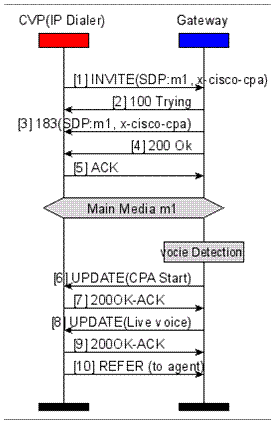
CPA is initiated when SIP INVITE is sent with x-cisco-cpa application/content body. While the call is in progress, DSP analyzes the incoming voice stream. DSP identifies the type of voice stream based on statistical voice patterns or specific tone frequencies. The gateway sends SIP UPDATE with x-cisco-cpa, which contains the CPA result. Based on this CPA result, the caller decides the next step, such as to transfer the call or terminate the call. CPA does not interfere with the existing SIP protocol.
Typical CPA call flow
This diagram depicts the typical CPA call flow.
New x-cisco-cpa application body
These are the application bodies for the new x-cisco-cpa:
-
Within SIP INVITE—Dialer > Cisco IOS: Tells Cisco IOS to activate the CPA algorithm for this call.
-
Within SIP 18x—Cisco IOS > Dialer: Tells the Dialer whether or not CPA is enabled for this call.
-
Within SIP UPDATE—Cisco IOS > Dialer: Tells the Dialer the CPA result.
New x-cisco-cpa application body in SIP INVITE
--uniqueBoundary
Content-Type: application/x-cisco-cpa
Content-Disposition: signal;handling=optional
Events=FT,Asm,AsmT,Sit
CPAMinSilencePeriod=<int16>
CPAAnalysisPeriod=<int16>
CPAMaxTimeAnalysis=<int16>
CPAMinValidSpeechTime=<int16>
CPAMaxTermToneAnalysis=<int16>
--uniqueBoundary--
New x-cisco-cpa application body in SIP 18x
--uniqueBoundary
Content-Type: application/x-cisco-cpa
Content-Disposition: signal;handling=optional
event=enabled
--uniqueBoundary--
New x-cisco-cpa application body in SIP UPDATE
Content-Disposition: signal;handling=optional
Content-Type: application/x-cisco-cpa
CSeq: 102 UPDATE
Max-Forwards: 70

event=detected
status=FT
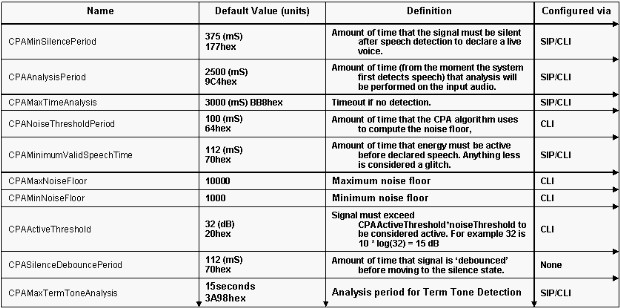
CPA parameter set
This table shows the CPA parameters, their default value, the definition of each parameter, and the method by which each parameter is configured.
CPA CLI
All the CPA related CLI commands need to be configured under the voice service voip mode. In order to enable CPA support in the global gateway configutaion, enter this CLI command:
[default | no] cpa
These are the commands used to configure various CPA parameters through the CLI:
Note: Values in x-cisco-cpa body overwrite CLI values.
cpa timing live-person
	 	cpa timing timeout
		cpa timing term-tone
		cpa timing silent
		cpa timing valid-speech
		cpa timing noise-period
		cpa threshold active-signal
		cpa threshold noise-level min
		cpa threshold noise-level max
This is an example for the CPA configuration through the CLI:
#
!
voice service voip
 cpa
 cpa timing silent 375
 cpa timing live-person 2500
 cpa timing timeout 3000
 cpa timing noise-period 100
 cpa timing valid-speech 112
 cpa timing term-tone 15000
 cpa threshold noise-level max -50dBm0
 cpa threshold noise-level min -60dBm0
 cpa threshold active-signal 15db
!
In order to debug the CPA configuration, issue these commands in order to capture useful information:
Additional debug information can be collected with the following commands and the PCM capture:
 Feedback