Understand and Use Debug Commands to Troubleshoot IPsec

Available Languages
Download Options
Bias-Free Language
The documentation set for this product strives to use bias-free language. For the purposes of this documentation set, bias-free is defined as language that does not imply discrimination based on age, disability, gender, racial identity, ethnic identity, sexual orientation, socioeconomic status, and intersectionality. Exceptions may be present in the documentation due to language that is hardcoded in the user interfaces of the product software, language used based on RFP documentation, or language that is used by a referenced third-party product. Learn more about how Cisco is using Inclusive Language.
Contents
Introduction
This document describes commondebugcommands used to troubleshoot IPsec issues on both the Cisco IOS®Software and PIX/ASA.
Prerequisites
Requirements
This document assumes you have configured IPsec. Refer to IPSec Negotiation/IKE Protocolsfor more details.
Components Used
The information in this document is based on these software and hardware versions:
-
Cisco IOS® Software
-
IPsec feature set.
-
56i—Indicates single
Data Encryption Standard (DES)feature (on Cisco IOS® Software Release 11.2 and later). -
k2—Indicates triple DES feature (on Cisco IOS® Software Release 12.0 and later). Triple DES is available on the Cisco 2600 series and later.
-
-
PIX—V5.0 and later, which requires a single or triple DES license key in order to activate.
The information in this document was created from the devices in a specific lab environment. All of the devices used in this document started with a cleared (default) configuration. If your network is live, ensure that you understand the potential impact of any command.
Conventions
Refer to Cisco Technical Tips Conventions for more information on document conventions.
Background Information
Refer to Most Common L2L and Remote Access IPsec VPN Troubleshooting Solutions for information on the most common solutions to IPsec VPN problems.
It contains a checklist of common procedures that you can try before you begin to troubleshoot a connection and call Cisco Technical Support.
Cisco IOS® Software Debugs
The topics in this section describe the Cisco IOS® Software debug commands. Refer to IPSec Negotiation/IKE Protocolsfor more details.
show crypto isakmp sa
This command shows theInternet Security Association Management Protocol (ISAKMP) Security Associations (SAs)built between peers.
dst    	  src        state     conn-id     slot
10.1.0.2  10.1.0.1   QM_IDLE    1           0
show crypto ipsec sa
This command shows IPsec SAs built between peers. The encrypted tunnel is built between 10.1.0.1 and 10.1.0.2 for traffic that goes between networks 10.1.0.0 and 10.1.1.0.
You can see the two Encapsulating Security Payload (ESP) SAs built inbound and outbound. Authentication Header (AH) is not used since there are no AH SAs.
This output shows an example of theshow crypto ipsec sacommand.
  interface: FastEthernet0
    Crypto map tag: test, local addr. 10.1.0.1
   local  ident (addr/mask/prot/port): (10.1.0.0/255.255.255.0/0/0)
   remote ident (addr/mask/prot/port): (10.1.1.0/255.255.255.0/0/0)
   current_peer: 10.1.0.2
     PERMIT, flags={origin_is_acl,}
    #pkts encaps: 7767918, #pkts encrypt: 7767918, #pkts digest 7767918
    #pkts decaps: 7760382, #pkts decrypt: 7760382, #pkts verify 7760382
    #pkts compressed: 0, #pkts decompressed: 0
    #pkts not compressed: 0, #pkts compr. failed: 0,
    #pkts decompress failed: 0, #send errors 1, #recv errors 0
     local crypto endpt.: 10.1.0.1, remote crypto endpt.: 10.1.0.2
     path mtu 1500, media mtu 1500
     current outbound spi: 3D3
     inbound esp sas:
      spi: 0x136A010F(325714191)
        transform: esp-3des esp-md5-hmac ,
        in use settings ={Tunnel, }
        slot: 0, conn id: 3442, flow_id: 1443, crypto map: test
        sa timing: remaining key lifetime (k/sec): (4608000/52)
        IV size: 8 bytes
        replay detection support: Y
     inbound ah sas:
     inbound pcp sas:
inbound pcp sas:
outbound esp sas:
   spi: 0x3D3(979)
    transform: esp-3des esp-md5-hmac ,
    in use settings ={Tunnel, }
    slot: 0, conn id: 3443, flow_id: 1444, crypto map: test
    sa timing: remaining key lifetime (k/sec): (4608000/52)
    IV size: 8 bytes
    replay detection support: Y
outbound ah sas:
outbound pcp sas:
show crypto engine connection active
This command shows each phase 2 SA built and the amount of traffic sent.
Because phase 2 Security Associations (SAs)are unidirectional, each SA shows traffic in only one direction (encryptions are outbound, decryptions are inbound).
debug crypto isakmp
This output shows an example of the debug crypto isakmp command.
processing SA payload. message ID = 0
Checking ISAKMP transform against priority 1 policy
	encryption DES-CBC
      	hash SHA
	default group 2
	auth pre-share
	life type in seconds
	life duration (basic) of 240
atts are acceptable. Next payload is 0
processing KE payload. message ID = 0
processing NONCE payload. message ID = 0
processing ID payload. message ID = 0
SKEYID state generated
processing HASH payload. message ID = 0
SA has been authenticated
processing SA payload. message ID = 800032287
debug crypto ipsec
This command shows the source and destination of IPsec tunnel endpoints.Src_proxy and dest_proxyare the client subnets.
Twosa createdmessages appear with one in each direction. (Four messages appear if you perform ESP and AH.)
This output shows an example of thedebug crypto ipseccommand.
Checking IPSec proposal 1transform 1, ESP_DES
attributes in transform:
	encaps is 1
	SA life type in seconds
	SA life duration (basic) of 3600
	SA life type in kilobytes
	SA life duration (VPI) of 0x0 0x46 0x50 0x0
HMAC algorithm is SHA
atts are acceptable.
Invalid attribute combinations between peers will show up as "atts
  not acceptable".
IPSEC(validate_proposal_request): proposal part #2,
(key eng. msg.) dest= 10.1.0.2, src=10.1.0.1,
      dest_proxy= 10.1.1.0/0.0.0.0/0/0,
      src_proxy= 10.1.0.0/0.0.0.16/0/0,
      protocol= ESP, transform= esp-des esp-sha-hmac
      lifedur= 0s and 0kb,
      spi= 0x0(0), conn_id= 0, keysize= 0, flags= 0x4
IPSEC(key_engine): got a queue event...
IPSEC(spi_response): getting spi 203563166 for SA
      from 10.1.0.2 to 10.1.0.1 for prot 2
IPSEC(spi_response): getting spi 194838793 for SA
      from 10.1.0.2 to 10.1.0.1 for prot 3
IPSEC(key_engine): got a queue event...
IPSEC(initialize_sas): ,
  (key eng. msg.) dest= 10.1.0.2, src=10.1.0.1,
      dest_proxy= 10.1.1.0/255.255.255.0/0/0,
      src_proxy= 10.1.0.0/255.255.255.0/0/0,
      protocol= ESP, transform= esp-des esp-sha-hmac
      lifedur= 3600s and 4608000kb,
      spi= 0xC22209E(203563166), conn_id= 3,
              keysize=0, flags= 0x4
IPSEC(initialize_sas): ,
  (key eng. msg.) src=10.1.0.2, dest= 10.1.0.1,
      src_proxy= 10.1.1.0/255.255.255.0/0/0,
      dest_proxy= 10.1.0.0/255.255.255.0/0/0,
      protocol= ESP, transform= esp-des esp-sha-hmac
      lifedur= 3600s and 4608000kb,
      spi= 0xDED0AB4(233638580), conn_id= 6,
              keysize= 0, flags= 0x4
IPSEC(create_sa): sa created,
      (sa) sa_dest= 10.1.0.2, sa_prot= 50,
      sa_spi= 0xB9D0109(194838793),
      sa_trans= esp-des esp-sha-hmac , sa_conn_id= 5
 IPSEC(create_sa): sa created,
      (sa) sa_dest= 10.1.0.2, sa_prot= 50,
      sa_spi= 0xDED0AB4(233638580),
      sa_trans= esp-des esp-sha-hmac , sa_conn_id= 6
Sample Error Messages
These sample error messages were generated from the debug commands listed here:
-
debug crypto ipsec -
debug crypto isakmp -
debug crypt engine
Replay Check Failed
This output shows an example of the"Replay Check Failed"error:
%CRYPTO-4-PKT_REPLAY_ERR: decrypt: replay check failed connection id=#.
This error is a result of a reorder in transmission medium (especially if parallel paths exist), or unequal paths of packet processed inside Cisco IOS® for large versus small packets plus under load.
Change the transform-set to reflect this. The reply check is only seen when transform-set esp-md5-hmac is enabled. In order to surpress this error message, disable esp-md5-hmac and do encryption only.
Refer to Cisco bug IDCSCdp19680 (registered customers only) .
QM FSM Error
The IPsec L2L VPN tunnel does not come up on the PIX firewall or ASA, and the QM FSM error message appears.
One possible reason is the proxy identities, such as unusual traffic,Access Control List (ACL),or crypto ACL, do not match on both ends.
Check the configuration on both the devices, and make sure that the crypto ACLs match.
Another possible reason is a mismatch of the transform set parameters. Verify that at both ends, VPN gateways use the same transform set with the exact same parameters.
Invalid Local Address
This output shows an example of the error message:
IPSEC(validate_proposal): invalid local address 10.2.0.2
ISAKMP (0:3): atts not acceptable. Next payload is 0
ISAKMP (0:3): SA not acceptable!
This error message is attributed to one of these two common problems:
-
The
crypto map map-name local-address interface-idcommand causes the router to use an incorrect address as the identity because it forces the router to use a specified address. -
Crypto mapis applied to the wrong interface or is not applied at all. Check the configuration in order to ensure that crypto map is applied to the correct interface.
IKE Message from X.X.X.X Failed its Sanity Check or is Malformed
This debug error appears if the pre-shared keys on the peers do not match. In order to fix this issue, check the pre-shared keys on both sides.
1d00H:%CRPTO-4-IKMP_BAD_MESSAGE: IKE message from 198.51.100.1 failed its
 sanity check or is malformed
Process of Main Mode Failed with Peer
This is an example of theMain Modeerror message. The failure of main mode suggests that the phase 1 policy does not match on both sides.
1d00h: ISAKMP (0:1): atts are not acceptable. Next payload is 0
1d00h: ISAKMP (0:1); no offers accepted!
1d00h: ISAKMP (0:1): SA not acceptable!
1d00h: %CRYPTO-6-IKMP_MODE_FAILURE: Processing of Main Mode failed with
peer at 198.51.100.1
A show crypto isakmp sa command shows the ISAKMP SA to be inMM_NO_STATE. This also means that main mode has failed.
dst    	  src        state     		conn-id     	slot
10.1.1.2  10.1.1.1   MM_NO_STATE    	1           0
Verify that the phase 1 policy is on both peers, and ensure that all the attributes match.
Encryption DES or 3DES
Hash MD5 or SHA
Diffie-Hellman Group 1 or 2
Authentication {rsa-sig | rsa-encr | pre-share
Proxy Identities Not Supported
This message appears in debugs if the access list for IPsec traffic does not match.
1d00h: IPSec(validate_transform_proposal): proxy identities not supported
1d00h: ISAKMP: IPSec policy invalidated proposal
1d00h: ISAKMP (0:2): SA not acceptable!
The access lists on each peer need to mirror each other (all entries need to be reversible). This example illustrates this point.
Peer A
access-list 150 permit ip 172.21.113.0 0.0.0.255 172.21.114.0 0.0.0.255
access-list 150 permit ip host 10.2.0.8 host 172.21.114.123
Peer B
access-list 150 permit ip 172.21.114.0 0.0.0.255 172.21.113.0 0.0.0.255
access-list 150 permit ip host 172.21.114.123 host 10.2.0.8
Transform Proposal Not Supported
This message appears if the phase 2 (IPsec) does not match on both sides. This occurs most commonly if there is a mismatch or an incompatibility in the transform set.
1d00h: IPSec (validate_proposal): transform proposal
   (port 3, trans 2, hmac_alg 2) not supported
1d00h: ISAKMP (0:2) : atts not acceptable. Next payload is 0
1d00h: ISAKMP (0:2) SA not acceptable
Verify that the transform set matches on both sides:
crypto ipsec transform-set transform-set-name transform1
[transform2 [transform3]]
? ah-md5-hmac
? ah-sha-hmac
? esp-des
? esp-des and esp-md5-hmac
? esp-des and esp-sha-hmac
? esp-3des and esp-md5-hmac
? esp-3des and esp-sha-hmac
? comp-lzs
No Cert and No Keys with Remote Peer
This message indicates that the peer address configured on the router is wrong or has changed. Verify that the peer address is correct and that the address can be reached.
1d00h: ISAKMP: No cert, and no keys (public or pre-shared) with
remote peer 198.51.100.2
Peer Address X.X.X.X Not Found
This error message appears normally with theVPN 3000 Concentrator error message"Message: No proposal chosen(14)". This is because the connections are host-to-host.
The router configuration has the IPsec proposals in an order where the proposal chosen for the router matches the access list, but not the peer.
The access list has a larger network that includes the host that intersects traffic. In order to correct this, make the router proposal for this concentrator-to-router connection first in line.
This allows it to match the specific host first.
20:44:44: IPSEC(validate_proposal_request): proposal part #1,
  (key eng. msg.) dest= 192.0.2.15, src=198.51.100.6,
    dest_proxy= 10.0.0.76/255.255.255.255/0/0 (type=1),
    src_proxy= 198.51.100.23/255.255.255.255/0/0 (type=1),
    protocol= ESP, transform= esp-3des esp-md5-hmac ,
    lifedur= 0s and 0kb,
    spi= 0x0(0), conn_id= 0, keysize= 0, flags= 0x4
20:44:44: IPSEC(validate_transform_proposal):
   peer address 198.51.100.6 not found
IPsec Packet has Invalid SPI
This output is an example of the error message:
%PIX|ASA-4-402101: decaps: recd IPSEC packet has
invalid spi for destaddr=dest_address, prot=protocol, spi=number
The received IPsec packet specifies a Security Parameters Index (SPI) that does not exist in the Security Associations Database (SADB). This could be a temporary condition due to:
-
Slight differences in the aging of
Security Sssociations (SAs)between the IPsec peers. -
The local SAs have been cleared.
-
Incorrect packets sent by the IPsec peer.
This is possibly an attack.
Recommended Action:
The peer possibly does not acknowledge that the local SAs have been cleared. If a new connection is established from the local router, the two peers can then reestablish successfully. Otherwise, if the problem occurs for more than a brief period, either attempt to establish a new connection or contact the administrator of that peer.
PSEC(initialize_sas): Invalid Proxy IDs
The error "21:57:57: IPSEC(initialize_sas): invalid proxy IDs" indicates that the received proxy identity does not match the configured proxy identity as per the access list.
In order to ensure that they both match, check the output from the debug command.
In the debug command output of the proposal request, the access-list 103 permit ip 10.1.1.0 0.0.0.255 10.1.0.0 0.0.0.255 does not match.
The access list is network-specific on one end and host-specific on the other.
21:57:57: IPSEC(validate_proposal_request): proposal part #1,
  (key eng. msg.) dest= 192.0.2.1, src=192.0.2.2,
    dest_proxy= 10.1.1.1/255.255.255.0/0/0 (type=4),
    src_proxy= 10.2.0.1/255.255.255.0/0/0 (type=4)
Reserved Not Zero on Payload 5
This means that the ISAKMP keys do not match. Rekey/reset in order to ensure accuracy.
Hash Algorithm Offered does not Match Policy
If the configured ISAKMP policies do not match the proposed policy by the remote peer, the router tries the default policy of 65535.
If that does not match either, it fails ISAKMP negotiation.
A user receives either the"Hash algorithm offered does not match policy!"or"Encryption algorithm offered does not match policy!"error message on the routers.
=RouterA=
3d01h: ISAKMP (0:1): processing SA payload. message ID = 0
3d01h: ISAKMP (0:1): found peer pre-shared key matched 203.0.113.22
ISAKMP (0:1): Checking ISAKMP transform 1 against priority 1 policy
ISAKMP:      encryption 3DES-CBC
ISAKMP:      hash MD5
ISAKMP:      default group 1
ISAKMP:      auth pre-share
ISAKMP:      life type in seconds
ISAKMP:      life duration (VPI) of  0x0 0x1 0x51 0x80
ISAKMP (0:1): Hash algorithm offered does not match policy!
ISAKMP (0:1): atts are not acceptable. Next payload is 0
=RouterB=
ISAKMP (0:1): Checking ISAKMP transform 1 against priority 65535 policy
ISAKMP:      encryption 3DES-CBC
ISAKMP:      hash MD5
ISAKMP:      default group 1
ISAKMP:      auth pre-share
ISAKMP:      life type in seconds
ISAKMP:      life duration (VPI) of  0x0 0x1 0x51 0x80
ISAKMP (0:1): Encryption algorithm offered does not match policy!
ISAKMP (0:1): atts are not acceptable. Next payload is 0
ISAKMP (0:1): no offers accepted!
ISAKMP (0:1): phase 1 SA not acceptable!
HMAC Verification Failed
This error message is reported when there is a failure in the verification of theHash Message Authentication Codeon the IPsec packet. This usually happens when the packet is corrupted in any way.
Sep 22 11:02:39 203.0.113.16 2435:
Sep 22 11:02:39: %MOTCR-1-ERROR:motcr_crypto_callback() motcr return failure
Sep 22 11:02:39 203.0.113.16 2436:
Sep 22 11:02:39: %MOTCR-1-PKTENGRET_ERROR: MOTCR PktEng Return Value = 0x20000,
                 PktEngReturn_MACMiscompare
If you occasionally encounter this error message, you can ignore it. However, if this becomes more frequent, then you need to investigate the source of the corruption of the packet. This can be due to a defect in the crypto accelerator.
Remote Peer Not Responding
This error message is encountered when there is a transform set mismatch. Ensure that the matched transform sets are configured on both peers.
All IPSec SA Proposals Found Unacceptable
This error message occurs when the Phase 2 IPSec parameters are mismatched between the local and remote sites.
In order to resolve this issue, specify the same parameters in the transform set so that they match and successful VPN establishes.
Packet Encryption/Decryption Error
This output is an example of the error message:
HW_VPN-1-HPRXERR: Virtual Private Network (VPN) Module0/2: Packet Encryption/Decryption
error, status=4615
This error message is possibly due to one of these reasons:
-
Fragmentation — Fragmented crypto packets are process switched, which forces the fast-switched packets to be sent to the VPN card ahead of the process-switched packets.
If enough fast-switched packets are processed ahead of the process-switched packets, the ESP or AH sequence number for the process-switched packet gets stale, and when the packet arrives at the VPN card, its sequence number is outside of the replay window.
This causes either the AH or ESP sequence number errors (4615 and 4612, respectively), dependent on which encapsulation you use.
-
Stale cache entries — Another instance in which this could possibly happen is when a fast-switch cache entry gets stale and the first packet with a cache miss gets process switched.
Workarounds
-
Turn off any type of authentication on the 3DES transform set, and use ESP-DES/3DES. This effectively disables authentication/anti-replay protection, which (in turn) prevents packet drop errors related to unordered (mixed) IPsec traffic
%HW_VPN-1-HPRXERR: Hardware VPN0/2: Packet Encryption/Decryption error, status=4615. -
One workaround that applies to the reason mentioned here is to set the
Maximum Transmission Unit (MTU)size of inbound streams to less than 1400 bytes. Enter this command in order to set the maximum transmission unit (MTU) size of inbound streams to less than 1400 bytes:ip tcp adjust-mss 1300
-
Disable the AIM card.
-
Turn off fast/CEF switching on the router interfaces. In order to remove fast switching, use this command in interface configuration mode:
no ip route-cache
Packets Receive Error Due to ESP Sequence Fail
Here is an example of the error message:
%C1700_EM-1-ERROR: packet-rx error: ESP sequence fail
This error message usually indicates one of these possible conditions:
-
The IPsec encrypted packets are forwarded out of order by the encrypting router because of a misconfigured QoS mechanism.
-
The IPsec packets received by the decrypting router are out of order due to a packet reorder at an intermediate device.
-
The received IPsec packet is fragmented and requires reassembly before authentication verification and decryption.
Workaround
-
Disable QoS for the IPsec traffic on the encrypting or intermediate routers.
-
Enable IPsec pre-fragmentation on the encrypting router.
Router(config-if)#crypto ipsec fragmentation before-encryption
-
Set the MTU value to a size that does not have to be fragmented.
Router(config)#interface type [slot_#/]port_#
Router(config-if)#ip mtu MTU_size_in_bytes
-
Upgrade the Cisco IOS® image to the latest available stable image in that train.
If the MTU size is changed on any router, all tunnels terminated on that interface are to be torn down.
Plan to complete this workaround during a scheduled down-time.
Error Trying to Establish VPN Tunnel on 7600 Series Router
This error is received when you try to establish a VPN tunnel on 7600 series routers:
crypto_engine_select_crypto_engine: can't handle any more
This error occurs because software encryption is not supported on 7600 series routers. 7600 series routers do not support IPsec tunnel termination without IPsec SPA hardware. VPN is supported only with an IPSEC-SPA card in 7600 routers.
PIX Debugs
show crypto isakmp sa
This command shows the ISAKMP SA built between peers.
dst    	  src        state     conn-id     slot
10.1.0.2  10.1.0.1   QM_IDLE    1           0
In theshow crypto isakmp sa output, the state must always be QM_IDLE. If the state is MM_KEY_EXCH, it means either the configured pre-shared key is not correct or the peer IP addresses are different.
PIX(config)#show crypto isakmp sa
Total     : 2
Embryonic : 1
        dst               src        state     pending     created
 192.168.254.250   10.177.243.187    MM_KEY_EXCH   0           0
You can rectify this when you configure the correct IP address or pre-shared key.
show crypto ipsec sa
This command shows IPsec SAs built between peers. An encrypted tunnel is built between 10.1.0.1 and 10.1.0.2 for traffic that goes between networks 10.1.0.0 and 10.1.1.0.
You can see the two ESP SAs built inbound and outbound. AH is not used since there are no AH SAs.
An example of theshow crypto ipsec sacommand is shown in this output.
interface: outside
    Crypto map tag: vpn, local addr. 10.1.0.1
   local  ident (addr/mask/prot/port): (10.1.0.0/255.255.255.0/0/0)
   remote ident (addr/mask/prot/port): (10.1.0.2/255.255.255.255/0/0)
   current_peer: 10.2.1.1
   dynamic allocated peer ip: 10.1.0.2
     PERMIT, flags={}
    #pkts encaps: 345, #pkts encrypt: 345, #pkts digest 0
    #pkts decaps: 366, #pkts decrypt: 366, #pkts verify 0
    #pkts compressed: 0, #pkts decompressed: 0
    #pkts not compressed: 0, #pkts compr. failed: 0,
    #pkts decompress failed: 0, #send errors 0, #recv errors 0
     local crypto endpt.: 10.1.0.1, remote crypto endpt.: 10.1.0.2
     path mtu 1500, ipsec overhead 56, media mtu 1500
     current outbound spi: 9a46ecae
     inbound esp sas:
      spi: 0x50b98b5(84646069)
        transform: esp-3des esp-md5-hmac ,
        in use settings ={Tunnel, }
        slot: 0, conn id: 1, crypto map: vpn
        sa timing: remaining key lifetime (k/sec): (460800/21)
        IV size: 8 bytes
        replay detection support: Y
     inbound ah sas:

     inbound pcp sas:

     outbound esp sas:
      spi: 0x9a46ecae(2588339374)
        transform: esp-3des esp-md5-hmac ,
        in use settings ={Tunnel, }
        slot: 0, conn id: 2, crypto map: vpn
        sa timing: remaining key lifetime (k/sec): (460800/21)
        IV size: 8 bytes
        replay detection support: Y
    outbound ah sas:
debug crypto isakmp
This command displays debug information about IPsec connections and shows the first set of attributes that are denied because of incompatibilities on both ends.
The second attempt to match (to try 3DES instead of DES and theSecure Hash Algorithm (SHA)is acceptable, and the ISAKMP SA is built.
This debug is also from a dial-up client that accepts an IP address (10.32.8.1) out of a local pool. Once the ISAKMP SA is built, the IPsec attributes are negotiated and are found acceptable.
The PIX then sets up the IPsec SAs as seen here. This output shows an example of thedebug crypto isakmpcommand.
crypto_isakmp_process_block: src 10.1.0.1, dest 10.1.0.2
OAK_AG exchange
ISAKMP (0): processing SA payload. message ID = 0
ISAKMP (0): Checking ISAKMP transform 1 against priority 1 policy
ISAKMP:      encryption DES-CBC
ISAKMP:      hash MD5
ISAKMP:      default group 1
ISAKMP:      auth pre-share
ISAKMP (0): atts are not acceptable. Next payload is 3
ISAKMP (0): Checking ISAKMP transform 3 against priority 1 policy
ISAKMP:      encryption 3DES-CBC
ISAKMP:      hash SHA
ISAKMP:      default group 1
ISAKMP:      auth pre-share
ISAKMP (0): atts are acceptable. Next payload is 3
ISAKMP (0): processing KE payload. message ID = 0
ISAKMP: Created a peer node for 10.1.0.2
OAK_QM exchange
ISAKMP (0:0): Need config/address
ISAKMP (0:0): initiating peer config to 10.1.0.2. ID = 2607270170 (0x9b67c91a)
return status is IKMP_NO_ERROR
crypto_isakmp_process_block: src 10.1.0.2, dest 10.1.0.1
ISAKMP_TRANSACTION exchange
ISAKMP (0:0): processing transaction payload from 10.1.0.2.
   message ID = 2156506360
ISAKMP: Config payload CFG_ACK
ISAKMP (0:0): peer accepted the address!
ISAKMP (0:0): processing saved QM.
oakley_process_quick_mode:
OAK_QM_IDLE
ISAKMP (0): processing SA payload. message ID = 818324052
ISAKMP : Checking IPSec proposal 1
ISAKMP: transform 1, ESP_DES
ISAKMP:   attributes in transform:
ISAKMP:      authenticator is HMAC-MD5
ISAKMP:      encaps is 1
IPSEC(validate_proposal): transform proposal
   (prot 3, trans 2, hmac_alg 1) not supported
ISAKMP (0): atts not acceptable. Next payload is 0
ISAKMP : Checking IPSec proposal 2
ISAKMP: transform 1, ESP_3DES
ISAKMP:   attributes in transform:
ISAKMP:      authenticator is HMAC-MD5
ISAKMP:      encaps is 1
ISAKMP (0): atts are acceptable.
ISAKMP (0): processing NONCE payload. message ID = 818324052
ISAKMP (0): processing ID payload. message ID = 81
ISAKMP (0): ID_IPV4_ADDR src 10.32.8.1 prot 0 port 0
ISAKMP (0): processing ID payload. message ID = 81
ISAKMP (0): ID_IPV4_ADDR dst 10.1.0.1 prot 0 port 0
INITIAL_CONTACTIPSEC(key_engine): got a queue event...
debug crypto ipsec
This command displays debug information about IPsec connections.
IPSEC(key_engine): got a queue event...
IPSEC(spi_response): getting spi 0xd532efbd(3576885181) for SA
        from  10.1.0.2  to  10.1.0.1  for prot 3
return status is IKMP_NO_ERROR
crypto_isakmp_process_block: src 10.1.0.2, dest 10.1.0.1
OAK_QM exchange
oakley_process_quick_mode:
OAK_QM_AUTH_AWAIT
ISAKMP (0): Creating IPSec SAs
        inbound SA from  10.1.0.2  to  10.1.0.1
           (proxy 10.32.8.1 to  10.1.0.1.)
        has spi 3576885181 and conn_id 2 and flags 4
        outbound SA from  10.1.0.1  to  10.1.0.2
           (proxy 10.1.0.1 to 10.32.8.1)
        has spi 2749108168 and conn_id 1 and flags 4IPSEC(key_engine):
           got a queue event...
IPSEC(initialize_sas): ,
  (key eng. msg.) dest= 10.1.0.1, src=10.1.0.2,
    dest_proxy= 10.1.0.1/0.0.0.0/0/0 (type=1),
    src_proxy= 10.32.8.1/0.0.0.0/0/0 (type=1),
    protocol= ESP, transform= esp-3des esp-md5-hmac ,
    lifedur= 0s and 0kb,
    spi= 0xd532efbd(3576885181), conn_id= 2, keysize= 0, flags= 0x4
IPSEC(initialize_sas): ,
  (key eng. msg.) src=10.1.0.1, dest= 10.1.0.2,
    src_proxy= 10.1.0.1/0.0.0.0/0/0 (type=1),
    dest_proxy= 10.32.8.1/0.0.0.0/0/0 (type=1),
    protocol= ESP, transform= esp-3des esp-md5-hmac ,
    lifedur= 0s and 0kb,
    spi= 0xa3dc0fc8(2749108168), conn_id= 1, keysize= 0, flags= 0x4
return status is IKMP_NO_ERROR
Common Router-to-VPN Client Issues
Inability to Access Subnets Outside the VPN Tunnel: Split Tunnel
This sample router configuration output shows how to enable a split tunnel for the VPN connections.
The split tunnelcommand is associated with the group as configured in thecrypto isakmp client configuration group hw-client-groupnamecommand.
This allows theCisco VPN Client to use the router in order to access an additional subnet that is not a part of the VPN tunnel.
This is done without compromise in the security of the IPsec connection. The tunnel is formed on the 192.0.2.18 network.
Traffic flows unencrypted to devices not defined in theaccess list 150command, such as the Internet.
!
crypto isakmp client configuration group hw-client-groupname
 key hw-client-password
 dns 192.0.2.20 198.51.100.21
 wins 192.0.2.22 192.0.2.23
 domain cisco.com
 pool dynpool
 acl 150
!
!
access-list 150 permit ip 192.0.2.18 0.0.0.127 any
!
Common PIX-to-VPN Client Issues
The topics in this section address common problems that you encounter when you configure PIX to IPsec with the help of VPN Client 3.x. The sample configurations for the PIX are based on version 6.x.
Traffic Does Not Flow After the Tunnel Is Established: Cannot Ping Inside the Network Behind PIX
This is a common problem associated with routing. Ensure that the PIX has a route for networks that are on the inside and not directly connected to the same subnet.
Also, the inside network needs to have a route back to the PIX for the addresses in the client address pool.
This output shows an example.
!--- Address of PIX inside interface.

ip address inside 10.1.1.1 255.255.255.240

!--- Route to the networks that are on the inside segment. !--- The next hop is the router on the inside.

route inside 172.16.0.0 255.255.0.0 10.1.1.2 1

 !--- Pool of addresses defined on PIX from which it assigns !--- addresses to the VPN Client for the IPsec session.

ip local pool mypool 10.1.2.1-10.1.2.254

!--- On the internal router, if the default gateway is not !--- the PIX inside interface, then the router needs to have route !--- for 10.1.2.0/24 network with next hop as the PIX inside interface !.

ip route 10.1.2.0 255.255.255.0 10.1.1.1
After the Tunnel Is Up, User Is Unable to Browse the Internet: Split Tunnel
The most common reason for this problem is that, with the IPsec tunnel from the VPN Client to PIX, all the traffic is sent through the tunnel to the PIX firewall.
The PIX functionality does not allow traffic to be sent back to the interface where it was received. Therefore, the traffic destined to the Internet does not work.
In order to fix this problem, use thesplit tunnelcommand. The idea behind this fix is that only one sends specific traffic through the tunnel and the rest of the traffic goes directly to the Internet, not through the tunnel.
vpngroup vpn3000 split-tunnel 90
access-list 90 permit ip 10.1.1.0 255.255.255.0 10.1.2.0 255.255.255.0
access-list 90 permit ip 172.16.0.0 255.255.0.0 10.1.2.0 255.255.255.0
Thevpngroup vpn3000 split-tunnel 90command enables the split tunnel withaccess-list number 90.
Theaccess-list number 90command defines which traffic flows through the tunnel, the rest of which is denied at the end of the access list.
The access list needs to be the same to denyNetwork Address Translation (NAT)on PIX.
After the Tunnel Is Up, Certain Applications Do Not Work: MTU Adjustment on Client
After the tunnel is established, although you are able to ping the machines on the network behind the PIX firewall, you are unable to use certain applications like Microsoft
Outlook
A common problem is the maximum transfer unit (MTU) size of the packets. The IPsec header can be up to 50 to 60 bytes, which is added to the original packet.
If the size of the packet becomes more than 1500 (the default for the Internet), then the devices need to fragment it. After it adds the IPsec header, the size is still under 1496, which is the maximum for IPsec.
The show interfacecommand shows the MTU of that particular interface on the routers that are accessible or on the routers in your own premises.
In order to determine the MTU of the whole path from source to destination, the datagrams of various sizes are sent with theDo Not Fragment (DF)bit set so that, if the datagram sent is more than the MTU, this error message is sent back to the source:
frag. needed and DF set
This output shows an example of how to find the MTU of the path between the hosts with IP addresses 10.1.1.2 and 172.16.1.56.
Router#debug ip icmp
ICMP packet debugging is on


!--- Perform an extended ping.

Router#ping
Protocol [ip]:
Target IP address: 172.16.1.56
Repeat count [5]:
Datagram size [100]: 1550
Timeout in seconds [2]:


!--- Make sure you enter y for extended commands.

Extended commands [n]: y
Source address or interface: 10.1.1.2
Type of service [0]:


!--- Set the DF bit as shown.


Set DF bit in IP header? [no]: y
Validate reply data? [no]:
Data pattern [0xABCD]:
Loose, Strict, Record, Timestamp, Verbose[none]:
Sweep range of sizes [n]:
Type escape sequence to abort.
Sending 5, 1550-byte ICMP Echos to 172.16.1.56, timeout is 2 seconds:

2w5d: ICMP: dst (172.16.1.56): frag. needed and DF set.
2w5d: ICMP: dst (172.16.1.56): frag. needed and DF set.
2w5d: ICMP: dst (172.16.1.56): frag. needed and DF set.
2w5d: ICMP: dst (172.16.1.56): frag. needed and DF set.
2w5d: ICMP: dst (172.16.1.56): frag. needed and DF set.
Success rate is 0 percent (0/5)


!--- Reduce the datagram size further and perform extended ping again.

Router#ping
Protocol [ip]:
Target IP address: 172.16.1.56
Repeat count [5]:
Datagram size [100]: 1500
Timeout in seconds [2]:
Extended commands [n]: y
Source address or interface: 10.1.1.2
Type of service [0]:
Set DF bit in IP header? [no]: y
Validate reply data? [no]:
Data pattern [0xABCD]:
Loose, Strict, Record, Timestamp, Verbose[none]:
Sweep range of sizes [n]:
Type escape sequence to abort.
Sending 5, 1500-byte ICMP Echos to 172.16.1.56, timeout is 2 seconds:
!!!!!
2w5d: ICMP: echo reply rcvd, src 172.16.1.56, dst 10.1.1.2
2w5d: ICMP: echo reply rcvd, src 172.16.1.56, dst 10.1.1.2
2w5d: ICMP: echo reply rcvd, src 172.16.1.56, dst 10.1.1.2
2w5d: ICMP: echo reply rcvd, src 172.16.1.56, dst 10.1.1.2
2w5d: ICMP: echo reply rcvd, src 172.16.1.56, dst 10.1.1.2

Success rate is 100 percent (5/5), round-trip min/avg/max = 380/383/384 ms
The VPN client comes with an MTU adjust utility that allows the user to adjust MTU for the Cisco VPN Client.
In the case of PPP over Ethernet (PPPoE) client users, adjust MTU for the PPPoE adapter.
Complete these steps in order to adjust the MTU utility for the VPN Client.
-
Choose
Start > Programs > Cisco System VPN Client > Set MTU. -
Select
Local Area Connection, and then click the 1400 radio button. -
Click
OK.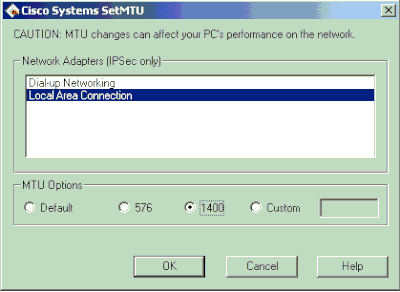
-
Repeat step 1, and select
Dial-up Networking. -
Click the576radio button, and then click
OK.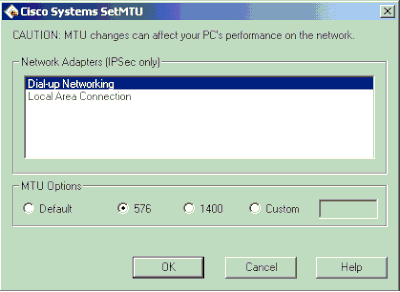
Miss the sysopt Command
Use the sysopt connection permit-ipseccommand in IPsec configurations on the PIX in order to permit IPsec traffic to pass through the PIX Firewall without a check ofconduit oraccess-listcommand statements.
By default, any inbound session must be explicitly permitted by a conduit or access-listcommand statement. With IPsec protected traffic, the secondary access list check can be redundant.
In order to enable IPsec authenticated/cipher inbound sessions to always be permitted, use thesysopt connection permit-ipseccommand.
Verify Access Control Lists (ACLs)
There are two access lists used in a typical IPsec VPN configuration. One access list is used to exempt traffic that is destined for the VPN tunnel from the NAT process.
The other access list defines what traffic to encrypt. This includes a crypto ACL in a LAN-to-LAN setup or a split-tunnel ACL in a remote access configuration.
When these ACLs are incorrectly configured or missed, traffic possibly flows only in one direction across the VPN tunnel, or it has not been sent across the tunnel at all.
Be sure that you have configured all of the access lists necessary to complete your IPsec VPN configuration and that those access lists define the correct traffic.
This list contains items to check when you suspect that an ACL is the cause of problems with your IPsec VPN.
-
Make sure that your NAT exemption and crypto ACLs specify the correct traffic.
-
If you have multiple VPN tunnels and multiple crypto ACLs, make sure that those ACLs do not overlap.
-
Do not use ACLs twice. Even if your NAT exemption ACL and crypto ACL specify the same traffic, use two different access lists.
-
Make sure that your device is configured to use the NAT exemption ACL. That is, use the
route-mapcommand on the router; use thenat (0)command on the PIX or ASA. A NAT exemption ACL is required for both LAN-to-LAN and remote access configurations.
In order to learn more about how to verify the ACL statements, refer to theVerify that ACLs are Correctsection inMost Common L2L and Remote Access IPsec VPN Troubleshooting Solutions.
Related Information
Revision History
| Revision | Publish Date | Comments |
|---|---|---|
3.0 |
12-Dec-2023
|
Updated Style Requirements, Contributor List and Formatting. |
2.0 |
10-Oct-2022
|
Initial Release |
1.0 |
15-Oct-2001
|
Initial Release |
Contributed by Cisco Engineers
- Cisco TAC Engineers
 Feedback
Contact Cisco
- Open a Support Case

- (Requires a Cisco Service Contract)