Preventing Duplicate EIGRP Router IDs
Available Languages
Contents
Introduction
Duplicate Enhanced Interior Gateway Routing Protocol (EIGRP) router IDs can cause problems with the redistribution of EIGRP external routes. This document explains the problem and provides the proper configuration to prevent it.
The EIGRP router ID is normally selected in the same manner as Open Shortest Path First (OSPF). The highest IP address assigned to a loopback interface is selected as the router ID. If there are not any loopback addresses configured, the highest IP address assigned to any other interface is chosen as the router ID.
Prerequisites
Requirements
There are no specific requirements for this document.
Components Used
This configuration was developed and tested using Cisco IOS® Software Release 12.2(10b).
The information presented in this document was created from devices in a specific lab environment. All of the devices used in this document started with a cleared (default) configuration. If you are working in a live network, ensure that you understand the potential impact of any command before using it.
Conventions
Refer to Cisco Technical Tips Conventions for more information on document conventions.
Problem
The problem that is encountered with redistributed routes due to the presence of routers with duplicate EIGRP router IDs can be understood with the help of this network setup.
Network Diagram
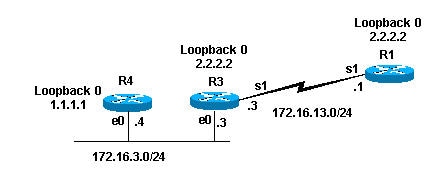
Configurations
| Router 4 |
|---|
interface Loopback0 ip address 1.1.1.1 255.255.255.255 ! interface Loopback1 ip address 10.10.10.10 255.255.255.0 ! interface Ethernet0 ip address 172.16.3.4 255.255.255.0 ! router rip version 2 network 10.0.0.0 network 172.16.0.0 |
| Router 3 |
|---|
interface Loopback0 ip address 2.2.2.2 255.255.255.255 ! interface Ethernet0 ip address 172.16.3.3 255.255.255.0 ip pim sparse-dense-mode ! interface Serial1 ip address 172.16.13.3 255.255.255.0 clockrate 4000000 ! router eigrp 7 redistribute rip metric 1 1 1 1 1 network 172.16.0.0 ! router rip version 2 network 172.16.0.0 |
| Router 1 |
|---|
interface Loopback0 ip address 2.2.2.2 255.255.255.0 ! interface Serial1 ip address 172.16.13.1 255.255.255.0 no ip mroute-cache ! router eigrp 7 network 172.16.0.0 auto-summary no eigrp log-neighbor-changes |
Show Commands
As previously shown , Router 3 redistributes Routing Information Protocol (RIP) routes into EIGRP. This is the 3 routing table and EIGRP topology table.
Router-3#show ip route
Codes: C - connected, S - static, I - IGRP, R - RIP, M - mobile, B - BGP
D - EIGRP, EX - EIGRP external, O - OSPF, IA - OSPF inter area
N1 - OSPF NSSA external type 1, N2 - OSPF NSSA external type 2
E1 - OSPF external type 1, E2 - OSPF external type 2, E - EGP
i - IS-IS, L1 - IS-IS level-1, L2 - IS-IS level-2, ia - IS-IS inter area
* - candidate default, U - per-user static route, o - ODR
P - periodic downloaded static route

Gateway of last resort is not set

     2.0.0.0/32 is subnetted, 1 subnets
C       2.2.2.2 is directly connected, Loopback0
R    10.0.0.0/8 [120/1] via 172.16.3.4, 00:00:25, Ethernet0
!--- Router 3 sees network 10.0.0.0.
     172.16.0.0/24 is subnetted, 3 2 subnets
C       172.16.13.0 is directly connected, Serial1
C       172.16.3.0 is directly connected, Ethernet0
router-3#


router-3#show ip eigrp topology 10.0.0.0 255.0.0.0
IP-EIGRP (AS 7): topology entry for 10.0.0.0/8
  State is Passive, Query origin flag is 1, 1 Successor(s), FD is 2560000256
  Routing Descriptor Blocks:
  0.0.0.0, from Redistributed, Send flag is 0x0
      Composite metric is (2560000256/0), Route is External
      Vector metric:
        Minimum bandwidth is 1 Kbit
        Total delay is 10 microseconds
        Reliability is 1/255
        Load is 1/255
        Minimum MTU is 1
        Hop count is 0
      External data:
        Originating router is 2.2.2.2 (this system)
!--- Shows that Router 3 is the originating router of the external route.

        AS number of route is 0
        External protocol is RIP, external metric is 1
        Administrator tag is 0 (0x00000000)
router-3#
From the previous output, you can see that Router 3 has learned about network 10.0.0.0 via RIP. Through redistribution, the route has been entered into the EIGRP topology table as an external route. Router 3 also shows that it is the originating router of the external route; its EIGRP router ID is 2.2.2.2.
Since Router 3 seems to redistribute the external route, it is expected to see it in the Router 1 routing table. This is the display of the routing table and EIGRP topology table for Router 1.
router-1#show ip route
Codes: C - connected, S - static, I - IGRP, R - RIP, M - mobile, B - BGP
       D - EIGRP, EX - EIGRP external, O - OSPF, IA - OSPF inter area
       N1 - OSPF NSSA external type 1, N2 - OSPF NSSA external type 2
       E1 - OSPF external type 1, E2 - OSPF external type 2, E - EGP
       i - IS-IS, L1 - IS-IS level-1, L2 - IS-IS level-2, ia - IS-IS inter area
       * - candidate default, U - per-user static route, o - ODR
       P - periodic downloaded static route

Gateway of last resort is not set

     2.0.0.0/24 is subnetted, 1 subnets
C       2.2.2.0 is directly connected, Loopback0
     172.16.0.0/24 is subnetted, 3 2 subnets
C       172.16.13.0 is directly connected, Serial1
D       172.16.3.0 [90/2195456] via 172.16.13.3, 00:31:59, Serial1
router-1#


router-1# show ip eigrp topology
IP-EIGRP Topology Table for AS(7)/ID(2.2.2.2)

Codes: P - Passive, A - Active, U - Update, Q - Query, R - Reply,
       r - reply Status, s - sia Status

P 172.16.13.0/24, 1 successors, FD is 2169856
         via Connected, Serial1
P 172.16.3.0/24, 1 successors, FD is 2195456
         via 172.16.13.3 (2195456/281600), Serial1
router-1#
From the previous output you can see that the expected route of 10.0.0.0/8 is not in the routing table or the EIGRP topology table of Router 1. The probable reason for this is that Routers 1 and 3 have the same EIGRP router ID. In Cisco IOS Software Release 12.0(2) and later, Cisco records the duplicate router IDs in the EIGRP events log, which you can view with the show ip eigrp events command. This is the output of this for Router 1:
router-1 #show ip eigrp events
Event information for AS 7:
1    18:06:15.863 Change queue emptied, entries: 1
2    18:06:15.863 Ignored route, metric: 10.0.0.0 2560512256
3    18:06:15.863 Ignored route, neighbor info: 172.16.13.3 Serial2
4    18:06:15.863 Ignored route, dup router: 2.2.2.2


!--- Output suppressed.
From the previous output you can see that the duplicate router ID is the reason that Router 1 does not accept the route from Router 3.
Solution
The solution is to change the router ID on one of the routers by changing the highest IP address on the loopback interface. If you ause Cisco IOS Software Release 12.1(6) or later, you can also use the eigrp router-id <router-id> router subcommand in order to change the router ID. In this example, we changed the router ID in Router 1.
router-1(config)#router eigrp 7
router-1(config-router)#eigrp router-id 3.3.3.3
Note: Issue clear ip eigrp <Autonomous System command after you change the Eigrp Router ID.
The external route now appears in the routing table as shown here.
router-1#show ip route
Codes: C - connected, S - static, I - IGRP, R - RIP, M - mobile, B - BGP
       D - EIGRP, EX - EIGRP external, O - OSPF, IA - OSPF inter area
       N1 - OSPF NSSA external type 1, N2 - OSPF NSSA external type 2
       E1 - OSPF external type 1, E2 - OSPF external type 2, E - EGP
       i - IS-IS, L1 - IS-IS level-1, L2 - IS-IS level-2, IA - IS-IS inter area
       * - candidate default, U - per-user static route, o - ODR
       P - periodic downloaded static route

Gateway of last resort is not set
     2.0.0.0/24 is subnetted, 1 subnets
C       2.2.2.0 is directly connected, Loopback0
     172.16.0.0/24 is subnetted, 2 subnets
C       172.16.13.0 is directly connected, Serial1
D       172.16.3.0 [90/2195456] via 172.16.13.3, 00:00:00, Serial1
D EX 10.0.0.0/8 [170/2560512256] via 172.16.13.3, 00:00:00, Serial1
router-1#
Related Information
Revision History
| Revision | Publish Date | Comments |
|---|---|---|
1.0 |
18-Jan-2008
|
Initial Release |
 Feedback