Use MultiExit Discriminator to Influence BGP Best Path Selection

Available Languages
Introduction
This document describes the bgp deterministic-med command and how it affects the path selection based on the multiexit discriminator (MED).
Prerequisites
Requirements
Cisco recommends that you have knowledge of these topics:
- Basic IP Routing
- Border Gateway Protocol (BGP)
Components Used
This document is not restricted to specific software and hardware versions.
The information in this document was created from the devices in a specific lab environment. All of the devices used in this document started with a cleared (default) configuration. If your network is live, ensure that you understand the potential impact of any command.
Conventions
For more information on Cisco documentation conventions, refer to Cisco Technical Tips Conventions.
The MED Attribute
MED is an optional, non-transitive BGP attribute that provides a hint to external neighbors about the preferred path into an autonomous system (AS) with multiple entry points. MED is also known as the external metric of a route and a lower MED value is preferred over a higher value. By default, BGP compares MED values only among paths received from the same neighboring AS.

Note: By default, BGP compares MED values only for paths received from the same neighboring AS, unless bgp always-compare-med is configured. Refer to How the bgp deterministic-med Command Differs from the bgp always-compare-med Command for additional information.
Network Topology
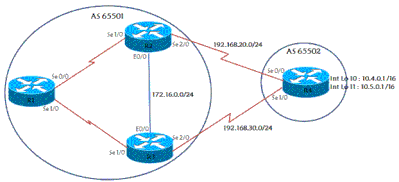 Network Topology
Example
In this scenario, AS 65502 is a user of the ISP which has AS 65501. R4 is connected to two different routers on the ISP side for redundancy purposes, and advertises two networks to ISP—10.4.0.0/16 and 10.5.0.0/16. Some of the relevant configuration is shown in this section.
| R4 |
|---|
! hostname r4 ! ip cef ! ! interface Loopback10 ip address 10.4.0.1 255.255.0.0 ! interface Loopback11 ip address 10.5.0.1 255.255.0.0 ! interface Serial0/0 ip address 192.168.20.4 255.255.255.0 ! interface Serial1/0 ip address 192.168.30.4 255.255.255.0 ! router bgp 65502 no synchronization bgp log-neighbor-changes network 10.4.0.0 mask 255.255.0.0 network 10.5.0.0 mask 255.255.0.0 neighbor 192.168.20.2 remote-as 65501 neighbor 192.168.30.3 remote-as 65501 no auto-summary ! ip classless ! ! line con 0 exec-timeout 0 0 line aux 0 line vty 0 4 exec-timeout 0 0 login ! ! end |
| R2 |
|---|
! hostname r2 ! ip cef ! ! interface Loopback0 ip address 10.2.2.2 255.255.255.255 ! interface Ethernet0/0 ip address 172.16.0.2 255.255.255.0 ! interface Serial1/0 ip address 192.168.1.2 255.255.255.0 serial restart-delay 0 ! interface Serial2/0 ip address 192.168.20.2 255.255.255.0 serial restart-delay 0 ! router ospf 1 log-adjacency-changes redistribute connected passive-interface Serial2/0 network 10.2.2.2 0.0.0.0 area 0 network 172.16.0.2 0.0.0.0 area 0 network 192.168.1.2 0.0.0.0 area 0 network 192.168.20.2 0.0.0.0 area 0 ! router bgp 65501 no synchronization bgp log-neighbor-changes neighbor 10.1.1.1 remote-as 65501 neighbor 10.1.1.1 update-source Loopback0 neighbor 10.3.3.3 remote-as 65501 neighbor 10.3.3.3 update-source Loopback0 neighbor 192.168.20.4 remote-as 65502 no auto-summary ! ip classless ! ! line con 0 exec-timeout 0 0 transport preferred all transport output all line aux 0 transport preferred all transport output all line vty 0 4 exec-timeout 0 0 login transport preferred all transport input all transport output all ! end |
The relevant R1 and R3 configurations use the same design as R2. R1, R2, and R3 have iBGP reachability through loopback interfaces and the IGP provides reachability to BGP next hops. R3 has an eBGP session with R4 and iBGP sessions with R1 and R2.
R1 has an iBGP which peers to R2 and one to R3. Look at what the R1, R2, and R3 BGP tables display for the two networks advertised by R4:
r2#show ip bgp 10.4.0.1
BGP routing table entry for 10.4.0.0/16, version 7
Paths: (2 available, best #1, table Default-IP-Routing-Table)
  Advertised to non peer-group peers:
  10.1.1.1 10.3.3.3
  65502
    192.168.20.4 from 192.168.20.4 (10.4.4.4)
      Origin IGP, metric 0, localpref 100, valid, external, best
  65502
    192.168.30.4 (metric 74) from 10.3.3.3 (10.3.3.3)
      Origin IGP, metric 0, localpref 100, valid, internal

r2#show ip bgp 10.5.0.1
BGP routing table entry for 10.5.0.0/16, version 6
Paths: (2 available, best #2, table Default-IP-Routing-Table)
  Advertised to non peer-group peers:
  10.1.1.1 10.3.3.3
  65502
    192.168.30.4 (metric 74) from 10.3.3.3 (10.3.3.3)
      Origin IGP, metric 0, localpref 100, valid, internal
  65502
    192.168.20.4 from 192.168.20.4 (10.4.4.4)
      Origin IGP, metric 0, localpref 100, valid, external, best

r3#show ip bgp 10.4.0.1
BGP routing table entry for 10.4.0.0/16, version 8
Paths: (2 available, best #2, table Default-IP-Routing-Table)
  Advertised to non peer-group peers:
  10.1.1.1 10.2.2.2
  65502
    192.168.20.4 (metric 74) from 10.2.2.2 (10.2.2.2)
      Origin IGP, metric 0, localpref 100, valid, internal
  65502
    192.168.30.4 from 192.168.30.4 (10.4.4.4)
      Origin IGP, metric 0, localpref 100, valid, external, best

r3#show ip bgp 10.5.0.1
BGP routing table entry for 10.5.0.0/16, version 10
Paths: (2 available, best #1, table Default-IP-Routing-Table)
  Advertised to non peer-group peers:
  10.1.1.1 10.2.2.2
  65502
    192.168.30.4 from 192.168.30.4 (10.4.4.4)
      Origin IGP, metric 0, localpref 100, valid, external, best
  65502
    192.168.20.4 (metric 74) from 10.2.2.2 (10.2.2.2)
      Origin IGP, metric 0, localpref 100, valid, internal

r1#show ip bgp 10.4.0.1
BGP routing table entry for 10.4.0.0/16, version 11
Paths: (2 available, best #1, table Default-IP-Routing-Table)
  Not advertised to any peer
  65502
    192.168.20.4 (metric 128) from 10.2.2.2 (10.2.2.2)
      Origin IGP, metric 0, localpref 100, valid, internal, best
  65502
    192.168.30.4 (metric 128) from 10.3.3.3 (10.3.3.3)
      Origin IGP, metric 0, localpref 100, valid, internal

r1#show ip bgp 10.5.0.1
BGP routing table entry for 10.5.0.0/16, version 10
Paths: (2 available, best #2, table Default-IP-Routing-Table)
  Not advertised to any peer
  65502
    192.168.30.4 (metric 128) from 10.3.3.3 (10.3.3.3)
      Origin IGP, metric 0, localpref 100, valid, internal
  65502
    192.168.20.4 (metric 128) from 10.2.2.2 (10.2.2.2)
      Origin IGP, metric 0, localpref 100, valid, internal, best
Both R2 and R3 pick the best path as the external route from R4 which is expected based on the BGP bestpath selection algorithm. Refer to BGP Best Path Selection Algorithm for more information.
Similarly, R1 chooses R2 to access the two networks because the earlier BGP best-path attributes tie, and the lowest BGP router ID is used as the tie-breaker. R2 has the router ID 10.2.2.2, and R3 has router ID 10.3.3.3. Because R2s router ID is 10.2.2.2 and R3s router ID is 10.3.3.3, R2 is chosen. In this basic configuration, all traffic to the two networks in AS 65502 passes from R1 through R2 and then to R4 by default. Now, suppose that R4 wants to load balance the traffic it receives from AS 65501. To do so without any R4 ISP modifications, you configure R4 to utilize MED to force traffic for one network down one path, and traffic for the other network down the other path.
Note: Please note that the MED configuration example described, provides a per-prefix traffic engineering, not true equal-cost load balancing.
This is the configuration of R4 after you apply the necessary configuration:
| R4 |
|---|
! hostname r4 ! ip cef ! ! ! interface Loopback10 ip address 10.4.0.1 255.255.0.0 ! interface Loopback11 ip address 10.5.0.1 255.255.0.0 ! interface Serial0/0 ip address 192.168.20.4 255.255.255.0 ! interface Serial1/0 ip address 192.168.30.4 255.255.255.0 ! router bgp 65502 no synchronization bgp log-neighbor-changes network 10.4.0.0 mask 255.255.0.0 network 10.5.0.0 mask 255.255.0.0 neighbor 192.168.20.2 remote-as 65501 neighbor 192.168.20.2 route-map setMED-R2 out neighbor 192.168.30.3 remote-as 65501 neighbor 192.168.30.3 route-map setMED-R3 out no auto-summary ! ip classless no ip http server ! ! access-list 1 permit 10.4.0.0 0.0.255.255 access-list 2 permit 10.5.0.0 0.0.255.255 ! route-map setMED-R3 permit 10 match ip address 1 set metric 200 ! route-map setMED-R3 permit 20 match ip address 2 set metric 100 !--- The route-map setMED-R3 is applying a MED of 200 to the 10.4.0.0/16 |
Note: In this example, only 10.4.0.0/16 and 10.5.0.0/16 are advertised. If additional prefixes are advertised to the same neighbor, add them to the appropriate access list or route-map sequence. Add a final permit sequence if unmatched prefixes must be advertised without being filtered by the outbound route map.
After MED is applied, R2 selects the R2-to-R4 path/link as best for 10.4.0.0/16, and R3 selects the R3-to-R4 path/link as best for 10.5.0.0/16. In the shown converged state, R1 receives the eligible best iBGP advertisement for each prefix and uses R2 for 10.4.0.0/16 and R3 for 10.5.0.0/16:
r1#show ip bgp 10.4.0.1
BGP routing table entry for 10.4.0.0/16, version 14
Paths: (1 available, best #1, table Default-IP-Routing-Table)
Flag: 0x800
  Not advertised to any peer
  65502
    192.168.20.4 (metric 128) from 10.2.2.2 (10.2.2.2)
      Origin IGP, metric 100, localpref 100, valid, internal, best

r1#show ip bgp 10.5.0.1
BGP routing table entry for 10.5.0.0/16, version 13
Paths: (1 available, best #1, table Default-IP-Routing-Table)
Flag: 0x800
  Not advertised to any peer
  65502
    192.168.30.4 (metric 128) from 10.3.3.3 (10.3.3.3)
      Origin IGP, metric 100, localpref 100, valid, internal, best
See the next example for the R2 display:
r2#show ip bgp 10.4.0.1
BGP routing table entry for 10.4.0.0/16, version 10
Paths: (1 available, best #1, table Default-IP-Routing-Table)
  Advertised to non peer-group peers:
  10.1.1.1 10.3.3.3
  65502
    192.168.20.4 from 192.168.20.4 (10.4.4.4)
      Origin IGP, metric 100, localpref 100, valid, external, best


r2#show ip bgp 10.5.0.1
BGP routing table entry for 10.5.0.0/16, version 11
Paths: (2 available, best #1, table Default-IP-Routing-Table)
  Advertised to non peer-group peers:
  192.168.20.4
  65502
    192.168.30.4 (metric 74) from 10.3.3.3 (10.3.3.3)
      Origin IGP, metric 100, localpref 100, valid, internal, best
  65502
    192.168.20.4 from 192.168.20.4 (10.4.4.4)
      Origin IGP, metric 200, localpref 100, valid, external
R2 shows one path for 10.4.0.0/16 because R3 no longer advertises its R4-learned path after R3 selects the iBGP-learned path through R2 as best. R3 withdraws the update (sends a BGP route withdrawal, this update contains an unreachable metric) for 10.4.0.0/16 once it notices that R3 uses R2 to access 10.4.0.0/16. Standard iBGP advertisement rules prevent R3 from advertising the iBGP-learned path back to another iBGP peer in this topology:
r3#show ip bgp 10.4.0.0
BGP routing table entry for 10.4.0.0/16, version 20
Paths: (2 available, best #1, table Default-IP-Routing-Table)
  Advertised to non peer-group peers:
  192.168.30.4
  65502
    192.168.20.4 (metric 74) from 10.2.2.2 (10.2.2.2)
      Origin IGP, metric 100, localpref 100, valid, internal, best
  65502
    192.168.30.4 from 192.168.30.4 (10.4.4.4)
      Origin IGP, metric 200, localpref 100, valid, external
This allows R2 to save some memory as it does not have to store this useless information. In the event the BGP session between R2 and R4 fails, R2 would send an unreachable update to R3 for 10.4.0.0/16. This update would trigger R3 to send an update with the R3 route for 10.4.0.0/16 via R4 to R2. R2 can start to route via R3.
The MED Command
To enable deterministic MED comparison, configure the bgp deterministic-med command under the BGP router configuration mode. When enabled, bgp deterministic-med removes temporal dependency from MED-based best-path decisions by grouping paths from the same AS before comparison. This ensures an accurate MED comparison is made across all routes received from the same autonomous system (AS).
If you disable bgp deterministic-med, the order routes are received can impact MED-based best path decisions. This can occur when the same route is received from multiple ASs or confederation sub-ASs, with exactly the same path length, but different MEDs.
Examples
For example, consider the next routes:
| Entry | AS Path | MED | Local Preference | AS Path Length | Origin |
|---|---|---|---|---|---|
| entry1 |
AS 65001 |
100 |
100 |
1 |
IGP |
| entry2 |
AS 65002 |
50 |
100 |
1 |
IGP |
| entry3 |
AS 65001 |
20 |
100 |
1 |
IGP |
A BGP Router with MED Disabled
Arrival Order 1 Example
The order BGP routes were received is (entry1 is the oldest entry in the BGP table and entry3 is the newest one):
- entry1
- entry2
- entry3
Initially, only one route exists, so entry1 becomes the best path. When entry2 from AS65002 is compared against entry1 from AS65001, MED is ignored because the routes come from different neighboring ASs; since all remaining attributes are equal, the router keeps the current best path, entry1.
When entry3 from AS65001 with MED 20 is compared against entry1 from AS65001 with MED 100, MED is evaluated because both routes come from the same neighboring AS. Since 20 is lower than 100, entry3 becomes the final best path.
Arrival Order 2 Example
Now suppose the same routes arrive in a different order:
- entry2
- entry3
- entry1
Initially, entry2 is selected as the best path. When entry3 from AS65001 is compared against entry2 from AS65002, MED is not evaluated because the routes come from different neighboring ASes; since all remaining attributes are equal, the router keeps the current best path, entry2.
When entry1 from AS65001 is compared against entry2 from AS65002, MED is again ignored because the routes come from different neighboring ASs. As a result, the router keeps entry2 as the final best path.
With MED disabled, the route arrival order influences the comparison sequence. Notice the router received is exactly the same three routes, yet it selected different best paths because the routes arrived in a different order. This is the temporal dependency that bgp deterministic-med is designed to eliminate.
Note: For more information about BGP path selection criteria, refer to BGP Best Path Selection Algorithm.
A BGP Router with MED Enabled
With MED enabled, the router first groups routes by neighboring AS before making any MED-based decisions. In this case, routes from the same AS are grouped together, and the best entries of each group are compared. In the given example, there are two ASs, AS 65001 and AS 65002.
| Group | AS Path | Entry | Selected Route | Reason |
|---|---|---|---|---|
| Group 1 |
AS 65001 |
entry1 (MED 100), entry3 (MED 20) |
entry3 |
Lower MED (20 < 100) |
| Group 2 |
AS 65002 |
entry2 (MED 50) |
entry2 |
Only candidate |
In Group 1, the best path is entry3 because of the lower MED (MED is used in this decision since the paths are from the same AS). In Group 2, there is only one entry (entry2). The best path then is determined with a comparison of the winners of each group, MED is not used in this comparison by default because the winners of each group are from different ASs.
At this point, MED is no longer considered, because the remaining routes originate from different neighboring ASs. The BGP best-path algorithm continues with the subsequent attributes (such as eBGP vs. iBGP, IGP metric to the next hop, oldest path, router ID, and so on., depending on which attributes differ).
The key advantage is this process is independent of the routes were received. Whether the router learns the routes as:
- entry1 → entry2 → entry3
- entry2 → entry3 → entry1
- entry3 → entry1 → entry2
As a result,arrival orders produce the same outcome because the decision is based on the route attributes rather than the order the updates were received.
Note: If bgp always-compare-med was also enabled when you compare entry3 (the winner from Group 1) and entry 2 (the winner from Group 2); entry 3 is the winner because of lower MED.
Note: Enabling the bgp deterministic-med command ensures the comparison of the MED variable when choosing routes advertised by different peers in the same AS. Enabling the bgp always-compare-med command ensures the comparison of the MED for paths from neighbors in different AS.
This example assumes all higher-priority BGP attributes (such as Weight, Local Preference, AS Path length, Origin, and others) are identical. The purpose is to isolate the effect of MED and illustrate why disabling bgp deterministic-med can ensure the best-path decision is dependent on the route arrival order.
Cisco recommends you enable bgp always-compare-med in all new network deployments. In addition, if bgp always-compare-med is enabled, BGP MED decisions are always deterministic.
For more information on the bgp deterministic-med and the bgp always-compare-med commands, refer to How the bgp deterministic-med Command Differs from the bgp always-compare-med Command.
Related Information
- Sample Configuration for BGP with Two Different Service Providers (Multihoming)
- IP/BGP Support
- BGP Case Studies
- Cisco Technical Support & Downloads
Revision History
| Revision | Publish Date | Comments |
|---|---|---|
3.0 |
30-Jul-2026
|
Updated title, introduction, spelling, grammar, insert horiztonal lines to separate sections/readability. |
2.0 |
26-Jan-2024
|
Updated SEO and Formatting. |
1.0 |
10-Dec-2001
|
Initial Release |
 Feedback