Troubleshooting EIGRP
Available Languages
Contents
Introduction
This document provides troubleshooting information for common problems with Enhanced Interior Gateway Routing Protocol (EIGRP). For more information, or to go to the next flowchart, refer to the links provided in this section.
If you have the output of a show interfaces serial , show ip eigrp neighbors , show tech-support , or a show ip eigrp topology command from your Cisco device, you can use Output Interpreter (registered customers only) to display potential issues and fixes.
Prerequisites
Requirements
Readers of this document should have a good understanding of how EIGRP works and a good knowledge of Configuring EIGRP.
Components Used
This document is not restricted to specific software and hardware versions.
The information in this document was created from the devices in a specific lab environment. All of the devices used in this document started with a cleared (default) configuration. If your network is live, make sure that you understand the potential impact of any command.
Conventions
For more information on document conventions, refer to the Cisco Technical Tips Conventions.
Main Troubleshooting Flowchart
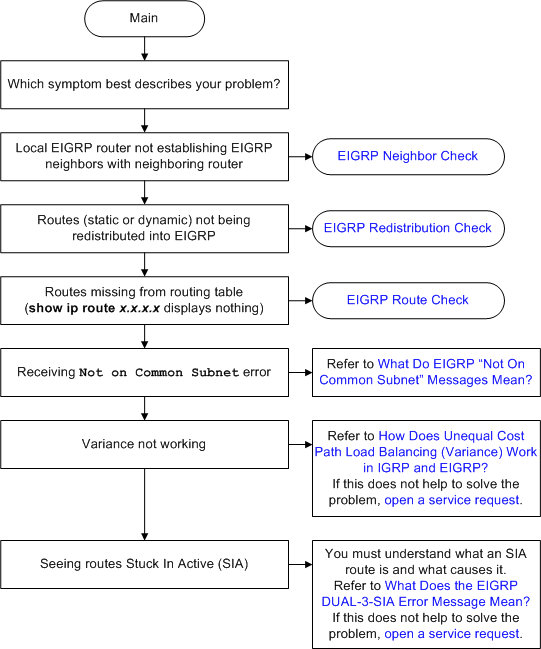
In order to troubleshoot EIGRP, use this flowchart, starting at the box marked Main. Depending on the symptoms, the flowchart might refer to one of the three flowcharts later in this document or to other relevant documents on Cisco.com. There are some problems that might not be resolvable here. In these cases, links are provided to Cisco Technical Support. In order to open a service request, you must have a valid service contract.
Neighbor Check
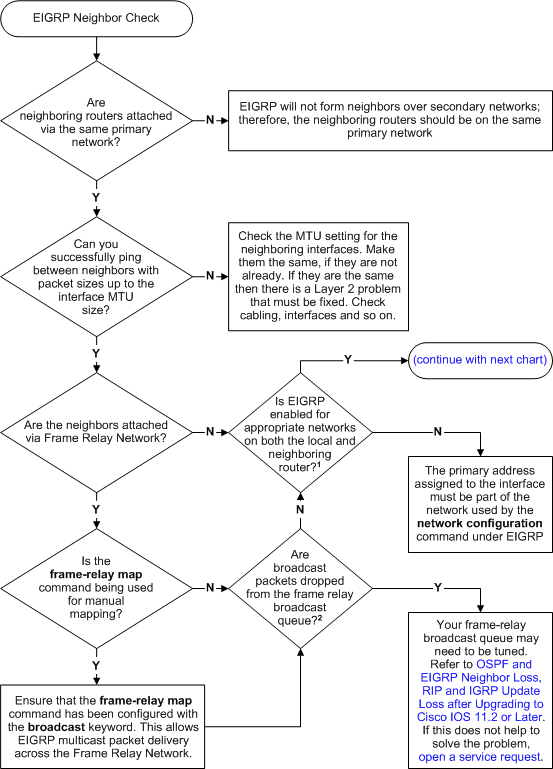
Note: If you are not able to ping successfuly between neighbors, run the debug ip packet command in order to verify if the hellos are sent to Multicast Address 224.0.0.10.
Note: For example:
R1#debug ip packet
IP packet debugging is on
R1#
*Mar  1 00:10:54.643: IP: s=10.10.10.1 (local), d=224.0.0.10 (FastEthernet0/0), len 60, sending broad/multicast
R1#
*Mar  1 00:10:58.611: IP: s=10.10.10.2 (FastEthernet0/0), d=224.0.0.10, len 60, rcvd 2

!--- Indicates that the hello packets are sent to 224.0.0.10.
| Flowchart Notes | |
|---|---|
| 1 | Issue the show ip eigrp interface command to verify. |
| 2 | Issue the show interface serial command to verify. |
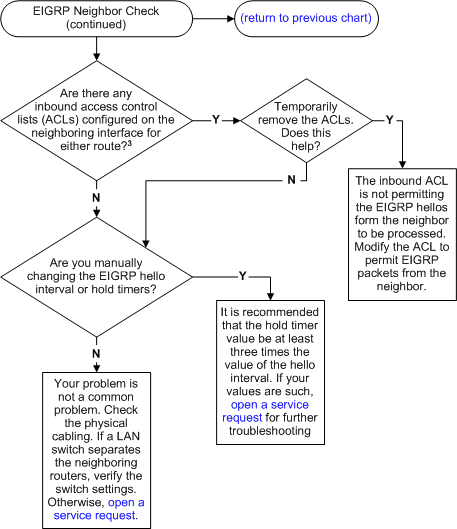
Note: If you experience the problems with EIGRP flapping across the GRE interface tunnel, it is possible that you have to configure the keepalive 10 3 and ip tcp adjust-mss 1400 commands at both ends of the GRE tunnel. .
| Flowchart Notes | |
|---|---|
| 3 | Issue the show ip interface command to verify. |
Redistribution Check
| Flowchart Notes | |
|---|---|
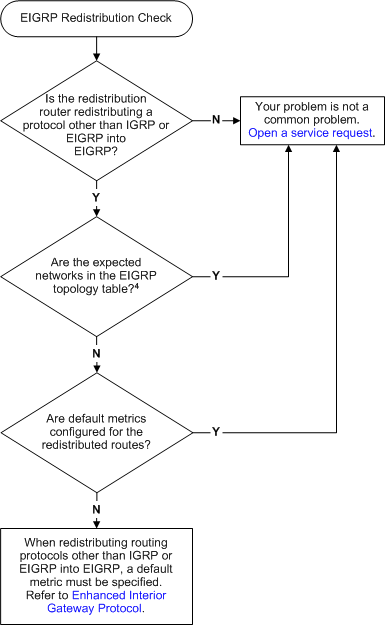
| 4 | Issue the show ip eigrp topology net mask command to verify. |
Route Check
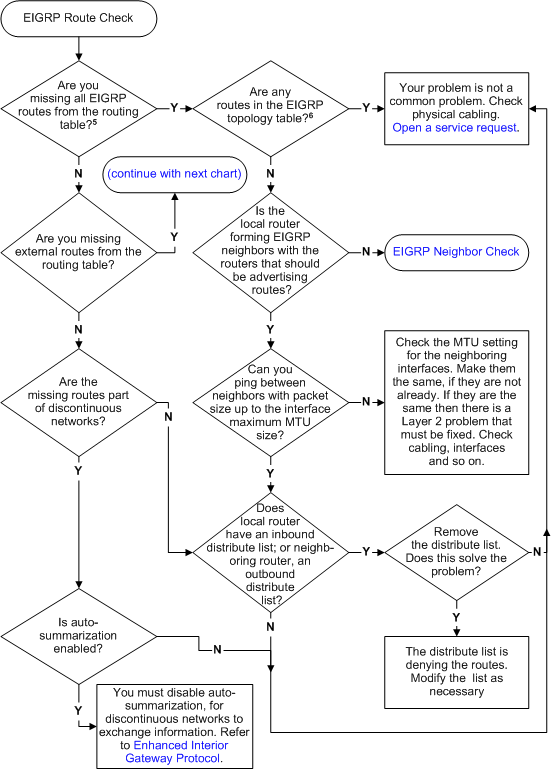
| Flowchart Notes | |
|---|---|
| 5 | Issue the show ip route eigrp command to verify. |
| 6 | Issue the show ip eigrp topology command to verify. If routes are not seen in the topology table, issue the clear ip eigrp topology command. |
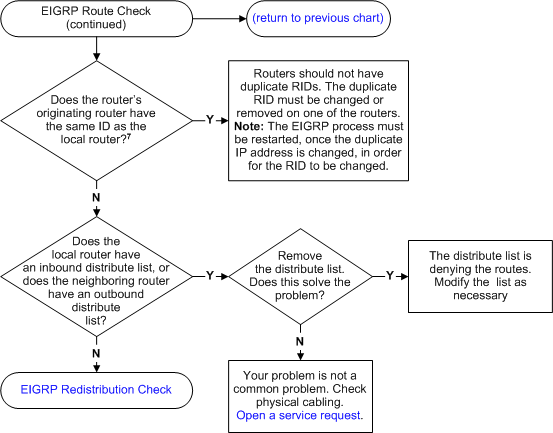
| Flowchart Notes | |
|---|---|
| 7 | Issue the show ip eigrp topology net mask command, to find the Router ID (RID). You can find the local RID with the same command on the locally generated external router. In Cisco IOS Software Release 12.1 and later, the show ip eigrp topology command shows the RID. |
Reasons for Neighbor Flapping
The stability of the neighbor relationship is of primary concern. A failure in the neighbor relationship is accompanied by increased CPU and bandwidth utilization. EIGRP neighbors can flap for these reasons:
-
Underlying link flaps. When an interface goes down, EIGRP takes down the neighbors that are reachable through that interface and flushes all routes learned through that neighbor.
-
Misconfigured hello and hold intervals. The EIGRP hold interval can be set independently of the hello interval if you issue the ip hold-time eigrp command. If you set a hold interval smaller than the hello interval, it results in the neighbors flapping continuously. Cisco recommends that the hold time be at least three times the hello interval. If the value is set less than 3 times the hello interval, there is the chance for link flapping or neighborship flapping.
R1(config-if)#ip hello-interval eigrp 1 30
R1(config-if)#ip hold-time eigrp 1 90
-
Loss of hello packets: Hello packets can be lost on overly congested links or error-prone links (CRC errors, Frame errors, or excessive collisions).
-
Existence of unidirectional links. A router on a unidirectional link can be able to receive hello packets, but the hello packets sent out are not received at the other end. The existence of this state is usually indicated by the retry limit exceeded messages on one end. If the routers generating retry limit exceeded messages has to form neighborship, then make the link bidirectional for both unicast and multicast. In case tunnel interfaces are used in the topology make sure that the interfaces are advertised properly.
-
Route goes stuck-in-active. When a router enters the stuck-in-active state, the neighbors from which the reply was expected are reinitialized, and the router goes active on all routes learned from those neighbors.
-
Provision of insufficient bandwidth for the EIGRP process. When sufficient bandwidth is not available, packets can be lost, which causes neighbors to go down.
-
Bad serial lines.
-
Improperly set bandwidth statements.
-
One-way multicast traffic.
-
Stuck in active routes.
-
Query storms.
EIGRP Neighbors are not Recognized
The EIGRP neighbor relationship is not established over the multipoint GRE tunnel if there is an incorrect NHRP association in the spoke. Next Hop Resolution Protocol (NHRP) is used to discover the addresses of other routers and networks behind the routers that are connected to a nonbroadcast multiaccess (NBMA) network. When a network statement under Eigrp covers both the physical interface and tunnel interface (tunnel interface ip address and physical interface ip address belong to the same major class) and if the phyiscal interface is the source of the tunnel, then the both interfaces have to be separately advertised in the Eigrp to avoid issues with DMVPN. The best practice is to advertise the interfaces using specific subnet advertisements.
This issue can be resolved when you clear the NHRP associations with this command:
Router#clear ip nhrp
Related Information
Revision History
| Revision | Publish Date | Comments |
|---|---|---|
1.0 |
15-Mar-2002
|
Initial Release |
 Feedback