Failover with EIGRP Using VRF Configuration Example
Available Languages
Contents
Introduction
This document describes how to configure failover with Enhanced Interior Gateway Routing Protocol (EIGRP) using virtual routing and forwarding (VRF). VRF is an extension of IP routing that provides multiple routing instances. Internet service providers (ISPs) take advantage of this VRF in order to create separate virtual private networks (VPNs) for the customers as it allows multiple instances of the routing table to exist in a router.
Prerequisites
-
Basic knowledge of EIGRP
-
Basic knowledge of VRF
Hardware and Software Versions
The configurations in this document are based on the Cisco 3700 Series Router on Cisco IOS® Software Release 12.4 (15)T 13.
Conventions
Refer to Cisco Technical Tips Conventions for more information on document conventions.
Configure
In this example, router R1 is considered a PE router. Routers R2 and R3 are considered CE routers. The routers use EIGRP to communicate with each other. If R2 loses connectivity with R1 (that is, in case of failover), the routes can reach R1 through R3. Routers R2 and R3 have an MPLS connection between them.
Note: Use the Command Lookup Tool (registered customers only) to find more information on the commands used in this document.
Network Diagram
This document uses this network setup:
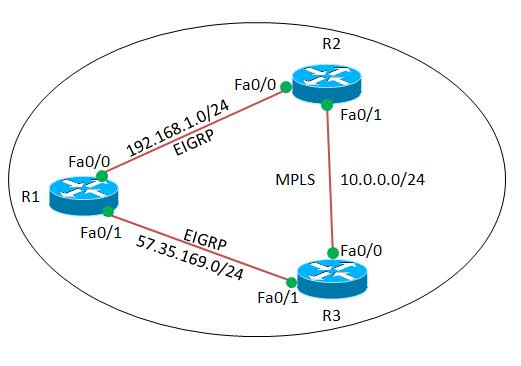
Configurations
This document uses these configurations:
| Router R1 |
|---|
! version 12.4 ! hostname R1 ! ip cef ! ! interface Loopback0 ip address 2.2.2.2 255.255.255.255 ! interface FastEthernet0/0 ip address 192.168.1.2 255.255.255.0 duplex auto speed auto ! interface FastEthernet0/1 ip address 57.35.169.2 255.255.255.0 duplex auto speed auto ! router eigrp 220 network 2.2.2.2 0.0.0.0 network 57.35.169.2 0.0.0.0 network 192.168.1.0 no auto-summary !--- Configured EIGRP and advertised the networks. ! end |
| Router R2 |
|---|
! version 12.4 ! hostname R2 ! ip cef ! ip vrf A !--- Configures VRF routing table! rd 1.1.1.1:111 !---Configuring a route distinguisher RD creates routing and forwarding table for a VRF. The RD can be used in either of these formats: - 16-bit AS number: Your 32-bit number (for example, 1:100) - 32-bit IP address: Your 16-bit number (In our case, 1.1.1.1:111) route-target export 1.1.1.1:111 route-target import 1.1.1.1:111 !--- Creates a list of import and/or export route target communities for the specified VRF. ! ip vrf B rd 2.2.2.2:222 import ipv4 unicast map vrfA-to-vrfB !--- Associates the specified route map with the VRF. route-target export 2.2.2.2:222 route-target import 2.2.2.2:222 ! mpls label protocol ldp ! interface Loopback1 ip vrf forwarding B !--- Associates a VRF instance with an interface. ip address 172.16.2.1 255.255.255.255 ! interface FastEthernet0/0 ip vrf forwarding A ip address 192.168.1.1 255.255.255.0 duplex auto speed auto ! interface FastEthernet0/1 ip vrf forwarding A ip address 10.0.0.1 255.255.255.0 duplex auto speed auto mpls ip ! interface FastEthernet1/0 ip vrf forwarding B ip address 203.197.194.1 255.255.255.0 duplex auto speed auto ! router eigrp 1 no auto-summary ! address-family ipv4 vrf B !--- Enter address family configuration mode for configuring EIGRP routing sessions. network 172.16.2.0 0.0.0.255 network 203.197.194.0 no auto-summary autonomous-system 330 !--- Defines the autonomous system number for this specific instance of EIGRP. exit-address-family ! address-family ipv4 vrf A network 10.0.0.1 0.0.0.0 network 192.168.1.0 no auto-summary autonomous-system 220 exit-address-family ! access-list 99 permit 172.16.1.0 0.0.0.255 access-list 99 permit 192.168.1.0 0.0.0.255 access-list 101 permit udp host 192.168.1.1 eq bootps host 1.1.1.1 eq bootps !--- Create access list in order to permit the host addresses. ! route-map vrfA-to-vrfB permit 10 match ip address 99 !--- Created a route map and distributed the routes permitted by access list 99. ! end |
| Router R3 |
|---|
! version 12.4 ! hostname R3 ! ip cef ! ! ! ! ip vrf A rd 1.1.1.1:111 ! mpls label protocol ldp ! interface Loopback1 ip address 1.1.1.1 255.255.255.255 ! interface FastEthernet0/0 ip vrf forwarding A ip address 10.0.0.2 255.255.255.0 duplex auto speed auto mpls ip ! interface FastEthernet0/1 ip vrf forwarding A ip address 57.35.169.1 255.255.255.0 duplex auto speed auto ! interface FastEthernet1/0 ip address 203.197.194.2 255.255.255.0 duplex auto speed auto ! router eigrp 330 network 1.1.1.1 0.0.0.0 network 10.0.0.2 0.0.0.0 network 57.35.169.1 0.0.0.0 network 203.197.194.0 no auto-summary ! address-family ipv4 vrf A network 10.0.0.2 0.0.0.0 network 57.35.169.1 0.0.0.0 no auto-summary autonomous-system 220 exit-address-family ! end |
Verify
Use this section to confirm that your configuration works properly.
The Output Interpreter Tool (registered customers only) (OIT) supports certain show commands. Use the OIT to view an analysis of show command output.
Show Commands
In order to verify that EIGRP is configured properly, use the show ip route vrf command.
| show ip route vrf |
|---|
In router R2 R2#show ip route vrf A
Routing Table: A
Codes: C - connected, S - static, R - RIP, M - mobile, B - BGP
D - EIGRP, EX - EIGRP external, O - OSPF, IA - OSPF inter area
N1 - OSPF NSSA external type 1, N2 - OSPF NSSA external type 2
E1 - OSPF external type 1, E2 - OSPF external type 2
I - IS-IS, su - IS-IS summary, L1 - IS-IS level-1, L2 - IS-IS level-2
ia - IS-IS inter area, * - candidate default, U - per-user static route
o - ODR, P - periodic downloaded static route
Gateway of last resort is not set
2.0.0.0/32 is subnetted, 1 subnets
D 2.2.2.2 [90/409600] via 192.168.1.2, 00:15:47, FastEthernet0/0
57.0.0.0/24 is subnetted, 1 subnets
D 57.35.169.0 [90/307200] via 192.168.1.2, 00:15:47, FastEthernet0/0
[90/307200] via 10.0.0.2, 00:15:47, FastEthernet0/1
10.0.0.0/24 is subnetted, 1 subnets
C 10.0.0.0 is directly connected, FastEthernet0/1
C 192.168.1.0/24 is directly connected, FastEthernet0/0
In router R3 R3#show ip route vrf A
Routing Table: A
Codes: C - connected, S - static, R - RIP, M - mobile, B - BGP
D - EIGRP, EX - EIGRP external, O - OSPF, IA - OSPF inter area
N1 - OSPF NSSA external type 1, N2 - OSPF NSSA external type 2
E1 - OSPF external type 1, E2 - OSPF external type 2
I - IS-IS, su - IS-IS summary, L1 - IS-IS level-1, L2 - IS-IS level-2
ia - IS-IS inter area, * - candidate default, U - per-user static route
o - ODR, P - periodic downloaded static route
Gateway of last resort is not set
2.0.0.0/32 is subnetted, 1 subnets
D 2.2.2.2 [90/409600] via 57.35.169.2, 00:16:59, FastEthernet0/1
57.0.0.0/24 is subnetted, 1 subnets
C 57.35.169.0 is directly connected, FastEthernet0/1
10.0.0.0/24 is subnetted, 1 subnets
C 10.0.0.0 is directly connected, FastEthernet0/0
D 192.168.1.0/24 [90/307200] via 57.35.169.2, 00:17:02, FastEthernet0/1
[90/307200] via 10.0.0.1, 00:17:02, FastEthernet0/0
!--- Displays the routing table associated with VRF instance A.
|
If R2 loses connectivity to R1, the routes from R2 will reach the router R1 through R3.
| In case of failover |
|---|
When R2 loses its connectivity to R1, try issuing shut down on R2's Fa0/0. In router R2 R2#conf t Enter configuration commands, one per line. End with CNTL/Z. R2(config)#int fa0/0 R2(config-if)#shut down R2(config-if)# *Mar 1 00:01:01.539: %TDP-5-INFO: VRF A: TDP ID removed *Mar 1 00:01:01.675: %LDP-5-NBRCHG: LDP Neighbor (vrf A) 57.35.169.1:0 (1) is DOWN (LDP Router ID changed) *Mar 1 00:01:01.679: %DUAL-5-NBRCHANGE: IP-EIGRP(1) 220: Neighbor 192.168.1.2 (FastEthernet0/0) is down: interface down R2(config-if)# *Mar 1 00:01:03.519: %LINK-5-CHANGED: Interface FastEthernet0/0, changed state to administratively down *Mar 1 00:01:04.519: %LINEPROTO-5-UPDOWN: Line protocol on Interface FastEthernet0/0, changed state to downAt the same instance in router R3, the failover link gets activated. R3# *Mar 1 00:00:52.527: %LDP-5-NBRCHG: LDP Neighbor (vrf A) 192.168.1.1:0 (1) is DOWN (TCP connection closed by peer) R3# *Mar 1 00:00:59.591: %LDP-5-NBRCHG: LDP Neighbor (vrf A) 10.0.0.1:0 (1) is UP |
In order to verify that router R2 can still reach R1, issue the ping vrf command in order to ping R1 from router R2.
| Ping |
|---|
In router R2 R2#ping vrf A 192.168.1.2 Type escape sequence to abort. Sending 5, 100-byte ICMP Echos to 192.168.1.2, timeout is 2 seconds: !!!!! Success rate is 100 percent (5/5), round-trip min/avg/max = 12/51/96 ms !--- R2 can still reach R1 through R3. |
 Feedback