Introduction
This document describes how to configure calls to transfer directly to any user's voice mail greeting. Users have the ability to transfer calls directly to a voice mailbox without ringing that user's extension and without the need to navigate through any opening greetings.
Prerequisites
Requirements
Cisco recommends that you have knowledge of these topics:
Components Used
The information in this document is based on these software versions:
- Cisco Unified Communications Manager 12.5
- Cisco Unity Connection 12.5
The information in this document has been previously validated using various legacy systems such as:
- Cisco CallManager 3.2.2 spD
-
Cisco Unity
-
Cisco Digital PBX Adapter (DPA) connected to Octel with use of digital Avaya signaling
-
Cisco VG248 Analog Phone Gateway connected to Octel with use of analog signaling and Simplified Message Desk Interface (SMDI)
-
Cisco SMDI connected to any voice mail system
-
Inter-Cluster Trunk (H.323) with use of any of the above on the destination cluster
The information in this document was created from the devices in a specific lab environment. All of the devices used in this document started with a cleared (default) configuration. If your network is live, make sure that you understand the potential impact of any command.
Configure
Overview
If you use the configuration in this document, dialing an asterisk and an extension drops the caller directly into the voice mail box that is associated with that extension. This works by configuring a voice mail box mask on the voice mail profile and associating it with a newly-created CTI route point that matches against the asterisk. The asterisk gets stripped by the voice mail box mask and the target mailbox extension is placed in the appropriate signaling header as the call goes to voice mail.
Note: Use of an asterisk is not a requirement. The asterisk is used as an example for the purposes of this document. You can use any distinct sequence of numbers in place of the asterisk. The use of a special character like an asterisk to begin the dialing sequence for this feature is often a good plan because most standard dialing plans do not have patterns that begin with the asterisk key. It is usually a good idea to preserve the use of numeric ranges such as 0 through 9.
Configure the Voice Mail Profile
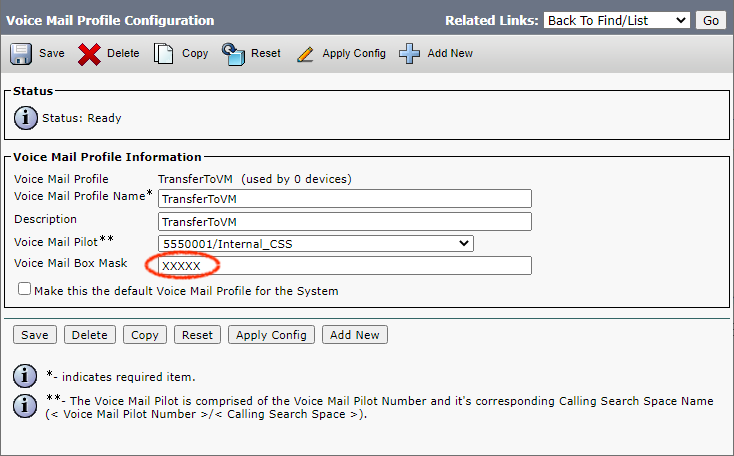
As this example shows, a new voice mail profile must be created. The profile has been named TransferToVM in order to distinguish it from the voice mail profile that is associated with user phones. The voice mail pilot should be set to the currently configured pilot number. The voice mail box mask is assigned the wildcard XXXXX to match a five-digit dialing plan. If four-digit dialing is used, set this wildcard to XXXX.
Whatever the dialing plan, this wildcard matches the dialed digits starting from the right. Anything that precedes the digits that are matched by the mask is stripped.
Caution: Do not make this the default voice mail profile for the system.
Configure the CTI Route Point
You must create a new CTI route point. The example in this section shows one named TransferToVM. This device is configured just like any other with a device pool, calling search space, and location. This is a CTI route point that will never be registered by any CTI application, and it should not be associated to any users in the directory.
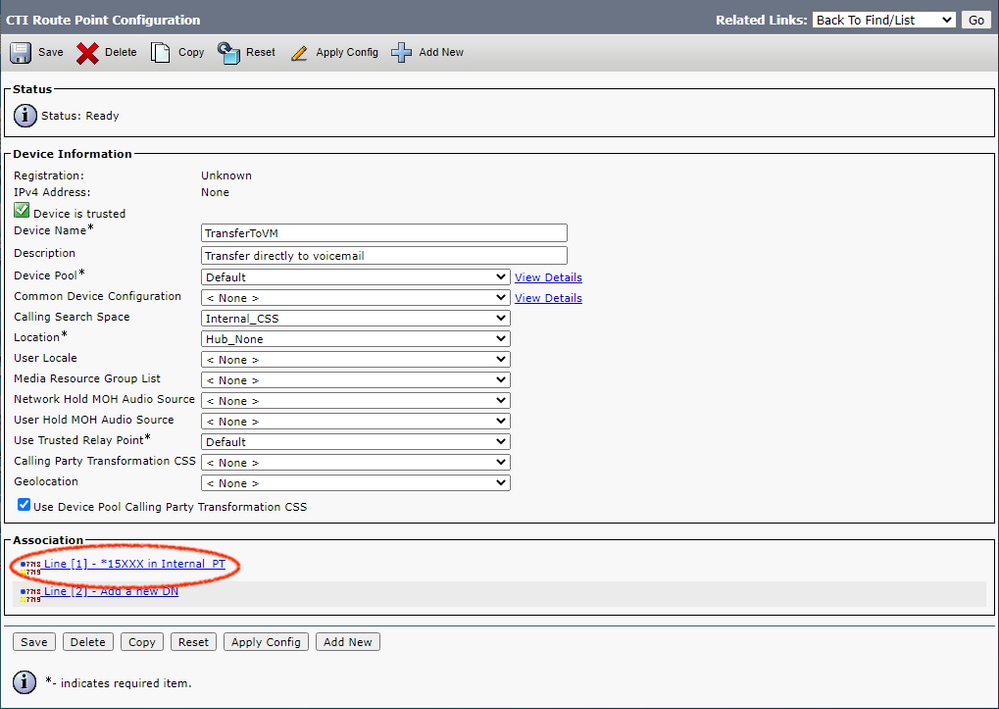
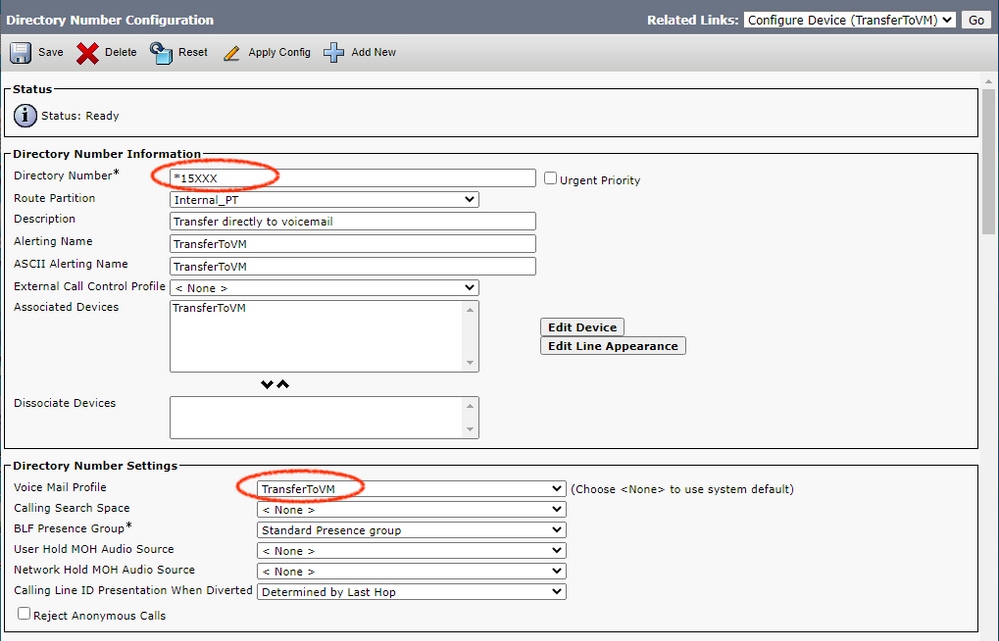
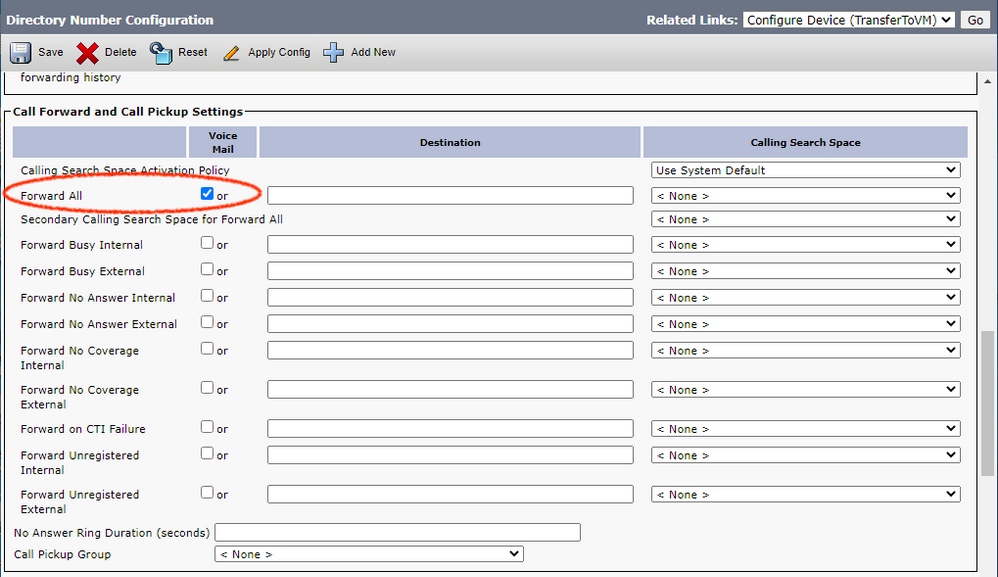
The configuration on the CTI route point line makes this all possible. In this example, the Directory Number is set to *15XXX. This setting can just as easily be *XXXXX to forward to all mail boxes, or something as granular as *15654 to forward to just one user mailbox. Choose the voice mail profile that you created in the section Configuration of the Voice Mail Profile for the Voice Mail Profile field, and select Forward All to voice mail under Call Forward and Pickup Settings.
Now anyone can call a user mailbox directly (or whoever's extension is included in the CTI route point directory number). If there are multiple, separate voice mail servers, you must create a voice mail profile for each of them. You can use the same CTI route point if you add extra lines. This also works across intercluster trunks.
Note: Do not use the word "Voicemail" as the Alerting Name or Display (Internal Caller ID) for the CTI Route Point Directory Number. Use of the word "Voicemail" can cause Cisco Unity to process the call as a Direct Call, instead of processing it as a Forwarded call.
Verify
There is currently no verification procedure available for this configuration.
Troubleshoot
There is currently no specific troubleshooting information available for this configuration.
Related Information

 Feedback