Wireless Guest Access FAQ

Available Languages
Download Options
Bias-Free Language
The documentation set for this product strives to use bias-free language. For the purposes of this documentation set, bias-free is defined as language that does not imply discrimination based on age, disability, gender, racial identity, ethnic identity, sexual orientation, socioeconomic status, and intersectionality. Exceptions may be present in the documentation due to language that is hardcoded in the user interfaces of the product software, language used based on RFP documentation, or language that is used by a referenced third-party product. Learn more about how Cisco is using Inclusive Language.
Contents
Introduction
This document describes information for the most frequently asked questions (FAQs) about the Wireless Guest Access feature, which is a part of the Cisco Unified Wireless network.
Refer to Cisco Technical Tips Conventions for more information on document conventions.
What is an Ethernet over IP (EoIP) tunnel to the unsecured network area?
Cisco recommends the use of a controller dedicated to guest traffic. This controller is known as the guest anchor controller.
The guest anchor controller is usually located in an unsecured network area, often called the demilitarized zone (DMZ). Other internal WLAN controllers from where the traffic originates are located in the enterprise LAN. An EoIP tunnel is established between the internal WLAN controllers and the guest anchor controller in order to ensure path isolation of guest traffic from enterprise data traffic. Path isolation is a critical security management feature for guest access. It ensures that security and quality of service (QoS) policies can be separate, and are differentiated between guest traffic and corporate or internal traffic.
An important feature of the Cisco Unified Wireless Network architecture is the ability to use an EoIP tunnel to statically map one or more provisioned WLANs (that is, SSIDs) to a specific guest anchor controller within the network. All traffic - both to and from a mapped WLAN - traverses a static EoIP tunnel that is established between a remote controller and the guest anchor controller.
Using this technique, all associated guest traffic can be transported transparently across the enterprise network to a guest anchor controller that resides in the unsecured network area.
How do I select the right controller to deploy as a guest anchor controller?
The selection of the guest anchor controller is a function of the amount of guest traffic as defined by the number of active guest client sessions, or as defined by the uplink interface capacity on the controller, or both.
Total throughput and client limitations per guest anchor controller are as follows:
-
Cisco 2504 Wireless LAN Controller - 4 * 1 Gbps interfaces and 1000 guest clients
-
Cisco 5508 Wireless LAN Controller (WLC) - 8 Gbps and 7,000 guest clients
-
Cisco Catalyst 6500 Series Wireless Services Module (WiSM-2) - 20 Gbps and 15,000 clients
-
Cisco 8500 Wireless LAN Controller (WLC) - 10 Gbps and 64,000 clients
Note: Cisco 7500 WLCs cannot be configured as a guest anchor controller. Refer to What controllers can be used to support guest access in the unsecured network area? for the list of WLCs that support guest anchor function.
A maximum of 2048 guest usernames and passwords can be stored on each controller's database. Therefore, if the total number of active guest credentials is in excess of this number, more than one controller is needed. Alternatively, guest credentials can be stored in an external RADIUS server.
The number of access points in the network does not impact the selection of the guest anchor controller.
How many Ethernet over IP (EoIP) tunnels can be terminated on a guest anchor controller?
One guest anchor controller can terminate up to 71 EoIP tunnels from internal WLAN controllers. This capacity is the same across any model of the Cisco Wireless LAN Controller except WLC- 2504. The 2504 controller can terminate up to 15 EoIP tunnels. More than one guest anchor controller can be configured if additional tunnels are required.
EoIP tunnels are counted per WLAN controller, independently of the number of tunneled WLANs or Secure Set Identifiers (SSIDs) in each EoIP.
One EoIP tunnel is configured between the guest anchor controller and each internal controller that supports access points with guest client associations.
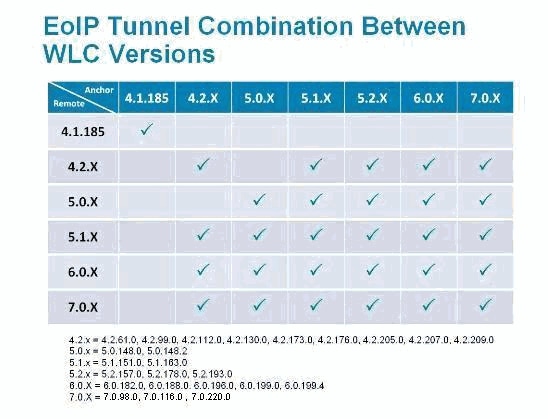
Can I create Ethernet over IP (EoIP) tunnels between controllers that run different software versions?
Not all Wireless LAN Controller software versions support this. In such cases the remote and anchor controller must run the same version of WLC software. However, the recent software versions do allow the remote and anchor controllers to have different versions.
This matrix lists the Wireless LAN Controller software versions with which you can create the EoIP tunnels.
Can the Cisco 2100/2500 Series Wireless LAN Controller be used as a guest anchor controller in the unsecured network area?
Yes, starting in Cisco Unified Wireless Network Software Release 7.4, the Cisco 2500 Series Wireless LAN Controller can terminate (up to 15 EoIP tunnels) guest traffic outside the firewall. The Cisco 2000 Series Wireless LAN Controller can only originate guest tunnels.
Can the Cisco Wireless LAN Controller Module for Integrated Services Routers (WLCM or WLCM2) be used as a guest anchor controller in the unsecured network area?
No, the WLCM or WLCM2 cannot terminate guest tunnels. The WLCM can only originate guest tunnels.
What controllers can be used to support guest access in the unsecured network area?
The guest tunnel anchor function, which includes EoIP tunnel termination, Web authentication, and access control of guest clients, is supported in these Cisco Wireless LAN Controller platforms with Version 4.0 or later software images:
-
Cisco Catalyst 6500 Series Wireless Services Module (WiSM2)
-
Cisco WiSM-2 Series Wireless LAN Controller
-
Cisco Catalyst 3750G Integrated Wireless LAN Controller
-
Cisco 5508 Series Wireless LAN Controller
-
Cisco 2500 Series Wireless LAN Controller (support introduced in Software Release 7.4)
If a guest anchor controller is used outside the firewall, what firewall ports are open for guest access to work?
On any firewall between the guest anchor controller and the remote controllers, these ports need to be open:
-
Legacy mobility: IP Protocol 97 for user data traffic, UDP Port 16666
-
New mobility: UDP Port 16666 and 16667
For optional management, these firewall ports need to be open:
-
SSH/Telnet - TCP Port 22/23
-
TFTP - UDP Port 69
-
NTP - UDP Port 123
-
SNMP - UDP Ports 161 (gets and sets) and 162 (traps)
-
HTTPS/HTTP - TCP Port 443/80
-
Syslog - TCP Port 514
-
RADIUS Auth/Account UDP Port 1812 and 1813
Can guest traffic pass through a firewall with Network Address Translation (NAT) configured?
One to one NAT must be used on the EoIP tunnel going through a firewall.
In an Anchor - Foreign WLC scenario, which WLC sends out the RADIUS accounting?
In this scenario, authentication is always done by the anchor WLC. Therefore, RADIUS accounting is sent by the anchor WLC.
Note: In a Central Web Authentication (CWA) and/or Change of Authorization (CoA) deployment, RADIUS Accounting must be DISABLED on the Anchor, and only used on the Foreign WLC.
The guest tunnel between the internal controller and anchor controller fails. I see these logs in the WLC: mm_listen.c:5373 MM-3-INVALID_PKT_RECVD: Received an invalid packet from 10. 40.220.18. Source member:0.0.0.0. source member unknown.. Why?
You check the status of the tunnel from the WLC GUI on the WLANs page. Click on the drop-down box near a WLAN and choose Mobility Anchors which contains the status of control and data path. The error message is seen due to one of these reasons:
-
Anchor and internal controllers are on different versions of code. Make sure they run same versions of the code.
-
Misconfigurations in the mobility anchor configuration. Check that the DMZ is configured itself as the Mobility anchor and the internal WLCs have the DMZ WLC configured as the Mobility anchor. For more information on how to configure the Mobility anchor, refer to the Configuring Auto- Anchor Mobility section of Cisco Wireless LAN Controller Configuration Guide. This would result in guest users unable to pass the traffic.
In a Wireless guest access setup, clients do not receive the IP address from the DHCP Server. The Thu Jan 22 16:39:09 2009: XX:XX:XX:XX:XX:XX DHCP dropping REPLY from Export-Foreign STA error message appears on the Internal controller. Why?
In a Wireless guest access setup, the DHCP proxy setting in the Guest Anchor controllers and the internal controller must match. Else, DHCP request from clients are dropped and you see this error message on the internal controller:
Thu Jan 22 16:39:09 2009: XX:XX:XX:XX:XX:XX DHCP dropping REPLY from Export-Foreign STA
Use this command in order to change the dhcp proxy setting on the WLC:
(Cisco Controller) >config dhcp proxy ?

enable         Enable DHCP processing's proxy style behaviour.
disable        Disable DHCP processing's proxy style behaviour.
Use the show dhcp proxy command on both controllers in order to verify that both controllers have the same DHCP proxy setting.
(Cisco Controller) >show dhcp proxy

DHCP Proxy Behaviour: enabled

(Cisco Controller) >
If guest traffic is tunneled to the unsecured network area, where do guest clients get an IP address?
Guest traffic is transported within the enterprise at Layer 3 via EoIP. Therefore, the first point at which Dynamic Host Configuration Protocol (DHCP) services can be implemented is locally on the guest anchor controller, or the guest anchor controller can relay client DHCP requests to an external server. This is also the method by which Domain Name System (DNS) address resolution is handled.
Does the Cisco Wireless LAN Controller support web portals for guest authentication?
Cisco Wireless LAN Controllers, software Version 3.2 or later, provide a built-in web portal that captures guest credentials for authentication and offers simple branding capabilities, along with the ability to display disclaimer and acceptable use policy information.
How do I customize the web portal?
For information on how to customize a web portal, refer to Choosing the Web Authentication Login Page.
How are guest credentials managed?
Guest credentials can be created and managed centrally using the Cisco Wireless Control System (WCS) Version 7.0 and or Network Control System (NCS) ver 1.0. A network administrator can establish a limited-privilege administrative account within WCS that permits “lobby ambassador” access for the purpose of creating guest credentials. In WCS or NCS, the person with a lobby ambassador account is able to create, assign, monitor, and delete guest credentials for the controller serving as a guest anchor controller.
The lobby ambassador can enter the guest username (or user ID) and password, or the credentials can be autogenerated. There is also a global configuration parameter that enables the use of one username and password for all guests, or a unique username and password for each guest.
In order to configure the lobby ambassador account on the WCS, refer to the Creating Guest User Accounts section of Cisco Wireless Control System Configuration Guide.
Is the lobby ambassador function available in the Cisco Wireless LAN Controller in addition to the Wireless Control System (WCS) or NCS?
Yes. If the WCS or NCS is not deployed, a network administrator can establish a lobby ambassador account on the guest anchor controller. A person who logs into the guest anchor controller using the lobby ambassador account has access only to guest user management functions.
If there are multiple guest anchor controllers, a WCS or NCS must be used to simultaneously configure usernames on multiple guest anchor controllers.
For information on how to create lobby ambassador accounts using Wireless LAN Controllers, refer to the Creating a Lobby Ambassador Account section of Cisco Wireless LAN Controller Configuration Guide.
Can guests be authenticated with an external authentication, authorization, and accounting (AAA) server?
Yes. Guest authentication requests can be relayed to an external RADIUS server.
What occurs when a guest logs on?
When a wireless guest logs in through the web portal, the guest anchor controller handles the authentication by performing these steps:
-
The guest anchor controller checks its local database for username and password, and if they are present, grants access.
-
If no user credentials are present locally on the guest anchor controller, the guest anchor controller checks WLAN configuration settings to see if an external RADIUS server(s) has been configured for the guest WLAN. If so, the controller creates a RADIUS access-request packet with the username and password and forwards it to the selected RADIUS server for authentication.
-
If no specific RADIUS servers have been configured for the WLAN, the controller checks its global RADIUS server configuration settings. Any external RADIUS servers configured with the option to authenticate "network user" is queried with the guest user's credentials. Otherwise, if no servers have "network user" selected, and the user has not been authenticated through steps 1 or 2, the authentication fails.
Is it possible to skip the guest user authentication and display only the web page disclaimer option?
Yes. Another configuration option of wireless guest access is to bypass user authentication altogether and allow open access. However, there might be a need to present an acceptable-use policy and disclaimer page to guests before granting access. In order to do this, a guest WLAN can be configured for web policy passthrough. In this scenario, a guest user is redirected to a web portal page which contains disclaimer information. In order to enable identification of the guest user, passthrough mode also has an option for a user to enter an email address before connecting.
Do we need to have the remote controller and guest anchor controller on the same mobility group?
No. The guest anchor controller and the remote controller can be on separate mobility groups.
If there is more than one guest SSID, can each WLAN (SSID) be directed to a unique web page portal?
Yes. All guest traffic, either on a single or multiple WLANs are redirected to one web page. Starting from WLC version 4.2 or later, each WLAN can be directed to a unique web portal page. Refer to the Assigning Login, Login Failure, and Logout Pages per WLAN section of Cisco Wireless LAN Controller Configuration Guide.
What is the functionality of the new setting in the WLC release 7.0, WebAuth on Mac Filter Failure?
If a WLAN has both a Layer 2 (mac-filter) and Layer 3 security (webauth-on-macfilter-failure) configured, the client moves to RUN state if either one is passed. And if it fails Layer 2 security (mac-filter), the client is moved to Layer 3 security (webauth-on-macfilter-failure).
Does the client operate properly if the browser is configured for proxy server?
Prior to release 7.0, client could not establish a TCP connection when proxy server was configured in the browser. After release 7.0, this WebAuth Proxy server support is added and Proxy server IP address and port can be configured on the controller.
Is there a deployment guide for Wireless Guest Access?
This is the link to the deployment guide:
Deployment Guide: Cisco Guest Access Using the Cisco Wireless LAN Controller
Is there a design guide for Wired and Wireless Guest Access?
These are the links to the design guides:
- Cisco Unified Wireless Guest Access Services
- Wired Guest Access using Cisco WLAN Controllers Configuration Example
Related Information
Revision History
| Revision | Publish Date | Comments |
|---|---|---|
1.0 |
12-Jun-2008
|
Initial Release |
Contributed by Cisco Engineers
 Feedback
Contact Cisco
- Open a Support Case

- (Requires a Cisco Service Contract)