FlexVPN Site-to-Site Configuration Example
Available Languages
Contents
Introduction
This document provides a sample configuration for FlexVPN site-to-site Internet Protocol Security (IPsec)/Generic Routing Encapsulation (GRE) tunnel.
Prerequisites
Requirements
There are no specific requirements for this document.
Components Used
This document is not restricted to specific software and hardware versions.
The information in this document was created from the devices in a specific lab environment. All of the devices used in this document started with a cleared (default) configuration. If your network is live, make sure that you understand the potential impact of any command.
Conventions
Refer to the Cisco Technical Tips Conventions for information on document conventions.
Configure
In this section, you are presented with the information to configure the features described in this document.
Network Diagram
This document uses this network setup:
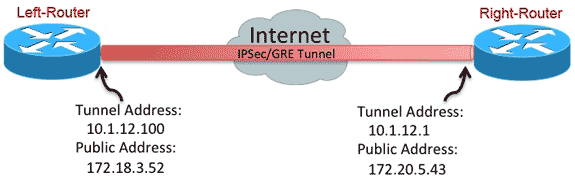
PSK Tunnel Configuration
The procedure in this section describes how to use a pre-shared key (PSK) in order to configure the tunnels in this network environment.
Left-Router
- Configure the Internet Key Exchange version 2 (IKEv2) keyring:
 crypto ikev2 keyring mykeys
 peer Right-Router
  address 172.20.5.43
  pre-shared-key Cisco123
! - Reconfigure the IKEv2 default profile in order to:
- match on the IKE ID
- set the authentication methods for local and remote
- reference the keyring listed in the previous step
 crypto ikev2 profile default
 match identity remote address 172.20.5.43 255.255.255.255
 authentication local pre-share
 authentication remote pre-share
 keyring local mykeys
 dpd 60 2 on-demand
!
- Reconfigure the default IPsec profile in order to reference the default IKEv2 profile:
crypto ipsec profile default
 set ikev2-profile default
!
interface Tunnel0
 ip address 10.1.12.100 255.255.255.0
 tunnel source Ethernet0/0
 tunnel destination 172.20.5.43
 tunnel protection ipsec profile default
! - Configure the LAN and WAN interfaces:
 interface Ethernet0/0
 description WAN
 ip address 172.18.3.52 255.255.255.0
!
interface Ethernet0/1
 description LAN
 ip address 192.168.100.1 255.255.255.0
!
ip route 0.0.0.0 0.0.0.0 172.18.3.1 name route_to_internet
Right-Router
Repeat the steps from the Left-Router configuration, but with these necessary changes:
 crypto ikev2 keyring mykeys
 peer Left-Router
  address 172.18.3.52
  pre-shared-key Cisco123
!
crypto ikev2 profile default
 match identity remote address 172.18.3.52 255.255.255.255
  authentication local pre-share
 authentication remote pre-share
 keyring local mykeys
 dpd 60 2 on-demand
!
crypto ipsec profile default
 set ikev2-profile default
!
   interface Tunnel0
 ip address 10.1.12.1 255.255.255.0
 tunnel source Ethernet0/0
 tunnel destination 172.18.3.52
 tunnel protection ipsec profile default
!
interface Ethernet0/0
 description WAN
 ip address 172.20.5.43 255.255.255.0
!
interface Ethernet0/1
 description LAN
 ip address 192.168.200.1 255.255.255.0
!
ip route 0.0.0.0 0.0.0.0 172.20.5.1 name route_to_internet
PKI Tunnel Configuration
After the tunnel from the previous section is completed with PSK, it can easily be changed in order to use Public Key Infrastructure (PKI) for the authentication. In this example, the Left-Router authenticates itself with a certificate to the Right-Router. The Right-Router continues to use a PSK in order to authenticate itself to the Left-Router. This has been done to show asymmetric authentication; however, it is trivial to switch both to use certificate authentication.
Left-Router
- Configure Cisco IOS® Certificate Authority (CA) on router:
Left-Router#config t
Left-Router(config)#ip http server
Left-Router(config)#crypto pki server S2S-CA
Left-Router(cs-server)#issuer-name cn="S2S-CA"
Left-Router(cs-server)#grant auto
Left-Router(cs-server)#no shut
%Some server settings cannot be changed after CA certificate generation.
% Please enter a passphrase to protect the private key
% or type Return to exit
Password:

Re-enter password:
% Generating 1024 bit RSA keys, keys will be non-exportable...
[OK] (elapsed time was 0 seconds)
% Exporting Certificate Server signing certificate and keys... - Authenticate and enroll the ID trustpoint:
Left-Router#config t
Left-Router(config)#ip domain name cisco.com
Left-Router(config)#crypto pki trustpoint S2S-ID
Left-Router(ca-trustpoint)#enrollment url http://172.18.3.52:80
Left-Router(ca-trustpoint)#subject-name cn=Left-Router.cisco.com
Left-Router(ca-trustpoint)#exit
Left-Router(config)#crypto pki authenticate S2S-ID
Certificate has the following attributes:
       Fingerprint MD5: C11CD575 EC2DEACD 97E9AA3A 2DACFCAB
      Fingerprint SHA1: A8A6E79B D1932175 F12652F1 4F967077 3AEFAF08

% Do you accept this certificate? [yes/no]: yes
Trustpoint CA certificate accepted.
Left-Router(config)#
Left-Router(config)#crypto pki enroll S2S-ID
%
% Start certificate enrollment ..
% Create a challenge password. You will need to verbally provide this
   password to the CA Administrator in order to revoke your certificate.
   For security reasons your password will not be saved in the configuration.
   Please make a note of it.

Password:
Re-enter password:
*Oct 29 15:15:50.287: %CRYPTO-6-AUTOGEN: Generated new 512 bit key pair

% The subject name in the certificate will include: cn=R1.cisco.com
% The subject name in the certificate will include: R1.cisco.com
% Include the router serial number in the subject name? [yes/no]: no
% Include an IP address in the subject name? [no]: no
Request certificate from CA? [yes/no]: yes
% Certificate request sent to Certificate Authority
% The 'show crypto pki certificate verbose S2S-ID' command will show the fingerprint.

*Oct 29 15:15:57.722: CRYPTO_PKI:  Certificate Request Fingerprint MD5:
     CA34FD51 A85007EF A785E058 60D8877D
*Oct 29 15:15:57.722: CRYPTO_PKI:  Certificate Request Fingerprint SHA1:
     E37AAE3C 851953C3 9FABE1FD 2F0EACD5 566F361E
Left-Router(config)#exit
Left-Router#
*Oct 29 15:16:57.829: %PKI-6-CERTRET: Certificate received from Certificate Authority - Reconfigure the IKEv2 profile:
 crypto ikev2 profile default
 authentication local rsa-sig
 identity local dn
 pki trustpoint S2S-ID
Right-Router
- Authenticate the CA trustpoint so that the router can verify the Left-Router certificate:
Right-Router#config t
Right-Router(config)#ip domain name cisco.com
Right-Router(config)#crypto pki trustpoint S2S-ID
Right-Router(ca-trustpoint)#enrollment url http://172.18.3.52:80
Right-Router(ca-trustpoint)#revocation-check none
Right-Router(ca-trustpoint)#exit
Right-Router(config)#crypto pki authenticate S2S-IDCertificate has the following attributes:
      Fingerprint MD5: C11CD575 EC2DEACD 97E9AA3A 2DACFCAB
      Fingerprint SHA1: A8A6E79B D1932175 F12652F1 4F967077 3AEFAF08

% Do you accept this certificate? [yes/no]: yes
Trustpoint CA certificate accepted.
Right-Router(config)# - Reconfigure the IKEv2 profile in order to match the incoming connection:
 crypto pki certificate map S2S-Cert-Map 10
  issuer eq cn=S2S-CA
crypto ikev2 profile default
 match certificate S2S-Cert-Map
 authentication remote rsa-sig
Verify
Use the show crypto ikev2 sa detailed command in order to verify the configuration.
The Right-Router shows this:
- Auth Sign = How this router authenticates itself to Left-Router = Pre-shared-Key
- Auth Verify = How Left-Router authenticates itself to this router = RSA (Certificate)
- Local/Remote id = The ISAKMP identities exchanged
 IPv4 Crypto IKEv2  SA

 Tunnel-id Local                 Remote                fvrf/ivrf            Status
 1         172.20.5.43/500       172.18.3.52/500       none/none            READY
      Encr: AES-CBC, keysize: 256, Hash: SHA512, DH Grp:5, Auth sign: PSK, Auth
      verify: RSA
      Life/Active Time: 86400/3165 sec
      CE id: 1043, Session-id: 22
      Status Description: Negotiation done
      Local spi: 3443E884EB151E8D       Remote spi: 92779BC873F58132
      Local id: 172.20.5.43
      Remote id: hostname=Left-Router.cisco.com,cn=Left-Router.cisco.com
      Local req msg id:  0              Remote req msg id:  4
      Local next msg id: 0              Remote next msg id: 4
      Local req queued:  0              Remote req queued:  4
      Local window:      5              Remote window:      5
      DPD configured for 60 seconds, retry 2
      NAT-T is not detected
      Cisco Trust Security SGT is disabled
      Initiator of SA : No

 IPv6 Crypto IKEv2  SA
Routing Configuration
The previous configuration example allows the tunnel to be established, but does not provide any information about routing (that is, what destinations are available over the tunnel). With IKEv2, there are two ways to exchange this information: Dynamic Routing Protocols and IKEv2 Routes.
Dynamic Routing Protocols
Since the tunnel is a point-to-point GRE tunnel, it behaves like any other point-to-point interface (for example: serial, dialer), and it is possible to run any Interior Gateway Protocol (IGP)/Exterior Gateway Protocol (EGP) over the link in order to exchange routing information. Here is an example of Enhanced Interior Gateway Routing Protocol (EIGRP):
- Configure the Left-Router in order to enable and advertise EIGRP on the LAN and tunnel interfaces:
router eigrp 100
  no auto-summary
  network 10.1.12.0 0.0.0.255
network 192.168.100.0 0.0.0.255 - Configure the Right-Router in order to enable and advertise EIGRP on the LAN and tunnel interfaces:
router eigrp 100
  no auto-summary
  network 10.1.12.0 0.0.0.255
network 192.168.200.0 0.0.0.255 - Confirm that the route to 192.168.200.0/24 is learned over the tunnel via EIGRP:
Left-Router#show ip route
Codes: L - local, C - connected, S - static, R - RIP, M - mobile, B - BGP
       D - EIGRP, EX - EIGRP external, O - OSPF, IA - OSPF inter area
       N1 - OSPF NSSA external type 1, N2 - OSPF NSSA external type 2
       E1 - OSPF external type 1, E2 - OSPF external type 2
       i - IS-IS, su - IS-IS summary, L1 - IS-IS level-1, L2 - IS-IS level-2
       ia - IS-IS inter area, * - candidate default, U - per-user static route
       o - ODR, P - periodic downloaded static route, H - NHRP, l - LISP
       + - replicated route, % - next hop override

Gateway of last resort is 172.18.3.1 to network 0.0.0.0

S*    0.0.0.0/0 [1/0] via 172.18.3.1
      10.0.0.0/8 is variably subnetted, 2 subnets, 2 masks
C        10.1.12.0/24 is directly connected, Tunnel0
L        10.1.12.100/32 is directly connected, Tunnel0
      172.18.0.0/16 is variably subnetted, 2 subnets, 2 masks
C        172.18.3.0/24 is directly connected, Ethernet0/0
L        172.18.3.52/32 is directly connected, Ethernet0/0
      192.168.100.0/24 is variably subnetted, 2 subnets, 2 masks
C        192.168.100.0/24 is directly connected, Ethernet0/1
L        192.168.100.1/32 is directly connected, Ethernet0/1
D     192.168.200.0/24 [90/27008000] via 10.1.12.1, 00:00:22, Tunnel0
IKEv2 Routes
Instead of using dynamic routing protocol routes in order to learn destinations across the tunnel, routes might be exchanged during the establishment of an IKEv2 Security Association (SA).
- On the Left-Router, configure a list of the subnets that the Left-Router advertises to the Right-Router:
ip access-list standard Net-List
permit 192.168.100.0 0.0.0.255 - On the Left-Router, configure an authorization policy in order to specify the subnets to advertise:
- /32 configured on the tunnel interface
- /24 route referenced in the ACL
crypto ikev2 authorization policy default
  route set interface
route set access-list Net-List - On the Left-Router, reconfigure the IKEv2 profile in order to reference the authorization policy when pre-shared keys are used:
crypto ikev2 profile default
aaa authorization group psk list default default - On the Right-Router, repeat steps 1 and 2 and adjust the IKEv2 profile in order to reference the authorization policy when certificates are used:
ip access-list standard Net-List
  permit 192.168.200.0 0.0.0.255

crypto ikev2 authorization policy default
   route set interface
   route set access-list Net-List

crypto ikev2 profile default
aaa authorization group cert list default default - Use the shut and no shut commands on the tunnel interface in order to force a new IKEv2 SA to be built.
- Verify that the IKEv2 routes are exchanged. See "Remote subnets" in this sample output:
Right-Router#show crypto ikev2 sa detailed
 IPv4 Crypto IKEv2  SA

Tunnel-id Local                 Remote                fvrf/ivrf            Status
1         172.20.5.43/500       172.18.3.52/500       none/none            READY
      Encr: AES-CBC, keysize: 256, Hash: SHA512, DH Grp:5, Auth sign: PSK, Auth verify: RSA
      Life/Active Time: 86400/3165 sec
      CE id: 1043, Session-id: 22
      Status Description: Negotiation done
      Local spi: 3443E884EB151E8D       Remote spi: 92779BC873F58132
      Local id: 172.20.5.43
      Remote id: hostname=R100.cisco.com,cn=R100.cisco.com
      Local req msg id:  0              Remote req msg id:  4
      Local next msg id: 0              Remote next msg id: 4
      Local req queued:  0              Remote req queued:  4
      Local window:      5              Remote window:      5
      DPD configured for 60 seconds, retry 2
      NAT-T is not detected
      Cisco Trust Security SGT is disabled      Initiator of SA : No

      Remote subnets:
      10.1.12.100 255.255.255.255
      192.168.100.0 255.255.255.0

 IPv6 Crypto IKEv2  SA
Related Information
Revision History
| Revision | Publish Date | Comments |
|---|---|---|
1.0 |
15-Nov-2013
|
Initial Release |

 Feedback
Contact Cisco
- Open a Support Case

- (Requires a Cisco Service Contract)