How to Find the Firmware Version From a Cisco IP Phone
Available Languages
Contents
Introduction
This document describes how to find the IP phone firmware load from the Cisco IP Phone, as well as from a remote location.
Prerequisites
Requirements
There are no specific requirements for this document.
Components Used
The information in this document is based on these software and hardware versions:
-
Cisco Catalyst 6500 Switch
-
IP Phone CP-7941G
-
Cisco Unified Communications Manager 7.x
The information in this document was created from the devices in a specific lab environment. All of the devices used in this document started with a cleared (default) configuration. If your network is live, make sure that you understand the potential impact of any command.
Conventions
Refer to Cisco Technical Tips Conventions for more information on document conventions.
Firmware Naming Convention
These conventions are used in naming the IP Phone firmware:
SCCP firmware: P003xxyyzzww.bin: where x represents the major version, y represents the major subversion, z represents the maintenance version, and w represents the maintenance subversion.
SIP firmware: P0S3-xx-y-zz: where x represents the major version, y represents the minor version, and z represents the subversions.
MGCP firmware: P0M3-xx-y-zz: where M is the third character. The major, minor, and subversions for MGCP are consistent with the SIP naming convention
For Java-based IP phones, the following naming conventions are used for image files.
SCCP firmware: TERMnn.xx-y-z-ww or SCCPnn.xx-y-zz-ww: where n represents the phone type, x represents the major version, y represents the major subversion, z represents the maintenance version, and w represents the maintenance subversion.
Firmware Offered by CUCM
Complete these steps in order to view the software versions that the Cisco Unified Communications Manager offers:
-
Log in to the Cisco Unified Communications Manager Administration page.
-
Navigate to Device > Device Settings > Device Defaults.
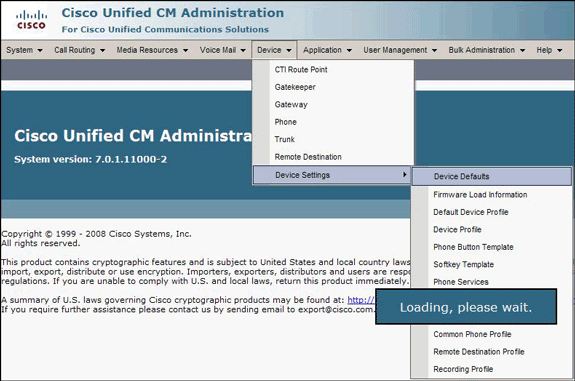
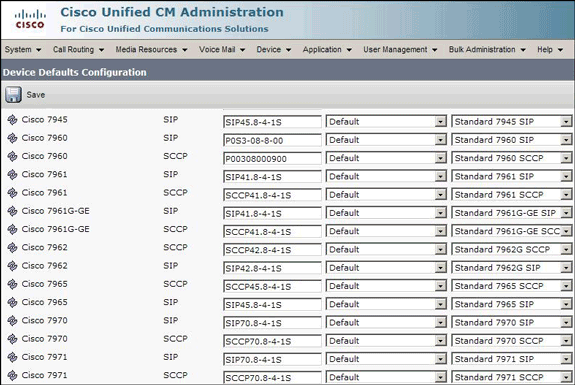
The Device Defaults Configuration list appears. This list shows the firmware that the IP Phone will load when it registers with CUCM. In this example, the Cisco 7961 IP Phone will load SCCP41.8-4-1S when it register with the Cisco Unified Communications Manager.


Methods
Complete one of these methods in order to find the firmware version of an IP phone:
-
You can access the firmware version directly from the phone from the Settings Menu.
-
Press Settings, scroll down, and select Status.
-
Scroll down, and select Firmware Versions.
This lists the versions of the different kinds of load.
-
-
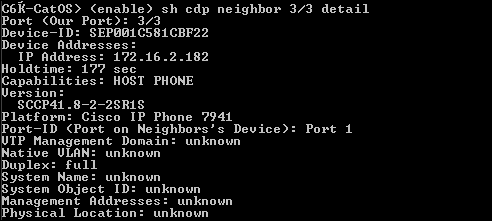
If the IP Phone is located in a remote location, telnet to the Cisco switch to which the IP Phone is connected and issue the show cdp neighbors <module/port> detail command.
-
If you know the IP address of the IP Phone, you can access directly the HTTP interface of the IP Phone.
Open a web browser, and enter http://<ip phone ip address>/. Where ip phone ip address is the IP address of the IP Phone.
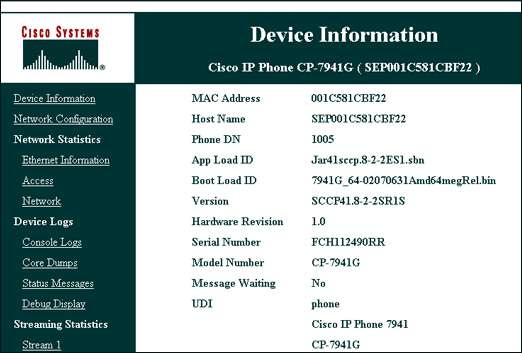


Here is a link to the video on the Cisco Support Community  which explains the procedure to find the firmware version running on a Cisco IP Phone: How to find the Firmware version running on a Cisco IP Phone
Related Information
 Feedback
Contact Cisco
- Open a Support Case

- (Requires a Cisco Service Contract)