Cisco Unified Attendant Console Business Edition Version 9.1 Data Sheet
Available Languages
Cisco® Unified Attendant Consoles are client-server applications that enable operators and receptionists to answer and quickly dispatch incoming calls to their intended recipients or suitable alternatives. The applications offer a rich set of features, including a call-queuing engine, endpoint busy status, presence integration, and Cisco Unified Communications Manager end-user directory search.
Product Overview
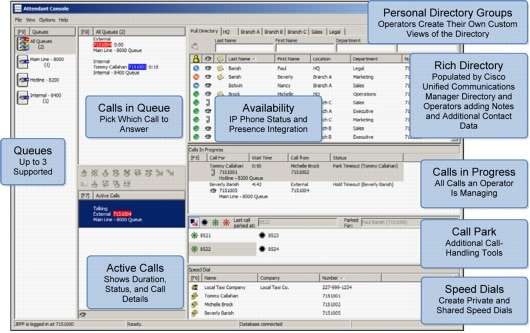
Figure 1. Cisco Unified Attendant Console Business Edition
Features and Benefits
Table 1. Features and Benefits of Cisco Unified Attendant Console Business Edition
| Feature |
Benefit |
| Queue Features |
|
| Support for three queues with prioritization |
You can configure queue names and priorities per customer needs, and you can prioritize and answer calls out of order. For example, a Cisco Unified Communications Manager customer can have a sales queue, a service queue, and a general business queue. Sales calls can be prioritized and answered first, before service or general business calls. |
| Operator queue assignment |
In Web Admin, you can assign one or more queues to each operator, allowing you to segment your call-answering processes to fit your business needs. |
| Queue operator views |
The operator can view all calls within a queue or view all calls within all queues. If the operator sees many calls in queue, the operator knows that calls need to be processed quickly. If the operator sees only a few calls in queue, then the operator can spend more time with each caller to provide a higher level of customer service. If the operator sees a high-priority caller, the operator can select and answer calls out of sequence. |
| Overflow options |
Number of Calls overflow sends calls to the overflow destination when the queue already contains the maximum capacity of calls. No Operator overflow sends calls to the overflow destination when no operators are logged into the queue. Wait Time overflow sends calls to the overflow destination when a call has been waiting in queue for a defined period of time. Overflow settings are defined on a queue-by-queue basis. |
| Music in queue |
Callers hear music through the Cisco Unified Communications Manager Music on Hold (MoH) function. |
| Directory Features |
|
| Support for up to 500 IP phone users |
The operator can answer calls and view busy status for up to 500 IP phone users. |
| Directory integration |
The Cisco Unified Attendant Console Business Edition derives its directory from the Cisco Unified Communications Manager directory. The application includes a utility for keeping the directories synchronized. |
| Personal directory groups |
Each operator can create up to 100 custom directory groups, displayed as tabs across the top of the directory. These directory groups are subsets of the full directory, which is synchronized with Cisco Unified Communications Manager. Because personal directory groups are created using live directory filters as well as dragging and dropping individual contacts, operators can be confident their groups are always up-to-date. |
| Search options |
Four directory search fields are provided. They allow the operator to quickly find call destinations and then quickly dispatch calls. Search options include last name, first name, department, extension, job title, and location, and they can be customized within each attendant console client. |
| Presence integration |
Operators can view each contact's Cisco Unified Presence status directly from the Attendant Console directory. This feature allows operators to manage calls efficiently because they can easily see whether a particular contact is available to take a call. Microsoft OCS 2007 and Microsoft Lync are also supported presence sources in the Attendant Console directory. |
| Telephony Features |
|
| Operator handset ringing |
When a call comes into a queue configured with operator handset ringing, the call is sent directly to the handset of the operator logged into that queue for the longest duration. This feature enables operators to answer the call from a wireless headset while away from their desks. (The wireless headset is not included.) |
| Transfer reversion (call recall) |
This feature allows a transferred call to revert back to the operator so that it can be answered and then transferred to a new destination. |
| Call park |
With call park, a caller can be placed on hold while the operator announces that a call is on hold and waiting for a particular person or group. The call can be answered from any phone by dialing the park extension. |
| Call park recall |
If a parked call is not answered, this feature allows that call to revert back to the operator so that it can be transferred to a new destination. |
| Call toggle |
This feature allows the operator to shift between callers. |
| Conference |
This feature allows the operator to provide a three-party conference call. |
| Emergency Mode switch |
This feature provides a manual switch within the application that redirects all calls to another destination in emergencies to alert callers that an emergency such as a snow storm has occurred, and therefore the business is closed until further notice. |
| Night service |
You can define working hours on the Cisco Unified Attendant Console Business Edition server, and automatically route calls to an answering service or voicemail system to alert the callers that it is after hours and the business is closed. |
| Additional Features |
|
| Adjustable font size |
Changing the font size is one of the many ways in which individual users can tailor the Cisco Unified Attendant Console Business Edition application to best suit their needs. |
| Server-based console preferences |
Many of the attendant console client preferences can now follow users to different PCs running Cisco Unified Attendant Console Business Edition. |
| Reports |
You can gain a better understanding of call volumes by operator and queue, the queues that have the most abandoned calls, and other important metrics through attendant console reports, accessible through the Web Admin tool. |
| VMware support |
Cisco Unified Attendant Console server is supported in a production environment on VMware ESXi 4.x or 5.x running on a host machine that is compliant with the Cisco Specifications-Based Hardware Support program. For more information about this program, please visit: http://docwiki.cisco.com/wiki/Specification-Based_Hardware_Support. Note: This feature is supported only with Cisco Unified Communications Manager 8.0(1) and later. |
| Accessibility |
The visually impaired can use Cisco Unified Attendant Console Business Edition, because both ZoomText and JAWS scripts are supported. |
| Attendant console client localization |
English, French, German, Italian, Portuguese, Spanish, Dutch, Swedish, Danish, Russian, Arabic, Korean, Japanese, Traditional Chinese, and Simplified Chinese are supported. |
Product Specifications
Table 2. Server Requirements for Cisco Unified Attendant Console Business Edition
Note: The operator client for the Cisco Unified Attendant Console Business Edition requires the PC specifications listed in Table 3. You can install Cisco Unified Attendant Console Business Edition client software on many PCs, but only up to 12 operators can be concurrently logged into a server. Refer to the "Ordering Information" section for additional licensing details.
Table 3. Client Requirements
Download Information and 60-Day Evaluation
Ordering Information
Table 4. Ordering Information
Cisco Unified Communications Services and Support
For More Information
 Feedback