Cisco Aironet Dual-band Dipole Antenna (AIR-ANT2524DB-R, AIR-ANT2524DG-R, AIR-ANT2524DW-R, and AIR-ANT2524DW-RS)
Available Languages
Table of Contents
Communications, Services, and Additional Information
Cisco Aironet Dual-band Dipole Antenna (AIR-ANT2524DB-R, AIR-ANT2524DG-R, AIR-ANT2524DW-R, and AIR-ANT2524DW-RS)
Note: The documentation set for this product strives to use bias-free language. For purposes of this documentation set, bias-free is defined as language that does not imply discrimination based on age, disability, gender, racial identity, ethnic identity, sexual orientation, socioeconomic status, and intersectionality. Exceptions may be present in the documentation due to language that is hardcoded in the user interfaces of the product software, language used based on RFP documentation, or language that is used by a referenced third-party product.
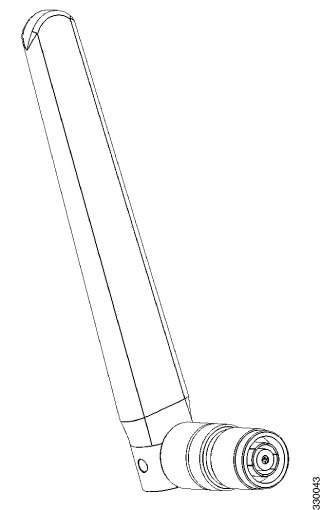
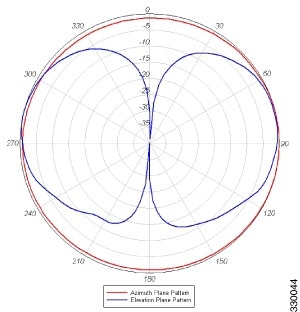
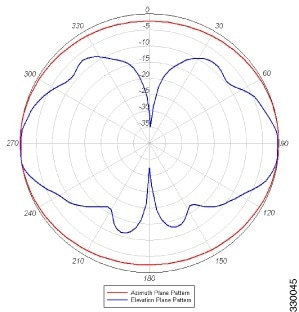
This describes the Cisco Aironet high-performance, dual-band dipole antenna, and provides specifications and mounting instructions. The antenna operates in both the 2.4 GHz and 5 GHz frequency bands, and is designed for use with Cisco Aironet 2.4 GHz and 5 GHz radio products with dual-band reverse-polarity TNC (RP-TNC) antenna ports. The antenna has a nominal gain of 2 dBi in the 2.4 GHz frequency band and 4 dBi in the 5 GHz frequency band. The AIR-ANT2524Dx-R antennas covered in this document are electrically the same but differ physically by the color of the radome, which is specified by the product part number shown in Table 1. The AIR-ANT2524DW-RS antenna includes self-identifying circuitry.
■ Communications, Services, and Additional Information
System Requirements
This antenna is designed for use with Cisco Aironet access points that support simultaneous operation in the 2.4 GHz band and the 5 GHz band and that have dual-band antenna ports, labeled in orange text.
The Self Identifying Antenna model AIR-ANT2524DW-RS= is supported only on Cisco Catalyst 9800 Series Wireless Controllers running an IOS-XE 17.4.1 release or a later release. This antenna model is not supported on Cisco AireOS Wireless Controllers.
Features
The antenna has an articulated base that can be rotated 360 degrees at the connection point and from 0 to 90 degrees at its joint.
The AIR-ANT2524DW-RS antenna includes circuitry to enable self identification of the antenna by the Cisco Catalyst 91xx Series access points. The self identifying function is indicated by a purple band on the antenna. Ensure this antenna is connected to Port A on the AP, which is also designated by purple text around the RP-TNC connector. This antenna has a built-in EEPROM that can be read by the AP to automatically configure the antenna type and gain in the Wireless LAN Controller.
Installing the Antenna
Caution: The AIR-ANT2524Dx-R series of antennas are dual-band antennas, meaning that they operate in both the 2.4 GHz and 5 GHz frequency bands. The AIR-ANT2524Dx-R series antennas have an orange ID band on them to indicate their dual-band functionality. Connect these antennas only to dual-band antenna ports, which are identified with orange text on Cisco Aironet access points. Using these antennas on Cisco Aironet access points that employ single-band antennas might result in lower performance.
1. Verify that the connector to which you are connecting the antenna is a dual-band antenna port, identified by orange text on the access point.
2. Align the antenna connector with the RP-TNC connector on the access point.
3. Engage the antenna connector threads with the RP-TNC connector on the access point.
4. Hand tighten the antenna to the port using the metal knurled ring only.
Warning: Do not use the plastic body to tighten. This may damage the antenna.
5. Adjust the antenna articulating joint to the desired position.
Communications, Services, and Additional Information
■To receive timely, relevant information from Cisco, sign up at Cisco Profile Manager.
■To get the business impact you’re looking for with the technologies that matter, visit Cisco Services.
■To submit a service request, visit Cisco Support.
■To discover and browse secure, validated enterprise-class apps, products, solutions and services, visit Cisco Marketplace.
■To obtain general networking, training, and certification titles, visit Cisco Press.
■To find warranty information for a specific product or product family, access Cisco Warranty Finder.
Cisco Bug Search Tool
Cisco Bug Search Tool (BST) is a web-based tool that acts as a gateway to the Cisco bug tracking system that maintains a comprehensive list of defects and vulnerabilities in Cisco products and software. BST provides you with detailed defect information about your products and software.
THE SPECIFICATIONS AND INFORMATION REGARDING THE PRODUCTS IN THIS MANUAL ARE SUBJECT TO CHANGE WITHOUT NOTICE. ALL STATEMENTS, INFORMATION, AND RECOMMENDATIONS IN THIS MANUAL ARE BELIEVED TO BE ACCURATE BUT ARE PRESENTED WITHOUT WARRANTY OF ANY KIND, EXPRESS OR IMPLIED. USERS MUST TAKE FULL RESPONSIBILITY FOR THEIR APPLICATION OF ANY PRODUCTS.
THE SOFTWARE LICENSE AND LIMITED WARRANTY FOR THE ACCOMPANYING PRODUCT ARE INCORPORATED HEREIN BY THIS REFERENCE. IF YOU ARE UNABLE TO LOCATE THE SOFTWARE LICENSE OR LIMITED WARRANTY, CONTACT YOUR CISCO REPRESENTATIVE FOR A COPY.
The following information is for FCC compliance of Class A devices: This equipment has been tested and found to comply with the limits for a Class A digital device, pursuant to part 15 of the FCC rules. These limits are designed to provide reasonable protection against harmful interference when the equipment is operated in a commercial environment. This equipment generates, uses, and can radiate radio-frequency energy and, if not installed and used in accordance with the instruction manual, may cause harmful interference to radio communications. Operation of this equipment in a residential area is likely to cause harmful interference, in which case users will be required to correct the interference at their own expense.
The following information is for FCC compliance of Class B devices: This equipment has been tested and found to comply with the limits for a Class B digital device, pursuant to part 15 of the FCC rules. These limits are designed to provide reasonable protection against harmful interference in a residential installation. This equipment generates, uses and can radiate radio frequency energy and, if not installed and used in accordance with the instructions, may cause harmful interference to radio communications. However, there is no guarantee that interference will not occur in a particular installation. If the equipment causes interference to radio or television reception, which can be determined by turning the equipment off and on, users are encouraged to try to correct the interference by using one or more of the following measures:
■Reorient or relocate the receiving antenna.
■Increase the separation between the equipment and receiver.
■Connect the equipment into an outlet on a circuit different from that to which the receiver is connected.
■Consult the dealer or an experienced radio/TV technician for help.
Modifications to this product not authorized by Cisco could void the FCC approval and negate your authority to operate the product.
The Cisco implementation of TCP header compression is an adaptation of a program developed by the University of California, Berkeley (UCB) as part of UCB’s public domain version of the UNIX operating system. All rights reserved. Copyright © 1981, Regents of the University of California.
NOTWITHSTANDING ANY OTHER WARRANTY HEREIN, ALL DOCUMENT FILES AND SOFTWARE OF THESE SUPPLIERS ARE PROVIDED “AS IS” WITH ALL FAULTS. CISCO AND THE ABOVE-NAMED SUPPLIERS DISCLAIM ALL WARRANTIES, EXPRESSED OR IMPLIED, INCLUDING, WITHOUT LIMITATION, THOSE OF MERCHANTABILITY, FITNESS FOR A PARTICULAR PURPOSE AND NONINFRINGEMENT OR ARISING FROM A COURSE OF DEALING, USAGE, OR TRADE PRACTICE.
IN NO EVENT SHALL CISCO OR ITS SUPPLIERS BE LIABLE FOR ANY INDIRECT, SPECIAL, CONSEQUENTIAL, OR INCIDENTAL DAMAGES, INCLUDING, WITHOUT LIMITATION, LOST PROFITS OR LOSS OR DAMAGE TO DATA ARISING OUT OF THE USE OR INABILITY TO USE THIS MANUAL, EVEN IF CISCO OR ITS SUPPLIERS HAVE BEEN ADVISED OF THE POSSIBILITY OF SUCH DAMAGES.
Any Internet Protocol (IP) addresses and phone numbers used in this document are not intended to be actual addresses and phone numbers. Any examples, command display output, network topology diagrams, and other figures included in the document are shown for illustrative purposes only. Any use of actual IP addresses or phone numbers in illustrative content is unintentional and coincidental.
All printed copies and duplicate soft copies of this document are considered uncontrolled. See the current online version for the latest version.
Cisco has more than 200 offices worldwide. Addresses, phone numbers, and fax numbers are listed on the Cisco website at www.cisco.com/go/offices.
 Feedback
Contact Cisco
- Open a Support Case

- (Requires a Cisco Service Contract)