Release Note for Catalyst 4948 Series Switch, Cisco IOS Release 12.2(54)SGx and 12.2(53)SGx
Available Languages
Table of Contents
Release Notes for the Catalyst 4900 Series Switch, Cisco IOS Release 12.2(54)SGx and 12.2(53)SGx
Cisco IOS Software Packaging for theCisco Catalyst 4900 Series Switch
Catalyst 4900 Series Switch Cisco IOS Release Strategy
New Hardware Features in Release12.2(54)SG
New Software Features in Release12.2(54)SG
New Hardware Features in Release12.2(53)SG3
New Software Features in Release12.2(53)SG3
New Hardware Features in Release12.2(53)SG
New Software Features in Release12.2(53)SG
New Hardware Features in Release12.2(52)SG
New Software Features in Release12.2(52)SG
New Hardware Features in Release12.2(50)SG2
New Software Features in Release12.2(50)SG2
New Hardware Features in Release12.2(50)SG1
New Software Features in Release12.2(50)SG1
New Hardware Features in Release12.2(50)SG
New Software Features in Release12.2(50)SG
New Hardware Features in Release12.2(46)SG
New Software Features in Release12.2(46)SG
New Hardware Features in Release12.2(44)SG
New Software Features in Release12.2(44)SG
New Hardware Features in Release12.2(40)SG
New Software Features in Release12.2(40)SG
New Hardware Features in Release12.2(37)SG
New Software Features in Release12.2(37)SG
New Hardware Features in Release12.2(31)SGA
New Software Features in Release12.2(31)SGA
New Hardware Features in Release12.2(31)SG
New Software Features in Release12.2(31)SG
New Hardware Features in Release12.2(25)SG
New Software Features in Release12.2(25)SG
New Hardware Features in Release12.2(25)EWA
New Software Features in Release12.2(25)EWA
New Hardware Features in Release12.2(25)EW
New Software Features in Release12.2(25)EW
New Hardware Features in Release12.2(20)EWA
New Software Features in Release12.2(20)EWA
Upgrading the ROMMON from the Console
Upgrading the ROMMON Remotely Using Telnet
Upgrading the Cisco IOS Software
Open Caveats in Cisco IOS Release 12.2(54)SG1
Resolved Caveats in Cisco IOS Release 12.2(54)SG1
Open Caveats in Cisco IOS Release 12.2(54)SG
Resolved Caveats in Cisco IOS Release 12.2(54)SG
Open Caveats in Cisco IOS Release 12.2(53)SG11
Resolved Caveats in Cisco IOS Release 12.2(53)SG11
Open Caveats in Cisco IOS Release 12.2(53)SG10
Resolved Caveats in Cisco IOS Release 12.2(53)SG10
Open Caveats in Cisco IOS Release 12.2(53)SG9
Resolved Caveats in Cisco IOS Release 12.2(53)SG9
Open Caveats in Cisco IOS Release 12.2(53)SG8
Resolved Caveats in Cisco IOS Release 12.2(53)SG8
Open Caveats in Cisco IOS Release 12.2(53)SG7
Resolved Caveats in Cisco IOS Release 12.2(53)SG7
Open Caveats in Cisco IOS Release 12.2(53)SG6
Resolved Caveats in Cisco IOS Release 12.2(53)SG6
Open Caveats in Cisco IOS Release 12.2(53)SG5
Resolved Caveats in Cisco IOS Release 12.2(53)SG5
Open Caveats in Cisco IOS Release 12.2(53)SG4
Resolved Caveats in Cisco IOS Release 12.2(53)SG4
Open Caveats in Cisco IOS Release 12.2(53)SG3
Resolved Caveats in Cisco IOS Release 12.2(53)SG3
Open Caveats in Cisco IOS Release 12.2(53)SG2
Resolved Caveats in Cisco IOS Release 12.2(53)SG2
Open Caveats in Cisco IOS Release 12.2(53)SG1
Resolved Caveats in Cisco IOS Release 12.2(53)SG1
Open Caveats in Cisco IOS Release 12.2(53)SG
Resolved Caveats in Cisco IOS Release 12.2(53)SG
Open Caveats in Cisco IOS Release 12.2(52)SG
Resolved Caveats in Cisco IOS Release 12.2(52)SG
Open Caveats in Cisco IOS Release 12.2(50)SG8
Resolved Caveats in Cisco IOS Release 12.2(50)SG8
Open Caveats in Cisco IOS Release 12.2(50)SG7
Resolved Caveats in Cisco IOS Release 12.2(50)SG7
Open Caveats in Cisco IOS Release 12.2(50)SG6
Resolved Caveats in Cisco IOS Release 12.2(50)SG6
Open Caveats in Cisco IOS Release 12.2(50)SG4
Resolved Caveats in Cisco IOS Release 12.2(50)SG4
Open Caveats in Cisco IOS Release 12.2(50)SG2
Resolved Caveats in Cisco IOS Release 12.2(50)SG2
Open Caveats in Cisco IOS Release 12.2(50)SG1
Resolved Caveats in Cisco IOS Release 12.2(50)SG1
Open Caveats in Cisco IOS Release 12.2(50)SG
Resolved Caveats in Cisco IOS Release 12.2(50)SG
Open Caveats in Cisco IOS Release 12.2(46)SG
Resolved Caveats in Cisco IOS Release 12.2(46)SG
Open Caveats in Cisco IOS Release 12.2(44)SG1
Resolved Caveats in Cisco IOS Release 12.2(44)SG1
Open Caveats in Cisco IOS Release 12.2(44)SG
Resolved Caveats in Cisco IOS Release 12.2(44)SG
Open Caveats in Cisco IOS Release 12.2(40)SG
Resolved Caveats in Cisco IOS Release 12.2(40)SG
Open Caveats in Cisco IOS Release 12.2(37)SG1
Resolved Caveats in Cisco IOS Release 12.2(37)SG1
Open Caveats in Cisco IOS Release 12.2(37)SG
Resolved Caveats in Cisco IOS Release 12.2(37)SG
Open Caveats in Cisco IOS Release 12.2(31)SGA11
Resolved Caveats in Cisco IOS Release 12.2(31)SGA11
Open Caveats in Cisco IOS Release 12.2(31)SGA10
Resolved Caveats in Cisco IOS Release 12.2(31)SGA10
Open Caveats in Cisco IOS Release 12.2(31)SGA9
Resolved Caveats in Cisco IOS Release 12.2(31)SGA9
Open Caveats in Cisco IOS Release 12.2(31)SGA8
Resolved Caveats in Cisco IOS Release 12.2(31)SGA8
Open Caveats in Cisco IOS Release 12.2(31)SGA7
Resolved Caveats in Cisco IOS Release 12.2(31)SGA7
Open Caveats in Cisco IOS Release 12.2(31)SGA6
Resolved Caveats in Cisco IOS Release 12.2(31)SGA6
Open Caveats in Cisco IOS Release 12.2(31)SGA5
Resolved Caveats in Cisco IOS Release 12.2(31)SGA5
Open Caveats in Cisco IOS Release 12.2(31)SGA4
Resolved Caveats in Cisco IOS Release 12.2(31)SGA4
Open Caveats in Cisco IOS Release 12.2(31)SGA3
Resolved Caveats in Cisco IOS Release 12.2(31)SGA3
Open Caveats in Cisco IOS Release 12.2(31)SGA2
Resolved Caveats in Cisco IOS Release 12.2(31)SGA2
Open Caveats in Cisco IOS Release 12.2(31)SGA1
Resolved Caveats in Cisco IOS Release 12.2(31)SGA1
Open Caveats in Cisco IOS Release 12.2(31)SGA
Resolved Caveats in Cisco IOS Release 12.2(31)SGA
Open Caveats in Cisco IOS Release 12.2(31)SG2
Resolved Caveats in Cisco IOS Release 12.2(31)SG3
Open Caveats in Cisco IOS Release 12.2(31)SG2
Resolved Caveats in Cisco IOS Release 12.2(31)SG2
Open Caveats in Cisco IOS Release 12.2(31)SG1
Resolved Caveats in Cisco IOS Release 12.2(31)SG1
Open Caveats in Cisco IOS Release 12.2(31)SG
Resolved Caveats in Cisco IOS Release 12.2(31)SG
Open Caveats in Cisco IOS Release 12.2(25)SG4
Resolved Caveats in Cisco IOS Release 12.2(25)SG4
Open Caveats in Cisco IOS Release 12.2(25)SG3
Resolved Caveats in Cisco IOS Release 12.2(25)SG3
Open Caveats in Cisco IOS Release 12.2(25)SG2
Resolved Caveats in Cisco IOS Release 12.2(25)SG2
Open Caveats in Cisco IOS Release 12.2(25)SG1
Resolved Caveats in Cisco IOS Release 12.2(25)SG1
Open Caveats in Cisco IOS Release 12.2(25)SG
Resolved Caveats in Cisco IOS Release 12.2(25)SG
Open Caveats in Cisco IOS Release 12.2(25)EWA14
Resolved Caveats in Cisco IOS Release 12.2(25)EWA14
Open Caveats in Cisco IOS Release 12.2(25)EWA13
Resolved Caveats in Cisco IOS Release 12.2(25)EWA13
Open Caveats in Cisco IOS Release 12.2(25)EWA12
Resolved Caveats in Cisco IOS Release 12.2(25)EWA12
Open Caveats in Cisco IOS Release 12.2(25)EWA11
Resolved Caveats in Cisco IOS Release 12.2(25)EWA11
Open Caveats in Cisco IOS Release 12.2(25)EWA10
Resolved Caveats in Cisco IOS Release 12.2(25)EWA10
Open Caveats in Cisco IOS Release 12.2(25)EWA9
Resolved Caveats in Cisco IOS Release 12.2(25)EWA9
Open Caveats in Cisco IOS Release 12.2(25)EWA8
Resolved Caveats in Cisco IOS Release 12.2(25)EWA8
Open Caveats in Cisco IOS Release 12.2(25)EWA7
Resolved Caveats in Cisco IOS Release 12.2(25)EWA7
Open Caveats in Cisco IOS Release 12.2(25)EWA6
Resolved Caveats in Cisco IOS Release 12.2(25)EWA6
Open Caveats in Cisco IOS Release 12.2(25)EWA5
Resolved Caveats in Cisco IOS Release 12.2(25)EWA5
Open Caveats in Cisco IOS Release 12.2(25)EWA4
Resolved Caveats in Cisco IOS Release 12.2(25)EWA4
Open Caveats in Cisco IOS Release 12.2(25)EWA3
Resolved Caveats in Cisco IOS Release 12.2(25)EWA3
Open Caveats in Cisco IOS Release 12.2(25)EWA2
Resolved Caveats in Cisco IOS Release 12.2(25)EWA2
Open Caveats in Cisco IOS Release 12.2(25)EWA1
Resolved Caveats in Cisco IOS Release 12.2(25)EWA1
Open Caveats in Cisco IOS Release 12.2(25)EWA
Resolved Caveats in Cisco IOS Release 12.2(25)EWA
Open Caveats in Cisco IOS Release 12.2(25)EW
Resolved Caveats in Cisco IOS Release 12.2(25)EW
Open Caveats in Cisco IOS Release 12.2(20)EWA4
Resolved Caveats in Cisco IOS Release 12.2(20)EWA4
Open Caveats in Cisco IOS Release 12.2(20)EWA3
Resolved Caveats in Cisco IOS Release 12.2(20)EWA3
Open Caveats in Cisco IOS Release 12.2(20)EWA2
Resolved Caveats in Cisco IOS Release 12.2(20)EWA2
Open Caveats in Cisco IOS Release 12.2(20)EWA1
Resolved Caveats in Cisco IOS Release 12.2(20)EWA1
Open Caveats in Cisco IOS Release 12.2(20)EWA
Resolved Caveats in Cisco IOS Release 12.2(20)EWA
Troubleshooting at the System Level
Obtaining Documentation and Submitting a Service Request
Release Notes for the Catalyst 4900 Series Switch, Cisco IOS Release 12.2(54)SGx and 12.2(53)SGx
Current Release
12.2(53)SG11—August 18,, 2014Previous Releases
12.2(54)SG1,12.2(54)SG, 12.2(53)SG10, 12.2(53)SG9, 12.2(53)SG8, 12.2(53)SG7, 12.2(53)SG6, 12.2(53)SG5, 12.2(54)SG4, 12.2(53)SG3, 12.2(53)SG2, 12.2(53)SG1, 12.2(53)SG, 12.2(52)SG, 12.2(50)SG8, 12.2(50)SG7, 12.2(50)SG6, 12.2(50)SG4, 12.2(50)SG2, 12.1(50)SG1, 12.2(50)SG, 12.2(46)SG, 12.2(44)SG1, 12.2(44)SG, 12.2(37)SG1, 12..2(37)SG, 12.2(31)SGA11, 12.2(31)SGA10, 12.2(31)SGA9, 12.2(31)SGA8, 12.2(31)SGA7, 12.2(31)SGA6, 12.2(31)SGA5, 12.2(31)SGA4, 12.2(31)SGA3, 12.2(31)SGA2, 12.2(31)SGA1, 12.2(31)SGA, 12.2(31)SG3, 12.2(31)SG2, 12.2(31)SG1, 12.2(31)SG, 112.2(25)SG4, 2.2(25)SG3, 12.2(25)SG2, 12.2(25)SG1, 12.2(25)SG, 12.2(25)EWA14, 12.2(25)EWA13, 12.2(25EWA12, 12.2(25)EWA11, 12.2(25)EWA10, 12.2(25)EWA9, 12.2(25)EWA8, 12.2(25)EWA7, 12.2(25)EWA6, 12.2(25)EWA5, 12.2(25)EWA4, 12.2(25)EWA3, 12.2(25)EWA2, 12.2(25)EWA1, 12.2(25)EW, 12.2(20)EWA4, 12.2(20)EWA3, 12.2(20)EWA2, 12.2(20)EWA1, 12.2(20)EWAThese release notes describe the features, modifications, and caveats for the Cisco IOS software on the Catalyst 4900 series switch. The most current software release is Cisco IOS Release 12.2(54)SG.
Support for Cisco IOS Software Release 12.2(54)SG, the default image, follows the standard Cisco Systems® support policy, available at
http://www.cisco.com/en/US/products/products_end-of-life_policy.html
Note
Although their Release Notes are unique, the 4 platforms (Catalyst 4500, Catalyst 4900,
Catalyst ME 4900, and Catalyst 4900M/4948E) use the same Software Configuration Guide, Command Reference Guide, and System Message Guide.
For more information on the Catalyst 4500 series switches, visit the following URL:
http://www.cisco.com/go/cat4500/docsContents
This publication consists of these sections:
- Cisco IOS Software Packaging for the Cisco Catalyst 4900 Series Switch
- Catalyst 4900 Series Switch Cisco IOS Release Strategy
- System Requirements
- New and Changed Information
- Upgrading the System Software
- Limitations and Restrictions
- Caveats
- Troubleshooting
- Related Documentation
- Notices
- Obtaining Documentation and Submitting a Service Request
Cisco IOS Software Packaging for the
Cisco Catalyst 4900 Series SwitchA new Cisco IOS Software package for Cisco Catalyst 4900 Series switches was introduced in Cisco IOS Software Release 12.2(25)SG. It is a new foundation for features and functionality and provides consistency across all Cisco Catalyst switches. The new Cisco IOS Software release train is designated as 12.2SG.
Prior Cisco Catalyst 4900 Series Cisco IOS Software images for the Cisco Catalyst 4900 Series Switches, formerly known as Basic Layer 3 and Enhanced Layer 3, now map to IP Base and Enterprise Services, respectively. All currently shipping Cisco Catalyst 4900 software features based on Cisco IOS Software are supported in the IP Base image of Release 12.2(54)SG with a few exceptions.
The IP Base image does not support enhanced routing features such as Nonstop Forwarding/Stateful Switchover (NSF/SSO), BGP, Enhanced Interior Gateway Routing Protocol (EIGRP), Open Shortest Path First (OSPF), Intermediate System-to-Intermediate System (IS-IS), Internetwork Packet Exchange (IPX), AppleTalk, Virtual Routing Forwarding (VRF-lite), GLBP, and policy-based routing (PBR). The IP Base image supports EIGRP-Stub for limited routing on Cisco Catalyst 4900 Series Switches.
The Enterprise Services image supports all Cisco Catalyst 4900 Series software features based on Cisco IOS Software, including enhanced routing. BGP capability is included in the Enterprises Services package.
Cisco IOS Release 12.2(46)SG1 introduced a LAN Base software image and an IP upgrade image for the fixed configuration switches, WS-X4948 and WS-X4948-10GE. These will complement the existing IP Base and Enterprise Services images. The LAN Base image is primarily focused on customer access and Layer 2 requirements and therefore many of the IP Base features are not required. An IP Upgrade image is available if later you require some of those features.
For more information about the Cisco Catalyst 4900 series switch, visit
http://www.cisco.com/en/US/products/ps6021/index.htmlTable 1 contrasts feature support on the LAN Base vs IP Base images.
For information on MiBs support, pls refer to this URL:
http:// ftp.cisco.com/pub/mibs/supportlists/cat4000/cat4000-supportlist.html
Note With the LAN Base image, 10GbE uplinks are supported on the Catalyst 4948-10GE switch but not the Catalyst 4948 switch.
- S49LB-12254SG(=)—Cisco IOS Software for Cisco Catalyst 4900 Series Switch (LAN Base image)
- S49LBK9-12254SG(=)—Cisco IOS Software for Cisco Catalyst 4900 Series Switch (LAN Base image with Triple Data Encryption)
- S49IPB-12254SG(=)—Cisco IOS Software for Cisco Catalyst 4900 Series Switch (IP Base image)
- S49IPBK9-12254SG(=)—Cisco IOS Software for Cisco Catalyst 4900 Series Switch (IP Base image with Triple Data Encryption)
- S49ES-12254SG(=)— Cisco IOS Software for Cisco Catalyst 4900 Series Switch (Enterprise Services image with BGP support)
- S49ESK9-12254SG(=)—Cisco IOS Software for Cisco Catalyst 4900 Series Switch (Enterprise Services image with 3DES and BGP support)
- S49ES-12253SG - Cisco IOS Software for Cisco Catalyst 4900 Series Switches (Enterprise Services image with BGP support)
- S49ESK9-12253SG - Cisco IOS Software for Cisco Catalyst 4900 Series Switches (Enterprise Services image with 3DES and BGP support)
- S49IPB-12253SG - Cisco IOS Software for Cisco Catalyst 4900 Series Switches (IP Base image)
- S49IPBK9-12253SG - Cisco IOS Software for Cisco Catalyst 4900 Series Switches (IP Base image with 3DES)
- S49LB-12253SG - Cisco IOS Software for Cisco Catalyst 4900 Series Switches (LAN Base image)
- S49LBK9-12253SG - Cisco IOS Software for Cisco Catalyst 4900 Series Switches (LAN Base image with 3DES)
- WS-C4900-SW-LIC - Catalyst 4948 IP Base Upgrade License for LAN Base IOS
- S49ES-12252SG—Cisco IOS software for the Catalyst 4900 Series (Enterprise Services image with BGP support) (cat4500-entservices-mz)
- S49ESK9-12252SG—Cisco IOS software for the Catalyst 4900 Series (Enterprise Services image with 3DES and BGP) (cat4500-entservicesk9-mz)
- S49IPB-12252SG—Cisco IOS software for the Catalyst 4900 Series (IP Base image) (cat4500-ipbase-mz)
- S49IPBK9-12252SG—Cisco IOS software for the Catalyst 4900 Series (IP Base image with Triple Data Encryption Standard (3DES)) (cat4500-ipbasek9-mz)
- S49IPB-12250SG—Cisco IOS software for the Catalyst 4900 Series (IP Base image) (cat4500-ipbase-mz)
- S49IPBK9-12250SG—Cisco IOS software for the Catalyst 4900 Series (IP Base image with Triple Data Encryption Standard (3DES)) (cat4500-ipbasek9-mz)
- S49ES-12250SG—Cisco IOS software for the Catalyst 4900 Series (Enterprise Services image with BGP support) (cat4500-entservices-mz)
- S49ESK9-12250SG—Cisco IOS software for the Catalyst 4900 Series (Enterprise Services image with 3DES and BGP) (cat4500-entservicesk9-mz)
- S49IPB-12246SG—Cisco IOS software for the Catalyst 4900 Series (IP Base image) (cat4500-ipbase-mz)
- S49IPBK9-12246SG—Cisco IOS software for the Catalyst 4900 Series (IP Base image with Triple Data Encryption Standard (3DES)) (cat4500-ipbasek9-mz)
- S49ES-12246SG—Cisco IOS software for the Catalyst 4900 Series (Enterprise Services image with BGP support) (cat4500-entservices-mz)
- S49ESK9-12246SG—Cisco IOS software for the Catalyst 4900 Series (Enterprise Services image with 3DES and BGP) (cat4500-entservicesk9-mz)
- S49IPB-12244SG—Cisco IOS software for the Catalyst 4900 Series (IP Base image) (cat4500-ipbase-mz)
- S49IPBK9-12244SG—Cisco IOS software for the Catalyst 4900 Series (IP Base image with Triple Data Encryption Standard (3DES)) (cat4500-ipbasek9-mz)
- S49ES-12244SG—Cisco IOS software for the Catalyst 4900 Series (Enterprise Services image with BGP support) (cat4500-entservices-mz)
- S49ESK9-12244SG—Cisco IOS software for the Catalyst 4900 Series (Enterprise Services image with 3DES and BGP) (cat4500-entservicesk9-mz)
- S49IPB-12240SG—Cisco IOS software for the Catalyst 4900 Series (IP Base image) (cat4500-ipbase-mz)
- S49IPBK9-12240SG—Cisco IOS software for the Catalyst 4900 Series (IP Base image with Triple Data Encryption Standard (3DES)) (cat4500-ipbasek9-mz)
- S49ES-12240SG—Cisco IOS software for the Catalyst 4900 Series (Enterprise Services image with BGP support) (cat4500-entservices-mz)
- S49ESK9-12240SG—Cisco IOS software for the Catalyst 4900 Series (Enterprise Services image with 3DES and BGP) (cat4500-entservicesk9-mz)
- S49IPB-12237SG—Cisco IOS software for the Catalyst 4900 Series (IP Base image) (cat4500-ipbase-mz)
- S49IPBK9-12237SG—Cisco IOS software for the Catalyst 4900 Series (IP Base image with Triple Data Encryption Standard (3DES)) (cat4500-ipbasek9-mz)
- S49ES-12237SG—Cisco IOS software for the Catalyst 4900 Series (Enterprise Services image) (cat4500-entservices-mz)
- S49ESK9-12237SG—Cisco IOS software for the Catalyst 4900 Series (Enterprise Services image with 3DES) (cat4500-entservicesk9-mz)
- S49IPB-12231SGA—Cisco IOS software for the Catalyst 4900 Series (IP Base image) (cat4500-ipbase-mz)
- S49IPBK9-12231SGA—Cisco IOS software for the Catalyst 4900 Series (IP Base image with Triple Data Encryption Standard (3DES)) (cat4500-ipbasek9-mz)
- S49ES-12231SGA—Cisco IOS software for the Catalyst 4900 Series (Enterprise Services image) (cat4500-entservices-mz)
- S49ESK9-12231SGA—Cisco IOS software for the Catalyst 4900 Series (Enterprise Services image with 3DES) (cat4500-entservicesk9-mz)
Note
- S49IPB-12231SG—Cisco IOS software for the Catalyst 4900 Series (IP Base image) (cat4500-ipbase-mz)
- S49IPBK9-12231SG—Cisco IOS software for the Catalyst 4900 Series (IP Base image with Triple Data Encryption Standard (3DES)) (cat4500-ipbasek9-mz)
- S49ES-12231SG—Cisco IOS software for the Catalyst 4900 Series (Enterprise Services image) (cat4500-entservices-mz)
- S49ESK9-12231SG—Cisco IOS software for the Catalyst 4900 Series (Enterprise Services image with 3DES) (cat4500-entservicesk9-mz)
- S49IPB-12225SG—Cisco IOS software for the Catalyst 4900 Series Switch (IP Base image) (cat4500-ipbase-mz)
- S49IPBK9-12225SG—Cisco IOS software for the Catalyst 4900 Series Switch (IP Base image with Triple Data Encryption Standard (3DES)) (cat4500-ipbasek9-mz)
- S49ES-12225SG—Cisco IOS software for the Catalyst 4900 Series Switch (Enterprise Services image with BGP support) (cat4500-entservices-mz)
- S49ESK9-12225SG—Cisco IOS software for the Catalyst 4900 Series Switch (Enterprise Services image with 3DES and BGP support) (cat4500-entservicesk9-mz)
- S4KL3-12225EWA—Cisco IOS software for the Catalyst 4900 series switch, basic Layer 3 and voice software image (RIPv1, RIPv2, Static Routes, AppleTalk, and IPX Software Routing, Release 12.2(25)EWA (cat4000-i9s-mz.122-25.EWA)
- S4KL3E-12225EWA—Cisco IOS software for the Catalyst 4900 series switch, enhanced Layer 3 and voice software image including OSPF, IS-IS, and EIGRP, Release 12.2(25)EWA (cat4000-i5s-mz.122-25.EWA)
- S4KL3K9-12225EWA—Cisco IOS software for the Catalyst 4900 series switch, with 3DES strong encryption, basic Layer 3 and voice software image (SSHv1, SSHv2, RIPv1, RIPv2, static routes, AppleTalk, and IPX), Release 12.2(25)EWA (cat4000-i9k9s-mz.122-25.EWA)
- S4KL3EK9-12225EWA—Cisco IOS software for the Catalyst 4900 series switch, with 3DES strong encryption, enhanced Layer 3 and voice software image including (OSPF, IS-IS, IGRP, and EIGRP), Release 12.2(25)EWA (cat4000-i5k9s-mz.122-25.EWA)
- S4KL3-12220EWA—Cisco IOS software for the Catalyst 4900 series switch, basic Layer 3 and voice software image (RIPv1, RIPv2, Static Routes, AppleTalk, and IPX Software Routing, Release 12.2(20)EWA (cat4000-i9s-mz.122-20.EWA)
- S4KL3E-12220EWA—Cisco IOS software for the Catalyst 4900 series switch, enhanced Layer 3 and voice software image including OSPF, IS-IS, and EIGRP, Release 12.2(20)EWA (cat4000-i5s-mz.122-20.EWA)
- S4KL3K9-12220EWA—Cisco IOS software for the Catalyst 4900 series switch, with 3DES strong encryption, basic Layer 3 and voice software image (SSHv1, SSHv2, RIPv1, RIPv2, static routes, AppleTalk, and IPX), Release 12.2(20)EWA (cat4000-i9k9s-mz.122-20.EWA)
- S4KL3EK9-12220EWA—Cisco IOS software for the Catalyst 4900 series switch, with 3DES strong encryption, enhanced Layer 3 and voice software image including (OSPF, IS-IS, IGRP, and EIGRP), Release 12.2(20)EWA (cat4000-i5k9s-mz.122-20.EWA)
- S4KL3-12220EW—Cisco IOS software for the Catalyst 4900 series switch, basic Layer 3 and voice software image (RIPv1, RIPv2, Static Routes, AppleTalk, and IPX), Release Software Routing, Release 12.2(20)EW (cat4000-i9s-mz.122-20.EW)
- S4KL3E-12220EW—Cisco IOS software for the Catalyst 4900 series switch, enhanced Layer 3 and voice software image including OSPF, IS-IS, and EIGRP, Release 12.2(20)EW (cat4000-i5s-mz.122-20.EW)
- S4KL3K91-12220EW—Cisco IOS software for the Catalyst 4900 series switch, with 3DES strong encryption, basic Layer 3 and voice software image (SSHv1, SSHv2, RIPv1, RIPv2, static routes, AppleTalk, and IPX), Release 12.2(20)EW (cat4000-i9k91s-mz.122-20.EW)
- S4KL3EK91-12220EW—Cisco IOS software for the Catalyst 4900 series switch, with 3DES strong encryption, enhanced Layer 3 and voice software image including (OSPF, IS-IS, and EIGRP), Release 12.2(20)EW (cat4000-i5k91s-mz.122-20.EW)
Catalyst 4900 Series Switch Cisco IOS Release Strategy
Customers with Catalyst 4900 series switches who need the latest hardware support and software features should migrate to Cisco IOS Release 12.2(54)SG.
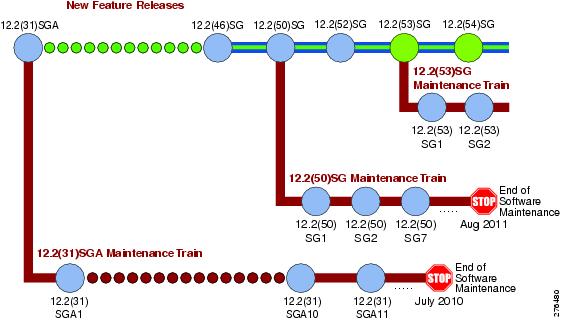
Catalyst 4900 Series has three maintenance trains. The Cisco IOS Release 12.2(31)SGA train is the longest living train. Currently, the Cisco IOS Release 12.2(31)SGA10 is the recommended release for customers who require a release with a maintenance train. The Cisco IOS Release 12.2(53)SG is the latest maintenance train.
Cisco IOS Software Migration
Figure 1 displays the two active, 12.2(31)SGA and 12.2(50)SG, and newly introduced 12.2(53)SG extended maintenance trains.
Figure 1 Software Release Strategy for the Catalyst 4900 Series Switch
Summary of Migration Plan
- Customers requiring the latest Cisco Catalyst 4900 Series hardware and software features should migrate to Cisco IOS Software Release 12.2(54)SG.
- Cisco IOS Software Release 12.2(31)SGA and 12.2(50)SG will continue offering maintenance releases. The latest release from the 12.2(31)SGA maintenance train is 12.2(31)SGA10. The latest release from the 12.2(50)SG maintenance train is 12.2(50)SG3.
Support
Support for Cisco IOS Software Release 12.2(54)SG follows the standard Cisco Systems® support policy, available at
http://www.cisco.com/en/US/products/products_end-of-life_policy.htmlSystem Requirements
This section describes the system requirements:
Supported Hardware
This section describes the hardware supported on the Catalyst 4900 series switch.
For Catalyst 4900 series switch transciever module compatibility information, see the url:
http://www.cisco.com/en/US/products/hw/modules/ps5455/products_device_support_tables_list.html
Table 2 briefly describes the Catalyst 4900 series switch product set.
Supported Features
Table 3 lists the Cisco IOS software features for the Catalyst 4900 series switch.
Table 3 Cisco IOS Software Feature Set for the Catalyst 4900 Series Switch
Layer 2 transparent bridging3
Layer 2 MAC4 learning, aging, and switching by software
VMPS5 Client
No. of VLAN support per switch: 2048 (for LAN Base), 4096 (for IP Base)
IP and IP multicast routing and switching between Ethernet ports
IP Multicast Load Splitting (Equal Cost Multipath (ECMP) using S, G and Next-hop)
Classless routing6
PBR7
CEF8 load balancing
Route Leaking9
IS-IS10
DTP11
RIP12 and RIP II
EIGRP13
OSPF14
BGP415
MBGP16
MSDP17
ICMP18 Router Discovery Protocol
PIM19—sparse and dense mode
DVMRP20
NTP21
VRRP22
SCP23
GLBP24
Load balancing for routed traffic, based on source and destination IP addresses
RSPAN25
Authentication, authorization, and accounting using TACACS+ and RADIUS protocol
HSRP26 over Ethernet, EtherChannels - 10/100/1000Mbps, 10 Gbps
IGMP27 snooping version1, version 2, and version 3 (Full Support)
SSH version 1 and version 228
UDLR29
SNMP30 version 1, version 2, and version 3
802.1X with voice VLAN ID31
Router standard and extended ACLs 32on all ports with no performance penalty
Identity ACL Policy Enforcement33
PACL34
Per-port QoS35 rate-limiting and shaping
Non-stop Forwarding Awareness for EIGRP-stub in IP base for all supervisor engines
WCCP36v2 Layer 2 Redirection
CNA37
EEM38
IP SLA39
DHCPv6 Relay - Persistent Interface ID option DHCPv6 Relay Agent notification for Prefix Delegation
PIM Accept Register - Rogue Multicast Server Protection40
9.Route Leaking from a global routing table into a VRF and Route Leaking from a VRF into a global routing table
Unsupported Features
These features are not supported in Cisco IOS Release 12.2(54)SG for the 4900 series switches:
–
–
–
- ADSL and Dial access for IPv6
- AppleTalk EIGRP (use native AppleTalk routing instead)
- Bridge groups
- Cisco IOS software-based transparent bridging (also called “fallback bridging”)
- Connectionless (CLNS) routing; including IS-IS routing for CLNS. IS-IS is supported for IP routing only.
- DLSw (data-link switching)
- IGRP (use EIGRP instead)
- isis network point-to-point command
- Kerberos support for access control
- Lock and key
- NAT-PT for IPv6
- NetFlow
- PBR with Multiple Tracking Options
- QoS for IPv6 (QoS for IPv6 traffic)
- Reflexive ACLs
- Routing IPv6 over an MPLS network
- Two-way community VLANs in private VLANs
- CFM CoS
- PBR with EOT
- Unicast RPF
New and Changed Information
These sections describe the new and changed information for the Catalyst 4900 series switch running Cisco IOS software:
- New Hardware Features in Release 12.2(54)SG
- New Software Features in Release 12.2(54)SG
- New Hardware Features in Release 12.2(53)SG3
- New Software Features in Release 12.2(53)SG3
- New Hardware Features in Release 12.2(53)SG
- New Software Features in Release 12.2(53)SG
- New Hardware Features in Release 12.2(52)SG
- New Software Features in Release 12.2(52)SG
- New Hardware Features in Release 12.2(50)SG2
- New Software Features in Release 12.2(50)SG2
- New Hardware Features in Release 12.2(50)SG1
- New Software Features in Release 12.2(50)SG1
- New Hardware Features in Release 12.2(50)SG
- New Software Features in Release 12.2(50)SG
- New Hardware Features in Release 12.2(46)SG
- New Software Features in Release 12.2(46)SG
- New Hardware Features in Release 12.2(44)SG
- New Software Features in Release 12.2(44)SG
- New Hardware Features in Release 12.2(40)SG
- New Software Features in Release 12.2(40)SG
- New Hardware Features in Release 12.2(37)SG
- New Software Features in Release 12.2(37)SG
- New Hardware Features in Release 12.2(31)SGA
- New Software Features in Release 12.2(31)SGA
- New Hardware Features in Release 12.2(31)SG
- New Software Features in Release 12.2(31)SG
- New Hardware Features in Release 12.2(25)SG
- New Software Features in Release 12.2(25)SG
- New Hardware Features in Release 12.2(25)EWA
- New Software Features in Release 12.2(25)EWA
- New Hardware Features in Release 12.2(25)EW
- New Software Features in Release 12.2(25)EW
- New Hardware Features in Release 12.2(20)EWA
- New Software Features in Release 12.2(20)EWA
New Hardware Features in Release 12.2(54)SG
Release 12.2(54)SG provides the following new hardware on the Catalyst 4900 series switch:
New Software Features in Release 12.2(54)SG
Release 12.2(54)SG provides the following new software features on the Catalyst 4900 series switch:
- 802.1X with User Distribution ("Configuring 802.1X Port-Based Authentication" chapter)
- Auto SmartPort ("Configuring Auto SmartPort Macros" chapter)
- DSCP/CoS via LLDP ("Configuring LLDP, LLDP-MED, and Location Service" chapter
- EEM: Embedded Event Manager 3.2
For details, refer to the URL:
http://www.cisco.com/en/US/docs/ios/netmgmt/configuration/guide/nm_eem_3.2.htmlFor details refer to the URL:
http://www.cisco.com/en/US/docs/ios/saf/configuration/guide/saf_cg.htmlFor details refer to the URL:
http://www.cisco.com/en/US/docs/switches/lan/energywise/phase2/ios/configuration/guide/ew_v2.html
- Identity 4.1 ACL Policy Enhancements ("Configuring Network Security with ACLs" chapter)
- Identity 4.1 Network Edge Access Topology ("Configuring 802.1X Port-Based Authentication" chapter)
- IPSG for Static Hosts (Refer to the Cisco IOS library)
- Layer Control Packet (extended to Supervisor 6)
- Link State Tracking ("Configuring EtherChannel and Link State Tracking" chapter)
- MAC move and replace ("Administering the Switch" chapter)
- Per-VLAN Learning ("Administering the Switch" chapter)
- PoEP via LLDP ("Configuring LLDP, LLDP-MED, and Location Service" chapter)
- RADIUS CoA ("Configuring 802.1X Port-Based Authentication" chapter)
- Sub-second UDLD (Configuring UDLD" chapter)
- VRF-aware TACACS+ ("Configuring VRF-lite" chapter)
- XML Programmatic Interface (Refer to the Cisco IOS library)
For details refer to the URL:
http://www.cisco.com/en/US/docs/ios/netmgmt/configuration/guide/nm_xmlpi_v1.htmlNew Hardware Features in Release 12.2(53)SG3
Release 12.2(53)SG3 provides the following new hardware on the Catalyst 4500 series switch:
Note
New Software Features in Release 12.2(53)SG3
Release 12.2(53)SG3 provides no new features for the Catalyst 4500 series switch.
New Hardware Features in Release 12.2(53)SG
Release 12.2(53)SG provides the following new hardware for the Catalyst 4900 series switch:
New Software Features in Release 12.2(53)SG
Release 12.2(53)SG provides the following Cisco IOS software features for the Catalyst 4900 series switch:
New Hardware Features in Release 12.2(52)SG
Release 12.2(52)SG provides no new hardware for the Catalyst 4900 series switch.
New Software Features in Release 12.2(52)SG
Release 12.2(52)SG provides the following new Cisco IOS software features for the Catalyst 4900 series switch:
All LAN Base customers looking to upgrade from LAN Base to IP Base or Enterprise services are required to order “The Catalyst 4948 IP Base upgrade license WS-C4900-SW-LIC.” This license is not required for customers currently running IP base or enterprise services.
Note LAN base is only supported on Catalyst 4948 and Catalyst 4948-10GE. It is not supported on Catalyst 4900M or Catalyst 4928-10GE (ME 4900).
–
–
- Local WebAuth Enhancement
- Network Mobility Services Protocol
- Online Diagnostics
- PIM Accept Register - Rogue Multicast Server Protection (route-map option is not supported)
- QinQ Tunneling and Layer 2 Protocol Tunneling (“Configuring 802.1Q and Layer 2 Protocol Tunneling” chapter)
Note Support has now been extended to Catalyst 4900M series switch and Supervisor Engine 6L-E.
New Hardware Features in Release 12.2(50)SG2
Release 12.2(50)SG2 provides the following new hardware for the Catalyst 4900 series switch:
New Software Features in Release 12.2(50)SG2
Release 12.2(50)SG2 provides the following new Cisco IOS software features for the Catalyst 4900 series switch:
New Hardware Features in Release 12.2(50)SG1
Release 12.2(50)SG1 provides the following new hardware for the Catalyst 4900 series switch:
New Software Features in Release 12.2(50)SG1
Release 12.2(50)SG1 provides the following new Cisco IOS software features for the Catalyst 4900 series switch:
New Hardware Features in Release 12.2(50)SG
Release 12.2(50)SG provides the following new hardware for the Catalyst 4900 series switch:
New Software Features in Release 12.2(50)SG
Release 12.2(50)SG provides the following Cisco IOS software features for the Catalyst 4900 series switch:
Note The following chapter references are for the Catalyst 4500 Series Switch Cisco IOS Software Configuration Guide.
- IGMP Querier (“Configuring IGMP Snooping” chapter)
- OSPF and EIGRP fast convergence and protection (Refer to the Cisco IOS Release 12.4 documentation)
- CDP 2nd Port Status TLV (no configuration required on the switch)
- Flexible Authentication Sequencing (“Configuring 802.1X” chapter)
- Multi-Authentication (“Configuring 802.1X” chapter)
- Open Authentication (“Configuring 802.1X” chapter)
- Web Authentication (“Configuring Web Authentication” chapter)
- Inactivity Timer (“Configuring 802.1X” chapter)
- Downloadable ACLs (“Configuring Network Security with ACLs” chapter)
- ANCP Client (not supported on E-Series Supervisor Engine 6-E; “Configuring ANCP Client” chapter)
- PPPoE Intermediate Agent (not supported on E-Series Supervisor Engine 6-E; “PPPoE Circuit-Id Tag Processing” chapter)
- VTP version 3 (“Configuring VLANs, VTP, and VMPS” chapter)
- VRF-aware IP services (“Configuring VRF-Lite” chapter)
- ANCP Client (not supported on E-Series Supervisor Engine 6-E; “Configuring ANCP Client” chapter)
- PPPoE Intermediate Agent (not supported on E-Series Supervisor Engine 6-E; “PPPoE Circuit-Id Tag Processing” chapter)
- VTP version 3 (“Configuring VLANs, VTP, and VMPS” chapter)
- VRF-aware IP services (“Configuring VRF-Lite” chapter)
- boot config command (Refer to the Cisco IOS Release 12.2 documentation)
- Archiving Crashinfo Files (“Configuring Command-Line Interfaces” chapter)
- Unicast MAC filtering (“Configuring Network Security with ACLs” chapter)
- Configuration Rollback
- Cisco TrustSec SGT Exchange Protocol (SXP) IPv4
For more information, refer to the following URLs:
http://www.cisco.com/en/US/docs/switches/lan/trustsec/configuration/guide/trustsec.html
http://www.cisco.com/en/US/docs/switches/lan/trustsec/release/notes/rn_cts_xplat.html
New Hardware Features in Release 12.2(46)SG
Release 12.2(46)SG provides the following new hardware for the Catalyst 4900 series switch:
New Software Features in Release 12.2(46)SG
Release 12.2(46)SG provides the following Cisco IOS software features for the Catalyst 4900 series switch:
Note The following chapter references are for the Catalyst 4500 Series Switch Cisco IOS Software Configuration Guide.
New Hardware Features in Release 12.2(44)SG
Release 12.2(44)SG provides the following new hardware for the Catalyst 4900 series switch:
New Software Features in Release 12.2(44)SG
Release 12.2(44)SG provides the following Cisco IOS software features for the Catalyst 4900 series switch:
Note The following chapter references are for the Catalyst 4500 Series Switch Cisco IOS Software Configuration Guide.
After configuring VSS dual-active on a Catalyst 6500 switches, the Catalyst 4500 series switch can detect VSS dual-active with PagP+ support.
- IP SLA (Refer to the Cisco IOS Release 12.2 documentation)
- 802.1ab LLDP and LLDP-MED (Refer to the “Configuring LLDP and LLDP-MED” chapter)
- X2 Link Debounce Timer (Refer to the “Configuring Interfaces” chapter)
- ESM
For details, refer to the ESM Home Page:
http://www.cisco.com/en/US/docs/ios/12_3t/12_3t2/feature/guide/gt_esm.htmlNew Hardware Features in Release 12.2(40)SG
Release 12.2(40)SG provides the following new hardware for the Catalyst 4900 series switch:
New Software Features in Release 12.2(40)SG
Release 12.2(40)SG provides the following Cisco IOS software features for the Catalyst 4900 series switch:
Note The following chapter references are for the Catalyst 4500 Series Switch Cisco IOS Software Configuration Guide.
New Hardware Features in Release 12.2(37)SG
Release 12.2(37)SG provides the following new hardware for the Catalyst 4900 series switch:
New Software Features in Release 12.2(37)SG
Release 12.2(37)SG provides the following Cisco IOS software features for the Catalyst 4900 series switch:
Note The following chapter references are for the Catalyst 4500 Series Switch Cisco IOS Software Configuration Guide.
- Selective Dynamic Buffer Limiting (“Configuring QoS” chapter)
- SVI Autostate Exclude (“Configuring Layer 3 Interface” chapter)
- IP Source Guard for Static Hosts (“Configuring DHCP Snooping, IP Source Guard, and IPSG for Static Hosts” chapter)
- BGP route-map Continue Support for Outbound Policy
For details, locate the feature entry in the Feature Information Table located toward the end of the "Connecting to a Service Provider Using External BGP" module
New Hardware Features in Release 12.2(31)SGA
Cisco IOS Release 12.2(31)SGA is the first IOS release supporting the Cisco ME 4900 Series Ethernet Switch.
New Software Features in Release 12.2(31)SGA
Release 12.2(31)SGA provides the following Cisco IOS software features for the Catalyst 4900 series switch:
Note The following chapter references are for the Catalyst 4500 Series Switch Cisco IOS Software Configuration Guide.
- Trunk Port Security over EtherChannel (“Configuring Port Security and Configuring EtherChannel” chapters)
- Match CoS for Non-IPv4 Traffic (“Configuring QoS” chapter)
- CoS Mutation (“Configuring QoS” chapter)
- QinQ Tunneling and Layer 2 Protocol Tunneling (“Configuring 802.1Q and Layer 2 Protocol Tunneling” chapter)
Note This support applies to WS-X4948 only.
New Hardware Features in Release 12.2(31)SG
There are no new hardware features in Cisco IOS Release 12.2(31)SG.
New Software Features in Release 12.2(31)SG
Release 12.2(31)SG provides the following Cisco IOS software features for the Catalyst 4900 series switch:
Note The following chapter references are for the Catalyst 4500 Series Switch Cisco IOS Software Configuration Guide.
- Control Plane Policing (“Configuring Control Plane Policing” chapter)
- WCCPv2 Layer 2 Redirection (“Configuring WCCPv2 Services” chapter)
- MAC Authentication Bypass (“Configuring 802.1X Port-Based Authentication” chapter)
- 802.1X Inaccessible Authentication Bypass (“Configuring 802.1X Port-Based Authentication” chapter)
- 802.1X Unidirectional Controlled Port (“Configuring 802.1X Port-Based Authentication” chapter)
- Private VLAN Promiscuous Trunk (“Configuring Private VLANs” chapter)
- MAC Address Notification (“Administering the Switch” chapter)
- Voice VLAN Sticky Port Security (“Configuring Port Security” chapter)
- Virtual Router Redundancy Protocol (VRRP) (Refer to the Cisco IOS Release 12.3 documentation)
- Secure Copy Protocol (SCP) (Refer to the Cisco IOS Release 12.3 documentation)
New Hardware Features in Release 12.2(25)SG
There are no new hardware features in Cisco IOS Release 12.2(25)SG.
New Software Features in Release 12.2(25)SG
Release 12.2(25)SG provides the following Cisco IOS software features for the Catalyst 4900 series switch:
Note The following chapter references are for the Catalyst 4500 Series Switch Cisco IOS Software Configuration Guide.
Note In Cisco IOS Release 12.2(25)SG for the Catalyst 4500 and 4900 series switches, the implementation for multiple spanning tree (MST) changed from the previous release. Multiple STP (MSTP) complies with IEEE 802.1s standard. Previous MSTP implementations were based on a draft of the IEEE 802.1s standard.
- 802.1X Authentication Failure VLAN (“Understanding and Configuring 802.1X Port-Based Authentication” chapter)
- HTTPS (Refer to the Cisco IOS Release 12.3 documentation)
- IS-IS MIB (Refer to the Cisco IOS Release 12.3 documentation
- OSPF Fast Convergence (Refer to the Cisco IOS Release 12.3 documentation)
- Time Domain Reflectometry (“Checking Port Status and Connectivity” chapter)
- IEEE 802.1S Standards Compliance (Refer to the Cisco IOS Release 12.3 documentation)
- SNMP V3 support for Bridge-MIB with VLAN indexing
- Interface Link and Trunk Status Logging Event Enhancement (“Configuring Interfaces” chapter)
New Hardware Features in Release 12.2(25)EWA
Release 12.2(25)EWA provides the following new hardware for the Catalyst 4900 series switch:

Caution If you plan to insert X2 transceivers in the Cisco Catalyst 4948-10GE, you should ensure that the Catalyst 4900 series switch and the X2 back interfaces are properly oriented during the OIR (Online insertion and removal) of the transceivers. The top transceiver (port tengig1/49) should be inserted with heatsink facing up. The bottom transceiver (port tengig1/50) should be plugged in with heatsink facing down, CLEI (Common Language Equipment Identifiers) label facing up. When inserted correctly, the TX/RX of the bottom transceiver would look reversed. For more details refer to the
Catalyst 4948-10GE Switch Installation Guide.
New Software Features in Release 12.2(25)EWA
Release 12.2(25)EWA provides the following Cisco IOS software features for the Catalyst 4900 series switch:
Note The following chapter references are for the Catalyst 4500 Series Switch Cisco IOS Software Configuration Guide.
- Per-Port Per-VLAN QoS (“Configuring QoS and Per-Port Per-VLAN QoS” chapter)
- Trunk-Port Security (“Configuring Port Security and Trunk Port Security” chapter)
- 802.1X Private VLAN Assignment (“Understanding and Configuring 802.1X Port-Based Authentication” chapter)
- 802.1X Private Guest VLAN (“Understanding and Configuring 802.1X Port-Based Authentication” chapter)
- 802.1X Radius-Supplied Session Timeout (“Understanding and Configuring 802.1X Port-Based Authentication” chapter)
- DHCP Option 82 Pass Through (“Configuring DHCP Snooping and IP Source Guard” chapter)
New Software Features in Release 12.2(25)EW
There are no new software features in Cisco IOS Release 12.2(25)EW
New Hardware Features in Release 12.2(20)EWA
There are no new hardware features in Cisco IOS Release 12.2(20)EWA.
Upgrading the System Software
In most cases, upgrading the switch to a newer release of Cisco IOS software does not require a ROMMON upgrade. However, if you are running an early release of Cisco IOS software and plan to upgrade, the following tables list the recommended ROMMON release.
Caution Most supervisor engines have the required ROMMON release. However, due to caveat CSCed25996, we recommend that you upgrade your ROMMON to the recommended release.
The following sections describe how to upgrade your switch software:
- Upgrading the ROMMON from the Console
- Upgrading the ROMMON Remotely Using Telnet
- Upgrading the Cisco IOS Software
Upgrading the ROMMON from the Console
Caution To avoid actions that might make your system unable to boot, read this entire section before starting the upgrade.
Note
Follow this procedure to upgrade your supervisor engine ROMMON:
Step 1
Note
Step 2
The cat4000-ios-promupgrade-122_25r_EWA programs are available on Cisco.com at the same location from which you download Catalyst 4000 system images.
Step 3
squeeze bootflash: command to reclaim the space.Step 4
The following example shows how to download the PROM upgrade image cat4000-ios-promupgrade-122_25r_EWA from the remote host 172.20.58.78 to bootflash:
Switch# copy tftp: bootflash:
Address or name of remote host [172.20.58.78]?
Source filename [cat4000-ios-promupgrade-122_25r_EWA]?
Destination filename [cat4000-ios-promupgrade-122_25r_EWA]?
Accessing tftp://172.20.58.78/cat4000-ios-promupgrade-122_25r_EWA...
Loading cat4000-ios-promupgrade-122_25r_EWA from 172.20.58.78 (viaStep 5
The following example shows the output after a reset into ROMMON:
Step 6
boot bootflash:cat4000-ios-promupgrade-122_25r_EWA
Caution No intervention is necessary to complete the upgrade. To ensure a successful upgrade, do not interrupt the upgrade process. Do not perform a reset, power cycle, or OIR of the supervisor engine until the upgrade is complete.
The following example shows the output from a successful upgrade, followed by a system reset:
Step 7
Step 8
The following example shows how to delete the cat4000-ios-promupgrade-122_25r_EWA image from bootflash and reclaim unused space:
Step 9
Cisco IOS Software, Catalyst 4900 L3 Switch Software (cat4500-IPBASE-M), Version 12.2(25)EWA, RELEASE SOFTWARE (fc1)
The ROMMON has now been upgraded.
See the “Upgrading the Cisco IOS Software” section for instructions on how to upgrade the Cisco IOS software on your switch.
Upgrading the ROMMON Remotely Using Telnet
Caution To avoid actions that might make your system unable to boot, read this entire section before starting the upgrade.
Follow this procedure to upgrade your supervisor engine ROMMON to Release 12.2(25r)EWA. This procedure can be used when console access is not available and when the ROMMON upgrade must be performed remotely.
Note
Step 1
Note
Step 2
The cat4000-ios-promupgrade-122_25r_EWA programs are available on Cisco.com at the same location from which you download Catalyst 4000 system images.
Step 3
squeeze bootflash: command to reclaim the space.Step 4
copy tftp command.The following example shows how to download the PROM upgrade image cat4000-ios-promupgrade-122_25r_EWA from the remote host 10.5.5.5 to bootflash:
Source filename [cat4000-ios-promupgrade-122_25r_EWA]? /tftpboot/pjose/cat4000-ios-promupgrade-122_25r_EWAStep 5
Use the boot system flash bootflash:file_name command to set the BOOT variable. You will use two BOOT commands: one to upgrade the ROMMON and a second to load the Cisco IOS software image after the ROMMON upgrade is complete. Notice the order of the BOOT variables in the example below. At bootup the first BOOT variable command upgrades the ROMMON. When the upgrade is complete the supervisor engine will autoboot, and the second BOOT variable command will load the Cisco IOS software image specified by the second BOOT command.
Note The config-register must be set to autoboot.
In this example, we assume that the console port baud rate is set to 9600 bps and that the config-register is set to 0x0102.Use the config-register command to autoboot using image(s) specified by the BOOT variable. Configure the BOOT variable to upgrade the ROMMON and then autoboot the IOS image after the ROMMON upgrade is complete. In this example, we are upgrading the ROMMON to version 12.2(25r)EWA. After the ROMMON upgrade is complete, the supervisor engine will boot Cisco IOS software Release 12.2(25)EWA.Step 6
BOOT variable = bootflash:cat4000-ios-promupgrade-122_25r_EWA,1;bootflash:cat4500-ipbase-mz.122-25.EWAStep 7
Caution Verify the boot string in step 6. No intervention is necessary to complete the upgrade. To ensure a successful upgrade, do not interrupt the upgrade process. Do not perform a reset, power cycle, or OIR of the supervisor engine until the upgrade is complete.
The following example shows the console port output from a successful ROMMON upgrade followed by a system reset. Your Telnet session will be disconnected during the ROMMON upgrade, so you will not see this output. This step could take 2-3 minutes to complete. You will need to reconnect your Telnet session after 2-3 minutes when the Cisco IOS software image and the interfaces are loaded.
Cisco IOS Software, Catalyst 4900 L3 Switch Software (cat4500-IPBASE-M), Version 12.2(25)EWA, RELEASE SOFTWARE (fc1)Step 8
Step 9
Cisco IOS Software, Catalyst 4900 L3 Switch Software (cat4500-IPBASE-M), Version 12.2(25)EWA, RELEASE SOFTWARE (fc1)Step 10
The following example shows how to delete the cat4000-ios-promupgrade-122_25r_EWA image from bootflash and reclaim unused space:
Step 11
The ROMMON has now been upgraded.
See the “Upgrading the Cisco IOS Software” section for instructions on how to upgrade the Cisco IOS software on your switch.
Upgrading the Cisco IOS Software
Caution To avoid actions that might make your system unable to boot, please read this entire section before starting the upgrade.
Before you proceed, observe the following rules for hostname:
Uppercase and lowercase characters look the same to many internet software applications. It may seem appropriate to capitalize a name the same way you might do in English, but conventions dictate that computer names appear all lowercase. For more information, refer to RFC 1178, Choosing a Name for Your Computer.
- Must start with a letter and end with a letter or digit.
- Interior characters can only be letters, digits, and hyphens; periods and underscores not allowed.
- Names must be 63 characters or fewer; hostname of fewer than 10 characters is recommended.
- On most systems, a field of 30 characters is used for the host name and the prompt in the CLI. Longer configuration mode prompts may be truncated.
To upgrade the Cisco IOS software on your Catalyst 4900 series switch, use this procedure:
Step 1
Step 2
Step 3
The following example shows how to download the Cisco IOS software image cat4500-ipbase-mz.122-25.EWA from the remote host 172.20.58.78 to bootflash:
Step 4
The following example shows how to clear the BOOT variable:
Step 5
The following example shows how to add the cat4500-ipbase-mz.122-25.EWA image to the BOOT variable:
Step 6
The following example show how to set the second least significant bit in the configuration register:
Step 7
Caution No intervention is necessary to complete the upgrade. To ensure a successful upgrade, do not interrupt the upgrade process by performing a reset, power cycle, or OIR of the supervisor, for at least five minutes.
The following example shows the output from a successful upgrade followed by a system reset:
Step 8
Limitations and Restrictions
These sections list the limitations and restrictions for the current release of Cisco IOS software on the Catalyst 4900 series switch.
–
–
–
–
–
–
–
–
–
- IGRP not supported (use EIGRP, instead).
- IP classful routing is not supported; do not use the no ip classless command; it will have no effect, as only classless routing is supported. The command ip classless is not supported as classless routing is enabled by default.
- Catalyst 4500 supervisor engines will not be properly initialized if the VLAN configuration in the startup file does not match the information stored in the VLAN database file. This situation might occur if a backup configuration file was used.
- A Layer 2 LACP channel cannot be configured with the spanning tree PortFast feature.
- Netbooting using a boot loader image is not supported. See the “Troubleshooting” section for details on alternatives.
- An unsupported default CLI for mobile IP is displayed in the HSRP configuration. Although this CLI will not harm your system, you might want to remove it to avoid confusion.
Workaround: Display the configuration with the show standby command, then remove the CLI. Here is sample output of the show standby GigabitEthernet1/1 command:
- For HSRP “preempt delay” to function consistently, you must use the standby delay minimum command. Be sure to set the delay to more than 1 hello interval, thereby ensuring that a hello is received before HSRP leaves the initiate state.
Use the standby delay reload option if the router is rebooting after reloading the image.
- When you attempt to run OSPF between a Cisco router and a third party router, the two interfaces might get stuck in the Exstart/Exchange state. This problem occurs when the maximum transmission unit (MTU) settings for neighboring router interfaces do not match. If the router with the higher MTU sends a packet larger than the MTU set on the neighboring router, the neighboring router ignores the packet.
Workaround: Since the problem is caused by mismatched MTUs, the solution is to change the MTU on either router to match the neighbor’s MTU.
- The Ethernet management port on the supervisor module is active in ROMMON mode only.
- If an original packet is dropped due to transmit queue shaping and/or sharing configurations, a SPAN packet copy can still be transmitted on the SPAN port.
- All software releases support a maximum of 32,768 IGMP snooping group entries.
- Use the no ip unreachables command on all interfaces with ACLs configured for performance reasons.
- The threshold for the Dynamic Arp Inspection err-disable function is set to 15 ARP packets per second per interface. You should adjust this threshold depending on the network configuration. The CPU should not receive DHCP packets at a sustained rate greater than 1000 pps.
Workaround: Verify whether or not the Neighbor discovery cache has an entry, separate from regular troubleshooting areas of IPv6 address configurations and other configurations.
- If you first configure an IP address or IPv6 address on a Layer 3 port, then change the Layer 3 port to a Layer 2 port with the switchport command, and finally change it back to a Layer 3 port, the original IP/IPv6 address will be lost.
- By default, IPv6 is not enabled. To route IPv6, you must issue the IPv6 unicast-routing command. If you plan to use IPv6 multicast routing, use the IPv6 multicast-routing command.
- By default, CEF is not enabled for IPv6 (once IPv6 unicast routing is enabled). To prevent IPv6 traffic from being process-switched, use the IPv6 cef command.
- Multicast sources in community VLANs are not supported.
- Two-way community VLANs are not supported.
- Voice VLANs are not supported on community VLAN host interfaces.
- Private VLAN trunks do not carry community VLANs.
- The maximum number of unique private VLAN pairs supported by the
switchport private-vlan mapping trunk command above is 1000. For example, one thousand secondary VLANs could map to one primary VLAN, or one thousand secondary VLANs could map one to one to one thousand primary VLANs.- While configuring PVLAN promiscuous trunk ports, the maximum number of mappings is 500 primary VLANs to 500 secondary VLANs.
- 802.1X inaccessible authentication bypass feature is not supported with NAC LAN port IP feature.
- Changes to the console speed in "line console 0" configuration mode do not impact console speed in ROMMON mode. To apply the same console speed in ROMMON mode, use the "confreg" ROMMON utility and change ROMMON console speed.
- If a Catalyst 4900 series switch requests information from the Cisco Secure Access Control Server (ACS) and the message exchange times out because the server does not respond, a message similar to this appears:
If this message appears, check that there is network connectivity between the switch and the ACS. You should also check that the switch has been properly configured as an AAA client on the ACS.
- The bgp shutdown command is not supported in BGP router configuration mode. Executing this command might produce unexpected results.
- A spurious error message appears when an SSH connection disconnects after an idle timeout.
Workaround: Disable idle timeouts. (CSCec30214)
- IPSG for Static Hosts basically supports the same port mode as IPSG except that it does not support trunk port:
–
–
- IPSG for Static Hosts should not be used on uplink ports.
- Selective DBL is only supported for non-tagged or single-tagged IP packets. To achieve Selective DBL-like functionality with a non-IP packet (like Q-in-Q and IPX), apply an input policy map that matches COS values and specifies DBL in the class map.
- For Selective DBL, if the topology involves Layer 2 Q in Q tunneling, the match cos policy map will apply to the incoming port.
- If a set of DSCP values are already configured (e.g. 0-30, 0-63), specifying a subset of these DSCP values with the qos dbl dscp-based 0-7 command will not remove the unwanted DSCP values of 8 through 63. Rather, you must use the no form of the command to remove the extraneous values. In this case, the no qos dbl dscp-based 8-63 command will leave 0-7 selected.
- When using Port Security with Multi Domain Authentication (MDA) on an interface:
–
–
–
–
–
–
- After the fix for CSCsg08775, a GARP ACL entry is no longer part of the Static CAM area, but there is still a system-defined GARP class in Control Plane Policing (CPP). CPP is a macro with many CLIs and the GARP class creation CLI has been removed.
- When ipv6 is enabled on an interface via any CLI, it is possible to see the following message:
In such a scenario, the ipv6 MTU value programmed in hardware will be different from the ipv6 interface MTU value. This will happen if there is no room in the hw MTU table to store additional values.
You must free up some space in the table by unconfiguring some unused MTU values and subsequently disable/re-enable ipv6 on the interface or reapply the MTU configuration.
- To stop IPSG with Static Hosts on an interface, use the following commands in interface configuration submode:
To enable IPSG with Static Hosts on a port, issue the following commands:
Caution If you only configure the ip verify source tracking [port-security] interface configuration command on a port without enabling IP device tracking globally or setting an IP device tracking maximum on that interface, IPSG with Static Hosts will reject all the IP traffic from that interface.
Note
- Management port does not support non-VRF aware features.
- When you enter the permit any any ? command you will observe the octal option, which is unsupported in Cisco IOS Release 12.2(52)SG.
- A Span destination of fa1 is not supported.
- The "keepalive" CLI is not supported in interface mode on the switch, although it will appear in the running configuration. This behavious has no impact on functionality.
- TDR is only supported on interfaces Gi1/1 through Gi1/48, at 1000BaseT under open or shorted cable conditions. TDR length resolution is +/- 10 m. If the cable is less than 10 m or if the cable is properly terminated, the TDR result displays "0" m. If the interface speed is not 1000BaseT, an "unsupported" result status displays. TDR results will be unreliable for cables extended with the use of jack panels or patch panels.
- The following guidelines apply to Fast UDLD:
–
–
–
–
–
–
The outputs of certain commands, such as show ip route and show access-lists, contain non-deterministic text. While the output is easily understood, the output text does not contain strings that are consistently output. A general purpose specification file entry is unable to parse all possible output.
While a general purpose specification file entry may not be possible, a specification file entry might be created that returns the desired text by searching for text that is guaranteed to be in the output. If a string is guaranteed to be in the output, it can be used for parsing.
For example, the output of the show ip access-lists SecWiz_Gi3_17_out_ip command is this:
The first line is easily parsed because access list is guaranteed to be in the output:
The remaining lines all contain the term host. As a result, the specification file may report the desired values by specifying that string. For example, this line
will produce the following for the first and second rules
and the following for the third statement
Request the output of the show running-config command using NETCONF and parse that output for the desired strings. This is useful when the desired lines contain nothing in common. For example, the rules in this access list do not contain a common string and the order (three permits, then a deny, then another permit), prevent the spec file entry from using permit as a search string, as in the following example:
The XML output of show running-config command includes the following, which can then be parsed programmatically, as desired:
<X-Interface> permit 0000.0000.ffef ffff.ffff.0000 0000.00af.bcef ffff.ff00.0000 appletalk</X-Interface>
- Although the Catalyst 4900 series switch still supports legacy 802.1X commands used in Cisco IOS Release 12.2(46)SG and earlier releases (that is, they are accepted on the CLI), they do not display in the CLI help menu.
- Current IOS software cannot support filenames exceeding 64 characters.
- If you use MDA or multi-auth host mode in conjunction with pre-authentication open access, a switch ignores unicast EAPOL responses.
–
Caveats
Caveats describe unexpected behavior in Cisco IOS releases. Caveats listed as open in a prior release are carried forward to the next release as either open or resolved.
Note
http://tools.cisco.com/security/center/publicationListing
Open Caveats in Cisco IOS Release 12.2(54)SG1
This section lists the open caveats in Cisco IOS Release 12.2(54)SG1:
- In rare instances, when you are using MAC ACL-based policers, the packet match counters in
show policy-map interface fa6/1 do not show the packets being matched:Workaround: Verify that the MAC addresses being transmitted through the system are learned.
- When you issue the ip http secure-server command (or if the system reads it from the startup configuration), the device will check for the existence of a persistent self-signed certificate during boot up.
–
–
On a switch that support redundancy, the generation of the self-signed certificate is performed independently on the active and the standby supervisor engines. So, the certificates differ. After switchover, the HTTP client that holds the old certificate can not connect to the HTTPS server.
Workaround: Re-connect. (CSCsb11964)
- After upgrading to Cisco IOS 12.2(31)SG and later releases, some CPU queues configured as SPAN sources and saved in the startup configuration file do not function as they did in the older software release.
This only impacts a switch that has any of the following queues are configured as SPAN source in releases prior to 12.2(31)SG and saved to startup-config. The SPAN destination would not get the same traffic after upgrading to 12.2(31)SG and later releases.
Workaround: After upgrading to 12.2(31)SG and later releases, remove the old SPAN source configuration and reconfigure with the new queue names/IDs. For example:
Workaround: None. (CSCsc11726)
- An IP redirect may not be sent out if the outgoing interface on a Catalyst 4500 series switch is an IP unnumbered port.
This could occur for these reasons:
–
–
–
–
- When policing IEEE 802.1Q tagged non-IP traffic and calculating traffic conformance, the policer excludes the four bytes that constitute the 802.1Q tag even when you configure
qos account layer2 encapsulation.Workaround: None. (CSCsg58526)
- When hardcoded duplex and speed settings are deleted after an interface shuts down, an "a-" is added to the duplex and speed in the output from the show interface status command.
This does not impact performance.
Workaround: Issue the no shutdown command. (CSCsg27395)
- When a transceiver is removed rapidly from one port and placed in another on the same chassis, occasionally a duplicate seeprom message is displayed and the port is not able to handle traffic.
Workaround: Remove the transceiver from the new port and place it in the old port. Once the SFP is recognized in the old port, remove it slowly and insert it in the new port. (CSCse34693).
- When traffic is sent on a VLAN ID higher than 3000, the convergence timing caused by a failure exceeds 225ms.
Workaround: None. (CSCsm30320)
- With CFM enabled globally as well as on an ingress interface, CFM packets received on the interface are not policed with HWCOPP (HW Control Plane Policing).
Workaround: None. (CSCso93282)
Workarounds: Do one of the following:
–
–
–
- In SSO mode, when a port-channel is created, deleted, and re-created on an active supervisor engine with the same channel-number, the standby port-channel state goes out of sync. After a switch over, the following message displays:
Workaround: When the port channel starts to flap, enter shut and no shut on the port channel. After the first switchover and after deleting the portchannel, create a new channel. (CSCsr00333)
- During an ISSU upgrade or downgrade from v122_31_sg_throttle to v122_46_sg_throttle, the following error message displays on console of the active supervisor engine:
Workaround: None. (CSCso68331)
- VTP databases do not propagate through promiscuous trunk ports. If only promiscuous trunks are configured, users will not see the VLAN updates on the other switches in the VTP domain.
Workaround: For VTP database propagation, configure ISL/dot1q trunk port. (CSCsu43445)
- When you remove an SFP+ from a OneX converter in a X2 slot, it takes roughly 45 seconds for the system to recognize this. Any commands during this time will indicate that the SFP+ is still present. Reinserting the SFP+ in another port or inserting another SFP+ in the same port can result in Duplicate Seeprom error message.
Workaround: When a log message appears indicating that the SFP+ has been removed, do one of the following:
–
–
–
- If VLAN Load Balancing is progressing, and you reconfigure VLAN Load Balancing to reflect different blocking ports, manual preemption does not occur.
Workaround: To reconfigure VLAN Load Balancing with a different configuration, do the following:
a.
b.
c.
d.
- After posture validation succeeds, the following benign traceback messages may appear after you unconfigure the global RADIUS and IP device tracking commands:
%SM-4-BADEVENT: Event 'eouAAAAuthor' is invalid for the current state 'eou_abort': eou_auth 4.1.0.101 Traceback= 101D9A88 10B76BB0 10B76FE0 10B7A114 10B7A340 1066A678 106617F8%SM-4-BADEVENT: Event 'eouAAAAuthor' is invalid for the current state 'eou_abort': eou_auth 4.1.0.102 Traceback= 101D9A88 10B76BB0 10B76FE0 10B7A114 10B7A340 1066A678 106617F8This applies to classic or E-series Catalyst 4500 supervisor engines running
Cisco IOS Release 12.2(50)SGWorkaround: None. (CSCsw14005)
- The host's MAC address is not synchronized to the standby supervisor engine after you unconfigure 802.1X on the port and reconnect the host to a IP phone (with CDP port status TLV support) that is connected to the switch.
If the switch were to run a supervisor switchover while in this state, the host's MAC address would not be present in the new active supervisor engine’s MAC address table, causing possible connectivity interruption on the host.
Workaround: Enter the shutdown command, followed by the no shutdown command on the interface. This triggers relearning and synchronizing of the host's MAC to the standby supervisor engine. CSCsw91661
- Class-map hit counters do not increment on the egress policy-map when it is attached to the primary VLAN on a PVLAN trunk ports. However, the traffic is properly classified and the actions configured in the policy are applied properly.
- If you simultaneously apply a service-policy to a port in the output direction and a service-policy to a vlan-range under that port in the output direction, the class-map hit counters in the output of the
show policy-map interface command are wrong.The queue transmit counters as well as the policing statistics (if any) are correct. CSCsz20149
- On a wireless control system (WCS), some device information is incorrectly displayed for PCs sitting behind an lldp-med capable phone. Specifically, WCS displays the phone's serial number, model number, and software version in the PC's device information. All other information about the PC is correctly displayed on WCS.
This only happens when the switch is running network mobility service protocol (nmsp). It does not happen if the phone is CDP enabled.
Workaround: Use VLAN ID or name to differentiate the IP phone and the PC sitting behind the phone on the WCS. Specifically, the IP phone is detected on the voice VLAN, and the displayed information of serial number, model number, and software version is correct. However, a PC sitting behind the phone is detected on a data VLAN, and the displayed device information is wrong and should be ignored. CSCsz34522
- On a Layer 2 port (that is, a switchport) of Supervisor Engine II+ thru V-10GE, the
|auto qos voice trust command auto generates qos trust cos configuration, in addition to other parameters. However, when the port is converted from Layer 2 to Layer 3 with the no switchport command, the qos trust dscp command should be generated.Workaround: When interface mode is changed from Layer2 to Layer3, manually change interface trust state by enter the cos trust dscp command. CSCta16492
- If time is not specified in the link debounce command, the default value depends on the supervisor engine. The default is 10 mS for C4900M, Supervisor Engine 6-E, and Supervisor Engine 6L-E. The default is 100 mS for all other supervisor engines.
Despite the different default value, you can configure any value in the time range. CSCte51948
- On a peer interface on a Catalyst 4948E Ethernet Switch, if errdisabled mode flap detection is set to a very small number (such as 2 flaps in 10 sec), a 10GE link flap may cause the peer interface to enter the errdisabled state.
Workarounds: The Cisco switch default link-flap detection value is 5 flaps in 10 seconds. Use the default value or larger numbers. CSCtg07677
- If you disable and re-enable IGMP Snooping on a VLAN, the output of the show mac address command does not display the [term] Switch against the multicast entry. Multicast traffic is not impacted.
Workaround: Do shut, then no shut on the SVI. CSCtg72559
- When you have enabled EPM logging and the client is authenticated via MAB or Webauth, the value of AUTHTYPE is DOT1X in EPM syslog messages irrespective of the authentication method.
Similarly, the show epm sessions command always displays the authentication method as DOT1X.
Workaround: To view the authentication method used for a client, enter the
show authentication sessions command. CSCsx42157
- When Fallback WebAuth and Multi-host is configured on a port and no PACL exists, "permit ip any any" is installed in the TCAM and all traffic from the host is allowed to pass.
Workaround: Configure an ACL on the port. CSCte18760
- With a NEAT configuration on an ASW (Catalyst 4500 series switch) connected to an SSW (Catalyst 3750 series switch) serving as a root bridge and with redundant links between ASW and SSW, the following occur:
–
Workaround: Configure the ASW or any other switch upstream as the root-bridge for all the VLANs. CSCtg71030
- If host-mode multi-domain is configured and authorization succeeds, traffic may not pass from an IP phone or a data device.
- A switch may crash while loading BGP routes if the ip cef accounting non-recursive command is already configured.
Workaround: Disable the ip cef accounting non-recursive command. CSCtn68186
- When a switch is configured for MAC Authentication Bypass (MAB) EAP and the AAA server requests EAP-TLS (as the EAP method) first, MAB fails.
–
–
Resolved Caveats in Cisco IOS Release 12.2(54)SG1
This section lists the resolved caveats in Release 12.2(54)SG1:
- Catalyst 4500 series switches may lose the per-vlan maximum mac addresses for port-security when the link goes down. This applies to the following interface configuration :
Workaround: None. CSCti74791..ALL
- If no vtp is configured on ports that receive VTP updates, a switch no longer processes Layer 2 control traffic (STP and CDP).
Workaround: Upgrade to 12.2(53)SG3, 12.2(50)SG8, or later. CSCth00398 .....ALL
- When the show ip ospf int command is paused while the backup designated router neighbor goes down, a switch may reload when you enter the show ip ospf int command:
The next line in the output of the show ip ospf int command is the following:
If you now advance the output by pressing either Enter or the space bar, the device reloads and the following error message displays:
Open Caveats in Cisco IOS Release 12.2(54)SG
This section lists the open caveats in Cisco IOS Release 12.2(54)SG:
- In rare instances, when you are using MAC ACL-based policers, the packet match counters in
show policy-map interface fa6/1 do not show the packets being matched:Workaround: Verify that the MAC addresses being transmitted through the system are learned.
- When you issue the ip http secure-server command (or if the system reads it from the startup configuration), the device will check for the existence of a persistent self-signed certificate during boot up.
–
–
On a switch that support redundancy, the generation of the self-signed certificate is performed independently on the active and the standby supervisor engines. So, the certificates differ. After switchover, the HTTP client that holds the old certificate can not connect to the HTTPS server.
Workaround: Re-connect. (CSCsb11964)
- After upgrading to Cisco IOS 12.2(31)SG and later releases, some CPU queues configured as SPAN sources and saved in the startup configuration file do not function as they did in the older software release.
This only impacts a switch that has any of the following queues are configured as SPAN source in releases prior to 12.2(31)SG and saved to startup-config. The SPAN destination would not get the same traffic after upgrading to 12.2(31)SG and later releases.
Workaround: After upgrading to 12.2(31)SG and later releases, remove the old SPAN source configuration and reconfigure with the new queue names/IDs. For example:
Workaround: None. (CSCsc11726)
- An IP redirect may not be sent out if the outgoing interface on a Catalyst 4500 series switch is an IP unnumbered port.
This could occur for these reasons:
–
–
–
–
- When policing IEEE 802.1Q tagged non-IP traffic and calculating traffic conformance, the policer excludes the four bytes that constitute the 802.1Q tag even when you configure
qos account layer2 encapsulation.Workaround: None. (CSCsg58526)
- When hardcoded duplex and speed settings are deleted after an interface shuts down, an "a-" is added to the duplex and speed in the output from the show interface status command.
This does not impact performance.
Workaround: Issue the no shutdown command. (CSCsg27395)
- When a transceiver is removed rapidly from one port and placed in another on the same chassis, occasionally a duplicate seeprom message is displayed and the port is not able to handle traffic.
Workaround: Remove the transceiver from the new port and place it in the old port. Once the SFP is recognized in the old port, remove it slowly and insert it in the new port. (CSCse34693).
- When traffic is sent on a VLAN ID higher than 3000, the convergence timing caused by a failure exceeds 225ms.
Workaround: None. (CSCsm30320)
- With CFM enabled globally as well as on an ingress interface, CFM packets received on the interface are not policed with HWCOPP (HW Control Plane Policing).
Workaround: None. (CSCso93282)
Workarounds: Do one of the following:
–
–
–
- In SSO mode, when a port-channel is created, deleted, and re-created on an active supervisor engine with the same channel-number, the standby port-channel state goes out of sync. After a switch over, the following message displays:
Workaround: When the port channel starts to flap, enter shut and no shut on the port channel. After the first switchover and after deleting the portchannel, create a new channel. (CSCsr00333)
- During an ISSU upgrade or downgrade from v122_31_sg_throttle to v122_46_sg_throttle, the following error message displays on console of the active supervisor engine:
Workaround: None. (CSCso68331)
- VTP databases do not propagate through promiscuous trunk ports. If only promiscuous trunks are configured, users will not see the VLAN updates on the other switches in the VTP domain.
Workaround: For VTP database propagation, configure ISL/dot1q trunk port. (CSCsu43445)
- When you remove an SFP+ from a OneX converter in a X2 slot, it takes roughly 45 seconds for the system to recognize this. Any commands during this time will indicate that the SFP+ is still present. Reinserting the SFP+ in another port or inserting another SFP+ in the same port can result in Duplicate Seeprom error message.
Workaround: When a log message appears indicating that the SFP+ has been removed, do one of the following:
–
–
–
- If VLAN Load Balancing is progressing, and you reconfigure VLAN Load Balancing to reflect different blocking ports, manual preemption does not occur.
Workaround: To reconfigure VLAN Load Balancing with a different configuration, do the following:
a.
b.
c.
d.
- After posture validation succeeds, the following benign traceback messages may appear after you unconfigure the global RADIUS and IP device tracking commands:
%SM-4-BADEVENT: Event 'eouAAAAuthor' is invalid for the current state 'eou_abort': eou_auth 4.1.0.101 Traceback= 101D9A88 10B76BB0 10B76FE0 10B7A114 10B7A340 1066A678 106617F8%SM-4-BADEVENT: Event 'eouAAAAuthor' is invalid for the current state 'eou_abort': eou_auth 4.1.0.102 Traceback= 101D9A88 10B76BB0 10B76FE0 10B7A114 10B7A340 1066A678 106617F8This applies to classic or E-series Catalyst 4500 supervisor engines running
Cisco IOS Release 12.2(50)SGWorkaround: None. (CSCsw14005)
- The host's MAC address is not synchronized to the standby supervisor engine after you unconfigure 802.1X on the port and reconnect the host to a IP phone (with CDP port status TLV support) that is connected to the switch.
If the switch were to run a supervisor switchover while in this state, the host's MAC address would not be present in the new active supervisor engine’s MAC address table, causing possible connectivity interruption on the host.
Workaround: Enter the shutdown command, followed by the no shutdown command on the interface. This triggers relearning and synchronizing of the host's MAC to the standby supervisor engine. CSCsw91661
- Class-map hit counters do not increment on the egress policy-map when it is attached to the primary VLAN on a PVLAN trunk ports. However, the traffic is properly classified and the actions configured in the policy are applied properly.
- If you simultaneously apply a service-policy to a port in the output direction and a service-policy to a vlan-range under that port in the output direction, the class-map hit counters in the output of the
show policy-map interface command are wrong.The queue transmit counters as well as the policing statistics (if any) are correct. CSCsz20149
- On a wireless control system (WCS), some device information is incorrectly displayed for PCs sitting behind an lldp-med capable phone. Specifically, WCS displays the phone's serial number, model number, and software version in the PC's device information. All other information about the PC is correctly displayed on WCS.
This only happens when the switch is running network mobility service protocol (nmsp). It does not happen if the phone is CDP enabled.
Workaround: Use VLAN ID or name to differentiate the IP phone and the PC sitting behind the phone on the WCS. Specifically, the IP phone is detected on the voice VLAN, and the displayed information of serial number, model number, and software version is correct. However, a PC sitting behind the phone is detected on a data VLAN, and the displayed device information is wrong and should be ignored. CSCsz34522
- On a Layer 2 port (that is, a switchport) of Supervisor Engine II+ thru V-10GE, the
|auto qos voice trust command auto generates qos trust cos configuration, in addition to other parameters. However, when the port is converted from Layer 2 to Layer 3 with the no switchport command, the qos trust dscp command should be generated.Workaround: When interface mode is changed from Layer2 to Layer3, manually change interface trust state by enter the cos trust dscp command. CSCta16492
- If time is not specified in the link debounce command, the default value depends on the supervisor engine. The default is 10 mS for C4900M, Supervisor Engine 6-E, and Supervisor Engine 6L-E. The default is 100 mS for all other supervisor engines.
Despite the different default value, you can configure any value in the time range. CSCte51948
- On a peer interface on a Catalyst 4948E Ethernet Switch, if errdisabled mode flap detection is set to a very small number (such as 2 flaps in 10 sec), a 10GE link flap may cause the peer interface to enter the errdisabled state.
Workarounds: The Cisco switch default link-flap detection value is 5 flaps in 10 seconds. Use the default value or larger numbers. CSCtg07677
- If you disable and re-enable IGMP Snooping on a VLAN, the output of the show mac address command does not display the [term] Switch against the multicast entry. Multicast traffic is not impacted.
Workaround: Do shut, then no shut on the SVI. CSCtg72559
- When you have enabled EPM logging and the client is authenticated via MAB or Webauth, the value of AUTHTYPE is DOT1X in EPM syslog messages irrespective of the authentication method.
Similarly, the show epm sessions command always displays the authentication method as DOT1X.
Workaround: To view the authentication method used for a client, enter the
show authentication sessions command. CSCsx42157
- When Fallback WebAuth and Multi-host is configured on a port and no PACL exists, "permit ip any any" is installed in the TCAM and all traffic from the host is allowed to pass.
Workaround: Configure an ACL on the port. CSCte18760
- With a NEAT configuration on an ASW (Catalyst 4500 series switch) connected to an SSW (Catalyst 3750 series switch) serving as a root bridge and with redundant links between ASW and SSW, the following occur:
–
Workaround: Configure the ASW or any other switch upstream as the root-bridge for all the VLANs. CSCtg71030
- If host-mode multi-domain is configured and authorization succeeds, traffic may not pass from an IP phone or a data device.
- A switch may crash while loading BGP routes if the ip cef accounting non-recursive command is already configured.
Workaround: Disable the ip cef accounting non-recursive command. CSCtn68186
- When a switch is configured for MAC Authentication Bypass (MAB) EAP and the AAA server requests EAP-TLS (as the EAP method) first, MAB fails.
–
–
Resolved Caveats in Cisco IOS Release 12.2(54)SG
This section lists the resolved caveats in Release 12.2(54)SG:
- When you configure switchport block multicast on a switch running
Cisco IOS Release 12.2(53)SG1 or 12.2(50)SG6, Layer 2 multicast is not blocked.Prior to Cisco IOS Release 12.2(53)SG1, 12.2(50)SG6, the switchport block multicast command would block IP Multicast, Layer 2 multicast, and broadcast traffic .
- When you configure ip source binding statically on an interface, and then remove linecard on which the interface resides, the entries are not removed from the running config.
Workaround: Before removing a linecard, delete the statically configured ip source binding entries on any of the interfaces on the line-card. CSCsv54529
- On a switch running Cisco IOS Release 12.2(50)SG, when the access VLAN is deleted and then restored on a port configured with 802.1x multi-auth, authorized 802.1X clients cannot pass traffic because the spanning tree remains in a Disabled state after the access VLAN is restored.
This problem occurs when an 802.1X client is authorized on a multi-auth port. After the access VLAN is deleted, then restored, the client is reauthorized but the spanning tree state of the access VLAN remains Disabled.
Workaround: Shut down then reopen the interface. CSCso50921
- When .1X with MDA is set in host mode and guest VLAN is enabled, when you pump traffic from a traffic generator at a high rate, a Security violation is wrongly flagged.
- When you enter the show adjacency x.x.x.x internal command for an adjacency, the packet counters are increment correctly but the byte counters remain 0.
- When you request an on demand Call Home message send without specifying a profile name & the specified module returns an unknown diagnostic result, the following error message displays:
*Jan 3 01:54:24.471: %CALL_HOME-3-ONDEMAND_MESSAGE_FAILED: call-home on-demand message failed to send (ERR 18, The alert group is not subscribed)Workaround: Specify a profile name when you enter the diagnostic command.
You might want to avoid requesting on demand send for invalid modules. First, enter the
show module command to check for valid or present modules.Assuming that you configured authentication open on the port and a host is authenticated on that port, if you unconfigure open auth (no authentication open), the STP state becomes blocked on an authenticated port.
The connected host is authenticated so it should be able to send traffic and the STP state should be Forwarding.
Workaround: Enter shut, then no shut on the port.
Workaround: Configure the route map to only match on ACL(s).
- On a redundant switch running Cisco IOS Release 12.2(52)SG, after a ports is authorized through 802.1X, the show dot1x interface statistics command may display empty values on the standby supervisor engine.
The statistics are displayed properly on the active supervisor.
- After three failed authentication attempts, WinXP stops responding to EAPOL requests from the switch that caused the 802.1X timeout (default or configured). After the timeout, WinXP moves to auth-fail VLAN.
Workaround: Attempt an authorization after a timeout.
- The switch may reload after destroying the expExpressionTable row via SNMP when you enter the debug management expression evaluator command.
Workaround: Disable the debug management expression evaluator command. (CSCsu67323)
- When using dynamic policy installation for a client or host that is authenticated on a secure port, the traffic from the client is not permitted even though the permit ip any any command is specified as the dynamic policy for the client.
This occurs only if the following conditions are satisfied:
–
–
–
- When you load an unsupported Catalyst 4500 software version on WS-C4507R+E and WS-C4510R+E, the following log messages are seen and none of the ports come up:
"%C4K_CHASSIS-3-CHASSISTYPEMISMATCHINSPROM: Supervisor's FPGA register chassis type is WS-C4510R-E, but chassis' serial eeprom chassis type is Unknown chassis type""%C4K_CHASSIS-3-CHASSISTYPEMISMATCHINSPROM: Supervisor's FPGA register chassis type is WS-C4507R-E, but chassis' serial eeprom chassis type is Unknown chassis type""%C4K_CHASSIS-2-MUXBUFFERTYPENOTSUPPORTED: Mux Buffer in slot <n> of unsupported type 14" (where n is a slot number)Workaround: Load Cisco IOS Release 12.2(54)SG or 12.2(53)SG4 on WS-C4507R+E and WS-C4510R+E.
Open Caveats in Cisco IOS Release 12.2(53)SG11
This section lists the open caveats in Cisco IOS Release 12.2(53)SG11:
- In rare instances, when you are using MAC ACL-based policers, the packet match counters in
show policy-map interface fa6/1 do not show the packets being matched:Workaround: Verify that the MAC addresses being transmitted through the system are learned.
- When you issue the ip http secure-server command (or if the system reads it from the startup configuration), the device will check for the existence of a persistent self-signed certificate during boot up.
–
–
On a switch that support redundancy, the generation of the self-signed certificate is performed independently on the active and the standby supervisor engines. So, the certificates differ. After switchover, the HTTP client that holds the old certificate can not connect to the HTTPS server.
Workaround: Re-connect. (CSCsb11964)
- After upgrading to Cisco IOS 12.2(31)SG and later releases, some CPU queues configured as SPAN sources and saved in the startup configuration file do not function as they did in the older software release.
This only impacts a switch that has any of the following queues are configured as SPAN source in releases prior to 12.2(31)SG and saved to startup-config. The SPAN destination would not get the same traffic after upgrading to 12.2(31)SG and later releases.
Workaround: After upgrading to 12.2(31)SG and later releases, remove the old SPAN source configuration and reconfigure with the new queue names/IDs. For example:
Workaround: None. (CSCsc11726)
- An IP redirect may not be sent out if the outgoing interface on a Catalyst 4500 series switch is an IP unnumbered port.
This could occur for these reasons:
–
–
–
–
- When policing IEEE 802.1Q tagged non-IP traffic and calculating traffic conformance, the policer excludes the four bytes that constitute the 802.1Q tag even when you configure
qos account layer2 encapsulation.Workaround: None. (CSCsg58526)
- When hardcoded duplex and speed settings are deleted after an interface shuts down, an "a-" is added to the duplex and speed in the output from the show interface status command.
This does not impact performance.
Workaround: Issue the no shutdown command. (CSCsg27395)
- When a transceiver is removed rapidly from one port and placed in another on the same chassis, occasionally a duplicate seeprom message is displayed and the port is not able to handle traffic.
Workaround: Remove the transceiver from the new port and place it in the old port. Once the SFP is recognized in the old port, remove it slowly and insert it in the new port. (CSCse34693).
- When traffic is sent on a VLAN ID higher than 3000, the convergence timing caused by a failure exceeds 225ms.
Workaround: None. (CSCsm30320)
Workaround: None. (CSCsq72572)
- With CFM enabled globally as well as on an ingress interface, CFM packets received on the interface are not policed with HWCOPP (HW Control Plane Policing).
Workaround: None. (CSCso93282)
Workarounds: Do one of the following:
–
–
–
- In SSO mode, when a port-channel is created, deleted, and re-created on an active supervisor engine with the same channel-number, the standby port-channel state goes out of sync. After a switch over, the following message displays:
Workaround: When the port channel starts to flap, enter shut and no shut on the port channel. After the first switchover and after deleting the portchannel, create a new channel. (CSCsr00333)
- During an ISSU upgrade or downgrade from v122_31_sg_throttle to v122_46_sg_throttle, the following error message displays on console of the active supervisor engine:
Workaround: None. (CSCso68331)
- When you configure ip source binding statically on an interface, and then remove linecard on which the interface resides, the entries are not removed from the running config.
Workaround: Before removing a linecard, delete the statically configured ip source binding entries on any of the interfaces on the line-card. (CSCsv54529)
- The CTS SXP cts sxp default password mypassword configuration command does not work when you configure type 6 password encryption on the switch.
Workarounds: Use either of the following to set the sxp default password:
–
- Duplicate serial number error messages are reported on switching One X Convertor with SFP+, SFP+, X2 to another port, the inserted port enters a faulty status.
This problem impacts X2, OneX converters, and SFP+ on the Supervisor Engine 6-E, and linecards.
Workaround: Remove and reinsert the One X Convertor with SFP+, SFP+ alone, or X2 after some perceivable delay. (CSCsu43461)
- On a Catalyst 4500 switch running 12.2(50)SG, when the access VLAN is deleted and then restored on a port configured with 802.1x multi-auth, authorized 802.1X clients cannot pass traffic because the spanning tree remains in a Disabled state after the access VLAN is restored.
This problem occurs when an 802.1X client is authorized on a multi-auth port. After the access VLAN is deleted, then restored, the client is reauthorized but the spanning tree state of the access VLAN remains Disabled.
Workaround: Shut down then reopen the interface.
- VTP databases do not propagate through promiscuous trunk ports. If only promiscuous trunks are configured, users will not see the VLAN updates on the other switches in the VTP domain.
Workaround: For VTP database propagation, configure ISL/dot1q trunk port. (CSCsu43445)
- CTS SXP connection with a default password may cause the following message to display on the console because of bad TCP authentication:
This issue is seen when the default SXP password is encrypted with type-6 encryption.
Workaround: Do one of the following:
–
–
- After posture validation succeeds, the following benign traceback messages may appear after you unconfigure the global RADIUS and IP device tracking commands:
%SM-4-BADEVENT: Event 'eouAAAAuthor' is invalid for the current state 'eou_abort': eou_auth 4.1.0.101 Traceback= 101D9A88 10B76BB0 10B76FE0 10B7A114 10B7A340 1066A678 106617F8%SM-4-BADEVENT: Event 'eouAAAAuthor' is invalid for the current state 'eou_abort': eou_auth 4.1.0.102 Traceback= 101D9A88 10B76BB0 10B76FE0 10B7A114 10B7A340 1066A678 106617F8This applies to classic or E-series Catalyst 4500 supervisor engines running
Cisco IOS Release 12.2(50)SGWorkaround: None. (CSCsw14005)
- The host's MAC address is not synchronized to the standby supervisor engine after you unconfigure 802.1X on the port and reconnect the host to a IP phone (with CDP port status TLV support) that is connected to the switch.
If the switch were to run a supervisor switchover while in this state, the host's MAC address would not be present in the new active supervisor engine’s MAC address table, causing possible connectivity interruption on the host.
Workaround: Enter the shutdown command, followed by the no shutdown command on the interface. This triggers relearning and synchronizing of the host's MAC to the standby supervisor engine. CSCsw91661
- When .1X with MDA is set in host mode and guest VLAN is enabled, when you pump traffic from a traffic generator at a high rate, a Security violation is wrongly flagged.
- When you request an on demand Call Home message send without specifying a profile name & the specified module returns an unknown diagnostic result, the following error message displays:
*Jan 3 01:54:24.471: %CALL_HOME-3-ONDEMAND_MESSAGE_FAILED: call-home on-demand message failed to send (ERR 18, The alert group is not subscribed)Workaround: Specify a profile name when you enter the diagnostic command.
You might want to avoid requesting on demand send for invalid modules. First, enter the
show module command to check for valid or present modules.
- Packets entering a switch as fragments or with a non-zero fragment offset field are not be subjected to PBR.
- When you configure EnergyWise power control on PoE ports with a time-based execution schedule, time entry executes without adjusting for daylight savings time.
Workaround: Manually re-enter all entries with new time settings.
- On wireless control system (WCS), some device information is incorrectly displayed for PCs sitting behind an lldp-med capable phone. Specifically, WCS displays the phone's serial number, model number, and software version in the PC's device information. All other information about the PC is correctly displayed on WCS.
This only happens when the switch is running network mobility service protocol (nmsp). It does not happen if the phone is CDP enabled.
Workaround: Use VLAN ID or name to differentiate the IP phone and the PC sitting behind the phone on the WCS. Specifically, the IP phone is detected on the voice VLAN, and the displayed information of serial number, model number, and software version is correct. However, a PC sitting behind the phone is detected on a data VLAN, and the displayed device information is wrong and should be ignored.
Assuming that you configured authentication open on the port and a host is authenticated on that port, if you unconfigure open auth (no authentication open), the STP state becomes blocked on an authenticated port.
The connected host is authenticated so it should be able to send traffic and the STP state should be Forwarding.
Workaround: Enter shut, then no shut on the port.
- On a Layer 2 port (that is, a switchport) of Supervisor Engine II+ thru V-10GE, the
|auto qos voice trust command auto generates qos trust cos configuration, in addition to other parameters. However, when the port is converted from Layer 2 to Layer 3 with the no switchport command, the qos trust dscp command should be generated.Workaround: When interface mode is changed from Layer2 to Layer3, manually change interface trust state by enter the cos trust dscp command.
- When using dynamic policy installation for a client or host that is authenticated on a secure port, the traffic from the client is not permitted even though the permit ip any any command is specified as the dynamic policy for the client.
This occurs only if the following conditions are satisfied:
–
–
–
- If time is not specified in the link debounce command, the default value depends on the supervisor engine. The default is 10 mS for C4900M, Supervisor Engine 6-E, and Supervisor Engine 6L-E. The default is 100 mS for all other supervisor engines.
Despite the different default value, you can configure any value in the time range.
- If you observe a periodic increase in call or packet drops and a constant decrease in free memory available in your switch, you could use the show memory debug leak command. However, this command is CPU intensive; it might tear down your call or data session if used on live network.
The show memory debug leak lowmem command can work in extremely low memory conditions but might crash the switch due to its very high CPU intensity. It also takes between 20 and 90 minutes to complete.
Workaround: If call or packet drops persist, contact TAC rather than entering these commands on your own. CSCsi48986
Workaround: When creating the file, enter some characters, remove the ftp command, then re-enter it as follows:
- When you load an unsupported Catalyst 4500 software version on WS-C4507R+E and WS-C4510R+E, the following log messages are seen and none of the ports come up:
"%C4K_CHASSIS-3-CHASSISTYPEMISMATCHINSPROM: Supervisor's FPGA register chassis type is WS-C4510R-E, but chassis' serial eeprom chassis type is Unknown chassis type""%C4K_CHASSIS-3-CHASSISTYPEMISMATCHINSPROM: Supervisor's FPGA register chassis type is WS-C4507R-E, but chassis' serial eeprom chassis type is Unknown chassis type""%C4K_CHASSIS-2-MUXBUFFERTYPENOTSUPPORTED: Mux Buffer in slot <n> of unsupported type 14" (where n is a slot number)Workaround: Load Cisco IOS Release 12.2(54)SG or 12.2(53)SG4 on WS-C4507R+E and WS-C4510R+E.
- When you load software images earlier than Cisco IOS Release 12.2(53)SG4, 12.54(SG) or 15.0(1)SG on a redundant WS-C4510R+E or WS-C4507R+E chassis, the active supervisor engines displays the following log message:
%C4K_CHASSIS-3-CHASSISTYPEMISMATCHINSPROM: Supervisor's FPGA register chassis type is WS-C4510R-E, but chassis' serial eeprom chassis type is Unknown chassis typeThe active supervisor engine also displays following log message for each linecard slot in the chassis:
If the standby supervisor engine boots, the active supervisor engine displays the following message and reboots:
%C4K_REDUNDANCY-2-POSTFAIL_RESET: Power-On Self Test (POST) failure on ACTIVE supervisor detected. Detected the Standby Supervisor bootupFailedWhile active supervisor engine is up, no traffic can be handled by the switch.
The two supervisor engines might alternately reboot continuously.
Workaround: Use Cisco IOS Release 12.2(53)SG4, 12.2(54)SG, 15.0(1)SG or later images with WS-C4510R+E and WS-C4507R+E chassis.
Resolved Caveats in Cisco IOS Release 12.2(53)SG11
This section lists the resolved caveats in Release 12.2(53)SG11:
- If a switch is running IOS Release 12.2(53)SG6 with Supervisor Engine 2 and a phone and PC are authenticated (or authorized) via MAB while connected to a port in multi-auth mode (with authentication open), both sessions are removed after 30 seconds without any reason:
Open Caveats in Cisco IOS Release 12.2(53)SG10
This section lists the open caveats in Cisco IOS Release 12.2(53)SG10:
- In rare instances, when you are using MAC ACL-based policers, the packet match counters in
show policy-map interface fa6/1 do not show the packets being matched:Workaround: Verify that the MAC addresses being transmitted through the system are learned.
- When you issue the ip http secure-server command (or if the system reads it from the startup configuration), the device will check for the existence of a persistent self-signed certificate during boot up.
–
–
On a switch that support redundancy, the generation of the self-signed certificate is performed independently on the active and the standby supervisor engines. So, the certificates differ. After switchover, the HTTP client that holds the old certificate can not connect to the HTTPS server.
Workaround: Re-connect. (CSCsb11964)
- After upgrading to Cisco IOS 12.2(31)SG and later releases, some CPU queues configured as SPAN sources and saved in the startup configuration file do not function as they did in the older software release.
This only impacts a switch that has any of the following queues are configured as SPAN source in releases prior to 12.2(31)SG and saved to startup-config. The SPAN destination would not get the same traffic after upgrading to 12.2(31)SG and later releases.
Workaround: After upgrading to 12.2(31)SG and later releases, remove the old SPAN source configuration and reconfigure with the new queue names/IDs. For example:
Workaround: None. (CSCsc11726)
- An IP redirect may not be sent out if the outgoing interface on a Catalyst 4500 series switch is an IP unnumbered port.
This could occur for these reasons:
–
–
–
–
- When policing IEEE 802.1Q tagged non-IP traffic and calculating traffic conformance, the policer excludes the four bytes that constitute the 802.1Q tag even when you configure
qos account layer2 encapsulation.Workaround: None. (CSCsg58526)
- When hardcoded duplex and speed settings are deleted after an interface shuts down, an "a-" is added to the duplex and speed in the output from the show interface status command.
This does not impact performance.
Workaround: Issue the no shutdown command. (CSCsg27395)
- When a transceiver is removed rapidly from one port and placed in another on the same chassis, occasionally a duplicate seeprom message is displayed and the port is not able to handle traffic.
Workaround: Remove the transceiver from the new port and place it in the old port. Once the SFP is recognized in the old port, remove it slowly and insert it in the new port. (CSCse34693).
- When traffic is sent on a VLAN ID higher than 3000, the convergence timing caused by a failure exceeds 225ms.
Workaround: None. (CSCsm30320)
Workaround: None. (CSCsq72572)
- With CFM enabled globally as well as on an ingress interface, CFM packets received on the interface are not policed with HWCOPP (HW Control Plane Policing).
Workaround: None. (CSCso93282)
Workarounds: Do one of the following:
–
–
–
- In SSO mode, when a port-channel is created, deleted, and re-created on an active supervisor engine with the same channel-number, the standby port-channel state goes out of sync. After a switch over, the following message displays:
Workaround: When the port channel starts to flap, enter shut and no shut on the port channel. After the first switchover and after deleting the portchannel, create a new channel. (CSCsr00333)
- During an ISSU upgrade or downgrade from v122_31_sg_throttle to v122_46_sg_throttle, the following error message displays on console of the active supervisor engine:
Workaround: None. (CSCso68331)
- When you configure ip source binding statically on an interface, and then remove linecard on which the interface resides, the entries are not removed from the running config.
Workaround: Before removing a linecard, delete the statically configured ip source binding entries on any of the interfaces on the line-card. (CSCsv54529)
- The CTS SXP cts sxp default password mypassword configuration command does not work when you configure type 6 password encryption on the switch.
Workarounds: Use either of the following to set the sxp default password:
–
- Duplicate serial number error messages are reported on switching One X Convertor with SFP+, SFP+, X2 to another port, the inserted port enters a faulty status.
This problem impacts X2, OneX converters, and SFP+ on the Supervisor Engine 6-E, and linecards.
Workaround: Remove and reinsert the One X Convertor with SFP+, SFP+ alone, or X2 after some perceivable delay. (CSCsu43461)
- On a Catalyst 4500 switch running 12.2(50)SG, when the access VLAN is deleted and then restored on a port configured with 802.1x multi-auth, authorized 802.1X clients cannot pass traffic because the spanning tree remains in a Disabled state after the access VLAN is restored.
This problem occurs when an 802.1X client is authorized on a multi-auth port. After the access VLAN is deleted, then restored, the client is reauthorized but the spanning tree state of the access VLAN remains Disabled.
Workaround: Shut down then reopen the interface.
- VTP databases do not propagate through promiscuous trunk ports. If only promiscuous trunks are configured, users will not see the VLAN updates on the other switches in the VTP domain.
Workaround: For VTP database propagation, configure ISL/dot1q trunk port. (CSCsu43445)
- CTS SXP connection with a default password may cause the following message to display on the console because of bad TCP authentication:
This issue is seen when the default SXP password is encrypted with type-6 encryption.
Workaround: Do one of the following:
–
–
- After posture validation succeeds, the following benign traceback messages may appear after you unconfigure the global RADIUS and IP device tracking commands:
%SM-4-BADEVENT: Event 'eouAAAAuthor' is invalid for the current state 'eou_abort': eou_auth 4.1.0.101 Traceback= 101D9A88 10B76BB0 10B76FE0 10B7A114 10B7A340 1066A678 106617F8%SM-4-BADEVENT: Event 'eouAAAAuthor' is invalid for the current state 'eou_abort': eou_auth 4.1.0.102 Traceback= 101D9A88 10B76BB0 10B76FE0 10B7A114 10B7A340 1066A678 106617F8This applies to classic or E-series Catalyst 4500 supervisor engines running
Cisco IOS Release 12.2(50)SGWorkaround: None. (CSCsw14005)
- The host's MAC address is not synchronized to the standby supervisor engine after you unconfigure 802.1X on the port and reconnect the host to a IP phone (with CDP port status TLV support) that is connected to the switch.
If the switch were to run a supervisor switchover while in this state, the host's MAC address would not be present in the new active supervisor engine’s MAC address table, causing possible connectivity interruption on the host.
Workaround: Enter the shutdown command, followed by the no shutdown command on the interface. This triggers relearning and synchronizing of the host's MAC to the standby supervisor engine. CSCsw91661
- Class-map hit counters do not increment on the egress policy-map when it is attached to the primary VLAN on a PVLAN trunk ports. However, the traffic is properly classified and the actions configured in the policy are applied properly.
- When .1X with MDA is set in host mode and guest VLAN is enabled, when you pump traffic from a traffic generator at a high rate, a Security violation is wrongly flagged.
- When you enter the show adjacency x.x.x.x internal command for an adjacency, the packet counters are increment correctly but the byte counters remain 0.
- When you request an on demand Call Home message send without specifying a profile name & the specified module returns an unknown diagnostic result, the following error message displays:
*Jan 3 01:54:24.471: %CALL_HOME-3-ONDEMAND_MESSAGE_FAILED: call-home on-demand message failed to send (ERR 18, The alert group is not subscribed)Workaround: Specify a profile name when you enter the diagnostic command.
You might want to avoid requesting on demand send for invalid modules. First, enter the
show module command to check for valid or present modules.
- If you simultaneously apply a service-policy to a port in the output direction and a service-policy to a vlan-range under that port in the output direction, the class-map hit counters in the output of the
show policy-map interface command are wrong.The queue transmit counters as well as the policing statistics (if any) are correct.
- Packets entering a switch as fragments or with a non-zero fragment offset field are not be subjected to PBR.
- When you configure EnergyWise power control on PoE ports with a time-based execution schedule, time entry executes without adjusting for daylight savings time.
Workaround: Manually re-enter all entries with new time settings.
- On wireless control system (WCS), some device information is incorrectly displayed for PCs sitting behind an lldp-med capable phone. Specifically, WCS displays the phone's serial number, model number, and software version in the PC's device information. All other information about the PC is correctly displayed on WCS.
This only happens when the switch is running network mobility service protocol (nmsp). It does not happen if the phone is CDP enabled.
Workaround: Use VLAN ID or name to differentiate the IP phone and the PC sitting behind the phone on the WCS. Specifically, the IP phone is detected on the voice VLAN, and the displayed information of serial number, model number, and software version is correct. However, a PC sitting behind the phone is detected on a data VLAN, and the displayed device information is wrong and should be ignored.
Assuming that you configured authentication open on the port and a host is authenticated on that port, if you unconfigure open auth (no authentication open), the STP state becomes blocked on an authenticated port.
The connected host is authenticated so it should be able to send traffic and the STP state should be Forwarding.
Workaround: Enter shut, then no shut on the port.
- On a Layer 2 port (that is, a switchport) of Supervisor Engine II+ thru V-10GE, the
|auto qos voice trust command auto generates qos trust cos configuration, in addition to other parameters. However, when the port is converted from Layer 2 to Layer 3 with the no switchport command, the qos trust dscp command should be generated.Workaround: When interface mode is changed from Layer2 to Layer3, manually change interface trust state by enter the cos trust dscp command.
- When using dynamic policy installation for a client or host that is authenticated on a secure port, the traffic from the client is not permitted even though the permit ip any any command is specified as the dynamic policy for the client.
This occurs only if the following conditions are satisfied:
–
–
–
- If time is not specified in the link debounce command, the default value depends on the supervisor engine. The default is 10 mS for C4900M, Supervisor Engine 6-E, and Supervisor Engine 6L-E. The default is 100 mS for all other supervisor engines.
Despite the different default value, you can configure any value in the time range.
- If you observe a periodic increase in call or packet drops and a constant decrease in free memory available in your switch, you could use the show memory debug leak command. However, this command is CPU intensive; it might tear down your call or data session if used on live network.
The show memory debug leak lowmem command can work in extremely low memory conditions but might crash the switch due to its very high CPU intensity. It also takes between 20 and 90 minutes to complete.
Workaround: If call or packet drops persist, contact TAC rather than entering these commands on your own. CSCsi48986
Workaround: When creating the file, enter some characters, remove the ftp command, then re-enter it as follows:
- When you load an unsupported Catalyst 4500 software version on WS-C4507R+E and WS-C4510R+E, the following log messages are seen and none of the ports come up:
"%C4K_CHASSIS-3-CHASSISTYPEMISMATCHINSPROM: Supervisor's FPGA register chassis type is WS-C4510R-E, but chassis' serial eeprom chassis type is Unknown chassis type""%C4K_CHASSIS-3-CHASSISTYPEMISMATCHINSPROM: Supervisor's FPGA register chassis type is WS-C4507R-E, but chassis' serial eeprom chassis type is Unknown chassis type""%C4K_CHASSIS-2-MUXBUFFERTYPENOTSUPPORTED: Mux Buffer in slot <n> of unsupported type 14" (where n is a slot number)Workaround: Load Cisco IOS Release 12.2(54)SG or 12.2(53)SG4 on WS-C4507R+E and WS-C4510R+E.
- When you load software images earlier than Cisco IOS Release 12.2(53)SG4, 12.54(SG) or 15.0(1)SG on a redundant WS-C4510R+E or WS-C4507R+E chassis, the active supervisor engines displays the following log message:
%C4K_CHASSIS-3-CHASSISTYPEMISMATCHINSPROM: Supervisor's FPGA register chassis type is WS-C4510R-E, but chassis' serial eeprom chassis type is Unknown chassis typeThe active supervisor engine also displays following log message for each linecard slot in the chassis:
If the standby supervisor engine boots, the active supervisor engine displays the following message and reboots:
%C4K_REDUNDANCY-2-POSTFAIL_RESET: Power-On Self Test (POST) failure on ACTIVE supervisor detected. Detected the Standby Supervisor bootupFailedWhile active supervisor engine is up, no traffic can be handled by the switch.
The two supervisor engines might alternately reboot continuously.
Workaround: Use Cisco IOS Release 12.2(53)SG4, 12.2(54)SG, 15.0(1)SG or later images with WS-C4510R+E and WS-C4507R+E chassis.
Resolved Caveats in Cisco IOS Release 12.2(53)SG10
This section lists the resolved caveats in Release 12.2(53)SG10:
- The following message appears during MAC aging or learning on ports where dot1x or port security is configured:
Open Caveats in Cisco IOS Release 12.2(53)SG9
This section lists the open caveats in Cisco IOS Release 12.2(53)SG9:
- In rare instances, when you are using MAC ACL-based policers, the packet match counters in
show policy-map interface fa6/1 do not show the packets being matched:Workaround: Verify that the MAC addresses being transmitted through the system are learned.
- When you issue the ip http secure-server command (or if the system reads it from the startup configuration), the device will check for the existence of a persistent self-signed certificate during boot up.
–
–
On a switch that support redundancy, the generation of the self-signed certificate is performed independently on the active and the standby supervisor engines. So, the certificates differ. After switchover, the HTTP client that holds the old certificate can not connect to the HTTPS server.
Workaround: Re-connect. (CSCsb11964)
- After upgrading to Cisco IOS 12.2(31)SG and later releases, some CPU queues configured as SPAN sources and saved in the startup configuration file do not function as they did in the older software release.
This only impacts a switch that has any of the following queues are configured as SPAN source in releases prior to 12.2(31)SG and saved to startup-config. The SPAN destination would not get the same traffic after upgrading to 12.2(31)SG and later releases.
Workaround: After upgrading to 12.2(31)SG and later releases, remove the old SPAN source configuration and reconfigure with the new queue names/IDs. For example:
Workaround: None. (CSCsc11726)
- An IP redirect may not be sent out if the outgoing interface on a Catalyst 4500 series switch is an IP unnumbered port.
This could occur for these reasons:
–
–
–
–
- When policing IEEE 802.1Q tagged non-IP traffic and calculating traffic conformance, the policer excludes the four bytes that constitute the 802.1Q tag even when you configure
qos account layer2 encapsulation.Workaround: None. (CSCsg58526)
- When hardcoded duplex and speed settings are deleted after an interface shuts down, an "a-" is added to the duplex and speed in the output from the show interface status command.
This does not impact performance.
Workaround: Issue the no shutdown command. (CSCsg27395)
- When a transceiver is removed rapidly from one port and placed in another on the same chassis, occasionally a duplicate seeprom message is displayed and the port is not able to handle traffic.
Workaround: Remove the transceiver from the new port and place it in the old port. Once the SFP is recognized in the old port, remove it slowly and insert it in the new port. (CSCse34693).
- When traffic is sent on a VLAN ID higher than 3000, the convergence timing caused by a failure exceeds 225ms.
Workaround: None. (CSCsm30320)
Workaround: None. (CSCsq72572)
- With CFM enabled globally as well as on an ingress interface, CFM packets received on the interface are not policed with HWCOPP (HW Control Plane Policing).
Workaround: None. (CSCso93282)
Workarounds: Do one of the following:
–
–
–
- In SSO mode, when a port-channel is created, deleted, and re-created on an active supervisor engine with the same channel-number, the standby port-channel state goes out of sync. After a switch over, the following message displays:
Workaround: When the port channel starts to flap, enter shut and no shut on the port channel. After the first switchover and after deleting the portchannel, create a new channel. (CSCsr00333)
- During an ISSU upgrade or downgrade from v122_31_sg_throttle to v122_46_sg_throttle, the following error message displays on console of the active supervisor engine:
Workaround: None. (CSCso68331)
- When you configure ip source binding statically on an interface, and then remove linecard on which the interface resides, the entries are not removed from the running config.
Workaround: Before removing a linecard, delete the statically configured ip source binding entries on any of the interfaces on the line-card. (CSCsv54529)
- The CTS SXP cts sxp default password mypassword configuration command does not work when you configure type 6 password encryption on the switch.
Workarounds: Use either of the following to set the sxp default password:
–
- Duplicate serial number error messages are reported on switching One X Convertor with SFP+, SFP+, X2 to another port, the inserted port enters a faulty status.
This problem impacts X2, OneX converters, and SFP+ on the Supervisor Engine 6-E, and linecards.
Workaround: Remove and reinsert the One X Convertor with SFP+, SFP+ alone, or X2 after some perceivable delay. (CSCsu43461)
- On a Catalyst 4500 switch running 12.2(50)SG, when the access VLAN is deleted and then restored on a port configured with 802.1x multi-auth, authorized 802.1X clients cannot pass traffic because the spanning tree remains in a Disabled state after the access VLAN is restored.
This problem occurs when an 802.1X client is authorized on a multi-auth port. After the access VLAN is deleted, then restored, the client is reauthorized but the spanning tree state of the access VLAN remains Disabled.
Workaround: Shut down then reopen the interface.
- VTP databases do not propagate through promiscuous trunk ports. If only promiscuous trunks are configured, users will not see the VLAN updates on the other switches in the VTP domain.
Workaround: For VTP database propagation, configure ISL/dot1q trunk port. (CSCsu43445)
- CTS SXP connection with a default password may cause the following message to display on the console because of bad TCP authentication:
This issue is seen when the default SXP password is encrypted with type-6 encryption.
Workaround: Do one of the following:
–
–
- After posture validation succeeds, the following benign traceback messages may appear after you unconfigure the global RADIUS and IP device tracking commands:
%SM-4-BADEVENT: Event 'eouAAAAuthor' is invalid for the current state 'eou_abort': eou_auth 4.1.0.101 Traceback= 101D9A88 10B76BB0 10B76FE0 10B7A114 10B7A340 1066A678 106617F8%SM-4-BADEVENT: Event 'eouAAAAuthor' is invalid for the current state 'eou_abort': eou_auth 4.1.0.102 Traceback= 101D9A88 10B76BB0 10B76FE0 10B7A114 10B7A340 1066A678 106617F8This applies to classic or E-series Catalyst 4500 supervisor engines running
Cisco IOS Release 12.2(50)SGWorkaround: None. (CSCsw14005)
- The host's MAC address is not synchronized to the standby supervisor engine after you unconfigure 802.1X on the port and reconnect the host to a IP phone (with CDP port status TLV support) that is connected to the switch.
If the switch were to run a supervisor switchover while in this state, the host's MAC address would not be present in the new active supervisor engine’s MAC address table, causing possible connectivity interruption on the host.
Workaround: Enter the shutdown command, followed by the no shutdown command on the interface. This triggers relearning and synchronizing of the host's MAC to the standby supervisor engine. CSCsw91661
- Class-map hit counters do not increment on the egress policy-map when it is attached to the primary VLAN on a PVLAN trunk ports. However, the traffic is properly classified and the actions configured in the policy are applied properly.
- When .1X with MDA is set in host mode and guest VLAN is enabled, when you pump traffic from a traffic generator at a high rate, a Security violation is wrongly flagged.
- When you enter the show adjacency x.x.x.x internal command for an adjacency, the packet counters are increment correctly but the byte counters remain 0.
- When you request an on demand Call Home message send without specifying a profile name & the specified module returns an unknown diagnostic result, the following error message displays:
*Jan 3 01:54:24.471: %CALL_HOME-3-ONDEMAND_MESSAGE_FAILED: call-home on-demand message failed to send (ERR 18, The alert group is not subscribed)Workaround: Specify a profile name when you enter the diagnostic command.
You might want to avoid requesting on demand send for invalid modules. First, enter the
show module command to check for valid or present modules.
- If you simultaneously apply a service-policy to a port in the output direction and a service-policy to a vlan-range under that port in the output direction, the class-map hit counters in the output of the
show policy-map interface command are wrong.The queue transmit counters as well as the policing statistics (if any) are correct.
- Packets entering a switch as fragments or with a non-zero fragment offset field are not be subjected to PBR.
- When you configure EnergyWise power control on PoE ports with a time-based execution schedule, time entry executes without adjusting for daylight savings time.
Workaround: Manually re-enter all entries with new time settings.
- On wireless control system (WCS), some device information is incorrectly displayed for PCs sitting behind an lldp-med capable phone. Specifically, WCS displays the phone's serial number, model number, and software version in the PC's device information. All other information about the PC is correctly displayed on WCS.
This only happens when the switch is running network mobility service protocol (nmsp). It does not happen if the phone is CDP enabled.
Workaround: Use VLAN ID or name to differentiate the IP phone and the PC sitting behind the phone on the WCS. Specifically, the IP phone is detected on the voice VLAN, and the displayed information of serial number, model number, and software version is correct. However, a PC sitting behind the phone is detected on a data VLAN, and the displayed device information is wrong and should be ignored.
Assuming that you configured authentication open on the port and a host is authenticated on that port, if you unconfigure open auth (no authentication open), the STP state becomes blocked on an authenticated port.
The connected host is authenticated so it should be able to send traffic and the STP state should be Forwarding.
Workaround: Enter shut, then no shut on the port.
- On a Layer 2 port (that is, a switchport) of Supervisor Engine II+ thru V-10GE, the
|auto qos voice trust command auto generates qos trust cos configuration, in addition to other parameters. However, when the port is converted from Layer 2 to Layer 3 with the no switchport command, the qos trust dscp command should be generated.Workaround: When interface mode is changed from Layer2 to Layer3, manually change interface trust state by enter the cos trust dscp command.
- When using dynamic policy installation for a client or host that is authenticated on a secure port, the traffic from the client is not permitted even though the permit ip any any command is specified as the dynamic policy for the client.
This occurs only if the following conditions are satisfied:
–
–
–
- If time is not specified in the link debounce command, the default value depends on the supervisor engine. The default is 10 mS for C4900M, Supervisor Engine 6-E, and Supervisor Engine 6L-E. The default is 100 mS for all other supervisor engines.
Despite the different default value, you can configure any value in the time range.
- If you observe a periodic increase in call or packet drops and a constant decrease in free memory available in your switch, you could use the show memory debug leak command. However, this command is CPU intensive; it might tear down your call or data session if used on live network.
The show memory debug leak lowmem command can work in extremely low memory conditions but might crash the switch due to its very high CPU intensity. It also takes between 20 and 90 minutes to complete.
Workaround: If call or packet drops persist, contact TAC rather than entering these commands on your own. CSCsi48986
Workaround: When creating the file, enter some characters, remove the ftp command, then re-enter it as follows:
- When you load an unsupported Catalyst 4500 software version on WS-C4507R+E and WS-C4510R+E, the following log messages are seen and none of the ports come up:
"%C4K_CHASSIS-3-CHASSISTYPEMISMATCHINSPROM: Supervisor's FPGA register chassis type is WS-C4510R-E, but chassis' serial eeprom chassis type is Unknown chassis type""%C4K_CHASSIS-3-CHASSISTYPEMISMATCHINSPROM: Supervisor's FPGA register chassis type is WS-C4507R-E, but chassis' serial eeprom chassis type is Unknown chassis type""%C4K_CHASSIS-2-MUXBUFFERTYPENOTSUPPORTED: Mux Buffer in slot <n> of unsupported type 14" (where n is a slot number)Workaround: Load Cisco IOS Release 12.2(54)SG or 12.2(53)SG4 on WS-C4507R+E and WS-C4510R+E.
- When you load software images earlier than Cisco IOS Release 12.2(53)SG4, 12.54(SG) or 15.0(1)SG on a redundant WS-C4510R+E or WS-C4507R+E chassis, the active supervisor engines displays the following log message:
%C4K_CHASSIS-3-CHASSISTYPEMISMATCHINSPROM: Supervisor's FPGA register chassis type is WS-C4510R-E, but chassis' serial eeprom chassis type is Unknown chassis typeThe active supervisor engine also displays following log message for each linecard slot in the chassis:
If the standby supervisor engine boots, the active supervisor engine displays the following message and reboots:
%C4K_REDUNDANCY-2-POSTFAIL_RESET: Power-On Self Test (POST) failure on ACTIVE supervisor detected. Detected the Standby Supervisor bootupFailedWhile active supervisor engine is up, no traffic can be handled by the switch.
The two supervisor engines might alternately reboot continuously.
Workaround: Use Cisco IOS Release 12.2(53)SG4, 12.2(54)SG, 15.0(1)SG or later images with WS-C4510R+E and WS-C4507R+E chassis.
- If a port is configured for Private VLAN and is authorized in a guest VLAN, a traceback appears on the console.
- The following message appears during MAC aging or learning on ports where dot1x or port security is configured:
Resolved Caveats in Cisco IOS Release 12.2(53)SG9
This section lists the resolved caveats in Release 12.2(53)SG9:
- When a trunk port is configured with a native VLAN other than VLAN 1, REP packets are not sent on that VLAN.
Workaround: Retain the default setting (VLAN 1) for the native VLAN on trunks ports. CSCud05521
- The Cisco IOS Software implementation of the virtual routing and forwarding (VRF) aware network address translation (NAT) feature contains a vulnerability when translating IP packets that could allow an unauthenticated, remote attacker to cause a denial of service (DoS) condition.
Cisco has released free software updates that address this vulnerability. Workarounds that mitigate this vulnerability are not available.
This advisory is available at the following link:
http://tools.cisco.com/security/center/content/CiscoSecurityAdvisory/cisco-sa-20130327-nat
Note: The March 27, 2013, Cisco IOS Software Security Advisory bundled publication includes seven Cisco Security Advisories. All advisories address vulnerabilities in Cisco IOS Software. Each Cisco IOS Software Security Advisory lists the Cisco IOS Software releases that correct the vulnerability or vulnerabilities detailed in the advisory as well as the Cisco IOS Software releases that correct all Cisco IOS Software vulnerabilities in the March 2013 bundled publication.
Individual publication links are in “Cisco Event Response: Semiannual Cisco IOS Software Security Advisory Bundled Publication” at the following link:
http://www.cisco.com/web/about/security/intelligence/Cisco_ERP_mar13.html
Open Caveats in Cisco IOS Release 12.2(53)SG8
This section lists the open caveats in Cisco IOS Release 12.2(53)SG8:
- In rare instances, when you are using MAC ACL-based policers, the packet match counters in
show policy-map interface fa6/1 do not show the packets being matched:Workaround: Verify that the MAC addresses being transmitted through the system are learned.
- When you issue the ip http secure-server command (or if the system reads it from the startup configuration), the device will check for the existence of a persistent self-signed certificate during boot up.
–
–
On a switch that support redundancy, the generation of the self-signed certificate is performed independently on the active and the standby supervisor engines. So, the certificates differ. After switchover, the HTTP client that holds the old certificate can not connect to the HTTPS server.
Workaround: Re-connect. (CSCsb11964)
- After upgrading to Cisco IOS 12.2(31)SG and later releases, some CPU queues configured as SPAN sources and saved in the startup configuration file do not function as they did in the older software release.
This only impacts a switch that has any of the following queues are configured as SPAN source in releases prior to 12.2(31)SG and saved to startup-config. The SPAN destination would not get the same traffic after upgrading to 12.2(31)SG and later releases.
Workaround: After upgrading to 12.2(31)SG and later releases, remove the old SPAN source configuration and reconfigure with the new queue names/IDs. For example:
Workaround: None. (CSCsc11726)
- An IP redirect may not be sent out if the outgoing interface on a Catalyst 4500 series switch is an IP unnumbered port.
This could occur for these reasons:
–
–
–
–
- When policing IEEE 802.1Q tagged non-IP traffic and calculating traffic conformance, the policer excludes the four bytes that constitute the 802.1Q tag even when you configure
qos account layer2 encapsulation.Workaround: None. (CSCsg58526)
- When hardcoded duplex and speed settings are deleted after an interface shuts down, an "a-" is added to the duplex and speed in the output from the show interface status command.
This does not impact performance.
Workaround: Issue the no shutdown command. (CSCsg27395)
- When a transceiver is removed rapidly from one port and placed in another on the same chassis, occasionally a duplicate seeprom message is displayed and the port is not able to handle traffic.
Workaround: Remove the transceiver from the new port and place it in the old port. Once the SFP is recognized in the old port, remove it slowly and insert it in the new port. (CSCse34693).
- When traffic is sent on a VLAN ID higher than 3000, the convergence timing caused by a failure exceeds 225ms.
Workaround: None. (CSCsm30320)
Workaround: None. (CSCsq72572)
- With CFM enabled globally as well as on an ingress interface, CFM packets received on the interface are not policed with HWCOPP (HW Control Plane Policing).
Workaround: None. (CSCso93282)
Workarounds: Do one of the following:
–
–
–
- In SSO mode, when a port-channel is created, deleted, and re-created on an active supervisor engine with the same channel-number, the standby port-channel state goes out of sync. After a switch over, the following message displays:
Workaround: When the port channel starts to flap, enter shut and no shut on the port channel. After the first switchover and after deleting the portchannel, create a new channel. (CSCsr00333)
- During an ISSU upgrade or downgrade from v122_31_sg_throttle to v122_46_sg_throttle, the following error message displays on console of the active supervisor engine:
Workaround: None. (CSCso68331)
- When you configure ip source binding statically on an interface, and then remove linecard on which the interface resides, the entries are not removed from the running config.
Workaround: Before removing a linecard, delete the statically configured ip source binding entries on any of the interfaces on the line-card. (CSCsv54529)
- The CTS SXP cts sxp default password mypassword configuration command does not work when you configure type 6 password encryption on the switch.
Workarounds: Use either of the following to set the sxp default password:
–
- Duplicate serial number error messages are reported on switching One X Convertor with SFP+, SFP+, X2 to another port, the inserted port enters a faulty status.
This problem impacts X2, OneX converters, and SFP+ on the Supervisor Engine 6-E, and linecards.
Workaround: Remove and reinsert the One X Convertor with SFP+, SFP+ alone, or X2 after some perceivable delay. (CSCsu43461)
- On a Catalyst 4500 switch running 12.2(50)SG, when the access VLAN is deleted and then restored on a port configured with 802.1x multi-auth, authorized 802.1X clients cannot pass traffic because the spanning tree remains in a Disabled state after the access VLAN is restored.
This problem occurs when an 802.1X client is authorized on a multi-auth port. After the access VLAN is deleted, then restored, the client is reauthorized but the spanning tree state of the access VLAN remains Disabled.
Workaround: Shut down then reopen the interface.
- VTP databases do not propagate through promiscuous trunk ports. If only promiscuous trunks are configured, users will not see the VLAN updates on the other switches in the VTP domain.
Workaround: For VTP database propagation, configure ISL/dot1q trunk port. (CSCsu43445)
- CTS SXP connection with a default password may cause the following message to display on the console because of bad TCP authentication:
This issue is seen when the default SXP password is encrypted with type-6 encryption.
Workaround: Do one of the following:
–
–
- After posture validation succeeds, the following benign traceback messages may appear after you unconfigure the global RADIUS and IP device tracking commands:
%SM-4-BADEVENT: Event 'eouAAAAuthor' is invalid for the current state 'eou_abort': eou_auth 4.1.0.101 Traceback= 101D9A88 10B76BB0 10B76FE0 10B7A114 10B7A340 1066A678 106617F8%SM-4-BADEVENT: Event 'eouAAAAuthor' is invalid for the current state 'eou_abort': eou_auth 4.1.0.102 Traceback= 101D9A88 10B76BB0 10B76FE0 10B7A114 10B7A340 1066A678 106617F8This applies to classic or E-series Catalyst 4500 supervisor engines running
Cisco IOS Release 12.2(50)SGWorkaround: None. (CSCsw14005)
- The host's MAC address is not synchronized to the standby supervisor engine after you unconfigure 802.1X on the port and reconnect the host to a IP phone (with CDP port status TLV support) that is connected to the switch.
If the switch were to run a supervisor switchover while in this state, the host's MAC address would not be present in the new active supervisor engine’s MAC address table, causing possible connectivity interruption on the host.
Workaround: Enter the shutdown command, followed by the no shutdown command on the interface. This triggers relearning and synchronizing of the host's MAC to the standby supervisor engine. CSCsw91661
- Class-map hit counters do not increment on the egress policy-map when it is attached to the primary VLAN on a PVLAN trunk ports. However, the traffic is properly classified and the actions configured in the policy are applied properly.
- When .1X with MDA is set in host mode and guest VLAN is enabled, when you pump traffic from a traffic generator at a high rate, a Security violation is wrongly flagged.
- When you enter the show adjacency x.x.x.x internal command for an adjacency, the packet counters are increment correctly but the byte counters remain 0.
- When you request an on demand Call Home message send without specifying a profile name & the specified module returns an unknown diagnostic result, the following error message displays:
*Jan 3 01:54:24.471: %CALL_HOME-3-ONDEMAND_MESSAGE_FAILED: call-home on-demand message failed to send (ERR 18, The alert group is not subscribed)Workaround: Specify a profile name when you enter the diagnostic command.
You might want to avoid requesting on demand send for invalid modules. First, enter the
show module command to check for valid or present modules.
- If you simultaneously apply a service-policy to a port in the output direction and a service-policy to a vlan-range under that port in the output direction, the class-map hit counters in the output of the
show policy-map interface command are wrong.The queue transmit counters as well as the policing statistics (if any) are correct.
- Packets entering a switch as fragments or with a non-zero fragment offset field are not be subjected to PBR.
- When you configure EnergyWise power control on PoE ports with a time-based execution schedule, time entry executes without adjusting for daylight savings time.
Workaround: Manually re-enter all entries with new time settings.
- On wireless control system (WCS), some device information is incorrectly displayed for PCs sitting behind an lldp-med capable phone. Specifically, WCS displays the phone's serial number, model number, and software version in the PC's device information. All other information about the PC is correctly displayed on WCS.
This only happens when the switch is running network mobility service protocol (nmsp). It does not happen if the phone is CDP enabled.
Workaround: Use VLAN ID or name to differentiate the IP phone and the PC sitting behind the phone on the WCS. Specifically, the IP phone is detected on the voice VLAN, and the displayed information of serial number, model number, and software version is correct. However, a PC sitting behind the phone is detected on a data VLAN, and the displayed device information is wrong and should be ignored.
Assuming that you configured authentication open on the port and a host is authenticated on that port, if you unconfigure open auth (no authentication open), the STP state becomes blocked on an authenticated port.
The connected host is authenticated so it should be able to send traffic and the STP state should be Forwarding.
Workaround: Enter shut, then no shut on the port.
- On a Layer 2 port (that is, a switchport) of Supervisor Engine II+ thru V-10GE, the
|auto qos voice trust command auto generates qos trust cos configuration, in addition to other parameters. However, when the port is converted from Layer 2 to Layer 3 with the no switchport command, the qos trust dscp command should be generated.Workaround: When interface mode is changed from Layer2 to Layer3, manually change interface trust state by enter the cos trust dscp command.
- When using dynamic policy installation for a client or host that is authenticated on a secure port, the traffic from the client is not permitted even though the permit ip any any command is specified as the dynamic policy for the client.
This occurs only if the following conditions are satisfied:
–
–
–
- If time is not specified in the link debounce command, the default value depends on the supervisor engine. The default is 10 mS for C4900M, Supervisor Engine 6-E, and Supervisor Engine 6L-E. The default is 100 mS for all other supervisor engines.
Despite the different default value, you can configure any value in the time range.
- If you observe a periodic increase in call or packet drops and a constant decrease in free memory available in your switch, you could use the show memory debug leak command. However, this command is CPU intensive; it might tear down your call or data session if used on live network.
The show memory debug leak lowmem command can work in extremely low memory conditions but might crash the switch due to its very high CPU intensity. It also takes between 20 and 90 minutes to complete.
Workaround: If call or packet drops persist, contact TAC rather than entering these commands on your own. CSCsi48986
Workaround: When creating the file, enter some characters, remove the ftp command, then re-enter it as follows:
- When you load an unsupported Catalyst 4500 software version on WS-C4507R+E and WS-C4510R+E, the following log messages are seen and none of the ports come up:
"%C4K_CHASSIS-3-CHASSISTYPEMISMATCHINSPROM: Supervisor's FPGA register chassis type is WS-C4510R-E, but chassis' serial eeprom chassis type is Unknown chassis type""%C4K_CHASSIS-3-CHASSISTYPEMISMATCHINSPROM: Supervisor's FPGA register chassis type is WS-C4507R-E, but chassis' serial eeprom chassis type is Unknown chassis type""%C4K_CHASSIS-2-MUXBUFFERTYPENOTSUPPORTED: Mux Buffer in slot <n> of unsupported type 14" (where n is a slot number)Workaround: Load Cisco IOS Release 12.2(54)SG or 12.2(53)SG4 on WS-C4507R+E and WS-C4510R+E.
- When you load software images earlier than Cisco IOS Release 12.2(53)SG4, 12.54(SG) or 15.0(1)SG on a redundant WS-C4510R+E or WS-C4507R+E chassis, the active supervisor engines displays the following log message:
%C4K_CHASSIS-3-CHASSISTYPEMISMATCHINSPROM: Supervisor's FPGA register chassis type is WS-C4510R-E, but chassis' serial eeprom chassis type is Unknown chassis typeThe active supervisor engine also displays following log message for each linecard slot in the chassis:
If the standby supervisor engine boots, the active supervisor engine displays the following message and reboots:
%C4K_REDUNDANCY-2-POSTFAIL_RESET: Power-On Self Test (POST) failure on ACTIVE supervisor detected. Detected the Standby Supervisor bootupFailedWhile active supervisor engine is up, no traffic can be handled by the switch.
The two supervisor engines might alternately reboot continuously.
Workaround: Use Cisco IOS Release 12.2(53)SG4, 12.2(54)SG, 15.0(1)SG or later images with WS-C4510R+E and WS-C4507R+E chassis. CSCtl84092
- If a port is configured for Private VLAN and is authorized in a guest VLAN, a traceback appears on the console.
- When a trunk port is configured with a native VLAN other than VLAN 1, REP packets are not sent on that VLAN.
Workaround: Retain the default setting (VLAN 1) for the native VLAN on trunks ports. CSCud05521
Resolved Caveats in Cisco IOS Release 12.2(53)SG8
This section lists the resolved caveats in Release 12.2(53)SG8:
- While processing a CDP frame, a switch may crash after displaying SYS-2-FREEFREE and SYS-6-MTRACE messages.
Workaround: Enter the no cdp run command to disable CDP. CSCub45763
Open Caveats in Cisco IOS Release 12.2(53)SG7
This section lists the open caveats in Cisco IOS Release 12.2(53)SG7:
- In rare instances, when you are using MAC ACL-based policers, the packet match counters in
show policy-map interface fa6/1 do not show the packets being matched:Workaround: Verify that the MAC addresses being transmitted through the system are learned.
- When you issue the ip http secure-server command (or if the system reads it from the startup configuration), the device will check for the existence of a persistent self-signed certificate during boot up.
–
–
On a switch that support redundancy, the generation of the self-signed certificate is performed independently on the active and the standby supervisor engines. So, the certificates differ. After switchover, the HTTP client that holds the old certificate can not connect to the HTTPS server.
Workaround: Re-connect. (CSCsb11964)
- After upgrading to Cisco IOS 12.2(31)SG and later releases, some CPU queues configured as SPAN sources and saved in the startup configuration file do not function as they did in the older software release.
This only impacts a switch that has any of the following queues are configured as SPAN source in releases prior to 12.2(31)SG and saved to startup-config. The SPAN destination would not get the same traffic after upgrading to 12.2(31)SG and later releases.
Workaround: After upgrading to 12.2(31)SG and later releases, remove the old SPAN source configuration and reconfigure with the new queue names/IDs. For example:
Workaround: None. (CSCsc11726)
- An IP redirect may not be sent out if the outgoing interface on a Catalyst 4500 series switch is an IP unnumbered port.
This could occur for these reasons:
–
–
–
–
- When policing IEEE 802.1Q tagged non-IP traffic and calculating traffic conformance, the policer excludes the four bytes that constitute the 802.1Q tag even when you configure
qos account layer2 encapsulation.Workaround: None. (CSCsg58526)
- When hardcoded duplex and speed settings are deleted after an interface shuts down, an "a-" is added to the duplex and speed in the output from the show interface status command.
This does not impact performance.
Workaround: Issue the no shutdown command. (CSCsg27395)
- When a transceiver is removed rapidly from one port and placed in another on the same chassis, occasionally a duplicate seeprom message is displayed and the port is not able to handle traffic.
Workaround: Remove the transceiver from the new port and place it in the old port. Once the SFP is recognized in the old port, remove it slowly and insert it in the new port. (CSCse34693).
- When traffic is sent on a VLAN ID higher than 3000, the convergence timing caused by a failure exceeds 225ms.
Workaround: None. (CSCsm30320)
Workaround: None. (CSCsq72572)
- With CFM enabled globally as well as on an ingress interface, CFM packets received on the interface are not policed with HWCOPP (HW Control Plane Policing).
Workaround: None. (CSCso93282)
Workarounds: Do one of the following:
–
–
–
- In SSO mode, when a port-channel is created, deleted, and re-created on an active supervisor engine with the same channel-number, the standby port-channel state goes out of sync. After a switch over, the following message displays:
Workaround: When the port channel starts to flap, enter shut and no shut on the port channel. After the first switchover and after deleting the portchannel, create a new channel. (CSCsr00333)
- During an ISSU upgrade or downgrade from v122_31_sg_throttle to v122_46_sg_throttle, the following error message displays on console of the active supervisor engine:
Workaround: None. (CSCso68331)
- When you configure ip source binding statically on an interface, and then remove linecard on which the interface resides, the entries are not removed from the running config.
Workaround: Before removing a linecard, delete the statically configured ip source binding entries on any of the interfaces on the line-card. (CSCsv54529)
- The CTS SXP cts sxp default password mypassword configuration command does not work when you configure type 6 password encryption on the switch.
Workarounds: Use either of the following to set the sxp default password:
–
- Duplicate serial number error messages are reported on switching One X Convertor with SFP+, SFP+, X2 to another port, the inserted port enters a faulty status.
This problem impacts X2, OneX converters, and SFP+ on the Supervisor Engine 6-E, and linecards.
Workaround: Remove and reinsert the One X Convertor with SFP+, SFP+ alone, or X2 after some perceivable delay. (CSCsu43461)
- On a Catalyst 4500 switch running 12.2(50)SG, when the access VLAN is deleted and then restored on a port configured with 802.1x multi-auth, authorized 802.1X clients cannot pass traffic because the spanning tree remains in a Disabled state after the access VLAN is restored.
This problem occurs when an 802.1X client is authorized on a multi-auth port. After the access VLAN is deleted, then restored, the client is reauthorized but the spanning tree state of the access VLAN remains Disabled.
Workaround: Shut down then reopen the interface.
- VTP databases do not propagate through promiscuous trunk ports. If only promiscuous trunks are configured, users will not see the VLAN updates on the other switches in the VTP domain.
Workaround: For VTP database propagation, configure ISL/dot1q trunk port. (CSCsu43445)
- CTS SXP connection with a default password may cause the following message to display on the console because of bad TCP authentication:
This issue is seen when the default SXP password is encrypted with type-6 encryption.
Workaround: Do one of the following:
–
–
- After posture validation succeeds, the following benign traceback messages may appear after you unconfigure the global RADIUS and IP device tracking commands:
%SM-4-BADEVENT: Event 'eouAAAAuthor' is invalid for the current state 'eou_abort': eou_auth 4.1.0.101 Traceback= 101D9A88 10B76BB0 10B76FE0 10B7A114 10B7A340 1066A678 106617F8%SM-4-BADEVENT: Event 'eouAAAAuthor' is invalid for the current state 'eou_abort': eou_auth 4.1.0.102 Traceback= 101D9A88 10B76BB0 10B76FE0 10B7A114 10B7A340 1066A678 106617F8This applies to classic or E-series Catalyst 4500 supervisor engines running
Cisco IOS Release 12.2(50)SGWorkaround: None. (CSCsw14005)
- The host's MAC address is not synchronized to the standby supervisor engine after you unconfigure 802.1X on the port and reconnect the host to a IP phone (with CDP port status TLV support) that is connected to the switch.
If the switch were to run a supervisor switchover while in this state, the host's MAC address would not be present in the new active supervisor engine’s MAC address table, causing possible connectivity interruption on the host.
Workaround: Enter the shutdown command, followed by the no shutdown command on the interface. This triggers relearning and synchronizing of the host's MAC to the standby supervisor engine. CSCsw91661
- Class-map hit counters do not increment on the egress policy-map when it is attached to the primary VLAN on a PVLAN trunk ports. However, the traffic is properly classified and the actions configured in the policy are applied properly.
- When .1X with MDA is set in host mode and guest VLAN is enabled, when you pump traffic from a traffic generator at a high rate, a Security violation is wrongly flagged.
- When you enter the show adjacency x.x.x.x internal command for an adjacency, the packet counters are increment correctly but the byte counters remain 0.
- When you request an on demand Call Home message send without specifying a profile name & the specified module returns an unknown diagnostic result, the following error message displays:
*Jan 3 01:54:24.471: %CALL_HOME-3-ONDEMAND_MESSAGE_FAILED: call-home on-demand message failed to send (ERR 18, The alert group is not subscribed)Workaround: Specify a profile name when you enter the diagnostic command.
You might want to avoid requesting on demand send for invalid modules. First, enter the
show module command to check for valid or present modules.
- If you simultaneously apply a service-policy to a port in the output direction and a service-policy to a vlan-range under that port in the output direction, the class-map hit counters in the output of the
show policy-map interface command are wrong.The queue transmit counters as well as the policing statistics (if any) are correct.
- Packets entering a switch as fragments or with a non-zero fragment offset field are not be subjected to PBR.
- When you configure EnergyWise power control on PoE ports with a time-based execution schedule, time entry executes without adjusting for daylight savings time.
Workaround: Manually re-enter all entries with new time settings.
- On wireless control system (WCS), some device information is incorrectly displayed for PCs sitting behind an lldp-med capable phone. Specifically, WCS displays the phone's serial number, model number, and software version in the PC's device information. All other information about the PC is correctly displayed on WCS.
This only happens when the switch is running network mobility service protocol (nmsp). It does not happen if the phone is CDP enabled.
Workaround: Use VLAN ID or name to differentiate the IP phone and the PC sitting behind the phone on the WCS. Specifically, the IP phone is detected on the voice VLAN, and the displayed information of serial number, model number, and software version is correct. However, a PC sitting behind the phone is detected on a data VLAN, and the displayed device information is wrong and should be ignored.
Assuming that you configured authentication open on the port and a host is authenticated on that port, if you unconfigure open auth (no authentication open), the STP state becomes blocked on an authenticated port.
The connected host is authenticated so it should be able to send traffic and the STP state should be Forwarding.
Workaround: Enter shut, then no shut on the port.
- On a Layer 2 port (that is, a switchport) of Supervisor Engine II+ thru V-10GE, the
|auto qos voice trust command auto generates qos trust cos configuration, in addition to other parameters. However, when the port is converted from Layer 2 to Layer 3 with the no switchport command, the qos trust dscp command should be generated.Workaround: When interface mode is changed from Layer2 to Layer3, manually change interface trust state by enter the cos trust dscp command.
- When using dynamic policy installation for a client or host that is authenticated on a secure port, the traffic from the client is not permitted even though the permit ip any any command is specified as the dynamic policy for the client.
This occurs only if the following conditions are satisfied:
–
–
–
- If time is not specified in the link debounce command, the default value depends on the supervisor engine. The default is 10 mS for C4900M, Supervisor Engine 6-E, and Supervisor Engine 6L-E. The default is 100 mS for all other supervisor engines.
Despite the different default value, you can configure any value in the time range.
- If you observe a periodic increase in call or packet drops and a constant decrease in free memory available in your switch, you could use the show memory debug leak command. However, this command is CPU intensive; it might tear down your call or data session if used on live network.
The show memory debug leak lowmem command can work in extremely low memory conditions but might crash the switch due to its very high CPU intensity. It also takes between 20 and 90 minutes to complete.
Workaround: If call or packet drops persist, contact TAC rather than entering these commands on your own. CSCsi48986
Workaround: When creating the file, enter some characters, remove the ftp command, then re-enter it as follows:
- When you load an unsupported Catalyst 4500 software version on WS-C4507R+E and WS-C4510R+E, the following log messages are seen and none of the ports come up:
"%C4K_CHASSIS-3-CHASSISTYPEMISMATCHINSPROM: Supervisor's FPGA register chassis type is WS-C4510R-E, but chassis' serial eeprom chassis type is Unknown chassis type""%C4K_CHASSIS-3-CHASSISTYPEMISMATCHINSPROM: Supervisor's FPGA register chassis type is WS-C4507R-E, but chassis' serial eeprom chassis type is Unknown chassis type""%C4K_CHASSIS-2-MUXBUFFERTYPENOTSUPPORTED: Mux Buffer in slot <n> of unsupported type 14" (where n is a slot number)Workaround: Load Cisco IOS Release 12.2(54)SG or 12.2(53)SG4 on WS-C4507R+E and WS-C4510R+E.
- When you load software images earlier than Cisco IOS Release 12.2(53)SG4, 12.54(SG) or 15.0(1)SG on a redundant WS-C4510R+E or WS-C4507R+E chassis, the active supervisor engines displays the following log message:
%C4K_CHASSIS-3-CHASSISTYPEMISMATCHINSPROM: Supervisor's FPGA register chassis type is WS-C4510R-E, but chassis' serial eeprom chassis type is Unknown chassis typeThe active supervisor engine also displays following log message for each linecard slot in the chassis:
If the standby supervisor engine boots, the active supervisor engine displays the following message and reboots:
%C4K_REDUNDANCY-2-POSTFAIL_RESET: Power-On Self Test (POST) failure on ACTIVE supervisor detected. Detected the Standby Supervisor bootupFailedWhile active supervisor engine is up, no traffic can be handled by the switch.
The two supervisor engines might alternately reboot continuously.
Workaround: Use Cisco IOS Release 12.2(53)SG4, 12.2(54)SG, 15.0(1)SG or later images with WS-C4510R+E and WS-C4507R+E chassis.
- If a port is configured for Private VLAN and is authorized in a guest VLAN, a traceback appears on the console.
- While processing a CDP frame, a switch may crash after displaying SYS-2-FREEFREE and SYS-6-MTRACE messages.
Workaround: Enter the no cdp run command to disable CDP. CSCub45763
- When a trunk port is configured with a native VLAN other than VLAN 1, REP packets are not sent on that VLAN.
Workaround: Retain the default setting (VLAN 1) for the native VLAN on trunks ports. CSCud05521
Resolved Caveats in Cisco IOS Release 12.2(53)SG7
This section lists the resolved caveats in Release 12.2(53)SG7:
- If you use AAA accounting with the broadcast keyword, a switch may either display unpredictable behavior or crash.
Workaround: Do not use AAA accounting with the broadcast keyword. CSCts56125
- A vulnerability exists in the Cisco IOS software that may allow a remote application or device to exceed its authorization level when authentication, authorization, and accounting (AAA) authorization is used. This vulnerability requires that the HTTP or HTTPS server is enabled on the Cisco IOS device.
Products that are not running Cisco IOS software are not vulnerable.
Cisco has released free software updates that address these vulnerabilities.
The HTTP server may be disabled as a workaround for the vulnerability described in this advisory.
This advisory is available at the following link:
http://tools.cisco.com/security/center/content/CiscoSecurityAdvisory/cisco-sa-20120328-paiAdditional information on Cisco's security vulnerability policy can be found at the URL:
http://www.cisco.com/web/about/security/psirt/security_vulnerability_policy.html
- A switch operating as a DHCP server where sessions receive DHCP information from a RADIUS server may experience a crash and DHCP related errors.
- A vulnerability in the Multicast Source Discovery Protocol (MSDP) implementation of Cisco IOS Software and Cisco IOS XE Software could allow a remote, unauthenticated attacker to cause a reload of an affected device. Repeated attempts to exploit this vulnerability could result in a sustained denial of service (DoS) condition.
Cisco has released free software updates that address this vulnerability. Workarounds that mitigate this vulnerability are available. This advisory is available at the following link:
http://tools.cisco.com/security/center/content/CiscoSecurityAdvisory/cisco-sa-20120328-msdp
Note The March 28, 2012, Cisco IOS Software Security Advisory bundled publication includes nine Cisco Security Advisories. Each advisory lists the Cisco IOS Software releases that correct the vulnerability or vulnerabilities detailed in the advisory as well as the Cisco IOS Software releases that correct all vulnerabilities in the March 2012 bundled publication.
Individual publication links are in ''Cisco Event Response: Semiannual Cisco IOS Software Security Advisory Bundled Publication'' at the following link:
http://www.cisco.com/web/about/security/intelligence/Cisco_ERP_mar12.html%AUTHMGR-7-RESULT: Authentication result 'success' from 'dot1x' for client (Unknown MAC) on Interface Gi5/39 AuditSessionID AC156241000000670001BC9.provided the following conditions apply:
–
authentication event server dead action authorize...
authenticaton event server alive action reinitalize
–
The RADIUS server becomes available again, and the IAB-authorized port transitions to another state.
Open Caveats in Cisco IOS Release 12.2(53)SG6
This section lists the open caveats in Cisco IOS Release 12.2(53)SG6:
- In rare instances, when you are using MAC ACL-based policers, the packet match counters in
show policy-map interface fa6/1 do not show the packets being matched:Workaround: Verify that the MAC addresses being transmitted through the system are learned.
- When you issue the ip http secure-server command (or if the system reads it from the startup configuration), the device will check for the existence of a persistent self-signed certificate during boot up.
–
–
On a switch that support redundancy, the generation of the self-signed certificate is performed independently on the active and the standby supervisor engines. So, the certificates differ. After switchover, the HTTP client that holds the old certificate can not connect to the HTTPS server.
Workaround: Re-connect. (CSCsb11964)
- After upgrading to Cisco IOS 12.2(31)SG and later releases, some CPU queues configured as SPAN sources and saved in the startup configuration file do not function as they did in the older software release.
This only impacts a switch that has any of the following queues are configured as SPAN source in releases prior to 12.2(31)SG and saved to startup-config. The SPAN destination would not get the same traffic after upgrading to 12.2(31)SG and later releases.
Workaround: After upgrading to 12.2(31)SG and later releases, remove the old SPAN source configuration and reconfigure with the new queue names/IDs. For example:
Workaround: None. (CSCsc11726)
- An IP redirect may not be sent out if the outgoing interface on a Catalyst 4500 series switch is an IP unnumbered port.
This could occur for these reasons:
–
–
–
–
- When policing IEEE 802.1Q tagged non-IP traffic and calculating traffic conformance, the policer excludes the four bytes that constitute the 802.1Q tag even when you configure
qos account layer2 encapsulation.Workaround: None. (CSCsg58526)
- When hardcoded duplex and speed settings are deleted after an interface shuts down, an "a-" is added to the duplex and speed in the output from the show interface status command.
This does not impact performance.
Workaround: Issue the no shutdown command. (CSCsg27395)
- When a transceiver is removed rapidly from one port and placed in another on the same chassis, occasionally a duplicate seeprom message is displayed and the port is not able to handle traffic.
Workaround: Remove the transceiver from the new port and place it in the old port. Once the SFP is recognized in the old port, remove it slowly and insert it in the new port. (CSCse34693).
- When traffic is sent on a VLAN ID higher than 3000, the convergence timing caused by a failure exceeds 225ms.
Workaround: None. (CSCsm30320)
Workaround: None. (CSCsq72572)
- With CFM enabled globally as well as on an ingress interface, CFM packets received on the interface are not policed with HWCOPP (HW Control Plane Policing).
Workaround: None. (CSCso93282)
Workarounds: Do one of the following:
–
–
–
- In SSO mode, when a port-channel is created, deleted, and re-created on an active supervisor engine with the same channel-number, the standby port-channel state goes out of sync. After a switch over, the following message displays:
Workaround: When the port channel starts to flap, enter shut and no shut on the port channel. After the first switchover and after deleting the portchannel, create a new channel. (CSCsr00333)
- During an ISSU upgrade or downgrade from v122_31_sg_throttle to v122_46_sg_throttle, the following error message displays on console of the active supervisor engine:
Workaround: None. (CSCso68331)
- When you configure ip source binding statically on an interface, and then remove linecard on which the interface resides, the entries are not removed from the running config.
Workaround: Before removing a linecard, delete the statically configured ip source binding entries on any of the interfaces on the line-card. (CSCsv54529)
- The CTS SXP cts sxp default password mypassword configuration command does not work when you configure type 6 password encryption on the switch.
Workarounds: Use either of the following to set the sxp default password:
–
- Duplicate serial number error messages are reported on switching One X Convertor with SFP+, SFP+, X2 to another port, the inserted port enters a faulty status.
This problem impacts X2, OneX converters, and SFP+ on the Supervisor Engine 6-E, and linecards.
Workaround: Remove and reinsert the One X Convertor with SFP+, SFP+ alone, or X2 after some perceivable delay. (CSCsu43461)
- On a Catalyst 4500 switch running 12.2(50)SG, when the access VLAN is deleted and then restored on a port configured with 802.1x multi-auth, authorized 802.1X clients cannot pass traffic because the spanning tree remains in a Disabled state after the access VLAN is restored.
This problem occurs when an 802.1X client is authorized on a multi-auth port. After the access VLAN is deleted, then restored, the client is reauthorized but the spanning tree state of the access VLAN remains Disabled.
Workaround: Shut down then reopen the interface.
- VTP databases do not propagate through promiscuous trunk ports. If only promiscuous trunks are configured, users will not see the VLAN updates on the other switches in the VTP domain.
Workaround: For VTP database propagation, configure ISL/dot1q trunk port. (CSCsu43445)
- CTS SXP connection with a default password may cause the following message to display on the console because of bad TCP authentication:
This issue is seen when the default SXP password is encrypted with type-6 encryption.
Workaround: Do one of the following:
–
–
- After posture validation succeeds, the following benign traceback messages may appear after you unconfigure the global RADIUS and IP device tracking commands:
%SM-4-BADEVENT: Event 'eouAAAAuthor' is invalid for the current state 'eou_abort': eou_auth 4.1.0.101 Traceback= 101D9A88 10B76BB0 10B76FE0 10B7A114 10B7A340 1066A678 106617F8%SM-4-BADEVENT: Event 'eouAAAAuthor' is invalid for the current state 'eou_abort': eou_auth 4.1.0.102 Traceback= 101D9A88 10B76BB0 10B76FE0 10B7A114 10B7A340 1066A678 106617F8This applies to classic or E-series Catalyst 4500 supervisor engines running
Cisco IOS Release 12.2(50)SGWorkaround: None. (CSCsw14005)
- The host's MAC address is not synchronized to the standby supervisor engine after you unconfigure 802.1X on the port and reconnect the host to a IP phone (with CDP port status TLV support) that is connected to the switch.
If the switch were to run a supervisor switchover while in this state, the host's MAC address would not be present in the new active supervisor engine’s MAC address table, causing possible connectivity interruption on the host.
Workaround: Enter the shutdown command, followed by the no shutdown command on the interface. This triggers relearning and synchronizing of the host's MAC to the standby supervisor engine. CSCsw91661
- Class-map hit counters do not increment on the egress policy-map when it is attached to the primary VLAN on a PVLAN trunk ports. However, the traffic is properly classified and the actions configured in the policy are applied properly.
- When .1X with MDA is set in host mode and guest VLAN is enabled, when you pump traffic from a traffic generator at a high rate, a Security violation is wrongly flagged.
- When you enter the show adjacency x.x.x.x internal command for an adjacency, the packet counters are increment correctly but the byte counters remain 0.
- When you request an on demand Call Home message send without specifying a profile name & the specified module returns an unknown diagnostic result, the following error message displays:
*Jan 3 01:54:24.471: %CALL_HOME-3-ONDEMAND_MESSAGE_FAILED: call-home on-demand message failed to send (ERR 18, The alert group is not subscribed)Workaround: Specify a profile name when you enter the diagnostic command.
You might want to avoid requesting on demand send for invalid modules. First, enter the
show module command to check for valid or present modules.
- If you simultaneously apply a service-policy to a port in the output direction and a service-policy to a vlan-range under that port in the output direction, the class-map hit counters in the output of the
show policy-map interface command are wrong.The queue transmit counters as well as the policing statistics (if any) are correct.
- Packets entering a switch as fragments or with a non-zero fragment offset field are not be subjected to PBR.
- When you configure EnergyWise power control on PoE ports with a time-based execution schedule, time entry executes without adjusting for daylight savings time.
Workaround: Manually re-enter all entries with new time settings.
- On wireless control system (WCS), some device information is incorrectly displayed for PCs sitting behind an lldp-med capable phone. Specifically, WCS displays the phone's serial number, model number, and software version in the PC's device information. All other information about the PC is correctly displayed on WCS.
This only happens when the switch is running network mobility service protocol (nmsp). It does not happen if the phone is CDP enabled.
Workaround: Use VLAN ID or name to differentiate the IP phone and the PC sitting behind the phone on the WCS. Specifically, the IP phone is detected on the voice VLAN, and the displayed information of serial number, model number, and software version is correct. However, a PC sitting behind the phone is detected on a data VLAN, and the displayed device information is wrong and should be ignored.
Assuming that you configured authentication open on the port and a host is authenticated on that port, if you unconfigure open auth (no authentication open), the STP state becomes blocked on an authenticated port.
The connected host is authenticated so it should be able to send traffic and the STP state should be Forwarding.
Workaround: Enter shut, then no shut on the port.
- On a Layer 2 port (that is, a switchport) of Supervisor Engine II+ thru V-10GE, the
|auto qos voice trust command auto generates qos trust cos configuration, in addition to other parameters. However, when the port is converted from Layer 2 to Layer 3 with the no switchport command, the qos trust dscp command should be generated.Workaround: When interface mode is changed from Layer2 to Layer3, manually change interface trust state by enter the cos trust dscp command.
- When using dynamic policy installation for a client or host that is authenticated on a secure port, the traffic from the client is not permitted even though the permit ip any any command is specified as the dynamic policy for the client.
This occurs only if the following conditions are satisfied:
–
–
–
- If time is not specified in the link debounce command, the default value depends on the supervisor engine. The default is 10 mS for C4900M, Supervisor Engine 6-E, and Supervisor Engine 6L-E. The default is 100 mS for all other supervisor engines.
Despite the different default value, you can configure any value in the time range.
- If you observe a periodic increase in call or packet drops and a constant decrease in free memory available in your switch, you could use the show memory debug leak command. However, this command is CPU intensive; it might tear down your call or data session if used on live network.
The show memory debug leak lowmem command can work in extremely low memory conditions but might crash the switch due to its very high CPU intensity. It also takes between 20 and 90 minutes to complete.
Workaround: If call or packet drops persist, contact TAC rather than entering these commands on your own. CSCsi48986
Workaround: When creating the file, enter some characters, remove the ftp command, then re-enter it as follows:
- When you load an unsupported Catalyst 4500 software version on WS-C4507R+E and WS-C4510R+E, the following log messages are seen and none of the ports come up:
"%C4K_CHASSIS-3-CHASSISTYPEMISMATCHINSPROM: Supervisor's FPGA register chassis type is WS-C4510R-E, but chassis' serial eeprom chassis type is Unknown chassis type""%C4K_CHASSIS-3-CHASSISTYPEMISMATCHINSPROM: Supervisor's FPGA register chassis type is WS-C4507R-E, but chassis' serial eeprom chassis type is Unknown chassis type""%C4K_CHASSIS-2-MUXBUFFERTYPENOTSUPPORTED: Mux Buffer in slot <n> of unsupported type 14" (where n is a slot number)Workaround: Load Cisco IOS Release 12.2(54)SG or 12.2(53)SG4 on WS-C4507R+E and WS-C4510R+E.
- When you load software images earlier than Cisco IOS Release 12.2(53)SG4, 12.54(SG) or 15.0(1)SG on a redundant WS-C4510R+E or WS-C4507R+E chassis, the active supervisor engines displays the following log message:
%C4K_CHASSIS-3-CHASSISTYPEMISMATCHINSPROM: Supervisor's FPGA register chassis type is WS-C4510R-E, but chassis' serial eeprom chassis type is Unknown chassis typeThe active supervisor engine also displays following log message for each linecard slot in the chassis:
If the standby supervisor engine boots, the active supervisor engine displays the following message and reboots:
%C4K_REDUNDANCY-2-POSTFAIL_RESET: Power-On Self Test (POST) failure on ACTIVE supervisor detected. Detected the Standby Supervisor bootupFailedWhile active supervisor engine is up, no traffic can be handled by the switch.
The two supervisor engines might alternately reboot continuously.
Workaround: Use Cisco IOS Release 12.2(53)SG4, 12.2(54)SG, 15.0(1)SG or later images with WS-C4510R+E and WS-C4507R+E chassis.
- If a port is configured for Private VLAN and is authorized in a guest VLAN, a traceback appears on the console.
- If you use AAA accounting with the broadcast keyword, a switch may either display unpredictable behavior or crash.
Workaround: Do not use AAA accounting with the broadcast keyword. CSCts56125
- A vulnerability exists in the Cisco IOS software that may allow a remote application or device to exceed its authorization level when authentication, authorization, and accounting (AAA) authorization is used. This vulnerability requires that the HTTP or HTTPS server is enabled on the Cisco IOS device.
Products that are not running Cisco IOS software are not vulnerable.
Cisco has released free software updates that address these vulnerabilities.
The HTTP server may be disabled as a workaround for the vulnerability described in this advisory.
This advisory is available at the following link:
http://tools.cisco.com/security/center/content/CiscoSecurityAdvisory/cisco-sa-20120328-paiAdditional information on Cisco's security vulnerability policy can be found at the URL:
http://www.cisco.com/web/about/security/psirt/security_vulnerability_policy.html
- A switch operating as a DHCP server where sessions receive DHCP information from a RADIUS server may experience a crash and DHCP related errors.
- A vulnerability in the Multicast Source Discovery Protocol (MSDP) implementation of Cisco IOS Software and Cisco IOS XE Software could allow a remote, unauthenticated attacker to cause a reload of an affected device. Repeated attempts to exploit this vulnerability could result in a sustained denial of service (DoS) condition.
Cisco has released free software updates that address this vulnerability. Workarounds that mitigate this vulnerability are available. This advisory is available at the following link:
http://tools.cisco.com/security/center/content/CiscoSecurityAdvisory/cisco-sa-20120328-msdp
Note The March 28, 2012, Cisco IOS Software Security Advisory bundled publication includes nine Cisco Security Advisories. Each advisory lists the Cisco IOS Software releases that correct the vulnerability or vulnerabilities detailed in the advisory as well as the Cisco IOS Software releases that correct all vulnerabilities in the March 2012 bundled publication.
Individual publication links are in ''Cisco Event Response: Semiannual Cisco IOS Software Security Advisory Bundled Publication'' at the following link:
http://www.cisco.com/web/about/security/intelligence/Cisco_ERP_mar12.html%AUTHMGR-7-RESULT: Authentication result 'success' from 'dot1x' for client (Unknown MAC) on Interface Gi5/39 AuditSessionID AC156241000000670001BC9.provided the following conditions apply:
–
authentication event server dead action authorize...
authenticaton event server alive action reinitalize
–
The RADIUS server becomes available again, and the IAB-authorized port transitions to another state.
- When a trunk port is configured with a native VLAN other than VLAN 1, REP packets are not sent on that VLAN.
Workaround: Retain the default setting (VLAN 1) for the native VLAN on trunks ports. CSCud05521
Resolved Caveats in Cisco IOS Release 12.2(53)SG6
This section lists the resolved caveats in Release 12.2(53)SG6:
Workaround: Re-enter the rep preempt segment command.
Workaround: Ensure that a policy is configured on an interface prior to changing a default next-hop in route-map. CSCtr31759
–
–
Workaround: Perform the following task:
1. Disable the SNMP engine with the no snmp-server command.
2. Configure an IPv4 address and an IPv6 address on loopback interfaces.
Workaround: Perform the following task:
1. Disable the SNMP engine with the no snmp-server command.
2. Configure an IP address and an IPv6 address on loopback interfaces.
- When flex link load balancing is used, MAC addresses sourced over the backup interface are not programmed into the dynamic MAC address table. Source address learning is triggered for all traffic from these MAC addresses, which may cause high CPU.
Workaround: Configure static MAC addresses for the source addresses on the backup flex link interface. CSCtr40070
- On networks with round-trip-time (RTT) delay of 5 milisec and over, IP SLA ethernet jitter probes are stuck in NoConnection/Busy/Timeout state:
Issue is likely not to appear in environments with low latency (<5msec).
–
–
- A system may crash if it receives more than 10 MA (Management Address) TLVs per LLDP neighbor entry.
Workaround: Disable LLDP MA TLV sending on the peers. CSCtj22354
Workaround: Use getnext rather than get to list valid indicies for the MIB OID. CSCtr52740
- Flooded multicast traffic is not sent over a port channel interface after a member link or port-channel flaps.
–
–
- If VLAN Load Balancing is progressing, and you reconfigure VLAN Load Balancing to reflect different blocking ports, manual preemption does not occur.
Workaround: To reconfigure VLAN Load Balancing with a different configuration, do the following:
a.
b.
c.
d.
- If VLAN Load Balancing is progressing, and you reconfigure VLAN Load Balancing to reflect different blocking ports, manual preemption does not occur.
Workaround: To reconfigure VLAN Load Balancing with a different configuration, do the following:
a.
b.
c.
d.
Open Caveats in Cisco IOS Release 12.2(53)SG5
This section lists the open caveats in Cisco IOS Release 12.2(53)SG5:
- In rare instances, when you are using MAC ACL-based policers, the packet match counters in
show policy-map interface fa6/1 do not show the packets being matched:Workaround: Verify that the MAC addresses being transmitted through the system are learned.
- When you issue the ip http secure-server command (or if the system reads it from the startup configuration), the device will check for the existence of a persistent self-signed certificate during boot up.
–
–
On a switch that support redundancy, the generation of the self-signed certificate is performed independently on the active and the standby supervisor engines. So, the certificates differ. After switchover, the HTTP client that holds the old certificate can not connect to the HTTPS server.
Workaround: Re-connect. (CSCsb11964)
- After upgrading to Cisco IOS 12.2(31)SG and later releases, some CPU queues configured as SPAN sources and saved in the startup configuration file do not function as they did in the older software release.
This only impacts a switch that has any of the following queues are configured as SPAN source in releases prior to 12.2(31)SG and saved to startup-config. The SPAN destination would not get the same traffic after upgrading to 12.2(31)SG and later releases.
Workaround: After upgrading to 12.2(31)SG and later releases, remove the old SPAN source configuration and reconfigure with the new queue names/IDs. For example:
Workaround: None. (CSCsc11726)
- An IP redirect may not be sent out if the outgoing interface on a Catalyst 4500 series switch is an IP unnumbered port.
This could occur for these reasons:
–
–
–
–
- When policing IEEE 802.1Q tagged non-IP traffic and calculating traffic conformance, the policer excludes the four bytes that constitute the 802.1Q tag even when you configure
qos account layer2 encapsulation.Workaround: None. (CSCsg58526)
- When hardcoded duplex and speed settings are deleted after an interface shuts down, an "a-" is added to the duplex and speed in the output from the show interface status command.
This does not impact performance.
Workaround: Issue the no shutdown command. (CSCsg27395)
- When a transceiver is removed rapidly from one port and placed in another on the same chassis, occasionally a duplicate seeprom message is displayed and the port is not able to handle traffic.
Workaround: Remove the transceiver from the new port and place it in the old port. Once the SFP is recognized in the old port, remove it slowly and insert it in the new port. (CSCse34693).
- When traffic is sent on a VLAN ID higher than 3000, the convergence timing caused by a failure exceeds 225ms.
Workaround: None. (CSCsm30320)
Workaround: None. (CSCsq72572)
- With CFM enabled globally as well as on an ingress interface, CFM packets received on the interface are not policed with HWCOPP (HW Control Plane Policing).
Workaround: None. (CSCso93282)
Workarounds: Do one of the following:
–
–
–
- In SSO mode, when a port-channel is created, deleted, and re-created on an active supervisor engine with the same channel-number, the standby port-channel state goes out of sync. After a switch over, the following message displays:
Workaround: When the port channel starts to flap, enter shut and no shut on the port channel. After the first switchover and after deleting the portchannel, create a new channel. (CSCsr00333)
- During an ISSU upgrade or downgrade from v122_31_sg_throttle to v122_46_sg_throttle, the following error message displays on console of the active supervisor engine:
Workaround: None. (CSCso68331)
- When you configure ip source binding statically on an interface, and then remove linecard on which the interface resides, the entries are not removed from the running config.
Workaround: Before removing a linecard, delete the statically configured ip source binding entries on any of the interfaces on the line-card. (CSCsv54529)
- The CTS SXP cts sxp default password mypassword configuration command does not work when you configure type 6 password encryption on the switch.
Workarounds: Use either of the following to set the sxp default password:
–
- Duplicate serial number error messages are reported on switching One X Convertor with SFP+, SFP+, X2 to another port, the inserted port enters a faulty status.
This problem impacts X2, OneX converters, and SFP+ on the Supervisor Engine 6-E, and linecards.
Workaround: Remove and reinsert the One X Convertor with SFP+, SFP+ alone, or X2 after some perceivable delay. (CSCsu43461)
- On a Catalyst 4500 switch running 12.2(50)SG, when the access VLAN is deleted and then restored on a port configured with 802.1x multi-auth, authorized 802.1X clients cannot pass traffic because the spanning tree remains in a Disabled state after the access VLAN is restored.
This problem occurs when an 802.1X client is authorized on a multi-auth port. After the access VLAN is deleted, then restored, the client is reauthorized but the spanning tree state of the access VLAN remains Disabled.
Workaround: Shut down then reopen the interface.
- VTP databases do not propagate through promiscuous trunk ports. If only promiscuous trunks are configured, users will not see the VLAN updates on the other switches in the VTP domain.
Workaround: For VTP database propagation, configure ISL/dot1q trunk port. (CSCsu43445)
- CTS SXP connection with a default password may cause the following message to display on the console because of bad TCP authentication:
This issue is seen when the default SXP password is encrypted with type-6 encryption.
Workaround: Do one of the following:
–
–
- If VLAN Load Balancing is progressing, and you reconfigure VLAN Load Balancing to reflect different blocking ports, manual preemption does not occur.
Workaround: To reconfigure VLAN Load Balancing with a different configuration, do the following:
a.
b.
c.
d.
- After posture validation succeeds, the following benign traceback messages may appear after you unconfigure the global RADIUS and IP device tracking commands:
%SM-4-BADEVENT: Event 'eouAAAAuthor' is invalid for the current state 'eou_abort': eou_auth 4.1.0.101 Traceback= 101D9A88 10B76BB0 10B76FE0 10B7A114 10B7A340 1066A678 106617F8%SM-4-BADEVENT: Event 'eouAAAAuthor' is invalid for the current state 'eou_abort': eou_auth 4.1.0.102 Traceback= 101D9A88 10B76BB0 10B76FE0 10B7A114 10B7A340 1066A678 106617F8This applies to classic or E-series Catalyst 4500 supervisor engines running
Cisco IOS Release 12.2(50)SGWorkaround: None. (CSCsw14005)
- The host's MAC address is not synchronized to the standby supervisor engine after you unconfigure 802.1X on the port and reconnect the host to a IP phone (with CDP port status TLV support) that is connected to the switch.
If the switch were to run a supervisor switchover while in this state, the host's MAC address would not be present in the new active supervisor engine’s MAC address table, causing possible connectivity interruption on the host.
Workaround: Enter the shutdown command, followed by the no shutdown command on the interface. This triggers relearning and synchronizing of the host's MAC to the standby supervisor engine. CSCsw91661
- Class-map hit counters do not increment on the egress policy-map when it is attached to the primary VLAN on a PVLAN trunk ports. However, the traffic is properly classified and the actions configured in the policy are applied properly.
- When .1X with MDA is set in host mode and guest VLAN is enabled, when you pump traffic from a traffic generator at a high rate, a Security violation is wrongly flagged.
- When you enter the show adjacency x.x.x.x internal command for an adjacency, the packet counters are increment correctly but the byte counters remain 0.
- When you request an on demand Call Home message send without specifying a profile name & the specified module returns an unknown diagnostic result, the following error message displays:
*Jan 3 01:54:24.471: %CALL_HOME-3-ONDEMAND_MESSAGE_FAILED: call-home on-demand message failed to send (ERR 18, The alert group is not subscribed)Workaround: Specify a profile name when you enter the diagnostic command.
You might want to avoid requesting on demand send for invalid modules. First, enter the
show module command to check for valid or present modules.
- If you simultaneously apply a service-policy to a port in the output direction and a service-policy to a vlan-range under that port in the output direction, the class-map hit counters in the output of the
show policy-map interface command are wrong.The queue transmit counters as well as the policing statistics (if any) are correct.
- Packets entering a switch as fragments or with a non-zero fragment offset field are not be subjected to PBR.
- When you configure EnergyWise power control on PoE ports with a time-based execution schedule, time entry executes without adjusting for daylight savings time.
Workaround: Manually re-enter all entries with new time settings.
- On wireless control system (WCS), some device information is incorrectly displayed for PCs sitting behind an lldp-med capable phone. Specifically, WCS displays the phone's serial number, model number, and software version in the PC's device information. All other information about the PC is correctly displayed on WCS.
This only happens when the switch is running network mobility service protocol (nmsp). It does not happen if the phone is CDP enabled.
Workaround: Use VLAN ID or name to differentiate the IP phone and the PC sitting behind the phone on the WCS. Specifically, the IP phone is detected on the voice VLAN, and the displayed information of serial number, model number, and software version is correct. However, a PC sitting behind the phone is detected on a data VLAN, and the displayed device information is wrong and should be ignored.
Assuming that you configured authentication open on the port and a host is authenticated on that port, if you unconfigure open auth (no authentication open), the STP state becomes blocked on an authenticated port.
The connected host is authenticated so it should be able to send traffic and the STP state should be Forwarding.
Workaround: Enter shut, then no shut on the port.
- On a Layer 2 port (that is, a switchport) of Supervisor Engine II+ thru V-10GE, the
|auto qos voice trust command auto generates qos trust cos configuration, in addition to other parameters. However, when the port is converted from Layer 2 to Layer 3 with the no switchport command, the qos trust dscp command should be generated.Workaround: When interface mode is changed from Layer2 to Layer3, manually change interface trust state by enter the cos trust dscp command.
- When using dynamic policy installation for a client or host that is authenticated on a secure port, the traffic from the client is not permitted even though the permit ip any any command is specified as the dynamic policy for the client.
This occurs only if the following conditions are satisfied:
–
–
–
- If time is not specified in the link debounce command, the default value depends on the supervisor engine. The default is 10 mS for C4900M, Supervisor Engine 6-E, and Supervisor Engine 6L-E. The default is 100 mS for all other supervisor engines.
Despite the different default value, you can configure any value in the time range.
- If you observe a periodic increase in call or packet drops and a constant decrease in free memory available in your switch, you could use the show memory debug leak command. However, this command is CPU intensive; it might tear down your call or data session if used on live network.
The show memory debug leak lowmem command can work in extremely low memory conditions but might crash the switch due to its very high CPU intensity. It also takes between 20 and 90 minutes to complete.
Workaround: If call or packet drops persist, contact TAC rather than entering these commands on your own. CSCsi48986
Workaround: When creating the file, enter some characters, remove the ftp command, then re-enter it as follows:
- When you load an unsupported Catalyst 4500 software version on WS-C4507R+E and WS-C4510R+E, the following log messages are seen and none of the ports come up:
"%C4K_CHASSIS-3-CHASSISTYPEMISMATCHINSPROM: Supervisor's FPGA register chassis type is WS-C4510R-E, but chassis' serial eeprom chassis type is Unknown chassis type""%C4K_CHASSIS-3-CHASSISTYPEMISMATCHINSPROM: Supervisor's FPGA register chassis type is WS-C4507R-E, but chassis' serial eeprom chassis type is Unknown chassis type""%C4K_CHASSIS-2-MUXBUFFERTYPENOTSUPPORTED: Mux Buffer in slot <n> of unsupported type 14" (where n is a slot number)Workaround: Load Cisco IOS Release 12.2(54)SG or 12.2(53)SG4 on WS-C4507R+E and WS-C4510R+E.
- When you load software images earlier than Cisco IOS Release 12.2(53)SG4, 12.54(SG) or 15.0(1)SG on a redundant WS-C4510R+E or WS-C4507R+E chassis, the active supervisor engines displays the following log message:
%C4K_CHASSIS-3-CHASSISTYPEMISMATCHINSPROM: Supervisor's FPGA register chassis type is WS-C4510R-E, but chassis' serial eeprom chassis type is Unknown chassis typeThe active supervisor engine also displays following log message for each linecard slot in the chassis:
If the standby supervisor engine boots, the active supervisor engine displays the following message and reboots:
%C4K_REDUNDANCY-2-POSTFAIL_RESET: Power-On Self Test (POST) failure on ACTIVE supervisor detected. Detected the Standby Supervisor bootupFailedWhile active supervisor engine is up, no traffic can be handled by the switch.
The two supervisor engines might alternately reboot continuously.
Workaround: Use Cisco IOS Release 12.2(53)SG4, 12.2(54)SG, 15.0(1)SG or later images with WS-C4510R+E and WS-C4507R+E chassis.
- If a port is configured for Private VLAN and is authorized in a guest VLAN, a traceback appears on the console.
- If you use AAA accounting with the broadcast keyword, a switch may either display unpredictable behavior or crash.
Workaround: Do not use AAA accounting with the broadcast keyword. CSCts56125
- A vulnerability exists in the Cisco IOS software that may allow a remote application or device to exceed its authorization level when authentication, authorization, and accounting (AAA) authorization is used. This vulnerability requires that the HTTP or HTTPS server is enabled on the Cisco IOS device.
Products that are not running Cisco IOS software are not vulnerable.
Cisco has released free software updates that address these vulnerabilities.
The HTTP server may be disabled as a workaround for the vulnerability described in this advisory.
This advisory is available at the following link:
http://tools.cisco.com/security/center/content/CiscoSecurityAdvisory/cisco-sa-20120328-paiAdditional information on Cisco's security vulnerability policy can be found at the URL:
http://www.cisco.com/web/about/security/psirt/security_vulnerability_policy.html
- A switch operating as a DHCP server where sessions receive DHCP information from a RADIUS server may experience a crash and DHCP related errors.
- A vulnerability in the Multicast Source Discovery Protocol (MSDP) implementation of Cisco IOS Software and Cisco IOS XE Software could allow a remote, unauthenticated attacker to cause a reload of an affected device. Repeated attempts to exploit this vulnerability could result in a sustained denial of service (DoS) condition.
Cisco has released free software updates that address this vulnerability. Workarounds that mitigate this vulnerability are available. This advisory is available at the following link:
http://tools.cisco.com/security/center/content/CiscoSecurityAdvisory/cisco-sa-20120328-msdp
Note The March 28, 2012, Cisco IOS Software Security Advisory bundled publication includes nine Cisco Security Advisories. Each advisory lists the Cisco IOS Software releases that correct the vulnerability or vulnerabilities detailed in the advisory as well as the Cisco IOS Software releases that correct all vulnerabilities in the March 2012 bundled publication.
Individual publication links are in ''Cisco Event Response: Semiannual Cisco IOS Software Security Advisory Bundled Publication'' at the following link:
http://www.cisco.com/web/about/security/intelligence/Cisco_ERP_mar12.html%AUTHMGR-7-RESULT: Authentication result 'success' from 'dot1x' for client (Unknown MAC) on Interface Gi5/39 AuditSessionID AC156241000000670001BC9.provided the following conditions apply:
–
authentication event server dead action authorize...
authenticaton event server alive action reinitalize
–
The RADIUS server becomes available again, and the IAB-authorized port transitions to another state.
- When a trunk port is configured with a native VLAN other than VLAN 1, REP packets are not sent on that VLAN.
Workaround: Retain the default setting (VLAN 1) for the native VLAN on trunks ports. CSCud05521
Resolved Caveats in Cisco IOS Release 12.2(53)SG5
This section lists the resolved caveats in Release 12.2(53)SG5:
- When you specify a proxy ACL ACE with an extra space, the proxy ACL is not programmed for authenticated and authorized hosts.
–
–
- When reconnecting to a switch using IP device tracking, a Windows Vista, Windows 2008, or Windows 2007 device registers a duplicate address message.
Workaround: Disable gratuitous ARP on the Windows device. CSCtn27420
–
–
Workaround: Disable AAA accounting. CSCtl77241
- When IP SLA probes are configured and active for a period of 72 weeks, and you poll the rttmon mib for probe statistics, the router reloads.
The problem is not observed for another 72 weeks.
- If a device is connected to multiple ports on the switch and no ip routing is configured, ARP entries display in an incorrect VLAN (pv vlan appears in the entry).
Workaround: Configure ip routing. CSCtj20399
- When a switch is using 802.X with web authentication, and you open an http session, you see a login screen using http, rather than https.
This happens only if you use a custom banner configured like the following:
Workaround: Remove the custom banner. CSCtb77378
- If you change the authentication method for a client to webauth before removing the fallback configuration, web authentication is triggered.
–
–
- LLDP packets are sent (.1q) tagged when the native VLAN of the of the dot1q trunk is not the default (VLAN 1).
LLDP IEEE standard requires frames sent untagged. With this issue, some peer devices may reject the tagged LLDP frame.
Workaround: Use the default native VLAN for the trunks. CSCtn29321
- When a redundant power supply is turned off, ciscoEnvMonAlarmContacts returns 00 even though the LED on the supervisor engine is orange.
Workaround: If you include snmp-server enable traps envmon in the device configuration, a ciscoEnvMonSuppStatusChangeNotification is generated when the power supply either turns off or fails. CSCtl72109
- A switch might crash if ip cef accounting non-recursive is configured and BGP routes are being supplied.
Workaround: Disable IP cef accounting. CSCtn68186
–
–
- A power supply can be listed as removed, but continues to function normally. This behavior is illustrated by the following system messages:
%C4K_CHASSIS-3-INSUFFICIENTPOWERSUPPLIESDETECTED: Insufficient power supplies present for specified configuration
- High CPU results from constant MAC learning when multiple REP rings are used, each with a different VLAN list.
Workaround: Ensure that all trunk ports in the REP ring topology have the same list of VLANs, including ports in other REP rings that export STCNs into the REP ring where the problem is observed. CSCto67625
- DHCP clients renewing through a load-balanced DHCP relay on an unnumbered interface may be unable to renew their lease because the renew ACK is lost.
Workaround: Avoid using DHCP load balancing. CSCth00482
- If a switch is configured for multiple authentication host-mode, and an interface on that switch is configured for 802.1X, that interface disallows unidirectional port control, breaking the functionality of Wake on LAN.
Workaround: Use a different host-mode. CSCti92970
Workaround: Allow SSH connections only from trusted hosts. CSCth87458
- If you provide extra space anywhere in between while specifying a proxy ACL ACE, the proxy ACL is not programmed for authenticated and authorized hosts.
–
–
- In multi-auth mode, when you disconnect a PC behind a Cisco IP phone, the data session is not removed.
This behavior is anticipated. In multi-auth mode, the system cannot distinguish between the data client that is attached to the phone and those that are attached to the switch through a hub.
- A switch crashes when you use no set extcommunity cost to remove set extcommunity cost in a route-map and you enter show run.
Workaround: Remove the entire route-map and re-create it. CSCsr23563
- On a SSH and telnet-configured switch, if you configure a banner, then SSH to the router, the banner shows incorrectly:
Here is how you configured the banner:
If you telnet to the router, the banner shows correctly as follows:
- After you boot a reloaded switch in a REP ring topology, the soon-to-be alternate port forwards traffic and causes a loop. This continues until you enter shut and no shut on the alternate port.
Workaround: Enter shut and no shut on the alternate interface. CSCtn03533
- If a static route is configured for an RP address that is reachable from a directly connected network, the switch does not send a PIM register toward the RP.
Workaround: Avoid configuring overlapping IP addresses. CSCtj96095
Open Caveats in Cisco IOS Release 12.2(53)SG4
This section lists the open caveats in Cisco IOS Release 12.2(53)SG4:
- In rare instances, when you are using MAC ACL-based policers, the packet match counters in
show policy-map interface fa6/1 do not show the packets being matched:Workaround: Verify that the MAC addresses being transmitted through the system are learned.
- When you issue the ip http secure-server command (or if the system reads it from the startup configuration), the device will check for the existence of a persistent self-signed certificate during boot up.
–
–
On a switch that support redundancy, the generation of the self-signed certificate is performed independently on the active and the standby supervisor engines. So, the certificates differ. After switchover, the HTTP client that holds the old certificate can not connect to the HTTPS server.
Workaround: Re-connect. (CSCsb11964)
- After upgrading to Cisco IOS 12.2(31)SG and later releases, some CPU queues configured as SPAN sources and saved in the startup configuration file do not function as they did in the older software release.
This only impacts a switch that has any of the following queues are configured as SPAN source in releases prior to 12.2(31)SG and saved to startup-config. The SPAN destination would not get the same traffic after upgrading to 12.2(31)SG and later releases.
Workaround: After upgrading to 12.2(31)SG and later releases, remove the old SPAN source configuration and reconfigure with the new queue names/IDs. For example:
Workaround: None. (CSCsc11726)
- An IP redirect may not be sent out if the outgoing interface on a Catalyst 4500 series switch is an IP unnumbered port.
This could occur for these reasons:
–
–
–
–
- When policing IEEE 802.1Q tagged non-IP traffic and calculating traffic conformance, the policer excludes the four bytes that constitute the 802.1Q tag even when you configure
qos account layer2 encapsulation.Workaround: None. (CSCsg58526)
- When hardcoded duplex and speed settings are deleted after an interface shuts down, an "a-" is added to the duplex and speed in the output from the show interface status command.
This does not impact performance.
Workaround: Issue the no shutdown command. (CSCsg27395)
- When a transceiver is removed rapidly from one port and placed in another on the same chassis, occasionally a duplicate seeprom message is displayed and the port is not able to handle traffic.
Workaround: Remove the transceiver from the new port and place it in the old port. Once the SFP is recognized in the old port, remove it slowly and insert it in the new port. (CSCse34693).
- When traffic is sent on a VLAN ID higher than 3000, the convergence timing caused by a failure exceeds 225ms.
Workaround: None. (CSCsm30320)
Workaround: None. (CSCsq72572)
- With CFM enabled globally as well as on an ingress interface, CFM packets received on the interface are not policed with HWCOPP (HW Control Plane Policing).
Workaround: None. (CSCso93282)
Workarounds: Do one of the following:
–
–
–
- In SSO mode, when a port-channel is created, deleted, and re-created on an active supervisor engine with the same channel-number, the standby port-channel state goes out of sync. After a switch over, the following message displays:
Workaround: When the port channel starts to flap, enter shut and no shut on the port channel. After the first switchover and after deleting the portchannel, create a new channel. (CSCsr00333)
- During an ISSU upgrade or downgrade from v122_31_sg_throttle to v122_46_sg_throttle, the following error message displays on console of the active supervisor engine:
Workaround: None. (CSCso68331)
- When you configure ip source binding statically on an interface, and then remove linecard on which the interface resides, the entries are not removed from the running config.
Workaround: Before removing a linecard, delete the statically configured ip source binding entries on any of the interfaces on the line-card. (CSCsv54529)
- The CTS SXP cts sxp default password mypassword configuration command does not work when you configure type 6 password encryption on the switch.
Workarounds: Use either of the following to set the sxp default password:
–
- Duplicate serial number error messages are reported on switching One X Convertor with SFP+, SFP+, X2 to another port, the inserted port enters a faulty status.
This problem impacts X2, OneX converters, and SFP+ on the Supervisor Engine 6-E, and linecards.
Workaround: Remove and reinsert the One X Convertor with SFP+, SFP+ alone, or X2 after some perceivable delay. (CSCsu43461)
- On a Catalyst 4500 switch running 12.2(50)SG, when the access VLAN is deleted and then restored on a port configured with 802.1x multi-auth, authorized 802.1X clients cannot pass traffic because the spanning tree remains in a Disabled state after the access VLAN is restored.
This problem occurs when an 802.1X client is authorized on a multi-auth port. After the access VLAN is deleted, then restored, the client is reauthorized but the spanning tree state of the access VLAN remains Disabled.
Workaround: Shut down then reopen the interface.
- VTP databases do not propagate through promiscuous trunk ports. If only promiscuous trunks are configured, users will not see the VLAN updates on the other switches in the VTP domain.
Workaround: For VTP database propagation, configure ISL/dot1q trunk port. (CSCsu43445)
- CTS SXP connection with a default password may cause the following message to display on the console because of bad TCP authentication:
This issue is seen when the default SXP password is encrypted with type-6 encryption.
Workaround: Do one of the following:
–
–
- If VLAN Load Balancing is progressing, and you reconfigure VLAN Load Balancing to reflect different blocking ports, manual preemption does not occur.
Workaround: To reconfigure VLAN Load Balancing with a different configuration, do the following:
a.
b.
c.
d.
- After posture validation succeeds, the following benign traceback messages may appear after you unconfigure the global RADIUS and IP device tracking commands:
%SM-4-BADEVENT: Event 'eouAAAAuthor' is invalid for the current state 'eou_abort': eou_auth 4.1.0.101 Traceback= 101D9A88 10B76BB0 10B76FE0 10B7A114 10B7A340 1066A678 106617F8%SM-4-BADEVENT: Event 'eouAAAAuthor' is invalid for the current state 'eou_abort': eou_auth 4.1.0.102 Traceback= 101D9A88 10B76BB0 10B76FE0 10B7A114 10B7A340 1066A678 106617F8This applies to classic or E-series Catalyst 4500 supervisor engines running
Cisco IOS Release 12.2(50)SGWorkaround: None. (CSCsw14005)
- The host's MAC address is not synchronized to the standby supervisor engine after you unconfigure 802.1X on the port and reconnect the host to a IP phone (with CDP port status TLV support) that is connected to the switch.
If the switch were to run a supervisor switchover while in this state, the host's MAC address would not be present in the new active supervisor engine’s MAC address table, causing possible connectivity interruption on the host.
Workaround: Enter the shutdown command, followed by the no shutdown command on the interface. This triggers relearning and synchronizing of the host's MAC to the standby supervisor engine. CSCsw91661
- Class-map hit counters do not increment on the egress policy-map when it is attached to the primary VLAN on a PVLAN trunk ports. However, the traffic is properly classified and the actions configured in the policy are applied properly.
- When .1X with MDA is set in host mode and guest VLAN is enabled, when you pump traffic from a traffic generator at a high rate, a Security violation is wrongly flagged.
- When you enter the show adjacency x.x.x.x internal command for an adjacency, the packet counters are increment correctly but the byte counters remain 0.
- When you request an on demand Call Home message send without specifying a profile name & the specified module returns an unknown diagnostic result, the following error message displays:
*Jan 3 01:54:24.471: %CALL_HOME-3-ONDEMAND_MESSAGE_FAILED: call-home on-demand message failed to send (ERR 18, The alert group is not subscribed)Workaround: Specify a profile name when you enter the diagnostic command.
You might want to avoid requesting on demand send for invalid modules. First, enter the
show module command to check for valid or present modules.
- If you simultaneously apply a service-policy to a port in the output direction and a service-policy to a vlan-range under that port in the output direction, the class-map hit counters in the output of the
show policy-map interface command are wrong.The queue transmit counters as well as the policing statistics (if any) are correct.
- Packets entering a switch as fragments or with a non-zero fragment offset field are not be subjected to PBR.
- When you configure EnergyWise power control on PoE ports with a time-based execution schedule, time entry executes without adjusting for daylight savings time.
Workaround: Manually re-enter all entries with new time settings.
- On wireless control system (WCS), some device information is incorrectly displayed for PCs sitting behind an lldp-med capable phone. Specifically, WCS displays the phone's serial number, model number, and software version in the PC's device information. All other information about the PC is correctly displayed on WCS.
This only happens when the switch is running network mobility service protocol (nmsp). It does not happen if the phone is CDP enabled.
Workaround: Use VLAN ID or name to differentiate the IP phone and the PC sitting behind the phone on the WCS. Specifically, the IP phone is detected on the voice VLAN, and the displayed information of serial number, model number, and software version is correct. However, a PC sitting behind the phone is detected on a data VLAN, and the displayed device information is wrong and should be ignored.
Assuming that you configured authentication open on the port and a host is authenticated on that port, if you unconfigure open auth (no authentication open), the STP state becomes blocked on an authenticated port.
The connected host is authenticated so it should be able to send traffic and the STP state should be Forwarding.
Workaround: Enter shut, then no shut on the port.
- On a Layer 2 port (that is, a switchport) of Supervisor Engine II+ thru V-10GE, the
|auto qos voice trust command auto generates qos trust cos configuration, in addition to other parameters. However, when the port is converted from Layer 2 to Layer 3 with the no switchport command, the qos trust dscp command should be generated.Workaround: When interface mode is changed from Layer2 to Layer3, manually change interface trust state by enter the cos trust dscp command.
- When using dynamic policy installation for a client or host that is authenticated on a secure port, the traffic from the client is not permitted even though the permit ip any any command is specified as the dynamic policy for the client.
This occurs only if the following conditions are satisfied:
–
–
–
- If time is not specified in the link debounce command, the default value depends on the supervisor engine. The default is 10 mS for C4900M, Supervisor Engine 6-E, and Supervisor Engine 6L-E. The default is 100 mS for all other supervisor engines.
Despite the different default value, you can configure any value in the time range.
- If you observe a periodic increase in call or packet drops and a constant decrease in free memory available in your switch, you could use the show memory debug leak command. However, this command is CPU intensive; it might tear down your call or data session if used on live network.
The show memory debug leak lowmem command can work in extremely low memory conditions but might crash the switch due to its very high CPU intensity. It also takes between 20 and 90 minutes to complete.
Workaround: If call or packet drops persist, contact TAC rather than entering these commands on your own. CSCsi48986
Workaround: When creating the file, enter some characters, remove the ftp command, then re-enter it as follows:
- When you load an unsupported Catalyst 4500 software version on WS-C4507R+E and WS-C4510R+E, the following log messages are seen and none of the ports come up:
"%C4K_CHASSIS-3-CHASSISTYPEMISMATCHINSPROM: Supervisor's FPGA register chassis type is WS-C4510R-E, but chassis' serial eeprom chassis type is Unknown chassis type""%C4K_CHASSIS-3-CHASSISTYPEMISMATCHINSPROM: Supervisor's FPGA register chassis type is WS-C4507R-E, but chassis' serial eeprom chassis type is Unknown chassis type""%C4K_CHASSIS-2-MUXBUFFERTYPENOTSUPPORTED: Mux Buffer in slot <n> of unsupported type 14" (where n is a slot number)Workaround: Load Cisco IOS Release 12.2(54)SG or 12.2(53)SG4 on WS-C4507R+E and WS-C4510R+E.
- A proxy ACL is not programmed for authenticated and authorized hosts, when you specify a proxy ACL ACE with an extra space
–
–
- When you load software images earlier than Cisco IOS Release 12.2(53)SG4, 12.54(SG) or 15.0(1)SG on a redundant WS-C4510R+E or WS-C4507R+E chassis, the active supervisor engines displays the following log message:
%C4K_CHASSIS-3-CHASSISTYPEMISMATCHINSPROM: Supervisor's FPGA register chassis type is WS-C4510R-E, but chassis' serial eeprom chassis type is Unknown chassis typeThe active supervisor engine also displays following log message for each linecard slot in the chassis:
If the standby supervisor engine boots, the active supervisor engine displays the following message and reboots:
%C4K_REDUNDANCY-2-POSTFAIL_RESET: Power-On Self Test (POST) failure on ACTIVE supervisor detected. Detected the Standby Supervisor bootupFailedWhile active supervisor engine is up, no traffic can be handled by the switch.
The two supervisor engines might alternately reboot continuously.
Workaround: Use Cisco IOS Release 12.2(53)SG4, 12.2(54)SG, 15.0(1)SG or later images with WS-C4510R+E and WS-C4507R+E chassis.
- A switch may crash while loading BGP routes if the ip cef accounting non-recursive command is already configured.
Workaround: Disable the ip cef accounting non-recursive command.
- If you use AAA accounting with the broadcast keyword, a switch may either display unpredictable behavior or crash.
Workaround: Do not use AAA accounting with the broadcast keyword. CSCts56125
- A vulnerability exists in the Cisco IOS software that may allow a remote application or device to exceed its authorization level when authentication, authorization, and accounting (AAA) authorization is used. This vulnerability requires that the HTTP or HTTPS server is enabled on the Cisco IOS device.
Products that are not running Cisco IOS software are not vulnerable.
Cisco has released free software updates that address these vulnerabilities.
The HTTP server may be disabled as a workaround for the vulnerability described in this advisory.
This advisory is available at the following link:
http://tools.cisco.com/security/center/content/CiscoSecurityAdvisory/cisco-sa-20120328-paiAdditional information on Cisco's security vulnerability policy can be found at the URL:
http://www.cisco.com/web/about/security/psirt/security_vulnerability_policy.html
- A switch operating as a DHCP server where sessions receive DHCP information from a RADIUS server may experience a crash and DHCP related errors.
- A vulnerability in the Multicast Source Discovery Protocol (MSDP) implementation of Cisco IOS Software and Cisco IOS XE Software could allow a remote, unauthenticated attacker to cause a reload of an affected device. Repeated attempts to exploit this vulnerability could result in a sustained denial of service (DoS) condition.
Cisco has released free software updates that address this vulnerability. Workarounds that mitigate this vulnerability are available. This advisory is available at the following link:
http://tools.cisco.com/security/center/content/CiscoSecurityAdvisory/cisco-sa-20120328-msdp
Note The March 28, 2012, Cisco IOS Software Security Advisory bundled publication includes nine Cisco Security Advisories. Each advisory lists the Cisco IOS Software releases that correct the vulnerability or vulnerabilities detailed in the advisory as well as the Cisco IOS Software releases that correct all vulnerabilities in the March 2012 bundled publication.
Individual publication links are in ''Cisco Event Response: Semiannual Cisco IOS Software Security Advisory Bundled Publication'' at the following link:
http://www.cisco.com/web/about/security/intelligence/Cisco_ERP_mar12.html%AUTHMGR-7-RESULT: Authentication result 'success' from 'dot1x' for client (Unknown MAC) on Interface Gi5/39 AuditSessionID AC156241000000670001BC9.provided the following conditions apply:
–
authentication event server dead action authorize...
authenticaton event server alive action reinitalize
–
The RADIUS server becomes available again, and the IAB-authorized port transitions to another state.
- When a trunk port is configured with a native VLAN other than VLAN 1, REP packets are not sent on that VLAN.
Workaround: Retain the default setting (VLAN 1) for the native VLAN on trunks ports. CSCud05521
Resolved Caveats in Cisco IOS Release 12.2(53)SG4
This section lists the resolved caveats in Release 12.2(53)SG4:
- If you are using a large custom Webauth login page on a switch running Cisco IOS Release 12.2(53)SG3 or IOS-XE 3.1.0 SG and multiple user are trying to access custom HTML pages, the switch might reload.
Workaround: Unconfigure the customized HTML page to use default internal Webauth pages and reload the switch after changing the configuration. CSCti81874
- When you remove an SFP+ from a OneX converter in a X2 slot, it takes roughly 45 seconds for the system to recognize this. Any commands during this time will indicate that the SFP+ is still present. Reinserting the SFP+ in another port or inserting another SFP+ in the same port can result in Duplicate Seeprom error message.
Workaround: When a log message appears indicating that the SFP+ has been removed, do one of the following:
–
–
Open Caveats in Cisco IOS Release 12.2(53)SG3
This section lists the open caveats in Cisco IOS Release 12.2(53)SG3:
- In rare instances, when you are using MAC ACL-based policers, the packet match counters in
show policy-map interface fa6/1 do not show the packets being matched:Workaround: Verify that the MAC addresses being transmitted through the system are learned.
- When you issue the ip http secure-server command (or if the system reads it from the startup configuration), the device will check for the existence of a persistent self-signed certificate during boot up.
–
–
On a switch that support redundancy, the generation of the self-signed certificate is performed independently on the active and the standby supervisor engines. So, the certificates differ. After switchover, the HTTP client that holds the old certificate can not connect to the HTTPS server.
Workaround: Re-connect. (CSCsb11964)
- After upgrading to Cisco IOS 12.2(31)SG and later releases, some CPU queues configured as SPAN sources and saved in the startup configuration file do not function as they did in the older software release.
This only impacts a switch that has any of the following queues are configured as SPAN source in releases prior to 12.2(31)SG and saved to startup-config. The SPAN destination would not get the same traffic after upgrading to 12.2(31)SG and later releases.
Workaround: After upgrading to 12.2(31)SG and later releases, remove the old SPAN source configuration and reconfigure with the new queue names/IDs. For example:
Workaround: None. (CSCsc11726)
- An IP redirect may not be sent out if the outgoing interface on a Catalyst 4500 series switch is an IP unnumbered port.
This could occur for these reasons:
–
–
–
–
- When policing IEEE 802.1Q tagged non-IP traffic and calculating traffic conformance, the policer excludes the four bytes that constitute the 802.1Q tag even when you configure
qos account layer2 encapsulation.Workaround: None. (CSCsg58526)
- When hardcoded duplex and speed settings are deleted after an interface shuts down, an "a-" is added to the duplex and speed in the output from the show interface status command.
This does not impact performance.
Workaround: Issue the no shutdown command. (CSCsg27395)
- When a transceiver is removed rapidly from one port and placed in another on the same chassis, occasionally a duplicate seeprom message is displayed and the port is not able to handle traffic.
Workaround: Remove the transceiver from the new port and place it in the old port. Once the SFP is recognized in the old port, remove it slowly and insert it in the new port. (CSCse34693).
- When traffic is sent on a VLAN ID higher than 3000, the convergence timing caused by a failure exceeds 225ms.
Workaround: None. (CSCsm30320)
Workaround: None. (CSCsq72572)
- With CFM enabled globally as well as on an ingress interface, CFM packets received on the interface are not policed with HWCOPP (HW Control Plane Policing).
Workaround: None. (CSCso93282)
Workarounds: Do one of the following:
–
–
–
- In SSO mode, when a port-channel is created, deleted, and re-created on an active supervisor engine with the same channel-number, the standby port-channel state goes out of sync. After a switch over, the following message displays:
Workaround: When the port channel starts to flap, enter shut and no shut on the port channel. After the first switchover and after deleting the portchannel, create a new channel. (CSCsr00333)
- During an ISSU upgrade or downgrade from v122_31_sg_throttle to v122_46_sg_throttle, the following error message displays on console of the active supervisor engine:
Workaround: None. (CSCso68331)
- When you configure ip source binding statically on an interface, and then remove linecard on which the interface resides, the entries are not removed from the running config.
Workaround: Before removing a linecard, delete the statically configured ip source binding entries on any of the interfaces on the line-card. (CSCsv54529)
- The CTS SXP cts sxp default password mypassword configuration command does not work when you configure type 6 password encryption on the switch.
Workarounds: Use either of the following to set the sxp default password:
–
- Duplicate serial number error messages are reported on switching One X Convertor with SFP+, SFP+, X2 to another port, the inserted port enters a faulty status.
This problem impacts X2, OneX converters, and SFP+ on the Supervisor Engine 6-E, and linecards.
Workaround: Remove and reinsert the One X Convertor with SFP+, SFP+ alone, or X2 after some perceivable delay. (CSCsu43461)
- On a Catalyst 4500 switch running 12.2(50)SG, when the access VLAN is deleted and then restored on a port configured with 802.1x multi-auth, authorized 802.1X clients cannot pass traffic because the spanning tree remains in a Disabled state after the access VLAN is restored.
This problem occurs when an 802.1X client is authorized on a multi-auth port. After the access VLAN is deleted, then restored, the client is reauthorized but the spanning tree state of the access VLAN remains Disabled.
Workaround: Shut down then reopen the interface.
- VTP databases do not propagate through promiscuous trunk ports. If only promiscuous trunks are configured, users will not see the VLAN updates on the other switches in the VTP domain.
Workaround: For VTP database propagation, configure ISL/dot1q trunk port. (CSCsu43445)
- When you remove an SFP+ from a OneX converter in a X2 slot, it takes roughly 45 seconds for the system to recognize this. Any commands during this time will indicate that the SFP+ is still present. Reinserting the SFP+ in another port or inserting another SFP+ in the same port can result in Duplicate Seeprom error message.
Workaround: When a log message appears indicating that the SFP+ has been removed, do one of the following:
–
–
–
- CTS SXP connection with a default password may cause the following message to display on the console because of bad TCP authentication:
This issue is seen when the default SXP password is encrypted with type-6 encryption.
Workaround: Do one of the following:
–
–
- If VLAN Load Balancing is progressing, and you reconfigure VLAN Load Balancing to reflect different blocking ports, manual preemption does not occur.
Workaround: To reconfigure VLAN Load Balancing with a different configuration, do the following:
a.
b.
c.
d.
- After posture validation succeeds, the following benign traceback messages may appear after you unconfigure the global RADIUS and IP device tracking commands:
%SM-4-BADEVENT: Event 'eouAAAAuthor' is invalid for the current state 'eou_abort': eou_auth 4.1.0.101 Traceback= 101D9A88 10B76BB0 10B76FE0 10B7A114 10B7A340 1066A678 106617F8%SM-4-BADEVENT: Event 'eouAAAAuthor' is invalid for the current state 'eou_abort': eou_auth 4.1.0.102 Traceback= 101D9A88 10B76BB0 10B76FE0 10B7A114 10B7A340 1066A678 106617F8This applies to classic or E-series Catalyst 4500 supervisor engines running
Cisco IOS Release 12.2(50)SGWorkaround: None. (CSCsw14005)
- The host's MAC address is not synchronized to the standby supervisor engine after you unconfigure 802.1X on the port and reconnect the host to a IP phone (with CDP port status TLV support) that is connected to the switch.
If the switch were to run a supervisor switchover while in this state, the host's MAC address would not be present in the new active supervisor engine’s MAC address table, causing possible connectivity interruption on the host.
Workaround: Enter the shutdown command, followed by the no shutdown command on the interface. This triggers relearning and synchronizing of the host's MAC to the standby supervisor engine. CSCsw91661
- Class-map hit counters do not increment on the egress policy-map when it is attached to the primary VLAN on a PVLAN trunk ports. However, the traffic is properly classified and the actions configured in the policy are applied properly.
- When .1X with MDA is set in host mode and guest VLAN is enabled, when you pump traffic from a traffic generator at a high rate, a Security violation is wrongly flagged.
- When you enter the show adjacency x.x.x.x internal command for an adjacency, the packet counters are increment correctly but the byte counters remain 0.
- When you request an on demand Call Home message send without specifying a profile name & the specified module returns an unknown diagnostic result, the following error message displays:
*Jan 3 01:54:24.471: %CALL_HOME-3-ONDEMAND_MESSAGE_FAILED: call-home on-demand message failed to send (ERR 18, The alert group is not subscribed)Workaround: Specify a profile name when you enter the diagnostic command.
You might want to avoid requesting on demand send for invalid modules. First, enter the
show module command to check for valid or present modules.
- If you simultaneously apply a service-policy to a port in the output direction and a service-policy to a vlan-range under that port in the output direction, the class-map hit counters in the output of the
show policy-map interface command are wrong.The queue transmit counters as well as the policing statistics (if any) are correct.
- Packets entering a switch as fragments or with a non-zero fragment offset field are not be subjected to PBR.
- When you configure EnergyWise power control on PoE ports with a time-based execution schedule, time entry executes without adjusting for daylight savings time.
Workaround: Manually re-enter all entries with new time settings.
- On wireless control system (WCS), some device information is incorrectly displayed for PCs sitting behind an lldp-med capable phone. Specifically, WCS displays the phone's serial number, model number, and software version in the PC's device information. All other information about the PC is correctly displayed on WCS.
This only happens when the switch is running network mobility service protocol (nmsp). It does not happen if the phone is CDP enabled.
Workaround: Use VLAN ID or name to differentiate the IP phone and the PC sitting behind the phone on the WCS. Specifically, the IP phone is detected on the voice VLAN, and the displayed information of serial number, model number, and software version is correct. However, a PC sitting behind the phone is detected on a data VLAN, and the displayed device information is wrong and should be ignored.
Assuming that you configured authentication open on the port and a host is authenticated on that port, if you unconfigure open auth (no authentication open), the STP state becomes blocked on an authenticated port.
The connected host is authenticated so it should be able to send traffic and the STP state should be Forwarding.
Workaround: Enter shut, then no shut on the port.
- On a Layer 2 port (that is, a switchport) of Supervisor Engine II+ thru V-10GE, the
|auto qos voice trust command auto generates qos trust cos configuration, in addition to other parameters. However, when the port is converted from Layer 2 to Layer 3 with the no switchport command, the qos trust dscp command should be generated.Workaround: When interface mode is changed from Layer2 to Layer3, manually change interface trust state by enter the cos trust dscp command.
- When using dynamic policy installation for a client or host that is authenticated on a secure port, the traffic from the client is not permitted even though the permit ip any any command is specified as the dynamic policy for the client.
This occurs only if the following conditions are satisfied:
–
–
–
- If time is not specified in the link debounce command, the default value depends on the supervisor engine. The default is 10 mS for C4900M, Supervisor Engine 6-E, and Supervisor Engine 6L-E. The default is 100 mS for all other supervisor engines.
Despite the different default value, you can configure any value in the time range.
- If you observe a periodic increase in call or packet drops and a constant decrease in free memory available in your switch, you could use the show memory debug leak command. However, this command is CPU intensive; it might tear down your call or data session if used on live network.
The show memory debug leak lowmem command can work in extremely low memory conditions but might crash the switch due to its very high CPU intensity. It also takes between 20 and 90 minutes to complete.
Workaround: If call or packet drops persist, contact TAC rather than entering these commands on your own. CSCsi48986
- If you are using a large custom Webauth login page on a switch running Cisco IOS Release 12.2(53)SG3 or IOS-XE 3.1.0 SG and multiple user are trying to access custom HTML pages, the switch might reload.
Workaround: Unconfigure the customized HTML page to use default internal Webauth pages and reload the switch after changing the configuration. CSCti81874
- A switch may crash while loading BGP routes if the ip cef accounting non-recursive command is already configured.
Workaround: Disable the ip cef accounting non-recursive command.
%AUTHMGR-7-RESULT: Authentication result 'success' from 'dot1x' for client (Unknown MAC) on Interface Gi5/39 AuditSessionID AC156241000000670001BC9.provided the following conditions apply:
–
authentication event server dead action authorize...
authenticaton event server alive action reinitalize
–
The RADIUS server becomes available again, and the IAB-authorized port transitions to another state.
- When a trunk port is configured with a native VLAN other than VLAN 1, REP packets are not sent on that VLAN.
Workaround: Retain the default setting (VLAN 1) for the native VLAN on trunks ports. CSCud05521
Resolved Caveats in Cisco IOS Release 12.2(53)SG3
This section lists the resolved caveats in Release 12.2(53)SG3:
- When you configure switchport block multicast on a switch running
Cisco IOS Release 12.2(53)SG1 or 12.2(50)SG6, Layer 2 multicast is not blocked.Prior to Cisco IOS Release 12.2(53)SG1, 12.2(50)SG6, the switchport block multicast command would block IP Multicast, Layer 2 multicast, and broadcast traffic (CSCta61825).
Workaround: Configure the route map to only match on ACL(s). CSCtg22126
- Under SSH configuration, when using access-class vty-login in, you cannot telnet on an interfaces in a VRF. SSH is still avail but not enabled. As documented, if the vrf-also keyword is not used in access-class, the SSH to interface in VRF will not work.
After upgrading to Cisco IOS Release 12.2(53)SG3, ensure that the vrf-also keyword follows any access-class under the SSH configuration.
Open Caveats in Cisco IOS Release 12.2(53)SG2
This section lists the open caveats in Cisco IOS Release 12.2(53)SG2:
- In rare instances, when you are using MAC ACL-based policers, the packet match counters in
show policy-map interface fa6/1 do not show the packets being matched:Workaround: Verify that the MAC addresses being transmitted through the system are learned.
- When you issue the ip http secure-server command (or if the system reads it from the startup configuration), the device will check for the existence of a persistent self-signed certificate during boot up.
–
–
On a switch that support redundancy, the generation of the self-signed certificate is performed independently on the active and the standby supervisor engines. So, the certificates differ. After switchover, the HTTP client that holds the old certificate can not connect to the HTTPS server.
Workaround: Re-connect. (CSCsb11964)
- After upgrading to Cisco IOS 12.2(31)SG and later releases, some CPU queues configured as SPAN sources and saved in the startup configuration file do not function as they did in the older software release.
This only impacts a switch that has any of the following queues are configured as SPAN source in releases prior to 12.2(31)SG and saved to startup-config. The SPAN destination would not get the same traffic after upgrading to 12.2(31)SG and later releases.
Workaround: After upgrading to 12.2(31)SG and later releases, remove the old SPAN source configuration and reconfigure with the new queue names/IDs. For example:
Workaround: None. (CSCsc11726)
- An IP redirect may not be sent out if the outgoing interface on a Catalyst 4500 series switch is an IP unnumbered port.
This could occur for these reasons:
–
–
–
–
- When policing IEEE 802.1Q tagged non-IP traffic and calculating traffic conformance, the policer excludes the four bytes that constitute the 802.1Q tag even when you configure
qos account layer2 encapsulation.Workaround: None. (CSCsg58526)
- When hardcoded duplex and speed settings are deleted after an interface shuts down, an "a-" is added to the duplex and speed in the output from the show interface status command.
This does not impact performance.
Workaround: Issue the no shutdown command. (CSCsg27395)
- When a transceiver is removed rapidly from one port and placed in another on the same chassis, occasionally a duplicate seeprom message is displayed and the port is not able to handle traffic.
Workaround: Remove the transceiver from the new port and place it in the old port. Once the SFP is recognized in the old port, remove it slowly and insert it in the new port. (CSCse34693).
- When traffic is sent on a VLAN ID higher than 3000, the convergence timing caused by a failure exceeds 225ms.
Workaround: None. (CSCsm30320)
Workaround: None. (CSCsq72572)
- With CFM enabled globally as well as on an ingress interface, CFM packets received on the interface are not policed with HWCOPP (HW Control Plane Policing).
Workaround: None. (CSCso93282)
Workarounds: Do one of the following:
–
–
–
- In SSO mode, when a port-channel is created, deleted, and re-created on an active supervisor engine with the same channel-number, the standby port-channel state goes out of sync. After a switch over, the following message displays:
Workaround: When the port channel starts to flap, enter shut and no shut on the port channel. After the first switchover and after deleting the portchannel, create a new channel. (CSCsr00333)
- During an ISSU upgrade or downgrade from v122_31_sg_throttle to v122_46_sg_throttle, the following error message displays on console of the active supervisor engine:
Workaround: None. (CSCso68331)
- When you configure ip source binding statically on an interface, and then remove linecard on which the interface resides, the entries are not removed from the running config.
Workaround: Before removing a linecard, delete the statically configured ip source binding entries on any of the interfaces on the line-card. (CSCsv54529)
- The CTS SXP cts sxp default password mypassword configuration command does not work when you configure type 6 password encryption on the switch.
Workarounds: Use either of the following to set the sxp default password:
–
- Duplicate serial number error messages are reported on switching One X Convertor with SFP+, SFP+, X2 to another port, the inserted port enters a faulty status.
This problem impacts X2, OneX converters, and SFP+ on the Supervisor Engine 6-E, and linecards.
Workaround: Remove and reinsert the One X Convertor with SFP+, SFP+ alone, or X2 after some perceivable delay. (CSCsu43461)
- On a Catalyst 4500 switch running 12.2(50)SG, when the access VLAN is deleted and then restored on a port configured with 802.1x multi-auth, authorized 802.1X clients cannot pass traffic because the spanning tree remains in a Disabled state after the access VLAN is restored.
This problem occurs when an 802.1X client is authorized on a multi-auth port. After the access VLAN is deleted, then restored, the client is reauthorized but the spanning tree state of the access VLAN remains Disabled.
Workaround: Shut down then reopen the interface.
- VTP databases do not propagate through promiscuous trunk ports. If only promiscuous trunks are configured, users will not see the VLAN updates on the other switches in the VTP domain.
Workaround: For VTP database propagation, configure ISL/dot1q trunk port. (CSCsu43445)
- When you remove an SFP+ from a OneX converter in a X2 slot, it takes roughly 45 seconds for the system to recognize this. Any commands during this time will indicate that the SFP+ is still present. Reinserting the SFP+ in another port or inserting another SFP+ in the same port can result in Duplicate Seeprom error message.
Workaround: When a log message appears indicating that the SFP+ has been removed, do one of the following:
–
–
–
- CTS SXP connection with a default password may cause the following message to display on the console because of bad TCP authentication:
This issue is seen when the default SXP password is encrypted with type-6 encryption.
Workaround: Do one of the following:
–
–
Workaround: None. (CSCsv42869)
- If VLAN Load Balancing is progressing, and you reconfigure VLAN Load Balancing to reflect different blocking ports, manual preemption does not occur.
Workaround: To reconfigure VLAN Load Balancing with a different configuration, do the following:
a.
b.
c.
d.
- After posture validation succeeds, the following benign traceback messages may appear after you unconfigure the global RADIUS and IP device tracking commands:
%SM-4-BADEVENT: Event 'eouAAAAuthor' is invalid for the current state 'eou_abort': eou_auth 4.1.0.101 Traceback= 101D9A88 10B76BB0 10B76FE0 10B7A114 10B7A340 1066A678 106617F8%SM-4-BADEVENT: Event 'eouAAAAuthor' is invalid for the current state 'eou_abort': eou_auth 4.1.0.102 Traceback= 101D9A88 10B76BB0 10B76FE0 10B7A114 10B7A340 1066A678 106617F8This applies to classic or E-series Catalyst 4500 supervisor engines running
Cisco IOS Release 12.2(50)SGWorkaround: None. (CSCsw14005)
- The host's MAC address is not synchronized to the standby supervisor engine after you unconfigure 802.1X on the port and reconnect the host to a IP phone (with CDP port status TLV support) that is connected to the switch.
If the switch were to run a supervisor switchover while in this state, the host's MAC address would not be present in the new active supervisor engine’s MAC address table, causing possible connectivity interruption on the host.
Workaround: Enter the shutdown command, followed by the no shutdown command on the interface. This triggers relearning and synchronizing of the host's MAC to the standby supervisor engine. CSCsw91661
- Class-map hit counters do not increment on the egress policy-map when it is attached to the primary VLAN on a PVLAN trunk ports. However, the traffic is properly classified and the actions configured in the policy are applied properly.
- When .1X with MDA is set in host mode and guest VLAN is enabled, when you pump traffic from a traffic generator at a high rate, a Security violation is wrongly flagged.
- When you enter the show adjacency x.x.x.x internal command for an adjacency, the packet counters are increment correctly but the byte counters remain 0.
- When you request an on demand Call Home message send without specifying a profile name & the specified module returns an unknown diagnostic result, the following error message displays:
*Jan 3 01:54:24.471: %CALL_HOME-3-ONDEMAND_MESSAGE_FAILED: call-home on-demand message failed to send (ERR 18, The alert group is not subscribed)Workaround: Specify a profile name when you enter the diagnostic command.
You might want to avoid requesting on demand send for invalid modules. First, enter the
show module command to check for valid or present modules.
- If you simultaneously apply a service-policy to a port in the output direction and a service-policy to a vlan-range under that port in the output direction, the class-map hit counters in the output of the
show policy-map interface command are wrong.The queue transmit counters as well as the policing statistics (if any) are correct.
- Packets entering a switch as fragments or with a non-zero fragment offset field are not be subjected to PBR.
- When you configure EnergyWise power control on PoE ports with a time-based execution schedule, time entry executes without adjusting for daylight savings time.
Workaround: Manually re-enter all entries with new time settings.
- On wireless control system (WCS), some device information is incorrectly displayed for PCs sitting behind an lldp-med capable phone. Specifically, WCS displays the phone's serial number, model number, and software version in the PC's device information. All other information about the PC is correctly displayed on WCS.
This only happens when the switch is running network mobility service protocol (nmsp). It does not happen if the phone is CDP enabled.
Workaround: Use VLAN ID or name to differentiate the IP phone and the PC sitting behind the phone on the WCS. Specifically, the IP phone is detected on the voice VLAN, and the displayed information of serial number, model number, and software version is correct. However, a PC sitting behind the phone is detected on a data VLAN, and the displayed device information is wrong and should be ignored.
Assuming that you configured authentication open on the port and a host is authenticated on that port, if you unconfigure open auth (no authentication open), the STP state becomes blocked on an authenticated port.
The connected host is authenticated so it should be able to send traffic and the STP state should be Forwarding.
Workaround: Enter shut, then no shut on the port.
- On a Layer 2 port (that is, a switchport) of Supervisor Engine II+ thru V-10GE, the
|auto qos voice trust command auto generates qos trust cos configuration, in addition to other parameters. However, when the port is converted from Layer 2 to Layer 3 with the no switchport command, the qos trust dscp command should be generated.Workaround: When interface mode is changed from Layer2 to Layer3, manually change interface trust state by enter the cos trust dscp command.
- When you configure switchport block multicast on a switch running
Cisco IOS Release 12.2(53)SG1 or 12.2(50)SG6, Layer 2 multicast is not blocked.Prior to Cisco IOS Release 12.2(53)SG1, 12.2(50)SG6, the switchport block multicast command would block IP Multicast, Layer 2 multicast, and broadcast traffic (CSCta61825).
- When using dynamic policy installation for a client or host that is authenticated on a secure port, the traffic from the client is not permitted even though the permit ip any any command is specified as the dynamic policy for the client.
This occurs only if the following conditions are satisfied:
–
–
–
- If time is not specified in the link debounce command, the default value depends on the supervisor engine. The default is 10 mS for C4900M, Supervisor Engine 6-E, and Supervisor Engine 6L-E. The default is 100 mS for all other supervisor engines.
Despite the different default value, you can configure any value in the time range.
Workaround: Configure the route map to only match on ACL(s).
- A switch may crash while loading BGP routes if the ip cef accounting non-recursive command is already configured.
Workaround: Disable the ip cef accounting non-recursive command.
- If you use AAA accounting with the broadcast keyword, a switch may either display unpredictable behavior or crash.
Workaround: Do not use AAA accounting with the broadcast keyword. CSCts56125
- A vulnerability exists in the Cisco IOS software that may allow a remote application or device to exceed its authorization level when authentication, authorization, and accounting (AAA) authorization is used. This vulnerability requires that the HTTP or HTTPS server is enabled on the Cisco IOS device.
Products that are not running Cisco IOS software are not vulnerable.
Cisco has released free software updates that address these vulnerabilities.
The HTTP server may be disabled as a workaround for the vulnerability described in this advisory.
This advisory is available at the following link:
http://tools.cisco.com/security/center/content/CiscoSecurityAdvisory/cisco-sa-20120328-paiAdditional information on Cisco's security vulnerability policy can be found at the URL:
http://www.cisco.com/web/about/security/psirt/security_vulnerability_policy.html
- A switch operating as a DHCP server where sessions receive DHCP information from a RADIUS server may experience a crash and DHCP related errors.
- A vulnerability in the Multicast Source Discovery Protocol (MSDP) implementation of Cisco IOS Software and Cisco IOS XE Software could allow a remote, unauthenticated attacker to cause a reload of an affected device. Repeated attempts to exploit this vulnerability could result in a sustained denial of service (DoS) condition.
Cisco has released free software updates that address this vulnerability. Workarounds that mitigate this vulnerability are available. This advisory is available at the following link:
http://tools.cisco.com/security/center/content/CiscoSecurityAdvisory/cisco-sa-20120328-msdp
Note The March 28, 2012, Cisco IOS Software Security Advisory bundled publication includes nine Cisco Security Advisories. Each advisory lists the Cisco IOS Software releases that correct the vulnerability or vulnerabilities detailed in the advisory as well as the Cisco IOS Software releases that correct all vulnerabilities in the March 2012 bundled publication.
Individual publication links are in ''Cisco Event Response: Semiannual Cisco IOS Software Security Advisory Bundled Publication'' at the following link:
http://www.cisco.com/web/about/security/intelligence/Cisco_ERP_mar12.html%AUTHMGR-7-RESULT: Authentication result 'success' from 'dot1x' for client (Unknown MAC) on Interface Gi5/39 AuditSessionID AC156241000000670001BC9.provided the following conditions apply:
–
authentication event server dead action authorize...
authenticaton event server alive action reinitalize
–
The RADIUS server becomes available again, and the IAB-authorized port transitions to another state.
- When a trunk port is configured with a native VLAN other than VLAN 1, REP packets are not sent on that VLAN.
Workaround: Retain the default setting (VLAN 1) for the native VLAN on trunks ports. CSCud05521
Resolved Caveats in Cisco IOS Release 12.2(53)SG2
This section lists the resolved caveats in Release 12.2(53)SG2:
- A 802.1X port enabled for multi-authentication might not begin learning the MAC address of a successfully authenticated phone.
Workaround: Configure the port in multi-domain mode (rather than multi-auth mode) with the authentication host-mode multi-domain command
- A PBR policy is not honored on a Supervisor Engine 6 running Cisco IOS Release 12.2(53)SG or 12.2(52)SG. Packets are forwarded through the normal routing table instead of through policy based routing.
This is a side effect of a heavily shared path.
- Upon upgrading to Cisco IOS Releases 12.2(52)SG, 12.2(52)XO, 12.2(53)SG, or 12.2(53)SG1, if the flash device name differs from the default name flash:, you might observe the following message continuously on your console:
Workaround: Rename the flash device to the default name flash:.
- MAC learning does not work with Guest VLAN, Wake-on-LAN, and port security. When these features are enabled simultaneously in an interface, MAC learning does not work; none of the packets are forwarded.
You will need to disableWake-on-LAN on the interface.
Workaround: Reconfigure tracking on the newly created interface. (CSCsr66876)
- When a PVLAN isolated port is connected to a router serving as a multicast source, and you enable igmp snooping, the routers connected to the isolated ports display as PIM neighbors.
Workaround: Do one of the following:
–
–
–
Workarounds: Do one of the following:
–
–
- After a .1X port is enabled for Guest VLAN, if you shut down the port connected to the RADIUS server so that the server goes dead and EAPOL packets are sent on that port, it is authorized in the access VLAN although the server is unreachable.
Workaround: Enter shut, then no shut on the port.
- When a switch enabled for explicit host tracking runs IGMPv3, ports that stopped sending IGMPv3 reports are displayed in the IGMPv3 table until a timeout. This behavior didn’t exist in Cisco IOS Release 12.2(50)SG..
Workaround: Disable explicit host tracking in the affected VLANs.
- On a WS-C4948-10GE, on each reload or power off/on, the system clock may lose (decrease) up to 59 seconds.
All software releases up to and including Cisco IOS Releases 12.2(31)SGA9, 12.2(50)SG6 and 12,2(53)SG1 are affected.
Workaround: After rebooting the switch, adjust the system clock with the clock set command.
- A switch running Cisco IOS Release 12.2(53)SG displays the message
%C4K_EBM-4-HOSTFLAPPING: happening between master loopback port and the source port during layer3 (IPv4 and IPv6) packets loop using ethernet oam (EOAM)This message is does not impact performance.
- EnergyWise is enabled and you use the energywise level level recurrence importance importance at minute hour day_of_month month day_of_week interface configuration command to configure a recurring event on a switch. After the time changes from daylight savings time to standard time, the switch might
–
–
This occurs when the time change for the next year occurs after the time change for the current year.
Before the time change occurs, use one of these workarounds:
–
–
–
This problem is observed on images later than Cisco IOS Release 12.2(46)SG.
Open Caveats in Cisco IOS Release 12.2(53)SG1
This section lists the open caveats in Cisco IOS Release 12.2(53)SG1:
- In rare instances, when you are using MAC ACL-based policers, the packet match counters in
show policy-map interface fa6/1 do not show the packets being matched:Workaround: Verify that the MAC addresses being transmitted through the system are learned.
- When you issue the ip http secure-server command (or if the system reads it from the startup configuration), the device will check for the existence of a persistent self-signed certificate during boot up.
–
–
On a switch that support redundancy, the generation of the self-signed certificate is performed independently on the active and the standby supervisor engines. So, the certificates differ. After switchover, the HTTP client that holds the old certificate can not connect to the HTTPS server.
Workaround: Re-connect. (CSCsb11964)
- After upgrading to Cisco IOS 12.2(31)SG and later releases, some CPU queues configured as SPAN sources and saved in the startup configuration file do not function as they did in the older software release.
This only impacts a switch that has any of the following queues are configured as SPAN source in releases prior to 12.2(31)SG and saved to startup-config. The SPAN destination would not get the same traffic after upgrading to 12.2(31)SG and later releases.
Workaround: After upgrading to 12.2(31)SG and later releases, remove the old SPAN source configuration and reconfigure with the new queue names/IDs. For example:
Workaround: None. (CSCsc11726)
- An IP redirect may not be sent out if the outgoing interface on a Catalyst 4500 series switch is an IP unnumbered port.
This could occur for these reasons:
–
–
–
–
- When policing IEEE 802.1Q tagged non-IP traffic and calculating traffic conformance, the policer excludes the four bytes that constitute the 802.1Q tag even when you configure
qos account layer2 encapsulation.Workaround: None. (CSCsg58526)
- When hardcoded duplex and speed settings are deleted after an interface shuts down, an "a-" is added to the duplex and speed in the output from the show interface status command.
This does not impact performance.
Workaround: Issue the no shutdown command. (CSCsg27395)
- When a transceiver is removed rapidly from one port and placed in another on the same chassis, occasionally a duplicate seeprom message is displayed and the port is not able to handle traffic.
Workaround: Remove the transceiver from the new port and place it in the old port. Once the SFP is recognized in the old port, remove it slowly and insert it in the new port. (CSCse34693).
- When traffic is sent on a VLAN ID higher than 3000, the convergence timing caused by a failure exceeds 225ms.
Workaround: None. (CSCsm30320)
Workaround: None. (CSCsq72572)
- With CFM enabled globally as well as on an ingress interface, CFM packets received on the interface are not policed with HWCOPP (HW Control Plane Policing).
Workaround: None. (CSCso93282)
Workarounds: Do one of the following:
–
–
–
- In SSO mode, when a port-channel is created, deleted, and re-created on an active supervisor engine with the same channel-number, the standby port-channel state goes out of sync. After a switch over, the following message displays:
Workaround: When the port channel starts to flap, enter shut and no shut on the port channel. After the first switchover and after deleting the portchannel, create a new channel. (CSCsr00333)
- During an ISSU upgrade or downgrade from v122_31_sg_throttle to v122_46_sg_throttle, the following error message displays on console of the active supervisor engine:
Workaround: None. (CSCso68331)
- When you configure ip source binding statically on an interface, and then remove linecard on which the interface resides, the entries are not removed from the running config.
Workaround: Before removing a linecard, delete the statically configured ip source binding entries on any of the interfaces on the line-card. (CSCsv54529)
- The CTS SXP cts sxp default password mypassword configuration command does not work when you configure type 6 password encryption on the switch.
Workarounds: Use either of the following to set the sxp default password:
–
- Duplicate serial number error messages are reported on switching One X Convertor with SFP+, SFP+, X2 to another port, the inserted port enters a faulty status.
This problem impacts X2, OneX converters, and SFP+ on the Supervisor Engine 6-E, and linecards.
Workaround: Remove and reinsert the One X Convertor with SFP+, SFP+ alone, or X2 after some perceivable delay. (CSCsu43461)
- Certain Cisco Trusted Security (CTS) SXP connection configuration may not consistently select the best source IP for each SXP connection.
On a switch with multiple Layer 3 interfaces, if the CTS SXP connection is configured without specifying source IP address and no default SXP source IP address is configured on the box, different SXP connections may pickup different source IP address for each connection.
Workaround: Do one of the following:
–
–
–
- On a Catalyst 4500 switch running 12.2(50)SG, when the access VLAN is deleted and then restored on a port configured with 802.1x multi-auth, authorized 802.1X clients cannot pass traffic because the spanning tree remains in a Disabled state after the access VLAN is restored.
This problem occurs when an 802.1X client is authorized on a multi-auth port. After the access VLAN is deleted, then restored, the client is reauthorized but the spanning tree state of the access VLAN remains Disabled.
Workaround: Shut down then reopen the interface.
- VTP databases do not propagate through promiscuous trunk ports. If only promiscuous trunks are configured, users will not see the VLAN updates on the other switches in the VTP domain.
Workaround: For VTP database propagation, configure ISL/dot1q trunk port. (CSCsu43445)
Workarounds: Do one of the following:
–
–
- When you remove an SFP+ from a OneX converter in a X2 slot, it takes roughly 45 seconds for the system to recognize this. Any commands during this time will indicate that the SFP+ is still present. Reinserting the SFP+ in another port or inserting another SFP+ in the same port can result in Duplicate Seeprom error message.
Workaround: When a log message appears indicating that the SFP+ has been removed, do one of the following:
–
–
–
- When a PVLAN isolated port is connected to a router serving as a multicast source, and you enable igmp snooping, the routers connected to the isolated ports display as PIM neighbors.
Workaround: Do one of the following:
–
–
–
Workaround: Reconfigure tracking on the newly created interface. (CSCsr66876)
- CTS SXP connection with a default password may cause the following message to display on the console because of bad TCP authentication:
This issue is seen when the default SXP password is encrypted with type-6 encryption.
Workaround: Do one of the following:
–
–
Workaround: None. (CSCsv42869)
- If VLAN Load Balancing is progressing, and you reconfigure VLAN Load Balancing to reflect different blocking ports, manual preemption does not occur.
Workaround: To reconfigure VLAN Load Balancing with a different configuration, do the following:
a.
b.
c.
d.
- After posture validation succeeds, the following benign traceback messages may appear after you unconfigure the global RADIUS and IP device tracking commands:
%SM-4-BADEVENT: Event 'eouAAAAuthor' is invalid for the current state 'eou_abort': eou_auth 4.1.0.101 Traceback= 101D9A88 10B76BB0 10B76FE0 10B7A114 10B7A340 1066A678 106617F8%SM-4-BADEVENT: Event 'eouAAAAuthor' is invalid for the current state 'eou_abort': eou_auth 4.1.0.102 Traceback= 101D9A88 10B76BB0 10B76FE0 10B7A114 10B7A340 1066A678 106617F8This applies to classic or E-series Catalyst 4500 supervisor engines running
Cisco IOS Release 12.2(50)SGWorkaround: None. (CSCsw14005)
- The host's MAC address is not synchronized to the standby supervisor engine after you unconfigure 802.1X on the port and reconnect the host to a IP phone (with CDP port status TLV support) that is connected to the switch.
If the switch were to run a supervisor switchover while in this state, the host's MAC address would not be present in the new active supervisor engine’s MAC address table, causing possible connectivity interruption on the host.
Workaround: Enter the shutdown command, followed by the no shutdown command on the interface. This triggers relearning and synchronizing of the host's MAC to the standby supervisor engine. CSCsw91661
- Class-map hit counters do not increment on the egress policy-map when it is attached to the primary VLAN on a PVLAN trunk ports. However, the traffic is properly classified and the actions configured in the policy are applied properly.
- When .1X with MDA is set in host mode and guest VLAN is enabled, when you pump traffic from a traffic generator at a high rate, a Security violation is wrongly flagged.
- When you enter the show adjacency x.x.x.x internal command for an adjacency, the packet counters are increment correctly but the byte counters remain 0.
- When you request an on demand Call Home message send without specifying a profile name & the specified module returns an unknown diagnostic result, the following error message displays:
*Jan 3 01:54:24.471: %CALL_HOME-3-ONDEMAND_MESSAGE_FAILED: call-home on-demand message failed to send (ERR 18, The alert group is not subscribed)Workaround: Specify a profile name when you enter the diagnostic command.
You might want to avoid requesting on demand send for invalid modules. First, enter the
show module command to check for valid or present modules.
- When an access-list is attached to an interface under extreme hardware resource exhaustion, the ACL may not be automatically loaded into the hardware even if hardware resources later become available.
No TCAM entries are available for the new access-list.
Workaround: Manually remove and reapply the ACL after freeing hardware TCAM resources by removing or shortening other classification policies on the switch.
- If you simultaneously apply a service-policy to a port in the output direction and a service-policy to a vlan-range under that port in the output direction, the class-map hit counters in the output of the
show policy-map interface command are wrong.The queue transmit counters as well as the policing statistics (if any) are correct.
- Packets entering a switch as fragments or with a non-zero fragment offset field are not be subjected to PBR.
- After a .1X port is enabled for Guest VLAN, if you shut down the port connected to the RADIUS server so that the server goes dead and EAPOL packets are sent on that port, it is authorized in the access VLAN although the server is unreachable.
Workaround: Enter shut, then no shut on the port.
- When a switch enabled for explicit host tracking runs IGMPv3, ports that stopped sending IGMPv3 reports are displayed in the IGMPv3 table until a timeout. This behavior didn’t exist in Cisco IOS Release 12.2(50)SG..
Workaround: Disable explicit host tracking in the affected VLANs.
- On wireless control system (WCS), some device information is incorrectly displayed for PCs sitting behind an lldp-med capable phone. Specifically, WCS displays the phone's serial number, model number, and software version in the PC's device information. All other information about the PC is correctly displayed on WCS.
This only happens when the switch is running network mobility service protocol (nmsp). It does not happen if the phone is CDP enabled.
Workaround: Use VLAN ID or name to differentiate the IP phone and the PC sitting behind the phone on the WCS. Specifically, the IP phone is detected on the voice VLAN, and the displayed information of serial number, model number, and software version is correct. However, a PC sitting behind the phone is detected on a data VLAN, and the displayed device information is wrong and should be ignored.
Assuming that you configured authentication open on the port and a host is authenticated on that port, if you unconfigure open auth (no authentication open), the STP state becomes blocked on an authenticated port.
The connected host is authenticated so it should be able to send traffic and the STP state should be Forwarding.
Workaround: Enter shut, then no shut on the port.
- On a Layer 2 port (that is, a switchport) of Supervisor Engine II+ thru V-10GE, the
|auto qos voice trust command auto generates qos trust cos configuration, in addition to other parameters. However, when the port is converted from Layer 2 to Layer 3 with the no switchport command, the qos trust dscp command should be generated.Workaround: When interface mode is changed from Layer2 to Layer3, manually change interface trust state by enter the cos trust dscp command.
- A 802.1X port enabled for multi-authentication might not begin learning the MAC address of a successfully authenticated phone.
Workaround: Configure the port in multi-domain mode (rather than multi-auth mode) with the authentication host-mode multi-domain command
- On a WS-C4948-10GE, on each reload or power off/on, the system clock may lose (decrease) up to 59 seconds.
All software releases up to and including Cisco IOS Releases 12.2(31)SGA9, 12.2(50)SG6 and 12,2(53)SG1 are affected.
Workaround: After rebooting the switch, adjust the system clock with the clock set command.
- When you configure switchport block multicast on a switch running
Cisco IOS Release 12.2(53)SG1 or 12.2(50)SG6, Layer 2 multicast is not blocked.Prior to Cisco IOS Release 12.2(53)SG1, 12.2(50)SG6, the switchport block multicast command would block IP Multicast, Layer 2 multicast, and broadcast traffic (CSCta61825).
- A switch running Cisco IOS Release 12.2(53)SG displays the message
%C4K_EBM-4-HOSTFLAPPING: happening between master loopback port and the source port during layer3 (IPv4 and IPv6) packets loop using ethernet oam (EOAM)This message is does not impact performance.
- When using dynamic policy installation for a client or host that is authenticated on a secure port, the traffic from the client is not permitted even though the permit ip any any command is specified as the dynamic policy for the client.
This occurs only if the following conditions are satisfied:
–
–
–
- EnergyWise is enabled and you use the energywise level level recurrence importance importance at minute hour day_of_month month day_of_week interface configuration command to configure a recurring event on a switch. After the time changes from daylight savings time to standard time, the switch might
–
–
This occurs when the time change for the next year occurs after the time change for the current year.
Before the time change occurs, use one of these workarounds:
–
–
–
- Upon upgrading to Cisco IOS Releases 12.2(52)SG, 12.2(52)XO, 12.2(53)SG, or 12.2(53)SG1, if the flash device name differs from the default name flash:, you might observe the following message continuously on your console:
Workaround: Rename the flash device to the default name flash:.
- If time is not specified in the link debounce command, the default value depends on the supervisor engine. The default is 10 mS for C4900M, Supervisor Engine 6-E, and Supervisor Engine 6L-E. The default is 100 mS for all other supervisor engines.
Despite the different default value, you can configure any value in the time range.
- A switch may crash while loading BGP routes if the ip cef accounting non-recursive command is already configured.
Workaround: Disable the ip cef accounting non-recursive command.
- If you use AAA accounting with the broadcast keyword, a switch may either display unpredictable behavior or crash.
Workaround: Do not use AAA accounting with the broadcast keyword. CSCts56125
- A vulnerability exists in the Cisco IOS software that may allow a remote application or device to exceed its authorization level when authentication, authorization, and accounting (AAA) authorization is used. This vulnerability requires that the HTTP or HTTPS server is enabled on the Cisco IOS device.
Products that are not running Cisco IOS software are not vulnerable.
Cisco has released free software updates that address these vulnerabilities.
The HTTP server may be disabled as a workaround for the vulnerability described in this advisory.
This advisory is available at the following link:
http://tools.cisco.com/security/center/content/CiscoSecurityAdvisory/cisco-sa-20120328-paiAdditional information on Cisco's security vulnerability policy can be found at the URL:
http://www.cisco.com/web/about/security/psirt/security_vulnerability_policy.html
- A switch operating as a DHCP server where sessions receive DHCP information from a RADIUS server may experience a crash and DHCP related errors.
- A vulnerability in the Multicast Source Discovery Protocol (MSDP) implementation of Cisco IOS Software and Cisco IOS XE Software could allow a remote, unauthenticated attacker to cause a reload of an affected device. Repeated attempts to exploit this vulnerability could result in a sustained denial of service (DoS) condition.
Cisco has released free software updates that address this vulnerability. Workarounds that mitigate this vulnerability are available. This advisory is available at the following link:
http://tools.cisco.com/security/center/content/CiscoSecurityAdvisory/cisco-sa-20120328-msdp
Note The March 28, 2012, Cisco IOS Software Security Advisory bundled publication includes nine Cisco Security Advisories. Each advisory lists the Cisco IOS Software releases that correct the vulnerability or vulnerabilities detailed in the advisory as well as the Cisco IOS Software releases that correct all vulnerabilities in the March 2012 bundled publication.
Individual publication links are in ''Cisco Event Response: Semiannual Cisco IOS Software Security Advisory Bundled Publication'' at the following link:
http://www.cisco.com/web/about/security/intelligence/Cisco_ERP_mar12.html%AUTHMGR-7-RESULT: Authentication result 'success' from 'dot1x' for client (Unknown MAC) on Interface Gi5/39 AuditSessionID AC156241000000670001BC9.provided the following conditions apply:
–
authentication event server dead action authorize...
authenticaton event server alive action reinitalize
–
The RADIUS server becomes available again, and the IAB-authorized port transitions to another state.
- When a trunk port is configured with a native VLAN other than VLAN 1, REP packets are not sent on that VLAN.
Workaround: Retain the default setting (VLAN 1) for the native VLAN on trunks ports. CSCud05521
Resolved Caveats in Cisco IOS Release 12.2(53)SG1
This section lists the resolved caveats in Release 12.2(53)SG1:
- When a service-policy is attached to a port-channel and that service-policy is configured to match CPU generated packets, the classification statistics do not increment for the CPU generated packets.
Workaround: Configure an access-list to permit the CPU generated packets and apply the ACL to the class-map.
- When you configure EnergyWise power control on PoE ports with a time-based execution schedule, time entry executes without adjusting for daylight savings time.
Workaround: Manually re-enter all entries with new time settings.
- If many ARP entries (47k) exist and you clear the ARP table, the system reloads and the switch crashes with the message:
Downgrade to Cisco IOS Release 12.2(50)SG3 if needed.
- On a switch running Cisco IOS Release 12.2(50)SG or 12.2(52)SG, when an 802.1X port configured with PVLAN community VLAN receives a new PVLAN assignment from the AAA server, resetting the configuration on this interface may cause the switch to reload.
- When the vlan-port state changes on flexlink ports, the following two messages appear on the console:
A syslog warning message "%SM-4-BADEVENT: Event 'forward' is invalid for the current state 'present': pm_vp .."This issue happens only on flexlink ports under the following two scenarios:
–
–
The syslog and Traceback do not impact functionality. Flexlink states end up with correct states and there is no impact on traffic forwarding.
- Per vlan-port error disable features (dhcp-rate-limit and arp-inspection) do not work on flexlink (without VLAN load balancing). When a violation occurs on the Active link, the corresponding vlan-port will not be error disabled.
The existing per-port error disable (that is, when a violation happens, the entire port will be error disabled) still works on flexlink.
Workaround: Use flexlink with VLAN load balancing.
If you do not want to use vlan load balancing, then enter the
switchport backup interface perfer vlan command on the Active interface, where vlan z is set to an unused vlan on the system
- If you enable VTP pruning after a switch is moved to VTP version 3, VLAN pruning does not happen on the trunks.
Workaround: Change the VTP version from 3 to version 2 or 1 and then revert to version 3.
- If a switch running Cisco IOS Release 12.2(52)SG receives MPLS packets, SA miss and host learning will cause high CPU.
–
–
- When you configure EnergyWise power control on PoE ports with a time-based execution schedule, time entry executes without adjusting for daylight savings time.
Workaround: Manually re-enter all entries with new time settings.
Open Caveats in Cisco IOS Release 12.2(53)SG
This section lists the open caveats in Cisco IOS Release 12.2(53)SG:
- In rare instances, when you are using MAC ACL-based policers, the packet match counters in
show policy-map interface fa6/1 do not show the packets being matched:Workaround: Verify that the MAC addresses being transmitted through the system are learned.
- When you issue the ip http secure-server command (or if the system reads it from the startup configuration), the device will check for the existence of a persistent self-signed certificate during boot up.
–
–
On a switch that support redundancy, the generation of the self-signed certificate is performed independently on the active and the standby supervisor engines. So, the certificates differ. After switchover, the HTTP client that holds the old certificate can not connect to the HTTPS server.
Workaround: Re-connect. (CSCsb11964)
- After upgrading to Cisco IOS 12.2(31)SG and later releases, some CPU queues configured as SPAN sources and saved in the startup configuration file do not function as they did in the older software release.
This only impacts a switch that has any of the following queues are configured as SPAN source in releases prior to 12.2(31)SG and saved to startup-config. The SPAN destination would not get the same traffic after upgrading to 12.2(31)SG and later releases.
Workaround: After upgrading to 12.2(31)SG and later releases, remove the old SPAN source configuration and reconfigure with the new queue names/IDs. For example:
Workaround: None. (CSCsc11726)
- An IP redirect may not be sent out if the outgoing interface on a Catalyst 4500 series switch is an IP unnumbered port.
This could occur for these reasons:
–
–
–
–
- When policing IEEE 802.1Q tagged non-IP traffic and calculating traffic conformance, the policer excludes the four bytes that constitute the 802.1Q tag even when you configure
qos account layer2 encapsulation.Workaround: None. (CSCsg58526)
- When hardcoded duplex and speed settings are deleted after an interface shuts down, an "a-" is added to the duplex and speed in the output from the show interface status command.
This does not impact performance.
Workaround: Issue the no shutdown command. (CSCsg27395)
- When a transceiver is removed rapidly from one port and placed in another on the same chassis, occasionally a duplicate seeprom message is displayed and the port is not able to handle traffic.
Workaround: Remove the transceiver from the new port and place it in the old port. Once the SFP is recognized in the old port, remove it slowly and insert it in the new port. (CSCse34693).
- When traffic is sent on a VLAN ID higher than 3000, the convergence timing caused by a failure exceeds 225ms.
Workaround: None. (CSCsm30320)
Workaround: None. (CSCsq72572)
- With CFM enabled globally as well as on an ingress interface, CFM packets received on the interface are not policed with HWCOPP (HW Control Plane Policing).
Workaround: None. (CSCso93282)
Workarounds: Do one of the following:
–
–
–
- In SSO mode, when a port-channel is created, deleted, and re-created on an active supervisor engine with the same channel-number, the standby port-channel state goes out of sync. After a switch over, the following message displays:
Workaround: When the port channel starts to flap, enter shut and no shut on the port channel. After the first switchover and after deleting the portchannel, create a new channel. (CSCsr00333)
- During an ISSU upgrade or downgrade from v122_31_sg_throttle to v122_46_sg_throttle, the following error message displays on console of the active supervisor engine:
Workaround: None. (CSCso68331)
- When you configure ip source binding statically on an interface, and then remove linecard on which the interface resides, the entries are not removed from the running config.
Workaround: Before removing a linecard, delete the statically configured ip source binding entries on any of the interfaces on the line-card. (CSCsv54529)
- The CTS SXP cts sxp default password mypassword configuration command does not work when you configure type 6 password encryption on the switch.
Workarounds: Use either of the following to set the sxp default password:
–
- Duplicate serial number error messages are reported on switching One X Convertor with SFP+, SFP+, X2 to another port, the inserted port enters a faulty status.
This problem impacts X2, OneX converters, and SFP+ on the Supervisor Engine 6-E, and linecards.
Workaround: Remove and reinsert the One X Convertor with SFP+, SFP+ alone, or X2 after some perceivable delay. (CSCsu43461)
- Certain Cisco Trusted Security (CTS) SXP connection configuration may not consistently select the best source IP for each SXP connection.
On a switch with multiple Layer 3 interfaces, if the CTS SXP connection is configured without specifying source IP address and no default SXP source IP address is configured on the box, different SXP connections may pickup different source IP address for each connection.
Workaround: Do one of the following:
–
–
–
- On a Catalyst 4500 switch running 12.2(50)SG, when the access VLAN is deleted and then restored on a port configured with 802.1x multi-auth, authorized 802.1X clients cannot pass traffic because the spanning tree remains in a Disabled state after the access VLAN is restored.
This problem occurs when an 802.1X client is authorized on a multi-auth port. After the access VLAN is deleted, then restored, the client is reauthorized but the spanning tree state of the access VLAN remains Disabled.
Workaround: Shut down then reopen the interface.
- VTP databases do not propagate through promiscuous trunk ports. If only promiscuous trunks are configured, users will not see the VLAN updates on the other switches in the VTP domain.
Workaround: For VTP database propagation, configure ISL/dot1q trunk port. (CSCsu43445)
Workarounds: Do one of the following:
–
–
- When you remove an SFP+ from a OneX converter in a X2 slot, it takes roughly 45 seconds for the system to recognize this. Any commands during this time will indicate that the SFP+ is still present. Reinserting the SFP+ in another port or inserting another SFP+ in the same port can result in Duplicate Seeprom error message.
Workaround: When a log message appears indicating that the SFP+ has been removed, do one of the following:
–
–
–
- When a PVLAN isolated port is connected to a router serving as a multicast source, and you enable igmp snooping, the routers connected to the isolated ports display as PIM neighbors.
Workaround: Do one of the following:
–
–
–
Workaround: Reconfigure tracking on the newly created interface. (CSCsr66876)
- CTS SXP connection with a default password may cause the following message to display on the console because of bad TCP authentication:
This issue is seen when the default SXP password is encrypted with type-6 encryption.
Workaround: Do one of the following:
–
–
Workaround: None. (CSCsv42869)
- If VLAN Load Balancing is progressing, and you reconfigure VLAN Load Balancing to reflect different blocking ports, manual preemption does not occur.
Workaround: To reconfigure VLAN Load Balancing with a different configuration, do the following:
a.
b.
c.
d.
- After posture validation succeeds, the following benign traceback messages may appear after you unconfigure the global RADIUS and IP device tracking commands:
%SM-4-BADEVENT: Event 'eouAAAAuthor' is invalid for the current state 'eou_abort': eou_auth 4.1.0.101 Traceback= 101D9A88 10B76BB0 10B76FE0 10B7A114 10B7A340 1066A678 106617F8%SM-4-BADEVENT: Event 'eouAAAAuthor' is invalid for the current state 'eou_abort': eou_auth 4.1.0.102 Traceback= 101D9A88 10B76BB0 10B76FE0 10B7A114 10B7A340 1066A678 106617F8This applies to classic or E-series Catalyst 4500 supervisor engines running
Cisco IOS Release 12.2(50)SGWorkaround: None. (CSCsw14005)
- The host's MAC address is not synchronized to the standby supervisor engine after you unconfigure 802.1X on the port and reconnect the host to a IP phone (with CDP port status TLV support) that is connected to the switch.
If the switch were to run a supervisor switchover while in this state, the host's MAC address would not be present in the new active supervisor engine’s MAC address table, causing possible connectivity interruption on the host.
Workaround: Enter the shutdown command, followed by the no shutdown command on the interface. This triggers relearning and synchronizing of the host's MAC to the standby supervisor engine. CSCsw91661
- Class-map hit counters do not increment on the egress policy-map when it is attached to the primary VLAN on a PVLAN trunk ports. However, the traffic is properly classified and the actions configured in the policy are applied properly.
- When .1X with MDA is set in host mode and guest VLAN is enabled, when you pump traffic from a traffic generator at a high rate, a Security violation is wrongly flagged.
- When you enter the show adjacency x.x.x.x internal command for an adjacency, the packet counters are increment correctly but the byte counters remain 0.
- If you enable VTP pruning after a switch is moved to VTP version 3, VLAN pruning does not happen on the trunks.
Workaround: Change the VTP version from 3 to version 2 or 1 and then revert to version 3.
- When you request an on demand Call Home message send without specifying a profile name & the specified module returns an unknown diagnostic result, the following error message displays:
*Jan 3 01:54:24.471: %CALL_HOME-3-ONDEMAND_MESSAGE_FAILED: call-home on-demand message failed to send (ERR 18, The alert group is not subscribed)Workaround: Specify a profile name when you enter the diagnostic command.
You might want to avoid requesting on demand send for invalid modules. First, enter the
show module command to check for valid or present modules.
- When an access-list is attached to an interface under extreme hardware resource exhaustion, the ACL may not be automatically loaded into the hardware even if hardware resources later become available.
No TCAM entries are available for the new access-list.
Workaround: Manually remove and reapply the ACL after freeing hardware TCAM resources by removing or shortening other classification policies on the switch.
- If you simultaneously apply a service-policy to a port in the output direction and a service-policy to a vlan-range under that port in the output direction, the class-map hit counters in the output of the
show policy-map interface command are wrong.The queue transmit counters as well as the policing statistics (if any) are correct.
- On a switch running Cisco IOS Release 12.2(50)SG or 12.2(52)SG, when an 802.1X port configured with PVLAN community VLAN receives a new PVLAN assignment from the AAA server, resetting the configuration on this interface may cause the switch to reload.
- Packets entering a switch as fragments or with a non-zero fragment offset field are not be subjected to PBR.
- After a .1X port is enabled for Guest VLAN, if you shut down the port connected to the RADIUS server so that the server goes dead and EAPOL packets are sent on that port, it is authorized in the access VLAN although the server is unreachable.
Workaround: Enter shut, then no shut on the port.
- When you configure EnergyWise power control on PoE ports with a time-based execution schedule, time entry executes without adjusting for daylight savings time.
Workaround: Manually re-enter all entries with new time settings.
- When a switch enabled for explicit host tracking runs IGMPv3, ports that stopped sending IGMPv3 reports are displayed in the IGMPv3 table until a timeout. This behavior didn’t exist in Cisco IOS Release 12.2(50)SG..
Workaround: Disable explicit host tracking in the affected VLANs.
- On wireless control system (WCS), some device information is incorrectly displayed for PCs sitting behind an lldp-med capable phone. Specifically, WCS displays the phone's serial number, model number, and software version in the PC's device information. All other information about the PC is correctly displayed on WCS.
This only happens when the switch is running network mobility service protocol (nmsp). It does not happen if the phone is CDP enabled.
Workaround: Use VLAN ID or name to differentiate the IP phone and the PC sitting behind the phone on the WCS. Specifically, the IP phone is detected on the voice VLAN, and the displayed information of serial number, model number, and software version is correct. However, a PC sitting behind the phone is detected on a data VLAN, and the displayed device information is wrong and should be ignored.
Assuming that you configured authentication open on the port and a host is authenticated on that port, if you unconfigure open auth (no authentication open), the STP state becomes blocked on an authenticated port.
The connected host is authenticated so it should be able to send traffic and the STP state should be Forwarding.
Workaround: Enter shut, then no shut on the port.
- On a Layer 2 port (that is, a switchport) of Supervisor Engine II+ thru V-10GE, the
|auto qos voice trust command auto generates qos trust cos configuration, in addition to other parameters. However, when the port is converted from Layer 2 to Layer 3 with the no switchport command, the qos trust dscp command should be generated.Workaround: When interface mode is changed from Layer2 to Layer3, manually change interface trust state by enter the cos trust dscp command.
- When the vlan-port state changes on flexlink ports, the following two messages appear on the console:
A syslog warning message "%SM-4-BADEVENT: Event 'forward' is invalid for the current state 'present': pm_vp .."This issue happens only on flexlink ports under the following two scenarios:
–
–
The syslog and Traceback do not impact functionality. Flexlink states end up with correct states and there is no impact on traffic forwarding.
- Per vlan-port error disable features (dhcp-rate-limit and arp-inspection) do not work on flexlink (without VLAN load balancing). When a violation occurs on the Active link, the corresponding vlan-port will not be error disabled.
The existing per-port error disable (that is, when a violation happens, the entire port will be error disabled) still works on flexlink.
Workaround: Use flexlink with VLAN load balancing.
If you do not want to use vlan load balancing, then enter the
switchport backup interface perfer vlan command on the Active interface, where vlan z is set to an unused vlan on the system
- When using dynamic policy installation for a client or host that is authenticated on a secure port, the traffic from the client is not permitted even though the permit ip any any command is specified as the dynamic policy for the client.
This occurs only if the following conditions are satisfied:
–
–
–
- If a switch running Cisco IOS Release 12.2(52)SG receives MPLS packets, SA miss and host learning will cause high CPU.
–
–
- EnergyWise is enabled and you use the energywise level level recurrence importance importance at minute hour day_of_month month day_of_week interface configuration command to configure a recurring event on a switch. After the time changes from daylight savings time to standard time, the switch might
–
–
This occurs when the time change for the next year occurs after the time change for the current year.
Before the time change occurs, use one of these workarounds:
–
–
–
- Upon upgrading to Cisco IOS Releases 12.2(52)SG, 12.2(52)XO, 12.2(53)SG, or 12.2(53)SG1, if the flash device name differs from the default name flash:, you might observe the following message continuously on your console:
Workaround: Rename the flash device to the default name flash:.
- If time is not specified in the link debounce command, the default value depends on the supervisor engine. The default is 10 mS for C4900M, Supervisor Engine 6-E, and Supervisor Engine 6L-E. The default is 100 mS for all other supervisor engines.
Despite the different default value, you can configure any value in the time range.
- A switch may crash while loading BGP routes if the ip cef accounting non-recursive command is already configured.
Workaround: Disable the ip cef accounting non-recursive command.
- If you use AAA accounting with the broadcast keyword, a switch may either display unpredictable behavior or crash.
Workaround: Do not use AAA accounting with the broadcast keyword. CSCts56125
- A vulnerability exists in the Cisco IOS software that may allow a remote application or device to exceed its authorization level when authentication, authorization, and accounting (AAA) authorization is used. This vulnerability requires that the HTTP or HTTPS server is enabled on the Cisco IOS device.
Products that are not running Cisco IOS software are not vulnerable.
Cisco has released free software updates that address these vulnerabilities.
The HTTP server may be disabled as a workaround for the vulnerability described in this advisory.
This advisory is available at the following link:
http://tools.cisco.com/security/center/content/CiscoSecurityAdvisory/cisco-sa-20120328-paiAdditional information on Cisco's security vulnerability policy can be found at the URL:
http://www.cisco.com/web/about/security/psirt/security_vulnerability_policy.html
- A switch operating as a DHCP server where sessions receive DHCP information from a RADIUS server may experience a crash and DHCP related errors.
- A vulnerability in the Multicast Source Discovery Protocol (MSDP) implementation of Cisco IOS Software and Cisco IOS XE Software could allow a remote, unauthenticated attacker to cause a reload of an affected device. Repeated attempts to exploit this vulnerability could result in a sustained denial of service (DoS) condition.
Cisco has released free software updates that address this vulnerability. Workarounds that mitigate this vulnerability are available. This advisory is available at the following link:
http://tools.cisco.com/security/center/content/CiscoSecurityAdvisory/cisco-sa-20120328-msdp
Note The March 28, 2012, Cisco IOS Software Security Advisory bundled publication includes nine Cisco Security Advisories. Each advisory lists the Cisco IOS Software releases that correct the vulnerability or vulnerabilities detailed in the advisory as well as the Cisco IOS Software releases that correct all vulnerabilities in the March 2012 bundled publication.
Individual publication links are in ''Cisco Event Response: Semiannual Cisco IOS Software Security Advisory Bundled Publication'' at the following link:
http://www.cisco.com/web/about/security/intelligence/Cisco_ERP_mar12.html%AUTHMGR-7-RESULT: Authentication result 'success' from 'dot1x' for client (Unknown MAC) on Interface Gi5/39 AuditSessionID AC156241000000670001BC9.provided the following conditions apply:
–
authentication event server dead action authorize...
authenticaton event server alive action reinitalize
–
The RADIUS server becomes available again, and the IAB-authorized port transitions to another state.
- When a trunk port is configured with a native VLAN other than VLAN 1, REP packets are not sent on that VLAN.
Workaround: Retain the default setting (VLAN 1) for the native VLAN on trunks ports. CSCud05521
Resolved Caveats in Cisco IOS Release 12.2(53)SG
This section lists the resolved caveats in Release 12.2(53)SG:
- When port-security is configured on normal trunks carrying primary and secondary private VLANs, its configuration can be erased from the running-config under the following circumstances:
Entering shut/no shut on the port after deleting a secondary VLAN.
–
–
- On a Catalyst 4948 switch operating with high CPU, when you configure a large number of VLANs as the SPAN source, reloading causes a link up delay.
The link partner detects the link as up although the link on the 4948 is still down, causing the partner to start forwarding traffic. Because the Catalyst 4948 is down, it drops the traffic.
–
–
- Entering shut/no shut on the port after configuring port-security vp err disable and a violation occurs. (CSCsy80415)
–
–
–
- Cisco IOS Software contains a vulnerability that could allow an attacker to cause a Cisco IOS device to reload by remotely sending a crafted encryption packet. Cisco has released free software updates that address this vulnerability.
- Cisco devices running affected versions of Cisco IOS Software are vulnerable to a denial of service (DoS) attack if configured for IP tunnels and Cisco Express Forwarding.
Cisco has released free software updates that address this vulnerability.
Open Caveats in Cisco IOS Release 12.2(52)SG
This section lists the open caveats in Cisco IOS Release 12.2(52)SG:
- In rare instances, when you are using MAC ACL-based policers, the packet match counters in
show policy-map interface fa6/1 do not show the packets being matched:Workaround: Verify that the MAC addresses being transmitted through the system are learned.
- When you issue the ip http secure-server command (or if the system reads it from the startup configuration), the device will check for the existence of a persistent self-signed certificate during boot up.
–
–
On a switch that support redundancy, the generation of the self-signed certificate is performed independently on the active and the standby supervisor engines. So, the certificates differ. After switchover, the HTTP client that holds the old certificate can not connect to the HTTPS server.
Workaround: Re-connect. (CSCsb11964)
- After upgrading to Cisco IOS 12.2(31)SG and later releases, some CPU queues configured as SPAN sources and saved in the startup configuration file do not function as they did in the older software release.
This only impacts a switch that has any of the following queues are configured as SPAN source in releases prior to 12.2(31)SG and saved to startup-config. The SPAN destination would not get the same traffic after upgrading to 12.2(31)SG and later releases.
Workaround: After upgrading to 12.2(31)SG and later releases, remove the old SPAN source configuration and reconfigure with the new queue names/IDs. For example:
Workaround: None. (CSCsc11726)
- An IP redirect may not be sent out if the outgoing interface on a Catalyst 4500 series switch is an IP unnumbered port.
This could occur for these reasons:
–
–
–
–
- When policing IEEE 802.1Q tagged non-IP traffic and calculating traffic conformance, the policer excludes the four bytes that constitute the 802.1Q tag even when you configure
qos account layer2 encapsulation.Workaround: None. (CSCsg58526)
- When hardcoded duplex and speed settings are deleted after an interface shuts down, an "a-" is added to the duplex and speed in the output from the show interface status command.
This does not impact performance.
Workaround: Issue the no shutdown command. (CSCsg27395)
- When a transceiver is removed rapidly from one port and placed in another on the same chassis, occasionally a duplicate seeprom message is displayed and the port is not able to handle traffic.
Workaround: Remove the transceiver from the new port and place it in the old port. Once the SFP is recognized in the old port, remove it slowly and insert it in the new port. (CSCse34693).
- When traffic is sent on a VLAN ID higher than 3000, the convergence timing caused by a failure exceeds 225ms.
Workaround: None. (CSCsm30320)
Workaround: None. (CSCsq72572)
- With CFM enabled globally as well as on an ingress interface, CFM packets received on the interface are not policed with HWCOPP (HW Control Plane Policing).
Workaround: None. (CSCso93282)
Workarounds: Do one of the following:
–
–
–
- In SSO mode, when a port-channel is created, deleted, and re-created on an active supervisor engine with the same channel-number, the standby port-channel state goes out of sync. After a switch over, the following message displays:
Workaround: When the port channel starts to flap, enter shut and no shut on the port channel. After the first switchover and after deleting the portchannel, create a new channel. (CSCsr00333)
- During an ISSU upgrade or downgrade from v122_31_sg_throttle to v122_46_sg_throttle, the following error message displays on console of the active supervisor engine:
Workaround: None. (CSCso68331)
- When you configure ip source binding statically on an interface, and then remove linecard on which the interface resides, the entries are not removed from the running config.
Workaround: Before removing a linecard, delete the statically configured ip source binding entries on any of the interfaces on the line-card. (CSCsv54529)
- The CTS SXP cts sxp default password mypassword configuration command does not work when you configure type 6 password encryption on the switch.
Workarounds: Use either of the following to set the sxp default password:
–
- Duplicate serial number error messages are reported on switching One X Convertor with SFP+, SFP+, X2 to another port, the inserted port enters a faulty status.
This problem impacts X2, OneX converters, and SFP+ on the Supervisor Engine 6-E, and linecards.
Workaround: Remove and reinsert the One X Convertor with SFP+, SFP+ alone, or X2 after some perceivable delay. (CSCsu43461)
- Certain Cisco Trusted Security (CTS) SXP connection configuration may not consistently select the best source IP for each SXP connection.
On a switch with multiple Layer 3 interfaces, if the CTS SXP connection is configured without specifying source IP address and no default SXP source IP address is configured on the box, different SXP connections may pickup different source IP address for each connection.
Workaround: Do one of the following:
–
–
–
- On a Catalyst 4500 switch running 12.2(50)SG, when the access VLAN is deleted and then restored on a port configured with 802.1x multi-auth, authorized 802.1X clients cannot pass traffic because the spanning tree remains in a Disabled state after the access VLAN is restored.
This problem occurs when an 802.1X client is authorized on a multi-auth port. After the access VLAN is deleted, then restored, the client is reauthorized but the spanning tree state of the access VLAN remains Disabled.
Workaround: Shut down then reopen the interface.
- VTP databases do not propagate through promiscuous trunk ports. If only promiscuous trunks are configured, users will not see the VLAN updates on the other switches in the VTP domain.
Workaround: For VTP database propagation, configure ISL/dot1q trunk port. (CSCsu43445)
Workarounds: Do one of the following:
–
–
- When you remove an SFP+ from a OneX converter in a X2 slot, it takes roughly 45 seconds for the system to recognize this. Any commands during this time will indicate that the SFP+ is still present. Reinserting the SFP+ in another port or inserting another SFP+ in the same port can result in Duplicate Seeprom error message.
Workaround: When a log message appears indicating that the SFP+ has been removed, do one of the following:
–
–
–
- When a PVLAN isolated port is connected to a router serving as a multicast source, and you enable igmp snooping, the routers connected to the isolated ports display as PIM neighbors.
Workaround: Do one of the following:
–
–
–
Workaround: Reconfigure tracking on the newly created interface. (CSCsr66876)
- CTS SXP connection with a default password may cause the following message to display on the console because of bad TCP authentication:
This issue is seen when the default SXP password is encrypted with type-6 encryption.
Workaround: Do one of the following:
–
–
Workaround: None. (CSCsv42869)
- If VLAN Load Balancing is progressing, and you reconfigure VLAN Load Balancing to reflect different blocking ports, manual preemption does not occur.
Workaround: To reconfigure VLAN Load Balancing with a different configuration, do the following:
a.
b.
c.
d.
- After posture validation succeeds, the following benign traceback messages may appear after you unconfigure the global RADIUS and IP device tracking commands:
%SM-4-BADEVENT: Event 'eouAAAAuthor' is invalid for the current state 'eou_abort': eou_auth 4.1.0.101 Traceback= 101D9A88 10B76BB0 10B76FE0 10B7A114 10B7A340 1066A678 106617F8%SM-4-BADEVENT: Event 'eouAAAAuthor' is invalid for the current state 'eou_abort': eou_auth 4.1.0.102 Traceback= 101D9A88 10B76BB0 10B76FE0 10B7A114 10B7A340 1066A678 106617F8This applies to classic or E-series Catalyst 4500 supervisor engines running
Cisco IOS Release 12.2(50)SGWorkaround: None. (CSCsw14005)
- The host's MAC address is not synchronized to the standby supervisor engine after you unconfigure 802.1X on the port and reconnect the host to a IP phone (with CDP port status TLV support) that is connected to the switch.
If the switch were to run a supervisor switchover while in this state, the host's MAC address would not be present in the new active supervisor engine’s MAC address table, causing possible connectivity interruption on the host.
Workaround: Enter the shutdown command, followed by the no shutdown command on the interface. This triggers relearning and synchronizing of the host's MAC to the standby supervisor engine. CSCsw91661
- Class-map hit counters do not increment on the egress policy-map when it is attached to the primary VLAN on a PVLAN trunk ports. However, the traffic is properly classified and the actions configured in the policy are applied properly.
- When .1X with MDA is set in host mode and guest VLAN is enabled, when you pump traffic from a traffic generator at a high rate, a Security violation is wrongly flagged.
- When you enter the show adjacency x.x.x.x internal command for an adjacency, the packet counters are increment correctly but the byte counters remain 0.
- If you enable VTP pruning after a switch is moved to VTP version 3, VLAN pruning does not happen on the trunks.
Workaround: Change the VTP version from 3 to version 2 or 1 and then revert to version 3.
- When you request an on demand Call Home message send without specifying a profile name & the specified module returns an unknown diagnostic result, the following error message displays:
*Jan 3 01:54:24.471: %CALL_HOME-3-ONDEMAND_MESSAGE_FAILED: call-home on-demand message failed to send (ERR 18, The alert group is not subscribed)Workaround: Specify a profile name when you enter the diagnostic command.
You might want to avoid requesting on demand send for invalid modules. First, enter the
show module command to check for valid or present modules.
- When an access-list is attached to an interface under extreme hardware resource exhaustion, the ACL may not be automatically loaded into the hardware even if hardware resources later become available.
No TCAM entries are available for the new access-list.
Workaround: Manually remove and reapply the ACL after freeing hardware TCAM resources by removing or shortening other classification policies on the switch.
- If you simultaneously apply a service-policy to a port in the output direction and a service-policy to a vlan-range under that port in the output direction, the class-map hit counters in the output of the
show policy-map interface command are wrong.The queue transmit counters as well as the policing statistics (if any) are correct.
- On a switch running Cisco IOS Release 12.2(50)SG or 12.2(52)SG, when an 802.1X port configured with PVLAN community VLAN receives a new PVLAN assignment from the AAA server, resetting the configuration on this interface may cause the switch to reload.
- Packets entering a switch as fragments or with a non-zero fragment offset field are not be subjected to PBR.
- After a .1X port is enabled for Guest VLAN, if you shut down the port connected to the RADIUS server so that the server goes dead and EAPOL packets are sent on that port, it is authorized in the access VLAN although the server is unreachable.
Workaround: Enter shut, then no shut on the port.
- When you configure EnergyWise power control on PoE ports with a time-based execution schedule, time entry executes without adjusting for daylight savings time.
Workaround: Manually re-enter all entries with new time settings.
- When a switch enabled for explicit host tracking runs IGMPv3, ports that stopped sending IGMPv3 reports are displayed in the IGMPv3 table until a timeout. This behavior didn’t exist in Cisco IOS Release 12.2(50)SG.
Workaround: Disable explicit host tracking in the affected VLANs.
- On wireless control system (WCS), some device information is incorrectly displayed for PCs sitting behind an lldp-med capable phone. Specifically, WCS displays the phone's serial number, model number, and software version in the PC's device information. All other information about the PC is correctly displayed on WCS.
This only happens when the switch is running network mobility service protocol (nmsp). It does not happen if the phone is CDP enabled.
Workaround: Use VLAN ID or name to differentiate the IP phone and the PC sitting behind the phone on the WCS. Specifically, the IP phone is detected on the voice VLAN, and the displayed information of serial number, model number, and software version is correct. However, a PC sitting behind the phone is detected on a data VLAN, and the displayed device information is wrong and should be ignored.
- When port-security is configured on normal trunks carrying primary and secondary private VLANs, its configuration can be erased from the running-config under the following circumstances:
Entering shut/no shut on the port after deleting a secondary VLAN. (CSCsz73895)
–
–
Entering shut/no shut on the port after configuring port-security vp err disable and a violation occurs. (CSCsz80415)
–
–
–
- When using dynamic policy installation for a client or host that is authenticated on a secure port, the traffic from the client is not permitted even though the permit ip any any command is specified as the dynamic policy for the client.
This occurs only if the following conditions are satisfied:
–
–
–
- If a switch running Cisco IOS Release 12.2(52)SG receives MPLS packets, SA miss and host learning will cause high CPU.
–
–
- EnergyWise is enabled and you use the energywise level level recurrence importance importance at minute hour day_of_month month day_of_week interface configuration command to configure a recurring event on a switch. After the time changes from daylight savings time to standard time, the switch might
–
–
This occurs when the time change for the next year occurs after the time change for the current year.
Before the time change occurs, use one of these workarounds:
–
–
–
- Upon upgrading to Cisco IOS Releases 12.2(52)SG, 12.2(52)XO, 12.2(53)SG, or 12.2(53)SG1, if the flash device name differs from the default name flash:, you might observe the following message continuously on your console:
Workaround: Rename the flash device to the default name flash:.
- If time is not specified in the link debounce command, the default value depends on the supervisor engine. The default is 10 mS for C4900M, Supervisor Engine 6-E, and Supervisor Engine 6L-E. The default is 100 mS for all other supervisor engines.
Despite the different default value, you can configure any value in the time range.
Resolved Caveats in Cisco IOS Release 12.2(52)SG
This section lists the resolved caveats in Release 12.2(52)SG:
- Under control place policing, control plane classes (the classes that are auto created by the
macro global apply system-cpp command and use predefined ACLs to match traffic) increment both their packet and byte count. So, both counters are non-zero.In contrast, data plane classes (the classes that are configured manually by user written ACLs), the byte counter increments as expected, but the packet count remains 0.
- On a Catalyst 4500, if an isolated private VLAN trunk interface flaps, the ingress and egress per-port per-vlan service policies are no longer applied on the port.
This impacts Cisco IOS Releases 12.2(31)SGA08, 12.2(37)SG, 12.2(40)SG, 12.2(44)SG, 12.2(46)SG, 12.2(50)SG, and 12.2(50)SG1.
For a Classic Series Supervisor Engine, disable and configure QoS on the port.
For example, to configure Gig 2/1 as an isolated private VLAN trunk port, do the following:
You can configure the following EEM script to automate this workaround. QoS will be disabled and re-enabled whenever a port flaps.
- When you run an SNMP (getmany) query on cbQosPoliceStatsTable and cbQosREDClassStatsTable with a single SSH window (session), CPU utilization achives 99 per cent. If you query cbQosPoliceStatsTable and cbQosREDClassStatsTable from 18 SSH sessions, a CPU-HOG error message displays.
Workaround: None, other than stopping the query.
- On a supervisor engine running Cisco IOS Release 12.2(50)SG or later releases with one or more ports configured for single-host mode, MAB, and authentication control-direction in, hosts are not authenticated through MAB when a port is configured for single-host mode and you enter the unidirectional control in command (Wake-on-LAN).
Workaround: Disable the authentication control-direction in command.
If you require authentication control-direction in, configure the port for multi-authentication or Multi-Domain Authentication (MDA).
- On a redundant switch running Cisco IOS Releases 12.2(50)SG or 12.2(50)SG1 where
802.1X VVID and port security are configured on a port, CDP MAC from the non 802.1X capable Cisco IP phone might not be added to the port security table on the standby supervisor engine.This problem is fixed in Cisco IOS Releases 12.2(50)SG2 and 12.2(52)SG.
- On a switch running Cisco IOS Release 12.2(50)SG or 12.2(50)SG1 where 802.1X VVID and port security are configured on a port, inserting a non 802.1X capable Cisco IP phone with LLDP capability and a PC behind it may trigger a security violation.
Workaround: Turn off LLDP (on the switch) and the phone (from Call Manager).
This problem is fixed in 12.2(50)SG2 and 12.2(52)SG.
The key pieces of data are "VECTOR 0" and a MCSR value of 40000000, 20000000, or 10000000.
Workaround: Enter the show platform cpu cache command to launch an IOS algorithm that detects and recovers from parity errors in the CPU's cache. You will obtain a running count of the number of CPU cache parity errors that have been successfully detected and corrected on a running system:
- On a switch running Cisco IOS Release12.2(50)SG, supplicants authorized on PVLAN in multi-auth host mode are not moved to an Unauthorized state when the PVLAN is removed.
This problem occurs only when a port is configured with PVLAN and 802.1X multi-auth.
Workaround: Shut down then reopen the interface. (CSCsr58573)
- The switch does not accept the snmp mib target list vrf command. This CLI is rejected even if the vrf is present in the DUT.
Workaround: None. (CSCsr95941)
- When the switch port configured with 802.1X Multi-Domain Authentication (MDA) and Guest VLAN is connected to a non-802.1X supplicant PC through a hub, the port falls back to guest VLAN. Subsequently, it is stuck in the guest VLAN and ignores all EAPOL traffic from another 802.1X supplicant PC connected to the hub.
Workaround: None. (CSCsu42775)
- The switch may reload after destroying the expExpressionTable row via SNMP when you enable the debug management expression evaluator command.
Workaround: Remove the above debug command. (CSCsu67323)
- A router may crash when a privilege-level 15 user logs on with the callback or callback-dialstring attribute.
'This problem is seen on all Catalyst 4500 or 4900 chassis running Cisco IOS Release 12.2.(50)SG. The problem occurs when the following conditions are present:
–
–
–
Workarounds: Do not configure the callback or callback-dialstring attribute for the user. If you use the callback-dialstring attribute in the TACACS+ profile, ensure that the NULL value is not configured. (CSCei62358)
- When you attempt an ISSU upgrade or downgrade between Cisco IOS Release 12.2(50)SG and 12.2(44)SG or 12.2(46)SG, the switch displays a traceback.
Workaround: None. (CSCsw32519)
- Entering the channel-group x mode or channel-protocol followed by lacp or pagp command on an fa1 management interface causes the active supervisor engine to reload.
Port-channel functionality is not supported on the management interface.
This is a configuration error.
Workaround: None. (CSCsv91302)
- On classic series supervisors and Supervisor Engine 6-E running Cisco IOS Release 12.2(50)SG and later releases, egress traffic is not allowed on ports configured for Wake-on-LAN (through the authentication control-direction in command) and Multi-domain Authentication (MDA) (through the authentication host-mode multi-domain command) before the port is authorized.
Workaround: Reapply the identity policy on the interface with the permit icmp command. (CSCsu03507
- When you use a WCCPv2 service group employing promiscuous TCP mode on an interface, the switch redirects GRE traffic to one of the WAAS devices in the group.
Workaround: Remove the WCCP redirection.
If the WAAS device drops this unexpected GRE traffic, the WCCP service group with promiscuous mode cannot be used on the interface. Conversely, if the WAAS device returns the traffic to the switch, the switch routes it normally to the original destination.
- Cisco IOS Software contains a vulnerability that could allow an attacker to cause a Cisco IOS device to reload by remotely sending a crafted encryption packet. Cisco has released free software updates that address this vulnerability.
- On a switch running Cisco IOS 12.2(52)SG, when a port configured with 802.1X enters per vp errdisable mode because of a violation triggered by port security, DAI, DHCP snooping, or BPDU guard, the port’s 802.1X sessions are not cleared despite the linkdown.
Do not configure 802.1X with other per vp errdisable features.
This problem is first seen in Cisco IOS Release 12.2(40)SG.
Workaround: Manually apply the configuration that would be generated by Auto QoS.
- If you configure OFM on an Etherchannel (with at least two interfaces), when you shut or remove the first member that joined the channel, the CFM neighbor is lost.
Workaround: Clear the errors with the clear ethernet cfm errors command in EXEC mode. (CSCsv43819)
Open Caveats in Cisco IOS Release 12.2(50)SG8
This section lists the open caveats in Cisco IOS Release 12.2(50)SG8:
- In rare instances, when you are using MAC ACL-based policers, the packet match counters in
show policy-map interface fa6/1 do not show the packets being matched:Workaround: Verify that the MAC addresses being transmitted through the system are learned.
- When you issue the ip http secure-server command (or if the system reads it from the startup configuration), the device will check for the existence of a persistent self-signed certificate during boot up.
–
–
On a switch that support redundancy, the generation of the self-signed certificate is performed independently on the active and the standby supervisor engines. So, the certificates differ. After switchover, the HTTP client that holds the old certificate can not connect to the HTTPS server.
Workaround: Re-connect. (CSCsb11964)
- After upgrading to Cisco IOS 12.2(31)SG and later releases, some CPU queues configured as SPAN sources and saved in the startup configuration file do not function as they did in the older software release.
This only impacts a switch that has any of the following queues are configured as SPAN source in releases prior to 12.2(31)SG and saved to startup-config. The SPAN destination would not get the same traffic after upgrading to 12.2(31)SG and later releases.
Workaround: After upgrading to 12.2(31)SG and later releases, remove the old SPAN source configuration and reconfigure with the new queue names/IDs. For example:
Workaround: None. (CSCsc11726)
- An IP redirect may not be sent out if the outgoing interface on a Catalyst 4500 series switch is an IP unnumbered port.
This could occur for these reasons:
–
–
–
–
- When policing IEEE 802.1Q tagged non-IP traffic and calculating traffic conformance, the policer excludes the four bytes that constitute the 802.1Q tag even when you configure
qos account layer2 encapsulation.Workaround: None. (CSCsg58526)
- When hardcoded duplex and speed settings are deleted after an interface shuts down, an "a-" is added to the duplex and speed in the output from the show interface status command.
This does not impact performance.
Workaround: Issue the no shutdown command. (CSCsg27395)
- When a transceiver is removed rapidly from one port and placed in another on the same chassis, occasionally a duplicate seeprom message is displayed and the port is not able to handle traffic.
Workaround: Remove the transceiver from the new port and place it in the old port. Once the SFP is recognized in the old port, remove it slowly and insert it in the new port. (CSCse34693).
- When traffic is sent on a VLAN ID higher than 3000, the convergence timing caused by a failure exceeds 225ms.
Workaround: None. (CSCsm30320)
Workaround: None. (CSCsq72572)
- With CFM enabled globally as well as on an ingress interface, CFM packets received on the interface are not policed with HWCOPP (HW Control Plane Policing).
Workaround: None. (CSCso93282)
Workarounds: Do one of the following:
–
–
–
- In SSO mode, when a port-channel is created, deleted, and re-created on an active supervisor engine with the same channel-number, the standby port-channel state goes out of sync. After a switch over, the following message displays:
Workaround: When the port channel starts to flap, enter shut and no shut on the port channel. After the first switchover and after deleting the portchannel, create a new channel. (CSCsr00333)
- During an ISSU upgrade or downgrade from v122_31_sg_throttle to v122_46_sg_throttle, the following error message displays on console of the active supervisor engine:
Workaround: None. (CSCso68331)
- When you configure ip source binding statically on an interface, and then remove linecard on which the interface resides, the entries are not removed from the running config.
Workaround: Before removing a linecard, delete the statically configured ip source binding entries on any of the interfaces on the line-card. (CSCsv54529)
- If you configure OFM on an Etherchannel (with at least two interfaces), when you shut or remove the first member that joined the channel, the CFM neighbor is lost.
Workaround: Clear the errors with the clear ethernet cfm errors command in EXEC mode. (CSCsv43819)
- Duplicate serial number error messages are reported on switching One X Convertor with SFP+, SFP+, X2 to another port, the inserted port enters a faulty status.
This problem impacts X2, OneX converters, and SFp+ on the Supervisor Engine 6-E, and linecards.
Workaround: Remove and reinsert the One X Convertor with SFP+ , SFP+ alone, or X2 after some perceivable delay. (CSCsu43461)
Workaround: Reapply the identity policy on the interface with the permit icmp command. (CSCsu03507
- On a Catalyst 4500 switch running 12.2(50)SG, when the access VLAN is deleted and then restored on a port configurd with 802.1x multi-auth, authorized 802.1X clients cannot pass traffic because the spanning tree remains in a Disabled state after the access VLAN is restored.
This problem occurs when an 802.1X client is authorized on a multi-auth port. After the access VLAN is deleted, then restored, the client is reauthorized but the spanning tree state of the access VLAN remains Disabled.
Workaround: Shut down then reopen the interface.
- On a switch running Cisco IOS Release12.2(50)SG, supplicants authorized on PVLAN in multi-auth host mode are not moved to an Uauthorized state when the PVLAN is removed.
This problem occurs only when a port is configured with PVLAN and 802.1X multi-auth.
Workaround: Shut down then reopen the interface. (CSCsr58573)
- When the switch port configured with 802.1X Multi-Domain Authentication (MDA) and Guest VLAN is connected to a non-802.1X supplicant PC through a hub, the port falls back to guest VLAN. Subsequently, it is stuck in the guest VLAN and ignores all EAPOL traffic from another 802.1X supplicant PC connected to the hub.
Workaround: None. (CSCsu42775)
- VTP databases do not propagate through promiscuous trunk ports. If only promiscuous trunks are configured, users will not see the VLAN updates on the other switches in the VTP domain.
Workaround: For VTP database propagation, configure ISL/dot1q trunk port. (CSCsu43445)
Workarounds: Do one of the following:
–
–
- When you remove an SFP+ from a OneX converter in a X2 slot, it takes roughly 45 seconds for the system to recognize this. Any commands during this time will indicate that the SFP+ is still present. Reinserting the SFP+ in another port or inserting another SFP+ in the same port can result in Duplicate Seeprom error message.
Workaround: When a log message appears indicating that the SFP+ has been removed , do one of the following:
–
–
–
- The switch does not accept the snmp mib target list vrf command. This CLI is rejected even if the vrf is present in the DUT.
Workaround: None. (CSCsr95941)
- When a PVLAN isolated port is connected to a router serving as a mutlicast source, and you enable igmp snooping, the routers connected to the isolated ports display as PIM neighbours.
Workaround: Do one of the following:
–
–
–
Workaround: Reconfigure tracking on the newly created interface. (CSCsr66876)
- The switch may reload after destroying the expExpressionTable row via SNMP when you enable the debug management expression evaluator command.
Workaround: Remove the above debug command. (CSCsu67323)
Workaround: None. (CSCsv42869)
- A router may crash when a privilege-level 15 user logs on with the callback or callback-dialstring attribute.
'This problem is seen on all Catalyst 4500 or 4900 chassis running CiscoIOS Release 12.2.(50)SG. The problem occurs when the following conditions are present:
–
–
–
Workarounds: Do not configure the callback or callback-dialstring attribute for the user. If you use the callback-dialstring attribute in the TACACS+ profile, ensure that the NULL value is not configured. (CSCei62358)
- When you attempt an ISSU upgrade or downgrade between Cisco IOS Release 12.2(50)SG and 12.2(44)SG or 12.2(46)SG, the switch displays a traceback.
Workaround: None. (CSCsw32519)
- If VLAN Load Balancing is progressing, and you reconfigure VLAN Load Balancing to reflect different blocking ports, manual preemption does not occur.
Workaround: To reconfigure VLAN Load Balancing with a different configuration, do the following:
a.
b.
c.
d.
- After posture validation succeeds, the following benign traceback messages may appear after you unconfigure the global RADIUS and IP device tracking commands:
%SM-4-BADEVENT: Event 'eouAAAAuthor' is invalid for the current state 'eou_abort': eou_auth 4.1.0.101 Traceback= 101D9A88 10B76BB0 10B76FE0 10B7A114 10B7A340 1066A678 106617F8%SM-4-BADEVENT: Event 'eouAAAAuthor' is invalid for the current state 'eou_abort': eou_auth 4.1.0.102 Traceback= 101D9A88 10B76BB0 10B76FE0 10B7A114 10B7A340 1066A678 106617F8This applies to classic or E-series Catalyst 4500 supervisor engines running
Cisco IOS Release 12.2(50)SGWorkaround: None. (CSCsw14005)
- Entering the channel-group x mode or channel-protocol followed by lacp or pagp command on an fa1 management interface causes the active supervisor engine to reload.
Port-channel functionality is not supported on the management interface.
This is a configuration error.
Workaround: None. (CSCsv91302)
- The host's MAC address is not synchronized to the standby supervisor engine after you unconfigure 802.1X on the port and reconnect the host to a IP phone (with CDP port status TLV support) that is connected to the switch.
If the switch were to run a supervisor switchover while in this state, the host's MAC address would not be present in the new active supervisor engine’s MAC address table, causing possible connectivity interruption on the host.
Workaround: Enter the shutdown command, followed by the no shutdown command on the interface. This triggers relearning and synchronizing of the host's MAC to the standby supervisor engine. CSCsw91661
- Class-map hit counters do not increment on the egress policy-map when it is attached to the primary VLAN on a PVLAN trunk ports. However, the traffic is properly classified and the actions configured in the policy are applied properly.
This problem is first seen in 12.2(40)SG.
Workaround: Manually apply the configuration that is generated by AutoQoS. Do not use Auto Qos. CSCsv03316
- Class-map hit counters do not increment on the egress policy-map when it is attached to primary VLAN on private VLAN trunk ports. However, the traffic is properly classified and the actions configured in policy are applied properly.
- On a Catalyst 4900 series switch running Cisco IOS Release 12.2(46)SG and later versions, if you enter the clear port-security dynamic interface fastethernet1 command, the switch reloads.
Do not enter this command if port security is not configured on the interface.
Do not enter this command on fa1.
- When using dynamic policy installation for a client or host that is authenticated on a secure port, the traffic from the client is not permitted even though the permit ip any any command is specified as the dynamic policy for the client.
This occurs only if the following conditions are satisfied:
–
–
–
- If time is not specified in the link debounce command, the default value depends on the supervisor engine. The default is 10 mS for C4900M, Supervisor Engine 6-E, and Supervisor Engine 6L-E. The default is 100 mS for all other supervisor engines.
Despite the different default value, you can configure any value in the time range.
Resolved Caveats in Cisco IOS Release 12.2(50)SG8
This section lists the resolved caveats in Release 12.2(50)SG8:
Open Caveats in Cisco IOS Release 12.2(50)SG7
This section lists the open caveats in Cisco IOS Release 12.2(50)SG7:
- In rare instances, when you are using MAC ACL-based policers, the packet match counters in
show policy-map interface fa6/1 do not show the packets being matched:Workaround: Verify that the MAC addresses being transmitted through the system are learned.
- When you issue the ip http secure-server command (or if the system reads it from the startup configuration), the device will check for the existence of a persistent self-signed certificate during boot up.
–
–
On a switch that support redundancy, the generation of the self-signed certificate is performed independently on the active and the standby supervisor engines. So, the certificates differ. After switchover, the HTTP client that holds the old certificate can not connect to the HTTPS server.
Workaround: Re-connect. (CSCsb11964)
- After upgrading to Cisco IOS 12.2(31)SG and later releases, some CPU queues configured as SPAN sources and saved in the startup configuration file do not function as they did in the older software release.
This only impacts a switch that has any of the following queues are configured as SPAN source in releases prior to 12.2(31)SG and saved to startup-config. The SPAN destination would not get the same traffic after upgrading to 12.2(31)SG and later releases.
Workaround: After upgrading to 12.2(31)SG and later releases, remove the old SPAN source configuration and reconfigure with the new queue names/IDs. For example:
Workaround: None. (CSCsc11726)
- An IP redirect may not be sent out if the outgoing interface on a Catalyst 4500 series switch is an IP unnumbered port.
This could occur for these reasons:
–
–
–
–
- When policing IEEE 802.1Q tagged non-IP traffic and calculating traffic conformance, the policer excludes the four bytes that constitute the 802.1Q tag even when you configure
qos account layer2 encapsulation.Workaround: None. (CSCsg58526)
- When hardcoded duplex and speed settings are deleted after an interface shuts down, an "a-" is added to the duplex and speed in the output from the show interface status command.
This does not impact performance.
Workaround: Issue the no shutdown command. (CSCsg27395)
- When a transceiver is removed rapidly from one port and placed in another on the same chassis, occasionally a duplicate seeprom message is displayed and the port is not able to handle traffic.
Workaround: Remove the transceiver from the new port and place it in the old port. Once the SFP is recognized in the old port, remove it slowly and insert it in the new port. (CSCse34693).
- When traffic is sent on a VLAN ID higher than 3000, the convergence timing caused by a failure exceeds 225ms.
Workaround: None. (CSCsm30320)
Workaround: None. (CSCsq72572)
- With CFM enabled globally as well as on an ingress interface, CFM packets received on the interface are not policed with HWCOPP (HW Control Plane Policing).
Workaround: None. (CSCso93282)
Workarounds: Do one of the following:
–
–
–
- In SSO mode, when a port-channel is created, deleted, and re-created on an active supervisor engine with the same channel-number, the standby port-channel state goes out of sync. After a switch over, the following message displays:
Workaround: When the port channel starts to flap, enter shut and no shut on the port channel. After the first switchover and after deleting the portchannel, create a new channel. (CSCsr00333)
- During an ISSU upgrade or downgrade from v122_31_sg_throttle to v122_46_sg_throttle, the following error message displays on console of the active supervisor engine:
Workaround: None. (CSCso68331)
- When you configure ip source binding statically on an interface, and then remove linecard on which the interface resides, the entries are not removed from the running config.
Workaround: Before removing a linecard, delete the statically configured ip source binding entries on any of the interfaces on the line-card. (CSCsv54529)
- If you configure OFM on an Etherchannel (with at least two interfaces), when you shut or remove the first member that joined the channel, the CFM neighbor is lost.
Workaround: Clear the errors with the clear ethernet cfm errors command in EXEC mode. (CSCsv43819)
- Duplicate serial number error messages are reported on switching One X Convertor with SFP+, SFP+, X2 to another port, the inserted port enters a faulty status.
This problem impacts X2, OneX converters, and SFp+ on the Supervisor Engine 6-E, and linecards.
Workaround: Remove and reinsert the One X Convertor with SFP+ , SFP+ alone, or X2 after some perceivable delay. (CSCsu43461)
Workaround: Reapply the identity policy on the interface with the permit icmp command. (CSCsu03507
- On a Catalyst 4500 switch running 12.2(50)SG, when the access VLAN is deleted and then restored on a port configurd with 802.1x multi-auth, authorized 802.1X clients cannot pass traffic because the spanning tree remains in a Disabled state after the access VLAN is restored.
This problem occurs when an 802.1X client is authorized on a multi-auth port. After the access VLAN is deleted, then restored, the client is reauthorized but the spanning tree state of the access VLAN remains Disabled.
Workaround: Shut down then reopen the interface.
- On a switch running Cisco IOS Release12.2(50)SG, supplicants authorized on PVLAN in multi-auth host mode are not moved to an Uauthorized state when the PVLAN is removed.
This problem occurs only when a port is configured with PVLAN and 802.1X multi-auth.
Workaround: Shut down then reopen the interface. (CSCsr58573)
- When the switch port configured with 802.1X Multi-Domain Authentication (MDA) and Guest VLAN is connected to a non-802.1X supplicant PC through a hub, the port falls back to guest VLAN. Subsequently, it is stuck in the guest VLAN and ignores all EAPOL traffic from another 802.1X supplicant PC connected to the hub.
Workaround: None. (CSCsu42775)
- VTP databases do not propagate through promiscuous trunk ports. If only promiscuous trunks are configured, users will not see the VLAN updates on the other switches in the VTP domain.
Workaround: For VTP database propagation, configure ISL/dot1q trunk port. (CSCsu43445)
- When you remove an SFP+ from a OneX converter in a X2 slot, it takes roughly 45 seconds for the system to recognize this. Any commands during this time will indicate that the SFP+ is still present. Reinserting the SFP+ in another port or inserting another SFP+ in the same port can result in Duplicate Seeprom error message.
Workaround: When a log message appears indicating that the SFP+ has been removed , do one of the following:
–
–
–
- The switch does not accept the snmp mib target list vrf command. This CLI is rejected even if the vrf is present in the DUT.
Workaround: None. (CSCsr95941)
- The switch does not accept the snmp mib target list vrf command. This CLI is rejected even if the vrf is present in the DUT.
Workaround: None. (CSCsr95941)
Workaround: Reconfigure tracking on the newly created interface. (CSCsr66876)
- The switch may reload after destroying the expExpressionTable row via SNMP when you enable the debug management expression evaluator command.
Workaround: Remove the above debug command. (CSCsu67323)
Workaround: None. (CSCsv42869)
- A router may crash when a privilege-level 15 user logs on with the callback or callback-dialstring attribute.
'This problem is seen on all Catalyst 4500 or 4900 chassis running CiscoIOS Release 12.2.(50)SG. The problem occurs when the following conditions are present:
–
–
–
Workarounds: Do not configure the callback or callback-dialstring attribute for the user. If you use the callback-dialstring attribute in the TACACS+ profile, ensure that the NULL value is not configured. (CSCei62358)
- When you attempt an ISSU upgrade or downgrade between Cisco IOS Release 12.2(50)SG and 12.2(44)SG or 12.2(46)SG, the switch displays a traceback.
Workaround: None. (CSCsw32519)
- If VLAN Load Balancing is progressing, and you reconfigure VLAN Load Balancing to reflect different blocking ports, manual preemption does not occur.
Workaround: To reconfigure VLAN Load Balancing with a different configuration, do the following:
a.
b.
c.
d.
- After posture validation succeeds, the following benign traceback messages may appear after you unconfigure the global RADIUS and IP device tracking commands:
%SM-4-BADEVENT: Event 'eouAAAAuthor' is invalid for the current state 'eou_abort': eou_auth 4.1.0.101 Traceback= 101D9A88 10B76BB0 10B76FE0 10B7A114 10B7A340 1066A678 106617F8%SM-4-BADEVENT: Event 'eouAAAAuthor' is invalid for the current state 'eou_abort': eou_auth 4.1.0.102 Traceback= 101D9A88 10B76BB0 10B76FE0 10B7A114 10B7A340 1066A678 106617F8This applies to classic or E-series Catalyst 4500 supervisor engines running
Cisco IOS Release 12.2(50)SGWorkaround: None. (CSCsw14005)
- Entering the channel-group x mode or channel-protocol followed by lacp or pagp command on an fa1 management interface causes the active supervisor engine to reload.
Port-channel functionality is not supported on the management interface.
This is a configuration error.
Workaround: None. (CSCsv91302)
- The host's MAC address is not synchronized to the standby supervisor engine after you unconfigure 802.1X on the port and reconnect the host to a IP phone (with CDP port status TLV support) that is connected to the switch.
If the switch were to run a supervisor switchover while in this state, the host's MAC address would not be present in the new active supervisor engine’s MAC address table, causing possible connectivity interruption on the host.
Workaround: Enter the shutdown command, followed by the no shutdown command on the interface. This triggers relearning and synchronizing of the host's MAC to the standby supervisor engine. CSCsw91661
- Class-map hit counters do not increment on the egress policy-map when it is attached to the primary VLAN on a PVLAN trunk ports. However, the traffic is properly classified and the actions configured in the policy are applied properly.
This problem is first seen in 12.2(40)SG.
Workaround: Manually apply the configuration that is generated by AutoQoS. Do not use Auto Qos. CSCsv03316
- Class-map hit counters do not increment on the egress policy-map when it is attached to primary VLAN on private VLAN trunk ports. However, the traffic is properly classified and the actions configured in policy are applied properly.
- When using dynamic policy installation for a client or host that is authenticated on a secure port, the traffic from the client is not permitted even though the permit ip any any command is specified as the dynamic policy for the client.
This occurs only if the following conditions are satisfied:
–
–
–
- If time is not specified in the link debounce command, the default value depends on the supervisor engine. The default is 10 mS for C4900M, Supervisor Engine 6-E, and Supervisor Engine 6L-E. The default is 100 mS for all other supervisor engines.
Despite the different default value, you can configure any value in the time range.
Resolved Caveats in Cisco IOS Release 12.2(50)SG7
This section lists the resolved caveats in Release 12.2(50)SG7:
This problem is observed on images later than Cisco IOS Release 12.2(46)SG.
- A PBR policy is not honored on a Supervisor Engine 6 running Cisco IOS Release 12.2(53)SG or 12.2(52)SG. Packets are forwarded through the normal routing table instead of through policy based routing.
This is a side effect of a heavily shared path.
- In Cisco IOS Releases 12.2(50)SG, 12.2(52)SG and 12.2(53)SG, some GBICs may be deemed incompatible after you upgrade to 12.2(50)SG. The following message may be displayed:
Workarounds: Do one of the following
–
–
- When a PVLAN isolated port is connected to a router serving as a mutlicast source, and you enable igmp snooping, the routers connected to the isolated ports display as PIM neighbours.
Workaround: Do one of the following:
–
–
–
- When a PVLAN isolated port is connected to a router serving as a mutlicast source, and you enable igmp snooping, the routers connected to the isolated ports display as PIM neighbours.
Workaround: Do one of the following:
–
–
–
- On a Catalyst 4900 series switch running Cisco IOS Release 12.2(46)SG and later versions, if you enter the clear port-security dynamic interface fastethernet1 command, the switch reloads.
Do not enter this command if port security is not configured on the interface.
Open Caveats in Cisco IOS Release 12.2(50)SG6
This section lists the open caveats in Cisco IOS Release 12.2(50)SG6:
- In rare instances, when you are using MAC ACL-based policers, the packet match counters in
show policy-map interface fa6/1 do not show the packets being matched:Workaround: Verify that the MAC addresses being transmitted through the system are learned.
- When you issue the ip http secure-server command (or if the system reads it from the startup configuration), the device will check for the existence of a persistent self-signed certificate during boot up.
–
–
On a switch that support redundancy, the generation of the self-signed certificate is performed independently on the active and the standby supervisor engines. So, the certificates differ. After switchover, the HTTP client that holds the old certificate can not connect to the HTTPS server.
Workaround: Re-connect. (CSCsb11964)
- After upgrading to Cisco IOS 12.2(31)SG and later releases, some CPU queues configured as SPAN sources and saved in the startup configuration file do not function as they did in the older software release.
This only impacts a switch that has any of the following queues are configured as SPAN source in releases prior to 12.2(31)SG and saved to startup-config. The SPAN destination would not get the same traffic after upgrading to 12.2(31)SG and later releases.
Workaround: After upgrading to 12.2(31)SG and later releases, remove the old SPAN source configuration and reconfigure with the new queue names/IDs. For example:
Workaround: None. (CSCsc11726)
- An IP redirect may not be sent out if the outgoing interface on a Catalyst 4500 series switch is an IP unnumbered port.
This could occur for these reasons:
–
–
–
–
- When policing IEEE 802.1Q tagged non-IP traffic and calculating traffic conformance, the policer excludes the four bytes that constitute the 802.1Q tag even when you configure
qos account layer2 encapsulation.Workaround: None. (CSCsg58526)
- When hardcoded duplex and speed settings are deleted after an interface shuts down, an "a-" is added to the duplex and speed in the output from the show interface status command.
This does not impact performance.
Workaround: Issue the no shutdown command. (CSCsg27395)
- When a transceiver is removed rapidly from one port and placed in another on the same chassis, occasionally a duplicate seeprom message is displayed and the port is not able to handle traffic.
Workaround: Remove the transceiver from the new port and place it in the old port. Once the SFP is recognized in the old port, remove it slowly and insert it in the new port. (CSCse34693).
- When traffic is sent on a VLAN ID higher than 3000, the convergence timing caused by a failure exceeds 225ms.
Workaround: None. (CSCsm30320)
Workaround: None. (CSCsq72572)
- With CFM enabled globally as well as on an ingress interface, CFM packets received on the interface are not policed with HWCOPP (HW Control Plane Policing).
Workaround: None. (CSCso93282)
Workarounds: Do one of the following:
–
–
–
- In SSO mode, when a port-channel is created, deleted, and re-created on an active supervisor engine with the same channel-number, the standby port-channel state goes out of sync. After a switch over, the following message displays:
Workaround: When the port channel starts to flap, enter shut and no shut on the port channel. After the first switchover and after deleting the portchannel, create a new channel. (CSCsr00333)
- During an ISSU upgrade or downgrade from v122_31_sg_throttle to v122_46_sg_throttle, the following error message displays on console of the active supervisor engine:
Workaround: None. (CSCso68331)
- When you configure ip source binding statically on an interface, and then remove linecard on which the interface resides, the entries are not removed from the running config.
Workaround: Before removing a linecard, delete the statically configured ip source binding entries on any of the interfaces on the line-card. (CSCsv54529)
- If you configure OFM on an Etherchannel (with at least two interfaces), when you shut or remove the first member that joined the channel, the CFM neighbor is lost.
Workaround: Clear the errors with the clear ethernet cfm errors command in EXEC mode. (CSCsv43819)
- Duplicate serial number error messages are reported on switching One X Convertor with SFP+, SFP+, X2 to another port, the inserted port enters a faulty status.
This problem impacts X2, OneX converters, and SFp+ on the Supervisor Engine 6-E, and linecards.
Workaround: Remove and reinsert the One X Convertor with SFP+ , SFP+ alone, or X2 after some perceivable delay. (CSCsu43461)
Workaround: Reapply the identity policy on the interface with the permit icmp command. (CSCsu03507
- On a Catalyst 4500 switch running 12.2(50)SG, when the access VLAN is deleted and then restored on a port configurd with 802.1x multi-auth, authorized 802.1X clients cannot pass traffic because the spanning tree remains in a Disabled state after the access VLAN is restored.
This problem occurs when an 802.1X client is authorized on a multi-auth port. After the access VLAN is deleted, then restored, the client is reauthorized but the spanning tree state of the access VLAN remains Disabled.
Workaround: Shut down then reopen the interface.
- On a switch running Cisco IOS Release12.2(50)SG, supplicants authorized on PVLAN in multi-auth host mode are not moved to an Uauthorized state when the PVLAN is removed.
This problem occurs only when a port is configured with PVLAN and 802.1X multi-auth.
Workaround: Shut down then reopen the interface. (CSCsr58573)
- When the switch port configured with 802.1X Multi-Domain Authentication (MDA) and Guest VLAN is connected to a non-802.1X supplicant PC through a hub, the port falls back to guest VLAN. Subsequently, it is stuck in the guest VLAN and ignores all EAPOL traffic from another 802.1X supplicant PC connected to the hub.
Workaround: None. (CSCsu42775)
- VTP databases do not propagate through promiscuous trunk ports. If only promiscuous trunks are configured, users will not see the VLAN updates on the other switches in the VTP domain.
Workaround: For VTP database propagation, configure ISL/dot1q trunk port. (CSCsu43445)
Workarounds: Do one of the following:
–
–
- When you remove an SFP+ from a OneX converter in a X2 slot, it takes roughly 45 seconds for the system to recognize this. Any commands during this time will indicate that the SFP+ is still present. Reinserting the SFP+ in another port or inserting another SFP+ in the same port can result in Duplicate Seeprom error message.
Workaround: When a log message appears indicating that the SFP+ has been removed , do one of the following:
–
–
–
- The switch does not accept the snmp mib target list vrf command. This CLI is rejected even if the vrf is present in the DUT.
Workaround: None. (CSCsr95941)
- The switch does not accept the snmp mib target list vrf command. This CLI is rejected even if the vrf is present in the DUT.
Workaround: None. (CSCsr95941)
- When a PVLAN isolated port is connected to a router serving as a mutlicast source, and you enable igmp snooping, the routers connected to the isolated ports display as PIM neighbours.
Workaround: Do one of the following:
–
–
–
Workaround: Reconfigure tracking on the newly created interface. (CSCsr66876)
- The switch may reload after destroying the expExpressionTable row via SNMP when you enable the debug management expression evaluator command.
Workaround: Remove the above debug command. (CSCsu67323)
Workaround: None. (CSCsv42869)
- A router may crash when a privilege-level 15 user logs on with the callback or callback-dialstring attribute.
'This problem is seen on all Catalyst 4500 or 4900 chassis running CiscoIOS Release 12.2.(50)SG. The problem occurs when the following conditions are present:
–
–
–
Workarounds: Do not configure the callback or callback-dialstring attribute for the user. If you use the callback-dialstring attribute in the TACACS+ profile, ensure that the NULL value is not configured. (CSCei62358)
- When you attempt an ISSU upgrade or downgrade between Cisco IOS Release 12.2(50)SG and 12.2(44)SG or 12.2(46)SG, the switch displays a traceback.
Workaround: None. (CSCsw32519)
- If VLAN Load Balancing is progressing, and you reconfigure VLAN Load Balancing to reflect different blocking ports, manual preemption does not occur.
Workaround: To reconfigure VLAN Load Balancing with a different configuration, do the following:
a.
b.
c.
d.
- After posture validation succeeds, the following benign traceback messages may appear after you unconfigure the global RADIUS and IP device tracking commands:
%SM-4-BADEVENT: Event 'eouAAAAuthor' is invalid for the current state 'eou_abort': eou_auth 4.1.0.101 Traceback= 101D9A88 10B76BB0 10B76FE0 10B7A114 10B7A340 1066A678 106617F8%SM-4-BADEVENT: Event 'eouAAAAuthor' is invalid for the current state 'eou_abort': eou_auth 4.1.0.102 Traceback= 101D9A88 10B76BB0 10B76FE0 10B7A114 10B7A340 1066A678 106617F8This applies to classic or E-series Catalyst 4500 supervisor engines running
Cisco IOS Release 12.2(50)SGWorkaround: None. (CSCsw14005)
- Entering the channel-group x mode or channel-protocol followed by lacp or pagp command on an fa1 management interface causes the active supervisor engine to reload.
Port-channel functionality is not supported on the management interface.
This is a configuration error.
Workaround: None. (CSCsv91302)
- The host's MAC address is not synchronized to the standby supervisor engine after you unconfigure 802.1X on the port and reconnect the host to a IP phone (with CDP port status TLV support) that is connected to the switch.
If the switch were to run a supervisor switchover while in this state, the host's MAC address would not be present in the new active supervisor engine’s MAC address table, causing possible connectivity interruption on the host.
Workaround: Enter the shutdown command, followed by the no shutdown command on the interface. This triggers relearning and synchronizing of the host's MAC to the standby supervisor engine. CSCsw91661
- Class-map hit counters do not increment on the egress policy-map when it is attached to the primary VLAN on a PVLAN trunk ports. However, the traffic is properly classified and the actions configured in the policy are applied properly.
This problem is first seen in 12.2(40)SG.
Workaround: Manually apply the configuration that is generated by AutoQoS. Do not use Auto Qos. CSCsv03316
- Class-map hit counters do not increment on the egress policy-map when it is attached to primary VLAN on private VLAN trunk ports. However, the traffic is properly classified and the actions configured in policy are applied properly.
- On a Catalyst 4900 series switch running Cisco IOS Release 12.2(46)SG and later versions, if you enter the clear port-security dynamic interface fastethernet1 command, the switch reloads.
Do not enter this command if port security is not configured on the interface.
Do not enter this command on fa1.
- When using dynamic policy installation for a client or host that is authenticated on a secure port, the traffic from the client is not permitted even though the permit ip any any command is specified as the dynamic policy for the client.
This occurs only if the following conditions are satisfied:
–
–
–
- If time is not specified in the link debounce command, the default value depends on the supervisor engine. The default is 10 mS for C4900M, Supervisor Engine 6-E, and Supervisor Engine 6L-E. The default is 100 mS for all other supervisor engines.
Despite the different default value, you can configure any value in the time range.
Resolved Caveats in Cisco IOS Release 12.2(50)SG6
This section lists the resolved caveats in Release 12.2(50)SG6:
- If many ARP entries (47k) exist and you clear the ARP table, the system reloads and the switch crashes with the message:
Downgrade to Cisco IOS Release 12.2(50)SG3 if needed.
- ARP entries learned on PVLAN SVIs are not aged out even if the no ip sticky arp command is configured globally.
ARP entries learned on normal SVIs are unaffected.
Workaround: Clear these ARP entries with the clear ip arp command.
- When port security and ARP inspection are configured together, the first ARP packet from a host, which is connected to the switch, could bypass the ARP inspection and be bridged out mistakenly.
Workaround: Disable port security.
- When you exit policy-map configuration mode without making changes to a policy-map on a switch configured with a service-policy for QoS, configuring an output service policy on an EtherChannel interface causes a link flap.
Workarounds: Configure identical policy-maps with different names so that each EtherChannel has its own policy. This action restricts the effect of this link flap to a limited number of EtherChannels.
Open Caveats in Cisco IOS Release 12.2(50)SG4
This section lists the open caveats in Cisco IOS Release 12.2(50)SG4:
- In rare instances, when you are using MAC ACL-based policers, the packet match counters in
show policy-map interface fa6/1 do not show the packets being matched:Workaround: Verify that the MAC addresses being transmitted through the system are learned.
- When you issue the ip http secure-server command (or if the system reads it from the startup configuration), the device will check for the existence of a persistent self-signed certificate during boot up.
–
–
On a switch that support redundancy, the generation of the self-signed certificate is performed independently on the active and the standby supervisor engines. So, the certificates differ. After switchover, the HTTP client that holds the old certificate can not connect to the HTTPS server.
Workaround: Re-connect. (CSCsb11964)
- After upgrading to Cisco IOS 12.2(31)SG and later releases, some CPU queues configured as SPAN sources and saved in the startup configuration file do not function as they did in the older software release.
This only impacts a switch that has any of the following queues are configured as SPAN source in releases prior to 12.2(31)SG and saved to startup-config. The SPAN destination would not get the same traffic after upgrading to 12.2(31)SG and later releases.
Workaround: After upgrading to 12.2(31)SG and later releases, remove the old SPAN source configuration and reconfigure with the new queue names/IDs. For example:
Workaround: None. (CSCsc11726)
- An IP redirect may not be sent out if the outgoing interface on a Catalyst 4500 series switch is an IP unnumbered port.
This could occur for these reasons:
–
–
–
–
- When policing IEEE 802.1Q tagged non-IP traffic and calculating traffic conformance, the policer excludes the four bytes that constitute the 802.1Q tag even when you configure
qos account layer2 encapsulation.Workaround: None. (CSCsg58526)
- When hardcoded duplex and speed settings are deleted after an interface shuts down, an "a-" is added to the duplex and speed in the output from the show interface status command.
This does not impact performance.
Workaround: Issue the no shutdown command. (CSCsg27395)
- When a transceiver is removed rapidly from one port and placed in another on the same chassis, occasionally a duplicate seeprom message is displayed and the port is not able to handle traffic.
Workaround: Remove the transceiver from the new port and place it in the old port. Once the SFP is recognized in the old port, remove it slowly and insert it in the new port. (CSCse34693).
- When traffic is sent on a VLAN ID higher than 3000, the convergence timing caused by a failure exceeds 225ms.
Workaround: None. (CSCsm30320)
Workaround: None. (CSCsq72572)
- With CFM enabled globally as well as on an ingress interface, CFM packets received on the interface are not policed with HWCOPP (HW Control Plane Policing).
Workaround: None. (CSCso93282)
Workarounds: Do one of the following:
–
–
–
- In SSO mode, when a port-channel is created, deleted, and re-created on an active supervisor engine with the same channel-number, the standby port-channel state goes out of sync. After a switch over, the following message displays:
Workaround: When the port channel starts to flap, enter shut and no shut on the port channel. After the first switchover and after deleting the portchannel, create a new channel. (CSCsr00333)
- During an ISSU upgrade or downgrade from v122_31_sg_throttle to v122_46_sg_throttle, the following error message displays on console of the active supervisor engine:
Workaround: None. (CSCso68331)
- When you configure ip source binding statically on an interface, and then remove linecard on which the interface resides, the entries are not removed from the running config.
Workaround: Before removing a linecard, delete the statically configured ip source binding entries on any of the interfaces on the line-card. (CSCsv54529)
- If you configure OFM on an Etherchannel (with at least two interfaces), when you shut or remove the first member that joined the channel, the CFM neighbor is lost.
Workaround: Clear the errors with the clear ethernet cfm errors command in EXEC mode. (CSCsv43819)
- Duplicate serial number error messages are reported on switching One X Convertor with SFP+, SFP+, X2 to another port, the inserted port enters a faulty status.
This problem impacts X2, OneX converters, and SFp+ on the Supervisor Engine 6-E, and linecards.
Workaround: Remove and reinsert the One X Convertor with SFP+ , SFP+ alone, or X2 after some perceivable delay. (CSCsu43461)
Workaround: Reapply the identity policy on the interface with the permit icmp command. (CSCsu03507
- On a Catalyst 4500 switch running 12.2(50)SG, when the access VLAN is deleted and then restored on a port configurd with 802.1x multi-auth, authorized 802.1X clients cannot pass traffic because the spanning tree remains in a Disabled state after the access VLAN is restored.
This problem occurs when an 802.1X client is authorized on a multi-auth port. After the access VLAN is deleted, then restored, the client is reauthorized but the spanning tree state of the access VLAN remains Disabled.
Workaround: Shut down then reopen the interface.
- On a switch running Cisco IOS Release12.2(50)SG, supplicants authorized on PVLAN in multi-auth host mode are not moved to an Uauthorized state when the PVLAN is removed.
This problem occurs only when a port is configured with PVLAN and 802.1X multi-auth.
Workaround: Shut down then reopen the interface. (CSCsr58573)
- When the switch port configured with 802.1X Multi-Domain Authentication (MDA) and Guest VLAN is connected to a non-802.1X supplicant PC through a hub, the port falls back to guest VLAN. Subsequently, it is stuck in the guest VLAN and ignores all EAPOL traffic from another 802.1X supplicant PC connected to the hub.
Workaround: None. (CSCsu42775)
- VTP databases do not propagate through promiscuous trunk ports. If only promiscuous trunks are configured, users will not see the VLAN updates on the other switches in the VTP domain.
Workaround: For VTP database propagation, configure ISL/dot1q trunk port. (CSCsu43445)
Workarounds: Do one of the following:
–
–
- When you remove an SFP+ from a OneX converter in a X2 slot, it takes roughly 45 seconds for the system to recognize this. Any commands during this time will indicate that the SFP+ is still present. Reinserting the SFP+ in another port or inserting another SFP+ in the same port can result in Duplicate Seeprom error message.
Workaround: When a log message appears indicating that the SFP+ has been removed , do one of the following:
–
–
–
- The switch does not accept the snmp mib target list vrf command. This CLI is rejected even if the vrf is present in the DUT.
Workaround: None. (CSCsr95941)
- The switch does not accept the snmp mib target list vrf command. This CLI is rejected even if the vrf is present in the DUT.
Workaround: None. (CSCsr95941)
- When a PVLAN isolated port is connected to a router serving as a mutlicast source, and you enable igmp snooping, the routers connected to the isolated ports display as PIM neighbours.
Workaround: Do one of the following:
–
–
–
Workaround: Reconfigure tracking on the newly created interface. (CSCsr66876)
- The switch may reload after destroying the expExpressionTable row via SNMP when you enable the debug management expression evaluator command.
Workaround: Remove the above debug command. (CSCsu67323)
Workaround: None. (CSCsv42869)
- A router may crash when a privilege-level 15 user logs on with the callback or callback-dialstring attribute.
'This problem is seen on all Catalyst 4500 or 4900 chassis running CiscoIOS Release 12.2.(50)SG. The problem occurs when the following conditions are present:
–
–
–
Workarounds: Do not configure the callback or callback-dialstring attribute for the user. If you use the callback-dialstring attribute in the TACACS+ profile, ensure that the NULL value is not configured. (CSCei62358)
- When you attempt an ISSU upgrade or downgrade between Cisco IOS Release 12.2(50)SG and 12.2(44)SG or 12.2(46)SG, the switch displays a traceback.
Workaround: None. (CSCsw32519)
- If VLAN Load Balancing is progressing, and you reconfigure VLAN Load Balancing to reflect different blocking ports, manual preemption does not occur.
Workaround: To reconfigure VLAN Load Balancing with a different configuration, do the following:
a.
b.
c.
d.
- After posture validation succeeds, the following benign traceback messages may appear after you unconfigure the global RADIUS and IP device tracking commands:
%SM-4-BADEVENT: Event 'eouAAAAuthor' is invalid for the current state 'eou_abort': eou_auth 4.1.0.101 Traceback= 101D9A88 10B76BB0 10B76FE0 10B7A114 10B7A340 1066A678 106617F8%SM-4-BADEVENT: Event 'eouAAAAuthor' is invalid for the current state 'eou_abort': eou_auth 4.1.0.102 Traceback= 101D9A88 10B76BB0 10B76FE0 10B7A114 10B7A340 1066A678 106617F8This applies to classic or E-series Catalyst 4500 supervisor engines running
Cisco IOS Release 12.2(50)SGWorkaround: None. (CSCsw14005)
- Entering the channel-group x mode or channel-protocol followed by lacp or pagp command on an fa1 management interface causes the active supervisor engine to reload.
Port-channel functionality is not supported on the management interface.
This is a configuration error.
Workaround: None. (CSCsv91302)
- The host's MAC address is not synchronized to the standby supervisor engine after you unconfigure 802.1X on the port and reconnect the host to a IP phone (with CDP port status TLV support) that is connected to the switch.
If the switch were to run a supervisor switchover while in this state, the host's MAC address would not be present in the new active supervisor engine’s MAC address table, causing possible connectivity interruption on the host.
Workaround: Enter the shutdown command, followed by the no shutdown command on the interface. This triggers relearning and synchronizing of the host's MAC to the standby supervisor engine. CSCsw91661
- Class-map hit counters do not increment on the egress policy-map when it is attached to the primary VLAN on a PVLAN trunk ports. However, the traffic is properly classified and the actions configured in the policy are applied properly.
This problem is first seen in 12.2(40)SG.
Workaround: Manually apply the configuration that is generated by AutoQoS. Do not use Auto Qos. CSCsv03316
- Class-map hit counters do not increment on the egress policy-map when it is attached to primary VLAN on private VLAN trunk ports. However, the traffic is properly classified and the actions configured in policy are applied properly.
- On a Catalyst 4900 series switch running Cisco IOS Release 12.2(46)SG and later versions, if you enter the clear port-security dynamic interface fastethernet1 command, the switch reloads.
Do not enter this command if port security is not configured on the interface.
Do not enter this command on fa1.
- When using dynamic policy installation for a client or host that is authenticated on a secure port, the traffic from the client is not permitted even though the permit ip any any command is specified as the dynamic policy for the client.
This occurs only if the following conditions are satisfied:
–
–
–
Resolved Caveats in Cisco IOS Release 12.2(50)SG4
This section lists the resolved caveats in Release 12.2(50)SG4:
- A router may crash when a privilege-level 15 user logs on with the callback or callback-dialstring attribute.
'This problem is seen on all Catalyst 4500 or 4900 chassis running Cisco IOS Release 12.2.(50)SG. The problem occurs when the following conditions are present:
–
–
–
- Workarounds: Do not configure the callback or callback-dialstring attribute for the user. If you use the callback-dialstring attribute in the TACACS+ profile, ensure that the NULL value is not On a switch running Cisco IOS Release12.2(50)SG, supplicants authorized on PVLAN in multi-auth host mode are not moved to an Unauthorized state when the PVLAN is removed.
This problem occurs only when a port is configured with PVLAN and 802.1X multi-auth.
Workaround: Shut down then reopen the interface. (CSCsr58573)
Workaround: Reapply the identity policy on the interface with the permit icmp command. (CSCsu03507
This problem is first seen in 12.2(40)SG.
Workaround: Manually apply the configuration that is generated by AutoQoS. Do not use Auto Qos. CSCsv03316
- Entering the channel-group x mode or channel-protocol followed by lacp or pagp command on an fa1 management interface causes the active supervisor engine to reload.
Port-channel functionality is not supported on the management interface.
This is a configuration error.
Workaround: None. (CSCsv91302)
- When you attempt an ISSU upgrade or downgrade between Cisco IOS Release 12.2(50)SG and 12.2(44)SG or 12.2(46)SG, the switch displays a traceback.
Workaround: None. (CSCsw32519)
- On classic series supervisors and Supervisor Engine 6-E running Cisco IOS Release 12.2(50)SG and later releases, egress traffic is not allowed on ports configured for Wake-on-LAN (through the authentication control-direction in command) and Multi-domain Authentication (MDA) (through the authentication host-mode multi-domain command) before the port is authorized.
Cisco IOS Software configured with Authentication Proxy for HTTP(S), Web Authentication or the consent feature, contains a vulnerability that may allow an unauthenticated session to bypass the authentication proxy server or bypass the consent webpage.
There are no workarounds that mitigate this vulnerability.
- Cisco IOS Software contains a vulnerability that could allow an attacker to cause a Cisco IOS device to reload by remotely sending a crafted encryption packet. Cisco has released free software updates that address this vulnerability.
- Cisco devices running affected versions of Cisco IOS Software are vulnerable to a denial of service (DoS) attack if configured for IP tunnels and Cisco Express Forwarding.
Cisco has released free software updates that address this vulnerability.
This problem is first seen in Cisco IOS Release 12.2(40)SG.
Workaround: Manually apply the configuration that would be generated by Auto QoS.
Open Caveats in Cisco IOS Release 12.2(50)SG2
This section lists the open caveats in Cisco IOS Release 12.2(50)SG2:
- In rare instances, when you are using MAC ACL-based policers, the packet match counters in
show policy-map interface fa6/1 do not show the packets being matched:Workaround: Verify that the MAC addresses being transmitted through the system are learned.
- When you issue the ip http secure-server command (or if the system reads it from the startup configuration), the device will check for the existence of a persistent self-signed certificate during boot up.
–
–
On a switch that support redundancy, the generation of the self-signed certificate is performed independently on the active and the standby supervisor engines. So, the certificates differ. After switchover, the HTTP client that holds the old certificate can not connect to the HTTPS server.
Workaround: Re-connect. (CSCsb11964)
- After upgrading to Cisco IOS 12.2(31)SG and later releases, some CPU queues configured as SPAN sources and saved in the startup configuration file do not function as they did in the older software release.
This only impacts a switch that has any of the following queues are configured as SPAN source in releases prior to 12.2(31)SG and saved to startup-config. The SPAN destination would not get the same traffic after upgrading to 12.2(31)SG and later releases.
Workaround: After upgrading to 12.2(31)SG and later releases, remove the old SPAN source configuration and reconfigure with the new queue names/IDs. For example:
Workaround: None. (CSCsc11726)
- An IP redirect may not be sent out if the outgoing interface on a Catalyst 4500 series switch is an IP unnumbered port.
This could occur for these reasons:
–
–
–
–
- When policing IEEE 802.1Q tagged non-IP traffic and calculating traffic conformance, the policer excludes the four bytes that constitute the 802.1Q tag even when you configure
qos account layer2 encapsulation.Workaround: None. (CSCsg58526)
- When hardcoded duplex and speed settings are deleted after an interface shuts down, an "a-" is added to the duplex and speed in the output from the show interface status command.
This does not impact performance.
Workaround: Issue the no shutdown command. (CSCsg27395)
- When a transceiver is removed rapidly from one port and placed in another on the same chassis, occasionally a duplicate seeprom message is displayed and the port is not able to handle traffic.
Workaround: Remove the transceiver from the new port and place it in the old port. Once the SFP is recognized in the old port, remove it slowly and insert it in the new port. (CSCse34693).
- When traffic is sent on a VLAN ID higher than 3000, the convergence timing caused by a failure exceeds 225ms.
Workaround: None. (CSCsm30320)
Workaround: None. (CSCsq72572)
- With CFM enabled globally as well as on an ingress interface, CFM packets received on the interface are not policed with HWCOPP (HW Control Plane Policing).
Workaround: None. (CSCso93282)
Workarounds: Do one of the following:
–
–
–
- In SSO mode, when a port-channel is created, deleted, and re-created on an active supervisor engine with the same channel-number, the standby port-channel state goes out of sync. After a switch over, the following message displays:
Workaround: When the port channel starts to flap, enter shut and no shut on the port channel. After the first switchover and after deleting the portchannel, create a new channel. (CSCsr00333)
- During an ISSU upgrade or downgrade from v122_31_sg_throttle to v122_46_sg_throttle, the following error message displays on console of the active supervisor engine:
Workaround: None. (CSCso68331)
- When you configure ip source binding statically on an interface, and then remove linecard on which the interface resides, the entries are not removed from the running config.
Workaround: Before removing a linecard, delete the statically configured ip source binding entries on any of the interfaces on the line-card. (CSCsv54529)
- If you configure OFM on an Etherchannel (with at least two interfaces), when you shut or remove the first member that joined the channel, the CFM neighbor is lost.
Workaround: Clear the errors with the clear ethernet cfm errors command in EXEC mode. (CSCsv43819)
- Duplicate serial number error messages are reported on switching One X Convertor with SFP+, SFP+, X2 to another port, the inserted port enters a faulty status.
This problem impacts X2, OneX converters, and SFp+ on the Supervisor Engine 6-E, and linecards.
Workaround: Remove and reinsert the One X Convertor with SFP+ , SFP+ alone, or X2 after some perceivable delay. (CSCsu43461)
Workaround: Reapply the identity policy on the interface with the permit icmp command. (CSCsu03507
- On a Catalyst 4500 switch running 12.2(50)SG, when the access VLAN is deleted and then restored on a port configurd with 802.1x multi-auth, authorized 802.1X clients cannot pass traffic because the spanning tree remains in a Disabled state after the access VLAN is restored.
This problem occurs when an 802.1X client is authorized on a multi-auth port. After the access VLAN is deleted, then restored, the client is reauthorized but the spanning tree state of the access VLAN remains Disabled.
Workaround: Shut down then reopen the interface.
- On a switch running Cisco IOS Release12.2(50)SG, supplicants authorized on PVLAN in multi-auth host mode are not moved to an Uauthorized state when the PVLAN is removed.
This problem occurs only when a port is configured with PVLAN and 802.1X multi-auth.
Workaround: Shut down then reopen the interface. (CSCsr58573)
- When the switch port configured with 802.1X Multi-Domain Authentication (MDA) and Guest VLAN is connected to a non-802.1X supplicant PC through a hub, the port falls back to guest VLAN. Subsequently, it is stuck in the guest VLAN and ignores all EAPOL traffic from another 802.1X supplicant PC connected to the hub.
Workaround: None. (CSCsu42775)
- VTP databases do not propagate through promiscuous trunk ports. If only promiscuous trunks are configured, users will not see the VLAN updates on the other switches in the VTP domain.
Workaround: For VTP database propagation, configure ISL/dot1q trunk port. (CSCsu43445)
Workarounds: Do one of the following:
–
–
- When you remove an SFP+ from a OneX converter in a X2 slot, it takes roughly 45 seconds for the system to recognize this. Any commands during this time will indicate that the SFP+ is still present. Reinserting the SFP+ in another port or inserting another SFP+ in the same port can result in Duplicate Seeprom error message.
Workaround: When a log message appears indicating that the SFP+ has been removed , do one of the following:
–
–
–
- The switch does not accept the snmp mib target list vrf command. This CLI is rejected even if the vrf is present in the DUT.
Workaround: None. (CSCsr95941)
- The switch does not accept the snmp mib target list vrf command. This CLI is rejected even if the vrf is present in the DUT.
Workaround: None. (CSCsr95941)
- When a PVLAN isolated port is connected to a router serving as a mutlicast source, and you enable igmp snooping, the routers connected to the isolated ports display as PIM neighbours.
Workaround: Do one of the following:
–
–
–
Workaround: Reconfigure tracking on the newly created interface. (CSCsr66876)
- The switch may reload after destroying the expExpressionTable row via SNMP when you enable the debug management expression evaluator command.
Workaround: Remove the above debug command. (CSCsu67323)
Workaround: None. (CSCsv42869)
- A router may crash when a privilege-level 15 user logs on with the callback or callback-dialstring attribute.
'This problem is seen on all Catalyst 4500 or 4900 chassis running CiscoIOS Release 12.2.(50)SG. The problem occurs when the following conditions are present:
–
–
–
Workarounds: Do not configure the callback or callback-dialstring attribute for the user. If you use the callback-dialstring attribute in the TACACS+ profile, ensure that the NULL value is not configured. (CSCei62358)
- When you attempt an ISSU upgrade or downgrade between Cisco IOS Release 12.2(50)SG and 12.2(44)SG or 12.2(46)SG, the switch displays a traceback.
Workaround: None. (CSCsw32519)
- If VLAN Load Balancing is progressing, and you reconfigure VLAN Load Balancing to reflect different blocking ports, manual preemption does not occur.
Workaround: To reconfigure VLAN Load Balancing with a different configuration, do the following:
a.
b.
c.
d.
- After posture validation succeeds, the following benign traceback messages may appear after you unconfigure the global RADIUS and IP device tracking commands:
%SM-4-BADEVENT: Event 'eouAAAAuthor' is invalid for the current state 'eou_abort': eou_auth 4.1.0.101 Traceback= 101D9A88 10B76BB0 10B76FE0 10B7A114 10B7A340 1066A678 106617F8%SM-4-BADEVENT: Event 'eouAAAAuthor' is invalid for the current state 'eou_abort': eou_auth 4.1.0.102 Traceback= 101D9A88 10B76BB0 10B76FE0 10B7A114 10B7A340 1066A678 106617F8This applies to classic or E-series Catalyst 4500 supervisor engines running
Cisco IOS Release 12.2(50)SGWorkaround: None. (CSCsw14005)
- Entering the channel-group x mode or channel-protocol followed by lacp or pagp command on an fa1 management interface causes the active supervisor engine to reload.
Port-channel functionality is not supported on the management interface.
This is a configuration error.
Workaround: None. (CSCsv91302)
This problem is first seen in Cisco IOS Release 12.2(40)SG.
Workaround: Manually apply the configuration that would be generated by Auto QoS.
- The host's MAC address is not synchronized to the standby supervisor engine after you unconfigure 802.1X on the port and reconnect the host to a IP phone (with CDP port status TLV support) that is connected to the switch.
If the switch were to run a supervisor switchover while in this state, the host's MAC address would not be present in the new active supervisor engine’s MAC address table, causing possible connectivity interruption on the host.
Workaround: Enter the shutdown command, followed by the no shutdown command on the interface. This triggers relearning and synchronizing of the host's MAC to the standby supervisor engine. CSCsw91661
- On classic series supervisors and Supervisor Engine 6-E running Cisco IOS Release 12.2(50)SG and later releases, egress traffic is not allowed on ports configured for Wake-on-LAN (through the authentication control-direction in command) and Multi-domain Authentication (MDA) (through the authentication host-mode multi-domain command) before the port is authorized.
- Class-map hit counters do not increment on the egress policy-map when it is attached to the primary VLAN on a PVLAN trunk ports. However, the traffic is properly classified and the actions configured in the policy are applied properly.
This problem is first seen in 12.2(40)SG.
Workaround: Manually apply the configuration that is generated by AutoQoS. Do not use Auto Qos. CSCsv03316
- When using dynamic policy installation for a client or host that is authenticated on a secure port, the traffic from the client is not permitted even though the permit ip any any command is specified as the dynamic policy for the client.
This occurs only if the following conditions are satisfied:
–
–
–
Resolved Caveats in Cisco IOS Release 12.2(50)SG2
This section lists the resolved caveats in Release 12.2(50)SG2:
- Packets for traffic destined to SNAP host might be dropped if the ARP table indicates that the MAC entry is SNAP.
1. Configure a static ARPA entry for host.
2. Upgrade to a future IOS release containing the fix.
- When SPAN is enabled and the SPAN source port is receiving malformed packet such as the error packets produced by collision, the port might stop receiving packets or might replay the packets repeatedly to cause flooding to other ports.
This issue is observed on platforms including WS-C4948 and WS-X4548-GB, and linecards including:
Workaround: Enable packet filter function to alert the SPAN session to pass good packet only with the command:
- On a Catalyst 4948-10GE chassis running IOS Cisco Releases 12.21(31)SGA or 12.2(46)SG, the default transmit queue selection based on IP DSCP value is incorrect. For example, both CS1 and CS5 traffics are passing through transmit queue 1, instead of 1 and 3.
Workaround: Enable and disable global QoS, as follows:
- On a Catalyst 4500 switch running 12.2(50)SG or 12.2(50)SG1, when 802.1X VVID and port security are configured together on a switch port, inserting a non 802.1x capable Cisco IP phone with a PC behind it may trigger a security violation.
- On a Catalyst 4500 series switch, if an isolated private VLAN trunk interface flaps, the ingress per-port per-vlan policer is no longer applied on the port.
Affected Cisco IOS releases include 12.2(31)SGA08, 12.2(37)SG, 12.2(40)SG, 12.2(46)SG, and 12.2(50)SG.
Workaround: Disable and configure QoS, as follows:
- Hosts are not authenticated through MAB when you configure a port for single-host mode (with the authentication host-mode single-host command) and Wake-on-LAN (with the
authentication control-direction in command).Workarounds: Disable Wake-on-LAN with the no authentication control-direction in command.
- On a Catalyst 4500 series switch running Cisco IOS Release 12.2(50)SG or 12.2(50)SG1, when you configure both 802.1X VVID and port security together on a switch port, then insert a non-802.1X capable Cisco IP phone with LLDP capability and a PC behind it, you might trigger a security violation. The violation is triggered when the PC behind the phone gets authorized on the port before the IP phone sends LLDP packet.
Workaround: Turn off LLDP on the switch and Cisco IP phone from Call Manager.
- When using control place policing, the control plane classes (the classes which are auto created by the macro global apply system-cpp command and use the predefined ACLs to match traffic) increment the packet and byte count. This mean that both counters are non-zero.
Instead, the data plane classes (configured manually by user written ACLs) increment the byte counter, but not the packet count (remains 0).
Open Caveats in Cisco IOS Release 12.2(50)SG1
This section lists the open caveats in Cisco IOS Release 12.2(50)SG1:
- In rare instances, when you are using MAC ACL-based policers, the packet match counters in
show policy-map interface fa6/1 do not show the packets being matched:Workaround: Verify that the MAC addresses being transmitted through the system are learned.
- When you issue the ip http secure-server command (or if the system reads it from the startup configuration), the device will check for the existence of a persistent self-signed certificate during boot up.
–
–
On a switch that support redundancy, the generation of the self-signed certificate is performed independently on the active and the standby supervisor engines. So, the certificates differ. After switchover, the HTTP client that holds the old certificate can not connect to the HTTPS server.
Workaround: Re-connect. (CSCsb11964)
- After upgrading to Cisco IOS 12.2(31)SG and later releases, some CPU queues configured as SPAN sources and saved in the startup configuration file do not function as they did in the older software release.
This only impacts a switch that has any of the following queues are configured as SPAN source in releases prior to 12.2(31)SG and saved to startup-config. The SPAN destination would not get the same traffic after upgrading to 12.2(31)SG and later releases.
Workaround: After upgrading to 12.2(31)SG and later releases, remove the old SPAN source configuration and reconfigure with the new queue names/IDs. For example:
Workaround: None. (CSCsc11726)
- An IP redirect may not be sent out if the outgoing interface on a Catalyst 4500 series switch is an IP unnumbered port.
This could occur for these reasons:
–
–
–
–
- When policing IEEE 802.1Q tagged non-IP traffic and calculating traffic conformance, the policer excludes the four bytes that constitute the 802.1Q tag even when you configure
qos account layer2 encapsulation.Workaround: None. (CSCsg58526)
- When hardcoded duplex and speed settings are deleted after an interface shuts down, an "a-" is added to the duplex and speed in the output from the show interface status command.
This does not impact performance.
Workaround: Issue the no shutdown command. (CSCsg27395)
- When a transceiver is removed rapidly from one port and placed in another on the same chassis, occasionally a duplicate seeprom message is displayed and the port is not able to handle traffic.
Workaround: Remove the transceiver from the new port and place it in the old port. Once the SFP is recognized in the old port, remove it slowly and insert it in the new port. (CSCse34693).
- When traffic is sent on a VLAN ID higher than 3000, the convergence timing caused by a failure exceeds 225ms.
Workaround: None. (CSCsm30320)
Workaround: None. (CSCsq72572)
- With CFM enabled globally as well as on an ingress interface, CFM packets received on the interface are not policed with HWCOPP (HW Control Plane Policing).
Workaround: None. (CSCso93282)
Workarounds: Do one of the following:
–
–
–
- In SSO mode, when a port-channel is created, deleted, and re-created on an active supervisor engine with the same channel-number, the standby port-channel state goes out of sync. After a switch over, the following message displays:
Workaround: When the port channel starts to flap, enter shut and no shut on the port channel. After the first switchover and after deleting the portchannel, create a new channel. (CSCsr00333)
- During an ISSU upgrade or downgrade from v122_31_sg_throttle to v122_46_sg_throttle, the following error message displays on console of the active supervisor engine:
Workaround: None. (CSCso68331)
- When you configure ip source binding statically on an interface, and then remove linecard on which the interface resides, the entries are not removed from the running config.
Workaround: Before removing a linecard, delete the statically configured ip source binding entries on any of the interfaces on the line-card. (CSCsv54529)
- If you configure OFM on an Etherchannel (with at least two interfaces), when you shut or remove the first member that joined the channel, the CFM neighbor is lost.
Workaround: Clear the errors with the clear ethernet cfm errors command in EXEC mode. (CSCsv43819)
- The CTS SXP cts sxp default password mypassword configuration command does not work when you configure type 6 password encryption on the switch.
Workarounds:Use either of the following to set the sxp default password:
–
- Duplicate serial number error messages are reported on switching One X Convertor with SFP+, SFP+, X2 to another port, the inserted port enters a faulty status.
This problem impacts X2, OneX converters, and SFp+ on the Supervisor Engine 6-E, and linecards.
Workaround: Remove and reinsert the One X Convertor with SFP+ , SFP+ alone, or X2 after some perceivable delay. (CSCsu43461)
Workaround: Reapply the identity policy on the interface with the permit icmp command. (CSCsu03507
- Certain Cisco Trusted Security (CTS) SXP connection configuration may not consistently select the best source IP for each SXP connection.
On a switch with multiple Layer 3 interfaces, if the CTS SXP connection is configured without specifying source IP address and no default SXP source IP address is configured on the box, different SXP connections may pickup different source IP address for each connection.
Workaround: Do one of the following:
–
–
–
- On a Catalyst 4500 switch running 12.2(50)SG, when the access VLAN is deleted and then restored on a port configurd with 802.1x multi-auth, authorized 802.1X clients cannot pass traffic because the spanning tree remains in a Disabled state after the access VLAN is restored.
This problem occurs when an 802.1X client is authorized on a multi-auth port. After the access VLAN is deleted, then restored, the client is reauthorized but the spanning tree state of the access VLAN remains Disabled.
Workaround: Shut down then reopen the interface.
- On a switch running Cisco IOS Release12.2(50)SG, supplicants authorized on PVLAN in multi-auth host mode are not moved to an Uauthorized state when the PVLAN is removed.
This problem occurs only when a port is configured with PVLAN and 802.1X multi-auth.
Workaround: Shut down then reopen the interface. (CSCsr58573)
- When the switch port configured with 802.1X Multi-Domain Authentication (MDA) and Guest VLAN is connected to a non-802.1X supplicant PC through a hub, the port falls back to guest VLAN. Subsequently, it is stuck in the guest VLAN and ignores all EAPOL traffic from another 802.1X supplicant PC connected to the hub.
Workaround: None. (CSCsu42775)
- VTP databases do not propagate through promiscuous trunk ports. If only promiscuous trunks are configured, users will not see the VLAN updates on the other switches in the VTP domain.
Workaround: For VTP database propagation, configure ISL/dot1q trunk port. (CSCsu43445)
Workarounds: Do one of the following:
–
–
- When you remove an SFP+ from a OneX converter in a X2 slot, it takes roughly 45 seconds for the system to recognize this. Any commands during this time will indicate that the SFP+ is still present. Reinserting the SFP+ in another port or inserting another SFP+ in the same port can result in Duplicate Seeprom error message.
Workaround: When a log message appears indicating that the SFP+ has been removed , do one of the following:
–
–
–
- The switch does not accept the snmp mib target list vrf command. This CLI is rejected even if the vrf is present in the DUT.
Workaround: None. (CSCsr95941)
- The switch does not accept the snmp mib target list vrf command. This CLI is rejected even if the vrf is present in the DUT.
Workaround: None. (CSCsr95941)
- When a PVLAN isolated port is connected to a router serving as a mutlicast source, and you enable igmp snooping, the routers connected to the isolated ports display as PIM neighbours.
Workaround: Do one of the following:
–
–
–
Workaround: Reconfigure tracking on the newly created interface. (CSCsr66876)
- CTS SXP connection with a default password may cause the following message to display on the console because of bad TCP authentication:
This issue is seen when the default SXP password is encrypted with type-6 encryption.
Workaround: Do one of the following:
–
–
- The switch may reload after destroying the expExpressionTable row via SNMP when you enable the debug management expression evaluator command.
Workaround: Remove the above debug command. (CSCsu67323)
Workaround: None. (CSCsv42869)
- A router may crash when a privilege-level 15 user logs on with the callback or callback-dialstring attribute.
'This problem is seen on all Catalyst 4500 or 4900 chassis running CiscoIOS Release 12.2.(50)SG. The problem occurs when the following conditions are present:
–
–
–
Workarounds: Do not configure the callback or callback-dialstring attribute for the user. If you use the callback-dialstring attribute in the TACACS+ profile, ensure that the NULL value is not configured. (CSCei62358)
- When you attempt an ISSU upgrade or downgrade between Cisco IOS Release 12.2(50)SG and 12.2(44)SG or 12.2(46)SG, the switch displays a traceback.
Workaround: None. (CSCsw32519)
- If VLAN Load Balancing is progressing, and you reconfigure VLAN Load Balancing to reflect different blocking ports, manual preemption does not occur.
Workaround: To reconfigure VLAN Load Balancing with a different configuration, do the following:
a.
b.
c.
d.
- After posture validation succeeds, the following benign traceback messages may appear after you unconfigure the global RADIUS and IP device tracking commands:
%SM-4-BADEVENT: Event 'eouAAAAuthor' is invalid for the current state 'eou_abort': eou_auth 4.1.0.101 Traceback= 101D9A88 10B76BB0 10B76FE0 10B7A114 10B7A340 1066A678 106617F8%SM-4-BADEVENT: Event 'eouAAAAuthor' is invalid for the current state 'eou_abort': eou_auth 4.1.0.102 Traceback= 101D9A88 10B76BB0 10B76FE0 10B7A114 10B7A340 1066A678 106617F8This applies to classic or E-series Catalyst 4500 supervisor engines running
Cisco IOS Release 12.2(50)SGWorkaround: None. (CSCsw14005)
- Entering the channel-group x mode or channel-protocol followed by lacp or pagp command on an fa1 management interface causes the active supervisor engine to reload.
Port-channel functionality is not supported on the management interface.
This is a configuration error.
Workaround: None. (CSCsv91302)
- When using dynamic policy installation for a client or host that is authenticated on a secure port, the traffic from the client is not permitted even though the permit ip any any command is specified as the dynamic policy for the client.
This occurs only if the following conditions are satisfied:
–
–
–
Resolved Caveats in Cisco IOS Release 12.2(50)SG1
This section lists the resolved caveats in Release 12.2(50)SG1:
- When port security is configured on a port connected to a host via an IP phone and the host is disconnected, the host's MAC address is not removed from the port security MAC address table even if the IP phone and switch support the CDP 2nd port disconnect TLV feature.
Workaround:To remove the host's MAC address from the port security MAC address table, unconfigure and reconfigure port security on the port. (CSCsr74097)
Open Caveats in Cisco IOS Release 12.2(50)SG
This section lists the open caveats in Cisco IOS Release 12.2(50)SG:
- In rare instances, when you are using MAC ACL-based policers, the packet match counters in
show policy-map interface fa6/1 do not show the packets being matched:Workaround: Verify that the MAC addresses being transmitted through the system are learned.
- When you issue the ip http secure-server command (or if the system reads it from the startup configuration), the device will check for the existence of a persistent self-signed certificate during boot up.
–
–
On a switch that support redundancy, the generation of the self-signed certificate is performed independently on the active and the standby supervisor engines. So, the certificates differ. After switchover, the HTTP client that holds the old certificate can not connect to the HTTPS server.
Workaround: Re-connect. (CSCsb11964)
- After upgrading to Cisco IOS 12.2(31)SG and later releases, some CPU queues configured as SPAN sources and saved in the startup configuration file do not function as they did in the older software release.
This only impacts a switch that has any of the following queues are configured as SPAN source in releases prior to 12.2(31)SG and saved to startup-config. The SPAN destination would not get the same traffic after upgrading to 12.2(31)SG and later releases.
Workaround: After upgrading to 12.2(31)SG and later releases, remove the old SPAN source configuration and reconfigure with the new queue names/IDs. For example:
Workaround: None. (CSCsc11726)
- An IP redirect may not be sent out if the outgoing interface on a Catalyst 4500 series switch is an IP unnumbered port.
This could occur for these reasons:
–
–
–
–
- When policing IEEE 802.1Q tagged non-IP traffic and calculating traffic conformance, the policer excludes the four bytes that constitute the 802.1Q tag even when you configure
qos account layer2 encapsulation.Workaround: None. (CSCsg58526)
- When hardcoded duplex and speed settings are deleted after an interface shuts down, an "a-" is added to the duplex and speed in the output from the show interface status command.
This does not impact performance.
Workaround: Issue the no shutdown command. (CSCsg27395)
- When a transceiver is removed rapidly from one port and placed in another on the same chassis, occasionally a duplicate seeprom message is displayed and the port is not able to handle traffic.
Workaround: Remove the transceiver from the new port and place it in the old port. Once the SFP is recognized in the old port, remove it slowly and insert it in the new port. (CSCse34693).
- When traffic is sent on a VLAN ID higher than 3000, the convergence timing caused by a failure exceeds 225ms.
Workaround: None. (CSCsm30320)
Workaround: None. (CSCsq72572)
- With CFM enabled globally as well as on an ingress interface, CFM packets received on the interface are not policed with HWCOPP (HW Control Plane Policing).
Workaround: None. (CSCso93282)
Workarounds: Do one of the following:
–
–
–
- In SSO mode, when a port-channel is created, deleted, and re-created on an active supervisor engine with the same channel-number, the standby port-channel state goes out of sync. After a switch over, the following message displays:
Workaround: When the port channel starts to flap, enter shut and no shut on the port channel. After the first switchover and after deleting the portchannel, create a new channel. (CSCsr00333)
- During an ISSU upgrade or downgrade from v122_31_sg_throttle to v122_46_sg_throttle, the following error message displays on console of the active supervisor engine:
Workaround: None. (CSCso68331)
- When you configure ip source binding statically on an interface, and then remove linecard on which the interface resides, the entries are not removed from the running config.
Workaround: Before removing a linecard, delete the statically configured ip source binding entries on any of the interfaces on the line-card. (CSCsv54529)
- If you configure OFM on an Etherchannel (with at least two interfaces), when you shut or remove the first member that joined the channel, the CFM neighbor is lost.
Workaround: Clear the errors with the clear ethernet cfm errors command in EXEC mode. (CSCsv43819)
- The CTS SXP cts sxp default password mypassword configuration command does not work when you configure type 6 password encryption on the switch.
Workarounds:Use either of the following to set the sxp default password:
–
- Duplicate serial number error messages are reported on switching One X Convertor with SFP+, SFP+, X2 to another port, the inserted port enters a faulty status.
This problem impacts X2, OneX converters, and SFp+ on the Supervisor Engine 6-E, and linecards.
Workaround: Remove and reinsert the One X Convertor with SFP+ , SFP+ alone, or X2 after some perceivable delay. (CSCsu43461)
Workaround: Reapply the identity policy on the interface with the permit icmp command. (CSCsu03507
- Certain Cisco Trusted Security (CTS) SXP connection configuration may not consistently select the best source IP for each SXP connection.
On a switch with multiple Layer 3 interfaces, if the CTS SXP connection is configured without specifying source IP address and no default SXP source IP address is configured on the box, different SXP connections may pickup different source IP address for each connection.
Workaround: Do one of the following:
–
–
–
- On a Catalyst 4500 switch running 12.2(50)SG, when the access VLAN is deleted and then restored on a port configurd with 802.1x multi-auth, authorized 802.1X clients cannot pass traffic because the spanning tree remains in a Disabled state after the access VLAN is restored.
This problem occurs when an 802.1X client is authorized on a multi-auth port. After the access VLAN is deleted, then restored, the client is reauthorized but the spanning tree state of the access VLAN remains Disabled.
Workaround: Shut down then reopen the interface.
- On a switch running Cisco IOS Release12.2(50)SG, supplicants authorized on PVLAN in multi-auth host mode are not moved to an Uauthorized state when the PVLAN is removed.
This problem occurs only when a port is configured with PVLAN and 802.1X multi-auth.
Workaround: Shut down then reopen the interface. (CSCsr58573)
- When the switch port configured with 802.1X Multi-Domain Authentication (MDA) and Guest VLAN is connected to a non-802.1X supplicant PC through a hub, the port falls back to guest VLAN. Subsequently, it is stuck in the guest VLAN and ignores all EAPOL traffic from another 802.1X supplicant PC connected to the hub.
Workaround: None. (CSCsu42775)
- VTP databases do not propagate through promiscuous trunk ports. If only promiscuous trunks are configured, users will not see the VLAN updates on the other switches in the VTP domain.
Workaround: For VTP database propagation, configure ISL/dot1q trunk port. (CSCsu43445)
Workarounds: Do one of the following:
–
–
- When you remove an SFP+ from a OneX converter in a X2 slot, it takes roughly 45 seconds for the system to recognize this. Any commands during this time will indicate that the SFP+ is still present. Reinserting the SFP+ in another port or inserting another SFP+ in the same port can result in Duplicate Seeprom error message.
Workaround: When a log message appears indicating that the SFP+ has been removed , do one of the following:
–
–
–
- The switch does not accept the snmp mib target list vrf command. This CLI is rejected even if the vrf is present in the DUT.
Workaround: None. (CSCsr95941)
- The switch does not accept the snmp mib target list vrf command. This CLI is rejected even if the vrf is present in the DUT.
Workaround: None. (CSCsr95941)
- When a PVLAN isolated port is connected to a router serving as a mutlicast source, and you enable igmp snooping, the routers connected to the isolated ports display as PIM neighbours.
Workaround: Do one of the following:
–
–
–
Workaround: Reconfigure tracking on the newly created interface. (CSCsr66876)
- CTS SXP connection with a default password may cause the following message to display on the console because of bad TCP authentication:
This issue is seen when the default SXP password is encrypted with type-6 encryption.
Workaround: Do one of the following:
–
–
- The switch may reload after destroying the expExpressionTable row via SNMP when you enable the debug management expression evaluator command.
Workaround: Remove the above debug command. (CSCsu67323)
Workaround: None. (CSCsv42869)
- A router may crash when a privilege-level 15 user logs on with the callback or callback-dialstring attribute.
'This problem is seen on all Catalyst 4500 or 4900 chassis running CiscoIOS Release 12.2.(50)SG. The problem occurs when the following conditions are present:
–
–
–
Workarounds: Do not configure the callback or callback-dialstring attribute for the user. If you use the callback-dialstring attribute in the TACACS+ profile, ensure that the NULL value is not configured. (CSCei62358)
- When you attempt an ISSU upgrade or downgrade between Cisco IOS Release 12.2(50)SG and 12.2(44)SG or 12.2(46)SG, the switch displays a traceback.
Workaround: None. (CSCsw32519)
- If VLAN Load Balancing is progressing, and you reconfigure VLAN Load Balancing to reflect different blocking ports, manual preemption does not occur.
Workaround: To reconfigure VLAN Load Balancing with a different configuration, do the following:
a.
b.
c.
d.
- After posture validation succeeds, the following benign traceback messages may appear after you unconfigure the global RADIUS and IP device tracking commands:
%SM-4-BADEVENT: Event 'eouAAAAuthor' is invalid for the current state 'eou_abort': eou_auth 4.1.0.101 Traceback= 101D9A88 10B76BB0 10B76FE0 10B7A114 10B7A340 1066A678 106617F8%SM-4-BADEVENT: Event 'eouAAAAuthor' is invalid for the current state 'eou_abort': eou_auth 4.1.0.102 Traceback= 101D9A88 10B76BB0 10B76FE0 10B7A114 10B7A340 1066A678 106617F8This applies to classic or E-series Catalyst 4500 supervisor engines running
Cisco IOS Release 12.2(50)SGWorkaround: None. (CSCsw14005)
- Entering the channel-group x mode or channel-protocol followed by lacp or pagp command on an fa1 management interface causes the active supervisor engine to reload.
Port-channel functionality is not supported on the management interface.
This is a configuration error.
Workaround: None. (CSCsv91302)
- When using dynamic policy installation for a client or host that is authenticated on a secure port, the traffic from the client is not permitted even though the permit ip any any command is specified as the dynamic policy for the client.
This occurs only if the following conditions are satisfied:
–
–
–
Resolved Caveats in Cisco IOS Release 12.2(50)SG
This section lists the resolved caveats in Release 12.2(50)SG:
- With CFM, if the VLAN associated with the service instance/MEP is allocated after the Inward Facing MEP (IFM) is configured on an interface whose status is down, the IFM CC status remains inactive in the output of the show ethernet CFM maintenance local command. Also, the CFM remote neighbor is not seen.
This behavior is only seen when VLAN is allocated after the IFM is configured.
Workaround: Unconfigure with the no ethernet cfm mep level mpid vlan command, then reconfigure the IFM with the ethernet cfm mep level mpid vlan command on the port after the VLAN is allocated. Verify that the C-Status of the IFM is Active with the
show ethernet cfm maintenance-points local command. (CSCsm85460)
- Occasionally, if a PC continues to send traffic behind an 802.1X capable phone that is plugged into a port configured with MDA (Multi-Domain Authentication), MAB (MAC Authentication Bypass) and port security, a 802.1X security violation is triggered if the port observes traffic from the PC before the phone is fully authorized on the port.
Workaround: Authenticate the phone before plugging a PC behind the phone. (CSCsq92724)
- After CFM is disabled globally and then a switch is reloaded with the CFM configuration in place, and after reload when cfm is enabled globally, the cfm meps are being inactive, which results in loss of cfm neighbors.
Workarounds: Do one of the following:
–
–
- The show ip cache verbose flow command does not display the AS path information, when netflow aggregation for origin-as is configured.
Workaround: None. (CSCsq63572)
- In REP, when you change the VLAN Load Balancing configuration to reflect different VLAN blocking, Manual Preemption doesn't occur.
Workaround: Intentionally fail the link between two switches by physically pulling the cable or shutting down the interface. Then, return the links to a normal condition. This will be followed by delayed preemption, which you might have already configured. (CSCsm91997)
- Cisco IOS software contains a vulnerability in multiple features that could allow an attacker to cause a denial of service (DoS) condition on the affected device. A sequence of specially crafted TCP packets can cause the vulnerable device to reload.
Cisco has released free software updates that address this vulnerability.
Several mitigation strategies are outlined in the workarounds section of this advisory.
- Symptoms: Several features within Cisco IOS software are affected by a crafted UDP packet vulnerability. If any of the affected features are enabled, a successful attack will result in a blocked input queue on the inbound interface. Only crafted UDP packets destined for the device could result in the interface being blocked, transit traffic will not block the interface.
Cisco has released free software updates that address this vulnerability.
Workarounds that mitigate this vulnerability are available in the workarounds section of the advisory.
Conditions: A device configured for SSLVPN may stop accepting any new SSLVPN connections, due to a vulnerability in the processing of new TCP connections for SSLVPN services. If “debug ip tcp transactions” is enabled and this vulnerability is triggered, debug messages with connection queue limit reached will be observed. This vulnerability is documented in two separate Cisco bug IDs, both of which are required for a full fix: CSCso04657 and CSCsg00102.
- If a redundant switch is in SSO mode or during an ISSU upgrade/downgrade, and the standby supervisor is running IOS software release 12.2(44)SG or 12.2(46)SG, when you enter the
auto qos voip trust command on an interface with an attached service-policy, the standby supervisor engine reboots.Workaround: Remove all service-policies from the interface before entering the
auto qos voip trust command.
- Multiple Cisco products are affected by denial of service (DoS) vulnerabilities that manipulate the state of Transmission Control Protocol (TCP) connections. By manipulating the state of a TCP connection, an attacker could force the TCP connection to remain in a long-lived state, possibly indefinitely. If enough TCP connections are forced into a long-lived or indefinite state, resources on a system under attack may be consumed, preventing new TCP connections from being accepted. In some cases, a system reboot may be necessary to recover normal system operation. To exploit these vulnerabilities, an attacker must be able to complete a TCP three-way handshake with a vulnerable system.
In addition to these vulnerabilities, Cisco Nexus 5000 devices contain a TCP DoS vulnerability that may result in a system crash. This additional vulnerability was found as a result of testing the TCP state manipulation vulnerabilities.
Cisco has released free software updates for download from the Cisco website that address these vulnerabilities. Workarounds that mitigate these vulnerabilities are available.
Open Caveats in Cisco IOS Release 12.2(46)SG
This section lists the open caveats in Cisco IOS Release 12.2(46)SG:
- In rare instances, when you are using MAC ACL-based policers, the packet match counters in
show policy-map interface fa6/1 do not show the packets being matched:Workaround: Verify that the MAC addresses being transmitted through the system are learned.
- When you issue the ip http secure-server command (or if the system reads it from the startup configuration), the device will check for the existence of a persistent self-signed certificate during boot up.
–
–
On a switch that support redundancy, the generation of the self-signed certificate is performed independently on the active and the standby supervisor engines. So, the certificates differ. After switchover, the HTTP client that holds the old certificate can not connect to the HTTPS server.
Workaround: Re-connect. (CSCsb11964)
- After upgrading to Cisco IOS 12.2(31)SG and later releases, some CPU queues configured as SPAN sources and saved in the startup configuration file do not function as they did in the older software release.
This only impacts a switch that has any of the following queues are configured as SPAN source in releases prior to 12.2(31)SG and saved to startup-config. The SPAN destination would not get the same traffic after upgrading to 12.2(31)SG and later releases.
Workaround: After upgrading to 12.2(31)SG and later releases, remove the old SPAN source configuration and reconfigure with the new queue names/IDs. For example:
Workaround: None. (CSCsc11726)
- An IP redirect may not be sent out if the outgoing interface on a Catalyst 4500 series switch is an IP unnumbered port.
This could occur for these reasons:
–
–
–
–
- When policing IEEE 802.1Q tagged non-IP traffic and calculating traffic conformance, the policer excludes the four bytes that constitute the 802.1Q tag even when you configure
qos account layer2 encapsulation.Workaround: None. (CSCsg58526)
- When hardcoded duplex and speed settings are deleted after an interface shuts down, an "a-" is added to the duplex and speed in the output from the show interface status command.
This does not impact performance.
Workaround: Issue the no shutdown command. (CSCsg27395)
- When a transceiver is removed rapidly from one port and placed in another on the same chassis, occasionally a duplicate seeprom message is displayed and the port is not able to handle traffic.
Workaround: Remove the transceiver from the new port and place it in the old port. Once the SFP is recognized in the old port, remove it slowly and insert it in the new port. (CSCse34693).
- When traffic is sent on a VLAN ID higher than 3000, the convergence timing caused by a failure exceeds 225ms.
Workaround: None. (CSCsm30320)
- In REP, when you change the VLAN Load Balancing configuration to reflect different VLAN blocking, Manual Preemption doesn't occur.
Workaround: Intentionally fail the link between two switches by physically pulling the cable or shutting down the interface. Then, return the links to a normal condition. This will be followed by delayed preemption, which you might have already configured. (CSCsm91997)
- Occasionally, if a PC continues to send traffic behind an 802.1X capable phone that is plugged into a port configured with MDA (Multi-Domain Authentication), MAB (MAC Authentication Bypass) and port security, a 802.1X security violation is triggered if the port observes traffic from the PC before the phone is fully authorized on the port.
Workaround: Authenticate the phone before plugging a PC behind the phone. (CSCsq92724)
- With CFM, if the VLAN associated with the service instance/MEP is allocated after the Inward Facing MEP (IFM) is configured on an interface whose status is down, the IFM CC status remains inactive in the output of the show ethernet CFM maintenance local command. Also, the CFM remote neighbor is not seen.
This behavior is only seen when VLAN is allocated after the IFM is configured.
Workaround: Unconfigure with the no ethernet cfm mep level mpid vlan command, then reconfigure the IFM with the ethernet cfm mep level mpid vlan command on the port after the VLAN is allocated. Verify that the C-Status of the IFM is Active with the
show ethernet cfm maintenance-points local command. (CSCsm85460)
- The show ip cache verbose flow command does not display the AS path information, when netflow aggregation for origin-as is configured.
Workaround: None. (CSCsq63572)
Workaround: None. (CSCsq72572)
- With CFM enabled globally as well as on an ingress interface, CFM packets received on the interface are not policed with HWCOPP (HW Control Plane Policing).
Workaround: None. (CSCso93282)
Workarounds: Do one of the following:
–
–
–
- After CFM is disabled globally and then a switch is reloaded with the CFM configuration in place, and after reload when cfm is enabled globally, the cfm meps are being inactive, which results in loss of cfm neighbors.
Workarounds: Do one of the following:
–
–
- In SSO mode, when a port-channel is created, deleted, and re-created on an active supervisor engine with the same channel-number, the standby port-channel state goes out of sync. After a switch over, the following message displays:
Workaround: When the port channel starts to flap, enter shut and no shut on the port channel. After the first switchover and after deleting the portchannel, create a new channel. (CSCsr00333)
Resolved Caveats in Cisco IOS Release 12.2(46)SG
This section lists the resolved caveats in Release 12.2(46)SG:
- The REP Admin VLAN and RSPAN destination VLAN should not match. A given VLAN can be configured as a REP Admin VLAN as well as an RSPAN destination VLAN.
Workaround: Ensure that the REP Admin VLAN and the RSPAN destination VLAN differ. (CSCso12495)
- Under VLAN Load Balancing, the failure of a segment or the removal of supervisor engine may cause looping in the REP segment.
Workaround: None. (CSCsm61748)
- If you configure IPv6 MTU on an interface using the ipv6 mtu mtu-value command without first enabling IPv6 on the interface, your switch might pause indefinitely on startup.
Workarounds : Before configuring IPv6 MTU on an interface you must enable IPv6 on the interface. To enable IPv6, use the ipv6 enable command.
If you encounter this issue use the following commands in this order to recover your switch:
1. from the rommon prompt, use the confreg command to ignore the startup configuration
2. reset command to reboot your switch
3. copy startup-config running-config command to copy your startup configuration to your running configuration
4. ipv6 enable command to enable IPv6 on the interfaces
5. ipv6 mtu mtu-value command to configure IPv6 MTU on your interface
6. copy running-config startup-config command to save your recovered configuration
7. reload command on the switch to return to Rommon
8. from rommon, use the confreg command to process the startup config
9. reset the switch to resume normal operation. (CSCso42867)
Open Caveats in Cisco IOS Release 12.2(44)SG1
This section lists the open caveats in Cisco IOS Release 12.2(44)SG1:
- In rare instances, when you are using MAC ACL-based policers, the packet match counters in
show policy-map interface fa6/1 do not show the packets being matched:Workaround: Verify that the MAC addresses being transmitted through the system are learned.
- When you issue the ip http secure-server command (or if the system reads it from the startup configuration), the device will check for the existence of a persistent self-signed certificate during boot up.
–
–
On a switch that support redundancy, the generation of the self-signed certificate is performed independently on the active and the standby supervisor engines. So, the certificates differ. After switchover, the HTTP client that holds the old certificate can not connect to the HTTPS server.
Workaround: Re-connect. (CSCsb11964)
- After upgrading to Cisco IOS 12.2(31)SG and later releases, some CPU queues configured as SPAN sources and saved in the startup configuration file do not function as they did in the older software release.
This only impacts a switch that has any of the following queues are configured as SPAN source in releases prior to 12.2(31)SG and saved to startup-config. The SPAN destination would not get the same traffic after upgrading to 12.2(31)SG and later releases.
Workaround: After upgrading to 12.2(31)SG and later releases, remove the old SPAN source configuration and reconfigure with the new queue names/IDs. For example:
Workaround: None. (CSCsc11726)
- An IP redirect may not be sent out if the outgoing interface on a Catalyst 4500 series switch is an IP unnumbered port.
This could occur for these reasons:
–
–
–
–
- When policing IEEE 802.1Q tagged non-IP traffic and calculating traffic conformance, the policer excludes the four bytes that constitute the 802.1Q tag even when you configure
qos account layer2 encapsulation.Workaround: None. (CSCsg58526)
- When hardcoded duplex and speed settings are deleted after an interface shuts down, an "a-" is added to the duplex and speed in the output from the show interface status command.
This does not impact performance.
Workaround: Issue the no shutdown command. (CSCsg27395)
- If the ACL of an SVI interface is too large for the TCAM, ARP replies for the associated VLAN may not be processed.
Workaround: Upgrade to Cisco IOS Release 12.2(31)SG or later and resize the TCAM with the
access-list hardware region balance command to support the ACL Verify TCAM utilization with the show platform hardware acl statistics utilization brief command. (CSCsh50565)
- When a transceiver is removed rapidly from one port and placed in another on the same chassis, occasionally a duplicate seeprom message is displayed and the port is not able to handle traffic.
Workaround: Remove the transceiver from the new port and place it in the old port. Once the SFP is recognized in the old port, remove it slowly and insert it in the new port. (CSCse34693).
- The REP Admin VLAN and RSPAN destination VLAN should not match. A given VLAN can be configured as a REP Admin VLAN as well as an RSPAN destination VLAN.
Workaround: Ensure that the REP Admin VLAN and the RSPAN destination VLAN differ. (CSCso12495)
- When traffic is sent on a VLAN ID higher than 3000, the convergence timing caused by a failure exceeds 225ms.
Workaround: None. (CSCsm30320)
- In REP, when you change the VLAN Load Balancing configuration to reflect different VLAN blocking, Manual Preemption doesn't occur.
Workaround: Intentionally fail the link between two switches by physically pulling the cable or shutting down the interface. Then, return the links to a normal condition . This will be followed by delayed preemption, which you might have already configured. (CSCsm91997)
- Under VLAN Load Balancing, the failure of a segment or the removal of supervisor engine may cause looping in the REP segment.
Workaround: None. (CSCsm61748)
- If you configure IPv6 MTU on an interface using the ipv6 mtu mtu-value command without first enabling IPv6 on the interface, your switch might pause indefinitely on startup.
Workarounds : Before configuring IPv6 MTU on an interface you must enable IPv6 on the interface. To enable IPv6, use the ipv6 enable command.
If you encounter this issue use the following commands in this order to recover your switch:
10. from the rommon prompt, use the confreg command to ignore the startup configuration
11. reset command to reboot your switch
12. copy startup-config running-config command to copy your startup configuration to your running configuration
13. ipv6 enable command to enable IPv6 on the interfaces
14. ipv6 mtu mtu-value command to configure IPv6 MTU on your interface
15. copy running-config startup-config command to save your recovered configuration
16. reload command on the switch to return to Rommon
17. from rommon, use the confreg command to process the startup config
18. reset the switch to resume normal operation . (CSCso42867)
Resolved Caveats in Cisco IOS Release 12.2(44)SG1
This section lists the resolved caveats in Release 12.2(44)SG1:
- When an interface configured as an EIGRP passive interface experiences a link up or link down event, the switch may have an unexpected reload. This is usually accompanied with the message: “Vector 300" message on the console.”
Workaround: Remove the EIGRP passive interface configuration.
Upgrading to 12.2(44)SG1 or 12.2(46)SG for all supervisors eliminates the problem.
This defect is not present in the 12.2(31)SGA software train, which only supports classic supervisors. (CSCsk04287).
Open Caveats in Cisco IOS Release 12.2(44)SG
This section lists the open caveats in Cisco IOS Release 12.2(44)SG:
- In rare instances, when you are using MAC ACL-based policers, the packet match counters in
show policy-map interface fa6/1 do not show the packets being matched:Workaround: Verify that the MAC addresses being transmitted through the system are learned.
- When you issue the ip http secure-server command (or if the system reads it from the startup configuration), the device will check for the existence of a persistent self-signed certificate during boot up.
–
–
On a switch that support redundancy, the generation of the self-signed certificate is performed independently on the active and the standby supervisor engines. So, the certificates differ. After switchover, the HTTP client that holds the old certificate can not connect to the HTTPS server.
Workaround: Re-connect. (CSCsb11964)
- After upgrading to Cisco IOS 12.2(31)SG and later releases, some CPU queues configured as SPAN sources and saved in the startup configuration file do not function as they did in the older software release.
This only impacts a switch that has any of the following queues are configured as SPAN source in releases prior to 12.2(31)SG and saved to startup-config. The SPAN destination would not get the same traffic after upgrading to 12.2(31)SG and later releases.
Workaround: After upgrading to 12.2(31)SG and later releases, remove the old SPAN source configuration and reconfigure with the new queue names/IDs. For example:
Workaround: None. (CSCsc11726)
- An IP redirect may not be sent out if the outgoing interface on a Catalyst 4500 series switch is an IP unnumbered port.
This could occur for these reasons:
–
–
–
–
- When policing IEEE 802.1Q tagged non-IP traffic and calculating traffic conformance, the policer excludes the four bytes that constitute the 802.1Q tag even when you configure
qos account layer2 encapsulation.Workaround: None. (CSCsg58526)
- When hardcoded duplex and speed settings are deleted after an interface shuts down, an "a-" is added to the duplex and speed in the output from the show interface status command.
This does not impact performance.
Workaround: Issue the no shutdown command. (CSCsg27395)
- If the ACL of an SVI interface is too large for the TCAM, ARP replies for the associated VLAN may not be processed.
Workaround: Upgrade to Cisco IOS Release 12.2(31)SG or later and resize the TCAM with the
access-list hardware region balance command to support the ACL Verify TCAM utilization with the show platform hardware acl statistics utilization brief command. (CSCsh50565)
- When a transceiver is removed rapidly from one port and placed in another on the same chassis, occasionally a duplicate seeprom message is displayed and the port is not able to handle traffic.
Workaround: Remove the transceiver from the new port and place it in the old port. Once the SFP is recognized in the old port, remove it slowly and insert it in the new port. (CSCse34693).
- The REP Admin VLAN and RSPAN destination VLAN should not match. A given VLAN can be configured as a REP Admin VLAN as well as an RSPAN destination VLAN.
Workaround: Ensure that the REP Admin VLAN and the RSPAN destination VLAN differ. (CSCso12495)
- When traffic is sent on a VLAN ID higher than 3000, the convergence timing caused by a failure exceeds 225ms.
Workaround: None. (CSCsm30320)
- In REP, when you change the VLAN Load Balancing configuration to reflect different VLAN blocking, Manual Preemption doesn't occur.
Workaround: Intentionally fail the link between two switches by physically pulling the cable or shutting down the interface. Then, return the links to a normal condition . This will be followed by delayed preemption, which you might have already configured. (CSCsm91997)
- Under VLAN Load Balancing, the failure of a segment or the removal of supervisor engine may cause looping in the REP segment.
Workaround: None. (CSCsm61748)
- If you configure IPv6 MTU on an interface using the ipv6 mtu mtu-value command without first enabling IPv6 on the interface, your switch might pause indefinitely on startup.
Workarounds : Before configuring IPv6 MTU on an interface you must enable IPv6 on the interface. To enable IPv6, use the ipv6 enable command.
If you encounter this issue use the following commands in this order to recover your switch:
19. from the rommon prompt, use the confreg command to ignore the startup configuration
20. reset command to reboot your switch
21. copy startup-config running-config command to copy your startup configuration to your running configuration
22. ipv6 enable command to enable IPv6 on the interfaces
23. ipv6 mtu mtu-value command to configure IPv6 MTU on your interface
24. copy running-config startup-config command to save your recovered configuration
25. reload command on the switch to return to Rommon
26. from rommon, use the confreg command to process the startup config
27. reset the switch to resume normal operation . (CSCso42867)
Resolved Caveats in Cisco IOS Release 12.2(44)SG
This section lists the resolved caveats in Release 12.2(44)SG:
- A Cisco IOS device may crash while processing an SSL packet. This can happen during the termination of an SSL-based session. The offending packet is not malformed and is normally received as part of the packet exchange.
Cisco has released free software updates that address this vulnerability.
Aside from disabling affected services, there are no available workarounds to mitigate an exploit of this vulnerability.
- Cisco IOS Software Multiprotocol Label Switching (MPLS) Forwarding Infrastructure (MFI) is vulnerable to a Denial of Service (DoS) attack from specially crafted packets. Only the MFI is affected by this vulnerability. Older Label Forwarding Information Base (LFIB) implementation, which is replaced by MFI, is not affected.
Cisco has released free software updates that address this vulnerability.
Open Caveats in Cisco IOS Release 12.2(40)SG
This section lists the open caveats in Cisco IOS Release 12.2(40)SG:
- In rare instances, when you are using MAC ACL-based policers, the packet match counters in
show policy-map interface fa6/1 do not show the packets being matched:Workaround: Verify that the MAC addresses being transmitted through the system are learned.
- When you issue the ip http secure-server command (or if the system reads it from the startup configuration), the device will check for the existence of a persistent self-signed certificate during boot up.
–
–
On a switch that support redundancy, the generation of the self-signed certificate is performed independently on the active and the standby supervisor engines. So, the certificates differ. After switchover, the HTTP client that holds the old certificate can not connect to the HTTPS server.
Workaround: Re-connect. (CSCsb11964)
- After upgrading to Cisco IOS 12.2(31)SG and later releases, some CPU queues configured as SPAN sources and saved in the startup configuration file do not function as they did in the older software release.
This only impacts a switch that has any of the following queues are configured as SPAN source in releases prior to 12.2(31)SG and saved to startup-config. The SPAN destination would not get the same traffic after upgrading to 12.2(31)SG and later releases.
Workaround: After upgrading to 12.2(31)SG and later releases, remove the old SPAN source configuration and reconfigure with the new queue names/IDs. For example:
Workaround: None. (CSCsc11726)
- An IP redirect may not be sent out if the outgoing interface on a Catalyst 4500 series switch is an IP unnumbered port.
This could occur for these reasons:
–
–
–
–
- When policing IEEE 802.1Q tagged non-IP traffic and calculating traffic conformance, the policer excludes the four bytes that constitute the 802.1Q tag even when you configure
qos account layer2 encapsulation.Workaround: None. (CSCsg58526)
- When hardcoded duplex and speed settings are deleted after an interface shuts down, an "a-" is added to the duplex and speed in the output from the show interface status command.
This does not impact performance.
Workaround: Issue the no shutdown command. (CSCsg27395)
- If the ACL of an SVI interface is too large for the TCAM, ARP replies for the associated VLAN may not be processed.
Workaround: Upgrade to Cisco IOS Release 12.2(31)SG or later and resize the TCAM with the
access-list hardware region balance command to support the ACL Verify TCAM utilization with the show platform hardware acl statistics utilization brief command. (CSCsh50565)
- When a transceiver is removed rapidly from one port and placed in another on the same chassis, occasionally a duplicate seeprom message is displayed and the port is not able to handle traffic.
Workaround: Remove the transceiver from the new port and place it in the old port. Once the SFP is recognized in the old port, remove it slowly and insert it in the new port. (CSCse34693).
Resolved Caveats in Cisco IOS Release 12.2(40)SG
This section lists the resolved caveats in Release 12.2(40)SG:
- If you initiate a scp copy from the console and it is delayed long enough to cause a timeout, the console is disconnected.
–
- When dot1x (radius assigned vlan), port security and voice VLAN is enabled on the port with phone and PC connected to it and PC get authenticated in radius assigned VLAN, on switchover, first packet come from PC will trigger the security violation.
Workaround: Issue shut/no shut on the port to authorize the PC correctly. (CSCsi31362
- When dot1x (radius assigned vlan), port security and voice VLAN is enabled on the port with phone and PC connected to it and PC get authenticated in radius assigned VLAN, on switchover, first packet come from PC will trigger the security violation.
Workaround: Issue shut/no shut on the port to authorize the PC correctly. (CSCsi31362
Workaround: Re-apply user credentials with the snmp-server user command.
- A vulnerability in the Cisco implementation of Multicast Virtual Private Network (MVPN) is subject to exploitation that can allow a malicious user to create extra multicast states on the core routers or receive multicast traffic from other Multiprotocol Label Switching (MPLS) based Virtual Private Networks (VPN) by sending specially crafted messages.
Cisco has released free software updates that address this vulnerability. Workarounds that mitigate this vulnerability are available.
This advisory is posted at
http://www.cisco.com/en/US/products/csa/cisco-sa-20080326-mvpn.htmlOpen Caveats in Cisco IOS Release 12.2(37)SG1
This section lists the open caveats in Cisco IOS Release 12.2(37)SG1:
- In rare instances, when you are using MAC ACL-based policers, the packet match counters in
show policy-map interface fa6/1 do not show the packets being matched:Workaround: Verify that the MAC addresses being transmitted through the system are learned.
- When you issue the ip http secure-server command (or if the system reads it from the startup configuration), the device will check for the existence of a persistent self-signed certificate during boot up.
–
–
On a switch that support redundancy, the generation of the self-signed certificate is performed independently on the active and the standby supervisor engines. So, the certificates differ. After switchover, the HTTP client that holds the old certificate can not connect to the HTTPS server.
Workaround: Re-connect. (CSCsb11964)
- After upgrading to Cisco IOS 12.2(31)SG and later releases, some CPU queues configured as SPAN sources and saved in the startup configuration file do not function as they did in the older software release.
This only impacts a switch that has any of the following queues are configured as SPAN source in releases prior to 12.2(31)SG and saved to startup-config. The SPAN destination would not get the same traffic after upgrading to 12.2(31)SG and later releases.
Workaround: After upgrading to 12.2(31)SG and later releases, remove the old SPAN source configuration and reconfigure with the new queue names/IDs. For example:
- If you initiate a scp copy from the console and it is delayed long enough to cause a timeout, the console is disconnected.
–
Workaround: None. (CSCsc11726)
- An IP redirect may not be sent out if the outgoing interface on a Catalyst 4500 series switch is an IP unnumbered port.
This could occur for these reasons:
–
–
–
–
- When policing IEEE 802.1Q tagged non-IP traffic and calculating traffic conformance, the policer excludes the four bytes that constitute the 802.1Q tag even when you configure
qos account layer2 encapsulation.Workaround: None. (CSCsg58526)
- When hardcoded duplex and speed settings are deleted after an interface shuts down, an "a-" is added to the duplex and speed in the output from the show interface status command.
This does not impact performance.
Workaround: Issue the no shutdown command. (CSCsg27395)
- If the ACL of an SVI interface is too large for the TCAM, ARP replies for the associated VLAN may not be processed.
Workaround: Upgrade to Cisco IOS Release 12.2(31)SG or later and resize the TCAM with the
access-list hardware region balance command to support the ACL Verify TCAM utilization with the show platform hardware acl statistics utilization brief command. (CSCsh50565)
- When dot1x (radius assigned vlan), port security and voice VLAN is enabled on the port with phone and PC connected to it and PC get authenticated in radius assigned VLAN, on switchover, first packet come from PC will trigger the security violation.
Workaround: Issue shut/no shut on the port to authorize the PC correctly. (CSCsi31362
- IGMP Filtering feature is not available in Cisco IOS Release 12.2(37)SG. For example, the command igmp filter ...., used to apply IGMP filtering on an interface, is not recognized by IOS.
This is a temporary issue and is expected to be resolved in future IOS releases
Resolved Caveats in Cisco IOS Release 12.2(37)SG1
This section lists the resolved caveats in Release 12.2(37)SG1:
- Cisco IOS Software has been enhanced with the introduction of additional software checks to signal improper use of data structures.
This feature has been introduced in select Cisco IOS Software releases published after April 5, 2007.
The %DATACORRUPTION-1-DATAINCONSISTENCY error message is preceded by a timestamp:
The error message is then followed by a traceback.
Workaround: Gather the output from the show tech-support command and open a service request with the Technical Assistance Center (TAC) or designated support organization. (CSCsj44081)
- Multiple voice-related vulnerabilities are identified in Cisco IOS software, one of which is also shared with Cisco Unified Communications Manager. These vulnerabilities pertain to the following protocols or features:
–
–
–
–
Cisco has made free software available to address these vulnerabilities for affected customers. Fixed Cisco IOS software listed in the Software Versions and Fixes section contains fixes for all vulnerabilities mentioned in this advisory.
There are no workarounds available to mitigate the effects of any of the vulnerabilities apart from disabling the protocol or feature itself.
- Multiple voice-related vulnerabilities are identified in Cisco IOS software, one of which is also shared with Cisco Unified Communications Manager. These vulnerabilities pertain to the following protocols or features:
–
–
–
–
Cisco has made free software available to address these vulnerabilities for affected customers. Fixed Cisco IOS software listed in the Software Versions and Fixes section contains fixes for all vulnerabilities mentioned in this advisory.
There are no workarounds available to mitigate the effects of any of the vulnerabilities apart from disabling the protocol or feature itself.
- Multiple voice-related vulnerabilities are identified in Cisco IOS software, one of which is also shared with Cisco Unified Communications Manager. These vulnerabilities pertain to the following protocols or features:
–
–
–
–
Cisco has made free software available to address these vulnerabilities for affected customers. Fixed Cisco IOS software listed in the Software Versions and Fixes section contains fixes for all vulnerabilities mentioned in this advisory.
There are no workarounds available to mitigate the effects of any of the vulnerabilities apart from disabling the protocol or feature itself.
- The Cisco Next Hop Resolution Protocol (NHRP) feature in Cisco IOS contains a vulnerability that can result in a restart of the device or possible remote code execution.
NHRP is a primary component of the Dynamic Multipoint Virtual Private Network (DMVPN) feature.
NHRP can operate in three ways: at the link layer (Layer 2), over Generic Routing Encapsulation (GRE) and multipoint GRE (mGRE) tunnels and directly on IP (IP protocol number 54). This vulnerability affects all three methods of operation.
NHRP is not enabled by default for Cisco IOS.
This vulnerability is addressed by Cisco bug IDs CSCin95836 for non-12.2 mainline releases and CSCsi23231 for 12.2 mainline releases.
- A vulnerability in the Cisco implementation of Multicast Virtual Private Network (MVPN) is subject to exploitation that can allow a malicious user to create extra multicast states on the core routers or receive multicast traffic from other Multiprotocol Label Switching (MPLS) based Virtual Private Networks (VPN) by sending specially crafted messages.
Cisco has released free software updates that address this vulnerability. Workarounds that mitigate this vulnerability are available.
This advisory is posted at
http://www.cisco.com/en/US/products/csa/cisco-sa-20080326-mvpn.htmlOpen Caveats in Cisco IOS Release 12.2(37)SG
This section lists the open caveats in Cisco IOS Release 12.2(37)SG:
- In rare instances, when you are using MAC ACL-based policers, the packet match counters in
show policy-map interface fa6/1 do not show the packets being matched:Workaround: Verify that the MAC addresses being transmitted through the system are learned.
- When you issue the ip http secure-server command (or if the system reads it from the startup configuration), the device will check for the existence of a persistent self-signed certificate during boot up.
–
–
On a switch that support redundancy, the generation of the self-signed certificate is performed independently on the active and the standby supervisor engines. So, the certificates differ. After switchover, the HTTP client that holds the old certificate can not connect to the HTTPS server.
Workaround: Re-connect. (CSCsb11964)
- After upgrading to Cisco IOS 12.2(31)SG and later releases, some CPU queues configured as SPAN sources and saved in the startup configuration file do not function as they did in the older software release.
This only impacts a switch that has any of the following queues are configured as SPAN source in releases prior to 12.2(31)SG and saved to startup-config. The SPAN destination would not get the same traffic after upgrading to 12.2(31)SG and later releases.
Workaround: After upgrading to 12.2(31)SG and later releases, remove the old SPAN source configuration and reconfigure with the new queue names/IDs. For example:
- If you initiate a scp copy from the console and it is delayed long enough to cause a timeout, the console is disconnected.
–
Workaround: None. (CSCsc11726)
- An IP redirect may not be sent out if the outgoing interface on a Catalyst 4500 series switch is an IP unnumbered port.
This could occur for these reasons:
–
–
–
–
- When policing IEEE 802.1Q tagged non-IP traffic and calculating traffic conformance, the policer excludes the four bytes that constitute the 802.1Q tag even when you configure
qos account layer2 encapsulation.Workaround: None. (CSCsg58526)
- When hardcoded duplex and speed settings are deleted after an interface shuts down, an "a-" is added to the duplex and speed in the output from the show interface status command.
This does not impact performance.
Workaround: Issue the no shutdown command. (CSCsg27395)
- If the ACL of an SVI interface is too large for the TCAM, ARP replies for the associated VLAN may not be processed.
Workaround: Upgrade to Cisco IOS Release 12.2(31)SG or later and resize the TCAM with the
access-list hardware region balance command to support the ACL Verify TCAM utilization with the show platform hardware acl statistics utilization brief command. (CSCsh50565)
- When dot1x (radius assigned vlan), port security and voice VLAN is enabled on the port with phone and PC connected to it and PC get authenticated in radius assigned VLAN, on switchover, first packet come from PC will trigger the security violation.
Workaround: Issue shut/no shut on the port to authorize the PC correctly. (CSCsi31362
- IGMP Filtering feature is not available in Cisco IOS Release 12.2(37)SG. For example, the command igmp filter ...., used to apply IGMP filtering on an interface, is not recognized by IOS.
This is a temporary issue and is expected to be resolved in future IOS releases
Resolved Caveats in Cisco IOS Release 12.2(37)SG
This section lists the resolved caveats in Release 12.2(37)SG:
- Cisco IOS device may crash while processing malformed Secure Sockets Layer (SSL) packets. In order to trigger these vulnerabilities, a malicious client must send malformed packets during the SSL protocol exchange with the vulnerable device.
Successful repeated exploitation of any of these vulnerabilities may lead to a sustained Denial-of-Service (DoS); however, vulnerabilities are not known to compromise either the confidentiality or integrity of the data or the device. These vulnerabilities are not believed to allow an attacker will not be able to decrypt any previously encrypted information.
Cisco IOS is affected by the following vulnerabilities:
–
–
–
Cisco has made free software available to address these vulnerabilities for affected customers. There are workarounds available to mitigate the effects of these vulnerabilities.
This advisory is posted at
http://tools.cisco.com/security/center/content/CiscoSecurityAdvisory/cisco-sa-20070522-SSLAnother related advisory has been posted with this advisory. This additional advisory also describes a vulnerability related to cryptography that affects Cisco IOS. This related advisory is available at the following link
http://tools.cisco.com/security/center/content/CiscoSecurityAdvisory/cisco-sa-20070522-cryptoA combined software table for Cisco IOS is available to aid customers in choosing a software releases that fixes all security vulnerabilities published as of May 22, 2007.
(CSCsb12598, CSCsb40304, and CSCsd92405)
- A vulnerability has been discovered in a third party cryptographic library which is used by a number of Cisco products. This vulnerability may be triggered when a malformed Abstract Syntax Notation One (ASN.1) object is parsed. Due to the nature of the vulnerability it may be possible, in some cases, to trigger this vulnerability without a valid certificate or valid application-layer credentials (such as a valid username or password).
Successful repeated exploitation of any of these vulnerabilities may lead to a sustained Denial-of-Service (DoS); however, vulnerabilities are not known to compromise either the confidentiality or integrity of the data or the device. These vulnerabilities are not believed to allow an attacker will not be able to decrypt any previously encrypted information.
The vulnerable cryptographic library is used in the following Cisco products:
–
–
–
–
–
This vulnerability is also being tracked by CERT/CC as VU#754281.
Cisco has made free software available to address this vulnerability for affected customers. There are no workarounds available to mitigate the effects of the vulnerability.
This advisory is posted at
http://tools.cisco.com/security/center/content/CiscoSecurityAdvisory/cisco-sa-20070522-crypto
Note Another related advisory is posted together with this Advisory. It also describes vulnerabilities related to cryptography that affect Cisco IOS. A combined software table for Cisco IOS only can be used to choose a software release which fixes all security vulnerabilities published as of May 22, 2007. The related advisory is published at
http://tools.cisco.com/security/center/content/CiscoSecurityAdvisory/cisco-sa-20070522-SSL
- A device running Cisco IOS software that has Internet Protocol version 6 (IPv6) enabled may be subject to a denial of service (DoS) attack. For the device to be affected by this vulnerability the device also has to have certain Internet Protocol version 4 (IPv4) User Datagram Protocol (UDP) services enabled. To exploit this vulnerability an offending IPv6 packet must be targeted to the device. Packets that are routed throughout the router can not trigger this vulnerability. Successful exploitation will prevent the interface from receiving any additional traffic. The only exception is Resource Reservation Protocol (RSVP) service, which if exploited, will cause the device to crash. Only the interface on which the vulnerability was exploited will be affected.
Cisco is providing fixed software to address this issue. There are workarounds available to mitigate the effects of the vulnerability.
This advisory is posted at http://tools.cisco.com/security/center/content/CiscoSecurityAdvisory/cisco-sa-20080326-IPv4IPv6 (CSCse56501)
Open Caveats in Cisco IOS Release 12.2(31)SGA11
This section lists the open caveats in Cisco IOS Release 12.2(31)SGA11:
- In rare instances, when you are using MAC ACL-based policers, the packet match counters in
show policy-map interface fa6/1 do not show the packets being matched:Workaround: Verify that the MAC addresses being transmitted through the system are learned.
- When you issue the ip http secure-server command (or if the system reads it from the startup configuration), the device will check for the existence of a persistent self-signed certificate during boot up.
–
–
On a switch that support redundancy, the generation of the self-signed certificate is performed independently on the active and the standby supervisor engines. So, the certificates differ. After switchover, the HTTP client that holds the old certificate can not connect to the HTTPS server.
Workaround: Re-connect. (CSCsb11964)
- After upgrading to Cisco IOS 12.2(31)SG and later releases, some CPU queues configured as SPAN sources and saved in the startup configuration file do not function as they did in the older software release.
This only impacts a switch that has any of the following queues are configured as SPAN source in releases prior to 12.2(31)SG and saved to startup-config. The SPAN destination would not get the same traffic after upgrading to 12.2(31)SG and later releases.
Workaround: After upgrading to 12.2(31)SG and later releases, remove the old SPAN source configuration and reconfigure with the new queue names/IDs. For example:
- If you initiate a scp copy from the console and it is delayed long enough to cause a timeout, the console is disconnected.
–
Workaround: None. (CSCsc11726)
- An IP redirect may not be sent out if the outgoing interface on a Catalyst 4500 series switch is an IP unnumbered port.
This could occur for these reasons:
–
–
–
–
- When policing IEEE 802.1Q tagged non-IP traffic and calculating traffic conformance, the policer excludes the four bytes that constitute the 802.1Q tag even when you configure
qos account layer2 encapsulation.Workaround: None. (CSCsg58526)
- When hardcoded duplex and speed settings are deleted after an interface shuts down, an "a-" is added to the duplex and speed in the output from the show interface status command.
This does not impact performance.
Workaround: Issue the no shutdown command. (CSCsg27395)
- When a transceiver is removed rapidly from one port and placed in another on the same chassis, occasionally a duplicate seeprom message is displayed and the port is not able to handle traffic.
Workaround: Remove the transceiver from the new port and place it in the old port. Once the SFP is recognized in the old port, remove it slowly and insert it in the new port. (CSCse34693).
- The RADIUS attribute 32 is not being sent to the RADIUS server for Cisco IOS Release 12.2(31)SG and beyond.
Workaround: Downgrade to Cisco IOS Release 12.2(25)EWA10, if feasible. (CSCsi22041)
- In software releases 12.2(25)EWA10, 12.2(31)SGA2 and 12.2(31)SGA3, PoE Health Monitoring Diagnostic software introduced via CSCsf26804 incorrectly reports PoE errors for module WS-X4548-GB-RJ45V, hardware revision 4.0. (Use the show module command to see the hardware revision of module.) The software reloads the PoE module continuously, and the module will not operate.
WS-X4548-GB-RJ45V with hardware revision 4.0 is NOT impacted by the problem reported in CSCsf26804 hence PoE health Monitor checks are not applicable to the module.
This caveat is fixed in 12.2(25)EWA11 and 12.2(31)SGA4 software releases.
Release 12.2(37)SG is other recommended software release. 12.2(37)SG does not have the fix for CSCsf26804 and hence does not run into CSCsk85158.
A linecard replacement is not needed. Do not RMA the module. (CSCsk85158)
Resolved Caveats in Cisco IOS Release 12.2(31)SGA11
This section lists the resolved caveats in Release 12.2(31)SGA11:
- When running Cisco IOS Release 12.2(37)SG1 or 12.2(40)SG, if you have 802.1X with voice VLAN enabled on a switchport and have a 3rd generation phone (7961/41/70/71) running firmware 8-3-3 or greater to generate LLDP frames and cause the following traceback:
-Traceback= 10677608 11127844 11129E2C 1109C640 103D3448 103D2008 103D3C10 1054BA14 10056108 1005F378 11301CDC 11811E7C 11395664 113971D4When running Cisco IOS Release 12.2(40)SG, having a 3rd generation phone (7961/41/70/71) running firmware 8-3-3 or greater to generate LLDP frames might cause the switch to crash.
This behavior occurs because LLDP is sent out from the phone to the switch un-tagged and is flagged as a security violation.
If you enter the debug dot1x all command, you see the following security violation.
12:59:51: dot1x-ev:Potential Security Violation Packet on GigabitEthernet2/1 with MAC = 001b.d584.6873, Vlan = 712:59:51: dot1x-ev:Passing CDP packet from IP Phone with MAC = 001b.d584.6873, VLAN = 7 through to CDP handler12:59:51: dot1x-ev:dot1x_switch_addr_add: Added MAC 001b.d584.6873 to vlan 15 on interface GigabitEthernet2/1VLAN 7 is the data VLAN and VLAN 15 is the voice VLAN.
Workaround: Disable LLDP on the IP phone.
- Roughly 25 seconds after a link event occurs, PIM DR and HSRP status changes. At that time, IGMPSN process usage is high:
This only happens to ARP entries learned on SVIs that are mapped to PVLANs. ARP entries learned on normal SVIs are not impacted.
Workaround: Clear the ARP entries with the clear ip arp command.
- When a WS-C4500-E series chassis with WS-X45-SUP6-E, two 4200W AC power supplies, and 4 identical inputs is configured for power redundant mode, and one of the inputs is lost, a 4200WAC power supply enters err-disable state and linecards may get powered down due to insufficient power. The switch detects unequal wattage power supplies and selects the lower wattage supply while err-disabling the higher one. The following messages display:
Workaround: Enter power redundancy combined max inputs 2.
This command selects any available inputs to provide the power equivalent of 2 inputs (1 power supply unit). Even if one or two inputs fail, the same amount of power will be supplied.
Open Caveats in Cisco IOS Release 12.2(31)SGA10
This section lists the open caveats in Cisco IOS Release 12.2(31)SGA10:
- In rare instances, when you are using MAC ACL-based policers, the packet match counters in
show policy-map interface fa6/1 do not show the packets being matched:Workaround: Verify that the MAC addresses being transmitted through the system are learned.
- When you issue the ip http secure-server command (or if the system reads it from the startup configuration), the device will check for the existence of a persistent self-signed certificate during boot up.
–
–
On a switch that support redundancy, the generation of the self-signed certificate is performed independently on the active and the standby supervisor engines. So, the certificates differ. After switchover, the HTTP client that holds the old certificate can not connect to the HTTPS server.
Workaround: Re-connect. (CSCsb11964)
- After upgrading to Cisco IOS 12.2(31)SG and later releases, some CPU queues configured as SPAN sources and saved in the startup configuration file do not function as they did in the older software release.
This only impacts a switch that has any of the following queues are configured as SPAN source in releases prior to 12.2(31)SG and saved to startup-config. The SPAN destination would not get the same traffic after upgrading to 12.2(31)SG and later releases.
Workaround: After upgrading to 12.2(31)SG and later releases, remove the old SPAN source configuration and reconfigure with the new queue names/IDs. For example:
- If you initiate a scp copy from the console and it is delayed long enough to cause a timeout, the console is disconnected.
–
Workaround: None. (CSCsc11726)
- An IP redirect may not be sent out if the outgoing interface on a Catalyst 4500 series switch is an IP unnumbered port.
This could occur for these reasons:
–
–
–
–
- Gigabit IP phones cannot process IEEE 802.1Q tagged CDP packets when 802.1X is configured on a voice VLAN. This causes the phone to continually register and de-register with Call Manager. 100 Mbps IP phones are not affected.
Workaround: Remove the IEEE 802.1X configuration from the switch port. (CSCsg10135)
- When the same MAC addresses are learned and aged out on different VLANs, the Cat4k Mgmt LoPri process will cause CPU utilization to increase. This does not impact local data switching performance because the LoPri process is of low priority with limited access to the CPU.
Workaround: None. (CSCsg76868)
- When policing IEEE 802.1Q tagged non-IP traffic and calculating traffic conformance, the policer excludes the four bytes that constitute the 802.1Q tag even when you configure
qos account layer2 encapsulation.Workaround: None. (CSCsg58526)
- When hardcoded duplex and speed settings are deleted after an interface shuts down, an "a-" is added to the duplex and speed in the output from the show interface status command.
This does not impact performance.
Workaround: Issue the no shutdown command. (CSCsg27395)
- When a transceiver is removed rapidly from one port and placed in another on the same chassis, occasionally a duplicate seeprom message is displayed and the port is not able to handle traffic.
Workaround: Remove the transceiver from the new port and place it in the old port. Once the SFP is recognized in the old port, remove it slowly and insert it in the new port. (CSCse34693).
- The RADIUS attribute 32 is not being sent to the RADIUS server for Cisco IOS Release 12.2(31)SG and beyond.
Workaround: Downgrade to Cisco IOS Release 12.2(25)EWA10, if feasible. (CSCsi22041)
- In software releases 12.2(25)EWA10, 12.2(31)SGA2 and 12.2(31)SGA3, PoE Health Monitoring Diagnostic software introduced via CSCsf26804 incorrectly reports PoE errors for module WS-X4548-GB-RJ45V, hardware revision 4.0. (Use the show module command to see the hardware revision of module.) The software reloads the PoE module continuously, and the module will not operate.
WS-X4548-GB-RJ45V with hardware revision 4.0 is NOT impacted by the problem reported in CSCsf26804 hence PoE health Monitor checks are not applicable to the module.
This caveat is fixed in 12.2(25)EWA11 and 12.2(31)SGA4 software releases.
Release 12.2(37)SG is other recommended software release. 12.2(37)SG does not have the fix for CSCsf26804 and hence does not run into CSCsk85158.
A linecard replacement is not needed. Do not RMA the module. (CSCsk85158)
Resolved Caveats in Cisco IOS Release 12.2(31)SGA10
This section lists the resolved caveats in Release 12.2(31)SGA10:
- When SPAN is enabled and the SPAN source port is receiving malformed packet such as the error packets produced by collision, the port might stop receiving packets or might replay the packets repeatedly to cause flooding to other ports.
This issue is observed on platforms including WS-C4948 and WS-X4548-GB, and linecards including:
Workaround: Enable packet filtering so that the SPAN session passes only good packets using the command:
- On a Catalyst 4948-10GE chassis running IOS Cisco Releases 12.21(31)SGA or 12.2(46)SG, the default transmit queue selection based on IP DSCP value is incorrect. For example, both CS1 and CS5 traffics are passing through transmit queue 1, instead of 1 and 3.
Workaround: Enable and disable global QoS, as follows:
- On a Catalyst 4500, if an isolated private VLAN trunk interface flaps, the ingress and egress per-port per-vlan service policies are no longer applied on the port.
This impacts Cisco IOS Releases 12.2(31)SGA08, 12.2(37)SG, 12.2(40)SG, 12.2(44)SG, 12.2(46)SG, 12.2(50)SG, and 12.2(50)SG1.
For a Classic Series Supervisor Engine, disable and configure QoS on the port.
For example, to configure Gig 2/1 as an isolated private VLAN trunk port, do the following:
You can configure the following EEM script to automate this workaround. QoS will be disabled and re-enabled whenever a port flaps.
On Supervisor Engine 6-E or a Catalyst 4900M switch, remove and reapply the QoS service policy on the impacted VLAN:
- Under certain conditions, a Catalyst 4500R chassis with two supervisor engines (Sup II+, Sup IV, or Sup V) may experience a fail over (supervisor switchover) if the keepalive messages from the peer supervisor engine are missing for 162 seconds.
While the problem is happening, the following messages display:
%C4K_REDUNDANCY-4-KEEPALIVE_WARNING: STANDBY:Keepalive messages from peer Supervisor are missing for 162 seconds%C4K_REDUNDANCY-3-PEER_RELOAD: STANDBY:The peer Supervisor is being reset because keepalive message(s) not received.Workaround: None. (CSCsw64001)
- Provided you enable 1000base-SX Auto-negotiation, some ports might not boot correctly after you reload or reconnect an Intel 1000Base fiber NIC.
The following linecards are affected:
E-series linecards with SFP, TenGigabit ports using HAMM modules, and WS-C4948 SFP uplinks do not exhibit this problem.
Workarounds: Do one of the following:
–
- Cisco IOS Software with support for Network Time Protocol (NTP) version (v4) contains a vulnerability processing specific NTP packets that will result in a reload of the device. This results in a remote denial of service (DoS) condition on the affected device.
Cisco has released free software updates that address this vulnerability.
Workarounds that mitigate this vulnerability are available and are documented in the workarounds section of the posted advisory.
Open Caveats in Cisco IOS Release 12.2(31)SGA9
This section lists the open caveats in Cisco IOS Release 12.2(31)SGA9:
- In rare instances, when you are using MAC ACL-based policers, the packet match counters in
show policy-map interface fa6/1 do not show the packets being matched:Workaround: Verify that the MAC addresses being transmitted through the system are learned.
- When you issue the ip http secure-server command (or if the system reads it from the startup configuration), the device will check for the existence of a persistent self-signed certificate during boot up.
–
–
On a switch that support redundancy, the generation of the self-signed certificate is performed independently on the active and the standby supervisor engines. So, the certificates differ. After switchover, the HTTP client that holds the old certificate can not connect to the HTTPS server.
Workaround: Re-connect. (CSCsb11964)
- After upgrading to Cisco IOS 12.2(31)SG and later releases, some CPU queues configured as SPAN sources and saved in the startup configuration file do not function as they did in the older software release.
This only impacts a switch that has any of the following queues are configured as SPAN source in releases prior to 12.2(31)SG and saved to startup-config. The SPAN destination would not get the same traffic after upgrading to 12.2(31)SG and later releases.
Workaround: After upgrading to 12.2(31)SG and later releases, remove the old SPAN source configuration and reconfigure with the new queue names/IDs. For example:
- If you initiate a scp copy from the console and it is delayed long enough to cause a timeout, the console is disconnected.
–
Workaround: None. (CSCsc11726)
- An IP redirect may not be sent out if the outgoing interface on a Catalyst 4500 series switch is an IP unnumbered port.
This could occur for these reasons:
–
–
–
–
- Gigabit IP phones cannot process IEEE 802.1Q tagged CDP packets when 802.1X is configured on a voice VLAN. This causes the phone to continually register and de-register with Call Manager. 100 Mbps IP phones are not affected.
Workaround: Remove the IEEE 802.1X configuration from the switch port. (CSCsg10135)
- When the same MAC addresses are learned and aged out on different VLANs, the Cat4k Mgmt LoPri process will cause CPU utilization to increase. This does not impact local data switching performance because the LoPri process is of low priority with limited access to the CPU.
Workaround: None. (CSCsg76868)
- When policing IEEE 802.1Q tagged non-IP traffic and calculating traffic conformance, the policer excludes the four bytes that constitute the 802.1Q tag even when you configure
qos account layer2 encapsulation.Workaround: None. (CSCsg58526)
- When hardcoded duplex and speed settings are deleted after an interface shuts down, an "a-" is added to the duplex and speed in the output from the show interface status command.
This does not impact performance.
Workaround: Issue the no shutdown command. (CSCsg27395)
- When a transceiver is removed rapidly from one port and placed in another on the same chassis, occasionally a duplicate seeprom message is displayed and the port is not able to handle traffic.
Workaround: Remove the transceiver from the new port and place it in the old port. Once the SFP is recognized in the old port, remove it slowly and insert it in the new port. (CSCse34693).
- The RADIUS attribute 32 is not being sent to the RADIUS server for Cisco IOS Release 12.2(31)SG and beyond.
Workaround: Downgrade to Cisco IOS Release 12.2(25)EWA10, if feasible. (CSCsi22041)
- In software releases 12.2(25)EWA10, 12.2(31)SGA2 and 12.2(31)SGA3, PoE Health Monitoring Diagnostic software introduced via CSCsf26804 incorrectly reports PoE errors for module WS-X4548-GB-RJ45V, hardware revision 4.0. (Use the show module command to see the hardware revision of module.) The software reloads the PoE module continuously, and the module will not operate.
WS-X4548-GB-RJ45V with hardware revision 4.0 is NOT impacted by the problem reported in CSCsf26804 hence PoE health Monitor checks are not applicable to the module.
This caveat is fixed in 12.2(25)EWA11 and 12.2(31)SGA4 software releases.
Release 12.2(37)SG is other recommended software release. 12.2(37)SG does not have the fix for CSCsf26804 and hence does not run into CSCsk85158.
A linecard replacement is not needed. Do not RMA the module. (CSCsk85158)
Resolved Caveats in Cisco IOS Release 12.2(31)SGA9
This section lists the resolved caveats in Release 12.2(31)SGA9:
Workaround: Terminate traffic before you shut down a remote interface. (CSCsj73451)
- When a Catalyst 4948 switch running Cisco IOS Release 12.2(46)SG reloads, connected hosts observe a link-up lasting roughly 8 seconds.
Workaround: Shut down the interfaces prior to reloading the switch. (CSCsr42135)
- The message C4K_HWPORTMAN-4-BLOCKEDTXQUEUE can appear on a WS-C4948 when a port receives pause frames from the peer.
This message is not a problem; it reflects the current state of a port. The port should recover and the message will not appear when the pause frames from the peer are stopped. Rarely, the port is stuck permanently and a module reset is required to restore normal operation.
- If your switch is running IOS releases in the SGA train prior to 12.2(50)SG and 12.2(31)SGA9 (like 12.2(46)SG or 12.2(31)SGA8), you may observe the following error messages:
%C4K_REDUNDANCY-4-KEEPALIVE_WARNING: STANDBY:Keepalive messages from peer Supervisor are missing for 27 seconds
%C4K_ETH-4-MACFATALRXERR: STANDBY:Supervisor EOBC port MAC was reset due to a fatal Rx error
This issue does not impact your network.
Workaround: None. (CSCsu10462)
The KEEPALIVE_WARNING message is documented in the system message guide as informational.
The MACFATALRXERR message will not appear Cisco IOS Release 12.2(31)SGA9 and 12.2(50)SG onwards.
LACP PDUs should always be transmitted untagged.
- A vulnerability in the handling of IP sockets can cause devices to be vulnerable to a denial of service attack when any of several features of Cisco IOS software are enabled. A sequence of specially crafted TCP/IP packets could cause any of the following results:
–
–
–
–
Workarounds that mitigate this vulnerability are available in the “workarounds” section of the advisory.
- Cisco IOS software contains a vulnerability in multiple features that could allow an attacker to cause a denial of service (DoS) condition on the affected device. A sequence of specially crafted TCP packets can cause the vulnerable device to reload.
Cisco has released free software updates that address this vulnerability.
Several mitigation strategies are outlined in the workarounds section of this advisory.
- Symptoms: Several features within Cisco IOS software are affected by a crafted UDP packet vulnerability. If any of the affected features are enabled, a successful attack will result in a blocked input queue on the inbound interface. Only crafted UDP packets destined for the device could result in the interface being blocked, transit traffic will not block the interface.
Cisco has released free software updates that address this vulnerability.
Workarounds that mitigate this vulnerability are available in the workarounds section of the advisory.
Conditions: A device configured for SSLVPN may stop accepting any new SSLVPN connections, due to a vulnerability in the processing of new TCP connections for SSLVPN services. If “debug ip tcp transactions” is enabled and this vulnerability is triggered, debug messages with connection queue limit reached will be observed. This vulnerability is documented in two separate Cisco bug IDs, both of which are required for a full fix: CSCso04657 and CSCsg00102.
- Multiple Cisco products are affected by denial of service (DoS) vulnerabilities that manipulate the state of Transmission Control Protocol (TCP) connections. By manipulating the state of a TCP connection, an attacker could force the TCP connection to remain in a long-lived state, possibly indefinitely. If enough TCP connections are forced into a long-lived or indefinite state, resources on a system under attack may be consumed, preventing new TCP connections from being accepted. In some cases, a system reboot may be necessary to recover normal system operation. To exploit these vulnerabilities, an attacker must be able to complete a TCP three-way handshake with a vulnerable system.
In addition to these vulnerabilities, Cisco Nexus 5000 devices contain a TCP DoS vulnerability that may result in a system crash. This additional vulnerability was found as a result of testing the TCP state manipulation vulnerabilities.
Cisco has released free software updates for download from the Cisco website that address these vulnerabilities. Workarounds that mitigate these vulnerabilities are available.
Open Caveats in Cisco IOS Release 12.2(31)SGA8
This section lists the open caveats in Cisco IOS Release 12.2(31)SGA8:
- In rare instances, when you are using MAC ACL-based policers, the packet match counters in
show policy-map interface fa6/1 do not show the packets being matched:Workaround: Verify that the MAC addresses being transmitted through the system are learned.
- When you issue the ip http secure-server command (or if the system reads it from the startup configuration), the device will check for the existence of a persistent self-signed certificate during boot up.
–
–
On a switch that support redundancy, the generation of the self-signed certificate is performed independently on the active and the standby supervisor engines. So, the certificates differ. After switchover, the HTTP client that holds the old certificate can not connect to the HTTPS server.
Workaround: Re-connect. (CSCsb11964)
- After upgrading to Cisco IOS 12.2(31)SG and later releases, some CPU queues configured as SPAN sources and saved in the startup configuration file do not function as they did in the older software release.
This only impacts a switch that has any of the following queues are configured as SPAN source in releases prior to 12.2(31)SG and saved to startup-config. The SPAN destination would not get the same traffic after upgrading to 12.2(31)SG and later releases.
Workaround: After upgrading to 12.2(31)SG and later releases, remove the old SPAN source configuration and reconfigure with the new queue names/IDs. For example:
- If you initiate a scp copy from the console and it is delayed long enough to cause a timeout, the console is disconnected.
–
Workaround: None. (CSCsc11726)
- An IP redirect may not be sent out if the outgoing interface on a Catalyst 4500 series switch is an IP unnumbered port.
This could occur for these reasons:
–
–
–
–
- Gigabit IP phones cannot process IEEE 802.1Q tagged CDP packets when 802.1X is configured on a voice VLAN. This causes the phone to continually register and de-register with Call Manager. 100 Mbps IP phones are not affected.
Workaround: Remove the IEEE 802.1X configuration from the switch port. (CSCsg10135)
- When the same MAC addresses are learned and aged out on different VLANs, the Cat4k Mgmt LoPri process will cause CPU utilization to increase. This does not impact local data switching performance because the LoPri process is of low priority with limited access to the CPU.
Workaround: None. (CSCsg76868)
- When policing IEEE 802.1Q tagged non-IP traffic and calculating traffic conformance, the policer excludes the four bytes that constitute the 802.1Q tag even when you configure
qos account layer2 encapsulation.Workaround: None. (CSCsg58526)
- When hardcoded duplex and speed settings are deleted after an interface shuts down, an "a-" is added to the duplex and speed in the output from the show interface status command.
This does not impact performance.
Workaround: Issue the no shutdown command. (CSCsg27395)
- When a transceiver is removed rapidly from one port and placed in another on the same chassis, occasionally a duplicate seeprom message is displayed and the port is not able to handle traffic.
Workaround: Remove the transceiver from the new port and place it in the old port. Once the SFP is recognized in the old port, remove it slowly and insert it in the new port. (CSCse34693).
- The RADIUS attribute 32 is not being sent to the RADIUS server for Cisco IOS Release 12.2(31)SG and beyond.
Workaround: Downgrade to Cisco IOS Release 12.2(25)EWA10, if feasible. (CSCsi22041)
- In software releases 12.2(25)EWA10, 12.2(31)SGA2 and 12.2(31)SGA3, PoE Health Monitoring Diagnostic software introduced via CSCsf26804 incorrectly reports PoE errors for module WS-X4548-GB-RJ45V, hardware revision 4.0. (Use the show module command to see the hardware revision of module.) The software reloads the PoE module continuously, and the module will not operate.
WS-X4548-GB-RJ45V with hardware revision 4.0 is NOT impacted by the problem reported in CSCsf26804 hence PoE health Monitor checks are not applicable to the module.
This caveat is fixed in 12.2(25)EWA11 and 12.2(31)SGA4 software releases.
Release 12.2(37)SG is other recommended software release. 12.2(37)SG does not have the fix for CSCsf26804 and hence does not run into CSCsk85158.
A linecard replacement is not needed. Do not RMA the module. (CSCsk85158)
Resolved Caveats in Cisco IOS Release 12.2(31)SGA8
This section lists the resolved caveats in Release 12.2(31)SGA8:
- A switch directly connected to the uplink ports on a Catalyst 4500 supervisor engine does not see link down when the engine reloads through the reload command. So, if UDLD is enabled on the neighbor switch, a link partner will enter the err-disable state.
Workaround: Shut down supervisor uplink ports prior to reload. (CSCsl34390)
RFC2578 indicates that the next to last sub-identifier must be zero, however, cpscEvent OID is wrongly defined as: 1.3.6.1.4.1.9.9.362.0.1.1 Because the next to last sub-identifier is 1 and not 0, cpscEventRev1 is defined as: 1.3.6.1.4.1.9.9.362.0.2 and replaces the wrong cpscEvent OID.
- When you use 802.1X with port security and guest VLANs when migrating from Cisco IOS Release 12.2(31)SGA4 to a fixed version (a version in the integrated-in field), IOS installs the invalid MAC address 0042.0100.0000 in the port-security table.
Releases 12.2(37)SG, 12.2(40)SG, and 12.2(31)SGA3 (and earlier) are not affected.
–
Workaround: None. (CSCek25021)
- If a Catalyst 4500 switch is running MST, a brief (roughly 50 msec) Layer 2 loop can occur upon reload of the active root switch.
Workaround: None. (CSCsm19901)
–
–
- Devices running Cisco IOS versions 12.0S, 12.2, 12.3 or 12.4 and configured for Multiprotocol Label Switching (MPLS) Virtual Private Networks (VPNs) or VPN Routing and Forwarding Lite (VRF Lite) and using Border Gateway Protocol (BGP) between Customer Edge (CE) and Provider Edge (PE) devices may permit information to propagate between VPNs.
Workarounds are available to help mitigate this vulnerability.
This issue is triggered by a logic error when processing extended communities on the PE device.
This issue cannot be deterministically exploited by an attacker.
Cisco has released free software updates that address these vulnerabilities. Workarounds that mitigate these vulnerabilities are available.
Open Caveats in Cisco IOS Release 12.2(31)SGA7
This section lists the open caveats in Cisco IOS Release 12.2(31)SGA7:
- In rare instances, when you are using MAC ACL-based policers, the packet match counters in
show policy-map interface fa6/1 do not show the packets being matched:Workaround: Verify that the MAC addresses being transmitted through the system are learned.
- When you issue the ip http secure-server command (or if the system reads it from the startup configuration), the device will check for the existence of a persistent self-signed certificate during boot up.
–
–
On a switch that support redundancy, the generation of the self-signed certificate is performed independently on the active and the standby supervisor engines. So, the certificates differ. After switchover, the HTTP client that holds the old certificate can not connect to the HTTPS server.
Workaround: Re-connect. (CSCsb11964)
- After upgrading to Cisco IOS 12.2(31)SG and later releases, some CPU queues configured as SPAN sources and saved in the startup configuration file do not function as they did in the older software release.
This only impacts a switch that has any of the following queues are configured as SPAN source in releases prior to 12.2(31)SG and saved to startup-config. The SPAN destination would not get the same traffic after upgrading to 12.2(31)SG and later releases.
Workaround: After upgrading to 12.2(31)SG and later releases, remove the old SPAN source configuration and reconfigure with the new queue names/IDs. For example:
- If you initiate a scp copy from the console and it is delayed long enough to cause a timeout, the console is disconnected.
–
Workaround: None. (CSCsc11726)
- An IP redirect may not be sent out if the outgoing interface on a Catalyst 4500 series switch is an IP unnumbered port.
This could occur for these reasons:
–
–
–
–
- Gigabit IP phones cannot process IEEE 802.1Q tagged CDP packets when 802.1X is configured on a voice VLAN. This causes the phone to continually register and de-register with Call Manager. 100 Mbps IP phones are not affected.
Workaround: Remove the IEEE 802.1X configuration from the switch port. (CSCsg10135)
- When the same MAC addresses are learned and aged out on different VLANs, the Cat4k Mgmt LoPri process will cause CPU utilization to increase. This does not impact local data switching performance because the LoPri process is of low priority with limited access to the CPU.
Workaround: None. (CSCsg76868)
- When policing IEEE 802.1Q tagged non-IP traffic and calculating traffic conformance, the policer excludes the four bytes that constitute the 802.1Q tag even when you configure
qos account layer2 encapsulation.Workaround: None. (CSCsg58526)
- When hardcoded duplex and speed settings are deleted after an interface shuts down, an "a-" is added to the duplex and speed in the output from the show interface status command.
This does not impact performance.
Workaround: Issue the no shutdown command. (CSCsg27395)
- When a transceiver is removed rapidly from one port and placed in another on the same chassis, occasionally a duplicate seeprom message is displayed and the port is not able to handle traffic.
Workaround: Remove the transceiver from the new port and place it in the old port. Once the SFP is recognized in the old port, remove it slowly and insert it in the new port. (CSCse34693).
- The RADIUS attribute 32 is not being sent to the RADIUS server for Cisco IOS Release 12.2(31)SG and beyond.
Workaround: Downgrade to Cisco IOS Release 12.2(25)EWA10, if feasible. (CSCsi22041)
- In software releases 12.2(25)EWA10, 12.2(31)SGA2 and 12.2(31)SGA3, PoE Health Monitoring Diagnostic software introduced via CSCsf26804 incorrectly reports PoE errors for module WS-X4548-GB-RJ45V, hardware revision 4.0. (Use the show module command to see the hardware revision of module.) The software reloads the PoE module continuously, and the module will not operate.
WS-X4548-GB-RJ45V with hardware revision 4.0 is NOT impacted by the problem reported in CSCsf26804 hence PoE health Monitor checks are not applicable to the module.
This caveat is fixed in 12.2(25)EWA11 and 12.2(31)SGA4 software releases.
Release 12.2(37)SG is other recommended software release. 12.2(37)SG does not have the fix for CSCsf26804 and hence does not run into CSCsk85158.
A linecard replacement is not needed. Do not RMA the module. (CSCsk85158)
Resolved Caveats in Cisco IOS Release 12.2(31)SGA7
This section lists the resolved caveats in Release 12.2(31)SGA7:
This occurs with Cisco IOS Releases 12.2(25)EWA13 and earlier releases, 12.2(31)SGA6 and earlier releases, and 12.2(4x)SG releases.
Workaround: Restrict vty access to one session to avoid concurrent access, writing, and reading to memory. Upgrade to Cisco IOS Release 12.2(25)EWA14 or 12.2(31)SGA7. (CSCso86459)
- On a supervisor engine running Cisco IOS Releases 12.2(25)EWA13, or 12.2(31)SGA4 through 12.2(31)SGA6, you might receive the message "NVRAM Verification Failed" and the running config might not be saved to the NVRAM.
Workaround: Upgrade to Cisco IOS Release 12.2(25)EWA14 or 12.2(31)SGA7. (CSCsq27434)
Open Caveats in Cisco IOS Release 12.2(31)SGA6
This section lists the open caveats in Cisco IOS Release 12.2(31)SGA6:
- In rare instances, when you are using MAC ACL-based policers, the packet match counters in
show policy-map interface fa6/1 do not show the packets being matched:Workaround: Verify that the MAC addresses being transmitted through the system are learned.
- When you issue the ip http secure-server command (or if the system reads it from the startup configuration), the device will check for the existence of a persistent self-signed certificate during boot up.
–
–
On a switch that support redundancy, the generation of the self-signed certificate is performed independently on the active and the standby supervisor engines. So, the certificates differ. After switchover, the HTTP client that holds the old certificate can not connect to the HTTPS server.
Workaround: Re-connect. (CSCsb11964)
- After upgrading to Cisco IOS 12.2(31)SG and later releases, some CPU queues configured as SPAN sources and saved in the startup configuration file do not function as they did in the older software release.
This only impacts a switch that has any of the following queues are configured as SPAN source in releases prior to 12.2(31)SG and saved to startup-config. The SPAN destination would not get the same traffic after upgrading to 12.2(31)SG and later releases.
Workaround: After upgrading to 12.2(31)SG and later releases, remove the old SPAN source configuration and reconfigure with the new queue names/IDs. For example:
- If you initiate a scp copy from the console and it is delayed long enough to cause a timeout, the console is disconnected.
–
Workaround: None. (CSCsc11726)
- An IP redirect may not be sent out if the outgoing interface on a Catalyst 4500 series switch is an IP unnumbered port.
This could occur for these reasons:
–
–
–
–
- Gigabit IP phones cannot process IEEE 802.1Q tagged CDP packets when 802.1X is configured on a voice VLAN. This causes the phone to continually register and de-register with Call Manager. 100 Mbps IP phones are not affected.
Workaround: Remove the IEEE 802.1X configuration from the switch port. (CSCsg10135)
- When the same MAC addresses are learned and aged out on different VLANs, the Cat4k Mgmt LoPri process will cause CPU utilization to increase. This does not impact local data switching performance because the LoPri process is of low priority with limited access to the CPU.
Workaround: None. (CSCsg76868)
- When policing IEEE 802.1Q tagged non-IP traffic and calculating traffic conformance, the policer excludes the four bytes that constitute the 802.1Q tag even when you configure
qos account layer2 encapsulation.Workaround: None. (CSCsg58526)
- When hardcoded duplex and speed settings are deleted after an interface shuts down, an "a-" is added to the duplex and speed in the output from the show interface status command.
This does not impact performance.
Workaround: Issue the no shutdown command. (CSCsg27395)
- When a transceiver is removed rapidly from one port and placed in another on the same chassis, occasionally a duplicate seeprom message is displayed and the port is not able to handle traffic.
Workaround: Remove the transceiver from the new port and place it in the old port. Once the SFP is recognized in the old port, remove it slowly and insert it in the new port. (CSCse34693).
- The RADIUS attribute 32 is not being sent to the RADIUS server for Cisco IOS Release 12.2(31)SG and beyond.
Workaround: Downgrade to Cisco IOS Release 12.2(25)EWA10, if feasible. (CSCsi22041)
- In software releases 12.2(25)EWA10, 12.2(31)SGA2 and 12.2(31)SGA3, PoE Health Monitoring Diagnostic software introduced via CSCsf26804 incorrectly reports PoE errors for module WS-X4548-GB-RJ45V, hardware revision 4.0. (Use the show module command to see the hardware revision of module.) The software reloads the PoE module continuously, and the module will not operate.
WS-X4548-GB-RJ45V with hardware revision 4.0 is NOT impacted by the problem reported in CSCsf26804 hence PoE health Monitor checks are not applicable to the module.
This caveat is fixed in 12.2(25)EWA11 and 12.2(31)SGA4 software releases.
Release 12.2(37)SG is other recommended software release. 12.2(37)SG does not have the fix for CSCsf26804 and hence does not run into CSCsk85158.
A linecard replacement is not needed. Do not RMA the module. (CSCsk85158)
Resolved Caveats in Cisco IOS Release 12.2(31)SGA6
This section lists the resolved caveats in Release 12.2(31)SGA6:
- Data traffic may get dropped when Dynamic Buffer Leaking (DBL) is enabled on Catalyst 4500 switches. This problem may manifest as performance issues with TCP-based applications.
This problem is seen either when DBL is enabled via Auto-Qos or by attaching Qos policy with DBL action. For example,
While the problem is occurring, dropped traffic is displayed under the Dbl-Drop-Queue counter of the show interface counter detail command.
Workaround: Disable DBL globally with the no qos dbl command.
- Data traffic may be dropped when DBL is enabled on Catalyst 4500 switches, causing performance issues with TCP-based applications.
While the problem occurs, drops are displayed under the Dbl-Drop-Queue counter output of the show interface counter detail command.
Workaround: Disable DBL globally with the no qos dbl command. (CSCsk07525)
Catalyst 4500 Supervisor Engine V-10GE (WS-X4516-10GE) running a Cisco IOS release earlier than 12.2(25)EWA13 may encounter a system reset due to NFL fatal error. When it fails, you may see the following log message:
%C4K_SWITCHINGENGINEMAN-4-FATALERRORINTERRUPTSEEN: Fatal NFL Error !additional characters related to failure will be reported!And in the crashdump, you will see vector=600.
Workaround: None. (CSCsl99781)
- When you run Cisco IOS Release 12.2(31)SGA5 (or earlier) on Supervisor Engine V (or below) in a 4500-E Series chassis, the following message is displayed and the switch reboots:
This caveat is seen on bootup under either of the following conditions:
–
–
Workaround: Upgrade to Cisco IOS Release 12.2(31)SGA6, 12.2(37)SG or later versions of software. (CSCsm82435)
- A Cisco IOS device may crash while processing an SSL packet. This can happen during the termination of an SSL-based session. The offending packet is not malformed and is normally received as part of the packet exchange.
Cisco has released free software updates that address this vulnerability.
Aside from disabling affected services, there are no available workarounds to mitigate an exploit of this vulnerability.
Open Caveats in Cisco IOS Release 12.2(31)SGA5
This section lists the open caveats in Cisco IOS Release 12.2(31)SGA5:
- In rare instances, when you are using MAC ACL-based policers, the packet match counters in
show policy-map interface fa6/1 do not show the packets being matched:Workaround: Verify that the MAC addresses being transmitted through the system are learned.
- When you issue the ip http secure-server command (or if the system reads it from the startup configuration), the device will check for the existence of a persistent self-signed certificate during boot up.
–
–
On a switch that support redundancy, the generation of the self-signed certificate is performed independently on the active and the standby supervisor engines. So, the certificates differ. After switchover, the HTTP client that holds the old certificate can not connect to the HTTPS server.
Workaround: Re-connect. (CSCsb11964)
- After upgrading to Cisco IOS 12.2(31)SG and later releases, some CPU queues configured as SPAN sources and saved in the startup configuration file do not function as they did in the older software release.
This only impacts a switch that has any of the following queues are configured as SPAN source in releases prior to 12.2(31)SG and saved to startup-config. The SPAN destination would not get the same traffic after upgrading to 12.2(31)SG and later releases.
Workaround: After upgrading to 12.2(31)SG and later releases, remove the old SPAN source configuration and reconfigure with the new queue names/IDs. For example:
- If you initiate a scp copy from the console and it is delayed long enough to cause a timeout, the console is disconnected.
–
Workaround: None. (CSCsc11726)
- An IP redirect may not be sent out if the outgoing interface on a Catalyst 4500 series switch is an IP unnumbered port.
This could occur for these reasons:
–
–
–
–
- Gigabit IP phones cannot process IEEE 802.1Q tagged CDP packets when 802.1X is configured on a voice VLAN. This causes the phone to continually register and de-register with Call Manager. 100 Mbps IP phones are not affected.
Workaround: Remove the IEEE 802.1X configuration from the switch port. (CSCsg10135)
- When the same MAC addresses are learned and aged out on different VLANs, the Cat4k Mgmt LoPri process will cause CPU utilization to increase. This does not impact local data switching performance because the LoPri process is of low priority with limited access to the CPU.
Workaround: None. (CSCsg76868)
- When policing IEEE 802.1Q tagged non-IP traffic and calculating traffic conformance, the policer excludes the four bytes that constitute the 802.1Q tag even when you configure
qos account layer2 encapsulation.Workaround: None. (CSCsg58526)
- When hardcoded duplex and speed settings are deleted after an interface shuts down, an "a-" is added to the duplex and speed in the output from the show interface status command.
This does not impact performance.
Workaround: Issue the no shutdown command. (CSCsg27395)
- When a transceiver is removed rapidly from one port and placed in another on the same chassis, occasionally a duplicate seeprom message is displayed and the port is not able to handle traffic.
Workaround: Remove the transceiver from the new port and place it in the old port. Once the SFP is recognized in the old port, remove it slowly and insert it in the new port. (CSCse34693).
- The RADIUS attribute 32 is not being sent to the RADIUS server for Cisco IOS Release 12.2(31)SG and beyond.
Workaround: Downgrade to Cisco IOS Release 12.2(25)EWA10, if feasible. (CSCsi22041)
- In software releases 12.2(25)EWA10, 12.2(31)SGA2 and 12.2(31)SGA3, PoE Health Monitoring Diagnostic software introduced via CSCsf26804 incorrectly reports PoE errors for module WS-X4548-GB-RJ45V, hardware revision 4.0. (Use the show module command to see the hardware revision of module.) The software reloads the PoE module continuously, and the module will not operate.
WS-X4548-GB-RJ45V with hardware revision 4.0 is NOT impacted by the problem reported in CSCsf26804 hence PoE health Monitor checks are not applicable to the module.
This caveat is fixed in 12.2(25)EWA11 and 12.2(31)SGA4 software releases.
Release 12.2(37)SG is other recommended software release. 12.2(37)SG does not have the fix for CSCsf26804 and hence does not run into CSCsk85158.
A linecard replacement is not needed. Do not RMA the module. (CSCsk85158)
Resolved Caveats in Cisco IOS Release 12.2(31)SGA5
This section lists the resolved caveats in Release 12.2(31)SGA5:
- Once auto-QoS is enabled on a switch, data traffic may be dropped when Dynamic Buffer Leaking (DBL) is enabled.
While this problem occurs, traffic drops are displayed under the Dbl-Drop-Queue counter on the output of the show interface <mod/port> counter detail command.
Workaround: Disable DBL globally by configuring the no qos dbl command. (CSCsk07525)
- When MSDP and OSPF are configured and you issue the no ip routing command, the switch reloads because of memory corruption in one of the pointers used by MSDP.
To observe the problem, the MSDP timer must be set to 1.
Workaround: Because this s problem does not occur if the MSDP timer is bigger, increase the timer to 5. (CSCsj61328)
- A Cisco network access server (NAS) may enter an infinite loop, produce CPUHOG error messages similar to the following, and then reload:
If “radius-server retry method reorder” is not configured, the router may neglect to transmit RADIUS packets to servers after the “server-private” server if the “server-private” server does not respond. In addition, the reference count of a server, as shown by the output of the <CmdBold>debug aaa server-ref-count<noCmdBold> EXEC command, may improperly drop to zero. This results in no packets being transmitted to the server unless it is unconfigured and reconfigured.
Workaround: None. (CSCin45879)
Multicast Source---4500------Private VLAN Trunk----Switch-----STB
When you change channels on the set top box, the IGMP leaves are not acknowledged and the traffic accumulates across the link (the link utilization increases by 4mb).
Workaround: Remove the trunk configuration and configure the link as an access port. (CSCsl09521)
- A switch running RIP on a Cisco IOS Release after 12.3(14.8) that has
ip summary-address rip 0.0.0.0 0.0.0.0 configured on an interface, will send out the default with a metric of 16.Workaround: Instead of using ip summary-address rip 0.0.0.0 0.0.0.0 to only send out the default, configure a distribute-list under the rip process. (CSCsd68016)
Open Caveats in Cisco IOS Release 12.2(31)SGA4
This section lists the open caveats in Cisco IOS Release 12.2(31)SGA4:
- In rare instances, when you are using MAC ACL-based policers, the packet match counters in
show policy-map interface fa6/1 do not show the packets being matched:Workaround: Verify that the MAC addresses being transmitted through the system are learned.
- When you issue the ip http secure-server command (or if the system reads it from the startup configuration), the device will check for the existence of a persistent self-signed certificate during boot up.
–
–
On a switch that support redundancy, the generation of the self-signed certificate is performed independently on the active and the standby supervisor engines. So, the certificates differ. After switchover, the HTTP client that holds the old certificate can not connect to the HTTPS server.
Workaround: Re-connect. (CSCsb11964)
- After upgrading to Cisco IOS 12.2(31)SG and later releases, some CPU queues configured as SPAN sources and saved in the startup configuration file do not function as they did in the older software release.
This only impacts a switch that has any of the following queues are configured as SPAN source in releases prior to 12.2(31)SG and saved to startup-config. The SPAN destination would not get the same traffic after upgrading to 12.2(31)SG and later releases.
Workaround: After upgrading to 12.2(31)SG and later releases, remove the old SPAN source configuration and reconfigure with the new queue names/IDs. For example:
- If you initiate a scp copy from the console and it is delayed long enough to cause a timeout, the console is disconnected.
–
Workaround: None. (CSCsc11726)
- An IP redirect may not be sent out if the outgoing interface on a Catalyst 4500 series switch is an IP unnumbered port.
This could occur for these reasons:
–
–
–
–
- Gigabit IP phones cannot process IEEE 802.1Q tagged CDP packets when 802.1X is configured on a voice VLAN. This causes the phone to continually register and de-register with Call Manager. 100 Mbps IP phones are not affected.
Workaround: Remove the IEEE 802.1X configuration from the switch port. (CSCsg10135)
- When the same MAC addresses are learned and aged out on different VLANs, the Cat4k Mgmt LoPri process will cause CPU utilization to increase. This does not impact local data switching performance because the LoPri process is of low priority with limited access to the CPU.
Workaround: None. (CSCsg76868)
- When policing IEEE 802.1Q tagged non-IP traffic and calculating traffic conformance, the policer excludes the four bytes that constitute the 802.1Q tag even when you configure
qos account layer2 encapsulation.Workaround: None. (CSCsg58526)
- When hardcoded duplex and speed settings are deleted after an interface shuts down, an "a-" is added to the duplex and speed in the output from the show interface status command.
This does not impact performance.
Workaround: Issue the no shutdown command. (CSCsg27395)
- When a transceiver is removed rapidly from one port and placed in another on the same chassis, occasionally a duplicate seeprom message is displayed and the port is not able to handle traffic.
Workaround: Remove the transceiver from the new port and place it in the old port. Once the SFP is recognized in the old port, remove it slowly and insert it in the new port. (CSCse34693).
- The RADIUS attribute 32 is not being sent to the RADIUS server for Cisco IOS Release 12.2(31)SG and beyond.
Workaround: Downgrade to Cisco IOS Release 12.2(25)EWA10, if feasible. (CSCsi22041)
- In software releases 12.2(25)EWA10, 12.2(31)SGA2 and 12.2(31)SGA3, PoE Health Monitoring Diagnostic software introduced via CSCsf26804 incorrectly reports PoE errors for module WS-X4548-GB-RJ45V, hardware revision 4.0. (Use the show module command to see the hardware revision of module.) The software reloads the PoE module continuously, and the module will not operate.
WS-X4548-GB-RJ45V with hardware revision 4.0 is NOT impacted by the problem reported in CSCsf26804 hence PoE health Monitor checks are not applicable to the module.
This caveat is fixed in 12.2(25)EWA11 and 12.2(31)SGA4 software releases.
Release 12.2(37)SG is other recommended software release. 12.2(37)SG does not have the fix for CSCsf26804 and hence does not run into CSCsk85158.
A linecard replacement is not needed. Do not RMA the module. (CSCsk85158)
Resolved Caveats in Cisco IOS Release 12.2(31)SGA4
This section lists the resolved caveats in Release 12.2(31)SGA4:
- For Cisco IOS Releases 12.2(25)EWA10, 12.2(31)SGA2 and 12.2(31)SGA3, PoE Health Monitoring Diagnostic software introduced via CSCsf26804 incorrectly reports PoE errors for module WS-X4548-GB-RJ45V, hardware revision 4.0. (Use the show module command to see the hardware revision of module.) The software reloads the PoE module continuously, and the module will not operate.
WS-X4548-GB-RJ45V with hardware revision 4.0 is NOT impacted by the problem reported in CSCsf26804 hence PoE health Monitor checks are not applicable to the module.
This caveat is fixed in 12.2(25)EWA11 and 12.2(31)SGA4 software releases.
Release 12.2(37)SG is other recommended software release. 12.2(37)SG does not have the fix for CSCsf26804 and hence does not run into CSCsk85158.
A linecard replacement is not needed. Do not RMA the module. (CSCsk85158)
- When trunk ports configured with VLANs associated with SVIs that are participating in a link state routing protocol come up after either a no shutdown or a supervisor engine switchover, log messages similar to the following may appear:
Such messages indicate that there are pending messages for active and standby supervisor engine inter-process communication. This condition does not impact switching traffic.
Workaround: None. (CSCsg83090)
- For Cisco IOS Release 12.2(31)SG and later releases, RADIUS attribute 32 is not sent to the RADIUS server.
Workaround: Downgrade to Cisco IOS Release 12.2(25)EWA10. (CSCsi22041)
- An inconsistancy exists between the default signalling DSCP value used by the Catalyst 4500 series switch and CallManager 4.x, which uses DSCP 24 (by default) for the Cisco IP phone and softphone signalling. However, Auto-QoS operating on a switch requires DSCP 26. This inconsistancy causes Cisco IP phone packets to egress the switch with an incorrect DSCP. This also prevents Softphone/IP Communicator packets from obtaining the appropriate QoS.
Workaround: None. (CSCsi52529)
- If multiple interfaces in the OSPF area have the same IP address (duplicate IP addresses are present in the network) and the IP address is used as a link-state ID of the network LSA, this network LSA might occur in the OSPF database with a high Age:
Additionally, CPU load for OSPF process might increase.
Workaround: Avoid conflicting IP addresses. Remove duplicate IP address or shutdown the interface. (CSCsi11438)
- Lock & Key on a Catalyst 4948 switch running Cisco IOS Release 12.2(31)SGA1 does not work properly. When you open up the ACL with the access-enable host command, the ACL is correctly updated with an entry for the host. You can verify this with the show access-list command. However, the entry is not taking affect and the ACL is not permitting traffic from that IP address.
Workaround: After entering the access-enable host command, remove, then reapply the ACL to the interface. (CSCsi20981)
- When a port on a Catalyst 4500 series switch is configured as a Private VLAN trunk port carrying normal and secondary VLANs, any ingress QoS policy applied to normal VLANs on that port in the ingress direction does not get programmed in the hardware. So, ingress traffic on normal VLANs cannot be policed using per-port per-VLAN input policers.
Ingress service policies applied to secondary VLANs on that port work properly and are not affected.
Open Caveats in Cisco IOS Release 12.2(31)SGA3
This section lists the open caveats in Cisco IOS Release 12.2(31)SGA3:
- In rare instances, when you are using MAC ACL-based policers, the packet match counters in
show policy-map interface fa6/1 do not show the packets being matched:Workaround: Verify that the MAC addresses being transmitted through the system are learned.
- When you issue the ip http secure-server command (or if the system reads it from the startup configuration), the device will check for the existence of a persistent self-signed certificate during boot up.
–
–
On a switch that support redundancy, the generation of the self-signed certificate is performed independently on the active and the standby supervisor engines. So, the certificates differ. After switchover, the HTTP client that holds the old certificate can not connect to the HTTPS server.
Workaround: Re-connect. (CSCsb11964)
- After upgrading to Cisco IOS 12.2(31)SG and later releases, some CPU queues configured as SPAN sources and saved in the startup configuration file do not function as they did in the older software release.
This only impacts a switch that has any of the following queues are configured as SPAN source in releases prior to 12.2(31)SG and saved to startup-config. The SPAN destination would not get the same traffic after upgrading to 12.2(31)SG and later releases.
Workaround: After upgrading to 12.2(31)SG and later releases, remove the old SPAN source configuration and reconfigure with the new queue names/IDs. For example:
- If you initiate a scp copy from the console and it is delayed long enough to cause a timeout, the console is disconnected.
–
Workaround: None. (CSCsc11726)
- An IP redirect may not be sent out if the outgoing interface on a Catalyst 4500 series switch is an IP unnumbered port.
This could occur for these reasons:
–
–
–
–
- Gigabit IP phones cannot process IEEE 802.1Q tagged CDP packets when 802.1X is configured on a voice VLAN. This causes the phone to continually register and de-register with Call Manager. 100 Mbps IP phones are not affected.
Workaround: Remove the IEEE 802.1X configuration from the switch port. (CSCsg10135)
- When the same MAC addresses are learned and aged out on different VLANs, the Cat4k Mgmt LoPri process will cause CPU utilization to increase. This does not impact local data switching performance because the LoPri process is of low priority with limited access to the CPU.
Workaround: None. (CSCsg76868)
- When policing IEEE 802.1Q tagged non-IP traffic and calculating traffic conformance, the policer excludes the four bytes that constitute the 802.1Q tag even when you configure
qos account layer2 encapsulation.Workaround: None. (CSCsg58526)
- When hardcoded duplex and speed settings are deleted after an interface shuts down, an "a-" is added to the duplex and speed in the output from the show interface status command.
This does not impact performance.
Workaround: Issue the no shutdown command. (CSCsg27395)
- When a transceiver is removed rapidly from one port and placed in another on the same chassis, occasionally a duplicate seeprom message is displayed and the port is not able to handle traffic.
Workaround: Remove the transceiver from the new port and place it in the old port. Once the SFP is recognized in the old port, remove it slowly and insert it in the new port. (CSCse34693).
- The RADIUS attribute 32 is not being sent to the RADIUS server for Cisco IOS Release 12.2(31)SG and beyond.
Workaround: Downgrade to Cisco IOS Release 12.2(25)EWA10, if feasible. (CSCsi22041)
- In software releases 12.2(25)EWA10, 12.2(31)SGA2 and 12.2(31)SGA3, PoE Health Monitoring Diagnostic software introduced via CSCsf26804 incorrectly reports PoE errors for module WS-X4548-GB-RJ45V, hardware revision 4.0. (Use the show module command to see the hardware revision of module.) The software reloads the PoE module continuously, and the module will not operate.
WS-X4548-GB-RJ45V with hardware revision 4.0 is NOT impacted by the problem reported in CSCsf26804 hence PoE health Monitor checks are not applicable to the module.
This caveat is fixed in 12.2(25)EWA11 and 12.2(31)SGA4 software releases.
Release 12.2(37)SG is other recommended software release. 12.2(37)SG does not have the fix for CSCsf26804 and hence does not run into CSCsk85158.
A linecard replacement is not needed. Do not RMA the module. (CSCsk85158)
Resolved Caveats in Cisco IOS Release 12.2(31)SGA3
This section lists the resolved caveats in Release 12.2(31)SGA3:
- Cisco IOS Software has been enhanced with the introduction of additional software checks to signal improper use of data structures.
This feature has been introduced in select Cisco IOS Software releases published after April 5, 2007.
The %DATACORRUPTION-1-DATAINCONSISTENCY error message is preceded by a timestamp:
The error message is then followed by a traceback.
Workaround: Gather the output from the show tech-support command and open a service request with the Technical Assistance Center (TAC) or designated support organization. (CSCsj44081)
- The Cisco Next Hop Resolution Protocol (NHRP) feature in Cisco IOS contains a vulnerability that can result in a restart of the device or possible remote code execution.
NHRP is a primary component of the Dynamic Multipoint Virtual Private Network (DMVPN) feature.
NHRP can operate in three ways: at the link layer (Layer 2), over Generic Routing Encapsulation (GRE) and multipoint GRE (mGRE) tunnels and directly on IP (IP protocol number 54). This vulnerability affects all three methods of operation.
NHRP is not enabled by default for Cisco IOS.
This vulnerability is addressed by Cisco bug IDs CSCin95836 for non-12.2 mainline releases and CSCsi23231 for 12.2 mainline releases.
Open Caveats in Cisco IOS Release 12.2(31)SGA2
This section lists the open caveats in Cisco IOS Release 12.2(31)SGA2:
- In rare instances, when you are using MAC ACL-based policers, the packet match counters in
show policy-map interface fa6/1 do not show the packets being matched:Workaround: Verify that the MAC addresses being transmitted through the system are learned.
- When you issue the ip http secure-server command (or if the system reads it from the startup configuration), the device will check for the existence of a persistent self-signed certificate during boot up.
–
–
On a switch that support redundancy, the generation of the self-signed certificate is performed independently on the active and the standby supervisor engines. So, the certificates differ. After switchover, the HTTP client that holds the old certificate can not connect to the HTTPS server.
Workaround: Re-connect. (CSCsb11964)
- After upgrading to Cisco IOS 12.2(31)SG and later releases, some CPU queues configured as SPAN sources and saved in the startup configuration file do not function as they did in the older software release.
This only impacts a switch that has any of the following queues are configured as SPAN source in releases prior to 12.2(31)SG and saved to startup-config. The SPAN destination would not get the same traffic after upgrading to 12.2(31)SG and later releases.
Workaround: After upgrading to 12.2(31)SG and later releases, remove the old SPAN source configuration and reconfigure with the new queue names/IDs. For example:
- If you initiate a scp copy from the console and it is delayed long enough to cause a timeout, the console is disconnected.
–
Workaround: None. (CSCsc11726)
- An IP redirect may not be sent out if the outgoing interface on a Catalyst 4500 series switch is an IP unnumbered port.
This could occur for these reasons:
–
–
–
–
- Gigabit IP phones cannot process IEEE 802.1Q tagged CDP packets when 802.1X is configured on a voice VLAN. This causes the phone to continually register and de-register with Call Manager. 100 Mbps IP phones are not affected.
Workaround: Remove the IEEE 802.1X configuration from the switch port. (CSCsg10135)
- When the same MAC addresses are learned and aged out on different VLANs, the Cat4k Mgmt LoPri process will cause CPU utilization to increase. This does not impact local data switching performance because the LoPri process is of low priority with limited access to the CPU.
Workaround: None. (CSCsg76868)
- When policing IEEE 802.1Q tagged non-IP traffic and calculating traffic conformance, the policer excludes the four bytes that constitute the 802.1Q tag even when you configure
qos account layer2 encapsulation.Workaround: None. (CSCsg58526)
- When hardcoded duplex and speed settings are deleted after an interface shuts down, an "a-" is added to the duplex and speed in the output from the show interface status command.
This does not impact performance.
Workaround: Issue the no shutdown command. (CSCsg27395)
- When a transceiver is removed rapidly from one port and placed in another on the same chassis, occasionally a duplicate seeprom message is displayed and the port is not able to handle traffic.
Workaround: Remove the transceiver from the new port and place it in the old port. Once the SFP is recognized in the old port, remove it slowly and insert it in the new port. (CSCse34693).
- The RADIUS attribute 32 is not being sent to the RADIUS server for Cisco IOS Release 12.2(31)SG and beyond.
Workaround: Downgrade to Cisco IOS Release 12.2(25)EWA10, if feasible. (CSCsi22041)
- In software releases 12.2(25)EWA10, 12.2(31)SGA2 and 12.2(31)SGA3, PoE Health Monitoring Diagnostic software introduced via CSCsf26804 incorrectly reports PoE errors for module WS-X4548-GB-RJ45V, hardware revision 4.0. (Use the show module command to see the hardware revision of module.) The software reloads the PoE module continuously, and the module will not operate.
WS-X4548-GB-RJ45V with hardware revision 4.0 is NOT impacted by the problem reported in CSCsf26804 hence PoE health Monitor checks are not applicable to the module.
This caveat is fixed in 12.2(25)EWA11 and 12.2(31)SGA4 software releases.
Release 12.2(37)SG is other recommended software release. 12.2(37)SG does not have the fix for CSCsf26804 and hence does not run into CSCsk85158.
A linecard replacement is not needed. Do not RMA the module. (CSCsk85158)
Resolved Caveats in Cisco IOS Release 12.2(31)SGA2
This section lists the resolved caveats in Release 12.2(31)SGA2:
- If the ACL of an SVI interface is too large for the TCAM, ARP replies for the associated VLAN may not be processed.
Workaround: Upgrade to Cisco IOS Release 12.2(31)SG or later and resize the TCAM with the
access-list hardware region balance command to support the ACL Verify TCAM utilization with the show platform hardware acl statistics utilization brief command. (CSCsh50565)
- If two next-hop router interfaces are configured on a PBR route map, CPU utilization may be high if the first next-hop router interface is reachable via interface Null0:
Workaround: Ensure that the next-hops do not fall under a route pointing to Null0. Such routes may have been entered either statically or by a routing protocol configured for summarization. (CSCsd88586)
- After a PC configured for 802.1X disconnects from an IP phone port through a Catalyst 4500 series switch, the port transitions to the guest VLAN. When a PC reconnects, the switch successfully authenticates the user but the user remains on the guest VLAN. Through the show dot1x interface gigx/y detail command, the state machine indicates that the port is authenticated and authorized on the guest VLAN.
1) Disable the 802.1X guest-vlan supplicant. The port will not remain in the guest VLAN state; It will transition out of the unauthorized state.
2) Use dynamic VLAN assignment through the ACS to assign the correct VLAN to the port.
Workaround: Upgrade to Cisco IOS Release 12.2(31)SGA2. (CSCsi74467)
- Windows XP PCs configured for machine authentication and PEAP may not receive an updated IP address from the DHCP server based on user credentials if the PC has been machine authenticated and can ping its previously assigned default gateway.
Workaround: Upgrade to Cisco IOS Release 12.2(25)EWA10 or 12.2(31)SGA2. (CSCsi34572)
- The server side of the Secure Copy (SCP) implementation in Cisco IOS contains a vulnerability that allows any valid user, regardless of privilege level, to transfer files to and from an IOS device that is configured to be a Secure Copy server. This vulnerability could allow valid users to retrieve or write to any file on the device’s filesystem, including the device’s saved configuration. This configuration file may include passwords or other sensitive information.
The Cisco IOS Secure Copy Server is an optional service that is disabled by default. Devices that are not specifically configured to enable the Cisco IOS Secure Copy Server service are not affected by this vulnerability.
This vulnerability does not apply to the Cisco IOS Secure Copy Client feature.
- A device running Cisco IOS software that has Internet Protocol version 6 (IPv6) enabled may be subject to a denial of service (DoS) attack. For the device to be affected by this vulnerability the device also has to have certain Internet Protocol version 4 (IPv4) User Datagram Protocol (UDP) services enabled. To exploit this vulnerability an offending IPv6 packet must be targeted to the device. Packets that are routed throughout the router can not trigger this vulnerability. Successful exploitation will prevent the interface from receiving any additional traffic. The only exception is Resource Reservation Protocol (RSVP) service, which if exploited, will cause the device to crash. Only the interface on which the vulnerability was exploited will be affected.
Cisco is providing fixed software to address this issue. There are workarounds available to mitigate the effects of the vulnerability.
This advisory is posted at http://tools.cisco.com/security/center/content/CiscoSecurityAdvisory/cisco-sa-20080326-IPv4IPv6 (CSCse56501)
- A vulnerability in the Cisco implementation of Multicast Virtual Private Network (MVPN) is subject to exploitation that can allow a malicious user to create extra multicast states on the core routers or receive multicast traffic from other Multiprotocol Label Switching (MPLS) based Virtual Private Networks (VPN) by sending specially crafted messages.
Cisco has released free software updates that address this vulnerability. Workarounds that mitigate this vulnerability are available.
This advisory is posted at
http://www.cisco.com/en/US/products/csa/cisco-sa-20080326-mvpn.htmlOpen Caveats in Cisco IOS Release 12.2(31)SGA1
This section lists the open caveats in Cisco IOS Release 12.2(31)SGA1:
- In rare instances, when you are using MAC ACL-based policers, the packet match counters in
show policy-map interface fa6/1 do not show the packets being matched:Workaround: Verify that the MAC addresses being transmitted through the system are learned.
- When you issue the ip http secure-server command (or if the system reads it from the startup configuration), the device will check for the existence of a persistent self-signed certificate during boot up.
–
–
On a switch that support redundancy, the generation of the self-signed certificate is performed independently on the active and the standby supervisor engines. So, the certificates differ. After switchover, the HTTP client that holds the old certificate can not connect to the HTTPS server.
Workaround: Re-connect. (CSCsb11964)
- After upgrading to Cisco IOS 12.2(31)SG and later releases, some CPU queues configured as SPAN sources and saved in the startup configuration file do not function as they did in the older software release.
This only impacts a switch that has any of the following queues are configured as SPAN source in releases prior to 12.2(31)SG and saved to startup-config. The SPAN destination would not get the same traffic after upgrading to 12.2(31)SG and later releases.
Workaround: After upgrading to 12.2(31)SG and later releases, remove the old SPAN source configuration and reconfigure with the new queue names/IDs. For example:
- If you initiate a scp copy from the console and it is delayed long enough to cause a timeout, the console is disconnected.
–
Workaround: None. (CSCsc11726)
- An IP redirect may not be sent out if the outgoing interface on a Catalyst 4500 series switch is an IP unnumbered port.
This could occur for these reasons:
–
–
–
–
- Gigabit IP phones cannot process IEEE 802.1Q tagged CDP packets when 802.1X is configured on a voice VLAN. This causes the phone to continually register and de-register with Call Manager. 100 Mbps IP phones are not affected.
Workaround: Remove the IEEE 802.1X configuration from the switch port. (CSCsg10135)
- When the same MAC addresses are learned and aged out on different VLANs, the Cat4k Mgmt LoPri process will cause CPU utilization to increase. This does not impact local data switching performance because the LoPri process is of low priority with limited access to the CPU.
Workaround: None. (CSCsg76868)
- When policing IEEE 802.1Q tagged non-IP traffic and calculating traffic conformance, the policer excludes the four bytes that constitute the 802.1Q tag even when you configure
qos account layer2 encapsulation.Workaround: None. (CSCsg58526)
- When hardcoded duplex and speed settings are deleted after an interface shuts down, an "a-" is added to the duplex and speed in the output from the show interface status command.
This does not impact performance.
Workaround: Issue the no shutdown command. (CSCsg27395)
- If the ACL of an SVI interface is too large for the TCAM, ARP replies for the associated VLAN may not be processed.
Workaround: Upgrade to Cisco IOS Release 12.2(31)SG or later and resize the TCAM with the
access-list hardware region balance command to support the ACL Verify TCAM utilization with the show platform hardware acl statistics utilization brief command. (CSCsh50565)
- The RADIUS attribute 32 is not being sent to the RADIUS server for Cisco IOS Release 12.2(31)SG and beyond.
Workaround: Downgrade to Cisco IOS Release 12.2(25)EWA10, if feasible. (CSCsi22041)
Resolved Caveats in Cisco IOS Release 12.2(31)SGA1
This section lists the resolved caveats in Release 12.2(31)SGA1:
- The Catalyst 4900 switch running 12.2(31)SG and configured for 802.1X may reset after displaying the following console messages while switching EAP packets:
Jul 27 08:14:36: %SYS-2-FREEFREE: Attempted to free unassigned memory at 1A35ACA8, alloc 10355D60, dealloc 103594B4Workaround: Upgrade to Cisco IOS Release 12.2(31)SGA1 or later. (CSCsf09339)
- If you configure ISIS/IPv6 with the passive-interface default and
no passive-interface <interface> commands, ISIS IIH advertisements will be sent from such interfaces without the local IPv6 address, preventing the formation of adjacencies.Workaround: Remove passive-interface commands from the router isis configuration. (CSCei21664)
- GARP-based protocol packets leak through an STP block, potentially leading to a GARP storm in a redundant topology.
Workaround: Use Hardware Control Plane Policing (CoPP) to police GARP packets. (CSCsg08775)
- Configuring an ACL on a port configured with the switchport access vlan dynamic command will restart the Catalyst 4900 series switch.
This issue impacts Catalyst 4900 series switches running IOS releases including and earlier than 12.2(31)SGA and 12.2(25)EWA6.
Workaround: None. (CSCsg03745)
- The HSRP Active-Router does not respond to ARP requests for the virtual IP (VIP) address. Issuing clear arp on the HSRP standby router does not resolve the problem. This problem may occur when the same HSRP VIP address exists on different HSRP groups on different routers.
Workaround: Issue the no standby redirects command. (CSCsd80754)
- When you remove the radius-server source-ports 1645-1646 default command, the switch sends the RADIUS requests with the wrong source port, causing failed authentication attempts.
Reloading the switch will solve the problem. Upon boot-up, radius-server source-ports 1645-1646 will be in the running-config and communication with the RADIUS server will resume
Workaround: Ensure the radius-server source-ports 1645-1646 command is configured. (CSCsh22161)
Workaround: None. (CSCsd11631)
Workaround: None. (CSCsg02099)
Workaround: Disable and enable QoS. (CSCsg75348)
Workaround: Disable the PVLAN trunk port. (CSCsg46891)
- A switch configured in Rapid PVST spanning tree mode will not automatically recover an interface that was placed into ROOT_Inc state by ROOT guard.
Workaround: Bounce any interface on the 4900 switch causing a spanning tree topology change. (CSCsc95631)
- A tftp client that attempts to transfer a file from an IOS device configured as a tftp server, and which is denied by an ACL, receives a result that depends on whether the file is being offered for download. This may allow a third party to enumerate which files are available for download.
Workaround: Apply one of the following:
1. Interface ACL - Configure and attach an access list to every active router interface configured for IP packet processing. Once enabled, the tftp server in IOS listens by default on all interfaces enabled for IP processing. So, the access list needs to deny traffic to every IP address assigned to an active router interface.
2. Control Plane Policing - Configure and apply a CoPP policy.
Note CoPP is only available on certain platforms and IOS release trains.
3. Infrastructure ACLs (iACL) - Although it is often difficult to block traffic transiting your network, it is possible to identify traffic that should never be allowed to target your infrastructure devices and to block that traffic at the border of your network. Infrastructure ACLs are considered a network security best practice and should be considered as a long-term addition to good network security as well as a workaround for this specific vulnerability. The white paper entitled "Protecting Your Core: Infrastructure Protection Access Control Lists" presents guidelines and recommended deployment techniques for iACLs ( http://www.cisco.com/en/US/tech/tk648/tk361/technologies_white_paper09186a00801a1a55.shtml ).
4. Receive Access Lists (rACLs) - The rACLs protect a device from harmful traffic before the traffic can impact the route processor. rACLs are considered a network security best practice, and should be considered as a long-term addition to good network security, as well as a workaround for this specific vulnerability. The CPU load is distributed to the line card processors and helps mitigate load on the main route processor. The white paper entitled "GSR: Receive Access Control Lists" will help identify and allow legitimate traffic to your device and deny all unwanted packets ( http://www.cisco.com/en/US/tech/tk648/tk361/technologies_white_paper09186a00801a0a5e.shtml ). (CSCse04560)
Note
Workaround: None. (CSCse61081)
- If port security is enabled on a PVLAN isolated trunk port, Layer 3 connectivity to hosts connected via that port may be unreachable.
Workaround: None. (CSCsg11229)
- A Catalyst 4900 series switch running Cisco IOS Release 12.2(25)EWA6 might drop an ARP request. The switch cannot resolve the MAC address of connected devices.
This problem is not seen with Cisco IOS Releases 12.2(25)EWA4 and 12.2(25)EWA5.
Workaround: None. (CSCsf16422)
- When your DHCP address lease time is not updated on a switch configured with IP Source Guard, you cannot renew your DHCP IP addresses. Your non-DHCP traffic is dropped and the following error message is logged:
Workaround: Disable and enable the affected switch ports. (CSCsd65833)
- When you configure a switch with an IEEE 802.1X Failed Authentication VLAN and IEEE 802.1X supplicants use tunneled EAP methods such as PEAP and EAP-TLS for authentication, the switch attempts to send an EAP Success message on the third consecutive failed authentication attempt rather than an EAP Failure message. This results in erratic supplicant and network behavior.
Workaround: Either do not use tunneled EAP methods or disable the authentication failed VLAN. (CSCse71105)
- When the VTP configuration revision is higher than 0x7FFFFFFF (2147483647), the configuration revision displays in the output of the show vtp status command as a negative number.
Workaround: Reset the VTP domain name for all switches in the domain. (CSCse40078)
- Cisco Catalyst 6000, 6500 series and Cisco 7600 series that have a Network Analysis Module installed are vulnerable to an attack, which could allow an attacker to gain complete control of the system. Only Cisco Catalyst systems that have a NAM on them are affected. This vulnerability affects systems that run Cisco IOS or Catalyst Operating System (CatOS).
Cisco has made free software available to address this vulnerability for affected customers.
- Cisco Catalyst 6000, 6500 series and Cisco 7600 series that have a Network Analysis Module installed are vulnerable to an attack, which could allow an attacker to gain complete control of the system. Only Cisco Catalyst systems that have a NAM on them are affected. This vulnerability affects systems that run Cisco IOS or Catalyst Operating System (CatOS).
Cisco has made free software available to address this vulnerability for affected customers.
- A vulnerability has been discovered in a third party cryptographic library which is used by a number of Cisco products. This vulnerability may be triggered when a malformed Abstract Syntax Notation One (ASN.1) object is parsed. Due to the nature of the vulnerability it may be possible, in some cases, to trigger this vulnerability without a valid certificate or valid application-layer credentials (such as a valid username or password).
Successful repeated exploitation of any of these vulnerabilities may lead to a sustained Denial-of-Service (DoS); however, vulnerabilities are not known to compromise either the confidentiality or integrity of the data or the device. These vulnerabilities are not believed to allow an attacker will not be able to decrypt any previously encrypted information.
The vulnerable cryptographic library is used in the following Cisco products:
–
–
–
–
–
This vulnerability is also being tracked by CERT/CC as VU#754281.
Cisco has made free software available to address this vulnerability for affected customers. There are no workarounds available to mitigate the effects of the vulnerability.
Note Another related advisory is posted together with this Advisory. It also describes vulnerabilities related to cryptography that affect Cisco IOS. A combined software table for Cisco IOS only can be used to choose a software release which fixes all security vulnerabilities published as of May 22, 2007. The related advisory is published at
http://tools.cisco.com/security/center/content/CiscoSecurityAdvisory/cisco-sa-20070522-SSL
Open Caveats in Cisco IOS Release 12.2(31)SGA
This section lists the open caveats in Cisco IOS Release 12.2(31)SGA:
- In rare instances, when you are using MAC ACL-based policers, the packet match counters in
show policy-map interface fa6/1 do not show the packets being matched:Workaround: Verify that the MAC addresses being transmitted through the system are learned.
- After upgrading to Cisco IOS 12.2(31)SG and later releases, some CPU queues configured as SPAN sources and saved in the startup configuration file do not function as they did in the older software release.
This only impacts a switch that has any of the following queues are configured as SPAN source in releases prior to 12.2(31)SG and saved to startup-config. The SPAN destination would not get the same traffic after upgrading to 12.2(31)SG and later releases.
Workaround: After upgrading to 12.2(31)SG and later releases, remove the old SPAN source configuration and reconfigure with the new queue names/IDs. For example:
- If you initiate a scp copy from the console and it is delayed long enough to cause a timeout, the console is disconnected.
–
Workaround: None. (CSCsc11726)
- The RADIUS attribute 32 is not being sent to the RADIUS server for Cisco IOS Release 12.2(31)SG and beyond.
Workaround: Downgrade to Cisco IOS Release 12.2(25)EWA10, if feasible. (CSCsi22041)
Resolved Caveats in Cisco IOS Release 12.2(31)SGA
This section lists the resolved caveats in Release 12.2(31)SGA:
Workaround: Re-connect. (CSCsc31540)
- When running Cisco IOS Release 12.2(25)EWA6 on a Catalyst 4948 series switch, or the Catalyst 4013+TS supervisor engine and the 4306-GB-T linecard, the following problems may be seen on RJ45 ports only:
–
–
Aug 1 04:46:01 CDT: %C4K_HWPORTMAN-4-BLOCKEDTXQUEUE: Blocked transmit queue HwTxQId1 on Switch Phyport Gi1/35, count=1784Workaround: Use packets sizes less than or equal to 6656 bytes or use
Cisco IOS Release 12.2(25)EWA5 until the fix is available in Cisco IOS Release 12.2(25)EWA8. (CSCse29295)
- Symptoms: A router may crash if it receives a packet with a specific crafted IP option as detailed in Cisco Security Advisory: Crafted IP Option Vulnerability:
http://tools.cisco.com/security/center/content/CiscoSecurityAdvisory/cisco-sa-20070124-crafted-ip-option
Conditions: This DDTS resolves a symptom of CSCec71950. Cisco IOS with this specific DDTS are not at risk of crash if CSCec71950 has been resolved in the software.
Workaround: Cisco IOS versions with the fix for CSCec71950 are not at risk for this issue and no workaround is required. If CSCec71950 is not resolved, see the following Cisco Security Advisory: Crafted IP Option Vulnerability for workaround information:
http://tools.cisco.com/security/center/content/CiscoSecurityAdvisory/cisco-sa-20070124-crafted-ip-option
- The Cisco IOS Transmission Control Protocol (TCP) listener in certain versions of Cisco IOS software is vulnerable to a remotely-exploitable memory leak that may lead to a denial of service condition.
This vulnerability only applies to traffic destined to the Cisco IOS device. Traffic transiting the Cisco IOS device will not trigger this vulnerability.
Cisco has made free software available to address this vulnerability for affected customers.
This issue is documented as Cisco bug ID CSCek37177.
There are workarounds available to mitigate the effects of the vulnerability.
- Processing a specially crafted IPv6 Type 0 Routing header can crash a device running Cisco IOS software. This vulnerability does not affect IPv6 Type 2 Routing header which is used in mobile IPv6. IPv6 is not enabled by default in Cisco IOS.
Cisco has made free software available to address this vulnerability for affected customers.
There are workarounds available to mitigate the effects of the vulnerability. The workaround depends on if Mobile IPv6 is used and what version on Cisco IOS is being currently used.
This advisory is posted at http://tools.cisco.com/security/center/content/CiscoSecurityAdvisory/cisco-sa-20070124-IOS-IPv6
When an active TCP connection is established and when data is sent by the Cisco router to the remote router at a much faster rate than the remote router can handle, the router might advertise a zero window. So, when the router reads the data, the window is re-opened and the new window is advertised. When this situation occurs, and when the Cisco router has saved data to TCP in order to be send to the remote router, the Cisco router may drop the TCP connection.
Workaround: Increase the window size on both ends. On the Cisco router, enter the
ip tcp window-size command. When you use a Telnet connection, reduce the screen-length argument in the terminal length command to 20 or 30 lines. (CSCsc39357)Open Caveats in Cisco IOS Release 12.2(31)SG2
This section lists the open caveats in Cisco IOS Release 12.2(31)SG2:
- In rare instances, when you are using MAC ACL-based policers, the packet match counters in
show policy-map interface fa6/1 do not show the packets being matched:Workaround: Verify that the MAC addresses being transmitted through the system are learned.
- When you issue the ip http secure-server command (or if the system reads it from the startup configuration), the device will check for the existence of a persistent self-signed certificate during boot up.
–
–
On a switch that support redundancy, the generation of the self-signed certificate is performed independently on the active and the standby supervisor engines. So, the certificates differ. After switchover, the HTTP client that holds the old certificate can not connect to the HTTPS server.
Workaround: Re-connect. (CSCsb11964)
Workaround: Re-connect. (CSCsc31540)
- After upgrading to Cisco IOS 12.2(31)SG and later releases, some CPU queues configured as SPAN sources and saved in the startup configuration file do not function as they did in the older software release.
This only impacts a switch that has any of the following queues are configured as SPAN source in releases prior to 12.2(31)SG and saved to startup-config. The SPAN destination would not get the same traffic after upgrading to 12.2(31)SG and later releases.
Workaround: After upgrading to 12.2(31)SG and later releases, remove the old SPAN source configuration and reconfigure with the new queue names/IDs. For example:
- If you initiate a scp copy from the console and it is delayed long enough to cause a timeout, the console is disconnected.
–
Workaround: None. (CSCsc11726)
- Symptoms: The VTP feature in certain versions of Cisco IOS software may be vulnerable to a crafted packet sent from the local network segment which may lead to denial of service condition.
Conditions: The packets must be received on a trunk enabled port.
Further Information: On the 13th September 2006, Phenoelit Group posted an advisory containing three vulnerabilities:
–
–
These vulnerabilities are addressed by Cisco IDs:
–
–
–
Cisco’s statement and further information are available on the Cisco public website at http://tools.cisco.com/security/center/content/CiscoSecurityResponse/cisco-sr-20060913-vtp
- The RADIUS attribute 32 is not being sent to the RADIUS server for Cisco IOS Release 12.2(31)SG and beyond.
Workaround: Downgrade to Cisco IOS Release 12.2(25)EWA10, if feasible. (CSCsi22041)
Resolved Caveats in Cisco IOS Release 12.2(31)SG3
This section lists the resolved caveats in Release 12.2(31)SG3:
- Cisco IOS Software has been enhanced with the introduction of additional software checks to signal improper use of data structures.
This feature has been introduced in select Cisco IOS Software releases published after April 5, 2007.
The %DATACORRUPTION-1-DATAINCONSISTENCY error message is preceded by a timestamp:
The error message is then followed by a traceback.
Workaround: Gather the output from the show tech-support command and open a service request with the Technical Assistance Center (TAC) or designated support organization. (CSCsj44081)
Open Caveats in Cisco IOS Release 12.2(31)SG2
This section lists the open caveats in Cisco IOS Release 12.2(31)SG2:
- In rare instances, when you are using MAC ACL-based policers, the packet match counters in
show policy-map interface fa6/1 do not show the packets being matched:Workaround: Verify that the MAC addresses being transmitted through the system are learned.
- When you issue the ip http secure-server command (or if the system reads it from the startup configuration), the device will check for the existence of a persistent self-signed certificate during boot up.
–
–
On a switch that support redundancy, the generation of the self-signed certificate is performed independently on the active and the standby supervisor engines. So, the certificates differ. After switchover, the HTTP client that holds the old certificate can not connect to the HTTPS server.
Workaround: Re-connect. (CSCsb11964)
Workaround: Re-connect. (CSCsc31540)
- After upgrading to Cisco IOS 12.2(31)SG and later releases, some CPU queues configured as SPAN sources and saved in the startup configuration file do not function as they did in the older software release.
This only impacts a switch that has any of the following queues are configured as SPAN source in releases prior to 12.2(31)SG and saved to startup-config. The SPAN destination would not get the same traffic after upgrading to 12.2(31)SG and later releases.
Workaround: After upgrading to 12.2(31)SG and later releases, remove the old SPAN source configuration and reconfigure with the new queue names/IDs. For example:
- If you initiate a scp copy from the console and it is delayed long enough to cause a timeout, the console is disconnected.
–
Workaround: None. (CSCsc11726)
- Symptoms: The VTP feature in certain versions of Cisco IOS software may be vulnerable to a crafted packet sent from the local network segment which may lead to denial of service condition.
Conditions: The packets must be received on a trunk enabled port.
Further Information: On the 13th September 2006, Phenoelit Group posted an advisory containing three vulnerabilities:
–
–
These vulnerabilities are addressed by Cisco IDs:
–
–
–
Cisco’s statement and further information are available on the Cisco public website at http://tools.cisco.com/security/center/content/CiscoSecurityResponse/cisco-sr-20060913-vtp
- The RADIUS attribute 32 is not being sent to the RADIUS server for Cisco IOS Release 12.2(31)SG and beyond.
Workaround: Downgrade to Cisco IOS Release 12.2(25)EWA10, if feasible. (CSCsi22041)
Resolved Caveats in Cisco IOS Release 12.2(31)SG2
This section lists the resolved caveats in Release 12.2(31)SG2:
- The Cisco Next Hop Resolution Protocol (NHRP) feature in Cisco IOS contains a vulnerability that can result in a restart of the device or possible remote code execution.
NHRP is a primary component of the Dynamic Multipoint Virtual Private Network (DMVPN) feature.
NHRP can operate in three ways: at the link layer (Layer 2), over Generic Routing Encapsulation (GRE) and multipoint GRE (mGRE) tunnels and directly on IP (IP protocol number 54). This vulnerability affects all three methods of operation.
NHRP is not enabled by default for Cisco IOS.
This vulnerability is addressed by Cisco bug IDs CSCin95836 for non-12.2 mainline releases and CSCsi23231 for 12.2 mainline releases.
- A vulnerability in the Cisco implementation of Multicast Virtual Private Network (MVPN) is subject to exploitation that can allow a malicious user to create extra multicast states on the core routers or receive multicast traffic from other Multiprotocol Label Switching (MPLS) based Virtual Private Networks (VPN) by sending specially crafted messages.
Cisco has released free software updates that address this vulnerability. Workarounds that mitigate this vulnerability are available.
This advisory is posted at
http://www.cisco.com/en/US/products/csa/cisco-sa-20080326-mvpn.htmlOpen Caveats in Cisco IOS Release 12.2(31)SG1
This section lists the open caveats in Cisco IOS Release 12.2(31)SG1:
- In rare instances, when you are using MAC ACL-based policers, the packet match counters in
show policy-map interface fa6/1 do not show the packets being matched:Workaround: Verify that the MAC addresses being transmitted through the system are learned.
- When you issue the ip http secure-server command (or if the system reads it from the startup configuration), the device will check for the existence of a persistent self-signed certificate during boot up.
–
–
On a switch that support redundancy, the generation of the self-signed certificate is performed independently on the active and the standby supervisor engines. So, the certificates differ. After switchover, the HTTP client that holds the old certificate can not connect to the HTTPS server.
Workaround: Re-connect. (CSCsb11964)
Workaround: Re-connect. (CSCsc31540)
- After upgrading to Cisco IOS 12.2(31)SG and later releases, some CPU queues configured as SPAN sources and saved in the startup configuration file do not function as they did in the older software release.
This only impacts a switch that has any of the following queues are configured as SPAN source in releases prior to 12.2(31)SG and saved to startup-config. The SPAN destination would not get the same traffic after upgrading to 12.2(31)SG and later releases.
Workaround: After upgrading to 12.2(31)SG and later releases, remove the old SPAN source configuration and reconfigure with the new queue names/IDs. For example:
- If you initiate a scp copy from the console and it is delayed long enough to cause a timeout, the console is disconnected.
–
Workaround: None. (CSCsc11726)
- Symptoms: The VTP feature in certain versions of Cisco IOS software may be vulnerable to a crafted packet sent from the local network segment which may lead to denial of service condition.
Conditions: The packets must be received on a trunk enabled port.
Further Information: On the 13th September 2006, Phenoelit Group posted an advisory containing three vulnerabilities:
–
–
These vulnerabilities are addressed by Cisco IDs:
–
–
–
Cisco’s statement and further information are available on the Cisco public website at http://tools.cisco.com/security/center/content/CiscoSecurityResponse/cisco-sr-20060913-vtp
- The RADIUS attribute 32 is not being sent to the RADIUS server for Cisco IOS Release 12.2(31)SG and beyond.
Workaround: Downgrade to Cisco IOS Release 12.2(25)EWA10, if feasible. (CSCsi22041)
Resolved Caveats in Cisco IOS Release 12.2(31)SG1
This section lists the resolved caveats in Release 12.2(31)SG1:
- Specifically crafted CDP packets can cause a router to allocate and keep extra memory. Exploitation of this behaviour by sending multiple specifically crafted CDP packets could cause memory allocation problems on the router.
Because CDP is a layer-2 protocol, this issue can only be triggered by systems that are residing on the same network segment.
Workaround: Disable on interfaces where CDP is not necessary. (CSCse85200)
It only happens on releases that include the fix for CSCse85200.
When turning on "debug cdp even," the following message appears:
Open Caveats in Cisco IOS Release 12.2(31)SG
This section lists the open caveats in Cisco IOS Release 12.2(31)SG:
- In rare instances, when you are using MAC ACL-based policers, the packet match counters in
show policy-map interface fa6/1 do not show the packets being matched:Workaround: Verify that the MAC addresses being transmitted through the system are learned.
- When you issue the ip http secure-server command (or if the system reads it from the startup configuration), the device will check for the existence of a persistent self-signed certificate during boot up.
–
–
On a switch that support redundancy, the generation of the self-signed certificate is performed independently on the active and the standby supervisor engines. So, the certificates differ. After switchover, the HTTP client that holds the old certificate can not connect to the HTTPS server.
Workaround: Re-connect. (CSCsb11964)
Workaround: Re-connect. (CSCsc31540)
- After upgrading to Cisco IOS 12.2(31)SG and later releases, some CPU queues configured as SPAN sources and saved in the startup configuration file do not function as they did in the older software release.
This only impacts a switch that has any of the following queues are configured as SPAN source in releases prior to 12.2(31)SG and saved to startup-config. The SPAN destination would not get the same traffic after upgrading to 12.2(31)SG and later releases.
Workaround: After upgrading to 12.2(31)SG and later releases, remove the old SPAN source configuration and reconfigure with the new queue names/IDs. For example:
- If you initiate a scp copy from the console and it is delayed long enough to cause a timeout, the console is disconnected.
–
Workaround: None. (CSCsc11726)
- Symptoms: The VTP feature in certain versions of Cisco IOS software may be vulnerable to a crafted packet sent from the local network segment which may lead to denial of service condition.
Conditions: The packets must be received on a trunk enabled port.
Further Information: On the 13th September 2006, Phenoelit Group posted an advisory containing three vulnerabilities:
–
–
These vulnerabilities are addressed by Cisco IDs:
–
–
–
- The RADIUS attribute 32 is not being sent to the RADIUS server for Cisco IOS Release 12.2(31)SG and beyond.
Workaround: Downgrade to Cisco IOS Release 12.2(25)EWA10, if feasible. (CSCsi22041)
Resolved Caveats in Cisco IOS Release 12.2(31)SG
This section lists the resolved caveats in Release 12.2(31)SG:
- When changing the access VLAN ID on a sticky port configured with IPSG and voice VLAN, the secure MAC address counter on this port might become negative. This does not impact the system.
Workaround: Avoid enabling IPSG on sticky ports that are configured with VVID. (CSCeg31712)
- QoS policing will fail if you configure more than 1000 policers on a trunk port and you remove some of the VLANs from the trunk port.
Workaround: Use less than 1000 policers.(CSCsa57218)
- When Fast Hellos is configured on an interface thru the command
ip ospf dead-interval minimal hello-multiplier, the dead-interval can be changed to exceed 1 second with the ip ospf dead-interval keyword. However, the running configuration still displays the ip ospf dead-interval minimal hello-multiplier command instead of the
ip ospf dead-interval command.Workaround: To change the dead-interval when Fast Hellos is enabled, first disable Fast Hellos and then configure the new dead-interval. (CSCsa86676)
Open Caveats in Cisco IOS Release 12.2(25)SG4
This section lists the open caveats in Cisco IOS Release 12.2(25)SG4:
- Changes to console speed are not updated in ROMMON. If a system is reloaded, you will not see a prompt until Cisco IOS software re-starts.
Workaround: None. (CSCee65294)
- On a system reload, some of the QoS policies that had previously loaded into the hardware may fail to load due to limited space.
Workaround: Disable QoS with the no qos command, and then re-enable QoS with the qos global command. (CSCee52449)
- In a hierarchical policer configuration with parent as the aggregate policer and child as the microflow policer, child microflow policer-matched packets report only the packets that are in the profile (they match the policing rate). Packets that exceed the policing rate are not reported in the class-map packet match statistics.
Workaround: None. (CSCef88634)
- In rare instances, when you are using MAC ACL-based policers, the packet match counters in
show policy-map interface fa6/1 do not show the packets being matched:Workaround: Verify that the MAC addresses being transmitted through the system are learned.
- When changing the access VLAN ID on a sticky port configured with IPSG and voice VLAN, the secure MAC address counter on this port might become negative. This does not impact the system.
Workaround: Avoid enabling IPSG on sticky ports that are configured with VVID. (CSCeg31712)
- QoS policing will fail if you configure more than 1000 policers on a trunk port and you remove some of the VLANs from the trunk port.
Workaround: Use less than 1000 policers.(CSCsa57218)
- When Fast Hellos is configured on an interface thru the command
ip ospf dead-interval minimal hello-multiplier, the dead-interval can be changed to exceed 1 second with the ip ospf dead-interval keyword. However, the running configuration still displays the ip ospf dead-interval minimal hello-multiplier command instead of the
ip ospf dead-interval command.Workaround: To change the dead-interval when Fast Hellos is enabled, first disable Fast Hellos and then configure the new dead-interval. (CSCsa86676)
- When you issue the ip http secure-server command (or if the system reads it from the startup configuration), the device will check for the existence of a persistent self-signed certificate during boot up.
–
–
On a switch that support redundancy, the generation of the self-signed certificate is performed independently on the active and the standby supervisor engines. So, the certificates differ. After switchover, the HTTP client that holds the old certificate can not connect to the HTTPS server.
Workaround: Re-connect. (CSCsb11964)
- The RADIUS attribute 32 is not being sent to the RADIUS server for Cisco IOS Release 12.2(31)SG and beyond.
Workaround: Downgrade to Cisco IOS Release 12.2(25)EWA10, if feasible. (CSCsi22041)
Resolved Caveats in Cisco IOS Release 12.2(25)SG4
This section lists the resolved caveats in Release 12.2(25)SG4:
- In Cisco IOS Release 12.2(33)SXH or 12.2(18)SXF10, the output of the show pagp neighbor command may truncate the neighbor device name and port name fields by 1 character. This is a display issue and has no functional impact on the PAGP protocol.
Workaround: None. If you want to determine a partner's correct information, use the
show cdp neighbor command.Open Caveats in Cisco IOS Release 12.2(25)SG3
This section lists the open caveats in Cisco IOS Release 12.2(25)SG3:
- Changes to console speed are not updated in ROMMON. If a system is reloaded, you will not see a prompt until Cisco IOS software re-starts.
Workaround: None. (CSCee65294)
- On a system reload, some of the QoS policies that had previously loaded into the hardware may fail to load due to limited space.
Workaround: Disable QoS with the no qos command, and then re-enable QoS with the qos global command. (CSCee52449)
- In a hierarchical policer configuration with parent as the aggregate policer and child as the microflow policer, child microflow policer-matched packets report only the packets that are in the profile (they match the policing rate). Packets that exceed the policing rate are not reported in the class-map packet match statistics.
Workaround: None. (CSCef88634)
- In rare instances, when you are using MAC ACL-based policers, the packet match counters in
show policy-map interface fa6/1 do not show the packets being matched:Workaround: Verify that the MAC addresses being transmitted through the system are learned.
- When changing the access VLAN ID on a sticky port configured with IPSG and voice VLAN, the secure MAC address counter on this port might become negative. This does not impact the system.
Workaround: Avoid enabling IPSG on sticky ports that are configured with VVID. (CSCeg31712)
- QoS policing will fail if you configure more than 1000 policers on a trunk port and you remove some of the VLANs from the trunk port.
Workaround: Use less than 1000 policers.(CSCsa57218)
- When Fast Hellos is configured on an interface thru the command
ip ospf dead-interval minimal hello-multiplier, the dead-interval can be changed to exceed 1 second with the ip ospf dead-interval keyword. However, the running configuration still displays the ip ospf dead-interval minimal hello-multiplier command instead of the
ip ospf dead-interval command.Workaround: To change the dead-interval when Fast Hellos is enabled, first disable Fast Hellos and then configure the new dead-interval. (CSCsa86676)
- When you issue the ip http secure-server command (or if the system reads it from the startup configuration), the device will check for the existence of a persistent self-signed certificate during boot up.
–
–
On a switch that support redundancy, the generation of the self-signed certificate is performed independently on the active and the standby supervisor engines. So, the certificates differ. After switchover, the HTTP client that holds the old certificate can not connect to the HTTPS server.
Workaround: Re-connect. (CSCsb11964)
- The RADIUS attribute 32 is not being sent to the RADIUS server for Cisco IOS Release 12.2(31)SG and beyond.
Workaround: Downgrade to Cisco IOS Release 12.2(25)EWA10, if feasible. (CSCsi22041)
Resolved Caveats in Cisco IOS Release 12.2(25)SG3
This section lists the resolved caveats in Release 12.2(25)SG3:
- Cisco IOS Software has been enhanced with the introduction of additional software checks to signal improper use of data structures.
This feature has been introduced in select Cisco IOS Software releases published after April 5, 2007.
The %DATACORRUPTION-1-DATAINCONSISTENCY error message is preceded by a timestamp:
The error message is then followed by a traceback.
Workaround: Gather the output from the show tech-support command and open a service request with the Technical Assistance Center (TAC) or designated support organization. (CSCsj44081)
- A device running Cisco IOS software that has Internet Protocol version 6 (IPv6) enabled may be subject to a denial of service (DoS) attack. For the device to be affected by this vulnerability the device also has to have certain Internet Protocol version 4 (IPv4) User Datagram Protocol (UDP) services enabled. To exploit this vulnerability an offending IPv6 packet must be targeted to the device. Packets that are routed throughout the router can not trigger this vulnerability. Successful exploitation will prevent the interface from receiving any additional traffic. The only exception is Resource Reservation Protocol (RSVP) service, which if exploited, will cause the device to crash. Only the interface on which the vulnerability was exploited will be affected.
Cisco is providing fixed software to address this issue. There are workarounds available to mitigate the effects of the vulnerability.
This advisory is posted at http://tools.cisco.com/security/center/content/CiscoSecurityAdvisory/cisco-sa-20080326-IPv4IPv6 (CSCse56501)
Open Caveats in Cisco IOS Release 12.2(25)SG2
This section lists the open caveats in Cisco IOS Release 12.2(25)SG2:
- Changes to console speed are not updated in ROMMON. If a system is reloaded, you will not see a prompt until Cisco IOS software re-starts.
Workaround: None. (CSCee65294)
- On a system reload, some of the QoS policies that had previously loaded into the hardware may fail to load due to limited space.
Workaround: Disable QoS with the no qos command, and then re-enable QoS with the qos global command. (CSCee52449)
- In a hierarchical policer configuration with parent as the aggregate policer and child as the microflow policer, child microflow policer-matched packets report only the packets that are in the profile (they match the policing rate). Packets that exceed the policing rate are not reported in the class-map packet match statistics.
Workaround: None. (CSCef88634)
- In rare instances, when you are using MAC ACL-based policers, the packet match counters in
show policy-map interface fa6/1 do not show the packets being matched:Workaround: Verify that the MAC addresses being transmitted through the system are learned.
- When changing the access VLAN ID on a sticky port configured with IPSG and voice VLAN, the secure MAC address counter on this port might become negative. This does not impact the system.
Workaround: Avoid enabling IPSG on sticky ports that are configured with VVID. (CSCeg31712)
- QoS policing will fail if you configure more than 1000 policers on a trunk port and you remove some of the VLANs from the trunk port.
Workaround: Use less than 1000 policers.(CSCsa57218)
- When Fast Hellos is configured on an interface thru the command
ip ospf dead-interval minimal hello-multiplier, the dead-interval can be changed to exceed 1 second with the ip ospf dead-interval keyword. However, the running configuration still displays the ip ospf dead-interval minimal hello-multiplier command instead of the
ip ospf dead-interval command.Workaround: To change the dead-interval when Fast Hellos is enabled, first disable Fast Hellos and then configure the new dead-interval. (CSCsa86676)
- When you issue the ip http secure-server command (or if the system reads it from the startup configuration), the device will check for the existence of a persistent self-signed certificate during boot up.
–
–
On a switch that support redundancy, the generation of the self-signed certificate is performed independently on the active and the standby supervisor engines. So, the certificates differ. After switchover, the HTTP client that holds the old certificate can not connect to the HTTPS server.
Workaround: Re-connect. (CSCsb11964)
- The RADIUS attribute 32 is not being sent to the RADIUS server for Cisco IOS Release 12.2(31)SG and beyond.
Workaround: Downgrade to Cisco IOS Release 12.2(25)EWA10, if feasible. (CSCsi22041)
Resolved Caveats in Cisco IOS Release 12.2(25)SG2
This section lists the resolved caveats in Release 12.2(25)SG2:
- Cisco IOS Software has been enhanced with the introduction of additional software checks to signal improper use of data structures.
This feature has been introduced in select Cisco IOS Software releases published after April 5, 2007.
The %DATACORRUPTION-1-DATAINCONSISTENCY error message is preceded by a timestamp:
The error message is then followed by a traceback.
Workaround: Gather the output from the show tech-support command and open a service request with the Technical Assistance Center (TAC) or designated support organization. (CSCsj44081)
- Cisco IOS and Cisco IOS XR contain a vulnerability when processing specially crafted IPv6 packets with a Type 0 Routing Header present. Exploitation of this vulnerability can lead to information leakage on affected Cisco IOS and Cisco IOS XR devices, and may also result in a crash of the affected Cisco IOS device. Successful exploitation on an affected device running Cisco IOS XR will not result in a crash of the device itself, but may result in a crash of the IPv6 subsystem.
Cisco has made free software available to address this vulnerability for affected customers. There are workarounds available to mitigate the effects of the vulnerability.
- The Cisco Next Hop Resolution Protocol (NHRP) feature in Cisco IOS contains a vulnerability that can result in a restart of the device or possible remote code execution.
NHRP is a primary component of the Dynamic Multipoint Virtual Private Network (DMVPN) feature.
NHRP can operate in three ways: at the link layer (Layer 2), over Generic Routing Encapsulation (GRE) and multipoint GRE (mGRE) tunnels and directly on IP (IP protocol number 54). This vulnerability affects all three methods of operation.
NHRP is not enabled by default for Cisco IOS.
This vulnerability is addressed by Cisco bug IDs CSCin95836 for non-12.2 mainline releases and CSCsi23231 for 12.2 mainline releases.
A vulnerability in the Cisco implementation of Multicast Virtual Private Network (MVPN) is subject to exploitation that can allow a malicious user to create extra multicast states on the core routers or receive multicast traffic from other Multiprotocol Label Switching (MPLS) based Virtual Private Networks (VPN) by sending specially crafted messages.
Cisco has released free software updates that address this vulnerability. Workarounds that mitigate this vulnerability are available.
This advisory is posted at
http://www.cisco.com/en/US/products/csa/cisco-sa-20080326-mvpn.htmlOpen Caveats in Cisco IOS Release 12.2(25)SG1
This section lists the open caveats in Cisco IOS Release 12.2(25)SG1:
- Changes to console speed are not updated in ROMMON. If a system is reloaded, you will not see a prompt until Cisco IOS software re-starts.
Workaround: None. (CSCee65294)
- On a system reload, some of the QoS policies that had previously loaded into the hardware may fail to load due to limited space.
Workaround: Disable QoS with the no qos command, and then re-enable QoS with the qos global command. (CSCee52449)
- In a hierarchical policer configuration with parent as the aggregate policer and child as the microflow policer, child microflow policer-matched packets report only the packets that are in the profile (they match the policing rate). Packets that exceed the policing rate are not reported in the class-map packet match statistics.
Workaround: None. (CSCef88634)
- In rare instances, when you are using MAC ACL-based policers, the packet match counters in
show policy-map interface fa6/1 do not show the packets being matched:Workaround: Verify that the MAC addresses being transmitted through the system are learned.
- When changing the access VLAN ID on a sticky port configured with IPSG and voice VLAN, the secure MAC address counter on this port might become negative. This does not impact the system.
Workaround: Avoid enabling IPSG on sticky ports that are configured with VVID. (CSCeg31712)
- QoS policing will fail if you configure more than 1000 policers on a trunk port and you remove some of the VLANs from the trunk port.
Workaround: Use less than 1000 policers.(CSCsa57218)
- When Fast Hellos is configured on an interface thru the command
ip ospf dead-interval minimal hello-multiplier, the dead-interval can be changed to exceed 1 second with the ip ospf dead-interval keyword. However, the running configuration still displays the ip ospf dead-interval minimal hello-multiplier command instead of the
ip ospf dead-interval command.Workaround: To change the dead-interval when Fast Hellos is enabled, first disable Fast Hellos and then configure the new dead-interval. (CSCsa86676)
- When you issue the ip http secure-server command (or if the system reads it from the startup configuration), the device will check for the existence of a persistent self-signed certificate during boot up.
–
–
On a switch that support redundancy, the generation of the self-signed certificate is performed independently on the active and the standby supervisor engines. So, the certificates differ. After switchover, the HTTP client that holds the old certificate can not connect to the HTTPS server.
Workaround: Re-connect. (CSCsb11964)
- The RADIUS attribute 32 is not being sent to the RADIUS server for Cisco IOS Release 12.2(31)SG and beyond.
Workaround: Downgrade to Cisco IOS Release 12.2(25)EWA10, if feasible. (CSCsi22041)
Resolved Caveats in Cisco IOS Release 12.2(25)SG1
This section lists the resolved caveats in Release 12.2(25)SG1:
- Specifically crafted CDP packets can cause a router to allocate and keep extra memory. Exploitation of this behaviour by sending multiple specifically crafted CDP packets could cause memory allocation problems on the router.
Because CDP is a layer-2 protocol, this issue can only be triggered by systems that are residing on the same network segment.
Workaround: Disable on interfaces where CDP is not necessary. (CSCse85200)
It only happens on releases that include the fix for CSCse85200.
When turning on "debug cdp even," the following message appears:
Workaround: None. (CSCsf07847)
- Cisco Catalyst 6000, 6500 series and Cisco 7600 series that have a Network Analysis Module installed are vulnerable to an attack, which could allow an attacker to gain complete control of the system. Only Cisco Catalyst systems that have a NAM on them are affected. This vulnerability affects systems that run Cisco IOS or Catalyst Operating System (CatOS).
Cisco has made free software available to address this vulnerability for affected customers.
- Cisco Catalyst 6000, 6500 series and Cisco 7600 series that have a Network Analysis Module installed are vulnerable to an attack, which could allow an attacker to gain complete control of the system. Only Cisco Catalyst systems that have a NAM on them are affected. This vulnerability affects systems that run Cisco IOS or Catalyst Operating System (CatOS).
Cisco has made free software available to address this vulnerability for affected customers.
Open Caveats in Cisco IOS Release 12.2(25)SG
This section lists the open caveats in Cisco IOS Release 12.2(25)SG:
- Changes to console speed are not updated in ROMMON. If a system is reloaded, you will not see a prompt until Cisco IOS software re-starts.
Workaround: None. (CSCee65294)
- On a system reload, some of the QoS policies that had previously loaded into the hardware may fail to load due to limited space.
Workaround: Disable QoS with the no qos command, and then re-enable QoS with the qos global command. (CSCee52449)
- In a hierarchical policer configuration with parent as the aggregate policer and child as the microflow policer, child microflow policer-matched packets report only the packets that are in the profile (they match the policing rate). Packets that exceed the policing rate are not reported in the class-map packet match statistics.
Workaround: None. (CSCef88634)
- In rare instances, when you are using MAC ACL-based policers, the packet match counters in
show policy-map interface fa6/1 do not show the packets being matched:Workaround: Verify that the MAC addresses being transmitted through the system are learned.
- When changing the access VLAN ID on a sticky port configured with IPSG and voice VLAN, the secure MAC address counter on this port might become negative. This does not impact the system.
Workaround: Avoid enabling IPSG on sticky ports that are configured with VVID. (CSCeg31712)
- QoS policing will fail if you configure more than 1000 policers on a trunk port and you remove some of the VLANs from the trunk port.
Workaround: Use less than 1000 policers.(CSCsa57218)
- When Fast Hellos is configured on an interface thru the command
ip ospf dead-interval minimal hello-multiplier, the dead-interval can be changed to exceed 1 second with the ip ospf dead-interval keyword. However, the running configuration still displays the ip ospf dead-interval minimal hello-multiplier command instead of the
ip ospf dead-interval command.Workaround: To change the dead-interval when Fast Hellos is enabled, first disable Fast Hellos and then configure the new dead-interval. (CSCsa86676)
- When you issue the ip http secure-server command (or if the system reads it from the startup configuration), the device will check for the existence of a persistent self-signed certificate during boot up.
–
–
On a switch that support redundancy, the generation of the self-signed certificate is performed independently on the active and the standby supervisor engines. So, the certificates differ. After switchover, the HTTP client that holds the old certificate can not connect to the HTTPS server.
Workaround: Re-connect. (CSCsb11964)
- The RADIUS attribute 32 is not being sent to the RADIUS server for Cisco IOS Release 12.2(31)SG and beyond.
Workaround: Downgrade to Cisco IOS Release 12.2(25)EWA10, if feasible. (CSCsi22041)
Resolved Caveats in Cisco IOS Release 12.2(25)SG
This section lists the resolved caveats in Release 12.2(25)SG:
- If you enter the default interface command at the interface level, then at the interface configuration level, any command you enter after a macro apply command is not accepted. The Help(?) feature will show only two options: exit and help.
Workaround: Exit, then re-enter interface configuration mode. All commands will be accepted, even after you enter the macro apply command. (CSCsa44632)
Workaround: Use the no ip flow ingress command in conjunction with the
no ip flow ingress layer2-switched command. (CSCsa67042)Workaround: Remove, reconfigure and reinstall policers, or, use less than 800 policers. (CSCsa66422)
Open Caveats in Cisco IOS Release 12.2(25)EWA14
This section lists the open caveats in Cisco IOS Release 12.2(25)EWA14:
Workaround: Provide the entire command sequence in the browser command area as if you were entering the commands through the CLI. (CSCei76082)
- A switch upgrading to Cisco IOS Releases 12.2(25)EWA or 12.2(31)SG might show unusual uptime in the output of the show version command:
This caveat is cosmetic only; it does not impact the operation of the switch.
Workaround: Power-cycle the switch. (CSCsg00796)
- When hardcoded duplex and speed settings are deleted after an interface shuts down, an "a-" is added to the duplex and speed in the output from the show interface status command.
Resolved Caveats in Cisco IOS Release 12.2(25)EWA14
This section lists the resolved caveat in Cisco IOS Release 12.2(25)EWA14:
This occurs with Cisco IOS Releases 12.2(25)EWA13 and earlier releases, 12.2(31)SGA6 and earlier releases, and 12.2(4x)SG releases.
Workaround: Restrict vty access to one session to avoid concurrent access, writing, and reading to memory. Upgrade to Cisco IOS Release 12.2(25)EWA14 or 12.2(31)SGA7. (CSCso86459)
- On a supervisor engine running Cisco IOS Releases 12.2(25)EWA13, or 12.2(31)SGA4 through 12.2(31)SGA6, you might receive the message "NVRAM Verification Failed" and the running config might not be saved to the NVRAM.
Workaround: Upgrade to Cisco IOS Release 12.2(25)EWA14 or 12.2(31)SGA7. (CSCsq27434)
Open Caveats in Cisco IOS Release 12.2(25)EWA13
This section lists the open caveats in Cisco IOS Release 12.2(25)EWA13:
Workaround: Provide the entire command sequence in the browser command area as if you were entering the commands through the CLI. (CSCei76082)
- A switch upgrading to Cisco IOS Releases 12.2(25)EWA or 12.2(31)SG might show unusual uptime in the output of the show version command:
This caveat is cosmetic only; it does not impact the operation of the switch.
Workaround: Power-cycle the switch. (CSCsg00796)
- When hardcoded duplex and speed settings are deleted after an interface shuts down, an "a-" is added to the duplex and speed in the output from the show interface status command.
Resolved Caveats in Cisco IOS Release 12.2(25)EWA13
This section lists the resolved caveat in Cisco IOS Release 12.2(25)EWA13:
- Once auto-QoS is enabled on a switch, data traffic may be dropped when Dynamic Buffer Leaking (DBL) is enabled.
While this problem occurs, traffic drops are displayed under the Dbl-Drop-Queue counter on the output of the show interface <mod/port> counter detail command.
Workaround: Disable DBL globally by configuring the no qos dbl command. (CSCsk07525)
- When MSDP and OSPF are configured, the MSDP timer is set to 1, and you issue the no ip routing command, the switch reloads because of memory corruption in one of the pointerrs used by MSDP.
The caveat does not occur if the MSDP timer is greater than 1.
Open Caveats in Cisco IOS Release 12.2(25)EWA12
This section lists the open caveats in Cisco IOS Release 12.2(25)EWA12:
- While configuring Smartport macros via HTTP interactively, a Catalyst 4500 series switch might restart unexpectedly.
Workaround: Provide the entire command sequence in the browser "command" area as if you were entering the commands through the CLI. (CSCei76082)
- A Catalyst 4500 series switch upgrading to IOS versions 12.2(25)EWA or 12.2(31)SG might show unusual uptime in the output of the show version command:
This does not impact the operation of the Catalyst 4500 series switch, appearing to be strictly cosmetic.
Workaround: Power-cycle the switch. (CSCsg00796)
- When hardcoded duplex and speed settings are deleted after an interface shuts down, an "a-" is added to the duplex and speed in the output from the show interface status command.
Resolved Caveats in Cisco IOS Release 12.2(25)EWA12
This section lists the resolved caveat in Cisco IOS Release 12.2(25)EWA12:
- If a switch has a redundant supervisor, under rare conditions you will observe the following situation: You first observe the keepalive missing warning messages. Then, after the keepalive protocol times out, a switchover to the standby supervisor engine occurs. 4500 only
This happens because the active and standby supervisor engines refer to the same seed metric for calculating the EOBC collision back off timer. Consequently, the EOBC channel might get locked in infinite collisions.
Workaround: Upgrade the software to either:
–
–
- When connecting an end device installed with Intel 82471 to a 10/100/1000BaseTX port on a Catalyst 4948 switch with both sides (the switch port and the end device) set to auto, the speed downshifts from 1000 to 100 in autonegotiate mode when the switch side reloads and the end device is still alive (powered on and functional).
The problem is not observed if the third party device reloads while the switch is still alive.
Workaround: Enter the shutdown command followed by a no shutdown command on the switch port. (CSCsk54053)
- On a Cisco router that functions as an ISR configured for OSPF, shortly after OSPF adjacencies come up, the router crashes because of a bus error.
Workaround: Either enter the area 0 command in the OSPF VRF process or enter the
no capability transit command in the OSPF VRF process. (CSCsi84089).
- On a Catalyst 4948 switch running Cisco IOS Release 12.2(31)SGA, after removing and reinserting the fiber cable into the SFP, the link may not come up immediately.
Workaround: Either remove and reinsert the SFP or issue a shutdown command followed by the no shutdown command on the affected Catalyst 4948 interface. CSCsj67573
- When you add the ip ssh ver 2 command to the configuration of the primary supervisor engine and you fail over to the secondary supervisor engine, the command is present in the configuration of the secondary supervisor engine. However, when you fail back to the primary supervisor engine, the command disappears from the configuration of the primary supervisor engine, affecting your SSH sessions.
Open Caveats in Cisco IOS Release 12.2(25)EWA11
This section lists the open caveats in Cisco IOS Release 12.2(25)EWA11:
Workaround: Provide the entire command sequence in the browser "command" area as if you were entering the commands through the CLI. (CSCei76082)
- If you upgrade a switch to Cisco IOS Releases 12.2(25)EWA or 12.2(31)SG, it might show unusual uptime in the output of the show version command:
This does not impact the operation of the switch, appearing to be strictly cosmetic.
Workaround: Power-cycle the switch. (CSCsg00796)
- A switch running Cisco IOS Release 12.(25)EWA8 and beyond will send in dot1q tagged cdp packets when dot1x is enabled on a voice VLAN port. This might cause gigabit IP phones to send in packets that are untagged, moving the phone into the data VLAN.
Workaround: Do either of the following:
–
- When hardcoded duplex and speed settings are deleted after an interface shuts down, an "a-" is added to the duplex and speed in the output from the show interface status command.
This does not impact performance.
Workaround: Issue the no shutdown command. (CSCsg27395)
- A switch might experience high CPU utilization due to the Cat4k Mgmt LoPri process and the K2CpuMan and K2L2 Address Table reviews (using the
show platform health command.High CPU utilization does not impact the traffic switched in hardware.
The problem is seen when a large MAC address table exists and when the switch is frequently relearning MAC addresses on multiple VLANs. Enabling the service internal command followed by the debug platform log feature k2l2addresstable command will display output similar to the following:
Note Do not enable these commands on a production switch unless instructed by Cisco TAC.
*Nov 13 12:56:32.066 CLT-1: K2L2AddressTableMan::newEntry index 61956 vlan 1020 address 00:D0:02:2D:38:1A*Nov 13 12:56:34.030 CLT-1: K2L2AddressTableMan::deleteEntry index 55620 vlan 1010 address 00:D0:02:2D:38:1A*Nov 13 12:56:34.046 CLT-1: K2L2AddressTableMan::newEntry index 55620 vlan 1010 address 00:D0:02:2D:38:1A*Nov 13 12:56:34.062 CLT-1: K2L2AddressTableMan::deleteEntry index 61956 vlan 1020 address 00:D0:02:2D:38:1AResolved Caveats in Cisco IOS Release 12.2(25)EWA11
This section lists the resolved caveat in Cisco IOS Release 12.2(25)EWA11:
- In software releases 12.2(25)EWA10, 12.2(31)SGA2 and 12.2(31)SGA3, PoE Health Monitoring Diagnostic software introduced via CSCsf26804 incorrectly reports PoE errors for module WS-X4548-GB-RJ45V, hardware revision 4.0. (Use the show module command to see the hardware revision of module.) The software reloads the PoE module continuously, and the module will not operate.
WS-X4548-GB-RJ45V with hardware revision 4.0 is NOT impacted by the problem reported in CSCsf26804 hence PoE health Monitor checks are not applicable to the module.
This caveat is fixed in 12.2(25)EWA11 and 12.2(31)SGA4 software releases.
Release 12.2(37)SG is other recommended software release. 12.2(37)SG does not have the fix for CSCsf26804 and hence does not run into CSCsk85158.
A linecard replacement is not needed. Do not RMA the module. (CSCsk85158)
Open Caveats in Cisco IOS Release 12.2(25)EWA10
This section lists the open caveats in Cisco IOS Release 12.2(25)EWA10:
Workaround: Provide the entire command sequence in the browser "command" area as if you were entering the commands through the CLI. (CSCei76082)
- If you upgrade a switch to Cisco IOS Releases 12.2(25)EWA or 12.2(31)SG, it might show unusual uptime in the output of the show version command:
This does not impact the operation of the switch, appearing to be strictly cosmetic.
Workaround: Power-cycle the switch. (CSCsg00796)
- A switch running Cisco IOS Release 12.(25)EWA8 and beyond will send in dot1q tagged cdp packets when dot1x is enabled on a voice VLAN port. This might cause gigabit IP phones to send in packets that are untagged, moving the phone into the data VLAN.
Workaround: Do either of the following:
–
- When hardcoded duplex and speed settings are deleted after an interface shuts down, an "a-" is added to the duplex and speed in the output from the show interface status command.
This does not impact performance.
Workaround: Issue the no shutdown command. (CSCsg27395)
- A switch might experience high CPU utilization due to the Cat4k Mgmt LoPri process and the K2CpuMan and K2L2 Address Table reviews (using the
show platform health command.High CPU utilization does not impact the traffic switched in hardware.
The problem is seen when a large MAC address table exists and when the switch is frequently relearning MAC addresses on multiple VLANs. Enabling the service internal command followed by the debug platform log feature k2l2addresstable command will display output similar to the following:
Note Do not enable these commands on a production switch unless instructed by Cisco TAC.
*Nov 13 12:56:32.066 CLT-1: K2L2AddressTableMan::newEntry index 61956 vlan 1020 address 00:D0:02:2D:38:1A*Nov 13 12:56:34.030 CLT-1: K2L2AddressTableMan::deleteEntry index 55620 vlan 1010 address 00:D0:02:2D:38:1A*Nov 13 12:56:34.046 CLT-1: K2L2AddressTableMan::newEntry index 55620 vlan 1010 address 00:D0:02:2D:38:1A*Nov 13 12:56:34.062 CLT-1: K2L2AddressTableMan::deleteEntry index 61956 vlan 1020 address 00:D0:02:2D:38:1AWorkaround: None. (CSCsg76868)
- When the console port of a Catalyst 4948 is connected to a serial port on a Cisco 3845 router NM-32A or NM-16A module, the ASYNC LED of a NM module is off. The Catalyst 4948-10GE chassis is not affected.
Workaround: None. (CSCsj43019)
- In software releases 12.2(25)EWA10, 12.2(31)SGA2 and 12.2(31)SGA3, PoE Health Monitoring Diagnostic software introduced via CSCsf26804 incorrectly reports PoE errors for module WS-X4548-GB-RJ45V, hardware revision 4.0. (Use the show module command to see the hardware revision of module.) The software reloads the PoE module continuously, and the module will not operate.
WS-X4548-GB-RJ45V with hardware revision 4.0 is NOT impacted by the problem reported in CSCsf26804 hence PoE health Monitor checks are not applicable to the module.
This caveat is fixed in 12.2(25)EWA11 and 12.2(31)SGA4 software releases.
Release 12.2(37)SG is other recommended software release. 12.2(37)SG does not have the fix for CSCsf26804 and hence does not run into CSCsk85158.
A linecard replacement is not needed. Do not RMA the module. (CSCsk85158)
Resolved Caveats in Cisco IOS Release 12.2(25)EWA10
This section lists the resolved caveats in Cisco IOS Release 12.2(25)EWA10:
- If IGMP snooping and multicast routing are configured on a switch, and the switch is acting as a group querier and receives an IGMP group-specific query, the switch clears the entry from its IGMP group membership table after two seconds.
Workaround: Upgrade to Cisco IOS Release 12.2(31)SGA2 or 12.2(25)EWA10. (CSCsh65870)
- Windows XP PCs configured for machine authentication and PEAP may not receive an updated IP address from the DHCP server based on user credentials if the PC has been machine authenticated and can ping its previously assigned default gateway.
Workaround: Upgrade to Cisco IOS Release 12.2(25)EWA10 or 12.2(31)SGA2. (CSCsi34572)
- The RADIUS attribute 32 is not being sent to the RADIUS server for Cisco IOS Release 12.2(31)SG and beyond.
Workaround: Downgrade to Cisco IOS Release 12.2(25)EWA10, if feasible. (CSCsi22041)
- For switches running IOS software prior to Release 12.2(25)EWA10, DHCP snooping syslog statistics may not be sufficient for some debugging scenarios.
Workaround: Upgrade to Cisco IOS Release 12.2(25)EWA10. (CSCsg91116)
- On PoE line cards connected to IP phones or other PoE networking devices, you might see a S2W console warning message indicating that the POE devices are either not responding to polling from the supervisor or the devices are in an error state. When this situation exists, PoE service may not work correctly. For instance, phones will not have power or power will be removed intermittently from some ports.
This might happen for the following reasons:
–
–
This situation occurs on Cisco IOS Release 12.2(31)SGA1 or lower (except for Cisco IOS Release 12.2(25)EWA10).
Note This situation does not exist on the WS-X4148-RJ45V.
Workaround: Download an image that supports PoE Health Monitoring such as Cisco IOS Release 12.2(37)SG, 12.2(31)SGA2, or 12.2(25)EWA10. These software images have code that will monitor, detect, and attempt to correct random S2W errors. Although this code does not prevent the problem, it will positively identify the issue and reduce recovery time.
If you experience three HealthCheck warning messages within a week, RMA the line card immediately, and request an Engineer Failure Analysis (EFA) report. Perform the following debugging steps if your IP phone or PoE device fails:
Step 1
Step 2
Step 3
Step 4
Step 5
Step 6
- Cisco IOS and Cisco IOS XR contain a vulnerability when processing specially crafted IPv6 packets with a Type 0 Routing Header present. Exploitation of this vulnerability can lead to information leakage on affected Cisco IOS and Cisco IOS XR devices, and may also result in a crash of the affected Cisco IOS device. Successful exploitation on an affected device running Cisco IOS XR will not result in a crash of the device itself, but may result in a crash of the IPv6 subsystem.
Cisco has made free software available to address this vulnerability for affected customers. There are workarounds available to mitigate the effects of the vulnerability.
- The Cisco Next Hop Resolution Protocol (NHRP) feature in Cisco IOS contains a vulnerability that can result in a restart of the device or possible remote code execution.
NHRP is a primary component of the Dynamic Multipoint Virtual Private Network (DMVPN) feature.
NHRP can operate in three ways: at the link layer (Layer 2), over Generic Routing Encapsulation (GRE) and multipoint GRE (mGRE) tunnels and directly on IP (IP protocol number 54). This vulnerability affects all three methods of operation.
NHRP is not enabled by default for Cisco IOS.
This vulnerability is addressed by Cisco bug IDs CSCin95836 for non-12.2 mainline releases and CSCsi23231 for 12.2 mainline releases.
- The server side of the Secure Copy (SCP) implementation in Cisco IOS contains a vulnerability that allows any valid user, regardless of privilege level, to transfer files to and from an IOS device that is configured to be a Secure Copy server. This vulnerability could allow valid users to retrieve or write to any file on the device’s filesystem, including the device’s saved configuration. This configuration file may include passwords or other sensitive information.
The Cisco IOS Secure Copy Server is an optional service that is disabled by default. Devices that are not specifically configured to enable the Cisco IOS Secure Copy Server service are not affected by this vulnerability.
This vulnerability does not apply to the Cisco IOS Secure Copy Client feature.
- A device running Cisco IOS software that has Internet Protocol version 6 (IPv6) enabled may be subject to a denial of service (DoS) attack. For the device to be affected by this vulnerability the device also has to have certain Internet Protocol version 4 (IPv4) User Datagram Protocol (UDP) services enabled. To exploit this vulnerability an offending IPv6 packet must be targeted to the device. Packets that are routed throughout the router can not trigger this vulnerability. Successful exploitation will prevent the interface from receiving any additional traffic. The only exception is Resource Reservation Protocol (RSVP) service, which if exploited, will cause the device to crash. Only the interface on which the vulnerability was exploited will be affected.
Cisco is providing fixed software to address this issue. There are workarounds available to mitigate the effects of the vulnerability.
This advisory is posted at http://tools.cisco.com/security/center/content/CiscoSecurityAdvisory/cisco-sa-20080326-IPv4IPv6 (CSCse56501)
- A vulnerability in the Cisco implementation of Multicast Virtual Private Network (MVPN) is subject to exploitation that can allow a malicious user to create extra multicast states on the core routers or receive multicast traffic from other Multiprotocol Label Switching (MPLS) based Virtual Private Networks (VPN) by sending specially crafted messages.
Cisco has released free software updates that address this vulnerability. Workarounds that mitigate this vulnerability are available.
This advisory is posted at
http://www.cisco.com/en/US/products/csa/cisco-sa-20080326-mvpn.htmlOpen Caveats in Cisco IOS Release 12.2(25)EWA9
This section lists the open caveats in Cisco IOS Release 12.2(25)EWA9:
- While configuring Smartport macros via HTTP interactively, a Catalyst 4900 series switch might restart unexpectedly.
Workaround: Provide the entire command sequence in the browser "command" area as if you were entering the commands through the CLI. (CSCei76082)
- A Catalyst 4900 series switch upgrading to IOS versions 12.2(25)EWA or 12.2(31)SG might show unusual uptime in the output of the show version command:
This does not impact the operation of the Catalyst 4900 series switch, appearing to be strictly cosmetic.
Workaround: Power-cycle the switch. (CSCsg00796)
- A Catalyst 4900 series switch running Cisco IOS Release 12.(25)EWA8 will send in dot1q tagged cdp packets when dot1x is enabled on a voice VLAN port. This might cause gigabit IP phones to send in packets that are untagged, moving the phone into the data VLAN.
Workaround: Do either of the following:
–
- When hardcoded duplex and speed settings are deleted after an interface shuts down, an "a-" is added to the duplex and speed in the output from the show interface status command.
Resolved Caveats in Cisco IOS Release 12.2(25)EWA9
This section lists the resolved caveats in Cisco IOS Release 12.2(25)EWA9:
- When you telnet to a switch and configure the autocommand-options nohangup command on line vty 0 4, it will disappear once you exit. (If you look at the running configuration from the console connection, the command is not present.) This does not impact vty 5 15.
Workaround: Open 6 telnet sessions. (CSCsg41842)
- When UDP Small Servers is enabled on an HSRP active router and it receives a UDP ECHO to the virtual ip address, the router fails to echo back by LOOPPAK.
Workaround: None. (CSCsh13542)
- If you resume another Secure Shell (SSH) session after disconnecting an SSH session, the client console or vty will not respond until the server disconnects the session.
Workaround: None. (CSCsd76601)
- While either initiating a Secure Shell (SSH) session from a router or copying a file to/from the router via SCP, a router may reload due to software forced crash.
Prior to the crash, the router logs a series of %SYS-3-CPUHOG messages and will eventually crash displaying the %SYS-2-WATCHDOG message:
Workaround: Do not initiate SSH or SCP sessions from the router. (CSCsb54378)
- When you remove the radius-server source-ports 1645-1646 default command, the switch sends the RADIUS requests with the wrong source port, causing the authentication attempts to fail.
Workaround: Ensure that the radius-server source-ports 1645-1646 command is configured and reload the switch. Upon boot-up, the command will be in the running-config and communication with the RADIUS server will resume. (CSCsh22161)
- Memory corruption may occur if a EIGRP stub with static routes is configured on the switch, causing the switch to crash. Symptoms include console messages similar to the following:
Workaround: Unconfigure the EIGRP stub with static routes. (CSCef26340)
- A memory leak may occur if a switch is configured as a RADIUS client and receives invalid RADIUS packets. The switch will not have enough packet memory to receive incoming ARP packets destined for the CPU, and ARP entries will be incomplete.
Workaround: Disable the port that is receiving invalid RADIUS packets. (CSCeh84727)
- If the ACL configured on an SVI is too large for the TCAM, ARP replies for the associated VLAN may not be processed.
Workaround: Upgrade to Cisco IOS Release 12.2(31)SGA and resize the TCAM with the access-list hardware region balance command to support the ACL. Verify TCAM utilization with the show platform hardware acl statistics utilization brief command. (CSCsh50565)
- Cisco IOS device may crash while processing malformed Secure Sockets Layer (SSL) packets. In order to trigger these vulnerabilities, a malicious client must send malformed packets during the SSL protocol exchange with the vulnerable device.
Successful repeated exploitation of any of these vulnerabilities may lead to a sustained Denial-of-Service (DoS); however, vulnerabilities are not known to compromise either the confidentiality or integrity of the data or the device. These vulnerabilities are not believed to allow an attacker will not be able to decrypt any previously encrypted information.
Cisco IOS is affected by the following vulnerabilities:
–
–
–
Cisco has made free software available to address these vulnerabilities for affected customers. There are workarounds available to mitigate the effects of these vulnerabilities.
This advisory is posted at
http://tools.cisco.com/security/center/content/CiscoSecurityAdvisory/cisco-sa-20070522-SSL
Note Another related advisory has been posted with this advisory. This additional advisory also describes a vulnerability related to cryptography that affects Cisco IOS. This related advisory is available at the following link:
http://tools.cisco.com/security/center/content/CiscoSecurityAdvisory/cisco-sa-20070522-crypto
A combined software table for Cisco IOS is available to aid customers in choosing a software releases that fixes all security vulnerabilities published as of May 22, 2007. This software table is available at the following link:
http://tools.cisco.com/security/center/content/CiscoSecurityAdvisory/cisco-sa-20070522-crypto
- Cisco IOS device may crash while processing malformed Secure Sockets Layer (SSL) packets. In order to trigger these vulnerabilities, a malicious client must send malformed packets during the SSL protocol exchange with the vulnerable device.
Successful repeated exploitation of any of these vulnerabilities may lead to a sustained Denial-of-Service (DoS); however, vulnerabilities are not known to compromise either the confidentiality or integrity of the data or the device. These vulnerabilities are not believed to allow an attacker will not be able to decrypt any previously encrypted information.
Cisco IOS is affected by the following vulnerabilities:
–
–
–
Cisco has made free software available to address these vulnerabilities for affected customers. There are workarounds available to mitigate the effects of these vulnerabilities.
This advisory is posted at
http://tools.cisco.com/security/center/content/CiscoSecurityAdvisory/cisco-sa-20070522-SSLAnother related advisory has been posted with this advisory. This additional advisory also describes a vulnerability related to cryptography that affects Cisco IOS. This related advisory is available at the following link:
http://tools.cisco.com/security/center/content/CiscoSecurityAdvisory/cisco-sa-20070522-crypoA combined software table for Cisco IOS is available to aid customers in choosing a software releases that fixes all security vulnerabilities published as of May 22, 2007. This software table is available at the following link:
http://tools.cisco.com/security/center/content/CiscoSecurityAdvisory/cisco-sa-20070522-crypto
- Cisco IOS device may crash while processing malformed Secure Sockets Layer (SSL) packets. In order to trigger these vulnerabilities, a malicious client must send malformed packets during the SSL protocol exchange with the vulnerable device.
Successful repeated exploitation of any of these vulnerabilities may lead to a sustained Denial-of-Service (DoS); however, vulnerabilities are not known to compromise either the confidentiality or integrity of the data or the device. These vulnerabilities are not believed to allow an attacker will not be able to decrypt any previously encrypted information.
Cisco IOS is affected by the following vulnerabilities:
–
–
–
Cisco has made free software available to address these vulnerabilities for affected customers. There are workarounds available to mitigate the effects of these vulnerabilities.
This advisory is posted at
http://tools.cisco.com/security/center/content/CiscoSecurityAdvisory/cisco-sa-20070522-SSLAnother related advisory has been posted with this advisory. This additional advisory also describes a vulnerability related to cryptography that affects Cisco IOS. This related advisory is available at the following link:
http://tools.cisco.com/security/center/content/CiscoSecurityAdvisory/cisco-sa-20070522-cryptoA combined software table for Cisco IOS is available to aid customers in choosing a software releases that fixes all security vulnerabilities published as of May 22, 2007.
Open Caveats in Cisco IOS Release 12.2(25)EWA8
This section lists the open caveats in Cisco IOS Release 12.2(25)EWA8:
- While configuring Smartport macros via HTTP interactively, a Catalyst 4900 series switch might restart unexpectedly.
Workaround: Provide the entire command sequence in the browser "command" area as if you were entering the commands through the CLI. (CSCei76082)
- A Catalyst 4900 series switch upgrading to IOS versions 12.2(25)EWA or 12.2(31)SG might show unusual uptime in the output of the show version command:
This does not impact the operation of the Catalyst 4900 series switch, appearing to be strictly cosmetic.
Workaround: Power-cycle the switch. (CSCsg00796)
- A Catalyst 4900 series switch running Cisco IOS Release 12.(25)EWA8 will send in dot1q tagged cdp packets when dot1x is enabled on a voice VLAN port. This might cause gigabit IP phones to send in packets that are untagged, moving the phone into the data VLAN.
Workaround: Do either of the following:
–
- When hardcoded duplex and speed settings are deleted after an interface shuts down, an "a-" is added to the duplex and speed in the output from the show interface status command.
This does not impact performance.
Workaround: Issue the no shutdown command. (CSCsg27395)
- Reconfiguring a heavily-used policy map on a Catalyst 4900 series switch may cause the switch to crash. This issue affects Cisco IOS Releases 12.2(25)EWA3, 12.2(25)EWA4, 12.2(25)EWA5, 12.2(25)EWA6, 12.2(25)SG and 12.2(31)SG.
Workaround: Remove the policy-map from all interfaces before reconfiguring its contents. (CSCse80948)
- Configuring an ACL and issuing the switchport access vlan dynamic command on a port at the same time will crash Catalyst 4900 series switches.
This issue impacts Catalyst 4900 series switches running Cisco IOS Release 12.2(31)SGA back to at least Cisco IOS Release 12.2(25)EWA.
Workaround: None. (CSCsg03745)
- If the ACL configured on an SVI is too large for the TCAM, ARP replies for the associated VLAN may not be processed.
Workaround: Upgrade to Cisco IOS Release 12.2(31)SGA and resize the TCAM with the access-list hardware region balance command to support the ACL. Verify TCAM utilization with the show platform hardware acl statistics utilization brief command. (CSCsh50565)
Resolved Caveats in Cisco IOS Release 12.2(25)EWA8
This section lists the resolved caveats in Cisco IOS Release 12.2(25)EWA8:
In a switch running Cisco IOS Release 12.2(25)EWA8, the following symptoms might be observed.
–
–
Note Because UDLD is merely a symptom of the problem rather than the cause, disabling UDLD will not solve the problem.
–
Messages such as the following would be seen on the console
If one of the symptoms is observed, capture an output of the show tech command along with 4-5 snapshots of the following commands (over a 10 minute interval) and open a TAC Service request:
Workaround: “Move” to Cisco IOS Release 12.2(25)EWA6. (CSCsh25687)
- Starting in calendar year 2007, daylight savings summer-time rules may cause Cisco IOS to generate timestamps (such as in syslog messages) that are off by one hour.
By default, the Cisco IOS configuration command uses United States standards for daylight savings time rules:
clock summer-time zone recurring
The Energy Policy Act of 2005 (H.R.6.ENR), Section 110 changes the start date from the first Sunday of April to the second Sunday of March, and it changes the end date from the last Sunday of October to the first Sunday of November.
Workaround: Use the clock summer-time command to manually configure the proper start and end date for daylight savings time. After the summer-time period for calendar year 2006 ends, you can configure the following for the US/Pacific time zone:
clock summer-time PDT recurring 2 Sun Mar 2:00 1 Sun Nov 2:00
Note Using NTP is not a workaround to this problem, because it does not carry any information about timezones or summertime.
Open Caveats in Cisco IOS Release 12.2(25)EWA7
This section lists the open caveats in Cisco IOS Release 12.2(25)EWA7:
- While configuring Smartport macros via HTTP interactively, a Catalyst 4900 series switch might restart unexpectedly.
Workaround: Provide the entire command sequence in the browser "command" area as if you were entering the commands through the CLI. (CSCei76082)
- A Catalyst 4900 series switch upgrading to IOS versions 12.2(25)EWA or 12.2(31)SG might show unusual uptime in the output of the show version command:
This does not impact the operation of the Catalyst 4900 series switch, appearing to be strictly cosmetic.
Workaround: Power-cycle the switch. (CSCsg00796)
- A Catalyst 4900 series switch running Cisco IOS Release 12.(25)EWA7 will send in dot1q tagged cdp packets when dot1x is enabled on a voice VLAN port. This might cause gigabit IP phones to send in packets that are untagged, moving the phone into the data VLAN.
Workaround: Do either of the following:
–
- When hardcoded duplex and speed settings are deleted after an interface shuts down, an "a-" is added to the duplex and speed in the output from the show interface status command.
This does not impact performance.
Workaround: Issue the no shutdown command. (CSCsg27395)
- Reconfiguring a heavily-used policy map on a Catalyst 4900 series switch may cause the switch to crash. This issue affects Cisco IOS Releases 12.2(25)EWA3, 12.2(25)EWA4, 12.2(25)EWA5, 12.2(25)EWA6, 12.2(25)SG and 12.2(31)SG.
Workaround: Remove the policy-map from all interfaces before reconfiguring its contents. (CSCse80948)
- Configuring an ACL and issuing the switchport access vlan dynamic command on a port at the same time will crash Catalyst 4900 series switches.
This issue impacts Catalyst 4900 series switches running Cisco IOS Release 12.2(31)SGA back to at least Cisco IOS Release 12.2(25)EWA.
Resolved Caveats in Cisco IOS Release 12.2(25)EWA7
This section lists the resolved caveats in Cisco IOS Release 12.2(25)EWA7:
- When VRF Packet Leaking is configured on a Catalyst 4900 series switch with a Supervisor Engine IV, a packet loss of 50 per cent occurs when you ping a Catalyst 4900 series switch VRF interface IP address from a device in the global table.
Packets forwarded by Catalyst 4900 series switch are not impacted.
Workaround: None. (CSCej36831)
- On a Catalyst 4900 series switch running Cisco IOS Release 12.2(25)EWA5, after reloading an
"ip ftp source-interface <physical port>" configuration, it is impossible to upload the configuration to the FTP Server with the copy running-config ftp command.Workaround: Issue the ip ftp source-interface <loopback port> command rather than the
ip ftp source-interface <physical port> command. (CSCsd22662)
- Reconfiguring a heavily-used policy map on a Catalyst 4900 series switch may cause the switch to crash. This issue affects Cisco IOS Releases 12.2(25)EWA3, 12.2(25)EWA4, 12.2(25)EWA5, 12.2(25)EWA6, 12.2(25)SG and 12.2(31)SG.
Workaround: Remove the policy-map from all interfaces before reconfiguring its contents. Also ensure that no configuration is made in parallel that might result in concurrent modification of configured interface's state. (CSCse80948)
- Configuring an ACL on a port of a Catalyst 4900 series switch configured with the
switchport access vlan dynamic command will cause the switch to crash.This issue impacts switches running IOS releasse including and prior to 12.2(31)SGA and 12.2(25)EWA6.
Workaround: None. (CSCsg03745)
- GARP-based protocol packets leak through the STP block. In a redundant topology, this might lead to a GARP storm.
Workaround: Use Hardware Control Plane Policing (CoPP) to police GARP packets. (CSCsg08775)
- When the clear arp snmp command is sent to a Catalyst 4900 series switch running Cisco IOS Release 12.2(25)EWA4, the switch may reset.
This issue impacts running IOS releases including and prior to 12.2(31)SG and 12.2(25)EWA6.
Workaround: None. (CSCse49277)
- When there are a number of non-RPF multicast groups and the incoming rate of multicast traffic is high, the Catalyst 4900 series switch does not trigger a PIM Assert for some multicast groups immediately after receiving multicast packets on non-RPF interface.
Workaround: None. (CSCse56839)
- While running Cisco IOS Release 12.2(25)EWA6 on the Catalyst 4900 series switch, the 4013+TS supervisor engine, or the 4306-GB-T linecard, you might experience the following problem on RJ45 ports:
–
–
Workaround: Use packets sizes less than or equal to 6656 bytes or use Cisco IOS Release 12.2(25)EWA5 until the fix is available in subsequent releases. The fix will be available in 12.2(25)EWA7 release onwards. (CSCse29295)
- If a Catalyst 4900 series switch running Cisco IOS Release 12.2(31)SG is configured with Port Security and Cisco IP Phones are connected to the switchports, the CPU might be higher than expected. In the output of the show platform health command, the process hogging the CPU would be the following:
This process should not cause any forwarding issues.
Workaround: None. (CSCse72353)
Workaround: None. (CSCse66318)
- Applying an ACL to a Layer 3 interface on a Catalyst 4900 series switch that is too large to fit entirely in the TCAM, might cause valid arp replies to be installed incorrectly.
Workaround: Determine which portion of the TCAM is becoming saturated and resize it accordingly. This can be done by looking at the output of the show plat hard acl statistics u brief command:
With Cisco IOS Release 12.2(31)SG or later you can reize the tcam allocation using the
access-list hardware region [feature/qos] in balance [percentage] command. (CSCse53198)
- Upon reloading a Catalyst 4900 series switch configured with the ip ftp source-interface command and running Cisco IOS Release 12.2(25)EWA5, it is impossible to upload a configuraton to the FTP Server by issuing the copy running-config ftp command.
Workaround: Issue the ip ftp source-interface <loopback port>, instead of the
ip ftp source-interface <physical port> command. (CSCsd22662)
- A Catalyst 4900 series switch running Cisco IOS Release 12.2(25)EWA6, drops some ARP request packets in some VLANs.
Workaround: None. (CSCsf16422)
- Cisco Catalyst 6000, 6500 series and Cisco 7600 series that have a Network Analysis Module installed are vulnerable to an attack, which could allow an attacker to gain complete control of the system. Only Cisco Catalyst systems that have a NAM on them are affected. This vulnerability affects systems that run Cisco IOS or Catalyst Operating System (CatOS).
Cisco has made free software available to address this vulnerability for affected customers.
- Cisco Catalyst 6000, 6500 series and Cisco 7600 series that have a Network Analysis Module installed are vulnerable to an attack, which could allow an attacker to gain complete control of the system. Only Cisco Catalyst systems that have a NAM on them are affected. This vulnerability affects systems that run Cisco IOS or Catalyst Operating System (CatOS).
Cisco has made free software available to address this vulnerability for affected customers.
Open Caveats in Cisco IOS Release 12.2(25)EWA6
This section lists the open caveats in Cisco IOS Release 12.2(25)EWA6:
- While configuring Smartport macros via HTTP interactively, a Catalyst 4900 series switch might restart unexpectedly.
Workaround: Provide the entire command sequence in the browser "command" area as if you were entering the commands through the CLI. (CSCei76082)
- When VRF Packet Leaking is configured on a Catalyst 4900 series switch with a Supervisor Engine IV, a packet loss of 50 per cent occurs when you ping a Catalyst 4900 series switch VRF interface IP address from a device in the global table.
Packets forwarded by Catalyst 4900 series switch are not impacted.
Workaround: None. (CSCej36831)
- While running Cisco IOS Release 12.2(25)EWA5, after reloading an
"ip ftp source-interface <physical port>" configuration, it is impossible to upload the configuration to the FTP Server with the copy running-config ftp command.Workaround: Issue the ip ftp source-interface <loopback port> command rather than the
ip ftp source-interface <physical port> command. (CSCsd22662)
- When a third-party device is connected to a 1000BaseX interface and the link is shutdown/unshutdown, the autonegotiation process takes considerable time to complete and the link needs several minutes to come up again.
Workaround: Disable autonegotiation or flow-control. (CSCse33607)
Resolved Caveats in Cisco IOS Release 12.2(25)EWA6
This section lists the resolved caveats in Cisco IOS Release 12.2(25)EWA6:
- Occasionally, when a Catalyst 4900 series switch is in VTP client mode and “switchport trunk prunning vlan none” is configured on the trunk port, the trunk interface fails to send VLAN joins to the VTP server. Some of the VLAN is pruned on the link to the VTP server even when those VLANs are used.
Workaround: Instead of using the "none" option, provide a specific VLAN when enabling VTP pruning on the trunk interface. (CSCei42957)
- After you initially boot a Catalyst 4900 series switch, if the input interface is in PIM dense mode, “s,g” multicast cast traffic is not forwarded to the intended destination even if that group is represented by a “*,g” on the system.
Workaround: Issue the clear ip mroute * command multiple times. (CSCsb50317)
- When PVLAN features (for example, PVLAN QoS) are applied on a trunk port for a number of VLANs and later removed from some VLANs, the features may be reprogrammed for all other VLANs. While the reprogramming is in progress, you might see some log message indicating that the features could not be programmed for some of the VLANs.
Workaround: Remove the features and reapply. For PVLAN QoS, issuing a no qos and qos command will help. (CSCsc61449)
- On Cisco IOS Release 12.2(25)EWA4 and 12.2(25)EWA5, the system may crash during modification of a policy map attached to an interface with the set ip {dscp|ip|precedence} command.
Workaround: Remove the policy-map from the interface and re-configure a new policy-map without this option. (CSCsc97186)
- On a WS-C4948 running Cisco IOS Release 12.2(25)EWA3, you cannot re-set the interface MTU to the default.
Workaround: Return the value of "Global Ethernet MTU" to the previous default value. (CSCsb81150)
- The following error messages may appear on a Catalyst 4900 series switch after reload, causing it to lose its VLAN configuration and preventing you from recreating them:
This is observed on a switch whose VTP is in transparent mode, Version 2, after some non-default settings for VLANs 1003 and 1005 (token ring) were learned when the switch was in server mode.
%SW_VLAN-4-VTP_INTERNAL_ERROR: VLAN manager received an internal error 14 from vtp function vtp_download_info: Bad parent VLAN ID-Traceback=...–
- When you configure “logging host X.X.X.X vrf,” on a WS-X4515 chassis that is running
Cisco IOS Release 12.2(25)EWA5 or 12.2(25)SG, the chassis does not accept the command line to delete this configuration.Workaround: Issue the erase start command. (CSCek33573).
- If a physical interface is configured in shutdown mode, then configured with the same configuration including "switchport nonegotiate,” when it is later enabled by the no shutdown command, it can not join the bundle and the following error message displays:
%EC-5-CANNOT_BUNDLE2: Gi3/16 is not compatible with Po1and will be suspended (trunk mode of Gi3/16 is dynamic, Po1 is trunk)The following configuration sequence will prevent interface g3/16 from joining the bundle:
Workaround: Do NOT configure the channel-port with the same configuration while all physical ports are still in shutdown mode. Instead, issue the unshutdown command on the physical ports to carry over the first unshutdown to the channel port. (CSCsd11234)
- When you set up a topology wherein a Catalyst 6000 series switch is connected by multiple links to Port 2, 15-16, 21-47 of a Catalyst 4948 series switch, after 1 minute, the blocking port of Catalyst 4948 starts flapping the STP port status.
Workaround: Shutdown 2 ports to reduce the number of VLAN instances. (CSCsc29392)
- On a Catalyst 4900 series switch running Cisco IOS Release 12.2(25)EWA2, dhcp snooping does not work on a PVLAN trunk.
Workaround: None (CSCej06004).
Workaround: None (CSCsc51906).
Workaround: Check the variable with the show bootvar command before issuing the
write memory command. (CSCeg74620).
- If an interface is set to “not autonegotiate” from SNMP, and an snmp get is done to query the state of the interface, the correct state is returned. However, if the interface is set to “not autonegotiate” from the CLI, then an snmp get will show that it is still in autonegotiate mode, even though it isn't.
Workaround: If the autonegotiate state is set by SNMP through the ifMauAutoNegAdminStatus value, it is reported by SNMP and CLI correctly. (CSCsc21274).
- When copying files to and from the switch, using ftp, the operation fails for files larger than 18528 bytes when the ftp server is on a remote network.
Workaround: Either use a local ftp server on the same network or use tftp or rcp. (CSCsc48710).
Dec 19 10:53:36: %C4K_PKTPROCESSING-4-UNKNOWNBRIDGEORROUTE: (Suppressed 52 times) Unable to determine whether to route or bridge replicated software-processed pa cket with source address 00:04:AC:E4:BC:38 and destination address 00:00:0C:07:AC:23Dec 19 11:03:45: %C4K_PKTPROCESSING-4-UNKNOWNBRIDGEORROUTE: (Suppressed 48 times) Unable to determine whether to route or bridge replicated software-processed packet with source address 00:04:AC:E4:BC:38 and destination address 00:00:0C:07:AC:23Dec 19 11:13:52: %C4K_PKTPROCESSING-4-UNKNOWNBRIDGEORROUTE: (Suppressed 37 times) Unable to determine whether to route or bridge replicated software-processed pa cket with source address 00:04:AC:E4:BC:38 and destination address 00:00:0C:07:AC:23Workaround: None (CSCsc87365).
- Symptoms: The VTP feature in certain versions of Cisco IOS software may be vulnerable to a crafted packet sent from the local network segment which may lead to denial of service condition.
Conditions: The packets must be received on a trunk enabled port.
Further Information: On the 13th September 2006, Phenoelit Group posted an advisory containing three vulnerabilities:
–
–
These vulnerabilities are addressed by Cisco IDs:
–
–
–
Cisco’s statement and further information are available on the Cisco public website at http://tools.cisco.com/security/center/content/CiscoSecurityResponse/cisco-sr-20060913-vtp
- Symptoms: A router may crash if it receives a packet with a specific crafted IP option as detailed in Cisco Security Advisory: Crafted IP Option Vulnerability:
http://tools.cisco.com/security/center/content/CiscoSecurityAdvisory/cisco-sa-20070124-crafted-ip-option
Conditions: This DDTS resolves a symptom of CSCec71950. Cisco IOS with this specific DDTS are not at risk of crash if CSCec71950 has been resolved in the software.
Workaround: Cisco IOS versions with the fix for CSCec71950 are not at risk for this issue and no workaround is required. If CSCec71950 is not resolved, see the following Cisco Security Advisory: Crafted IP Option Vulnerability for workaround information:
http://tools.cisco.com/security/center/content/CiscoSecurityAdvisory/cisco-sa-20070124-crafted-ip-option
- The Cisco IOS Transmission Control Protocol (TCP) listener in certain versions of Cisco IOS software is vulnerable to a remotely-exploitable memory leak that may lead to a denial of service condition.
This vulnerability only applies to traffic destined to the Cisco IOS device. Traffic transiting the Cisco IOS device will not trigger this vulnerability.
Cisco has made free software available to address this vulnerability for affected customers.
This issue is documented as Cisco bug ID CSCek37177.
There are workarounds available to mitigate the effects of the vulnerability.
- Processing a specially crafted IPv6 Type 0 Routing header can crash a device running Cisco IOS software. This vulnerability does not affect IPv6 Type 2 Routing header which is used in mobile IPv6. IPv6 is not enabled by default in Cisco IOS.
Cisco has made free software available to address this vulnerability for affected customers.
There are workarounds available to mitigate the effects of the vulnerability. The workaround depends on if Mobile IPv6 is used and what version on Cisco IOS is being currently used.
This advisory is posted at http://tools.cisco.com/security/center/content/CiscoSecurityAdvisory/cisco-sa-20070124-IOS-IPv6
- Processing a specially crafted IPv6 Type 0 Routing header can crash a device running Cisco IOS software. This vulnerability does not affect IPv6 Type 2 Routing header which is used in mobile IPv6. IPv6 is not enabled by default in Cisco IOS.
Cisco has made free software available to address this vulnerability for affected customers.
There are workarounds available to mitigate the effects of the vulnerability. The workaround depends on if Mobile IPv6 is used and what version on Cisco IOS is being currently used.
This advisory is posted at http://tools.cisco.com/security/center/content/CiscoSecurityAdvisory/cisco-sa-20070124-IOS-IPv6
Open Caveats in Cisco IOS Release 12.2(25)EWA5
This section lists the open caveats in Cisco IOS Release 12.2(25)EWA5:
- A QoS policing fails if you configure more than 1000 policers on a trunk port and you remove some of the VLANs from the trunk port.
Workaround: Use less than 1000 policers. (CSCsa57218)
- On a Supervisor Engine V10-GE, when there are lot of flows in the system, an error message is logged to SYSLOG indicating that the netflow hardware table is full. The error message is misleading; the message states "flow table full" instead of "flow collisions."
Workaround: None. (CSCeh97868)
- Occasionally, when a Catalyst 4900 series switch is in VTP client mode and “switchport trunk prunning vlan none” is configured on the trunk port, the trunk interface fails to send VLAN joins to the VTP server. Some of the VLAN is pruned on the link to the VTP server even when those VLANs are used.
Workaround: Instead of using the "none" option, provide a specific VLAN when enabling VTP pruning on the trunk interface. (CSCei42957)
- While configuring Smartport macros via HTTP interactively, a Catalyst 4900 series switch might restart unexpectedly.
Workaround: Provide the entire command sequence in the browser "command" area as if you were entering the commands through the CLI. (CSCei76082)
- If you enter the default interface command at the interface level, then at the interface configuration level, any command you enter after a macro apply command is not accepted. The Help(?) feature will show only two options: exit and help.
Workaround: Exit, then re-enter interface configuration mode. All commands will be accepted, even after you enter the macro apply command. (CSCsc05612)
- When VRF Packet Leaking is configured on a Catalyst 4900 series switch with a Supervisor Engine IV, a packet loss of 50 per cent occurs when you ping a Catalyst 4900 series switch VRF interface IP address from a device in the global table.
Packets forwarded by Catalyst 4900 series switch are not impacted.
Workaround: None. (CSCej36831)
- After you initially boot a Catalyst 4900 series switch, if the input interface is in PIM dense mode, “s,g” multicast cast traffic is not forwarded to the intended destination even if that group is represented by a “*,g” on the system.
Workaround: Issue the clear ip mroute * command multiple times. (CSCsb50317)
Resolved Caveats in Cisco IOS Release 12.2(25)EWA5
This section lists the resolved caveats in Cisco IOS Release 12.2(25)EWA5:
- On the WS-4948G (RJ45 and SFP ports), WS-4948G-10GE (RJ45 ports only), WS-X4506-GB-T (RJ45 ports only), and WS-X4013+TS (RJ45 ports only), one or more ports may exhibit complete loss of traffic in both the transmit and receive directions. The problem can be seen on a port when its link flaps (up/down) multiple times in a short period of time.
This problem impacts all IOS releases starting from Cisco IOS Release 12.2(25)EWA2 or later, including 12.2(25)SG. Entering the shut and no shut commands will not recover from this problem.
Please verify the following problem conditions to confirm the occurrence of this problem:
–
–
Workaround: Reload the switch. (CSCsc10017)
- A WS-4948G, WS-4948G-10GE, WS-X4506-GB-T, and WS-X4013+TS might display the following message while running the Cisco IOS Release 12.2(20)EWA and later:
Ports with a duplex mis-match and the switch port operating in half duplex will exhibit this problem and no traffic will flow through those ports.
Such a mis-match can occur when the switch port is configured for auto-negotiation but the far-end device is operating in forced mode. This mis-match can also occur when both ends of the link are operating in forced mode with the same speed but different duplex settings.
–
–
Workaround: None. (CSCej03858)
- A port enabled for Loop Guard that participates in spanning tree (and is in BLK state) goes into a loop inconsistent state when it stops receiving BPDUs from its neighbor. When the neighbor resumes sending BPDUs (instead of STP BPDUs), STP ordinarily recovers from this state. For this caveat, STP does not recover and the port remains stuck.
–
–
- A Catalyst 4900 series switch with Supervisor Engine IV running Cisco IOS Release 12.2(25)EWA3 will send an ARP packet (from an STP blocking port) that can cause a broadcast storm when you either reload a Catalyst 4900 series switch with a blocking port or enter shut and no shut commands on any port of the switch.
Open Caveats in Cisco IOS Release 12.2(25)EWA4
This section lists the open caveats in Cisco IOS Release 12.2(25)EWA4:
- If you enter the default interface command at the interface level, then at the interface configuration level, any command you enter after a macro apply command is not accepted. The Help(?) feature shows only two options: exit and help.
Workaround: Exit, then re-enter interface configuration mode. All commands are accepted, even after you enter the macro apply command. (CSCsa44632)
- QoS policing fails if you configure more than 1000 policers on a trunk port and you remove some of the VLANs from the trunk port.
Workaround: Use less than 1000 policers. (CSCsa57218)
- After you initially boot a Catalyst 4900 series switch, if the input interface is in PIM dense mode, “s,g” multicast cast traffic is not forwarded to the intended destination even if that group is represented by a “*,g” on the system.
Workaround: Issue the clear ip mroute * command multiple times. (CSCsb50317)
- On a Supervisor Engine V10-GE, when there are lot of flows in the system, an error message is logged to SYSLOG indicating that the netflow hardware table is full. The error message is misleading; the message states "flow table full" instead of "flow collisions."
Workaround: None. (CSCeh97868)
- Occasionally, when a Catalyst 4900 series switch is in VTP client mode and “switchport trunk prunning vlan none” is configured on the trunk port, the trunk interface fails to send VLAN joins to the VTP server. Some of the VLAN is pruned on the link to the VTP server even when those VLANs are used.
Workaround: Instead of using the "none" option, you must provide a specific VLAN when enabling VTP pruning on the trunk interface. (CSCei42957)
- If UDLD is enabled on a trunk port with native VLAN tagging enabled, the UDLD protocol packets are sent out untagged. This may cause UDLD interoperability issues with other Cisco switches that expect to always see tagged packets on trunk ports.
Workaround: None. (CSCsb34771)
- While configuring Smartport macros via HTTP interactively, a Catalyst 4900 series switch might restart unexpectedly.
Workaround: Provide the entire command sequence in the browser "command" area as if you were entering the commands through the CLI. (CSCei76082)
Resolved Caveats in Cisco IOS Release 12.2(25)EWA4
This section lists the resolved caveats in Cisco IOS Release 12.2(25)EWA4:
Workaround: Use the no ip flow ingress command in conjunction with the
no ip flow ingress layer2-switched command.Workaround: Remove, reconfigure and reinstall policers, or, use less than 800 policers. (CSCsa66422)
- The dot1x default command does not restore the defaults for the dot1x max-reauth-req and
dot1x timeout reauth server commands.Workaround: Restore these default values manually. (CSCeh97513)
Workaround: Reload the system. (CSCei26830)
Note Always exit the global configuration mode before a switchover.
- After changing the SNMP engine ID on a Catalyst 4900 series switch running Cisco IOS Release 12.2(25)EWA, none of the existing community strings work. You must re-establish the relationship between any community strings and the new engine ID.
Upon issuing the snmp mib community-map command, you will observe additional SNMP configuration entries that reflect the mismatched SNMP engine ID.
Workaround: Remove the community-map with the no snmp mib community-map command. (CSCei29841)
- With IP multicast routing and IGMP snooping enabled, a Catalyst 4900 series switch does not send ARP requests to a partner switch if the trunk port on the Catalyst 4900 switch is the only interface carrying private VLANs.
Workaround: Configure any other port on the Catalyst 4900 switch (not necessarily one connected to the partner switch) as a regular trunk interface. Ensure that the interface is “link up” and carries both primary and isolated VLANs. (CSCsb06924)
- If an 802.1X supplicant logs off, the AAA Accounting Stop record displays “port-error” as the Acct-Terminate-Cause[49] reason instead of "user-req.”
- A Catalyst 4900 series switch running the Cisco IOS Release 12.2(25)EWA2 does not send LinkUp traps (IF-MIB).
Workaround: Issue the snmp trap link-status permit duplicates command on the interfaces. (CSCsb38308)
- Executing the show command in trustpoint-ca configuration mode might cause the switch to fail by corrupting the stack.
Workaround: Do not issue the show command in trust-ca configuration mode. (CSCsb42958)
- When 802.1X accounting is enabled, the Framed-IP-Address[8] attribute is not included in accounting messages generated on ports with IP DHCP snooping trust enabled.
Workaround: None. (CSCsb46019)
- If storm control is configured and you manually toggle the link (up/down), the ARP table no longer updates its database.
Workaround: Allow storm control to disable and enable the interface. (CSCsb49409)
- Cisco IOS may permit arbitrary code execution after exploitation of a heap-based buffer overflow vulnerability. Cisco has included additional integrity checks in its software, as further described below, that are intended to reduce the likelihood of arbitrary code execution.
Cisco has made free software available that includes the additional integrity checks for affected customers.
Open Caveats in Cisco IOS Release 12.2(25)EWA3
This section lists the open caveats in Cisco IOS Release 12.2(25)EWA3:
- Changes to console speed are not updated in ROMMON. If a system is reloaded, you will not see a prompt until Cisco IOS software re-starts.
Workaround: None. (CSCee65294)
- On a system reload, some of the QoS policies that had previously loaded into the hardware may fail to load due to limited space.
Workaround: Disable QoS with the no qos command, and then re-enable QoS with the qos global command. (CSCee52449)
- In a hierarchical policer configuration with parent as the aggregate policer and child as the microflow policer, child microflow policer-matched packets report only the packets that are in the profile (they match the policing rate). Packets that exceed the policing rate are not reported in the class-map packet match statistics.
Workaround: None. (CSCef88634)
- In rare instances, when you are using MAC ACL-based policers, the packet match counters in
show policy-map interface fa6/1 do not show the packets being matched:Workaround: Verify that the MAC addresses being transmitted through the system are learned.
- If you enter the default interface command at the interface level, then at the interface configuration level, any command you enter after a macro apply command is not accepted. The Help(?) feature will show only two options: exit and help.
Workaround: Exit, then re-enter interface configuration mode. All commands will be accepted, even after you enter the macro apply command. (CSCsa44632)
- Under certain rare scenarios, the packet match counter in show policy-map interface fa6/1 does not show the packets being matched, as in the following configuration:
Workaround: Either enter a shutdown/no shutdown on the port or detach and reapply the service policy. (CSCef30883)
- When changing the access VLAN ID on a sticky port configured with IPSG and voice VLAN, the secure MAC address counter on this port might become negative. This does not impact the system.
Workaround: Avoid enabling IPSG on sticky ports that are configured with VVID. (CSCeg31712)
Workaround: Use the no ip flow ingress command in conjunction with the
no ip flow ingress layer2-switched command.
- QoS policing will fail if you configure more than 1000 policers on a trunk port and you remove some of the VLANs from the trunk port.
Workaround: Use less than 1000 policers.(CSCsa57218)
Workaround: Remove, reconfigure and reinstall policers, or, use less than 800 policers. (CSCsa66422)
Resolved Caveats in Cisco IOS Release 12.2(25)EWA3
This section lists the resolved caveats in Release 12.2(25)EWA3:
Open Caveats in Cisco IOS Release 12.2(25)EWA2
This section lists the open caveats in Cisco IOS Release 12.2(25)EWA2:
- Changes to console speed are not updated in ROMMON. If a system is reloaded, you will not see a prompt until Cisco IOS software re-starts.
Workaround: None. (CSCee65294)
- On a system reload, some of the QoS policies that had previously loaded into the hardware may fail to load due to limited space.
Workaround: Disable QoS with the no qos command, and then re-enable QoS with the qos global command. (CSCee52449)
- In a hierarchical policer configuration with parent as the aggregate policer and child as the microflow policer, child microflow policer-matched packets report only the packets that are in the profile (they match the policing rate). Packets that exceed the policing rate are not reported in the class-map packet match statistics.
Workaround: None. (CSCef88634)
- In rare instances, when you are using MAC ACL-based policers, the packet match counters in
show policy-map interface fa6/1 do not show the packets being matched:Workaround: Verify that the MAC addresses being transmitted through the system are learned.
- If you enter the default interface command at the interface level, then at the interface configuration level, any command you enter after a macro apply command is not accepted. The Help(?) feature will show only two options: exit and help.
Workaround: Exit, then re-enter interface configuration mode. All commands will be accepted, even after you enter the macro apply command. (CSCsa44632)
- Under certain rare scenarios, the packet match counter in show policy-map interface fa6/1 does not show the packets being matched, as in the following configuration:
Workaround: Either enter a shutdown/no shutdown on the port or detach and reapply the service policy. (CSCef30883)
Workaround: Use the no ip flow ingress command in conjunction with the
no ip flow ingress layer2-switched command.
- QoS policing will fail if you configure more than 1000 policers on a trunk port and you remove some of the VLANs from the trunk port.
Workaround: Use less than 1000 policers.(CSCsa57218)
Workaround: Remove, reconfigure and reinstall policers, or, use less than 800 policers. (CSCsa66422)
Resolved Caveats in Cisco IOS Release 12.2(25)EWA2
This section lists the resolved caveats in Release 12.2(25)EWA2:
- If the switch receives an unlearned source MAC address after a security violation, memory is consumed in creating a security violation-related SNMP trap for each source MAC address. If the switch receives several unlearned source MAC addresses at a very high rate, considerable memory is consumed to ensure that the SNMP traps are generated and sent out correctly.
Workaround: Configure the trap-rate to limit very small number of traps every second. The following configuration sets a trap-rate of 1/2 trap per second (CSCeg41478):
- If you configure a SPAN session and then apply a SPAN ACL filter to the session, the packets that should be dropped according to the ACL definition are still sent out the SPAN destination port.
For example, the intent of the following command sequence is to drop packets with source or destination IP address 20.4.1.2 on the SPAN destination port Gigabit Ethernet 6/5:
However, if this is the first time you are applying the ACL filter to the SPAN session, the packets with IP address 20.4.1.2 are still copied to the SPAN destination port.
If this sample configuration is contained in the startup-config, then the ACL filter would work properly after the Catalyst 4900 series switch boots.
This caveat only impacts Cisco IOS Release 12.2(25)EWA.
Workaround: Remove the ACL filter and then re-apply it using the following command sequence:
Workaround: Use the no ip flow ingress command in conjunction with the
no ip flow ingress layer2-switched command.
- When you use the vlan command in interface range configuration mode to configure a range of VLANs on Layer 3 ports, the VLANs might not be created, as in the following example. Additional VLANs will not be created on the Catalyst 4900 series switch until the switch has been reloaded.
Workaround: Create the VLANs in global or interface command mode. CSCsa54831)
- Under load conditions, the CPU utilization reported on a Catalyst 4900 series switch running Cisco IOS Release 12.2(25)EWA2 is approximately 5 per cent higher than that reported on previous releases of IOS.
Workaround: In previous releases of Cisco IOS, CPU utilization was computed incorrectly. This defect has been fixed in Cisco IOS Release 12.2(25)EWA2 resulting in slightly higher CPU utilization being reported under similar load conditions as compared to previous releases. (CSCsb19391)
This is not a problem and a workaround is unnecessary.
- A QoS service-policy cannot be attached to a port or VLAN if routing is not configured on the system.
Workaround: Enable IP routing on the system, but do not configure any SVIs and or physical routed ports. The routing operation is performed only when a SVI and or physical routed port is configured with a valid IP address. (CSCsa54215)
- When you configure numerous per-port per-VLAN QoS (like 800 input policers), and then modify them, per-port per-VLAN QoS will stop working.
Workaround: Disable and or re-enable QoS. (CSCsa66422)
- Occasionally, when IPX ACL is configured with a tunnel interface to carry IPX traffic, the Catalyst 4900 series switch reloads once you delete the interface.
Open Caveats in Cisco IOS Release 12.2(25)EWA1
This section lists the open caveats in Cisco IOS Release 12.2(25)EWA1:
- Changes to console speed are not updated in ROMMON. If a system is reloaded, you will not see a prompt until Cisco IOS software re-starts.
Workaround: None. (CSCee65294)
- On a system reload, some of the QoS policies that had previously loaded into the hardware may fail to load due to limited space.
Workaround: Disable QoS with the no qos command, and then re-enable QoS with the qos global command. (CSCee52449)
- In a hierarchical policer configuration with parent as the aggregate policer and child as the microflow policer, child microflow policer-matched packets report only the packets that are in the profile (they match the policing rate). Packets that exceed the policing rate are not reported in the class-map packet match statistics.
Workaround: None. (CSCef88634)
- In rare instances, when you are using MAC ACL-based policers, the packet match counters in
show policy-map interface fa6/1 do not show the packets being matched:Workaround: Verify that the MAC addresses being transmitted through the system are learned.
- If you enter the default interface command at the interface level, then at the interface configuration level, any command you enter after a macro apply command is not accepted. The Help(?) feature will show only two options: exit and help.
Workaround: Exit, then re-enter interface configuration mode. All commands will be accepted, even after you enter the macro apply command. (CSCsa44632)
- If the switch receives an unlearned source MAC address after a security violation, memory is consumed in creating a security violation-related SNMP trap for each source MAC address. If the switch receives several unlearned source MAC addresses at a very high rate, considerable memory is consumed to ensure that the SNMP traps are generated and sent out correctly.
Workaround: Configure the trap-rate to limit very small number of traps every second. The following configuration sets a trap-rate of 1/2 trap per second (CSCeg41478):
- Under certain rare scenarios, the packet match counter in show policy-map interface fa6/1 does not show the packets being matched, as in the following configuration:
Workaround: Either enter a shutdown/no shutdown on the port or detach and reapply the service policy. (CSCef30883)
- When a switchport configured with port security is converted from an access to a promiscuous port, the port security configuration is lost. The show interface command will show that port security is no longer configured.
Workaround: After converting a switchport with port security to a promiscuous port, apply the port security interface command again. (CSCeg41424)
- When changing the access VLAN ID on a sticky port configured with IPSG and voice VLAN, the secure MAC address counter on this port might become negative. This does not impact the system.
Workaround: Avoid enabling IPSG on sticky ports that are configured with VVID. (CSCeg31712)
- If you configure a SPAN session and then apply a SPAN ACL filter to the session, the packets that should be dropped according to the ACL definition are still sent out the SPAN destination port.
For example, the intent of the following command sequence is to drop packets with source or destination IP address 20.4.1.2 on the SPAN destination port Gigabit Ethernet 6/5:
However, if this is the first time you are applying the ACL filter to the SPAN session, the packets with IP address 20.4.1.2 are still copied to the SPAN destination port.
If this sample configuration is contained in the startup-config, then the ACL filter would work properly after the Catalyst 4900 series switch boots.
This caveat only impacts Cisco IOS Release 12.2(25)EWA.
Workaround: Remove the ACL filter and then re-apply it using the following command sequence:
Workaround: Use the no ip flow ingress command in conjunction with the
no ip flow ingress layer2-switched command.
- QoS policing will fail if you configure more than 1000 policers on a trunk port and you remove some of the VLANs from the trunk port.
Workaround: Use less than 1000 policers. (CSCsa57218)
Workaround: Remove, reconfigure and reinstall policers, or, use less than 800 policers. (CSCsa66422)
- When you use the vlan command in interface range configuration mode to configure a range of VLANs on Layer 3 ports, the VLANs might not be created, as in the following example. Additional VLANs will not be created on the Catalyst 4900 series switch until the switch has been reloaded.
Workaround: Create the VLANs in global or interface command mode. CSCsa54831)
Resolved Caveats in Cisco IOS Release 12.2(25)EWA1
This section lists the resolved caveats in Release 12.2(25)EWA1:
- NetFlow Feature Acceleration has been deprecated and removed from Cisco IOS. The global command ip flow-cache feature-accelerate will no longer be recognized in any IOS configuration.
If your router configuration does not currently contain the command
ip flow-cache feature-accelerate, this change does not affect you.The removal of NetFlow Feature Acceleration does not affect any other aspects of Netflow operation, for example Access-list processing. The features are separate and distinct.
Cisco Express Forwarding (CEF) supercedes the deprecated NetFlow Feature Acceleration.
Additionally, the following MIB objects and OIDs have been deprecated and removed from the netflow mib (CISCO-NETFLOW-MIB):
- Cisco Internetwork Operating System (IOS®) Software is vulnerable to a Denial of Service (DoS) and potentially an arbitrary code execution attack from a specifically crafted IPv6 packet. The packet must be sent from a local network segment. Only devices that have been explicitly configured to process IPv6 traffic are affected. Upon successful exploitation, the device may reload or be open to further exploitation.
Cisco has made free software available to address this vulnerability for all affected customers.
Open Caveats in Cisco IOS Release 12.2(25)EWA
This section lists the open caveats in Cisco IOS Release 12.2(25)EWA:
- Changes to console speed are not updated in ROMMON. If a system is reloaded, you will not see a prompt until Cisco IOS software re-starts.
Workaround: None. (CSCee65294)
- On a system reload, some of the QoS policies that had previously loaded into the hardware may fail to load due to limited space.
Workaround: Disable QoS with the no qos command, and then re-enable QoS with the qos global command. (CSCee52449)
- In a hierarchical policer configuration with parent as the aggregate policer and child as the microflow policer, child microflow policer-matched packets report only the packets that are in the profile (they match the policing rate). Packets that exceed the policing rate are not reported in the class-map packet match statistics.
Workaround: None. (CSCef88634)
- In rare instances, when you are using MAC ACL-based policers, the packet match counters in
show policy-map interface fa6/1 do not show the packets being matched:Workaround: Verify that the MAC addresses being transmitted through the system are learned.
- If you enter the default interface command at the interface level, then at the interface configuration level, any command you enter after a macro apply command is not accepted. The Help(?) feature will show only two options: exit and help.
Workaround: Exit, then re-enter interface configuration mode. All commands will be accepted, even after you enter the macro apply command. (CSCsa44632)
- If the switch receives an unlearned source MAC address after a security violation, memory is consumed in creating a security violation-related SNMP trap for each source MAC address. If the switch receives several unlearned source MAC addresses at a very high rate, considerable memory is consumed to ensure that the SNMP traps are generated and sent out correctly.
Workaround: Configure the trap-rate to limit very small number of traps every second. The following configuration sets a trap-rate of 1/2 trap per second (CSCeg41478):
- Under certain rare scenarios, the packet match counter in show policy-map interface fa6/1 does not show the packets being matched, as in the following configuration:
Workaround: Either enter a shutdown/no shutdown on the port or detach and reapply the service policy. (CSCef30883)
- When a switchport configured with port security is converted from an access to a promiscuous port, the port security configuration is lost. The show interface command will show that port security is no longer configured.
Workaround: After converting a switchport with port security to a promiscuous port, apply the port security interface command again. (CSCeg41424)
- When changing the access VLAN ID on a sticky port configured with IPSG and voice VLAN, the secure MAC address counter on this port might become negative. This does not impact the system.
Workaround: Avoid enabling IPSG on sticky ports that are configured with VVID. (CSCeg31712)
- If you configure a SPAN session and then apply a SPAN ACL filter to the session, the packets that should be dropped according to the ACL definition are still sent out the SPAN destination port.
For example, the intent of the following command sequence is to drop packets with source or destination IP address 20.4.1.2 on the SPAN destination port Gigabit Ethernet 6/5:
However, if this is the first time you are applying the ACL filter to the SPAN session, the packets with IP address 20.4.1.2 are still copied to the SPAN destination port.
If this sample configuration is contained in the startup-config, then the ACL filter would work properly after the Catalyst 4900 series switch boots.
This caveat only impacts Cisco IOS Release 12.2(25)EWA.
Workaround: Remove the ACL filter and then re-apply it using the following command sequence:
Workaround: Use the no ip flow ingress command in conjunction with the
no ip flow ingress layer2-switched command.
- QoS policing will fail if you configure more than 1000 policers on a trunk port and you remove some of the VLANs from the trunk port.
Workaround: Use less than 1000 policers. (CSCsa57218)
Workaround: Remove, reconfigure and reinstall policers, or, use less than 800 policers. (CSCsa66422)
- When you use the vlan command in interface range configuration mode to configure a range of VLANs on Layer 3 ports, the VLANs might not be created, as in the following example. Additional VLANs will not be created on the Catalyst 4900 series switch until the switch has been reloaded.
Workaround: Create the VLANs in global or interface command mode. CSCsa54831)
Resolved Caveats in Cisco IOS Release 12.2(25)EWA
This section lists the resolved caveats in Release 12.2(25)EWA:
Workaround: Disable idle timeouts. (CSCec30214)
- When the access VLAN of an access port is converted into an RSPAN VLAN, the
show interface and show interface inactive commands indicate that the interface is up and connected. This problem is strictly cosmetic; the interface is no longer forwarding traffic.Workaround: None. (CSCsa44090)
- When a Catalyst 4900 series switch exhausts the packet buffers and can no longer receive packets, the Rx-No_pkt_Buff field in the output of the show platform interface all command may not get updated.
Workaround: None. (CSCef72691)
- Per-flow Border Gateway Protocol (BGP) AS information is not collected. As a result, BGP AS information will not be available in any of the aggregation caches.
Open Caveats in Cisco IOS Release 12.2(25)EW
This section lists the open caveats in Cisco IOS Release 12.2(25)EW.
- Changes to console speed are not updated in ROMMON. If a system is reloaded, you will not see a prompt until Cisco IOS software re-starts.
Workaround: None. (CSCee65294)
- On a system reload, some of the QoS policies that had previously loaded into the hardware may fail to load due to limited space.
Workaround: Disable QoS with the no qos command, and then reenable QoS with the qos global command. (CSCee52449)
Workaround: Disable idle timeouts. (CSCec30214)
- When the access VLAN of an access port is converted into an RSPAN VLAN, the
show interface and show interface inactive commands indicate that the interface is up and connected. This problem is strictly cosmetic; the interface is no longer forwarding traffic.Workaround: None. (CSCsa44090)
- When a Catalyst 4900 series switch exhausts the packet buffers and can no longer receive packets, the Rx-No_pkt_Buff field in the output of the show platform interface all command may not get updated.
Workaround: None. (CSCef72691)
- In a hierarchical policer configuration with parent as the aggregate policer and child as the microflow policer, child microflow policer-matched packets report only the packets that are in the profile (they match the policing rate). Packets that exceed the policing rate are not reported in the class-map packet match statistics.
Workaround: None. (CSCef88634)
- Per-flow Border Gateway Protocol (BGP) AS information is not collected. As a result, BGP AS information will not be available in any of the aggregation caches.
Workaround: None. (CSCin85662)
- In rare instances, when you are using MAC ACL-based policers, the packet match counters in
show policy-map interface fa6/1 do not show the packets being matched:Workaround: Verify that the MAC addresses being transmitted through the system are learned.
- If you enter the default interface command at the interface level, then at the interface configuration level, any command you enter after a macro apply command is not accepted. The Help(?) feature will show only two options: exit and help.
Workaround: Exit, then re-enter interface configuration mode. All commands will be accepted, even after you enter the macro apply command. (CSCsa44632)
- If the switch receives an unlearned source MAC address after a security violation, memory is consumed in creating a security violation-related SNMP trap for each source MAC address. If the switch receives several unlearned source MAC addresses at a very high rate, considerable memory is consumed to ensure that the SNMP traps are generated and sent out correctly.
Workaround: Configure the trap-rate to limit very small number of traps every second. The following configuration sets a trap-rate of 1/2 trap per second (CSCeg41478):
- Under certain rare scenarios, the packet match counter in show policy-map interface fa6/1 does not show the packets being matched, as in the following configuration:
Workaround: Either enter a shutdown/no shutdown on the port or detach and reapply the service policy. (CSCef30883)
- When a switchport configured with port security is converted from an access to a promiscuous port, the port security configuration is lost. The show interface command will show that port security is no longer configured.
Workaround: After converting a switchport with port security to a promiscuous port, apply the port security interface command again. (CSCeg41424)
- When changing the access VLAN ID on a sticky port configured with IPSG and voice VLAN, the secure MAC address counter on this port might become negative. This does not impact the system.
Workaround: Avoid enabling IPSG on sticky ports that are configured with VVID. (CSCeg31712)
Resolved Caveats in Cisco IOS Release 12.2(25)EW
This section lists the resolved caveats in Release 12.2(25)EW:
- Under conditions where switch communication with the RADIUS server is broken or delayed, 802.1X may either cause the switch to crash or generate memory corruption tracebacks. This issue impacts Release 12.2(20)EWA.
Workaround: None. (CSCef46146)
- Cisco Internetwork Operating System (IOS®) Software is vulnerable to a Denial of Service (DoS) and potentially an arbitrary code execution attack from a specifically crafted IPv6 packet. The packet must be sent from a local network segment. Only devices that have been explicitly configured to process IPv6 traffic are affected. Upon successful exploitation, the device may reload or be open to further exploitation.
Cisco has made free software available to address this vulnerability for all affected customers.
Open Caveats in Cisco IOS Release 12.2(20)EWA4
This section lists the open caveats in Cisco IOS Release 12.2(20)EWA4:
- Changes to console speed are not updated in ROMMON. If a system is reloaded, you will not see a prompt until Cisco IOS software re-starts.
Workaround: None. (CSCee65294)
- On a system reload, some of the QoS policies that had previously loaded into the hardware may fail to load due to limited space.
Workaround: Disable QoS with the no qos command, and then reenable QoS with the qos global command. (CSCee52449)
Resolved Caveats in Cisco IOS Release 12.2(20)EWA4
This section lists the resolved caveats in Release 12.2(20)EWA4:
It only happens on releases that include the fix for CSCse85200.
When turning on "debug cdp even," the following message appears:
Workaround: None. (CSCsf07847)
- Symptoms: A router may crash if it receives a packet with a specific crafted IP option as detailed in Cisco Security Advisory: Crafted IP Option Vulnerability:
http://tools.cisco.com/security/center/content/CiscoSecurityAdvisory/cisco-sa-20070124-crafted-ip-option
Conditions: This DDTS resolves a symptom of CSCec71950. Cisco IOS with this specific DDTS are not at risk of crash if CSCec71950 has been resolved in the software.
Workaround: Cisco IOS versions with the fix for CSCec71950 are not at risk for this issue and no workaround is required. If CSCec71950 is not resolved, see the following Cisco Security Advisory: Crafted IP Option Vulnerability for workaround information:
http://tools.cisco.com/security/center/content/CiscoSecurityAdvisory/cisco-sa-20070124-crafted-ip-option
- Cisco routers and switches running Cisco IOS or Cisco IOS XR software may be vulnerable to a remotely exploitable crafted IP option Denial of Service (DoS) attack. Exploitation of the vulnerability may potentially allow for arbitrary code execution. The vulnerability may be exploited after processing an Internet Control Message Protocol (ICMP) packet, Protocol Independent Multicast version 2 (PIMv2) packet, Pragmatic General Multicast (PGM) packet, or URL Rendezvous Directory (URD) packet containing a specific crafted IP option in the packet's IP header. No other IP protocols are affected by this issue.
Cisco has made free software available to address this vulnerability for affected customers.
There are workarounds available to mitigate the effects of the vulnerability.
This vulnerability was discovered during internal testing. This advisory is available at
http://tools.cisco.com/security/center/content/CiscoSecurityAdvisory/cisco-sa-20070124-crafted-ip-optionOpen Caveats in Cisco IOS Release 12.2(20)EWA3
This section lists the open caveats in Cisco IOS Release 12.2(20)EWA3:
- Changes to console speed are not updated in ROMMON. If a system is reloaded, you will not see a prompt until Cisco IOS software re-starts.
Workaround: None. (CSCee65294)
- On a system reload, some of the QoS policies that had previously loaded into the hardware may fail to load due to limited space.
Workaround: Disable QoS with the no qos command, and then reenable QoS with the qos global command. (CSCee52449)
Resolved Caveats in Cisco IOS Release 12.2(20)EWA3
This section lists the resolved caveats in Release 12.2(20)EWA3:
Open Caveats in Cisco IOS Release 12.2(20)EWA2
This section lists the open caveats in Cisco IOS Release 12.2(20)EWA2:
- Changes to console speed are not updated in ROMMON. If a system is reloaded, you will not see a prompt until Cisco IOS software re-starts.
Workaround: None. (CSCee65294)
- On a system reload, some of the QoS policies that had previously loaded into the hardware may fail to load due to limited space.
Workaround: Disable QoS with the no qos command, and then reenable QoS with the qos global command. (CSCee52449)
Resolved Caveats in Cisco IOS Release 12.2(20)EWA2
This section lists the resolved caveats in Release 12.2(20)EWA2:
- Cisco Internetwork Operating System (IOS®) Software is vulnerable to a Denial of Service (DoS) and potentially an arbitrary code execution attack from a specifically crafted IPv6 packet. The packet must be sent from a local network segment. Only devices that have been explicitly configured to process IPv6 traffic are affected. Upon successful exploitation, the device may reload or be open to further exploitation.
Cisco has made free software available to address this vulnerability for all affected customers.
More details can be found in the security advisory that is posted at http://tools.cisco.com/security/center/content/CiscoSecurityAdvisory/cisco-sa-20050729-ipv6 . (CSCef68324)
Open Caveats in Cisco IOS Release 12.2(20)EWA1
This section lists the open caveats in Cisco IOS Release 12.2(20)EWA1:
- Changes to console speed are not updated in ROMMON. If a system is reloaded, you will not see a prompt until Cisco IOS software re-starts.
Workaround: None. (CSCee65294)
- On a system reload, some of the QoS policies that had previously loaded into the hardware may fail to load due to limited space.
Workaround: Disable QoS with the no qos command, and then reenable QoS with the qos global command. (CSCee52449)
Resolved Caveats in Cisco IOS Release 12.2(20)EWA1
This section lists the resolved caveats in Release 12.2(20)EWA1:
- NetFlow Feature Acceleration has been deprecated and removed from Cisco IOS. The global command ip flow-cache feature-accelerate will no longer be recognized in any IOS configuration.
If your router configuration does not currently contain the command
ip flow-cache feature-accelerate, this change does not affect you.The removal of NetFlow Feature Acceleration does not affect any other aspects of Netflow operation, for example Access-list processing. The features are separate and distinct.
Cisco Express Forwarding (CEF) supercedes the deprecated NetFlow Feature Acceleration.
Additionally, the following MIB objects and OIDs have been deprecated and removed from the netflow mib (CISCO-NETFLOW-MIB):
Open Caveats in Cisco IOS Release 12.2(20)EWA
This section lists the open caveats in Cisco IOS Release 12.2(20)EWA.
- Changes to console speed are not updated in ROMMON. If a system is reloaded, you will not see a prompt until Cisco IOS software re-starts.
Workaround: None. (CSCee65294)
- On a system reload, some of the QoS policies that had previously loaded into the hardware may fail to load due to limited space.
Workaround: Disable QoS with the no qos command, and then reenable QoS with the qos global command. (CSCee52449)
Resolved Caveats in Cisco IOS Release 12.2(20)EWA
This section lists the resolved caveats in Release 12.2(20)EWA:
- The DHCP snooping database agent has a maximum of 8192 entries. If the number of DHCP bindings learned by the system exceeds this number, the entries in the database agent will be cleared out, the entries in hardware will be retained, and switching will continue. However, upon reload, bindings and connectivity will be lost.
Workaround: None. (CSCee34375)
- If IP source guard and QoS policies with large ACLs are configured on an interface, deleting the QoS policy will not clear the policers from the hardware.
Workaround: Either remove the IP source guard configuration using the
no ip verify source vlan dhcp-snooping port-security command and reconfigure using the ip verify source vlan dhcp-snooping port-security command or shut down the interface (after removing the policy) using the shutdown command, and reactivate it using the no shutdown command. (CSCee44402)
- When you use private VLANs on the Catalyst 4900 series switch, old ARP entries will not timeout of the ARP cache without manually clearing the ARP entry. This has no effect on production.
Workaround: Issue the clear arp command on the supervisor engine. (CSCee73094)
Troubleshooting
These sections provide troubleshooting guidelines for the Catalyst 4900 family running IOS supervisor engines:
- Netbooting from the ROMMON
- Troubleshooting at the System Level
- Troubleshooting Modules
- Troubleshooting MIBs
Netbooting from the ROMMON
Netbooting using a boot loader image is not supported. Instead, use one of the following options to boot an image:
1.
The ROMMON TFTP boot is very similar to the BOOTLDR TFTP boot, except that:
–
–
To boot from ROMMON, perform the following tasks while in ROMMON mode:
a.
b.
c.
For example, to set the supervisor engine Ethernet port with an IP address 172.16.1.5 and IP mask 255.255.255.0, enter the following command:
d.
e.
f.
For example, to boot the image name cat4500-is-mz located on the TFTP server 172.16.1.8, enter the following command:
Troubleshooting at the System Level
This section contains troubleshooting guidelines for system-level problems:
- When the system is booting and running power-on diagnostics, do not reset the switch.
- Ensure that you do not mix the serial and Ethernet cables. The Ethernet Management port is inoperative in all Cisco IOS releases (Cisco IOS Release 12.2(20)EWA through Cisco IOS Release 12.2(31)SGA). An Ethernet cable plugged into the Ethernet port is active only in ROMMON mode.
Troubleshooting Modules
This section contains troubleshooting guidelines for the Catalyst 4900 series switch:
- Whenever you connect an interface that has duplex set to autonegotiate to an end station or another networking device, ensure that the other device is configured for autonegotiation as well. If the other device is not set to autonegotiate, the port set to autonegotiate will remain in half-duplex mode, which can cause a duplex mismatch resulting in packet loss, late collisions, and line errors on the link.
Troubleshooting MIBs
For general information on MIBs, RMON groups, and traps, refer to the Cisco public MIB directory ( http://www.cisco.com/public/sw-center/netmgmt/cmtk/mibs.shtml ). For information on the specific MIBs supported by the Catalyst 4900 series switches, refer to the Catalyst 4000 MIB Support List located at ftp://ftp.cisco.com/pub/mibs/supportlists/cat4000/cat4000-supportlist.html.
Related Documentation
Although their Release Notes are unique, the 4 platforms (Catalyst 4500, Catalyst 4900, Catalyst ME 4900, and Catalyst 4900M) use the same Software Configuration Guide , Command Reference Guide , and System Message Guide . Refer to the following home pages for additional information:
http://www.cisco.com/go/cat4500/docs
http://www.cisco.com/go/cat4900/docs
http://www.cisco.com/en/US/products/ps7009/tsd_products_support_series_home.html
Hardware Documents
Installation guides and notes including specifications and relevant safety information are available at the following URLs:
http://www.cisco.com/en/US/docs/switches/lan/catalyst4500/hardware/installation/guide/78-14409-08/4500inst.html
http://www.cisco.com/en/US/docs/switches/lan/catalyst4500/hardware/catalyst4500e/installation/guide/Eseries.html
- For information about individual switching modules and supervisors, refer to the Catalyst 4500 Series Module Installation Guide at:
http://www.cisco.com/en/US/products/hw/switches/ps4324/prod_installation_guides_list.html
http://www.cisco.com/en/US/docs/switches/lan/catalyst4500/hardware/regulatory/compliance/78_13233.html
http://www.cisco.com/en/US/products/hw/switches/ps4324/prod_installation_guides_list.html
http://www.cisco.com/en/US/products/ps6021/prod_installation_guides_list.html
http://www.cisco.com/en/US/products/ps7009/prod_installation_guides_list.html
Software Documentation
Software release notes, configuration guides, command references, and system message guides are available at the following URLs:
http://www.cisco.com/en/US/products/hw/switches/ps4324/prod_release_notes_list.html
http://www.cisco.com/en/US/products/ps6021/prod_release_notes_list.html
http://www.cisco.com/en/US/docs/switches/lan/catalyst4500/release/note/OL_11511.html
Software documents for the Catalyst 4500 Classic, Catalyst 4500 E-Series, Catalyst 4900, and
Cisco ME 4900 Series Ethernet Switches are available at the following URLs:http://www.cisco.com/en/US/products/hw/switches/ps4324/products_installation_and_configuration_guides_list.html
http://www.cisco.com/en/US/products/hw/switches/ps4324/prod_command_reference_list.html
http://www.cisco.com/en/US/products/hw/switches/ps4324/products_system_message_guides_list.html
Cisco IOS Documentation
Platform-independent Cisco IOS documentation may also apply to the Catalyst 4500 and 4900 switches. These documents are available at the following URLs:
http://www.cisco.com/en/US/products/ps6350/products_installation_and_configuration_guides_list.html
http://www.cisco.com/en/US/products/ps6350/prod_command_reference_list.html
You can also use the Command Lookup Tool at:
http://tools.cisco.com/Support/CLILookup/cltSearchAction.do
http://www.cisco.com/en/US/products/ps6350/products_system_message_guides_list.html
You can also use the Error Message Decoder tool at:
http://www.cisco.com/pcgi-bin/Support/Errordecoder/index.cgi
http://www.cisco.com/public/sw-center/netmgmt/cmtk/mibs.shtml
Notices
The following notices pertain to this software license.
OpenSSL/Open SSL Project
This product includes software developed by the OpenSSL Project for use in the OpenSSL Toolkit ( http://www.openssl.org/ ).
This product includes cryptographic software written by Eric Young (eay@cryptsoft.com).
This product includes software written by Tim Hudson (tjh@cryptsoft.com).
License Issues
The OpenSSL toolkit stays under a dual license, i.e. both the conditions of the OpenSSL License and the original SSLeay license apply to the toolkit. See below for the actual license texts. Actually both licenses are BSD-style Open Source licenses. In case of any license issues related to OpenSSL please contact openssl-core@openssl.org.
Copyright © 1998-2007 The OpenSSL Project. All rights reserved.
Redistribution and use in source and binary forms, with or without modification, are permitted provided that the following conditions are met:
1.
2.
3.
4.
5.
6.
“This product includes software developed by the OpenSSL Project for use in the OpenSSL Toolkit ( http://www.openssl.org/ )”.
THIS SOFTWARE IS PROVIDED BY THE OpenSSL PROJECT “AS IS”' AND ANY EXPRESSED OR IMPLIED WARRANTIES, INCLUDING, BUT NOT LIMITED TO, THE IMPLIED WARRANTIES OF MERCHANTABILITY AND FITNESS FOR A PARTICULAR PURPOSE ARE DISCLAIMED. IN NO EVENT SHALL THE OpenSSL PROJECT OR ITS CONTRIBUTORS BE LIABLE FOR ANY DIRECT, INDIRECT, INCIDENTAL, SPECIAL, EXEMPLARY, OR CONSEQUENTIAL DAMAGES (INCLUDING, BUT NOT LIMITED TO, PROCUREMENT OF SUBSTITUTE GOODS OR SERVICES; LOSS OF USE, DATA, OR PROFITS; OR BUSINESS INTERRUPTION) HOWEVER CAUSED AND ON ANY THEORY OF LIABILITY, WHETHER IN CONTRACT, STRICT LIABILITY, OR TORT (INCLUDING NEGLIGENCE OR OTHERWISE) ARISING IN ANY WAY OUT OF THE USE OF THIS SOFTWARE, EVEN IF ADVISED OF THE POSSIBILITY OF SUCH DAMAGE.
This product includes cryptographic software written by Eric Young (eay@cryptsoft.com). This product includes software written by Tim Hudson (tjh@cryptsoft.com).
Copyright © 1995-1998 Eric Young (eay@cryptsoft.com). All rights reserved.
This package is an SSL implementation written by Eric Young (eay@cryptsoft.com).
The implementation was written so as to conform with Netscapes SSL.
This library is free for commercial and non-commercial use as long as the following conditions are adhered to. The following conditions apply to all code found in this distribution, be it the RC4, RSA, lhash, DES, etc., code; not just the SSL code. The SSL documentation included with this distribution is covered by the same copyright terms except that the holder is Tim Hudson (tjh@cryptsoft.com).
Copyright remains Eric Young’s, and as such any Copyright notices in the code are not to be removed. If this package is used in a product, Eric Young should be given attribution as the author of the parts of the library used. This can be in the form of a textual message at program startup or in documentation (online or textual) provided with the package.
Redistribution and use in source and binary forms, with or without modification, are permitted provided that the following conditions are met:
1.
2.
3.
“This product includes cryptographic software written by Eric Young (eay@cryptsoft.com)”.
The word ‘cryptographic’ can be left out if the routines from the library being used are not cryptography-related.
4.
THIS SOFTWARE IS PROVIDED BY ERIC YOUNG “AS IS” AND ANY EXPRESS OR IMPLIED WARRANTIES, INCLUDING, BUT NOT LIMITED TO, THE IMPLIED WARRANTIES OF MERCHANTABILITY AND FITNESS FOR A PARTICULAR PURPOSE ARE DISCLAIMED. IN NO EVENT SHALL THE AUTHOR OR CONTRIBUTORS BE LIABLE FOR ANY DIRECT, INDIRECT, INCIDENTAL, SPECIAL, EXEMPLARY, OR CONSEQUENTIAL DAMAGES (INCLUDING, BUT NOT LIMITED TO, PROCUREMENT OF SUBSTITUTE GOODS OR SERVICES; LOSS OF USE, DATA, OR PROFITS; OR BUSINESS INTERRUPTION) HOWEVER CAUSED AND ON ANY THEORY OF LIABILITY, WHETHER IN CONTRACT, STRICT LIABILITY, OR TORT (INCLUDING NEGLIGENCE OR OTHERWISE) ARISING IN ANY WAY OUT OF THE USE OF THIS SOFTWARE, EVEN IF ADVISED OF THE POSSIBILITY OF SUCH DAMAGE.
The license and distribution terms for any publicly available version or derivative of this code cannot be changed. i.e. this code cannot simply be copied and put under another distribution license [including the GNU Public License].
Obtaining Documentation and Submitting a Service Request
For information on obtaining documentation, submitting a service request, and gathering additional information, see the monthly What’s New in Cisco Product Documentation , which also lists all new and revised Cisco technical documentation, at:
http://www.cisco.com/en/US/docs/general/whatsnew/whatsnew.html
Subscribe to the What’s New in Cisco Product Documentation as a Really Simple Syndication (RSS) feed and set content to be delivered directly to your desktop using a reader application. The RSS feeds are a free service and Cisco currently supports RSS Version 2.0.
This document is to be used in conjunction with the documents listed in the “Related Documentation” section.CCVP, the Cisco logo, and Welcome to the Human Network are trademarks of Cisco Systems, Inc.; Changing the Way We Work, Live, Play, and Learn is a service mark of Cisco Systems, Inc.; and Access Registrar, Aironet, Catalyst, CCDA, CCDP, CCIE, CCIP, CCNA, CCNP, CCSP, Cisco, the Cisco Certified Internetwork Expert logo, Cisco IOS, Cisco Press, Cisco Systems, Cisco Systems Capital, the Cisco Systems logo, Cisco Unity, Enterprise/Solver, EtherChannel, EtherFast, EtherSwitch, Fast Step, Follow Me Browsing, FormShare, GigaDrive, HomeLink, Internet Quotient, IOS, iPhone, IP/TV, iQ Expertise, the iQ logo, iQ Net Readiness Scorecard, iQuick Study, LightStream, Linksys, MeetingPlace, MGX, Networkers, Networking Academy, Network Registrar, PIX, ProConnect, ScriptShare, SMARTnet, StackWise, The Fastest Way to Increase Your Internet Quotient, and TransPath are registered trademarks of Cisco Systems, Inc. and/or its affiliates in the United States and certain other countries.
 Feedback
Contact Cisco
- Open a Support Case

- (Requires a Cisco Service Contract)