- RADIUS Attributes Overview and RADIUS IETF Attributes
- RADIUS Vendor-Proprietary Attributes
- Connect-Info RADIUS Attribute 77
- Encrypted Vendor Specific Attributes
- RADIUS Attribute 5 (NAS-Port) Format Specified on a Per-Server Group Level
- RADIUS Attribute 8 (Framed-IP-Address) in Access Requests
- RADIUS Attribute 82: Tunnel Assignment ID
- RADIUS Attribute 104
- RADIUS Tunnel Attribute Extensions
- V.92 Reporting Using RADIUS Attribute v.92-info
- RADIUS Attribute 66 (Tunnel-Client-Endpoint) Enhancements
- RADIUS Attribute Screening
- RADIUS NAS-IP-Address Attribute Configurability
- Vendor-Specific Attributes (VSA) and RADIUS Disconnect-Cause Attribute Values
- AAA Per VC QoS Policy Support
- Finding Feature Information
- Contents
- Prerequisites for Encrypted Vendor-Specific Attributes
- Information About Encrypted Vendor-Specific Attributes
- How to Verify Encrypted Vendor-Specific Attributes
- Configuration Examples for Encrypted Vendor-Specific Attributes
- Additional References
- Feature Information for Encrypted Vendor-Specific Attributes
Encrypted Vendor-Specific Attributes
The Encrypted Vendor-Specific Attributes feature provides users with a way to centrally manage filters at a RADIUS server and supports the following types of string vendor-specific attributes (VSAs):
• Tagged String VSA (similar to Cisco VSA type 1 (Cisco:AVPair (1)) except that this new VSA is tagged)
•Encrypted String VSA (similar to Cisco VSA type 1 except that this new VSA is encrypted)
•Tagged and Encrypted String VSA (similar to Cisco VSA type 1 except that this new VSA is tagged and encrypted)
Cisco:AVPairs specify additional authentication and authorization information in the form an Attribute-Value Pair (AVPair) string. When Internet Engineering Task Force (IETF) RADIUS attribute 26 (Vendor-Specific) is transmitted with a vendor-Id number of "9" and a vendor-type value of "1" (which means that it is a Cisco AVPair), the RADIUS user profile format for a Cisco AVPair looks as follows: Cisco:AVPair = "protocol:attribute=value".
Finding Feature Information
Your software release may not support all the features documented in this module. For the latest feature information and caveats, see the release notes for your platform and software release. To find information about the features documented in this module, and to see a list of the releases in which each feature is supported, see the "Feature Information for Encrypted Vendor-Specific Attributes" section.
Use Cisco Feature Navigator to find information about platform support and Cisco IOS and Catalyst OS software image support. To access Cisco Feature Navigator, go to http://tools.cisco.com/ITDIT/CFN/jsp/index.jsp. An account on Cisco.com is not required.
Contents
•Prerequisites for Encrypted Vendor-Specific Attributes
•Information About Encrypted Vendor-Specific Attributes
•How to Verify Encrypted Vendor-Specific Attributes
•Configuration Examples for Encrypted Vendor-Specific Attributes
•Feature Information for Encrypted Vendor-Specific Attributes
Prerequisites for Encrypted Vendor-Specific Attributes
Before the RADIUS server can accept tagged and encrypted VSAs, you must configure your server for AAA authentication and authorization and to accept PPP calls.
For information on performing these tasks, refer to the chapter "PPP Configuration" in the Cisco IOS Dial Technologies Configuration Guide, Release 12.4 and the chapters "Configuring Authentication" and "Configuring Authorization" in the Cisco IOS Security Configuration Guide, Release 12.4.
Information About Encrypted Vendor-Specific Attributes
The following sections describe packet encryption formats for the different VSAs:
•Tagged and Encrypted String VSA
Tagged String VSA
Figure 1 displays the packet format for the Tagged String VSA:
Figure 1 Tagged String VSA Format
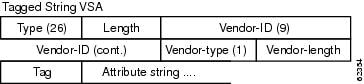
To retrieve the correct value, the Tag field must be parsed correctly. The value for this field can range only from 0x01 through 0x1F. If the value is not within the specified range, the RADIUS server ignores the value and considers the Tag field to be a part of the Attribute String field.
Encrypted String VSA
Figure 2 displays the packet format for the Encrypted String VSA:
Figure 2 Encrypted String VSA Format
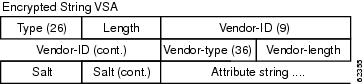
The Salt field ensures the uniqueness of the encryption key that is used to encrypt each instance of the VSA. The first and most significant bit of the Salt field must be set to 1.

Note Vendor-type (36) indicates that the attribute is an encrypted string VSA.
Tagged and Encrypted String VSA
Figure 3 displays the packet formats for each of the newly supported VSAs:
Figure 3 Tagged and Encrypted String VSA Format
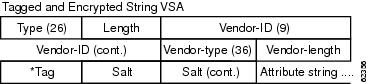
This VSA is similar to encrypted string VSAs except this VSA has an additional Tag field. If the Tag field is not within the valid range (0x01 through 0x1F), it is considered to be part of the Salt field.
How to Verify Encrypted Vendor-Specific Attributes
The Encrypted Vendor-Specific Attributes feature requires no configuration. To verify that RADIUS-tagged and encrypted VSAs are being sent from the RADIUS server, use the following command in privileged EXEC mode:
|
|
|
|---|---|
Router# debug radius |
Displays information associated with RADIUS. The output of this command shows whether tagged and encrypted VSAs are being sent from the RADIUS server. |
Configuration Examples for Encrypted Vendor-Specific Attributes
This section provides the following configuration examples:
•RADIUS User Profile with a Tagged and Encrypted VSA Example
NAS Configuration Example
The following example shows how to configure a network access server (NAS) with a basic configuration using tagged and encrypted VSAs. (This example assumes that the configuration required to make PPP calls is already enabled.)
aaa new-model
aaa authentication ppp default group radius
aaa authorization network default group radius
!
radius-server host 10.2.2.2 auth-port 1645 acct-port 1646
radius-server key cisco
RADIUS User Profile with a Tagged and Encrypted VSA Example
The following is an example of user profile on a RADIUS server that supports tagged and encrypted string VSAs:
mascot Password = "password1"
Service-Type = NAS-Prompt,
Framed-Protocol = PPP,
Cisco:Cisco-Enc = "ip:route=10.0.0.0 255.0.0.0"
Cisco.attr Cisco-Enc 36 tag-encstr(*,*)
Additional References
The following sections provide references related to the Encrypted Vendor-Specific Attributes.
Related Documents
|
|
|
|---|---|
RADIUS Attributes |
Cisco IOS Security Configuration Guide: Securing User Services, Release 12.4T |
Standards
|
|
|
|---|---|
None |
— |
MIBs
|
|
|
|---|---|
None |
To locate and download MIBs for selected platforms, Cisco IOS releases, and feature sets, use Cisco MIB Locator found at the following URL: |
RFCs
|
|
|
|---|---|
RFC 2865 |
Remote Authentication Dial In User Service (RADIUS) |
RFC 2868 |
RADIUS Attributes for Tunnel Protocol Support |
Technical Assistance
Feature Information for Encrypted Vendor-Specific Attributes
Table 1 lists the release history for this feature.
Not all commands may be available in your Cisco IOS software release. For release information about a specific command, see the command reference documentation.
Use Cisco Feature Navigator to find information about platform support and software image support. Cisco Feature Navigator enables you to determine which Cisco IOS and Catalyst OS software images support a specific software release, feature set, or platform. To access Cisco Feature Navigator, go to http://tools.cisco.com/ITDIT/CFN/jsp/index.jsp. An account on Cisco.com is not required.
Note Table 1 lists only the Cisco IOS software release that introduced support for a given feature in a given Cisco IOS software release train. Unless noted otherwise, subsequent releases of that Cisco IOS software release train also support that feature.
 Feedback