Cisco Packet Data Serving Node (PDSN) Release 5.0 for Cisco IOS Release 12.4(22)XR
Available Languages
Table Of Contents
Cisco Packet Data Serving Node Release 5.0 for Cisco IOS Release 12.4(22)XR
PMTU Discovery by Mobile IP Client
Features From Previous Releases
Simple IP-based Service Access
Mobile IP-based Service Access
Session Redundancy Infrastructure
In Process Synchronization Events
AAA - Authentication and Authorization
Single Interface for MIP, Simple IP, VPDN-based calls or A11 Registrations
Single Interface for Configuration
Single Interface for SNMP Management
Single Interface for Trouble Shooting and Debug
Chassis-Wide MIB for Application-Related Parameters
AAA Responsiveness Test Tool and Traps
Intra-Chassis Configuration Synchronization
Redundancy Support in Cisco PDSN Release 5.0
Single IP Support - Reused and New CLI Commands
Distributed Configuration, Show and Debug commands in Single IP PDSN
Improved Throughput and Transaction Handling
Cluster Controller Support in Single IP Blade
Clustering Architecture in PDSN
Functions of Cluster Controller
Metrics for Cluster Controller
Metrics Between Member and Controller
Backward Compatibility of Cluster Controller
Configuring Cluster Controller Support
Cluster Controller Member Configuration
Features of IMSI and PCF-based Redirection
Limitations of IMSI and PCF-based Redirection
Mobile IP and AAA Attributes for China Telecom
Proxy Mobile IP Indicator Attribute
Proxy Mobile IP Capability Indicator Attribute
Trap Generation for AAA Server Unresponsiveness
Flow Trigger Classification for DOS
Flow Marking Based on Classification Criteria for DOS
SDB Accounting Record sent by 1xRTT PCF
Differentiated Services Code Point Marking Support
Flow Trigger Classification for DSCP
Flow Marking Based on Classification Criteria for DSCP
Changes Related to Single IP Architecture
Functional Flow in SingleIP Architecture
Limitations for Masking Off the IMSI Prefix
Configuring Masking Off the IMSI Prefix
Conserve Unique IP-ID for FA-HA IP-in-IP Tunnel
GRE CVSE Support in FA-HA Tunnel
Support for 835B-Compliant RAA Table Index Downloaded from RADIUS
Configuring Remote Address Accounting
Default Service Option Implementation
Configurable Per-Flow Accounting Options
Configuring Per-Flow Accounting Options
Functional Flow for Configuring Per-Flow Accounting Options
Session and Flow Setup for Configurable Per-Flow Accounting Options
Limitations in Configuring Per-Flow Accounting Options
IP Flow Discriminator Support for PCF Backward Compatibility
Support for Remark DSCP to Max-class Value
Command Support for Fragmentation Size
New Statistics Counters for China Telecom
Prepaid Statistics per PCF level
EVDO Network Initial Aux A10 Connection Request
EVDO Network Accepted Initial Aux A10 Connection
Successful PPP Connection Request
Successful PPP Initial Request
PCF Terminate A10 Before LCP Stage
Initial Connection Requests for L2TP tunnel
Successful Request for L2TP Tunnel
Failed Request for L2TP Tunnel
Outbound and Inbound Bytes on RP Interface
Features From Previous Releases
Virtual Route Forwarding with Sub-interfaces
Configuring PDSN Session Redundancy
Configuring PDSN Session Redundancy Infrastructure
Protocol Layering and RP Connections
Identification of Data Packets For SDB Indication
SDB Indicator Marking for PPP Control Packets
Session Creation—A11 Registration Request
Configuring Multiple Service Connections
Configuring the Subscriber QoS Profile
Configuring Per-Flow Accounting
Configuring Call Admission Control on the PDSN
Resource Revocation for Mobile IP
Subscriber Authorization Based on Domain
Volume-based Prepaid Data Service Flow
Duration-based Prepaid Data Service Flow
Volume-based Prepaid Data Service with Tariff Switching
Support for G17 Attribute in Acct-Stop and Interim Records
Configuring Subscriber Qos Profile to PCF
Configuring Bandwidth Policing
Configuring VSAs in Subscriber QoS Profiles
Mobile IP Call Processing Per Second Improvements
Cisco Proprietary Prepaid Billing
Hardware IPSec Acceleration Using IPSec Acceleration Module—Static IPSec
Conditional Debugging Enhancements
Enhancements in Releases Earlier Than Cisco PDSN 3.0
Electronic Serial Number in Billing
Support for Mobile Equipment Indentifier
PDSN Cluster Controller / Member Architecture
PDSN Controller-Member Clustering
Upgrading the Member PDSN Software from Cisco PDSN Release 1.2 to Release 2.0 and Higher
Related Features and Technologies
Supported Standards, MIBs, and RFCs
Determining the Software Version
Upgrading to a New Software Release
Creating the CDMA Ix Interface
Creating a Virtual Template Interface and Associating it with the PDSN Application
Enabling R-P Interface Signaling
Configuring User Session Parameters
Configuring PDSN Session Redundancy Infrastructure
Configuring AAA Server in the PDSN Environment
Configuring RADIUS in the PDSN Environment
Configuring Prepaid in the PDSN Environment
Enabling VPDN in a PDSN Environment
Configuring Proxy Mobile IP Attributes Locally
Configuring Mobile IP Security Associations
Configuring PDSN Cluster Controller
Configuring PDSN Cluster Member
Configuring A11 Session Updates
Configuring SDB Indicator Marking
Configuring SDB Indicator Marking for PPP Control Packets
Configuring Mobile IP Resource Revocation on the PDSN
Configuring Short Data Burst Flagging
Configuring PDSN Accounting Events
Configuring CDMA RADIUS Attributes
Monitoring and Maintaining the PDSN
PDSN Default Cluster Configuration
Cisco PDSN Configuration for Simple IP
Cisco PDSN Configuration for Simple IP with VPDN
Cisco PDSN Configuration for Mobile IP
Combined Configuration for Cisco PDSN
Session Redundancy Configuration Examples
Simple IPv6 Configuration Example
AAA Server Authentication and Authorization Profile
AAA Server Profiles for Various Service Types
Authentication and Authorization RADIUS Attributes
Accounting Services RADIUS Attributes
Mandatory AVPs in Connection Setup/Release Messages
Q.931 Cause Codes Used in Call Disconnect Notify Message
Cisco Packet Data Serving Node Release 5.0 for Cisco IOS Release 12.4(22)XR
Feature History
This table describes feature support for Cisco Packet Serving Node (PDSN) releases.
12.4(22)XR
Release 5.0 of Cisco PDSN. The following new features are introduced:
•
Improved Throughput and Transaction Handling
•
•
•
•
•
12.4(22)XR
(contd...)
•
•
•
•
•
12.4(15)XR2
Release 4.1 of Cisco PDSN. The following new features are introduced:
•
•
12.4(15)XR
Release 4.0 of Cisco PDSN. The following new features are introduced:
•
Closed-RP support is removed from release 4.0.
PPPoGRE RP Interface support is removed from release 4.0.
12.4(15)XN
Release 3.5 of Cisco PDSN. The following new features are introduced:
12.3(14)YX8
Release 3.0 of Cisco PDSN. The following commands are updated:
•
•
Deleted sections on ODAP and PDSN Selection Peer-to-Peer clustering.
12.3(14)YX1
Release 3.0 of Cisco PDSN. The following new feature is introduced:
12.3(14)YX
Release 3.0 of Cisco PDSN. The following new features are introduced:
•
•
12.3(11)YF3
Release 2.1 of Cisco PDSN.
Added support for:
The following new command is added:
•
12.3(11)YF2
Release 2.1 of Cisco PDSN.
Added support for:
•
•
•
The following new commands are added or modified:
•
•
•
12.3(11)YF1
Release 2.1 of Cisco PDSN.
A restriction for Registration Revocation is removed.
The following new commands are added or modified:
•
•
•
•
•
•
•
•
12.3(11)YF
Release 2.1 of Cisco PDSN. Four new features are added, including the Closed-RP Interface.
12.3(8)XW
Release 2.0 of Cisco PDSN. Five new features are added, including the Always On.
12.3(4)T
Cisco PDSN (a Cisco IOS software) feature is integrated into Cisco IOS Release 12.3(4)T.
12.2(8)ZB8
One new CLI command is added.
12.2(8)ZB7
Six CLI commands are added or modified.
12.2(8)ZB6
Two CLI commands are added or modified.
12.2(8)ZB5
Four new CLI commands are added.
12.2(8)ZB1
Cisco PDSN feature is introduced on the Cisco 7600 Series Router.
12.2(8)ZB
Cisco PDSN feature is introduced on the Cisco Catalyst 6500 Switch.
12.2(8)BY
Cisco PDSN feature is introduced on the Cisco 7200 Series Router.
This document describes the Cisco Packet Data Serving Node (PDSN) software for use on the Cisco Service and Application Module for IP (SAMI) card that resides on the Cisco 7600 Series Router. It includes information on the features and functions of the product, supported platforms, related documents, and configuration tasks.
This document includes the following sections:
•
•
•
•
•
•
•
•
•
Feature Overview
A PDSN provides access to the Internet, intranets, and Wireless Application Protocol (WAP) servers for mobile stations using a Code Division Multiple Access 2000 (CDMA 2000) Radio Access Network (RAN). The PDSN is a Cisco IOS software feature that runs on SAMI cards on the Cisco 7600 Series Router, where PDSN acts as an access gateway for Simple IP (SIP) and Mobile IP (MIP) stations. The PDSN provides foreign agent (FA) support and packet transport for virtual private networking (VPN). It also acts as an Authentication, Authorization, and Accounting (AAA) client.
The PDSN supports all relevant 3rd Generation Partnership Project 2 (3GPP2) standards, including those that define the overall structure of a CDMA 2000 network, and the interfaces between radio components and the PDSN.
System Overview
CDMA is one of the standards for Mobile Station communication. A typical CDMA 2000 network includes terminal equipment, mobile termination, base transceiver stations (BTSs), base station controllers (BSCs or Packet Control Functions (PCFs)), PDSNs, and other CDMA network and data network entities. The PDSN is the interface between a BSC or PCF and a network router.
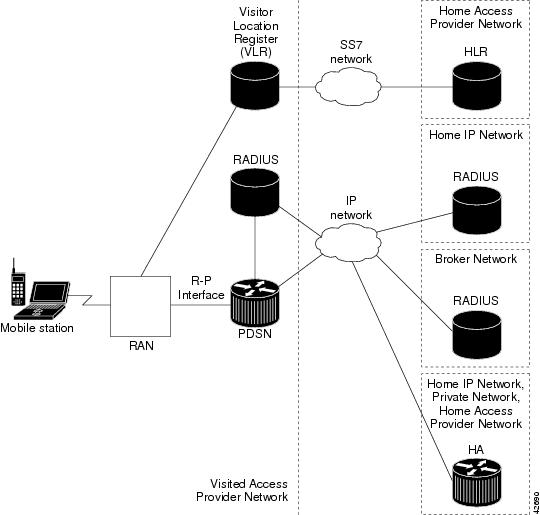
Figure 1 illustrates the relationship of the components of a typical CDMA 2000 network, including a PDSN. In this illustration, a roaming mobile station user receives data services from a visited access provider network, rather than from the mobile station user's subscribed access provider network.
Figure 1 The CDMA Network
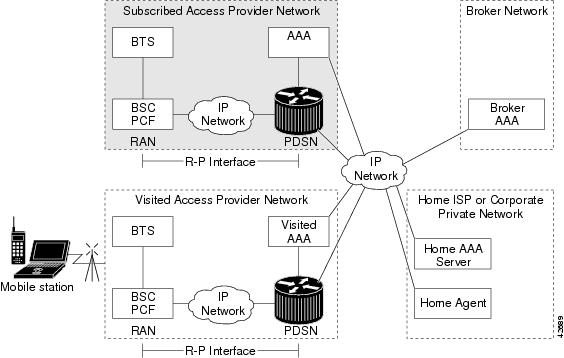
As the illustration shows, the mobile station, which must support either SIP or MIP, connects to a radio tower and BTS. The BTS connects to a BSC, which contains a component called the Packet Control Function (PCF). The PCF communicates with the PDSN through an A10/A11 interface. The A10 interface is for user data and the A11 interface is for control messages. This interface is also known as the RAN-to-PDSN (R-P) interface.
Figure 2 illustrates the communication between the RAN and the PDSN.
Figure 2 RAN-to-PDSN Connection: the R-P Interface
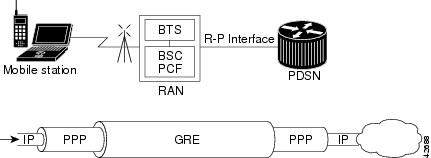
The IP networking between the PDSN and external data networks is through the PDSN-to-intranet or Internet (Pi) interface. For the Cisco PDSN Release 2.0 and higher, you can use either an FE or GE interface as the Pi interface.
For "back office" connectivity, such as connections to a AAA server, or to a RADIUS server, the interface is media independent. Any of the interfaces supported on the Cisco 7206 can be used to connect to these types of services; however, Cisco recommends that you use either an FE or GE interface.
How PDSN Works
When a mobile station makes a data service call, it establishes a Point-to-Point Protocol (PPP) link with the PDSN. The PDSN authenticates the mobile station by communicating with the AAA server. The AAA server verifies that the user is a valid subscriber, determines available services, and tracks usage for billing.
The method used to assign an IP address and the nature of the connection depends on service type and network configuration. SIP operation and MIP operation are referred to as service types. The service type available to a user is determined by the mobile station, and by the type of service that the service provider offers. In the context of PDSN, a mobile station is the end user in both SIP and MIP operation.
Once the mobile station is authenticated, it requests an IP address. SIP stations communicate the request using the Internet Protocol Control Protocol (IPCP). MIP stations communicate the request using MIP registrations.
The following sections describe the IP addressing and communication levels for each respective topic:
•
PDSN Simple IP
With SIP, a service provider's Cisco PDSN assigns a dynamic or static IP address to the mobile station during the PPP link setup. The mobile station retains this IP address as long as it is served by a radio network that has connectivity to the address-assigning PDSN.
Therefore, as long as the mobile station remains within an area of RANs that is served by the same PDSN, the MS can move or roam inside the coverage area and maintain the same PPP links. If the mobile station moves outside the coverage area of the given PDSN, the mobile station is assigned a new IP address, and any application-level connections are terminated.

Note
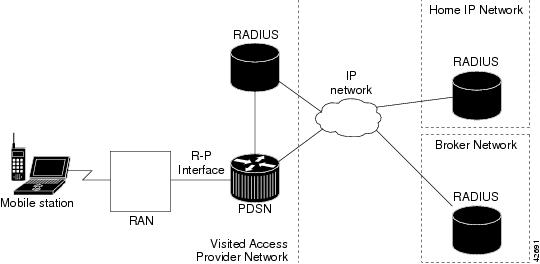
Figure 3 illustrates the placement of the PDSN in a Simple IP scenario.
Figure 3 CDMA Network - Simple IP Scenario
PDSN Simple IP with VPDN Scenario
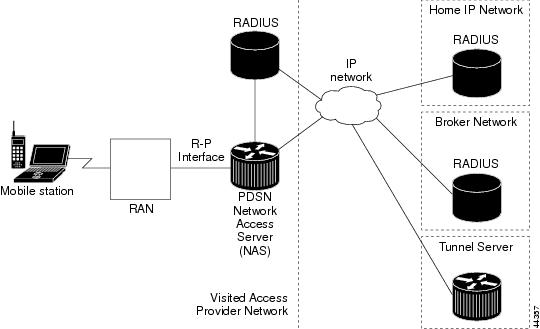
A Virtual Private Data Network (VPDN) allows a private network dial-in service to span to a remote access server called Network Access Server (NAS).
Figure 4 illustrates a VPDN connection in the PDSN environment with SIP. In this scenario, the PDSN acts as the NAS.
Figure 4 CDMA Network —Simple IP with VPDN Scenario
A VPDN connection is established in the following order:
1.
2.
3.
The PPP client is forwarded through a Layer 2 Tunneling Protocol (L2TP) tunnel over User Datagram Protocol (UDP).
4.
PDSN Mobile IP
With MIP, the mobile station can roam beyond the coverage area of a given PDSN and still maintain the same IP address and application-level connections.
Figure 5 shows the placement of the PDSN in a MIP scenario.
Figure 5 CDMA Network —Mobile IP Scenario
The communication process occurs in the following order:
1.
2.
As part of the registration process, the HA creates a binding table entry to associate the mobile station's home address with its Care-of address.
Note
3.
4.
5.
6.
7.
Note
Randomized IMSI Handling
The PDSN cannot recognize 1xRTT to EVDO as a handoff due to a change of IMSI. The result is that the "cdma-reason-ind" in the account stop message will not reflect the same.
By default, the PDSN keeps the first call session if the Mobile does a static home address. In this release, the PDSN supports deleting the first call session for dynamic home address cases (for example, 1x-RTT to EVDO handoff where the IMSI changes during the handoff).
•
–
–
•
–
A new CLI command is introduced in this release that allows you to delete the old session. When you issue the ip mobile cdma imsi dynamic command, the PDSN releases the old session and allows the new session to come up.
The limitation with this CLI command is that the error message "PLATFORM-3-SAMI_IPC_IXP_FAIL: Msgcode 26: Bad Param Error received from IXP" may displayed during high stress scenarios.
PMTU Discovery by Mobile IP Client
FTP upload and ping from the end node may fail when PMTU Discovery (done by setting the DF bit) is done by a MobileIP client (an end node) for packet sizes of about 1480. Due to failure of PMTUD algorithm, the IP sender will never learn the smaller path MTU, but will continue unsuccessfully to retransmit the too-large packet, until the retransmissions time out.
Please refer to http://www.cisco.com/warp/public/105/38.shtml#2000XP for disabling PMTUD for Windows 2000/XP platforms.
PDSN Proxy Mobile IP
Currently, there is a lack of commercially available MIP client software. Conversely, PPP, which is widely used to connect to an Internet Service Provider (ISP), is ubiquitous in IP devices. As an alternative to MIP, you can use Cisco Proxy Mobile IP (PMIP) feature. This capability of the PDSN, which is integrated with PPP, enables a MIP FA to provide mobility to authenticated PPP users.
Note
The communication process occurs in the following order:
1.
2.
3.
4.
5.
6.
PDSN on SAMI
The SAMI blade supports the feature set of Cisco PDSN Release 5.0, and a Cisco 7600 chassis supports a maximum of six application modules. Each application module has six PPCs, each with two Gigabytes of RAM, and uses one instance of a Cisco IOS software application image. Each PPC can function as a PDSN.
Additionally, instances of the cluster controller functionality will be configured as required. One active and standby controller can support three single IP PDSN members. Each PDSN image supports 1,75,000 user sessions.
Migration Scenarios
Table 1 lists currently available PDSN releases and the migration path to the SAMI platform.
Based on Table 2, there are many possible migration scenarios. In this section, we focus on those scenarios closest to current customer deployments. The actual migration path has to be determined per-customer end-to-end deployment. Additionally, migration should be engineered, and we recommend that you perform the migration in a maintenance window in your deployment.
Customers may take this opportunity to redesign their network, for example, redesigning IP addresses scheme and configuring the routing protocols, network connectivity between PDSN and HA, application connectivity between PDSN and AAA servers, routing on the new SAMI PDSN or HA, and so on.
Note
Table 2 lists the most common migration scenarios:
Migration Steps
Migration to Cisco PDSN Release 5.0 is more than replacing Multi-processor WAN Application Module (MWAM) cards with SAMI modules. Your migration must be well planned and conducted in a way that has minimal impact on an existing mobile subscriber's service connections. Migration to Cisco PDSN Release 5.0 image means, changing to the architecture of single PDSN per blade level. The single IP feature reapportions functionality on a SAMI service blade from the 4.0 model of six independent IOS processors. Each IOS processor executes both control and traffic plane functions, to a model where one IOS processor is designated as a Control Plane (PCOP) processor and the other five designated as Traffic Plane (TCOP) processors.
Note
•
Table 3 lists the migration tasks that are based on the scenarios that were previously established in Table 2.
Features
This section lists the features introduced in the current release (Cisco PDSN Release 5.0) and the previous releases.
For a detailed list, see the following:
•
New Features in This Release
This section lists the features of the Cisco PDSN Release 5.0:
•
•
•
•
•
•
•
•
•
•
•
•
•
Features From Previous Releases
This section lists features that were introduced before Cisco PDSN Release 5.0:
•
•
•
•
•
•
•
–
–
•
–
•
•
•
•
•
•
•
Note
Note
Please note that Cisco PDSN Release 4.0 does not support Closed-RP clustering. Additionally, Closed-RP support is removed in the release.
Note
PDSN Performance Metrics
Cisco PDSN Release 4.x and later releases deliver performance improvements such as significant improvement in 1XRTT call setup rates, compared to Release 3.0 and Release 3.5.
Performance Metrics on the Cisco 7600 S eries Router are as follows: The quoted figures are per image, and each SAMI can support six PDSN images.
•
•
•
•
•
•
Note
Packet Data Service Access
The PDSN supports two types of service accesses. The type of service access for a mobile session is determined by the capabilities of the mobile station:
•
•
Simple IP-based Service Access
The PDSN facilitates a mobile user to access the internet and corporate intranet by using SIP-based service access. SIP mode of access, however, limits user mobility to the coverage area of the serving PDSN. Inter-PDSN handoff causes renegotiation of PPP between the mobile station and the new PDSN. The old IP address assigned at the previous PDSN cannot usually be assigned to the mobile user from the new PDSN, and results in reset and restart of user applications.
Some of the salient features for SIP-based service access are:
•
•
•
•
•
•
•
•
•
•
•
User NAI is available during the PPP CHAP/PAP authenticating phase. Domain name information in the NAI determines the domain responsible for user authentication. Based on the type of packet routing model, SIP-based service access can be categorized as follows:
•
•
•
Simple IP Routed Access
After receiving username and password during PPP LCP negotiations, the PDSN forwards authentication information to the local AAA server through an access-request message. This, in turn, may be proxied to the AAA server in the user's home domain, via broker AAA servers, if necessary. On successful authentication, the user is authorized services based on its service profile. User Class/CDMA_IPTECH information, along with other authorization parameters are returned to the PDSN using an access-accept message from the home AAA server. On successful negotiation of an IP address, SIP-based services are made available to the mobile user.
SIP routed access method is applicable for users that are not configured for VPDN or PMIP services. With PPP terminated at the PDSN, uplink user traffic is routed toward the IP network from the PDSN. The address assigned to the mobile user would be from within the PDSN routable domain. Private addresses may also be used if a NAT is configured. User mobility is limited to the PDSN coverage area. Inter-PCF handoffs do not disrupt service. Inter-PDSN handoffs, however, result in PPP renegotiation at the new PDSN, another IP address being assigned at the new PDSN, and reset and restart of user applications.
Simple IP VPDN Access
After receiving username and password during PPP LCP negotiations, the PDSN forwards authentication information to the local AAA server via an access-request message. This, in turn, may be proxied to the AAA server in the user's home domain, via broker AAA servers, if necessary. On successful authentication, the user is authorized services based on user's service profile. If the user is configured for VPDN based access services, User Class information, along with other authorization parameters including tunneling options and tunneling parameters, are returned to the PDSN through an access-accept message from the home AAA server. The following type of VPDN services is supported at the PDSN:
L2TP - Layer 2 Tunneling Protocol
For L2TP type layer2 tunneling, the PDSN establishes an L2TP tunnel with the tunneling endpoints specified by the tunneling parameters. The L2TP tunnel would be established between the Link Control Protocol (LAC) at the PDSN and LNS at the NAS in user's home domain. The PPP connection would be between the mobile station and the LNS in the home network. Despite the PPP connection termination at the L2TP Network Server (LNS), the PDSN monitors the PPP session for inactivity. Status of the PPP connection is also linked with the state of the underlying A10 connection. PPP connection is deleted when the underlying A10 connection is deleted. IPSec encryption methods can also be enabled over the L2TP tunnels for enhanced security.
On successful negotiation of an IP address between the mobile and the LNS, IP-based services are made available to the mobile.
The LNS may be configured to authenticate the mobile user based on the challenge and challenge response information from the PDSN. Additionally, the LNS may also be configured to challenge the user again after the layer2 tunnel has been established. The following authentication options are supported for L2TP:
•
The LAC (PDSN) challenges the mobile user and forwards authentication-related information to the LNS as part of tunnel-setup parameters. The LNS may be configured to authenticate the user either locally or through the home AAA server, based on the authentication-related information from the LAC (PDSN). On successful authentication, the mobile and the LNS proceed with the IPCP phase and negotiate an IP address for the user session.
•
The LAC (PDSN) challenges the mobile and forwards authentication-related information to the LNS as part of tunnel-setup parameters. The LNS may be configured to authenticate the user either locally or through the home AAA server, based on the authentication-related information from the LAC (PDSN). On successful authentication, the LNS challenges the mobile again. After successful authentication, the LNS and the mobile proceed with IPCP phase and negotiate the IP address for the user session.
Proxy Mobile IP Access
After receiving username and password during PPP LCP negotiations, the PDSN forwards authentication information to the local AAA server via an access-request message. This, in turn, may be proxied to the AAA server in the user's home domain, using broker AAA servers, if necessary. On successful authentication, the user is authorized services based on its service profile. User Class information, along with other authorization parameters, are returned to the PDSN via an access reply from the home AAA server.
If the user is configured for PMIP-based access, authorization parameters from the home AAA server include the HA address, and the security parameter (SPI) to be used for computing the MN-HA Authentication extension for the mobile station. The HA is allocated from the list of HAs configured at the home AAA server. Round robin or hashing algorithms based on user NAI can be used for allocating a HA at the AAA server. Other authorization attributes returned from the AAA server include MN-AAA authenticating extension as defined in RFC 3012. Based on this information, the PDSN performs PMIP procedures on behalf of the mobile user by sending a MIP Registration Request message to the allocated HA. On successful authentication of the mobile with the AAA server and registration at the HA, the HA assigns a home address for this mobile user This address is returned to the mobile during IPCP IP address negotiation phase.
On successful negotiation of an IP address, PMIP-based services are made available to the mobile user. To the mobile, these services are no different from SIP services with tunneling being done through the HA. This feature, however, extends the coverage area of the call beyond the coverage area of the serving PDSN. If, as a result of a handoff event, another PDSN is allocated to the call, the target PDSN performs MIP registration with the HA, thereby ensuring that the same home address is allocated to the mobile.
Mobile IP-based Service Access
The PDSN allows a mobile station with MIP client function to access the Internet and corporate intranet using MIP-based service access. With this mode of service access, user mobility is extended beyond the coverage area of currently serving PDSN. Resulting from a handoff, if another PDSN is allocated to the call, the target PDSN performs MIP registration with the HA, thereby ensuring that the same home address is allocated to the mobile.
Some of the salient features for MIP services access are:
•
•
•
•
•
•
•
•
•
•
•
•
•
•
•
•
•
•
•
•
•
•
•
•
•
•
•
•
•
•
•
•
A MIP capable mobile client may be configured to skip PAP/CHAP based authentication during the PPP LCP phase. Once the PPP is established, the PDSN sends a burst of MIP Agent Advertisement messages that include the MIP Agent Advertisement Challenge extension specified in RFC 3012. The number and timing of the burst is configurable. The mobile user responds with a MIP Registration Request message that includes the mobile user's NAI and MN-FA Challenge extension in response to the challenge in the Agent Advertisement message. If the mobile user does not respond to the initial burst, advertisements can be solicited.
The Foreign Agent function at the PDSN can be configured to authenticate the mobile user by forwarding an access-request message to the local AAA server. The local AAA server would proxy the message to the home AAA server, through broker AAA servers, if necessary. On successful authentication, the home AAA server may assign a HA to the call and return its address in the access reply message. Other authorization parameters in the access-reply message include the SPI and IPSec shared key to be used between the FA and the HA. The PDSN or FA and HA establish a secure IPSec tunnel, if required, and the PDSN/FA forwards the Registration Request message to the HA. The Registration Request message includes the NAI and MN-FA-Challenge Extension also. It may also include MN-AAA Authentication extension.
The HA can be configured to authenticate the mobile again with the home AAA server. On successful authentication and registration, the HA responds with a Registration Reply message to the PDSN or FA that is forwarded to the mobile station. The Registration Reply message contains the home address also (static or dynamically assigned) for the user session.
Potential home addresses are available to the PDSN from the following:
•
•
•
The mobile may be configured to perform PPP PAP/CHAP authentication in addition to performing Foreign Agent Challenge based authentication specified in RFC 3012. In this case the PDSN would support one SIP flow, in addition to one or more MIP flows.
For MIP services, the HA would typically be located within an ISP network or within a corporate domain. However, many of the ISPs and/or corporate entities may not be ready to provision HAs by the time service providers begin rollout of third-generation packet data services. Access service providers could mitigate this situation by provisioning HAs within their own domain, and then forward packets to ISPs or corporate domains via VPDN services.
Binding Update Procedures
When a mobile first registers for packet data services, a PPP session and associated MIP flows are established at the PDSN. In the event of an inter-PDSN handoff, another PPP session is established at the target PDSN, and the mobile registers with the HA through the new PDSN/FA. The Visitor list binding and the PPP session at the previous PDSN are, however, not released until the PPP inactivity timer expires.
Idle/unused PPP sessions at a PDSN consume valuable resources. The PDSN and HA support MIP Resource Revocation as defined in IS83C and Cisco Proprietary Binding Update and Binding Acknowledge messages for releasing such idle PPP sessions as soon as possible. MIP Resource Revocation is described in Section 16 in greater detail
If Cisco Proprietary binding update feature is used, in the event of an inter-PDSN handoff and MIP registration, the HA updates mobility binding information for the mobile with the Care-of-Address (COA) of the new PDSN/FA. If simultaneous bindings are not enabled, the HA sends a notification in the form of a Binding Update message to the previous PDSN/FA. The previous PDSN/FA acknowledges with Binding Acknowledge, if required, and deletes visitor list entry for the MIP session. The previous PDSN/FA initiates the release of the PPP session when there are no active flows for that mobile station.
The sending of the binding update message is configurable at the HA.
Note
Simple IPv6 Access
The PDSN SIP service has been enhanced to allow both simple IPv4 and simple IPv6 access. These protocols can be used one at a time, or at the same time. The ipcp and the ipv6cp are equivalent for each protocol.
An IPv6 access uses the same PPP LCP authentication and authorization procedures, as well as the AAA server access. When an RP connection is established, the MS sends a PPP Link Control Protocol (LCP) Configuration-Request for a new PPP session to the PDSN. The PPP authentication (CHAP/PAP/none) is one of the parameters negotiated during the LCP phase. After the LCP parameters are negotiated between the MS and the PDSN, an LCP Configure-Acknowledge message is exchanged. Once LCP is up, the PPP authentication is started.
The authentication phase uses CHAP, PAP, or none, depending on the configuration and LCP negotiation. After authentication, the NCPs, ipcp or ipv6cp or both, can be started. A simultaneous IPv4 and IPv6 access from an MS shares the common LCP authentication and authorization as well as the AAA server correlation-ID parameter.
The ipv6cp protocol negotiates a valid non-zero 64-bit IPv6 interface identifier for the MS and the PDSN. The PDSN has only one interface-identifier associated with the PPP connection, so it will be unique. Once ipv6cp has been successfully negotiated, the PDSN and MS both generate unique link-local addresses for the IPv6 interface. The link-local addresses are generated by pre-pending the link-local prefix, FE80:/64, to the 64-bit interface-identifier negotiated during the ipv6cp phase (for example, FE80::205:9AFF:FEFA:D806). This gives a 128-bit link-local address.
The PDSN immediately sends an initial unsolicited Router Advertisement (RA) message on the PPP link to the MS. The link-local address of the PDSN is used as the source address and the destination address will be FF02::1, the "all nodes on the local link" IPv6 address. The PDSN includes a globally unique /64 prefix in the RA message sent to the MS. The prefix may be obtained from a local prefix pool or from the AAA server. The MS will construct a global IPv6 unicast address by prepending the prefix received in the RA to the lower 64-bit interface identifier. You should carefully configure the PDSNs so that the /64 prefix is globally unique for each MS.
After a successful ipv6cp negotiation phase and configuration of the link-local address, the MS transmits a Router Solicitation (RS) message if an RA message has not been received from the PDSN within some specified period of time. The RA is necessary for the MS to construct its 128-bit global unicast address.
In contrast to IPv4, an IPv6 MS will have multiple IPv6 addresses, including:
•
•
•
An IPv6 address is 128-bits for both source and destination addresses. The /64 designation means that 64-bits are used for the prefix (upper 64-bits). This is similar to an IPv4 netmask. A /128 address would mean that the entire address is used. Refer to RFC 3513 for additional IPv6 addressing details and information.
Note
Configuring Simple IPv6
The following commands are used to configure simple IPv6 on the PDSN, and are listed in the Cisco IOS IPv6 Command Reference guide:
•
•
•
•
•
•
•
The following configuration commands are required for IPv6:
Global Configuration Commands
•
•
•
Virtual-template Interface Commands
•
•
•
•
•
Other commands
•
Refer to the Cisco IOS IPv6 Command Reference at the following URL for more detailed information about these configuration commands:
http://www.cisco.com/en/US/products/sw/iosswrel/ps5187/products_command_reference_book09186a00801d661a.html
Session Redundancy Infrastructure
In Cisco PDSN Release 5.0, a redundant PDSN is updated with the session details at the following two different times:
•
•
–
–
–
–
–
–
The new parameters introduced in this feature are synchronized to stand by for both scenarios.
Functional Overview
PDSN session redundancy is focused on preserving user flows on failover. Support for the continuity of billing records, internal counters, and MIB variables is secondary. The following conditions need to exist for failover to be successful on the PDSN:
•
•
•
The PDSN Session Redundancy feature provides user session failover capability to minimize the impact of a PDSN failure on the mobile user experience. The PDSN uses a 1:1 redundancy model, with a standby present for every active PDSN. The active PDSN sends state information to the standby PDSN for synchronization on an as-needed basis. When a PDSN failure occurs, the standby PDSN has the necessary state information to provide service to all existing sessions. It then takes over as the active PDSN and services user sessions, thus providing session redundancy. When the previously active PDSN comes back online, it assumes the role of standby for the now active PDSN, and receives state information for all existing sessions from the newly active PDSN.
Under normal operating conditions, the active and standby PDSN pairs are two separate PDSN images that have identical configurations. They share one or more HSRP interfaces, which are used by all external entities to communicate with them. The active PDSN synchronizes session data to the standby PDSN based on events described below.
Session Events
When a new user session needs to be established, the PCF first sets up an A10 connection to the active PDSN using the HSRP address known to the PCF. The MN then sets up a PPP connection with the active PDSN using the A10 tunnel. Once the call is in a stable state (the PPP session is successful), the active PDSN then synchronizes relevant state information to the standby PDSN. The standby then duplicates the actions of the active PDSN with regards to the A10 connection and the PPP session, and awaits further updates from the active. When any of the other events as listed below occurs, the active PDSN sends state information to the standby.
In order to minimize the loss of accounting data in the event of a failover, a periodic accounting update, with configurable frequency will run on the active PDSN. Every periodic update for a session will trigger a synchronization sent to the standby PDSN, which will update its accounting data. Only counters and attributes that undergo a change on the active PDSN are synchronized to the standby periodically. Information since the last accounting synchronization point will be lost. Also, in order to ensure that the latest information is correctly conveyed to the billing system, the standby unit will never send out any accounting records to the AAA server. The records are always sent from the active unit.
Session events that lead to a synchronization are:
•
•
•
•
•
•
•
•
•
Active PDSN Failure
In the event that the standby PDSN detects that the active PDSN has failed (using HSRP), it then takes over as the active PDSN. Since all external entities, including PCFs, AAA servers, and HAs are configured to communicate with the PDSN pair only using the HSRP addresses, once the standby PDSN takes over those addresses, they are unable to detect a failure. All stable calls also have their state synchronized to the standby; therefore the standby is able to start forwarding user traffic once it takes over as active. On the standby all timers (such as A11 lifetime, PPP timers, and MIP lifetime) are started at the time it takes over as active. Accounting data is also synchronized to the extent that the periodic accounting synchronization timer has been configured on the PDSNs.
Standby PDSN Start-up
When a PDSN comes up when there is an existing active, it takes over the standby role. When the active PDSN learns that a standby PDSN is available, it goes through a process of transferring state data for all existing user sessions to the standby, called a Bulk synchronization. After this process is complete, the standby PDSN is then ready to take over as active in the event of a failure.
Handling Active-Active Scenario
If there is a link failure or a failure in an intermediate node, HSRP packets sent will not reach the peer and the standby node would assume that the active has reloaded and transitioned to active state. This leads to a situation of Active-Active PDSN nodes. The requirement is that, in case one of the PDSNs continues to receive traffic while the other is isolated from the network, it is ensured that the node which received traffic should remain active once the link is restored.
To achieve this, an application tracking object is introduced and HSRP priority is altered based on whether PDSN is processing traffic after the HSRP peer is lost. The PDSN will lower its HSPR priority once it detects that the peer PDSN is lost. Afterward, when the PDSN processes traffic (either control or data packets), it raises its priority back to the configured value. This helps to choose the active node after the link is restored between the PDSNs. So the node which received traffic in Active-Active situation remains to be active after link restoration.
Other Considerations
A Redundancy Framework (RF) MIB is available in order to monitor the active and standby status of the two PDSNs. Other MIB variables and internal counters are not synchronized between the active and standby. They start from the values following IOS-Load or Reload on the backup image. The backup image is treated as a new box.
The PDSN redundant pair is treated as a single member by the cluster controller, and is transparent to the PDSN clustering mechanism. The cluster controller is oblivious to a failover from an active PDSN to its redundant standby.
Similarly, a PDSN redundant pair appears as a single PDSN to all external entities, such as the PCF, the HA, and the AAA server.
IPSec security associations for FA-HA connectivity are maintained across failover.
Note
Note
In Process Synchronization Events
The following subsections explain the expected behavior of the PDSN in session redundancy for various synchronization events in process.
Call Setup
The state of "sessions-in-progress" is not preserved during failover. Mechanisms such as R-P connection retry from the PCF will ensure that sessions will be established as required.
It is possible that a failover can occur when the PCF has established an R-P session for a user flow, but user flow establishment is not completed. In this case, failover will result in the R-P session not being present on the standby. The PCF will timeout the R-P session on the next R-P session lifetime refresh. If the user attempts to establish a new session during this time, a new session will be created.
Call Teardown
There are four scenarios for session termination and include:
•
•
•
•
For each of these cases, session teardown is a multi-step process. For example, a failover can occur when a Registration Update message has been sent from the PDSN and the acknowledgement has not been received. In this case, the standby PDSN will already have been told to delete the session. The active PDSN will not wait for an update acknowledgement from the PCF.
If a failover occurs after sending the Registration Update to the PCF but before the standby has been told to delete the session, or the request to delete the session is lost, the session will remain established on the standby.
Another case is that the PPP context has been deleted as a result of mobile-initiated termination, and then failover occurs prior to the R-P session being terminated.
Similarly, expiry of the PPP Idle timer on the PDSN could also result in deleting the PPP context followed by failover prior to R-P session termination.
In these cases, either the MIP Registration Lifetime or the PPP Idle Timeout will expire, and the session is terminated.
Flow Setup
Flows that are in the process of being established are not preserved. You will see this as failure to establish the flow, and you will have to re-establish the flow.
Flow Teardown
This section applies when a session has two or more flows. Currently, only a MIP call supports this case. For a single IP call, only one flow is allowed.
Although a MIP flow is preserved after switchover, it is possible that registration lifetime expiration will lead to deleting the flow. If the same user registers again before the lifetime expires, it will be considered as a reregistration because this is an existing visitor. However, the reregistration may or may not succeed, depending on the following conditions:
•
•
Dormant-Active Transition
The transition is synchronized between active and standby, and occurs in the following scenarios:
•
•
•
•
Handoff
Inter-PCF Handoff (Dormant or Active) - Same PDSN
The most significant problem with handoff is to re-establish the data path between the target PCF and the now-active PDSN for the preserved session, irrespective of whether this is an active or dormant handoff. Again, there is a window between handoff actually being completed and the state being synchronized within which a failover can occur.
These are the following scenarios:
•
•
•
Inter-PCF Handoff (Dormant or Active) - Different PDSN
This kind of handoff is indicated to the PDSN by receipt of an A11 Registration Request containing the PANID and CANID. It also includes the Mobility Event Indicator and Accounting Data (R-P Session Setup Air-link Record). From the perspective of High Availability, this looks like a new session establishment on the newly active PDSN and a 'regular' session termination on the old PDSN.
A11 Reregistrations
A11 Reregistration RRQ is received by the active unit. The registration life timer does not start on the standby, but it keeps track of the life timer value so that it can restart the life timer once it becomes active. If the lifetime in the reregistration RRQ is different from the previous RRQ, the new lifetime is synchronized to the standby. For example, if a previous RRQ carries a lifetime of 300 seconds and now a new RRQ has the value changed to 500 seconds, the new value is synchronized to the standby. Other significant parameters included in the reregistration RRQ are also synchronized to the standby.
Now, in the above example, if the failover occurs before synchronizing the new lifetime to the standby, the standby will start the lifetime for 300 seconds.
PPP Renegotiation
On PPP renegotiation, the PDSN deletes all the flows on the RP session and sends accounting STOP for each flow. After PPP is up again, the PDSN creates new flow(s) for the session. Therefore, when PPP renegotiation happens on the active, the active unit will send a PPP renegotiation notification to the standby which will then delete all the flows from the RP session on the standby. After PPP is up again and a new flow is created on the active, the active unit sends each flow's data to the standby. If the failover occurs during PPP renegotiation, the renegotiation will fail, and the session may be torn down on the newly active unit.
Other Considerations
Timers
The following timers are normally running when a session is established:
•
•
•
•
The below timer may be running, depending on configuration
•
These timers are restarted on the standby when failover occurs, and the elapsed time is not synchronized to the standby. The effect will be to extend the timers beyond their original values by a time equal to the time that has already expired. This ensures that the user will not perceive a session failure on failover.
Restrictions
The following restrictions exist for the PDSN Session Redundancy Feature:
•
Setting the revocation timestamp to "msec" (ip mobile foreign-service revocation timeout 5 retransmit 4 timestamp msec) for PMIP flows with Session Redundancy is not permitted.
The "msec" option puts the uptime in the timestamp field, and the uptime of the standby router is expected to be lower after switchover when the standby PDSN takes over as active (and when the PMIP flow was closed). Therefore, revocation on HA will be ignored because the identifier value in the revocation message is less than what is expected by HA.
•
•
•
Internals
The following sections identify information that is synchronized to the standby unit:
AHDLC
The control character mapping per used AHDLC channel is preserved. As the default is normally used, only those that are different are synchronized. The AHDLC channel number is not synchronized; an available channel will be selected independently on the standby.
GRE - RP Interface
The GRE Key is synchronized. The flags are synchronized as the sequence flag can be set on a per user basis.
RP Signaling
The contents of the A11 messaging will be treated as described below.
•
•
•
•
•
•
•
•
•
•
•
•
•
•
PPP
All LCP options are synchronized. For IPCP, only the IP address and IPHC parameters are synchronized. DNS server IP address negotiated during IPCP negotiation is not synchronized to the standby unit. All per user attributes downloaded from the AAA server during authentication or authorization are synchronized to the standby unit.
Compression - Header and Payload
There is no synchronization of compression context for either header or payload compression. Fail-over to a standby PDSN results in the compression context being re-established.
Header compression - First packet for a session after switchover is dropped, and peer retries the packet after acknowledge timeout.
Payload compression - There is no compression history present after switchover on the standby. A CCP reset is automatically generated when decode fails. No special treatment is needed.
IP Address Assignment
When an IP address is dynamically assigned from a pool configured on the PDSN, it is necessary that the standby associates the same address with the session. The IP address will be synchronized as part of PPP state. If the IP address is received from the AAA server or a static IP address is used that does not come from a local pool, this address will also be associated with the session on the standby. Similarly, the address pool will be synchronized.
AAA - Authentication and Authorization
Table 5 lists the relevant authentication and authorization parameters. This is required on the standby to allow accurate recreation of the AAA state.
GPP2 Packet Data Service Attributes
Table 6 lists the 3GPP2 Packet Data Service Attributes.
AAA Server Accounting
GPP2 Accounting Records Fields
Table 7 identifies the GPP2 accounting records fields.
RADIUS Server Group Support
The IP address of the AAA server chosen will not be synchronized.
Mobile IP Signaling
For MIP service, the parameters to be synchronized, per MIP flow, include the following:
•
•
•
•
•
•
•
•
Mobile IP Tunneled Traffic
This traffic is carried in either GRE tunnels or IP-in-IP tunnels. The only information that needs to be synchronized is the tunnel endpoint of the peer.
Locally Configured IPSec
For the PDSN on the Catalyst 76xx series, IPSec tunnels are terminated on the VPN Acceleration Module. The role of the PDSN is to retrieve parameters from the AAA server and, based on these parameters, 'trigger' IPSec tunnel establishment. Synchronization of these parameters is sufficient to preserve IPSec tunnels in the event of PDSN failover for intra-chassis configurations. PDSN failover is not coupled with VPN Acceleration Module/SUP failover. Inter chassis configurations and intra-chassis SUP failover does not currently support stateful IPSec.
FA-HA IPSec
FA-HA IPSec tunnels will be preserved when PDSN on 7600 failover occurs for intra-chassis configurations. They will not be preserved for inter chassis configurations.
AAA Server Accounting
Periodic Accounting Synchronization
Accounting information is optionally synchronized between the active and standby images. This synchronization occurs at the configured periodic accounting interval. The counters that are synchronized are g1 and g2, along with the packet counts. Sending an Interim Accounting record will trigger synchronization of the byte and packet counts. Setting the operator-defined periodic accounting interval determines the accuracy of the user-billing record as impacted by PDSN failover. It is possible that undercharging could occur; however, overcharging is not possible.
Accounting with VSA Approach
After a switchover takes place, the first interim or stop accounting record (as appropriate) includes a Vendor Specific Attribute (VSA) (cdma-rfswact) indicating that a switchover has occurred. The inclusion of this VSA is controllable by issuing the cdma pdsn redundancy accounting send vsa swact command.
Note
Here is a sample accounting debug with vsa:
Sep 13 18:23:10.179: RADIUS: Cisco AVpair [34] 16Sep 13 18:23:10.179: RADIUS: 63 64 6D 61 2D 72 66 73 77 61 63 74 3D 31 [cdma-rfswact=1]System Accounting
In a session redundancy setup, an accounting ON will be sent by the active unit only when the whole setup is brought up (accounting ON will not be sent by the newly active unit after a failover). The standby unit does not send any system accounting events under any scenarios. The events, however, are sent in a standalone mode.
A sys-off is sent if reload is issued on the active unit.
New Features in This Release
This section explains new and modified features of Cisco PDSN Release 5.0.
Single IP per Blade
This chapter discusses concepts related to single IP Infrastructure and Manageability requirements for the Service Provider PDSN gateway application. This application is resident on the SAMI service blade of the Cisco 7600 Series Router and is part of the Mobile Internet product family. This section also provides details about how to configure this feature.
This section includes the following sub sections:
•
–
–
–
–
–
–
–
–
•
•
•
Overview of Single IP Feature
The current Mobile Internet gateway-on-SAMI solutions, (WiMax ASNGW, GGSN, and PDSN except HA) all offer a multiple-routers-on-a-stick model with the attendant manageability and operational issues. The system design for PDSN single IP allows you to manage the gateway-on-SAMI on a per-blade basis. This results in a "factor-of-6 decrease" in operational complexity compared to the previous presentation of six individual processors per blade.
Here is an additional targeted subset of functionality that is presented in a per-chassis model. The presentation of a per-blade model applies to the following areas:
•
•
•
•
•
Additionally, the presentation of a per-chassis model applies to the following targeted functionality:
•
•
•
•
Single IP Interface
The following features fall under the umbrella of a single IP per blade:
•
•
•
•
•
Single Interface for MIP, Simple IP, VPDN-based calls or A11 Registrations
The service blade presents one IP address for the A11 registration request. This IP address is common across all processors in the blade. The IP address for vaccess interface is also common across all processors in the blade. Thus, the blade presents one IP address for the single IP calls. Similarly, the service blade presents a distinct IP address (PDSN IP address) for each of its service including Simple IPv6. These addresses are configured as done for Cisco PDSN Release 4.0, but only on one of the processors of the blade. The IP address configuration is present on both control plane and traffic plane processors.
The service blade implements a packet distribution function in IXP ucode, which ensures that user traffic packets are dispatched to the correct traffic plane processor. Packets identified as control plane traffic (such as A11 packets, packet of disconnect POD packets, MIP registration revocation packets, and so on) are sent to the control plane processor. The rest of the control plane packets (PPP Negotiation, AAA authentication, accounting, MIP, and so on) are dispatched to the correct traffic plane processor. Packets that do not match a specific identification are sent to the control plane processor for treatment.
Single Interface for Configuration
The service blade provides a single point of configuration for blade functionality. This means that you can establish a session to the service blade, the same as performed in Cisco PDSN Release 4.0. The session is established to the control processor on the service blade. From that single session to the service blade, you can configure PDSN features each command required for a feature. That configuration is then propagated to all processors that require the same configuration without you performing any additional configuration.
The default treatment for any IOS configuration command is that the configuration takes effect on all IOS processors on the service blade. It is possible to define a set of commands that only executes on the processor hosting the configuration session. Some examples of filtered configuration commands are those relating to OSPF, SNMP, HSRP, BGP, Eigrp, CDP, and sub-commands in the interface configuration mode relating to any of the above.
Single Interface for SNMP Management
The service blade provides a distinct configurable IP address that is the target address for SNMP operations. This IP address is hosted on the control plane processor. All MIBs on a service blade related to PDSN functionality are accessible through this IP address. Information required from processors other than the control plane processor is either pushed or pulled depending on the MIB target.
There are two MIBs related to processor resource usage and memory usage that present information on a per-processor basis. There is a single Processor Resource MIB result returned with six individual entries, one per processor. Similarly, this also occurs for memory usage.
Single Interface for Trouble Shooting and Debug
The service blade provides a single point of entry (session into the control plane processor) to execute show and debug commands. By default, show commands are executed on the control plane processor only. Each command that requires execution on one or more traffic plane processors is individually instrumented.
For debug commands the HA model for single IP is followed for the PDSN as well. For commands that require additional information from the traffic plane processor and are qualified per user (either NAI or IP address), the traffic plane processor hosting that user is identified and the command executed on that specific processor.
The results from the various processors are combined into a single presentation before a response to the command is provided.
Conditional debug commands use a similar approach. The model proposed by Osler for HA is followed in the PDSN as well.
Single Interface for AAA
The service blade presents a single IP address for AAA interactions. This IP address may be one address for both RADIUS-based interactions, or separate IP address configurations for each protocol.
RADIUS-based authentication and authorization is executed from the traffic plane processor.
The service blade packet distribution function directs RADIUS traffic to a specific processor based on the destination UDP port.
Single Interface for Failover
The current SAMI failure mode is for a per-processor failure whenever possible. For the single IP model, a failure detected on the blade results in a blade-level failover, even if a processor-level failover is sufficient. This feature is similar to the HA single IP.
Operation and Management
This section discusses features that fall under the umbrella of Operation and Management and describes:
•
•
•
•
Chassis-Wide MIB for Application-Related Parameters
This feature provides a single MIB within which all application-related parameters are reported across the chassis. For PDSN, this functionality is provided on a per-PDSN instance basis.
For all PDSN instances on a single service blade, this information is available through an SNMP Get to a single IP address. The information is available in the CISCO-PDSN-MIB. CISCO-CDMA-PDSN-EXT-MIB and in the CISCO-IP-LOCAL-POOL-MIB. The SNMP manager is responsible for executing the necessary number of SNMP GET operations to retrieve a MIB per PDSN instance. This release of the single IP PDSN feature supports one PDSN instance per service blade, thereby reducing the number of Get operations from 12 per service blade to 2.
AAA Responsiveness Test Tool and Traps
There are two aspects to this function:
•
•
AAA Responsiveness Test Tool
This release does not support the AAA responsiveness test tool.
Trap Generation for AAA Unresponsiveness
Refer the Trap Generation for AAA Server Unresponsiveness.
Show Subscriber
This feature provides—from a single point in the chassis—summary listings of subscribers hosted by the PDSN instances in the chassis. This release supports a single PDSN instance per service blade, so the sequence of steps necessary is limited to requesting the desired information using IOS CLI commands for one, or all, service blades.
Table 8 lists the feature's functionality:
Here is a list of the possible output display formats:
•
•
•
This functionality is not supported through SNMP.
Intra-Chassis Configuration Synchronization
This feature provides that any configuration command executed on the active blade must automatically be synchronized on the partner standby blade by enabling auto synchronization feature. This applies to all commands, except the configuration commands on the active or standby partnering model, PDSN redundancy, and the configuration commands for configuring HSRP, standby command, as a failure detection mode for redundancy.
This feature is disabled by default and can be enabled by the auto-sync all command in configuration mode. The "write memory" needs to be performed before the standby is up.
Note
How an active or standby PDSN is determined is based on the Radio Frequency (RF) infrastructure that is used for Stateful SwitchOver (SSO) support, as well as for Session Redundancy support for various Mobile Severely Errored Frames (mSEF) gateways.
Initialization
The SSO configuration synchronization happens automatically during bootup without any pre-required configurations. The same synchronization cannot be applied to the PDSN as IP connectivity between the redundant units is required before RF negotiation. Therefore, different yet related configurations are necessary for the active and standby blades.
Additionally, the SSO configuration synchronization feature does not support any unique configuration on each of the redundant units. On the PDSN, HSRP and RF Interdev protocols are required, both of which require certain unique configurations on the redundant units.
The existing commands that require unique configurations for each unit are modified to accommodate configurations for the peer unit. A new command identifies the peer slots. These commands are parsed and the RF negotiation state RF_PROG_STANDBY_CONFIG is used to trigger configuration synchronization automatically. Refer Configuration Details section for the new commands.
RF Client
As in the case of SSO configuration synchronization, the PDSN configuration synchronization is also an RF client. The configuration synchronization feature registers a callback with RF for the progression and status events. The RF notifies each of these registered clients in order with the progression and status of events, thus allowing the PDSN to know when to synchronize the configuration files.
Configuration Files and Synchronization
The configuration synchronization feature comprises the startup configuration and the running configuration processes.
The startup configuration is stored in the NVRAM as a text file. This file is synchronized whenever you perform operations such as write memory, copy running startup, and so on. If the file is opened for a write operation, synchronization starts after the file is closed.
A running configuration synchronization is dynamically generated by certain operations, so any time a synchronization is performed, the running configuration must be generated.
In the SSO implementation, before the synchronization process begins, the primary is locked. A bulk synchronization of the startup configuration and the running configuration is performed, followed up by a parser mode synchronization.
After both the processes are in synchronization and the primary is unlocked, the line-by-line synchronization begins.
All the synchronizing processes require a transport mechanism to communicate between the redundant units.
The PDSN configuration synchronization feature may use one the following transport mechanisms:
•
•
•
The first is the fastest solution from an implementation perspective but it does not scale well for an inter-chassis solution. In this release, PDSN supports the second option, RF or CF SCTP.
Bulk Synchronization
RF Interdev communication needs to be established between the two units prior to initiating the bulk synchronization. Each unit parses its startup configuration and this will cause the unit to become active or go into standby. The active unit will then bulk synchronize its running and private configuration files to the standby if there has been running or private configuration modifications on it after bootup.
After the bulk synchronization, the standby will reload itself and come up with the altered configurations. During this standby reload phase, no configurations are allowed on the active unit.
The configurations that are synchronized during initialization include:
•
•
The startup configuration is not synchronized because the startup config files in the SUP are always in synchronization.
If a private configuration is changed after bootup, the active unit copies its private configuration file into a buffer and transports the file using RF Interdev SCTP to the standby.
If running configurations change after bootup, the active unit copies its running configuration file to a buffer and transports the file using RF Interdev SCTP to the standby. Following these steps, the active sends a message to the standby to start parsing the received buffers.
The standby unit saves the received buffer contents locally, and reloads itself to apply the modified configuration to itself.
Note
Line-by-Line Synchronization
When both active and standby units are up and running, the CLI command entered from the active unit is executed first, the command is then propagated to the standby and executed, and the results are returned back to the active unit.
The Parser Return Code (PRC) scheme is used in the SSO implementation to have all the parser action routine for each CLI command set the return code. This return code is a combination of the class of the error code, component ID, sync-bit, sub-code, and so on.
Parser Mode Synchronization maintains the same parser mode between the active and standby units before a command is sent to slave for synchronization.
In the SSO implementation, the synchronization is done through RPC, which blocks the current process until the active RP receives return code message from the standby RP. Thus, the commands are executed in order for both units.
If a command fails on the standby unit, then the result is conveyed back to the active. On the active, a stub registry for the policy maker is invoked that leaves the decision on what to do with the returned result to the calling or upper layer.
The single IP PDSN configuration synchronization feature uses the SSO line-by-line synchronization implementation as is.
Startup Configuration Synchronization
In the SSO implementation, the startup configuration is synchronized during bootup when the RF state is ready to perform bulk synchronization. You must lock the router before initiating the startup configuration synchronization.
When a write memory or copy file1 startup-config is executed, there are two ways to handle the scenario:
•
•
For the single IP PDSN, bulk synchronization of the startup configuration file is used because it allows the active unit to save configuration changes to the standby location.
Running Configuration Synchronization
With a running configuration synchronization, the redundancy units carry the same state of information.
Initially, after the secondary unit establishes RF Interdev communication, the running configuration file is bulk synchronized. The bulk synchronization induces a self-reload of the standby unit if the running configuration has changed on the active unit prior to its bootup. After the reload, the standby comes up with the running config of the active unit.
After this the line-by-line synchronization occurs between the two units. As you configure each command, the same command is passed on to the secondary side after executing the same on the primary.
The bulk synchronization of the running configuration is done using the RF Interdev SCTP for the single IP PDSN feature.
Limitations
The following are the limitations when configuring the intra-chassis:
•
•
•
•
Configuration Details
Using the auto synchronization feature, the configurations are synchronized, and the CLIs on both the units must be identical. This feature is disabled by default. The following commands are currently unique to each redundant unit and have been modified:
•
•
•
•
•
•
•
The following new command is introduced under the interface GigabitEthernet0/0.23:
redundancy ip address unit1 ip1 mask1 unit2 ip2 mask2The redundancy ip address command is a per-interface command. The HSRP protocol uses this IP address configured for its negotiation, and not the one configured using the regular ip address command. You do not require the ip address configuration for a sub-interface that is dedicated for HSRP negotiation with the peer.
redundancy unit1 slot x unit2 slot yThe redundancy slot command is a global configuration and is used for identifying the peer slot.
To configure intra-chassis configuration synchronization, perform the following tasks:
redundancy unit1 slot x unit2 slot yunit1-port portnum , unit2-port portnumunder the ipc-assoc-protocol-sctp mode.
unit1-ip address1 , unit2-ip address2under the ipc-unit1-port and ipc-unit2-port modes respectively.
redundancy ip address unit1 address1 mask1 unit2 address2 mask2under the interface and sub-interface modes.
Sequence of configuration steps that must be performed on each of the cards:
When session redundancy is configured for the first time with auto synchronization feature enabled, you must configure only one unit and the other unit must be powered down.
After the configuration is done, ensure that you run the write memory on unit1, then power up unit2.
Monitor Subscriber
This feature allows you from a single point in the chassis to establish conditional debugs based on the NAI or the assigned IP address. This is possible without knowing which PDSN instance in the chassis hosts the subscriber session or is selected to host the subscriber session for cases when the session is not yet established. This feature make use of the Osler tool that allows centralized execution of IOS commands with the ability to receive responses and present those responses in a clear and concise format.
There are two output formats, brief, where the debug output is succinctly presented, and verbose which is the complete debug output.
You must log in to the Supervisor of the 7600, and then execute the command debug condition "qualifier" protocols.
You need to implement the below two-stage process:
1.
2.
It is possible to specify the protocol subsystems for which conditional debugging applies. The choices are Session, Accounting, TFT, VPDN, MIP, PMIP, All and so on.
There is a limit of ten simultaneous pre-triggers.
Note
Show Subscriber Session
You log in to the Supervisor of the 7600 and then execute the show subscriber session command where the subscriber is identified by IMSI, NAI or IP address.
You need to implement the below two-stage process:
•
•
Bulk Statistics Collection
This feature is capable at a single point:
•
•
•
You can set the statistics collection period to increment by 15 minutes, the minimum collection period being 30 minutes. The maximum collection period is 24 hours.
The file content contains summary statistics for each blade except that relating to CPU usage and memory occupation available on a per-CPU basis collected per blade. The per-blade file has an entry for each application CPU on that blade.
The file format is a sequence of "variable_name value" pairs separated by commas.
In Cisco PDSN Release 5.0, the variable name is the OID of the variable as this is the level of support available from the IOS Bulk Statistics Collection CLI command.
There is a predefined set of statistics that is collected, including the variables available in the MIBs that are supported by the PDSN application. The OID assigned to the statistic corresponds directly to the OID in the related MIB.
The following variables of interest are not present in a MIB. These are not supported as part of the Bulk Statistics Collection feature:
•
•
•
•
•
•
The time-period over which collection is made is indicated in the file in the format yy:mm:dd:hh:mm:ss yy:mm:dd:hh:mm:ss. The first date is the start; the second date the end.
If you want to alter the set of subsystems for which statistics collection is enabled, you must first cancel the ongoing statistics collection and begin a new collection. Any information that you collect during the cancelled session is saved.
In the event that the external server is unavailable, the file is saved in local non-volatile memory. The last transferred file is saved locally until the next file is successfully transferred. On successful transfer of the new file, the currently saved file is replaced with the new one.
No new IOS commands are used to support the bulk statistics feature in the single IP PDSN Release 5.0.
Redundancy Support in Cisco PDSN Release 5.0
Redundancy support for Cisco PDSN Release 5.0 features is identical to that supported in Release 4.0 of the PDSN.
The session redundancy is extended to support the single IP architecture. Only one processor (that is PCOP) per SAMI is involved in redundancy management. All the other processors (such as TCOPs) follow the PCOP's state. Configuration synchronization from active to standby is supported in the Cisco PDSN Release 5.0
Performance Requirements
The single IP PDSN supports the following performance figures:
•
•
•
•
Single IP Support - Reused and New CLI Commands
The following CLI commands are provided to allow IPC to communicate with IXP, and to allow GTP and IPC over GTP modules to provide reliable, acknowledged and unacknowledged communication capabilities between the SAMI PPCs:
EXEC Mode
•
•
•
•
•
•
•
•
Show Commands
•
•
•
Configuration Mode:
•
•
•
•
•
•
•
•
The sami ipc crashdump command in configuration mode is as follows:
pdsn-Stdby-ftb3-73(config)# sami ipc crashdump ?
never Do not crash in response to an IPC failure.
tolerance Specifies permitted duration of IPC link failure.
Distributed Configuration, Show and Debug commands in Single IP PDSN
The following sections describe the distributed configuration, show and debug commands in single IP PDSN.
Distributed Configuration
The Distributed CLI agent distributes the configuration information from the PCOP to each of the TCOPs using the IPC protocol.
By default, the CLI agent allows all the commands, but filter the ones that may trigger some functionality on the TCOP that is not needed.
Non-CDMA (the Rest of IOS) Configuration Commands
A set of non-cdma CLI commands are blocked or filtered on the PCOP.
The list of commands that are filtered on the PCOP are:
•
•
•
•
•
•
•
The routing protocols are not sent to TCOPs. We do not recommend configuring the routing protocols on SAMI, it is preferable to set up static routing configurations between SAMI and SUP.
While allocating the IP address pools on the SAMI, we recommend you to configure their respective static routing entries on the SUP.
IP Local Pool Command Change
This command is reused from the GGSN Centralized Pools implementation.
CDMA-related Configuration Commands
For the single IP model, an EXEC banner appears when logging in to a TCOP and warns you to be aware that "normal" maintenance activities should be run from PCOP.
The Table 9 lists the commands that PDSN single IP supports, and indicates whether they are filtered at the PCOP or also sent to the TCOPs.
If the command is sent to the TCOPs, then it is executed at each of the TCOPs.
PDSN Commands for Local Subscriber QoS Profile
The cdma pdsn multiple service flows qos subscriber profile command takes you to a submode. Table 10 lists the commands that you can use to configure various parameters in the local subscriber QoS profile.
Note
Refer Configuring the PDSN Image section for the below configuration tasks:
•
•
•
•
•
•
•
•
•
•
•
•
•
•
•
•
•
•
•
•
•
•
•
•
•
Configuring Host Routes
Host routes are added in general on the TCOPs for the mobile. In case of SingleIP, any ARP request for the MIP address lands on the PCOP. To enable PCOP to respond to ARP requests, enable this CLI command. This CLI command installs the host route for the mobile on the PCOP when the flow comes up, and deletes the host route whenever the flow goes down.
This CLI command is required only when the host routes are not added at the Supervisor for MIP. By default, this CLI command is not configured (Table 11):
Table 11 Configuring Host Routes
[no] cdma pdsn sm add mobile route
Configures or removes configuration of host route on the PDSN.
TCOP
Clear Commands
Table 12 lists the clear commands:
Distributed Show and Debug
By default, all the debug commands are executed in the TCOPs, and the trace is displayed from the PCOP. The PCOP does not perform any aggregation for distributed debug.
Distributed Show - The rule to be followed for distributed show command is that, only for the commands mentioned in the Existing show Commands, aggregation is done at the PCOP for the data collected from the TCOPs. By default, the show commands are not executed at all TCOPs.
Distributed Debug - The rule to be followed for distributed debug commands is that, by default, all the debug commands are executed in the TCOPs, and the trace is displayed from the PCOP. The PCOP does not perform any aggregation for distributed debug.
New Show Commands in The Single IP Architecture
The following example snippets show the new show commands in the single IP architecture:
pdsn# show sami sm imsi IMSIshow sami sm imsi 12345678910112Session Manager User DetailsIMSI: 12345678910112 Location:7(7000000)Call DetailsIP Address: 12.1.1.31 VRF ID:0HA IP Address: 0.0.0.0 NAI: user1pdsn# show sami sm statisticsSession Manager StatisticsRequest Sent:Session: 4 Control: 0Control AAA: 0 Control HA: 0Request Received:Session Create: 5 Session Delete: 4Flow Create: 6 Flow Delete: 5Agg resp: 0Response Sent:Session Create Success: 5 Session Create Failure: 0Session Delete Success: 4 Session Delete Failure: 0IMSI update: 0 IMSI delete Generated : 0Flow Create Success: 6 Flow Create Failure: 0Flow Delete Success: 5 Flow Delete Failure: 0IXP Update:Total: 0 Success: 0Failure: 0Failure:Message parsing: 0 Internal 1: 0Internal 2: 0 PPC not found: 0Timer Expiry: 0 Pool Manager: 0Flow message parse : 0PDSN-Act-ftb3-83# sh cdma pdsn statistics smPPC Stats:Imsi Create Request to PPC Success 4, Failure 0Imsi Delete Request to PPC Success 4, Failure 0Imsi Response from PPC Success 4, Failure 0CCB Create Request to PPC Success 0, Failure 0CCB Delete Request to PPC Success 0, Failure 0CCB HA Create Request to PPC Success 4, Failure 0CCB HA Delete Request to PPC Success 4, Failure 0CCB Response from PPC Success 4, Failure 0IXP A10 Add Send Success 4 Failure 0, Received Success 4 Failure 0IXP A10 Delete Send Success 4 Failure 0, Received Success 4 Failure 0IXP CCB Add Send Success 0 Failure 0, Received Success 0 Failure 0IXP CCB Delete Send Success 0 Failure 0, Received Success 0 Failure 0IXP CCB HA Add Send Success 4 Failure 0, Received Success 4 Failure 0IXP CCB HA Delete Send Success 4 Failure 0, Received Success 4 Failure 0IXP Nack terminated session 0 flow 0Ack timer expiry Imsi 0, Ccb 0Tunnel PPC Stats:Tunnel Create Request Rcvd 3, Sent Ack 3 Nack 0Tunnel Delete Request Rcvd 3, Deleted 3Invalid Tunnel Request Type Rcvd 0PDSN-Act-ftb3-83#PDSN-Act-ftb3-83#Table 13 lists the distributed show commands.
Existing show Commands
The show commands can be categorized into Data Aggregator (DA)/Data Provider (DP) model or remote console and logging (RCAL) model. Commands under the RCAL model are executed directly on the TCOP from either the SUP or the PCOP without any aggregation using execute-on command. All non-cdma related commands can be executed only through this method.
Commands under DA/DP category are executed on the PCOP and either show the values present in the PCOP itself or show the aggregated output received from all TCOPs.
These commands are further classified as push commands and pull commands.
Push commands - The push commands do aggregation from all the TCOPs periodically and get displayed on the PCOP on demand (that means, on executing the corresponding CLI command).
The list of existing push-based show commands are:
•
•
•
•
•
•
•
•
•
•
Pull commands - The pull commands do aggregation only on executing the commands under this category. On executing the CLI command, the data or statistics are fetched from the TCOPs at that instant and displayed.
The list of existing pull-based show commands are:
•
•
•
•
•
•
•
•
•
•
•
•
•
•
•
Changes to Clustering show Commands
The changes to clustering show commands are given below:
show cdma pdsn cluster controller member 2.1.1.1PDSN cluster member 2.1.1.1 (local) state ready, Group NONE <--- Newregistered with PDSN controller 11.1.1.50reported load 1 percent, will be sought in 2 secondsMember 2.1.1.1 statistics:Number of sessions 0Controller seek rcvd 6122, Member seek reply rcvd 6122Member state changed 0 time to readyMember state changed 0 time to Admin prohibitedSession-Up message rcvd 0, Session-Down message received 0Member seek not replied in sequence 0show cdma pdsn cluster controller configurationcluster interface GigabitEthernet0/0.341 (collocated)no R-P signaling proxytimeout to seek member = 10 secondswindow to seek member is 2 timeouts in a row if no reply (afterwards the member is declared offline)default: spi 101, Timestamp +/- 0, key ascii hellothis PDSN cluster controller is configuredController maximum number of load units = 100show cdma pdsn cluster member configurationcluster interface GigabitEthernet0/0.341IP address of controller is 11.1.1.50 (collocated) <--- Newno prohibit administrativelytimeout to resend status or seek controller = 10 sec or less, randomizedresend a msg for 2 timeouts sequentially if no reply, then inform operatordefault: spi 101, Timestamp +/- 0, key ascii hellothis PDSN cluster member is configuredChanges to Show commands
The changes to show commands are given below:
show cdma pdsn pcf:pdsn_act# show cdma pdsn pcfPCF 2.2.2.4 has 1 session, 1 service flowReceived 382 pkts (9750 bytes), sent 391 pkts (10585 bytes)pdsn_act#Displays only the tunnel information. Sessions associated with that tunnel will not be displayed.show cdma pdsn pcf <pcf-ip-addr>:pdsn_act# show cdma pdsn pcf 2.2.2.4PCF 2.2.2.4 has 1 session, 1 service flowReceived 382 pkts (9750 bytes), sent 391 pkts (10585 bytes)pdsn_act#Displays only the tunnel information. Sessions associated with that tunnel will not be displayed.show cdma pdsn statistics:san-pdsn# show cdma pdsn statisticsLast clearing of "show cdma pdsn statistics" counters neverLast Update received at 00:12:54 UTC Mar 1 2009 <--- NewRP Interface:Reg Request rcvd 0, accepted 0, denied 0, discarded 0Initial Reg Request rcvd 0, accepted 0, denied 0, discarded 0, AuxRequest 0Re-registration requests rcvd 0, accepted 0, denied 0, discarded 0Re-registration requests containing Active-Start 0, Active-Stop 0Re-registration requests containing new connections 0, missing connections 0, remapping flows 0Handoff requests rcvd 0, accepted 0, denied 0, discarded 0,AuxRequest 0De-registration rcvd 0, accepted 0, denied 0, discarded 0De-registration Reg Request with Active-Stop 0Registration Request Errors:Unspecified 0, Administratively prohibited 0Resource unavailable 0, Authentication failed 0Identification mismatch 0, Poorly formed requests 0Unknown PDSN 0, Reverse tunnel mandatory 0Reverse tunnel unavailable 0, Bad CVSE 0Max Service Flows 0, Unsupported So 0, Non-Existent A10 0Bandwidth Unavailable 0Update sent 0, accepted 0, denied 0, not acked 0Initial Update sent 0, retransmissions 0Acknowledge received 0, discarded 0Update reason lifetime expiry 0, PPP termination 0, other 0Registration Update Errors:Unspecified 0, Identification mismatch 0Authentication failed 0, Administratively prohibited 0Poorly formed request 0Handoff statistics:Inter PCF handoff active 0, dormant 0Update sent 0, accepted 0, denied 0, not acked 0Initial Update sent 0, retransmissions 0Acknowledge received 0, discarded 0De-registration accepted 0, denied 0Handoff Update Errors:Unspecified 0, Identification mismatch 0Authentication failed 0, Administratively prohibited 0Poorly formed request 0RP Session Update statistics:Update sent 0, accepted 0, denied 0, not acked 0Initial Update sent 0, retransmissions 0Acknowledge received 0, discarded 0Sent reasons Always On 0, RN-PDIT 0, Subscriber Qos 0RP Session Update Errors:Unspecified 0, Identification mismatch 0Authentication failed 0, Session parameters not updated 0Poorly formed request 0Service Option:Address Stats:Simple IP: Static 0, Dynamic 0Mobile IP: Static 0, Dynamic 0Proxy Mobile IP: Static 0, Dynamic 0Simple IP VPDN: Static 0, Dynamic 0Flow Stats:Simple IP: Success 0, Failure 0Mobile IP: Success 0, Failure 0Proxy Mobile IP: Success 0, Failure 0Simple IP VPDN: Success 0, Failure 0Unknown Service Failures: 0PPP:Current Connections 0Connection requests 0, success 0, failure 0, aborted 0Connection enters stage LCP 0, Auth 0, IPCP 0Connection success LCP 0, AUTH 0, IPCP 0Failure reason LCP 0, authentication 0, IPCP 0, other 0Failure reason lower layer disconnect 0A10 release before LCP nego by PDSN 0, by PCF 0LCP StageFailure Reasons Options 0, MaxRetry 0, Unknown 0LCP Term Req during LCP nego sent 0, rcvd 0A10 release during LCP nego by PDSN 0, by PCF 0Auth StageCHAP attempt 0, success 0, failure 0, timeout 0PAP attempt 0, success 0, failure 0, timeout 0MSCHAP attempt 0, success 0, failure 0, timeout 0EAP attempt 0, success 0, failure 0MSID attempt 0, success 0, failure 0AAA timeouts 0, Auth timeouts 0, Auth skipped 0LCP Term Req during Auth nego sent 0, rcvd 0A10 release during Auth nego by PDSN 0, by PCF 0IPCP StageFailure Reasons Options 0, MaxRetry 0, Unknown 0Options failure reason MN Rejected IP Address 0LCP Term Req during IPCP nego sent 0, rcvd 0A10 release during IPCP nego by PDSN 0, by PCF 0CCP StageConnection negotiated compression 0Compression type Microsoft 0, Stac 0, other 0Connections negotiated MRRU 0, IPX 0, IP 0Connections negotiated VJ-Compression 0, BAP 0PPP bundles 0Connections failed to negotiate compression 0Renegotiation total 0, by PDSN 0, by Mobile Node 0Renegotiation success 0, failure 0, aborted 0Renegotiation reason: address mismatch 0, lower layer handoff 0GRE key change 0, other 0Release total 0, by PDSN 0, by Mobile Node 0Release by ingress address filtering 0Release reason: administrative 0, LCP termination 0Idle timeout 0, echo missed 0L2TP tunnel 0, insufficient resources 0Session timeout 0, service unavailable 0De-Reg from PCF 0, lifetime expiry 0, other 0Echo statsRequest sent 0, resent 0, max retransmit timeout 0Response rcvd 0Discarded PacketsUnknown Protocol Errors 0, Bad Packet Length 0RSVP:IEs Parsed 0TFTs Created Success 0, Failure 0TFTs Updated Success 0, Failure 0TFTs Deleted Success 0, Failure 0Other Failure 0Unknown 0, Unsupported Ie types 0Tft Ipv4 Failure StatsTft Unauthorized 0, Unsuccessful Processing 0Tft Treatment Unsupported 0Packet Filter Add 0, Replace 0Packet Filter Precedence Contention 0, Unavailable 0Packet Filter Maximum Limit 0, Non-Existent Tft add 0QOS:Total Profile Download Success 0, Failure 0Local Profile selected 0Failure Reason DSCP 0, Flow Profile ID 0,Service option profile 0, Others 0Total Consolidated Profile 0, DSCP Remarked 0Total policing installed 0, failure 0, removed 0slot 0:AHDLC Engine Type: CDMA HDLC SW ENGINEEngine is ENABLEDtotal channels: 375000, available channels: 375000Framing input 0 bytes, 0 paksFraming output 0 bytes, 0 paksFraming errors 0, insufficient memory 0, queue overflow 0Invalid size 0Deframing input 0 bytes, 0 paksDefaming output 0 bytes, 0 paksDeframing errors 0, insufficient memory 0, queue overflow 0Invalid size 0, CRC errors 0RADIUS DISCONNECT:Disconnect Request rcvd 0, accepted 0Disconnect Request Errors:Unsupported Attribute 0, Missing Attribute 0Invalid Request 0, NAS Id Mismatch 0Session Cxt Not Found 0, Administratively ProhibitedSimilar to show cdma pdsn statistics, if we execute any of the individual statistics except for sm, the following line appears at the start:
Last Update received at 00:12:54 UTC Mar 1 2009 <--- Newrouter# show cdma pdsn statistics ?ahdlc AHDLC informationppp CDMA PDSN ppp statisticsprepaid CDMA PDSN prepaid statisticsqos CDMA PDSN QOS statisticsraa CDMA PDSN RAA statisticsradius CDMA PDSN traffic statisticsrp CDMA PDSN RP statisticssm CDMA PDSN SM statisticstft CDMA PDSN TFT statistics| Output modifiers<cr>router#show cdma pdsn statistics rp error:san-pdsn# show cdma pdsn statistics rp errorLast clearing of "show cdma pdsn statistics rp error" counters neverLast Update received at 00:12:54 UTC Mar 1 2009 <--- NewRP Registration Request Error Reasons:Invalid Packet length 0, Protocol 0, Flags 0Invalid Connection ID 0, Authentication Key 0, SPI 0, Mismatch SPI 0Invalid Mobile ID 0, ID type 0, ID length 0Invalid Extension Order 0, VSE type 0, Vendor id 0Invalid Application type 0, Sub Application type 0Missing extension SSE 0, MHAE 0Duplicate Application type 0, GRE Key 0, CVSE 0Airlink Retransmission with same sequence number 0Airlink Invalid attribute length 0, sequence number 0, record 0Airlink Unknown attribute 0, Duplicate attribute 0Airlink Initial RRQ No Setup 0, Contains Stop 0, Contains SDB 0Airlink Start before Setup 0, Start in De-Registration 0Airlink GRE Key change no Setup 0, Rereceive Setup with same GRE Key 0Airlink Start rcvd during active 0, Stop rcvd during dormant 0De-Registration received for unknown session 0Re-Registration received during session disconnect 0Processing error due to memory failure 0RP Registration Update Ack Error Reasons:Invalid Packet length 0, Protocol 0Invalid Connection ID 0, Authentication Key 0, SPI 0Invalid Mobile ID 0, ID type 0, ID length 0Invalid Extension Order 0, VSE type 0Missing extension SSE 0, RUAE 0Received for unknown session 0, discard memory failure 0RP Session Update Ack Error Reasons:Invalid Packet length 0, Protocol 0Invalid Connection ID 0, Authentication Key 0, SPI 0Invalid Mobile ID 0, ID type 0, ID length 0Invalid Extension Order 0, VSE type 0Missing extension SSE 0, RUAE 0Received for unknown session 0, discard memory failure 0RP Registration Reply Error Reasons:Not sent memory allocation failure 0, Internal error 0Reply not sent to PCF security not found/parse error 0RP Registration Update Error Reasons:Not sent memory allocation failure 0, Internal error 0RP Session Update Error Reasons:Not sent memory allocation failure 0, Internal error 0Other Error Reasons:Maximum configured/limit number of session reached 0show cdma pdsn cac:pdsn_act# show cdma pdsn cacOutput in Values Output in percentageTotal configured bandwidth 2000000 b 100%Allocated bandwidth 100 b 0%Available bandwidth 1999900 b 100%Sessions allocated 1 0%Max sessions allowed 175000 100%PDSN_ACT#
Note
Debug Commands in the Single IP Architecture
Table 14 shows the debug commands in the single IP architecture:
Network Management and MIBs
See the Radius disconnect enabled section.
Features Not Supported
Cross chassis configuration synchronization.
Summary of Features Reused from Other Gateways
•
•
•
•
•
•
•
•
•
Summary of Features Reuseable in Other Gateways
The following features that are included in the single IP subsystem as part of PDSN single IP are reused by other gateways:
•
•
•
•
Refer the Command Reference for Cisco PDSN Release 5.0 in IOS Release 12.4(22)XR for more information about configuration commands for Single IP per Blade in Cisco PDSN Release 5.0.
Osler Support
The Operator Interface for Multiple Service blades for the single IP PDSN product is used to provide a single OAM viewpoint for a defined set of functionality. This support means that you can see the whole chassis as a black box without worrying about the multiple service blades having multiple processors, active or standby configuration, and so on.
The implementation reduces dependence on customer OAM deployments and provides real-time diagnostics to allow quick or proactive problem resolution. It also helps in ongoing verification of dimensioning parameters; namely, network predictability, repair or recovery based on problem identification.
This section describes:
Installing Osler
The PDSN Osler Package is a TCL executable file (pdsn_Osler-Package.tcl) along with an archival file (pdsn_osler.tar). You need to download the executable file and archival file to the flash of the supervisor from where you choose to use PDSN Osler Policies.
As the PDSN Osler Package is bundled as part of the SAMI image, first you need to copy both the files (that is, pdsn_Osler-Package.tcl and pdsn_osler.tar) from the respective SAMI LCP (Processor 0) to disk0: of SUP.
Installation Commands for Osler
You need to issue the following commands on SUP prompt:
pdsn-osler# copy sami# slot_number-fs:image/scripts/pdsn_Osler-Package.tcl disk0:
pdsn-osler# copy sami# slot_number-fs:image/scripts/ pdsn_osler.tar disk0:
Once both the files have been copied to the disk0: of SUP, to see the options available within the package on the SUP execute the command tclsh disk0:pdsn_Osler-Package.tcl --help. The command output is as shown below (Table 15).
Sample Installation of Osler
To install the PDSN Osler Package, the following is an example:
Single chassis environment:
tclsh disk0:pdsn_Osler-Package.tcl -pkg install -f disk0:pdsn_osler.tar -maxP 9 -tftpN
1.1.1.19 -statLD disk0:stats -statRD dirname/stats/globalStats -statT 30 -subRD
nishigup/Osler_Lib -traceLD disk0:/traces -traceRD dirname/traces
The above example assumes that:
•
•

Tip
To uninstall the PDSN Osler Package, the following is an example:
Single chassis environment:
tclsh disk0:pdsn_Osler-Package.tcl -pkg uninstall
Note
•
•
•
Show Subscriber Commands
The CLI commands are invoked on the processors running the active PDSN instances to query the subscriber, matching one or more of various conditions. The conditions are:
•
•
•
•
•
•
•
•
•
•
Three display formats are provided: summary, brief, and verbose.
•
•
•
The Osler CLI collects the output of the commands from the processors, collates the results and presents, as if one command is executed. You must provide the option to collect the data in a file or to display the data on the screen for the verbose and brief options.
Show Subscriber Verbose All
This command shows all the subscribers on the chassis. This command internally use show cdma pdsn session detail and parse the output.

Caution
The policy runs the summary command first and checks for the users per PCOP. If the number of the subscribers exceeds the recommended numbers for the terminal display, you need to select the file option. If you have not selected the file option, the PCOP is ignored.
You can use the IOS CLI command show cdma pdsn session detail for this purpose. tftp://tftp-ip/user/[dir]/PPC3-SLOTNumber-subs-[date-time].txt is used collect all the data into a file on the TFTP server.
Note
The below example is a snippet of the display output:
----------- Slot 1/CPU 5, show cdma pdsn session detail-------------Mobile Station ID IMSI 09003000001PCF IP Address 6.6.6.2, PCF Session ID 1A10 connection time 02:25:51, registration lifetime 65535 secNumber of successful A11 reregistrations 0Remaining session lifetime INFINITEAlways-On not enabled for the userCurrent Access network ID 0006-0606-02Last airlink record received is Active Start, airlink is activeGRE protocol type is 0x8881GRE sequence number transmit 867, receive 860Using interface Virtual-Access2.1, status OPNUsing AHDLC engine on slot 0, channel ID 10Service Option EV-DO Flow Discrimination 0 DSCP Included 0Flow Count forward 0 reverse 0This session has 1 flowThis session has 0 service flowsSession Airlink State ActiveThis session has 0 TFTsQos subscriber profileMax Aggregate Bandwidth : 1Inter User Priority : 1000Maximum Flow Priority : 120980Forward profile-id : 4660Forward profile-id : 9097Forward profile-id : 14454Reverse profile-id : 6295Reverse profile-id : 17185Bidirectional profile-id : 22136Bidirectional profile-id : 26505Flow service Simple, NAI osler1Mobile Node IP address 4.4.4.1Packets in 0, bytes in 0Packets out 0, bytes out 0Qos per flow : osler1Max Aggregate Bandwidth : 1Inter User Priority : 1000Maximum Flow Priority : 120980Number of Persistent Tft : 34567Forward profile-id : 4660Forward profile-id : 9097Forward profile-id : 14454Reverse profile-id : 6295Reverse profile-id : 17185Bidirectional profile-id : 22136Bidirectional profile-id : 26505Show Subscriber Brief All
This command is implemented to show all the subscribers in the chassis. This command internally uses show cdma pdsn session brief and parses the output.
Caution
The policy runs the summary command first and checks for the users per PCOP. If the number of the subscribers exceeds the recommended numbers for the terminal display, you need to select the file option. If you have not selected the file option, the PCOP is ignored.
You can use the IOS CLI command show cdma pdsn session detail for this purpose. tftp://tftp-ip/user/[dir]/PPC3-SLOTNumber-subs-[date-time].txt is used collect all the data into a file on the TFTP server.
Note
The below example is a snippet of the display output:
----------- Slot 1/CPU 5, show cdma pdsn session brief-------------MSID PCF IP Address PSI Age St SFlows Flows Interface09003000001 6.6.6.2 1 00:27:02 OPN 0 1 Virtual-Access2.109003000053 6.6.6.5 51 00:00:32 OPN 0 1 Virtual-Access2.2Show Subscriber Summary All
This command is implemented to show summary of all the subscribers in the chassis. This command internally uses show cdma pdsn session summary and parse the output.
The below example is a snippet of the display output:
SHOW SUBSCRIBER SUMMARY-------------------------------Total Number of sessions :121Total Number of Paks in :83866Total Number of Paks out :87872Total Number of bytes in :1341130Total Number of bytes out :2601436Show Subscriber Verbose Card
This command shows all the subscribers on a specific SAMI card. This command internally uses show cdma pdsn session detail on the specified card and then parse the output.
Caution
The policy runs the summary command first and checks for the users per PCOP. If the number of the subscribers exceeds the recommended numbers for the terminal display, you need to select the file option. If you have not selected the file option, the PCOP is ignored.
You can use the IOS CLI command show cdma pdsn session detail for this purpose. tftp://tftp-ip/user/[dir]/PPC3-SLOTNumber-subs-[date-time].txt is used collect all the data into a file on the TFTP server.
Note
The below example is a snippet of the display output:
>> Now enter the SAMI Card ID ([1-13]): 1----------- Slot 1/CPU 5, show cdma pdsn session detail-------------Mobile Station ID IMSI 09003000003PCF IP Address 6.6.6.5, PCF Session ID 1A10 connection time 00:08:36, registration lifetime 65535 secNumber of successful A11 reregistrations 0Remaining session lifetime INFINITEAlways-On not enabled for the userCurrent Access network ID 0006-0606-05Last airlink record received is Active Start, airlink is activeGRE protocol type is 0x8881GRE sequence number transmit 14, receive 0Using interface Virtual-Access2.1, status OPNUsing AHDLC engine on slot 0, channel ID 54Service Option EV-DO Flow Discrimination 0 DSCP Included 0Flow Count forward 0 reverse 0This session has 1 flowThis session has 0 service flowsSession Airlink State ActiveThis session has 0 TFTsQos subscriber profileMax Aggregate Bandwidth : 1Inter User Priority : 1000Maximum Flow Priority : 120980Forward profile-id : 4660Forward profile-id : 9097Forward profile-id : 14454Reverse profile-id : 6295Reverse profile-id : 17185Bidirectional profile-id : 22136Bidirectional profile-id : 26505Flow service Mobile, NAI scdma_osler3@ark.comMobile Node IP address 9.9.9.2HA IP address 5.5.5.2Packets in 0, bytes in 0Packets out 0, bytes out 0Qos per flow : scdma_osler3@ark.comMax Aggregate Bandwidth : 1Inter User Priority : 1000Maximum Flow Priority : 120980Number of Persistent Tft : 34567Forward profile-id : 4660Forward profile-id : 9097Forward profile-id : 14454Reverse profile-id : 6295Reverse profile-id : 17185Bidirectional profile-id : 22136Bidirectional profile-id : 26505Show Subscriber Brief Card
This command shows all the subscribers on a specific card. This command internally uses show cdma pdsn session brief on the specified card and then parse the output.
Caution
The policy runs the summary command first and checks for the users per PCOP. If the number of the subscribers exceeds the recommended numbers for the terminal display, you need to select the file option. If you have not selected the file option, the PCOP is ignored.
You can use the IOS CLI command show cdma pdsn session detail for this purpose. tftp://tftp-ip/user/[dir]/PPC3-SLOTNumber-subs-[date-time].txt is used collect all the data into a file on the TFTP server.
Note
The below example is a snippet of the display output:
>> Now enter the SAMI Card ID ([1-13]): 1----------- Slot 1/CPU 5, show cdma pdsn session brief-------------MSID PCF IP Address PSI Age St SFlows Flows Interface09003000001 6.6.6.2 1 00:28:39 OPN 0 1 Virtual-Access2.109003000053 6.6.6.5 51 00:02:09 OPN 0 1 Virtual-Access2.2Show Subscriber Summary Card
This command shows summary of all the subscribers on a specific card. This command internally uses show cdma pdsn session summary on the specified card and parse the output.
The below example is a snippet of the display output:
>> Now enter the SAMI Card ID ([1-13]): 1SHOW SUBSCRIBER SUMMARY <-> (All Subscribers on the Card: 1)-------------------------------Total Number of sessions :121Total Number of Paks in :84555Total Number of Paks out :88561Total Number of bytes in :1352154Total Number of bytes out :2620915Show Subscriber Verbose CPU
This command shows all the subscribers from the specific TCOP on a SAMI card. This command internally uses execute-on [TCOP] show cdma pdsn session detail on the specified {Card, PCOP} and parse the output.
Caution
The policy runs the summary command first and checks for the users per PCOP. If the number of the subscribers exceeds the recommended numbers for the terminal display, you need to select the file option. If you have not selected the file option, the PCOP is ignored.
You can use the IOS CLI command show cdma pdsn session detail for this purpose. tftp://tftp-ip/user/[dir]/PPC3-SLOTNumber-subs-[date-time].txt is used collect all the data into a file on the TFTP server location.
Note
The below example is a snippet of the display output:
>> Now enter the ',' separated SAMI Card & CPU ID (e.g. 4,5): 1,5----------- Slot 1/CPU 5, show cdma pdsn session detail-------------Mobile Station ID IMSI 09003000051PCF IP Address 6.6.6.2, PCF Session ID 51A10 connection time 00:08:24, registration lifetime 65535 secNumber of successful A11 reregistrations 0Remaining session lifetime INFINITEAlways-On not enabled for the userCurrent Access network ID 0006-0606-02Last airlink record received is Active Start, airlink is activeGRE protocol type is 0x8881GRE sequence number transmit 62, receive 55Using interface Virtual-Access2.2, status OPNUsing AHDLC engine on slot 0, channel ID 53Service Option EV-DO Flow Discrimination 0 DSCP Included 0Flow Count forward 0 reverse 0This session has 1 flowThis session has 0 service flowsSession Airlink State ActiveThis session has 0 TFTsQos subscriber profileMax Aggregate Bandwidth : 1Inter User Priority : 1000Maximum Flow Priority : 120980Forward profile-id : 4660Forward profile-id : 9097Forward profile-id : 14454Reverse profile-id : 6295Reverse profile-id : 17185Bidirectional profile-id : 22136Bidirectional profile-id : 26505Flow service Simple, NAI osler1Mobile Node IP address 4.4.4.5Packets in 0, bytes in 0Packets out 0, bytes out 0Qos per flow : osler1Max Aggregate Bandwidth : 1Inter User Priority : 1000Maximum Flow Priority : 120980Number of Persistent Tft : 34567Forward profile-id : 4660Forward profile-id : 9097Forward profile-id : 14454Reverse profile-id : 6295Reverse profile-id : 17185Bidirectional profile-id : 22136Bidirectional profile-id : 26505Show Subscriber Brief CPU
This command shows all the subscribers from the specific TCOP on a SAMI card. This command internally uses execute-on [TCOP] show cdma pdsn session brief on the specified {Card, PCOP} and parse the output to present it in short form.
Caution
The policy runs the summary command first and checks for the users per PCOP. If the number of the subscribers exceeds the recommended numbers for the terminal display, you need to select the file option. If you have not selected the file option, the PCOP is ignored.
You can use the IOS CLI command show cdma pdsn session detail for this purpose. tftp://tftp-ip/user/[dir]/PPC3-SLOTNumber-subs-[date-time].txt is used collect all the data into a file on the TFTP server location.
Note
The below example is a snippet of the display output:
>> Now enter the ',' separated SAMI Card & CPU ID (e.g. 4,5): 1,5>> Large number of records to process. Should I tftp it (y/n): yRedirected the file PPC3-SLOT1-04_33_58.19_Feb_2009***********************************************************************=================== Total OP-REDIRECTED Records Found ==================Show Subscriber Summary CPU
This command shows the subscribers from the specific TCOP on a SAMI card. This command internally uses execute-on [TCOP] show cdma pdsn session summary on the specified {Card, PCOP} and parse the output.
The below example is a snippet of the display output:
>> Now enter the ',' separated SAMI Card & CPU ID (e.g. 4,5): 1,5SHOW SUBSCRIBER SUMMARY <-> (All Subscribers on the Slot,CPU: [1,5])-------------------------------Total Number of sessions :121Total Number of Paks in :120771Total Number of Paks out :124777Total Number of bytes in :1931750Total Number of bytes out :3648760Show Subscriber Verbose with Connect
This command shows the subscribers with a lifetime within the specified parameters in hh:mm:ss format.This command internally uses show cdma pdsn session lifetime age {greater | less | equals} [time] detail and parse the output.
Because of the huge amount of data to the SUP card, the policy takes an extended period of time to process the data, if the criterion matches for large number of subscribers.
The policy runs the summary command first and checks for the users per PCOP. If the number of the subscribers exceeds the recommended numbers for the terminal display, you need to select the file option. If you have not selected the file option, the PCOP is ignored.
You can use the IOS CLI command show cdma pdsn session detail for this purpose. tftp://tftp-ip/user/[dir]/PPC3-SLOTNumber-subs-[date-time].txt is used collect all the data into a file on the TFTP server location.
Note
The below example is a snippet of the display output:
>> Now enter the lifetime (hh:mm:ss format): 0:2:29>> Enter the value type for Life Time Record (e.g: greater|lesser|equals): greater----------- Slot 1/CPU 5, show cdma pdsn session lifetime age greater 0:2:29 detail-------------Mobile Station ID IMSI 09003000051PCF IP Address 6.6.6.2, PCF Session ID 51A10 connection time 00:04:25, registration lifetime 65535 secNumber of successful A11 reregistrations 0Remaining session lifetime INFINITEAlways-On not enabled for the userCurrent Access network ID 0006-0606-02Last airlink record received is Active Start, airlink is activeGRE protocol type is 0x8881GRE sequence number transmit 38, receive 31Using interface Virtual-Access2.2, status OPNUsing AHDLC engine on slot 0, channel ID 55Service Option EV-DO Flow Discrimination 0 DSCP Included 0Flow Count forward 0 reverse 0This session has 1 flowThis session has 0 service flowsSession Airlink State ActiveThis session has 0 TFTsQos subscriber profileMax Aggregate Bandwidth : 1Inter User Priority : 1000Maximum Flow Priority : 120980Forward profile-id : 4660Forward profile-id : 9097Forward profile-id : 14454Reverse profile-id : 6295Reverse profile-id : 17185Bidirectional profile-id : 22136Bidirectional profile-id : 26505Flow service Simple, NAI osler1Mobile Node IP address 4.4.4.5Packets in 0, bytes in 0Packets out 0, bytes out 0Qos per flow : osler1Max Aggregate Bandwidth : 1Inter User Priority : 1000Maximum Flow Priority : 120980Number of Persistent Tft : 34567Forward profile-id : 4660Forward profile-id : 9097Forward profile-id : 14454Reverse profile-id : 6295Reverse profile-id : 17185Bidirectional profile-id : 22136Bidirectional profile-id : 26505Show Subscriber Brief with Connect
This command shows the subscribers with a lifetime within the parameters in the hh:mm:ss format. This command internally uses show cdma pdsn session lifetime age {greater | less | equals} [time] brief and parse the output.
Because of large amount of data to the SUP card, the policy takes an extended period of time to process the data, if the criterion matches for large number of subscribers.
The policy runs the summary command first and checks for the users per PCOP. If the number of the subscribers exceeds the recommended numbers for the terminal display, you need to select the file option. If you have not selected the file option, the PCOP is ignored.
You can use the IOS CLI command show cdma pdsn session detail for this purpose. tftp://tftp-ip/user/[dir]/PPC3-SLOTNumber-subs-[date-time].txt is used collect all the data into a file on the TFTP server location.
Note
The below example is a snippet of the display output:
>> Now enter the lifetime (hh:mm:ss format): 0:2:59>> Enter the value type for Life Time Record (e.g.: greater|lesser|equals): greater----------- Slot 1/CPU 5, show cdma pdsn session lifetime age greater 0:2:59 brief-------------MSID PCF IP Address PSI Age St SFlows Flows Interface09003000051 6.6.6.2 51 00:05:10 OPN 0 1 Virtual-Access2.2Show Subscriber Summary with Connect
This command shows the subscribers with a lifetime within the parameters in the hh:mm:ss format. This command internally uses show cdma pdsn session lifetime age {greater | less | equals} [time] summary and parse the output.
The below example is a snippet of the display output:
>> Now enter the lifetime (hh:mm:ss format): 1:23:0>> Enter the value type for Life Time Record (e.g: greater|lesser|equals): greaterSHOW SUBSCRIBER SUMMARY <-> (With specified lifetime: 1:23:0)-------------------------------Total Number of sessions with lifetime greater than the given time :120Total Number of Paks in :121117Total Number of Paks out :125114Total Number of bytes in :1937152Total Number of bytes out :3657995Show Subscriber Verbose from FA-Chassis
This command shows the total number of visitors serviced by the FA in the chassis. This command internally uses show ip mobile visitor and parse the output.
Caution
The policy runs the summary command first and checks for the users per PCOP. If the number of the subscribers exceeds the recommended numbers for the terminal display, you need to select the file option. If you have not selected the file option, the PCOP is ignored.
You can use the IOS CLI command show cdma pdsn session detail for this purpose. tftp://tftp-ip/user/[dir]/PPC3-SLOTNumber-subs-[date-time].txt is used collect all the data into a file on the TFTP server location.
Note
The below example is a snippet of the display output:
----------- Slot 1/CPU 5, show ip mobile visitor-------------Mobile Visitor List:Total 1scdma_osler3@ark.com:Home addr 9.9.9.2Interface Virtual-Access2.1, MAC addr 0000.0000.0000IP src 0.0.0.0, dest 5.5.5.1, UDP src port 434HA addr 5.5.5.2, Identification CD1EB19A.10000Lifetime 00:10:00 (600) Remaining 00:03:05Tunnel0 src 5.5.5.1, dest 5.5.5.2, reverse-allowedRouting OptionsShow Subscriber Brief From FA-Chassis
This command shows total number of visitors serviced by the FA in the chassis. This command internally uses show ip mobile visitor brief and parses the output to present in a short form.
If the specific FA has a large number of subscribers in the chassis, the policy may take an extended period of time to display all the subscribers. In such cases, we recommend that you do not run this command often.
The policy runs the summary command first and checks for the users per PCOP. If the number of the subscribers exceeds the recommended numbers for the terminal display, you need to select the file option. If you have not selected the file option, the PCOP is ignored.
You can use the IOS CLI command show cdma pdsn session detail for this purpose. tftp://tftp-ip/user/[dir]/PPC3-SLOTNumber-subs-[date-time].txt is used collect all the data into a file on the TFTP server location.
Note
The below example is a snippet of the display output:
----------- Slot 1/CPU 5, show ip mobile visitor brief-------------Mobile Visitor List:Total 1scdma_osler3@ark.com:Home addr 9.9.9.1MAC addr 0000.0000.0000HA addr 5.5.5.2FA addr 5.5.5.1Lifetime 00:10:00 (600) Remaining 00:08:03Show Subscriber Summary from FA-Chassis
This command shows the total number of visitors serviced by the FA in the chassis. This command internally uses show ip mobile visitor summary and parse the output.
The below example is a snippet of the display output:
SHOW SUBSCRIBER SUMMARY <-> (FA-Chasis Visitors)-------------------------------FA-Chasis visitors List:Total 1Show Subscriber Verbose from FA-Member
This command shows the total number of visitors serviced by FA in the specified service card. This command internally uses show ip mobile visitor [Card] and parse the output.
Caution
The policy runs the summary command first and checks for the users per PCOP. If the number of the subscribers exceeds the recommended numbers for the terminal display, you need to select the file option. If you have not selected the file option, the PCOP is ignored.
You can use the IOS CLI command show cdma pdsn session detail for this purpose. tftp://tftp-ip/user/[dir]/PPC3-SLOTNumber-subs-[date-time].txt is used collect all the data into a file on the TFTP server location.
Note
The below example is a snippet of the display output:
>> Now enter the Card number for FA-Member visitors: 1----------- Slot 1/CPU 5, show ip mobile visitor-------------Mobile Visitor List:Total 1scdma_osler3@ark.com:Home addr 9.9.9.2Interface Virtual-Access2.3, MAC addr 0000.0000.0000IP src 0.0.0.0, dest 5.5.5.1, UDP src port 434HA addr 5.5.5.2, Identification CD229382.10000Lifetime 00:10:00 (600) Remaining 00:02:39Tunnel0 src 5.5.5.1, dest 5.5.5.2, reverse-allowedRouting OptionsShow Subscriber Brief from FA-Member
This command shows the total number of visitors serviced by FA in the specified service card. This command internally uses show ip mobile visitor [card] brief and parse the output.
If the specific FA has a large number of subscribers in card, the policy takes an extended period of time to display all the subscribers. In such cases, we recommend that you do not run this command often.
The policy runs the summary command first and checks for the users per PCOP. If the number of the subscribers exceeds the recommended numbers for the terminal display, you need to select the file option. If you have not selected the file option, the PCOP is ignored.
You can use the IOS CLI command show cdma pdsn session detail for this purpose. tftp://tftp-ip/user/[dir]/PPC3-SLOTNumber-subs-[date-time].txt is used collect all the data into a file on the TFTP server location.
Note
The below example is a snippet of the display output:
>> Now enter the Card number for FA-Member visitors: 1----------- Slot 1/CPU 5, show ip mobile visitor brief-------------Mobile Visitor List:Total 1scdma_osler3@ark.com:Home addr 9.9.9.2MAC addr 0000.0000.0000HA addr 5.5.5.2Lifetime 00:10:00 (600) Remaining 00:04:57Show Subscriber Summary from FA-Member
This command shows the total number of visitors serviced by FA in the specified service card. This command internally uses show ip mobile visitor [card] summary and parse the output.
The below example is a snippet of the display output:
SHOW SUBSCRIBER SUMMARY <-> (FA-Member Visitors: 1)-------------------------------FA-Member Visitors List:Total 1Show Subscriber Verbose from HA-User
This command shows the total number of users registered with a particular HA. This command internally uses show ip mobile visitor ha-addr [ha-ip] on all the TCOPs and parse the output.
Caution
The policy runs the summary command first and checks for the users per PCOP. If the number of the subscribers exceeds the recommended numbers for the terminal display, you need to select the file option. If you have not selected the file option, the PCOP is ignored.
You can use the IOS CLI command show cdma pdsn session detail for this purpose. tftp://tftp-ip/user/[dir]/PPC3-SLOTNumber-subs-[date-time].txt is used collect all the data into a file on the TFTP server location.
Note
The below example is a snippet of the display output:
>> Now enter the HA-User address (HA IP): 5.5.5.2----------- Slot 1/CPU 5, show ip mobile visitor ha-addr 5.5.5.2-------------Mobile Visitor List:Total 1scdma_osler3@ark.com:Home addr 9.9.9.2Interface Virtual-Access2.3, MAC addr 0000.0000.0000IP src 0.0.0.0, dest 5.5.5.1, UDP src port 434HA addr 5.5.5.2, Identification CD228505.10000Lifetime 00:10:00 (600) Remaining 00:07:33Tunnel0 src 5.5.5.1, dest 5.5.5.2, reverse-allowedRouting OptionsShow Subscriber Brief from HA-User
This command shows the total number of users registered with a particular HA. This command internally uses show ip mobile visitor ha-addr [ha-ip] brief and parse the output.
If the specific HA has large number of subscribers in card, the policy takes an extended period of time to display all the subscribers; not recommended to run more often.
The policy runs the summary command first and checks for the users per PCOP. If the number of the subscribers exceeds the recommended numbers for the terminal display, you need to select the file option. If you have not selected the file option, the PCOP is ignored.
You can use the IOS CLI command show cdma pdsn session detail for this purpose. tftp://tftp-ip/user/[dir]/PPC3-SLOTNumber-subs-[date-time].txt is used collect all the data into a file on the TFTP server location.
Note
The below example is a snippet of the display output:
>> Now enter the HA-User address (HA IP): 5.5.5.2----------- Slot 1/CPU 5, show ip mobile visitor ha-addr 5.5.5.2 brief-------------Mobile Visitor List:Total 1scdma_osler3@ark.com:Home addr 9.9.9.2MAC addr 0000.0000.0000HA addr 5.5.5.2Lifetime 00:10:00 (600) Remaining 00:04:07Show Subscriber Summary from HA-user
This command is implemented to show the total number of users registered with a particular HA. This command internally uses show ip mobile visitor ha-addr [ha-ip] summary and parses the output.
The below example is a snippet of the display output:
>> Now enter the HA-User address (HA IP): 5.5.5.2SHOW SUBSCRIBER SUMMARY <-> (HA-User IP: 5.5.5.2)-------------------------------HA User Subscriber List:Total 1Show Subscriber Verbose within Address Space
This command shows all the subscribers within the given address space. This command internally uses show cdma pdsn flow mn-ip-address range [mn-ip] detail and parse the output.
Caution
The policy runs the summary command first and checks for the users per PCOP. If the number of the subscribers exceeds the recommended numbers for the terminal display, you need to select the file option. If you have not selected the file option, the PCOP is ignored.
You can use the IOS CLI command show cdma pdsn session detail for this purpose. tftp://tftp-ip/user/[dir]/PPC3-SLOTNumber-subs-[date-time].txt is used collect all the data into a file on the TFTP server location.
Note
The below example is a snippet of the display output:
>> Now enter the ',' separated starting IP address & end IP address(e.g.
10.114.200.49,10.114.200.180) : 4.4.4.1,4.4.4.10
----------- Slot 1/CPU 5, show cdma pdsn flow mn-ip-address range 4.4.4.1 4.4.4.10 detail-------------Flow service Simple, NAI osler1@cisco.comMobile Node IP address 4.4.4.1Packets in 0, bytes in 0Packets out 0, bytes out 0Qos per flow : osler1@cisco.comMax Aggregate Bandwidth : 1Inter User Priority : 1000Maximum Flow Priority : 120980Number of Persistent Tft : 34567Forward profile-id : 4660Forward profile-id : 9097Forward profile-id : 14454Reverse profile-id : 6295Reverse profile-id : 17185Bidirectional profile-id : 22136Bidirectional profile-id : 26505Flow service Simple, NAI osler1@cisco.comMobile Node IP address 4.4.4.2Packets in 1, bytes in 108Packets out 1, bytes out 76Qos per flow : osler1@cisco.comMax Aggregate Bandwidth : 1Inter User Priority : 1000Maximum Flow Priority : 120980Number of Persistent Tft : 34567Forward profile-id : 4660Forward profile-id : 9097Forward profile-id : 14454Reverse profile-id : 6295Reverse profile-id : 17185Bidirectional profile-id : 22136Bidirectional profile-id : 26505Show Subscriber Brief within Address Space
This command shows all the subscribers within the given address space. This command internally uses show cdma pdsn flow mn-ip-address range <mn-ip> brief and parse the output.
Caution
The policy runs the summary command first and checks for the users per PCOP. If the number of the subscribers exceeds the recommended numbers for the terminal display, you need to select the file option. If you have not selected the file option, the PCOP is ignored.
You can use the IOS CLI command show cdma pdsn session detail for this purpose. tftp://tftp-ip/user/[dir]/PPC3-SLOTNumber-subs-[date-time].txt is used collect all the data into a file on the TFTP server location.
Note
The below example is a snippet of the display output:
>> Now enter the ',' separated starting IP address & end IP address(e.g.
10.114.200.49,10.114.200.180) : 4.4.4.1,4.4.4.10
----------- Slot 1/CPU 5, show cdma pdsn flow mn-ip-address range 4.4.4.1 4.4.4.10-------------MSID NAI Type MN IP Address St09003000001 osler1@cisco.com Simple 4.4.4.2 ACTShow Subscriber Summary within Address Space
This command shows summary of all the subscribers within the given address space. This command internally uses show cdma pdsn flow mn-ip-address range [mn-ip] summary and parse the output.
The below example is a snippet of the display output:
>> Now enter the ',' separated starting IP address & end IP address (e.g.
10.114.200.49,10.114.200.180) : 4.4.4.1,4.4.4.10
SHOW SUBSCRIBER SUMMARY <-> (Subscriber in address range: 4.4.4.1 4.4.4.10)-------------------------------Number of flows having mn-ip-adress between 4.4.4.1 4.4.4.10 : 8Total Number of Packs in :0Total Number of Packs out :0Total Number of bytes in :0Total Number of Packs out :0Show Subscriber Verbose for Calltype
This command shows the total number of users for a particular Calltype. This command internally uses show cdma pdsn session service-option [so] detail and parse the output.
Caution
The policy runs the summary command first and checks for the users per PCOP. If the number of the subscribers exceeds the recommended numbers for the terminal display, you need to select the file option. If you have not selected the file option, the PCOP is ignored.
You can use the IOS CLI command show cdma pdsn session detail for this purpose. tftp://tftp-ip/user/[dir]/PPC3-SLOTNumber-subs-[date-time].txt is used collect all the data into a file on the TFTP server location.
Note
The below example is a snippet of the display output:
Select Service type:1. EVDO2. 1xRTT3. QuitEnter the service Type choice from the above menu (1/2/3): 1----------- Slot 1/CPU 5, show cdma pdsn session service-option 59 detail-------------Mobile Station ID IMSI 09003000051PCF IP Address 6.6.6.2, PCF Session ID 51A10 connection time 00:11:13, registration lifetime 65535 secNumber of successful A11 reregistrations 0Remaining session lifetime INFINITEAlways-On not enabled for the userCurrent Access network ID 0006-0606-02Last airlink record received is Active Start, airlink is activeGRE protocol type is 0x8881GRE sequence number transmit 78, receive 71Using interface Virtual-Access2.2, status OPNUsing AHDLC engine on slot 0, channel ID 55Service Option EV-DO Flow Discrimination 0 DSCP Included 0Flow Count forward 0 reverse 0This session has 1 flowThis session has 0 service flowsSession Airlink State ActiveThis session has 0 TFTsQos subscriber profileMax Aggregate Bandwidth : 1Inter User Priority : 1000Maximum Flow Priority : 120980Forward profile-id : 4660Forward profile-id : 9097Forward profile-id : 14454Reverse profile-id : 6295Reverse profile-id : 17185Bidirectional profile-id : 22136Bidirectional profile-id : 26505Flow service Simple, NAI osler1Mobile Node IP address 4.4.4.5Packets in 0, bytes in 0Packets out 0, bytes out 0Qos per flow : osler1Max Aggregate Bandwidth : 1Inter User Priority : 1000Maximum Flow Priority : 120980Number of Persistent Tft : 34567Forward profile-id : 4660Forward profile-id : 9097Forward profile-id : 14454Reverse profile-id : 6295Reverse profile-id : 17185Bidirectional profile-id : 22136Bidirectional profile-id : 26505Show Subscriber Brief for Calltype
This command shows the total number of users for a particular Calltype. This command internally uses show pdsn session service-option [so] brief and parse the output.
If the specific card has large number of subscribers, the policy may take an extended period of time to display all the subscribers; not recommended to run more often.
The policy runs the summary command first and checks for the users per PCOP. If the number of the subscribers exceeds the recommended numbers for the terminal display, you need to select the file option. If you have not selected the file option, the PCOP is ignored.
You can use the IOS CLI command show cdma pdsn session detail for this purpose. tftp://tftp-ip/user/[dir]/PPC3-SLOTNumber-subs-[date-time].txt is used collect all the data into a file on the TFTP server location.
Note
The below example is a snippet of the display output:
Select Service type:1. EVDO2. 1xRTT3. QuitEnter the service Type choice from the above menu (1/2/3): 1----------- Slot 1/CPU 5, show cdma pdsn session service-option 59 brief-------------MSID PCF IP Address PSI Age St SFlows Flows Interface09003000051 6.6.6.2 51 00:12:00 OPN 0 1 Virtual-Access2.209003000003 6.6.6.5 1 00:04:33 OPN 0 1 Virtual-Access2.1Show Subscriber Summary for Calltype
This command shows the total number of users for a particular Calltype. This command internally uses show pdsn session service-option [so] summary and parse the output.
The below example is a snippet of the display output:
Select Service type:1. EVDO2. 1xRTT3. QuitEnter the service Type choice from the above menu (1/2/3): 1SHOW SUBSCRIBER SUMMARY <-> With CallType Option 59-------------------------------Total Number of sessions with service option 59:121Total Number of Paks in :124122Total Number of Paks out :128128Total Number of bytes in :1985366Total Number of bytes out :3744118Show Subscriber Verbose with NAI
This command shows the subscribers with specific string within the NAI. For example, you can view subscribers for the push to talk that will have "ptt" within the NAI. This command internally uses show cdma pdsn session user *ptt* detail' and parse the output. It returns only bindings that match the "ptt" string in the NAI.
Because of the large amount of data to the SUP card, depending on the matching criterion, the policy takes an extended time to process the data.
The policy runs the summary command first and checks for the users per PCOP. If the number of the subscribers exceeds the recommended numbers for the terminal display, you need to select the file option. If you have not selected the file option, the PCOP is ignored.
You can use the IOS CLI command show cdma pdsn session detail for this purpose. tftp://tftp-ip/user/[dir]/PPC3-SLOTNumber-subs-[date-time].txt is used collect all the data into a file on the TFTP server location.
Note
The below example is a snippet of the display output:
>> Now enter the NAI (wild-carded or specific): *_osler*----------- Slot 1/CPU 5, show cdma pdsn session user *_osler* detail-------------Mobile Station ID IMSI 09003000053PCF IP Address 6.6.6.5, PCF Session ID 51A10 connection time 00:01:37, registration lifetime 65535 secNumber of successful A11 reregistrations 0Remaining session lifetime INFINITEAlways-On not enabled for the userCurrent Access network ID 0006-0606-05Last airlink record received is Active Start, airlink is activeGRE protocol type is 0x8881GRE sequence number transmit 14, receive 0Using interface Virtual-Access2.3, status OPNUsing AHDLC engine on slot 0, channel ID 11Service Option EV-DO Flow Discrimination 0 DSCP Included 0Flow Count forward 0 reverse 0This session has 1 flowThis session has 0 service flowsSession Airlink State ActiveThis session has 0 TFTsQos subscriber profileMax Aggregate Bandwidth : 1Inter User Priority : 1000Maximum Flow Priority : 120980Forward profile-id : 4660Forward profile-id : 9097Forward profile-id : 14454Reverse profile-id : 6295Reverse profile-id : 17185Bidirectional profile-id : 22136Bidirectional profile-id : 26505Flow service Mobile, NAI scdma_osler3@ark.comMobile Node IP address 9.9.9.2HA IP address 5.5.5.2Packets in 0, bytes in 0Packets out 0, bytes out 0Qos per flow : scdma_osler3@ark.comMax Aggregate Bandwidth : 1Inter User Priority : 1000Maximum Flow Priority : 120980Number of Persistent Tft : 34567Forward profile-id : 4660Forward profile-id : 9097Forward profile-id : 14454Reverse profile-id : 6295Reverse profile-id : 17185Bidirectional profile-id : 22136Bidirectional profile-id : 26505Show Subscriber Brief with NAI
This command shows the subscribers with specific string within the NAI. For example, you can view subscribers for the push to talk that will have "ptt" within the NAI. This command internally uses show cdma pdsn session user *ptt* brief and parse the output. It returns only bindings that match the "ptt" string in the NAI.
The policy runs the summary command first and checks for the users per PCOP. If the number of the subscribers exceeds the recommended numbers for the terminal display, you need to select the file option. If you have not selected the file option, the PCOP is ignored.
You can use the IOS CLI command show cdma pdsn session detail for this purpose. tftp://tftp-ip/user/[dir]/PPC3-SLOTNumber-subs-[date-time].txt is used collect all the data into a file on the TFTP server location.
Note
The below example is a snippet of the display output:
>> Now enter the NAI (wild-carded or specific): osler*----------- Slot 1/CPU 5, show cdma pdsn session user osler* brief-------------MSID PCF IP Address PSI Age St SFlows Flows Interface09003000051 6.6.6.2 51 00:01:35 OPN 0 1 Virtual-Access2.2Show Subscriber Summary With NAI
This command shows the subscribers with specific string within the NAI. For example, you can view subscribers for the push to talk that will have "ptt" within the NAI. This command internally uses show cdma pdsn session user *ptt* summary and parse the output. It returns only bindings that match the "ptt" string in the NAI.
The below example is a snippet of the display output:
>> Now enter the NAI (wild-carded or specific): osler1*SHOW SUBSCRIBER SUMMARY <-> (Matching NAI: osler1*)-------------------------------Total Number of sessions with user osler1* :121Total Number of Paks in :124644Total Number of Paks out :128650Total Number of bytes in :1993718Total Number of bytes out :3759382Monitor Subscriber Commands
Osler implements trace commands to perform all the tasks for subscriber tracing. The subscriber is identified based on the NAI or IMSI.
To trace the subscriber, the policy invokes multiple CLI commands on the processors running the active or standby PDSN to set conditional debugs, using existing IOS CLIs for that subscriber.
The set of conditional debugs is based on session, accounting, MIP, PMIP, VPDN and TFT, which results in invoking multiple commands on the processors. You do not have to set the debug conditions on all the processors.
The monitor commands must configure each SAMI processor mode command debug condition [username | calling] {NAI | IMSI} to enable the inclusion of your name or NAI in the traces.
Note
The following command provides an option to start the subscriber tracing based on NAI or IMSI:
Note
SUP-7600#traces
For NAI-based tracing, the traces command uses the following commands to set the trace conditions:
trace condition
debug condition username [NAI]
For IMSI-based tracing, the traces command uses the following commands to set the trace conditions:
trace condition
debug condition calling [IMSI]
To configure show debug condition, use the command cdma pdsn debug show-conditions in configuration mode. For MIP and PMIP debugs to display debug conditions, use the ip mobile debug include username command in configuration mode.
The application specific traces are configured as below:
application specific traces
Session
debug cdma pdsn a11
debug cdma pdsn session
debug ppp negotiation
debug radius authentication
Accounting
debug radius accounting
debug cdma pdsn accounting
TFT
debug cdma pdsn rsvp
debug cdma pdsn tft
VPDN
debug vpdn l2x-errors
debug vpdn l2x-events
MIP
debug ip mobile
PMIP
debug ip mobile proxy
After debugging on PDSN instances, the traces command creates a trace log file on the local disk of the supervisor card to dump the traces. It also displays the traces on the terminal.
The trace command continuously collects the traces of subscriber, until it receives the trace stop request or the trace command registration time (default is one hour) expires. On receiving the trace stop request, it stops the subscriber tracing and it resets the trace conditions that were set while starting the tracing for the subscriber.
Stop Subscriber Tracing
You can send the trace stop request to a single subscriber at a time to stop tracing. The trace stop request contains information about transferring the trace log file to an external host and you need to confirm this information before PDSN sends the trace stop request to the corresponding trace session.
If the trace stop request needs transferring the trace log file to an external host, the trace command transfers the trace log file to an external host and deletes the trace log file from the local directory of the supervisor card.
If the trace stop request does not need transferring the trace log file to an external host, the traces command retains the trace log file in a local directory of the supervisor card.
Show Subscriber Trace Sessions
You can use the trace command to view information about all the existing trace sessions in the system.
This option shows the number of existing trace sessions and the list of subscribers for which tracing is enabled. To view the information about Osler trace conditions, this option invokes the CLI command show debugging on all PDSN instances.
Clear All Subscriber Trace Sessions
You can also clear all existing trace sessions.
Before clearing the trace sessions, this option displays the information about all the existing trace sessions in the system.
The trace clear session request also contains the information about transferring the trace log file to an external host and you need to confirm this information before PDSN sends the trace clear session request.
After sending the clear trace session request, the policy removes the conditional debug from all active and standby PDSN instances for the specific NAI or assigned IP address.
If only one debug condition exists, the application-specific traces are removed first to avoid trace flooding and then the condition is removed.
If there is no active trace session in system, this option provides the mechanism to reset the Osler trace condition which are left unclear (if any) on PDSN instances.
Note
Traces Representation
After starting the subscriber tracing, the traces command continuously reads the traces from the system log. While logging the traces in trace log file and displaying the traces on the terminal, the trace command reformats them and categorizes the traces based on timestamps and protocols. Within the protocol, the traces are sub-categorized based on the processing stage of a particular request from the subscriber.
Trace Mode
Osler implements the subscriber tracing for brief and verbose mode, where brief mode includes only meaningful traces and verbose mode includes all subscriber traces. All the brief mode traces are maintained in one separate database file. If you want to get more traces, you can add the tokens in the database file. Pre-defined tokens are default tokens for brief traces. To add a new token, add it in a new line in a particular topic.
Protocol Selection
Osler provides the subscriber tracing on Session, Accounting, TFT, MIP, PMIP and VPDN protocols. You can thus trace the subscribers for specific protocols only.
While starting the tracing, the trace command provides an option to select one or more protocols among Session, Accounting, TFT, MIP, PMIP and VPDN protocols. The trace command enables the trace conditions, logs, and displays the conditions for selected protocols only.
Other Conditions
Because the tracing is a continuous process, it consumes CPU resources. Therefore, to meet the CPU requirements, the trace command performs the following checks:
•
•
•
•
•
•
Show Subscriber Session
The CLI or script commands are implemented as part of this module to determine which service blade is hosting the subscriber and then executes the set of IOS CLIs on that service blade and collates the results and presents in a single coherent output format.
This module runs the following CLIs on all the active SAMI card and get the session and accounting details from the card which is holding the session.
The CLI command for NAI as the condition is:
pdsn# show cdma pdsn session user NAI detail
pdsn# show cdma pdsn accounting user NAI
The CLI command for IMSI as the condition is:
pdsn# show cdma pdsn session msid IMSI_value detail
pdsn# show cdma pdsn accounting session IMSI_value
The CLI command for Mobile Node (mn) IP address as condition is:
pdsn# show cdma pdsn session mn-ip-address IP-Address detail
pdsn# show cdma pdsn accounting mn-ip-addr IP-Address
The below example is a snippet of the display output for the co mmand showSession:
pdsn-osler# showSessionSubscriber IP Address/NAI/IMSI: osler1@cisco.com################### SUBSCRIBER SESSION FOUND ###################User ID: osler1@cisco.com [Slot:1 CPU:3]Session Details:Mobile Station ID IMSI 09003000001PCF IP Address 6.6.6.2, PCF Session ID 1A10 connection time 00:00:12, registration lifetime 65535 secNumber of successful A11 reregistrations 0Remaining session lifetime INFINITEAlways-On not enabled for the userCurrent Access network ID 0006-0606-02Last airlink record received is Active Start, airlink is activeGRE protocol type is 0x8881GRE sequence number transmit 14, receive 7Using interface Virtual-Access2.1, status OPNUsing AHDLC engine on slot 0, channel ID 3Service Option EV-DO Flow Discrimination 0 DSCP Included 0Flow Count forward 0 reverse 0This session has 1 flowThis session has 0 service flowsSession Airlink State ActiveThis session has 0 TFTsQos subscriber profileMax Aggregate Bandwidth : 1Inter User Priority : 1000Maximum Flow Priority : 120980Forward profile-id : 4660Forward profile-id : 9097Forward profile-id : 14454Reverse profile-id : 6295Reverse profile-id : 17185Bidirectional profile-id : 22136Bidirectional profile-id : 26505Flow service Simple, NAI osler1@cisco.comMobile Node IP address 4.4.4.1Packets in 0, bytes in 0Packets out 0, bytes out 0Qos per flow : osler1@cisco.comMax Aggregate Bandwidth : 1Inter User Priority : 1000Maximum Flow Priority : 120980Number of Persistent Tft : 34567Forward profile-id : 4660Forward profile-id : 9097Forward profile-id : 14454Reverse profile-id : 6295Reverse profile-id : 17185Bidirectional profile-id : 22136Bidirectional profile-id : 26505Accounting Details:UDR for sessionsession ID: 1Mobile Station ID IMSI 09003000001A - A1:09003000001 A2: A3:C - C3:0D - D3:6.6.6.2 D4:000000000000E - E1:0000F - F1:00F1 F2:00F2 F5:003B F6:F6 F7:F7 F8:F8F9:F9 F10:FA F14:00 F15:0F16:00 F17:00 F18:00F19:00 F20:00 F22:00G - G3:0 G8:0 G9:1 G10:0 G11:0 G12:0G13:0 G14:245 G15:0 G16:270 G17:0I - I1:0 I4:0Y - Y2:1UDR for flowMobile Node IP address 4.4.4.1B - B1:4.4.4.1 B2:osler1@cisco.comC - C1:000F C2:7 C4:0D - D1:0.0.0.0F - F11:01 F12:00 F13:00G - G1:0 G2:0 G4:1232699771G22:0 G23:0 G24:0 G25:0Packets- in:0 out:0
Note
Bulk Statistics Collection
Statistics is collected with the SNMP MIB bulk statistics feature available on the Cisco router. With the help of Osler script, the SNMP MIB object list is configured on the control processor. After enabling the bulk statistics feature, for a specified time interval, the statistics is collected and sent to the configured TFTP server. If TFTP file transfer failed, the statistics is sent to the SUP disk specified in the secondary URL.
Start Bulk Statistics
This command configures SNMP MIB objects on all the control processor. While running this command you must not use the Telnet connection, as the command fails to configure SNMP MIB objects on each PCOP. The command establishes Telnet session to each active PCOP and configures various SNMP options such as transfer parameters, object list, and schema definition. Finally, it enables statistics collection.
To enable periodic reporting of the bulk statistics, you must run startStats command. The below example is a snippet of the display output:
pdsn-osler# startStatsmwtcp-PDSN_SUP-ftb6#startStatsAddress or name of remote host to dump statistics[9.11.44.1]?Directory path on remote host[raseshad/stats]?Directory path on local host[disk0:/stats]?Statistics dumping periodicity (in minutes)[30]?Add MIP object names for statistics reporting? [y/n]y <<<<<Add VPDN object names for statistics reporting? [y/n]y <<<<<Collecting Cisco Object Names for Statistics Reporting ....##############################################################################Configuring Slot:1, Processor:3...##############################################################################Successfully enabled bulk stats reporting for Slot:1, Processor:3##############################################################################Configuring Slot:2, Processor:3...#############################################################################Successfully enabled bulk stats reporting for Slot:2, Processor:3#############################################################################Stop Bulk Statistics
This command removes configuration of SNMP MIB objects on all the control processors. While running this command, you must not telnet to any processor, as the command fails to remove configurations of SNMP MIB objects from that processor. The telnet session to each active PCOP disables statistics collection, and removes all the configuration from the control processor.
To disable the periodic reporting of the bulk statistics, you must run the stopStats command. The below example is a snippet of the display output:
pdsn-osler# stopStatsStopping periodic bulk statistics collection and dumping...#############################################################################Configuring Slot:1, Processor:3...#############################################################################Successfully stopped the periodic bulk stats reporting for Slot:1, Processor:3#############################################################################Configuring Slot:2, Processor:3...##############################################################################Successfully stopped the periodic bulk stats reporting for Slot:2, Processor:3##############################################################################Successfully stopped the periodic reporting of bulk statistics for all active CPs!
Timesaver
Update Statistics Mapping File
Adds new OIDs to the mapping file, which contains all the OIDs with the Cisco object name, vendor object name, and object ID. To update the mapping file with new OIDs that need to be included in the global statistics, you can run the upStatsMap command.
The following example shows output for the upStatsMap command:
pdsn-osler# upStatsMapEnter the Cisco Object Name: cCdmaServiceOptionSucessesEnter the SNMP OID: 1.3.6.1.4.1.9.9.157.1.7.6.2.1.3Enter the Vendor Object Name: ServiceOptionSucessesUpdating the mapping file disk0:/pdsn_osler/pdsn_Mappings.txt...Done !!Refer the Command Reference for Cisco PDSN Release 5.0 in IOS Release 12.4(22)XR for more information about configuration commands for Osler Support in Cisco PDSN Release 5.0.
Improved Throughput and Transaction Handling
This release provides improved throughout, enabling PDSN to deliver 3 Gbps. Improved throughout at 3 Gbps is possible under the following assumptions:
•
–
–
–
•
•
–
–
–
All throughput parameters must be No Drop Rate (NDR), with 1 in 10,000 packet drop allowable.
Cluster Controller Support in Single IP Blade
This release introduces support for cluster controller in single IP blade. The cluster controller improves cluster capacity by reducing the resource utilization on the PDSN cluster member.
The following sections describe:
•
•
•
•
•
•
Clustering Architecture in PDSN
The following flow describes the clustering architecture in PDSN:
•
•
•
•
•
•
•
•
Functions of Cluster Controller
The call flow of cluster controller starts with receiving the A11 RRQ from PCF. On receiving the A11 RRQ, the controller checks whether a session already exists for IMSI. If no session exists, the controller selects the member based on the load. The load table is maintained by the controller and contains the load of all the registered members.
If the member-selected resides on another blade, the controller adds the IMSI in a temporary queue in the session manager (if the controller-periodic is configured) and rejects the A11.
The PCF then resends the A11 RRQ to the suggested member. When the session comes up on the selected member, the member sends a session-up for the IMSI. The controller, on processing the session-up from the member, makes the IMSI permanent on the session manager. The member, selected based on the load, is the co-existing member and the A11 RRQ is given to the session manager.
During handoff, the new PCF sends the A11 RRQ to the controller and the controller looks up the IMSI.
The session manager returns the IMSI with the hosted Member IP address.If the IMSI already exists on the member, the controller sends a reject message with the already hosted member IP address. If the session manager returns TCOP address, the controller forwards the A11 RRQ to the session manager, which forwards to the selected TCOP.
Metrics for Cluster Controller
The load-balancing metric used between PCOP and TCOP is on the lines of Dynamic Feedback Protocol (DFP). The TCOPs calculate the TCOPs overall weight and send to PCOP. The PCOP performs load balancing based on the weight.
The same metric is also extended to members and the controller.

The default value for dfp_max_weight is 100 as release 4.0 is based on percentage. So the weight reported is from dfp_max_weight (when no load is present) to zero (when load is maximum).
The CPU and memory utilization are converted to a range between 0 and 16 and included in the weight calculation. When the CPU reaches 100 percentage utilization, the weight reported is zero, so that no further redirection happens to the member for the period of time. The DFP parameters are tuned after performance tests are done.
When the available bandwidth reaches the total configured bandwidth, the weight is sent as zero. The TCOP sends this metric to the PCOP.
Note
Metrics Between Member and Controller
The controller is based on percentage (based on Cisco PDSN Release 4.0) and also assumes 0 is lightweight and 100 is maximum weight. To retain the logic, the consolidated weight is inverted and converted to percentage when sent to the controller. So, when the member sends the data, it is loaded in terms of 0 as lightly loaded and 100 as heavily loaded.
The consolidated weight is the weight of the least-loaded TCOP. If the maximum number of sessions or the maximum bandwidth for the blade is reached, the load is reported as 100 (heavily loaded).
The metric used between the controller and member has changed from Cisco PDSN Release 3.0 and release 4.0. To retain the backward compatibility, the new member also uses the load extension. Also, session count and maximum session count are "short" (two bytes) fields. With the member now handling the whole blade, the session count and maximum session count are exceeding their limit. So the extension must be reused but replaced with the newly defined weight.
The attributes in the load extension are:
•
•
•
Backward Compatibility of Cluster Controller
The maximum weight (or old maximum session count) in the PDSN_LOAD extension is only two bytes, and the blade capacity is close to 200,000 sessions; the session count extension cannot be used as in previous versions of PDSN.
As the session load CVSE is reused, the earlier Cisco PDSN Release 3.0 or release 4.0 controllers still assume it to be the session counts. So, when the member session count is zero, the controllers flush their session records. In the current release, the member session count is a weight and weight can be zero in the initial phases of the PDSN member that services sessions. To avoid the earlier controllers from clearing when the reported weight is zero, the new PDSN release 5.0 member sends the weight as one, if the weight computed is zero but has some sessions servicing it.
The following section describes about the various scenarios of controller and member combination:
Case 1: 3.0 Controller and 5.0 Member
As the load is sent in session count CVSE, Cisco PDSN Release 3.0 controller proceeds to work based on the session count. But we recommend the round robin selection.
Case 2: 4.0 Controller and 5.0 Member
As with Cisco PDSN Release 3.0 controller, the session count CVSE is considered and the controller continues to work. But we recommend the round robin selection.
Case 3: 5.0 Controller and 3.0 Member
The member reports the load only in terms of sessions. The load is calculated as a percentage and is used.
Case 4: 5.0 Controller and 4.0 Member
The Cisco PDSN Release 4.0 controller interprets the data and gathers the weight in terms of percentage. This weight must be used for the member.
The Controller Redundancy
The controller redundancy is not affected in the single IP. When standby controller is configured, the whole blade is used for redundancy. With single IP, when a processor in a blade reloads, the whole blade reloads. So with single IP, it is necessary to configure the session redundancy also on the blade. This configuration ensures that all the member functionality on the active blade are synchronized to the standby blade.
Configuring Cluster Controller Support
The below example snippet shows the cluster controller configuration:
pdsn# show cdma pdsn cluster controller configurationcluster interface GigabitEthernet0/0.341 (collocated)no R-P signaling proxytimeout to seek member = 10 secondswindow to seek member is 2 timeouts in a row if no reply (afterwards the member is declared offline)default: spi 101, Timestamp +/- 0, key ascii hellothis PDSN cluster controller is configuredController maximum number of load units = 100The below example snippet shows the cluster controller-member configuration:
pdsn# show cdma pdsn cluster member configurationcluster interface GigabitEthernet0/0.341IP address of controller is 11.1.1.50 (collocated)no prohibit administrativelytimeout to resend status or seek controller = 10 sec or less, randomizedresend a msg for 2 timeouts sequentially if no reply, then inform operatordefault: spi 101, Timestamp +/- 0, key ascii hellothis PDSN cluster member is configuredCluster Controller Member Configuration
The below example snippet shows the cluster controller-member configuration:
cdma pdsn cluster controller interface GigabitEthernet0/0.20cdma pdsn cluster controller standby PDSN-ssp2-43-RPcdma pdsn cluster controller timeout 120cdma pdsn cluster controller member periodic-updatecdma pdsn cluster member controller 20.2.43.254cdma pdsn cluster member interface GigabitEthernet0/0.20cdma pdsn cluster member timeout 120cdma pdsn redundancyTo enable round-robin method for member selection on controller, you need to enable the cdma pdsn cluster controller member selection-policy round-robin command.
The below example snippet shows the cluster member configuration:
cdma pdsn cluster member controller 20.2.43.254cdma pdsn cluster member interface GigabitEthernet0/0.20cdma pdsn cluster member timeout 120cdma pdsn cluster member periodic-update 300Also, the show command output in context with the above configuration:
For controller:
PDSN-controller-member# show cdma pdsn cluster controller configurationcluster interface GigabitEthernet0/0.20 (collocated)no R-P signaling proxytimeout to seek member = 10 secondswindow to seek member is 2 timeouts in a row if no reply (afterwards the member is declared offline)default: spi 300, Timestamp +/- 0, key ascii ciscothis PDSN cluster controller is configuredFor controller redundancy:
database in-sync or no need to syncgroup: PDSN-ssp2-43-RPController maximum number of load units = 100For collocated member:
PDSN-controller-member# show cdma pdsn cluster member configurationcluster interface GigabitEthernet0/0.20IP address of controller is 20.2.43.254 (collocated)no prohibit administrativelytimeout to resend status or seek controller = 120 sec or less, randomizedresend a msg for 2 timeouts sequentially if no reply, then inform operatordefault: spi 300, Timestamp +/- 0, key ascii ciscothis PDSN cluster member is configuredFor remote member:
PDSN-cluster-member# show cdma pdsn cluster member configurationcluster interface GigabitEthernet0/0.20IP address of controller is 20.2.43.254no prohibit administrativelytimeout to resend status or seek controller = 120 sec or less, randomizedresend a msg for 2 timeouts sequentially if no reply, then inform operatordefault: spi 300, Timestamp +/- 0, key ascii ciscothis PDSN cluster member is configuredIMSI and PCF Redirection
This release supports International Mobile Subscriber Identifier (IMSI) and Packet Control Function (PCF) redirection in both cluster controller and standalone PDSN. This feature enables directing a call to a specific PDSN for troubleshooting. You can also use this feature to send specific line ranges of IMSI to a different set of PDSNs.
The following sections describe:
•
•
IMSI-based Redirection
You can add IMSI-based redirection feature to the cluster controller, member, or standalone PDSN to redirect A11 Registration Requests (RRQ) from a specific or a range of IMSIs to a configured member or non-member PDSN IP.
PCF-based Redirection
You can add PCF-based redirection feature to the cluster controller, member, or standalone PDSN. Adding PCF-based redirection redirects A11 RRQs from a specific or a range of PCFs to a configured member or non-member PDSN IP.
Features of IMSI and PCF-based Redirection
This section describes the common functionality between IMSI and PCF-based redirection. Both features follow the same functionality in storage and lookup, except that IMSI-based lookup is performed before PCF-based redirection. IMSI-based redirection, therefore, takes precedence over PCF-based redirection.
The workflow of IMSI and PCF-based redirection begins with receiving the A11 RRQ. On receiving the A11 RRQ, PDSN checks whether any session exists for the IMSI. If a session exists, the packet is handed over for normal A11 processing. If no session exists, PDSN looks for a match in the IMSI redirection table that is configured with the IMSI derived from the A11 RRQ. On identifying a match, the A11 RRQ is rejected with the matched PDSN IP filled under unknown HA with code as 0x88H (136 decimal).
If no match is found, PDSN looks for a match in the PCF redirection table configured with the PCF IP address in the A11 RRQ. On identifying a match, the A11 RRQ is rejected with the matched PDSN IP filled under unknown HA with code as 0x88H (136 decimal). If no match is found in the IMSI and PCF redirection table, or if PCF or IMSI redirection is not configured, the A11 RRQ is handled by normal A11 processing.
When removing configuration of the IP address range or IMSI range, it is sufficient to give the start value of the IP or IMSI to delete the entire range. When removing a configuration, PDSN ignores the upper value of the IP or IMSI range, even if you have provided the value.
Limitations of IMSI and PCF-based Redirection
The following are the limitations that impact the functioning of IMSI and PCF-based redirection:
•
•
•
•
Functions of Controller PDSN
The workflow of the controller PDSN starts with receiving the A11 RRQ. On receiving the A11 RRQ, PDSN checks whether a session exists for the IMSI. If a session already exists, the packet is handed over for normal A11 processing. If no session exists, PDSN checks for a match in the IMSI redirection table that is configured with the IMSI derived from the A11 RRQ. If no match is found in the IMSI redirection table, PDSN checks if the PCF address in the A11 RRQ falls within the IP address range configured under different PCF groups. If there is no match with the PCF group, the A11 RRQ is handed over to the controller load balancer to select the member PDSN from all the members available in the cluster.
If a match is identified (either IMSI or PCF), the controller gets a PDSN group. The controller then checks whether the "force" option has been configured. If "force" is configured, the controller sends an A11 Reject with the primary IP configured under PDSN. If "force" is not configured, the controller checks the PDSN whether any least-loaded member is available in the matched PDSN group.
If all the member PDSNs under the group are loaded, then the controller sends a A11 Reject with the reason "Insufficient Resources". If the controller returns a least-loaded member from the PDSN group, then with that least-loaded member a A11 Reject is sent.
Before configuring IMSI and PCF redirection, note the following points:
•
Caution
•
•
Note
•
•
•
•
The following is a sample configuration that enables you to configure IMSI redirection for a standalone PDSN from the CLI command:
pdsn# cdma pdsn redirect imsi {Single-bound IMSI | Lower-bound IMSI} [Upper Bound IMSI]
member [Member IP]
cdma pdsn redirect ?imsi - IMSI Redirectionpcf - PCF Redirectioncdma pdsn redirect imsi ?Single or Start IMSI - 15 digit IMSI addresscdma pdsn redirect imsi 123456789012345 ?Ending IMSI - 15 digit IMSI addresscdma pdsn redirect imsi 123456789012345 123456789012400 ?member - PDSN membercdma pdsn redirect imsi 123456789012345 123456789012400 member ?PDSN IP address - IP address of PDSN where A11 need to be redirectedTo remove IMSI redirection for a standalone PDSN from the CLI command:
pdsn# no cdma pdsn redirect imsi {Single-bound IMSI | Lower-bound IMSI}
Note
To configure PCF redirection CLI command for a standalone PDSN from the CLI command:
pdsn# cdma pdsn redirect pcf {Single or Lower-bound PCF IP_address | Upper-bound PCF
IP_address} member Member_IP
pdsn# cdma pdsn redirect ?imsi - MSID Redirectionpcf - PCF Redirectionpdsn# cdma pdsn redirect pcf ?PCF IP address - Single or Start of the range of PCF IP addresspdsn# cdma pdsn redirect pcf 11.11.11.11 ?PCF IP address - Last PCF address in the rangepdsn# cdma pdsn redirect pcf 11.11.11.11 11.11.11.200 ?member - PDSN memberpdsn# cdma pdsn redirect pcf 11.11.11.11 11.11.11.200 member ?PDSN IP address - IP address of PDSN where A11 need to be redirectedTo remove PCF redirection for a standalone PDSN from the CLI command:
pdsn# no cdma pdsn redirect pcf Single or Lower-bound PCF IP address
Note
The following commands introduced in Cisco PDSN Release 5.0 enable you to configure the cluster controller PDSN:
To configure the cluster controller for a PCF group:
pdsn# cdma pdsn cluster controller pcf group number
description group name
pcf ip [end_ip]
pcf ip [end_ip]
To configure the cluster controller for a PDSN group:
pdsn# cdma pdsn cluster controller pdsn group number
description group name
pdsn ip [end_ip]
pdsn ip [end_ip]
primary ip
To configure the cluster controller for IMSI or PCF redirection:
pdsn# cdma pdsn cluster controller redirect
imsi IMSI_range pdsn pdsn_group_number [force]
pcf pcf_group_number pdsn pdsn_group_number [force]
Mobile IP and AAA Attributes for China Telecom
This release introduces support for MIP and AAA attributes required for China Telecom (CT).
The following sections describe:
•
•
•
Calling Station ID in MIP RRQ
The calling station ID as the normal vendor specific extension (NVSE) is the carrier in MIP Registration Request (RRQ) between the FA and HA.
The configuration for the calling station ID:
router(config)# cdma pdsn attribute vendor 20942 send a1 mip_rrq
Correlation ID in MIP RRQ
The correlation ID as NVSE is the carrier in the MIP RRQ between the FA and HA. The correlation ID from PDSN is sent in the MIP RRQ to the HA. This ID is sent in all HA-generated accounting records.
The configuration for the correlation ID:
router(config)# cdma pdsn attribute vendor 20942 send c2 mip_rrq
Proxy Mobile IP Indicator Attribute
The PMIP indicator is a VSA. The PMIP indicator is returned via Remote Authentication Dial-In User Service (RADIUS) to PDSN as an access-accept packet, so that PDSN starts PMIP on behalf of the subscriber.
Proxy Mobile IP Capability Indicator Attribute
The PMIP capability indicator is a VSA. PDSN sends the capability indicator through RADIUS to the AAA server as an access-request packet to indicate to the AAA server that PDSN supports PMIP and it is enabled. If the capability indicator attribute is missing, then PMIP is not supported by PDSN.
The configuration for the PMIP capability indicator:
router(config)# cdma pdsn attribute vendor 20942 send pmip_capability access_request
PDSN Service Address
PDSN service address is a VSA. This service address is sent to AAA by accounting-start message.
The configuration for PDSN service message:
pdsn-stby-ftb4-73(config)# cdma pdsn attribute vendor 20942 send pdsn-src-addr ?
pdsn-stby-ftb4-73(config)# acct_reqs Send pdsn-src-addr attribute in acct-reqs ?
pdsn-stby-ftb4-73(config)# cdma pdsn attribute vendor 20942 send pdsn-src-addr ac ?
pdsn-stby-ftb4-73(config)# cdma pdsn attribute vendor 20942 send pdsn-src-addr acct_reqs
Charging Type
The charging type is a CT VSA that is downloaded in the access-accept message form the AAA server (if charging type is configured in the AAA subscriber profile for a particular user). Cisco PDSN sends this downloaded attribute value to the AAA server by using the accounting-start message.
This charging type is of three types as below:
•
•
•
To download the charging type, the following CLI command must be enabled:
pdsn_active(config)# cdma pdsn attribute vendor 20942
To remove the configuration:
pdsn_active(config)# no cdma pdsn attribute vendor 20942
The following example snippet shows the downloaded charging type for each flow:
pdsn_active# show cdma pdsn sessionMobile Station ID MIN 2000000003PCF IP Address 10.1.1.1, PCF Session ID 1A10 connection time 00:00:05, registration lifetime 500 secNumber of successful A11 re-registrations 0Remaining session lifetime 494 secAlways-On not enabled for the userCurrent Access network ID 000A-0101-01Last airlink record received is Connection Setup, airlink is activeGRE protocol type is 0x8881GRE sequence number transmit 14, receive 22Using interface Virtual-Access2.1, status OPNUsing AHDLC engine on slot 0, channel ID 6Service Option EV-DO Flow Discrimination 0 DSCP Included 0Flow Count forward 0 reverse 0This session has 1 flowThis session has 0 service flowsSession Airlink State SetupThis session has 0 TFTsQos subscriber profileMax Aggregate Bandwidth : 200Inter User Priority : 1000Flow service Mobile, NAI mwts-mip-np-user11@ispxyz.comMobile Node IP address 12.1.1.10Home Agent IP address 4.1.1.2Packets in 0, bytes in 0Packets out 0, bytes out 0Charge Type 1Radius disconnect enabledMIB Support
This release introduces support for several new MIBs, related to single IP and chassis-wide MIBs. Many MIBs are used as a source of Key Performance Indicators (KPIs).
The following sections describe:
MIBs as source of KPIs
The MIBs that are used as a source of KPIs are:
•
•
•
•
•
•
•
•
•
•
•
•
The CISCO-PROCESS-MIB, http://tools.cisco.com/Support/SNMP/do/BrowseMIB.do?local=en&mibName=CISCO-PROCESS-MIB, and the CISCO-MEMORY-POOL-MIB, http://tools.cisco.com/Support/SNMP/do/BrowseMIB.do?local=en&step=2&mibName=CISCO-MEMORY-POOL-MIB are affected by the requirement to provide a single MIB report per-service blade, PDSN-SIP-50.
Note
•
•
•
Both these MIBs contain per-processor content. The information for all six application processors is reported with one SNMP GET, each MIB contains six entries, one per-application processor.
The IF-MIB contains information for interfaces of the traffic plane processors, in addition to the interfaces of the control plane processor.
The CISCO-PROCESS-MIB contains a facility to provide information for one or more CPUs. The CSG2 project developed a solution, which requires usage of the ENTITY-MIB in conjunction with the CISCO-PROCESS-MIB.
The CISCO-MEMORY-POOL-MIB does not support this capability. However, the CSG2 project developed a solution, incorporating the CISCO-ENHANCED-MEMPOOL-MIB, http://tools.cisco.com/Support/SNMP/do/BrowseMIB.do?local=en&step=2&submitClicked=true&mibName=CISCO-ENHANCED-MEMPOOL-MIB#dependencies, which is reused for this release.
Both CISCO-CDMA-PDSN-MIB and CISCO-CDMA-PDSN-EXT-MIB currently support only global statistics and PCF-based statistics. All these attributes are independent of multiple CPUs. So, aggregation of values is done on the PCOP.
Both CISCO-VPDN-MGMT-MIB and CISCO-VPDN-MGMT-EXT-MIB currently support only VPDN information,VPDN tunnel information,VPDN tunnel user information, and failure history per-user. All these attributes are independent of multiple CPUs. Aggregation of values is done on the PCOP.
CISCO-AAA-SERVER-MIB currently supports only distinct statistics for each AAA function, status of servers providing AAA functions, and table for configuring AAA servers. All these attributes are independent of multiple CPUs (except configuration table). Aggregation of values is done on the PCOP.
Model for MIBs
The model followed for each MIBs is described in this section. The TCOPs are provided with a mechanism whereby they periodically PUSH data that is required by the SNMP MIBs to the PCOP. A process on the PCOP periodically receives this data and puts it into appropriate temporary structures indexed by TCOP index.
When an SNMP GET arrives at the PCOP, the PCOP aggregates the data or in the case of individual entries per-TCOP, does not aggregate the data; and fills in the summed value or the non-summed value into the SNMP variables that are relevant to the GET request. The rest of the code fills in the SNMP variables into the response PDU and sends it back to the entity that requested the GET.
Aggregate counters are available on PCOP or each counter is turned into a table, indexed by the TCOP index. PCOP either pulls the data at the time of SNMP GET to fill in the SNMP response PDU or it uses the values in the pushed data in temporary structures to fill in the SNMP variables; and then fill in the SNMP response PDU back to the manager entity. The model for MIBs is either a push model or an on-demand pull model to get the data on the PCOP.
The Table 16 describes the different MIBs that are supported in this release:
Trap Generation for AAA Server Unresponsiveness
This release introduces support for sending an SNMP trap or a notification to NMS server when the AAA server unresponsiveness is noticed by PDSN while authenticating MNs.
For each RADIUS server, you can configure the threshold percentage values; that is, normal or high threshold values. When the round-trip time of RADIUS messages between PDSN and the AAA server exceeds or falls below the threshold values, an SNMP trap or notification is sent to the NMS server indicating the AAA server's responsiveness or unresponsiveness. Similarly, when the number of RADIUS retransmit messages rises above or falls below the threshold values, an SNMP trap or message is sent to the NMS server indicating the AAA server's responsiveness or unresponsiveness. By default, the threshold values for both round-trip time and retransmits are:
•
•
For example, when the round-trip time or the number of retransmits exceeds the high threshold value, an SNMP trap or notification is sent to the NMS server indicating that the AAA server state is BUSY or DOWN. Similarly, when round-trip time or number of retransmits falls below the low threshold value, an SNMP trap or notification is sent to the NMS server indicating that the AAA server state is NORMAL. Round-trip time and retransmits generate separate traps for the threshold values configured on them .
The conditions for notification are:
•
•
•
•
To enable this feature, perform the following tasks:
Note
The RADIUS-CLIENT-AUTHENTICATION-MIB is implemented per PDSN instance and each of these instances generate a trap.
The RADIUS-CLIENT-AUTHENTICATION-MIB contains entries for timeout on AAA access. A trap is added based on this timeout occurring. It is also possible to set a threshold on round trip delay (defined as a percentage of the maximum response time), and generate a trap when that threshold is exceeded. An additional trap is generated when the round-trip delay falls below a second threshold. This provides a level of delay for trap generation.
Supervisor Support
This release introduces support for SUP32, SUP720, and RSP720 variants.
Supervisor support is provided for: Cisco Catalyst 6500 Supervisor Engine 32 (WS-SUP32-GE-3B and WS-SUP32-10GE-3B), Cisco Catalyst 6500 Supervisor Engine 720 (WS-SUP720-3B and WS-SUP720), and the new Cisco Route Switch Processor 720 (RSP720-3C-GE, RSP720-3CXL-GE, and RSP720-3CXL-10GE)
Data Over Signaling
This release introduces support for Data Over Signaling (DOS), also known as Short Data Burst feature enabling you to send short data bursts to and from mobile station (MS) using the available signaling channel.
IOS uses the Modular QoS CLI (MQC) command set and Common Classification Engine (CCE) APIs to support the flow-based infrastructure for policing. CCE is a general framework that provides classification and feature association functions to IOS applications (for example, QoS and ACL). An IOS flow is defined in CCE as a unique instance of a class and as a whole or subset of source address, source port, destination address, destination port, and protocol.
While only one vaccess per MIP session is available, there are multiple flows and each flow downloads a different policy name. So, vaccess is not a target. To enable flow-based QoS on PDSN, a virtual object is created on PDSN, which acts as an interface and attaches the service policy. This virtual object identifies flow and marking parameters to QoS.
DOS packet is identified based on the policy map configured (flow-based policy) on the router. This policy map must be downloaded from the AAA server during access-accept for each direction, The downloaded policy is installed on the PDSN over that virtual interface for that particular direction.
QoS marks the packet as eligible for DOS marking. PDSN must mark the packets with DOS attribute in the GRE header in downstream or forward direction only based on the classification criteria and only when the session is in dormant state.
Note
Note
The following sections describe:
•
•
•
Flow Trigger Classification for DOS
When a packet arrives at the PDSN, based on the flow, the service policy associated with the virtual interface is identified and the QoS functions that need to be applied to the data packet are also identified. IOS QoS triggers flow classification because of virtual object , which is unique per flow to indicate that the classification criteria is a PDSN flow.
Flow Marking Based on Classification Criteria for DOS
For PDSN, each packet is classified and marked based on classification criteria. Currently, PDSN supports only set marking; set dos is used to mark the SDB packet based on the classification criteria.
Note
AT-terminated DOS
When a PDSN sends downstream traffic over a dormant session, PDSN adds the SDB or DOS attribute in the GRE header with a flag to indicate that it is SDB traffic. This attribute signals to the PCF that it must handle the traffic appropriately while sending it to the Access Network (AN).
1x SDB/HRPD DoS Indicator
If the packet is tagged by PDSN as being suitable for 1x SDB or High Rate Packet Data (HRPD) DoS transmission, it is identified by an attribute defined as:
Type '000 0001' - Short Data Indication
Length 02H
SDI/DoS 0 - Reserved
1 - packet suitable for 1x SDB or HRPD DoS transmission
AT-generated DOS
In case of AT-generated DOS, PDSN does not perform any special handling of the received packet.
SDB Accounting Record sent by 1xRTT PCF
1xRTT PCF sends an airlink record to indicate to PDSN that an SDB transaction has occurred; this is done by sending an airlink-record Y1 set to four. PDSN increments G11 by the value of G10 and increments G13 by one, when mobile originated (y4) or mobile terminated equals zero. PDSN increments G10 by the value of G10 and increments G12 by one, when mobile originated (y4) or mobile terminated equals one.
Limitations for DOS
Performing DOS is subject to the following limitations:
•
•
•
Configuring DOS
To enable DOS in the PDSN:
cdma pdsn dos
For flow-based DOS classification and marking:
class-map class-pdsnMatch anypolicy-map policy-pdsnClass class-pdsnset dosThe following CLI command in Exec mode displays flow-based QoS marking statistics when flow-based classification is enabled for a particular flow. The statistics include details such as the number of DOS-marked packets. The statistics is displayed based on specific NAI.
pdsn_active# show policy-map apn realm user1MSID NAI Type MN IP Address St HA IP01002647325 user1 Simple 3.1.1.5 ACT 0.0.0.0Service-policy output: SIP-POLICYClass-map: SIP-CLASS (match-all)5 packets, 520 bytes30 second offered rate 0 bps, drop rate 0 bpsMatch: anyQoS SetdosPackets marked 5Class-map: class-default (match-any)0 packets, 0 bytes30 second offered rate 0 bps, drop rate 0 bpsMatch: anyThe following CLI command in Exec mode displays flow-based QoS policy installation and download statistics:
pdsn_active-4# show cdm pds stat qosQoS:Total Profile Download Success 10, Failure 0Local Profile selected 1Failure Reason DSCP 0, Flow Profile ID 0,Service option profile 0, Others 0Total Consolidated Profile 5, DSCP Remarked 5Total policing installed 5, failure 0, removed 3Flow based QoS:Input policy:Total policy download success 2, failure 0Failure reason policy not configured 0, policy downloaded already 0Total policy installed 1, failure 0, removed 1Output policy:Total policy download success 2, failure 0Failure reason policy not configured 0, policy downloaded already 0Total policy installed 1, failure 0, removed 1The following CLI command in Exec mode displays the number of flows using flow-based QoS:
pdsn_active-4# show cdm pdsPDSN software version 5.0, service is enabledA11 registration-update timeout 5 sec, retransmissions 5A11 session-update timeout 5 sec, retransmissions 3Mobile IP registration timeout 10 secA10 maximum lifetime allowed 65534 secGRE sequencing is onMaximum PCFs limit not setMaximum sessions limit not set (default 35000 maximum)SNMP failure history table size 100MSID Authentication is disabledIngress address filtering is disabledSending Agent Adv in case of IPCP Address Negotiation is enabledAllow CI_ADD option during IPCP Phase is disabledAging of idle users disabledRadius Disconnect Capability enabledMultiple Service flows enabledMaximum number of service-flows per MN allowed is 7Call Admission Control disabledPolice Downstream enabledData Over Signaling disabledFlow based policy enabledNumber of pcfs connected 1,Number of pcfs 3GPP2-RP 1,Number of sessions connected 1,Number of sessions 3GPP2-RP 1,Number of sessions Active 1, Dormant 0,Number of sessions using HDLCoGRE 1, using PPPoGRE 0Number of sessions using Auxconnections 0, using Policing 1, using DSCP 1Number of service flows 0Number of flows using flow based qos 1Number of sessions connected to VRF 0,Simple IP flows 1, Mobile IP flows 0,Proxy Mobile IP flows 0, VPDN flows 0Differentiated Services Code Point Marking Support
This release introduces support for Differentiated Services Code Point (DSCP) marking, which uses flow-based policy.
IOS uses Modular QoS CLI (MQC) command set and Common Classification Engine (CCE) APIs to support the flow-based infrastructure for policing. CCE is a general framework that provides classification and feature association functions to IOS applications (for example, QoS, ACL, and so on). An IOS flow is defined in CCE as a unique instance of a class and as a whole or subset of source address, source port, destination address, destination port, and protocol.
While only one vaccess per MIP session is available, there are multiple flows and each flow downloads a different policy name. So, vaccess is not a target. To enable flow-based QoS on PDSN, a virtual object is created on PDSN, which acts as an interface and attaches the service policy. This virtual object identifies flow and marking parameters to QoS.
DSCP packet is identified based on the policy map configured (flow-based policy) on the router. This policy map must be downloaded from AAA during access-accept for each direction, The downloaded policy is installed on the PDSN over the virtual interface for that particular direction.
PDSN must mark the packets with DSCP in both upstream or reverse and downstream or forward direction based on the classification criteria.
Note
The following sections describe:
•
•
Flow Trigger Classification for DSCP
When a packet arrives at the PDSN, based on the flow, the service policy associated with the virtual interface is identified and the QoS functions that need to be applied on the data packet are also identified. IOS QoS triggers flow classification because of "apn_qos_info_t", which is unique per flow to indicate that the classification criteria is a PDSN flow.
Flow Marking Based on Classification Criteria for DSCP
For PDSN, each packet is classified and marked based on classification criteria. PDSN supports only set marking, such as set dos, set dscp, and set qos-group. Because qos-group and set dos are mutually exclusive, you must use either qos-group or set dos.
Note
Limitations for DSCP
Performing DSCP is subject to the following limitations:
•
•
•
Configuring DSCP
For flow-based DSCP classification and marking:
Class-map class-pdsnMatch anyPolicy-map policy-pdsn-outClass class-pdsnset dscp 1Policy-map policy-pdsn-inClass class-pdsnset dscp 1The following CLI command in Exec mode displays flow-based QoS marking statistics when flow-based classification is enabled for a particular flow. The statistics include details such as the number of DSCP marked packets. The statistics is displayed based on specific NAI.
pdsn_active# show policy-map apn realm user1MSID NAI Type MN IP Address St HA IP01002647325 user1 Simple 3.1.1.5 ACT 0.0.0.0Service-policy input: policy-pdsn-inClass-map: class-pdsn (match-all)5 packets, 520 bytes30 second offered rate 0 bps, drop rate 0 bpsMatch: anyQoS Setdscp 1Packets marked 5Class-map: class-default (match-any)0 packets, 0 bytes30 second offered rate 0 bps, drop rate 0 bpsMatch: anyService-policy output: policy-pdsn-outClass-map: class-pdsn (match-all)5 packets, 520 bytes30 second offered rate 0 bps, drop rate 0 bpsMatch: anyQoS SetdosPackets marked 5Class-map: class-default (match-any)0 packets, 0 bytes30 second offered rate 0 bps, drop rate 0 bpsMatch: anyThe following CLI command in execution mode displays flow-based QoS policy installation and download statistics:
pdsn_active-4# show cdm pds stat qosQOS:Total Profile Download Success 10, Failure 0Local Profile selected 1Failure Reason DSCP 0, Flow Profile ID 0,Service option profile 0, Others 0Total Consolidated Profile 5, DSCP Remarked 5Total policing installed 5, failure 0, removed 3Flow based QoS:Input policy:Total policy download success 2, failure 0Failure reason policy not configured 0, policy downloaded already 0Total policy installed 1, failure 0, removed 1Output policy:Total policy download success 2, failure 0Failure reason policy not configured 0, policy downloaded already 0Total policy installed 1, failure 0, removed 1The following CLI command in execution mode displays the number of flows using flow-based QoS:
pdsn_active-4# show cdm pdsPDSN software version 5.0, service is enabledA11 registration-update timeout 5 sec, retransmissions 5A11 session-update timeout 5 sec, retransmissions 3Mobile IP registration timeout 10 secA10 maximum lifetime allowed 65534 secGRE sequencing is onMaximum PCFs limit not setMaximum sessions limit not set (default 35000 maximum)SNMP failure history table size 100MSID Authentication is disabledIngress address filtering is disabledSending Agent Adv in case of IPCP Address Negotiation is enabledAllow CI_ADD option during IPCP Phase is disabledAging of idle users disabledRadius Disconnect Capability enabledMultiple Service flows enabledMaximum number of service-flows per MN allowed is 7Call Admission Control disabledPolice Downstream enabledData Over Signaling disabledFlow based policy enabledNumber of pcfs connected 1,Number of pcfs 3GPP2-RP 1,Number of sessions connected 1,Number of sessions 3GPP2-RP 1,Number of sessions Active 1, Dormant 0,Number of sessions using HDLCoGRE 1, using PPPoGRE 0Number of sessions using Auxconnections 0, using Policing 1, using DSCP 1Number of service flows 0Number of flows using flow based qos 1Number of sessions connected to VRF 0,Simple IP flows 1, Mobile IP flows 0,PMIP flows 0, VPDN flows 0
Nortel Aux A10 Support
This release introduces support for Nortel Aux A10, which enables PDSN to accept the Aux A11 Request with protocol type set to 0x88D2. The Aux A10 connection with protocol type set to 0x88D2 carries a packet with Asynchronous High-Level Data Link Control (AHDLC) encoding. With the new support, PDSN can handle AHDLC encoding and decoding for the packets destined to the Aux A10 with protocol type 0x88D2.
Masking Off IMSI Prefix
This release introduces support for masking off the IMSI prefix. Masking off the IMSI prefix is needed for inter-technology handoff (1xRTT to or from EVDO). In inter-technology handoff, the same PPP session is maintained when the subscriber's IMSI changes from 15 digits to or from 10 digits, or vice versa, with the upper five digits set as all ones or all zeros to or from EVDO that uses the country code in the upper five digits.
This feature masks off the upper five digits and then looks for a matching session on the PDSN. Any handoff from 1xRTT to EVDO or vice versa is treated as the same session.
The following sections describe:
•
•
•
•
Changes Related to Single IP Architecture
With the IMSI MIN equivalence feature, a new flag, "strict", is introduced in the message communicated between TCOP and the Internet eXchange Point (IXP). The "strict" flag is set to false on enabling the IMSI MIN equivalence feature, while the default is true. For any incoming IMSI, the IXP tries to match all the digits with any IMSI entry (strict or non-strict). If it does not match, IXP checks the last 10 digits and tries to match with non-strict IMSI entries.
Functional Flow in SingleIP Architecture
The functional flow in a single IP architecture is as follows:
•
•
•
•
•
•
•
•
•
–
–
•
•
•
•
Limitations for Masking Off the IMSI Prefix
•
•
•
•
•
Configuring Masking Off the IMSI Prefix
The following CLI command configures masking off the IMSI prefix in PDSN. We recommend you to configure this CLI command in a new window (with no sessions).
Router(config)# cdma pdsn imsi-min-equivalence
To remove the configuration:
Router(config)# no cdma pdsn imsi-min-equivalence
The following example snippet shows the output with lower 11 digits for show cdma pdsn session msid command:
pdsn-act# show cdma pdsn session msid 45678987655Mobile Station ID IMSI 112345678987655PCF IP Address 4.0.0.1, PCF Session ID 1A10 connection time 00:02:33, registration lifetime 20000 secNumber of successful A11 reregistrations 0Remaining session lifetime 19846 secAlways-On not enabled for the userCurrent Access network ID 0004-0000-01Last airlink record received is Active Start, airlink is activeGRE protocol type is 0x8881GRE sequence number transmit 13, receive 0Using interface Virtual-Access3, status OPNUsing AHDLC engine on slot 0, channel ID 2Service Option 1xRTT Flow Discrimination 0 DSCP Included 0Flow Count forward 0 reverse 0This session has 1 flowThis session has 0 service flowsSession Airlink State ActiveThis session has 0 TFTsQos subscriber profileThe following example snippet shows the output with lower 10 digits for show cdma pdsn session msid command:
pdsn-act# show cdma pdsn session msid 5678987655Mobile Station ID IMSI 112345678987655PCF IP Address 4.0.0.1, PCF Session ID 1A10 connection time 00:02:48, registration lifetime 20000 secNumber of successful A11 reregistrations 0Remaining session lifetime 19831 secAlways-On not enabled for the userCurrent Access network ID 0004-0000-01Last airlink record received is Active Start, airlink is activeGRE protocol type is 0x8881GRE sequence number transmit 13, receive 0Using interface Virtual-Access3, status OPNUsing AHDLC engine on slot 0, channel ID 2Service Option 1xRTT Flow Discrimination 0 DSCP Included 0Flow Count forward 0 reverse 0This session has 1 flowThis session has 0 service flowsSession Airlink State ActiveThis session has 0 TFTsQos subscriber profileThe following example snippet shows the output for show cdma pdsn accounting command:
pdsn1# show cdma pdsn accountingUDR for sessionsession ID: 1Mobile Station ID IMSI 112345678987655A - A1:5678987655 A2: A3:C - C3:0D - D3:11.1.1.12 D4:000000000000E - E1:0000F - F1:0000 F2:0000 F5:003B F6:00 F7:00 F8:00F9:00 F10:00 F14:00 F15:0F16:00 F17:00 F18:00F19:00 F20:00 F22:00G - G3:0 G8:0 G9:0 G10:0 G11:0 G12:0G13:0 G14:176 G15:0 G16:0 G17:0I - I1:0 I4:0Y - Y2:1UDR for flowMobile Node IP address 9.1.1.9B - B1:9.1.1.9 B2:g7SIP1@xxx.comC - C1:0025 C2:98 C4:0D - D1:0.0.0.0F - F11:01 F12:00 F13:00G - G1:0 G2:0 G4:1243836799G22:0 G23:0 G24:0 G25:0Packets- in:0 out:0The following example snippet shows the output for show cdma pdsn accounting detail command:
pdsn1# show cdma pdsn accounting detailUDR for sessionsession ID: 1Mobile Station ID IMSI 112345678987656Mobile Station ID (A1) IMSI 5678987656ESN (A2)MEID (A3)Session Continue (C3) ' ' 0Serving PCF (D3) 11.1.1.12 Base Station ID (D4) 000000000000User Zone (E1) 0000Forward Mux Option (F1) 0 Reverse Mux Option (F2) 0Service Option (F5) 59 Forward Traffic Type (F6) 0Reverse Traffix type (F7) 0 Fundamental Frame size (F8) 0Forward Fundamental RC (F9) 0 Reverse Fundamntal RC (F10) 0DCCH Frame Format (F14) 0 Always On (F15) 0Forward PDCH RC (F16) 0 Forward DCCH Mux (F17) 0Reverse DCCH Mux (F18) 0 Forward DCCH RC (F19) 0Reverse DCCH RC (F20) 0 Reverse PDCH RC (F22) 0Bad PPP Frame Count (G3) 0 Active Time (G8) 0Number of Active Transitions (G9) 0SDB Octet Count Terminating (G10) 0SDB Octet Count Originating (G11) 0Number of SDBs Terminating (G12) 0Number of SDBs Originating G13 0Number of HDLC Layer Bytes Received (G14) 290In-Bound Mobile IP Signalling Octet Count (G15) 0Out-bound Mobile IP Signalling Octet Count (G16) 0Last User Activity Time (G17) 0IP Quality of Service (I1) 0Airlink Quality of Service (I4) 0R-P Session ID (Y2) 1UDR for flowMobile Node IP address 9.1.1.1IP Address (B1) 9.1.1.1, Network Access Identifier (B2) g7SIP1@xxx.comAccount Session ID (C1) 2Correlation ID (C2) ' ' 18Beginning Session (C4) ' ' 0MIP Home Agent (D1) 0.0.0.0IP Technology (F11) 01 Compulsory Tunnel indicator (F12) 00Release Indicator (F13) 00Data Octet Count Terminating (G1) 0Data Octet Count Originating (G2) 0 Event Time G4:1243950581Rsvp Signaling Inbound Count (G22) 0 Outbound Count (G23) 0Rsvp Signaling Packets In (G24) 0 Packets Out (G25) 0Packets- in:0 out:0Persistent TFT Support
This release introduces support for installing Traffic Flow Template (TFT), which requires dependency on the AAA server attribute. PDSN rejects Resource reSerVation Protocol (RSVP) messages and fails to install the TFT if it does not receive the 3GPP2 attribute Type 89 (cdma-num-persistent) attribute from the AAA server as part of access-accept. To remove dependency on the AAA server attribute, this release merges the AAA server and local QoS profiles.
The following new command enables you to check the 3rd Generation Partnership Project 2 (3GPP2) attribute Type 89 (cdma-num-persistent) downloaded from the AAA server before installing TFT:
router(config)# cdma pdsn tft persistent-check
Depending on your configuration, PDSN behaves in the following ways:
•
•
–
–
–
–
–
•
To remove the configuration, use the following command:
router(config)# no cdma pdsn tft persistent-check
Conserve Unique IP-ID for FA-HA IP-in-IP Tunnel
This release enables PDSN to set a valid value to the ID field in the IP header when the packet has the chance of fragmenting, by conserving the unique ID in the IP header. By using this feature, you can avoid repeating the ID number within a short time, preventing the duplication of the packet.
The following new command enables you to configure the threshold for the packet size:
Router(config)# ip mobile tunnel ip-ip conserve-ip-id threshold value
Where value represents the threshold value of the packet and now the ip-id could be:
•
•
The following example snippets show the outputs for the ip mobile tunnel ip-ip conserve-ip-id threshold command:
pdsn_active(config)# ip mobile tunnel ip-ip conserve-ip-id threshold ?<576-1500> length in bytespdsn_active(config)# ip mobile tunnel ip-ip conserve-ip-id threshold 600pdsn_active(config)# endpdsn_active#To remove the configuration:
pdsn_active(config)# no ip mobile tunnel ip-ip conserve-ip-id threshold 600pdsn_active(config)# endpdsn_active#GRE CVSE Support in FA-HA Tunnel
This release enables PDSN and the HA to negotiate a Generic Routing Encapsulation (GRE) key, though in the earlier releases, the packets passing through the GRE-enabled reverse tunnel (FA-to-HA) have the default key value as zero. This negotiation is made possible using GRE critical vendor-specific extension (CVSE) support in the Foreign Agent-Home Agent (FA-HA) tunnel.
Here, the FA and HA can generate their own key or both of them can use the FA-generated key. You can send the GRE key CVSE to the HA by configuring the following commands:
•
Router(config)# cdma pdsn attribute send gre_cvse mip_rrq
•
Router(config)# ip mobile foreign-agent extension gre home-agent address range or a single address
The following example snippet shows the output for the show ip mobile visitor command:
pdsn_active# show ip mobile visitorMobile Visitor List:Total 1mwts-mip-np-user11@ispxyz.com:Home addr 12.1.1.10Interface Virtual-Access2.1, MAC addr 0000.0000.0000IP src 0.0.0.0, dest 4.1.1.1, UDP src port 434HA addr 4.1.1.2, Identification CDF2DC2A.10000Lifetime 00:01:00 (60) Remaining 00:00:45Tunnel0 src 4.1.1.1, dest 4.1.1.2, reverse-allowedgre cvse enableFA provided key 1253037210, HA returned key 2926312514Routing Options - (G)GRE (T)Reverse TunnelingThe following example snippet shows the output for the show ip mobile proxy registration command:
pdsn_active# show ip mobile proxy registrationProxy Mobile Node Registrations:userpmip1@ispxyz.com:Registration accepted 06/29/09 06:27:11Next Re-registration 00:00:13Registration sequence number 1Care-of addr 4.1.1.1, HA addr 4.1.1.2, Home addr 12.1.1.12gre cvse enableFA provided key 1527991487, HA returned key 3076709629Flags sbdmG-T-, Identification CDF2DD3F.8CB49CB8Lifetime requested 00:01:00 (60), granted 00:01:00, remaining 00:00:43The following example snippet shows the output for show ip mobile tunnel command:
pdsn_active# show ip mobile tunnelMobile Tunnels:Total mobile ip tunnels 1Tunnel0:src 4.1.1.1, dest 4.1.1.2encap GRE/IP, mode reverse-allowed, tunnel-users 1Multiple GRE keys supportedInput ACL users 0, Output ACL users 0IP MTU 1472 bytesPath MTU Discovery, mtu: 0, ager: 10 mins, expires: neveroutbound interface Ethernet1/0FA created, CEF switching enabled, ICMP unreachable enabled5 minute input rate 0 bits/sec, 0 packets/sec5 minute output rate 0 bits/sec, 0 packets/sec0 packets input, 0 bytes, 0 drops0 packets output, 0 bytesTo configure the cdma pdsn attribute send gre_cvse mip_rrq command:
pdsn_active# conf termdsn_active(config)# cdma pdsn attribute send gre_cvse mip_rrqpdsn_active(config)# endTo configure the ip mobile foreign-agent extension gre home-agent command:
pdsn_active# conf termpdsn_active(config)# ip mobile foreign-agent extension gre home-agent 4.1.1.2pdsn_active(config)# endTo remove the configuration:
pdsn_active# conf termpdsn_active(config)# no cdma pdsn attribute send gre_cvse mip_rrqpdsn_active# conf termpdsn_active(config)# no ip mobile foreign-agent extension gre home-agent 4.1.1.2Remote Address Accounting
This release enables the PDSN to support remote address-based accounting (RAA). Using RAA, the number of octets exchanged between the Mobile Station (MS) and a remote IP address during a packet-data session can be counted. The PDSN enables this accounting functionality on a per-user basis, as specified in the User Profile received from the Home RADIUS server during authentication procedures. The PDSN supports Remote Address Table Index attributes from the AAA server to enable RAA in a session. The PDSN supports RAA only when the IP address is visible to it. For example, in Virtual Packet Data Networks (VPDNs), there are no IP packets and hence, the PDSN does not support RAA for VPDN calls.
The following sections describe:
•
Setting up a Session
This section describes the workflow to set up a session. During initial call setup, the PDSN authenticates with the AAA server and downloads the remote table index attribute as part of the access-accept. On downloading the RAA table index during access-accept, the downloaded RAA Table indices are matched against the table index configured on the PDSN. The matched indices are associated with the session; unmatched indices are dropped and not associated with the session. If the force index match is configured, and the downloaded index does not match with the configured RAA table index, the session is dropped.
About the G5 Attribute
The G5 container contains counters for forward octet count, reverse octet count, either the RAA index or the remote-network-and-mask pair , forward octet overflow count, and reverse octet overflow count.
Note
A remote address mask is used to indicate a range of addresses for remote address accounting. The PDSN aggregates the octet counts for all the remote IP addresses of that mask and generates one remote IPv4 octet-count attribute.
The G5 attribute is included in the accounting stop and accounting interim. Some features of the attribute are:
•
•
•
•
•
The following workflow describes updates to the G5 attribute during traffic flow:
1.
2.
a.
b.
c.
Support for 835B-Compliant RAA Table Index Downloaded from RADIUS
To support the IS835B-compliant RAA table index downloaded from the AAA server, use the new cdma pdsn accounting remote address compliance 835b command in global configuration mode:
Note that:
•
•
•
•
Note
•
•
•
•
•
Configuring Remote Address Accounting
The following commands have been introduced for configuring remote address accounting.
To configure the remote address table:
pdsn(config)# cdma pdsn accounting remote address table
pdsn(config-raa)# index number
pdsn(config-raa-table)# description string
pdsn(config-raa-table)# remote address ip-addr ip-addr mask
To remove the remote address that is configured in the table:
pdsn(config)# cdma pdsn accounting remote address table
pdsn(config-raa)# index number
pdsn(config-raa-table)# no remote address ip-addr
To remove the index:
pdsn(config)# cdma pdsn accounting remote address table
pdsn(config-raa)# no index number
To remove the remote address table and to disable remote address accounting feature:
pdsn(config)# no cdma pdsn accounting remote address table
Note
To force remote address accounting:
pdsn(config)# cdma pdsn accounting remote address table index match
Note
To remove force remote address accounting:
pdsn(config)# no cdma pdsn accounting remote address table index match
The following example snippet shows output for the show run command when remote address accounting is enabled:
cdma pdsn accounting remote address tableindex 1description test1remote address 1.1.1.1 255.255.255.255remote address 2.2.2.0 255.255.255.0remote address 10.10.10.5 255.255.255.255index 2description test2remote address 3.3.3.3 255.255.255.255remote address 4.4.4.0 255.255.255.255cdma pdsn accounting remote address index matchThe following command clears all RAA-related statistics:
pdsn# clear cdma pdsn statistics
The following command enables support for the 835B-compliant RAA table index that is downloaded from the AAA server:
pdsn(config)# cdma pdsn accounting remote address compliance 835b
When you use this command, the PDSN accepts only the IS835B-compliant RAA table index downloaded from the AAA server. On disabling this command, the PDSN accepts the RAA table indexes downloaded from the AAA server that are compliant with IS835C or D and B; other forms are rejected. This command is disabled by default.
The following command disables support only for the 835B-compliant RAA table index that is downloaded from the AAA server:
pdsn(config)# no cdma pdsn accounting remote address compliance 835b
The following new commands enable you to debug remote address accounting:
pdsn# debug cdma pdsn accounting raa errors
CDMA PDSN Remote address based accounting errors debugging is on.
pdsn#debug cdma pdsn accounting raa events
CDMA PDSN Remote address based accounting events debugging is on.
See the debug commands in the Cisco Packet Data Serving Node Release 5.0 for Cisco IOS Release 12.4(22)XR for more information about debugging remote address accounting in Cisco PDSN Release 5.0.
Default Service Option Implementation
As part of accounting records, the PDSN sends zero to the AAA server in either these instances:
•
or
•
To set the F5 Service Option value to be a non-zero value in a controlled manner, you can now set the default SO value for accounting using the following new command:
Router(config)# [no] cdma pdsn a11 default-service-option value
The new command enables you to configure a default SO value for accounting.
To remove this setting, use the no form of this command.
Note
Configurable Per-Flow Accounting Options
Currently, the PDSN supports per-flow based accounting, which means accounting records are sent per flow (IPflow). This release enables the PDSN to support configurable per-flow accounting optionally, which is decided either by configuring the CLI command or downloading the accounting option.
The following sections describe:
•
•
•
•
Configuring Per-Flow Accounting Options
The following commands are used to configure per-flow accounting options in the PDSN.
To configure CDMA PDSN accounting with main flow:
pdsn_act(config)# cdma pdsn accounting [main flow] ?
where, main flow configures main flow optionally for accounting.
To configure CDMA PDSN accounting main flow, including IP flows:
pdsn_act(config)# cdma pdsn accounting [main flow include ipflows]
where, main flow include ipflows includes IP flow data optionally in the accounting main flow.
To remove the configuration of CDMA PDSN accounting:
pdsn_act(config)# no cdma pdsn accounting ?
local-timezone Enable local timezone values for accounting
main flow Accounting on Main Flow
prepaid Prepaid related configurations
remote Configure Remote Accounting
send Accounting option
time-of-day Generate accounting record at specified time
pdsn_act(config)# no cdma pdsn accounting main flow ?
The following are the options for configuring the accounting options:
Option 1 - Configuring Accounting Option Only for Main Flow:
If the accounting option (Cisco VSA generic) is downloaded from the AAA server as 2 or the cdma pdsn accounting main flow command is enabled.
Option 2 - Configuring Accounting Option for Including Ipflows in Main Flow:
If the accounting option (Cisco VSA generic) is downloaded from the AAA server as 3 or the cdma pdsn accounting main flow include ipflows command is enabled, the accounting records are sent for main flow alone and include IPflows details.
Default Option - Per-Flow Accounting:
Per-flow accounting is performed, if option 1 is configured. If the accounting option (Cisco VSA generic) downloaded from the AAA server is other than option 1 or option 2, or if neither cdma pdsn accounting main-flow or cdma pdsn accounting main-flow include ipflows commands are enabled, the default option is configured.
Functional Flow for Configuring Per-Flow Accounting Options
The functional flow for this feature includes three options: Only Main Flow, Include IPflow in Main Flow, and Per-Flow Accounting (default).
Option 1 - Only Main Flow:
Accounting is done only on main flow. No accounting records are sent for IPflows. But upstream and downstream traffic are accounted in the respective IPflows and aux A10, if the TFT matches. However, the accounting records (start or stop or interim) are not sent for IPflows. Counters for G1 or G2, packets in or out for IPflows are not included, when the accounting records (interim and stop) of the main flow are sent.
Option 2 - Include IP Flow in Main Flow:
Accounting is done only on main flow. No accounting records are sent for IPflows. But upstream and downstream traffic are accounted in the respective IPflows and aux A10, if the TFT matches. However, the accounting records (start or stop or interim) are not sent for IPflows. Counters for G1 or G2, packets in or out for IPflows are added to G1 or G2 and packets in or out of main flow, when the accounting records (interim and stop) of main flow are sent.
Default Option - Per Flow Accounting:
Per-flow (IPflow)-based accounting is done. Accounting records are sent for main flow and IPflows.
Session and Flow Setup for Configurable Per-Flow Accounting Options
During initial call setup, the PDSN authenticates with the AAA server and downloads the accounting option as part of access-accept. On downloading the attribute, the PDSN checks whether the downloaded option is valid. If it is a valid option, the option is copied to the session. If it is not valid, the PDSN checks for configured CLI command. If the accounting option is configured, it is copied to the session. If the accounting option is not configured, there is no accounting option.
If airlink records are received for the IPflows, the records are parsed and updated. If the accounting option is valid, the accounting records for the IPflows, however, are not sent. The upstream and downstream traffic are sent over the respective IPflows and aux A10s after checking the TFT.
Before sending the accounting records (interim and stop), the PDSN checks for the accounting option and depending on the accounting option value, you can decide about including the G1 or G2, packets in or packets out to the respective attributes of the main flow. If accounting option is valid, you can reset G1 or G2, packets in or out of IPflows when you flush the IPflows for main flow.
Limitations in Configuring Per-Flow Accounting Options
The following are the limitations in configuring per-flow accounting options:
•
•
•
•
•
•
IP Flow Discriminator Support for PCF Backward Compatibility
PDSN adds the 4-byte IP flow discriminator to the GRE header. But some PCFs are based on the standard A.S0008 v3.0, or a lesser value that defines the IP flow discriminator to be 3 bytes without the reserved byte.
This release supports IPflow discriminator for backward compatibility of PCFs using the following new command in global configuration mode:
pdsn# cdma pdsn compliance hrpd ipflow-discriminator
On configuring this command, the IP flow discriminator is defined in the new format of 3 bytes. The A10s carry the IP flow discriminator of 3 bytes without a reserved byte. By default, the command is disabled.
Support for Remark DSCP to Max-class Value
The PDSN remarks the upstream packet with the value of the unauthorized Differentiated Services Code Point (DSCP), either to zero or to the value specified by the global configuration command cdma pdsn multiple service-flows qos remark-dscp remark_value. So all unauthorized packets are remarked only to 0 or to a global value as specified in the command.
Note
To remark the DSCP value of the unauthorized packet to a DSCP value on per-user basis, this release introduces a new command.
To remark the DSCP value of the packet either to the max-class value downloaded from the AAA server or to be configured locally:
pdsn# cdma pdsn multiple service-flows qos remark-maxclass
From this release, the PDSN remarks the DSCP value in the following three ways:
•
•
•
Command Support for Fragmentation Size
This release introduces a new command that enables you to set the fragmentation size of the first packet and thereby avoid further fragmentation of the second fragment in the network. With IP fragmentation, the first fragment may not include the Layer-4 header information of the inner packet. Thus, firewalls on the network that performs extensive inspection up to Layer 4, may drop the first fragment.
You can use the following new command in global configuration mode to set the fragmentation size of the first packet with Offset = 0 to set the first fragment size and ensure that the network does not drop the first segment.
pdsn# ip fragment first minimum size ?
where, size represents a number between 8 and 560 in bytes.
The size must include only the payload in multiples of 8 bytes and not any header. Otherwise, the command is rejected with the following error message:
%% First fragment payload size is not in multiples of 8.New Statistics Counters for China Telecom
This release introduces support for new statistics counters for China Telecom.
Currently, only the PDSN-related statistics in the CLI are supported and Exhaustion of Prepaid Quota is provided by the CLI. This release supports A11 registration update per-PCF counter.
A list of new metrics is made available to China Telecom through SNMP on the PDSN. The following statistics counters are supported:
•
•
•
•
•
•
•
•
•
•
Prepaid Statistics per PCF level
The CLI command in Exec mode show cdma pdsn statistics prepaid is enhanced to per-PCF level. The updated command gives prepaid statistics at the per-PCF level.
The per-PCF level prepaid statistics counter does not have the Total Online Access Response Received and Discarded counters. But, these counters are available at the global-level prepaid statistics; if the session is deleted while processing an online response, you cannot control to increment the per-PCF level of the counters.
The following example snippet shows the output for the show cdma pdsn statistics prepaid pcf command:
pdsn1_act# show cdma pdsn statistics prepaid pcf 2.2.2.1PCF 2.2.2.1, Service Option 59Total prepaid flows opened: 0Volume-based 0, Duration-based 0Simple IP 0, VPDN 0, Proxy Mobile IP 0, Mobile IP 0Total online Access Requests sent 0Total online Access ResponseAccepted 0, Timeout 0Online Access Requests sent with Update Reason:Pre-Initialization 0Initial Request 0Threshold Reached 0Quota Reached 0Remote Forced Disconnect 0Client Service Termination 0Main SI Released 0SI not eastablished 0Tariff Switch Update 0Inter-PCF Handoff RRQ
Currently, only the PDSN-related statistics in the CLI are supported. This release supports inter-PCF handoff RRQ. A counter for inter-PCF handoff on a per-PCF basis is provided in the PDSN.
Accepted Inter-PCF Handoff
Currently, only the PDSN-related statistics in the CLI are supported. This release supports accepted inter-PCF handoff. A counter for accepted inter-PCF handoff on a per-PCF basis is provided in the PDSN.
EVDO Network Initial Aux A10 Connection Request
Currently, only the PDSN-related statistics in the CLI are supported. This release supports EVDO network initial aux A10 connection request. In this release, the total number of aux A10 connections is requested and a new counter is added under "statistics rp", and the per-PCF level is supported.
EVDO Network Accepted Initial Aux A10 Connection
This release supports EVDO network-accepted initial auxiliary A10 connection. In this release, the total number of aux A10 connections is successfully created and a new counter is added under "statistics rp", and a per-PCF level is supported.
New Aux Connection Requested and Accepted
Two new counters, New Aux Connection Requested and New Aux Connection Accepted are added under the show cdma pdsn statistics rp CLI command in the Exec mode. These counters are also available at the per-PCF level.
Whenever a registration or reregistration request is received by the PDSN to create n number of new aux connections, the New Aux Connection Requested counter is incremented by n. If all the aux connections are successfully created, the New Aux Connection Accepted counter is incremented by n. In case there are problems in creating any of the requested aux connections, the New Aux Connection Accepted is not incremented.
The following example snippet shows the output for the show cdma pdsn statistics rp pcf pcf IP address command:
pdsn1_act# show cdma pdsn statistics rp pcf 2.2.2.1PCF 2.2.2.1, Service Option 59Reg Request rcvd 2, accepted 2, denied 0, discarded 0Initial Reg Request rcvd 1, accepted 1, denied 0,discarded 0, AuxRequest 0Re-registration requests rcvd 1, accepted 1, denied 0, discarded 0Re-registration requests containing Active-Start 1, Active-Stop 0Re-registration requests containing new connections 0, missing connections 0, remapping flows 0New Aux Connection Requested 4, New Aux Connection Accepted 4Handoff requests rcvd 0, accepted 0, denied 0, discarded 0, AuxRequest 0.Successful PPP Connection Request
Currently, the successful PPP connection request counter is not compliant with China Telecom. In this release, this counter is updated and also added to MIB and per-PCF-based counters.
IPCP is updated in the PPP connection request counter, in both negotiations and renegotiations. For VPDN, the PDSN receives an authentication response success message from the AAA server, and updates this counter. The total successful PPP connection request is calculated as below:
Total successful PPP connection request = (Connection success + Renegotiation success).
PPP renegotiation for a VPDN call is transparent to the PDSN. Only the initial PPP connection status is updated for the VPDN call.
Successful PPP Initial Request
Currently, the successful PPP initial request counter is not compliant with China Telecom definition. In this release, this counter is updated and also added to the per-PCF-based counter.
IPCP is updated in the PPP initial request counter in the initial stage. For VPDN case, PDSN receives authentication response success message from AAA, and updates this counter.
PPP Statistics Connection Success Counter
For a VPDN call, as soon as an authentication get success is received, the connection success counter is incremented regardless of the status of the L2TP tunnel.
The following example snippet shows the output for the show cdma pdsn statistics ppp command:
pdsn1_act# show cdma pdsn statistics pppLast clearing of "show cdma pdsn statistics ppp" counters neverPPP:Current Connections 2Connection requests 2, success 2, failure 0, aborted 0Failed PPP Connection Request
Not having IP resource for allocation is one of the reasons for code failure. Currently, this failure reason is not supported and only the PDSN-related statistics in CLI commands are supported. This release supports this failure reason and a failed PPP connection request is added in MIB and per-PCF-based counter.
New Counter for Not Having IP Resource for Allocation in PPP Statistics
Currently, when the IP pool is exhausted, the unknown count available under the IPCP stage is incremented if the IP pool name is downloaded from the AAA server. The other counters under release are incremented, if the pool name is locally configured. A new counter is introduced, under the show cdma pdsn statistics PPP command, to reflect the number of sessions that failed at the IPCP stage because of the IP pool exhaustion, irrespective of whether the pool name is downloaded from the AAA server or locally configured.
The old counter's behavior related to IP address exhaustion has not been changed. The new counter value does not match with the total number of failures under IPCP stage, because the IP pool exhaustion of a local pool is not considered an IPCP failure.
The following example snippet shows the output for the show cdma pdsn statistics ppp command:
pdsn_act# show cdm pdsn statistics pppLast clearing of "show cdma pdsn statistics ppp" counters 00:09:33Last update received at 02:51:38 UTC Mar 1 2002PPP:Current Connections 2Connection requests 11, success 2, failure 9, aborted 0Connection enters stage LCP 11, Auth 11, IPCP 11Connection success LCP 11, AUTH 11, IPCP 2Failure reason LCP 0, authentication 0, IPCP 9, other 0Failure reason lower layer disconnect 0A10 release before LCP nego by PDSN 0, by PCF 0IPCP StageFailure Reasons Options 0, MaxRetry 0, Unknown 9Options failure reason MN Rejected IP Address 0LCP Term Req during IPCP nego sent 9, rcvd 0A10 release during IPCP nego by PDSN 0, by PCF 0No enough IP resource for allocation 9PCF Terminate A10 Before LCP Stage
Currently, only the PDSN-related statistics in the CLI are supported. This release supports PCF terminate A10 before the LCP stage counter.
PPP Statistics at Per-PCF Level
The counter that gives the PPP statistics about "PCF Terminate A10 before LCP Stage" and renegotiation details are now made available at the per-PCF level.
The following example snippet shows the output for the show cdma pdsn statistics ppp pcf pcf ip address command:
pdsn1_act# show cdma pdsn statistics ppp pcf 2.2.2.1PCF 2.2.2.1, Service Option 59Current Connections 1Connection requests 1, success 1, failure 0, aborted 0A10 release before LCP nego by PDSN 0, by PCF 0Renegotiation total 0, by PDSN 0, by Mobile Node 0Renegotiation success 0, failure 0, aborted 0Renegotiation reason: address mismatch 0, lower layer handoff 0GRE key change 0, other 0Initial Connection Requests for L2TP tunnel
Currently, only the PDSN-related statistics in the CLI are supported. This release supports initial connection requests for L2TP tunnel as a global counter. The Start-Control-Connection-Reply (SCCRQ) counter from XMIT gives the details about the initial connection request for the L2TP tunnel, when you execute the command show l2tp counters tunnel.
Successful Request for L2TP Tunnel
Currently, only the PDSN-related statistics in CLI are supported. This release supports successful request for the L2TP tunnel as a global counter. The Start-Control-Channel-Connected (SCCCN) counter from XMIT gives the details about the successful connection request for the L2TP tunnel, when you execute the show l2tp counters tunnel command.
Failed Request for L2TP Tunnel
Currently, only the PDSN-related statistics in the CLI are supported. This release supports failed request for the L2TP tunnel as a global counter. The SCCRQ - SCCCN counter from XMIT gives the details about the failed request for the L2TP tunnel, when you execute the show l2tp counters tunnel command.
Active and Dormant Session Counters
The active counters, also available at the per-PCF level, and dormant session counters give details about the total number of main connections in dormant state.
The following example snippet shows the output for the show cdma pdsn statistics pcf pcf ip address command:
pdsn1_act# show cdma pdsn pcf 2.2.2.1PCF 2.2.2.1 has 1 sessionReceived 6 pkts (185 bytes), sent 15 pkts (640 bytes)PCF Session ID 1, Mobile Station ID IMSI 09884708943A10 connection age 01:40:24A10 registration lifetime 65535 sec, time since last registration 6024 secNumber of sessions Active 2, Dormant 0,Outbound and Inbound Bytes on RP Interface
This release supports outbound and inbound bytes on RP interface (SO=33,SO=59,SO=64,SO=67) are added in the per-PCF-based counter.
Counters for Inbound and Outbound Bytes on RP Interface by Service Option
A new CLI command in Exec mode is introduced to give the total number of inbound and outbound bytes on the RP interface based on service option. This command is also available at the per-PCF level.
The following example snippet shows the output for the show cdma pdsn statistics service-option command:
san-pdsn# show cdma pdsn statistics service-option 33 ?pcf give pcf ip for faster response!!| Output modifiers<cr>san-pdsn# show cdma pdsn statistics service-option 33 pcf ?A.B.C.D PCF IP addresssan-pdsn# show cdma pdsn statistics service-option 33 pcf 41.1.1.2Service Option: 50 PCF: 41.1.1.2Bytes in: 0 Bytes out: 0Packs in: 0 Packs out: 0san-pdsn# show cdma pdsn stat serv 59Service Option: 59Bytes in: 184 Bytes out: 506Packs in: 30 Packs out: 1san-pdsn# show cdma pdsn stat serv 59 pcf 41.1.1.3Service Option: 59 PCF: 41.1.1.3Bytes in: 0 Bytes out: 0Packs in: 0 Packs out: 0Features From Previous Releases
This section explains the features that were introduced in releases earlier than Cisco PDSN Release 5.0.
Inter-User Priority
PCF uses the inter-user priority attribute to schedule packets to the mobile node. PDSN receives this attribute from the AAA server in a RADIUS access-accept message.
Roamer Identification
Roamer Identification is a home area attribute defined by Lucent, and PDSN receives this attribute from the AAA server in a RADIUS access-accept message.
Served MDN
Served MDN is a vendor-specific attribute defined by China Telecom. It is similar to the Class IETF attribute. The Served MDN attribute is received by the PDSN from the AAA server in a RADIUS-access accept message and is included in all the accounting request messages sent to the AAA server for the session or IP flow.
The Served-MDN attribute is a China Telecom VSA that is downloaded from the AAA server as part of RADIUS access-accept message per user.
When you configure the cdma pdsn attribute vendor 20942 command, the PDSN parses the served MDN attribute, and sends the attribute in accounting messages. If parsed successfully, the attribute value is stored as part of the flow structure for the user that has received the RADIUS access-accept message.
If downloaded, this attribute is sent in all accounting request messages (start, stop, and interim-update) of the corresponding flow and its associated IP flows. If the PDSN receives multiple values of this attribute in a single access-accept message, and if they are parsed successfully, the last instance in the list of attributes downloaded is stored in the flow structure.
The PDSN drops the access-accept if it gets an invalid format or incorrect length for the Served-MDN VSA. The corresponding failure counter is then incremented. When a new value of the attribute is received in an access-accept during PPP-renegotiation or MIP reregistration, the latest value downloaded will update the existing value. And when a subsequent access-accept does not download this value, then the existing value is retained.
In case of inter-PCF handoff, this attribute is sent in both the accounting stop and accounting start message. In case of PPP renegotiation, if PDSN receives a new value, then the new value is stored in the flow structure. If a new attribute value is downloaded when the session is dormant and accounting start stop is not enabled, the accounting stop contains the old served MDN attribute value and the accounting start contains the new served MDN attribute value.
If unknown China Telecom attributes are received, these attributes are ignored.
If both IETF class attribute and CT VSA served MDN attribute is downloaded as a part of access-accept, both attributes are sent to the AAA server in accounting messages for the session.
To support the served MDN attribute in accounting, show and debugging, run the following command:
router (config)# cdma pdsn attribute vendor 20492
This new command enables the PDSN to parse the served MDN attribute, and send the attribute in accounting messages.
Framed Pool
The Framed Pool attribute is an IETF attribute downloaded by the PDSN from the AAA server in RADIUS access-accept message. This attribute value is used by the PDSN to match the IP pools configured in the PDSN, and allocates an IP address from the selected pool through PPP IPCP negotiation. The PDSN supports Cisco VSA for downloading the pool names from the AAA server. This feature is required to download the pool name as an IETF VSA.
The PDSN downloads the IETF framed-pool attribute from the AAA server as part of the access-accept message per user flow. If the local pool name matches the pool name downloaded, and if the pool has an IP address available for allocation, an IP address is allocated to the MN and the allocated IP address is sent as part of the IPCP CONFNAK message to the MN.
If the MN requests a static IP address and the IETF pool name is downloaded as well during the access-accept, the static IP address requested by the MN is given preference only when the IP address preferred is within the pool range configured in the PDSN. Otherwise, the IP address is assigned from the downloaded Pool.
If no local pool matches the pool name configured in the PDSN, or if the matched pool name does not have any address to allocate, the PPP IPCP negotiation fails, and the call is terminated. If framed IP pool and Cisco av pair pool name attributes are downloaded, the IP address is allocated from the framed pool. When multiple framed IP pool names are downloaded, the IP address is allocated from the first of the downloaded pools. If the IP addresses in the framed IP pool are exhausted, the session goes down.
The IETF pool name is synchronized to the standby unit by the AAA server subsystem. Parsing and validation of this attribute is performed by the AAA server subsystem.
Other Considerations
SIP calls are supported. For all other calls, IP address assignment will be done by the HA and the pool configuration in VAAA will be ignored by the PDSN.
For PMIP calls, the address allocated by the HA is negotiated with the MN as a part of IPCP even if a IETF pool name attribute value was downloaded.
3GPP2 DNS Server IP
The DNS server IP address attribute is a 3GPP2 VSA downloaded by PDSN from the AAA server in RADIUS access-accept message. These IP addresses downloaded from the AAA server must be sent to the MN if requested during IPCP negotiation.
The PDSN downloads the 3GPP2 DNS IP address VSA with Vendor ID 117 from the AAA server as a part of the access-accept message. Downloaded attributes are parsed for the primary and secondary IP addresses and are stored in the AAA server list for the user session. The values that are sent in sub-type 3 and 4 are not used by the PDSN. This attribute (if requested) is sent to the MN during IPCP negotiation from the AAA server list.
During PPP IPCP negotiation, the MN requests an IP address in the IPCP CONFREQ message by sending the primary DNS IP address as 0.0.0.0 and secondary DNS IP address as 0.0.0.0. If a user is authorized for the DNS IP addresses, addresses downloaded from the AAA server are sent to the MN through the IPCP CONFNAK message.
If invalid attributes are downloaded in the DNS VSA (for example, an invalid length or an invalid subtype), the PDSN drops the access-accept, and the corresponding failure counter is incremented. The PDSN does not check the content of the IP address in the primary and secondary fields and the value is sent to the MN as received.
If a user requests is sent for the DNS IP address, but the PDSN does not download the DNS IP address VSA, an IPCP CONFREJ message is sent rejecting the DNS request sent by the MN. Then the MN sends a new CONFREQ without the primary DNS address or secondary DNS address in its CONFREQ.
The attributes downloaded are sent to the MN for SIP calls when configured in VAAA. Flags downloaded are ignored by the PDSN for SIP and PMIP calls. For MIP calls, DNS is sent by the HA through MIP RRP. No configuration is required in the VAAA.
For PMIP calls, the DNS address downloaded by the HA is given preference. If the DNS IP address is downloaded from the AAA server for PMIP calls, it would not be suggested to the MN even if the mobile node requests for the DNS server IP address.
If multiple 3GPP2 attributes, or a combination of 3GPP2 attributes, and CISCO VSA DNS attribute are downloaded, the last downloaded attribute value is taken into consideration. In case the 3GPP2 DNS server IP address attribute is downloaded but not negotiated with the MN, it would be displayed on the session.
Virtual Route Forwarding with Sub-interfaces
The Virtual Route Forwarding (VRF) attribute is a Cisco-specific vendor attribute downloaded by the PDSN from the AAA server in a RADIUS access-accept message. The vaccess (sub-interface created per session on the PDSN) is added to the VRF matching the VRF attribute value downloaded from the AAA server. The PDSN downloads the Cisco vendor-specific VRF attribute from the AAA server as a part of the access-accept message. If this VSA is received in user authorization, and if the VRF name returned from RADIUS is configured globally on the PDSN, the PDSN will apply this VRF information for the session.
The current support on IOS creates a full vaccess interface for this user session to support VRF. VRF forces the creation of a full access interface that limits the number of sessions to 8,000 (only 8K software IDBs exist).
The VRF, when configured in PDSN, creates an instance of the routing table. When the VRF is applied to the vaccess created, after the PPP IPCP negotiation, the route inserted is in the VRF routing table and not in the global routing table. The current implementation supports VRF as an LCP-based configuration request.
Basic Functionality
•
•
•
•
•
•
•
•
•
•
•
•
•
•
•
–
–
•
•
•
•
•
•
•
Other Considerations
•
•
•
•
Performance
•
Scalability
•
•
Configuring PDSN Session Redundancy
The following new commands have been introduced for PDSN Session Redundancy:
Enabling PDSN Session Redundancy
The active PDSN will be able to synchronize the session and flow related data to its standby peer provided the redundancy capability has been enabled. By default this capability is disabled.
The commands syntax is as follows:
[no] cdma pdsn redundancy
When the above CLI command is configured, session redundancy is enabled provided the underlying redundancy infrastructure has been configured. The redundancy functionality for PDSN is disabled when the above command with no is executed.
Periodic Accounting Counters Synchronization
The active PDSN by default will not try synchronizing accounting counters periodically. To enable periodic accounting counters synchronization, configure the following command:
[no] cdma pdsn redundancy accounting update-periodic
The no form of the command is used to return to the default behavior. When configured, the byte and packet counts for each flow are synchronized from the active to the standby unit (only if they undergo a change) at the configured periodic accounting interval (using aaa accounting update periodic xxx). If periodic accounting is not configured, the byte and packet counts are not synchronized.
Debug Commands for PDSN-Session Redundancy
In order to facilitate the identification of problem areas of PDSN high availability, the following debug commands are introduced for debugging. All of these debug can be turned off using either undebug all or no debug all, if desired.
[no] debug cdma attribute
[no] debug cdma pdsn redundancy packets
To debug and collect any data pertaining to PDSN-SR, the above command is executed and the details pertaining to redundancy data is sent to the console.
[no] debug cdma pdsn redundancy errors
To debug the PDSN-SR redundancy errors the above command is executed and the details pertaining to A11 data is sent to the console.
[no] debug cdma pdsn redundancy events
To debug events for PDSN session redundancy events, above command is executed and the details pertaining to PDSN (for example, RP) data is sent to the console.
Display of Redundancy Statistics
When a pair of PDSNs is operating in an active and a standby mode, it is desirable to show or display a variety of information about the sessions and its associated flows that have been synchronized to the standby. The following command allows you to view the session redundancy data for PDSN:
show cdma pdsn redundancy statistics
On execution the above command displays a number of data items; some of the examples are as follows:
–
–
–
–
–
Note
show cdma pdsn redundancy
Running this command, in addition to existing data being displayed, it will also output "pdsn redundancy is enabled," or "redundancy is not enabled," depending on whether the redundancy feature for PDSN has been turned on, or not.
Clearing of PDSN Session Redundancy Statistics
clear cdma pdsn redundancy statistics
On execution of this command, all the data counters associated with the PDSN session redundancy will be actualized to initial value.
Other Debug Commands
In addition to the PDSN-SR debugging commands described above, the following commands associated with high availability are also useful debugging aid:
debug redundancy inter-device
debug ccm
Other Show Commands
In addition to the PDSN-SR show commands described above, the following commands associated with high availability are also useful:
show redundancy inter-device
Configuring PDSN Session Redundancy Infrastructure
The PDSN-SR feature uses the Cisco IOS Check-point Facility (CF) to send stateful data over Stream Control Transmission Protocol (SCTP) to a redundant PDSN. Additionally, in conjunction with Cisco IOS HSRP, the PDSN uses the Cisco IOS Redundancy Facility (RF) to monitor and report transitions on active and standby PDSNs.
Before you configure PDSN-SR, you need to configure the inter-device redundancy infrastructure.
Configuring HSRP
The HSRP provides high network availability because it routes IP traffic from hosts on networks without relying on the availability of any single router. HSRP is used in a group of routers for selecting an active router and a standby router. HSRP monitors both the inside and outside interfaces so that if any interface goes down, the whole device is deemed to be down and the standby device becomes active and takes over the responsibilities of an active device.
When configuring HSRP, note that the following recommendation and restrictions apply:
•
–
–
–
–
•
•
Note
•
Use the same group number for each PDSN follow group as is defined for the primary group. Using the same group number for the primary and follow groups facilitates HRSP group setup and maintenance in an environment that contains a large number of PDSN interfaces and HRSP groups.
More information on HSRP configuration and HSRP groups can be found here:
http://www.cisco.com/en/US/partner/tech/tk648/tk362/tk321/tsd_technology_support_sub-protocol_home.html
and
http://www.cisco.com/en/US/partner/tech/tk648/tk362/technologies_configuration_example09186a0080094e90.shtml
Enabling HSRP and Configuring an HSRP Master Group
To enable HSRP on an interface and configure the primary group, use the following commands in interface configuration mode:
Step 1
Enables the HSRP on the interface.
Step 2
Set the Hot Standby priority used in choosing the active router. The priority value range is from 1 to 255, where 1 denotes the lowest priority and 255 denotes the highest priority. Specify that, if the local router has priority over the current active router, the local router should attempt to take its place as the active router.
Step 3
Specifies the name of the standby group.
Step 4
(Optional) Configures HSRP to use the burned-in address of an interface as its virtual MAC address instead of the preassigned MAC address.
Configuring Follow Groups
HSRP follow groups are configured to share the HSRP parameters of the primary group by defining a follow group on the interface using the standby interface configuration command with the follow keyword option specified. Interfaces that share a group track states together and have the same priority.
To configure an interface to follow a primary group, use the following command in interface configuration mode:
Step 1
Specifies the number of the follow group and the name of the primary group to follow and share status.
Note
Step 2
Specifies the group number and virtual IP address of the follow group.
Note
Enabling Inter-Device Redundancy
To enable inter-device redundancy, use the following commands beginning in global configuration mode.
Step 1
Configures redundancy and enters inter-device configuration mode.
To remove all inter-device configuration, use the no form of the command.
Step 2
Defines the redundancy scheme that is to be used. Currently, "standby" is the only supported scheme.
standby-group-name-Must match the standby name specified in the standby name interface configuration command (see the "Configuring HSRP" section). Also, the standby name should be the same on both PDSNs.
Step 3
Returns to global configuration mode.
Configuring the Inter-Device Communication Transport
Inter-device redundancy requires a transport for communication between the redundant PDSNs. This transport is configured using Interprocess Communication (IPC) commands.
To configure the inter-device communication transport between the two PDSNs, use the following commands beginning in global configuration mode:
Step 1
Configures the Inter-device Communication Protocol (IPC) and enters IPC zone configuration mode.
Use this command to start the communication link between the active device and the standby device.
Step 2
Configures an association between two devices and enters IPC association configuration mode.
In IPC association configuration mode, you configure the details of the association, such as the transport protocol, local port and local IP addresses, and the remote port and remote IP addresses.
Valid association IDs range from 1 to 255. There is no default value.
Step 3
Restarts a disabled association and its associated transport protocol. Shutdown of the association is required for any changes to the transport protocol parameters.
Step 4
Configures Stream Control Transmission Protocol (SCTP) as the transport protocol for this association and enables SCTP protocol configuration mode.
Step 5
Defines the local SCTP port number to use for communication with the redundant peer and enables IPC transport-SCTP local configuration mode.
The IPC zone configuration must be distributed to the TCOPs. The TCOPs establish SCTP connection with their peer, so a set of 12 contiguous port numbers from the configured SCTP port number are used for RF or CF purposes.
Router(config-ipc-protocol-sctp)# local-port 5000
In the above case, port numbers between 5000 and 5011 are used for SCTP communication.
If you have enabled auto synchronization feature, configure the SCTP port as:
Router(config-ipc-protocol-sctp)# unit1-port port_num
Valid port numbers range between 1 and 65535. There is no default value.
Note
Step 6
Defines the local IP address that is used to communicate with the redundant peer. The local IP address must match the remote IP address on the peer router.
Router(config-ipc-unit1-sctp)# unit1-ip ip_addr
Represents the IP address that is used to communicate with the redundant pair, if auto synchronization is enabled.
Step 7
Enables keepalive packets and specifies the number of times that the Cisco IOS software tries to send keepalive packets with a response before bringing down the interface or tunnel protocol for a specific interface.
Valid value for period is an integer value in seconds great than 0. The default is 10. Valid value for retries is an integer value greater than one and less than 355. The default is the previously used value or 5 if there was no value previously specified.
Step 8
Configures the message retransmission time. Valid range is 300 to 60000 milliseconds. The minimum default is 1000. The maximum default is 60000.
Step 9
Configures the maximum number of keep-alive retries before the corresponding destination address is marked inactive. Valid range is 2 to 10. The default is 5.
Step 10
Defines the maximum number of retransmissions over all destination addresses before an association is declared failed. Valid range is 2 to 20. The default is 10.
Step 11
Exits IPC transport - SCTP local configuration mode.
Step 12
Defines the remote SCTP port that is used to communicate with the redundant peer and enables IPC Transport-SCTP remote configuration mode. Valid port numbers range from 1 to 65535. There is no default.
Note
Step 13
Defines the SCTP port for the unit2, if auto synchronization is enabled.
Router(config-ipc-remote-sctp)# remote-ip ip_addr
Defines the remote IP address of the redundant peer that is used to communicate with the local device. All remote IP addresses must refer to the same device. To remove an association configuration, use the no form of the command.
Router(config-ipc-unit2-sctp)# unit2-ip ip_ addr
Defines the unit2 IP address of the redundant peer that is used to communicate with the unit1 device.
Using the Loopback Interface For the PDSN-AAA Server Interface
To ensure that the AAA server views the active and standby units as a single NAS, the same NAS IP address should be used by both the units. Now, the NAS IP address can be configured for the PDSN using the ip radius source-interface command. When configured, the IP address of that interface is used as the NAS IP address.
However, the command does not support virtual IP addresses (HSRP). As a result, the only way to ensure that both the units appear as a single NAS is to configure a loopback interface, and use that interface as the source-interface. In short, the CLI command would look something like:
ip radius source-interface Loopback1
Configuring Application Tracking to Handle Active-Active Situation
Step 1
Defines a tracking object for PDSN application.
Step 2
Associates the tracking object defined for PDSN with the HSRP config. HSRP would start tracking the state of this object. The configured decrement priority is used to change the HSRP priority based on the state of the tracking object. If the tracking object is "UP", HSRP will have the configured priority. If the tracking object is "DOWN", HSRP decrements its priority by the decrement priority specified in the standby track command.
Note
Protocol Layering and RP Connections
Each mobile station has a single PPP connection with the PDSN, and for each PPP connection there is a corresponding R-P connection between the PDSN and the Base Station/ PCF. R-P connection-related information is maintained for the duration of the PPP connection.
Additionally, the PPP connection and the associated HDLC, LCP, CCP and IPCP state information is also maintained for the duration of the packet data session. One SIP flow and several MIP flows can be supported over a single PPP connection.
Note
Open RP Interface Connections
An R-P connection represents the logical tunnel between the PDSN and the Base Station/PCF. It enables bearer data for a PPP connection to be transported between the PDSN and the Base Station/PCF. R-P connection state information is maintained at the PDSN for the duration of the PPP connection. During handoff, the mobile station may connect the PDSN through another Base Station/PCF entity resulting in establishment of another R-P connection between the PDSN and the new Base Station/PCF. This results in the release of the R-P connection between the PDSN and the old Base Station/PCF.
R-P connection state information is maintained at the PDSN even during the dormant phase of the session. When a mobile station transitions to active state, this information allows the PDSN to associate the mobile station with an already available PPP connection. Loss of R-P state information results in the release of the PPP connection by the PDSN. As a result, a mobile station accessing packet data services following the loss of an R-P connection results in the establishment of a new PPP connection, and the reset and restart of user applications. Therefore, the PDSN retains the R-P connection state information to ensure minimal disruption of user applications during transitions between active and dormant session phases.
PPP Connections
A PPP connection represents the link layer connectivity between the mobile station and the PDSN. It includes the HDLC state, negotiated LCP parameters, negotiated IP address and CCP compression state tables, and so on. Peer PPP entities may re-negotiate LCP and CCP parameters during an active session without compromising continuity of user sessions; however, user identity, authentication-related information and negotiated IP addresses are retained, thus ensuring that applications established over the SimpleIP flow are unaware that renegotiation has occurred. PPP connection state information is retained at the PDSN during dormant phase of the session to ensure minimal disruption of user applications during transitions between active and dormant session phases.
Application Flows
One SIP and several MIP flow instances can be supported over a single PPP connection. For each SIP flow, the state information includes the associated IP address, NAI and billing related user data records (UDRs), and other related information. For each MIP flow, the state information includes the MIP visitor list information, NAI and UDRs, and other related information.
PPPoGRE RP Interface
The PDSN interfaces with the Radio Network/Base Station to provide a transmission path for the user data stream between the packet network and the radio access network. The PDSN interfaces to the Radio Network through the Packet Control Function (PCF) using the PPPoGRE RP interface.
The following list describes the transmission path between the Radio Network and the PDSN:
•
•
The PPPoGRE RP interface is based on 3GPP2 TIA/EIA/IS-835 standard for the control and bearer data transport capabilities. The following list describes the differences between the 3GPP2 standard and PPPoGRE RP Interface from the PDSN perspective:
•
•
•
A11 Session Update
This feature is based on Interoperability Specification (IOS) for cdma 2000 Access Network Interfaces (Part 7 (A10 and A11 Interfaces) (3G-IOSv4.3) Version 2.0.1 Date: July 2003) and Interoperability Specification (IOS) for cdma 2000 Access Network Interfaces (Part 3 Features (3G-IOSv4.3) Version 2.0.1 Date: July 2003 standard). An A11 Session Update message is sent from the PDSN to the PCF to add, change, or update session parameters for an A10 connection. The following parameters are sent from the PDSN to PCF in an A11 Session Update message in a session parameters NVSE extension with Application Type 08H (Session Parameter). These session parameters NVSE extension will also be sent by the PDSN in the A11 Registration Reply messages.
•
–
–
•
–
–
As per the standard cdma 2000® Wireless IP Network Standard TIA-835-C, AUGUST 2003, the PDSN will download the Always On Indicator VSA and RN-PDIT VSA from the RADIUS server (Visited/Home RADIUS) during the authentication phase. If a user initiates multiple packet data sessions, the PDSN may receive more than one RN PDIT VSA from different home domains. In this case, the largest RN PDIT value received from different home domains is sent from the PDSN to the RN. This update may happen during an ongoing packet data session when the PDSN receives a new RN PDIT value that is greater than the one previously sent to the RN. For Handoff scenario the RN-PDIT and Always-On indicator are sent the PCF in the A11 Registration Reply if the Airlink is not dormant.
SDB Indicator Marking
This feature supports short data burst (SDB) applications, such as SIP signaling for PTT applications, and proposes the interaction with the PDSN. SIP is used by PTT applications to signal a PTT call. The message is short and needs to be delivered to the end-user. The Short Data Burst support on the RAN can be used to send these to the end-user, especially when the messages are to be terminated to the mobile. This is especially important when the mobile user is actually dormant.
The proposal consists of two parts:
•
•
Note
Signaling of SDB Indication
The SDB indication is based on the 3GPP2 Proposal Contribution (Ericsson/SKT) A30-20030818-006, where one of the reserved bits in the GRE header is used to indicate the SDB packets from the PDSN for dormant sessions. The PDSN definition of dormancy is Airlink Stop record A11 Registration request is received from the PCF and A11 Registration success reply is sent by the PDSN.
The PDSN may set the B bit to "1" if the GRE frame contains an IP packet suitable for transmission over the air interface in a Data Burst Message. In the PCF-to-PDSN direction, and on the A8 interface, the B bit is set to "0".
Identification of Data Packets For SDB Indication
SDB indication is required for certain types of data only. Packets destined towards the mobiles that match the policy criteria will be chosen for SDB indication provided the mobile is in dormant mode
The local policy can be considered for an initial phase, if the selection of servers or signaling protocols is limited. For example, if there is only a single SIP server sending out SIP signaling message, a combination of port and source IP address may be used. In addition to this, the PDSN can also be configured with the min and max IP length.
On a PDSN, IOS MQC can be used to apply classification rules for matching packets that require SDB classification. For example, simple classification criteria can include port number, and source IP address range of the server. A more complex classification criterion can include a custom protocol inspection.
If packets pass the classification criteria and the user is dormant, the PDSN will signal SDB indication to the PCF.
To enable the identification of data packets for SDB indication feature, use the following command:
cdma pdsn compliance ios4.1 sdb
This command enables the PDSN to process an SDB record sent from PCF according to IOS4.1 Standard.
If deep classification is required for certain types of payloads such as RTP, or a custom application, IOS NBAR can be used for inspecting these packets. For a detailed description of how to configure IOS NBAR please refer to the documentation on NBAR.
A sample configuration for the classification function is shown here:
class-map match-all sdb-packetsmatch packet length min 100 max 300match protocol <protocol>match access-group <access-group-number>ip access-list <access-group-number> permit ip 192.0.2.0 0.0.0.255 any(This example of access-list allows matching of a certain protocol from servers whose address range is 192.0.2.0/24)
The protocol and the access-group can be set to match the desired packet stream. The match criteria can also include a custom protocol inspection such as
ip nbar custom media_new 8 hex 0x60 dest udp 3001
The above statement classifies all packets with a UDP destination of port 3001, and contains the value 0x60 at offset 8. The protocol media_new can now be used in the match protocol protocol statement.
policy-map sdb-policyclass sdb-packetsset qos-group group-numberThe policy map is then applied to the input interface. The group-number represents the classified match criteria. All packets that are set with the specific group-number will be flagged for SDB usage between the PCF and the PDSN. This is done with the following command:
cdma pdsn a11 dormant sdb-indication gre-flags group-number
The B bit (SDB indication) would be set for packets matching the sdb-indication group-number.
SDB Indicator Marking for PPP Control Packets
While data packets can be sent towards the mobile using SDBs as shown above, SDBs can also be used for delivering PPP control packets. This can be particularly helpful for Always-On sessions, where the session is dormant. Basically, with Always On configured, the PDSN sends out LCP echo requests (and waits for LCP echo replies) to keep the session alive. Hence, when such a session goes dormant, a data channel needs to be setup to deliver these LCP echo requests to the MN. The other option is to use SDBs to deliver the LCP echo requests without setting up a data channel.
Configure the following CLI command along with the above CLIs to enable this feature:
cdma pdsn a11 dormant sdb-indication match-qos-group group-number ppp-ctrl-pkts
Multiple Service Connections
The PDSN currently maintains one A10 connection and an associated session, and supports multiple flows (one SIP and multiple MIP flows). In this new implementation, the term "Service connection" indicates an A10 connection as defined in IS-835-D. All A10 service connections for a given MS are associated with a single A10 session. The series of packets that share a specific instance of IETF protocol layers are called "IP flows". Multiple IP flows may use a single service connection. Currently, there is one main service instance only, and all SIP and MIP flows use that single service instance. IP Flows on different flows (SIP or MIP) can be spread across different A10s.
Each A10 connection can support multiple IP flows, as indicated by the RAN in A11 messaging. The TFTs signaled by the MS indicate which applications are mapped to which IP flow.
The mapping of an IP flow to the A10 session is sent by the PCF. Each IP flow is identified using a Flow ID.
Cisco PDSN Release 4.0 supports a maximum of 25,000 sessions with two aux A10s and two IP flows per direction per aux A10.
Session Creation—A11 Registration Request
Connection Establishment Call Flow
The PCF sends the initial A11 Registration Request with Service Option 59 for the main service connection. This SR ID is always the main service instance in the A11 Registration Request. This service flow is the default A10 connection, and is used by the Application Flows with ID FFH for both forward and reverse directions. When a MN needs multiple flows, the PCF sends out an A11 Registration Request with non-zero lifetime including Additional Session Information NVSE (which contains details of additional A10 connections to be created). The current implementation supports only SO 64, and not SO 67. Aux connection SO 64 requires PPPoAHDLC.
The RRQ contains the R_QOS_SUBBLOB along with the Additional Session Info (GRE Key information), which provides the mapping of A10 to Flow IDs.
All PPP negotiations happen over the main service connection.
A11 Registration Reply
PDSN sends out a Registration Reply based on the Request received with non-zero lifetime from PCF. On receiving a valid A11 registration request, the PDSN creates the requested A10 connections and acknowledges them to the PCF. If any aux connection is new in the A11 request, then a new A10 connection is created. If the information of any aux connection present on the PDSN is missing in the A11 registration request, then that A10 connection is deleted from the PDSN. If any of the aux connections failed to be created on the PDSN, the PDSN responds with the message: Insufficient Resources.
Each A10 connection is created based on the GRE key in the Additional Session Information NVSE (Application Type 0CH). The application flows defined in the QoS NVSE (Application Type 0DH) (Forward and Reverse) are linked to the corresponding A10 connection based (GRE information NVSE) on SR ID. This registration reply also includes the subscriber QoS policy during authentication (when attributes are downloaded from the AAA server during authentication), and dormant handoff.
Whenever additional session information contains SO other than 64, it is rejected with 8BH (Registration Denied - service option not supported).
Whenever mapping of Flow to A10 is received but SRID does not exist, it is rejected with 8EH (Registration Denied - nonexistent A10 or IP flow).
Session Refresh
All A11 Reregistrations (A11 Registration request with non-zero lifetime) contain all the A10 connections in the Additional Session NVSE that exist after this reregistration. If there are additional A10 connections in the Additional Session NVSE, they are created. A10 connections that already existed but are absent in the request are released.
During reregistration, it is possible for the mapping of flow IDs to A10 to change. A MN and a PCF might renegotiate the mapping and forward the same to the PDSN. The PDSN accordingly remaps the flow ID to the newly mapped A10.
Session Deletion
In order to release all the connections from the PCF, an A11 Registration Request is sent by the PCF with a lifetime value of zero. Releasing the main service connection releases all its aux connections as well.
When the PDSN wants to terminate the session, an A11 Registration Update is sent. This occurs when all of the connections need to be brought down. The PDSN cannot initiate a release of a particular connection. There is no change in the packet format of this message. The SRID is always filled with one for HRPD sessions.
A11 Session Update
An A11 session update is used to pass on the newly downloaded or updated subscriber QoS profile to the PCF. The PDSN does not include the QoS update information as the PDSN does not update the QoS information.
When configured, an A11 Session Update is sent when at least one of the subscriber QoS attributes is downloaded during authentication. During handoff the attributes are sent in a RRP except when the session is dormant. When the session is dormant, a session-update is sent when the session becomes active.
Configuring Multiple Service Connections
To configure the Multiple Service Connections feature on the PDSN, perform the following tasks:
Example
Here is a sample configuration:
router#cdma pdsn multiple service-flows ?maximum Maximum limitqos Configure qos parameters<cr>router# cdma pdsn multiple service-flowsrouter# cdma pdsn multiple service-flows maximum 8Verifying the Configuration
To verify that the Multiple Service Connections feature is enabled on the PDSN, perform the following tasks:
Examples
Here is an example for Cisco PDSN Release 4.0:
router# show cdma pdsnPDSN software version 4.0, service is enabledA11 registration-update timeout 1 sec, retransmissions 5A11 session-update timeout 3 sec, retransmissions 3Mobile IP registration timeout 300 secA10 maximum lifetime allowed 65535 secGRE sequencing is onMaximum PCFs limit not setMaximum sessions limit set to 10 (default 9950 maximum)SNMP failure history table size 100MSID Authentication is disabledIngress address filtering is disabledSending Agent Adv in case of IPCP Address Negotiation is enabledAllow CI_ADD option during IPCP Phase is disabledAging of idle users disabledRadius Disconnect Capability disabledMultiple Service flows enabledMaximum number of service-flows per MN allowed is 8Call Admission Control enabledPolice Downstream enabledNumber of pcfs connected 1,Number of pcfs 3GPP2-RP 1,Number of sessions connected 1,Number of sessions 3GPP2-RP 1,Number of sessions Active 1, Dormant 0,Number of sessions using HDLCoGRE 1, using PPPoGRE 0Number of sessions using Auxconnections 1, using Policing 1, using DSCP 1Number of service flows 1Simple IP flows 1, Mobile IP flows 0,PMIP flows 0, VPDN flows 0
Here is another example with information about service flows and session details:
router#show cdm pds session service-flows
Mobile Station ID IMSI 09884708942PCF IP Address 2.2.2.4, PCF Session ID 1GRE protocol type is 0x8881GRE sequence number transmit 17, receive 0Using interface Virtual-Access2.1Using AHDLC engine on slot 0, channel ID 1Service Option EV-DO Flow Discrimination 0 DSCP Included 0Flow Count forward 0 reverse 0This session has 1 flowThis session has 1 service flowService Flow PCF IP Address 2.2.2.4 SR ID 0x2Service Option 0x40 Flow Discrimination 0 DSCP Included 0Flow Count forward 2 reverse 2GRE protocol type is 0x8881, key 2GRE sequence number transmit 0, receive 0Using AHDLC engine on slot 0, channel ID 0Here is an example output for the show cdma pdsn statistics command for Cisco PDSN Release 4.0:
router# show cdma pdsn statisticsLast clearing of "show cdma pdsn statistics" counters neverRP Interface:Reg Request rcvd 1524, accepted 1405, denied 2, discarded 117Initial Reg Request rcvd 18, accepted 17, denied 1, discarded 0, AuxRequest 1Re-registration requests rcvd 1380, accepted 1374, denied 0, discarded 6Re-registration requests containing Active-Start 15, Active-Stop 16, updated QoS Blob 5Re-registration requests containing new connections 10, missing connections 12, remapping flows 1Handoff requests rcvd 2, accepted 2, denied 0, discarded 0, AuxRequest 1De-registration rcvd 13, accepted 12, denied 1, discarded 0De-registration Reg Request with Active-Stop 9Registration Request Errors:Unspecified 0, Administratively prohibited 0Resource unavailable 0, Authentication failed 0Identification mismatch 1, Poorly formed requests 1Unknown PDSN 0, Reverse tunnel mandatory 0Reverse tunnel unavailable 0, Bad CVSE 0Max Service Flows 0, Unsupported SO 0, Non-existent A10 0,Bandwidth unavailable 0Update sent 52, accepted 9, denied 8, not acked 35Initial Update sent 14, retransmissions 38Acknowledge received 17, discarded 0Update reason lifetime expiry 0, PPP termination 11, other 3Registration Update Errors:Unspecified 0, Identification mismatch 8Authentication failed 0, Administratively prohibited 0Poorly formed request 0Handoff statistics:Inter PCF handoff active 2, dormant 0Update sent 5, accepted 2, denied 2, not acked 1Initial Update sent 2, retransmissions 3Acknowledge received 4, discarded 0De-registration accepted 2, denied 0Handoff Update Errors:Unspecified 0, Identification mismatch 2Authentication failed 0, Administratively prohibited 0Poorly formed request 0RP Session Update statistics:Update sent 0, accepted 0, denied 0, not acked 0Initial Update sent 0, retransmissions 0Acknowledge received 0, discarded 0Sent reasons Always On 0, RN-PDIT 0, Subscriber QoS 0RP Session Update Errors:Unspecified 0, Identification mismatch 0Authentication failed 0, Session parameters not updated 0Poorly formed request 0Service Option:Unknown (0) success 1405, failure 2PPP:Current Connections 0Connection requests 17, success 17, failure 0, aborted 0Connection enters stage LCP 17, Auth 6, IPCP 13Connection success LCP 17, AUTH 6, IPCP 13Failure reason LCP 0, authentication 0, IPCP 0, other 0Failure reason lower layer disconnect 0A10 release before LCP nego by PDSN 0, by PCF 0LCP StageFailure Reasons Options 0, MaxRetry 0, Unknown 0LCP Term Req during LCP nego sent 0, rcvd 0A10 release during LCP nego by PDSN 0, by PCF 0Auth StageCHAP attempt 2, success 2, failure 0, timeout 0PAP attempt 4, success 4, failure 0, timeout 0MSCHAP attempt 0, success 0, failure 0, timeout 0EAP attempt 0, success 0, failure 0MSID attempt 0, success 0, failure 0AAA timeouts 0, Auth timeouts 0, Auth skipped 11LCP Term Req during Auth nego sent 0, rcvd 0A10 release during Auth nego by PDSN 0, by PCF 0IPCP StageFailure Reasons Options 0, MaxRetry 0, Unknown 0Options failure reason MN Rejected IP Address 0LCP Term Req during IPCP nego sent 0, rcvd 0A10 release during IPCP nego by PDSN 0, by PCF 0CCP StageConnection negotiated compression 0Compression type Microsoft 0, Stac 0, other 0Connections negotiated MRRU 0, IPX 0, IP 13Connections negotiated VJ-Compression 0, BAP 0PPP bundles 0Connections failed to negotiate compression 0Renegotiation total 0, by PDSN 0, by Mobile Node 0Renegotiation success 0, failure 0, aborted 0Renegotiation reason: address mismatch 0, lower layer handoff 0GRE key change 0, other 0Release total 16, by PDSN 14, by Mobile Node 2Release by ingress address filtering 0Release reason: administrative 4, LCP termination 2Idle timeout 3, echo missed 0L2TP tunnel 0, insufficient resources 0Session timeout 0, service unavailable 0De-Reg from PCF 0, lifetime expiry 0, other 7Echo statsRequest sent 0, resent 0, max retransmit timeout 0Response rcvd 0Discarded PacketsUnknown Protocol Errors 424, Bad Packet Length 0RSVPIEs Parsed 0TFTs Created Success 0, Failure 0TFTs Updated Success 0, Failure 0TFTs Deleted Sucesss 0, Failure 0Other Failure 0Unknown 0, Unsupported Ie types 0Tft Ipv4 Failure StatsTft Unauthorized 0, Unsuccessful Processing 0Tft Treatment Unsupported 0, Persistency reached 0Packet Filter Add 0, Replace 0Packet Filter Precedence Contention 0, Unavailable 0Packet Filter Maximum Limit 0, Non-Existent Tft add 0QoS:Total Profile Download Success 10, Failure 10,Local Profile selected 4Failure Reason DSCP 1, Flow Profile ID 1,Service Option Profile 1, Others 1Total Consolidated Profile 4, DSCP Remarked 0Total Policing installed 4, failure 5, removed 4slot 0:AHDLC Engine Type: CDMA HDLC SW ENGINEEngine is ENABLEDtotal channels: 20000, available channels: 20000Framing input 5306 bytes, 169 paksFraming output 7008 bytes, 169 paksFraming errors 0, insufficient memory 0, queue overflow 0Invalid size 0Deframing input 1371683974 bytes, 4005798483 paksDefaming output 4948 bytes, 142 paksDeframing errors 0, insufficient memory 0, queue overflow 0Invalid size 64, CRC errors 117817589RADIUS DISCONNECT:Disconnect Request rcvd 0, accepted 0Disconnect Request Errors:Unsupported Attribute 0, Missing Attribute 0Invalid Request 0, NAS Id Mismatch 0Session Cxt Not Found 0, Administratively Prohibited 0Data Plane
Downstream or Forward Packet Processing
When a packet is received in the forward direction at the PDSN, flow accounting occurs. At this point, the PDSN first identifies the TFT that can be applied based on the destination IP address. The packet is then run through the packet filters to identify the application flow. The A11 RRQ contains the mapping of the application flows to the service flow. With that mapping, the service flow is identified and the packet is marked with the A10 connection information. If the packet is a PPP control packets, the packet is marked with main A10 connection. When the packet later completes AHDLC encapsulation after PPP encapsulation, the corresponding A10 connection is selected and forwarded to the tunnel.
In the A11 RRQ, more specifically in the QoS update, the PCF may specify to use flow discrimination. This means that all bearer packets will contain the flow ID that is encoded in the 3GPP2 header extension for GRE.
Upstream or Reverse Packet Processing
When a packet is received in the reverse direction, after the PPP encapsulation is removed, the packet is picked up by the PDSN for flow accounting. The packet is first evaluated for the DSCP and actions are taken accordingly. If the packet can then be forwarded, the packet is passed through the TFT (which has the packet filters to identify the flow ID). If packet has the "IP flow" details in the GRE header, the packet is directly accounted for that flow ID, and not passed through TFT. Once the flow is identified, accounting is performed and then forwarded. If there is no packet filter to identify a flow, the default flow ID FF is assumed.
QoS Signaling
This section discusses Quality of Service (QoS) signaling, and involves the following concepts:
•
–
–
•
–
–
•
–
–
–
Traffic Flow Templates
Traffic Flow Templates (TFT) define the IP flows. The TFT contains a set of packet filters that define each IP flow. An IP flow can carry multiple application flows, each of which is identified using packet filters.
The MN determines the flows and sends the packet filters in a TFT as a RSVP message. The RSVP message contains a 3GPP2 object that defines the TFT. There could be only one 3GPP2 object with multiple TFTs sent in one RSVP Message. In HRPD, there is only one persistent TFT per MS IP address. The TFT describes the flow, the packet filters, and the packet treatments. The MN sends 1 TFT per IP address per flow direction. These packet filters are associated with a precedence level. The packet filters are sorted and associated with the session. The flow IDs (which are the IP flow IDs) in these packet filters are matched with the IP flow IDs mentioned in the A11 RRQ to determine the corresponding A10 connection to use. If there is no mapping, the PDSN forwards the packet through the main service instance (which is the default A10 and has a flow ID FF).
In this case, RSVP messages are accounted as data traffic on the session.
Other Considerations
An HRPD MS only uses Non-Specific TFTs in both the forward and reverse directions.
Each TFT IE contains one or more packet filters that are matched against forward or reverse directions. The PDSN supports 255 packet filters per direction per TFT.
During PPP renegotiation, all of the connection details (like TFTs) are released and reestablished when a fresh request comes for the same.
Packet Filters
Packet filters describe an IP flow for a particular direction. Packet filters contain sub-type PF0 and PF1. PF0 implies the filter is applied on the Outer IP Header and PF1 implies the filter is applied on the extended headers or transport headers. The initial support on PDSN is only for IPv4 addresses/Port/ToS/Protocol. The only protocol supported in the initial phase is IP and GRE. Each packet filter is associated with a precedence level. When a packet (during data traffic) is given to this TFT to identify the ip flow, the packet is passed through these filters in their order of precedence.
TFT Installation
When a fresh TFT needs to be installed, the MS sends a TFT with "Create new TFT" attached. The following TFTs are marked with appropriate actions like "Add packet filter to existing TFT", "Delete existing TFT", "Replace packet filters in existing TFT", or "Delete packet filters from existing TFT".
The PDSN replies affirmatively if the TFT is parsed properly and installed successfully.
The PDSN reports one of the following errors depending on the scenario it encountered:
The PDSN processes the request in order of the IEs that are present in the 3GPP2 OBJECT. If processing of all the IEs is successful, the PDSN returns a ResvConf message containing the MS IP address. If processing of an IE fails, the PDSN stops further processing of the Resv message. The PDSN returns a ResvErr message to the MS including the error code and the index of the IE that failed processing. The TFT IE index starts from 1. If processing of an IE fails, the PDSN stops further processing of the Resv message but retains the result of any actions already performed on earlier IEs in the message.
TFT Update
The MS can update the TFT at any point of time. It might do so when there is any change in the packet filter content, or change of MS IP address.
As a TFT is associated with a MS based on its IP address, when there is a change of MS IP address, the MS sends RSVP messages to delete the old and create a new TFT for the new IP address.
TFTs for a session will be deleted only when either the MS sends a delete TFT message, the session goes down, or during PPP renegotiation.
Configuring TFTs
To configure the PDSN to include the TFT error extensions, perform the following task:
router# cdma pdsn tft reject include error extension
Configure this CLI command to include the error extension in the reject message whenever a TFT is rejected.
Example
Here is an example of the cdma pdsn tft reject include error extension command:
cdma pdsn tft ?reject Configure CDMA PDSN TFT rejectcdma pdsn tft reject ?include Configure CDMA PDSN TFT reject includecdma pdsn tft reject include ?error Configure CDMA PDSN TFT reject include errorcdma pdsn tft reject include error ?extension Configure CDMA PDSN TFT reject include error extensioncdma pdsn tft reject include error extension ?
Verifying the Configuration
To verify that the TFT feature is enabled, and to gather information about those TFTs, perform the following tasks:
Example
Here are some configuration examples:
router#show cdma pdsn session tftMobile Station ID IMSI 123456789011122PCF IP Address 10.1.1.1, PCF Session ID 1This session has 1 flowThis session has 1 TftTFT IP Address 3.1.1.1Number of Packet Filters Forward 2, Reverse 1Forward Packet FiltersPacket Filter 1Flow Id 10, Precedence 255, PF Type 0Source Port 125Packet Filter 2Flow Id 10, Precedence 255, PF Type 0Source Port 125Reverse Packet FiltersPacket Filter 1Flow Id 10, Precedence 10, PF Type 0Source Port 125Mobile Station ID IMSI 123456789011123PCF IP Address 10.1.1.1, PCF Session ID 2This session has 1 flowThis session has 1 TftTFTIP Address 3.1.1.2Number of Packet Filters Forward 2, Reverse 3Forward Packet FiltersPacket Filter 1Flow Id 2, Precedence 2, PF Type 0Source Ip 5.5.5.5 Mask 255.255.255.0Packet Filter 2Flow Id 5, Precedence 5, PF Type 0Source Ip 1.1.1.1 Mask 255.255.255.0Reverse Packet FiltersPacket Filter 1Flow Id 10, Precedence 255, PF Type 0Source Port 125Packet Filter 2Flow Id 10, Precedence 255, PF Type 0Source Port 125Packet Filter 3Flow Id 10, Precedence 255, PF Type 0Source Port 125router#show cdma pdsn statisticsLast clearing of "show cdma pdsn statistics" counters neverRP Interface:Reg Request rcvd 1524, accepted 1405, denied 2, discarded 117Initial Reg Request rcvd 18, accepted 17, denied 1, discarded 0, AuxRequest 1Re-registration requests rcvd 1380, accepted 1374, denied 0, discarded 6Re-registration requests containing Active-Start 15, Active-Stop 16, updated QoS Blob 5Re-registration requests containing new connections 10, missing connections 12Handoff requests rcvd 2, accepted 2, denied 0, discarded 0, remapping flows 1De-registration rcvd 13, accepted 12, denied 1, discarded 0De-registration Reg Request with Active-Stop 9Registration Request Errors:Unspecified 0, Administratively prohibited 0Resource unavailable 0, Authentication failed 0Identification mismatch 1, Poorly formed requests 1Unknown PDSN 0, Reverse tunnel mandatory 0Reverse tunnel unavailable 0, Bad CVSE 0Max Service Flows 0, Unsupported SO 0, Non-existent A10 0,Bandwidth unavailable 0Update sent 52, accepted 9, denied 8, not acked 35Initial Update sent 14, retransmissions 38Acknowledge received 17, discarded 0Update reason lifetime expiry 0, PPP termination 11, other 3Registration Update Errors:Unspecified 0, Identification mismatch 8Authentication failed 0, Administratively prohibited 0Poorly formed request 0Handoff statistics:Inter PCF handoff active 2, dormant 0Update sent 5, accepted 2, denied 2, not acked 1Initial Update sent 2, retransmissions 3Acknowledge received 4, discarded 0De-registration accepted 2, denied 0Handoff Update Errors:Unspecified 0, Identification mismatch 2Authentication failed 0, Administratively prohibited 0Poorly formed request 0RP Session Update statistics:Update sent 0, accepted 0, denied 0, not acked 0Initial Update sent 0, retransmissions 0Acknowledge received 0, discarded 0Sent reasons Always On 0, RN-PDIT 0, Subscriber QoS 0RP Session Update Errors:Unspecified 0, Identification mismatch 0Authentication failed 0, Session parameters not updated 0Poorly formed request 0Service Option:Unknown (0) success 1405, failure 2PPP:Current Connections 0Connection requests 17, success 17, failure 0, aborted 0Connection enters stage LCP 17, Auth 6, IPCP 13Connection success LCP 17, AUTH 6, IPCP 13Failure reason LCP 0, authentication 0, IPCP 0, other 0Failure reason lower layer disconnect 0A10 release before LCP nego by PDSN 0, by PCF 0LCP StageFailure Reasons Options 0, MaxRetry 0, Unknown 0LCP Term Req during LCP nego sent 0, rcvd 0A10 release during LCP nego by PDSN 0, by PCF 0Auth StageCHAP attempt 2, success 2, failure 0, timeout 0PAP attempt 4, success 4, failure 0, timeout 0MSCHAP attempt 0, success 0, failure 0, timeout 0EAP attempt 0, success 0, failure 0MSID attempt 0, success 0, failure 0AAA timeouts 0, Auth timeouts 0, Auth skipped 11LCP Term Req during Auth nego sent 0, rcvd 0A10 release during Auth nego by PDSN 0, by PCF 0IPCP StageFailure Reasons Options 0, MaxRetry 0, Unknown 0Options failure reason MN Rejected IP Address 0LCP Term Req during IPCP nego sent 0, rcvd 0A10 release during IPCP nego by PDSN 0, by PCF 0CCP StageConnection negotiated compression 0Compression type Microsoft 0, Stac 0, other 0Connections negotiated MRRU 0, IPX 0, IP 13Connections negotiated VJ-Compression 0, BAP 0PPP bundles 0Connections failed to negotiate compression 0Renegotiation total 0, by PDSN 0, by Mobile Node 0Renegotiation success 0, failure 0, aborted 0Renegotiation reason: address mismatch 0, lower layer handoff 0GRE key change 0, other 0Release total 16, by PDSN 14, by Mobile Node 2Release by ingress address filtering 0Release reason: administrative 4, LCP termination 2Idle timeout 3, echo missed 0L2TP tunnel 0, insufficient resources 0Session timeout 0, service unavailable 0De-Reg from PCF 0, lifetime expiry 0, other 7Echo statsRequest sent 0, resent 0, max retransmit timeout 0Response rcvd 0Discarded PacketsUnknown Protocol Errors 424, Bad Packet Length 0RSVPTFTs Parsed 0TFTs Created Success 0, Failure 0TFTs Updated Success 0, Failure 0TFTs Deleted Sucesss 0, Failure 0TFT Failure StatsTft Unauthorized 0, Unsuccessful Parsing 0Tft Treatment Unsupported 0, Persistency reached 0Packet Filter Add 0, Replace 0Packet Filter Precedence Contention 0, Unavailable 0Packet Filter Maximum Limit 0, Non-Existent Tft add 0router#show cdma pdsn redundancyCDMA PDSN Redundancy is enabledCDMA PDSN Session Redundancy system statusPDSN state = ACTIVEPDSN-peer state = STANDBY HOTCDMA PDSN Session Redundancy StatisticsLast clearing of cumulative counters neverSynced to standby Currentsince peer up ConnectedSessions 0 0SIP Flows 0 0MIP Flows 0 0PMIP Flows 0 0TFT 0 0Subscriber QoS Policy
While establishing a session with PDSN, during authentication subscriber QoS attributes are downloaded from the AAA server. The following are the attributes downloaded from the AAA server as part of subscriber QoS profile:
•
•
•
•
•
•
•
The maximum authorized aggregate bandwidth is used for policing and bandwidth allocation on the PDSN.
The first two items in the above list are used by the PDSN for authorizing and applying on the bearer traffic. The remaining five attributes are stored and forwarded to the PCF as part of A11 Registration Reply and A11 Session-Update.
If different profiles are downloaded for a MN with single NAI, the profile in the PDSN is updated.
If there are multiple NAIs per MN, multiple versions of the above attributes will be received. The PDSN consolidates the attributes and forwards them to the PCF. This consolidation process provides the following details:
•
•
•
•
•
•
When the subscriber QoS profile is not downloaded from the AAA server, the locally configured QoS profile is applied.
Allowed Differentiated Services Marking
The Allowed Differentiated Services Marking attribute consists of three subtypes:
•
•
•
The MS may mark the packet and send the traffic. The PDSN monitors it and checks if the marked value is within the allowed marking. If packets contain DSCP greater than the allowed value, the PDSN may remark those packets if a remark DSCP is configured. If this remark DSCP is not configured, the packet is forwarded using best-effort DSCP.
The PDSN validates the DSCP in the following ways:
•
•
•
•
Allowed Number of Persistent TFTs
In HRPD, there can be only one persistent TFT per MS IP address. This attribute is not forwarded to the PCF.
If the number of persistent TFT attributes is not downloaded or configured locally, the TFT is rejected with "Unsuccessful TFT Processing" error.
Maximum Authorized Aggregate Bandwidth
Maximum Authorized Aggregate Bandwidth is used for downstream policing. This value is considered as the guaranteed bandwidth for the mobile for the session. It is forwarded to PCF.
Configuring the Subscriber QoS Profile
To configure the subscriber QoS profile feature on the PDSN, perform the following tasks:
Configuring the cdma pdsn multiple service flows qos subscriber profile takes you to a submode. The following commands are available to configure various parameters in the local subscriber QoS profile:
Examples
Here are some example configurations:
router(config)#cdma pdsn multiple service-flows qos subscriber profilerouter(config-qos-profile)#Eg:cdma pdsn multiple service-flows qos subscriber profilerouter# cdma pdsn multiple service-flows qos remark-dscp AF11router#(config-qos-profile)#bandwidth ?<8000-2000000000> Valuerouter#(config-qos-profile)#bandwidth 9000 ?<cr>dscp Command
Here is an example of the dscp command:
router#(config-qos-profile)#dscp ?allowed-class allowed dscp's classes with which user can markpacketsmax-class User may mark packets with a class selector codepointreverse-marking marking level pdsn apply to reverse tunneled packetsrouter#(config-qos-profile)#dscp allowed-class ?AF User can send packets with AF dscp (A bit)EF User can send packets with EF dscp (E bit)O User can mark packets for experiment or local use (O bit)router#(config-qos-profile)#dscp allowed-class AF ?<cr>AF11 AF11AF12 AF12AF13 AF13AF21 AF21AF22 AF22AF23 AF23AF31 AF31AF32 AF32AF33 AF33AF41 AF41AF42 AF42AF43 AF43Default Selector Class 0EF EFclass1 Selector Class 1class2 Selector Class 2class3 Selector Class 3class4 Selector Class 4class5 Selector Class 5class6 Selector Class 6class7 Selector Class 7router(config-qos-profile)#router(config-qos-profile)#dscp reverse-marking ?AF11 AF11AF12 AF12AF13 AF13AF21 AF21AF22 AF22AF23 AF23AF31 AF31AF32 AF32AF33 AF33AF41 AF41AF42 AF42AF43 AF43Default Selector Class 0EF EFclass1 Selector Class 1class2 Selector Class 2class3 Selector Class 3class4 Selector Class 4class5 Selector Class 5class6 Selector Class 6class7 Selector Class 7router(config-qos-profile)#flow-priority Command
Here is an example or the flow-priority command:
router(config-qos-profile)#flow-priority ?<1-4294967295> Valuerouter(config-qos-profile)#flow-priority 100 ?<cr>flow-profile direction Command
Here is an example or the flow-profile direction command:
router#(config-qos-profile)#flow-profile ?direction Configure direction for flow of packetrouter#(config-qos-profile)#flow-profile direction ?<1-3> 1-Reverse 2-Forward 3-Bi-directionrouter#(config-qos-profile)#flow-profile direction 1 ?flow-id defines qos treatment to apply to a packet flowrouter(config-qos-profile)#flow-profile direction 1 flow-id ?<1-65535> Valuerouter#(config-qos-profile)#flow-profile direction 1 flow-id 100 ?inter-user-priority Command
Here is an example of the inter-user-priority command:
router#(config-qos-profile)#inter-user-priority ?<1-4294967295> Valuerouter#(config-qos-profile)#inter-user-priority 200 ?<cr>link-flow Command
Here is an example of the link-flow command:
router(config-qos-profile)#link-flow ?<1-4294967295> Valuerouter(config-qos-profile)#link-flow 40 ?<cr>router(config-qos-profile)#tft Command
Here is an example of the tft command:
router(config-qos-profile)#tft-allowed ?<1-4294967295> Valuerouter(config-qos-profile)#tft-allowed 1 ?<cr>router(config-qos-profile)#tft-allowed 1subscriber redundancy rate Command
Here is an example of the subscriber redundancy rate command:
router(config)# subscriber redundancy rate 250 1Verifying the Configuration
To verify the subscriber QoS profile feature on the PDSN, perform the following tasks:
Examples
Here is an example of the show cdma pdsn session tft command:
router# show cdma pdsn session tftMobile Station ID IMSI 123456789011122PCF IP Address 10.1.1.1, PCF Session ID 1This session has 1 flowThis session has 1 TftTFT IP Address 3.1.1.1Number of Packet Filters Forward 2, Reverse 1Forward Packet FiltersPacket Filter 1Flow Id 10, Precedence 255, PF Type 0Source Port 125Packet Filter 2Flow Id 10, Precedence 255, PF Type 0Source Port 125Reverse Packet FiltersPacket Filter 1Flow Id 10, Precedence 10, PF Type 0Source Port 125Mobile Station ID IMSI 123456789011123PCF IP Address 10.1.1.1, PCF Session ID 2This session has 1 flowThis session has 1 TftTFT IP Address 3.1.1.2Number of Packet Filters Forward 2, Reverse 3Forward Packet FiltersPacket Filter 1Flow Id 2, Precedence 2, PF Type 0Source Ip 5.5.5.5 Mask 255.255.255.0Packet Filter 2Flow Id 5, Precedence 5, PF Type 0Source Ip 1.1.1.1 Mask 255.255.255.0Reverse Packet FiltersPacket Filter 1Flow Id 10, Precedence 255, PF Type 0Source Port 125Packet Filter 2Flow Id 10, Precedence 255, PF Type 0Source Port 125Packet Filter 3Flow Id 10, Precedence 255, PF Type 0Source Port 125Here is an example of the show cdma pdsn qos local profile command:
router# show cdma pdsn qos ?local CDMA PDSN local qos informationrouter# show cdma pdsn qos local ?profile CDMA PDSN local qos profile informationrouter# show cdma pdsn qos local profile ?| Output modifiers<cr>router# show cdma pdsn qos local profile ?CDMA PDSN LOCAL QOS PROFILEQoS subscriber profileMax Aggregate Bandwidth : 8000Inter User Priority : 4321Maximum Flow Priority : 4Number of persistent TFT : 10Total link flow : 2Service Option : 59Service Option : 61Flow-profileForward flow-id : 1Reverse flow-id : 2Bi-direction flow-id : 3DSCPAllowed-class AFMax-selector class 4Here is a partial example of the show cdma pdsn statistics command that identifies QoS statistics:
router #show cdma pdsn statisticsQoS:Total Profile Download Success 10, Failure 10, Local Profile selected 4Failure Reason DSCP 1, Bandwidth 1, TFT 1, Flow Profile ID 1,Max per flow 1, IUP 1, Others 4Total Consolidated Profile 4, DSCP Remarked 0Total Policing installed 4, failure 5, removed 4Other QoS Parameters
The MS sends the QoS parameters for the IP flows in R_QOS_SUB_BLOB to PCF. The PCF, after it grants the QoS, forwards the details to the PDSN in an A11 RRQ. This is just stored and forwarded during accounting, and contains the mapping the definitions of IP flows (FlowID) which are used for A10 connection mapping. This blob also contains an indicator of whether the flow ID needs to be included in the bearer packets. If it is set, the PDSN adds a new GRE header, including the flow ID, in all the bearer packets for that flow.
Flow Remapping
Many times, even while the session and connections are up, the MS might decide to remap. It may do so when a new application is started. In such cases, QoS is again renegotiated, and the details are forwarded to the PDSN. The PDSN creates or deletes the A10, and also remaps the flows to the corresponding A10 connections.
Per-flow Accounting
Connection Setup
In HRPD systems, if a single A11-Registration Request message is used to establish multiple A10 connections, an A10 Connection Setup Airlink record is included for each of the A10 connections to be established. No field in the QoS blob is used or processed in the PDSN other than forwarding the same to the AAA server for accounting.
Airlink Start
An accounting start is generated under the following conditions:
•
•
–
•
Note
This record does not include granted QoS parameters.
Airlink Stop
An accounting stop will be generated under the following conditions:
•
•
–
–
–
•
For inter-PCF handoff, the source PCF sends an Active-Stop Airlink record for each activated IP flow to the PDSN, and the target PCF send Active-Start Airlink records for each activated IP flow per direction to the PDSN.
During A11 reregistration, if some connections are missing and the flows are deleted, an accounting stop is sent for those connections and flows. Similarly an accounting start is sent for all those newly added flow-ids.
IP flows with received accounting records are identified by the granted QoS that carries the respective IP flow ID and direction. When remapping of IP flows occurs, the flows get mapped from one A10 to another A10. The PDSN sends an accounting stop for the old A10, and an accounting start for the new A10 for that particular IP flow. In this scenario, an accounting Start and Stop is triggered on receiving an active start and active stop, respectively. When an active start and stop are not received and session is torn down, still the pair of accounting stops for the old A10 and the start for new A10 are sent for the IP flow.
When an IP flow receives an active stop with flow status as inactive, it is moved to inactive state. The IP flow becomes active once an active start is received for the same. The PDSN generates a stop accounting stop record when the IP Flow moves from active to inactive state.The IP flow is moved back to active after it receives an active start, and when it changes from inactive to active an accounting start is sent.
Configuring Per-Flow Accounting
To configure the Per-flow Accounting feature on the PDSN, perform the following task:
Example
Here is sample output for Cisco PDSN Release 4.0:
cdma pdsn attribute send ?a1 Attribute Calling Station IDa2 Attribute ESN, Electronic Serial Numbera3 Attribute MEID, Mobile Equipment Identifierc5 Service Reference IDesn-optional Send ESN in Access Req/accounting records only when receivedfrom PCFf11 IP Technologyf15 Attribute f15, always-onf16 Forward PDCH RCf17 Forward DCCH MUXf18 Reverse DCCH MUXf19 Forward DCCH RCf20 Reverse DCCH RCf22 Reverse PDCH RCf5 Attribute Service Optiong1 Attribute Input Octetsg17 Last known user activityg2 Attribute Output Octetsis835a is835a specified attributes (g3 and g8 to g16)meid-optional Send MEID in Access req/accounting records only when received from PCF.
Verifying Per-Flow Accounting
To verify that the Per-flow Accounting feature is configured on the PDSN, perform the following tasks:
Step 1
router# Show cdma pdsn accounting [detail]
In Cisco PDSN Release 4.0, the output is enhanced to display the HRPD and IP flow details.
Example
Here is example output:
router#show cdma pdsn accounting detailUDR for sessionsession ID: 1Mobile Station ID IMSI 123456789123457Mobile Station ID (A1) IMSI 123456789123457ESN (A2) 000100020003005MEID (A3)Session Continue (C3) ' ' 0Serving PCF (D3) 2.2.1.1 Base Station ID (D4) 000000000000User Zone (E1) 0000Forward Mux Option (F1) 1 Reverse Mux Option (F2) 2Service Option (F5) 59 Forward Traffic Type (F6) 6Reverse Traffix type (F7) 7 Fundamental Frame size (F8) 8Forward Fundamental RC (F9) 9 Reverse Fundamental RC (F10) 10DCCH Frame Format (F14) 14 Always On (F15) 0Forward PDCH RC (F16) 16 Forward DCCH Mux (F17) 17Reverse DCCH Mux (F18) 18 Forward DCCH RC (F19) 19Reverse DCCH RC (F20) 20 Reverse PDCH RC (F22) 22Bad PPP Frame Count (G3) 0 Active Time (G8) 0Number of Active Transitions (G9) 1SDB Octet Count Terminating (G10) 0SDB Octet Count Originating (G11) 0Number of SDBs Terminating (G12) 0Number of SDBs Originating G13 0Number of HDLC Layer Bytes Received (G14) 225In-Bound Mobile IP Signalling Octet Count (G15) 0Out-bound Mobile IP Signalling Octet Count (G16) 0Last User Activity Time (G17) 0IP Quality of Service (I1) 0Airlink Quality of Service (I4) 0R-P Session ID (Y2) 1UDR for flowMobile Node IP address 20.2.0.0IP Address (B1) 20.2.0.0, Network Access Identifier (B2) mwtcp-sip-basic-user1Account Session ID (C1) 4248Correlation ID (C2) ' ' 240Beginning Session (C4) ' ' 0MIP Home Agent (D1) 0.0.0.0IP Technology (F11) 01 Compulsory Tunnel indicator (F12) 00Release Indicator (F13) 00Data Octet Count Terminating (G1) 0Data Octet Count Originating (G2) 0 Event Time G4:1219295403Rsvp Signaling Inbound Count (G22) 0 Outbound Count (G23) 0Rsvp Signaling Packets In (G24) 0 Packets Out (G25) 0Packets- in:0 out:0The following are new in Cisco PDSN Release 4.0:
UDR for IPFlow (new: Yes)Session ID : 2 Flow ID : 0x01 Direction : ForwardAccount Session ID (C1) 1095 Correlation (C2) 0Service Reference ID (C5) 2 Flow ID (C6) 1Serving PCF (D3) 2.2.1.1Forward Mux Option (F1) 1 Reverse Mux Option (F2) 2Service Option (F5) 59 Forward Traffic Type (F6) 6Reverse Traffix type (F7) 7 Fundamental Frame size (F8) 8Forward Fundamental RC (F9) 9 Reverse Fundamntal RC (F10) 10DCCH Frame Format (F14) 14 Forward PDCH RC (F16) 16Forward DCCH Mux (F17) 17 Reverse DCCH Mux (F18) 18Forward DCCH RC (F19) 19 Reverse DCCH RC (F20) 20Reverse PDCH RC (F22) 22 Flow Status (F24) ActiveData Octet Count Terminating (G1) 0Data Octet Count Originating (G2) 0 Event Time G4:0Active Time (G8) 0Number of Active Transitions (G9) 1SDB Octet Count Terminating (G10) 0SDB Octet Count Originating (G11) 0Number of SDBs Terminating (G12) 0Number of SDBs Originating G13 0Granted Qos (I5):Flow direction :0 Flow ID :1Flow Profile ID :0Qos Attribute Set ID :1 Traffic Class :0Peak Rate :1 Bucket Size :100Token Rate :100 Maximum Latency :100Max IP Packet Loss Rate :10Packet Size :10 Delay Variance Sensitive :100IP Quality of Service (I1) 0Airlink Quality of Service (I4) 0R-P Session ID (Y2) 2UDR for sessionsession ID: 1Mobile Station ID IMSI 987654321098766Mobile Station ID (A1) IMSI 987654321098766ESN (A2)MEID (A3)Session Continue (C3) ' ' 0Serving PCF (D3) 11.1.1.11 Base Station ID (D4) 123412340000HRPD Subnet (D7) SNL 40SN 00010001000200030000000000000004SID 00030004000500060000000000000007User Zone (E1) 0000Forward Mux Option (F1) 241 Reverse Mux Option (F2) 242Service Option (F5) 59 Forward Traffic Type (F6) 246Reverse Traffix type (F7) 247 Fundamental Frame size (F8) 248Forward Fundamental RC (F9) 249 Reverse Fundamntal RC (F10) 250DCCH Frame Format (F14) 0 Always On (F15) 0Forward PDCH RC (F16) 0 Forward DCCH Mux (F17) 0Reverse DCCH Mux (F18) 0 Forward DCCH RC (F19) 0Reverse DCCH RC (F20) 0 Reverse PDCH RC (F22) 0Bad PPP Frame Count (G3) 0 Active Time (G8) 0Number of Active Transitions (G9) 0SDB Octet Count Terminating (G10) 0SDB Octet Count Originating (G11) 0Number of SDBs Terminating (G12) 0Number of SDBs Originating G13 0Number of HDLC Layer Bytes Received (G14) 177In-Bound Mobile IP Signalling Octet Count (G15) 0Out-bound Mobile IP Signalling Octet Count (G16) 0Last User Activity Time (G17) 0IP Quality of Service (I1) 0Airlink Quality of Service (I4) 0R-P Session ID (Y2) 1UDR for flowMobile Node IP address 9.1.1.6IP Address (B1) 9.1.1.6, Network Access Identifier (B2) g7SIP1@xxx.comAccount Session ID (C1) 11Correlation ID (C2) ' ' 34Beginning Session (C4) ' ' 0MIP Home Agent (D1) 0.0.0.0IP Technology (F11) 01 Compulsory Tunnel indicator (F12) 00Release Indicator (F13) 00Data Octet Count Terminating (G1) 0Data Octet Count Originating (G2) 0 Event Time G4:1247463520Rsvp Signaling Inbound Count (G22) 0 Outbound Count (G23) 0Rsvp Signaling Packets In (G24) 0 Packets Out (G25) 0Packets- in:0 out:0Handoff Scenarios
This section lists various handoff scenarios.
Inter-PCF handoff - Same PDSN (RevA to RevA)
The PDSN, irrespective of PPP Renegotiation or not, will release all of its existing A10 connections with the old PCF and establish the aux connections afresh for the new PCF.
In this case, the TFTs are not cleared. The flow-IDs are retained and remapped to the new PCF's A10 connections.
Handoff from 1x to RevA
When a mobile node hands off from a 1x network to a Rev A PCF, the existing flow is considered the main service connection. The aux service flows and the application flows are then created afresh. When a handoff from 1xRTT to EV-DO occurs, the PDSN sends an accounting start on receiving active start per flow per direction. In this case, there should be a connection setup received for the associated A10 of that IP flow.
Handoff from Rev A to 1x
When a mobile node hands off from a Rev A PCF to a 1x PCF, all the service flows and application flows are deleted except the TFTs. The subscriber QoS profile is retained with the session. The policing and DSCP validations continue if already in place. When there is a handoff from EV-DO to 1xRTT, will be sending one accounting stop per IP flow per direction is sent for those IP flows that are active. A pair of Start-Stops are sent for those IP flows that are inactive, since this is the final stop through which to detach from the AAA server context.
Call Admission Control
As part of the subscriber QoS profile, bandwidth is downloaded from the AAA server. The PDSN needs to make that bandwidth available for the mobile station. This bandwidth helps in case the mobile uses any video services.
There is no specific interface on the PDSN that is considered as egress that defines the maximum available bandwidth. So there is no direct allocation, and the PDSN cannot use generic IOS QoS implementation on allocation failure.
As a solution, a new CLI command is introduced which defines the total bandwidth on the box. This bandwidth could be the Gigabit interface on the SAMI card, or the egress interface on the line card. The maximum available bandwidth could be the minimum of the two.
Whenever a session registers with the PDSN, and the PDSN downloads the bandwidth to allocate, it checks the available bandwidth. If the requested bandwidth is available for use, the session is created successfully and the allotted amount is deducted from the available bandwidth. If it runs out of bandwidth, the call is rejected.
Whenever the session is deleted, the bandwidth is returned to the original pool.
Whenever a different bandwidth is downloaded during reregistration, the old one is returned and then the new one is deducted.
BandwidthFactor = (ConsumedBandwidth / Total Bandwidth) * 100
The other factors that can be included are memory, CPU, and the session load.
Session Load:
Currently, the load that is calculated and forwarded to the cluster controller is the ratio of number of sessions active to the total session capacity of the box.
SessionFactor = (Number of Sessions active / Total session capacity) * 100
Memory:
Memory factor consists of 2 parts—Processor Memory and IO Memory. The RRQ should be accepted only if 10% of memory is available (both processor and IO Memory).
ProcMemoryFactor = (MemoryConsumed/TotalMemory) * 100
IOMemoryFactor = (MemoryConsumed/TotalMemory) * 100
CPU Factor:
The processor could be loaded due to heavy traffic (high packets/sec), or because of high number of requests or heavy data traffic. To consider this parameter, take the current CPU percentage for computation as well.
CPUFactor = (CPU Percentage)
Taking all the four parameters, the new load factor will be the maximum of the four.
If the maximum is memory or CPU, new registration requests are rejected till the value drops below the configured threshold.
If the maximum is because of BandwidthFactor, and if the new request is 1x (not downloading bandwidth), it is allowed. If it is RevA or 1x (downloading bandwidth), the registration proceeds until the bandwidth is downloaded. Then, based on bandwidth availability, the request is either processed or rejected.
If the highest is session count, it proceeds till the maximum is reached.
Controller - Member Calculation
The member now sends the newly calculated load to the controller as the exact load of the system. The controller performs load-balancing with the load value sent by the member. The controller reject calls once any of the load parameters for all the associated members reach the threshold of 100%. CAC is enabled on the member when the BW and CPU thresholds are configured. Multiple flows are enabled in the controller to support Cisco PDSN Release 4.0. The default memory threshold is 90%.
Configuring Call Admission Control on the PDSN
To configure the Call Admission Control feature on the PDSN, perform the following tasks:
Note
Examples
Here is an example of the configuration commands:
router# cdma pdsn cac ?maximum Configure Maximum values for CAC Parameterscdma pdsn cac maximum ?bandwidth Configure Maximum Bandwidthcpu Configure CPU Threshold parameterscdma pdsn cac maximum bandwidth ?<8000-2000000000> Value
cdma pdsn cac maximum cpu ?<30-100> Value
Note
Verifying the Configuration
To verify that the CAC feature is enabled, and to gather information regarding the CAC feature, perform the following task:
Step 1
router# show cdma pdsn cac
Displays the various call admission control parameters and their status.
Examples
Here is an example of the show cdma pdsn cac command:
router# show cdma pdsn cacRouter#sh cdma pdsn cacOutput in Values Output in percentageTotal configured bandwidth 200000000 b 100%Allocated bandwidth 0 b 0%Available bandwidth 200000000 b 100%CPU Threshold 90%CPU Current 0%Processor Memory Threshold 813609471 90%Processor Memory Current 73398292 8%IO Memory Threshold 60397977 90%IO Memory Current 45603376 67%Sessions allocated 0 0%Max sessions allowed 25000 100%Router#Resource Management
Resource management defines the mechanism to release packet data session related resources at the network elements like the PDSN and the HA. Resources may be released due to the session handoff or for administrative purposes.
IS-835-C defines two mechanisms for resource management:
•
•
While resource management based on Packet of Disconnect is applicable to SIP, MIP and PMIP flows, resource management based on MIP Resource revocation is applicable only to MIP flows.
The PDSN supports resource management based on both Packet of Disconnect and MIP resource revocation.
Resource Revocation for Mobile IP
Basic MIP resource revocation is an IS-835-C initiative that defines the methods by which a mobility agent (one that provides MIP services to a mobile node) can notify the other mobility agent of the termination of a registration due to administrative reasons or MIP handoff.
When configured on the PDSN/FA, the Mobility Agent Advertisement extension in the Agent advertisement will have the X bit set, thus advertising support for resource revocation on that link. A PDSN configured to support resource revocation in MIPv4 will include a revocation support extension in all MIP RRQ including reregistrations. If the associated MIP RRP from the HA also includes a valid revocation support extension, then the PDSN will assume the associated registration as revocable.
For a registration that is revocable, if the PDSN/FA needs to terminate the session administratively, the PDSN/FA sends a resource revocation message to the HA and releases the resources held for that registration.
If the resource revocation ACK from the HA is not received within a configurable amount of time, the resource revocation message will be retransmitted.
On receipt of a resource revocation message from HA, and a registration (identified by the home address, care-of address, and HA address) is located, the resources held by that registration are freed, and a resource revocation ACK message is sent back to the HA. If no other MIP registrations are active on the PPP session associated with the revoked binding, then the PDSN will release the associated PPP and R-P sessions for the revoked registration.
Restrictions for Registration Revocation
The following restrictions for Registration Revocation on the PDSN apply:
•
•
•
•
•
•
Packet of Disconnect
RADIUS Disconnect, or Packet of Disconnect (PoD) is a mechanism that allows the RADIUS server to send a RADIUS Disconnect Message to the PDSN to release Session related resources. Resources may be released due to the session handoff, or for administrative purposes. Some of the resources identified include PPP, RP sessions and MIP bindings. Support for RADIUS Disconnect on the PDSN and HA is TIA835C compliant.
The PDSN communicates its resource management capabilities to the Home AAA server in the access-request message (sent for authentication/authorization procedure) by including a 3GPP2 Vendor Specific Session Termination Capability (STC) VSA. The value communicated in the STC VSA is obtained in the configuration. The PDSN also includes an NAS-Identifier attribute containing its Fully Qualified Domain Name (FQDN) in the access-request.
The Home AAA server establishes a relationship between the user and the NAS Identifier/ NAS-IP address to detect a inter-PDSN handoff. If the NAS-Identifier/ NAS IP address received in the access-request is different from the previously stored value (non-zero), an inter-PDSN handoff is detected.
The Disconnect Request contains the NAS-ID and the Username (NAI) attributes. It can optionally contain 3GPP2 Correlation ID Calling station ID (IMSI) and the Framed IP address—some session identification attributes. A Disconnect Reason VSA is included if a inter-PDSN handoff is detected. The session identification attributes supported by the PDSN are 3GPP2 Correlation ID and Calling station ID (IMSI).
If the 3GPP2 Correlation ID and Calling station ID (IMSI) attributes are received in the Disconnect Request, and the PDSN is able to find the session/flow corresponding to them, the PDSN will terminate the associated flow and send a Disconnect ACK message to RADIUS server. If session is not found for the received attributes, the PDSN will reply back with a Disconnect NACK message with error code "session context not found". If the Disconnect request has invalid attributes (for example, an 8-digit IMSI), the PDSN will reply with a Disconnect NACK with error code "Invalid Request".
The PDSN also supports processing Disconnect Requests that only contain the NAI attribute (if configured). In compliance with the standards, the PDSN terminates all sessions corresponding to the Username received.
The Ballot version mentions that a Disconnect Request can be received at the HA, but details on the action to be taken in such an event is not detailed. Hence the approach followed is to terminate a specific binding if Framed-IP-Address attribute is received along with NAI, or terminate all bindings for the NAI, if only NAI attribute is received in the Disconnect Request.
The following restriction is present for this feature:
•
The command line interface for this feature will be standard AAA server interfaces. The preferred method to configure POD in Release 2.0 and higher is to use the aaa server radius dynamic-author command, which leads to a sub-configuration mode that has options to configure clients, security keys, and other variables.
The following NAS global AAA command is used to enable listening for POD packets:
•
The full syntax for this command is:
•
The following debug command is also available:
•
Restrictions for RADIUS Disconnect
•
•
•
RADIUS Enhancements
Cisco PDSN Release 3.0 includes the following RADIUS enhancements:
•
•
RADIUS Server Load Balancing
The RADIUS Load-Balancing (RLB) feature shares the load of RADIUS Authentication and Accounting transactions across a set of RADIUS servers. Without RLB, all transactions are sent to the first server considered to be alive in a server group. When this server stops responding and is marked dead, the PDSN fails over to the next one in the group. Using only one server, despite the presence of other usable servers in the group, limits the overall throughput for call setup/teardown.
RADIUS Server Load Balancing allows the PDSN to distribute the transaction load across multiple servers in a server group. It tracks the slower servers and reduces the transaction load on those servers, and it adapts when a server is marked dead and when it comes back up again.
The transactions are grouped into batches (the size of which is configurable), and each server is assigned a batch to process. The feature then load-balances transactions based on these batches, one batch at a time. When the first transaction is received, the algorithm determines the server with the least outstanding transactions, and this server is assigned the next batch of transactions. Once a batch of transactions has been assigned, the algorithm determines the server with the least outstanding transactions, and this server is assigned the next batch of transactions. Thus, the server with the least outstanding transactions always gets assigned the next batch. This load-balancing scheme can be applied based on a server group. Thus, each server group defined on the IOS platform can have its own load-balancing scheme.
You should exercise care while configuring the batch size. The trade-off in large versus a small batch size is that of throughput versus CPU load. A large batch size results in a lesser amount of computations, and a lower CPU load; however, it may cause a particular server within the server-group to be assigned transactions even though others in the group are idle. For very small batch sizes, the CPU load increases, as it computes outstanding load across servers more often. Lab simulations indicate that a batch size of 25 gives a decent throughput while not adversely affecting the CPU load.
High Latency RADIUS Servers
The algorithm adapts well to servers of varying response times. Servers that are quick have a lower number of transactions outstanding, and are assigned larger number of the incoming transactions. Slower servers get proportionately lower numbers of transactions.
Server Failovers
When a transaction fails over to the next server in the group after a failover, its outstanding count is increased. Thus, failed-over transactions are also load-balanced. When the next batch of transactions is assigned, this server's outstanding count will reflect it's load accurately—both new and failover transactions will be accounted for in the outstanding transaction count.
Dealing with Server Groups
Consider the following two server-groups:
Server-group SG1 with servers S1, S2, S3.
Server-group SG2 with servers S3, S4, S5.
Consider that SG1 is configured to be load-balanced, while SG2 is not. When requests are sent to SG2 these requests are assigned to S3, as it is the first server in the group and its outstanding transaction count will increase. When requests are sent to SG1, these requests are load-balanced across these servers. When sending transactions to S3, the outstanding transaction count for the server will be high because SG2 transactions are assigned directly to it. Thus, it will receive a low proportion of transactions in SG1. This is the preferred behavior, since the goal is to send transactions to servers that are quicker and able to handle more load, where the load is the total transactions a server is handling, not just those of the current server-group.
Preferred Servers
In certain cases, it is desirable to use the same server for all requests for a given session. With RADIUS server load balancing there is no guaranty that this will occur. To avoid such situations a preferred-server indication is introduced in Cisco PDSN Release 3.0.
Note
The preferred server behavior, which is enabled by default, tries to ensure that all the accounting records (Start, Stop, and Interim) for a session are sent to the same RADIUS server. However, authentication and accounting records for the same session may still be sent to different RADIUS servers as determined by the load balancing algorithm.
The following events may cause accounting records for the same session to be sent to different RADIUS servers:
•
•
The PDSN will try to use the server if possible, but if not, it will fall back to other servers in the group based on the load-balancing mechanism.
When this indicator is used, costs are not considered in deciding which server to use. However, it might not be possible to always use the preferred server. The server may have been marked dead. Or the server may not be usable since it is not part of the server-group that was used for a previous transaction during the session (for example, the Accounting server-group may be different from the authentication server-group). In this case, the algorithm is free to select an alternate server, based on the load-balancing scheme.
Incoming RADIUS Requests
The RADIUS server load balancing feature is not applicable to incoming RADIUS requests (for example, Packet of Disconnect). POD responses require that the server requesting service be the one that is responded to, thus you should not load-balance these requests across servers.
Subscriber Authorization Based on Domain
Cisco IOS provides a "Subscriber Authorization" mechanism to authorize subscribers based on their realm. You can find details of this feature at the following URL:
IS-835 Prepaid Support
The Cisco PDSN Release 2.0 provides real-time monitoring and rating of data calls for prepaid users. The prepaid billing solution for the PDSN is based on the RADIUS (AAA) server, and takes advantage of the existing flow-based accounting functionality. The prepaid billing feature requires the RADIUS server to interface with a PBS to relay real-time billing information between the PDSN and the PBS. A third-party PBS controls the real-time rating of data calls and maintains balances in users accounts. Cisco does not supply the PBS.
The following three types of prepaid service are available in Cisco PDSN Release 2.1:
•
•
•
Prepaid functionality is supported on PDSN for the following type of data sessions:
•
•
•
•
Prepaid service is also available for sessions opened with MSID-based authentication access.
Note
Volume-based accounting for prepaid flows other than VPDN will count the bytes present in the PPP payload. For VPDN flows, it will count the bytes present in the PPP packet including the PPP packet header. A session that has multiple flows can have some of the flows with prepaid data service enabled, each either Volume-based or Duration-based, while other flows may not be prepaid enabled.
Tariff-based prepaid service is also supported for volume-based prepaid data service on the PDSN. To support tariff-based prepaid service, the PBS should have the following capabilities:
•
•
Restrictions for Prepaid Support in Cisco PDSN Release 2.1
•
•
•
•
Prepaid Billing
When a user performs SIP access with the AAA server authentication, or MIP access with FA-CHAP, the prepaid-capable PDSN sends a RADIUS access-request message for authentication and authorization. The prepaid-capable PDSN informs the billing server of its own prepaid capabilities by including a PPAC VSA in the RADIUS access-request message.
The Home RADIUS performs authentication and authorization procedures as usual. If the HAAA identifies that a user is a prepaid user from its user profile, the HAAA interfaces with the billing server to retrieve prepaid related information for the user, and passes on the prepaid related information in the access-request message. The billing server performs prepaid authorization for the user. The prepaid authorization procedure at HAAA and billing server consists of the following steps:
•
•
•
When the billing server successfully authorizes the user as a valid prepaid user, it notifies the HAAA that it supports prepaid service based on volume, or duration, or both, depending on the configuration at the billing server and capabilities as indicated by the PDSN. The HAAA encodes the information in a PPAC VSA to the PDSN, and indicates that volume-based or duration-based prepaid (or both) service is supported by the billing server.
HAAA sends the authorization response to the prepaid capable PDSN using RADIUS access-accept or reject messages. The authorization response includes a PPAQ VSA in the same RADIUS access-accept message stating an initial quota, quota-id and a threshold value of the quota for the prepaid flow corresponding to the user.
When the PDSN sends online access-request messages to HAAA for prepaid related functionality, it does not set the User-Password (= 2) field in the message, and normal RADIUS message authentication is set and performed with Message Authenticator. Currently, the User-Password is set in online Access Requests to the default value of "cisco".
If the PDSN does not receive the PPAC VSA from the HAAA in the initial RADIUS access-accept message, or the message is included but indicates that "Prepaid Accounting not used", the PDSN will release the user's prepaid flow if the RADIUS access-accept message includes a PPAQ VSA. The PDSN will send an access-request to HAAA to return the quota allocated with update-reason VSA that indicates client service termination.
If the PDSN is capable of supporting prepaid service based on either volume or duration, then the PDSN will enable prepaid service for the flow based on the Billing server-indicated service that applies to the session in PPAC. If the Billing server also indicates that the PDSN can allocate either volume or duration, then the PDSN will enable prepaid service based on the type of quota (volume or duration) present in PPAQ from HAAA. If both types of quota are present in PPAQ, then prepaid flow is not opened on the PDSN.
If the PDSN is capable of supporting prepaid service based on volume, and billing server indicates that it will support prepaid service based on duration, then the PDSN will close the prepaid flow. The PDSN will send an access-request message with update-reason VSA indicating "Client Service Termination". The same logic applies to the PDSN if it supports prepaid based on duration, and billing server returns prepaid service based on volume.
If the PDSN receives an access-accept message containing the PPAC VSA indicating prepaid service supported, but the initial quota is not included in the message, the PDSN will close the flow. Since no quota was received in the access-accept, the PDSN will not send further RADIUS access-request message to HAAA.
To ignore billing server interaction of HAAA for access-requests sent by the PDSN during MIP reregistration for FA-CHAP, the PDSN will include the Session-Continue VSA set to "TRUE" in the online access-request messages.
If multiple flows are present for the session that hosted the prepaid flow, and a prepaid flow was stopped, and if it was the last flow for the session, then the session will be deleted by the PDSN. If one of MIP flows expires and it is not the last flow for the session, then the PDSN will close the flow locally. If the resource revocation mechanism is enabled on PDSN, the relevant resource revocation mechanism will be applied in this case.
If the SIP flow is closed (for example, a PPP session is torn down or quota for the SIP flow expires), then all the other MIP flows, both prepaid and non-prepaid, will also get closed. If SIP flow is closing due to allocated quota expiry, it will send access-request message with update-reason as "Quota Reached". In other cases where the SIP session is closed, the access-request will be sent with update-reason as "Client Service Termination". All other prepaid flows for the PPP session will also send access-request messages to close the prepaid service and return unused quota. The update-reason for all these flows will contain value for "Main SI Released".
When threshold for the quota is reached, the PDSN sends an access-request to HAAA to retrieve more quota for the flow. In case the values of threshold for the quota and the quota allocated are same, then on quota expiry (when Quota = Threshold), the PDSN will treat this as flow as closed, and send an access-request with Update-reason as "Quota reached".
When the quota expires for the flow, the PDSN sends an online access-request to the HAAA to indicate that the prepaid flow is released. During this time the PDSN marks the flow as deleted, and stops switching any packets for the flow. On receipt of the access-accept from the AAA server for this access-request, the PDSN deletes the prepaid flow for the user and sends an accounting stop.
If resource revocation mechanism is enabled at the PDSN, then the PDSN will send a resource revocation to the HA to clear binding at the HA, and the PDSN will clear the visitor information for the flow.
On receiving a RADIUS Disconnect Request (POD) or MIP revocation messages, the PDSN sends an online RADIUS access-request message containing the used quota and the update-reason sub-type set to "Remote forced disconnect". The PDSN will delete the flow and send resource revocation message to the HA, and will send the existing RADIUS Accounting-Stop.
Volume-based Prepaid Data Service Flow
The metric for accounting volume-based prepaid service is total bytes flowing through the user flow in upstream and downstream direction.
Step 1
The PDSN includes its own PPAC VSA to inform the HAAA or billing server that it supports prepaid based on volume (value = 1 or 3). If resource revocation is enabled on the PDSN, then it will send a SessionTerminationCapability (STC) attribute indicating that it can support resource revocation for MIP sessions.
The Home RADIUS server performs the regular authentication and authorization of the access-request sent by the user. If the user profile indicates the user is a prepaid subscriber, HAAA interfaces with the billing server, and provides the billing server with the prepaid information for the user as received in the access-request message.
Step 2
The HAAA encapsulates the prepaid information received for the user in a RADIUS access-accept message and sends it to the PDSN. The RADIUS message includes:
•
–
–
–
•
After the PDSN receives the access-accept message from the AAA server, it parses the RADIUS packet and retrieves the attributes inside it. The PDSN stores the information present in the packet regarding the quota allocated for the flow and the threshold corresponding to the allocated flow. It also stores the Quota-ID allocated in the user flow present in the message. Once the flow for the user comes up (IP address assigned for SIP, or MIP RRP received from the HA and sent to the MS), the PDSN starts metering the user's traffic over the flow against the allocated quota.
Step 3
Step 4
–
–
–
HAAA authenticates the RADIUS packet and if authentication is successful, forwards the prepaid-related information present in the packet to the billing server.
Step 5
The HAAA sends the information received from the billing server into a RADIUS access-accept message to be sent to PDSN. The attributes that are encapsulated into a PPAQ VSA include:
–
–
–
After the PDSN receives the access-accept message from the AAA server, it parses the RADIUS packet and retrieves the attributes inside it. The PDSN stores the information present in the packet and updates the quota allocated for the flow and the current threshold value corresponding to the allocated flow. It also stores the new Quota-ID allocated for the current quota.
Step 6
Step 7
•
•
In this case, PDSN sends an access-request message containing the PPAQ VSA that includes:
–
–
At this time, the PDSN marks the prepaid flow as being marked for deleted, such that it does not switch any packets through it for the prepaid flow. It does not delete the prepaid flow immediately and waits for the response of the access-request or timeout of the access-request message.
Step 8
After the PDSN receives the access-accept message, it deletes the user flow for the prepaid session. As part of the usual offline accounting procedures, the PDSN sends an offline RADIUS Accounting-Stop message on successful release of the appropriate resources (normal operation).
Duration-based Prepaid Data Service Flow
The metric for accounting duration-based prepaid service is session duration in seconds.
Step 1
The PDSN includes its own PPAC VSA to inform the HAAA or billing server that it supports prepaid based on duration (value = 2 or 3). If resource revocation is enabled on the PDSN, the PDSN will send a SessionTerminationCapability (STC) attribute indicating that it can support resource revocation for MIP sessions. The Event_Time attribute (G4, value = 55) will be included in the RADIUS access-request message.
The Home RADIUS server performs the regular authentication and authorization of the access-request sent by the user. If the user profile indicates the user is a prepaid subscriber, the HAAA interfaces with the billing server and provides the billing server with the prepaid related information for the user as received in the access-request message.
Step 2
The HAAA encapsulates the prepaid information received for the user in a RADIUS access-accept message and sends it to the PDSN. The RADIUS message includes:
A PPAQ VSA that contains the following parameters:
•
•
•
A PPAC VSA that indicates prepaid service is based on Volume.
For duration based prepaid packet data service, the Event_Time attribute is used for DurationQuota/DurationThreshold allocation by the billing server.
After the PDSN receives the access-accept message from the AAA server, it parses the RADIUS packet and retrieves the attributes inside it. The PDSN stores information in the packet regarding the quota allocated for the flow, and threshold corresponding to the allocated flow. It also stores the Quota-ID allocated corresponding to the quota.
Once the flow for the user comes up (for example, an IP address assigned for SIP or MIP RRP received from the HA and sent to the MS), the PDSN starts the timer corresponding to the duration threshold value and duration quota value.
Once the timer expires for the threshold value of the allocated quota for the prepaid flow, the PDSN sends an access-request message to the AAA server to refresh quota for the prepaid flow. This access-request message contains a PPAQ VSA, which includes the following parameters:
•
•
•
The HAAA authorizes the RADIUS packet and, if successful, forwards the prepaid-related information in the packet to the billing server.
Step 3
The HAAA sends the information received from the billing server into a RADIUS access-accept message to be sent to the PDSN. The attributes that are encapsulated into a PPAQ VSA include:
•
•
•
After the PDSN receives the access-accept message from the AAA server, it parses the RADIUS packet and retrieves the attributes inside it. The PDSN stores the information in the packet, updates it with the quota allocated for the flow and the current threshold value corresponding to the allocated flow. The PDSN restarts the duration quota timer with the new value received in the Accept-Accept message, and starts the threshold timer with the new threshold value received corresponding to the current quota. It also stores the new Quota-ID allocated for the current quota.
Step 4
•
•
If this event occurs, the PDSN sends an access-request message containing the PPAQ VSA that includes:
–
–
The PDSN marks the prepaid flow for deletion, and does not switch any packets through it for the prepaid flow. The PDSN does not delete the prepaid flow immediately, and waits for the response of the access-request or timeout of the access-request message.
Step 5
When the PDSN receives the access-accept message, it clears the user flow for the prepaid session. As part of the usual offline accounting procedures, the PDSN sends an offline RADIUS Accounting-Stop message on successful release of the appropriate resources.
Volume-based Prepaid Data Service with Tariff Switching
The PDSN and the billing server support tariff switch, volume-based, prepaid packet data service. The tariff switch trigger is controlled at the billing server. To support this capability, a new sub-Type PrepaidTariffSwitch (PTS) VSA attribute is sent by HAAA to PDSN. This attribute contains following key sub-types:
•
•
•
The following sequence describes the functionality of prepaid data service when Tariff Switching is enabled.
Step 1
PDSN includes its own PPAC VSA to inform the HAAA or billing server that it supports prepaid based on volume (value = 1 or 3). If resource revocation is enabled on the PDSN, then it will send a SessionTerminationCapability (STC) attribute indicating that it can support resource revocation for MIP sessions.
The Home RADIUS server performs the regular authentication and authorization of the access-request sent by the user. If the user profile indicates the user is a prepaid subscriber, HAAA interfaces with the billing server and provides the billing server with the prepaid related information for the user as received in the access-request message.
Step 2
The billing server that supports tariff switching indicates the time (in seconds) remaining for the next tariff switch point, and passes the information to the HAAA server. Optionally, it can include the time after tariff switch point that the PDSN will send access-request to the HAAA, if the threshold value for the assigned quota is not reached.
The HAAA encapsulates the prepaid information received for the user from billing server in a RADIUS access-accept message and sends it to the PDSN. The RADIUS message includes:
•
–
–
–
•
–
–
–
•
After the PDSN receives the access-accept message from the AAA server, it parses the RADIUS packet and retrieves the attributes inside it. It stores the information present in the packet regarding the quota allocated for the flow and threshold corresponding to the allocated flow. The PDSN also stores the Quota-ID allocated in the user flow present in the message.
Once the flow for the user comes up (the IP address assigned for SIP, or MIP RRP received from the HA and sent to the MS), the PDSN starts metering user's traffic over the flow against the allocated quota. It also starts the timer corresponding to the value received in TariffSwitchInterval attribute so that it is aware when the tariff switch condition is hit. The timer is started by the PDSN only if the timestamp of the access-request + Tariff Switch Interval is more than the timestamp of the access-accept message.
QuotaId present in the PTS attribute should be equal to the QuotaId present inside PPAQ. If the 2 values are unequal, the prepaid flow is closed by PDSN.
Step 3
Step 4
•
•
•
The HAAA authorizes the RADIUS packet and if authorization is successful, forwards the prepaid-related information present in the packet to the billing server.
Step 5
The billing server also indicates to the HAAA, the time remaining in seconds for the next tariff switch trigger point.
The HAAA sends the information received from the billing server into a RADIUS access-accept message to be sent to the PDSN. The attributes that are encapsulated into a PPAQ VSA include:
•
•
•
The Attributes encapsulated inside PTS attribute includes:
•
•
•
After the PDSN receives the access-accept message from the AAA server, it parses the RADIUS packet and retrieves the attributes inside it. It stores the information present in the packet updating with the quota allocated for the flow and the current threshold value corresponding to the allocated flow. It also stores the new Quota-ID allocated for the current quota.
Additionally, the PDSN re-starts the timer indicated in TariffSwitchInterval attribute. This time indicates the time remaining in seconds before the next tariff switch condition will be hit.
Step 6
Step 7
Step 8
Step 9
•
•
•
The PTS attribute contains following subtypes:
–
–
The HAAA authorizes the RADIUS packet and, if authorization is successful, forwards the prepaid-related information present in the packet to the billing server.
The billing server updates its database with the amount of quota utilized by the user. Since the user indicates quota renewal, the billing server apportions a fraction of prepaid account balance of the user. It also assigns a new Quota ID for the current allocated quota and a corresponding threshold value for the assigned quota. This information is passed on to the HAAA.
The billing server also indicates to the HAAA the time remaining in seconds for the next Tariff Switch trigger point.
The HAAA sends the information received from the billing server into a RADIUS access-accept message to be sent to PDSN. The attributes that are encapsulated into a PPAQ VSA include:
•
•
•
The PTS attribute contains following subtypes:
–
–
–
After the PDSN receives the access-accept message from the AAA server, it parses the RADIUS packet and retrieves the attributes inside it. The PDSN stores the information present in the packet, and updates it with the quota allocated for the flow and the current threshold value corresponding to the allocated flow. It also stores the new Quota-ID allocated for the current quota.
Additionally, the PDSN re-starts the timer indicated in TariffSwitchInterval attribute. The PDSN starts the timer only if the timestamp of the access-request + Tariff Switch Interval is more than the timestamp of the access-accept message. This time indicates the time remaining in seconds before the next tariff switch condition will be hit.
Support for G17 Attribute in Acct-Stop and Interim Records
The G17 attribute is required to bill users based on when the last activity was detected rather than when the user is de-registered. The following scenario briefly describes on how the attribute is used and how the AAA server identifies the last user activity.
G17 is defined as last user activity to indicate the time when the last activity was detected by the user. The G17 attribute is sent in acct-stop and interim accounting update messages, and has the following usage guidelines:
•
•
•
•
•
The G17 attribute is useful under the following conditions:
•
–
–
–
•
–
–
–
Home Area, Maximum Authorized Aggregate Bandwidth, and Inter-user Priority Attributes Downloaded from AAA Server
The home-area, inter-user priority, and maximum authorized aggregate bandwidth attributes are received by the PDSN, and are forwarded to the PCF as part of subscriber QoS profile (NVSE) structure. Local configurations of these attributes are not supported in Cisco PDSN Release 3.5.
The subscriber QoS profile is carried to the PCF in the following messages from the PDSN:
•
•
All of these attributes are synchronized to the standby in session redundancy
Basic Operation
•
•
•
•
•
•
•
•
•
•
•
•
•
•
•
–
–
•
•
Subscriber QoS Profile
Subscriber QoS profile consists of the following attributes that are downloaded from the AAA server:
•
•
•
These attributes are stored in the PDSN, and are forwarded to the PCF as part of subscriber QoS profile. The A11 registration reply, or A11 session-update, carries the subscriber QoS profile to PCF.
The subscriber QoS profile, carried in A11 messages to the PCF, is packed as an NVSE with the attributes as RADIUS VSAs.
Bandwidth Policing
During authentication of the mobile with the AAA server, the maximum authorized aggregate bandwidth attribute may be downloaded from the AAA server as part of an access-accept. If this attribute is downloaded, the PDSN creates a policy internally and associates it with the session. The traffic to the mobile is then policed based on the value downloaded. When the session goes down, the policy is also removed.
Session Redundancy
The downloaded attributes are always synchronized to the standby PDSN using the existing Session Redundancy infrastructure whenever the flow is created, or during handoff.
When the switchover happens, the policing starts over in the newly active box because fresh tokens are allocated in the bucket.
Configuring Subscriber Qos Profile to PCF
To enable the PDSN to send subscriber QoS profiles to the PCF through session updates, perform the following task:
Configuring Bandwidth Policing
To configure policing of down stream data traffic for the session, perform the following task:
Configuring VSAs in Subscriber QoS Profiles
To configure the sending of vendor-specific attributes in subscriber QoS profile, perform the following task:
Note
Here is a sample configuration:
cdma pdsn virtual-template 1cdma pdsn a10 max-lifetime 65535cdma pdsn a10 ahdlc engine 0 usable-channels 8000cdma pdsn a10 police downstreamcdma pdsn a11 session-update qoscdma pdsn pcf 10.1.1.1 10.1.1.50 vendor-id 3729cdma pdsn timeout mobile-ip-registration 10cdma pdsn timeout a11-session-update 3cdma pdsn send-agent-advcdma pdsn debug show-conditionscdma pdsn secure pcf 150.1.4.1 spi 100 key ascii ciscocdma pdsn secure pcf 150.1.4.10 150.1.4.18 spi 100 key ascii ciscocdma pdsn secure pcf 150.1.4.25 spi 100 key ascii ciscocdma pdsn secure pcf 150.1.4.123 spi 100 key ascii ciscocdma pdsn secure pcf 150.1.4.223 spi 100 key ascii ciscocdma pdsn secure pcf 150.1.4.224 spi 100 key ascii ciscocdma pdsn compliance is835a handoffVerifying the Configuration
To verify that these various attributes are sent, perform the following tasks:
Here are some examples:
router# show cdma pdsnPDSN software version 3.5, service is enabledA11 registration-update timeout 1 sec, retransmissions 5Mobile IP registration timeout 10 secA10 maximum lifetime allowed 65535 secGRE sequencing is onMaximum PCF's limit set to 2000Maximum sessions limit not set (default 974 maximum)SNMP failure history table size 100MSID Authentication is disabledIngress address filtering is disabledSending Agent Adv in case of IPCP Address Negotiation is enabledAllow CI_ADD option during IPCP Phase is disabledAging of idle users disabledRadius Disconnect Capability enabledNumber of pcfs connected 0,Number of pcfs 3GPP2-RP 0,Number of sessions connected 0,Number of sessions 3GPP2-RP 0,Number of sessions Active 0, Dormant 0,Number of sessions using HDLCoGRE 0, using PPPoGRE 0router# show cdma pdsn sessionMobile Station ID IMSI 123456789123457PCF IP Address 5.1.1.46, PCF Session ID 1A10 connection time 119:19:10, registration lifetime 1800 secNumber of successful A11 reregistrations 357Remaining session lifetime 650 secAlways-On not enabled for the userCurrent Access network ID 0005-0101-2ELast airlink record received is Unknown, airlink is activeGRE protocol type is 0x8881GRE sequence number transmit 9, receive 7Using interface Virtual-Access2.1, status OPNUsing AHDLC engine on slot 0, channel ID 4381Service Option Ev-DOPolice Downstream CIR(bps) 8000,Normal Burst(bytes) 1500, Excess Burst(bytes) 3000Packets Conformed 0 Exceeded 0 Dropped packets 0This session has 1 flowSession Airlink State ActiveQoS Parameters:Max Aggregate Bandwidth: 8000Home Area : 10Inter User Priority : 15Flow service Simple, NAI NAI gSIP1@xxx.comMobile Node IP address 32.1.35.203Packets in 0, bytes in 0Packets out 0, bytes outrouter# show cdma pdsn statisticsBandwidth policing:Policing installed 0 failure 0 uninstalled 0Mobile IP Call Processing Per Second Improvements
In previous Cisco PDSN Releases, the MIP CPS rate was approximately 40—comparatively low to that of SIP CPS which around 125. MIP CPS was low because some of the MIP configurations are interface specific. When these configurations are applied to the virtual-template interface (which is typical for the PDSN software), it takes considerable time to clone the virtual-access from the Virtual-Template because of the presence of the MIP configuration, and this directly affects the CPS for MIP service. The virtual-access are cloned when the calls are setup. To reduce virtual-access cloning time, Cisco PDSN Release 2.1 supports commonly used per-interface configurations in global configuration mode, and supports per-interface for backward compatibility.
Always On Feature
The PDSN supports always-on service to maintain the subscriber's packet data session in the local network. The always-on support ensures that the PDSN will not release a subscriber's packet data session due to PPP idle timer expiry unless the PDSN determines the user is no longer reachable.
The always-on service maintains a subscriber's packet data session irrespective of PPP inactivity timer value for the user. At the same time, by making use of a finite PPP inactivity timer value, this feature provides a way to keep a session only as long as the user is reachable. The PDSN uses LCP Echos (as per RFC 1661 and IS835B) to determine if the user is reachable.
The always-on service is enabled for a user only when the F15 "Always On" attribute is received and set to a value of 1 in the access-accept message from the AAA server.
The PDSN supports the ability to configure the Echo-Reply-Timeout timer and Echo-Request-Attempts counter. There is no extra configuration required on the PDSN to enable the Always On feature itself; however, you can disable the feature by configuring the Echo-Request-Attempts to zero. The PPP inactivity timer is started for a session entering IPCP open state, if is configured or retrieved from the AAA server, for the user.
For always-on users:
1.
2.
3.
4.
This feature is not supported for VPDN users, and is not applicable to MIP users.
For always-on users, a value of "1" will be sent for F15 attribute in the accounting start or stop or interim records. For non-always-on users, the F15 attribute will only be sent in the accounting records if configured.
Restrictions for the Always On Feature:
•
•
Basically it means even if there is upstream or downstream data received, the session will be teared down unless the echo-reply received within configured number of retries and configured time interval.
•
•
•
PDSN MIB Enhancements
The following new objects are created as part of the Cisco PDSN 4.0 software release:
SystemInfo - Global level on the PDSN
•
•
•
•
•
•
•
•
•
•
•
•
•
Pcf Based Table:
•
•
•
•
•
•
•
•
•
•
•
•
•
•
Here is an example of these objects:
Due to CPU Low Reason:===========================Received SNMPv2c Trap:Community: publicFrom: 9.11.51.83sysUpTime.0 = 20545snmpTrapOID.0 = ciscoCdmaExtLoadLowReachedNotifccpCdmaExtPDSNIpAddrType.0 = ipv4(1)ccpCdmaExtPDSNIpAddress.0 = 03 04 53 67ccpCdmaExtNotifReason.0 = cputhreshold(2)ccpCdmaExtNotifReasonCurrentValue.0 = 27Bandwidth Policies
•
•
•
RPErrors
•
•
•
•
RPSessUpdates
•
RSVPStats
•
•
•
•
•
•
•
•
•
•
•
QOSStats
•
•
•
RpStats
•
•
•
•
•
CAC
The following NotificationObjects are introduced as part of Call Admission Control
•
•
PPP Counters in Cisco PDSN Release 3.0
Objects have been added under the following existing MIB subgroups:
•
•
•
•
•
Table 18 describes the list of PPP counters that have been added in Cisco PDSN Release 3.0.
RP Counters in Cisco PDSN Release 3.0
The following list identifies new MIB subgroups in Cisco PDSN Release 3.0:
•
•
•
•
•
•
•
•
The following list identifies existing MIB subgroups, under which objects are added:
•
•
•
•
•
Table 19 indicates the additional RP counters supported in Cisco PDSN Release 3.0:
The following MIB enhancements are included in the Cisco PDSN Release 2.1:
PPP Counter Objects have been added under the following existing MIB subgroups:
•
•
•
•
•
CDMA PDSN System Information
ccpcEnabled OBJECT-TYPE
::= { ccpcSystemInfo 1 }
ccpcSessionTotal OBJECT-TYPE
::= { ccpcSystemInfo 2 }
CDMA PDSN Closed RP Registration Statistics per PCF
The PDSN PCF table maintains reference about the PCF in the RAN currently interacting with the PDSN.
An entry is created when an L2TP tunnel is established with the PCF. An entry is deleted when the tunnel is deleted.
Statistics Objects maintained per PCF include the following:
ccpcPcfIpAddressType OBJECT-TYPE
"Represents the type of the address specified by ccpcPcfIpAddress."
::= { ccpcPcfPerfStatsEntry 1 }
ccpcPcfIpAddress OBJECT-TYPE
"The IP address of the PCF that serves the mobile node."
::= { ccpcPcfPerfStatsEntry 2 }
ccpcPcfRcvdIcrqs OBJECT-TYPE
"Total number of Incoming-Call-Requests received to establish a L2TP session since the L2TP tunnel was established with PCF."
::= { ccpcPcfPerfStatsEntry 3 }
ccpcPcfAcptdIcrqs OBJECT-TYPE
"Total number of Incoming-Call-Requests accepted since the L2TP tunnel was established with PCF."
::= { ccpcPcfPerfStatsEntry 4 }
ccpcPcfDroppedIcrqs OBJECT-TYPE
"Total number of Incoming-Call-Requests denied since the L2TP tunnel was established with PCF."
::= { ccpcPcfPerfStatsEntry 5 }
ccpcPcfSentIcrps OBJECT-TYPE
"Total number of Incoming-Call-Replies sent since the L2TP tunnel was established with PCF."
::= { ccpcPcfPerfStatsEntry 6 }
ccpcPcfRcvdIccns OBJECT-TYPE
"Total number of Incoming-Call-Connected messages received since the L2TP tunnel was established with PCF."
::= { ccpcPcfPerfStatsEntry 7 }
ccpcPcfAcptdIccns OBJECT-TYPE
"Total number of Incoming-Call-Connected messages accepted since the L2TP tunnel was established with PCF."
::= { ccpcPcfPerfStatsEntry 8 }
ccpcPcfDroppedIccns OBJECT-TYPE
"Total number of Incoming-Call-Connected messages accepted since the L2TP tunnel was established with PCF."
::= { ccpcPcfPerfStatsEntry 9 }
ccpcPcfRcvdCdns OBJECT-TYPE
"Total number of Call-Disconnect-Notify messages received to tear down L2TP session since the L2TP tunnel was established with PCF."
::= { ccpcPcfPerfStatsEntry 10 }
ccpcPcfSentCdns OBJECT-TYPE
"Total number of Call-Disconnect-Notify messages sent to PCF to tear down L2TP session since the L2TP tunnel was established with PCF."
::= { ccpcPcfPerfStatsEntry 11 }
ccpcPcfDroppedCdns OBJECT-TYPE
"Total number of Call-Disconnect-Notify messages dropped since the L2TP tunnel was established with PCF."
::= { ccpcPcfPerfStatsEntry 12 }
ccpcPcfRcvdZlbs OBJECT-TYPE
"Total number of Zero-Length-Buffer messages received since the L2TP tunnel was established with PCF."
::= { ccpcPcfPerfStatsEntry 13 }
ccpcPcfSentZlbs OBJECT-TYPE
"Total number of Zero-Length-Buffer messages sent since the L2TP tunnel was established with PCF."
::= { ccpcPcfPerfStatsEntry 14 }
In Cisco PDSN Release 2.0 and higher, the MIB CISCO-CDMA-PDSN-MIB module is modified to provide the following statistics by PCF plus Service Option:
•
•
•
PCF/Service Option-based RP Statistics
In Release 1.2, the PDSN MIB provided RP registration statistics that offer box level information. These statistics are defined under the group "cCdmaRpRegStats." In Release 2.0 and higher, in addition to box level information, the PCF/SO-based RP statistics will also be provided, and the MIB objects pertaining to these statistics is defined under the following group:
cCdmaPcfSoRpRegStats OBJECT IDENTIFIER
::= { cCdmaPerformanceStats 10 }
PCF/Service Option-based RP Update Statistics
The Release 1.2 MIB provides RP update statistics at box level; the MIB objects pertaining to these statistics are defined under the group cCdmaRpUpdStats. In addition to these statistics, the Release 2.0 MIB will provide PCF/SO based RP update statistics. These new MIB objects are defined under the following group.
cCdmaPcfSoRpUpdStats OBJECT IDENTIFIER
::= { cCdmaPerformanceStats 11 }
PCF/Service Option-based PPP Statistics
In Release 1.2, the MIB objected defined under the group "cCdmaPppStats" provides box level information about PPP negotiation between the PDSN and the MN. In Release 2.0, the MIB will provide the following PPP stats based on PCF/SO.
cCdmaPcfSoPppCurrentConns,
cCdmaPcfSoPppConnInitiateReqs,
cCdmaPcfSoPppConnSuccesses,
cCdmaPcfSoPppConnFails,
cCdmaPcfSoPppConnAborts
These objects are grouped under the following MIB group.
cCdmaPcfSoPppSetupStats OBJECT IDENTIFIER
::= { cCdmaPerformanceStats 12 }
As with previous releases, you can manage the PDSN with CiscoWorks 2000 network management system using SNMP. In addition to the standard 6500 MIBS, the Cisco CDMA PDSN MIB (CISCO_CDMA_PDSN_MIB.my) is part of the PDSN solution. The PDSN MIB continues to support the following features:
•
–
–
–
–
–
•
–
–
Cisco Proprietary Prepaid Billing
Cisco PDSN Release 2.1 supports Cisco proprietary prepaid billing features, that provide the following services:
•
•
•
Figure 6 shows the network reference architecture for prepaid service. The PBS resides in the mobile station's home network and is accessed by the home RADIUS server. A Cisco Access Registrar (AR) with prepaid functionality can be used as the home RADIUS server to provide service to prepaid and non-prepaid users.
Figure 6 PDSN Prepaid Billing Architecture
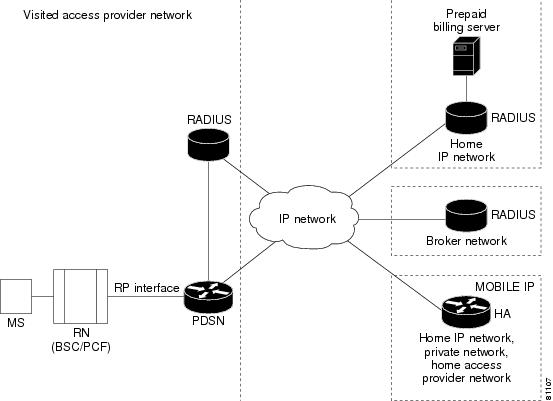
For roaming users, the local RADIUS server in the visited network forwards the AAA server requests to the home RADIUS server, using a broker RADIUS server if required. For roaming prepaid users, this requires that the local and broker AAA servers forward the new vendor-specific prepaid accounting attributes transparently to the home RADIUS server.
In existing networks, where the home RADIUS server does not support the interface to the PBS, AR can be placed in front of the home RADIUS server to act as a proxy. In this case AR forwards all authorization and accounting messages to or from the home RADIUS server and communicates with the PBS. This scenario is relevant if you already have a RADIUS server.
While this architecture does impose some additional requirements on the RADIUS server, the interface towards the PDSN does not change.
It is possible that you may want to use an existing WIN or IN-based prepaid billing server. In this situation, the PBS will interface to the external prepaid billing server.
Accounting Records
The PDSN will continue to generate per flow accounting records in the same way as it does for non-prepaid users. However, the last accounting stop request for a flow will contain the new prepaid Vendor Specific Attributes (VSAs) for reporting the final usage.
How Prepaid Works in PDSN
When a prepaid mobile user makes a data service call, the MS establishes a Point-to-Point Protocol (PPP) link with the PDSN. The PDSN authenticates the mobile station by communicating with the AAA server. The AAA server verifies that the user is a valid prepaid subscriber, determines what services are available for the user, and tracks usage for billing.
The methods used to assign an IP address and the nature of the connection are similar to those discussed in the "How PDSN Works" section on page 5.
The following sections describe the IP addressing and communication levels in the prepaid environment for each respective topic:
•
•
Prepaid Simple IP Call Flow
In the following scenario, the prepaid user has sufficient credit and makes a SIP data call. The user disconnects at the end of the call.
Step 1
Step 2
Step 3
Step 4
Step 5
Step 6
Step 7
Step 8
Step 9
Step 10
Step 11
Step 12
Step 13
Prepaid Mobile IP Call Flow
In the following scenario, the prepaid user makes a MIP data call. The user runs out of quota during the MIP data session and the PDSN disconnects the call. The call flow shows a single MIP flow; however, additional flows are established and handled in a similar manner when the MS sends additional MIP Registration Requests.
Step 1
Step 2
Step 3
Step 4
Step 5
Step 6
Step 7
Step 8
Step 9
Step 10
Step 11
Step 12
Step 13
Step 14
Step 15
Note
3DES Encryption
The PDSN include 3DES encryption, which supports IPSec on PDSN. IPSec on the MWAM platform requires you to use a Cisco VPN Acceleration Module.
This feature allows VPDN traffic and MIP traffic (between the PDSN HA) to be encrypted. In this release the PDSN requires you to configure the parameters for each HA before a MIP data traffic tunnel is established between the PDSN and the HA.
Note
Note
Mobile IP IPSec
The Internet Engineering Task Force (IETF) has developed a framework of open standards called IP Security (IPSec) that provides data confidentiality, data integrity, and data authentication between participating peers. IPSec provides these security services at the IP layer; it uses Internet Key Exchange (IKE) to handle negotiation of protocols and algorithms based on local policy, and to generate the encryption and authentication keys to be used by IPSec. IPSec can be used to protect one or more data flows between a pair of hosts, between a pair of security gateways, or between a security gateway and a host.
IS-835-B specifies three mechanisms for providing IPSec security:
•
•
•
Note
Hardware IPSec Acceleration Using IPSec Acceleration Module—Static IPSec
Note
IPSec-based security may be applied on tunnels between the PDSN and the HA depending on parameters received from Home AAA server. A single tunnel may be established between each PDSN-HA pair. It is possible for a single tunnel between the PDSN-HA pair to have three types of traffic streams: Control Messages, Data with IP-in-IP encapsulation, and Data with GRE-in-IP encapsulation. All Traffic carried in the tunnel will have the same level of protection provided by IPSec.
IS-835-B defines Mobile IP service as described in RFC 2002; the PDSN provides MIP service and PMIP service.
In Proxy Mobile service, the Mobile-Node is connected to the PDSN/FA through SIP, and the PDSN/FA acts as MIP Proxy for the MN to the HA.
Once Security Associations (SAs, or tunnels) are established, they remain active until there is traffic on the tunnel, or the lifetime of the SAs expire.
Note
Conditional Debugging Enhancements
In Cisco PDSN Release 4.1, debugs are displayed while parsing the attributes and sending them in an accounting request.
•
•
•
•
•
Debugs from Access Accept
SAMI 5/3: Aug  4 10:16:07.859: RADIUS:  Service-Type        [6]   6   Framed
[2]
SAMI 5/3: Aug 4 10:16:07.859: RADIUS: Framed-IP-Pool [88] 11 "test-pool"SAMI 5/3: Aug 4 10:16:07.859: RADIUS: Vendor, 3GPP2 [26] 20SAMI 5/3: Aug 4 10:16:07.859: RADIUS: cdma-dns-server-ip-[117] 14SAMI 5/3: Aug 4 10:16:07.859: RADIUS: 01 06 01 02 03 04 02 06 05 06 07 08 [????????????]SAMI 5/3: Aug 4 10:16:07.859: RADIUS: Vendor, Cisco [26] 27SAMI 5/3: Aug 4 10:16:07.859: RADIUS: Cisco AVpair [1] 21 "ip:vrf-id=test-pdsn"SAMI 5/3: Aug 4 10:16:07.859: RADIUS: Vendor, Cisco [26] 34SAMI 5/3: Aug 4 10:16:07.859: RADIUS: Cisco AVpair [1] 28 "ip:ip-unnumbered=Loopback0"SAMI 5/3: Aug 4 10:16:07.859: RADIUS: Vendor, CNCTC [26] 17SAMI 5/3: Aug 4 10:16:07.859: RADIUS: cnctc-served-mdn [100] 11SAMI 5/3: Aug 4 10:16:07.859: RADIUS: 74 65 73 74 2D 70 64 73 6E [test-pdsn]Debugs in IPCP
SAMI 5/3: Aug 4 10:16:07.863: Vi2.1 IPCP: O CONFNAK [REQsent] id 1 len 22SAMI 5/3: Aug 4 10:16:07.863: Vi2.1 IPCP: Address 2.1.1.1 (0x030602010101)SAMI 5/3: Aug 4 10:16:07.863: Vi2.1 IPCP: PrimaryDNS 1.2.3.4 (0x810601020304)SAMI 5/3: Aug 4 10:16:07.863: Vi2.1 IPCP: SecondaryDNS 5.6.7.8 (0x830605060708)SAMI 5/3: Aug 4 10:16:07.863: Vi2.1 IPCP: I CONFACK [REQsent] id 1 len 10SAMI 5/3: Aug 4 10:16:07.863: Vi2.1 IPCP: Address 51.1.1.10 (0x03063301010A)SAMI 5/3: Aug 4 10:16:07.867: Vi2.1 IPCP: I CONFREQ [ACKrcvd] id 2 len 22SAMI 5/3: Aug 4 10:16:07.867: Vi2.1 IPCP: Address 2.1.1.1 (0x030602010101)SAMI 5/3: Aug 4 10:16:07.867: Vi2.1 IPCP: PrimaryDNS 1.2.3.4 (0x810601020304)SAMI 5/3: Aug 4 10:16:07.867: Vi2.1 IPCP: SecondaryDNS 5.6.7.8 (0x830605060708)SAMI 5/3: Aug 4 10:16:07.867: Vi2.1 AAA/AUTHOR/IPCP: primary dns server 1.2.3.4SAMI 5/3: Aug 4 10:16:07.867: Vi2.1 AAA/AUTHOR/IPCP: seconday dns server 5.6.7.8SAMI 5/3: Aug 4 10:16:07.867: Vi2.1 IPCP: O CONFACK [ACKrcvd] id 2 len 22SAMI 5/3: Aug 4 10:16:07.867: Vi2.1 IPCP: Address 2.1.1.1 (0x030602010101)SAMI 5/3: Aug 4 10:16:07.867: Vi2.1 IPCP: PrimaryDNS 1.2.3.4 (0x810601020304)SAMI 5/3: Aug 4 10:16:07.867: Vi2.1 IPCP: SecondaryDNS 5.6.7.8 (0x830605060708)SAMI 5/3: Aug 4 10:16:07.867: Vi2.1 IPCP: State is OpenSAMI 5/3: Aug 4 10:16:07.867: AAA/AUTHOR: Processing PerUser AV vrf-idSAMI 5/3: Aug 4 10:16:07.867: AAA/AUTHOR: Processing PerUser AV ip-unnumberedSAMI 5/3: Aug 4 10:16:07.867: AAA/BIND(000000DE): Bind i/fSAMI 5/3: Aug 4 10:16:07.867: Vi2.1 IPCP: Install route to 2.1.1.1SAMI 5/3: Aug 4 10:16:07.867: RADIUS/ENCODE(000000DE):Orig. component type = PDSNDebugs in Accounting Request
SAMI 5/3: Aug 4 10:16:07.867: RADIUS: Framed-IP-Address [8] 6 2.1.1.1SAMI 5/3: Aug 4 10:16:07.867: RADIUS: Vendor, CNCTC [26] 17SAMI 5/3: Aug 4 10:16:07.867: RADIUS: cnctc-served-mdn [100] 11SAMI 5/3: Aug 4 10:16:07.867: RADIUS: 74 65 73 74 2D 70 64 73 6E [test-pdsn]Trace Functionality in Cisco PDSN Release 3.0
While conditional debugging has been a useful tool to limit the displayed debugs to a particular user, the output can still be a bit misleading if a few users are traced together. Therefore, the following capabilities are added in Cisco PDSN Release 3.0:
•
–
–
–
–
–
–
–
–
–
–
–
•
Note
Note
Note
Note
Note
•
Enhancements in Releases Earlier Than Cisco PDSN 3.0
Cisco PDSN Release 2.1 supports additional conditional debugging for MIP components. MIP conditional debugging is supported based on NAI as well as the MN's home address.
Currently, when multiple conditional debugging is enabled, the debug output does not individually display the condition for which the debugs are printed for all the CDMA related debugs.
Check Condition
A condition is set using the debug condition username command.
Delete Condition
The debugging conditions can be removed using the following commands:
•
•
When a condition is removed using the above CLI command, the IOS Conditional Debugging Subsystem, which maintains a list of conditions and the TRUE conditions, resets the flag. When all the conditions are removed, the debugging information will appear without any filter applied.
The PDSN software also utilizes conditional debugging based on the Mobile Subscriber ID (MSID) into the CDMA subsystem by using the existing IOS debug condition of the CLI command. The calling option of the CLI command is used to specify the MSID (for example, debug condition calling 00000000011124).
The following debug commands are supported for conditional debugging based on NAI. The NAI is a name like foo@bar.com.
•
•
•
The following debug commands are not impacted by NAI-based conditional debugging:
•
•
This release provides conditional debugging support for the following PDSN CLI commands:
•
•
•
•
•
The a11 debugs additionally support msid-based debugging using the following individual CLI commands:
•
•
•
Conditional debugging is an IOS feature, and the following CLI commands are available across all images.
router# debug condition ?application Applicationcalled called numbercalling callingglbp interface groupinterface interfaceip IP addressmac-address MAC addressmatch-list apply the match-liststandby interface groupusername usernamevcid VC IDThe options calling, username, and ip are used by the CDMA or MIP subsystems.
PDSN#debug condition username ?WORD Username for debug filteringPDSN#debu condition calling ?WORD Calling numberPDSN#debu condition ip ?A.B.C.D IP addressRefer to the debug commands in the Command Reference for the Cisco PDSN 2.1 Release for Cisco IOS Release 12.3(11)YF for more information about conditional debugging in Cisco PDSN Release 2.1.
Electronic Serial Number in Billing
The Electronic Serial Number (ESN) is a unique identifier for a piece of equipment, such as of a mobile device, and is used during the authentication process. The ESN is parameter a2 of the R-P Session Setup airlink record, and parameter A2 in the PDSN Usage Data Record (UDR). Both parameters are introduced in this release.
The PDSN accepts the parameter a2, and puts it as A2 into a User Data Record.
This feature is supported in the Cisco Access Registrar.
Support for Mobile Equipment Indentifier
The Mobile Equipment Indentifier (MEID) is a new attribute introduced in IS-835D, and will eventually replace the ESN AVP. In the interim period, both attributes are supported on the PDSN.
To include the MEID in access-request, FA-CHAP, or MIP RRQ, use the cdma pdsn attribute send a3 command.
1xEV-DO Support
The PDSN supports Evolution-Data Optimized (1xEV-DO) telecommunications standard. 1xEV-DO offers high-performance, high-speed, high-capacity wireless Internet connectivity, and is optimized for packet data services. It can transport packet data traffic at forward peak rates of 2.4 Mbps, which is much higher than the current 1xRTT peak rate of 144 kbps.
PDSN support for 1xEV-DO technology includes the following enhancements:
•
•
Integrated Foreign Agent
The FA is an essential component to mobility, because it allows a mobile station to remotely access services provided by the station's home network. The PDSN provides an integrated FA. The FA communicates with any standard HA, including the Cisco IOS-based HA.
AAA Server Support
The PDSN provides an authentication client that communicates with any standard AAA server, including Cisco Access Registrar, to authenticate the mobile station. It uses the mobile stations' name (NAI) to authenticate the user with the local AAA server.
•
–
–
–
Note
•
–
–
•
–
–
–
•
–
–
–
–
The PDSN also supports service provisioning using AAA servers and a user service profile. This profile is defined by the user's home network. It is referenced by the NAI. It is typically stored on the AAA server in the user's home network, along with the user authentication information, and is retrieved as part of authorization reply.
In Cisco PDSN Release 4.0, the following AAA server attributes (see Table 20) are added.
Note
•
•
Packet Transport for VPDN
The PDSN supports the transport of VPDN packets. If you offer VPDN services, the mobile station can securely access private resources through a public Internet or dedicated links. The VPDN tunnel extends from the PDSN/FA to the home IP network. The home IP network is the IP network associated with the NAI.
Proxy Mobile IP
With PMIP as part of the PPP link initiation, the PDSN registers with a HA on behalf of the mobile station. It obtains an address from the HA and forwards that address to the mobile station as part of IPCP during PPP initialization.
Multiple Mobile IP Flows
The PDSN allows multiple IP access points from the same mobile station, as long as each IP flow registers individually (each IP flow requires a unique NAI). This enables multiple IP hosts to communicate through the same mobile access device and share a single PPP connection to your network. For accounting purposes, it is important that the PDSN generate separate usage data records (UDRs) for each flow to the AAA server.
Redundancy and Load Balancing
This section provides information about Intelligent PDSN Selection and Load Balancing for the Controller - Member cluster model.
PDSN Cluster Controller / Member Architecture
The PDSN Controller member architecture was designed to support 8 members with redundant active or standby controllers. This controller-member mode designates certain nodes as controllers responsible for performing PDSN selection, and for maintaining the global session tables. Each member node maintains information only about the sessions that are terminated on that node. Controllers can be redundant with all session information synchronized between them, and they monitor the state of all nodes to detect the failure of a member or another controller.
When a PDSN cluster operates in the controller-member mode, controllers are dedicated to the PDSN selection function, and do not terminate bearer sessions.
Cisco PDSN Release 2.1 supports the following enhancements:
•
•
•
•
When a Registration Request (RRQ) arrives from the PCF to the active controller, the controller uses the MSID as an index to look up the session-table. If a session record entry is present, the controller forwards the RRQ to the PDSN that hosts the session for the MSID. If the session entry is not present in the controller session-table, the controller chooses a member based on a configured selection algorithm, and replies to the PCF with an RRP that suggests the member IP address in the message.
When the session comes up, the member sends a Session-Up message from the member for that session (MSID) to the controller. On receipt of this message from the member, the controller creates the Session Record for that MSID in the controller to establish MSID-member association on the controller. On receipt of Session-Down message from member, the controller flushes the Session Record from the controller.
The controller does not create a Session Record for the MSID when it redirects the RRQ, but only on the receipt of a Session-Up message from the member on which the session has come up
To support a large number of members (28~48) per Controller, processing overhead is reduced when members send one bulk-update packet to the controller for every configured periodic update time interval with multiple pairs of Session-Up/Session-Down. The packet contains concatenated multiple MSIDs with one Session-Up/Session-Down flag, thereby saving bytes in the packet. The controller will process these bulk-update packets and send a bulk-update-ack packet to the members.
Conditional Debugging Support Under Clustering Feature
Cisco PDSN Release 2.0 clustering feature adds additional support for the conditional debugging with the following clustering debug command on both controller and member:
•
Note
PDSN Controller-Member Clustering
In Controller-Member clustering, a controller maintains load and session (such as A10 connection) information for each member in the cluster, and performs member selection for load-balancing or inter-PDSN handoff avoidance. The controller identifies the operational state of each member and detects the failure of a member, or the failure of another controller. A member notifies the controller about its load and session information.
Note
Figure 7 illustrates the Controller-Member architecture on the 6500 or 7600-based MWAM platform. This illustration depicts two PDSN clusters with two primary and two backup controllers, and their corresponding members.
Figure 7 PDSN Controller -Member Architecture for MWAM on the Catalyst 6500
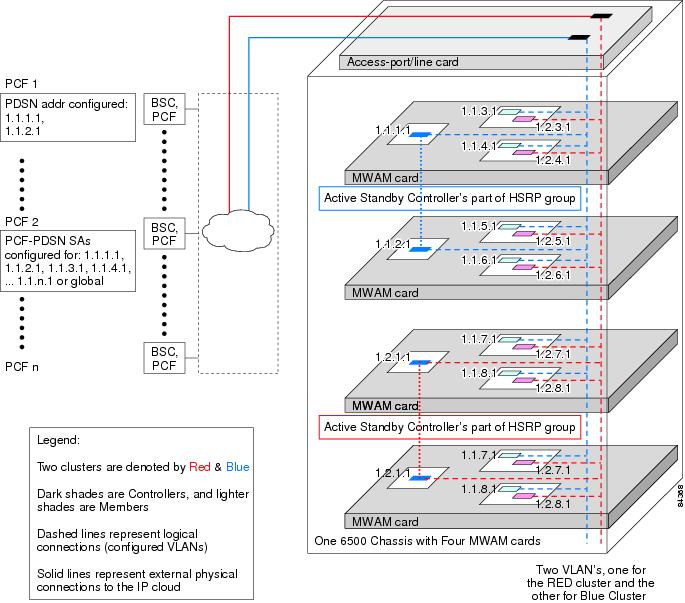
PDSNs that are designated as controllers, perform member PDSN selection and load balancing. The following list describes the major functions of the controllers:
•
•
•
•
•
•
•
Redundancy
Cluster redundancy is based on the premise that only one PDSN might fail at any given time. Two controllers are configured as an HSRP group: One controller is active, the other standby. Controllers have redundancy and members have load sharing.
Load Sharing
Cluster member loadsharing is an N+1 scheme. If a member fails, the established sessions will be lost, but the overall group capacity allows sessions to be re-established with the other group members. Additionally, redundancy is also enhanced because cluster members no longer have to be network neighbors.
Controllers exchange information over an ethernet link. Controllers and members exchange information over a unicast interface link where members address messages to the HSRP group address of the controllers. The members in a PDSN cluster do not need to be network neighbors; they can be attached anywhere in the IP network.
Adding an additional controller to a cluster is simplified by auto configuration of the controller in the cluster. This is possible by configuring the additional controller for HSRP. The newly-added controller will automatically synchronize with the active controller, by enabling auto synchronization feature. Similarly, when a new member is added to the cluster, auto configuration for the member occurs in all cluster controllers.
PDSN Cluster Member Selection
Selection of a cluster member by the controller is based on a load factor. Load factor is a computed value by session load and CPU load on a member. The controller attempts to assign sessions to a member that has smallest load factor so that data connections are evenly distributed over members in the cluster as much as possible.
If an A11 Registration Request is received indicating a handoff, a member that is already serving the session is selected by the controller.
Load Balancing
A controller maintains load information for all members in the cluster in order to perform PDSN Cluster Member selection. This load information is transferred from the members to the controller under the following conditions:
•
•
•
The session and member records are synchronized between the active and standby controllers as needed. Since both active and standby controller maintain session and load information for all the members of that cluster, failure of a controller does not result in the loss of any session or load information.
Upgrading the Member PDSN Software from Cisco PDSN Release 1.2 to Release 2.0 and Higher
To upgrade a member PDSN to Cisco PDSN Release 2.0 or higher, perform the following tasks:
Step 1
config# cdma pdsn cluster member prohibit administratively
The status of the member will be updated to the controller in a subsequent periodic keepalive reply message that the member sends to the controller. The controller, on reception of this message, does not select this member for any of the new incoming calls.
Step 2
#show cluster controller member prohibited administratively
The calls, which are already connected to the member, will be alive until the mobile node disconnects the call. Alternatively, the calls can be forcibly cleared on the prohibited member using the following command:
#clear cdma pdsn session all
Step 3
config# no cdma pdsn cluster member prohibit administratively
Once the controller is updated with the status the new member PDSN will be selected for new incoming calls.
Step 4
config# cdma pdsn cluster member periodic-update 300
Scalability
In this release the PDSN uses a new scalability feature that allows PPP sessions to run on virtual-access subinterfaces that can support up to 175,000 sessions.
Note
Note
Note
High Availability
Overview
High availability allows you to minimize the switchover time from the active supervisor engine to the standby supervisor engine if the active supervisor engine fails.
Prior to this feature, fast switchover ensured that a switchover to the standby supervisor engine happened quickly. However, with fast switchover, because the state of the switch features before the switchover was unknown, you had to re-initialize and restart all the switch features when the standby supervisor engine assumed the active role.
High availability removes this limitation; high availability allows the active supervisor engine to communicate with the standby supervisor engine, keeping feature protocol states synchronized. Synchronization between the supervisor engines allows the standby supervisor engine to take over in the event of a failure.
In addition, high availability provides a versioning option that allows you to run different software images on the active and standby supervisor engines.
For high availability, a system database is maintained on the active supervisor engine and updates are sent to the standby supervisor engine for any change of data in the system database. The active supervisor engine communicates and updates the standby supervisor engine when any state changes occur, ensuring that the standby supervisor engine knows the current protocol state of supported features. The standby supervisor engine knows the current protocol states for all modules, ports, and VLANs; the protocols can initialize with this state information and start running immediately.
The active supervisor engine controls the system bus (backplane), sends and receives packets to and from the network, and controls all modules. Protocols run on the active supervisor engine only.
The standby supervisor engine is isolated from the system bus and does not switch packets. But it does receive packets from the switching bus to learn and populate its Layer 2 forwarding table for Layer 2-switched flows. The standby supervisor engine also receives packets from the switching bus to learn and populate the Multilayer Switching (MLS) table for Layer 3-switched flows. The standby supervisor engine does not participate in forwarding any packets and does not communicate with any modules.
If you enable high availability when the standby supervisor engine is running, image version compatibility is checked and if found compatible, the database synchronization starts. High availability compatible features continue from the saved states on the standby supervisor engine after a switchover.
When you disable high availability, the database synchronization is not done and all features must restart on the standby supervisor engine after a switchover.
If you change high availability from enabled to disabled, synchronization from the active supervisor engine is stopped and the standby supervisor engine discards all current synchronization data.
If you change high availability from disabled to enabled, synchronization from the active to standby supervisor engine is started (provided the standby supervisor engine is present and its image version is compatible).
NVRAM synchronization occurs irrespective of high availability being enabled or disabled (provided there are compatible NVRAM versions on the two supervisor engines).
If you do not install a standby supervisor engine during system bootup, the active supervisor engine detects this and the database updates are not queued for synchronization. Similarly, when you reset or remove the standby supervisor engine, the synchronization updates are not queued and any pending updates in the synchronization queue are discarded. When you hot insert or restart a second supervisor engine that becomes the standby supervisor engine, the active supervisor engine downloads the entire system database to the standby supervisor engine. Only after this global synchronization is completed, the active supervisor engine queues and synchronizes the individual updates to the standby supervisor engine.
Note
For more information about High Availability, including configuration details, and information about power management, refer to the PDSN Controller-Member Clustering section, as well as the documents at the following urls:
•
–
•
–
–
Related Features and Technologies
•
•
•
•
•
Related Documents
For additional information about the Cisco PDSN Release 2.1 software, refer to the following documents:
•
For more information about:
•
•
•
•
•
•
Supported Platforms
Cisco PDSN 4.0 release is a special release that is developed on Cisco IOS 12.4 for the SAMI card on the Cisco 6500 Catalyst Switch and 7600 Series Router, and the Cisco NPE-G1 Router.
A SAMI card with 2 GB of memory is recommended for Cisco PDSN Release 4.0. See the Release Notes for the Cisco PDSN 4.0 Feature in Cisco IOS Release 12.4(15)xx for information about the supported platforms.
Supported Standards, MIBs, and RFCs
Standards
•
•
•
MIBs
•
•
•
•
•
•
•
•
For descriptions of supported MIBs and how to use MIBs, see the Cisco MIB web site on CCO at http://www.cisco.com/public/sw-center/netmgmt/cmtk/mibs.shtml.
RFCs
•
•
•
•
•
•
•
•
•
•
•
•
•
•
•
•
•
•
•
Configuration Tasks
This section describes the steps for configuring the Cisco PDSN software on the MWAM platform. Prior to configuring instances of the PDSN on MWAM application cards, you must create a base Catalyst 6500 or 7600 configuration. Refer to the Cisco Multi-processor WAN Application Module Installation and Configuration Note for more information.
System Requirements
This section describes the system requirements for Cisco IOS Release 12.4(15)XR2:
•
•
•
•
•
Memory Requirements
Table 21 shows the memory requirements for the PDSN Software Feature Set that supports the SAMI card on the Cisco7600 Series Router. The table also lists the memory requirements for the IP Standard Feature Set (for the PDSN).
Hardware Supported
Cisco IOS Release 12.4(15)XR2 is optimized for the SAMI Card on the Cisco 7600 Series Router.
A Hardware-Software Compatibility Matrix is available on Cisco.com for users with CCO accounts. This matrix allows users to search for supported hardware components by entering a Cisco platform and IOS Release. The Hardware-Software Compatibility Matrix tool is available at the following URL: http://www.cisco.com/cgi-bin/front.x/Support/HWSWmatrix/hwswmatrix.cgi
Cisco PDSN 4.0 release is a special release that is developed on Cisco IOS 12.4 for the SAMI card on the Cisco 7600 Series Router, and the Cisco NPE-G1 Router.
A SAMI card with 2 GB of memory is recommended for Cisco PDSN Release 4.0.
For user migration, one of the processors on the SAMI must act as a standby to an active MWAM processor that hosts the PDSN application. Through systems synchronization, ensure that the standby SAMI processor gets all session and flow information from the active MWAM processor. For user migration, the correlation will be 5 to 5 from a processor standpoint, since the 6th processor on MWAM blade is not used for synchronization. After the synchronization is complete, perform the switchover and take the active MWAM offline. The SAMI now becomes active, and user sessions are preserved with no loss of data.
The steps to setup up the SAMI and HSRP to make it the standby to MWAM are similar to those related to MWAM redundancy.
A Hardware-Software Compatibility Matrix is available on CCO for users with CCO login accounts. This matrix allows users to search for supported hardware components by entering a Cisco platform and IOS Release. The Hardware-Software Compatibility Matrix tool is available at the following URL:
http://www.cisco.com/cgi-bin/front.x/Support/HWSWmatrix/hwswmatrix.cgi
Software Compatibility
Cisco IOS Release 12.4(15)XR2 is a special release that is developed on Cisco IOS Release 12.4.
Cisco IOS Release 12.4(15)XR2 supports the same features that are in Cisco IOS Release 12.4, with the addition of the PDSN feature.
Determining the Software Version
To determine the version of Cisco IOS software running on your router, log in to the router and enter the show version EXEC command:
Router# show versionCisco IOS Software, MWAM Software (MWAM-C6IS-M), Version 12.4(15)XN , RELEASE SOFTWARECopyright (c) 1986-2007 by Cisco Systems, Inc.Compiled Tue 11-Dec-07 15:44 by jsomiramROM: System Bootstrap, Version 12.2(11)YS2 RELEASE SOFTWAREPDSN-S2000-BAL uptime is 4 minutesSystem returned to ROM by bus error at PC 0x2033D804, address 0x283 at 06:56:44 PDT Mon Dec 3 2007System restarted at 03:29:24 PDT Tue Dec 11 2007System image file is "svcmwam-c6is-mz.xn"Cisco MWAM (MWAM) processor with 997376K/32768K bytes of memory.SB-1 CPU at 700MHz, Implementation 1025, Rev 0.2Last reset from power-on1 Gigabit Ethernet interface511K bytes of non-volatile configuration memory.Configuration register is 0x4Router#Upgrading to a New Software Release
For information on upgrading to a new software release, see the product bulletin Cisco IOS Software Upgrade Ordering Instructions located at:
http://www.cisco.com/warp/public/cc/pd/iosw/prodlit/957_pp.htm
Configuring the PDSN Image
The PDSN can provide four classes of user services: SIP, SIP with VPDN, MIP, and PMIP. The following sections describe the configuration tasks for implementing PDSN. Each category of tasks indicates whether the tasks are optional or required.
R-P Interface Configuration Tasks (Required for all classes of user services)
The following tasks establish the R-P interface, also referred to as the A10/A11 interface.
To configure the R-P interface, complete the following tasks:
•
•
•
•
User Session Configuration Tasks (Optional)
To configure the user session, complete the following task.
•
Session Redundancy Configuration Tasks
To configure Session Redundancy on the PDSN, complete the following tasks:
•
•
•
•
AAA and RADIUS Configuration Tasks (Required for All Scenarios)
To configure the AAA server and RADIUS in the PDSN environment, complete the following tasks.
•
•
Prepaid Configuration Tasks
•
VPDN Configuration Tasks (Required for Simple IP with VPDN Scenario)
To configure the VPDN in the PDSN environment, complete the following task:
•
Mobile IP Configuration Tasks (Required for Mobile IP)
To configure MIP on the PDSN, complete the following task:
•
PDSN Selection Configuration Tasks (Optional)
To configure PDSN selection, complete the following tasks:
•
•
Network Management Configuration Tasks (Required for Network Management in Any Scenario)
To configure network management, complete the following task:
Other Configuration Tasks
The following tasks are optional on the PDSN:
•
•
•
•
•
•
•
•
Tuning, Verification, and Monitoring Tasks (Optional)
To tune, verify, and monitor PDSN elements, complete the following tasks:
•
Enabling PDSN Services
To enable PDSN services, use the following commands in global configuration mode:
Creating the CDMA Ix Interface
To create the CDMA Ix interface, use the following commands in global configuration mode:
Creating a Loopback Interface
We recommend that you create a loopback interface and then associate the loopback interface IP address to the virtual template, rather than directly configuring an IP address on the virtual template.
To create a loopback interface, use the following commands in global configuration mode:
Creating a Virtual Template Interface and Associating it with the PDSN Application
Creating a virtual template interface allows you to establish an interface configuration and apply it dynamically.
To create a virtual template interface that can be configured and applied dynamically, use the following commands in global configuration mode:
Enabling R-P Interface Signaling
To enable the R-P interface signaling, use the following commands in global configuration mode:
Configuring User Session Parameters
To configure user session parameters, use the following commands in global configuration mode:
Configuring PDSN Session Redundancy Infrastructure
The PDSN-SR feature uses the Cisco IOS Check-point Facility (CF) to send stateful data over Stream Control Transmission Protocol (SCTP) to a redundant PDSN. Additionally, in conjunction with Cisco IOS HSRP, the PDSN uses the Cisco IOS Redundancy Facility (RF) to monitor and report transitions on active and standby PDSNs.
Before configuring PDSN-SR, you need to configure the inter-device redundancy infrastructure.
Configuring HSRP
The HSRP provides high network availability because it routes IP traffic from hosts on networks without relying on the availability of any single router. HSRP is used in a group of routers for selecting an active router and a standby router. HSRP monitors both the inside and outside interfaces so that if any interface goes down, the whole device is deemed to be down and the standby device becomes active and takes over the responsibilities of an active device.
When configuring HSRP, note that the following recommendation and restrictions apply:
•
–
–
–
–
Note
•
Note
•
Use the same group number for each PDSN follow group as is defined for the primary group. Using the same group number for the primary and follow groups facilitates HRSP group setup and maintenance in an environment that contains a large number of PDSN interfaces and HRSP groups.
More information on HSRP configuration and HSRP groups can be found here:
and
Enabling HSRP and Configuring an HSRP Master Group
To enable HSRP on an interface and configure the primary group, use the following commands in interface configuration mode:
Configuring Follow Groups
HSRP follow groups are configured to share the HSRP parameters of the primary group by defining a follow group on the interface using the standby interface configuration command with the follow keyword option specified. Interfaces that share a group track states together and have the same priority.
To configure an interface to follow a primary group, use the following commands in interface configuration mode:
Enabling Inter-Device Redundancy
To enable inter-device redundancy, use the following commands beginning in global configuration mode:
Configuring the Inter-Device Communication Transport
Inter-device redundancy requires a transport for communication between the redundant PDSNs. This transport is configured using Interprocess Communication (IPC) commands.
To configure the inter-device communication transport between the two PDSNs, use the following commands beginning in global configuration mode:
Using the Loopback Interface For the PDSN-AAA Server Interface
To ensure that the AAA server views the active and standby units as a single NAS, the same NAS IP address should be used by both the units. Now, the NAS IP address can be configured for the PDSN using the ip radius source-interface command. When configured, the IP address of that interface is used as the NAS IP address.
However, the CLI command does not support virtual IP addresses (HSRP). As a result, the only way to ensure that both the units appear as a single NAS is to configure a loopback interface, and use that interface as the source-interface. The command is ip radius source-interface Loopback1.
Configuring Application Tracking to Handle active-active Situation
Configuring AAA Server in the PDSN Environment
Access control is the way you manage who is allowed access to the network server and the services they are allowed to use. AAA network security services provide the primary framework through which you set up access control on your router or access server. For detailed information about the AAA server configuration options, see the "Configuring Authentication," and "Configuring Accounting" chapters in the Cisco IOS Security Configuration Guide.
To configure the AAA server in the PDSN environment, use the following commands in global configuration mode:
Configuring RADIUS in the PDSN Environment
RADIUS is a method for defining the exchange of the AAA server information in the network. In the Cisco implementation, RADIUS clients run on Cisco routers and send authentication requests to a RADIUS server that contains all user authentication and network server access information. For detailed information about RADIUS configuration options, refer to the "Configuring RADIUS" chapter in the Cisco IOS Security Configuration Guide.
To configure RADIUS in the PDSN environment, use the following commands in global configuration mode:
Configuring Prepaid in the PDSN Environment
For the 1.2 release of Cisco PDSN software, to configure prepaid, ensure that you include crb-entity-type=1 in the user profile.
In Cisco PDSN release 2.0 and higher, to configure IS835C prepaid, use the following commands in global configuration mode:
router (config)# cdma pdsn accounting prepaid ?
duration
threshold
volume
Prepaid service based on duration.
Configure threshold percentage per quota.
Prepaid service based on volume.
Enabling VPDN in a PDSN Environment
To configure VPDN in the PDSN environment, use the following commands in global configuration mode:
Router(config)# vpdn enable
Enables VPDN.
Router(config)# vpdn authen-before-forward
Specifies to authenticate a user locally before tunneling.
For more information about VPDNs, refer to the Cisco IOS Release 12.3 documentation modules Cisco IOS Dial Services Configuration Guide: Network Services and Cisco IOS Dial Services Command Reference.
Configuring the Mobile IP FA
MIP operation (as specified by TR-45.6) requires the ability to authenticate a mobile station through a challenge/response mechanism between the PDSN (acting as an FA) and the mobile station.
To configure the MIP FA, use the following commands in global and interface configuration modes:
To reduce the virtual-access cloning time in order to increase the CPS rate on a standalone PDSN on a Cisco router, use the following per interface configurations in global configuration mode:
The CPS on a standalone PDSN on a Cisco Router should improve to 100 CPS from the current number of 40.
Configuring Proxy Mobile IP Attributes Locally
As an alternative to true MIP, which is not supported by all mobile devices, you can configure the Cisco PDSN to provide many of the benefits of MIP through the use of PMIP. All PMIP attributes can be retrieved from the AAA server. To configure PMIP attributes locally, use the following command in global configuration mode:
Configuring Mobile IP Security Associations
To configure security associations for mobile hosts, FAs, and HAs, use one of the following commands in global configuration mode:
Configuring PDSN Cluster Controller
To configure the PDSN cluster controller attributes locally, use the following commands in global configuration mode.
Note
Configuring PDSN Cluster Member
To configure the PDSN Cluster Member attributes locally, use the following commands in global configuration mode:
Note
Enabling Network Management
To enable SNMP network management for the PDSN, use the following commands in global configuration mode:
Configuring Always On Service
Always On service maintains the subscriber's packet data session in the local network. The PDSN will not initiate release of the subscriber's packet data session due to PPP idle timer expiry, unless the PDSN determines the user is no longer reachable. The Always On feature is enabled by default. To change the default parameters related to this feature, use following command:
Configuring A11 Session Updates
A11 Session Update messages are sent from the PDSN to the PCF to add, change, or update session parameters for an A10 connection. To enable the A11 Session Update feature, perform the following tasks:
Configuring SDB Indicator Marking
This feature supports short data burst applications, such as SIP signaling for PTT applications, and proposes the interaction with the PDSN. SIP is used by PTT applications to signal a PTT call. The message is short and needs to be delivered to the end-user. The Short Data Burst support on the RAN can be used to send these to the end-user, especially when the messages are to be terminated to the mobile. This is especially important when the mobile user is actually dormant. Use the following command to configure SDB Indicator Marking:
Configuring SDB Indicator Marking for PPP Control Packets
While data packets can be sent towards the mobile using SDBs as shown above, SDBs can also be used for delivering PPP control packets. This can be particularly helpful for Always-On sessions, where the session is dormant. Basically, with Always On configured, the PDSN sends out LCP echo requests (and waits for LCP echo replies) to keep the session alive. Hence, when such a session goes dormant, a data channel needs to be setup to deliver these LCP echo requests to the MN. The other option is to use SDBs to deliver the LCP echo requests without setting up a data channel.
Use the following CLI command in conjunction of the above CLI command to enable this feature:
Router(config)# cdma pdsn a11 dormant sdb-indication match-qos-group group-number ppp-ctrl-pkts
The group-number represents the classified match criteria.
Configuring PoD on the PDSN
To enable the Packet of Disconnect (RADIUS Disconnect) feature on the PDSN, perform the following tasks:
Configuring Mobile IP Resource Revocation on the PDSN
To enable resource revocation support on PDSN, perform the following task:
Note
For information regarding VPDN configuration details, please refer to the following URL:
For information regarding Layer 2 Tunneling Protocol (L2TP) tunnel configuration details, please refer to the following URL:
For information regarding IOS Server Load Balancing, please refer to the following URL:
Configuring Short Data Burst Flagging
This feature adds support for short data burst applications such as SIP signaling for PTT applications, and proposes the interaction with PDSN. SIP is used by PTT applications to signal a PTT call. The message is short and needs to be delivered to the end-user. The Short Data Burst support on the RAN can be used to send these over to the end-user, especially when the messages are to be terminated to the mobile.
To configure SDB on the PDSN so that all packets that are set with the specific group-number will be flagged for SDB usage between the PCF and the PDSN, use the following command in global configuration:
Configuring PDSN Accounting Events
To configure attributes of PDSN accounting events, use the following commands in global configuration mode:
Configuring CDMA RADIUS Attributes
To configure both authentication and accounting requests on the PDSN, perform the following tasks:
Monitoring and Maintaining the PDSN
To monitor and maintain the PDSN, use the following commands in privileged EXEC mode:
PDSN Default Cluster Configuration
The cluster configuration for Cisco PDSN Release 5.0 is given below:
PDSN-ACT-ssp-03-03#show runBuilding configuration...Current configuration : 8278 bytes!! Last configuration change at 12:40:40 UTC Thu Aug 13 2009 by sa!version 12.4service timestamps debug datetime msecservice timestamps log datetime msecservice password-encryptionservice internalservice cdma pdsnboot-start-markerboot-end-marker!!redundancy inter-devicescheme standby PDSN-ssp1-33-RP!!redundancy unit1 slot 3 unit2 slot 2!redundancy unit1 hostname PDSN-ACT-ssp-03-03 unit2 hostname PDSN-STDY-ssp-02-03!redundancyno keepalive-enablelogging message-counter syslog!!ipc zone defaultassociation 1no shutdownprotocol sctpunit1-port 5000unit1-ip 21.1.33.103unit2-port 5000unit2-ip 21.1.23.203!aaa new-model!!aaa group server radius auth_server_group_1server 170.1.4.201 auth-port 1645 acct-port 1646!aaa group server radius acct_server_group_1server 170.1.4.201 auth-port 1645 acct-port 1646!aaa authentication login default local noneaaa authentication ppp default group auth_server_group_1aaa authorization network default group auth_server_group_1aaa authorization configuration default group auth_server_group_1aaa accounting update periodic 300aaa accounting network pdsnaction-type start-stopgroup acct_server_group_1!aaa accounting system defaultaction-type start-stopbroadcastgroup acct_server_group_1!!!aaa session-id commonaaa memory threshold authentication reject 15aaa memory threshold accounting disable 10memory-size iomem 256/* default pool cache size is 10 , recommended cache size is 50 */sami pool-cache 50!mmi polling-interval 60no mmi auto-configureno mmi pvcmmi snmp-timeout 180ip source-routeip cef!!no ip domain lookupsubscriber redundancy rate 250 1no ipv6 cefvpdn enablevpdn authen-before-forward!!multilink bundle-name authenticated!!memory litearchivelog confighidekeys!!!!!!!!interface Loopback0ip address 40.1.33.103 255.255.0.0!interface Loopback1ip address 171.1.33.103 255.255.0.0!interface Loopback2ip address 51.1.33.103 255.255.0.0!interface CDMA-Ix1ip address 30.1.33.103 255.255.0.0tunnel source 30.1.33.103tunnel key 46tunnel sequence-datagrams!interface GigabitEthernet0/0mtu 1600no ip addressload-interval 30no keepalive!!!interface GigabitEthernet0/0.20description RP-interfaceencapsulation dot1Q 20redundancy ip address unit1 20.1.33.103 255.255.0.0 unit2 20.1.23.203 255.255.0.0ip mtu 1600standby delay minimum 30 reload 30standby version 2standby 20 ip 20.1.33.254standby 20 priority 110standby 20 name PDSN-ssp1-33-RP!interface GigabitEthernet0/0.21description redundancy-sctp-connectivityencapsulation dot1Q 21redundancy ip address unit1 21.1.33.103 255.255.0.0 unit2 21.1.23.203 255.255.0.0ip mtu 1500standby delay minimum 30 reload 30standby version 2standby 21 ip 21.1.33.254standby 21 follow PDSN-ssp1-33-RP!interface GigabitEthernet0/0.50description PDSN-HA Connectivityencapsulation dot1Q 50redundancy ip address unit1 50.1.33.103 255.255.0.0 unit2 50.1.23.203 255.255.0.0ip mtu 1500standby delay minimum 30 reload 30standby version 2standby 50 ip 50.1.33.254standby 50 follow PDSN-ssp1-33-RP!interface GigabitEthernet0/0.60description ReverseDirection Connectivityencapsulation dot1Q 60redundancy ip address unit1 60.1.33.103 255.255.0.0 unit2 60.1.23.203 255.255.0.0ip mtu 1500standby delay minimum 30 reload 30standby version 2standby 60 ip 60.1.33.254standby 60 follow PDSN-ssp1-33-RP!interface GigabitEthernet0/0.170description LAAA Connectivityencapsulation dot1Q 170redundancy ip address unit1 170.1.33.103 255.255.0.0 unit2 170.1.23.203 255.255.0.0ip mtu 1500standby delay minimum 30 reload 30standby version 2standby 170 ip 170.1.33.254standby 170 follow PDSN-ssp1-33-RP!interface Virtual-Template1ip unnumbered Loopback0peer default ip address pool sip-addr-33-pool1no keepaliveppp accm 0ppp authentication pap chap optionalppp accounting noneppp direction callinppp timeout ncp 30ppp timeout authentication 60ppp timeout idle 7200!router mobile!ip local pool sip-addr-33-pool1 100.33.1.1 100.33.254.254 recycle delay 30ip local pool sip-addr-33-pool1 100.34.1.1 100.34.254.254ip local pool sip-addr-33-pool1 100.35.1.1 100.35.254.254ip local pool msid-sip-addr-33-pool1 140.33.1.1 140.33.254.254 recycle delay 30ip local pool msid-sip-addr-33-pool1 140.34.1.1 140.34.254.254ip local pool msid-sip-addr-33-pool1 140.35.1.1 140.35.254.254ip forward-protocol ndip route 11.1.0.0 255.255.0.0 20.1.2.100ip route 12.1.0.0 255.255.0.0 60.1.2.100ip route 21.1.0.0 255.255.0.0 20.1.2.100ip route 70.1.0.0 255.255.0.0 50.1.112.102!!no ip http serverno ip http secure-serverip mobile debug include usernameip mobile foreign-agent care-of GigabitEthernet0/0.50ip mobile foreign-agent reverse-tunnel private-addressip mobile foreign-agent skip-aaa-reauthenticationip mobile secure home-agent 50.1.112.102 spi FFFFFFFF key ascii cisco algorithm md5 mode prefix-suffixip mobile foreign-service revocationip mobile foreign-service challenge forward-mfceip mobile foreign-service registration-required reverse-tunnel mandatoryip mobile proxy-host nai @cisco.com flags 42ip mobile proxy-registration lifetime 1800!ip radius source-interface Loopback1logging main-cpu 4000 emergenciessnmp-server community public RWsnmp-server enable traps cdma!!radius-server attribute 8 include-in-access-reqradius-server dead-criteria time 50 tries 5radius-server host 170.1.4.201 auth-port 1645 acct-port 1646 key 7 045802150C2Eradius-server retransmit 5radius-server timeout 10radius-server deadtime 1radius-server vsa send accountingradius-server vsa send authenticationradius-server vsa send accounting 3gpp2radius-server vsa send authentication 3gpp2!control-plane!cdma pdsn radius disconnect naicdma pdsn accounting send start-stopcdma pdsn tft reject include error extensioncdma pdsn virtual-template 1cdma pdsn a10 max-lifetime 1800cdma pdsn a11 session-update always-on rn-pdit qoscdma pdsn timeout mobile-ip-registration 100cdma pdsn timeout a11-update 5cdma pdsn timeout a11-session-update 5cdma pdsn msid-authenticationcdma pdsn imsi-min-equivalencecdma pdsn send-agent-advcdma pdsn debug show-conditionscdma pdsn secure pcf default spi 100 key ascii testtesttesttest local-timezone replay 255cdma pdsn secure pcf 20.1.32.1 20.1.32.7 spi 100 key ascii ciscocdma pdsn compliance is835c account ipmobile control-packetscdma pdsn redundancy!line con 0exec-timeout 0 0line aux 0exec-timeout 0 0line vty 0 4exec-timeout 0 0password 7 151E0A0E!exception data-corruption buffer truncatentp server 127.0.0.51endPDSN-ACT-ssp-03-03#Configuration Examples
This section provides the following configuration examples:
•
•
•
•
Cisco PDSN Configuration for Simple IP
Figure 8 and the information that follows is an example of PDSN architecture for SIP and its accompanying configuration.
Figure 8 PDSN for Simple IP—A Network Map
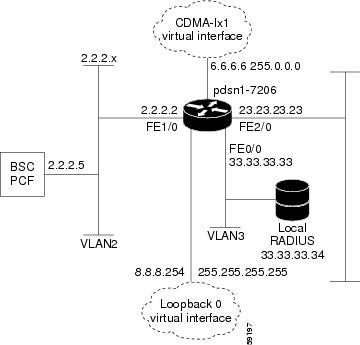
service cdma pdsn!hostname PDSN1-7206!aaa new-modelaaa authentication ppp default group radiusaaa authorization config-commandsaaa authorization network default group radiusaaa authorization configuration default group radiusaaa accounting update periodic 60aaa accounting network pdsn start-stop group radius!no ip gratuitous-arps!interface Loopback0ip address 8.8.8.254 255.255.255.255!interface CDMA-Ix1ip address 6.6.6.6 255.0.0.0!interface FastEthernet0/0! Interface for communication with RADIUS server and NMSip address 33.33.33.33 255.255.255.0!!!interface FastEthernet1/0! Interface to PCF - R-Pip address 2.2.2.2 255.255.255.0half-duplexno cdp enable!interface FastEthernet2/0! Interface to external network - Piip address 23.23.23.23 255.255.0.0!!!interface Virtual-Template1ip unnumbered Loopback0peer default ip address pool pdsn-poolppp accm 0ppp authentication chap pap optionalppp accounting noneppp timeout idle 2000!ip local pool pdsn-pool 8.8.8.1 8.8.8.253ip classles!!radius-server host 33.33.33.34 auth-port 1645 acct-port 1646 key ciscoradius-server retransmit 3radius-server vsa send authentication 3gpp2radius-server vsa send accounting 3gpp2cdma pdsn virtual-template 1cdma pdsn maximum sessions 16000cdma pdsn a10 max-lifetime 36000cdma pdsn msid-authenticationcdma pdsn secure pcf 2.2.2.5 spi 100 key ascii cisco!!!endCisco PDSN Configuration for Simple IP with VPDN
The configuration SIP with VPDN is identical to the configuration for SIP with two additional lines:
vpdn enablevpdn authen-before-forwardCisco PDSN Configuration for Mobile IP
Figure 9 and the information that follows is an example of PDSN architecture for MIP service and its accompanying configuration. The example shows the configuration of PDSN1.
Figure 9 PDSN for Mobile IP—A Network Map
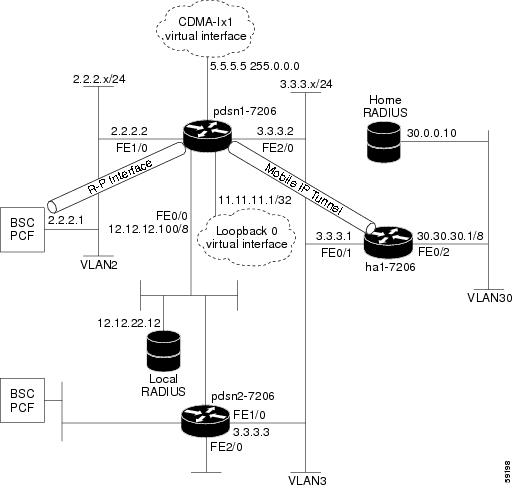
service cdma pdsn!hostname PDSN1-7206!aaa new-modelaaa authentication login default group radiusaaa authentication login CONSOLE noneaaa authentication ppp default group radiusaaa authorization config-commandsaaa authorization network default group radius!interface Loopback0ip address 11.11.11.1 255.255.255.255!interface CDMA-Ix1ip address 5.5.5.5 255.0.0.0!interface FastEthernet0/0description AAA NMS interfaceip address 12.12.12.100 255.0.0.0!interface FastEthernet1/0description R-P interfaceip address 2.2.2.2 255.255.255.0full-duplex!!interface FastEthernet2/0description Pi interfaceip address 3.3.3.2 255.255.255.0full-duplex!interface Virtual-Template1ip unnumbered loopback0no ip route-cacheno keepaliveppp authentication chap pap optionalppp timeout idle 2000!router mobile!ip classlessno ip http serverip mobile foreign-agent care-of FastEthernet2/0ip mobile foreign-service challenge forward-mfce timeout 10 window 10ip mobile foreign-service reverse-tunnelradius-server host 12.12.22.12 auth-port 1645 acct-port 1646 key ascii cisco!radius-server host 12.12.22.12 auth-port 1645 acct-port 1646 key ascii ciscoradius-server retransmit 3radius-server vsa send authentication 3gpp2radius-server vsa send accounting 3gpp2cdma pdsn secure pcf 2.2.2.1 spi 100 key ascii ciscocdma pdsn virtual-template 1cdma pdsn msid-authentication!!endCombined Configuration for Cisco PDSN
The following example illustrates a PDSN configured for all scenarios: SIP, SIP with VPDN, MIP, and PMIP.
service cdma pdsn!hostname PDSN1!aaa new-modelaaa authentication ppp default group radiusaaa authorization config-commandsaaa authorization network default group radiusaaa authorization configuration default group radiusaaa accounting update periodic 60aaa accounting network pdsn start-stop group radius!vpdn enablevpdn authen-before-forwardvirtual-profile aaausername HA password 0 rosebudusername LNS password 0 ciscousername PDSN password 0 ciscono ip gratuitous-arps!interface Loopback0ip address 8.8.8.254 255.255.255.255!interface CDMA-Ix1ip address 6.6.6.6 255.0.0.0!interface FastEthernet0/0! Interface for communication with RADIUS server and NMSip address 33.33.33.33 255.255.255.0!!!interface FastEthernet1/0! Interface to PCF - R-Pip address 2.2.2.2 255.255.255.0!interface FastEthernet2/0! Interface to external network - Piip address 23.23.23.23 255.255.0.0!!!interface Virtual-Template1ip unnumbered Loopback0no keepalivepeer default ip address pool pdsn-poolppp accm 0ppp authentication chap pap optionalppp accounting noneppp timeout idle 2000!router mobile!ip local pool pdsn-pool 8.8.8.1 8.8.8.253ip classlessip mobile foreign-agent care-of FastEthernet2/0ip mobile foreign-service challenge forward-mfce timeout 10 window 10ip mobile foreign-service reverse-tunnelradius-server host 12.12.22.12 auth-port 1645 acct-port 1646 key ascii cisco!!radius-server host 33.33.33.34 auth-port 1645 acct-port 1646 key ciscoradius-server retransmit 3radius-server vsa send authentication 3gpp2radius-server vsa send accounting 3gpp2cdma pdsn virtual-template 1cdma pdsn maximum sessions 16000cdma pdsn a10 max-lifetime 36000cdma pdsn msid-authenticationcdma pdsn secure pcf 2.2.2.5 spi 100 key ascii ciscocdma pdsn secure cluster default spi 100 key ascii cisco!!!endPDSN Cluster Configuration
Cluster Member configuration
service cdma pdsn!hostname PDSN-MEM!boot-start-markerboot-end-marker!logging message-counter sysloglogging buffered 2000000no logging console!aaa new-model!!aaa group server radius auth_server_group_1server 6.5.1.2 auth-port 1645 acct-port 1646!aaa group server radius acct_server_group_1server 6.5.1.2 auth-port 1645 acct-port 1646!aaa authentication login default noneaaa authentication ppp default group auth_server_group_1aaa authorization network default group auth_server_group_1aaa authorization configuration default group auth_server_group_1aaa accounting update periodic 10aaa accounting network pdsnaction-type start-stopgroup radius!aaa accounting system defaultaction-type start-stopbroadcastgroup acct_server_group_1!!!aaa session-id commonmemory-size iomem 256!mmi polling-interval 60no mmi auto-configureno mmi pvcmmi snmp-timeout 180ip source-routeip cef!!no ipv6 cefvpdn enablevpdn authen-before-forward!vpdn-group VPDN-test! Default L2TP VPDN groupaccept-dialinprotocol l2tpl2tp tunnel hello 0!multilink bundle-name authenticated!!archivelog confighidekeys!!!!!!!!interface Loopback0ip address 4.5.73.103 255.255.0.0!interface Loopback1ip address 16.5.73.103 255.255.0.0!interface Loopback2ip address 15.5.73.103 255.255.0.0!interface Loopback3ip address 17.5.73.103 255.255.0.0!interface CDMA-Ix1ip address 3.5.73.103 255.255.0.0tunnel source 3.5.73.103tunnel key 451tunnel sequence-datagrams!interface GigabitEthernet0/0no ip addressno keepalive!interface GigabitEthernet0/0.2description PDSN-SUP-to-SIM7200-Connectivity(RP)encapsulation dot1Q 2ip address 2.5.73.103 255.255.0.0!interface GigabitEthernet0/0.5description PDSN-SUP-to-HA-Connectivityencapsulation dot1Q 5ip address 5.5.73.103 255.255.0.0!interface GigabitEthernet0/0.6description PDSN-Sup-to-RSIM-Connectivityencapsulation dot1Q 6ip address 6.5.73.103 255.255.0.0!interface Virtual-Template1ip unnumbered Loopback0peer default ip address pool sip-addr-pool73ppp accm 0ppp authentication chap pap optionalppp accounting none!router mobile!router ospf 100log-adjacency-changes!ip local pool msid-sip-addr-pool73 25.1.0.0 25.1.255.255ip local pool sip-addr-pool73 22.1.0.0 22.1.255.255ip forward-protocol ndip route 3.5.83.103 255.255.255.255 2.5.1.254!!no ip http serverno ip http secure-server!ip radius source-interface Loopback1!!radius-server attribute 8 include-in-access-reqradius-server attribute 32 include-in-access-reqradius-server attribute 55 include-in-acct-reqradius-server dead-criteria time 50 tries 5radius-server host 6.5.1.2 auth-port 1645 acct-port 1646 key 7 1511021F0725radius-server retransmit 5radius-server timeout 10radius-server deadtime 1radius-server vsa send accountingradius-server vsa send authenticationradius-server vsa send accounting 3gpp2radius-server vsa send authentication 3gpp2!control-plane!cdma pdsn cac maximum cpu 30cdma pdsn virtual-template 1cdma pdsn secure pcf 2.5.1.1 2.5.1.2 spi 100 key ascii ciscocdma pdsn secure pcf 2.5.1.3 2.5.1.4 spi 100 key ascii ciscocdma pdsn secure pcf 2.5.1.5 2.5.1.6 spi 100 key ascii ciscocdma pdsn secure pcf 2.5.1.7 2.5.1.8 spi 100 key ascii ciscocdma pdsn secure cluster default spi 101 key ascii ciscocdma pdsn cluster member controller 2.5.1.254cdma pdsn cluster member interface GigabitEthernet0/0.2cdma pdsn cluster member timeout 120!line con 0exec-timeout 0 0line aux 0line vty 0 4exec-timeout 0 0!exception data-corruption buffer truncatentp server 127.0.0.51endCluster controller with collocated member with redundancy [auto-sync enabled]
version 12.4service timestamps debug datetime msecservice timestamps log datetime msecno service password-encryptionservice cdma pdsnboot-start-markerboot-end-marker!!redundancy inter-devicescheme standby Cluster!!redundancy unit1 slot 8 unit2 slot 9!redundancy unit1 hostname PDSN-ACT-CNTRL unit2 hostname PDSN-STD-CNTRL!redundancyno keepalive-enablelogging message-counter sysloglogging buffered 2000000no logging console!auto-sync all!ipc zone defaultassociation 1no shutdownprotocol sctpunit2-port 5000unit2-ip 2.5.93.103unit1-port 5000unit1-ip 2.5.83.103!aaa new-model!!aaa group server radius auth_server_group_1server 6.5.1.2 auth-port 1645 acct-port 1646!aaa group server radius acct_server_group_1server 6.5.1.2 auth-port 1645 acct-port 1646!aaa authentication login default noneaaa authentication ppp default group auth_server_group_1aaa authorization network default group auth_server_group_1aaa authorization configuration default group auth_server_group_1aaa accounting update periodic 10aaa accounting network pdsnaction-type start-stopgroup radius!aaa accounting system defaultaction-type start-stopbroadcastgroup acct_server_group_1!!!aaa session-id commonmemory-size iomem 256!mmi polling-interval 60no mmi auto-configureno mmi pvcmmi snmp-timeout 180ip source-routeip cef!!no ipv6 cefvpdn enablevpdn authen-before-forward!vpdn-group VPDN-test! Default L2TP VPDN groupaccept-dialinprotocol l2tpl2tp tunnel hello 0!multilink bundle-name authenticated!!username PDSN-ftb5-83 password 7 01100F175804archivelog confighidekeys!!interface Loopback0ip address 4.5.83.103 255.255.0.0!interface Loopback1ip address 16.5.83.103 255.255.0.0!interface Loopback2ip address 15.5.83.103 255.255.0.0!interface Loopback3ip address 17.5.83.103 255.255.0.0!interface CDMA-Ix1ip address 3.5.83.103 255.255.0.0tunnel source 3.5.83.103tunnel key 451tunnel sequence-datagrams!interface GigabitEthernet0/0no ip addressno keepalive!interface GigabitEthernet0/0.2description PDSN-SUP-to-SIM7200-Connectivity(RP)encapsulation dot1Q 2redundancy ip address unit1 2.5.83.103 255.255.0.0 unit2 2.5.93.103 255.255.0.0standby version 2standby 40 ip 2.5.1.254standby 40 name Cluster!interface GigabitEthernet0/0.5description PDSN-SUP-to-HA-Connectivityencapsulation dot1Q 5redundancy ip address unit1 5.5.83.103 255.255.0.0 unit2 5.5.93.103 255.255.0.0standby version 2standby 41 ip 5.5.1.254standby 41 follow Cluster!interface GigabitEthernet0/0.6description PDSN-Sup-to-RSIM-Connectivityencapsulation dot1Q 6redundancy ip address unit1 6.5.83.103 255.255.0.0 unit2 6.5.93.103 255.255.0.0standby version 2standby 42 ip 6.5.1.254standby 42 follow Cluster!interface Virtual-Template1ip unnumbered Loopback0peer default ip address pool sip-addr-pool83ppp accm 0ppp authentication chap pap optionalppp accounting none!router mobile!router ospf 100log-adjacency-changes!ip local pool sip-addr-pool83 22.1.0.0 22.1.255.255ip local pool msid-sip-addr-pool83 25.1.0.0 25.1.255.255ip forward-protocol ndip route 3.5.73.103 255.255.255.255 2.5.73.103ip route 3.5.74.103 255.255.255.255 2.5.74.103ip route 3.5.75.103 255.255.255.255 2.5.75.103ip route 9.11.1.6 255.255.255.255 9.11.54.254ip route 9.11.44.1 255.255.255.255 9.11.54.254ip route 10.77.0.0 255.255.0.0 9.11.54.1ip route 10.77.0.0 255.255.0.0 9.11.54.254!!no ip http serverno ip http secure-serverip mobile foreign-agent care-of Loopback2ip mobile secure home-agent 5.5.1.2 spi FFFFFFFF key ascii cisco algorithm md5 mode prefix-suffixip mobile foreign-service revocationip mobile foreign-service challenge forward-mfceip mobile foreign-service reverse-tunnelip mobile proxy-host nai @cisco.com flags 42ip mobile proxy-registration lifetime 600!ip radius source-interface Loopback1snmp-server community public RW!!radius-server attribute 8 include-in-access-reqradius-server attribute 32 include-in-access-reqradius-server attribute 55 include-in-acct-reqradius-server dead-criteria time 50 tries 5radius-server host 6.5.1.2 auth-port 1645 acct-port 1646 key 7 1511021F0725radius-server retransmit 5radius-server timeout 10radius-server deadtime 1radius-server vsa send accountingradius-server vsa send authenticationradius-server vsa send accounting 3gpp2radius-server vsa send authentication 3gpp2!control-plane!cdma pdsn virtual-template 1cdma pdsn secure pcf 2.5.1.1 2.5.1.2 spi 100 key ascii ciscocdma pdsn secure pcf 2.5.1.3 2.5.1.4 spi 100 key ascii ciscocdma pdsn secure pcf 2.5.1.5 2.5.1.6 spi 100 key ascii ciscocdma pdsn secure pcf 2.5.1.7 2.5.1.8 spi 100 key ascii ciscocdma pdsn secure cluster default spi 101 key ascii ciscocdma pdsn cluster controller interface GigabitEthernet0/0.2cdma pdsn cluster controller standby Clustercdma pdsn cluster controller timeout 120cdma pdsn cluster member controller 2.5.1.254cdma pdsn cluster member interface GigabitEthernet0/0.2cdma pdsn cluster member timeout 120cdma pdsn redundancy!line con 0exec-timeout 0 0line aux 0line vty 0 4exec-timeout 0 0!exception data-corruption buffer truncatentp server 127.0.0.51Show Command output on controller
show cdma pdsn cluster controller configurationcluster interface GigabitEthernet0/0.2 (collocated)no R-P signaling proxytimeout to seek member = 120 secondswindow to seek member is 2 timeouts in a row if no reply (afterwards the member is declared offline)default: spi 101, Timestamp +/- 0, key ascii ciscothis PDSN cluster controller is configuredcontroller redundancy:database in-sync or no need to syncgroup: ClusterController maximum number of load units = 100show cdma pdsn cluster member configurationcluster interface GigabitEthernet0/0.2IP address of controller is 2.5.1.254 (collocated)no prohibit administrativelytimeout to resend status or seek controller = 120 sec or less, randomizedresend a msg for 2 timeouts sequentially if no reply, then inform operatordefault: spi 101, Timestamp +/- 0, key ascii ciscothis PDSN cluster member is configuredCluster controller with collocated member with redundancy [without auto-sync]
Active:
PDSN-Cntrl-B# show running-configBuilding configuration...Current configuration : 4778 bytes!! Last configuration change at 06:48:10 UTC Thu Sep 10 2009!version 12.4service timestamps debug datetime msecservice timestamps log datetime msecno service password-encryptionservice cdma pdsn!hostname PDSN-Cntrl-B!boot-start-markerboot-end-marker!!redundancy inter-devicescheme standby Cluster!!!redundancyno keepalive-enablelogging message-counter sysloglogging buffered 2000000no logging console!!ipc zone defaultassociation 1no shutdownprotocol sctplocal-port 5000local-ip 2.5.93.103remote-port 5000remote-ip 2.5.83.103!aaa new-model!!aaa group server radius auth_server_group_1server 6.5.1.2 auth-port 1645 acct-port 1646!aaa group server radius acct_server_group_1server 6.5.1.2 auth-port 1645 acct-port 1646!aaa authentication login default noneaaa authentication ppp default group auth_server_group_1aaa authorization network default group auth_server_group_1aaa authorization configuration default group auth_server_group_1aaa accounting update periodic 10aaa accounting network pdsnaction-type start-stopgroup radius!!!aaa session-id commonmemory-size iomem 256!mmi polling-interval 60no mmi auto-configureno mmi pvcmmi snmp-timeout 180ip source-routeip cef!!subscriber redundancy rate 250 1no ipv6 cefvpdn enablevpdn authen-before-forward!vpdn-group VPDN-test! Default L2TP VPDN groupaccept-dialinprotocol l2tpl2tp tunnel hello 0!multilink bundle-name authenticated!!archivelog confighidekeys!!!interface Loopback0ip address 4.5.83.103 255.255.0.0!interface Loopback1ip address 16.5.83.103 255.255.0.0!interface Loopback2ip address 15.5.83.103 255.255.0.0!interface Loopback3ip address 17.5.83.103 255.255.0.0!interface CDMA-Ix1ip address 3.5.83.103 255.255.0.0tunnel source 3.5.83.103tunnel key 1tunnel sequence-datagrams!interface GigabitEthernet0/0no ip addressno keepalive!interface GigabitEthernet0/0.2description PDSN-SUP-to-SIM7200-Connectivity(RP)encapsulation dot1Q 2ip address 2.5.93.103 255.255.0.0standby delay minimum 30 reload 30standby version 2standby 2 ip 2.5.1.254standby 2 name Cluster!interface GigabitEthernet0/0.5description PDSN-SUP-to-HA-Connectivityencapsulation dot1Q 5ip address 5.5.93.103 255.255.0.0standby version 2standby 5 ip 5.5.1.254standby 5 follow Cluster!interface GigabitEthernet0/0.6description PDSN-Sup-to-RSIM-Connectivityencapsulation dot1Q 6ip address 6.5.93.103 255.255.0.0standby version 2standby 6 ip 6.5.1.254standby 6 follow Cluster!interface Virtual-Template1ip unnumbered Loopback0peer default ip address pool sip-addr-pool83ppp accm 0ppp authentication chap pap optionalppp accounting none!router mobile!router ospf 100log-adjacency-changes!ip local pool msid-sip-addr-pool83 26.1.0.0 26.1.255.255ip local pool sip-addr-pool83 27.1.0.0 27.1.255.255ip forward-protocol ndip route 3.5.73.103 255.255.255.255 2.5.73.103!!no ip http serverno ip http secure-serverip mobile foreign-agent care-of Loopback2ip mobile secure home-agent 5.5.1.2 spi FFFFFFFF key ascii cisco algorithm md5 mode prefix-suffixip mobile foreign-service revocationip mobile foreign-service challenge forward-mfceip mobile foreign-service reverse-tunnelip mobile proxy-host nai @cisco.com flags 42ip mobile proxy-registration lifetime 600!ip radius source-interface Loopback1!!radius-server attribute 8 include-in-access-reqradius-server attribute 32 include-in-access-reqradius-server attribute 55 include-in-acct-reqradius-server dead-criteria time 50 tries 5radius-server host 6.5.1.2 auth-port 1645 acct-port 1646 key 7 1511021F0725radius-server retransmit 5radius-server timeout 10radius-server deadtime 1radius-server vsa send accountingradius-server vsa send authenticationradius-server vsa send accounting 3gpp2radius-server vsa send authentication 3gpp2!control-plane!cdma pdsn cac maximum cpu 30cdma pdsn virtual-template 1cdma pdsn secure pcf 2.5.1.1 2.5.1.2 spi 100 key ascii ciscocdma pdsn secure pcf 2.5.1.3 2.5.1.4 spi 100 key ascii ciscocdma pdsn secure pcf 2.5.1.5 2.5.1.6 spi 100 key ascii ciscocdma pdsn secure pcf 2.5.1.7 2.5.1.8 spi 100 key ascii ciscocdma pdsn secure cluster default spi 101 key ascii ciscocdma pdsn cluster controller interface GigabitEthernet0/0.2cdma pdsn cluster controller standby Clustercdma pdsn cluster controller timeout 60cdma pdsn cluster member controller 2.5.1.254cdma pdsn cluster member interface GigabitEthernet0/0.2cdma pdsn cluster member timeout 60cdma pdsn redundancy!line con 0exec-timeout 0 0line aux 0line vty 0 4exec-timeout 0 0!exception data-corruption buffer truncatentp server 127.0.0.51endStandby:
PDSN-Cntrl-A# show running-configBuilding configuration...Current configuration : 4825 bytes!! Last configuration change at 06:47:39 UTC Thu Sep 10 2009!version 12.4service timestamps debug datetime msecservice timestamps log datetime msecno service password-encryptionservice cdma pdsn!hostname PDSN-Cntrl-A!boot-start-markerboot-end-marker!!redundancy inter-devicescheme standby Cluster!!!redundancyno keepalive-enablelogging message-counter sysloglogging buffered 2000000no logging console!!ipc zone defaultassociation 1no shutdownprotocol sctplocal-port 5000local-ip 2.5.83.103remote-port 5000remote-ip 2.5.93.103!aaa new-model!!aaa group server radius auth_server_group_1server 6.5.1.2 auth-port 1645 acct-port 1646!aaa group server radius acct_server_group_1server 6.5.1.2 auth-port 1645 acct-port 1646!aaa authentication login default noneaaa authentication ppp default group auth_server_group_1aaa authorization network default group auth_server_group_1aaa authorization configuration default group auth_server_group_1aaa accounting update periodic 10aaa accounting network pdsnaction-type start-stopgroup radius!!!aaa session-id commonmemory-size iomem 256!mmi polling-interval 60no mmi auto-configureno mmi pvcmmi snmp-timeout 180ip source-routeip cef!!subscriber redundancy rate 250 1no ipv6 cefvpdn enablevpdn authen-before-forward!vpdn-group VPDN-test! Default L2TP VPDN groupaccept-dialinprotocol l2tpl2tp tunnel hello 0!multilink bundle-name authenticated!!archivelog confighidekeys!!!!!!!!interface Loopback0ip address 4.5.83.103 255.255.0.0!interface Loopback1ip address 16.5.83.103 255.255.0.0!interface Loopback2ip address 15.5.83.103 255.255.0.0!interface Loopback3ip address 17.5.83.103 255.255.0.0!interface CDMA-Ix1ip address 3.5.83.103 255.255.0.0tunnel source 3.5.83.103tunnel key 1tunnel sequence-datagrams!interface GigabitEthernet0/0no ip addressno keepalive!interface GigabitEthernet0/0.2description PDSN-SUP-to-SIM7200-Connectivity(RP)encapsulation dot1Q 2ip address 2.5.83.103 255.255.0.0standby delay minimum 30 reload 30standby version 2standby 2 ip 2.5.1.254standby 2 name Cluster!interface GigabitEthernet0/0.5description PDSN-SUP-to-HA-Connectivityencapsulation dot1Q 5ip address 5.5.83.103 255.255.0.0standby version 2standby 5 ip 5.5.1.254standby 5 follow Cluster!interface GigabitEthernet0/0.6description PDSN-Sup-to-RSIM-Connectivityencapsulation dot1Q 6ip address 6.5.83.103 255.255.0.0standby version 2standby 6 ip 6.5.1.254standby 6 follow Cluster!interface Virtual-Template1ip unnumbered Loopback0peer default ip address pool sip-addr-pool83ppp accm 0ppp authentication chap pap optionalppp accounting none!router mobile!router ospf 100log-adjacency-changes!ip local pool msid-sip-addr-pool83 26.1.0.0 26.1.255.255ip local pool sip-addr-pool83 27.1.0.0 27.1.255.255ip forward-protocol ndip route 3.5.73.103 255.255.255.255 2.5.73.103ip route 3.5.93.103 255.255.255.255 2.5.93.103!!no ip http serverno ip http secure-serverip mobile foreign-agent care-of Loopback2ip mobile secure home-agent 5.5.1.2 spi FFFFFFFF key ascii cisco algorithm md5 mode prefix-suffixip mobile foreign-service revocationip mobile foreign-service challenge forward-mfceip mobile foreign-service reverse-tunnelip mobile proxy-host nai @cisco.com flags 42ip mobile proxy-registration lifetime 600!ip radius source-interface Loopback1!!radius-server attribute 8 include-in-access-reqradius-server attribute 32 include-in-access-reqradius-server attribute 55 include-in-acct-reqradius-server dead-criteria time 50 tries 5radius-server host 6.5.1.2 auth-port 1645 acct-port 1646 key 7 1511021F0725radius-server retransmit 5radius-server timeout 10radius-server deadtime 1radius-server vsa send accountingradius-server vsa send authenticationradius-server vsa send accounting 3gpp2radius-server vsa send authentication 3gpp2!control-plane!cdma pdsn cac maximum cpu 30cdma pdsn virtual-template 1cdma pdsn secure pcf 2.5.1.1 2.5.1.2 spi 100 key ascii ciscocdma pdsn secure pcf 2.5.1.3 2.5.1.4 spi 100 key ascii ciscocdma pdsn secure pcf 2.5.1.5 2.5.1.6 spi 100 key ascii ciscocdma pdsn secure pcf 2.5.1.7 2.5.1.8 spi 100 key ascii ciscocdma pdsn secure cluster default spi 101 key ascii ciscocdma pdsn cluster controller interface GigabitEthernet0/0.2cdma pdsn cluster controller standby Clustercdma pdsn cluster controller timeout 60cdma pdsn cluster member controller 2.5.1.254cdma pdsn cluster member interface GigabitEthernet0/0.2cdma pdsn cluster member timeout 60cdma pdsn redundancy!line con 0exec-timeout 0 0line aux 0line vty 0 4exec-timeout 0 0!exception data-corruption buffer truncatentp server 127.0.0.51endShow command output on Active and Standby controller
PDSN-Cntrl-B# show redundancy statesmy state = 13 -ACTIVEpeer state = 8 -STANDBY HOTMode = DuplexUnit ID = 0Maintenance Mode = DisabledManual Swact = EnabledCommunications = Upclient count = 12client_notification_TMR = 30000 millisecondsRF debug mask = 0x0PDSN-Cntrl-B#PDSN-Cntrl-B# show standby briefP indicates configured to preempt.|Interface Grp Pri P State Active Standby Virtual IPGi0/0.2 2 100 Active local 2.5.83.103 2.5.1.254PDSN-Cntrl-B#PDSN-Cntrl-A# show redundancy statemy state = 8 -STANDBY HOTpeer state = 13 -ACTIVEMode = DuplexUnit ID = 0Maintenance Mode = DisabledManual Swact = EnabledCommunications = Upclient count = 12client_notification_TMR = 30000 millisecondsRF debug mask = 0x0PDSN-Cntrl-A# show standby briefP indicates configured to preempt.|Interface Grp Pri P State Active Standby Virtual IPGi0/0.2 2 100 Standby 2.5.93.103 local 2.5.1.254PDSN-Cntrl-A#PDSN-Cntrl-B# show cdma pdsn cluster controller configurationcluster interface GigabitEthernet0/0.2 (collocated)no R-P signaling proxytimeout to seek member = 60 secondswindow to seek member is 2 timeouts in a row if no reply (afterwards the member is declared offline)default: spi 101, Timestamp +/- 0, key ascii ciscothis PDSN cluster controller is configuredcontroller redundancy:database in-sync or no need to syncgroup: ClusterController maximum number of load units = 100PDSN-Cntrl-B#PDSN-Cntrl-B#PDSN-Cntrl-B# show cdma pdsn cluster member configurationcluster interface GigabitEthernet0/0.2IP address of controller is 2.5.1.254 (collocated)no prohibit administrativelytimeout to resend status or seek controller = 60 sec or less, randomizedresend a msg for 2 timeouts sequentially if no reply, then inform operatordefault: spi 101, Timestamp +/- 0, key ascii ciscothis PDSN cluster member is configuredPDSN-Cntrl-B#PDSN-Cntrl-B#PDSN-Cntrl-A# show cdma pdsn cluster controller configurationcluster interface GigabitEthernet0/0.2 (collocated)no R-P signaling proxytimeout to seek member = 60 secondswindow to seek member is 2 timeouts in a row if no reply (afterwards the member is declared offline)default: spi 101, Timestamp +/- 0, key ascii ciscothis PDSN cluster controller is configuredcontroller redundancy:database in-sync or no need to syncgroup: ClusterController maximum number of load units = 100PDSN-Cntrl-A# show cdma pdsn cluster member configurationcluster interface GigabitEthernet0/0.2IP address of controller is 2.5.1.254 (collocated)no prohibit administrativelytimeout to resend status or seek controller = 60 sec or less, randomizedresend a msg for 2 timeouts sequentially if no reply, then inform operatordefault: spi 101, Timestamp +/- 0, key ascii ciscothis PDSN cluster member is configuredPDSN-Cntrl-A#PDSN-Cntrl-A#PDSN-Cntrl-A# show cdma pdsn cluster controller configurationcluster interface GigabitEthernet0/0.2 (collocated)no R-P signaling proxytimeout to seek member = 60 secondswindow to seek member is 2 timeouts in a row if no reply (afterwards the member is declared offline)default: spi 101, Timestamp +/- 0, key ascii ciscothis PDSN cluster controller is configuredcontroller redundancy:database in-sync or no need to syncgroup: ClusterController maximum number of load units = 100PDSN-Cntrl-A#PDSN-Cntrl-A#PDSN-Cntrl-A# show cdma pdsn cluster member configurationcluster interface GigabitEthernet0/0.2IP address of controller is 2.5.1.254 (collocated)no prohibit administrativelytimeout to resend status or seek controller = 60 sec or less, randomizedresend a msg for 2 timeouts sequentially if no reply, then inform operatordefault: spi 101, Timestamp +/- 0, key ascii ciscothis PDSN cluster member is configuredPDSN-Cntrl-A#PDSN-Cntrl-A#Session Redundancy Configuration Examples
Supervisor Configuration
!! Last configuration change at 14:50:14 IST Tue Dec 13 2005! NVRAM config last updated at 17:20:23 IST Wed Nov 30 2005!upgrade fpd autoversion 12.2service timestamps debug uptimeservice timestamps log uptimeno service password-encryptionservice counters max age 10!hostname mwtbc11-7609a!boot system flash disk0:logging snmp-authfailenable password lab!no aaa new-modelclock timezone IST 5 30mwam module 7 port 1 allowed-vlan 1-4094mwam module 7 port 2 allowed-vlan 1-4094mwam module 7 port 3 allowed-vlan 1-4094mwam module 8 port 1 allowed-vlan 1-4094mwam module 8 port 2 allowed-vlan 1-4094mwam module 8 port 3 allowed-vlan 1-4094ip subnet-zeroip rcmd rcp-enable!!no ip domain-lookup!ipv6 mfib hardware-switching replication-mode ingressmls ip multicast flow-stat-timer 9no mls flow ipno mls flow ipv6no mls acl tcam share-globalmls cef error action freezeno scripting tcl initno scripting tcl encdir!!redundancymode rpr-plusmain-cpuauto-sync running-configauto-sync standardspanning-tree mode pvstno spanning-tree optimize bpdu transmissionspanning-tree extend system-iddiagnostic cns publish cisco.cns.device.diag_resultsdiagnostic cns subscribe cisco.cns.device.diag_commands!vlan internal allocation policy ascendingvlan access-log ratelimit 2000!!interface FastEthernet1/1no ip addressshutdown!interface FastEthernet1/2no ip addressshutdown!interface FastEthernet1/3switchportswitchport access vlan 71switchport mode accessno ip address!interface FastEthernet1/4no ip addressshutdown!interface FastEthernet1/5no ip addressshutdown!interface FastEthernet1/6no ip addressshutdown!interface FastEthernet1/7no ip addressshutdown!interface FastEthernet1/8no ip addressshutdown!interface FastEthernet1/9switchportswitchport access vlan 51switchport mode accessno ip address!interface FastEthernet1/10no ip addressshutdown!interface FastEthernet1/11no ip addressshutdown!interface FastEthernet1/12no ip addressshutdown!interface FastEthernet1/13no ip addressshutdown!interface FastEthernet1/14no ip addressshutdown!interface FastEthernet1/15no ip addressshutdown!interface FastEthernet1/16no ip addressshutdown!interface FastEthernet1/17no ip addressshutdown!interface FastEthernet1/18no ip addressshutdown!interface FastEthernet1/19no ip addressshutdown!interface FastEthernet1/20no ip addressshutdown!interface FastEthernet1/21no ip addressshutdown!interface FastEthernet1/22no ip addressshutdown!interface FastEthernet1/23no ip addressshutdown!interface FastEthernet1/24no ip addressshutdown!interface FastEthernet1/25no ip addressshutdown!interface FastEthernet1/26no ip addressshutdown!interface FastEthernet1/27no ip addressshutdown!interface FastEthernet1/28no ip addressshutdown!interface FastEthernet1/29no ip addressshutdown!interface FastEthernet1/30no ip addressshutdown!interface FastEthernet1/31no ip addressshutdown!interface FastEthernet1/32no ip addressshutdown!interface FastEthernet1/33no ip addressshutdown!interface FastEthernet1/34no ip addressshutdown!interface FastEthernet1/35no ip addressshutdown!interface FastEthernet1/36no ip addressshutdown!interface FastEthernet1/37no ip addressshutdown!interface FastEthernet1/38no ip addressshutdown!interface FastEthernet1/39no ip addressshutdown!interface FastEthernet1/40no ip addressshutdown!interface FastEthernet1/41no ip addressshutdown!interface FastEthernet1/42no ip addressshutdown!interface FastEthernet1/43no ip addressshutdown!interface FastEthernet1/44no ip addressshutdown!interface FastEthernet1/45no ip addressshutdown!interface FastEthernet1/46no ip addressshutdown!interface FastEthernet1/47no ip addressshutdown!interface FastEthernet1/48no ip addressshutdown!interface GigabitEthernet2/1switchportswitchport access vlan 110switchport mode accessno ip address!interface GigabitEthernet2/2switchportswitchport access vlan 73switchport mode accessno ip address!interface GigabitEthernet2/3no ip addressshutdown!interface GigabitEthernet2/4no ip addressshutdown!interface GigabitEthernet2/5no ip addressshutdown!interface GigabitEthernet2/6no ip addressshutdown!interface GigabitEthernet2/7no ip addressshutdown!interface GigabitEthernet2/8no ip addressshutdown!interface GigabitEthernet2/9no ip addressshutdown!interface GigabitEthernet2/10no ip addressshutdown!interface GigabitEthernet2/11no ip addressshutdown!interface GigabitEthernet2/12no ip addressshutdown!interface GigabitEthernet2/13no ip addressshutdown!interface GigabitEthernet2/14no ip addressshutdown!interface GigabitEthernet2/15no ip addressshutdown!interface GigabitEthernet2/16no ip addressshutdown!interface GigabitEthernet5/1no ip addressshutdown!interface GigabitEthernet5/2no ip addressshutdown!interface GigabitEthernet6/1no ip addressshutdown!interface GigabitEthernet6/2no ip addressshutdown!interface GigabitEthernet9/1switchportswitchport trunk encapsulation dot1qswitchport trunk allowed vlan noneswitchport mode trunkmtu 4500no ip addressflowcontrol receive onflowcontrol send offspanning-tree portfast trunk!interface GigabitEthernet9/2switchportswitchport trunk encapsulation dot1qswitchport trunk allowed vlan 1,1002-1005switchport mode trunkmtu 4500no ip addressflowcontrol receive onflowcontrol send offspanning-tree portfast trunk!interface Vlan1no ip addressshutdown!interface Vlan71description PI Interfaceip address 71.0.0.254 255.0.0.0!interface Vlan73description To the Sup on the HA chassisip address 73.0.0.2 255.255.255.0standby 73 ip 73.0.0.73standby 73 name PDSN-SUP!interface Vlan110description RP Interfaceip address 41.0.0.252 255.0.0.0!ip classlessip route 7.0.0.82 255.255.255.255 71.0.0.82ip route 72.0.0.0 255.0.0.0 73.0.0.1ip route 82.0.0.0 255.0.0.0 71.0.0.82!no ip http server!snmp-server community public RO!!control-plane!!dial-peer cor custom!!!line con 0exec-timeout 0 0line vty 0 4exec-timeout 0 0privilege level 15password ciscologinline vty 5 15exec-timeout 0 0privilege level 15password ciscologin!!monitor event-trace timestampsno cns aaa enableendPDSN 1 Configuration
!! Last configuration change at 10:46:54 IST Fri Nov 11 2005!version 12.4service timestamps debug datetime msecservice timestamps log datetime msecno service password-encryptionservice internalservice cdma pdsn!boot-start-markerboot-end-marker!!redundancy inter-devicescheme standby PDSN-SSP-SR!redundancy unit1 hostname mem82a unit2 hostname mem82b!redundancy unit1 slot 6 unit2 slot 7!!!redundancyenable password lab!aaa new-model!!aaa authentication ppp default group radiusaaa authorization config-commandsaaa authorization ipmobile default group radiusaaa authorization network default group radiusaaa authorization configuration default group radiusaaa accounting network pdsn start-stop group radius!!aaa session-id common!resource policy!!ipc zone defaultassociation 1no shutdownprotocol sctpunit1-port 5000unit1-ip 41.0.1.82unit2-port 5000unit2-ip 41.0.2.82!clock timezone IST 5 30ip subnet-zerono ip gratuitous-arps!!ip cefno ip domain lookupno ip dhcp use vrf connected!!subscriber redundancy rate 250 1vpdn enablevpdn authen-before-forwardvpdn ip udp ignore checksum!vpdn-group 1! Default L2TP VPDN groupaccept-dialinprotocol l2tpsource-ip 5.0.0.82l2tp tunnel hello 0no l2tp tunnel authenticationl2tp tunnel timeout no-session never!no virtual-template snmp!!!interface Loopback0ip address 82.82.82.82 255.255.255.0!interface Loopback1ip address 7.0.0.82 255.255.255.0!interface CDMA-Ix1ip address 5.0.0.82 255.255.255.0tunnel source 5.0.0.82tunnel bandwidth transmit 0tunnel bandwidth receive 0!interface GigabitEthernet0/0no ip address!interface GigabitEthernet0/0.51description To AAA Serverencapsulation dot1Q 51ip address 51.0.0.82 255.0.0.0no snmp trap link-status!interface GigabitEthernet0/0.71description PI Interfaceencapsulation dot1Q 71redundancy ip address unit1 71.0.1.82 255.0.0.0 unit2 71.0.2.82 255.0.0.0 address 71.0.1.82 255.0.0.0no snmp trap link-statusstandby 182 ip 71.0.0.82standby 182 follow PDSN-SSP-SR!interface GigabitEthernet0/0.110description RP Interfaceencapsulation dot1Q 110redundancy ip address unit1 41.0.1.82 255.0.0.0 unit2 41.0.2.82 255.0.0.0no snmp trap link-statusstandby 82 ip 41.0.0.82standby 82 name PDSN-SSP-SR!interface Virtual-Template1ip unnumbered Loopback0peer default ip address pool pdsn-poolno keepaliveppp accm 0ppp authentication chap pap optionalppp accounting none!router mobile!ip local pool pdsn-pool 82.0.1.0 82.0.16.255ip local pool pdsn-pool 82.0.17.0 82.0.32.255ip local pool pdsn-pool 82.0.33.0 82.0.48.255ip local pool pdsn-pool 82.0.49.0 82.0.64.255ip local pool pdsn-pool 82.0.65.0 82.0.79.31ip classlessip route 72.0.0.0 255.0.0.0 71.0.0.254no ip http serverip mobile foreign-agent care-of Loopback1ip mobile foreign-service challengeip mobile foreign-service reverse-tunnelip mobile registration-lifetime 65535!!!snmp-server community public RO!!radius-server host 51.0.0.2 auth-port 1645 acct-port 1646 key ciscocdma pdsn pcf default closed-rpcdma pdsn accounting send start-stopcdma pdsn virtual-template 1cdma pdsn a10 max-lifetime 65535no cdma pdsn a10 gre sequencingcdma pdsn timeout a11-update 5cdma pdsn secure pcf default spi 100 key ascii cisco replay 200cdma pdsn secure cluster default spi 100 key ascii ciscocdma pdsn cluster member controller 41.0.0.41cdma pdsn cluster member interface GigabitEthernet0/0.110cdma pdsn cluster member queueingcdma pdsn redundancy!control-plane!line con 0exec-timeout 0 0line vty 0exec-timeout 0 0line vty 1 4line vty 5 15!!endPDSN 2 Configuration
version 12.4service timestamps debug datetime msecservice timestamps log datetime msecno service password-encryptionservice internalservice cdma pdsn!boot-start-markerboot-end-marker!!redundancy inter-devicescheme standby PDSN-SSP-SR!redundancy unit1 hostname mem82a unit2 hostname mem82b!redundancy unit1 slot 6 unit2 slot 7!!redundancyenable password lab!aaa new-model!!aaa authentication ppp default group radiusaaa authorization config-commandsaaa authorization ipmobile default group radiusaaa authorization network default group radiusaaa authorization configuration default group radiusaaa accounting network pdsn start-stop group radius!!aaa session-id common!resource policy!!ipc zone defaultassociation 1no shutdownprotocol sctpunit2-port 5000unit2-ip 41.0.2.82unit1-port 5000unit1-ip 41.0.1.82!clock timezone IST 5 30ip subnet-zerono ip gratuitous-arps!!ip cefno ip domain lookupno ip dhcp use vrf connected!!subscriber redundancy rate 250 1vpdn enablevpdn authen-before-forwardvpdn ip udp ignore checksum!vpdn-group 1! Default L2TP VPDN groupaccept-dialinprotocol l2tpsource-ip 5.0.0.82l2tp tunnel hello 0no l2tp tunnel authenticationl2tp tunnel timeout no-session never!no virtual-template snmp!!!interface Loopback0ip address 82.82.82.82 255.255.255.0!interface Loopback1ip address 7.0.0.82 255.255.255.0!interface CDMA-Ix1ip address 5.0.0.82 255.255.255.0tunnel source 5.0.0.82tunnel bandwidth transmit 0tunnel bandwidth receive 0!interface GigabitEthernet0/0no ip address!interface GigabitEthernet0/0.51description To AAA Serverencapsulation dot1Q 51ip address 51.0.0.182 255.0.0.0no snmp trap link-status!interface GigabitEthernet0/0.71description PI Interfaceencapsulation dot1Q 71ip address 71.0.2.82 255.0.0.0no snmp trap link-statusstandby 182 ip 71.0.0.82standby 182 follow PDSN-SSP-SR!interface GigabitEthernet0/0.110description RP Interfaceencapsulation dot1Q 110ip address 41.0.2.82 255.0.0.0no snmp trap link-statusstandby 82 ip 41.0.0.82standby 82 name PDSN-SSP-SR!interface Virtual-Template1ip unnumbered Loopback0peer default ip address pool pdsn-poolno keepaliveppp accm 0ppp authentication chap pap optionalppp accounting none!router mobile!ip local pool pdsn-pool 82.0.1.0 82.0.16.255ip local pool pdsn-pool 82.0.17.0 82.0.32.255ip local pool pdsn-pool 82.0.33.0 82.0.48.255ip local pool pdsn-pool 82.0.49.0 82.0.64.255ip local pool pdsn-pool 82.0.65.0 82.0.79.31ip classlessip route 72.0.0.0 255.0.0.0 71.0.0.254no ip http serverip mobile foreign-agent care-of Loopback1ip mobile foreign-service challengeip mobile foreign-service reverse-tunnelip mobile registration-lifetime 65535!!!snmp-server community public RO!!radius-server host 51.0.0.1 auth-port 1645 acct-port 1646 key ciscocdma pdsn pcf default closed-rpcdma pdsn accounting send start-stopcdma pdsn virtual-template 1cdma pdsn a10 max-lifetime 65535no cdma pdsn a10 gre sequencingcdma pdsn timeout a11-update 5cdma pdsn secure pcf default spi 100 key ascii cisco replay 200cdma pdsn secure cluster default spi 100 key ascii ciscocdma pdsn cluster member controller 41.0.0.41cdma pdsn cluster member interface GigabitEthernet0/0.110cdma pdsn cluster member queueingcdma pdsn redundancy!control-plane!line con 0exec-timeout 0 0line vty 0exec-timeout 0 0line vty 1 4line vty 5 15!!endSimple IPv6 Configuration Example
PDSN:pdsn2#sh runBuilding configuration...Current configuration : 4595 bytes!version 12.4no service padservice timestamps debug datetimeservice timestamps log datetimeno service password-encryptionservice cdma pdsn!hostname mwtcc21-pdsn2!boot-start-markerboot-end-marker!!redundancy inter-devicescheme standby pdsn-sr0!!redundancyno logging queue-limitenable password lab!aaa new-model!!aaa authentication ppp default local group radiusaaa authorization config-commandsaaa authorization network default group radiusaaa authorization configuration default group radiusaaa accounting update periodic 1aaa accounting network pdsn start-stop group radius!!aaa session-id common!resource manager!!ipc zone defaultassociation 1no shutdownprotocol sctplocal-port 5000local-ip 4.0.0.103remote-port 5000remote-ip 4.0.0.101!ip subnet-zero!!ip cefip cef accounting per-prefix non-recursiveip domain name cisco.comno ip dhcp use vrf connectedip dhcp ping packets 0!!ipv6 unicast-routingipv6 cef!no virtual-template snmp!!username pdsn2 password 0 cisco!!interface Loopback0ip address 6.0.0.1 255.0.0.0!interface Loopback2ip address 77.0.0.1 255.0.0.0!interface Loopback3ip address 3.0.0.1 255.0.0.0!interface CDMA-Ix1ip address 5.0.0.1 255.0.0.0tunnel source 5.0.0.1tunnel key 1tunnel sequence-datagrams!interface FastEthernet0/0ip address 10.77.154.236 255.255.255.192duplex autospeed auto!interface FastEthernet0/1ip address 86.0.0.2 255.0.0.0duplex autospeed auto!interface FastEthernet1/0ip address 22.22.22.3 255.0.0.0duplex fullno cdp enable!interface FastEthernet2/0ip address 88.0.0.4 255.0.0.0duplex halfstandby delay minimum 30 reload 60standby 12 ip 88.0.0.251standby 12 name pdsn-sr2!interface FastEthernet3/0ip address 4.0.0.103 255.0.0.0duplex autospeed autostandby delay minimum 30 reload 60standby 10 ip 4.0.0.254standby 10 name pdsn-sr0!interface FastEthernet3/1ip address 7.0.0.4 255.0.0.0duplex autospeed autostandby delay minimum 30 reload 60standby 11 ip 7.0.0.254standby 11 name pdsn-sr1!interface Ethernet4/0no ip addressduplex halfipv6 enable!interface Ethernet4/1ip address 66.0.0.2 255.0.0.0duplex halfipv6 address 2001::1/64ipv6 enable!interface Ethernet4/2no ip addressshutdownduplex half!interface Ethernet4/3no ip addressshutdownduplex half!interface Virtual-Template1ip unnumbered Loopback0ipv6 enableipv6 nd ra-interval 1000ipv6 nd ra-lifetime 5000no ipv6 nd suppress-rano keepalivecompress stacppp authentication chap pap optionalppp accounting none!router mobile!ip default-gateway 10.77.154.193ip classlessip route 9.0.0.2 255.255.255.255 86.0.0.1ip route 15.0.0.0 255.0.0.0 7.0.0.2ip route 19.0.0.0 255.0.0.0 7.0.0.2ip route 17.19.21.34 255.255.255.255 88.0.0.3ip mobile foreign-agent care-of Loopback2ip mobile foreign-service challenge forward-mfce timeout 10ip mobile foreign-service reverse-tunnelip mobile registration-lifetime 60000!no ip http serverno ip http secure-server!!ip radius source-interface Loopback3!!radius-server host 9.0.0.2 auth-port 1645 acct-port 1646 key ciscoradius-server vsa send accountingradius-server vsa send accounting 3gpp2cdma pdsn accounting send start-stopcdma pdsn virtual-template 1cdma pdsn a10 max-lifetime 65535cdma pdsn a10 ahdlc engine 0 usable-channels 8000cdma pdsn timeout mobile-ip-registration 300cdma pdsn send-agent-advcdma pdsn secure pcf 4.0.0.1 spi 100 key ascii ciscocdma pdsn secure pcf 4.0.0.2 spi 100 key ascii ciscocdma pdsn ipv6cdma pdsn redundancycdma pdsn redundancy accounting update-periodic!control-plane!!gatekeepershutdown!alias dhcp hu util ma hialias dhcp lu util ma loalias dhcp o30 origin dhcp subnet size initial /30 autogrow /30alias dhcp o29 origin dhcp subnet size initial /29 autogrow /29alias dhcp sp30 subnet prefix-length 30alias dhcp sp subnet prefix-lengthalias dhcp sp29 subnet prefix-length 29alias dhcp sp28 subnet prefix-length 28alias configure nopl no ip dhcp pool ispabc-odappoolalias configure cpool ip dhc poo ispabc-odappoolalias configure cpl ip dhc poo ispabc-odappoolalias exec shpl sh ip dhc pooalias exec shb sh ip dhc bin!line con 0exec-timeout 0 0stopbits 1line aux 0stopbits 1line vty 5 15!!endPDSN Accounting
The CDMA 2000 packet accounting model is divided into radio specific parameters collected by the radio network elements, and the IP network specific parameters collected by the serving PDSN. In conformance with the packet accounting procedures specified in TIA/EIA/IS-835-D, the PDSN merges the radio specific parameters for a given user session with the IP network specific ones to form a Usage Data Record (UDR). After merging the parameters, the PDSN sends the UDR to the local RADIUS server at trigger events specified. The PDSN maintains the UDR until it receives positive acknowledgment from the RADIUS server indicating that the RADIUS server has correctly received the UDR.
Flow-based Accounting
The Cisco PDSN supports multiple user sessions per mobile station. Each of these user sessions is termed a flow. For each mobile station, one SIP-based flow and one or more MIP-based flows can be supported. Each flow is identified by a unique IP address. Accounting procedures for generating a separate UDR for each flow is called flow based accounting.
The Cisco PDSN supports flow based accounting. As per TIA/EIA/IS-835-D specifications, each flow is identified by a unique Correlation-ID. Accounting start/stop message pair for each flow is correlated by unique Accounting-Session-ID.
While creating UDRs for flow based accounting, radio specific accounting parameters are common to all flows. IP network specific parameters, such as uplink and downlink octet counts are specific to each flow and are identified by the unique IP address assigned to that flow. The PDSN creates UDR for each flow by merging the radio specific parameters and the IP network specific parameters. These UDRs are forwarded to the RADIUS server via accounting-request (start, stop, interim) messages.
The following RADIUS attributes are contained in the UDR sent by the PDSN.
The following list identifies the prepaid VSAs that can be included in the RADIUS attributes contained in the accounting stop record:
•
•
•
•
•
•
•
•
•
AAA Server Authentication and Authorization Profile
This section describes user profiles to be configured at the AAA server for authentication and authorization of users for various service types (SIP, MIP, and so on). It also describes the minimal configuration required for the profiles.
1.
The client profile contains the IP address of the router and the shared key. The following example illustrates a client profile:
[ //localhost/Radius/Clients/username ]Name = usernameDescription =IPAddress = 9.15.68.7SharedSecret = labType = NASVendor =IncomingScript~ =OutgoingScript~ =UseDNIS = FALSEDeviceName =DevicePassword =2.
A user profile contains the username, password, and the base profile where attributes retrieved during authorization can be configured.
The following example illustrates a user profile:
[ //localhost/Radius/UserLists/Default/username ]Name = usernameDescription =Password = <encrypted>AllowNullPassword = FALSEEnabled = TRUEGroup~ =BaseProfile~ = username-sipAuthenticationScript~ =AuthorizationScript~ =UserDefined1 =3.
The following example illustrates a base profile :
[ //localhost/Radius/Profiles/username-sip ]Name = username-sipDescription =Attributes/4.
[ //localhost/Radius/Profiles/username-sip/Attributes ]CDMA-IP-Technology = xAAA Server Profiles for Various Service Types
The following examples document the AAA server profiles for various service types such as SIP, MIP, and others. The mandatory and optional attributes, and the attributes required to be configured for enabling different features, are specified.
Simple IP
CDMA-IP-Technology = x
The following attributes are optional and are needed only for specific scenarios:
•
Framed-IP-Address = 8.1.0.2
•
cisco-avpair = ip:addr-pool=pdsn-pool
•
cisco-avpair = "lcp:interface-config=compress stac"
cisco-avpair = "lcp:interface-config=compress mppc"
cisco-avpair = "lcp:interface-config=compress predictor"
•
Framed-Protocol = PPP
Framed-Routing = None
Service-Type = Framed
VPDN
cisco-avpair = vpdn:tunnel-type=l2tp
cisco-avpair = vpdn:ip-addresses=5.5.5.1
cisco-avpair = vpdn:l2tp-tunnel-password=cisco
The following configuration is optional at the AAA server contacted by LNS:
cisco-avpair = ip:addr-pool=pdsn-pool
MSID based Authentication
•
cisco-avpair = cdma:cdma-realm=cisco.com
CDMA-IP-Technology = x
•
cisco-avpair = lcp:cdma-user-class=3
cisco-avpair = cdma:cdma-realm=cisco.com
cisco-avpair = "lcp:spi#0 = spi 100 key ascii cisco"
cisco-avpair = lcp:cdma-ha-ip-addr=5.5.5.1
Proxy Mobile IP
cisco-avpair = lcp:cdma-ha-ip-addr=5.5.5.1
cisco-avpair = "lcp:spi#0 = spi 100 key ascii cisco"
cisco-avpair = lcp:cdma-user-class=3
Mobile IP
•
The following attributes are optional, and are only needed for specific scenarios:
–
CDMA-HA-IP-Addr = 6.0.0.2
–
cisco-avpair = "mobileip:spi#0=spi 100 key ascii cisco"
cisco-avpair = "mobileip:static-ip-addresses=20.0.0.1 20.0.0.2 20.0.0.3 20.0.0.4"
–
cisco-avpair = "mobileip:spi#0=spi 100 key ascii cisco"
cisco-avpair = "mobileip:static-ip-pool=mypool"
Prepaid (Optional)
•
Attributes
This section lists several of the various Accounting and Authentication attributes for the Cisco PDSN.
Authentication and Authorization RADIUS Attributes
The PDSN, HA, and the RADIUS server support RADIUS attributes are listed in Table 27 for accounting services. The authentication and authorization RADIUS attributes are listed in Table 25.
Accounting Services RADIUS Attributes
Table 27 lists the PDSN and the RADIUS server support the RADIUS attributes for accounting services. The inclusion of the various attributes in each of the accounting messages is detailed in the table. The inclusion, or not, of attributes in a message is not configurable.
Table 27 Accounting AVPs For Packet Data Services
Reference Specsstart
stop
interim
User-Name
B2
1
—
64
string
Network Access Identifier (NAI) of the mobile user.
RFC 2865
Yes
Yes
Yes
NAS-IP- Address
D2
4
—
4
IP addr
PDSN/FA address
RFC 2865
Yes
Yes
Yes
NAS-Port
—
5
—
4
integer
Port number on the PDSN used for com- municating with the RADIUS server
RFC 2865
Yes
Yes
Yes
Service-Type
—
6
—
4
integer
Type of service the user is getting.
Supported values:
•
•
RFC 2865
Yes
Yes
Yes
Framed- Protocol
—
7
—
4
integer
Framing protocol user is using.
Supported values:
•
RFC 2865
Yes
Yes
Yes
Framed-IP- Address
B1
8
—
4
IP addr
IP address assigned to the user.
RFC 2865
Yes
Yes
Yes
Calling- Station-Id
A1
31
—
15
string
MSID identifier of the mobile user.
RFC 2865
Yes
Yes
Yes
Acct-Status- Type
—
40
—
4
integer
Accounting record type
Supported Values:
•
•
•
•
•
RFC 2866
Yes
Yes
Yes
Acct-Delay- Time
—
41
—
4
integer
Number of seconds PDSN has been trying to send this accounting record.
RFC 2866
Yes
Yes
Yes
Acct-Input- Octets
G2
42
—
4
integer
Total number of octets in IP packets send by the mobile user (verify)
RFC 2866
Yes
Yes
Yes
Acct-Output- Octets
G1
43
—
4
integer
Total number of octets in IP packets send to the mobile user (verify)
RFC 2866
Yes
Yes
Yes
Acct-Session- Id
C1
44
—
4
string
A unique accounting ID created by the PDSN that allows stop and start records to be matched in a log file.
RFC 2866
Yes
Yes
Yes
Acct- Authentic
—
45
—
4
integer
Method of authenticating the user
Supported values:
•
•
•
RFC 2866
Yes
Yes
Yes
Acct-Session Time
—
46
—
4
integer
Number of seconds user has received service.
RFC 2866
Yes
Yes
Yes
Acct-Input- Packets
—
47
—
4
integer
Number of packets sent from the mobile user (verify).
RFC 2866
Yes
Yes
Yes
Acct-Output- Packets
—
48
—
4
integer
Number of packets sent to the mobile user (verify).
RFC 2866
Yes
Yes
Yes
EventTime stamp
G4
55
—
4
integer
Indicates start of accounting session or stop of accounting session if part of a RADIUS start message or stop message, respectively. It is also used in a RADIUS interim message to indicate the time of the event which triggered the interim message.
RFC 2869
Yes
Yes
Yes
NAS-Port- Type
—
61
—
4
integer
Type of physical port on the PDSN.
RFC 2865
Yes
Yes
Yes
Source IPv6 Prefix
B#
97
—
4-20
IPv6-prefix
Carries the IPv6 prefix of the MS. The length includes the reserved byte as well as the prefix length field byte (see RFC 3162, section 2.3).
RFC 3162
Yes
Yes
Yes
IPv6 Interface ID
B4
96
—
10
string
Interface ID of the mobile flow
RFC 3162
Yes
Yes
Yes
3GPP2-ESN
A2
26/52
3GPP2
15
string
ASCII string of ESN
IS-835-B
Yes
Yes
Yes
3GPP2-MEID
A3
26/116
3GPP2
14
string
ASCII string of MEID
IS-835-D
Yes
Yes
Yes
3GPP2-HA- IP-Addr
D1 4
26/7
3GPP2
4
ip-addr
IP address of the HA
IS-835-B
Yes
Yes
Yes
3GPP2-PCF- IP-Addr
D3
26/9
3GPP2
4
ip-addr
IP address of the serving PCF
IS-835-B
Yes
Yes
Yes
3GPP2-BSID
D4
26/10
3GPP2
12
string
Base station ID
IS-835-B
Yes
Yes
Yes
3GPP2 IS-835-D
(005-D)
D7
26/108
3GPP2
37
string
The subnet for HRPD system
IS-835-B
Yes
Yes
Yes
3GPP2-User- Zone-ID
E1
26/11
3GPP2
4
integer
Tiered services user zone
IS-835-B
Yes
Yes
Yes
3GPP2- Forward-Mux- Option
F1
26/12
3GPP2
4
integer
Forward direction multiplex option
IS-835-B
Yes
Yes
Yes
3GPP2- Reverse-Mux- Option
F2
26/13
3GPP2
4
integer
Reverse direction multiplex option
IS-835-B
Yes
Yes
Yes
3GPP2- Service- Option
F5
26/16
3GPP2
4
integer
CDMA air interface service option
Supported values:
•
•
•
•
•
•
•
•
•
IS-835-B
Yes
Yes
Yes
3GPP2- Forward- Traffic-Type
F6
26/17
3GPP2
4
integer
Forward traffic type
Supported values:
•
•
IS-835-B
Yes
Yes
Yes
3GPP2- Reverse- Traffic-Type
F7
26/18
3GPP2
4
integer
Forward traffic type
Supported values:
•
•
IS-835-B
Yes
Yes
Yes
3GPP2- Fundamental- Frame-Size
F8
26/19
3GPP2
4
integer
Fundamental channel Frame Size
Supported values:
•
•
•
IS-835-B
Yes
Yes
Yes
3GPP2- Forward- Fundamental- RC
F9
26/20
3GPP2
4
integer
Forward Fundamental RC
Use is not yet specified in the specs.
IS-835-B
Yes
Yes
Yes
3GPP2- Reverse- Fundamental- RC
F10
26/21
3GPP2
4
integer
Reverse Fundamental RC.
Use is not yet specified in the specs.
IS-835-B
Yes
Yes
Yes
3GPP2-IP- Technology
F11
26/22
3GPP2
4
integer
Specifies SIP, MIP, or other technology
Supported values:
•
•
Other values are configurable, but the defaults are as follows:
•
•
IS-835-B
Yes
Yes
Yes
3GPP2-Comp- Tunnel-Flag
F12
26/23
3GPP2
4
integer
Indicator of invocation of compulsory tunnel established on behalf of MS for providing private network and/or ISP access during a single packet data connection.
Supported values:
•
•
•
IS-835-B
Yes
Yes
Yes
3GPP2- Release- Indicator
F13
26/24
3GPP2
4
integer
Specifies reason for sending a Stop record.
Supported values:
•
•
•
•
•
IS-835-B
Yes
Yes
Yes
3GPP2-Bad- PPP-Frame- Count
G3
26/25
3GPP2
4
integer
Number of PPP frames from the mobile station dropped by PDSN due to un-correctable errors.
IS-835-B
Yes
Yes
Yes
3GPP2-Num- Active- Transitions
G9
26/30
3GPP2
4
integer
Number of dormant to active transitions by the user.
IS-835-B
Yes
Yes
Yes
3GPP2-SDB- Octet-Count- Terminating
G10
26/31
3GPP2
4
integer
Total number of octets sent to the user via Short Data Bursts.
IS-835-B
Yes
Yes
Yes
3GPP2-SDB- Octet-Count- Originating
G11
26/32
3GPP2
4
integer
Total number of octets sent by the user via Short Data Bursts.
IS-835-B
Yes
Yes
Yes
3GPP2-Num- SDB- Terminating
G12
26/33
3GPP2
4
integer
Total number of Short Data Burst transactions sent to the user
IS-835-B
Yes
Yes
Yes
3GPP2-Num- SDB- Originating
G13
26/34
3GPP2
4
integer
Total number of Short Data Burst transactions sent by the user.
IS-835-B
Yes
Yes
Yes
3GPP2-IP- QOS
l1
26/36
3GPP2
4
integer
Differentiated Services Code Points associated with the user data
Use is not yet specified in the specs.
IS-835-B
Yes
Yes
Yes
3GPP2- Airlink-QOS
l4
26/39
3GPP2
4
integer
Identifies airlink QoS associated with the user data.
Use is not yet specified in the specs.
IS-835-B
Yes
Yes
Yes
3GPP2-RP- Session-ID
Y2
26/41
3GPP2
4
integer
RP Session ID associated with user session
IS-835-B
Yes
Yes
Yes
3GPP2-Num- Bytes- Received- Total
G14
26/43
3GPP2
4
integer
Count of all bytes received in the reverse direction by the HDLC layer in PDSN.
IS-835-B
Yes
Yes
Yes
3GPP2- Correlation-ID
C2
26/44
3GPP2
8
integer
Identifies all the accounting sessions authorized for this NAI at a PDSN.
IS-835-B
Yes
Yes
Yes
3GPP2- MobileIP- InBound- Signaling- Count
G15
26/46
3GPP2
4
integer
Total number of octets in Registration Requests and Solicitations sent by the mobile.
IS-835-B
Yes
Yes
Yes
3GPP2- MobileIP- OutBound- Signaling- Count
G16
26/47
3GPP2
4
integer
Total number of octets in Registration Replies and advertisements sent to the mobile.
IS-835-B
Yes
Yes
Yes
3GPP2- Session- Continue
C3
26/48
3GPP2
4
integer
Session Continue Indicator to the RADIUS server.
Supported values:
•
•
IS-835-B
Yes
Yes
Yes
3GPP2-Active- Time
G8
26/49
3GPP2
4
integer
Total active connection time on traffic channel in seconds.
IS-835-B
Yes
Yes
Yes
3GPP2- DCCH- Frame-Format
F14
26/50
3GPP2
4
integer
Frame sizes on DCCH channel
Supported values:
•
•
•
•
IS-835-B
Yes
Yes
Yes
3GPP2-Always-On
F15
26/78
3GPP2
4
integer
Always On Service Indication.
Supported values:
•
•
IS-835-B
Yes1
Yes2
Yes3
CDMA-Forward PDCH RC
F16
26/83
3GPP2
4
integer
The Radio Configuration of the Forward Packet Data Channel. (This parameter can be used as an indication that the MS is 1xEV DV capable.).
IS-835-B
Yes
Yes
Yes
CDMA-Forward DCCH Mux Option
F17
26/84
3GPP2
4
integer
Forward Dedicated Control Channel multiplex option.
IS-835-B
Yes
Yes
Yes
CDMA-Reverse DCCH Mux Option
F18
26/85
3GPP2
4
integer
Reverse Dedicated Control Channel multiplex option.
IS-835-B
Yes
Yes
Yes
CDMA-Forward DCCH RC
F19
26/86
3GPP2
4
integer
The format and structure of the radio channel in the forward Dedicated Control Channel.
A set of forward transmission formats that are characterized by data rates, modulation characteristics, and spreading rates [6].
IS-835-B
Yes
Yes
Yes
CDMA-Reverse DCCH RC
F20
26/87
3GPP2
4
integer
The format and structure of the radio channel in the reverse Dedicated Control Channel.
A set of reverse transmission formats that are characterized by data rates, modulation characteristics, and spreading rates [6].
IS-835-B
Yes
Yes
Yes
CDMA-Reverse PDCH RC
F22
26/114
3GPP2
4
integer
The Radio Configuration of the Reverse Packet Data Channel. (This parameter can be used as an indication that the MS is capable of 1xEV DV enhanced reverse packet data rates.)
IS-835-B
Yes
Yes
Yes
Flow ID
C6
26/144
3GPP2
2
string
Indicates the IP flow ID.
IS-835-B
Yes
Yes
Yes
Flow Status
F24
26/145
3GPP2
4
integer
Indicates the IP flow status.
IS-835-B
Yes
Yes
Yes
CDMA-Granted QoS
I5
26/132
3GPP2
variable
string
The granted QoS for the IP flow.
IS-835-B
Yes
Yes
Yes
RSVP Signaling Octets Inbound
G22
26/162
3GPP2
4
integer
RSVP signaling octets sent by the MS.
IS-835-B
Yes
Yes
Yes
RSVP Signaling Octets Outbound
G23
26/163
3GPP2
4
integer
RSVP signaling octets sent to the MS.
IS-835-B
Yes
Yes
Yes
RSVP Signaling Packets Inbound
G24
26/164
3GPP2
4
integer
Number of RSVP signaling packets sent by the MS.
IS-835-B
Yes
Yes
Yes
RSVP Signaling Packets Outbound
G25
26/165
3GPP2
4
integer
Number of RSVP signaling packets sent to the MS.
IS-835-B
Yes
Yes
Yes
1 F15 will be sent only when Always On service enabled for the user. However configuration option is provided to send it for all users.
2 F15 will be sent only when Always On service enabled for the user. However configuration option is provided to send it for all users.
3 F15 will be sent only when Always On service enabled for the user. However configuration option is provided to send it for all users.
Prepaid RADIUS Attributes
Table 28 describes prepaid-specific attributes:
Mandatory AVPs in Connection Setup/Release Messages
Table 29 lists the information elements carried in the
Connection Setup and Release messages.
Q.931 Cause Codes Used in Call Disconnect Notify Message
The Call Disconnect Message uses Cause Code AVP to give additional information in case of unsolicited call disconnection. This AVP consists of Cause Code and a Cause Message field. The Cause Code field is always set to 0, any other value for Cause Code will cause the L2TP session to disconnect. The values for Cause Code and Cause Message defined by Q.931 standards are not sufficient, and Closed-RP defines the following addition values for Call Management (Table 30):
Glossary
1XRTT—Single Carrier, Radio Transmission Technology
1xEV-DO—Evolution-Data Optimized
3GPP2—3rd Generation Partnership Project 2
A10—3GPP2 TSG-A defined interface for user data
A11—3GPP2 TSG-A defined interface for control messages
AAA—Authentication, Authorization and Accounting
AH—Authentication Header
AHDLC—Asynchronous High-Level Data Link Control
AN—Access Network
APN—Access Point Name
AUX—Auxiliary
BG—Border Gateway
BSC—Base Station Controller
BSS— Base Station Subsystem
BTS—Base Transceiver Station
CCE—Common Classification Engine
CDMA—Code Division Multiple Access
CEF—Cisco Express Forwarding
CHAP—Challenge Handshake Authentication Protocol
CN—Corresponding Node
CoA—Care-of-Address
CPS—Calls Per Second
CRB—Cisco RADIUS Billing (part of the VSA)
CT—China Telecom
CVSE—Critical Vendor Specific Extension
DES—Data Encryption Standard
DFP—Dynamic Feedback Protocol
DNS—Domain Name Server
DSCP—Differentiated Services Code Point
EAP—Extensible Authentication Protocol
EIA—Electronic Industries Alliance
ESN—Electronic Serial Number
EVDO—EVolved Data Optimized
FA—Foreign Agent
FAC—Foreign Agent Challenge (also FA-CHAP)
GGSN—GPRS Gateway Support Node
GRE—Generic Routing Encapsulation
HA—Home Agent
HDLC—High-Level Data Link Control
HRPD—High Rate Packet Data
HSRP—Hot Standby Router Protocol
IMSI—International Mobile Subscriber Identifier
IOMEM—I/O MEMory
IP—Internet Protocol
IPC—Interprocessor Communication
IPCP—IP Control Protocol
IS-835B—Specification of the CDMA 2000 Wireless Data Architecture
ISP—Internet Service Provider
ITU—International Telecommunications Union
IXP—Internet eXchange Point
L2TP—Layer 2 Tunneling Protocol
LAC—L2TP Access Controller
LB—Load Balancer
LCP—Link Control Protocol
LNS—L2TP Network Server
MAC—Medium Access Control
MEID—Mobile Equipment Identifier
MIB—Management Information Base
MIN—Mobile Identification Number
MIP—Mobile IP
MN—Mobile Node
MQC—Modular QoS CLI
MS—Mobile Station (= TE + MT)
mSEF—Mobile Severely Errored Frames
MSID—Mobile Station Identification
MT—Mobile Termination
MWAM—Multi-processor WAN Application Module
MWTM—Mobile Wireless Transport Manager
NAI—Network Access Identifier
NAS—Network Access Server
NMS—Network Management Systems
NVRAM—Non-Volatile Random Access Memory
NVSE—Normal Vendor specific Extension
PMIP—Proxy Mobile IP
PAP—Password Authentication Protocol
PCF—Packet Control Function
PCOP—Proxy COntrol Processor
PDSN—Packet Data Serving Node
POD—Packet Of Disconnect
PPP—Point-to-Point Protocol
PPTP—Point-to-Point Tunneling Protocol
PTT—Push To Talk
QoS—Quality of Service
RADIUS—Remote Authentication Dial-in User Service
RAN—Radio Access Network
R—Radio Frequency
RP—Radio-PDSN Interface
RRQ—Registration Request
RSVP—Resource reSerVation Protocol
SAMI—Service and Application Module for IP
SCCCN—Start-Control-Channel-Connected
SCCRQ—Start-Control-Connection-Reply
SDB—Short Data Burst
SEF—Severely Errored Frames
SIP—Simple IP
SNMP—Simple Network Management Protocol
SO—Service Option
SSO—Stateful SwitchOver
SPI Value—Security Parameter Index Value
TE—Terminal Equipment
TFT—Traffic Flow Template
TIA—Telecommunications Industry Association
TID—Tunnel Identifier
UDR—Usage Data Record
UDP—User Datagram Protocol
VRF—Virtual Routing and Forwarding
VPDN—Virtual Packet Data Network
VSA—Vendor Specific Attribute
Vaccess—Virtual Access
WAP—Wireless Application Protocol
Product Documentation
Note
Table 31 describes the product documentation that is available.
Table 31 Product Documentation
Cisco Packet Data Serving Node Release 5.0 for Cisco IOS Release 12.4(22)XR
•
•
http://www.cisco.com/en/US/docs/ios/12_4/12_4x/12_4_22_xr/feature/guide/
pdsn5_0_fcs.html
Related Documentation
Note
Table 32 describes the additional documentation that is available.
Table 32 Related Documentation
Command Reference for Cisco PDSN Release 5.0 in IOS Release 12.4(22)XR
•
•
http://www.cisco.com/en/US/docs/ios/12_4/12_4x/12_4_22_xr/command/reference_xr/
pdsn_5_0cr.htmlRelease Notes for Cisco PDSN Release 5.0 in IOS Release 12.4(22)XR
•
•
http://www.cisco.com/en/US/docs/ios/12_4/12_4x/12_4_22_xr/release/notes/
124_22xrrn.html
CCDE, CCENT, CCSI, Cisco Eos, Cisco HealthPresence, Cisco IronPort, the Cisco logo, Cisco Lumin, Cisco Nexus, Cisco Nurse Connect, Cisco StackPower, Cisco StadiumVision, Cisco TelePresence, Cisco Unified Computing System, Cisco WebEx, DCE, Flip Channels, Flip for Good, Flip Mino, Flip Video, Flip Video (Design), Flipshare (Design), Flip Ultra, and Welcome to the Human Network are trademarks; Changing the Way We Work, Live, Play, and Learn, Cisco Store, and Flip Gift Card are service marks; and Access Registrar, Aironet, AsyncOS, Bringing the Meeting To You, Catalyst, CCDA, CCDP, CCIE, CCIP, CCNA, CCNP, CCSP, CCVP, Cisco, the Cisco Certified Internetwork Expert logo, Cisco IOS, Cisco Press, Cisco Systems, Cisco Systems Capital, the Cisco Systems logo, Cisco Unity, Collaboration Without Limitation, EtherFast, EtherSwitch, Event Center, Fast Step, Follow Me Browsing, FormShare, GigaDrive, HomeLink, Internet Quotient, IOS, iPhone, iQuick Study, IronPort, the IronPort logo, LightStream, Linksys, MediaTone, MeetingPlace, MeetingPlace Chime Sound, MGX, Networkers, Networking Academy, Network Registrar, PCNow, PIX, PowerPanels, ProConnect, ScriptShare, SenderBase, SMARTnet, Spectrum Expert, StackWise, The Fastest Way to Increase Your Internet Quotient, TransPath, WebEx, and the WebEx logo are registered trademarks of Cisco Systems, Inc. and/or its affiliates in the United States and certain other countries.All other trademarks mentioned in this document or website are the property of their respective owners. The use of the word partner does not imply a partnership relationship between Cisco and any other company. (0907R)
© 2009, Cisco Systems, Inc.
All rights reserved.
 Feedback