![]() |
SIP Configuration Guide, Cisco IOS Release 15M&T
|
||||||||||||||||||||||||||||||||||||||||||||||||||||||||||||||||||||||||||||||||||||||||||||||||||||||||||||||||||||||||||||||||||||||||||||||||||||||||||||||||||||||||||||||||||||||||||||||||||||||||||||||||||||||||||||||||||||||||||||||||||||||||||||||||||||||||||||||||||||||||||||||||||||||||||||||||||||||||||||||||||||||||||||||||||||||||||||||||||||||||||||||||||||||||||||||||||||||||||||||||||||||||||||||||||||||||||||||||||||||||||||||||||||||||||||||||||||||||||||||||||||||||||||||||||||||||||||||||||||||||||||||||||||||||||||||||||||||||||||||||||||||||||||||||||||||||||||||||||||||||||||||||||||||||||||||||||||||||||||||||||||||||||||||||||||||||||||||||||||||||||||||||||||||||||||||||||||||||||||||||||||||||||||||||||||||||||||||||||||||||||||||||||||||||||||||||||||||||||||||||||||||||||||||||||||||||||||||||||||||||||||||||||||||||||||||||||||||||||||||||||||||||||||||||||||||||||||||||||||||||||||||||||||||||||||||||||||||||||||||||||||||||||||||||||||||||||||||||||||||
Configuring SIP Message Timer and Response Features
![]() |
|||||||||||||||||||||||||||||||||||||||||||||||||||||||||||||||||||||||||||||||||||||||||||||||||||||||||||||||||||||||||||||||||||||||||||||||||||||||||||||||||||||||||||||||||||||||||||||||||||||||||||||||||||||||||||||||||||||||||||||||||||||||||||||||||||||||||||||||||||||||||||||||||||||||||||||||||||||||||||||||||||||||||||||||||||||||||||||||||||||||||||||||||||||||||||||||||||||||||||||||||||||||||||||||||||||||||||||||||||||||||||||||||||||||||||||||||||||||||||||||||||||||||||||||||||||||||||||||||||||||||||||||||||||||||||||||||||||||||||||||||||||||||||||||||||||||||||||||||||||||||||||||||||||||||||||||||||||||||||||||||||||||||||||||||||||||||||||||||||||||||||||||||||||||||||||||||||||||||||||||||||||||||||||||||||||||||||||||||||||||||||||||||||||||||||||||||||||||||||||||||||||||||||||||||||||||||||||||||||||||||||||||||||||||||||||||||||||||||||||||||||||||||||||||||||||||||||||||||||||||||||||||||||||||||||||||||||||||||||||||||||||||||||||||||||||||||||||||||||||||
|
Contents
Configuring SIP Message Timer and Response FeaturesLast Updated: December 30, 2012
This chapter describes how to configure Session Initiation Protocol (SIP) message components, session timers, and responses. It describes the following features: Feature History for Support for Stripping off Progress Indication from Incoming ISDN Messages on SIP and H.323 TDM Gateways
Finding Feature InformationYour software release may not support all the features documented in this module. For the latest caveats and feature information, see Bug Search Tool and the release notes for your platform and software release. To find information about the features documented in this module, and to see a list of the releases in which each feature is supported, see the feature information table at the end of this module. Use Cisco Feature Navigator to find information about platform support and Cisco software image support. To access Cisco Feature Navigator, go to www.cisco.com/go/cfn. An account on Cisco.com is not required. Prerequisites for SIP Message Timer and Response FeaturesAll SIP Message Components, Session Timers, and Responses Features
SIP: Cisco IOS Gateway Reason Header and Buffered Calling Name Completion Feature
Restrictions for SIP Message Timer and Response FeaturesAll SIP Message Components, Session Timers, and Responses Features
SIP Permit Hostname Command Features
SIP Accept-Language Header Support Feature
SIP Extensions for Caller Identity and Privacy Feature
SIP INVITE Request with Malformed Via Header Feature
SIP Session Timer Support Feature
SIP: SIP Header/URL Support and SUBSCRIBE/NOTIFY for External Triggers Feature
All other headers may be overwritten by the application to create the header lines in the SIP INVITE message.
SIP Gateway Support for SDP Session Information Feature
SIP: SIP Support for PAI
SIP History-info Header Support Feature
Information About SIP Message Components Session Timers and Response Features
Internal Cause Code Consistency Between SIP and H.323The Internal Cause Code Consistency Between SIP and H.323 feature establishes a standard set of categories for internal causes of voice call failures. Before this feature, the cause code that was passed when an internal failure occurred was not standardized or based on any defined rules. The nonstandardization lead to confusing or incorrect cause code information, and possibly contributed to billing errors. This feature establishes a standard set of categories for internal causes of voice call failures. Internal cause-code consistency enables more efficient and effective operation of combined SIP and H.323 networks, which reduces operational expenses and improves service availability. H.323 and SIP standard cause codes that are now generated accurately reflect the nature of each internal failure. This capability makes the H.323 and SIP call control protocols consistent with cause codes that are generated for common problems. Also, for each internal failure, an ITU-T Q.850 release cause code is also assigned and the table below maps the new standard categories with the Q.850 release cause code and description that is assigned to each category.
SIP - Configurable PSTN Cause Code MappingFor calls to be established between a SIP network and a PSTN network, the two networks must be able to interoperate. One aspect of their interoperation is the mapping of PSTN cause codes, which indicate reasons for PSTN call failure or completion, to SIP status codes or events. The opposite is also true: SIP status codes or events are mapped to PSTN cause codes. Event mapping tables found in this document show the standard or default mappings between SIP and PSTN. However, you may want to customize the SIP user-agent software to override the default mappings between the SIP and PSTN networks. The SIP - Configurable PSTN Cause Code Mapping feature allows you to configure specific map settings between the PSTN and SIP networks. Thus, any SIP status code can be mapped to any PSTN cause code, or vice versa. When set, these settings can be stored in the NVRAM and are restored automatically on bootup. Default MappingsThe table below lists PSTN cause codes and the corresponding SIP event mappings that are set by default. Any code other than the codes listed are mapped by default to 500 Internal server error .
The table below lists the SIP events and the corresponding PSTN cause codes mappings that are set by default.
Benefits of SIP - Configurable PSTN Cause Code MappingThe feature offers control and flexibility. By using CLI commands, you can easily customize the default or standard mappings that are currently available between PSTN and SIP networks. This allows for flexibility when setting up deployment sites. SIP Accept-Language Header SupportThe SIP Accept-Language Header Support feature introduces support for the Accept-Language header in SIP INVITE messages and in OPTIONS responses. This feature enables you to configure up to nine languages to be carried in SIP messages and to indicate multiple language preferences of first choice, second choice, and so on. Feature benefits include the following:
To configure Accept-Language header support, you need to understand the following concepts: Feature Design of SIP Accept-Language Header SupportCisco implements this feature on SIP trunking gateways by supporting a new header, Accept-Language, as defined in the Internet Engineering Task Force (IETF) specification, draft-ietf-sip-rfc2543bis-09, SIP: Session Initiation Protocol. The Accept-Language header is used in SIP INVITEs, which establish media sessions between user agents, and in SIP OPTIONS responses, which list user-agent capabilities. The header specifies language preferences for reason phrases, session descriptions, or status responses. A SIP proxy may also use the Accept-Language header to route to a human operator. The Accept-Language header supports 139 languages, as specified in the International Organization for Standardization (ISO) specification, ISO 639: Codes for Representation of Names of Languages. The SIP Accept-Language Header Support feature allows you to configure up to nine languages to be carried in INVITE messages and OPTIONS responses. This feature also supports the qvalue (q=) parameter, which allows you to indicate multiple language preferences, that is, first choice, second choice, and so on. Sample INVITE MessageThe following is a sample outgoing INVITE message for a gateway configured to support the Sindhi, Zulu, and Lingala languages. 11:38:42: Sent: INVITE sip:36602@172.18.193.120:5060 SIP/2.0 Via: SIP/2.0/UDP 172.18.193.98:5060 From: <sip:172.18.193.98>;tag=27FB000-42E To: <sip:36602@172.18.193.120> Date: Mon, 01 Mar 1993 11:38:42 GMT Call-ID: 23970D87-155011CC-8009E835-18264FDE@172.18.193.98 Supported: timer,100rel Min-SE: 1800 Cisco-Guid: 0-0-0-0 User-Agent: Cisco-SIPGateway/IOS-12.x Accept-Language: sd, zu, ln;q=0.123 Allow: INVITE, OPTIONS, BYE, CANCEL, ACK, PRACK, COMET, Refer , SUBSCRIBE, NOTIFY, INFO CSeq: 101 INVITE Max-Forwards: 10 Remote-Party-ID: <sip:172.18.193.98>;party=calling;screen=no;privacy=off Timestamp: 730985922 Contact: <sip:172.18.193.98:5060> Expires: 300 Allow-Events: telephone-event Content-Type: application/sdp Content-Length: 322 v=0 o=CiscoSystemsSIP-GW-UserAgent 5606 9265 IN IP4 172.18.193.98 s=SIP Call c=IN IP4 172.18.193.98 t=0 0 m=audio 16434 RTP/AVP 18 100 101 c=IN IP4 172.18.193.98 a=rtpmap:18 G729/8000 a=fmtp:18 annexb=no a=rtpmap:100 X-NSE/8000 a=fmtp:100 192-194 a=rtpmap:101 telephone-event/8000 a=fmtp:101 0-16 a=ptime:10 Sample OPTIONS ResponseThe following is a sample OPTIONS response from a gateway configured to support the Yoruba, Sindhi, and English languages. 11:28:44: Received: OPTIONS sip:36601@172.18.193.98:5060;user=phone SIP/2.0 Via: SIP/2.0/UDP 172.18.193.120:5060 From: "user" <sip:36602@172.18.193.120> To: <sip:36601@172.18.193.98> Date: Mon, 01 Mar 1993 02:55:01 GMT Call-ID: BB8A5738-14EE11CC-8008B310-2C18B10E@172.18.193.120 Accept: application/sdp CSeq: 110 OPTIONS Contact: <sip:36601@172.18.193.98:5060> Content-Length: 0 11:28:44: Sent: SIP/2.0 200 OK Via: SIP/2.0/UDP 172.18.193.120:5060 From: "user" <sip:36602@172.18.193.120> To: <sip:36601@172.18.193.98>;tag=2768F24-1DB2 Date: Mon, 01 Mar 1993 11:28:44 GMT Call-ID: BB8A5738-14EE11CC-8008B310-2C18B10E@172.18.193.120 Server: Cisco-SIPGateway/IOS-12.x Content-Type: application/sdp CSeq: 110 OPTIONS Supported: 100rel Accept-Language: yo, sd;q=0.234, en;q=0.123 Allow: INVITE, OPTIONS, BYE, CANCEL, ACK, PRACK, COMET, Refer , SUBSCRIBE, NOTIFY, INFO Accept: application/sdp Allow-Events: telephone-event Content-Length: 170 v=0 o=CiscoSystemsSIP-GW-UserAgent 7292 5756 IN IP4 172.18.193.98 s=SIP Call c=IN IP4 172.18.193.98 t=0 0 m=audio 0 RTP/AVP 18 0 8 4 2 15 3 c=IN IP4 172.18.193.98 SIP Enhanced 180 Provisional Response HandlingThe SIP Enhanced 180 Provisional Response Handling feature provides the ability to enable or disable early media cut-through on Cisco IOS gateways for SIP 180 response messages. The feature allows you to specify whether 180 messages with Session Description Protocol (SDP) are handled in the same way as 183 responses with SDP. The 180 Ringing message is a provisional or informational response used to indicate that the INVITE message has been received by the user agent and that alerting is taking place. The 183 Session Progress response indicates that information about the call state is present in the message body media information. Both 180 and 183 messages may contain SDP which allow an early media session to be established prior to the call being answered. Prior to the implementation of this feature, Cisco gateways handled a 180 Ringing response with SDP in the same manner as a 183 Session Progress response; that is, the SDP was assumed to be an indication that the far end would send early media. Cisco gateways handled a 180 response without SDP by providing local ringback, rather than early media cut-through. This feature provides the capability to ignore the presence or absence of SDP in 180 messages, and as a result, treat all 180 messages in a uniform manner. The SIP Enhanced 180 Provisional Response Handling feature introduces the new disable-early-media 180 command that enables you to specify which call treatment, early media or local ringback, is provided for 180 responses with SDP. The table below shows the call treatments available with this feature.
SIP Extensions for Caller Identity and PrivacyTo configure the SIP Extensions for Caller Identity and Privacy feature, you must understand the following concepts:
Privacy Screening and Presentation IndicatorsCisco implements this feature on SIP trunking gateways by supporting a header, Remote-Party-ID, as defined in the IETF specification, draft-ietf-privacy-.02.txt, SIP Extensions for Caller Identity and Privacy. The Remote-Part-ID header identifies the calling party and carries presentation and screening information. In previous SIP implementations, the From header was used to indicate calling party identity, and once defined in the initial INVITE request, could not be modified for that session. Implementing the Remote-Part-ID header, which can be modified, added, or removed as a call session is being established, overcomes previous limitations and enables call participant privacy indication, screening, and verification. The feature uses the Remote-Part-ID header to support translation capability between Integrated Services Digital Networks (ISDN) messages and Remote-Party-ID SIP tags. The SIP header also enables support for certain telephony services, and some regulatory and public safety requirements, by providing screening and presentation indicators. The SIP Extensions for Caller Identity and Privacy feature introduces command-line interface (CLI) commands to enable remote-party-id translations and to configure alternative calling information treatments for calls entering the SIP trunking gateway. Configurable treatment options are:
You can configure alternative calling information treatments for calls exiting the SIP trunking gateway. Configurable treatment options are as follows:
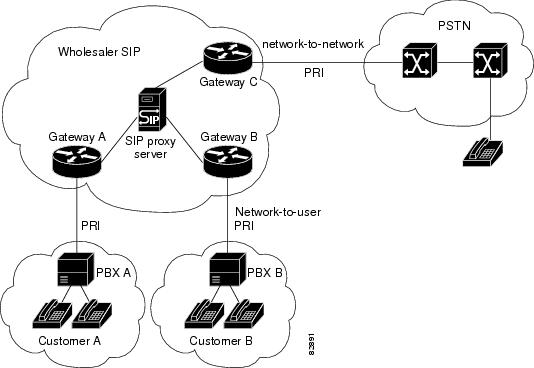
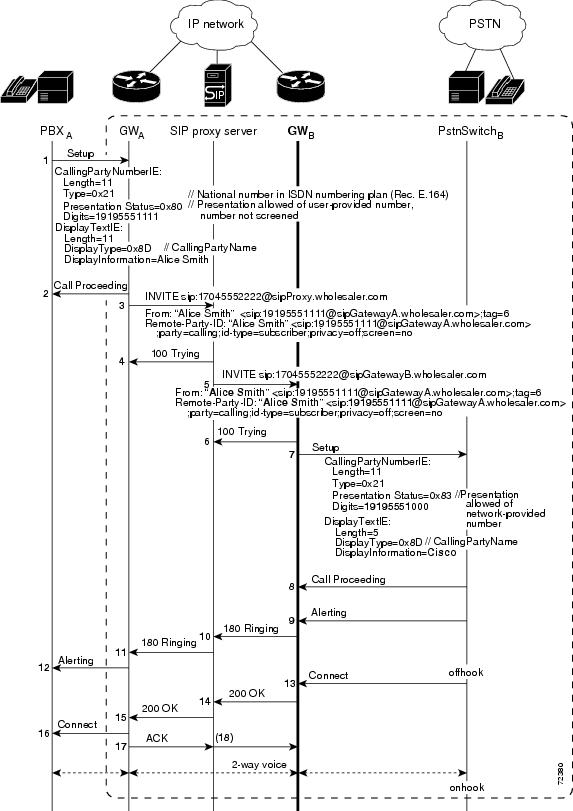
Remote-Party-ID ImplementationThis section discusses the implementation of the Remote-Party-ID feature in a SIP network. Before the implementation of this feature, there was no mechanism to modify the contents of the From header field. With the feature enabled, SIP gateways provide translation capability for ISDN screening and presentation identifiers in call setup messages. SIP gateways and proxy servers require configuration to support Remote-Party-ID feature. The figure below shows a typical network where the feature is implemented. Gateway C is configured for unscreened discard, that is, if the incoming SIP INVITE request does not contain a screened Remote-Part-ID header (;screen=yes), no calling name or number is sent in the forwarded Setup message.
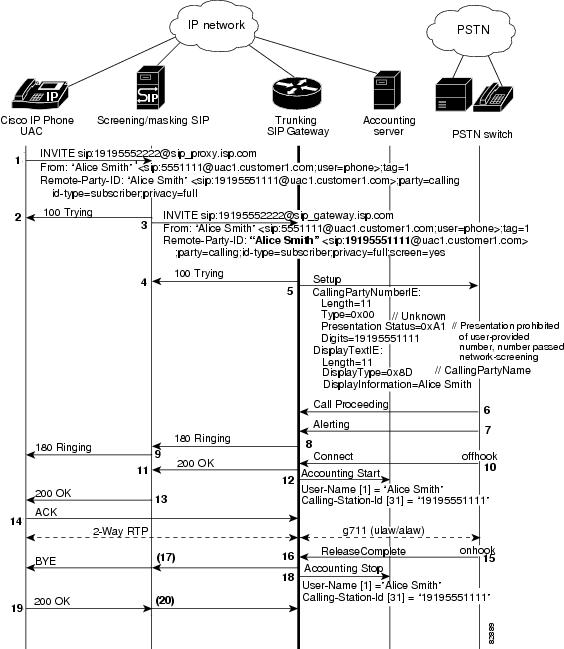
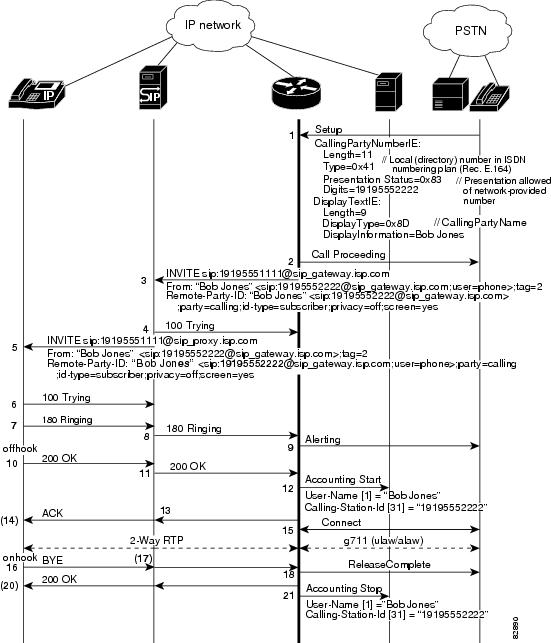
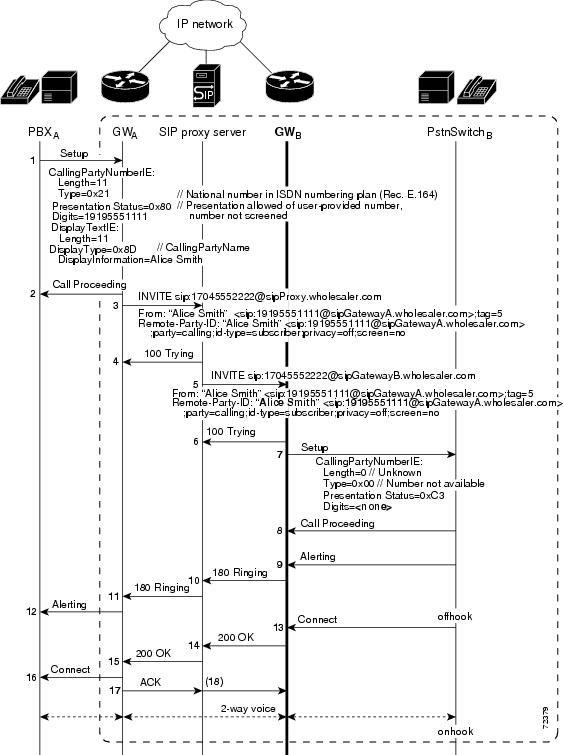
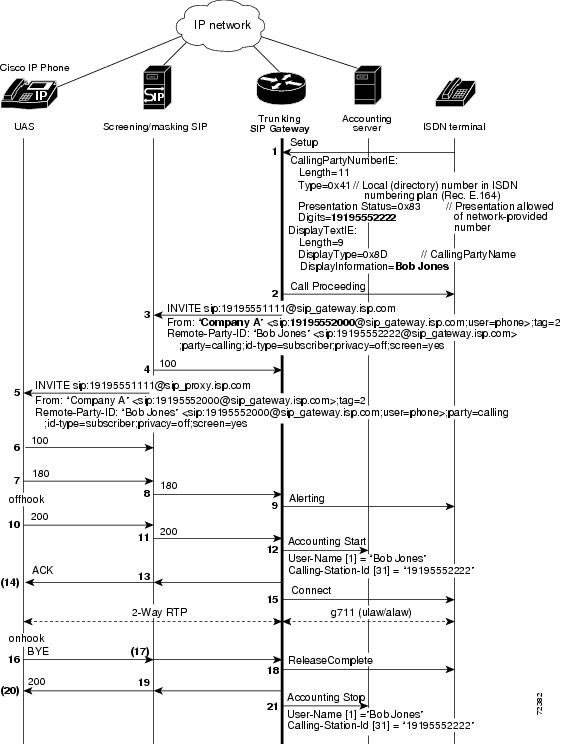
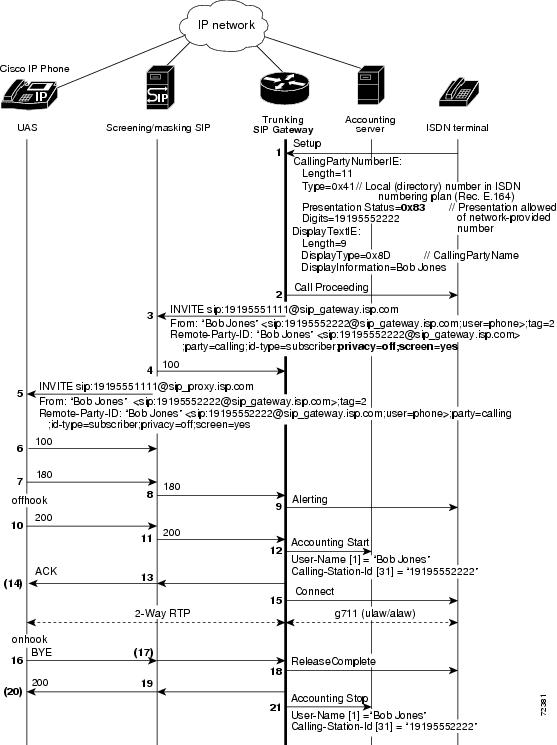
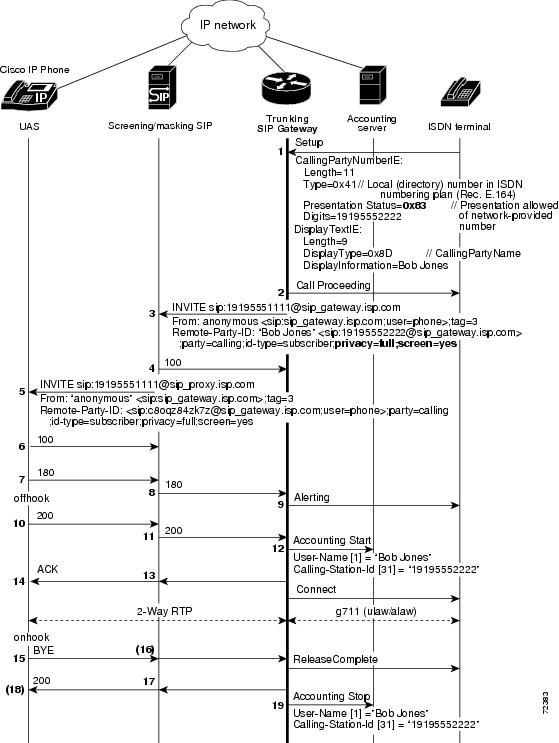
The figures in the Inbound and Outbound Call Flows section illustrate various calling information treatment options using the commands available with the feature. Calling information treatment is determined by the parameters specified in the Setup message and Remote-Party-ID configuration on the SIP gateway. Inbound and Outbound Call FlowsThis section presents inbound and outbound call flows for the Remote-Party-ID feature. The figure below shows the SIP-to-PSTN default behavior where the calling party name and number are passed. The feature enables this treatment by default and no configuration is required. The figure below shows the PSTN-to-SIP default behavior where the calling party name and number are passed. This feature enables this treatment by default and no configuration is required. The figure below shows the call flow for discarding the calling name and number at Gateway B. The Setup message includes ISDN information elements (IEs) that specify calling information treatment. The INVITE message from Gateway A includes the corresponding Remote-Party-ID SIP tags. The figure below shows Gateway B overriding the calling name and number received in the Setup message from Gateway A. To configure Gateway B to override calling name and number, use the following commands: In the figure below the trunking SIP gateway is configured to override the calling name and number of the From header. To configure this call treatment option, use the following commands:
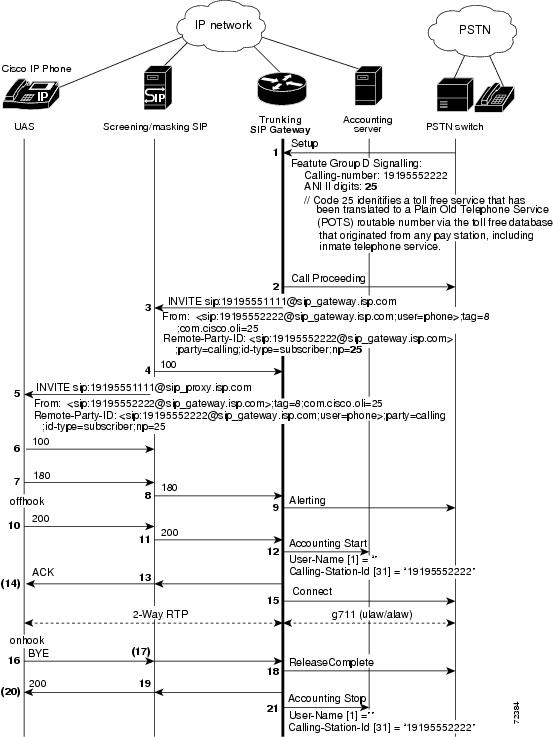
The figure below shows translation of OLI or ANI II digits for a billing application. The Remote-Party-ID feature enables this treatment by default; no configuration tasks are required. If the feature was disabled by using the no remote-party-id command, use the remote-party-id command to re-enable the feature. The next two figures show the SIP trunking gateway capability to provide translation between ISDN screening and presentation identifiers and SIP Remote-Party-ID extensions. The two figures show the difference in call treatment, with and without privacy requested. With no privacy requested, the calling party name and number are passed unchanged. With privacy requested, as shown in the figure below, screened identity information is still logged in accounting records for billing information, but the user field is not populated in the From header of the outgoing INVITE message, and the display-name is populated with "anonymous." Remote-Party-ID in SIP and PSTN MessagesThe ability to provide marking, screening, and PSTN translation of identity information to and from Remote-Party-ID extensions is supported in SIP INVITE and PSTN messages. This section discusses the formats of SIP INVITE and PSTN messages, and has the following subsections: Remote-Party-ID HeaderThe SIP Remote-Party-ID header identifies the calling party and includes user, party, screen and privacy headers that specify how a call is presented and screened. The header contains a URL and an optional display name that identifies a user. A valid Remote-Party-ID header may be either a SIP URL or a TEL URL.
The following example shows representative Remote-Party-ID headers, including user, party, screen, and privacy. 02:32:17:Received: INVITE sip:3331000@172.27.184.118:5060;user=phone SIP/2.0 Via:SIP/2.0/UDP 10.0.0.1:5070 Supported:org.ietf.sip.100rel From:"alice" <sip:555-1001@10.0.0.1:5070> To:sip:555-1002@172.27.184.118:5060 Remote-Party-ID:"Alice Smith" <sip:5551111@192.0.2.67;user=phone>;party=calling;screen=no;privacy=off Call-ID:00000001@10.0.0.1:5070 CSeq:1 INVITE Contact:"alice" <sip:10.0.0.1:5070> Content-Type:application/sdp v=0 o=- 2890844526 2890844526 IN IP4 A3C47F2146789F0 s=- c=IN IP4 10.0.0.1 t=36124033 0 m=audio 49170 RTP/AVP 0 Remote-Party-ID SyntaxRemote-Party-ID fields identify the calling party depending upon how the field is marked. If the party is unmarked, a Remote-Party-ID in a header represents the identity of the calling party. Remote-Party-ID follows the Augmented Backus-Naur Format (ABNF). Refer to draft-ietf-sip-privacy-02.txt for the definitive specification. Fields are as follows:
ISDN SyntaxISDN messages follow the format specified in ISDN Primary Rate Interface Call Control Switching and Signalling Generic Requirements for Class II Equipment, TR-NWT-001268, Revisions 1-4, Telcordia Technologies Technical Reference, 2001 and ISDN Basic Rate Interface Call Control Switching and Signalling Generic Requirements, GR-268-CORE, July 1998, to signal call control. ISDN messages are composed of information elements (IEs). The Cisco IOS VoiceXML feature uses Calling Party Number and Display Text IEs to provide specified screening and presentation treatment. The Calling Party Number IE specifies the origin of the calling number and presentation status, and the Display Text IE supplies calling party name information that is formatted for display by a terminal for a human user. See the Setup message in "ISDN Syntax" for sample IE information. Screening and Presentation InformationThe Remote-Part-ID header and ISDN Setup messages contain tags used to specify screened identity information. The table below lists translation of screening and presentation information included in the Remote-Party-ID SIP tags for SIP to PSTN networks.
The table below provides the same translation for PSTN to SIP networks.
The table below lists the corresponding translation for ISDN tags in binary and hex formats.
Benefits of SIP Extensions for Caller Identity and Privacy
SIP Via Header SupportEach SIP request includes a Via header that may have an maddr (multiple address) parameter. The maddr parameter indicates an alternate address for where to send the SIP response. The value of the maddr parameter can be an IP address or a hostname. If a maddr parameter is a hostname, the SIP stack performs a DNS query to resolve the name to an IP address. In compliance with RFC 3261, this feature allows the SIP request sender to specify the response destination using the maddr parameter in the Via header.
The sender of the SIP request is a far-end SIP endpoint with which the Cisco IOS gateway is communicating. The far-end endpoint manages SIP dialogs across multiple nodes. The far-end endpoint is a SIP INVITE request to initiate a new dialog with the Cisco IOS gateway. It uses the maddr parameter in the Via header to specify a destination address for SIP responses. SIP dialog to the Cisco IOS gateway can originate from one IP address, but subsequent responses go to the destination address specified in the maddr parameter. The following SIP request shows a destination address specified using the maddr parameter in the Via header (192.168.199.200). The SIP response is sent to this address. INVITEsip:1234@10.105.209.114:5060 SIP/2.0 Via: SIP/2.0/TCP 192.168.199.200:5060; branch=z9hG4K0245fc9a5; maddr=192.168.10.11 From: <sip:1234@10.105.209.114> Date: Tue, 23 Mar 2010 21:42:14 GMT Call-ID: f06cc480-ba9135b6-1-c8c71ac@192.168.199.200 Supported: timer, resource-priority, replaces Min-SE: 1800 User-Agent: Cisco-CUCM8.0 Allow: INVITE, OPTIONS, INFO, BYE, CANCEL, ACK, PRACK, UPDATE, REFER, SUBSCRIBE, NOTIFY CSeq: 101 INVITE Contact: <sip:3001@192.168.199.200:5060;transport=tcp> Expires: 1800 Allow- Events: presence, kpml Supported: X-Cisco-srtp-fallback Support: Geolocation Call-Info: <sip:192.168.199.200:5060>;method="NOTIFY; Event=telephone-event;Duration=500" Cisco-Guid: 4033660032-3130078646-0000000001-3368489644 Session Expires: 1800 P-Asserted-Identity: <sip:3001@192.168.199.200> Content-Length: 0 SIP INVITE Request with Malformed Via HeaderA SIP INVITE requests that a user or service participate in a session. Each INVITE contains a Via header that indicates the transport path taken by the request so far, and where to send a response. In the past, when an INVITE contained a malformed Via header, the gateway would print a debug message and discard the INVITE without incrementing a counter. However, the printed debug message was often inadequate, and it was difficult to detect that messages were being discarded. The SIP INVITE Request with Malformed Via Header feature provides a response to the malformed request. A counter, Client Error: Bad Request, increments when a response is sent for a malformed Via field. Bad Request is a class 400 response and includes the explanation Malformed Via Field . The response is sent to the source IP address (the IP address where the SIP request originated) at User Datagram Protocol (UDP) port 5060.
Feature benefits include the following:
SIP Session Timer SupportThe SIP Session Timer Support feature adds the capability to periodically refresh SIP sessions by sending repeated INVITE requests. The repeated INVITE requests (re-INVITEs), are sent during an active call leg to allow user agents or proxies to determine the status of a SIP session. Without this keepalive mechanism, proxies that remember incoming and outgoing requests (stateful proxies) may continue to retain call state needlessly. If a user agent fails to send a BYE message at the end of a session or if the BYE message is lost because of network problems, a stateful proxy does not know that the session has ended. The re-INVITEs ensure that active sessions stay active and completed sessions are terminated. In addition to re-INVITEs, UPDATE can also used as a method for session keepalives. The SIP stack supports both re-INVITE and UPDATE. The gateway continues to use re-INVITE for session refresh. The SIP Session Timer Support feature also adds two new general headers that are used to negotiate the value of the refresh interval.
Role of the User AgentsThe initial INVITE request establishes the duration of the session and may include a Session-Expires header and a Min-SE header. These headers indicate the session timer value required by the UAC. A receiving user-agent server (UAS) or proxy can lower the session timer value, but not lower than the value of the Min-SE header. If the session timer duration is lower than the configured minimum, the proxy or UAS can also send out a 422 response message. If the UAS or proxy finds that the session timer value is acceptable, it copies the Session-Expires header into the 2xx class response. A UAS or proxy can also insert a Session-Expires header in the INVITE if the UAC did not include one. Thus a UAC can receive a Session-Expires header in a response even if none was present in the request. In the 2xx response, the refresher parameter in the Session-Expires header indicates who performs the re-INVITEs or UPDATE. For example, if the parameter contains the value UAC, the UAC performs the refreshes. For compatibility issues, only one of the two user agents needs to support the session timer feature, and in that case, the user agent that supports the feature performs the refreshes. Re-INVITEs are processed identically to INVITE requests, but go out in predetermined session intervals. Re-INVITEs carry the new session expiration time. The user agent that is responsible for generating re-INVITE requests sends a re-INVITE out before the session expires. If there is no response, the user agent sends a BYE request to terminate the call before session expiration. If a re-INVITE is not sent before the session expiration, either the UAC or the UAS can send a BYE. If the 2xx response does not contain a Session-Expires header, there is no session expiration and re-INVITEs do not need to be sent. Session-Expires HeaderThe Session-Expires header conveys the session interval for a SIP call. It is placed in an INVITE request and is allowed in any 2xx class response to an INVITE. Its presence indicates that the UAC wishes to use the session timer for this call. Unlike the SIP-Expires header, it can only contain a delta-time, which is the current time, plus the session interval from the response. For example, if a UAS generates a 200 OK response to a INVITE that contained a Session-Expires header with a value of 90 seconds (1.5 minutes), the UAS computes the session expiration as 1.5 minutes after the time when the 200 OK response was sent. For each proxy, the session expiration is 1.5 minutes after the time when the 2xx was received or sent. For the UAC, the expiration time is 1.5 minutes after the receipt of the final response. When the gateway acts as an UAS, it is responsible for refreshes. The refresh interval is a minimum of 32 seconds, or one-third the refresh interval. When the gateway act as an UAC, the refresh interval is one-half the refresh interval. If the session is not refreshed, the minimum time to send a BYE before the session expires is 32 seconds. The recommended value for the Session-Expires header is 90 seconds. The syntax of the Session-Expires header is as follows:
Session-Expires = ("Session-Expires" |
"x"
) ":" delta-seconds
[refresher]
refresher = ";" "refresher" "=" "UAS"|"UAC"
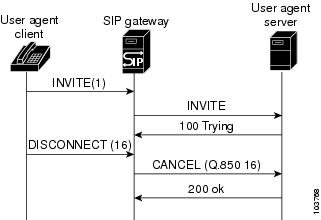
The refresher parameter is optional in the initial INVITE, although the UAC can set it to UAC to indicate that it will do the refreshes. The 200 OK response must have the refresher parameter set. Min-SE HeaderBecause of the processing load of INVITE requests, the proxy, UAC, and UAS can have a configured minimum timer value that they can accept. The min-se (SIP) command sets the minimum timer, and it is conveyed in the Min-SE header in the initial INVITE request. When making a call, the presence of the Min-SE header informs the UAS and any proxies of the minimum value that the UAC accepts for the session timer duration, in units of delta-seconds. The default value is 90 seconds (1.5 minutes). By not reducing the session interval below the value set, the UAS and proxies prevent the UAC from having to reject a call with a 422 error. Once set, the min-se command value affects all calls originated by the router. If the Min-SE header is not present, the user agent accepts any value. The syntax of the Min-SE header is: Min-SE = "Min-SE" ":" delta-seconds 422 Response MessageIf the value of the Session-Expires header is too small, the UAS or proxy rejects the call with a 422 Session Timer Too Small response message. With the 422 response message, the proxy or UAS includes a Min-SE header indicating the minimum session value it can accept. The UAC may then retry the call with a larger session timer value. If a 422 response message is received after an INVITE request, the UAC can retry the INVITE. Supported and Require HeadersThe presence of the timer argument in the Supported header indicates that the user agent supports the SIP session timer. The presence of the timer argument in the Require header indicates that the opposite user agent must support the SIP session timer for the call to be successful. Benefits of SIP Session Timer Support
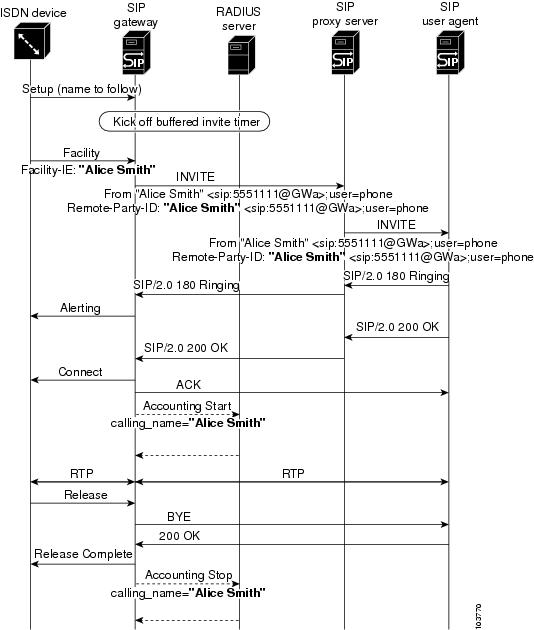
SIP Cisco IOS Gateway Reason Header and Buffered Calling Name CompletionReason HeaderThe Reason header facilitates PSTN interworking. This is achieved by having the side receiving a Disconnect message response append a Reason header to the outgoing Bye or Cancel message request and 4xx, 5xx, or 6xx message response, indicating the Q.850 cause code that passed down from the PSTN (see the figure below). SIP implementations on PSTN gateways are plagued with issues related to mapping ISDN-disconnect message-request cause codes to SIP response status codes, which stem from the mapping on the gateway receiving the disconnect. Specifically, more than one ISDN-disconnect message-request cause code maps to one SIP status code. For example, on SIP gateways, ISDN cause codes 18, 19, and 20 all map to the SIP status code of 480 message response. This makes it impossible to deterministically relay the cause-code value on the remote end. The Reason header can carry the actual cause code (see the figure below). Buffered Calling-Name CompletionAs shown in the figure below, Cisco IOS SIP has always supported receiving calling-name information in the display information element (IE) of a Setup message request. Support for receiving calling-name information in the facility IE of a Setup message request, of a Facility message request, and of a NOTIFY message request were supported through the Support for the ISDN Calling Name Display feature in release 12.3(4)T (refer to the "Configuring SIP DTMF Features" chapter). The Buffered Calling Name Completion feature adds support for buffering the INVITE message request when the calling-name information is going to arrive in a subsequent facility IE of a Facility message request. When an originating gateway (OGW) receives a Setup message with an indication that calling-name information is enabled, the configuration is checked for INVITE-message display-name buffering. When buffering is enabled, the INVITE message is buffered until the time specified in the configuration. If a Facility message with display information in the From and Remote Party ID headers of the INVITE message is received, then send it out. If no Facility message is received in the specified time, send out only the INVITE message. SIP SIP Header URL Support and SUBSCRIBE NOTIFY for External TriggersThe SIP: SIP Header/URL Support and SUBSCRIBE/NOTIFY for External Triggers feature provides a mechanism for applications to send and receive SIP headers and to send SUBSCRIBE messages and receive NOTIFY events. Where appropriate, this section discusses separately the features that make up this feature set, the SIP Header Support feature along with the SUBSCRIBE and NOTIFY for External Triggers feature. Feature benefits include the following:
Feature Design of SIP Header SupportPrior to the implementation of this feature, voice applications running on the gateway did not have access to headers sent in SIP requests. The SIP Header Passing feature makes SIP headers, the fields which specify session details in SIP messages, available to applications. This feature supports the following capabilities for VoiceXML and Tcl IVR 2.0 applications:
Using headers in SIP INVITE messages, voice applications can pass information about a call to an application on another server. For example, if the caller has entered an account number and the application transfers the call to another application on another platform, the account number can be passed in a SIP Header. An example scenario is an airline application transferring the call to a hotel reservation application hosted at a different service provider. This feature enables the respective sites to share context information about the caller. This feature introduces a new command, the header-passing command, to either enable or disable passing headers from INVITE messages to applications. The SIP Header Passing feature also provides enhanced inbound and outbound dial-peer matching services. Feature Design of SIP SUBSCRIBE and NOTIFY for External TriggersThis feature implements support for two SIP methods, SUBSCRIBE and NOTIFY, and for a new Event header, as defined in the IETF draft, draft-roach-sip-subscribe-notify-02.txt, Event Notification in SIP.
Overview of the ApplicationThe SIP event notification mechanism uses the SUBSCRIBE method to request notification of an event at a later time. The NOTIFY method provides notification that an event which has been requested by an earlier SUBSCRIBE method has occurred, or provides further details about the event. The new feature makes headers in incoming SIP INVITE, SUBSCRIBE, and NOTIFY messages available to applications for use in event subscription. Similarly, to allow an application to place an outbound call using SIP, this feature passes headers in the URL for use by the SIP service provider interface (SPI) to create an outgoing INVITE request. The new feature also supports the capability to subscribe to standard event packages, such as Message Waiting Indicator and Presence, and to application-specific custom event packages, as defined in SIP-Specific Event Notification, an earlier draft of RFC 3265, Session Initiation Protocol (SIP)-Specific Event Notification. For information on these capabilities, see the following:
Cisco implements the SUBSCRIBE and NOTIFY for External Triggers feature using the Application SUBSCRIBE/NOTIFY Layer (ASNL). ASNL is a software interface layer between the application and signaling protocol stacks that allows the application to subscribe to interested events and to pass notification when it is received. The SUBSCRIBE and NOTIFY for External Triggers allows external SIP servers to trigger a particular voice application, behavior or activity on Cisco voice gateways. For example, a client application on the gateway subscribes to a particular event in a server. When the event takes place, the server notifies the client of that event. On receiving this event notification, the client application triggers a particular action in the gateway. The client and server must mutually agree on the events they can handle and the processing of those events. Example of a ApplicationThe SUBSCRIBE and NOTIFY for External Triggers feature supports various applications of external triggers. In the following scenario, a user requests a stock reminder service, for example "Let me know if Stock X reaches 100. Here is a phone number to reach me." The SUBSCRIBE and NOTIFY for External Triggers feature supports an application like this in the following manner:
Other external trigger applications include mid-call triggers such as call center queuing and subscription to a wake-up call service. RFC 3265 Compliance for the FeatureThe Cisco implementation of SIP SUBSCRIBE and NOTIFY methods is based on an earlier draft of SIP-Specific Event Notification, and deviates from RFC 3265, Session Initiation Protocol (SIP)-Specific Event Notification in the following capabilities:
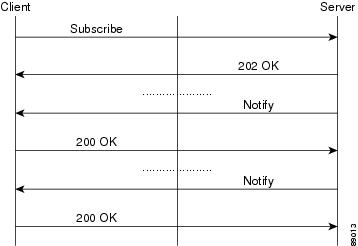
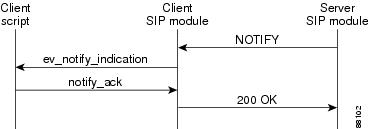
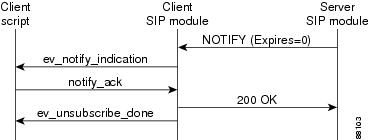
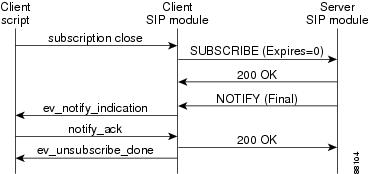
SUBSCRIBE and NOTIFY Message FlowThe figure below shows a typical message flow for SUBSCRIBE and NOTIFY messages. The figure below shows the message flow for a successful subscription. The figure below shows a completed subscription. The server can send any number of NOTIFY messages as long as the subscription is active. The figure below shows the message flow for subscription termination by the server. The figure below shows the message flow for subscription termination by the client. Sample MessagesThis section presents a sequence of SIP messages sent and received between gateways during the message flow shown in "Sample Messages" in the preceding section. Example: Subscription Request Sent From ClientThis example shows a SUBSCRIBE request sent to the server. The example includes a nonstandard Subject header and an Event header. *Apr 19 08:38:52.525: //-1//TCL2:HN01C24D3C:/tcl_PutsCmd: Sending MWI client request to server *Apr 19 08:38:52.525: *Apr 19 08:38:52.529: Sent: SUBSCRIBE sip:user@10.7.104.88:5060 SIP/2.0 Via: SIP/2.0/UDP 10.7.102.35:5060 From: <sip:10.7.102.35>;tag=1C24D44-20FD To: <sip:user@10.7.104.88> Date: Wed, 19 Apr 2000 08:38:52 UTC Call-ID: C4BB7610-150411D4-802186E3-AD119804 CSeq: 101 SUBSCRIBE Timestamp: 956133532 Subject: Hi There Contact: <sip:10.7.102.35:5060> Event: message-summary Expires: 500 ) Content-Type: text/plain Content-Length: 21 This is from client Example: Subscription Response Received from the ServerThis example shows a response from the server to a subscription request. *Apr 19 08:38:52.537: Received: SIP/2.0 202 Accepted Via: SIP/2.0/UDP 10.7.102.35:5060 From: <sip:10.7.102.35>;tag=1C24D44-20FD To: <sip:user@10.7.104.88>;tag=1D80E90-2072 Date: Sun, 17 Nov 2002 02:59:19 GMT Call-ID: C4BB7610-150411D4-802186E3-AD119804 Server: Cisco-SIPGateway/IOS-12.x Timestamp: 956133532 Content-Length: 0 CSeq: 101 SUBSCRIBE Expires: 500 *Apr 19 08:38:52.541: //-1//TCL2:HN01C24D3C:/tcl_PutsCmd: ***** act_Subscribe : SUBSCRIPTION DONE received *Apr 19 08:38:52.541: //-1//TCL2:HN01C24D3C:/tcl_PutsCmd: *** act_subscribe: subscription status=sn_000 Example: NOTIFY Request from the ServerThis example shows the initial NOTIFY request from a server and includes an application-specific nonstandard Hello header. *Apr 19 08:38:52.545: Received: NOTIFY sip:10.7.102.35:5060 SIP/2.0 Via: SIP/2.0/UDP 10.7.104.88:5060 From: <sip:user@10.7.104.88>;tag=1D80E90-2072 To: <sip:10.7.102.35>;tag=1C24D44-20FD Date: Sun, 17 Nov 2002 02:59:19 GMT Call-ID: C4BB7610-150411D4-802186E3-AD119804 User-Agent: Cisco-SIPGateway/IOS-12.x Max-Forwards: 6 Timestamp: 1037501959 CSeq: 101 NOTIFY Event: message-summary Hello: Hello world Contact: <sip:user@10.7.104.88:5060> Content-Length: 43 Content-Type: text/plain This is content(message body) from server Example: An Application Reads Header and Body Information in a NOTIFY RequestThis example shows an application accessing the From and Hello headers in the NOTIFY request. *Apr 19 08:38:52.549: //-1//TCL2:HN01C24D3C:/tcl_PutsCmd: *** act_Notify : NOTIFY RECEIVED t *Apr 19 08:38:52.549: //-1//TCL2:HN01C24D3C:/tcl_PutsCmd: From header is: <sip:user@10.7.104.88>;tag=1D80E90-2072 *Apr 19 08:38:52.549: //-1//TCL2:HN01C24D3C:/tcl_PutsCmd: Hello header is: Hello world *Apr 19 08:38:52.549: //-1//TCL2:HN01C24D3C:/tcl_PutsCmd: content_type received=text/plain *Apr 19 08:38:52.549: *Apr 19 08:38:52.553: //-1//TCL2:HN01C24D3C:/tcl_PutsCmd: content received=This is content(message body) from server Example: NOTIFY Request Sent From the ClientThis example shows a NOTIFY request sent from a client. *Apr 19 08:38:52.553: Sent: SIP/2.0 200 OK Via: SIP/2.0/UDP 10.7.102.35:5060 From: <sip:user@10.7.104.88>;tag=1D80E90-2072 To: <sip:10.7.102.35>;tag=1C24D44-20FD Date: Wed, 19 Apr 2000 08:38:52 UTC Call-ID: C4BB7610-150411D4-802186E3-AD119804 CSeq: 101 NOTIFY Timestamp: 956133532 Event: message-summary Content-Length: 0 Example: The Client receives a NOTIFY MessageThis example shows a NOTIFY message received by a client. c5300-5# *Apr 19 08:38:57.565: Received: NOTIFY sip:10.7.102.35:5060 SIP/2.0 Via: SIP/2.0/UDP 10.7.104.88:5060 From: <sip:user@10.7.104.88>;tag=1D80E90-2072 To: <sip:10.7.102.35>;tag=1C24D44-20FD Date: Sun, 17 Nov 2002 02:59:19 GMT Call-ID: C4BB7610-150411D4-802186E3-AD119804 User-Agent: Cisco-SIPGateway/IOS-12.x Max-Forwards: 6 Timestamp: 1037501964 CSeq: 102 NOTIFY Event: message-summary Hello: Hello world Contact: <sip:user@10.7.104.88:5060> Content-Length: 35 Content-Type: text/plain this is just a notify from server *Apr 19 08:38:57.569: //-1//TCL2:HN01C24D3C:/tcl_PutsCmd: *** act_Notify : NOTIFY RECEIVED *Apr 19 08:38:57.569: //-1//TCL2:HN01C24D3C:/tcl_PutsCmd: From header is: <sip:user@10.7.104.88>;tag=1D80E90-2072 *Apr 19 08:38:57.569: //-1//TCL2:HN01C24D3C:/tcl_PutsCmd: Hello header is: Hello world *Apr 19 08:38:57.569: //-1//TCL2:HN01C24D3C:/tcl_PutsCmd: content_type received=text/plain *Apr 19 08:38:57.569: //-1//TCL2:HN01C24D3C:/tcl_PutsCmd: content received=this is just a notify from server Example: The Client Sends a NOTIFY MessageThis example shows a client sending a NOTIFY message. *Apr 19 08:38:57.573: Sent: SIP/2.0 200 OK Via: SIP/2.0/UDP 10.7.102.35:5060 From: <sip:user@10.7.104.88>;tag=1D80E90-2072 To: <sip:10.7.102.35>;tag=1C24D44-20FD Date: Wed, 19 Apr 2000 08:38:57 UTC Call-ID: C4BB7610-150411D4-802186E3-AD119804 CSeq: 102 NOTIFY Timestamp: 956133537 Event: message-summary Content-Length: 0 Example: The Client Initiates a Subscription TerminationThis example shows a a client initiating a subscription termination request using the Expires header set to zero. *Apr 19 08:38:57.577: Sent: SUBSCRIBE sip:user@10.7.104.88:5060 SIP/2.0 Via: SIP/2.0/UDP 10.7.102.35:5060 From: <sip:10.7.102.35>;tag=1C24D44-20FD To: <sip:user@10.7.104.88>;tag=1D80E90-2072 Date: Wed, 19 Apr 2000 08:38:57 UTC Call-ID: C4BB7610-150411D4-802186E3-AD119804 CSeq: 102 SUBSCRIBE Timestamp: 956133537 Subject: Hi There Contact: <sip:10.7.102.35:5060> Event: message-summary Expires: 0 Content-Type: text/plain Content-Length: 21 This is from client Example: The Client Receives a Response to a Subscription Termination RequestThis example shows a client receiving a response to a subscription termination request. *Apr 19 08:38:57.589: Received: SIP/2.0 200 OK Via: SIP/2.0/UDP 10.7.102.35:5060 From: <sip:10.7.102.35>;tag=1C24D44-20FD To: <sip:user@10.7.104.88>;tag=1D80E90-2072 Date: Sun, 17 Nov 2002 02:59:24 GMT Call-ID: C4BB7610-150411D4-802186E3-AD119804 Server: Cisco-SIPGateway/IOS-12.x Timestamp: 956133532 Content-Length: 0 CSeq: 102 SUBSCRIBE Expires: 0 Contact: <sip:user@10.7.104.88:5060> Example: The Client Receives a Final NOTIFY MessageThis example shows a client receiving a final NOTIFY message that a subscription is finished. c5300-5# *Apr 19 08:39:02.585: Received: NOTIFY sip:10.7.102.35:5060 SIP/2.0 Via: SIP/2.0/UDP 10.7.104.88:5060 From: <sip:user@10.7.104.88>;tag=1D80E90-2072 To: <sip:10.7.102.35>;tag=1C24D44-20FD Date: Sun, 17 Nov 2002 02:59:24 GMT Call-ID: C4BB7610-150411D4-802186E3-AD119804 User-Agent: Cisco-SIPGateway/IOS-12.x Max-Forwards: 6 Timestamp: 1037501969 CSeq: 103 NOTIFY Event: message-summary Hello: Hello world Contact: <sip:user@10.7.104.88:5060> Content-Length: 35 Content-Type: text/plain this is just a notify from server *Apr 19 08:39:02.589: //-1//TCL2:HN01C24D3C:/tcl_PutsCmd: *** act_Notify : FINAL NOTIFY RECEIVED *Apr 19 08:39:02.589: //-1//TCL2:HN01C24D3C:/tcl_PutsCmd: status=sn_004 *Apr 19 08:39:02.589: //-1//TCL2:HN01C24D3C:/tcl_PutsCmd: From header is: <sip:user@10.7.104.88>;tag=1D80E90-2072 *Apr 19 08:39:02.593: //-1//TCL2:HN01C24D3C:/tcl_PutsCmd: act_UnsubcribeDone : !!! SUBSCRIPTION IS OVER !!! Example: A Final NOTIFY Message to a ServerThis example shows a final NOTIFY message to a server. *Apr 19 08:39:02.593: Sent: SIP/2.0 200 OK Via: SIP/2.0/UDP 10.7.102.35:5060 From: <sip:user@10.7.104.88>;tag=1D80E90-2072 To: <sip:10.7.102.35>;tag=1C24D44-20FD Date: Wed, 19 Apr 2000 08:39:02 UTC Call-ID: C4BB7610-150411D4-802186E3-AD119804 CSeq: 103 NOTIFY Timestamp: 956133542 Event: message-summary Content-Length: 0 SIP Stack PortabilityThe SIP Stack Portability feature implements the following capabilities to the Cisco IOS SIP gateway stack:
It sends an INVITE message request without Session Description Protocol (SDP) and provides SDP information in either the PRACK or ACK message request for both initial call establishment and mid-call re-INVITE message requests.
The stack applies certain rules and restrictions for a subset of headers and for some content types (such as SDP) to protect the integrity of the stack's functionality and to maintain backward compatibility. When receiving SIP message requests, it reads the SIP header and any attached body without any restrictions. To make the best use of SIP call-transfer features, you should understand the following concepts:
SIP Call-Transfer BasicsBasic Terminology of SIP Call TransferCall transfer allows a wide variety of decentralized multiparty call operations. These decentralized call operations form the basis for third-party call control, and thus are important features for VoIP and SIP. Call transfer is also critical for conference calling, where calls can transition smoothly between multiple point-to-point links and IP-level multicasting. Refer Message RequestThe SIP Refer message request provides call-transfer capabilities to supplement the SIP BYE and ALSO message requests already implemented on Cisco IOS SIP gateways. The Refer message request has three main roles:
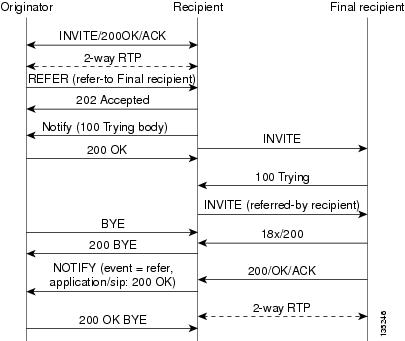
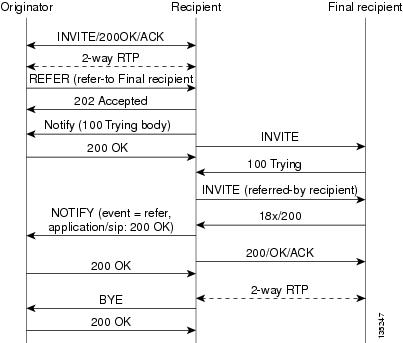
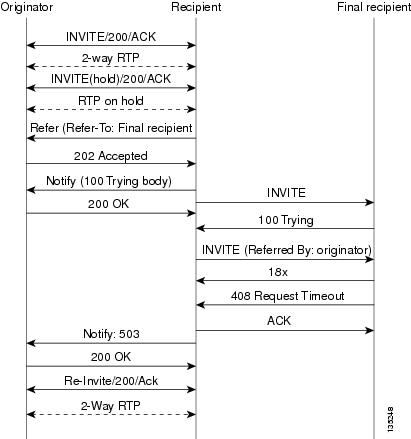
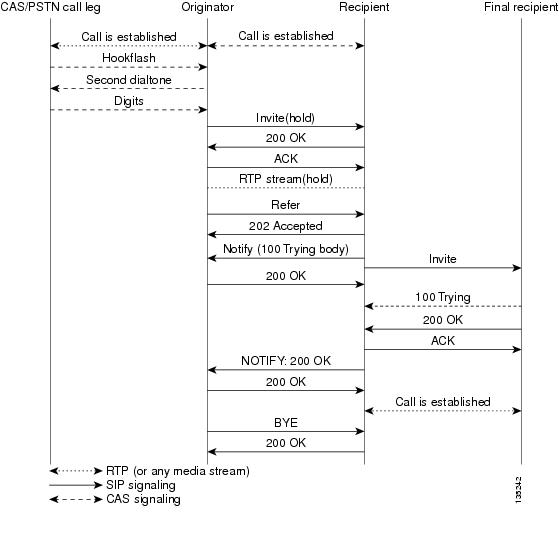
The Refer message request always begins within the context of an existing call and starts with the originator . The originator sends a Refer request to the recipient (user agent receiving the Refer request) to initiate a triggered INVITE request. The triggered INVITE request uses the SIP URL contained in the Refer-To header as the destination of the INVITE request. The recipient then contacts the resource in the Refer-To header (final recipient ), and returns a SIP 202 (Accepted) response to the originator. The recipient also must notify the originator of the outcome of the Refer transaction--whether the final recipient was successfully contacted or not. The notification is accomplished using the SIP NOTIFY message request, SIP's event notification mechanism. A NOTIFY message with a message body of SIP 200 OK indicates a successful transfer, and a message body of SIP 503 Service Unavailable indicates an unsuccessful transfer. If the call was successful, a call between the recipient and the final recipient results. The figure below represents the call flow of a successful Refer transaction initiated within the context of an existing call. Refer-To HeaderThe recipient receives from the originator a Refer request that always contains a single Refer-To header. The Refer-To header includes a SIP URL that indicates the party to be invited and must be in SIP URL format.
The Refer-To header may contain three additional overloaded headers to form the triggered INVITE request. If any of these three headers are present, they are included in the triggered INVITE request. The three headers are:
All other headers present in the Refer-To are ignored, and are not sent in the triggered INVITE. Referred-By HeaderThe Referred-By header is required in a Refer request. It identifies the originator and may also contain a signature (included for security purposes). SIP gateways echo the contents of the Referred-By header in the triggered INVITE request, but on receiving an INVITE request with this header, gateways do not act on it. NOTIFY Message RequestOnce the outcome of the Refer transaction is known, the recipient of the Refer request must notify the originator of the outcome of the Refer transaction--whether the final-recipient was successfully contacted or not. The notification is accomplished using the NOTIFY message request, SIP's event notification mechanism. The notification contains a message body with a SIP response status line and the response class in the status line indicates the success or failure of the Refer transaction. The NOTIFY message must do the following:
Two Cisco IOS commands pertain to the NOTIFY message request:
Types of SIP Call Transfer Using the Refer Message RequestThis section discusses how the Refer message request facilitates call transfer. There are two types of call transfer: blind and attended. The primary difference between the two is that the Replaces header is used in attended call transfers. The Replaces header is interpreted by the final recipient and contains a Call-ID header, indicating that the initial call leg is to be replaced with the incoming INVITE request. As outlined in the Refer message request, there are three main roles:
A gateway can be a recipient or final recipient, but not an originator. Blind Call-Transfer ProcessA blind, or unattended, transfer is one in which the transferring phone connects the caller to a destination line before ringback begins. This is different from a consultative, or attended, transfer in which one of the transferring parties either connects the caller to a ringing phone (ringback heard) or speaks with the third party before connecting the caller to the third party. Blind transfers are often preferred by automated devices that do not have the capability to make consultation calls. Blind transfer works as described in the Refer Message Request section. The process is as follows:
The figure below shows a successful blind or unattended call transfer in which the originator initiates a Bye request to terminate signaling with the recipient. The figure below shows a successful blind or unattended call transfer in which the recipient initiates a Bye request to terminate signaling with the originator. A NOTIFY message is always sent by the recipient to the originator after the final outcome of the call is known. If a failure occurs with the triggered INVITE to the final recipient, the call between originator and recipient is not disconnected. Rather, with blind transfer the process is as follows:
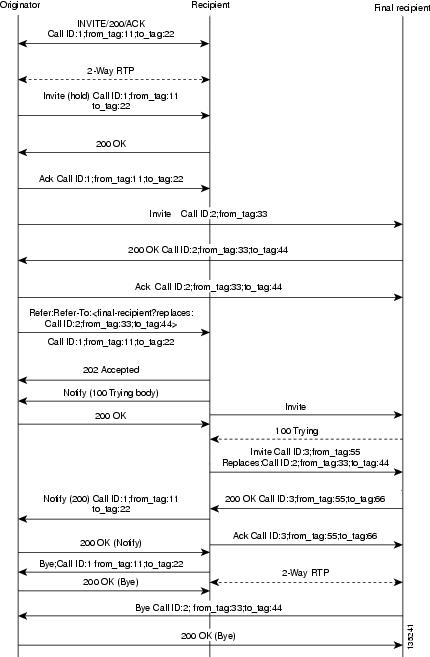
Attended TransferIn attended transfers, the Replaces header is inserted by the initiator of the Refer message request as an overloaded header in the Refer-To and is copied into the triggered INVITE request sent to the final recipient. The header has no effect on the recipient, but is interpreted by the final recipient as a way to distinguish between blind transfer and attended transfer. The attended transfer process is as follows:
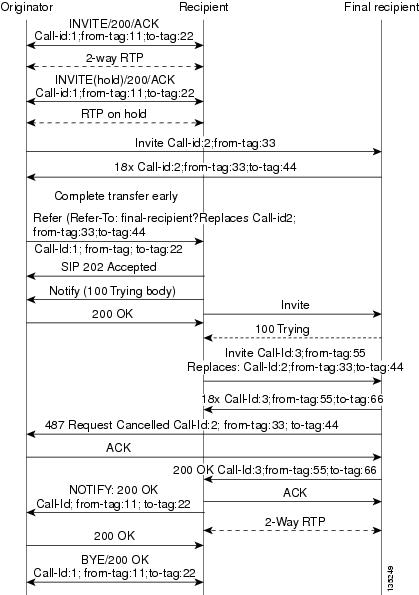
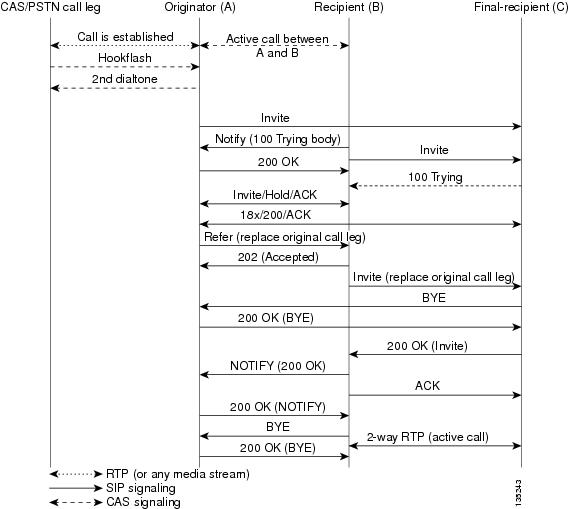
Replaces HeaderThe Replaces header is required in attended transfers. It indicates to the final recipient that the initial call leg (identified by the Call-ID header and tags) is to be shut down and replaced by the incoming INVITE request. The final recipient sends a Bye request to the originator to terminate its session. If the information provided by the Replaces header does not match an existing call leg, or if the information provided by the Replaces header matches a call leg but the call leg is not active (a Connect, 200 OK to the INVITE request has not been sent by the final-recipient), the triggered INVITE does not replace the initial call leg and the triggered INVITE request is processed normally. Any failure resulting from the triggered INVITE request from the recipient to the final recipient does not drop the call between the originator and the final recipient. In these scenarios, all calls that are active (originator to recipient and originator to final recipient) remain active after the failed attended transfer attempt The figure below shows a call flow for a successful attended transfer. Attended Transfer with Early CompletionAttended transfers allow the originator to have a call established between both the recipient and the final recipient. With attended transfer with early completion, the call between the originator and the final recipient does not have to be active, or in the talking state, before the originator can transfer it to the recipient. The originator establishes a call with the recipient and only needs to be setting up a call with the final recipient. The final recipient may be ringing, but has not answered the call from the originator when it receives a re-INVITE to replace the call with the originator and the recipient. The process for attended transfer with early completion is as follows (see the figure below):
Referred-By HeaderFor consistency with existing billing models, Referred-By and Requested-By headers are populated in call history tables as a VSA. Cisco VSAs are used for VoIP call authorization. The new VSA tag supp-svc-xfer-byhelps to associate the call legs for call-detail-record (CDR) generation. The call legs can be originator-to-recipient or recipient-to-final-recipient. The VSA tag supp-svc-xfer-by contains the user@host portion of the SIP URL of the Referred-By header for transfers performed with the Refer message request. For transfers performed with the Bye/Also message request, the tag contains user@host portion of the SIP URL of the Requested-By header. For each call on the gateway, two RADIUS records are generated: start and stop. The supp-svc-xfer-byVSA is generated only for stop records and is generated only on the recipient gateway--the gateway receiving the Refer or Bye/Also message. The VSA is generated when a gateway that acts as a recipient receives a Refer or Bye/Also message with the Referred-By or Requested-By headers. There are usually two pairs of start and stop records. There is a start and stop record between the recipient and the originator and also between the recipient to final recipient. In the latter case, the VSA is generated between the recipient to the final recipient only. Business Group FieldA new business group VSA field has been added that assists service providers with billing. The field allows service providers to add a proprietary header to call records. The VSA tag for business group ID is cust-biz-grp-id and is generated only for stop records. It is generated when the gateway receives an initial INVITE with a vendor dial-plan header to be used in call records. In cases when the gateway acts as a recipient, the VSA is populated in the stop records between the recipient and originator and the final recipient.
SIP Call Transfer and Call Forwarding Using Tcl IVR 2.0 and VoiceXML Applications
SIP Call Transfer and Call Forwarding with a Tcl IVR ScriptWhen using a Tcl IVR 2.0 application, you can implement SIP support of blind, or attended, call-transfer and call-forwarding requests from a Cisco IOS gateway. A blind transfer is one in which the transferring phone connects the caller to a destination line before ringback begins. This is different from a consultative transfer in which one of the transferring parties either connects the caller to a ringing phone (ringback heard) or speaks with the third party before connecting the caller to the third party. Blind transfers are often preferred by automated devices that do not have the capability to make consultation calls. Before implementing blind transfer and call forwarding, you must write a custom Tcl IVR 2.0 script that implements call transfer and call forwarding. The script is responsible for receiving the hookflash event, providing dial tone, matching against the dial plan, initiating call transfer, and reestablishing the original call if the transfer attempt fails.
When the Tcl IVR script runs on the Cisco gateway, it can respond to requests to initiate blind call transfer (transfer without consultation) on a SIP call leg. SIP call forwarding on ephones (IP phones that are not configured on the gateway) is also supported.
Release Link Trunking on SIP GatewaysRelease link trunking (RLT) functionality has been added to Cisco IOS SIP gateways. With RLT functionality, SIP call transfer now can be triggered by channel associated signaling (CAS) trunk signaling, which the custom Tcl IVR application can monitor. After a SIP call transfer has transpired and the CAS interface is no longer required, the CAS interface can be released. The RLT functionality can be used to initiate blind transfers on SIP gateways. Blind call transfer uses the Refer message request. A full description of blind transfer and the Refer message request can be found in the "Configuring SIP Call-Transfer Features" chapter. RLT and SIP Call TransfersCall transfer can be triggered by CAS trunk signaling and then captured by the Tcl IVR script on a gateway. The process begins with the originator (the SIP user agent that initiates the transfer or Refer message request) responding with a dial tone once the originator receives the signal or hookflash from the PSTN call leg. The originator then prepares to receive dual-tone multifrequency (DTMF) digits that identify the final recipient (the user agent introduced into a call with the recipient). Once the first DTMF digit is received, the dial tone is discontinued. DTMF-digit collection is not completed until a 4-second interdigit timeout occurs, or an on-hook is received on that specific CAS time slot. Call transfer starts when DTMF-digit collection is successful. If digit collection fails, for example, if not enough DTMF digits or invalid digits are collected, the initial call is reestablished. Once the DTMF digits are successfully collected, the Tcl IVR script can initiate call transfer. SIP messaging begins when the transfer is initiated with the Refer message request. The originator sends an INVITE to the recipient (the user agent that receives the Refer message request and is transferred to the final recipient) to hold the call and request that the recipient not return Real-Time Transport Protocol (RTP) packets to the originator. The originator then sends a SIP Refer message request to the recipient to start the transfer process. When the recipient receives the request, the recipient returns a 202 Accepted acknowledgment to the originator. The Tcl IVR script run by the originator can then release the CAS trunk and close the primary call. See the figure below. If the recipient does not support the Refer message request, a 501 Not implemented message is returned. However, for backward compatibility purposes, the call transfer is automatically continued with the Bye/Also message request. The originator sends a Bye/Also request to the recipient and releases the CAS trunk with the PSTN call leg. The primary call between the originator and the recipient is closed when a 200 OK response is received. In all other cases of call-transfer failures, the primary call between the originator and the recipient is immediately shut down. SIP and TEL URLs in Call TransfersWhen the SIP call-transfer originator collects DTMF digits from the CAS trunk, it attempts to find a dial peer. If a dial peer is found, the session target in the dial peer is used to formulate a SIP URL. This URL can be used with both the Refer message request and the Bye/Also message request. A SIP URL is in the following form: sip:JohnSmith@example.com If a valid dial peer is not found, a Telephone Uniform Resource Locator (TEL URL) is formulated in the Refer-To header. A TEL URL is in the following form: tel:+11235550100 The choice of which URL to use is critical when correctly routing SIP calls. For example, the originating gateway can send out a Bye with an Also header, but the Also header can carry only a SIP URL. The Also header cannot carry a TEL URL. That is, if the gateway decides to send a Bye/Also but cannot find a matched dial peer, the gateway reports an error on the transfer gateway and sends a Bye without the Also header. If the recipient of a SIP call transfer is a SIP phone, the phone must have the capability to interpret either the Refer message request or the Bye/Also message request for the call transfer to work. If the recipient is a Cisco IOS gateway, there needs to be a matching dial peer for the Refer-To user . User, looking at the previous example, can be either JohnSmith or 11235550100 . The dial peer also needs to have an application session defined, where session can be the name of a Tcl IVR application. If there is no match, a 4xx error is sent back and no transfer occurs. If there is a POTS dial-peer match, a call is made to that POTS phone. Before Cisco IOS Release 12.2(15)T, if there is a VoIP match, the Refer-To URL is used to initiate a SIP call. In Release 12.2(15)T and later releases, the application session target in the dial peer is used for the SIP call. SIP Gateway Initiation of Call TransfersSIP gateways can also initiate, or originate, attended call transfers. The process begins when the originator establishes a call with the recipient. When the user on the PSTN call leg wants to transfer the call, the user uses hookflash to get a second dial tone and then enters the final recipient's number. The Tcl IVR script can then put the original call on hold and set up the call to the final-recipient, making the originator active with the final-recipient. The Refer message request is sent out when the user hangs up to transfer the call. The Refer message request contains a Replaces header that contains three tags: SIP CallID , from , and to . The tags are passed along in the INVITE from the recipient to the final recipient, giving the final recipient adequate information to replace the call leg. The host portion of the Refer message request is built from the established initial call. The following is an example of a Refer message request that contains a Replaces header:
Refer sip:5550100@172.16.190.100:5060;user=phone SIP/2.0 Via: SIP/2.0/UDP 172.16.190.99:5060 From: "5550101" <sip:5555555@172.16.190.187> To: <sip:5550100@172.16.190.187>;tag=A7C2C-1E8C Date: Sat, 01 Jan 2000 05:15:06 GMT Call-ID: c2943000-106ae5-1c5f-3428@172.16.197.182 User-Agent: Cisco-SIPGateway/IOS-12.x Max-Forwards: 6 Timestamp: 946685709 CSeq: 103 Refer Refer-To: sip:5550101@10.102.17.217?Replaces=DD713380-339C11CC-80BCF308-92BA812C@172.16.195.77;to-tag=A5438-23E4;from-tag=C9122EDB-2408 Referred-By: <sip:5550101@172.16.190.99> Content-Length: 0 Once the NOTIFY is received by the originator, the Tcl IVR script can disconnect the call between the originator and the recipient. The call between the originator and the final recipient is disconnected by the recipient sending a BYE to the originator. See the figure below for a call flow of a successful call transfer. If the recipient does not support the Refer message request, a 501 Not implemented message is returned. In all other cases of call-transfer failures, the primary call between the originator and the recipient is immediately shut down. The figure below shows the recipient hanging up the call before the transfer completes. The item to notice is that the NOTIFY message is never sent. SIP Call ForwardingSIP call forwarding is supported only on ephones--IP phones that are not configured on the gateway. Foreign exchange station (FXS), foreign exchange office (FXO), T1, E1, and CAS phones are not supported. With ephones, four different types of SIP call forwarding are supported:
In all four of these call-forwarding types, a 302 Moved Temporarily response is sent to the user-agent client. A Diversion header included in the 302 response indicates the type of forward. The 302 response also includes a Contact header, which is generated by the calling number that is provided by the custom Tcl IVR script. The 302 response also includes the host portion found in the dial peer for that calling number. If the calling number cannot match a VoIP dial-peer or POTS dial-peer number, a 503 Service Unavailable message is sent, except in the case of the Call Forward No Answer. With Call Forward No Answer, call forwarding is ignored, the phone rings, and the expires timer clears the call if there is no answer. SUBSCRIBE or NOTIFY Message Request SupportThe Cisco IOS gateway accepts in dialog the SUBSCRIBE message requests with the same Call-Id and tags (to and from) for out-of-band (OOB) DTMF for Event header: telephone event. There can be an ID parameter in it, but the gateway supports in-dialog subscription for only one event. After the subscription is accepted, an initial NOTIFY message request is sent and includes a Subscription-State header as per RFC 3265. When a digit is pressed on the PSTN end, the digit event is sent in the NOTIFY message requests. The Subscription-State header in these requests is active. When the subscription expires before it is refreshed, the gateway terminates it by sending a NOTIFY message request with a Subscription-State header value set to terminated. The subscriber can always refresh the subscription by sending another SUBSCRIBE message request with the same Call-Id and tags as in the initial SUBSCRIBE message request. If the INVITE message request dialog is terminated before the subscription expires, the subscription is terminated by sending a NOTIFY message request with a Subscription-State header value set to terminated. The gateway does not support generating in-dialog SUBSCRIBE message request. SIP NOTIFY-Based Out-of-Band DTMF RelayThe Skinny Client Control Protocol (SCCP) IP phones do not support in-band DTMF digits; they are capable of sending only out-of-band DTMF digits. To support SCCP devices, originating and terminating SIP gateways can use Cisco-proprietary NOTIFY-based out-of-band DTMF relay. In addition, NOTIFY-based out-of-band DTMF relay can also be used by analog phones attached to analog voice ports (FXS) on the router. NOTIFY-based out-of-band DTMF relay sends messages bidirectionally between the originating and terminating gateways for a DTMF event during a call. If multiple DTMF relay mechanisms are enabled on a SIP dial peer and are negotiated successfully, NOTIFY-based out-of-band DTMF relay takes precedence. The originating gateway sends an INVITE message with a SIP Call-Info header to indicate the use of NOTIFY-based out-of-band DTMF relay. The terminating gateway acknowledges the message with an 18x or 200 Response message, also using the Call-Info header. The Call-Info header for NOTIFY-based out-of-band relay appears as follows: Call-Info: <sip: address>; method="NOTIFY;Event=telephone-event;Duration=msec"
The NOTIFY-based out-of-band DTMF relay mechanism is negotiated by the SIP INVITE and 18x/200 Response messages. Then, when a DTMF event occurs, the gateway sends a SIP NOTIFY message for that event. In response, the gateway expects to receive a 200 OK message. The NOTIFY-based out-of-band DTMF relay mechanism is similar to the DTMF message format described in RFC 2833. NOTIFY-based out-of-band DTMF relay consists of 4 bytes in a binary encoded format. The message format is shown in the figure below; the table below describes the fields.
Sending NOTIFY MessagesAs soon as the DTMF event is recognized, the gateway sends out an initial NOTIFY message for this event with the duration negotiated in the Call-Info header of the SIP INVITE. For the initial NOTIFY message, the end bit is set to zero. Afterward, one of the following actions can occur:
For example, if the negotiated duration is 600 ms, as soon as a DTMF event occurs, the initial NOTIFY message is sent with duration as 600 ms. Then a timer starts for this duration.
Every DTMF event corresponds to at least two NOTIFY message requests: an initial NOTIFY message and an end NOTIFY message. There might also be some update NOTIFY message requests involved, if the total duration of the event is greater than the negotiated max-duration interval. Because DTMF events generally last for less than 1000 ms, setting the duration using the notify telephone-event command to more than 1000 ms reduces the total number of NOTIFY messages sent. The default value of the notify telephone-event command is 2000 ms. Receiving NOTIFY MessagesOnce a NOTIFY message is received by the terminating gateway, the DTMF tone plays and a timer is set for the value in the duration field. Afterward, one of the following actions can occur:
Two commands allow you to enable or disable NOTIFY-based out-of-band DTMF relay on a dial peer. The functionality is advertised to the other end using INVITE messages if it is enabled by the commands, and must be configured on both the originating and terminating SIP gateways. A third command allows you to verify DTMF relay status: The NOTIFY message request has a Subscription-State header per RFC 3265. Refer to the "Configuring SIP DTMF Features" module for additional information that relates to the DTMF feature. Support for RFC 3312--QoSThis feature provides implementation on the gateway with suitable enhancements to the common stack to support quality of service (QoS) RSVP calls adhering to RFC 3312. This feature changes the existing implementation and follows RFC 3312 to provide QoS services using RSVP.
SIP Portable Stack Considerations for QoSThe portable SIP stack is unaware of the type of call (QoS or regular). All QoS-related information carried by SIP or SDP are passed by or to the application. The application takes the necessary steps to distinguish the type of call and handle it accordingly, transparent to the portable SIP stack. From the portable SIP stack's perspective, the call flow for establishing a QoS call is similar to that of a non-QoS call. The only additions to the portable SIP stack application for establishing or modifying QoS calls are as follows:
Behavior for QoS with RFC 3312 for Cisco IOS GatewaysThe following lists the behavior that SIP QoS calls exhibits on Cisco IOS gateways, with RFC 3312 complaint stack as opposed to existing ICEE implementation:
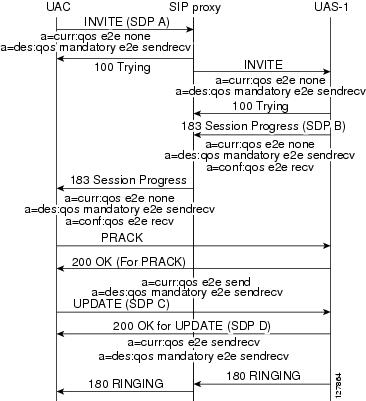
Current Status--This attribute carries the current status of the network resources for a particular media stream in either offer or answer SDP. The gateways generates the following values depending on the state of the reservation. Desired Status--This attribute states the preconditions for a particular media stream. For the Cisco IOS gateway the reservation is always applicable end-to-end status with resources reserved in either direction. The strength tag is configurable. Confirmation Status--This attribute carries the information for the other gateway to notify back (using the UPDATE message request) once resource reservations are done on its end. On Cisco IOS gateways the originating gateways never request confirmation from the terminating gateway and if that fails, then the call is not presented and is terminated with a 580 (Precondition Failure) message response. The terminating gateway always asks for confirmation from the originating gateway when its reservations are done using the UPDATE message request. This is requested through the 183 message response for the INVITE message request.
Backward CompatibilityThe QoS call flows are not backward compatible on Cisco IOS gateways. SIP continues to use existing RSVP Cisco IOS subsystem and its APIs but the SIP or SDP signalling involved is different from the existing implementation. COMET Message Request ObsolescenceThis feature stack is obsoletes the usage (sending or receiving) of COMET message requests. This message request is replaced by UPDATE message request. This change has minor impact on the Call Admission Control feature on Cisco IOS gateways. QoS is the only other feature to use COMET. The CAC feature is using the UPDATE message request instead of COMET. QoS Call FlowThe flows shown in the figure below show a two-party call that invokes RSVP services to reserve resources before the called party is alerted. On the Cisco IOS gateway for this feature implementation the originating gateway does not need confirmation for INVITE message request preconditions. All the QoS SDP attributes shown are media-level attributes. If multiple media lines are associated with their own QoS attributes, then only the first media line QoS is honored. Support for the Achieving SIP RFC Compliance FeatureThe Achieving SIP RFC Compliance feature enhances SIP gateway compliance for RFCs 3261, 3262, and 3264. This feature inherits these enhancements for the portable stack. Refer to the "Achieving SIP RFC Compliance" chapter for a description of introduced enhancements. Enhanced Redirect HandlingThe portable stack handles redirections (3xx or 485 message responses) internally. When a 3xx or 485 class message response is received by the SIP stack, the stack sends out a new INVITE message request to the contact in the 3xx message response, without notification to the application. In this feature, the functionality is opened up to the application. Upon receipt of a 3xx or 485 message response the application has the ability to take over the redirect response. When the application decides to handle the redirect, the SIP stack disconnects the original call that the 3xx or 485 message response received, and the application takes over responsibilities for setting up the new call. Diversion Header Draft 06 ComplianceThis feature upgrades the Diversion header draft implementation to the draft-levy-diversion-06.txt version. This upgrade adds the capability to send or receive two new parameters in the Diversion header. The stack adds two new fields to set or pass this information to and from the application.
SIP Domain Name Support in SIP HeadersThe SIP: Domain Name Support in SIP Headers feature adds a command line interface (CLI) switch to provide a host or domain name in the host portion of the locally generated SIP headers (for example, From, RPID, and Call-ID). This feature also affects outgoing dialog-initiating SIP requests (for example, INVITE and SUBSCRIBE message requests). To configure this feature, you should understand the following concepts: Vendor-specific attribute (VSA) is introduced to generate information about the locally configured host or domain name in the accounting records generated by the gateway. For a complete list of VSA changes, see the RADIUS VSA Voice Implementation Guide . Call Active and History VoIP RecordsCall active and history VoIP records present the local hostname. They have the following format: #show call active voice VOIP: LocalHostname=example.com These records are generated for calls created in the context of the INVITE message request. SIP HeadersThe CLI affects the host portion of the following SIP headers generated for an outbound VoIP call from the SIP gateway:
Other SIP headers such as Contact and Via are not affected by configuring the new CLI. Those headers continue to have IP addresses even when the CLI is configured. These changes do not affect the Session Definition Protocol (SDP). SIP headers that are provided by the application to SIP via header passing mechanisms always override headers generated by SIP. Sample SIP Header MessagesThis section contains the following sample SIP header messages with the SIP: Domain Name Support in SIP Headers feature disabled and enabled: Feature Disabled--INVITE Message Request Sent from the GatewaySent: INVITE sip:9002@example.sip.com:5060 SIP/2.0 Via:SIP/2.0/TCP 172.18.195.49;branch=z9hG4bK597 Remote-Party-ID:<sip:9001@172.18.195.49>;party=calling;screen=no;privacy=off From:<sip:9001@172.18.195.49>;tag=3AA7574-11BA To:<sip:9002@example.sip.com> Date:Tue, 31 Aug 2004 13:40:57 GMT Call-ID:3924408D-FA8A11D8-80208D32-72E3122E@172.18.195.49 Supported:100rel,timer,resource-priority Min-SE:1800 Cisco-Guid:940277299-4203352536-2149420338-1927483950 User-Agent:Cisco-SIPGateway/IOS-12.x Allow:INVITE, OPTIONS, BYE, CANCEL, ACK, PRACK, UPDATE, Refer , SUBSCRIBE, NOTIFY, INFO, REGISTER CSeq:101 INVITE Max-Forwards:70 Timestamp:1093959657 Contact:<sip:9001@172.18.195.49:5060;transport=tcp> Expires:180 Allow-Events:telephone-event Content-Type:multipart/mixed;boundary=uniqueBoundary Mime-Version:1.0 Content-Length:418 --uniqueBoundary Content-Type:application/sdp Content-Disposition:session;handling=required v=0 o=CiscoSystemsSIP-GW-UserAgent 4780 5715 IN IP4 172.18.195.49 s=SIP Call c=IN IP4 172.18.195.49 t=0 0 m=audio 18336 RTP/AVP 18 101 19 c=IN IP4 172.18.195.49 a=rtpmap:18 G729/8000 a=fmtp:18 annexb=no a=rtpmap:101 telephone-event/8000 a=fmtp:101 0-16 a=rtpmap:19 CN/8000 a=ptime:20 --uniqueBoundary-- Feature Enabled--INVITE Message Request Sent from the GatewaySent: INVITE sip:9002@example.sip.com:5060 SIP/2.0 Via:SIP/2.0/TCP 172.18.195.49;branch=z9hG4bK22C7 Remote-Party-ID:<sip:9001@gw11.example.com>;party=calling;screen=no;privacy=off From:<sip:9001@gw11.example.com>;tag=39CF740-FFC To:<sip:9002@example.sip.com> Date:Tue, 31 Aug 2004 13:26:13 GMT Call-ID:2A101AD3-FA8811D8-801C8D32-72E3122E@gw11.example.com Supported:100rel,timer,resource-priority Min-SE:1800 Cisco-Guid:686218050-4203221464-2149158194-1927483950 User-Agent:Cisco-SIPGateway/IOS-12.x Allow:INVITE, OPTIONS, BYE, CANCEL, ACK, PRACK, UPDATE, Refer , SUBSCRIBE, NOTIFY, INFO, REGISTER CSeq:101 INVITE Max-Forwards:70 Timestamp:1093958773 Contact:<sip:9001@172.18.195.49:5060;transport=tcp> Expires:180 Allow-Events:telephone-event Content-Type:multipart/mixed;boundary=uniqueBoundary Mime-Version:1.0 Content-Length:418 --uniqueBoundary Content-Type:application/sdp Content-Disposition:session;handling=required v=0 o=CiscoSystemsSIP-GW-UserAgent 5250 7833 IN IP4 172.18.195.49 s=SIP Call c=IN IP4 172.18.195.49 t=0 0 m=audio 18998 RTP/AVP 18 101 19 c=IN IP4 172.18.195.49 a=rtpmap:18 G729/8000 a=fmtp:18 annexb=no a=rtpmap:101 telephone-event/8000 a=fmtp:101 0-16 a=rtpmap:19 CN/8000 a=ptime:20 --uniqueBoundary-- SIP Gateway Support for SDP Session Information and Permit Hostname CLIThe SIP GW Support for SDP Session Information and Permit Hostname CLI Feature adds support to Cisco IOS SIP gateways for both SDP session information and validation of hostnames in initial INVITE requests. SDP Changes for Session Information LineThe SDP Session Information line can exist multiple times within a session description. The line, represented by "i=" in the SDP, can be present at the session-level as well as the media-level. You can have only one session description per packet. The session description contains one session-level, but can have multiple media-levels. The following is a sample SDP description. The highlighted lines represent the updates to reflect RFC 2327: v=0 o=mhandley 2890844526 2890842807 IN IP4 126.16.64.4 s=SDP Seminar i=A Seminar on the session description protocol u=http://www.cs.ucl.ac.uk/staff/M.Handley/sdp.03.ps e=mjh@isi.edu (Mark Handley) c=IN IP4 224.2.17.12/127 t=2873397496 2873404696 a=recvonly m=audio 49170 RTP/AVP 0 i=media-information 1 m=video 51372 RTP/AVP 31 i=media-information 2 m=application 32416 udp wb a=orient:portrait The session information is optional, therefore internal structures are not built to expect this parameter. Specifically, internal memory is only allocated for this parameter when it is present in SDP, or when the application specifies that it be built into an outgoing message. In order to protect the internal operation of the Cisco IOS gateway, the maximum allowable length of a received session information line is 1000 characters. Session information lines over 1000 characters are truncated. While the RFC detailing SDP indicates to only expect one session information line at the appropriate level, the Cisco IOS gateway will not "drop" the SDP in the event that this rule is violated. In the event that multiple "i=" lines are received at a particular level, the first parsed line that contains data is stored. All subsequent lines for that level are dropped. Validating Hostname in Initial INVITE Request URIBeginning with Cisco IOS Software Release 12.4(9)T, administrators can validate hostnames of incoming initial INVITE messages. When the gateway processes an initial INVITE, a determination is made whether or not the host portion is in ipv4 format or a domain name. If the host portion is an IP address, its IP address is compared with the interfaces on the gateway. If a match is found, the INVITE is processed as normal. If there is not a match, the gateway sends a 400 Bad Request - 'Invalid IP Address' message. If the initial INVITE has a domain name in the host of the request URI, the gateway checks this domain name against a list of configured hostnames. If you configure no hostnames, existing behavior executes and the INVITE is processed. If you configure hostnames for this gateway, the gateway compares the host name in the request URI to the configured hostname list. If a match is found, the INVITE is processed as normal. If there is not a match, the gateway sends a 400 Bad Request - 'Invalid host' message. You can configure up to 10 hostnames by re-entering the permit hostname dnscommand. Use the no form of this command to remove any configured hostnames. The following example shows a configured list of hostnames. The highlighted lines represent the updates to reflect RFC 2327. sip-ua retry invite 1 registrar ipv4:172.18.193.97 expires 3600 permit hostname dns:sinise.sip.com permit hostname dns:liotta.sip.com permit hostname dns:sipgw.sip.com permit hostname dns:yourgw.sip.com permit hostname dns:csps.sip.com ! The following example shows an initial INVITE message with a hostname. The highlighted line represents the updates to reflect RFC 2327. INVITE sip:777@sinise.sip.com;user=phone SIP/2.0 Via: SIP/2.0/UDP 172.18.201.173:5060;branch=z9hG4bK2C419 To: <sip:777@172.18.197.154> From: <sip:333@64.102.17.246>;tag=B87C0-B65 Date: Thu, 23 Feb 2006 16:49:26 GMT Call-ID: 4EAF670B-A3C311DA-80148B65-6E225A8E@172.18.197.154 Contact: <sip:333@172.18.201.173> Supported: 100rel, eatit Allow: INVITE, OPTIONS, BYE, CANCEL, ACK, PRACK, COMET, Refer, SUBSCRIBE, NOTIFY, INFO Max-Forwards: 70 Cseq: 104 INVITE Expires: 60 Timestamp: 730947404 Content-Length: 211 Content-Type: application/sdp ^M v=0 o=CiscoSystemsSIP-GW-UserAgent 6109 4520 IN IP4 172.18.201.173 s=SIP Call c=IN IP4 111.11.111.111 t=0 0 m=audio 16880 RTP/AVP 0 19 c=IN IP4 111.11.111.111 a=rtpmap:0 PCMU/8000 a=rtpmap:19 CN/8000 a=ptime:20 Outbound Proxy Support for the SIP GatewayThe Outbound Proxy Support for the SIP Gateway feature allows you to configure an outbound proxy server on a SIP gateway. You can use the outbound-proxy command to globally configure a SIP gateway to send all dialog initiating requests (such as INVITE, SUBSCRIBE, and REGISTER) to a specified destination. You can also use the voice-class sip outbound-proxy command to configure these settings on an individual dial peer, overriding the global gateway settings (refer to the Cisco IOS Voice Command Reference). The request-uri of these dialog initiating requests are extracted from the session-target and does not reflect that the request is sent to a configured outbound-proxy server. The outbound-proxy server, based on the host in the request-uri, routes it accordingly. However, in some scenarios, it is possible that calls coming in over a SIP trunk to Cisco Unified CME get forwarded to the outbound SIP proxy rather than directly to the phone. To correct this behavior, use the outbound-proxy system command to configure SIP line-side phones on Cisco Unified CME (refer to the Cisco Unified Communications Manager Express Command Reference). SIP SIP Support for PAIThe SIP Support for PAI feature allows you to configure privacy headers into associated SIP request messages, as defined in RFC 3323 and RFC 3325. This feature introduces the privacy and asserted-id commands which you can use to build various privacy-header requests into common SIP messages, as shown in the table below. SIP History-info Header SupportThe SIP History-info Header Support feature provides support for the history-info header in SIP INVITE messages only. The SIP gateway generates history information in the INVITE message for all forwarded and transferred calls. The history-info header records the call or dialog history. The receiving application uses the history-info header information to determine how and why the call has reached it. The receiving application can use the call or dialog history to enhance services, such as calls to voice mail servers or sessions initiated to call centers from a click-to-talk SIP URL on a web page. To configure the SIP History-info Header Support feature, you need to understand the following concepts: Feature Design of SIP History-Info Header SupportCisco implements SIP History-Info Header Support on SIP TDM gateways and SIP-SIP Cisco UBEs by supporting the history-info header, as defined in RFC 4244 , An Extension to the Session Initiation Protocol (SIP) for Request History Information. The history-info header forms part of the SIP INVITE messages that establish media sessions between user agents, and the subsequent responses to the INVITE messages. Support for history-info headers on a gateway is enabled using the history-info command. The system supports multiple history-info headers ( maximum of nine) for a single INVITE message. The headers are contained in a comma-separated list.
SIP History-Info Header Support on SIP TDM GatewaysWhen the TDM gateway sends an INVITE message, it creates the history-info header based on the request URI. When the gateway receives a redirected PSTN call, it builds the history-info header using the redirect information provided by the PSTN source signaling address, the local host configuration (DNS name), and the host registrar. To maintain the correct order and to record any redirection of a request, the header includes index information (as a series of dot-delimited digits). The index format is defined in RFC 4244 section 4.3.3.1.3. If history-info headers are enabled for the SIP stage, the gateway sends both diversion headers and history-info headers in the outbound request. However, the history-info header takes precedence when the gateway maps the header to the ISDN redirect number. SIP History-Info Header Support on SIP-SIP Cisco Unified Border Element GatewaysWhen the Cisco UBE gateway receives an inbound INVITE message without a history-Info header, it generates the history-Info header based on the request URI of the outbound INVITE message. If privacy is enabled on the gateway, history is added to the privacy settings. When Cisco UBE receives an outbound message, it adds the history-Info header to the message based on the request URI. Cisco UBE supports multiple history-Info headers, and history-Info headers received on the incoming SIP call leg are sent to the peer SIP leg. Cisco UBE can support upto a maximum of nine history-Info headers. If Cisco UBE receives a message with nine or more headers, it keeps only the first eight messages and adds a new header to the end of the header list. When history-Info privacy is configured on the Cisco UBE, it transparently passes all history-Info and privacy headers in the message from one SIP stage to the next. If history-Info headers are enabled for the SIP stage, the gateway behaves as follows:
If history-Info headers are disabled for the SIP stage, Cisco UBE sends all diversion headers (including any new diversion headers) to the next SIP stage. SIP Trunk RegistrationThe Cisco IOS gateway registers all its POTS dial peers to the registrar when the registrar is configured on the Gateway. With the introduction of trunk registration support, registration of a single number would represent the SIP trunk. SIP trunk registration can be associated with multiple dial-peers for routing outbound calls. This registration will represent all the gateway end points for routing calls from or to the endpoints. IOS-SIP gateway sends the REGISTER request to the configured registrar after resolving the outbound-proxy DNS name.On successful registration, IOS-SIP gateway re-uses the Outbound Proxy IP address, port number, service-route response received for sending subsequent REGISTER/INVITE. Support for SIP 181 Call is Being Forwarded MessageSupport for SIP 181 Call is Being Forwarded message on Cisco IOS SIP TDM gateways and Cisco UBEs. This feature is enabled by default, allowing Cisco IOS SIP TDM gateways and Cisco UBEs to pass SIP 181 messages as is. To disable this feature for all SIP 181 messages or for SIP 181 messages either with or without SDP, see the block and voice-class sip block commands in the Cisco IOS Voice Command Reference. On the Cisco UBE, this feature also adds the ability to receive SIP 181 messages on one leg and send out SIP 183 messages on the other leg. For details about enabling this feature on a Cisco UBE, see the map resp-code and voice-class sip map resp-code commands, also in the Cisco IOS Voice Command Reference. Support for Expires Timer Reset on Receiving or Sending SIP 183 MessageSupport for resetting the Expires timer upon receipt of SIP 183 messages on Cisco Unified Communications Manager Express (Cisco Unified CME), a Cisco IOS voice gateway, or a Cisco UBE. When the terminating device lacks answer supervision or does not send the required SIP 200 OK message within the timer expiry, you can enable this feature to send periodic SIP 183 messages to reset the Expires timer and preserve the call until final response. This feature can be enabled globally or on a specific dial peer. Additionally, you can configure this feature based on the presence or absence of SDP. For details about enabling this feature, see the reset timer expires and voice-class sip reset timer expires commands in the Cisco IOS Voice Command Reference. Support for Stripping off Progress Indication from Incoming ISDN Messages on SIP and H.323 TDM GatewaysYou can use the progress_ind command to configure replacement behavior on outbound dial peers on a Cisco IOS SIP or H.323 TDM voice gateway or Cisco UBE to ensure proper end-to-end signaling of VoIP calls. You can also use this command to configure removal (stripping) of PIs on outbound dial peers on Cisco IOS voice gateways or Cisco UBEs, such as when configuring a Cisco IOS SIP gateway (or SIP-SIP Cisco UBE) to not generate additional SIP 183 Session In Progress messages. However, before configuring the progress_ind command on an outbound dial peer, you must configure a destination pattern on the dial peer. To configure a destination pattern for an outbound dial peer, use the destination-pattern command in dial peer voice configuration mode. Once you have set a destination pattern on the dial peer, you can then use the progress_ind command, also in dial peer voice configuration mode, to override and replace or remove the default progress indication (PI) in specific call message types. For messages that contain multiple PIs, behavior configured using the progress_ind command will override only the first PI in the message. Additionally, configuring a replacement PI will not result in an override of the default PI in call Progress messages if the Progress message is sent after a backward cut-through event, such as when an Alert message with a PI of 8 was sent before the Progress message. For details about enabling this feature, see the progress_ind command in the Cisco IOS Voice Command Reference. How to Configure SIP Message Timer and Response Features
Configuring Internal Cause Code Consistency Between SIP and H.323Configure Internal Cause Code Consistency Between SIP and H.323The standard set of cause-code categories that is now generated for internal voice call failures is used by default. To configure internal failures with existing or nonstandard H.323 and SIP cause codes, perform the following steps. DETAILED STEPS
Configuring SIP - Configurable PSTN Cause Code MappingMap PSTN Codes to SIP Status Codes
SUMMARY STEPS
DETAILED STEPS
Map SIP Status Codes to PSTN Cause Codes
SUMMARY STEPS
DETAILED STEPS
Configuring SIP Accept-Language Header SupportYou can configure Accept-Language header support in two different configuration modes: voice service configuration mode and dial-peer voice configuration mode. The gateway first checks for languages configured under the dial-peer voice configuration mode and failing a match will then default to the global voice service configuration. If no languages are configured in either mode, then the header is not added.
Perform this task to enable Accept-Language header support and specify languages carried in the Accept-Language header of SIP INVITE requests and OPTIONS responses.
DETAILED STEPS
The following is a partial list of supported language codes and languages. To display a complete listing, use the help command supported-language ?.
Configuring SIP Enhanced 180 Provisional Response HandlingThis feature allows you to do the following:
DETAILED STEPS
Configuring SIP Extensions for Caller Identity and Privacy
Configure Remote Party-IDThis feature is enabled by default; no configuration tasks are required to enable this feature. If the feature is disabled by means of the no remote-party-id command, perform this task to re-enable the feature. DETAILED STEPS
Configure SIP-to-PSTN Calling-Info PolicyWhen Remote-Party-ID support is enabled, the default calling-info treatment is the following:
To override the default calling-info treatment, perform this task to optionally configure SIP to PSTN calling-info policy. DETAILED STEPS
Configure PSTN-to-SIP Calling-Info PolicyTo override the default calling-info treatment, perform this task to optionally configure PSTN to SIP calling-info policy. DETAILED STEPS
Configuring SIP INVITE Request with Malformed Via HeaderThere are no configuration steps for this feature. Use the show sip-ua statistics command (see "Verifying SIP Message Components Session Timers and Responses Configuration") to display the Bad Request counter. Configuring Privacy HeadersYou can configure privacy headers according to values defined in RFC 3323 and RFC 3325 as shown in the table below.
UAC Gateway BehaviorWhen you configure the privacy command to use one of the header values shown in the table above, then the gateway's outgoing message request contains a privacy header set to the corresponding privacy value. The following example shows the format of the "From" header, if you configure the privacy command, based on RFC 3323: From: "Anonymous" <sip:anonymous@anonymous.invalid>; tag=<tag value> If you configure the privacy criticalcommand, the gateway adds a Proxy-Require header with the value set to critical. Thus, in the unlikely event that the user agent sends a request to an intermediary that does not support the described extension, the request will fail. If you configure the asserted-id paicommand, the gateway builds a PAI into the common SIP stack. The asserted-id paicommand has priority over the Remote-Party-ID (RPID) header and removes this header from any outbound message even if the router is configured to use the RPID header. If you configure the asserted-id ppicommand, the gateway builds a PPI into the common SIP stack. The asserted-id ppicommand has priority over the Remote-Party-ID (RPID) header and removes this header from any outbound message even if the router is configured to use the RPID header. Privacy Header PSTN with UAC GatewayYou can use the privacy pstn command to derive information passed in from the PSTN Octet 3a of the CALLING PARTY Information Element to enable privacy information on the VoIP side of the call. The data within the CALLING PARTY field indicates whether or not you want to relay calling information. The CALLING PARTY field also supplies information and details about who supplied the information, and whether or not the information has been verified. The table below summarizes the relationship between the ISDN Octet 3a values and the SIP-header values that the UAC gateway generates, when you configure the privacy pstn command.
Privacy Header PSTN with UAS GatewayWhen you configure a privacy header for PSTN by using the privacy pstn command, a UAS gateway maps headers in the incoming SIP messages to Octet 3a fields on the outbound side of the call. If a UAS gateway receives a message that has a Privacy header with a valid value, it ignores the privacy or asserted-id commands. The UAS gateway marks the outbound Octet 3a value Presentation Prohibited. If the UAS gateway does not receive a Privacy header, then the UAS gateway marks the outbound Octet 3a value as Presentation Allowed. If a UAS gateway receives an Asserted-ID header, and a valid Privacy header is within the same message, then the UAS gateway uses the Asserted-ID to derive the ISDN Name and Number fields. If the UAS gateway receives an Asserted-ID with PAI, then the Octet 3a Number Origin is marked as "User Provided, passed network screening." If the received Asserted-ID is PPI, then the Octet 3a Number Origin is marked as "User provided, number not screened." If a UAS gateway receives an Asserted-ID header that has no Privacy header in the same message, then the UAS gateway checks the asserted-id command. If you configure the asserted-id command, then the asserted-ID is used. Otherwise, the information in the "From" header is used to populate the appropriate ISDN fields. The table below summarizes the relationship between the ISDN Octet 3a values and SIP header values that the UAS gateway generates on the outbound side of the call.
Interaction with Caller ID When Privacy ExistsWhen you configure the privacy pstn command, on the UAC gateway side of the call, after configuring the substitute name command under the clid (voice-service-voip) command and defining no "Display Name" parameter, then the PAI or PPI substitutes the calling number in the Display field. The following example show a PAI header when the substitute name command is not set: P-Asserted_Identity: <sip:5551212@example.com> If you set the substitute name command, the header in the example is modified: P-Asserted_Identity: "5551212" <sip:5551212@example.com> When you configure the privacy pstn command, after configuring the strip pi-restrict allcommand under the clid (voice-service-voip) command, and if the CALLING INFORMATION Octet 3a indicates that the number is restricted, then the PAI/PPI value is not sent. On the UAS gateway side of the call, if you configure the clid network-providedcommand, it will override any value you set by using the privacycommand. If you configure the clid network-providedcommand and a PPI is received, the number in the Octet 3a is set to "Network Provided." If you do not configure the clid network-providedcommand, the number in the Octet 3a is set to "User Provided." If you configure the calling-info pstn-to-sip unscreened discardcommand and the privacy pstn command, and if the calling number has a screening indicator of "User-provided, not screened," or "User-provided, failed screen" the PAI/PPI is not sent. The table below summarizes the interaction when you configure the privacy pstn command.
Configuring SIP Session Timer Support
SUMMARY STEPS
DETAILED STEPS
Configuring SIP Cisco IOS Gateway Reason Header and Buffered Calling Name CompletionThe SIP: Cisco IOS Gateway Reason Header and Buffered Calling Name Completion feature implements support for Reason headers and buffered calling-name completion. Reason-header support on Cisco IOS gateways is defined by RFC 3326. Feature benefits include the following:
Configure Reason-Header OverrideSUMMARY STEPS
DETAILED STEPS
Configure Buffer Calling-Name CompletionSUMMARY STEPS
DETAILED STEPS
Configuring SIP SIP Header URL Support and SUBSCRIBE NOTIFY for External TriggersConfigure SIP Header SupportSUMMARY STEPS
DETAILED STEPS
Configure SIP SUBSCRIBE and NOTIFY for External Triggers
SUMMARY STEPS
DETAILED STEPS
Configuring SIP Stack PortabilityNo configuration tasks are required to configure the SIP stack portability feature. The feature is enabled by default. Configuring SIP Domain Name Support in SIP Headers
Configure the Hostname in Locally Generated SIP HeadersYou can configure the hostname in either of two configuration modes:
Gateway-Wide Configuration ModeThis procedure allows global configuration of the local hostname for use for locally generated URIs. DETAILED STEPS
Dial-Peer-Specific Configuration ModeThis procedure allows dial-peer configuration of the local hostname for use for locally generated URIs.
DETAILED STEPS
Monitor the Hostname in Locally Generated SIP Headers
SUMMARY STEPS
DETAILED STEPS
Examplesshow call active Command Output: ExampleThe following example shows active-call command output when the local hostname is enabled. Router# show call active voice Telephony call-legs:1 SIP call-legs:1 H323 call-legs:0 Call agent controlled call-legs:0 Multicast call-legs:0 Total call-legs:2 GENERIC: SetupTime=126640 ms Index=1 PeerAddress=9001 PeerSubAddress= PeerId=100 PeerIfIndex=6 LogicalIfIndex=4 ConnectTime=130300 ms CallDuration=00:00:47 sec CallState=4 CallOrigin=2 ChargedUnits=0 InfoType=speech TransmitPackets=2431 TransmitBytes=48620 ReceivePackets=2431 ReceiveBytes=48620 TELE: ConnectionId=[0xA0DC41CF 0x115511D9 0x8002EC82 0xAB4FD5BE] IncomingConnectionId=[0xA0DC41CF 0x115511D9 0x8002EC82 0xAB4FD5BE] CallID=1 TxDuration=48620 ms VoiceTxDuration=48620 ms FaxTxDuration=0 ms CoderTypeRate=g729r8 NoiseLevel=-61 ACOMLevel=3 OutSignalLevel=-35 InSignalLevel=-30 InfoActivity=2 ERLLevel=3 SessionTarget= ImgPages=0 CallerName= CallerIDBlocked=False OriginalCallingNumber= OriginalCallingOctet=0x0 OriginalCalledNumber= OriginalCalledOctet=0x80 OriginalRedirectCalledNumber= OriginalRedirectCalledOctet=0x0 TranslatedCallingNumber=9001 TranslatedCallingOctet=0x0 TranslatedCalledNumber= TranslatedCalledOctet=0x80 TranslatedRedirectCalledNumber= TranslatedRedirectCalledOctet=0x0 GwCollectedCalledNumber=9002 GENERIC: SetupTime=128980 ms Index=1 PeerAddress=9002 PeerSubAddress= PeerId=3301 PeerIfIndex=7 LogicalIfIndex=0 ConnectTime=130300 ms CallDuration=00:00:50 sec CallState=4 CallOrigin=1 ChargedUnits=0 InfoType=speech TransmitPackets=2587 TransmitBytes=51740 ReceivePackets=2587 ReceiveBytes=51740 VOIP: ConnectionId[0xA0DC41CF 0x115511D9 0x8002EC82 0xAB4FD5BE] IncomingConnectionId[0xA0DC41CF 0x115511D9 0x8002EC82 0xAB4FD5BE] CallID=2 RemoteIPAddress=172.18.193.87 RemoteUDPPort=17602 RemoteSignallingIPAddress=172.18.193.87 RemoteSignallingPort=5060 RemoteMediaIPAddress=172.18.193.87 RemoteMediaPort=17602 RoundTripDelay=2 ms SelectedQoS=best-effort tx_DtmfRelay=inband-voice FastConnect=FALSE AnnexE=FALSE Separate H245 Connection=FALSE H245 Tunneling=FALSE SessionProtocol=sipv2 ProtocolCallId=A240B4DC-115511D9-8005EC82-AB4FD5BE@pip.example.com SessionTarget=172.18.193.87 OnTimeRvPlayout=48620 GapFillWithSilence=0 ms GapFillWithPrediction=0 ms GapFillWithInterpolation=0 ms GapFillWithRedundancy=0 ms HiWaterPlayoutDelay=70 ms LoWaterPlayoutDelay=69 ms TxPakNumber=2434 TxSignalPak=0 TxComfortNoisePak=0 TxDuration=48680 TxVoiceDuration=48680 RxPakNumber=2434 RxSignalPak=0 RxDuration=0 TxVoiceDuration=48670 VoiceRxDuration=48620 RxOutOfSeq=0 RxLatePak=0 RxEarlyPak=0 PlayDelayCurrent=69 PlayDelayMin=69 PlayDelayMax=70 PlayDelayClockOffset=43547 PlayDelayJitter=0 PlayErrPredictive=0 PlayErrInterpolative=0 PlayErrSilence=0 PlayErrBufferOverFlow=0 PlayErrRetroactive=0 PlayErrTalkspurt=0 OutSignalLevel=-35 InSignalLevel=-30 LevelTxPowerMean=0 LevelRxPowerMean=-302 LevelBgNoise=0 ERLLevel=3 ACOMLevel=3 ErrRxDrop=0 ErrTxDrop=0 ErrTxControl=0 ErrRxControl=0 ReceiveDelay=69 ms LostPackets=0 EarlyPackets=0 LatePackets=0 SRTP = off VAD = enabled CoderTypeRate=g729r8 CodecBytes=20 Media Setting=flow-around CallerName= CallerIDBlocked=False OriginalCallingNumber=9001 OriginalCallingOctet=0x0 OriginalCalledNumber=9002 OriginalCalledOctet=0x80 OriginalRedirectCalledNumber= OriginalRedirectCalledOctet=0x0 TranslatedCallingNumber=9001 TranslatedCallingOctet=0x0 TranslatedCalledNumber=9002 TranslatedCalledOctet=0x80 TranslatedRedirectCalledNumber= TranslatedRedirectCalledOctet=0x0 GwCollectedCalledNumber=9002 GwOutpulsedCalledNumber=9002 GwOutpulsedCalledOctet3=0x80 GwOutpulsedCallingNumber=9001 GwOutpulsedCallingOctet3=0x0 GwOutpulsedCallingOctet3a=0x0 MediaInactiveDetected=no MediaInactiveTimestamp= MediaControlReceived= Username= LocalHostname=pip.example.com ! LocalHostname field Telephony call-legs:1 SIP call-legs:1 H323 call-legs:0 Call agent controlled call-legs:0 Multicast call-legs:0 Total call-legs:2 show call history Command Output: ExampleThe following example shows call-history command output when the local hostname is enabled. Router# show call history voice Telephony call-legs:1 SIP call-legs:1 H323 call-legs:0 Call agent controlled call-legs:0 Total call-legs:2 GENERIC: SetupTime=128980 ms Index=1 PeerAddress=9002 PeerSubAddress= PeerId=3301 PeerIfIndex=7 LogicalIfIndex=0 DisconnectCause=10 DisconnectText=normal call clearing (16) ConnectTime=130300 ms DisconnectTime=329120 ms CallDuration=00:03:18 sec CallOrigin=1 ReleaseSource=4 ChargedUnits=0 InfoType=speech TransmitPackets=9981 TransmitBytes=199601 ReceivePackets=9987 ReceiveBytes=199692 VOIP: ConnectionId[0xA0DC41CF 0x115511D9 0x8002EC82 0xAB4FD5BE] IncomingConnectionId[0xA0DC41CF 0x115511D9 0x8002EC82 0xAB4FD5BE] CallID=2 RemoteIPAddress=172.18.193.87 RemoteUDPPort=17602 RemoteSignallingIPAddress=172.18.193.87 RemoteSignallingPort=5060 RemoteMediaIPAddress=172.18.193.87 RemoteMediaPort=17602 SRTP = off RoundTripDelay=1 ms SelectedQoS=best-effort tx_DtmfRelay=inband-voice FastConnect=FALSE AnnexE=FALSE Separate H245 Connection=FALSE H245 Tunneling=FALSE SessionProtocol=sipv2 ProtocolCallId=A240B4DC-115511D9-8005EC82-AB4FD5BE@pip.example.com SessionTarget=172.18.193.87 OnTimeRvPlayout=195880 GapFillWithSilence=0 ms GapFillWithPrediction=0 ms GapFillWithInterpolation=0 ms GapFillWithRedundancy=0 ms HiWaterPlayoutDelay=70 ms LoWaterPlayoutDelay=69 ms ReceiveDelay=69 ms LostPackets=0 EarlyPackets=0 LatePackets=0 VAD = enabled CoderTypeRate=g729r8 CodecBytes=20 cvVoIPCallHistoryIcpif=2 MediaSetting=flow-around CallerName= CallerIDBlocked=False OriginalCallingNumber=9001 OriginalCallingOctet=0x0 OriginalCalledNumber=9002 OriginalCalledOctet=0x80 OriginalRedirectCalledNumber= OriginalRedirectCalledOctet=0x0 TranslatedCallingNumber=9001 TranslatedCallingOctet=0x0 TranslatedCalledNumber=9002 TranslatedCalledOctet=0x80 TranslatedRedirectCalledNumber= TranslatedRedirectCalledOctet=0x0 GwCollectedCalledNumber=9002 GwOutpulsedCalledNumber=9002 GwOutpulsedCalledOctet3=0x80 GwOutpulsedCallingNumber=9001 GwOutpulsedCallingOctet3=0x0 GwOutpulsedCallingOctet3a=0x0 MediaInactiveDetected=no MediaInactiveTimestamp= MediaControlReceived= LocalHostname=pip.example.com ! LocalHostname field Username= GENERIC: SetupTime=126640 ms Index=2 PeerAddress=9001 PeerSubAddress= PeerId=100 PeerIfIndex=6 LogicalIfIndex=4 DisconnectCause=10 DisconnectText=normal call clearing (16) ConnectTime=130300 ms DisconnectTime=330080 ms CallDuration=00:03:19 sec CallOrigin=2 ReleaseSource=4 ChargedUnits=0 InfoType=speech TransmitPackets=9987 TransmitBytes=199692 ReceivePackets=9981 ReceiveBytes=199601 TELE: ConnectionId=[0xA0DC41CF 0x115511D9 0x8002EC82 0xAB4FD5BE] IncomingConnectionId=[0xA0DC41CF 0x115511D9 0x8002EC82 0xAB4FD5BE] CallID=1 TxDuration=195940 ms VoiceTxDuration=195940 ms FaxTxDuration=0 ms CoderTypeRate=g729r8 NoiseLevel=-73 ACOMLevel=4 SessionTarget= ImgPages=0 CallerName= CallerIDBlocked=False OriginalCallingNumber= OriginalCallingOctet=0x0 OriginalCalledNumber= OriginalCalledOctet=0x80 OriginalRedirectCalledNumber= OriginalRedirectCalledOctet=0x0 TranslatedCallingNumber=9001 TranslatedCallingOctet=0x0 TranslatedCalledNumber= TranslatedCalledOctet=0x80 TranslatedRedirectCalledNumber= TranslatedRedirectCalledOctet=0x0 GwCollectedCalledNumber=9002 Configuring SIP Gateway Support for Session InformationThere are no tasks for configuring SIP gateway support for session information. Configuring SIP Gateway Support for Permit Hostname CLITo configure a list of hostname to validate against incoming INVITE messages, perform the following steps.
DETAILED STEPS
Configuring Outbound Proxy Support for the SIP Gateway
Configuring an Outbound-Proxy Server Globally on a GatewayTo configure SIP support for an outbound-proxy server globally on a SIP gateway, follow these steps: DETAILED STEPS
Configuring an Outbound-Proxy Server on a Dial PeerSUMMARY STEPS
DETAILED STEPS
Configuring SIP Support for PAIThis section provides procedures for configuring the following supplementary services:
Configuring a Privacy Header
SUMMARY STEPS
DETAILED STEPS
Configuring a Privacy Level
SUMMARY STEPS
DETAILED STEPS
Configuring a Name and Number in the asserted-id HeaderSUMMARY STEPS
DETAILED STEPS
Configuring SIP History-info Header SupportYou can configure SIP History-info Header Support in two different configuration modes: voice service sip configuration (global level) and dial peer voice configuration (dial-peer level) mode. The gateway first checks if support is configured under the dial peer voice configuration mode, and failing a match, then defaults to the voice service configuration. If support is not configured in either mode, then the header is not added.
Configuring SIP History-info Header Support GloballyPerform this task to configure history-info header support at a global level in SIP configuration (conf-serv-sip) mode. DETAILED STEPS
Configuring SIP History-info Header Support at the Dial-Peer LevelPerform this task to configure history-info header support at the dial-peer level, in dial peer voice configuration (config-dial-peer) mode. DETAILED STEPS
Configuring Call Routing on SIP History-info Header Support GloballyPerform this task to configure call routing on history-info header at a global level in SIP configuration (conf-serv-sip) mode. DETAILED STEPS
Configuring Call Routing on SIP History-info Header Support at the Dial-Peer LevelPerform this task to configure call routing on history-info header support at the dial-peer level, in dial peer voice configuration (config-dial-peer) mode. DETAILED STEPS
Configuring SIP Trunk RegistrationThe IOS Gateway registers all its POTS dial peers to the registrar when the registrar is configured on the Gateway. The gateway now supports registering the number configured in the command. With the introduction of trunk registration support, registration of a single number would represent the SIP trunk. SIP trunk registration can be associated with multiple dial peers for routing outbound calls. On successful registration, all subsequent registration refresh and outbound calls will use the same outbound proxy IP address and port used for the registration. DETAILED STEPS
Configuring Support for SIP 181 Call is Being Forwarded MessageYou can configure support for SIP 181 Call is Being Forwarded messages either globally or on a specific dial-peer. Use the block command in voice service SIP configuration mode to globally configure Cisco IOS voice gateways and Cisco UBEs to drop specified SIP provisional response messages. To configure settings for an individual dial peer, use the voice-class sip block command in dial peer voice configuration mode. Both globally and at the dial peer level, you can also use the sdp keyword to further control when the specified SIP message is dropped based on either the absence or presence of SDP information. Additionally, you can use commands introduced for this feature to configure a Cisco UBE, either globally or at the dial peer level, to map specific received SIP provisional response messages to a different SIP provisional response message on the outgoing SIP dial peer. To do so, use the map resp-code command in voice service SIP configuration mode for global configuration or, to configure a specific dial peer, use the voice-class sip map resp-code in dial peer voice configuration mode.
Configuring Support for SIP 181 Call is Being Forwarded Message GloballyPerform this task to configure support for SIP 181 messages at a global level in SIP configuration (conf-serv-sip) mode. DETAILED STEPS
Configuring Support for SIP 181 Call is Being Forwarded Message at the Dial-Peer LevelPerform this task to configure support for SIP 181 messages at the dial-peer level, in dial peer voice configuration (config-dial-peer) mode. DETAILED STEPS
Configuring Mapping of SIP Provisional Response Messages GloballyPerform this task to configure mapping of specific received SIP provisional response messages at a global level in SIP configuration (conf-serv-sip) mode. DETAILED STEPS
Configuring Mapping of SIP Provisional Response Messages at the Dial-Peer LevelPerform this task to configure mapping of received SIP provisional response messages at the dial-peer level, in dial peer voice configuration (config-dial-peer) mode. DETAILED STEPS
Configuring Support for Expires Timer Reset on Receiving or Sending SIP 183 MessageYou can configure support for resetting the Expires timer upon receipt or sending of SIP 183 messages to reset the Expires timer and preserve the call until final response. You can enable this feature globally, using the reset timer expires command in voice service SIP configuration mode, or on a specific dial-peer using the voice-class sip reset timer expires command in dial peer voice configuration mode.
Configuring Reset of Expires Timer GloballyPerform this task to enable resetting of the Expires timer at the global level in SIP configuration (conf-serv-sip) mode. DETAILED STEPS
Configuring Reset of Expires Timer at the Dial-Peer LevelPerform this task to enable resetting of the Expires timer at the dial-peer level in dial peer voice configuration (config-dial-peer) mode. DETAILED STEPS
Configuring Support for Stripping off Progress IndicationPerform this task to configure support for stripping off PI from incoming ISDN messages on a Cisco IOS SIP or H.323 TDM voice gateway or on a Cisco UBE. DETAILED STEPS
Verifying SIP Message Components Session Timers and Responses ConfigurationTo verify SIP message components, session timers, and responses configuration, perform the following steps as appropriate (commands are listed in alphabetical order). DETAILED STEPS
Troubleshooting Tips for SIP Message Timer and Response Features
Following is sample output for some of these commands: Sample Output for the debug asn1 events Command
Router# debug asnl events
*Mar 1 02:48:48.831: //-1//ASNL:SUB7:/asnl_subscribe: resp = ASNL_SUBSCRIBE_PENDING[2]
Sample Output for the debug ccsip all Command: Originating Gateway
Router# debug ccsip all
*Mar 1 01:45:53.783: Sent:
INVITE sip:debbie@example.com:5060 SIP/2.0
Via: SIP/2.0/UDP 10.1.1.109:5060
From: sip:nobody;tag=60F374-1061
To: sip:debbie@example.com
Date: Mon, 01 Mar 1993 01:45:53 GMT
Call-ID: 52F25057-14FD11CC-802B86FA-EE2DDC42@10.1.1.109
Subject: HelloSipTCL
AccountInfo: 123123
Priority: Urgent
testID: AL_FEAT_SIP_URL_O_RV_11
Supported: timer,100rel
Min-SE: 1800
Cisco-Guid: 1145332256-352129484-2150139642-3995982914
User-Agent: Cisco-SIPGateway/IOS-12.x
Allow: INVITE, OPTIONS, BYE, CANCEL, ACK, PRACK, COMET, Refer , SUBSCRIBE, NOTIFY, INFO
CSeq: 101 INVITE
Max-Forwards: 6
Remote-Party-ID: <sip:50006@10.1.1.109>;party=calling;screen=no;privacy=off
Timestamp: 730950353
Contact: <sip:50006@10.1.1.109:5060>
Expires: 180
Allow-Events: telephone-event
Content-Type: application/sdp
Content-Length: 234
v=0
o=CiscoSystemsSIP-GW-UserAgent 2819 5222 IN IP4 10.1.1.109
s=SIP Call
c=IN IP4 10.1.1.109
t=0 0
m=audio 16488 RTP/AVP 0 100
c=IN IP4 10.1.1.109
a=rtpmap:0 PCMU/8000
a=rtpmap:100 X-NSE/8000
a=fmtp:100 192-194
a=ptime:20
Sample Output for the debug ccsip all Command: Terminating Gateway*Jan 26 00:15:39.250: Received: INVITE sip:debbie@example.com:5060 SIP/2.0 Via: SIP/2.0/UDP 10.1.1.109:5060 From: sip:nobody;tag=60F374-1061 To: sip:debbie@example.com Date: Mon, 01 Mar 1993 01:45:53 GMT Call-ID: 52F25057-14FD11CC-802B86FA-EE2DDC42@10.1.1.109 Subject: HelloSipTCL AccountInfo: 123123 Priority: Urgent testID: AL_FEAT_SIP_URL_O_RV_11 Supported: timer,100rel Min-SE: 1800 Cisco-Guid: 1145332256-352129484-2150139642-3995982914 User-Agent: Cisco-SIPGateway/IOS-12.x Allow: INVITE, OPTIONS, BYE, CANCEL, ACK, PRACK, COMET, Refer , SUBSCRIBE, NOTIFY, INFO CSeq: 101 INVITE Max-Forwards: 6 Remote-Party-ID: <sip:50006@10.1.1.109>;party=calling;screen=no;privacy=off Timestamp: 730950353 Contact: <sip:50006@10.1.1.109:5060> Expires: 180 Allow-Events: telephone-event Content-Type: application/sdp Content-Length: 234 v=0 o=CiscoSystemsSIP-GW-UserAgent 2819 5222 IN IP4 10.1.1.109 s=SIP Call c=IN IP4 10.1.1.109 t=0 0 m=audio 16488 RTP/AVP 0 100 c=IN IP4 10.1.1.109 a=rtpmap:0 PCMU/8000 a=rtpmap:100 X-NSE/8000 a=fmtp:100 192-194 a=ptime:20 Sample Output for the debug ccsip all Command: SIP Trunk RegistrationSent: REGISTER sip:9.13.40.83:5099 SIP/2.0 Via: SIP/2.0/UDP 9.44.48.152:5060;branch=z9hG4bK1E19829 From: <sip:1234@9.13.40.83>;tag=187A1230-B2B To: <sip:1234@9.13.40.83> Call-ID: A3EC4165-192D11DF-8037BEFF-D94B81E0 Max-Forwards: 70 CSeq: 2 REGISTER Contact: <sip:1234@9.44.48.152:5060> Expires: 180 Supported: path Authorization: Digest username="test",realm="cisco.com",uri="sip:9.13.40.83:5099",response="",nonce="" Content-Length: 0 Sample Output for the debug ccsip messages CommandThe following shows sample output for one side of a call.
Router# debug ccsip messages
SIP Call messages tracing is enabled
Router#
*Mar 6 14:19:14: Sent:
INVITE sip:3660210@192.0.2.231;user=phone;phone-context=unknown SIP/2.0
Via: SIP/2.0/UDP 192.0.2.230:55820
From: "3660110" <sip:3660110@192.0.2.230>
To: <sip:3660210@192.0.2.231;user=phone;phone-context=unknown>
Date: Sat, 06 Mar 1993 19:19:14 GMT
Call-ID: ABBAE7AF-823100E2-0-1CD274BC@172.18.192.194
Cisco-Guid: 2881152943-2184249568-0-483551624
User-Agent: Cisco VoIP Gateway/ IOS 12.x/ SIP enabled
CSeq: 101 INVITE
Max-Forwards: 6
Timestamp: 731427554
Contact: <sip:3660110@192.0.2.230:5060;user=phone>
Expires: 180
Content-Type: application/sdp
Content-Length: 138
v=0
o=CiscoSystemsSIP-GW-UserAgent 5596 7982 IN IP4 192.0.2.230
s=SIP Call
t=0 0
c=IN IP4 192.0.2.230
m=audio 20762 RTP/AVP 0
*Mar 6 14:19:14: Received:
SIP/2.0 100 Trying
Via: SIP/2.0/UDP 192.0.2.230:55820
From: "3660110" <sip:3660110@192.0.2.230>
To: <sip:3660210@192.0.2.231;user=phone;phone-context=unknown>
Date: Mon, 08 Mar 1993 22:45:12 GMT
Call-ID: ABBAE7AF-823100E2-0-1CD274BC@172.18.192.194
Timestamp: 731427554
Server: Cisco VoIP Gateway/ IOS 12.x/ SIP enabled
CSeq: 101 INVITE
Content-Length: 0
*Mar 6 14:19:14: Received:
SIP/2.0 180 Ringing
Via: SIP/2.0/UDP 192.0.2.230:55820
From: "3660110" <sip:3660110@192.0.2.230>
To: <sip:3660210@192.0.2.231;user=phone;phone-context=unknown>
Date: Mon, 08 Mar 1993 22:45:12 GMT
Call-ID: ABBAE7AF-823100E2-0-1CD274BC@172.18.192.194
Timestamp: 731427554
Server: Cisco VoIP Gateway/ IOS 12.x/ SIP enabled
CSeq: 101 INVITE
Content-Type: application/sdp
Content-Length: 138
v=0
o=CiscoSystemsSIP-GW-UserAgent 1193 7927 IN IP4 192.0.2.231
s=SIP Call
t=0 0
c=IN IP4 192.0.2.231
m=audio 20224 RTP/AVP 0
*Mar 6 14:19:16: Received:
SIP/2.0 200 OK
Via: SIP/2.0/UDP 192.0.2.230:55820
From: "3660110" <sip:3660110@192.0.2.230>
To: <sip:3660210@192.0.2.231;user=phone;phone-context=unknown>;tag=27DBC6D8-1357
Date: Mon, 08 Mar 1993 22:45:12 GMT
Call-ID: ABBAE7AF-823100E2-0-1CD274BC@172.18.192.194
Timestamp: 731427554
Server: Cisco VoIP Gateway/ IOS 12.x/ SIP enabled
Contact: <sip:3660210@192.0.2.231:5060;user=phone>
CSeq: 101 INVITE
Content-Type: application/sdp
Content-Length: 138
v=0
o=CiscoSystemsSIP-GW-UserAgent 1193 7927 IN IP4 192.0.2.231
s=SIP Call
t=0 0
c=IN IP4 192.0.2.231
m=audio 20224 RTP/AVP 0
*Mar 6 14:19:16: Sent:
ACK sip:3660210@192.0.2.231:5060;user=phone SIP/2.0
Via: SIP/2.0/UDP 192.0.2.230:55820
From: "3660110" <sip:3660110@192.0.2.230>
To: <sip:3660210@192.0.2.231;user=phone;phone-context=unknown>;tag=27DBC6D8-1357
Date: Sat, 06 Mar 1993 19:19:14 GMT
Call-ID: ABBAE7AF-823100E2-0-1CD274BC@172.18.192.194
Max-Forwards: 6
Content-Type: application/sdp
Content-Length: 138
CSeq: 101 ACK
v=0
o=CiscoSystemsSIP-GW-UserAgent 5596 7982 IN IP4 192.0.2.230
s=SIP Call
t=0 0
c=IN IP4 192.0.2.230
m=audio 20762 RTP/AVP 0
*Mar 6 14:19:19: Received:
BYE sip:3660110@192.0.2.230:5060;user=phone SIP/2.0
Via: SIP/2.0/UDP 192.0.2.231:53600
From: <sip:3660210@192.0.2.231;user=phone;phone-context=unknown>;tag=27DBC6D8-1357
To: "3660110" <sip:3660110@192.0.2.230>
Date: Mon, 08 Mar 1993 22:45:14 GMT
Call-ID: ABBAE7AF-823100E2-0-1CD274BC@172.18.192.194
User-Agent: Cisco VoIP Gateway/ IOS 12.x/ SIP enabled
Max-Forwards: 6
Timestamp: 731612717
CSeq: 101 BYE
Content-Length: 0
*Mar 6 14:19:19: Sent:
SIP/2.0 200 OK
Via: SIP/2.0/UDP 192.0.2.231:53600
From: <sip:3660210@192.0.2.231;user=phone;phone-context=unknown>;tag=27DBC6D8-1357
To: "3660110" <sip:3660110@192.0.2.230>
Date: Sat, 06 Mar 1993 19:19:19 GMT
Call-ID: ABBAE7AF-823100E2-0-1CD274BC@172.18.192.194
Server: Cisco VoIP Gateway/ IOS 12.x/ SIP enabled
Timestamp: 731612717
Content-Length:
CSeq: 101 BYE
The following shows sample output for the other side of the call.
Router# debug ccsip messages
SIP Call messages tracing is enabled
Router#
*Mar 8 17:45:12: Received:
INVITE sip:3660210@192.0.2.231;user=phone;phone-context=unknown SIP/2.0
Via: SIP/2.0/UDP 192.0.2.230:55820
From: "3660110" <sip:3660110@192.0.2.230>
To: <sip:3660210@192.0.2.231;user=phone;phone-context=unknown>
Date: Sat, 06 Mar 1993 19:19:14 GMT
Call-ID: ABBAE7AF-823100E2-0-1CD274BC@172.18.192.194
Cisco-Guid: 2881152943-2184249568-0-483551624
User-Agent: Cisco VoIP Gateway/ IOS 12.x/ SIP enabled
CSeq: 101 INVITE
Max-Forwards: 6
Timestamp: 731427554
Contact: <sip:3660110@192.0.2.230:5060;user=phone>
Expires: 180
Content-Type: application/sdp
Content-Length: 138
v=0
o=CiscoSystemsSIP-GW-UserAgent 5596 7982 IN IP4 192.0.2.230
s=SIP Call
t=0 0
c=IN IP4 192.0.2.230
m=audio 20762 RTP/AVP 0
*Mar 8 17:45:12: Sent:
SIP/2.0 100 Trying
Via: SIP/2.0/UDP 192.0.2.230:55820
From: "3660110" <sip:3660110@192.0.2.230>
To: <sip:3660210@192.0.2.231;user=phone;phone-context=unknown>
Date: Mon, 08 Mar 1993 22:45:12 GMT
Call-ID: ABBAE7AF-823100E2-0-1CD274BC@172.18.192.194
Timestamp: 731427554
Server: Cisco VoIP Gateway/ IOS 12.x/ SIP enabled
CSeq: 101 INVITE
Content-Length: 0
*Mar 8 17:45:12: Sent:
SIP/2.0 180 Ringing
Via: SIP/2.0/UDP 192.0.2.230:55820
From: "3660110" <sip:3660110@192.0.2.230>
To: <sip:3660210@192.0.2.231;user=phone;phone-context=unknown>
Date: Mon, 08 Mar 1993 22:45:12 GMT
Call-ID: ABBAE7AF-823100E2-0-1CD274BC@172.18.192.194
Timestamp: 731427554
Server: Cisco VoIP Gateway/ IOS 12.x/ SIP enabled
CSeq: 101 INVITE
Content-Type: application/sdp
Content-Length: 138
v=0
o=CiscoSystemsSIP-GW-UserAgent 1193 7927 IN IP4 192.0.2.231
s=SIP Call
t=0 0
c=IN IP4 192.0.2.231
m=audio 20224 RTP/AVP 0
*Mar 8 17:45:14: Sent:
SIP/2.0 200 OK
Via: SIP/2.0/UDP 192.0.2.230:55820
From: "3660110" <sip:3660110@192.0.2.230>
To: <sip:3660210@192.0.2.231;user=phone;phone-context=unknown>;tag=27DBC6D8-1357
Date: Mon, 08 Mar 1993 22:45:12 GMT
Call-ID: ABBAE7AF-823100E2-0-1CD274BC@172.18.192.194
Timestamp: 731427554
Server: Cisco VoIP Gateway/ IOS 12.x/ SIP enabled
Contact: <sip:3660210@192.0.2.231:5060;user=phone>
CSeq: 101 INVITE
Content-Type: application/sdp
Content-Length: 138
v=0
o=CiscoSystemsSIP-GW-UserAgent 1193 7927 IN IP4 192.0.2.231
s=SIP Call
t=0 0
c=IN IP4 192.0.2.231
m=audio 20224 RTP/AVP 0
*Mar 8 17:45:14: Received:
ACK sip:3660210@192.0.2.231:5060;user=phone SIP/2.0
Via: SIP/2.0/UDP 192.0.2.230:55820
From: "3660110" <sip:3660110@192.0.2.230>
To: <sip:3660210@192.0.2.231;user=phone;phone-context=unknown>;tag=27DBC6D8-1357
Date: Sat, 06 Mar 1993 19:19:14 GMT
Call-ID: ABBAE7AF-823100E2-0-1CD274BC@172.18.192.194
Max-Forwards: 6
Content-Type: application/sdp
Content-Length: 138
CSeq: 101 ACK
v=0
o=CiscoSystemsSIP-GW-UserAgent 5596 7982 IN IP4 192.0.2.230
s=SIP Call
t=0 0
c=IN IP4 192.0.2.230
m=audio 20762 RTP/AVP 0
*Mar 8 17:45:17: Sent:
BYE sip:3660110@192.0.2.230:5060;user=phone SIP/2.0
Via: SIP/2.0/UDP 192.0.2.231:53600
From: <sip:3660210@192.0.2.231;user=phone;phone-context=unknown>;tag=27DBC6D8-1357
To: "3660110" <sip:3660110@192.0.2.230>
Date: Mon, 08 Mar 1993 22:45:14 GMT
Call-ID: ABBAE7AF-823100E2-0-1CD274BC@172.18.192.194
User-Agent: Cisco VoIP Gateway/ IOS 12.x/ SIP enabled
Max-Forwards: 6
Timestamp: 731612717
CSeq: 101 BYE
Content-Length: 0
*Mar 8 17:45:17: Received:
SIP/2.0 200 OK
Via: SIP/2.0/UDP 192.0.2.231:53600
From: <sip:3660210@192.0.2.231;user=phone;phone-context=unknown>;tag=27DBC6D8-1357
To: "3660110" <sip:3660110@192.0.2.230>
Date: Sat, 06 Mar 1993 19:19:19 GMT
Call-ID: ABBAE7AF-823100E2-0-1CD274BC@172.18.192.194
Server: Cisco VoIP Gateway/ IOS 12.x/ SIP enabled
Timestamp: 731612717
Content-Length: 0
CSeq: 101 BYE
Sample Output for the debug isdn q931 CommandThe following shows sample output of a call-setup procedure for an outgoing call.
Router# debug isdn q931
TX -> SETUP pd = 8 callref = 0x04
Bearer Capability i = 0x8890
Channel ID i = 0x83
Called Party Number i = 0x80, `415555121202'
RX <- CALL_PROC pd = 8 callref = 0x84
Channel ID i = 0x89
RX <- CONNECT pd = 8 callref = 0x84
TX -> CONNECT_ACK pd = 8 callref = 0x04....
Success rate is 0 percent (0/5)
The following shows sample output of a call-setup procedure for an incoming call.
Router# debug isdn q931
RX <- SETUP pd = 8 callref = 0x06
Bearer Capability i = 0x8890
Channel ID i = 0x89
Calling Party Number i = 0x0083, `81012345678902'
TX -> CONNECT pd = 8 callref = 0x86
RX <- CONNECT_ACK pd = 8 callref = 0x06
The following shows sample output of a call teardown procedure from the network.
Router# debug isdn q931
RX <- DISCONNECT pd = 8 callref = 0x84
Cause i = 0x8790
Looking Shift to Codeset 6
Codeset 6 IE 0x1 1 0x82 `10'
TX -> RELEASE pd = 8 callref = 0x04
Cause i = 0x8090
RX <- RELEASE_COMP pd = 8 callref = 0x84
The following shows sample output of a call teardown procedure from the router.
Router# debug isdn q931
TX -> DISCONNECT pd = 8 callref = 0x05
Cause i = 0x879081
RX <- RELEASE pd = 8 callref = 0x85
Looking Shift to Codeset 6
Codeset 6 IE 0x1 1 0x82 `10'
TX <- RELEASE_COMP pd = 8 callref = 0x05
Sample Output for the debug voip ccapi protoheaders Command: Originating GatewayRouter# debug voip ccapi protoheaders voip ccAPI protocol headers/bodies passing info debugging is on *Mar 1 01:23:14.711: //-1/xxxxxxxxxxxx/CCAPI/ccGetUriDataFromTDContainer: urlp=642D8EF0, urlp->original_url=sip:debbie@example.com?Subject=Hello&Priority=Urgent&testID=AL_FEAT_SIP_URL_O_RV_11 *Mar 1 01:23:14.711: //-1/xxxxxxxxxxxx/CCAPI/ccSetupReqDataTDFreeHelper: data=6472C678 *Mar 1 01:23:25.155: //-1/xxxxxxxxxxxx/CCAPI/ccSetupReqDataTDFreeHelper: data=632FFD54 Sample Output for the debug voip ccapi protoheaders Command: Terminating Gateway*Jan 25 23:53:00.102: //-1/xxxxxxxxxxxx/CCAPI/ccGetUriDataFromTDContainer: urlp=63CFFCD4, urlp->original_url=sip:nobody;tag=4C3670-14E3 *Jan 25 23:53:00.102: //-1/xxxxxxxxxxxx/CCAPI/ccGetUriDataFromTDContainer: urlp=652DAF54, urlp->original_url=sip:debbie@example.com:5060 *Jan 25 23:53:00.110: //-1/xxxxxxxxxxxx/CCAPI/ccGetUriDataFromTDContainer: urlp=63CFFCD4, urlp->original_url=sip:nobody;tag=4C3670-14E3 *Jan 25 23:53:00.110: //-1/xxxxxxxxxxxx/CCAPI/ccGetUriDataFromTDContainer: urlp=652DAF54, urlp->original_url=sip:debbie@example.com:5060 *Jan 25 23:53:00.122: //148/256F0CED801A/CCAPI/ccGetAvlistProtoHeader: tag=35, reqHeader=64417738, reqCount=1, sess_protocol=SIP Sample Output for the debug voip ivr script CommandIn the following example, the script fails because the application that is specified in the notificationReceiver field in the script is not configured on the gateway with the call application voicecommand:
Router# debug voip ivr script
*Mar 1 02:44:24.927: //73//TCL2:/TclInterpDriver: Tcl_Eval Failed in action=act_Setup code=1
code=ERROR
*Mar 1 02:44:24.927: IVR TCL script failure
Result:
notifyRecr is not a configured application. Processing subscriptionInfo array failed.
*Mar 1 02:44:24.927: IVR TCL script failure errorInfo:
notifyRecr is not a configured application. Processing subscriptionInfo array failed.
while executing
"subscription open sip:anglee@sip-server1 subinfo"
invoked from within
"set subscription_id [subscription open sip:anglee@sip-server1 subinfo]..."
(procedure "subscribeService" line 49)
invoked from within
"subscribeService"
(procedure "act_Setup" line 44)
invoked from within
"act_Setup"
Configuration Examples for SIP Message Timer and Response Features
Internal Cause Code Consistency Between SIP and H.323 ExampleThis example shows a H.323 and SIP configuration with the cause-code legacy command configured. The cause-code legacy command sets internal failures with nonstandard H.323 or SIP cause codes. The cause-code legacy command is generally used for backward compatibility purposes, as standard cause codes are used by default. Router# show running-config Building configuration... Current configuration : 4271 bytes ! version 12.3 service timestamps debug datetime msec service timestamps log datetime msec no service password-encryption ! enable password %#1$5dQA*@ ! voice-card 3 ! ip subnet-zero ! ip domain-name example.com ip name-server 10.100.0.40 ! isdn switch-type primary-net5 ! voice service voip cause-code legacy h323 call start slow ! no voice hpi capture buffer no voice hpi capture destination ! fax interface-type fax-mail mta receive maximum-recipients 0 ccm-manager mgcp ! controller E1 3/0 pri-group timeslots 1-31 ! controller E1 3/1 pri-group timeslots 1-31 ! interface FastEthernet0/0 ip address 10.102.0.33 255.255.255.0 duplex auto speed auto ! interface FastEthernet0/1 ip address 10.101.0.33 255.255.255.0 duplex auto speed auto h323-gateway voip interface h323-gateway voip id gatekeeper31 ipaddr 10.101.0.35 1718 h323-gateway voip h323-id gateway31 h323-gateway voip tech-prefix 1# ! interface Serial3/0:15 no ip address no logging event link-status isdn switch-type primary-net5 isdn incoming-voice voice no cdp enable ! interface Serial3/1:15 no ip address no logging event link-status isdn switch-type primary-net5 isdn incoming-voice voice no cdp enable ! ip classless ip route 0.0.0.0 0.0.0.0 10.102.0.1 ip http server ip pim bidir-enable ! call rsvp-sync ! voice-port 1/0/0 ! voice-port 1/0/1 ! voice-port 3/0:15 ! voice-port 3/1:15 ! mgcp ip qos dscp cs5 media mgcp ip qos dscp cs3 signaling ! mgcp profile default ! dial-peer cor custom ! dial-peer voice 1001096 pots destination-pattern 1001096 port 1/0/0 ! dial-peer voice 1001097 pots destination-pattern 1001097 port 1/0/1 ! dial-peer voice 1003000 pots destination-pattern 10030.. port 3/1:15 ! dial-peer voice 1003100 pots destination-pattern 10031.. port 3/1:15 ! dial-peer voice 2000000 voip destination-pattern 2...... session protocol sipv2 session target ipv4:10.101.0.40 ! dial-peer voice 3000000 voip destination-pattern 3...... session protocol sipv2 session target sip-server ! dial-peer voice 4000000 voip destination-pattern 4...... session target ras ! gateway ! sip-ua sip-server ipv4:10.100.0.40 ! line con 0 exec-timeout 0 0 line aux 0 line vty 0 4 session-timeout 20 password password login ! end SIP - Configurable PSTN Cause Code Mapping ExampleThis examples shows the two commands that change the standard mappings between the SIP and PSTN networks. The set sip-status command and set pstn-causecommand are highlighted in the following configuration. Router# show running-config Building configuration... Current configuration : 1564 bytes ! version 12.3 service timestamps debug uptime service timestamps log uptime no service password-encryption ! hostname 3660-1 ! clock timezone GMT 0 voice-card 1 ! ip subnet-zero ! ip domain-name example.sip.com ip name-server 10.10.1.8 ! isdn switch-type primary-5ess ! voice service voip sip ! no voice hpi capture buffer no voice hpi capture destination ! fax interface-type fax-mail mta receive maximum-recipients 0 ! controller T1 1/0 framing esf linecode b8zs ds0-group 0 timeslots 1-24 type e&m-wink-start ds0 busyout 2-24 ! controller T1 1/1 framing sf linecode ami ! interface FastEthernet0/0 no ip address shutdown duplex auto speed auto ! interface FastEthernet0/1 ip address 10.10.1.3 255.255.255.0 duplex auto speed auto ip rsvp bandwidth 75000 75000 ! ip classless ip route 0.0.0.0 0.0.0.0 FastEthernet0/1 ip http server ip pim bidir-enable ! call rsvp-sync ! voice-port 1/0:0 output attenuation 3 ! voice-port 2/0/0 ! voice-port 2/0/1 ! voice-port 2/1/0 ! voice-port 2/1/1 ! mgcp profile default ! dial-peer cor custom ! dial-peer voice 3640110 voip application session incoming called-number 3640110 destination-pattern 3640110 rtp payload-type nte 102 session protocol sipv2 session target ipv4:10.10.1.4 dtmf-relay rtp-nte codec g711ulaw ! dial-peer voice 3660110 pots application session destination-pattern 3660110 port 2/0/0 ! sip-ua set sip-status 486 pstn-cause 34 set pstn-cause 17 sip-status 503 no oli ! line con 0 exec-timeout 0 0 line aux 0 line vty 0 4 login ! end SIP Accept-Language Header Support ExamplesThe following provides partial output for SIP Accept-Language Header Support configured in voice service configuration mode and dial-peer configuration mode. Router# show running-config Building configuration... Current configuration :2791 bytes . . . voice service pots supported-language yo supported-language sd language-param 0.234 supported-language fr language-param 0.123 . . . end! Router# show running-config Building configuration... Current configuration :2791 bytes . . . dial-peer voice 1 pots application session destination-pattern 36601 port 2/0/0 supported-language sd supported-language zu supported-language ln language-param 0.123 . . . end! SIP Extensions for Caller Identity and Privacy ExampleIn the following example, the PSTN name is set to Company A and the PSTN number is set to 5550111. Router(config-sip-ua)# calling-info sip-to-pstn name set CompanyA Router(config-sip-ua)# calling-info sip-to-pstn number set 5550111 ! Router# show running-config Building configuration... Current configuration :2791 bytes ! version 12.3 service timestamps debug uptime service timestamps log uptime no service password-encryption ! hostname 3640 ! voice-card 2 ! ip subnet-zero ! no ip domain lookup ip domain name example.com ip name-server 172.18.195.113 ! isdn switch-type primary-ni ! fax interface-type fax-mail mta receive maximum-recipients 0 ccm-manager mgcp ! controller T1 2/0 framing esf linecode b8zs pri-group timeslots 1-24 ! controller T1 2/1 framing esf linecode b8zs pri-group timeslots 1-24 ! interface Ethernet0/0 ip address 172.18.197.22 255.255.255.0 half-duplex ! interface Serial0/0 no ip address shutdown ! interface TokenRing0/0 no ip address shutdown ring-speed 16 ! interface FastEthernet1/0 no ip address shutdown duplex auto speed auto ! interface Serial2/0:23 no ip address no logging event link-status isdn switch-type primary-ni isdn incoming-voice voice isdn outgoing display-ie no cdp enable ! interface Serial2/1:23 no ip address no logging event link-status isdn switch-type primary-ni isdn incoming-voice voice isdn outgoing display-ie no cdp enable ! ip classless ip route 0.0.0.0 0.0.0.0 Ethernet0/0 no ip http server ip pim bidir-enable ! call rsvp-sync ! voice-port 2/0:23 ! voice-port 2/1:23 ! voice-port 3/0/0 ! voice-port 3/0/1 ! mgcp ip qos dscp cs5 media mgcp ip qos dscp cs3 signaling ! mgcp profile default ! dial-peer cor custom ! dial-peer voice 1 voip incoming called-number 5552222 destination-pattern 5552222 session protocol sipv2 session target ipv4:172.18.197.27 ! dial-peer voice 2 pots destination-pattern 5551111 no digit-strip direct-inward-dial port 2/0:23 ! gateway ! sip-ua calling-info sip-to-pstn name set CompanyA calling-info sip-to-pstn number set 5550111 ! line con 0 line aux 0 line vty 0 4 login ! end! SIP Cisco IOS Gateway Reason Header and Buffered Calling Name Completion ExamplesReason Header EnabledThe following examples shows output for the show running-config command with reason header enabled. Current configuration :4643 bytes ! version 12.3 no parser cache service timestamps debug datetime msec localtime service timestamps log datetime msec localtime no service password-encryption service internal ! hostname cartman ! boot-start-marker boot-end-marker ! no logging buffered enable secret 5 $1$exgC$6yn9bof7/cYMhpNH9DfOp/ enable password password1 ! username 4444 username 232 username username1 password 0 password2 clock timezone EST -5 aaa new-model ! aaa authentication login h323 group radius aaa authorization exec h323 group radius aaa accounting connection h323 start-stop group radius aaa session-id common ip subnet-zero ip tcp path-mtu-discovery ! ip domain name example.sip.com ip name-server 172.18.192.48 ! ip dhcp pool 1 host 172.18.193.173 255.255.255.0 client-identifier 0030.94c2.5d00 option 150 ip 172.18.193.98 default-router 172.18.193.98 ! no scripting tcl init no scripting tcl encdir ! voice call carrier capacity active ! voice service pots ! voice service voip sip rel1xx disable ! voice class codec 1 codec preference 1 g729r8 codec preference 2 g711ulaw codec preference 5 g726r16 codec preference 6 g726r24 codec preference 7 g726r32 codec preference 8 g723ar53 codec preference 9 g723ar63 ! fax interface-type fax-mail ! translation-rule 100 ! interface FastEthernet0/0 ip address 172.18.193.98 255.255.255.0 duplex auto speed auto no cdp enable ip rsvp bandwidth 75000 75000 ! interface FastEthernet0/1 ip address 10.1.1.98 255.0.0.0 shutdown duplex auto speed auto no cdp enable ! ip http server ip classless ip route 0.0.0.0 0.0.0.0 FastEthernet0/0 ip route 10.0.0.0 255.0.0.0 172.18.193.1 ip route 172.18.0.0 255.255.0.0 172.18.193.1 ! ip radius source-interface FastEthernet0/0 logging source-interface FastEthernet0/0 dialer-list 1 protocol ip permit snmp-server engineID local 00000009020000309426F6D0 snmp-server community public RO snmp-server community private RW snmp-server packetsize 4096 snmp-server enable traps tty ! tftp-server flash:XMLDefault.cnf.xml ! radius-server host 172.18.192.108 auth-port 1645 acct-port 1646 radius-server retransmit 1 radius-server key lab radius-server vsa send accounting radius-server vsa send authentication ! control-plane ! voice-port 1/0/0 ! voice-port 1/0/1 ! voice-port 1/1/0 station-id number 36601 caller-id enable ! voice-port 1/1/1 ! voice-port 2/0/0 caller-id enable ! voice-port 2/0/1 ! voice-port 2/1/0 ! voice-port 2/1/1 ! mgcp mgcp sdp simple ! dial-peer cor custom ! dial-peer voice 6 voip destination-pattern 36602 session protocol sipv2 session target ipv4:10.102.17.80 session transport tcp incoming called-number 36601 codec g711ulaw ! dial-peer voice 5 voip application session destination-pattern 5550123 session protocol sipv2 session target ipv4:172.18.197.182 ! dial-peer voice 1 pots destination-pattern 36601 port 2/0/0 ! dial-peer voice 38 voip application session destination-pattern 3100802 voice-class codec 1 session protocol sipv2 session target ipv4:172.18.193.99 dtmf-relay cisco-rtp ! dial-peer voice 81 voip application session destination-pattern 3100801 session protocol sipv2 session target ipv4:172.18.193.100 dtmf-relay rtp-nte ! dial-peer voice 41 voip application session destination-pattern 777 session protocol sipv2 session target ipv4:172.18.199.94 session transport udp ! dial-peer voice 7 voip application session destination-pattern 999 session protocol sipv2 session target ipv4:172.18.193.98 incoming called-number 999 ! dial-peer voice 2 pots destination-pattern 361 port 2/1/1 ! dial-peer voice 55 voip destination-pattern 5678 session protocol sipv2 session target ipv4:192.0.2.208:5061 ! dial-peer voice 361 voip incoming called-number 361 ! dial-peer voice 100 voip ! dial-peer voice 3 pots destination-pattern 36601 port 2/0/1 ! dial-peer voice 111 pots ! dial-peer voice 11 pots preference 5 destination-pattern 123 port 2/0/0 ! dial-peer voice 12 pots destination-pattern 456 port 2/0/0 ! dial-peer voice 14 pots destination-pattern 980 port 2/0/0 ! dial-peer voice 15 pots destination-pattern 789 port 2/0/0 ! gateway ! sip-ua retry invite 2 retry response 4 retry bye 2 retry cancel 1 timers expires 300000 sip-server dns:example-srv.sip.com reason-header override ! reason header enabled ! telephony-service mwi relay mwi expires 600 max-conferences 8 ! banner motd ^Chello^C ! line con 0 exec-timeout 0 0 transport preferred all transport output all line aux 0 transport preferred all transport output all line vty 0 4 password password1 transport preferred all transport input all transport output all ! end The following shows output for the show sip-ua statuscommand with reason header enabled. SIP User Agent Status SIP User Agent for UDP :ENABLED SIP User Agent for TCP :ENABLED SIP User Agent bind status(signaling):DISABLED SIP User Agent bind status(media):DISABLED SIP early-media for 180 responses with SDP:ENABLED SIP max-forwards :70 SIP DNS SRV version:2 (rfc 2782) NAT Settings for the SIP-UA Role in SDP:NONE Check media source packets:DISABLED Maximum duration for a telephone-event in NOTIFYs:2000 ms SIP support for ISDN SUSPEND/RESUME:ENABLED Redirection (3xx) message handling:ENABLED Reason Header will override Response/Request Codes:ENABLED ! Reader Header Enabled SDP application configuration: Version line (v=) required Owner line (o=) required Timespec line (t=) required Media supported:audio image Network types supported:IN Address types supported:IP4 Transport types supported:RTP/AVP udptl Reason Header DisabledThe following shows output for the show running-configcommand with reason header disabled. Current configuration :4619 bytes ! version 12.3 no parser cache service timestamps debug datetime msec localtime service timestamps log datetime msec localtime no service password-encryption service internal ! hostname Router ! boot-start-marker boot-end-marker ! no logging buffered enable secret 5 $1$exgC$6yn9bof7/cYMhpNH9DfOp/ enable password password1 ! username 4444 username 232 username username1 password 0 password2 clock timezone EST -5 aaa new-model ! aaa authentication login h323 group radius aaa authorization exec h323 group radius aaa accounting connection h323 start-stop group radius aaa session-id common ip subnet-zero ip tcp path-mtu-discovery ! ip domain name example.sip.com ip name-server 172.18.192.48 ! ip dhcp pool 1 host 172.18.193.173 255.255.255.0 client-identifier 0030.94c2.5d00 option 150 ip 172.18.193.98 default-router 172.18.193.98 ! no scripting tcl init no scripting tcl encdir ! voice call carrier capacity active ! voice service pots ! voice service voip sip rel1xx disable ! voice class codec 1 codec preference 1 g729r8 codec preference 2 g711ulaw codec preference 5 g726r16 codec preference 6 g726r24 codec preference 7 g726r32 codec preference 8 g723ar53 codec preference 9 g723ar63 ! fax interface-type fax-mail ! translation-rule 100 ! interface FastEthernet0/0 ip address 172.18.193.98 255.255.255.0 duplex auto speed auto no cdp enable ip rsvp bandwidth 75000 75000 ! interface FastEthernet0/1 ip address 10.1.1.98 255.0.0.0 shutdown duplex auto speed auto no cdp enable ! ip http server ip classless ip route 0.0.0.0 0.0.0.0 FastEthernet0/0 ip route 10.0.0.0 255.0.0.0 172.18.193.1 ip route 172.18.0.0 255.255.0.0 172.18.193.1 ! ip radius source-interface FastEthernet0/0 logging source-interface FastEthernet0/0 dialer-list 1 protocol ip permit snmp-server engineID local 00000009020000309426F6D0 snmp-server community public RO snmp-server community private RW snmp-server packetsize 4096 snmp-server enable traps tty ! tftp-server flash:XMLDefault.cnf.xml ! radius-server host 172.18.192.108 auth-port 1645 acct-port 1646 radius-server retransmit 1 radius-server key lab radius-server vsa send accounting radius-server vsa send authentication ! control-plane ! voice-port 1/0/0 ! voice-port 1/0/1 ! voice-port 1/1/0 station-id number 36601 caller-id enable ! voice-port 1/1/1 ! voice-port 2/0/0 caller-id enable ! voice-port 2/0/1 ! voice-port 2/1/0 ! voice-port 2/1/1 ! mgcp mgcp sdp simple ! dial-peer cor custom ! dial-peer voice 6 voip destination-pattern 36602 session protocol sipv2 session target ipv4:10.102.17.80 session transport tcp incoming called-number 36601 codec g711ulaw ! dial-peer voice 5 voip application session destination-pattern 5550123 session protocol sipv2 session target ipv4:172.18.197.182 ! dial-peer voice 1 pots destination-pattern 36601 port 2/0/0 ! dial-peer voice 38 voip application session destination-pattern 3100802 voice-class codec 1 session protocol sipv2 session target ipv4:172.18.193.99 dtmf-relay cisco-rtp ! dial-peer voice 81 voip application session destination-pattern 3100801 session protocol sipv2 session target ipv4:172.18.193.100 dtmf-relay rtp-nte ! dial-peer voice 41 voip application session destination-pattern 777 session protocol sipv2 session target ipv4:172.18.199.94 session transport udp ! dial-peer voice 7 voip application session destination-pattern 999 session protocol sipv2 session target ipv4:172.18.193.98 incoming called-number 999 ! dial-peer voice 2 pots destination-pattern 361 port 2/1/1 ! dial-peer voice 55 voip destination-pattern 5678 session protocol sipv2 session target ipv4:10.102.17.208:5061 ! dial-peer voice 361 voip incoming called-number 361 ! dial-peer voice 100 voip ! dial-peer voice 3 pots destination-pattern 36601 port 2/0/1 ! dial-peer voice 111 pots ! dial-peer voice 11 pots preference 5 destination-pattern 123 port 2/0/0 ! dial-peer voice 12 pots destination-pattern 456 port 2/0/0 ! dial-peer voice 14 pots destination-pattern 980 port 2/0/0 ! dial-peer voice 15 pots destination-pattern 789 port 2/0/0 ! gateway ! sip-ua retry invite 2 retry response 4 retry bye 2 retry cancel 1 timers expires 300000 sip-server dns:example-srv.sip.com ! telephony-service mwi relay mwi expires 600 max-conferences 8 ! banner motd ^Chello^C ! line con 0 exec-timeout 0 0 transport preferred all transport output all line aux 0 transport preferred all transport output all line vty 0 4 password password1 transport preferred all transport input all transport output all ! end The following shows output for the show sip-ua statuscommand with reason header disabled. SIP User Agent Status SIP User Agent for UDP :ENABLED SIP User Agent for TCP :ENABLED SIP User Agent bind status(signaling):DISABLED SIP User Agent bind status(media):DISABLED SIP early-media for 180 responses with SDP:ENABLED SIP max-forwards :70 SIP DNS SRV version:2 (rfc 2782) NAT Settings for the SIP-UA Role in SDP:NONE Check media source packets:DISABLED Maximum duration for a telephone-event in NOTIFYs:2000 ms SIP support for ISDN SUSPEND/RESUME:ENABLED Redirection (3xx) message handling:ENABLED Reason Header will override Response/Request Codes:DISABLED ! Reason Header Disabled SDP application configuration: Version line (v=) required Owner line (o=) required Timespec line (t=) required Media supported:audio image Network types supported:IN Address types supported:IP4 Transport types supported:RTP/AVP udptl Buffer Calling Completion EnabledCurrent configuration :4646 bytes ! version 12.3 no parser cache service timestamps debug datetime msec localtime service timestamps log datetime msec localtime no service password-encryption service internal ! hostname Router ! boot-start-marker boot-end-marker ! no logging buffered enable secret 5 $1$exgC$6yn9bof7/cYMhpNH9DfOp/ enable password password1 ! username 4444 username 232 username username1 password 0 password2 clock timezone EST -5 aaa new-model ! aaa authentication login h323 group radius aaa authorization exec h323 group radius aaa accounting connection h323 start-stop group radius aaa session-id common ip subnet-zero ip tcp path-mtu-discovery ! ip domain name example.sip.com ip name-server 172.18.192.48 ! ip dhcp pool 1 host 172.18.193.173 255.255.255.0 client-identifier 0030.94c2.5d00 option 150 ip 172.18.193.98 default-router 172.18.193.98 ! no scripting tcl init no scripting tcl encdir ! voice call carrier capacity active ! voice service pots ! voice service voip sip rel1xx disable ! voice class codec 1 codec preference 1 g729r8 codec preference 2 g711ulaw codec preference 5 g726r16 codec preference 6 g726r24 codec preference 7 g726r32 codec preference 8 g723ar53 codec preference 9 g723ar63 ! fax interface-type fax-mail ! translation-rule 100 ! interface FastEthernet0/0 ip address 172.18.193.98 255.255.255.0 duplex auto speed auto no cdp enable ip rsvp bandwidth 75000 75000 ! interface FastEthernet0/1 ip address 10.1.1.98 255.0.0.0 shutdown duplex auto speed auto no cdp enable ! ip http server ip classless ip route 0.0.0.0 0.0.0.0 FastEthernet0/0 ip route 10.0.0.0 255.0.0.0 172.18.193.1 ip route 172.18.0.0 255.255.0.0 172.18.193.1 ! ip radius source-interface FastEthernet0/0 logging source-interface FastEthernet0/0 dialer-list 1 protocol ip permit snmp-server engineID local 00000009020000309426F6D0 snmp-server community public RO snmp-server community private RW snmp-server packetsize 4096 snmp-server enable traps tty ! tftp-server flash:XMLDefault.cnf.xml ! radius-server host 172.18.192.108 auth-port 1645 acct-port 1646 radius-server retransmit 1 radius-server key lab radius-server vsa send accounting radius-server vsa send authentication ! control-plane ! voice-port 1/0/0 ! voice-port 1/0/1 ! voice-port 1/1/0 station-id number 36601 caller-id enable ! voice-port 1/1/1 ! voice-port 2/0/0 caller-id enable ! voice-port 2/0/1 ! voice-port 2/1/0 ! voice-port 2/1/1 ! mgcp mgcp sdp simple ! dial-peer cor custom ! dial-peer voice 6 voip destination-pattern 36602 session protocol sipv2 session target ipv4:10.102.17.80 session transport tcp incoming called-number 36601 codec g711ulaw ! dial-peer voice 5 voip application session destination-pattern 5550123 session protocol sipv2 session target ipv4:172.18.197.182 ! dial-peer voice 1 pots destination-pattern 36601 port 2/0/0 ! dial-peer voice 38 voip application session destination-pattern 3100802 voice-class codec 1 session protocol sipv2 session target ipv4:172.18.193.99 dtmf-relay cisco-rtp ! dial-peer voice 81 voip application session destination-pattern 3100801 session protocol sipv2 session target ipv4:172.18.193.100 dtmf-relay rtp-nte ! dial-peer voice 41 voip application session destination-pattern 777 session protocol sipv2 session target ipv4:172.18.199.94 session transport udp ! dial-peer voice 7 voip application session destination-pattern 999 session protocol sipv2 session target ipv4:172.18.193.98 incoming called-number 999 ! dial-peer voice 2 pots destination-pattern 361 port 2/1/1 ! dial-peer voice 55 voip destination-pattern 5678 session protocol sipv2 session target ipv4:10.102.17.208:5061 ! dial-peer voice 361 voip incoming called-number 361 ! dial-peer voice 100 voip ! dial-peer voice 3 pots destination-pattern 36601 port 2/0/1 ! dial-peer voice 111 pots ! dial-peer voice 11 pots preference 5 destination-pattern 123 port 2/0/0 ! dial-peer voice 12 pots destination-pattern 456 port 2/0/0 ! dial-peer voice 14 pots destination-pattern 980 port 2/0/0 ! dial-peer voice 15 pots destination-pattern 789 port 2/0/0 ! gateway ! sip-ua retry invite 2 retry response 4 retry bye 2 retry cancel 1 timers expires 300000 timers buffer-invite 5000 ! Buffer Calling Completion enabled sip-server dns:example-srv.sip.com ! ! telephony-service mwi relay mwi expires 600 max-conferences 8 ! banner motd ^Chello^C ! line con 0 exec-timeout 0 0 transport preferred all transport output all line aux 0 transport preferred all transport output all line vty 0 4 password password1 transport preferred all transport input all transport output all ! end Buffer Calling Completion DisabledCurrent configuration :4619 bytes ! version 12.3 no parser cache service timestamps debug datetime msec localtime service timestamps log datetime msec localtime no service password-encryption service internal ! hostname Router ! boot-start-marker boot-end-marker ! no logging buffered enable secret 5 $1$exgC$6yn9bof7/cYMhpNH9DfOp/ enable password password1 ! username 4444 username 232 username username1 password 0 password2 clock timezone EST -5 aaa new-model ! aaa authentication login h323 group radius aaa authorization exec h323 group radius aaa accounting connection h323 start-stop group radius aaa session-id common ip subnet-zero ip tcp path-mtu-discovery ! ip domain name example.sip.com ip name-server 172.18.192.48 ! ip dhcp pool 1 host 172.18.193.173 255.255.255.0 client-identifier 0030.94c2.5d00 option 150 ip 172.18.193.98 default-router 172.18.193.98 ! no scripting tcl init no scripting tcl encdir ! voice call carrier capacity active ! voice service pots ! voice service voip sip rel1xx disable ! voice class codec 1 codec preference 1 g729r8 codec preference 2 g711ulaw codec preference 5 g726r16 codec preference 6 g726r24 codec preference 7 g726r32 codec preference 8 g723ar53 codec preference 9 g723ar63 ! fax interface-type fax-mail ! translation-rule 100 ! interface FastEthernet0/0 ip address 172.18.193.98 255.255.255.0 duplex auto speed auto no cdp enable ip rsvp bandwidth 75000 75000 ! interface FastEthernet0/1 ip address 10.1.1.98 255.0.0.0 shutdown duplex auto speed auto no cdp enable ! ip http server ip classless ip route 0.0.0.0 0.0.0.0 FastEthernet0/0 ip route 10.0.0.0 255.0.0.0 172.18.193.1 ip route 172.18.0.0 255.255.0.0 172.18.193.1 ! ip radius source-interface FastEthernet0/0 logging source-interface FastEthernet0/0 dialer-list 1 protocol ip permit snmp-server engineID local 00000009020000309426F6D0 snmp-server community public RO snmp-server community private RW snmp-server packetsize 4096 snmp-server enable traps tty ! tftp-server flash:XMLDefault.cnf.xml ! radius-server host 172.18.192.108 auth-port 1645 acct-port 1646 radius-server retransmit 1 radius-server key lab radius-server vsa send accounting radius-server vsa send authentication ! control-plane ! voice-port 1/0/0 ! voice-port 1/0/1 ! voice-port 1/1/0 station-id number 36601 caller-id enable ! voice-port 1/1/1 ! voice-port 2/0/0 caller-id enable ! voice-port 2/0/1 ! voice-port 2/1/0 ! voice-port 2/1/1 ! mgcp mgcp sdp simple ! dial-peer cor custom ! dial-peer voice 6 voip destination-pattern 36602 session protocol sipv2 session target ipv4:192.0.2.80 session transport tcp incoming called-number 36601 codec g711ulaw ! dial-peer voice 5 voip application session destination-pattern 5550123 session protocol sipv2 session target ipv4:172.18.197.182 ! dial-peer voice 1 pots destination-pattern 36601 port 2/0/0 ! dial-peer voice 38 voip application session destination-pattern 3100802 voice-class codec 1 session protocol sipv2 session target ipv4:172.18.193.99 dtmf-relay cisco-rtp ! dial-peer voice 81 voip application session destination-pattern 3100801 session protocol sipv2 session target ipv4:172.18.193.100 dtmf-relay rtp-nte ! dial-peer voice 41 voip application session destination-pattern 777 session protocol sipv2 session target ipv4:172.18.199.94 session transport udp ! dial-peer voice 7 voip application session destination-pattern 999 session protocol sipv2 session target ipv4:172.18.193.98 incoming called-number 999 ! dial-peer voice 2 pots destination-pattern 361 port 2/1/1 ! dial-peer voice 55 voip destination-pattern 5678 session protocol sipv2 session target ipv4:10.102.17.208:5061 ! dial-peer voice 361 voip incoming called-number 361 ! dial-peer voice 100 voip ! dial-peer voice 3 pots destination-pattern 36601 port 2/0/1 ! dial-peer voice 111 pots ! dial-peer voice 11 pots preference 5 destination-pattern 123 port 2/0/0 ! dial-peer voice 12 pots destination-pattern 456 port 2/0/0 ! dial-peer voice 14 pots destination-pattern 980 port 2/0/0 ! dial-peer voice 15 pots destination-pattern 789 port 2/0/0 ! gateway ! sip-ua retry invite 2 retry response 4 retry bye 2 retry cancel 1 timers expires 300000 sip-server dns:example-srv.sip.com ! telephony-service mwi relay mwi expires 600 max-conferences 8 ! banner motd ^Chello^C ! line con 0 exec-timeout 0 0 transport preferred all transport output all line aux 0 transport preferred all transport output all line vty 0 4 password password1 transport preferred all transport input all transport output all ! end SIP SIP Header URL Support and SUBSCRIBE NOTIFY for External Triggers ExamplesSIP Header Support and SubscriptionIn the following example, header passing is enabled and a default server IP address is configured. The history log is configured to retain 100 history records, each of which is retained for fifteen minutes after the subscription is removed. SUBSCRIBE messages are configured to retransmit six times. Router# show running-config Building configuration... version 12.2 no service pad service timestamps debug datetime msec service timestamps log uptime no service password-encryption service internal ! hostname Router ! subscription asnl session history duration 15 subscription asnl session history count 100 logging buffered 1000000 debugging ! resource-pool disable ! ip subnet-zero ip host server.example.com 10.7.104.88 !! isdn switch-type primary-5ess isdn voice-call-failure 0 ! voice call carrier capacity active ! voice service voip h323 sip !! The Cisco IOS VoiceXML features are enabled, and the maximum number of subscriptions to be originated by the gateway is configured. header-passing subscription maximum originate 200 ! mta receive maximum-recipients 0 ! controller T1 0 framing esf clock source line primary linecode b8zs cablelength short 133 pri-group timeslots 1-24 ! controller T1 1 framing sf clock source line secondary 1 linecode ami ! controller T1 2 framing sf clock source line secondary 2 linecode ami ! controller T1 3 framing sf clock source line secondary 3 linecode ami ! interface Ethernet0 ip address 10.7.102.35 255.255.0.0 ip helper-address 223.255.254.254 no ip mroute-cache no cdp enable ! interface Serial0 no ip address no ip mroute-cache shutdown clockrate 2015232 no fair-queue no cdp enable ! interface Serial1 no ip address no ip mroute-cache shutdown clockrate 2015232 no fair-queue no cdp enable ! interface Serial2 no ip address no ip mroute-cache shutdown clockrate 2015232 no fair-queue no cdp enable ! interface Serial3 no ip address no ip mroute-cache shutdown clockrate 2015232 no fair-queue no cdp enable ! interface Serial0:23 no ip address ip mroute-cache dialer-group 1 isdn switch-type primary-5ess isdn incoming-voice modem isdn disconnect-cause 1 fair-queue 64 256 0 no cdp enable ! interface FastEthernet0 ip address 172.19.139.114 255.255.255.0 no ip mroute-cache duplex auto speed auto no cdp enable ! ip default-gateway 172.19.139.1 ip classless ip route 172.71.56.39 255.255.255.255 172.19.139.1 ip route 10.255.254.0 255.255.255.0 10.7.104.1 no ip http server ! ip pim bidir-enable ! ! no cdp run ! call application voice mwi tftp://dirt/ramsubra/cli_mwi.tcl ! voice-port 0:D ! no mgcp timer receive-rtcp ! mgcp profile default ! dial-peer cor custom ! dial-peer voice 1 pots application mwi destination-pattern 408....... incoming called-number 52943 port 0:D prefix 950 ! dial-peer voice 789 voip destination-pattern 789 session target ipv4:10.7.104.88 codec g711ulaw ! dial-peer voice 766 voip application get_headers_tcl session protocol sipv2 session target ipv4:10.7.102.35 incoming uri request 766 codec g711ulaw ! dial-peer voice 88888 pots destination-pattern 767.... port 0:D prefix 9767 ! sip-ua retry subscribe 6 ! line con 0 exec-timeout 0 0 logging synchronous level all line aux 0 line vty 0 4 ! end SIP Domain Name Support in SIP Headers ExamplesConfiguration in Gateway-Wide Global Configuration ModeThe following example shows the command output when the local hostname uses the gateway-wide global configuration settings. Router# show running-config Building configuration... Current configuration :3512 bytes ! ! Last configuration change at 14:25:20 EDT Tue Aug 31 2004 ! NVRAM config last updated at 14:17:44 EDT Tue Aug 31 2004 ! version 12.3 service timestamps debug datetime msec localtime service timestamps log datetime msec localtime no service password-encryption ! voice service voip sip localhost dns:example.com ! ! Configuration in Dial-Peer-Specific Dial-Peer Configuration ModeThe following example shows the command output when the local hostname uses the dial-peer configuration settings. Router# show running-config Building configuration... Current configuration :3512 bytes ! ! Last configuration change at 14:25:20 EDT Tue Aug 31 2004 ! NVRAM config last updated at 14:17:44 EDT Tue Aug 31 2004 ! version 12.3 service timestamps debug datetime msec localtime service timestamps log datetime msec localtime no service password-encryption ! ! dial-peer voice 3301 voip destination-pattern 9002 voice-class sip localhost dns:gw11.example.com session protocol sipv2 session target dns:example.sip.com session transport tcp dtmf-relay rtp-nte ! SIP Gateway Support for Permit Hostname ExampleThe following example shows a configured list of hostnames. router> enable router# configure terminal router (config)# sip-ua router (config-sip-ua)# permit hostname dns: esample1.sip.com router (config-sip-ua)# permit hostname dns:example2.sip.comrouter (config-sip-ua)# permit hostname dns:example3.sip.comrouter (config-sip-ua)# permit hostname dns:example4.sip.comrouter (config-sip-ua)# permit hostname dns:example5.sip.comrouter (config-sip-ua)# exit Outbound-Proxy Support for the SIP Gateway ExamplesThe following example shows how to configure an outbound-proxy server globally on a gateway for the specified IP address: gateway> enable gateway# configure terminal Enter configuration commands, one per line. End with CNTL/Z. gateway(config)# voice service voip gateway(conf-voi-serv)# sip gateway(conf-serv-sip)# outbound-proxy ipv4:10.1.1.1 The following example shows how to configure an outbound-proxy server globally on a gateway for the specified domain: gateway> enable gateway# configure terminal Enter configuration commands, one per line. End with CNTL/Z. gateway(config)# voice service voip gateway(conf-voi-serv)# sip gateway(conf-serv-sip)# outbound-proxy dns:sipproxy:example.com The following examples shows how to configure an outbound-proxy server on a dial peer for the specified IP address: gateway> enable gateway# configure terminal Enter configuration commands, one per line. End with CNTL/Z. gateway(config)# dial-peer voice 111 voip gateway(conf-dial-peer)# voice-class sip gateway(conf-dial-peer)# outbound-proxy ipv4:10.1.1.1 The following examples shows how to configure an outbound-proxy server on a dial peer for the specified domain: gateway> enable gateway# configure terminal Enter configuration commands, one per line. End with CNTL/Z. gateway(config)# dial-peer voice 111 voip gateway(conf-dial-peer)# voice-class sip gateway(conf-dial-peer)# outbound-proxy dns:sipproxy.example.com The following example shows how to disable the global outbound proxy feature for all line-side SIP phones on Cisco Unified CME: gateway> enable gateway# configure terminal Enter configuration commands, one per line. End with CNTL/Z. gateway(config)# voice register global gateway(config-register-global)# no outbound-proxy SIP SIP Support for PAI ExamplesSIP History-Info Header Support ExamplesThe following example shows how to configure history-info header support at the global level: gateway> enable gateway# configure terminal Enter configuration commands, one per line. End with CNTL/Z. gateway(config)# voice service voip gateway(conf-voi-serv)# sip gateway(conf-serv-sip)# history-info The following example shows partial output from the show running-config command when history-info header support is configured at the global level:
gateway# show running-config
Building configuration...
Current configuration : 10198 bytes
.
.
voice service voip
fax protocol t38 ls-redundancy 0 hs-redundancy 0 fallback none
sip
privacy user critical
history-info
.
.
dial-peer voice 1 voip
voice-class sip resource priority namespace drsn
voice-class sip privacy header id critical
!
dial-peer voice 2 voip
voice-class sip privacy header critical
.
.
end
The following example shows how to configure history-info header support at the dial-peer level: gateway> enable gateway# configure terminal Enter configuration commands, one per line. End with CNTL/Z. gateway(config)# dial-peer voice 2 voip gateway(config-dial-peer)# voice-class sip history-info The following example shows partial output from the show running-config command when history-info header support is configured at the dial-peer level:
gateway# show running-config
Building configuration...
Current configuration : 10183 bytes
.
.
voice service voip
fax protocol t38 ls-redundancy 0 hs-redundancy 0 fallback none
sip
privacy user critical
.
.
dial-peer voice 1 voip
voice-class sip resource priority namespace drsn
voice-class sip privacy header id critical
!
dial-peer voice 2 voip
voice-class sip privacy header history critical
.
.
end
Additional ReferencesRelated Documents
StandardsMIBsRFCs
Technical Assistance
Cisco and the Cisco logo are trademarks or registered trademarks of Cisco and/or its affiliates in the U.S. and other countries. To view a list of Cisco trademarks, go to this URL: www.cisco.com/go/trademarks. Third-party trademarks mentioned are the property of their respective owners. The use of the word partner does not imply a partnership relationship between Cisco and any other company. (1110R) Any Internet Protocol (IP) addresses and phone numbers used in this document are not intended to be actual addresses and phone numbers. Any examples, command display output, network topology diagrams, and other figures included in the document are shown for illustrative purposes only. Any use of actual IP addresses or phone numbers in illustrative content is unintentional and coincidental. © 2012 Cisco Systems, Inc. All rights reserved.
|
||||||||||||||||||||||||||||||||||||||||||||||||||||||||||||||||||||||||||||||||||||||||||||||||||||||||||||||||||||||||||||||||||||||||||||||||||||||||||||||||||||||||||||||||||||||||||||||||||||||||||||||||||||||||||||||||||||||||||||||||||||||||||||||||||||||||||||||||||||||||||||||||||||||||||||||||||||||||||||||||||||||||||||||||||||||||||||||||||||||||||||||||||||||||||||||||||||||||||||||||||||||||||||||||||||||||||||||||||||||||||||||||||||||||||||||||||||||||||||||||||||||||||||||||||||||||||||||||||||||||||||||||||||||||||||||||||||||||||||||||||||||||||||||||||||||||||||||||||||||||||||||||||||||||||||||||||||||||||||||||||||||||||||||||||||||||||||||||||||||||||||||||||||||||||||||||||||||||||||||||||||||||||||||||||||||||||||||||||||||||||||||||||||||||||||||||||||||||||||||||||||||||||||||||||||||||||||||||||||||||||||||||||||||||||||||||||||||||||||||||||||||||||||||||||||||||||||||||||||||||||||||||||||||||||||||||||||||||||||||||||||||||||||||||||||||||||||||||||||||
|
|