This chapter discusses the following features that affect quality of service (QoS) in SIP networks:
Enhanced Codec Support for SIP Using Dynamic Payloads
Measurement-Based Call Admission Control for SIP
SIP Gateway Support of RSVP
SIP Gateway Support of 'tel' URL
SIP: Hold Timer Support
SIP Media Inactivity Timer
SIP Stack Portability
Note
This feature is described in "Configuring SIP Message, Timer, and Response Features".
Feature History for Enhanced Codec Support for SIP Using Dynamic Payloads
Release
Modification
12.2(11)T
This feature was introduced.
Feature History for Measurement-Based Call Admission Control for SIP
Release
Modification
12.2(15)T
This feature was introduced.
Feature History for SIP Gateway Support of RSVP
Release
Modification
12.2(2)XB
This feature was introduced.
12.2(2)XB1
This feature was implemented on an additional platform.
12.2(8)T
This feature was integrated into this release.
12.2(11)T
This feature was implemented on additional platforms.
Feature History for SIP Gateway Support of 'tel' URL
Release
Modification
12.2(2)XB
This feature was introduced.
12.2(2)XB1
This feature was implemented on an additional platform.
12.2(8)T
This feature was integrated into this release.
12.2(11)T
This feature was implemented on additional platforms.
Feature History for SIP: Hold Timer Support
Release
Modification
12.3(13)
This feature was introduced.
Feature History for SIP Media Inactivity Timer
Release
Modification
12.2(2)XB
This feature was introduced.
12.2(8)T
This feature was integrated into this release.
12.2(11)T
This feature was implemented on additional platforms.
Finding Support Information for Platforms and Cisco Software Images
Use Cisco Feature Navigator to find information about platform support and Cisco software image support. To access Cisco Feature Navigator, go to
http://www.cisco.com/go/cfn. An account on Cisco.com is not required.
Measurement-Based Call Admission Control for SIP Feature
By default, gateways support reliable provisional responses. That is, no additional configuration tasks are necessary to enable reliable provisional responses.
Note
For information on configuring reliable provisional responses including enabling the feature again if it was disabled, see SIP Gateway Support of RSVP and TEL URL.
Configure a basic VoIP network.
Enable Service Assurance Agent (SAA) Responder on the originating and terminating gateway.
Note
For information on configuring Service Assurance Agent, see Network Monitoring Using Cisco Service Assurance Agent.
Note
For information about configuring VoIP, see Cisco IOS Voice, Video, and Fax Configuration Guide, Release 12.2. For information about configuring reliable provisional responses including reenabling the feature if it was disabled, see SIP Gateway Support of RSVP and TEL URL. For information about configuring Service Assurance Agent, see "Network Monitoring Using Cisco Service Assurance Agent".
SIP Gateway Support of RSVP and SIP Gateway Support of 'tel' URL Features
Enable RSVP on the appropriate gateway interfaces by using the
iprsvpbandwidth command.
Note
For details on the command, see the
Cisco IOS Quality of Service Solutions Command Reference, Release 12.3.
Enable weighted fair queuing (WFQ) on these interfaces by using the
fair-queue command. This ensures that the voice packets get priority over the interface.
Note
For details on the command, see the
Cisco IOS Quality of Service Solutions Command Reference, Release 12.3. For an example, see "SIP Gateway Support of RSVP and TEL URL Example".
Set the desired and acceptable quality of service (QoS) levels in your dial peers by using the
req-qos and
acc-qos dial-peer configuration commands.
Bandwidth reservation is not attempted unless the desired QoS for the associated dial peer is set to
controlled-load or
guaranteed-delay. If the desired QoS level is set to the default of
best-effort, bandwidth reservation is
not attempted. With thereq-qoscommand, synchronized RSVP is attempted for a SIP call as long as the desired (requested) QoS for the associated dial peer is set to
controlled-load or
guaranteed-delay.
Note
For details on the commands, see the Cisco IOS Voice Command Reference, Release 12.3. For an example, see "SIP Gateway Support of RSVP and TEL URL Example".
Restrictions for SIP QoS
Enhanced Codec Support for SIP Using Dynamic Payloads Feature
Measurement-Based Call Admission Control for SIP Feature
When detecting network congestion, the PSTN fallback feature does not affect an existing call; it affects only subsequent calls.
Only a single calculated planning impairment factor (ICPIF) delay or loss value is allowed per system.
A small additional call setup delay can be expected for the first call to a new IP destination.
The Service Assurance Agent Responder feature, a network congestion analysis mechanism, cannot be configured for non-Cisco devices.
SIP Gateway Support of RSVP and SIP Gateway Support of 'tel' URL Features
Bandwidth reservation (QoS) is not supported for Session Description Protocol (SDP changes between 183 Session Progress/180 Alerting and 200 OK responses.
Bandwidth reservation (QoS) is not attempted if the desired QoS level is set to the default of
best-effort.The desired QoS for the associated dial peer must be set to
controlled-load or
guaranteed-delay.
Distributed Call Signaling (DCS) headers and extensions are not supported.
SIP gateways do not support codecs other than those listed in the SIP codec table listed in "Additional Codec Support". When an unsupported codec is selected during configuration of the dial peers, the action taken depends on the selected gateway:
If on the originating gateway, an appropriate SIP debug trace is presented, indicating the failure to originate the SIP call leg.
If on the terminating gateway, an appropriate SIP response (4xx) with a warning indicating incompatible media types is sent.
Information About SIP QoS
To configure SIP QoS features, you should understand the following concepts:
Enhanced Codec Support for SIP Using Dynamic Payloads
The Enhanced Codec Support for SIP Using Dynamic Payloads feature enhances codec selection and payload negotiation between originating and terminating SIP gateways.
This feature offers the following benefits:
Expanded dynamic payload support on Cisco IOS gateways, resulting in enhanced bandwidth control
Expanded ability to advertise and negotiate all codecs available on a given platform
Expanded interoperability and interconnectivity between gateways, applications, and services in the network
The feature provides the SIP enhancements described in the following sections:
Codecs are a digital signal processor (DSP) software algorithm used to
compress or decompress speech or audio signals. Previous implementations of the
SIP stack on Cisco IOS gateways supported only a subset of the available codecs
for each platform.
Support for codecs varies on different platforms. See the table below
for a listing of SIP codec support by platform. Use the codec ? command to
determine the codecs available on a specific platform.
Table 1
SIP Codec Support by Platform and Cisco IOS Release
Payload types define the content and format of Real-Time Transport
Protocol (RTP) packets and the resulting stream of data generated by the RTP
flow. The payload type defines the codec in use and is identified in the
payload type field of the header of each RTP packet. There are two mechanisms
for specifying payload type, static and dynamic.
Static payload types are assigned to specific RTP formats by RFC 1890
and these mappings are registered with the Internet Assigned Numbers Authority
(IANA). Although not required, static payload types can also be mapped to RTP
encodings using the rtpmap attribute. The following SIP-supported codecs have
static payload values defined by the IANA:
G711ulaw
G711alaw
G723r63
G726r32
G728
G729r8
GSM-FR
Dynamic payload values are used for codecs that do not have static
payload values defined. Dynamic payload types do not have fixed mappings, and
must be mapped to RTP encodings within the Session Description Protocol (SDP)
itself using the a=rtpmap: line. The feature allows dynamic payload values to
be used for the following codecs with no static payload values defined:
Clear-channel
G726r16
G726r24
GSM-EFR
Of the four codecs listed that allow dynamic payload values to be
assigned, only the payload type for the clear-channel codec can be configured
using the command-line interface (CLI). The remaining G.726r16, G.726r24 and
GSM-EFR codecs are selected on a per-call basis by the SIP subsystem. The
dynamic payload range is assigned by the IANA, with values from 96 to 127. The
SIP subsystem looks for and uses the first value in the range that is both
available and not reserved for Cisco IOS applications. Once a dynamic payload
value is picked for a particular payload type, it cannot be used for other
payload types. Of the 32 available IANA values, those reserved for special
Cisco IOS applications are listed in the table below. To configure dynamic
payload values for the payload types listed in the table, use the rtp
payload-type command; otherwise the default values for the payload types are
used.
Table 2
Default Dynamic Payload Values
Dynamic Payload Type
Default Dynamic Payload Value
Supported by SIP
Cisco-rtp-dtmf-relay
121
Yes
Named Signal Event
100
Yes
Named Telephony Event
101
Yes
Cisco-cas-payload
123
No
Cisco-clear-channel
125
No
Cisco-codec-fax-ack
97
No
Cisco-codec-fax-ind
96
No
Cisco-fax-relay
122
No
Cisco-pcm-switch-over-alaw
127
No
Cisco-pcm-switch-over-ulaw
126
No
Note
After a dynamic payload value has been assigned from the reserved
range, it cannot be used for any other payload types.
Advertising Codec Capabilities
The dynamic payload value selected by the SIP subsystem is advertised in the outgoing SIP INVITE request. The Enhanced Codec Support for SIP Using Dynamic Payloads feature supports dynamic payloads by expanding the SIP subsystem ability to advertise and negotiate available codecs. SIP uses the connection, media, and attribute fields of the SDP message during connection negotiation.
The feature supports the following Internet Engineering Task Force (IETF) drafts:
The following sample SIP INVITE message shows the payload value and codec selection resulting from the payload negotiation process. The media m= field includes the added payload value. The attribute a= field includes the selected codec. In this outgoing INVITE message, the first available dynamic payload value of 115 is selected by the SIP subsystem for a GSM-EFR codec.
In addition to the previously supported G.723r63 version of the G.723
codec, the feature supports the following versions:
G723r53, where the number
53 indicates the bit rate of 5.3 kbps
G723ar53, where the letter
a indicates support for Annex A, which specifies voice activity detection (VAD)
G723ar63, where the number
63 indicates a bit rate of 6.3 kbps
A static payload value of 4 is used for all versions of the G.723
codec.
Expanded codec support allows the originating and terminating gateways
to advertise and negotiate additional codec capabilities. Cisco implements
support for multiple G.723 codec versions by using a=fmtp and a=rtpmap
attributes in the SDP body of outgoing INVITE requests to define the G.723
codec version. For the G.723 codec, the value of a=fmtp is 4 (the IANA assigned
static value), and the annexa value is either yes or no. The default for annexa
is yes.
The table below lists the possible codec configurations, that, taken
together with Annex A support at the remote end, result in selecting the
negotiated codec.
Table 3
G723 Codecs
Configured Codec(s)
Remote End Supports Annex A
Negotiated Codec
G723r63
annexa = no or no fmtp line
G723r63
G723r53
annexa = no or no fmtp line
G7223r53
G723r53 and G723r63
annexa = no or no fmtp line
G723r63
G723ar63
annexa=yes or no fmtp line
G723ar63
G723ar53
annexa=yes or no fmtp line
G723ar53
G723ar53 and G723ar63
annexa=yes or no fmtp line
G723ar63
G723ar53 and G723r53
annexa=yes or no fmtp line
G723ar53
G723ar63 and G723r63
annexa=yes or no fmtp line
G723ar63
G723ar63 and G723r53
annexa=yes or no fmtp line
G723ar63
G723ar53 and G723r63
annexa=yes or no fmtp line
G723ar63
G723ar53, G723r53, G723ar63, and G723r63
annexa = no or no fmtp line
G723ar63
The following partial SDP body shows the media m= field and attribute
a= field for a gateway with G.723 codecs and Annex A specified.
The feature supports the following versions of G.729 codecs:
G729r8, where r8 indicates
the bit rate of 8 kbps
G729br8, where b indicates
support for Annex B, which specifies VAD, Discontinuity Transmission (DTX), and
Comfort Noise generation (CNG).
A static payload value of 18 is used for all versions of the G.729
codec.
Cisco implements support for multiple G.729 codec versions by using
a=fmtp and a=rtpmap attributes in the SDP body of outgoing INVITE requests. For
the G.729 codec, the value of a=fmtp is 18 (the IANA assigned static value),
and the annexb value is either yes or no. The default for annexb is yes.
The table below lists the possible codec configuration that, taken
together with Annex B support at the remote end, result in selecting the
negotiated codec.
Table 4
G729 Codecs
Configured Codec(s)
Remote End Supports Annex B
Negotiated Codec
G729r8
annexb= no or no fmtp line
G729r8
G729br8
annexb = yes or no fmtp line
G729br8
G729r8 and G729br8
annexb= yes or no fmtp line
G729br8
G729r8 and G729br8
no fmtp line
G729br8
G729r8 and G729br8
annexb=no or no fmtp line
G729r8
G729r8 and G729br8
annexb=yes
G729br8
The following partial SDP body shows the media m= field and attribute
a= field for a gateway with G.729 codecs and Annex B specified:
The Measurement-Based Call Admission Control for SIP feature implements support within SIP to monitor IP network capacity and reject or redirect calls based on congestion detection.
Feature benefits include the following:
PSTN fallback
Automatically routes a call to an alternate destination when the data network is congested at the time of call setup, thereby enabling higher call completion rates.
Enables the service provider to give a reasonable guarantee about the quality of the conversation to VoIP users at the time of call admission.
PSTN fallback provides network congestion measurement, including delay, jitter, and packet loss information for the configured IP addresses.
A new call need not wait for probe results before being admitted, thereby minimizing delays.
Call admission control
Configurable call treatment allows the Internet service provider (ISP) the flexibility to configure how the call will be treated when local resources to process the call are not available.
Resource unavailable signaling allows you to automatically busy out channels when local resources are not available to handle the call.
User-selected thresholds allow you the flexibility to configure thresholds to determine resource availability.
The Measurement-Based Call Admission Control for SIP feature does the following:
Verifies that adequate resources are available to carry a successful VoIP session.
Implements a mechanism to prevent calls arriving from the IP network from entering the gateway when required resources are not available to process the call.
Supports measurement-based call admission control (CAC) processes.
Before the CAC feature was developed, gateways did not have a mechanism to check for IP network congestion and resource unavailability. Although quality of service (QoS) mechanisms provide a level of low latency and guaranteed delivery that is required for voice traffic, CAC mechanisms are intended to extend the capabilities of QoS to protect voice traffic from being negatively affected by other voice traffic. CAC is used to gracefully deny network access under congestion conditions and provide alternative call rerouting to prevent dropped or delayed calls. There are a variety of CAC mechanisms, including the following:
Measurement-based CAC, which uses probes to look ahead into the packet network to gauge the state of the network to determine whether to allow a new call.
Resource-based CAC, which calculates resources needed for the call, determines their availability, and reserves those resources.
The Cisco IOS VoiceXML feature provides an alternative to Resource Reservation Protocol (RSVP) for VoIP service providers that do not deploy RSVP.
The new feature implements measurement-based CAC using the mechanisms described in the following sections:
Service Assurance Agents (SAA) is a generic network management feature that provides a mechanism for network congestion analysis. SAA determine latency, delay, and jitter and provides real-time ICPIF calculations before establishing a call across an IP infrastructure. The SAA Responder feature uses SAA probes to traverse the network to a given IP destination and measure the loss and delay characteristics of the network along the path traveled. These values are returned to the outgoing gateway to use in making a decision on the condition of the network and its ability to carry a call. Threshold values for rejecting a call are configured at the outgoing gateway (see "PSTN_Fallback").
Each probe consists of multiple packets, a configurable parameter of this feature. SAA packets emulate voice packets and receive the same priority as voice throughout the entire network. The delay, loss, and ICPIF values entered into the cache for the IP destination are averaged from all the responses. If the call uses G.729 and G.711 codecs, the probe packet sizes mimic those of a voice packet for that codec. Other codecs use G.711-like probes. In Cisco IOS software releases later than Release 12.1(3)T, other codec choices may also be supported with their own specific probes.
The IP precedence of the probe packets can also be configured to simulate the priority of a voice packet more closely. This parameter should be set equal to the IP precedence used for other voice media packets in the network.
SAA probes used for CAC go out randomly on ports selected from within the top end of the audio User Datagram Protocol (UDP) defined port range (16384 to 32767). Probes use a packet size based on the codec the call will use. IP precedence can be set if desired, and a full Realtime Transport Protocol (RTP), UDP, or IP header is used just as a real voice packet would carry. The SAA Responder feature was called Response Time Reporter (RTR) in earlier releases of Cisco IOS software.
The SAA Responder feature can not be configured for non-Cisco devices. For a complete description of SAA configuration, see the Cisco IOS Configuration Fundamentals and Network Management Configuration Guide, Release 12.3.
Calculated Planning Impairment Factor
The Cisco IOS VoiceXML feature supports the determination of ICPIF, as specified by International Telecommunications Union (ITU) standard G.113. The SIP subsystem calculates an impairment factor for network conditions to a particular IP address. ICPIF checks for end-to-end resource availability by calculating a Total Impairment Value, which is a function of codecs used and loss or delay of packets. You can configure router resources to make call admission decisions, using either the ICPIF threshold, or by setting delay and loss thresholds.
Configurable ICPIF values that represent the ITU specification for quality of voice as described in G.113 are the following:
5--Very good
10--Good
20--Adequate
30--Limiting case
45--Exceptional limiting case
55--Customers likely to react strongly
The default value is 20. SAA probe delay and loss information is used in calculating an ICPIF value, which is then used as a threshold for CAC decisions. You can base such decisions on either the ITU interpretation described or on the requirements of an individual customer network.
PSTN Fallback
The
Cisco IOS VoiceXML feature supports PSTN Fallback, which monitors congestion in the IP network and either redirects calls to the public switched telephone network (PSTN) or rejects calls based on network congestion. Calls can be rerouted to an alternate IP destination or to the PSTN if the IP network is found unsuitable for voice traffic at that time. You can define congestion thresholds based on the configured network. This functionality allows the service provider to give a reasonable guarantee about the quality of the conversation to VoIP users at the time of call admission.
Note
PSTN Fallback does not provide assurances that a VoIP call that proceeds over the IP network is protected from the effects of congestion. This is the function of the other QoS mechanisms, such as IP Real-Time Transport Protocol (RTP) priority or low latency queueing (LLQ).
PSTN Fallback includes the following capabilities:
Provides the ability to define the congestion thresholds based on the network.
Defines a threshold based on ICPIF, which is derived as part of ITU G.113 (see "Service Assurance Agents").
Defines a threshold based solely on packet delay and loss measurements.
Uses SAA probes to provide packet delay, jitter, and loss information for the relevant IP addresses. Based on the packet loss, delay, and jitter encountered by these probes, an ICPIF or delay or loss value is calculated.
Supports calls of any codec. Only G.729 and G.711 have accurately simulated probes. Calls of all other codecs are emulated by a G.711 probe.
The call fallback subsystem has a network traffic cache that maintains the ICPIF or delay or loss values for various destinations. This capability helps performance, because each new call to a well-known destination need not wait for a probe to be admitted because the value is usually cached from a previous call.
Once the ICPIF or delay or loss value is calculated, they are stored in a fallback cache where they remain until the cache ages out or overflows. Until an entry ages out, probes are sent periodically for that particular destination. This time interval is configurable.
SIP reliable provisional responses ensure that media information is exchanged and that resource and network checks can take place prior to connecting the call. The following SIP methods have been implemented to support fallback services:
INVITE with Session Description Protocol (SDP) body. The PSTN Fallback feature provides support for a new attribute line, a=rtr, in the SDP message body. The rtr attribute enables support for invoking fallback services. The INVITE message with SDP body provides media connection information, including IP address and negotiated codec.
Provisional Acknowledgment (PRACK). PRACK allows reliable exchanges of SIP provisional responses between SIP endpoints. When the INVITE message has no SDP body, that is, no delayed media, the terminating gateway sends media information in the 183 Session Progress message and expects the SDP from the originating gateway in the PRACK message.
Conditions Met (COMET), which indicates if the preconditions for a given call have been met.
Call Admission Thresholds
User-selected thresholds allow you to configure call admission thresholds for local resources and end-to-end memory and CPU resources. You can configure two thresholds, high and low, for each global or interface-related resource. The specified call treatment is triggered when the current value of a resource goes beyond the configured high, and remains in effect until the current resource value falls below the configured low.
Call Treatment Options
You can select how the call should be treated when local resources are not available to handle the call. For example, when the current resource value for any one of the configured triggers for call threshold exceeds the configured threshold, you have the following the call treatment choices:
TDM hairpinning--Hairpins the calls through the POTS dial peer.
Reject--Disconnects the call.
Play message or tone--Plays a configured message or tone to the user.
Resource Unavailable Signaling
The Resource Unavailable Signaling feature supports autobusyout capability, which busies out channels when local resources are not available to handle the call. Autobusyout is supported on both channel-associated signaling (CAS) and primary rate interface (PRI) channels:
CAS--Uses busyout to signal local resources are unavailable.
PRI--Uses either service messages or disconnect with correct cause-code to signal resources are unavailable.
SIP Gateway Support of RSVP and TEL URL
The SIP Gateway Support of RSVP and TEL URL feature provides the following SIP enhancements:
This section describes the SIP Gateway Support of RSVP and the SIP Gateway Support of 'tel' URL features. SIP gateways can enable resource reservation using Resource Reservation Protocol (RSVP). Resource reservation on SIP gateways synchronizes RSVP procedures with SIP call establishment procedures, ensuring that the required quality of service (QoS) for a call is maintained across the IP network.
Feature benefits include the following:
SIP Gateway Support of RSVP and TEL URL enables Quality of Service (QoS), ensuring certain bandwidth reservations for specific calls. The bandwidth reservation can bebest-effort, in which case the call is completed even if the reservation is not supported by both sides or cannot be established. Or the bandwidth reservation can be
required , and the call is not set up if the bandwidth reservation is not performed successfully.
With the reliable provisional response features, you can ensure that media information is exchanged and resource reservation takes place before connecting a call.
Gateways now accept TEL calls sent through the Internet, which provides interoperability with other equipment that uses TEL URL. The TEL URL feature also gives service providers a way to differentiate services based on the type of call, allowing for deployment of specific services.
Before this feature was implemented, SIP applications over IP networks functioned as best-effort services--their media packets were delivered with no performance guarantees. However, SIP gateway support of RSVP and TEL URL ensures quality of service (QoS) by coordinating SIP call signaling and RSVP resource management. This feature reserves sufficient network-layer resources to guarantee bandwidth and bounds on packet loss, delay, and jitter; thus ensuring that the called party's phone rings only after bandwidth required for the call has been successfully reserved.
Additionally, appropriate changes to the resources reserved for the SIP call are made when mid-call INVITE messages, requiring media change (such as a change of codec) are requested.
Synchronization with Cisco IOS QoS
A QoS module is provided that acts as a broker between the VoIP
service-provider interfaces (SPIs) and the Cisco IOS RSVP subsystem. The QoS
module enables the VoIP SPIs to initiate resource reservation, modify
parameters of an existing reservation, and clean up the reserved resources. The
QoS module then communicates the results of the operation to the RSVP
subsystem.
The conditions for SIP calls using QoS are as shown in the table below.
Table 5
Conditions for SIP Calls Using QoS
SIP Call Setup
Result
Bandwidth reservation (QoS) is attempted when:
The desired (requested) QoS for the associated dial peer is set
to
controlled-load or
guaranteed-delay.
Bandwidth reservation (QoS) is not attempted when:
The desired QoS level is set to the default of
best-effort.
If bandwidth reservation (QoS) is attempted but fails, the
acceptable QoS for the dial peer determines the outcome of the call:
--
The call proceeds without any bandwidth reservation in place if
the acceptable QoS is configured with
best-effort.
The call is released if the acceptable QoS on either gateway is
configured with
controlled-load or
guaranteed-delay.
The desired QoS and acceptable QoS are configured through Cisco IOS
software by using thereq-qos
andacc-qos dial-peer configuration
commands, respectively.
TEL URL Format in SIP Messages
The SIP Gateway Support of RSVP and TEL URL feature also supports Telephone Uniform Resource Locators or TEL URL. Currently SIP gateways support URLs in the SIP format. SIP URLs are used in SIP messages to indicate the originator, recipient, and destination of the SIP request. However, SIP gateways may also encounter URLs in other formats, such as TEL URLs. TEL URLs describe voice call connections. They also enable the gateway to accept TEL calls sent through the Internet, and to generate TEL URLs in the request line of outgoing INVITEs requests.
SIP and TEL URL Examples
SIP URL
A SIP URL identifies a user's address and appears similar to an email address: user@host where user
is the telephone number and host
is either a domain name or a numeric network address. For example, the request line of an outgoing INVITE request might appear as:
INVITE sip:5550100@
example
.com; user=phone.
The user=phone
parameter distinguishes that the user address is a telephone number rather than a username.
TEL URL
A TEL URL takes the basic form of tel:telephone subscriber number
, where tel
requests the local entity to place a voice call, and telephone subscriber number
is the number to receive the call. For example:
tel:+555-0100
For more detailed information on the structure of TEL URL, see RFC 2806, URLs for Telephone Calls.
Reliability of SIP Provisional Responses
SIP reliable provisional responses ensure that media information is exchanged and resource reservation can take place prior to connecting the call. Provisional acknowledgement (PRACK) and conditions met (COMET) are two methods that have been implemented.
PRACK allows reliable exchanges of SIP provisional responses between SIP endpoints. COMET indicates if the preconditions for a given call or session have been met.
SIP Hold Timer Support
The SIP: Hold Timer Support feature provides the ability to terminate a call that has been placed on hold in excess of a configurable time period, and to thereby free up trunk resources.
Feature benefits include the following:
Improved trunk resource utilization
Improved network monitoring and management capability
The SIP: Hold Timer Support feature provides a new configurable hold timer that allows you to specify a maximum hold time of up to 2880 minutes. Prior to this feature, there was no mechanism to automatically disconnect a call that had been on hold for a set period of time. When the SIP call hold process occurs in response to ISDN Suspend and Resume messages, a media inactivity timer allows a gateway to monitor and disconnect a VoIP call if no Real-Time Control Protocol (RTCP) packets are received within a configurable time period. This timer is deactivated when a call is placed on hold and no media packets are sent. As a result, a call is potentially allowed to stay on hold indefinitely.
Note
For information on the media inactivity timer, see SIP Media Inactivity Timer and
SIP: ISDN Suspend/Resume Support.
The SIP: Hold Timer Support feature resolves this problem by allowing you to configure a gateway to disconnect a held call when the hold timer is exceeded. The hold timer is activated when a gateway receives a call hold request from the other endpoint, for example, a SIP phone. SIP gateways receive notice of a call hold when the originating gateway sends a re-INVITE to the terminating gateway containing one of the following Session Description Protocol (SDP) lines: a connection IP address set to 0.0.0.0 (c=0.0.0.0), or the attribute field set to send only (a=sendonly) or to inactive (a=inactive). When the SIP phone or user-agent client cancels the hold, the originating gateway takes the call off hold by sending a re-INVITE with the attribute field (a=) set to sendrec or with the connection field (c=) set back to the actual IP address of the remote SIP entity, in place of 0.0.0.0.
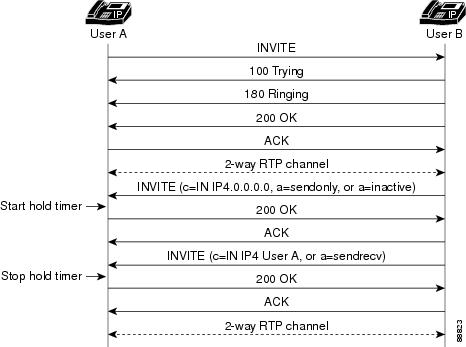
The following call flows show gateway behavior upon receiving a call hold request from a SIP endpoint. In the figure below, the originating gateway sends an INVITE with an indication to place a call on hold (c=IN IP4.0.0.0.0, a=sendonly, or a=inactive in the SDP), which starts the hold timer. When the gateway on hold receives a re-INVITE with the indication to resume the call (c=IN IP4 User A or a=sendrecv), it stops the hold timer, sends a 200 OK, and resumes the call.
Figure 1
Start and Stop Hold Time
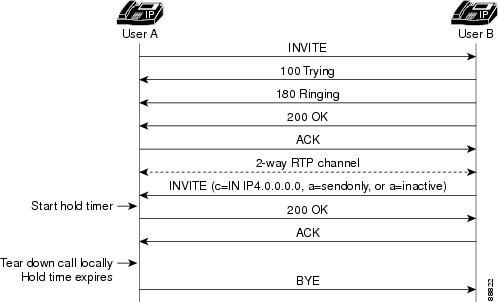
In the figure below, the hold timer expires, the gateway on hold tears down the call and sends a BYE request to the other end.
Figure 2
Hold Timer Expiration
SIP Media Inactivity Timer
The SIP Media Inactivity Timer feature enables Cisco gateways to monitor and disconnect VoIP calls if no Real-Time Control Protocol (RTCP) packets are received within a configurable time period.
When RTCP reports are not received by a Cisco gateway, the SIP Media Inactivity Timer feature releases the hung session and its network resources in an orderly manner. These network resources include the gateway digital signal processor (DSP) and time-division multiplexing (TDM) channel resources that are utilized by the hung sessions. Because call signaling is sent to tear down the call, any stateful SIP proxies involved in the call are also notified to clear the state that they have associated with the hung session. The call is also cleared back through the TDM port so that any attached TDM switching equipment also clears its resources.
Feature benefits include the following:
Provides a mechanism for detecting and freeing hung network resources when no RTCP packets are received by the gateway.
How to Configure SIP QoS Features
For help with a procedure, see the verification and troubleshooting
sections listed above. Before you perform a procedure, familiarize yourself
with the following information:
Enables privileged EXEC mode. Enter your password if prompted.
Step 2
configureterminal
Example:
Router# configure terminal
Enters global configuration mode.
Step 3
rtrresponder
Example:
Router(config)# rtr responder
Enables SAA Responder functionality on a device.
Step 4
exit
Example:
Router(config)# exit
Exits the current mode.
Configure PSTN Fallback
Note
PSTN fallback configuration applies to both inbound and outbound gateways. In most networks, gateways generate calls to each other, so that every gateway is both an outgoing gateway and a terminating gateway.
Configure the destination node, which is often but not necessarily the terminating gateway, with the SAA Responder feature.
PSTN fallback configuration is done at the global level and therefore applies to all calls attempted by the gateway. You cannot selectively apply PSTN fallback only to calls initiated by specific PSTN or PBX interfaces.
Configures the call-fallback subsystem to determine an average value based on the last two probes registered in the cache for call requests. This command allows the call-fallback subsystem to recover gradually from network congestion conditions. The argument is as follows:
weight--By percent, when a new probe is received, how much to rely upon the new probe as opposed to the previous cache entry. The configured weight applies to the new probe first. Range: 0 to 100. Default: 66.
Enables privileged EXEC mode. Enter your password if prompted.
Step 2
configureterminal
Example:
Router# configure terminal
Enters global configuration mode.
Step 3
callthresholdglobaltrigger-name low value high value [busyout | treatment]
Example:
Router(config)# call threshold global total-calls low 5 high 1000 busyout
Enables a trigger and define associated parameters to allow or disallow new calls on the router. Action is enabled when the trigger value exceeds the value specified by the high keyword and is disabled when it drops below the value specified by the low keyword. Keywords and arguments are as follows:
trigger-name--Global resources on the gateway to be used as call admission or utilization triggers. Valid values are the following:
cpu-5sec--CPU utilization in the last 5 seconds
cpu-avg--Average CPU utilization
io-mem--IO memory utilization
proc-mem--Processor memory utilization
total-calls--Total number of calls
total-mem--Total memory utilization
lowvalue--Low threshold. Range: 1 to 100 percent for utilization triggers and 1 to 10000 for total-calls.
highvalue--High threshold: Range: 1 to 100 percent for utilization triggers and 1 to 10000 for total-calls.
busyout--Busy out the T1 or E1 channels if the resource is not available
treatment--Apply call treatment from the session application if the resource is not available
Specifies threshold values for total numbers of voice calls placed through a particular interface. Use it also to allow or disallow admission for new calls on the router. Keywords and arguments are as follows:
interface-name--Interface used in making call admission decisions. Types of interfaces and their numbers depend upon the configured interfaces.
interface-number--Number of calls through the interface that triggers a call admission decision.
int-calls--Use the number of calls through the interface as a threshold.
lowvalue--Value of low threshold, in percent. Range: 1 to 100 for the utilization triggers and 1 to 10000 calls for int-calls.
highvalue--Value of high threshold, in percent. Range: 1 to 100 for the utilization triggers and 1 to 10000 calls for int-calls.
Step 4
exit
Example:
Router(config)# exit
Exits the current mode.
Configure SIP Reliable Provisional Response
Note
By default, gateways support reliable provisional responses. That is, no additional configuration tasks are necessary to enable reliable provisional responses. This task enables reliable provisional response if it was disabled using the
norel1xx command.
Enables privileged EXEC mode. Enter your password if prompted.
Step 2
configureterminal
Example:
Router# configure terminal
Enters global configuration mode.
Step 3
voiceservicevoip
Example:
Router(config)# voice service voip
Enters voice-service configuration mode.
Step 4
sip
Example:
Router (config-voi-serv)# sip
Enters SIP configuration mode.
Step 5
rel1xx {supportedvalue |
requirevalue |
disable}
Example:
Router(config-srv-sip)# rel1xx supported 100rel
Example:
Example:
Router(config-srv-sip)# rel1xx require 100rel
Example:
Example:
Router(config-srv-sip)# rel1xx disable
Enables all SIP provisional responses (other than 100 Trying) to be sent reliably to the remote SIP endpoint.
supportedvalue--Use provisional responses and you set the value; for instance, 100rel. The value argument may have any value, as long as both the user-agent client (UAC) and user-agent server (UAS) configure it the same. Default value is supported with the 100rel value.
requirevalue--Use provisional responses and you set the value; for instance, 100rel. The value argument may have any value, as long as both the UAC and UAS configure it the same.
disable--Disables the use of reliable provisional responses.
Step 6
exit
Example:
Router(config-srv-sip)# exit
Exits the current mode.
Configuring SIP Gateway Support of RSVP and TEL URL
This section contains the following procedures (you must perform them in the order listed):
To configure fair queuing and RSVP, perform the following steps.
Note
For details on these commands, see the
Cisco IOS Quality of Service Solutions Command Reference, Release 12.3. For an example, see the "SIP Gateway Support of RSVP and TEL URL Example".
Enables privileged EXEC mode. Enter your password if prompted.
Step 2
configureterminal
Example:
Router# configure terminal
Enters global configuration mode.
Step 3
interfacefastethernetnumber
Example:
Router(conf)# interface fastethernet 1
Selects a particular Fast Ethernet interface for configuration. The argument is as follows:
number--Port, connector, or interface card number. On a Cisco 4500 or Cisco 4700 series, the network-interface module or network-processor-module number. Numbers are assigned at the factory at the time of installation or when added to a system.
Step 4
iprsvpbandwidth[interface-kbps[single-flow-kbps]]
Example:
Router(conf-if)# ip rsvp bandwidth 100 100
Enables resource reservation protocol for IP on an interface. Arguments are as follows:
interface-kbps--Maximum amount of bandwidth, in kbps, that may be allotted by RSVP flows. Range: 1 to 10000000.
single-flow-kbps--Maximum amount of bandwidth, in kbps, that may be allocated in a single flow. Range: 1 to 10000000.
Enables weighted fair queuing for an interface. Arguments are as follows:
congestive-discard-threshold--Number of messages allowed in each queue. When a conversation reaches this threshold, new message packets are discarded. Valid values: powers of 2 in the range from 16 to 4096. Default: 64.
dynamic-queues--Number of dynamic queues used for best-effort conversations (that is, a normal conversation not requiring any special network services). Valid values: 16, 32, 64, 128, 256, 512, 1024, 2048, and 4096. See tables in the fair-queue (class-default) command for the default number of dynamic queues.
reservable-queues--Number of reservable queues used for reserved conversations. Reservable queues are used for interfaces configured for features such as RSVP. Range: 0 to 1000. Default: 0.
Step 6
exit
Example:
Router(config-if)# exit
Exits the current mode.
Configuring QoS Levels
To configure desired and acceptable QoS levels, perform the following steps.
Note
For details on these commands, see the Cisco IOS Voice Command Reference, Release 12.3. For an example, see "SIP Gateway Support of RSVP and TEL URL Example".
Defines the acceptable QoS for any inbound and outbound call on a VoIP dial peer. Keywords are as follows:
best-effort--RSVP makes no bandwidth reservation. This is the default.
controlled-load--RSVP guarantees a single level of preferential service, presumed to correlate to a delay boundary. The controlled load service uses admission (or capacity) control to ensure that preferential service is received even when the bandwidth is overloaded.
guaranteed-delay-- RSVP reserves bandwidth and guarantees a minimum bit rate and preferential queuing if the bandwidth reserved is not exceeded.
Enables privileged EXEC mode. Enter your password if prompted.
Step 2
configureterminal
Example:
Router# configure terminal
Enters global configuration mode.
Step 3
voiceservicevoip
Example:
Router(config)# voice service voip
Specifies the voice encapsulation type.
Step 4
sip
Example:
Router(config-voi-srv)# sip
Enters SIP configuration mode.
Step 5
url {sip |
tel}
Example:
Router(conf-serv-sip)# url sip
Configures URLs to either the SIP or TEL format for your VoIP SIP calls. Keywords are as follows:
sip--Generate URLs in SIP format for VoIP calls. This is the default.
tel--Generate URLs in TEL format for VoIP calls.
Step 6
exit
Example:
Router(conf-serv-sip)# exit
Exits the current mode.
Configuring TEL URLs for All Dial-Peer SIP Calls
Note
The
voice-classsipurlcommandin dial-peer configuration mode takes precedence over
theurlcommandinglobalconfiguration. However, if the
voice-classsipurl command contains the configuration of
system, the gateway uses what was globally configured under the
urlcommand.
SUMMARY STEPS
1.enable
2.configureterminal
3.dial-peervoicetagvoip
4.voice-classsipurl{sip|sips|system|tel}
5.exit
DETAILED STEPS
Command or Action
Purpose
Step 1
enable
Example:
Router> Enable
Enables privileged EXEC mode. Enter your password if prompted.
Step 2
configureterminal
Example:
Router# configure terminal
Enters global configuration mode.
Step 3
dial-peervoicetagvoip
Example:
Router(config)# dial-peer voice 29 voip
Enters dial-peer configuration mode for the specified VoIP dial peer.
Step 4
voice-classsipurl{sip|sips|system|tel}
Example:
Router(config-dial-peer)# voice-class sip url sip
Configures URLs to either the SIP or TEL format for your dial-peer SIP call. Keywords are as follows:
sip--Generate URLs in the SIP-format for calls on a dial-peer basis.
sips--Generate URLs in the SIPS-format for calls on a dial-peer basis.
system--Use the system value. This is the default.
tel--Generate URLs in the TEL format for calls on a dial-peer basis.
Step 5
exit
Example:
Router(config-dial-peer)# exit
Exits the current mode.
Configure Reliability of SIP Provisional Responses
The following are tasks for configuring reliability of SIP provisional
responses:
By default, gateways support reliable provisional responses. That is,
no additional configuration tasks are necessary to enable reliable provisional
responses.
However, there are instances when you may want control over the use of
reliable provisional responses. For example, you may want to:
Always require the use of
reliable provisional responses (use the Required header)
Never use reliable
provisional responses
In these cases, there are two ways to configure reliable provisional
responses:
Dial-peer mode. In this
mode you can configure reliable provisional responses for the specific dial
peer only. Configure with the
voice-classsiprel1xxcommand.
SIP mode. In this mode you
can configure reliable provisional responses globally. Configure with
therel1xxcommand.
When the
voice-classsiprel1xxcommand
under dial-peer configuration is configured, it takes precedence over
theglobalconfigurationoftherel1xxcommand.
However, if the
voice-classsiprel1xx
command contains the configuration of
system, the gateway uses what was globally
configured under the
rel1xx command.
The table below shows the possible configurations achieved with the
voice-classsiprel1xxand
the
rel1xx commands.It
outlines the possible configurations on both the originating gateway and the
terminating gateway, and the results of the various configurations.
Note
When configured with the
supported option, the SIP gateway uses the
Supported header in outgoing INVITE messages. When configured with the
require option, the SIP gateway uses the
Required header in outgoing INVITE messages.
Table 6
Configuration Results Based on Originating and Terminating Gateway
Configurations
Originating Gateway
Terminating Gateway
Result
supported 100rel
supported 100rel
Reliable provisional responses
supported 100rel
require 100rel
Reliable provisional responses
supported 100rel
disable
No reliable provisional responses, call proceeds
require 100rel
supported 100rel
Reliable provisional responses
require 100rel
require 100rel
Reliable provisional responses
require 100rel
disable
Call fails. TG sends 420 with "Unsupported: 100rel" header
Enables all SIP provisional responses (other than 100 Trying) to be sent reliably to the remote SIP endpoint. Keywords and arguments are as follows:
supportedvalue--Use provisional responses and you set the value; for instance,
100rel. The value argument may have any value, as long as both the user-agent client (UAC) and user-agent server (UAS) configure it as the same.
require value--Use provisional responses and you set the value; for instance,
100rel. The value argument may have any value, as long as both the UAC and UAS configure it the same.
system--Use the value configured in voice service mode. Default is the system value.
disable--Disable the use of rel1xx provisional responses.
Enables privileged EXEC mode. Enter your password if prompted.
Step 2
configureterminal
Example:
Router# configure terminal
Enters global configuration mode.
Step 3
voiceservicevoip
Example:
Router(config)# voice service voip
Enters voice-service configuration mode for VoIP.
Step 4
sip
Example:
Router(config-voi-srv)# sip
Enters SIP configuration mode.
Step 5
rel1xx {supportedvalue |
requirevalue |
disable}
Example:
Router(config-srv-sip)# rel1xx supported 100rel
Enables all SIP provisional responses (other than 100 Trying) to be sent reliably to the remote SIP endpoint.
supportedvalue--Use provisional responses and you set the value; for instance, 100rel. The value argument may have any value, as long as both the user-agent client (UAC) and user-agent server (UAS) configure it the same. The default value is supported with the 100rel value.
requirevalue--Use provisional responses and you set the value; for instance, 100rel. The value argument may have any value, as long as both the UAC and UAS configure it the same.
disable--Disables the use of reliable provisional responses.
Step 6
exit
Example:
Router(config-srv-sip)# exit
Exits the current mode.
Configuring PRACK Timers and Retries
SUMMARY STEPS
1.enable
2.configureterminal
3.sip-ua
4.timerspracknumber
5.retrypracknumber
6.exit
DETAILED STEPS
Command or Action
Purpose
Step 1
enable
Example:
Router> Enable
Enables privileged EXEC mode. Enter your password if prompted.
Step 2
configureterminal
Example:
Router# configure terminal
Enters global configuration mode.
Step 3
sip-ua
Example:
Router(config)# sip-ua
Enters SIP user-agent configuration mode.
Step 4
timerspracknumber
Example:
Router(config-sip-ua)# timers prack 500
Sets the amount of time that the user agent waits before retransmitting PRACK requests. The argument is as follows:
number--Time (in ms) to wait before retransmitting. Range: 100 to 1000. Default: 500.
Step 5
retrypracknumber
Example:
Router(config-sip-ua)# retry prack 9
Sets the number of times that the PRACK request is retransmitted to the other user agent. The argument is as follows:
number--Number of retries. Range: 1 to 10. Default: 10.
Step 6
exit
Example:
Router(config-sip-ua)# exit
Exits the current mode.
Configuring COMET Timers and Retries
SUMMARY STEPS
1.enable
2.configureterminal
3.sip-ua
4.timerscometnumber
5.retrycometnumber
6.exit
DETAILED STEPS
Command or Action
Purpose
Step 1
enable
Example:
Router> Enable
Enables privileged EXEC mode. Enter your password if prompted.
Step 2
configureterminal
Example:
Router# configure terminal
Enters global configuration mode.
Step 3
sip-ua
Example:
Router(config)# sip-ua
Enters SIP user-agent configuration mode.
Step 4
timerscometnumber
Example:
Router(config-sip-ua)# timers comet 100
Sets the amount of time that the user agent waits before retransmitting COMET requests. The argument is as follows:
number--Time (in ms) to wait before retransmitting. Range: 100 to 1000. Default: 500.
Step 5
retrycometnumber
Example:
Router(config-sip-ua)# retry comet 10
Sets the number of times that a COMET request is retransmitted to the other user agent. The argument is as follows:
number--Number of retries. Range: 1 to 10. Default: 10.
Step 6
exit
Example:
Router(config-sip-ua)# exit
Exits the current mode.
Configuring Reliable-Provisional-Response Timers and Retries
SUMMARY STEPS
1.enable
2.configureterminal
3.sip-ua
4.timersrel1xxnumber
5.retryrel1xxnumber
6.exit
DETAILED STEPS
Command or Action
Purpose
Step 1
enable
Example:
Router> Enable
Enables privileged EXEC mode. Enter your password if prompted.
Step 2
configureterminal
Example:
Router# configure terminal
Enters global configuration mode.
Step 3
sip-ua
Example:
Router(config)# sip-ua
Enters SIP user-agent mode.
Step 4
timersrel1xxnumber
Example:
Router(config-sip-ua)# timers rel1xx 500
Sets the amount of time that the user agent waits before retransmitting the reliable 1xx responses. The argument is as follows:
number--Time (in ms) to wait before retransmitting. Range: 100 to 1000. Default: 500.
Step 5
retryrel1xxnumber
Example:
Router(config-sip-ua)# retries rel1xx 10
Sets the number of times the reliable 1xx response is retransmitted to the other user agent. The argument is as follows:
number--Number of retries. Range: 1 to 10. Default: 6.
Step 6
exit
Example:
Router(config-sip-ua)# exit
Exits the current mode.
Reenabling SIP Hold Timer Support
To configure SIP hold timer support, perform the following steps.
Note
The SIP: Hold Timer Support feature is enabled by default; no configuration tasks are required to enable this feature. This task enables the feature again if it was disabled by using the notimershold command.
SUMMARY STEPS
1.enable
2.configureterminal
3.timersholdtime
4.exit
DETAILED STEPS
Command or Action
Purpose
Step 1
enable
Example:
Router> Enable
Enables privileged EXEC mode. Enter your password if prompted.
Step 2
configureterminal
Example:
Router# configure terminal
Enters global configuration mode.
Step 3
timersholdtime
Example:
Router(config)# timers hold 120
Enables the SIP hold timer and sets the timer interval. The argument is as follows:
time--Time, in minutes, before the gateway disconnects held calls. Range: 15 to 2880. Default: 2880.
Step 4
exit
Example:
Router(config)# exit
Exits the current mode.
Configuring the SIP Media Inactivity Timer
The SIP Media Inactivity Timer feature requires configuration of the iprtcpreportinterval command and the timerreceive-rtcp command to enable detection of RTCP packets by the gateway. When these commands are configured, the gateway uses RTCP report detection, rather than Real-Time Protocol (RTP) packet detection, to determine whether calls on the gateway are still active or should be disconnected. This method is more reliable because there are periods during voice calls when one or both parties are not sending RTP packets.
One common example of a voice session in which no RTP is sent is when a caller dials into a conference call and mutes his endpoint. If voice activity detection (VAD, also known as silence suppression) is enabled, no RTP packets are sent while the endpoint is muted. However, the muted endpoint continues to send RTCP reports at the interval specified by the iprtcpreportintervalcommand.
The timerreceive-rtcpvalue argument (or Mfactor) is multiplied with the interval that is set using the iprtcpreportintervalcommand. If no RTCP packets are received in the resulting time period, the call is disconnected. The gateway signals the disconnect to the SIP network and the TDM network so that upstream and downstream devices can clear their resources. The gateway sends a SIP BYE to disconnect the call and sends a Q.931 DISCONNECT back to the TDM network to clear the call upon the expiration of the timer. The Q.931 DISCONNECT is sent with a Cause code value of 3 (no route). There is no Q.931 Progress Indicator (PI) value included in the DISCONNECT.
SUMMARY STEPS
1.enable
2.configureterminal
3.gateway
4.timerreceive-rtcptimer
5.exit
6.iprtcpreportintervalvalue
7.exit
DETAILED STEPS
Command or Action
Purpose
Step 1
enable
Example:
Router> Enable
Enables privileged EXEC mode. Enter your password if prompted.
Step 2
configureterminal
Example:
Router# configure terminal
Enters global configuration mode.
Step 3
gateway
Example:
Router(config)# gateway
Enables the H.323 VoIP gateway.
Step 4
timerreceive-rtcptimer
Example:
Router(config-gateway)# timer receive-rtcp 100
Enables the Real-Time Control Protocol (RTCP) timer and to configure a multiplication factor for the RTCP timer interval for the SIP. The argument is as follows:
timer--Multiples of the RTCP report transmission interval. Range: 2 to 1000. Default: 5.
Step 5
exit
Example:
Router(config-gateway)# exit
Exits the current mode.
Step 6
iprtcpreportintervalvalue
Example:
Router(config)# ip rtcp report interval 500
Sets the average reporting interval between subsequent RTCP report transmissions. The argument is as follows:
value--Average interval (in ms) for RTCP report transmissions. Range: 1 to 65535. Default: 5000.
Note
RFC 1889, RTP: A Transport Protocol for Real-Time Applications
, recommends a minimum 5-second average reporting interval between successive RTCP reports. It also recommends that this interval be varied randomly. The randomization function is performed automatically and cannot be disabled. Therefore, the reporting interval does not remain constant throughout a given voice session, but its average is the specified reporting interval.
Step 7
exit
Example:
Router(config)# exit
Exits the current mode.
Verifying SIP QoS Features
To verify configuration of SIP QoS features, perform the following steps as appropriate (commands are listed in alphabetical order).
SUMMARY STEPS
1.showcallfallbackcache
2.showcallfallbackconfig
3.showcallfallbackstats
4.showcallrsvp-syncconf
5.showcallrsvp-syncstats
6.showdial-peervoice
7.showiprsvpreservation
8.showrunning-conf
9.showsip-uaretry
10.showsip-uastatistics
11.showsip-uastatus
12.showsip-uatimers
13.testcallfallbackprobeip-addresscodec
DETAILED STEPS
Step 1
showcallfallbackcache
Use this command to display the current ICPIF estimates for all IP addresses in the cache.
Step 2
showcallfallbackconfig
Use this command to display the call fallback configuration.
Step 3
showcallfallbackstats
Use this command to display call fallback statistics.
Step 4
showcallrsvp-syncconf
Use this command to display the configuration settings for RSVP synchronization.
Step 5
showcallrsvp-syncstats
Use this command to display statistics for calls that attempted RSVP reservation.
Example:
Router# show call rsvp-sync
conf Show RSVP/Voice Synchronization Config. information
state Show RSVP/Voice Statistics
The following sample output also shows configuration settings for RSVP synchronization. Of particular note in the example are the following:
Overture Synchronization is ON--Indicates that RSVP synchronization is enabled.
Reservation Timer is set to 10 seconds--Number of seconds for which the RSVP reservation timer is configured.
Example:
Router# show call rsvp-sync conf
VoIP QoS:RSVP/Voice Signaling Synchronization config:
Overture Synchronization is ON
Reservation Timer is set to 10 seconds
The following sample output shows configuration settings for RSVP synchronization. Of particular note in the example are the following:
Number of calls for which QoS was initiated--Number of calls for which RSVP setup was attempted.
Number of calls for which QoS was torn down--Number of calls for which an established RSVP reservation was released.
Number of calls for which Reservation Success was notified--Number of calls for which an RSVP reservation was successfully established.
Total Number of PATH Errors encountered--Number of path errors that occurred.
Total Number of RESV Errors encountered--Number of reservation errors that occurred.
Total Number of Reservation Timeouts encountered--Number of calls in which the reservation setup was not complete before the reservation timer expires.
Example:
Router# show call rsvp-sync stats
VoIP QoS:Statistics Information:
Number of calls for which QoS was initiated : 0
Number of calls for which QoS was torn down : 0
Number of calls for which Reservation Success was notified : 0
Total Number of PATH Errors encountered : 0
Total Number of RESV Errors encountered : 0
Total Number of Reservation Timeouts encountered : 0
Step 6
showdial-peervoice
Use this command to display detailed information for a specific voice dial peer.
Example:
Router# show dial-peer voice 5
VoiceOverIpPeer5
information type = voice,
tag = 5, destination-pattern = `5550100',
answer-address = `', preference=0,
numbering Type = `unknown'
group = 5, Admin state is up, Operation state is up,
incoming called-number = `', connections/maximum = 0/unlimited,
DTMF Relay = disabled,
modem passthrough = system,
huntstop = disabled,
in bound application associated:session
out bound application associated
dnis-map =
permission :both
incoming COR list:maximum capability
outgoing COR list:minimum requirement
type = voip, session-target = `ipv4:172.18.192.218',
technology prefix:
settle-call = disabled
ip media DSCP = default, ip signaling DSCP = default, UDP checksum = disabled,
session-protocol = sipv2, session-transport = system, req-qos = best-effort,
acc-qos = best-effort,
fax rate = voice, payload size = 20 bytes
fax protocol = system
fax NSF = 0xAD0051 (default)
codec = g711ulaw, payload size = 160 bytes,
Expect factor = 0, Icpif = 20,
Playout Mode is set to default,
Initial 60 ms, Max 300 ms
Playout-delay Minimum mode is set to default, value 40 ms
Expect factor = 0,
Max Redirects = 1, Icpif = 20,signaling-type = cas,
CLID Restrict = disabled
VAD = enabled, Poor QOV Trap = disabled,
voice class sip url = system,
voice class sip rel1xx = system,
voice class perm tag = `'
Connect Time = 0, Charged Units = 0,
Successful Calls = 0, Failed Calls = 0, Incomplete Calls = 0
Accepted Calls = 0, Refused Calls = 0,
Last Disconnect Cause is "",
Last Disconnect Text is "",
Last Setup Time = 0.
Step 7
showiprsvpreservation
Use this command to display RSVP-related receiver information currently in the database.
The following sample output shows, in the "To" field, the IP address of the receiver.
Example:
Router # show ip rsvp reservation
To From Pro DPort Sport Next Hop I/F Fi Serv BPS Bytes
172.18.193.101 172.18.193.102 UDP 20532 20600 FF LOAD 24K 120
172.18.193.102 172.18.193.101 UDP 20600 20532 172.18.193.102 Et0/0 FF LOAD 24K 120
Step 8
showrunning-conf
Use this command to display the contents of the currently running configuration file, the configuration for a specific interface, or map class information. Use it to display SIP user-agent statistics, including reliable provisional response information. Use it also to display configuration for the Cisco IOS VoiceXML feature.
The following sample output shows SIP user-agent statistics, including reliable provisional response information. In the following partial output, a dynamic payload value of 115 is configured, freeing up the reserved value of 101.
Example:
Router# show running-config
Building configuration...
Current configuration: 2024 bytes
version 12.3
service timestamps debug uptime
service timestamps log uptime
no service password-encryption
hostname r4
ip subnet-zero
ip tcp synwait-time 5
no ip domain-lookup
ipx routing 0000.0000.0004
no voice hpi capture buffer
no voice hpi capture destination
fax interface-type fax-mail
mta receive maximum-recipients 0
interface Loopback0
ip address 10.0.0.0 255.255.255.0
interface FastEthernet0/0
ip address 10.0.0.1 255.255.255.0
speed 100
full-duplex
interface Serial0/0
ip address 10.0.0.4 255.255.255.0
encapsulation frame-relay
.
.
.
call rsvp-sync
voice-port 3/0/0
voice-port 3/0/1
mgcp ip qos dscp cs5 media
mgcp ip qos dscp cs3 signaling
no mgcp timer receive-rtcp
mgcp profile default
dial-peer cor custom
dial-peer voice 1234 voip
rtp payload-type nte 115
alias exec co config t
alias exec br show ip int brief
alias exec i show ip route
alias exec sr show run
alias exec sri sh run interface
alias exec sio show ip ospf
alias exec sioi show ip ospf int
alias exec sion show ip ospf nei
alias exec cir clear ip route *
alias exec ix show ipx route
alias exec b show ip bgp
alias exec sis show isdn status
alias exec fm show frame map
alias exec dm show dialer map
line con 0
exec-timeout 0 0
privilege level 15
password password1
logging synchronous
line aux 0
line vty 0 4
exec-timeout 0 0
privilege level 15
password password1
logging synchronous
no login
end
The following sample output shows configuration for the Cisco IOS VoiceXML feature. If the SIP hold timer is enabled, which is the default setting, and the timer is set to the default value of 2880 minutes, command output does not display the timershold2880 command. In the following partial output, the hold timer is set to a nondefault value of 18 minutes.
Example:
Router# show running-config
Building configuration...
Current configuration :2791 bytes
.
.
.
sip-ua
max-forwards 10
retry invite 1
retry response 4
retry bye 1
retry cancel 1
timers expires 300000
timers hold 18
.
.
.
end!
Use this command to display SIP user-agent status.
Example:
Router# show sip-ua status
SIP User Agent Status
SIP User Agent for UDP : ENABLED
SIP User Agent for TCP : ENABLED
SIP User Agent bind status(signaling): DISABLED
SIP User Agent bind status(media): DISABLED
SIP max-forwards : 6
SIP DNS SRV version: 1 (rfc 2052)
Step 12
showsip-uatimers
Use this command to display SIP user-agent timer settings.
Example:
Router# show sip-ua timers
SIP UA Timer Values (millisecs unless noted)
trying 500, expires 150000, connect 500, disconnect 500
comet 500, prack 500, rel1xx 500, notify 500, hold 2880 minutes
Step 13
testcallfallbackprobeip-addresscodec
Use this command to test a probe to a specific IP address and display ICPIF RTR values. Keywords and arguments are as follows:
ip-address--Target IP address.
codec--Codec type to test. Valid values are 711 (G.711 codec) and 729 (G.729 codec).
Troubleshooting Tips
Note
For general troubleshooting tips and a list of important
debug commands, see the "General Troubleshooting Tips" section.
Make sure that you can make a voice call.
Make sure VoIP is working before call fallback is configured.
Use the
debugccsipevents command, which includes output specific to the SIP Media Inactivity Timer feature.
Use the
debugccsipevents command to show all SIP SPI events tracing.
Use the debug call fallback detail command to display details of the VoIP call fallback.
Use the debug ccsip messages command to enable CCSIP SPI messages debugging trace.
Use the debug ccsip error command to enable SIP error debugging trace.
Use the debug ccsip all command to enable all SIP debugging traces.
Use the debug rtr trace command to trace the execution of an SAA operation.
Use the debug call fallback probe command to verify that probes are being sent correctly.
Use the
debugccsipall command to enable all SIP debugging capabilities or use one of the following SIP debug commands:
debugccsipcalls
debugccsiperror
debugccsipevents
debugccsipmessages
debugccsipstates
When terminating long distance or international calls over ISDN, the terminating switch receives information from the gateway. Generally, the information received consists of the numbering plan and the ISDN number type. As a default, the gateway tags both the numbering plan and number type as
Unknown . However, this
Unknown tag may cause interworking issues with some switches.
You can override the default ISDN numbering plan and number type with custom values, using theisdnmap command. This command sets values on a per-number basis or on numbers that match set patterns. The following example shows an override of any plan or type with a called or calling number that begins with the numeral 1. Thus, the ISDN setup sent to the switch is used only for long distance numbers, the numbering plan isISDN, and the type of number isNational:
isdn map address 1.* plan isdn type* national
For more details on the
isdnmap command, see the
Cisco IOS Dial Technologies Command Reference, Release 12.3.
Following is sample output for some of these commands:
Sample Output for the debug ccsip events Command
The following example trace shows a timer being set:
Router# debug ccsip events
00:04:29: sipSPICreateAndStartRtpTimer: Valid RTP/RTCP session found and CLI ena
bled to create and start the inactivity timer
00:04:29: sipSPICreateAndStartRtpTimer:Media Inactivity timer created for call.
Mfactor(from CLI): 5 RTCP bandwidth: 500
RTCP Interval(in ms): 5000
Normalized RTCP interval (in ms):25000
The following example trace shows a timer expiring:
Router# debug ccsip events
02:41:03: %LINEPROTO-5-UPDOWN: Line protocol on Interface Ethernet0, changed state to down
*Jan 1 02:41:34.107: sipSPIRtpDiscTimerExpired:RTP/RTCP receive timer expired. Disconnect the call.
*Jan 1 02:41:34.107: Queued event From SIP SPI to CCAPI/DNS : SIPSPI_EV_CC_CALL_DISCONNECT
*Jan 1 02:41:34.107: CCSIP-SPI-CONTROL: act_active_disconnect
Note
The
timerreceive-rtcpcommand configures a media activity timer that is common to both H.323 and SIP. If set, it affects both H.323 and SIP calls.
This configuration example shows RSVP for SIP calls on gateways being enabled. Gateway A is the originating gateway and Gateway B is the terminating gateway:
GATEWAY A
---------
Router# show running-config
.
.
.
interface Ethernet0/0
ip address 172.18.193.101 255.255.255.0
fair-queue 64 256 235
ip rsvp bandwidth 7500 7500
!
voice-port 1/0/0
!
dial-peer voice 1 pots
destination-pattern 111
port 1/0/0
!
dial-peer voice 2 voip
incoming called-number 111
destination-pattern 222
session protocol sipv2
session target ipv4:172.18.193.102
req-qos controlled-load
!
GATEWAY B
---------
!
interface Ethernet0/0
ip address 172.18.193.102 255.255.255.0
fair-queue 64 256 235
ip rsvp bandwidth 7500 7500
!
voice-port 1/0/1
!
dial-peer voice 1 pots
destination-pattern 222
port 1/0/1
!
dial-peer voice 2 voip
incoming called-number 222
destination-pattern 111
session protocol sipv2
session target ipv4:172.18.193.101
req-qos controlled-load
!
SIP Media Inactivity Timer Example
Router# show running-config
!
version 12.3
no parser cache
service timestamps debug datetime msec
service timestamps log uptime
no service password-encryption
!
hostname madison
boot system flash
no logging buffered
aaa new-model
!
aaa authentication login h323 group radius
aaa authorization exec h323 group radius
aaa accounting connection passsword stop-only group radius
aaa accounting connection h323 start-stop group radius
aaa session-id common
!
resource-pool disable
clock timezone EST -5
!
ip subnet-zero
ip tcp path-mtu-discovery
ip name-server 172.18.192.48
ip dhcp smart-relay
!
isdn switch-type primary-ni
!
voice service voip
h323
!
voice class codec 1
codec preference 1 g723ar53
codec preference 2 g723r53
codec preference 3 g729br8
codec preference 4 gsmfr
codec preference 5 g726r24
codec preference 6 g726r32
voice class codec 2
codec preference 1 g729br8
codec preference 2 g729r8
codec preference 3 g723ar53
codec preference 4 g723ar63
codec preference 5 g723r53
codec preference 6 g723r63
codec preference 7 gsmfr
codec preference 8 gsmefr
!
voice class codec 3
codec preference 1 g726r24
codec preference 2 gsmefr
codec preference 3 g726r16
!
fax interface-type modem
mta receive maximum-recipients 0
controller T1 0
framing esf
clock source line secondary 1
linecode ami
pri-group timeslots 1-24
description summa_pbx
!
controller T1 1
framing esf
linecode ami
pri-group timeslots 1-24
description summa_pbx
!
controller T1 2
framing sf
linecode ami
!
controller T1 3
framing esf
clock source line primary
linecode b8zs
ds0-group 0 timeslots 1-24 type e&m-fgb dtmf dnis
cas-custom 0
!
gw-accounting h323 vsa
gw-accounting voip
interface Ethernet0
ip address 172.18.193.99 255.255.255.0
no ip route-cache
no ip mroute-cache
ip rsvp bandwidth 7500 7500
!
interface Serial0:23
no ip address
isdn switch-type primary-ni
isdn incoming-voice modem
isdn guard-timer 3000
isdn T203 10000
isdn T306 30000
isdn T310 4000
isdn disconnect-cause 1
fair-queue 64 256 0
no cdp enable
interface Serial1:23
no ip address
isdn switch-type primary-ni
isdn incoming-voice modem
isdn guard-timer 3000
isdn T203 10000
isdn disconnect-cause 1
fair-queue 64 256 0
no cdp enable
!
interface FastEthernet0
ip address 10.1.1.1 255.255.255.0
no ip route-cache
no ip mroute-cache
duplex auto
speed auto
ip rsvp bandwidth 7 7
!
ip classless
ip route 10.0.0.0 255.0.0.0 172.18.193.1
ip route 172.18.0.0 255.255.0.0 172.18.193.1
no ip http server
ip pim bidir-enable
!
ip radius source-interface Ethernet0
!
map-class dialer test
dialer voice-call
dialer-list 1 protocol ip permit
!
radius-server host 172.18.192.108 auth-port 1645 acct-port 1646
radius-server retransmit 1
radius-server key lab
radius-server vsa send accounting
radius-server vsa send authentication
call rsvp-sync
call application voice voice_billing tftp://172.18.207.16/app_passport_silent.2.0.0.0.tcl
!
voice-port 0:D
voice-port 1:D
voice-port 3:0
!
no mgcp timer receive-rtcp
!
mgcp profile default
!
dial-peer voice 10 pots
destination-pattern 2021010119
port 3:0
prefix 2021010119
!
dial-peer voice 11 pots
incoming called-number 3111100
destination-pattern 3100802
progress_ind progress enable 8
port 0:D
prefix 93100802
!
dial-peer voice 36 voip
application session
incoming called-number 3100802
destination-pattern 3100801
session protocol sipv2
session target ipv4:172.18.193.100
codec g726r16
!
dial-peer voice 5 voip
destination-pattern 5550155
session protocol sipv2
session target ipv4:172.18.192.218
!
dial-peer voice 12 pots
destination-pattern 3111100
prefix 93111100
!
dial-peer voice 19 pots
destination-pattern 2017030200
port 1:D
prefix 2017030200
!
dial-peer voice 30 voip
destination-pattern 36602
voice-class codec 2
session protocol sipv2
session target ipv4:172.18.193.120
dial-peer voice 47 pots
destination-pattern 2021030100
port 3:0
!
dial-peer voice 3111200 pots
destination-pattern 311200
prefix 93100802
!
dial-peer voice 31 voip
destination-pattern 36601
session protocol sipv2
session target ipv4:172.18.193.98
!
dial-peer voice 1234 voip
incoming called-number 1234
destination-pattern 1234
session target loopback:rtp
!
gateway timer receive-rtcp 5
!
sip-ua
aaa username proxy-auth
retry invite 1
retry bye 1
!
line con 0
exec-timeout 0 0
line aux 0
line vty 0 4
password password1
!
end
Use the
debugccsipall command to troubleshoot the SIP: Hold Timer
Support feature. To minimize the possibility of performance impact, use this
command during periods of minimal traffic. Make sure VoIP is working before
hold timer support is configured.
Router# debug ccsip all
Feb 28 21:34:09.479:Received:
INVITE sip:36601@172.18.193.98:5060 SIP/2.0
Via:SIP/2.0/UDP
172.18.193.187:5060;branch=f104ef32-21751ddb-ce8428fe-cffdbf5-1
Record-Route:
sip:5550155.f104ef32-21751ddb-ce8428fe-cffdbf5@172.18.197.182:5060;maddr=172.18.193.187>
Via:SIP/2.0/UDP 172.18.197.182:5060;received=172.18.197.182
From:"5550155"
sip:5550155@172.18.193.187>;tag=003094c2e56a00aa13cdcefd-61096c17
To:<sip:36601@172.18.193.187>;tag=8CDE00-1506
Call-ID:003094c2-e56a02b9-670be98d-1cf394e0@172.18.197.182
CSeq:102 INVITE
User-Agent:CSCO/4
Contact:<sip:5550155@172.18.197.182:5060>
Content-Type:application/sdp
Content-Length:243
v=0
o=Cisco-SIPUA 2802 21073 IN IP4 172.18.197.182
s=SIP Call
c=IN IP4 0.0.0.0
t=0 0
m=audio 28478 RTP/AVP 0 8 18 101
a=rtpmap:0 PCMU/8000
a=rtpmap:8 PCMA/8000
a=rtpmap:18 G729/8000
a=rtpmap:101 telephone-event/8000
a=fmtp:101 0-15
*Feb 28 21:34:09.479:HandleUdpSocketReads :Msg enqueued for SPI with IPaddr:
172.18.193.187:37775
*Feb 28 21:34:09.479:*****CCB found in UAS Request table. ccb=0x63C031B0
*Feb 28 21:34:09.479:CCSIP-SPI-CONTROL: act_active_new_message
*Feb 28 21:34:09.479:CCSIP-SPI-CONTROL: sact_active_new_message_request
*Feb 28 21:34:09.479:CCSIP-SPI-CONTROL: Converting TimeZone EST to SIP
default timezone = GMT
*Feb 28 21:34:09.479:sip_stats_method
*Feb 28 21:34:09.479:sact_active_new_message_request:Case of Mid-Call INVITE
*Feb 28 21:34:09.479:CCSIP-SPI-CONTROL: sipSPIHandleMidCallInvite
*Feb 28 21:34:09.479:CCSIP-SPI-CONTROL: sipSPIUASSessionTimer
*Feb 28 21:34:09.479:sipSPIDoMediaNegotiation:number of m lines is 1
*Feb 28 21:34:09.479: Codec (No Codec ) is not in preferred list
*Feb 28 21:34:09.479:sipSPIDoAudioNegotiation:An exact codec match not
configured, using interoperable codec g729r8
*Feb 28 21:34:09.479:sipSPIDoAudioNegotiation:Codec (g729r8) Negotiation
Successful on Static Payload for m-line 1
*Feb 28 21:34:09.479:sipSPIDoPtimeNegotiation:No ptime present or
multiple ptime attributes that can't be handled
*Feb 28 21:34:09.479:sipSPIDoDTMFRelayNegotiation:m-line index 1
*Feb 28 21:34:09.479:sipSPIDoDTMFRelayNegotiation:Requested DTMF-RELAY
option(s) not found in Preferred DTMF-RELAY option list!
*Feb 28 21:34:09.479: sipSPIStreamTypeAndDtmfRelay:DTMF Relay mode :Inband Voice
*Feb 28 21:34:09.479:sip_sdp_get_modem_relay_cap_params:
*Feb 28 21:34:09.479:sip_sdp_get_modem_relay_cap_params:NSE payload from
X-cap = 0
*Feb 28 21:34:09.479:sip_select_modem_relay_params:X-tmr not present in SDP.
Disable modem relay
*Feb 28 21:34:09.479:sipSPIGetSDPDirectionAttribute:No direction attribute
present or multiple direction attributes that can't be handled
*Feb 28 21:34:09.479:sipSPIDoAudioNegotiation:Codec negotiation
successful for media line 1 payload_type=18, codec_bytes=20, codec=g729r8,
dtmf_relay=inband-voice stream_type=voice-only (0), dest_ip_address=0.0.0.0,
dest_port=28478
*Feb 28 21:34:09.479:sipSPICompareSDP
*Feb 28 21:34:09.483:sipSPICompareStreams:stream 1 dest_port:old=28478
new=28478
*Feb 28 21:34:09.483:sipSPICompareConnectionAddress
*Feb 28 21:34:09.483:sipSPICompareConnectionAddress:Call hold activated for
stream 1
*Feb 28 21:34:09.483:sipSPICompareStreams:Flags set for stream 1:
RTP_CHANGE=No
CAPS_CHANGE=No
*Feb 28 21:34:09.483:sipSPICompareSDP:Flags set for call:NEW_MEDIA=No
DSPDNLD_REQD=No
*Feb 28 21:34:09.483:sipSPIGetGtdBody:No valid GTD body found.
*Feb 28 21:34:09.483:sipSPIReplaceSDP
*Feb 28 21:34:09.483:sipSPICopySdpInfo
*Feb 28 21:34:09.483:sipSPISetHoldTimer:Starting hold timer at 15 minutes
!!Timer started
*Feb 28 21:34:09.483:sipSPIUpdCallWithSdpInfo:
Preferred Codec :g729r8, bytes :20
Preferred DTMF relay :inband-voice
Preferred NTE payload :101
Early Media :Yes
Delayed Media :No
Bridge Done :Yes
New Media :No
DSP DNLD Reqd :No
*Feb 28 21:34:09.483:sipSPISetMediaSrcAddr: media src addr for stream 1 =
172.18.193.98
*Feb 28 21:34:09.483:sipSPIUpdCallWithSdpInfo:Stream Type:0
M-line Index :1
State :STREAM_ACTIVE (5)
Callid :1
Negotiated Codec :g729r8, bytes :20
Negotiated DTMF relay :inband-voice
Negotiated NTE payload :0
Media Srce Addr/Port :172.18.193.98:18764
Media Dest Addr/Port :0.0.0.0:28478
*Feb 28 21:34:09.483:sipSPIProcessMediaChanges
*Feb 28 21:34:09.483:CCSIP-SPI-CONTROL: sipSPIIncomingCallSDP
*Feb 28 21:34:09.483: SDP already there use old sdp and updatemedia if needed
*Feb 28 21:34:09.483:sipSPIUpdateSrcSdpVariablePart
*Feb 28 21:34:09.483:sipSPIUpdateSrcSdpVariablePart:setting stream 1
portnum to 18764
*Feb 28 21:34:09.483:CCSIP-SPI-CONTROL: sipSPISendInviteResponse
*Feb 28 21:34:09.483:sipSPIAddLocalContact
*Feb 28 21:34:09.483:sip_generate_sdp_xcaps_list:Modem Relay and T38
disabled.
X-cap not needed
*Feb 28 21:34:09.483: Queued event from SIP SPI :SIPSPI_EV_SEND_MESSAGE
*Feb 28 21:34:09.483:sip_stats_status_code
*Feb 28 21:34:09.483:Sent:
SIP/2.0 200 OK
Via:SIP/2.0/UDP
172.18.193.187:5060;branch=f104ef32-21751ddb-ce8428fe-cffdbf5-1,SIP/2.0/UDP
172.18.197.182:5060;received=172.18.197.182
From:"5550155"
sip:5550155@172.18.193.187>;tag=003094c2e56a00aa13cdcefd-61096c17
To:<sip:36601@172.18.193.187>;tag=8CDE00-1506
Date:Mon, 01 Mar 1993 02:34:09 GMT
Call-ID:003094c2-e56a02b9-670be98d-1cf394e0@172.18.197.182
Server:Cisco-SIPGateway/IOS-12.x
CSeq:102 INVITE
Allow:INVITE, OPTIONS, BYE, CANCEL, ACK, PRACK, COMET, REFER, SUBSCRIBE,
NOTIFY,
INFO
Allow-Events:telephone-event
Contact:<sip:36601@172.18.193.98:5060>
Record-Route:
sip:5550155.f104ef32-21751ddb-ce8428fe-cffdbf5@172.18.197.182:5060;maddr=172.18.193.18
Content-Type:application/sdp
Content-Length:229
v=0
o=CiscoSystemsSIP-GW-UserAgent 6264 8268 IN IP4 172.18.193.98
s=SIP Call
c=IN IP4 172.18.193.98
t=0 0
m=audio 18764 RTP/AVP 18 19
c=IN IP4 172.18.193.98
a=rtpmap:18 G729/8000
a=rtpmap:19 CN/8000
a=fmtp:18 annexb=no
*Feb 28 21:34:09.635:Received:
ACK sip:36601@172.18.193.98:5060 SIP/2.0
Via:SIP/2.0/UDP 172.18.193.187:5060;branch=f104ef32-21751ddb-ce8428fe-cffdbf5
Record-Route:
<sip:36601.f104ef32-21751ddb-ce8428fe-cffdbf5@172.18.193.187:5060;maddr=172.18.193.187
Via:SIP/2.0/UDP 172.18.197.182:5060
From:"5550155"
sip:5550155@172.18.193.187>;tag=003094c2e56a00aa13cdcefd-61096c17
To:<sip:36601@172.18.193.187>;tag=8CDE00-1506
Call-ID:003094c2-e56a02b9-670be98d-1cf394e0@172.18.197.182
CSeq:102 ACK
User-Agent:CSCO/4
Content-Length:0
*Feb 28 21:34:09.635:HandleUdpSocketReads :Msg enqueued for SPI with IPaddr:
172.18.193.187:37779
*Feb 28 21:34:09.635:*****CCB found in UAS Request table. ccb=0x63C031B0
*Feb 28 21:34:09.635:CCSIP-SPI-CONTROL: act_active_new_message
*Feb 28 21:34:09.635:CCSIP-SPI-CONTROL: sact_active_new_message_request
*Feb 28 21:34:09.635:CCSIP-SPI-CONTROL: Converting TimeZone EST to SIP
default timezone = GMT
*Feb 28 21:34:09.635:sip_stats_method
Router#
*Feb 28 21:49:09.483:act_onhold_timeout:Hold Timer Expired, tearing down
call
!!Timer expires after 15 minutes and gateway sends out BYE to the other endpoint.
*Feb 28 21:49:09.483:ccsip_set_release_source_for_peer:ownCallId[1], src[6]
*Feb 28 21:49:09.483: Queued event from SIP SPI :SIPSPI_EV_CREATE_CONNECTION
*Feb 28 21:49:09.483:0x63C031B0 :State change from (STATE_ACTIVE,
SUBSTATE_NONE) to (STATE_ACTIVE, SUBSTATE_CONNECTING)
*Feb 28 21:49:09.483:0x63C031B0 :State change from (STATE_ACTIVE,
SUBSTATE_CONNECTING) to (STATE_ACTIVE, SUBSTATE_CONNECTING)
*Feb 28 21:49:09.483: Queued event from SIP SPI :
SIPSPI_EV_CC_CALL_DISCONNECT
*Feb 28 21:49:09.483:CCSIP-SPI-CONTROL: sipSPICheckSocketConnection:
Connid(1)
created to 172.18.193.187:5060, local_port 51433
*Feb 28 21:49:09.483:0x63C031B0 :State change from (STATE_ACTIVE,
SUBSTATE_CONNECTING) to (STATE_ACTIVE, SUBSTATE_NONE)
*Feb 28 21:49:09.483:sipSPIStopHoldTimer:Stopping hold timer
*Feb 28 21:49:09.483:CCSIP-SPI-CONTROL: sipSPIAddRouteHeaders status = TRUE
Route <sip:5550155@172.18.197.182:5060>
*Feb 28 21:49:09.483: Queued event from SIP SPI :SIPSPI_EV_SEND_MESSAGE
*Feb 28 21:49:09.483:sip_stats_method
*Feb 28 21:49:09.483:0x63C031B0 :State change from (STATE_ACTIVE,
SUBSTATE_NONE) to (STATE_DISCONNECTING, SUBSTATE_NONE)
*Feb 28 21:49:09.483:CCSIP-SPI-CONTROL: act_disconnecting_disconnect
*Feb 28 21:49:09.483:Sent:
BYE
sip:5550155.d3c5ae1f-b5cf873d-17053c1f-e0126b18@172.18.197.182:5060;maddr=172.18.193.187
SIP/2.0
Via:SIP/2.0/UDP 172.18.193.98:5060
From:<sip:36601@172.18.193.187>;tag=8CDE00-1506
To:"5550155"
<sip:5550155@172.18.193.187>;tag=003094c2e56a00aa13cdcefd-61096c17
Date:Mon, 01 Mar 1993 02:34:09 GMT
Call-ID:003094c2-e56a02b9-670be98d-1cf394e0@172.18.197.182
User-Agent:Cisco-SIPGateway/IOS-12.x
Max-Forwards:10
Route:<sip:5550155@172.18.197.182:5060>
Timestamp:730954149
CSeq:101 BYE
Content-Length:0
*Feb 28 21:49:09.487:Received:
SIP/2.0 100 Trying
Via:SIP/2.0/UDP 172.18.193.98:5060;received=172.18.193.98
Call-ID:003094c2-e56a02b9-670be98d-1cf394e0@172.18.197.182
From:<sip:36601@172.18.193.187>;tag=8CDE00-1506
To:"5550155"
<sip:5550155@172.18.193.187>;tag=003094c2e56a00aa13cdcefd-61096c17
CSeq:101 BYE
Content-Length:0
*Feb 28 21:49:09.487:HandleUdpSocketReads :Msg enqueued for SPI with IPaddr:
172.18.193.187:37781
*Feb 28 21:49:09.487:*****CCB found in UAS Response table. ccb=0x63C031B0
*Feb 28 21:49:09.487:CCSIP-SPI-CONTROL: act_disconnecting_new_message
*Feb 28 21:49:09.487:
CCSIP-SPI-CONTROL: sact_disconnecting_new_message_response
*Feb 28 21:49:09.487:CCSIP-SPI-CONTROL: sipSPICheckResponse
*Feb 28 21:49:09.487:sip_stats_status_code
*Feb 28 21:49:09.487: Roundtrip delay 4 milliseconds for method BYE
*Feb 28 21:49:09.539:Received:
SIP/2.0 200 OK
Via:SIP/2.0/UDP 172.18.193.98:5060;received=172.18.193.98
From:<sip:36601@172.18.193.187>;tag=8CDE00-1506
To:"5550155"
<sip:5550155@172.18.193.187>;tag=003094c2e56a00aa13cdcefd-61096c17
Call-ID:003094c2-e56a02b9-670be98d-1cf394e0@172.18.197.182
CSeq:101 BYE
Server:CSCO/4
Content-Length:0
*Feb 28 21:49:09.539:HandleUdpSocketReads :Msg enqueued for SPI with IPaddr:
172.18.193.187:37784
*Feb 28 21:49:09.539:*****CCB found in UAS Response table. ccb=0x63C031B0
*Feb 28 21:49:09.539:CCSIP-SPI-CONTROL: act_disconnecting_new_message
*Feb 28 21:49:09.539:
CCSIP-SPI-CONTROL: sact_disconnecting_new_message_response
*Feb 28 21:49:09.539:CCSIP-SPI-CONTROL: sipSPICheckResponse
*Feb 28 21:49:09.539:sip_stats_status_code
*Feb 28 21:49:09.539: Roundtrip delay 56 milliseconds for method BYE
*Feb 28 21:49:09.539:CCSIP-SPI-CONTROL: sipSPICallCleanup
*Feb 28 21:49:09.539:sipSPIIcpifUpdate :CallState:3 Playout:16840
DiscTime:1014954 ConnTime 924101
*Feb 28 21:49:09.539:0x63C031B0 :State change from (STATE_DISCONNECTING,
SUBSTATE_NONE) to (STATE_DEAD, SUBSTATE_NONE)
*Feb 28 21:49:09.539:The Call Setup Information is :
Call Control Block (CCB) :0x63C031B0
State of The Call :STATE_DEAD
TCP Sockets Used :NO
Calling Number :5550155
Called Number :36601
Number of Media Streams :1
*Feb 28 21:49:09.539:Media Stream 1
Negotiated Codec :g729r8
Negotiated Codec Bytes :20
Negotiated Dtmf-relay :0
Dtmf-relay Payload :0
Source IP Address (Media):172.18.193.98
Source IP Port (Media):18764
Destn IP Address (Media):0.0.0.0
Destn IP Port (Media):28478
*Feb 28 21:49:09.539:Orig Destn IP Address:Port (Media):0.0.0.0:0
*Feb 28 21:49:09.539:
Source IP Address (Sig ):172.18.193.98
Destn SIP Req Addr:Port :172.18.193.187:5060
Destn SIP Resp Addr:Port :172.18.193.187:5060
Destination Name :172.18.193.187
*Feb 28 21:49:09.539:
Disconnect Cause (CC) :102
Disconnect Cause (SIP) :200
*Feb 28 21:49:09.539:****Deleting from UAS Request table. ccb=0x63C031B0
key=003094c2-e56a02b9-670be98d-1cf394e0@172.18.197.18236601
*Feb 28 21:49:09.539:****Deleting from UAS Response table. ccb=0x63C031B0
key=003094c2-e56a02b9-670be98d-1cf394e0@172.18.197.1828CDE00-1506
*Feb 28 21:49:09.539:Removing call id 1
*Feb 28 21:49:09.543:RequestCloseConnection:Closing connid 1 Local Port 51433
*Feb 28 21:49:09.543: Queued event from SIP SPI :SIPSPI_EV_CLOSE_CONNECTION
*Feb 28 21:49:09.543:sipSPIFlushEventBufferQueue:There are 0 events on the
internal queue that are going to be free'd
*Feb 28 21:49:09.543: freeing ccb 63C031B0
*Feb 28 21:49:09.543:udpsock_close_connect:Socket fd:1 closed for connid 1 with remote port:5060
Additional References
General SIP References
References Mentioned in This Chapter
Cisco IOS Quality of Service Solutions Command Reference , Release 12.3 at http://www.cisco.com/univercd/cc/td/doc/product/software/ios123/123cgcr/qos_r/index.htm
Cisco and the Cisco logo are trademarks or registered trademarks of Cisco and/or its affiliates in the U.S. and other countries. To view a list of Cisco trademarks, go to this URL:
www.cisco.com/go/trademarks. Third-party trademarks mentioned are the property of their respective owners. The use of the word partner does not imply a partnership relationship between Cisco and any other company. (1110R)
Any Internet Protocol (IP) addresses and phone numbers used in this document are not intended to be actual addresses and phone numbers. Any examples, command display output, network topology diagrams, and other figures included in the document are shown for illustrative purposes only. Any use of actual IP addresses or phone numbers in illustrative content is unintentional and coincidental.