![]() |
SIP Configuration Guide, Cisco IOS Release 15M&T
|
|||||||||||||||||||||||||||||||||||||||||||||||||||||||||||||||||||||||||||||||||||||||||||||||||||||||||||||||||||||||||||||||||||||||||||||||||||||||||||||||||||||||||||||||||||||||||||||||||||||||||||||||||||||||||||||||||||||||||||||||||||||||||||||||||||||||||||||||||||||||||||||||||||||||||||||||||||||||||||
Configuring SIP ISDN Features
![]() |
||||||||||||||||||||||||||||||||||||||||||||||||||||||||||||||||||||||||||||||||||||||||||||||||||||||||||||||||||||||||||||||||||||||||||||||||||||||||||||||||||||||||||||||||||||||||||||||||||||||||||||||||||||||||||||||||||||||||||||||||||||||||||||||||||||||||||||||||||||||||||||||||||||||||||||||||||||||||||||
|
Contents
Configuring SIP ISDN FeaturesLast Updated: December 30, 2012
This chapter discusses the following SIP features that support ISDN:
Feature History for ISDN Calling Name Display
Feature History for Signal ISDN B-Channel ID to Enable Application Control of Voice Gateway Trunks
Feature History for SIP Carrier Identification Code
Feature History for SIP: CLI for Caller ID When Privacy Exists Feature
Feature History for SIP: ISDN Suspend/Resume Support
Feature History for SIP PSTN Transport Using the Cisco Generic Transparency Descriptor
Finding Support Information for Platforms and Cisco Software ImagesUse Cisco Feature Navigator to find information about platform support and Cisco software image support. To access Cisco Feature Navigator, go to http://www.cisco.com/go/cfn . An account on Cisco.com is not required. Prerequisites for SIP ISDN SupportISDN Calling Name Display Feature
SIP: CLI for Caller ID When Privacy Exists
Restrictions for SIP ISDN SupportSIP Carrier Identification Code Feature
SIP PSTN Transport Using the Cisco Generic Transparency Descriptor Feature
Information About SIP ISDN SupportTo configure SIP ISDN support features, you should understand the following concepts:
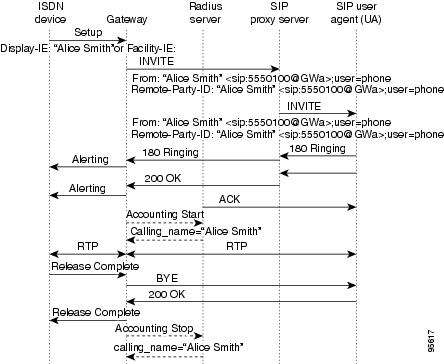
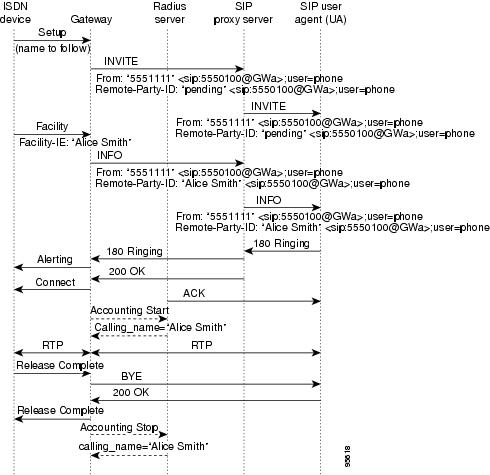
ISDN Calling Name DisplayWith releases earlier than Cisco IOS Release 12.2(15)ZJ, when a call came in from the ISDN network to a SIP gateway, the calling name as presented in ISDN Q.931 messages (Setup and/or Facility) was not transported end-to-end over the VoIP cloud to a SIP endpoint (a SIP IP phone). With this feature, SIP signaling on Cisco IOS gateways has been enhanced to update the calling name and number information in SIP headers as per the recommended SIP standards. Also included is the complete translation of ISDN screening and presentation indicators, allowing SIP customers basic caller ID privileges. Caller ID in ISDN NetworksIn ISDN networks, caller ID (sometimes called CLID or ICLID for incoming calling line identification) is an analog service offered by a central office (CO) to supply calling party information to subscribers. Caller ID allows the calling party number and name to appear on a device such as a telephone display. ISDN messages signal call control and are composed of information elements (IEs) that specify screening and presentation indicators. ISDN messages and their IEs are passed in GTD format. GTD format enables transport of signaling data in a standard format across network components and applications. The standard format enables other devices to scan and interpret the data. The SIP network extracts the calling name from the GTD format and sends the calling name information to the SIP customer. ISDN and SIP Call Flows Showing the Remote-Party-ID HeaderThe figure below shows the SIP gateway receiving an ISDN Setup message that contains a Display (or Facility) IE indicating the calling name. Receiving the message initiates call establishment. The Remote-Party-ID header sent by the SIP gateway identifies the calling party and carries presentation and screening information. The Remote-Party-ID header, which can be modified, added, or removed as a call session is being established, enables call participant privacy indication, screening, and verification. The figure below shows that the original ISDN Setup message sent by the ISDN device does not contain a Facility IE. The SIP gateway receives the ISDN Setup message indicating that the calling name is to be delivered in a subsequent ISDN Facility message. The SIP gateway then sets the display name of the Remote-Party-ID to pending . The presence of pending in a calling Remote-Party-ID of an INVITE denotes that the display name is to follow. The functionality of a calling name sent in a subsequent message requires that:
Signal ISDN B-Channel ID to Enable Application Control of Voice Gateway TrunksThe Signal ISDN B-Channel ID to Enable Application Control of Voice Gateway Trunks feature enables call management applications to identify specific ISDN bearer (B) channels used during a voice gateway call for billing purposes. With the identification of the B channel, SIP gateways can enable port-specific features such as voice recording and call transfer. In Cisco IOS releases prior to 12.3(7)T, fields used to store call leg information regarding the telephony port do not include B channel information. B channel information is used to describe incoming ISDN call legs. The Signal ISDN B-Channel ID to Enable Application Control of Voice Gateway Trunks feature allows SIP and H.323 gateways to receive B-channel information from incoming ISDN calls. The acquired B channel information can be used during call transfer or to route a call. SIP gateways use the ds0-num command to enable receiving the B channel of a telephony call leg. H.323 gateways use a different command, which allows users to run the two protocols on one gateway simultaneously.
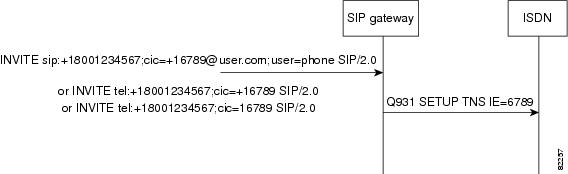
For SIP, if the ds0-num command is configured, the ISDN B-channel information is carried in the Via header of outgoing SIP requests. SIP Carrier Identification CodeSIP gateways can receive and transmit the carrier identification code (CIC) parameter, allowing equal access support over many different networks. CIC enables transmission of the CIC parameter from the SIP network to the ISDN. The CIC parameter is used in routing tables to identify the network that serves the remote user when a call is routed over many different networks. The parameter is carried in SIP INVITE requests and 302 REDIRECTs, and maps to the ISDN Transit Network Selection Information Element (TNS IE) in the outgoing ISDN SETUP message (see the figure below). The TNS IE identifies the requested transportation networks and allows different providers equal access support based on customer choice. The CIC parameter is supported in SIP URLs, which identify a user's address and appear similar to e-mail addresses: user@host. It is also supported in the telephone-subscriber part of a TEL URL, which takes the basic form of tel:telephone subscriber number , where tel requests the local entity to place a voice call, and telephone subscriber number is the number to receive the call. The CIC parameter can be a three-digit or a four-digit code. However, if it is a three-digit code, it is prefixed by a zero as in the following example: cic=+1234 = TNS IE 0234. SIP CLI for Caller ID When Privacy ExistsThe SIP: CLI for Caller ID When Privacy Exists feature is comprised of three main components, as follows:
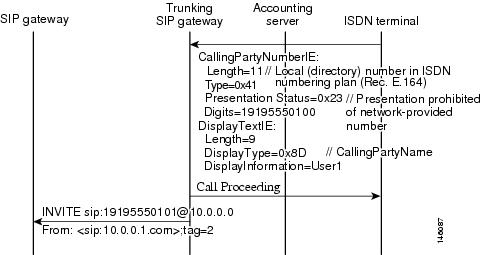
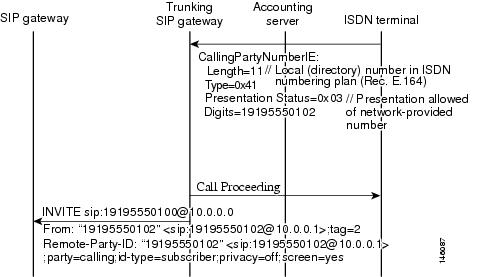
SIP Caller ID Removable to Improve PrivacyThe caller ID information is passed through from the ISDN-to-SIP by copying the number in the Calling Party Number information element (IE) in an ISDN Setup message into the Calling Number field of the SIP Remote-Party-ID and From headers. The Calling Name from the ISDN Display IE is copied into the SIP Display Name field in the SIP Remote-Party-ID and From headers. The Calling Party Number IE contains a Presentation Indicator field that is set to presentation allowed, presentation restricted, number not available due to interworking, or reserved. Presentation allowed and presentation restricted are translated into privacy set to off or privacy set to null, respectively, in the SIP Remote-Party-ID header field. However, for added privacy, the SIP: CLI for Caller ID When Privacy Exists feature introduces CLI to completely remove the Calling Number and Display Name from an outgoing message's From header if presentation is prohibited. This prohibits sending the SIP Remote Party ID header, because the Cisco gateway does not send SIP Remote-Party ID headers without both a Display Name and Calling Number.
See the figure below for call flows and the tables below for additional presentation mapping.
SIP Calling Number Substitution for the Display Name When the Display Name is UnavailableWhen the Display information element (IE) in a PSTN-to-SIP call is not available with a Setup message, the Cisco gateway leaves the Display Name field in the SIP Remote-Party-ID and From headers blank. When presentation is allowed, the SIP: CLI for Caller ID When Privacy Exists feature enables the substitution of the Calling Number for the missing Display Name in the SIP Remote-Party-ID and From headers. Upon receipt of a Setup message where a name to follow is indicated, the Calling Number is not copied into the Display Name. Also, the SIP Extensions for Caller Identity and Privacy on SIP gateway feature added the ability to hardcode calling name and number in the SIP Remote-Party-ID and From headers. The SIP Extensions for Caller Identify and Privacy feature settings take precedence over the SIP: CLI for Caller ID When Privacy Exists feature settings.
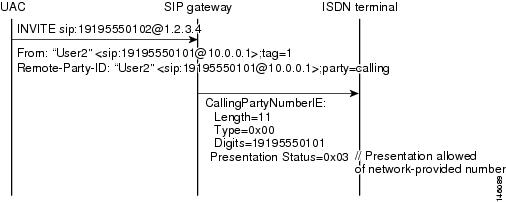
See the figure below for the call flow where the Calling Number is substituted for the Display Number. SIP Calling Number Passing as Network-Provided or User-ProvidedISDN numbers can be passed along as network-provided or user-provided in an ISDN Calling Party information element (IE) Screening Indicator field. The Cisco gateway automatically sets the Screening Indicator to user-provided in SIP-to-ISDN calls. The SIP: CLI for Caller ID When Privacy Exists feature allows toggling between user-provided and network-provided ISDN numbers for the screening indicator. Therefore, after bits 1 and 2 are set to reflect network-provided, any existing screening information is lost. However, presentation information in bits 6 and 7 is preserved.
See the figure below for the call flow when the calling number is passed along as network-provided. SIP ISDN Suspend Resume SupportSuspend and Resume are basic functions of ISDN and ISDN User Part (ISUP) signaling procedures and now are a part of SIP functionality. Suspend is described in ITU Q.764 as a message that indicates a temporary cessation of communication that does not release the call. A Suspend message can be accepted during a conversation. A Resume message is received after a Suspend message and is described in ITU Q.764 as a message that indicates a request to recommence communication. If the calling party requests to release the call, the Suspend and Resume sequence is overridden. SIP Call-Hold ProcessWhen a SIP originating gateway receives an ISDN Suspend message, the originating gateway informs the terminating gateway that there is a temporary cessation of media; that is, the call is placed on hold. There are two ways that SIP gateways receive notice of a call hold. The first way is for the originating gateway to use a connection IP address of 0.0.0.0 (c=0.0.0.0) in the Session Description Protocol ( SDP). The information in the SDP is sent in a re-Invite to the terminating gateway. The second way is for the originating gateway to use a=sendonly in the SDP of a re-Invite. The purpose of the c=0.0.0.0 line is to notify the terminating gateway to stop sending media packets. When the hold is cancelled and communication is to resume, an ISDN Resume message is sent. The SIP originating gateway takes the call off hold by sending out a re-Invite with the actual IP address of the remote SIP entity in the c= line (in place of 0.0.0.0). Multiple media fields (m-lines) in the SDP of a re-Invite message are used to indicate media forking, with each m-line representing one media destination. SIP gateways negotiate multiple media streams by using multiple m- and/or c-lines. When an originating gateway receives an ISDN Suspend on a gateway that has negotiated multiple media streams, all of the media streams are placed on hold. The originating gateway sends out a re-Invite that has a c= line that advertises the IP address as 0.0.0.0 on all streams. The originating gateway also mutes the SIP calls for each media stream so that no media is sent to the terminating gateway. When the originating gateway receives an ISDN Resume, it initiates a re-Invite with the original SDP and takes the call off hold. If the media inactivity timer is configured on the network, the timer is stopped for all active streams. The purpose of the media inactivity timer is to monitor and disconnect calls if no Real-Time Control Protocol (RTCP) packets are received within a configurable time period. However, on initiating the call hold, the originating gateway disables the media inactivity timer for that particular call, so the call remains active. The terminating gateway behaves in the same way when it receives the call-hold re-Invite from the originating gateway. When the call resumes, the originating gateway re-enables the Media Inactivity Timer.
All billing and accounting procedures are unaffected by the SIP: ISDN Suspend/Resume Support feature. SIP PSTN Transport Using the Cisco Generic Transparency DescriptorThe SIP PSTN Transport Using the Cisco Generic Transparency Descriptor feature adds SIP support for ISDN User Part (ISUP) Transport using Generic Transparency Descriptor (GTD). The ISUP data received on the originating gateway (OGW) is preserved and passed in a common text format to the terminating gateway (TGW). Feature benefits include the following:
SIP ISUP Transparency Using GTD OverviewThe SIP PSTN Transport Using the Cisco Generic Transparency Descriptor feature adds SIP support for ISUP transport using GTD. That is, ISUP data received on the OGW is preserved and presented in a common ASCII format to the TGW. GTD objects can be used to represent ISUP messages, parameters, and R2 signals. These GTD objects are encapsulated into existing signaling protocols, such as SIP, facilitating end-to-end transport. The transport of ISUP encapsulated in GTD ASCII format already exists for H.323; SIP PSTN Transport Using the Cisco Generic Transparency Descriptor provides feature parity. Using GTD as a transport mechanism for signaling data in Cisco IOS software provides a common format for sharing signaling data between various components in a network and for interworking various signaling protocols. To attain ISUP transparency in VoIP Networks, the gateway needs to externally interface with the Cisco SC node. The Cisco SC node is the combination of hardware (Cisco PGW 2200 and Cisco SLTs) and signaling controller software that provides the signaling controller function. The Cisco SC node transports the signaling traffic between the SC hosts and the SS7 signaling network. A brief example of the process of an ISDN message containing an ISUP GTD message that comes into the Cisco OGW from a Cisco SC node is described below and shown in the figure below. The process in the figure above is as follows:
SIP INFO Message Generation and SerializationThe SIP PSTN Transport Using the Cisco Generic Transparency Descriptor (GTD) feature adds client and server support for the SIP INFO message in all phases of a call. INFO messages are used to carry ISUP messages that were encapsulated into GTD format, but that do not have a specific mapping to any SIP response or request. These ISUP messages can be received in any phase of the call.
The gateway does not support sending out overlapping SIP INFO messages. For example, a second INFO message cannot be sent out while one is still outstanding. Multiple PSTN messages that map to SIP INFO messages are sent out serially. Transporting ISDN Messages in GTD FormatSupport for ISDN messages in GTD format is limited to the ISDN Setup message. Only the following parameters are encoded and decoded:
Whereas ISDN to GTD parameter mapping is enabled by default, you must configure the gateway to transport ISUP messages through SIP signaling. The ISDN parameters can be transported using either GTD or SIP headers. Before the SIP PSTN Transport Using the Cisco Generic Transparency Descriptor feature, only SIP headers provided ISDN parameters. For instance, the user portion of a SIP From header can carry the ISDN Calling Party information element. SIP headers generally contain the same information that is provided by GTD, because the headers are built on the OGW using information gained from the PSTN. However, there are situations in which the data may be in conflict. The inconsistent data occurs if the header was updated by an intermediate proxy or application server. In cases of conflict, the SIP header is used to construct the ISDN parameters on the TGW, because it generally contains the most recent information. SIP Generation of Multiple Message BodiesBefore this feature, the SIP gateway handled only SDP as a message body type. With SIP PSTN Transport Using the Cisco Generic Transparency Descriptor, it is now possible for the gateway to generate and properly format messages that contain both SDP and GTD message body types. Any SIP message that contains both SDP and GTD bodies may be large enough to require link-level fragmentation when User Datagram Protocol (UDP) transport is used, which could result in excessive retransmissions. TCP transport can be used if fragmentation becomes a performance issue. ISUP-to-SIP Message MappingSIP PSTN Transport Using the Cisco Generic Transparency Descriptor attempts to map particular ISUP messages to an equivalent SIP message. This mapping is defined in the table below.
ISDN UDI to SIP Clear-ChannelThe ISDN UDI to SIP Clear-Channel feature maps the ISDN bearer capability to an appropriate codec on the Session Initiation Protocol (SIP) trunk. When an ISDN bearer capability message is received as an Unrestricted Digital Information (UDI), only the clear-channel codec is used for negotiation on the SIP trunk. When the ISDN bearer capability message is non-UDI, like speech, the specific voice codecs are used for negotiation on the SIP trunk. The ISDN UDI to SIP Clear-Channel feature is applicable only for clear-channel and voice codecs. Integrated Service Router (ISR) gateways receive calls on ISDN trunks and forward them to SIP IP trunks. The ISDN UDI to SIP Clear-Channel feature advertises only the clear-channel codec when the ISDN has the bearer capability of UDI (this is meant for data calls), and advertises only voice codecs when the ISDN bearer capability is speech. This behavior is true when clear-channel codecs and voice codecs are configured either individually or together through voice-class codecs. The call is terminated with ISDN cause code 65 (bearer capability not implemented) if either:
How to Configure SIP ISDN Support FeaturesFor help with a procedure, see the troubleshooting section listed above. Before you perform a procedure, familiarize yourself with the following information:
Configuring ISDN Calling Name DisplayTo enable SIP IP phones to display caller-name identification for calls that originate on an ISDN network, perform the following task. DETAILED STEPS
Configuring Signal ISDN B-Channel ID to Enable Application Control of Voice Gateway Trunks
SUMMARY STEPS
DETAILED STEPS Configuring SIP Carrier Identification CodeSUMMARY STEPS
DETAILED STEPS
Configuring SIP CLI for Caller ID When Privacy Exists
Configuring SIP Blocking Caller ID Information Globally When Privacy ExistsThe Call-ID information is private information. In ISDN there is a private setting that can be set to protect this information. However, whenever SIP gets the Call-ID information, it does not hide the private information, rather, it just sets a field to reflect that it is private and not to display it on a Call-ID display. But, the data is still viewable in the SIP message requests. This option allows the Cisco gateway to delete the Call-ID information from the SIP message requests so it cannot be read on the network. Upon receiving an ISDN Setup message with the calling-party information element, the Cisco gateway translates the presentation indicator to set privacy to full for restricted presentation or to set privacy to off for unrestricted presentation in the Remote-Party-ID header field. The SIP: CLI for Caller ID When Privacy Exists feature introduces a CLI switch that either allows stripping the Calling Number and Display Name from the From and Remote-Party-ID fields in the SIP message requests or passes on the information. However, in cases of unrestricted presentation, the gateway passes the caller ID information, regardless of the CLI setting. The global commands to strip the Calling Name and Calling Number from the Remote-Party-ID and From headers are as follows: DETAILED STEPS
Configuring Dial-Peer Level SIP Blocking of Caller ID Information When Privacy ExistsThe dial-peer specific command to strip the Calling Number from the Remote-Party-ID and From headers is as follows: DETAILED STEPS
Configuring Globally the SIP Calling Number for Display Name Substitution When Display Name Is UnavailableWhen this is enabled, if there is no Display Name field but there is a number, it copies the number into the Display Name field, so the number is displayed on the recipient's Call-ID display. The Cisco gateway omits the Display Name field if no display information is received. This feature also introduces a CLI switch that allows the Calling Number to be copied into the Display Name field, as long as presentation is not prohibited. The steps for substituting the Calling Number for the Display Name when it is unavailable in the Remote-Party-ID and From headers are as follows: DETAILED STEPS
Configuring Dial-Peer-Level SIP Substitution of the Calling NumberThe dial-peer-specific steps for substituting the Calling Number for the Display Name when it is unavailable in the Remote-Party-ID and From headers are as follows: DETAILED STEPS
Configuring Globally the SIP Pass-Through of the Passing Calling Number as Network-ProvidedThis field shows whether the Call-ID information was supplied by the network or not. This is for screening purposes. Formerly the Calling Number from the session initiation protocol to public switched telephone network (SIP-to-PSTN) was always translated to user-provided. This feature introduces a CLI switch to toggle between branding numbers as user-provided or network-provided. The steps for globally setting set the Screening Indicator to network-provided are as follows: DETAILED STEPS
Configuring at the Dial-Peer Level the SIP Pass-Through of Passing the Calling Number as Network-Provided
SUMMARY STEPS
DETAILED STEPS
Configuring Globally the SIP Pass-Through of the Passing Calling Number as User-Provided
SUMMARY STEPS
DETAILED STEPS
Configuring at the Dial-Peer Level the SIP Pass-Through of Passing the Calling Number as User-Provided
SUMMARY STEPS
DETAILED STEPS
Configuring SIP ISDN Suspend Resume SupportSuspend and Resume functionality is enabled by default. However, the functionality is also configurable. To configure Suspend and Resume for all dial peers on the VoIP network, perform the steps below on both originating and terminating gateways. DETAILED STEPS
Configuring SIP PSTN Transport Using the Cisco Generic Transparency DescriptorTo forward the GTD payload to the gateway either for all dial peers on the VoIP network or for individual dial peers, perform the following steps. Before You Begin
SUMMARY STEPS
DETAILED STEPS Verifying SIP ISDN Support FeaturesTo verify configuration of SIP ISDN support features, perform the following steps as appropriate (commands are listed in alphabetical order). DETAILED STEPS
Troubleshooting Tips
Following is sample output for some of these commands: Sample Output for the debug ccsip messages CommandThe following is a sample INVITE request with B-channel information added as an extension parameter "x-ds0num" to the Via header. The format of the B-channel billing information is: 0 is the D-channel ID, 0 is the T1 controller, and 1 is the B-channel.
Router# debug ccsip messages
INVITE sip:3100802@172.18.193.99:5060 SIP/2.0
Via: SIP/2.0/UDP 172.18.193.100:5060;x-ds0num="ISDN 0:D 0:DS1 1:DS0"
From: <sip:3100801@172.18.193.100>;tag=21AC4-594
To: <sip:3100802@172.18.193.99>
Date: Thu, 28 Dec 2000 16:15:28 GMT
Call-ID: 7876AC6C-DC1311D4-8005DBCA-A25DA994@172.18.193.100
Supported: 100rel
Cisco-Guid: 1981523172-3692237268-2147670986-2724047252
User-Agent: Cisco-SIPGateway/IOS-12.x
Allow: INVITE, OPTIONS, BYE, CANCEL, ACK, PRACK, COMET, REFER, SUBSCRIBE, NOTIFY, INFO
CSeq: 101 INVITE
Max-Forwards: 6
Remote-Party-ID: <sip:3100801@172.18.193.100>;party=calling;screen=no;privacy=off
Timestamp: 978020128
Contact: <sip:3100801@172.18.193.100:5060>
Expires: 300
Allow-Events: telephone-event
Content-Type: application/sdp
Content-Length: 254
^M
v=0
o=CiscoSystemsSIP-GW-UserAgent 45 7604 IN IP4 172.18.193.100
s=SIP Call
c=IN IP4 172.18.193.100
t=0 0
m=audio 19492 RTP/AVP 18 0
c=IN IP4 172.18.193.100
a=rtpmap:18 G729/8000
a=fmtp:18 annexb=no
a=rtpmap:0 PCMU/8000
The following sample INVITE request shows the Via header if the incoming trunk is T3. The format of the B-channel billing information is: 7/0 is the T3 controller, 1 is the T1 controller, and 2 is the B channel. Router# debug ccsip messages Via: SIP/2.0/UDP 172.18.193.120:5060; x-ds0num="ISDN 7/0:D 1:D1 2:DS0" Configuring ISDN UDI to SIP Clear-Channel FeaturePerform this task to configure the ISDN UDI to SIP Clear-Channel feature. Configuring the ISDN UDI to SIP Clear-Channel feature only maps the ISDN UDI bearer capability to the clear-channel codec. However, it does not select the encapsulation type to be used for the clear-channel codec. You must select the clear-channel codec encapsulation at the global level or the dial-peer level after performing this task.DETAILED STEPS
Configuration Examples for SIP ISDN Support Features
ISDN Calling Name Display Examples
Router# show running-config
Building configuration...
Current configuration : 3845 bytes
!
version 12.3
service timestamps debug datetime msec
service timestamps log uptime
no service password-encryption
!
boot-start-marker
boot-end-marker
!
no logging buffered
!
resource-pool disable
clock timezone GMT 5
clock summer-time GMT recurring
!
no aaa new-model
ip subnet-zero
ip tcp path-mtu-discovery
ip name-server 172.18.192.48
!
isdn switch-type primary-ni
isdn voice-call-failure 0
isdn alert-end-to-end
!
voice call send-alert
!
voice service voip
signaling forward unconditional
sip
!
fax interface-type fax-mail
!
controller T1 0
framing esf
crc-threshold 0
clock source line primary
linecode b8zs
pri-group timeslots 1-24
description lucent_pbx
!
controller T1 1
shutdown
framing esf
crc-threshold 0
linecode ami
description summa_pbx
!
controller T1 2
shutdown
framing esf
crc-threshold 0
linecode ami
!
controller T1 3
framing esf
crc-threshold 0
clock source line secondary 1
linecode b8zs
pri-group timeslots 1-24
!
translation-rule 100
Rule 1 ^1 1 ANY national
Rule 2 2% 2 ANY unknown
Rule 4 4% 4 ANY unknown
Rule 5 5% 5 ANY unknown
Rule 6 6% 6 ANY unknown
Rule 7 7% 7 ANY unknown
Rule 8 8% 8 ANY unknown
Rule 9 9% 9 ANY unknown
!
interface Ethernet0
ip address 172.18.193.100 255.255.255.0
no ip route-cache
no ip mroute-cache
ip rsvp bandwidth 1 1
!
interface Serial0:23
no ip address
isdn switch-type primary-ni
isdn incoming-voice modem
isdn guard-timer 3000
isdn supp-service name calling
isdn disconnect-cause 1
fair-queue 64 256 0
no cdp enable
!
interface Serial3:23
no ip address
isdn switch-type primary-ni
isdn protocol-emulate network
isdn incoming-voice modem
isdn guard-timer 3000
isdn supp-service name calling
isdn T310 30000
isdn disconnect-cause 1
isdn bchan-number-order descending
fair-queue 64 256 0
no cdp enable
!
interface FastEthernet0
ip address 10.1.1.2 255.255.255.0
no ip route-cache
no ip mroute-cache
duplex auto
speed auto
!
ip classless
ip route 0.0.0.0 0.0.0.0 172.18.193.1
ip route 0.0.0.0 0.0.0.0 172.18.193.129
ip route 0.0.0.0 0.0.0.0 172.18.207.129
ip route 0.0.0.0 0.0.0.0 172.18.16.129
ip route 0.0.0.0 0.0.0.0 Ethernet0
ip route 0.0.0.0 0.0.0.0 172.18.197.1
ip route 0.0.0.0 255.255.255.0 Ethernet0
ip route 10.2.0.1 255.255.255.255 172.18.16.135
ip route 172.18.0.0 255.255.0.0 Ethernet0
no ip http server
!
map-class dialer test
dialer voice-call
dialer-list 1 protocol ip permit
!
control-plane
!
voice-port 0:D
!
dial-peer voice 10 pots
application session.t.old
destination-pattern 5550100
prefix 5550100
!
dial-peer voice 4 voip
application session
destination-pattern 5550120
session protocol sipv2
session target ipv4:172.18.193.99
incoming called-number 5550125
!
dial-peer voice 1 pots
application session
destination-pattern 5550125
incoming called-number 5550155
port 0:D
prefix 95550125
!
dial-peer voice 18 voip
application session
destination-pattern 36601
session protocol sipv2
session target ipv4:172.18.193.187
codec g711ulaw
!
dial-peer voice 25 voip
destination-pattern 5550155
session protocol sipv2
session target ipv4:172.18.192.232
!
dial-peer voice 5678 pots
destination-pattern 5678
port 3:D
prefix 5678
!
dial-peer voice 56781 voip
incoming called-number 5678
!
sip-ua
!
line con 0
line aux 0
line vty 0 4
password password1
login
!
end Signal ISDN B-Channel ID to Enable Application Control of Voice Gateway Trunks Example
Router# show running-config
Building configuration...
Current configuration : 3394 bytes
!
version 12.3
service timestamps debug uptime
service timestamps log uptime
no service password-encryption
service internal
!
memory-size iomem 15
ip subnet-zero
!
no ip domain lookup
!
voice service voip
h323
billing b-channel
sip
ds0-num
ip dhcp pool vespa
network 192.168.0.0 255.255.255.0
option 150 ip 192.168.0.1
default-router 192.168.0.1
!
voice call carrier capacity active
!
voice class codec 1
codec preference 2 g711ulaw
!
no voice hpi capture buffer
no voice hpi capture destination
!
fax interface-type fax-mail
mta receive maximum-recipients 0
!
interface Ethernet0/0
ip address 10.8.17.22 255.255.0.0
half-duplex
!
interface FastEthernet0/0
ip address 192.168.0.1 255.255.255.0
speed auto
no cdp enable
h323-gateway voip interface
h323-gateway voip id vespa2 ipaddr 10.8.15.4 1718
!
router rip
network 10.0.0.0
network 192.168.0.0
!
ip default-gateway 10.8.0.1
ip classless
ip route 0.0.0.0 0.0.0.0 10.8.0.1
no ip http server
ip pim bidir-enable
!
tftp-server flash:SEPDEFAULT.cnf
tftp-server flash:P005B302.bin
call fallback active
!
call application global default.new
call rsvp-sync
!
voice-port 1/0
!
voice-port 1/1
!
mgcp profile default
!
dial-peer voice 1 pots
destination-pattern 5100
port 1/0
!
dial-peer voice 2 pots
destination-pattern 9998
port 1/1
!
dial-peer voice 123 voip
destination-pattern [12]...
session protocol sipv2
session target ipv4:10.8.17.42
dtmf-relay sip-notify
!
gateway
!
sip-ua
retry invite 3
retry register 3
timers register 150
registrar dns:myhost3.example.com expires 3600
registrar ipv4:10.8.17.40 expires 3600 secondary
!
telephony-service
max-dn 10
max-conferences 4
!
ephone-dn 1
number 4001
!
ephone-dn 2
number 4002
!
line con 0
exec-timeout 0 0
line aux 0
line vty 0 4
login
line vty 5 15
login
!
no scheduler allocate
end
SIP Carrier Identification Code ExamplesCIC Parameter in SIP URLThis configuration example shows support for the CIC parameter in the user information part of the SIP URL. A SIP URL identifies a user's address and appears similar to an e-mail address, such as user@host, where user is the telephone number and host is either a domain name or a numeric network address. For example, the request line of an outgoing INVITE request might appear as: INVITE sip:+5550100;cic=+16789@example.com;user=phone SIP/2.0 Where +5550100; cic=+16789 signifies the user information, example.com the domain name, and the user=phone parameter distinguishes that the user address is a telephone number rather than a username. CIC Parameter in TEL URLThis configuration example shows support for the CIC parameter in the telephone-subscriber part of the TEL URL. A TEL URL takes the basic form of tel:telephone subscriber number , where tel requests the local entity to place a voice call, and telephone subscriber number is the number to receive the call. For example: tel:+5550100;cic=+16789 The additional CIC parameter can be in any of the following three formats: cic=+16789 cic=+1-6789 cic=6789 CIC Parameter and Visual SeparatorsThis configuration example shows support for the CIC parameter in different formats --with and without visual separators. However, the CIC parameter usually has no visual separators. All of the following formats are accepted: +12345 cic=+12345 cic=2345 Copying the CIC Parameter into the Resulting INVITE RequestThis configuration example shows that the CIC parameter can be copied from the user information part of a 3xx Contact SIP URL into the resulting INVITE request. For example, if a 302 REDIRECT response from a proxy appears like: Contact: <sip:+5550100;cic=+16789@example.com;user=phone> or like: Contact: <sip:+5550100;cic=6789@example.com;user=phone> The result is an INVITE request that sends the CIC with a +1 prefixed to it. INVITE sip:+5550100;cic=+16789@example.com;user=phone SIP/2.0 SIP CLI for Caller ID When Privacy Exists ExamplesThe following shows an example of the SIP: CLI for Caller ID When Privacy Exists feature when enabled globally and disabled on the dial-peer level: Router# show running-config Building configuration... Current configuration: 1234 bytes ! version 12.4 service timestamps debug datetime msec localtime service timestamps log datetime msec localtime no service password-encryption ! hostname pip ! boot-start-marker boot system tftp user1/c3660-is-mz 172.18.207.15 boot-end-marker ! logging buffered 1000000 debugging enable secret 5 $1$li0u$IkIqPXzKq4uKme.LhzGut0 enable password password1 ! no aaa new-model ! resource policy ! clock timezone GMT 0 clock summer-time EDT recurring ip subnet-zero ip tcp path-mtu-discovery ! ip cef ip domain name example.sip.com ip host sip-server1 172.18.193.100 ip host CALLGEN-SECURITY-V2 10.76.47.38 10.30.0.0 ip name-server 172.18.192.48 no ip dhcp use vrf connected ! ip vrf btknet rd 8262:2000 ! voice call send-alert ! voice service voip <- SIP: CLI for Caller ID When Privacy Exists feature enabled globally clid substitute name clid strip pi-restrict all clid network-provided sip ! voice class codec 1 codec preference 1 g729r8 codec preference 2 g711alaw codec preference 3 g711ulaw codec preference 4 g729br8 codec preference 5 g726r32 codec preference 6 g726r24 codec preference 7 g726r16 codec preference 8 g723ar53 codec preference 9 g723r53 codec preference 10 g723ar63 codec preference 11 gsmefr codec preference 12 gsmfr codec preference 13 g728 ! voice class codec 2 codec preference 1 g729r8 codec preference 2 g711ulaw codec preference 3 g711alaw ! voice class codec 99 codec preference 1 g729r8 codec preference 2 g711ulaw codec preference 3 g711alaw ! fax interface-type fax-mail ! interface FastEthernet0/0 ip address 172.18.195.49 255.255.255.0 duplex auto speed auto no cdp enable ip rsvp bandwidth 96 96 ! interface FastEthernet0/1 ip address 172.18.193.190 255.255.255.0 shutdown duplex auto speed auto no cdp enable ! no ip http server ! ip classless ip route 0.0.0.0 0.0.0.0 FastEthernet0/0 ip route 172.16.0.0 255.0.0.0 172.18.195.1 ! snmp-server community public RO ! control-plane ! voice-port 1/0/0 ! voice-port 1/0/1 ! mgcp behavior rsip-range tgcp-only ! dial-peer cor custom ! dial-peer voice 100 pots destination-pattern 9001 ! dial-peer voice 3301 voip destination-pattern 9002 session protocol sipv2 session target ipv4:172.18.193.87 incoming called-number 9001 codec g711ulaw no vad ! dial-peer voice 3303 voip destination-pattern 777 session protocol sipv2 session target ipv4:172.18.199.94 ! dial-peer voice 36601 voip destination-pattern 36601 no modem passthrough session protocol sipv2 session target ipv4:172.18.193.98 ! dial-peer voice 5 voip destination-pattern 5550100 session protocol sipv2 session target ipv4:172.18.197.182 codec g711ulaw ! dial-peer voice 36602 voip destination-pattern 36602 session protocol sipv2 session target ipv4:172.18.193.120 incoming called-number 9001 dtmf-relay rtp-nte codec g711ulaw ! dial-peer voice 111 voip destination-pattern 111 session protocol sipv2 session target ipv4:172.18.193.251 ! dial-peer voice 5550199 voip <- SIP: CLI for Caller ID When Privacy Exists feature disabled on dial-peer destination-pattern 3100801 session protocol sipv2 session target ipv4:10.102.17.208 codec g711ulaw ! dial-peer voice 333 voip preference 2 destination-pattern 333 modem passthrough nse codec g711ulaw voice-class codec 99 session protocol sipv2 session target ipv4:172.18.193.250 dtmf-relay rtp-nte no vad ! dial-peer voice 9003 pots preference 2 destination-pattern 9003 ! dial-peer voice 90032 voip preference 1 destination-pattern 9003 session protocol sipv2 session target ipv4:172.18.193.97 ! dial-peer voice 1 pots ! num-exp 5550100 5550199 num-exp 5550199 5550100 gateway timer receive-rtp 1200 ! sip-ua srv version 1 retry response 1 ! line con 0 exec-timeout 0 0 line aux 0 line vty 0 4 exec-timeout 0 0 password password1 login ! no process cpu extended no process cpu autoprofile hog ntp clock-period 17180176 ntp server 192.0.10.150 prefer ! end The following shows an example of the SIP: CLI for Caller ID When Privacy Exists feature when disabled globally and disabled on the dial-peer level: Router# show running-config Building configuration... Current configuration: 1234 bytes ! service timestamps debug datetime msec localtime service timestamps log datetime msec localtime no service password-encryption ! hostname pip ! boot-start-marker boot system tftp user1/c3660-is-mz 172.18.207.15 boot-end-marker ! logging buffered 1000000 debugging enable secret 5 $1$li0u$IkIqPXzKq4uKme.LhzGut0 enable password password1 ! no aaa new-model ! resource policy ! clock timezone GMT 0 clock summer-time EDT recurring ip subnet-zero ip tcp path-mtu-discovery ! ip cef ip domain name example.sip.com ip host sip-server1 172.18.193.100 ip host CALLGEN-SECURITY-V2 10.76.47.38 10.30.0.0 ip name-server 172.18.192.48 no ip dhcp use vrf connected ! ip vrf btknet rd 8262:2000 ! voice call send-alert ! voice service voip <- SIP: CLI for Caller ID When Privacy Exists feature disabled globally sip ! voice class codec 1 codec preference 1 g729r8 codec preference 2 g711alaw codec preference 3 g711ulaw codec preference 4 g729br8 codec preference 5 g726r32 codec preference 6 g726r24 codec preference 7 g726r16 codec preference 8 g723ar53 codec preference 9 g723r53 codec preference 10 g723ar63 codec preference 11 gsmefr codec preference 12 gsmfr codec preference 13 g728 ! voice class codec 2 codec preference 1 g729r8 codec preference 2 g711ulaw codec preference 3 g711alaw ! voice class codec 99 codec preference 1 g729r8 codec preference 2 g711ulaw codec preference 3 g711alaw ! fax interface-type fax-mail ! interface FastEthernet0/0 ip address 172.18.195.49 255.255.255.0 duplex auto speed auto no cdp enable ip rsvp bandwidth 96 96 ! interface FastEthernet0/1 ip address 172.18.193.190 255.255.255.0 shutdown duplex auto speed auto no cdp enable ! no ip http server ! ip classless ip route 0.0.0.0 0.0.0.0 FastEthernet0/0 ip route 172.16.0.0 255.0.0.0 172.18.195.1 ! snmp-server community public RO ! control-plane ! voice-port 1/0/0 ! voice-port 1/0/1 ! mgcp behavior rsip-range tgcp-only ! dial-peer cor custom ! dial-peer voice 100 pots destination-pattern 9001 ! dial-peer voice 3301 voip destination-pattern 9002 session protocol sipv2 session target ipv4:172.18.193.87 incoming called-number 9001 codec g711ulaw no vad ! dial-peer voice 3303 voip destination-pattern 777 session protocol sipv2 session target ipv4:172.18.199.94 ! dial-peer voice 36601 voip destination-pattern 36601 no modem passthrough session protocol sipv2 session target ipv4:172.18.193.98 ! dial-peer voice 5 voip destination-pattern 5550100 session protocol sipv2 session target ipv4:172.18.197.182 codec g711ulaw ! dial-peer voice 36602 voip destination-pattern 36602 session protocol sipv2 session target ipv4:172.18.193.120 incoming called-number 9001 dtmf-relay rtp-nte codec g711ulaw ! dial-peer voice 111 voip destination-pattern 111 session protocol sipv2 session target ipv4:172.18.193.251 ! dial-peer voice 5550199 voip <- SIP: CLI for Caller ID When Privacy Exists feature disabled on dial-peer destination-pattern 5550199 session protocol sipv2 session target ipv4:10.102.17.208 codec g711ulaw ! dial-peer voice 333 voip preference 2 destination-pattern 333 modem passthrough nse codec g711ulaw voice-class codec 99 session protocol sipv2 session target ipv4:172.18.193.250 dtmf-relay rtp-nte no vad ! dial-peer voice 9003 pots preference 2 destination-pattern 9003 ! dial-peer voice 90032 voip preference 1 destination-pattern 9003 session protocol sipv2 session target ipv4:172.18.193.97 ! dial-peer voice 1 pots ! num-exp 5550100 5550199 num-exp 5550101 5550198 gateway timer receive-rtp 1200 ! sip-ua srv version 1 retry response 1 ! ! line con 0 exec-timeout 0 0 line aux 0 line vty 0 4 exec-timeout 0 0 password password1 login ! no process cpu extended no process cpu autoprofile hog ntp clock-period 17180176 ntp server 192.0.10.150 prefer ! end The following shows an example of the SIP: CLI for Caller ID When Privacy Exists feature when disabled globally and enabled on the dial-peer level: Router# show running-config Building configuration... Current configuration: 1234 bytes ! version 12.4 service timestamps debug datetime msec localtime service timestamps log datetime msec localtime no service password-encryption ! hostname pip ! boot-start-marker boot system tftp judyg/c3660-is-mz 172.18.207.15 boot-end-marker ! logging buffered 1000000 debugging enable secret 5 $1$li0u$IkIqPXzKq4uKme.LhzGut0 enable password password1 ! no aaa new-model ! resource policy ! clock timezone GMT 0 clock summer-time EDT recurring ip subnet-zero ip tcp path-mtu-discovery ! ip cef ip domain name example.sip.com ip host sip-server1 172.18.193.100 ip host CALLGEN-SECURITY-V2 10.76.47.38 10.30.0.0 ip name-server 172.18.192.48 no ip dhcp use vrf connected ! ip vrf btknet rd 8262:2000 ! voice call send-alert ! voice service voip <- SIP: CLI for Caller ID When Privacy Exists feature disabled globally sip ! voice class codec 1 codec preference 1 g729r8 codec preference 2 g711alaw codec preference 3 g711ulaw codec preference 4 g729br8 codec preference 5 g726r32 codec preference 6 g726r24 codec preference 7 g726r16 codec preference 8 g723ar53 codec preference 9 g723r53 codec preference 10 g723ar63 codec preference 11 gsmefr codec preference 12 gsmfr codec preference 13 g728 ! voice class codec 2 codec preference 1 g729r8 codec preference 2 g711ulaw codec preference 3 g711alaw ! voice class codec 99 codec preference 1 g729r8 codec preference 2 g711ulaw codec preference 3 g711alaw ! fax interface-type fax-mail ! interface FastEthernet0/0 ip address 172.18.195.49 255.255.255.0 duplex auto speed auto no cdp enable ip rsvp bandwidth 96 96 ! interface FastEthernet0/1 ip address 172.18.193.190 255.255.255.0 shutdown duplex auto speed auto no cdp enable ! no ip http server ! ip classless ip route 0.0.0.0 0.0.0.0 FastEthernet0/0 ip route 172.16.0.0 255.0.0.0 172.18.195.1 ! snmp-server community public RO ! control-plane ! voice-port 1/0/0 ! voice-port 1/0/1 ! mgcp behavior rsip-range tgcp-only ! dial-peer cor custom ! dial-peer voice 100 pots destination-pattern 9001 ! dial-peer voice 3301 voip destination-pattern 9002 session protocol sipv2 session target ipv4:172.18.193.87 incoming called-number 9001 codec g711ulaw no vad ! dial-peer voice 3303 voip destination-pattern 777 session protocol sipv2 session target ipv4:172.18.199.94 ! dial-peer voice 36601 voip destination-pattern 36601 no modem passthrough session protocol sipv2 session target ipv4:172.18.193.98 ! dial-peer voice 5 voip destination-pattern 5550102 session protocol sipv2 session target ipv4:172.18.197.182 codec g711ulaw ! dial-peer voice 36602 voip destination-pattern 36602 session protocol sipv2 session target ipv4:172.18.193.120 incoming called-number 9001 dtmf-relay rtp-nte codec g711ulaw ! dial-peer voice 111 voip destination-pattern 111 session protocol sipv2 session target ipv4:172.18.193.251 ! dial-peer voice 5550100 voip <- SIP: CLI for Caller ID When Privacy Exists feature enabled on dial-peer destination-pattern 5550100 session protocol sipv2 session target ipv4:10.102.17.208 codec g711ulaw clid strip pi-restrict all clid network-provided clid substitute name ! dial-peer voice 333 voip preference 2 destination-pattern 333 modem passthrough nse codec g711ulaw voice-class codec 99 session protocol sipv2 session target ipv4:172.18.193.250 dtmf-relay rtp-nte no vad ! dial-peer voice 9003 pots preference 2 destination-pattern 9003 ! dial-peer voice 90032 voip preference 1 destination-pattern 9003 session protocol sipv2 session target ipv4:172.18.193.97 ! dial-peer voice 1 pots ! num-exp 5550100 5550199 num-exp 5550101 5550198 gateway timer receive-rtp 1200 ! sip-ua srv version 1 retry response 1 ! ! line con 0 exec-timeout 0 0 line aux 0 line vty 0 4 exec-timeout 0 0 password password1 login ! no process cpu extended no process cpu autoprofile hog ntp clock-period 17180176 ntp server 192.0.10.150 prefer ! end SIP ISDN Suspend Resume Support ExampleThe following example shows SIP Suspend and Resume disabled on the gateway (SIP Suspend and Resume is enabled by default on the gateway).
Router# show running-config Building configuration... Current configuration : 3845 bytes ! version 12.3 service timestamps debug datetime msec service timestamps log uptime no service password-encryption ! boot-start-marker boot-end-marker ! no logging buffered ! resource-pool disable clock timezone GMT 5 clock summer-time GMT recurring ! no aaa new-model ip subnet-zero ip tcp path-mtu-discovery ip name-server 172.18.192.48 ! isdn switch-type primary-ni isdn voice-call-failure 0 isdn alert-end-to-end ! voice call send-alert ! voice service voip signaling forward unconditional sip ! fax interface-type fax-mail ! controller T1 0 framing esf crc-threshold 0 clock source line primary linecode b8zs pri-group timeslots 1-24 description lucent_pbx ! controller T1 1 shutdown framing esf crc-threshold 0 linecode ami description summa_pbx ! controller T1 2 shutdown framing esf crc-threshold 0 linecode ami ! controller T1 3 framing esf crc-threshold 0 clock source line secondary 1 linecode b8zs pri-group timeslots 1-24 ! translation-rule 100 Rule 1 ^1 1 ANY national Rule 2 2% 2 ANY unknown Rule 4 4% 4 ANY unknown Rule 5 5% 5 ANY unknown Rule 6 6% 6 ANY unknown Rule 7 7% 7 ANY unknown Rule 8 8% 8 ANY unknown Rule 9 9% 9 ANY unknown ! interface Ethernet0 ip address 172.18.193.100 255.255.255.0 no ip route-cache no ip mroute-cache ip rsvp bandwidth 1 1 ! interface Serial0:23 no ip address isdn switch-type primary-ni isdn incoming-voice modem isdn guard-timer 3000 isdn supp-service name calling isdn disconnect-cause 1 fair-queue 64 256 0 no cdp enable ! interface Serial3:23 no ip address isdn switch-type primary-ni isdn protocol-emulate network isdn incoming-voice modem isdn guard-timer 3000 isdn supp-service name calling isdn T310 30000 isdn disconnect-cause 1 isdn bchan-number-order descending fair-queue 64 256 0 no cdp enable ! interface FastEthernet0 ip address 10.1.1.2 255.255.255.0 no ip route-cache no ip mroute-cache duplex auto speed auto ! ip classless ip route 0.0.0.0 0.0.0.0 172.18.193.1 ip route 0.0.0.0 0.0.0.0 172.18.193.129 ip route 0.0.0.0 0.0.0.0 172.18.207.129 ip route 0.0.0.0 0.0.0.0 172.18.16.129 ip route 0.0.0.0 0.0.0.0 Ethernet0 ip route 0.0.0.0 0.0.0.0 172.18.197.1 ip route 0.0.0.0 255.255.255.0 Ethernet0 ip route 10.2.0.1 255.255.255.255 172.18.16.135 ip route 172.18.0.0 255.255.0.0 Ethernet0 no ip http server ! map-class dialer test dialer voice-call dialer-list 1 protocol ip permit ! control-plane ! voice-port 0:D ! dial-peer voice 10 pots application session.t.old destination-pattern 5550100 prefix 5550100 ! dial-peer voice 4 voip application session destination-pattern 5550120 session protocol sipv2 session target ipv4:172.18.193.99 incoming called-number 5550125 ! dial-peer voice 1 pots application session destination-pattern 5550125 incoming called-number 5550155 port 0:D prefix 95550125 ! dial-peer voice 18 voip application session destination-pattern 36601 session protocol sipv2 session target ipv4:172.18.193.187 codec g711ulaw ! dial-peer voice 25 voip destination-pattern 5550155 session protocol sipv2 session target ipv4:172.18.192.232 ! dial-peer voice 5678 pots destination-pattern 5678 port 3:D prefix 5678 ! dial-peer voice 56781 voip incoming called-number 5678 ! sip-ua no suspend-resume retry invite 1 retry bye 1 line con 0 line aux 0 line vty 0 4 password password1 login ! end SIP PSTN Transport Using the Cisco Generic Transparency Descriptor ExamplesConfiguring GTD GloballyThe following examples shows that GTD is configured.
Router# show running-config
Building configuration...
Current configuration : 4192 bytes
!
version 12.2
service config
no service single-slot-reload-enable
no service pad
service timestamps debug uptime
service timestamps log uptime
no service password-encryption
service internal
service udp-small-servers
!
hostname router
!
voice service voip
signaling forward unconditional
sip
.
Configuring GTD for an Individual Dial PeerThe following example shows GTD configured with unconditional forwarding on two dial peers:
Router# show running-config
Building configuration...
Current configuration : 4169 bytes
!
version 12.2
service config
no service single-slot-reload-enable
no service pad
service timestamps debug uptime
service timestamps log uptime
no service password-encryption
service internal
service udp-small-servers
!
hostname router
.
.
.
dial-peer voice 36 voip
incoming called-number 3100802
destination-pattern 3100801
signaling forward unconditional
session protocol sipv2
session target ipv4:192.0.2.209
!
dial-peer voice 5 voip
destination-pattern 5555555
signaling forward unconditional
session protocol sipv2
session target ipv4:172.18.192.218
.
.
.
Example: Configuring the ISDN UDI to SIP Clear-Channel FeatureThe following example shows how to configure the ISDN UDI to SIP Clear-Channel feature on an ISDN SIP gateway: Router> enable Router# configure terminal Router(config)# voice service voip Router(conf-voi-serv)# sip Router(conf-serv-sip)# bearer-capability clear-channel udi bidirectional Router(conf-serv-sip)# end Cisco and the Cisco logo are trademarks or registered trademarks of Cisco and/or its affiliates in the U.S. and other countries. To view a list of Cisco trademarks, go to this URL: www.cisco.com/go/trademarks. Third-party trademarks mentioned are the property of their respective owners. The use of the word partner does not imply a partnership relationship between Cisco and any other company. (1110R) Any Internet Protocol (IP) addresses and phone numbers used in this document are not intended to be actual addresses and phone numbers. Any examples, command display output, network topology diagrams, and other figures included in the document are shown for illustrative purposes only. Any use of actual IP addresses or phone numbers in illustrative content is unintentional and coincidental. © 2012 Cisco Systems, Inc. All rights reserved.
|
|||||||||||||||||||||||||||||||||||||||||||||||||||||||||||||||||||||||||||||||||||||||||||||||||||||||||||||||||||||||||||||||||||||||||||||||||||||||||||||||||||||||||||||||||||||||||||||||||||||||||||||||||||||||||||||||||||||||||||||||||||||||||||||||||||||||||||||||||||||||||||||||||||||||||||||||||||||||||||
|
|