Your software release may not support all the features documented in this module. For the latest caveats and feature information, see
Bug Search Tool and the release notes for your platform and software release. To find information about the features documented in this module, and to see a list of the releases in which each feature is supported, see the feature information table at the end of this module.
Use Cisco Feature Navigator to find information about platform support and Cisco software image support. To access Cisco Feature Navigator, go to
www.cisco.com/go/cfn. An account on Cisco.com is not required.
Prerequisites for SIP Call Transfer
All SIP Call-Transfer Features
Establish a working IP network and configure VoIP.
Note
For information about configuring VoIP, see "Enhancements to the Session Initiation Protocol for VoIP on Cisco Access Platforms".
Ensure that the gateway has voice functionality configured for SIP.
Ensure that your Cisco router has minimum memory requirements.
With all SIP call-transfer methods, configure dial peers for correct functioning of the Refer method.
Note
For dial-peer configuration steps, see the "Configure SIP Call Transfer on a POTS Dial Peer".
As necessary, configure the router to use Greenwich Mean Time (GMT). SIP requires that all times be sent in GMT. The INVITE is sent in GMT. However, the default for routers is to use Coordinated Universal Time (UTC). To configure the router to use GMT, issue the
clocktimezone command in global configuration mode and specify GMT.
SIP Call Transfer and Call Forwarding Using Tcl IVR 2.0 and VoiceXML Applications Feature
Load Cisco IOS Release 12.2(15)T or a later release.
Configure hookflash signaling.
Write a Tool Command Language (Tcl) Interactive Voice Response (IVR) 2.0 script that implements Cisco IOS call-transfer and call-forward functionality.
Restrictions for SIP Call Transfer
All SIP Call-Transfer Features
The SIP gateway does not support codecs other than those listed in the table titled "SIP Codec Support by Platform and Cisco IOS Release" in the "Enhanced Codec Support for SIP Using Dynamic Payloads" section of the "Configuring SIP QoS Features" document.
SIP requires that all times be sent in GMT.
Although SIP Cisco IOS gateways currently support SIP URLs and TEL URLs, the Refer-To header and the Also header must be in SIP URL format to be valid. The TEL URL is only supported in the Refer-To header for blind transfer. The TEL URL format cannot be used because it does not provide a host portion, and without one, the triggered Invite request cannot be routed.
Only three overloaded headers in the Refer-to header are accepted: Accept-Contact, Proxy-Authorization, and Replaces. All other headers present in the Refer-To are ignored.
The Refer-To and Contact headers are required in the Refer request. The absence of either header results in a 4xx class response to the Refer request. Also, the Refer request must contain exactly one Refer-To header. Multiple Refer-To headers result in a 4xx class response.
The Referred-By header is required in a Refer request. The absence of this header results in a 4xx class response to the Refer request. Also, the Refer request must contain exactly one Referred-By header. Multiple Referred-By headers result in a 4xx class response.
With all SIP call-transfer methods, dial peers must be configured for correct functioning of the Refer method.
Note
For dial-peer configuration steps, see "Configure SIP Call Transfer on a POTS Dial Peer".
With call transfer using the Bye method, the Requested-By header identifies the party initiating the transfer. The Requested-By header is included in the INVITE request that is sent to the transferred-to party only if a Requested-By header was also included in the Bye request.
With call transfer using the Also method, the Also header identifies the transferred-to party. To invoke a transfer, the user portion of the Also header must be defined explicitly or with wildcards as a destination pattern on a VoIP dial peer. The transferred call is routed using the session target parameter on the dial peer instead of the host portion of the Also header. Therefore, the Also header can contain user@host, but the host portion is ignored for call routing purposes.
The grammar for the Also and Requested-By headers is not fully supported. Only the name-addr is supported. This implies that the crypto-param, which might be present in the Bye request, is not populated in the ensuing Invite to the transferred-to party.
Cisco SIP gateways do not support the "user=np-queried" parameter in a Request URI.
If a Cisco SIP gateway receives an ISDN Progress message, it generates a 183 Session progress message. If the gateway receives an ISDN ALERT, it generates a 180 Ringing message.
The SIP gateway requires each INVITE to include a Session Description Protocol (SDP) header.
The contents of the SDP header cannot change between the 180 Ringing message and the 200 OK message.
VoIP dial peers allow a user to configure the bytes parameter associated with a codec. Cisco SIP gateways present or respond to the a=ptime parameter in the SDP body of a SIP message. However, only one a=ptime attribute is allowed per m-line block.
If early transfer is attempted, and the call between the originator and final-recipient involves QoS or RSVP, the triggered Invite from the recipient with the Replaces header is not processed and the transfer fails. The session between the originator and the final-recipient remains unchanged.
SIP Call Transfer and Call Forwarding Using Tcl IVR 2.0 and VoiceXML Applications Feature
SIP call transfer and call forwarding using Tcl IVR 2.0 and VoiceXML applications feature is supported only through Tcl IVR 2.0 and VoiceXML applications; the feature is not supported for Tcl IVR 1.0 applications or the DEFAULT session application.
Only Cisco 1700 series, Cisco 2600 series, and Cisco 3600 series routers support the initiating of call transfer and call redirection.
Cisco SIP customer premise equipment (CPE) such as 79xx and Analog Telephone Adaptors (ATAs) do not currently support TEL URLs.
RLT on CAS or analog (FXS) ports are necessary to initiate SIP call transfers.
The Cisco AS5xxx platforms do not support hookflash detection for T1 CAS.
SIP call forwarding is supported only on ephones--IP phones that are not configured on the gateway. FXS, FXO, T1, E1, and CAS phones are not supported.
In Cisco IOS Release 12.2(15)T, when SIP with ephones is used, DTMF is not supported. Voice can be established, but DTMF cannot be relayed in- or out-of-band. Custom scripting is also necessary for ephones to initiate call forwarding. The standard configurations listed in this document work only when an ephone is the recipient or final-recipient.
The Refer method provides call-transfer capabilities to supplement the Bye and Also methods already implemented on Cisco IOS SIP gateways.
Call transfer allows a wide variety of decentralized multiparty call operations. These decentralized call operations form the basis for third-party call control, and thus are important features for VoIP and SIP. Call transfer is also critical for conference calling, where calls can transition smoothly between multiple point-to-point links and IP level multicasting.
The SIP Refer method provides call-transfer capabilities to supplement
the Bye and Also methods already implemented on Cisco IOS SIP gateways. The
Refer method has three main roles:
Originator--User agent that
initiates the transfer or Refer request.
Recipient--User agent that
receives the Refer request and is transferred to the final-recipient.
Final-Recipient--User agent
introduced into a call with the recipient.
Note
A gateway can be a recipient or final-recipient; but not an
originator.
The Refer method always begins within the context of an existing call
and starts with the
originator . The originator sends a Refer request to the
recipient (user agent receiving the Refer request) to initiate a
triggered Invite request. The triggered Invite request uses the SIP URL
contained in the Refer-To header as the destination of the Invite request. The
recipient then contacts the resource in the Refer-To header
(final-recipient ), and returns a SIP 202 (Accepted) response to the
originator. The recipient also must notify the originator of the outcome of the
Refer transaction--whether the final-recipient was successfully or
unsuccessfully contacted. The notification is accomplished using the Notify
Method, SIP's event notification mechanism. A Notify message with a message
body of SIP 200 OK indicates a successful transfer, while a body of SIP 503
Service Unavailable indicates an unsuccessful transfer. If the call was
successful, a call between the recipient and the final-recipient results.
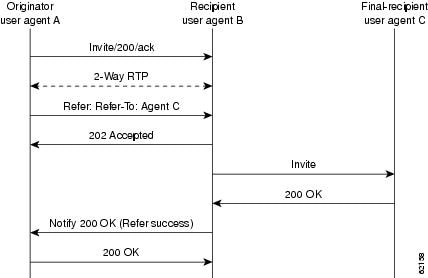
The figure below shows the call flow of a successful Refer transaction
initiated within the context of an existing call.
Figure 1
Successful Refer Transaction
Refer-To Header
The recipient receives from the originator a Refer request that
always contains a single Refer-to header. The Refer-to header includes a SIP
URL that indicates the party to invite and must be in SIP URL format.
Note
The TEL URL format cannot be used in a Refer-to header, because it
does not provide a host portion, and without one, the triggered Invite request
cannot be routed.
The Refer-To header may contain three additional overloaded headers
to form the triggered Invite request. If any of these three headers are
present, they are included in the triggered Invite request. The three headers
are:
Accept-Contact--Optional
in a Refer request. A SIP IOS gateway that receives an Invite request with an
Accept-Contact does not act upon this header. This header is defined in
draft-ietf-sip-callerprefs-03.txt and may be used by user agents that support
caller preferences.
Proxy-Authorization--A
nonstandard header that SIP gateways do not act on. It is echoed in the
triggered Invite request because proxies occasionally require it for billing
purposes.
Replaces--The Replaces
header is used by SIP gateways to indicate whether the originator of the Refer
request is requesting a blind or attended transfer. It is required if the
originator is performing an attended transfer, and not required for a blind
transfer.
All other headers present in the Refer-To are ignored, and are not
sent in the triggered invite.
Note
The Refer-To and Contact headers are required in the Refer
request. The absence of these headers results in a 4xx class response to
the Refer request. Also, the Refer request must contain exactly one Refer-To
header. Multiple Refer-To headers result in a 4xx class response.
Referred-By Header
The Referred-By header is required in a Refer request. It identifies
the originator and may also contain a signature (included for security
purposes). SIP gateways echo the contents of the Referred-By header in the
triggered Invite request, but on receiving an Invite request with this header,
gateways do not act on it.
Note
The Referred-By header is required in a Refer request. The absence
of this header results in a 4xx
class response to the Refer request. Also, the Refer request must
contain exactly one Referred-By header. Multiple Referred-By headers result in
a 4xx class response.
Notify Method
Once the outcome of the Refer transaction is known, the recipient of the Refer request must notify the originator of the outcome of the Refer transaction--whether the final-recipient was successfully or unsuccessfully contacted. The notification is accomplished using the Notify method, SIP's event notification mechanism. The notification contains a message body with a SIP response status line and the response class in the status line indicates the success or failure of the Refer transaction.
The Notify message must:
Reflect the same To, From, and Call-ID headers that were received in the Refer request.
Contain an Event header refer.
Contain a message body with a SIP response line. For example: SIP/2.0 200 OK to report a successful Refer transaction, or SIP/2.0 503 Service Unavailable to report a failure. To report that the recipient disconnected before the transfer finished, it must use SIP/2.0 487 Request Canceled.
Two Cisco IOS commands pertain to the Notify method.
The
timersnotify command sets the amount of time that the recipient should wait before retransmitting a Notify message to the originator.
Theretrynotify command configures the number of times a Notify message is retransmitted to the originator.
Note
For information on these commands, see the
Cisco IOS Voice Command Reference.
Types of SIP Call Transfer Using the Refer Method
This section discusses how the Refer method facilitates call transfer.
There are two types of call transfer: blind and attended. The primary difference between the two is that the Replaces header is used in attended call transfers. The Replaces header is interpreted by the final-recipient and contains a Call-ID header, indicating that the initial call leg is to be replaced with the incoming Invite request.
As outlined in the Refer method, there are three main roles:
Originator--User agent that initiates the transfer or Refer request.
Recipient--User agent that receives the Refer request and is transferred to the final-recipient.
Final-Recipient--User agent introduced into a call with the recipient.
A gateway can be a recipient or final-recipient but not an originator.
A blind, or unattended, transfer is one in which the transferring phone connects the caller to a destination line before ringback begins. This is different from a consultative, or attended, transfer in which one of the transferring parties either connects the caller to a ringing phone (ringback heard) or speaks with the third party before connecting the caller to the third party. Blind transfers are often preferred by automated devices that do not have the capability to make consultation calls.
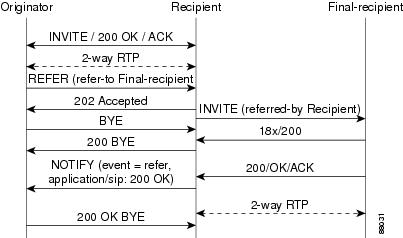
The basic process of blind transfers works as described in the figure below. In blind transfer, the originator (user agent that initiates the transfer or Refer request) sets up a call with the recipient (user agent that receives the Refer request). After the originator issues a Refer request to the recipient, the recipient, triggered by the Refer request, sends an Invite request to the final-recipient (user agent introduced into a call with the recipient). The recipient returns a SIP 202 (Accepted) response to the originator, and notifies the originator of the outcome of the Refer transaction--if the final-recipient was successfully (SIP 200 OK) or unsuccessfully (SIP 503 Service Unavailable) contacted.
If successful, a call is established between the recipient and the final-recipient. The original signaling relationship between the originator and recipient is terminated when a Bye request is sent by one of the parties. On a successful transfer, if the originator does not send a Bye request after receiving an acknowledgement for the Notify message, the recipient initiates a Bye request. The figure below shows a successful blind or unattended call transfer in which the originator initiates a Bye request to terminate signaling with the recipient.
Figure 2
Successful Blind or Unattended Transfer--Originator Initiating a Bye Request
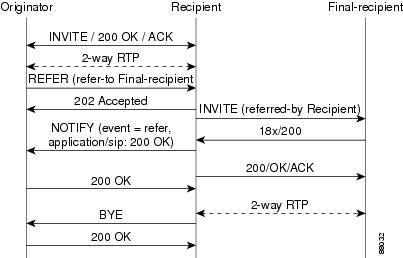
The figure below shows a successful blind or unattended call transfer in which the recipient initiates a Bye request to terminate signaling with the originator. A Notify message is always sent by the recipient to the originator after the final outcome of the call is known.
Figure 3
Successful Blind or Unattended Transfer --Recipient Initiating a Bye Request
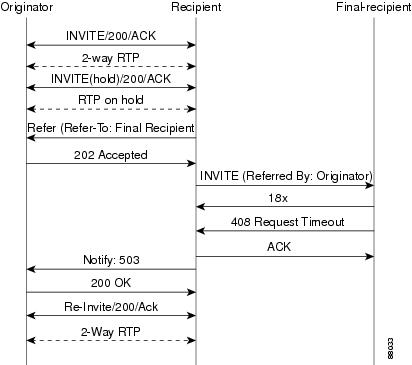
If a failure occurs with the triggered Invite to the final-recipient, the call between the originator and the recipient is not disconnected. The originator sends a re-Invite which takes the call off hold and returns to the original call with the recipient. With prior blind transfer functionality, if the recipient receives an 18x informational response from the final-recipient and then the call fails, the originator can not recover the call with the recipient.
A failure can be caused by an error condition or timeout.
The figure below shows that the call leg between the originator and the recipient remains active. Thus, if the Invite to the final-recipient fails (408 Request Timeout), the recipient notifies the originator of the failure with a Notify message. The originator sends a re-Invite and returns to the original call with the recipient.
Figure 4
Failed Blind Transfer--Originator Returns to Original Call with Recipient
Attended Transfer
In attended transfers, the Replaces header is inserted by the initiator
of the Refer request as an overloaded header in the Refer-To and is copied into
the triggered Invite request sent to the final-recipient. The header has no
affect on the recipient, but is interpreted by the final-recipient as a way to
distinguish between blind transfer and attended transfer. The attended transfer
process is described in the table below.
Table 1
Attended Transfer Process
Process
DescriptionorDetail
Originator sets up
a call with the recipient.
After the call is set up, originator places recipient on hold.
Originator
establishes a call to the final-recipient.
--
Originator sends
recipient a Refer request with an overloaded Replaces header in the Refer-To
header.
--
Upon receipt of the
Refer request, recipient sends a triggered Invite request to the
final-recipient.
The Invite request received by final-recipient includes the
Replaces header, identifying the call leg between the originator and
final-recipient.
Recipient returns a
SIP 202 (Accepted) response to the originator.
The SIP 202 (Accepted) acknowledges that the Invite has been
sent.
Final-recipient
establishes a direct signaling relationship with recipient.
Receipt of the Replaces header is what indicates that the
initial call leg is to be shut down and replaced by the incoming Invite
request.
Recipient notifies
originator of the outcome of the Refer transaction.
Recipient notifies the originator if the final-recipient was
successfully or unsuccessfully contacted.
Recipient
terminates the session with originator by sending a Bye request.
--
Replaces Header
The Replaces header is required in attended transfers. It indicates
to the final-recipient that the initial call leg (identified by the Call-ID
header and tags) is to be shut down and replaced by the incoming Invite
request. The final-recipient sends a Bye request to the originator to terminate
its session.
If the information provided by the Replaces header does not match an
existing call leg, or if the information provided by the Replaces header
matches a call leg but the call leg is not active (a Connect, 200 OK to the
Invite request has not been sent by the final-recipient), the triggered Invite
does not replace the initial call leg and the triggered Invite request is
processed normally.
Any failure resulting from the triggered Invite request from the
recipient to final-recipient does not destroy the call between the originator
and the final-recipient. In these scenarios, all calls that are active
(originator to recipient and originator to final-recipient) remain active after
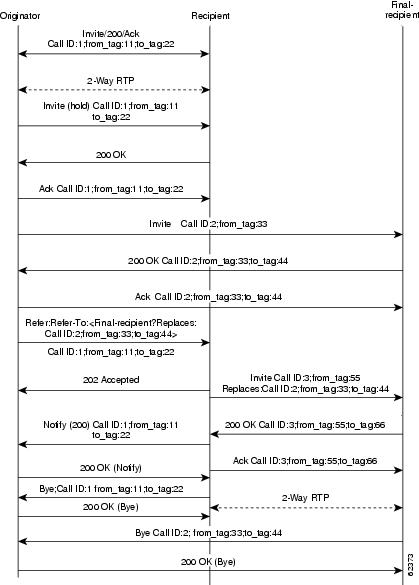
the failed attended transfer attempt. The figure below shows a call flow for a
successful attended transfer.
Figure 5
Successful Attended Transfer
Attended Transfer with Early Completion
Attended transfers allow the originator to have a call established
between both the recipient and the final-recipient. With attended transfer with
early completion, the call between the originator and the final-recipient does
not have to be active, or in the talking state, before the originator can
transfer it to the recipient. The originator establishes a call with the
recipient and only needs to be in the process of setting up a call with the
final-recipient. The final-recipient may be ringing, but has not answered the
call from the originator when it receives a re-Invite to replace the call with
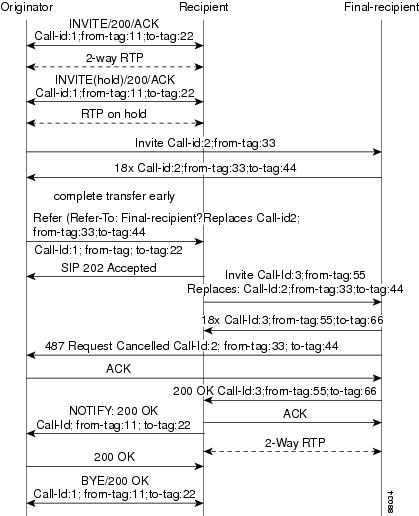
the originator and the recipient. The figure below shows the process of
attended transfer with early completion, and the detailed actions involved are
described in the table below.
Table 2
Attended Transfer with Early Completion Process
Process
DescriptionorDetail
Originator sets up
a call with recipient.
After the call is set up, originator places recipient on hold.
Originator contacts
final-recipient.
--
When originator
gets an indication that final-recipient is ringing, it sends recipient a Refer
request with an overloaded Replaces header in the Refer-to header.
The Replaces header is required in attended transfers and
distinguishes between blind transfer and attended transfers.
Recipient returns a
SIP 202 (Accepted) response to originator.
The SIP 202 (Accepted) acknowledges that the Invite has been
sent.
Upon receipt of the
Refer request, recipient sends a triggered Invite request to final-recipient.
The Invite request received by final-recipient includes the
Replaces header, which indicates that the initial call leg (identified by the
Call-ID header and tags) is to be shut down and replaced by the incoming Invite
request.
Final-recipient
establishes a direct signaling relationship with recipient.
Final-recipient tries to match the Call-ID header and the To or
From tags in the Replaces header of the incoming Invite with an active call leg
in its call control block. If a matching active call leg is found,
final-recipient replies with exactly the same status as the found call leg.
However it then terminates the found call leg with a 487 Request Cancelled
response.
Note
If early transfer is attempted and the call involves quality
of service (QoS) or Resource Reservation Protocol (RSVP), the triggered Invite
from the recipient with the Replaces header is not processed and the transfer
fails. The session between originator and final-recipient remains unchanged.
Recipient notifies
originator of the outcome of the Refer transaction--that is, whether
final-recipient was successfully or unsuccessfully contacted.
--
Recipient or
originator terminates the session by sending a Bye request.
--
Figure 6
Attended Transfer with Early Completion
VSA for Call Transfer
You can use a vendor-specific attribute (VSA) for SIP call transfer.
Referred-By Header
For consistency with existing billing models, the Referred-By and Requested-By headers are populated in call history tables as a VSA. Cisco VSAs are used for VoIP call authorization. The new VSA tag
supp-svc-xfer-byhelps to associate the call-legs for Call Detail Records (CDR) generation. The call-legs could be originator to recipient or recipient to final-recipient.
The new VSA tag
supp-svc-xfer-by contains the user@host portion of the SIP URL of the Referred-By header for transfers performed with the Refer method. For transfers performed with the Bye/Also method, the tag contains the user@host portion of the SIP URL of the Requested-By header. For each call on the gateway, there are two RADIUS records that are generated: start and stop. The
supp-svc-xfer-byVSA is only generated for stop records and is only generated on the recipient gateway--the gateway receiving the Refer or Bye/Also message.
The VSA is generated when a gateway that acts as a recipient receives a Refer or Bye/Also message with the Referred-By or Requested-By headers. There are usually two pairs of start and stop records. There is a start and stop record between the recipient and the originator and also between the recipient to final-recipient. In the latter case, the VSA is generated between the recipient to final-recipient only.
Business Group Field
A new business group VSA field has also been added that assists service providers with billing. The field allows service providers to add a proprietary header to call records. The VSA tag for business group ID iscust-biz-grp-id and is only generated for stop records. It is generated when the gateway receives an initial Invite with a vendor dial-plan header to be used in call records. In cases when the gateway acts as a recipient, the VSA is populated in the stop records between the recipient and originator and the recipient final-recipient.
Note
For more information about VSAs and CDRs, see the
CDR Accounting for Cisco IOS Voice Gateways guide.
SIP Call Transfer and Call Forwarding Using Tcl IVR 2.0 and VoiceXML Applications
SIP Call Transfer and Call Forwarding with a Tcl IVR Script
When using a Tcl IVR 2.0 application, you can implement SIP support of blind or attended call-transfer and call-forwarding requests from a Cisco IOS gateway. A blind transfer is one in which the transferring phone connects the caller to a destination line before ringback begins. An attended transfer is one that is consultative--one of the transferring parties either connects the caller to a ringing phone (ringback heard) or speaks with the third party before connecting the caller. Blind transfers are often preferred by automated devices that do not have the capability to make consultative calls.
Before implementing blind transfer and call forwarding, you must write a custom Tcl IVR 2.0 script that implements call transfer and call forwarding. The script is responsible for receiving the hookflash event, providing dial tone, matching against the dial plan, initiating call transfer, and reestablishing the original call if the transfer attempt fails.
Note
For information on writing a Tcl IVR script, see the
Tcl IVR API Version 2.0 Programmer's Guide.
When the Tcl IVR script runs on the Cisco gateway, it can respond to requests to initiate blind call transfer (transfer without consultation) on a SIP call leg. SIP call forwarding on ephones (IP phones that are not configured on the gateway) is also supported.
Note
SIP Call Transfer and Call Forwarding is compliant with Voice Extensible Markup Language (VXML). VXML scripts can also be used to implement call transfer and call forwarding.
Release Link Trunking on SIP Gateways
RLT functionality has been added to Cisco IOS SIP gateways. With RLT functionality, SIP call transfer can now be triggered by CAS trunk signaling, which the custom Tcl IVR application can monitor. After a SIP call transfer has transpired and the CAS interface is no longer required, the CAS interface can be released.
The RLT functionality can be used to initiate blind transfers on SIP gateways. Blind call transfer uses the Refer method. A full description of blind transfer and the refer Method can be found in "Call Transfer Capabilities Using the Refer Method" documentation.
RLT and SIP Call Transfers
Call transfer can be triggered by CAS trunk signaling and then captured by the custom Tcl IVR script on a gateway. The process begins with the originator (the SIP user agent that initiates the transfer or Refer request) responding with a dial tone once the originator receives the signal or hookflash from the PSTN call leg. The originator then prepares to receive dual-tone multifrequency (DTMF) digits that identify the final- recipient (the user agent introduced into a call with the recipient).
Once the first DTMF digit is received, the dial tone is discontinued. DTMF-digit collection is not completed until a 4-second interdigit timeout occurs, or an on-hook is received on that specific CAS time slot. Call transfer starts when DTMF-digit collection is successful. If digit collection fails, for example if not enough DTMF digits or invalid digits are collected, the initial call is reestablished.
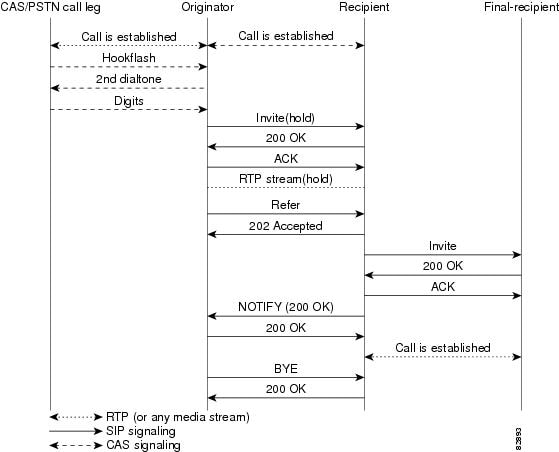
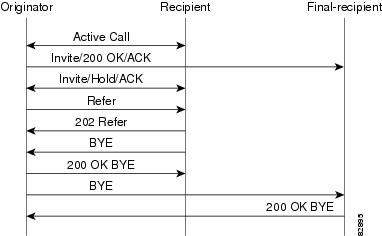
Once the DTMF digits are successfully collected, the custom Tcl IVR script can initiate call transfer. SIP messaging begins when the transfer is initiated with the Refer method. The originator sends an Invite to the recipient (the user agent that receives the Refer request and is transferred to the final-recipient) to hold the call and request that the recipient not return Real-Time Transport Protocol (RTP) packets to the originator. The originator then sends a SIP Refer request to the recipient to start the transfer process. When the recipient receives the request, the recipient returns a 202
Accepted acknowledgement to the originator. The Tcl IVR script run by the originator can then release the CAS trunk and close the primary call (see the figure below).
If the recipient does not support the Refer method, a 501 Not implemented message is returned. However, for backward compatibility purposes, the call transfer is automatically continued with the Bye/Also method. The originator sends a Bye/Also request to the recipient and releases the CAS trunk with the PSTN call leg. The primary call between the originator and the recipient is closed when a 200 OK response is received.
In all other cases of call-transfer failures, the primary call between the originator and the recipient is immediately shut down.
Figure 7
Call Transfer Using the Refer Method
SIP and TEL URLs in Call Transfers
When the SIP call-transfer originator collects DTMF digits from the CAS trunk, it attempts to find a dial peer. If a dial peer is found, the session target in the dial peer is used to formulate a Session Initiation Protocol Uniform Resource Locator (SIP URL). This URL can be used with both the Refer method and the Bye/Also method. A SIP URL is in the following form:
sip:JohnSmith@example.com
If a valid dial peer is not found, a Telephone Uniform Resource Locator (TEL URL) is formulated in the Refer-To header. A TEL URL is in the following form:
tel:+11231234567
The choice of which URL to use is critical when correctly routing SIP calls. For example, the originating gateway can send out a Bye with an Also header, but the Also header can carry only a SIP URL. The Also header cannot carry a TEL URL. That is, if the gateway decides to send a Bye/Also but cannot find a matched dial peer, the gateway reports an error on the transfer gateway and sends a Bye without the Also header.
If the recipient of a SIP call transfer is a SIP phone, the phone must have the capability to interpret either the Refer method or the Bye/Also method for the call transfer to work. If the recipient is a Cisco IOS gateway, there needs to be a matching dial peer for the Refer-To
user .
User, looking at the previous example, can be either
JohnSmith or
11231234567 . The dial peer also needs to have an application session defined, where session can be the name of a Tcl IVR application. If there's no match, a 4xx error is sent back and no transfer occurs. If there's a POTS dial peer match, a call is made to that POTS phone. Before the 12.2(15)T release, if there's a VoIP match, the Refer-To URL is used to initiate a SIP call. In release 12.2(15)T and later releases, the application session target in the dial peer is used for the SIP call.
Note
For information on the application session target, see the "Configure SIP Call Transfer and Call Forwarding on a POTS Dial Peer".
SIP Gateway Initiation of Call Transfers
SIP gateways can also initiate, or originate, attended call transfers.
The process begins when the originator establishes a call with the recipient.
When the user on the PSTN call leg wants to transfer the call, the user uses
hookflash to get a second dial tone and then enters the final-recipients
number. The Tcl IVR script can then put the original call on hold and set up
the call to the final-recipient, making the originator active with the
final-recipient. The Refer request is sent out when the user hangs up to
transfer the call. The Refer request contains a Replaces header that contains
three tags:
SIP CallID ,
from , and
to . The tags are passed along in the Invite from the recipient to
the final-recipient, giving the final-recipient adequate information to replace
the call leg. The host portion of the Refer request is built from the
established initial call. The following is an example of a Refer request that
contains a Replaces header:
Note
IP addresses and hostnames in examples are fictitious.
After the NOTIFY is received by the originator, the Tcl IVR script can
disconnect the call between the originator and the recipient. The call between
the originator and the final-recipient is disconnected by the recipient sending
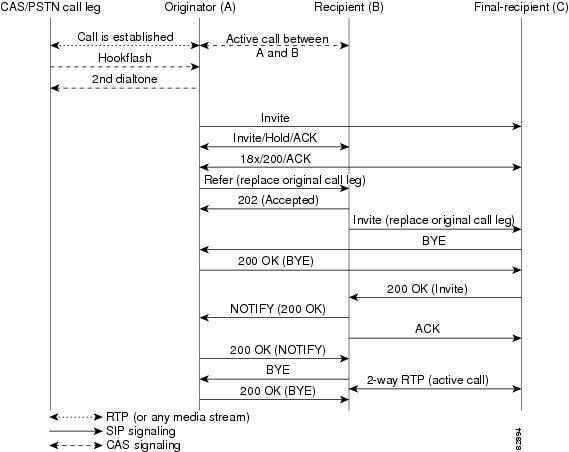
a BYE to the originator. The figure below shows a call flow of a successful
call transfer.
Figure 8
Successful Attended Call Transfer Initiated by the
Originator
If the recipient does not support the Refer method, a 501 Not
implemented message is returned.
In all other cases of call-transfer failures, the primary call between
the originator and the recipient is immediately shut down. The figure below
shows the recipient hanging up the call before the transfer completes. The item
to notice is that the NOTIFY message is never sent.
Figure 9
Unsuccessful Call Transfer--Recipient Hangs Up Before Transfer
Completes
SIP Call Forwarding
SIP call forwarding is supported only on ephones--IP phones that are not configured on the gateway. FXS, FXO, T1, E1, and CAS phones are not supported.
With ephones, there are four different types of SIP call forwarding supported:
Call Forward Unavailable
Call Forward No Answer
Call Forward Busy
Call Forward Unconditional
In all four of these call forwarding types, a 302
Moved Temporarily response is sent to the user agent client. A Diversion header included in the 302 response indicates the type of forward.
The 302 response also includes a Contact header, which is generated by the calling number that is provided by the custom Tcl IVR script. The 302 response also includes the host portion found in the dial peer for that calling number. If the calling number cannot match a VoIP dial-peer or POTS dial-peer number, a 503
Service Unavailable message is sent, except in the case of the Call Forward No Answer. With Call Forward No Answer, call forwarding is ignored, the phone rings, and the expires timer clears the call if there is no answer.
Note
By default, SIP credentials for forwarded calls on Cisco IOS voice gateways are based on the calling number. To globally enable a gateway to use the redirecting number, instead, use the
authenticateredirecting-number command. To configure this behavior for a specific dial peer on a gateway, use the
voice-classsipauthenticateredirecting-number command. For detailed information, see these commands in the Cisco IOS Voice Command Reference.
Note
In Cisco IOS Release 12.2(15)T and later releases, when SIP with ephones is used, DTMF is not supported. Voice can be established, but DTMF cannot be relayed in- or out-of-band. Custom scripting is also necessary for ephones to initiate call forwarding. The standard configurations listed in this document work only when an ephone is the recipient or final-recipient.
How to Configure SIP Call-Transfer Features
Note
For help with a procedure, see the verification and troubleshooting sections listed above. Before you perform a procedure, familiarize yourself with the following information:
To handle all call-transfer situations, configure both POTS and VoIP dial peers. This task configures SIP call transfer for a POTS dial peer.
SUMMARY STEPS
1.enable
2.configureterminal
3.dial-peervoicetagpots
4.application application-name
5.destination-pattern [+]string[T]
6.portslot/port
7.exit
DETAILED STEPS
Command or Action
Purpose
Step 1
enable
Example:
Router> enable
Enters privileged EXEC mode or any other security level set by a system administrator. Enter your password if prompted.
Step 2
configureterminal
Example:
Router# configure terminal
Enters global configuration mode.
Step 3
dial-peervoicetagpots
Example:
Router(config)# dial-peer voice 25 pots
Enters dial-peer configuration mode for the specified POTS dial peer.
Step 4
application application-name
Example:
Router(config-dial-peer)# application session
Enables a specific application on a dial peer. The argument is as follows:
application-name--Name of the predefined application that you wish to enable on the dial peer. For SIP, the default Tcl application (from the Cisco IOS image) is session and can be applied to both VoIP and POTS dial peers.
Specifies either the prefix or the full E.164 telephone number (depending on your dial plan) to be used for a dial peer: Keywords and arguments are as follows:
+--(Optional) Character indicating an E.164 standard number.
string --Series of digits that specify the E.164 or private dialing plan telephone number. Valid entries are the digits 0 through 9, the letters A through D, and any special character.
T--(Optional) Control character indicating that the
destination-pattern value is a variable length dial string.
Step 6
portslot/port
Example:
Router(config-dial-peer)# port 1/1
Associates a dial peer with a voice slot number and a specific local voice port through which incoming VoIP calls are received.
Note
To find the correct port argument for your router, see the
Cisco IOS Voice Command Reference.
Step 7
exit
Example:
Router(config-dial-peer)# exit
Exits the current mode.
Configure SIP Call Transfer on a VoIP Dial Peer
Note
To handle all call-transfer situations, configure both POTS and VoIP dial peers. This task configures SIP call transfer for a VoIP dial peer.
SUMMARY STEPS
1.enable
2.configureterminal
3.dial-peervoicetagvoip
4.applicationapplication-name
5.destination-pattern [+]string [T]
6.sessiontargetipv4:destination-address
7.sessionprotocolsipv2
8.exit
DETAILED STEPS
Command or Action
Purpose
Step 1
enable
Example:
Router> enable
Enters privileged EXEC mode or any other security level set by a system administrator. Enter your password if prompted.
Step 2
configureterminal
Example:
Router# configure terminal
Enters global configuration mode.
Step 3
dial-peervoicetagvoip
Example:
Router(config)# dial-peer voice 29 voip
Enters dial-peer configuration mode for the specified dial peer.
Step 4
applicationapplication-name
Example:
Router(config-dial-peer)# application session
Enables a specific application on a dial peer. The argument is as follows:
application-name--Name of the predefined application that you wish to enable on the dial peer. For SIP, the default Tcl application (from the Cisco IOS image) is session and can be applied to both VoIP and POTS dial peers.
Specifies either the prefix or the full E.164 telephone number (depending on your dial plan) to be used for a dial peer. Keywords and arguments are as follows:
+--(Optional) Character that indicates an E.164 standard number.
string--Series of digits that specify the E.164 or private dialing plan telephone number. Valid entries are the digits 0 through 9, the letters A through D, and any special character.
T--(Optional) Control character indicating that the
destination-pattern value is a variable-length dial string.
Specifies a network-specific address for a dial peer. Keyword and argument are as follows:
ipv4:destination address --IP address of the dial peer, in this format:
xxx.xxx.xxx.xxx
Step 7
sessionprotocolsipv2
Example:
Router(config-dial-peer)# session protocol sipv2
Configures the VoIP dial peer to use IETF SIP.
Step 8
exit
Example:
Router(config-dial-peer)# exit
Exits the current mode.
Configure the SIP Call-Transfer Session Target
To configure the SIP call-transfer session target, perform the following steps.
This task configures a SIP server as a session target. Although it is not required, configuring a SIP server as a session target is useful if there is a Cisco SIP proxy server (CSPS) present in the network. With a CSPS, you can configure the SIP server option and have the interested dial peers use the CSPS by default.
To determine the call-transfer destination on the originator, check if there is a matching dial peer:
If yes, check the session target for the dial peer. If the session target is a SIP server, configure the SIP server as described in the task below. If the session target is not a SIP server, the session target configured in the VoIP dial peer is used.
If no, a TEL URL is sent.
SUMMARY STEPS
1.enable
2.configureterminal
3.sip-ua
4.sip-serverdns: host-name
5.exit
6.dial-peervoicetagvoip
7.destination-pattern[+]string
[T]
8.sessiontargetsip-server
9.exit
DETAILED STEPS
Command or Action
Purpose
Step 1
enable
Example:
Router> enable
Enters privileged EXEC mode or any other security level set by a system administrator. Enter your password if prompted.
Sets the global SIP server interface to a Domain Name System (DNS) hostname. If you do not specify a hostname, the default DNS defined by the ipname-server command is used.
Step 5
exit
Example:
Router(config-sip-ua)# exit
Exits the current mode.
Step 6
dial-peervoicetagvoip
Example:
Router(config)# dial-peer voice 29 voip
Enters dial-peer configuration mode for the specified dial peer.
Specifies either the prefix or the full E.164 telephone number (depending on your dial plan) to be used for a dial peer. Keywords and arguments are as follows:
+--(Optional) Character that indicates an E.164 standard number.
string--Series of digits that specify the E.164 or private dialing plan telephone number. Valid entries are the digits 0 through 9, the letters A through D, and any special character.
T--(Optional) Control character indicating that the destination-pattern value is a variable-length dial string.
Instructsthedial-peersessiontargettousetheglobalSIPserver. Doing so saves you from having to repeatedly enter the SIP server interface address for each dial peer.
Step 9
exit
Example:
Router(config-dial-peer)# exit
Exits the current mode.
Configure SIP Refer and Notify Message Settings
Note
The Refer request is initiated by the originating gateway and signals the start of call transfer. Once the outcome of the SIP Refer transaction is known, the recipient of the Refer request notifies the originating gateway of the outcome of the Refer transaction--whether the final-recipient was successfully or unsuccessfully contacted. Notification is accomplished using the Notify method.
Before You Begin
Configure dial peers for correct functioning of the Refer method.
Note
For dial-peer configuration steps, see "Configure SIP Call Transfer on a POTS Dial Peer".
SUMMARY STEPS
1.enable
2.configureterminal
3.sip-ua
4.timersnotifymilliseconds
5.retrynotifynumber
6.exit
DETAILED STEPS
Command or Action
Purpose
Step 1
enable
Example:
Router> enable
Enters privileged EXEC mode or any other security level set by a system administrator. Enter your password if prompted.
Step 2
configureterminal
Example:
Router# configure terminal
Enters global configuration mode.
Step 3
sip-ua
Example:
Router(config)# sip-ua
Enters SIP user-agent configuration mode.
Step 4
timersnotifymilliseconds
Example:
Router(config-sip-ua)# timers notify 500
Sets the amount time that the user agent waits before retransmitting the Notify message. The argument is as follows:
milliseconds--Time, in ms. Range: 100 to 1000. Default: 500.
Step 5
retrynotifynumber
Example:
Router(config-sip-ua)# retry notify 10
Sets the number of times that the Notify message is retransmitted to the user agent that initiated the transfer or refer request. The argument is as follows:
number--Number of notify message retries. Range: 1 to 10.
Step 6
exit
Example:
Router(config-sip-ua)# exit
Exits the current mode.
Configuring SIP Call Transfer and Call Forwarding Using Tcl IVR 2.0 and VoiceXML Applications
Before you implement SIP support of blind or attended call-transfer and call-forwarding requests from a Cisco IOS gateway, you must load a custom Tcl IVR 2.0 or VXML script on the gateway. Write a Tcl IVR 2.0 script that implements Cisco IOS call-transfer and call-forwarding services. The Tcl IVR script is responsible for receiving the hookflash event, providing dial tone, matching against the dial plan, initiating the call transfer, and reestablishing the original call if the transfer attempt fails.
Note
For information on writing a Tcl IVR script, see "Tcl IVR API Version 2.0 Programmer's Guide".
Loads the Tcl IVR script and specifies its application name. Arguments are as follows:
application-name--Name used to reference the call application. This is a user-defined name and does not have to match the document name.
location--Location of the Tcl IVR file in URL format. For example, flash memory (flash:filename), TFTP (tftp://../filename) or HTTP server paths (http://../filename) are valid locations.
Router(config)# call application voice transfer_app set-location en 0 flash:/prompts
(Optional) Defines the location and category of the audio files that are used by the application for dynamic prompts. Arguments are as follows:
application-name--Name of the Tcl IVR application.
language--Language of the associated audio file. Valid values are as above.
category--Category group (0 to 4) for the audio files from this location. For example, audio files for the days and months could be category 1, audio files for units of currency could be category 2, and audio files for units of time (seconds, minutes, and hours) could be category 3. Range is from 0 to 4. The value 0 means all categories.
location--URL of the directory that contains the language audio files used by the application, without filenames. For example, flash memory (flash) or a directory on a server (TFTP, HTTP, or RTSP) are valid locations.
Step 6
exit
Example:
Router(config)# exit
Exits the current mode.
Step 7
allapplicationvoiceloadapplication-name
Example:
Router# call application voice load transfer.app
(Optional) Reloads the Tcl script after it has been modified. The argument is as follows:
application-name--Name of the Tcl IVR application to reload.
Configure SIP Call Transfer and Call Forwarding on a POTS Dial Peer
Note
To handle all call-transfer and call-forwarding situations, configure both POTS and VoIP dial peers. This task configures SIP call transfer and call forwarding for a POTS dial peer.
To configure SIP call transfer and forwarding on a Cisco IOS gateway by using the CAS trunk, see the
Cisco IOS Dial Technologies Configuration Guide .
Note
To locate a release-specific configuration guide for your Cisco IOS software release, select the
CiscoIOSandNX-OSSoftware category at the following Product Support page and navigate accordingly:http://www.cisco.com/web/psa/products/index.html.
Note
In Cisco IOS Release 12.2(15)T, when SIP with ephones is used, DTMF is not supported. Voice can be established, but DTMF cannot be relayed in- or out-of-band. Custom scripting is also necessary for ephones to initiate call forwarding. The standard configurations listed in this document work only when an ephone is the recipient or final-recipient.
SUMMARY STEPS
1.enable
2.configureterminal
3.dial-peervoicetagpots
4.applicationapplication-name
5.destination-pattern[+]string [T]
6.portslot/port
7.exit
DETAILED STEPS
Command or Action
Purpose
Step 1
enable
Example:
Router> enable
Enters privileged EXEC mode or any other security level set by a system administrator. Enter your password if prompted.
Step 2
configureterminal
Example:
Router# configure terminal
Enters global configuration mode.
Step 3
dial-peervoicetagpots
Example:
Router(config)# dial-peer voice 25 pots
Enters dial-peer configuration mode and for the specified POTS dial peer.
Specifies either the prefix or the full E.164 telephone number (depending on your dial plan) to be used for a dial peer. Keywords and arguments are as follows:
+--(Optional) Character that indicates an E.164 standard number.
string--Series of digits that specify the E.164 or private dialing plan telephone number. Valid entries are the digits 0 through 9, the letters A through D, and any special character.
T--(Optional) Control character indicating that the
destination-pattern value is a variable-length dial string.
Step 6
portslot/port
Example:
Router(config-dial-peer)# port 1/1
Associates a dial peer with a voice slot number and a specific local voice port through which incoming VoIP calls are received.
Note
To find the correct port argument for your router, see the
Cisco IOS Voice Command Reference.
Step 7
exit
Example:
Router(config-dial-peer)# exit
Exits the current mode.
Configure SIP Call Transfer and Call Forwarding on a VoIP Dial Peer
Note
To handle all call-transfer and call-forwarding situations, configure both POTS and VoIP dial peers. This task configures SIP call transfer and call forwarding for a VoIP dial peer.
To configure SIP call transfer and forwarding on a Cisco IOS gateway by using the CAS trunk, see the
Cisco IOS Dial Technologies Configuration Guide.
Note
To locate a release-specific configuration guide for your Cisco IOS software release, select the
CiscoIOSandNX-OSSoftware category at the following Product Support page and navigate accordingly:http://www.cisco.com/web/psa/products/index.html .
Note
RLT on CAS or analog (FXS) ports is necessary for initiating IP call transfers.
The Cisco AS5xxx platforms do not support hookflash detection for T1 CAS.
In Cisco IOS Release 12.2(15)T, when SIP with ephones is used, DTMF is not supported. Voice can be established, but DTMF cannot be relayed in- or out-of-band. Custom scripting is also necessary for ephones to initiate call forwarding. The standard configurations listed in this document work only when an ephone is the recipient or final-recipient.
SUMMARY STEPS
1.enable
2.configureterminal
3.dial-peervoicetagvoip
4.applicationapplication-name
5.destination-pattern[+]string [T]
6.sessiontargetipv4:destination-address
7.sessionprotocolsipv2
8.exit
DETAILED STEPS
Command or Action
Purpose
Step 1
enable
Example:
Router> enable
Enters privileged EXEC mode or any other security level set by a system administrator. Enter your password if prompted.
Step 2
configureterminal
Example:
Router# configure terminal
Enters global configuration mode.
Step 3
dial-peervoicetagvoip
Example:
Router(config)# dial-peer voice 29 voip
Enters dial-peer configuration mode for the specified dial peer.
Specifies either the prefix or the full E.164 telephone number (depending on your dial plan) to be used for a dial peer. Keywords and arguments are as follows:
+--(Optional) Character that indicates an E.164 standard number.
string--Series of digits that specify the E.164 or private dialing plan telephone number. Valid entries are the digits 0 through 9, the letters A through D, and any special character.
T--(Optional) Control character indicating that the
destination-pattern value is a variable-length dial string.
Specifies a network-specific address for a dial peer. The argument is as follows:
destinationaddress--IP address of the dial peer, in this format:
xxx.xxx.xxx.xxx
Step 7
sessionprotocolsipv2
Example:
Router(config-dial-peer)# session protocol sipv2
Configures the VoIP dial peer to use IETF SIP. The keyword is as follows:
sipv2--Causes the VoIP dial peer to use IETF SIP. Use this keyword with the SIP option.
Step 8
exit
Example:
Router(config-dial-peer)# exit
Exits the current mode.
Configure the SIP Call-Transfer and Call-Forwarding Session Target
Note
To configure a SIP server as a session target, follow this task. Although configuring a SIP server as a session target is not required, it is useful if there is a Cisco SIP proxy server (CSPS) present in the network. With a CSPS, you can configure the SIP server option and have the interested dial peers use the CSPS by default.
To determine the call-transfer destination on the originator, check if there is a matching dial peer:
If yes, check the session target for the dial peer. If the session target is a SIP server, configure the SIP server as described in the task below. If the session target is not a SIP server, the session target configured in the VoIP dial peer is used.
If no, a TEL URL is sent.
To configure SIP call transfer and forwarding on a Cisco IOS gateway by using the CAS trunk, see the
Cisco IOS Dial Technologies Configuration Guide .
Note
To locate a release-specific configuration guide for your Cisco IOS software release, select the
CiscoIOSandNX-OSSoftware category at the following Product Support page and navigate accordingly:http://www.cisco.com/web/psa/products/index.html .
SUMMARY STEPS
1.enable
2.configureterminal
3.sip-ua
4.sip-serverdns:host-name
5.exit
6.dial-peervoicetagvoip
7.destination-pattern [+]string[T]
8.sessiontargetsip-server
9.exit
DETAILED STEPS
Command or Action
Purpose
Step 1
enable
Example:
Router> enable
Enters privileged EXEC mode or any other security level set by a system administrator. Enter your password if prompted.
Specifies either the prefix or the full E.164 telephone number (depending on your dial plan) to be used for a dial peer. Keywords and arguments are as follows:
+--(Optional) Character that indicates an E.164 standard number.
string--Series of digits that specify the E.164 or private dialing plan telephone number. Valid entries are the digits 0 through 9, the letters A through D, and any special character.
T--(Optional) Control character indicating that the
destination-pattern value is a variable-length dial string.
Instructthedial-peersessiontargettousetheglobalSIPserver. Doing so saves you from having to repeatedly enter the SIP server interface address for each dial peer.
Step 9
exit
Example:
Router(config-dial-peer)# exit
Exits the current mode.
Configure SIP Refer and Notify Message Settings
To configure SIP Refer and Notify message settings, perform the following steps.
Note
The Refer request is initiated by the originating gateway and signals the start of call transfer. Once the outcome of the SIP Refer transaction is known, the recipient of the Refer request notifies the originating gateway of the outcome of the Refer transaction--whether the final-recipient was successfully or unsuccessfully contacted. The notification is accomplished using the Notify method.
Before You Begin
Custom scripting is necessary for ephones to initiate call forwarding. The standard configurations listed in this document work only when an ephone is the recipient or final-recipient.
Configure the dial peers for correct functioning of the Refer method.
Note
Dial-peer configuration steps are in "Configure SIP Call Transfer and Call Forwarding on a POTS Dial Peer".
Note
Only RLT on CAS or analog (FXS) ports is supported with SIP call transfers.
The Cisco AS5xxx platforms do not support hookflash detection for T1 CAS.
SIP call forwarding is supported only on ephones--IP phones that are not configured on the gateway. FXS and CAS phones are not supported.
In Cisco IOS Release 12.2(15)T, when SIP with ephones is used, DTMF is not supported. Voice can be established, but DTMF cannot be relayed in- or out-of-band. Custom scripting is also necessary for ephones to initiate call forwarding. The standard configurations listed in this document work only when an ephone is the recipient or final-recipient.
Note
Custom scripting is necessary for ephones to initiate call forwarding. The standard configurations listed in this document work only when an ephone is the recipient or final-recipient.
SUMMARY STEPS
1.enable
2.configureterminal
3.sip-ua
4.timersrefermilliseconds
5.retryrefernumber
6.timersnotifymilliseconds
7.retrynotifynumber
8.exit
DETAILED STEPS
Command or Action
Purpose
Step 1
enable
Example:
Router> enable
Enters privileged EXEC mode or any other security level set by a system administrator. Enter your password if prompted.
Step 2
configureterminal
Example:
Router# configure terminal
Enters global configuration mode.
Step 3
sip-ua
Example:
Router(config)# sip-ua
Enters SIP user-agent configuration mode.
Step 4
timersrefermilliseconds
Example:
Router(config-sip-ua)# timers refer 500
Sets the amount time that the user agent waits before retransmitting the Refer request. The argument is as follows:
milliseconds--Time, in ms. Range: 100 to 1000. Default: 500.
Step 5
retryrefernumber
Example:
Router(config-sip-ua)# retry refer 10
Sets the number of times that the Refer request is retransmitted to the user agent that initiated the transfer or refer request. The argument is as follows:
number--Number of Notify message retries. Range: 1 to 10. Default: 10.
Step 6
timersnotifymilliseconds
Example:
Router(config-sip-ua)# timers notify 500
Sets the amount time that the user agent waits before retransmitting the Notify message. The argument is as follows:
milliseconds--Time, in ms. Range: 100 to 1000. Default: 500.
Step 7
retrynotifynumber
Example:
Router(config-sip-ua)# retry notify 10
Sets the number of times that the Notify message is retransmitted to the user agent that initiated the transfer or refer request. The argument is as follows:
number--Number of notify message retries. Range: 1 to 10.
Step 8
exit
Example:
Router(config-sip-ua)# exit
Exits the current mode.
Verifying SIP Call Transfer
To verify SIP configurations, perform the following steps as appropriate (commands are listed in alphabetical order).
SUMMARY STEPS
1.showdial-peervoice
2.showephone
3.showephone-dn
4.showrunning-configuration
5.showsip-uaretry
6.showsip-uastatistics
7.showsip-uatimers
8.showtelephony-serviceephone-dn
9.showtelephony-servicevoice-port
10.showvoiceport
DETAILED STEPS
Step 1
showdial-peervoice
Use this command to display configuration information about voice dial peers. Use with the summary keyword to display a summary of all voice dial peers.
Step 2
showephone
Use this command to display IP-phone output. Use with the summary keyword to display a summary of all IP phones.
Step 3
showephone-dn
Use this command to display the IP-phone destination number. Use with the summary keyword to display a summary of all IP-phone destination numbers.
Step 4
showrunning-configuration
Use this command to verify your configuration.
Step 5
showsip-uaretry
Use this command to display SIP retry statistics including Notify responses.
Use this command to display the Cisco-IP-phone destination number of the Cisco IOS telephony-service router.
Step 9
showtelephony-servicevoice-port
Use this command to display the virtual voice-port configuration.
Step 10
showvoiceport
Use this command to display configuration information about a specific voice port.
Troubleshooting Tips
For general troubleshooting tips and a list of important
debug commands, see the "General Troubleshooting Tips" section of the "Basic SIP Configuration" document.
Configuration Examples for SIP Call-Transfer Features
Note that the applicationsession command is set on all involved gateway dial peers. You must set the correct Cisco IOS session for call transfer.
Router# show running-config
Building configuration...
Current configuration : 4192 bytes
!
version 12.2
service config
no service single-slot-reload-enable
no service pad
service timestamps debug uptime
service timestamps log uptime
no service password-encryption
service internal
service udp-small-servers
!
voice-card 2
!
ip subnet-zero
!
controller T1 2/0
framing esf
linecode b8zs
ds0-group 0 timeslots 1-24 type e&m-wink-start
!
interface FastEthernet3/0
ip address 172.18.200.36 255.255.255.0
speed 10
half-duplex
no shut
ip rsvp bandwidth 7500 7500
!
voice-port 2/0:0
timing hookflash-in 1500
!
dial-peer voice 3660110 voip
application session
incoming called-number 3660110
destination-pattern 3660110
session protocol sipv2
session target ipv4:172.18.200.24
codec g711ulaw
!
dial-peer voice 3640110 pots
application session
destination-pattern 3640110
direct-inward-dial
port 2/0:0
!
sip-ua
retry bye 1
retry refer 3
timers notify 400
timers refer 567
no oli
sip-server ipv4:172.18.200.21
!
line con 0
line aux 0
line vty 0 4
login
!
end
SIP Call Transfer and Call Forwarding Using Tcl IVR 2.0 and VoiceXML Applications Examples
This section provides an end-to-end call-transfer configuration
example.
Note
IP addresses and hostnames in examples are fictitious.
Blind Call Transfer
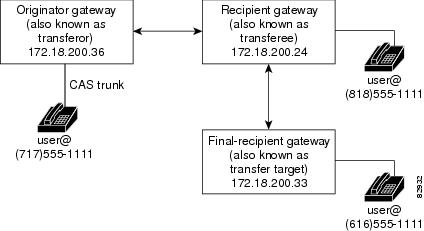
The figure below shows the relationship of the gateways in the blind
call transfer.
Figure 10
Blind Call Transfer
The following scenario is an example of a blind call transfer.
User at (818) 555-0111
calls user at (717) 555-0111, and they are in a conversation.
User at (717) 555-0111
decides to transfer user at (818) 555-0111 to user at (616) 555-0111.
Transfer takes place by the user at (717) 555-0111 going on-hook over
the CAS trunk and dialing (616) 555-0111.
Call transfer is
initiated from the originating gateway to the recipient gateway, and the
originator releases the CAS trunk to (717) 555-0111.
Recipient gateway
releases the call leg to the originator and initiates a new call to the
final-recipient--user at (616) 555-0111.
Call transfer is
complete, and user at (818) 555-0111 and user at (616) 555-0111 are in a
conversation.
Originating Gateway
The following example shows a configuration of the originating
gateway.
Router# show running-config
Building configuration...
Current configuration : 4192 bytes
!
version 12.2
service config
no service single-slot-reload-enable
no service pad
service timestamps debug uptime
service timestamps log uptime
no service password-encryption
service internal
service udp-small-servers
!
voice-card 2
!
ip subnet-zero
!
controller T1 2/0
framing esf
linecode b8zs
ds0-group 0 timeslots 1-24 type e&m-wink-start
!
interface FastEthernet3/0
ip address 172.18.200.36 255.255.255.0
speed 10
half-duplex
no shut
ip rsvp bandwidth 7500 7500
!
voice-port 2/0:0
timing hookflash-in 1500
!
call application voice sample_RLT tftp://sample_RLT.tcl
call application voice sample_RLT uid-len 4
call application voice sample_RLT language 1 en
call application voice sample_RLT set-location en 0 tftp://prompts/en/
!
dial-peer voice 2 voip
application sample_rlt
destination-pattern 8183821111
session protocol sipv2
session target ipv4:172.18.200.24
codec g711ulaw
!
dial-peer voice 3 pots
destination-pattern 7173721111
direct-inward-dial
port 2/0:0
prefix 7173721111
!
dial-peer voice 3621111 voip
application sample_rlt
destination-pattern 6163621111
session protocol sipv2
session target sip-server
codec g711ulaw
!
sip-ua
retry bye 1
retry refer 3
timers notify 400
timers refer 567
no oli
sip-server ipv4:172.18.200.21
!
line con 0
line aux 0
line vty 0 4
login
!
end
Recipient Gateway
The following example shows a configuration of the recipient gateway.
Router# show running-config
Building configuration...
Current configuration : 2791 bytes
!
version 12.2
service config
no service single-slot-reload-enable
no service pad
service timestamps debug uptime
service timestamps log uptime
no service password-encryption
service internal
service udp-small-servers
!
interface FastEthernet2/0
ip address 172.18.200.24 255.255.255.0
duplex auto
no shut
speed 10
ip rsvp bandwidth 7500 7500
!
voice-port 1/1/1
no supervisory disconnect lcfo
!
dial-peer voice 1 pots
application session
destination-pattern 8183821111
port 1/1/1
!
dial-peer voice 3 voip
application session
destination-pattern 7173721111
session protocol sipv2
session target ipv4:172.18.200.36
codec g711ulaw
!
dial-peer voice 4 voip
application session
destination-pattern 6163621111
session protocol sipv2
session target ipv4:172.18.200.33
codec g711ulaw
!
gateway
!
sip-ua
!
line con 0
line aux 0
line vty 0 4
login
!
end
Final-Recipient
The following example shows a configuration of the final-recipient
gateway.
Router# show running-config
!
version 12.2
no parser cache
service timestamps debug uptime
service timestamps log uptime
no service password-encryption
service internal
!
no logging buffered
!
clock timezone GMT 0
aaa new-model
!
!
aaa authentication login h323 group radius
aaa authorization exec h323 group radius
aaa accounting connection h323 start-stop group radius
aaa session-id common
ip subnet-zero
ip tcp path-mtu-discovery
!
!
ip domain name example.com
ip dhcp smart-relay
!
!
voice class codec 1
codec preference 2 g711alaw
codec preference 3 g711ulaw
codec preference 5 g726r16
codec preference 6 g726r24
codec preference 7 g726r32
codec preference 8 g723ar53
codec preference 9 g723ar63
codec preference 10 g729r8
!
interface Ethernet0/0
ip address 172.18.200.33 255.255.255.0
no shut
half-duplex
ip rsvp bandwidth 7500 7500
!
voice-port 1/1/1
no supervisory disconnect lcfo
!
voice-port 1/0/1
!
voice-port 1/1/0
!
voice-port 1/1/1
!
dial-peer voice 1 pots
application session
destination-pattern 6163621111
port 1/1/1
!
ip classless
no ip http server
ip pim bidir-enable
!
gateway
!
sip-ua
!
rtr responder
!
line con 0
exec-timeout 0 0
line aux 0
line vty 0 4
password password1
line vty 5 15
!
end
Additional References
General SIP References
"Overview of SIP" --Describes underlying SIP technology; also lists related documents, standards, MIBs, RFCs, and how to obtain technical assistance.
References Mentioned in This Chapter (listed alphabetically)
"Call Transfer Capabilities Using the Refer Method".
Cisco IOS Dial Technologies Configuration Guide.
Note
To locate a release-specific configuration guide for your Cisco IOS software release, select the Cisco IOS and NX-OS Software category at the following Product Support page and navigate accordingly:http://www.cisco.com/web/psa/products/index.html.
Cisco IOS Voice Command Reference.
"Enhancements to the Session Initiation Protocol for VoIP on Cisco Access Platforms".
" CDR Accounting for Cisco IOS Voice Gateways" guide.
"Tcl IVR API Version 2.0 Programmer's Guide".
Cisco and the Cisco logo are trademarks or registered trademarks of Cisco and/or its affiliates in the U.S. and other countries. To view a list of Cisco trademarks, go to this URL:
www.cisco.com/go/trademarks. Third-party trademarks mentioned are the property of their respective owners. The use of the word partner does not imply a partnership relationship between Cisco and any other company. (1110R)
Any Internet Protocol (IP) addresses and phone numbers used in this document are not intended to be actual addresses and phone numbers. Any examples, command display output, network topology diagrams, and other figures included in the document are shown for illustrative purposes only. Any use of actual IP addresses or phone numbers in illustrative content is unintentional and coincidental.