- Policing and Shaping Overview
- IPv6 QoS: MQC Traffic Shaping
- Distribution of Remaining Bandwidth Using Ratio
- QoS Percentage-Based Shaping
- Ethernet Overhead Accounting
- MQC Traffic Shaping Overhead Accounting for ATM
- QoS Policy Accounting
- PPP Session Queueing on ATM VCs
- VP/VC Shaping for PPPoEoA/PPPoA
- Hierarchical Color-Aware Policing
- IPv6 QoS: MQC Traffic Policing
- Traffic Policing
- Policer Enhancement Multiple Actions
- Control Plane Policing
- Management Plane Protection
- Class-Based Policing
- QoS Percentage-Based Policing
- Two-Rate Policer
- Punt Policing and Monitoring
- Port-Shaper and LLQ in the Presence of EFPs
- Adaptive QoS over DMVPN
- Finding Feature Information
- Prerequisites for Hierarchical Color-Aware Policing
- Restrictions for Hierarchical Color-Aware Policing
- Information About Hierarchical Color-Aware Policing
- How to Configure Hierarchical Color-Aware Policing
- Configuration Examples for Hierarchical Color-Aware Policing
- Example Enable the Hierarchical Color-Aware Policing Feature
- Example Disallowing Multiple Entries in Class Map
- Example Disallowing the Removal of an Active Color-Aware Class Map
- Example Dismantling a Configuration of the Hierarchical Color-Aware Policing Feature
- Example Enabling Hierarchical Color-Aware Policing
- Example Applying show Command with Hierarchical Color-Aware Policing
- Additional References
- Feature Information for Hierarchical Color-Aware Policing
Hierarchical Color-Aware Policing
The Hierarchical Color-Aware Policing feature provides two levels of policing where the policer ordering is evaluated from child to parent, and there is preferential treatment of certain traffic at the parent level. Beginning in Cisco IOS XE Release 3.2S, this feature is enabled on the Cisco ASR 1000 series Aggregation Services Routers through the following support and changes:
- Finding Feature Information
- Prerequisites for Hierarchical Color-Aware Policing
- Restrictions for Hierarchical Color-Aware Policing
- Information About Hierarchical Color-Aware Policing
- How to Configure Hierarchical Color-Aware Policing
- Configuration Examples for Hierarchical Color-Aware Policing
- Additional References
- Feature Information for Hierarchical Color-Aware Policing
Finding Feature Information
Your software release may not support all the features documented in this module. For the latest caveats and feature information, see Bug Search Tool and the release notes for your platform and software release. To find information about the features documented in this module, and to see a list of the releases in which each feature is supported, see the feature information table at the end of this module.
Use Cisco Feature Navigator to find information about platform support and Cisco software image support. To access Cisco Feature Navigator, go to www.cisco.com/go/cfn. An account on Cisco.com is not required.
Prerequisites for Hierarchical Color-Aware Policing
You must have Cisco IOS XE Release 3.2S or a later version installed and running on your Cisco ASR 1000 series router.
You must already be familiar with relevant features and technologies including modular QoS CLI (MQC) and the master control processor (MCP) software and hardware architecture. The Additional References section provides pointers to relevant feature and technology documents.
Restrictions for Hierarchical Color-Aware Policing
The following restrictions apply to the Hierarchical Color-Aware Policing feature:
Color-aware class maps support only QoS group matching.
Only one filter (one match statement) per color-aware class is supported.
Color-aware statistics are not supported, only existing policer statistics.
Color-aware class map removal (using the no class-mapclass-map-name command) is not allowed while the class map is being referenced in a color-aware policer. It must be removed from all color-aware policers (using either the no conform-colorclass-map-name or no exceed-colorclass-map-name command first).
Hierarchical policer evaluation is permanently reversed (not configurable) to support child-to-parent ordering.
Information About Hierarchical Color-Aware Policing
- Hierarchical Order Policing
- Limited Color-Aware Policing
- Policing Traffic in Child Classes and Parent Classes
Hierarchical Order Policing
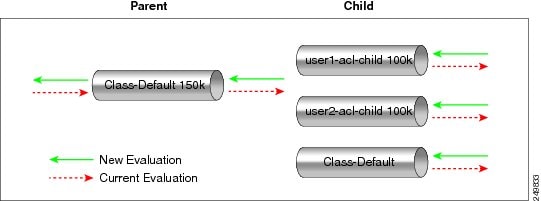
Prior to Cisco IOS XE Release 3.2S, the Cisco ASR 1000 series platform supported policers in hierarchical policies with an evaluation order of parent to child. With the introduction of the Hierarchical Color-Aware Policing feature, the evaluation order is reversed so that policers are evaluated from child to parent in QoS policies. This ordering is a permanent change to the default behavior and is not configurable. The reverse order policer functionality is shared for both ingress and egress directions.
The following sample configuration for a simple two-level policer would result in the changed behavior shown in the figure below:
policy-map child
 class user1
  police 100k
 class user2
  police 100k
policy-map parent
 class class-default
  police 150k
  service-policy child
Limited Color-Aware Policing
The following sample configuration for a simple two-level color-aware policer would result in the changed behavior shown in the figure below:
ip access-list extended user1-acl
 permit ip host 192.168.1.1 any
 permit ip host 192.168.1.2 any
ip access-list extended user2-acl
 permit ip host 192.168.2.1 any
 permit ip host 192.168.2.2 any
class-map match-all user1-acl-child
  match access-group name user1-acl
class-map match-all user2-acl-child
  match access-group name user2-acl
class-map match-all hipri-conform
 match qos-group 5
policy-map child-policy
 class user1-acl-child
   police 10000 bc 1500
    conform-action set-qos-transmit 5
class user2-acl-child
   police 20000 bc 1500
    conform-action set-qos-transmit 5
class class-default
   police 50000 bc 1500
policy-map parent-policy
 class class-default
  police 50000 bc 3000
   confirm-action transmit
   exceed-action transmit
   violate-action drop
   conform-color hipri-conform
  service-policy child-policy
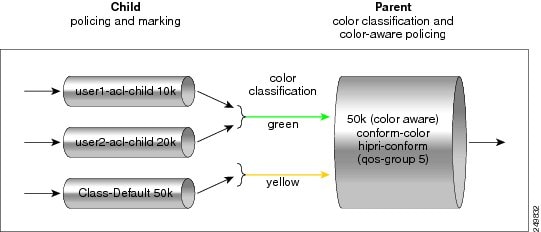
 Note | To avoid drops at the parent level for "conformed" child traffic, the parent policer must have a rate and burst that are equal to or greater than the sum of the child conform rates and burst sizes. There is no check for inappropriate (parent-to-child) rates and burst sizes in code. You must be aware of this limitation and configure appropriately. In the following example, explicit marking actions are supported in conjunction with color-aware policing and operate similarly color-aware policer marking actions. If these marking actions ("set qos-group," for example) are present in the child policies, the resulting bit values are evaluated by the parent color-aware policer (same as for child policer marking actions): 50k >= 10k (user1-acl-child) + 20k (user2-acl-child) |
Policing Traffic in Child Classes and Parent Classes
Prior to the release of the Hierarchical Color-Aware Policing feature, policing and marking were typically used as input QoS options. For example, a voice customer was limited to 112 kb/s for voice control and 200 kb/s for voice traffic. The class-default class has no policer. The only limit is the physical bandwidth of the xDSL connection. As shown in the figure below, a customer could send up to 1000 kb/s. However, this involved sending more voice and voice-control packets, which required policing the traffic for both classes.
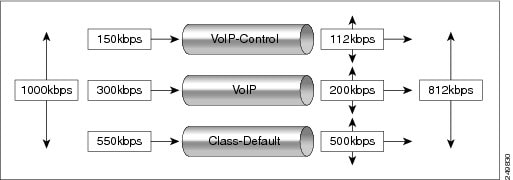
As shown in the figure below, it is important to control the overall input bandwidth. The important requirement is that the premium traffic in the overall limit is not affected. In the figure below, voice and voice-control packets are not dropped in the overall limit. Only packets from the child class-default class are dropped to fulfill the limit.
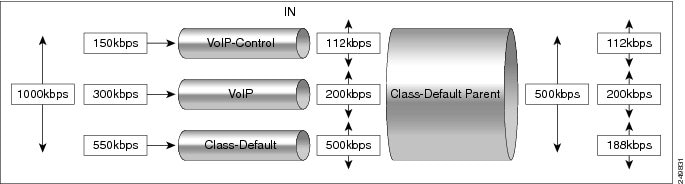
The first classes function the same way. Voice and voice-control are policed to the allowed level and the class-default class is not affected. In the next level, the overall bandwidth is forced to 500 kb/s and must only drop packets from the class-default class. Voice and voice-control must remain unaffected.
The order of policer execution is as follows:
Police the traffic in the child classes, as shown in the figure above, police VoIP-Control class to 112 kb/s, police VoIP class to 200 kb/s, and police class-default to 500 kb/s.
Police the traffic in the class default of the parent policy map, but only drop the traffic from the child class default, and do not drop the remaining child classes. As shown in the figure above, 112 kb/s VoIP-Control and 200 kb/s VoIP traffic are unaffected at the parent policer, but 500 kb/s class default from the child is policed to 188kb/s to meet the overall police policy of 500 kb/s at the parent level.
How to Configure Hierarchical Color-Aware Policing
Configuring the Hierarchical Color-Aware Policing Feature
1.
enable
2.
configure
terminal
3.
policy-map
policy-map-name
4.
class
{class-name |
class-default
[fragment
fragment-class-name]} [insert-before
class-name]
[service-fragment
fragment-class-name]
5.
police
[cir
cir][bc
conform-burst]
[pir
pir][be
peak-burst]
[conform-action
action
[exceed-action
action
[violate-action
action]]][conform-color
hipri-conform]
6.
service-policy
policy-map-name
7.
end
DETAILED STEPS
Example
The following is a sample configuration for the Hierarchical Color-Aware Policing feature, showing the reverse order for policing:
class-map match-all user1-acl-child
match access-group name user1-acl
class-map match-all user2-acl-child
match access-group name user2-acl
class-map match-all hipri-conform
match qos-group 5
policy-map child-policy
class user1-acl-child
police 10000 bc 1500
conform-action set-qos-transmit 5
class user2-acl-child
police 20000 bc 1500
conform-action set-qos-transmit 5
class class-default
police 50000 bc 1500
policy-map parent-policy
class class-default
police 50000 bc 3000
exceed-action transmit
violate-action drop
conform-color hipri-conform
service-policy child-policy
Configuration Examples for Hierarchical Color-Aware Policing
- Example Enable the Hierarchical Color-Aware Policing Feature
- Example Disallowing Multiple Entries in Class Map
- Example Disallowing the Removal of an Active Color-Aware Class Map
- Example Dismantling a Configuration of the Hierarchical Color-Aware Policing Feature
- Example Enabling Hierarchical Color-Aware Policing
- Example Applying show Command with Hierarchical Color-Aware Policing
Example Enable the Hierarchical Color-Aware Policing Feature
The following example shows a sample configuration that enables the Hierarchical Color-Aware Policing feature:
Router# configure terminal
Enter configuration commands, one per line. End with CNTL/Z.
Router(config)# ip access-list extended user1-acl
Router(config-ext-nacl)# permit ip host 192.168.1.1 any
Router(config-ext-nacl)# permit ip host 192.168.1.2 any
Router(config-ext-nacl)# ip access-list extended user2-acl
Router(config-ext-nacl)# permit ip host 192.168.2.1 any
Router(config-ext-nacl)# permit ip host 192.168.2.2 any
Router(config-ext-nacl)# exit
Router(config)# class-map match-all user1-acl-child
Router(config-cmap)# match access-group name user1-acl
Router(config-cmap)# class-map match-all user2-acl-child
Router(config-cmap)# match access-group name user2-acl
Router(config-cmap)# class-map match-all hipri-conform
Router(config-cmap)# match qos-group 5
Router(config-cmap)# exit
Router(config)# policy-map child-policy
Router(config-pmap)# class user1-acl-child
Router(config-pmap-c)# police cir 10000 bc 1500
Router(config-pmap-c-police)# class user2-acl-child
Router(config-pmap-c)# police cir 20000 bc 1500
Router(config-pmap-c-police)# exit
Router(config-pmap-c)# exit
Router(config-pmap)# exit
Router(config)# policy-map parent-policy
Router(config-pmap)# class class-default
Router(config-pmap-c)# police cir 50000 bc 3000
Router(config-pmap-c-police)# exceed-action transmit
Router(config-pmap-c-police)# violate-action drop
Router(config-pmap-c-police)# conform-color hipri-conform
Router(config-pmap-c-police)# service-policy child-policy
Example Disallowing Multiple Entries in Class Map
The following example shows a rejected attempt to configure multiple entries in a class map:
Router# configure terminal
Enter configuration commands, one per line. End with CNTL/Z.
Router(config)# class-map hipri-conform
Router(config-cmap)# match qos-group 5
Router(config-cmap)# match qos-group 6
Only one match statement is supported for color-aware policing
Router(config-cmap)# no match qos-group 6
Example Disallowing the Removal of an Active Color-Aware Class Map
The following example shows that an active color-aware class map cannot be disallowed:
Router# configure terminal
Enter configuration commands, one per line. End with CNTL/Z.
Router(config)# no class-map hipri-conform
Class-map hipri-conform is being used
Example Dismantling a Configuration of the Hierarchical Color-Aware Policing Feature
The following example shows how to dismantle the configuration of the Hierarchical Color-Aware Policing feature:
Router# configure terminal
Enter configuration commands, one per line. End with CNTL/Z.
Router(config)# no policy-map parent-policy
Router(config)# no policy-map child-policy
Router(config)# no class-map hipri-conform
Router(config)# no class-map user1-acl-child
Router(config)# no class-map user2-acl-child
Example Enabling Hierarchical Color-Aware Policing
The following example shows how to enable Hierarchical Color-Aware Policing:
Router# configure terminal
Enter configuration commands, one per line. End with CNTL/Z.
Router(config)# ip access-list extended user1-acl
Router(config-ext-nacl)# permit ip host 192.168.1.1 any
Router(config-ext-nacl)# permit ip host 192.168.1.2 any
Router(config-ext-nacl)# ip access-list extended user2-acl
Router(config-ext-nacl)# permit ip host 192.168.2.1 any
Router(config-ext-nacl)# permit ip host 192.168.2.2 any
Router(config-ext-nacl)# class-map match-all user1-acl-child
Router(config-cmap)# match access-group name user1-acl
Router(config-cmap)# class-map match-all user2-acl-child
Router(config-cmap)# match access-group name user2-acl
Router(config-cmap)# class-map match-all hipri-conform
Router(config-cmap)# match qos-group 5
Router(config-cmap)# policy-map child-policy
Router(config-pmap)# class user1-acl-child
Router(config-pmap-c)# police 10000 bc 1500
Router(config-pmap-c-police)# conform-action set-qos-transmit 5
Router(config-pmap-c-police)# class user2-acl-child
Router(config-pmap-c)# police 20000 bc 1500
Router(config-pmap-c-police)# conform-action set-qos-transmit 5
Router(config-pmap-c-police)# class class-default
Router(config-pmap-c)# police 50000 bc 1500
Router(config-pmap-c-police)# policy-map parent-policy
Router(config-pmap)# class class-default
Router(config-pmap-c)# police 50000 bc 3000
Router(config-pmap-c-police)# exceed-action transmit
Router(config-pmap-c-police)# violate-action drop
Router(config-pmap-c-police)# conform-color hipri-conform
Router(config-pmap-c-police)# service-policy child-policy
Router(config-pmap-c)# end
Router#
*Sep 16 12:31:11.536: %SYS-5-CONFIG_I: Configured from console by console
Router# show class-map
Class Map match-all user1-acl-child (id 4)
Match access-group name user1-acl
Class Map match-all user2-acl-child (id 5)
Match access-group name user2-acl
Class Map match-any class-default (id 0)
Match any
Class Map match-all hipri-conform (id 3)
Match qos-group 5
Router# show policy-map
Policy Map parent-policy
Class class-default
police cir 50000 bc 3000 be 3000
conform-color hipri-conform
conform-action transmit
exceed-action transmit
violate-action drop
service-policy child-policy
Policy Map police
Class prec1
priority level 1 20000 (kb/s)
Class prec2
bandwidth 20000 (kb/s)
Class class-default
bandwidth 20000 (kb/s)
Policy Map child-policy
Class user1-acl-child
police cir 10000 bc 1500
conform-action set-qos-transmit 5
exceed-action drop
Class user2-acl-child
police cir 20000 bc 1500
conform-action set-qos-transmit 5
exceed-action drop
Class class-default
police cir 50000 bc 1500
conform-action transmit
exceed-action drop
Example Applying show Command with Hierarchical Color-Aware Policing
The following is sample output from the show policy-map interface command when a policy with hierarchical color-aware policing is applied:
Router# show policy-map interface
GigabitEthernet0/0/0
Service-policy input: parent-policy
Class-map: class-default (match-any)
0 packets, 0 bytes
5 minute offered rate 0000 bps, drop rate 0000 bps
Match: any
police:
cir 50000 bps, bc 3000 bytes, be 3000 bytes
conformed 0 packets, 0 bytes; actions:
transmit
exceeded 0 packets, 0 bytes; actions:
transmit
violated 0 packets, 0 bytes; actions:
drop
No color-aware policing statistics available
conformed 0000 bps, exceed 0000 bps, violate 0000 bps
Service-policy : child-policy
Class-map: user1-acl-child (match-all)
0 packets, 0 bytes
5 minute offered rate 0000 bps, drop rate 0000 bps
Match: access-group name user1-acl
police:
cir 10000 bps, bc 1500 bytes
conformed 0 packets, 0 bytes; actions:
set-qos-transmit 5
exceeded 0 packets, 0 bytes; actions:
drop
conformed 0000 bps, exceed 0000 bps
Class-map: user2-acl-child (match-all)
0 packets, 0 bytes
5 minute offered rate 0000 bps, drop rate 0000 bps
Match: access-group name user2-acl
police:
cir 20000 bps, bc 1500 bytes
conformed 0 packets, 0 bytes; actions:
set-qos-transmit 5
exceeded 0 packets, 0 bytes; actions:
drop
conformed 0000 bps, exceed 0000 bps
Class-map: class-default (match-any)
0 packets, 0 bytes
5 minute offered rate 0000 bps, drop rate 0000 bps
Match: any
police:
cir 50000 bps, bc 1500 bytes
conformed 0 packets, 0 bytes; actions:
transmit
exceeded 0 packets, 0 bytes; actions:
drop
conformed 0000 bps, exceed 0000 bps
Additional References
Related Documents
|
Related Topic |
Document Title |
|---|---|
|
Cisco IOS commands |
|
|
Quality of Service commands |
Cisco IOS Quality of Service Solutions Command Reference |
|
Quality of Service configuration information |
Cisco IOS QoS Configuration Guide, Cisco IOS XE Release 3S |
Standards
|
Standard |
Title |
|---|---|
|
No new or modified standards are supported by this feature. |
-- |
MIBs
|
MIB |
MIBs Link |
|---|---|
|
To locate and download MIBs for selected platforms, Cisco software releases, and feature sets, use Cisco MIB Locator found at the following URL: |
RFCs
|
RFC |
Title |
|---|---|
|
RFC 2697 |
A Single Rate Three Color Marker |
|
RFC 2698 |
A Two Rate Three Color Marker |
Technical Assistance
|
Description |
Link |
|---|---|
|
The Cisco Support and Documentation website provides online resources to download documentation, software, and tools. Use these resources to install and configure the software and to troubleshoot and resolve technical issues with Cisco products and technologies. Access to most tools on the Cisco Support and Documentation website requires a Cisco.com user ID and password. |
Feature Information for Hierarchical Color-Aware Policing
The following table provides release information about the feature or features described in this module. This table lists only the software release that introduced support for a given feature in a given software release train. Unless noted otherwise, subsequent releases of that software release train also support that feature.
Use Cisco Feature Navigator to find information about platform support and Cisco software image support. To access Cisco Feature Navigator, go to www.cisco.com/go/cfn. An account on Cisco.com is not required.|
Feature Name |
Releases |
Feature Information |
|---|---|---|
|
Hierarchical Color-Aware Policing |
Cisco IOS XE Release 3.2S |
The Hierarchical Color-Aware Policing feature provides for two levels of policing where the policer ordering is evaluated from child to parent, and there is preferential treatment of certain traffic at the parent level. |
 Feedback