![]() |
Intelligent Services Gateway Configuration Guide, Cisco IOS XE Release 3S
|
|||||||||||||||||||||||||||||||||||||||||||||||
Configuring ISG Policies for Regulating Network Access
![]() |
||||||||||||||||||||||||||||||||||||||||||||||||
|
Contents
Configuring ISG Policies for Regulating Network AccessLast Updated: January 31, 2013
Intelligent Services Gateway (ISG) is a Cisco IOS XE software feature set that provides a structured framework in which edge devices can deliver flexible and scalable services to subscribers. ISG supports the use of policies for governing subscriber session bandwidth and network accessibility. This module provides information about the following methods of regulating session bandwidth and network access: Modular Quality of Service (QoS) command-line interface (CLI) policies and ISG policing.
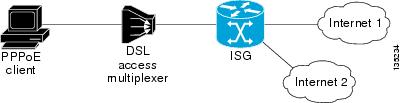
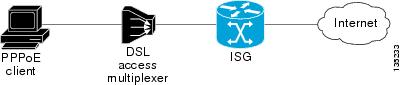
Finding Feature InformationYour software release may not support all the features documented in this module. For the latest caveats and feature information, see Bug Search Tool and the release notes for your platform and software release. To find information about the features documented in this module, and to see a list of the releases in which each feature is supported, see the feature information table at the end of this module. Use Cisco Feature Navigator to find information about platform support and Cisco software image support. To access Cisco Feature Navigator, go to www.cisco.com/go/cfn. An account on Cisco.com is not required. Information About ISG Policies for Regulating Network AccessMethods of Regulating Network AccessISG supports the following methods of regulating network access. Each of these methods can be applied to an ISG session and can be dynamically updated. Modular QoS CLI (MQC) PoliciesQoS policies configured using the MQC are supported for subscriber sessions only. MQC policies cannot be applied to ISG services. ISG PolicingISG policing supports policing of upstream and downstream traffic. ISG policing differs from policing configured using the MQC in that ISG policing can be configured in service profiles to support policing of traffic flows. MQC policies cannot be configured in service profiles. ISG policing can also be configured in user profiles and service profiles to support session policing. Overview of ISG PolicingTraffic policing allows you to control the maximum rate of traffic sent or received on an interface. Policing is often configured on interfaces at the edge of a network to limit traffic into or out of the network. Traffic that falls within the rate parameters is sent, whereas traffic that exceeds the parameters is dropped or sent with a different priority. ISG policing supports policing of upstream and downstream traffic and can be applied to a session or a flow. The following sections describe session-based policing and flow-based policing. Session-Based PolicingSession-based policing applies to the aggregate of subscriber traffic for a session. In the figure below, session policing would be applied to all traffic moving from the PPPoE client to ISG and from ISG to the PPPoE client. Session-based policing parameters can be configured on a AAA server in either a user profile or a service profile that does not specify a traffic class. It can also be configured on the router in a service policy map. Session-based policing parameters that are configured in a user profile take precedence over session-based policing parameters configured in a service profile or service policy map. Flow-Based PolicingFlow-based policing applies only to the destination-based traffic flows that are specified by a traffic class. In the figure below, flow-based policing would allow you to police the traffic between the PPPoE client and Internet 1 or Internet 2. Flow-based policing can be configured on a AAA server in a service profile that specifies a traffic class. It can also be configured on the router under a traffic class in a service policy map. Flow-based policing and session-based policing can coexist and operate simultaneously on subscriber traffic. How to Configure ISG Policies for Regulating Network AccessConfiguring ISG Policing
Configuring Policing in a Service Policy Map on the Router
SUMMARY STEPS
DETAILED STEPS
Configuring Policing in a Service Profile or User Profile on the AAA ServerSUMMARY STEPS
DETAILED STEPS
Verifying ISG Policing
SUMMARY STEPS
DETAILED STEPS ExamplesThe following example shows output for the show subscriber session command when policing parameters have been configured in the service profile. The "Config level" field indicates where the policing parameters are configured; in this case, in the service profile.
Router# show subscriber session detailed
Current Subscriber Information: Total sessions 2
Unique Session ID: 1
.....
Session inbound features:
Feature: Policing
Upstream Params:
Average rate = 24000, Normal burst = 4500, Excess burst = 9000
Config level = Service
Session outbound features:
Feature: Policing
Dnstream Params:
Average rate = 16000, Normal burst = 3000, Excess burst = 6000
Config level = Service
.....
The following example shows output for the show subscriber session command where upstream policing parameters are specified in a user profile and downstream policing parameters are specified in a service profile.
Router# show subscriber session all
Current Subscriber Information: Total sessions 2
Unique Session ID: 2
.....
Session inbound features:
Feature: Policing
Upstream Params:
Average rate = 24000, Normal burst = 4500, Excess burst = 9000
Config level = Per-user ===========> Upstream parameters are specified in
the user profile.
Session outbound features:
Feature: Policing
Dnstream Params:
Average rate = 16000, Normal burst = 3000, Excess burst = 6000
Config level = Service ============> No downstream parameters in the user
profile, hence the parameters in the service profile are applied.
.....
Configuration Examples for ISG Policies for Regulating Network AccessISG Policing ExamplesFlow-Based Policing Configured in a Service Policy Map Using the CLIThe following example shows the configuration of ISG flow-based policing in a service policy map: class-map type traffic match-any C3 match access-group in 103 match access-group out 203 policy-map type service P3 class type traffic C3 police input 20000 30000 60000 police output 21000 31500 63000 Additional ReferencesRelated Documents
Technical Assistance
Feature Information for ISG Policies for Regulating Network AccessThe following table provides release information about the feature or features described in this module. This table lists only the software release that introduced support for a given feature in a given software release train. Unless noted otherwise, subsequent releases of that software release train also support that feature. Use Cisco Feature Navigator to find information about platform support and Cisco software image support. To access Cisco Feature Navigator, go to www.cisco.com/go/cfn. An account on Cisco.com is not required.
Cisco and the Cisco logo are trademarks or registered trademarks of Cisco and/or its affiliates in the U.S. and other countries. To view a list of Cisco trademarks, go to this URL: www.cisco.com/go/trademarks. Third-party trademarks mentioned are the property of their respective owners. The use of the word partner does not imply a partnership relationship between Cisco and any other company. (1110R) Any Internet Protocol (IP) addresses and phone numbers used in this document are not intended to be actual addresses and phone numbers. Any examples, command display output, network topology diagrams, and other figures included in the document are shown for illustrative purposes only. Any use of actual IP addresses or phone numbers in illustrative content is unintentional and coincidental. © 2013 Cisco Systems, Inc. All rights reserved.
|
|||||||||||||||||||||||||||||||||||||||||||||||
|
|