- IP SLAs Overview
- Configuring Auto IP SLAs in IP SLAs Engine 3.0
- Configuring IP SLA - Percentile Support for Filtering Outliers
- Configuring IP SLAs Video Operations
- Configuring IP SLAs UDP Jitter Operations
- IP SLA - Support for OnDemand UDP Probes
- Configuring IP SLAs UDP Jitter Operations for VoIP
- IP SLAs Multicast Support
- Configuring IP SLAs LSP Health Monitor Operations
- Configuring IP SLAs for Metro-Ethernet
- Configuring Cisco IP SLAs ICMP Jitter Operations
- Configuring RTP-Based VoIP Operations
- Configuring VoIP Gatekeeper Registration Delay Operations
- Configuring VoIP Call Setup Monitoring
- Configuring IP SLAs UDP Echo Operations
- Configuring IP SLAs HTTP Operations
- Configuring IP SLAs TCP Connect Operations
- Configuring IP SLAs ICMP Echo Operations
- Configuring IP SLAs ICMP Path Echo Operations
- Configuring IP SLAs ICMP Path Jitter Operations
- Configuring IP SLAs FTP Operations
- Configuring IP SLAs DNS Operations
- Configuring IP SLAs DHCP Operations
- Configuring IP SLAs DLSw+ Operations
- Configuring an IP SLAs Multioperation Scheduler
- Configuring Proactive Threshold Monitoring for IP SLAs Operations
- IP SLAs TWAMP Responder
- Finding Feature Information
- Prerequisites for IP SLAs TWAMP Responder
- Restrictions for IP SLAs TWAMP Responder
- Information About IP SLAs TWAMP Responder
- How to Configure an IP SLAs TWAMP Responder
- Configuration Examples for IP SLAs TWAMP Responder
- Additional References
- Feature Information for IP SLAs TWAMP Responder
IP SLAs TWAMP Responder
This module describes how to configure an IETF Two-Way Active Measurement Protocol (TWAMP) responder on a Cisco device to measure IP performance between the Cisco device and a non-Cisco TWAMP control device on your network.
- Finding Feature Information
- Prerequisites for IP SLAs TWAMP Responder
- Restrictions for IP SLAs TWAMP Responder
- Information About IP SLAs TWAMP Responder
- How to Configure an IP SLAs TWAMP Responder
- Configuration Examples for IP SLAs TWAMP Responder
- Additional References
- Feature Information for IP SLAs TWAMP Responder
Finding Feature Information
Your software release may not support all the features documented in this module. For the latest caveats and feature information, see Bug Search Tool and the release notes for your platform and software release. To find information about the features documented in this module, and to see a list of the releases in which each feature is supported, see the feature information table.
Use Cisco Feature Navigator to find information about platform support and Cisco software image support. To access Cisco Feature Navigator, go to www.cisco.com/go/cfn. An account on Cisco.com is not required.
Prerequisites for IP SLAs TWAMP Responder
For the IP SLAs TWAMP responder to function, a TWAMP control-client and the session-sender must be configured in your network.
Restrictions for IP SLAs TWAMP Responder
-
For IP SLAs TWAMP Responder v1.0, the TWAMP server and the session-reflector must be configured on the same Cisco device.
-
Time stamping is not supported for TWAMP test packets that ingress/egress via management interface.
-
Time stamping is not supported on interfaces that are not routed or BDI interfaces.
-
Time stamping is not supported on MPLS/VPLS interfaces.
-
TWAMP client and session sender is not supported.
-
Upto nine session-senders can be configured for one TWAMP responder.
-
TWAMP Light mode is not supported.
Information About IP SLAs TWAMP Responder
TWAMP
The IETF Two-Way Active Measurement Protocol (TWAMP) defines a standard for measuring round-trip network performance between any two devices that support the TWAMP protocols. The TWAMP-Control protocol is used to set up performance measurement sessions. The TWAMP-Test protocol is used to send and receive performance-measurement probes.
The control-client sets up, starts, and stops TWAMP-Test sessions.
The session-sender instantiates TWAMP-Test packets that are sent to the session-reflector.
The session-reflector reflects a measurement packet upon receiving a TWAMP-Test packet. The session reflector does not collect packet statistics in TWAMP.
The TWAMP server is an end system that manages one or more TWAMP sessions and is also capable of configuring per-session ports in the end points. The server listens on the TCP port. The session-refector and server make up the TWAMP responder in an IP SLAs operation.
Although TWAMP defines the different entities for flexibility, it also allows for logical merging of the roles on a single device for ease of implementation. The figure below shows the four entities that make up the TWAMP architecture.
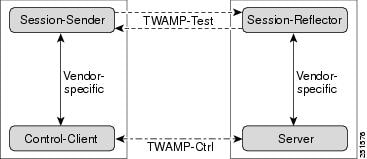
IP SLAs TWAMP Responder v1.0
A TWAMP responder interoperates with the control-client and session-sender on another device that supports TWAMP. In the IP SLAs TWAMP Responder v1.0 feature, the session-reflector and TWAMP server that make up the responder must be co-located on the same device.
In the figure below, one device is the control-client and session-sender (TWAMP control device), and the other two devices are Cisco devices that are configured as IP SLAs TWAMP responders. Each IP SLAs TWAMP responder is both a TWAMP server and a session-reflector.
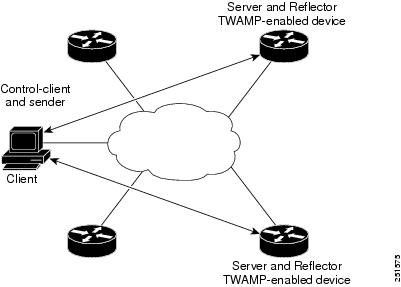
How to Configure an IP SLAs TWAMP Responder
 Note | Time stamping for sender (T1, T4) and receiver (T3, T2) is performed by hardware, instead of software to improve the accuracy of jitter and latency measurements effective Cisco IOS-XE Everest 16.6.1. |
Configuring the TWAMP Server
Note | For IP SLAs TWAMP Responder v1.0, the TWAMP server and the session-reflector are configured on the same device. |
1.
enable
2.
configure
terminal
3.
ip sla server twamp
4.
port
port-number
5.
timer inactivity
seconds
6.
end
DETAILED STEPS
Configuring the Session-Reflector
Note | For IP SLAs TWAMP Responder v1.0, the TWAMP server and the session-reflector are configured on the same device. |
1.
enable
2.
configure
terminal
3.
ip sla responder twamp
4.
timeout
seconds
5.
end
DETAILED STEPS
Configuration Examples for IP SLAs TWAMP Responder
IP SLAs TWAMP Responder v1.0 Example
Note | In order for the IP SLAs TWAMP responder to function, a control-client and the session-sender must be configured in your network. |
Device> enable
Device# configure terminal
Device(config)#  ip sla server twamp
Device(config-twamp-srvr)#  exit
Device(config)#  ip sla responder twamp
Device(config-twamp-ref)# end
Device> show running-config
.
.
.
ip sla responder
ip sla responder twamp
ip sla server twamp
port 862
Additional References
Related Documents
|
Related Topic |
Document Title |
|---|---|
|
Cisco IOS commands |
|
|
IP SLAs commands |
Standards and RFCs
|
Standard/RFC |
Title |
|---|---|
|
RFC 5357 |
Two-Way Active Measurement Protocol (TWAMP) |
|
RFC 4656 |
One-way Active Measurement Protocol (OWAMP) |
Technical Assistance
|
Description |
Link |
|---|---|
|
The Cisco Support and Documentation website provides online resources to download documentation, software, and tools. Use these resources to install and configure the software and to troubleshoot and resolve technical issues with Cisco products and technologies. Access to most tools on the Cisco Support and Documentation website requires a Cisco.com user ID and password. |
Feature Information for IP SLAs TWAMP Responder
The following table provides release information about the feature or features described in this module. This table lists only the software release that introduced support for a given feature in a given software release train. Unless noted otherwise, subsequent releases of that software release train also support that feature.
Use Cisco Feature Navigator to find information about platform support and Cisco software image support. To access Cisco Feature Navigator, go to www.cisco.com/go/cfn. An account on Cisco.com is not required.|
Feature Name |
Releases |
Feature Information |
|---|---|---|
|
IP SLAs TWAMP Responder v1.0 |
15.2(3)T |
This feature enables you to configure the TWAMP server and the session-reflector on a Cisco device for measuring the round-trip performance between an IP SLAs TWAMP responder and a non-Cisco TWAMP control device in your network. The following commands were introduced or modified: ip sla responder twamp, ip sla server twamp, port (twamp), show ip sla standards, show ip sla twamp connection, show ip sla twamp session, show ip sla twamp standards, timer inactivity, timeout (twamp).. |
 Feedback