The BGP per Neighbor SoO Configuration feature simplifies the configuration of the site-of-origin (SoO) value. In Cisco IOS Release 12.4(9)T, 12.2(33)SRA, 12.2(31)SB2, and previous releases, the SoO value is configured using an inbound route map that sets the SoO value during the update process. Per neighbor SoO configuration introduces two new commands that can be configured in submodes under router configuration mode to set the SoO value. In Cisco IOS Release 12.4(24)T, support was added for 4-byte autonomous system numbers in asdot format only.
Your software release may not support all the features documented in this module. For the latest caveats and feature information, see
Bug Search Tool and the release notes for your platform and software release. To find information about the features documented in this module, and to see a list of the releases in which each feature is supported, see the feature information table at the end of this module.
Use Cisco Feature Navigator to find information about platform support and Cisco software image support. To access Cisco Feature Navigator, go to
www.cisco.com/go/cfn. An account on Cisco.com is not required.
Prerequisites for BGP per Neighbor SoO Configuration
This feature assumes that a Border Gateway Protocol (BGP) network is configured and that Cisco Express Forwarding is enabled in your network.
Restrictions for BGP per Neighbor SoO Configuration
A BGP neighbor or peer policy template-based SoO configuration takes precedence over the SoO value configured in an inbound route map.
Information About Configuring BGP per Neighbor SoO
Site of Origin BGP Community Attribute
The site-of-origin (SoO) extended community is a BGP extended community attribute that is used to identify routes that have originated from a site so that the readvertisement of that prefix back to the source site can be prevented. The SoO extended community uniquely identifies the site from which a router has learned a route. BGP can use the SoO value associated with a route to prevent routing loops.
Route Distinguisher
A route distinguisher (RD) creates routing and forwarding tables and specifies the default route distinguisher for a VPN. The RD is added to the beginning of an IPv4 prefix to change it into a globally unique VPN-IPv4 prefix. An RD can be composed in one of two ways: with an autonomous system number and an arbitrary number or with an IP address and an arbitrary number.
You can enter an RD in either of these formats:
Enter a 16-bit autonomous system number, a colon, and a 32-bit number. For example:
45000:3
Enter a 32-bit IP address, a colon, and a 16-bit number. For example:
192.168.10.15:1
BGP per Neighbor Site of Origin Configuration
There are three ways to configure an SoO value for a BGP neighbor:
BGP peer policy template--A peer policy template is created, and an SoO value is configured as part of the peer policy. Under address family IPv4 VRF, a neighbor is identified and is configured to inherit the peer policy that contains the SoO value.
BGP
neighbor command--Under address family IPv4 VRF, a neighbor is identified, and an SoO value is configured for the neighbor.
BGP peer group--Under address family IPv4 VRF, a BGP peer group is configured, an SoO value is configured for the peer group, a neighbor is identified, and the neighbor is configured as a member of the peer group.
Note
A BGP neighbor or peer policy template-based SoO configuration takes precedence over the SoO value configured in an inbound route map.
The configuration of SoO values for BGP neighbors is performed on a provider edge (PE) router, which is the VPN entry point. When SoO is enabled, the PE router forwards prefixes to the customer premises equipment (CPE) only when the SoO tag of the prefix does not match the SoO tag configured for the CPE.
For example, in the figure below, an SoO tag is set as 65000:1 for the customer site that includes routers CPE1 and CPE2 with an autonomous system number of 65000. When CPE1 sends prefixes to PE1, PE1 tags the prefixes with 65000:1, which is the SoO tag for CPE1 and CPE2. When PE1 sends the tagged prefixes to PE2, PE2 performs a match against the SoO tag from CPE2. Any prefixes with the tag value of 65000:1 are not sent to CPE2 because the SoO tag matches the SoO tag of CPE2, and a routing loop is avoided.
Figure 1. Network Diagram for SoO Example
Benefits of BGP per Neighbor Site of Origin
In releases prior to the introduction of this feature, the SoO extended community attribute is configured using an inbound route map that sets the SoO value during the update process. With the introduction of the BGP per Neighbor Site of Origin feature, two new commands configured in submodes under router configuration mode simplify the SoO value configuration.
How to Configure BGP per Neighbor SoO
Enabling Cisco Express Forwarding and Configuring VRF Instances
Perform this task on both of the PE routers in the figure above to configure Virtual Routing and Forwarding (VRF) instances to be used with the per-VRF assignment tasks. In this task, Cisco Express Forwarding is enabled, and a VRF instance named SOO_VRF is created. To make the VRF functional, a route distinguisher is created, and the VRF is associated with an interface. When the route distinguisher is created, the routing and forwarding tables are created for the VRF instance named SOO_VRF. After associating the VRF with an interface, the interface is configured with an IP address.
Use this command to verify the configuration of this task.
Examples
The following output of the
showipvrf command displays the VRF named SOO_VRF configured in this task.
Device# show ip vrf
Name Default RD Interfaces
SOO_VRF 1:1 GE1/0/0
Configuring a per Neighbor SoO Value Using a BGP Peer Policy Template
Perform this task on router PE1 in the figure above to configure an SoO value for a BGP neighbor at the router CPE1 in the figure above using a peer policy template. In this task, a peer policy template is created, and the SoO value is configured for the peer policy. Under address family IPv4 VRF, a neighbor is identified and is configured to inherit the peer policy that contains the SoO value.
For a configuration example involving 4-byte autonomous system numbers, see the “Example: Configuring a per Neighbor SoO Value with a 4-Byte AS Number Using a BGP Peer Policy Template” section.
Note
If a BGP peer inherits from several peer policy templates that specify different SoO values, the SoO value in the last template applied takes precedence and is applied to the peer. However, direct configuration of the SoO value on the BGP neighbor overrides any inherited template configurations of the SoO value.
Peer policy templates are used to configure BGP policy commands that are configured for neighbors that belong to specific address families. Peer policy templates are configured once and then applied to many neighbors through the direct application of a peer policy template or through inheritance from peer policy templates. The configuration of peer policy templates simplifies the configuration of BGP policy commands that are applied to all neighbors within an autonomous system.
Peer policy templates support inheritance. A directly applied peer policy template can directly or indirectly inherit configurations from up to seven peer policy templates. So, a total of eight peer policy templates can be applied to a neighbor or neighbor group.
The configuration of peer policy templates simplifies and improves the flexibility of BGP configuration. A specific policy can be configured once and referenced many times. Because a peer policy supports up to eight levels of inheritance, very specific and very complex BGP policies can be created.
For more details about BGP peer policy templates, see the "Configuring a Basic BGP Network" module.
Before You Begin
This task assumes that the task described in the "Verifying CEF and Configuring VRF Instances" section has been performed.
Note
A BGP peer cannot inherit from a peer policy or session template and be configured as a peer group member at the same. BGP templates and BGP peer groups are mutually exclusive.
Specifies the IPv4 address family and enters address family configuration mode.
Use the
unicast keyword to specify the IPv4 unicast address family. By default, the router is placed in configuration mode for the IPv4 unicast address family if the
unicast keyword is not specified with the
address-familyipv4 command.
Use the
multicast keyword to specify IPv4 multicast address prefixes.
Use the
vrf keyword and
vrf-name argument to specify the name of the VRF instance to associate with subsequent IPv4 address family configuration mode commands.
Sends a peer policy template to a neighbor so that the neighbor can inherit the configuration.
In this example, the router is configured to send the peer policy template named SOO_POLICY to the 192.168.1.1 neighbor to inherit. If another peer policy template is indirectly inherited from SOO_POLICY, the indirectly inherited configuration will also be applied. Up to seven additional peer policy templates can be indirectly inherited from SOO_POLICY.
Step 11
end
Example:
Router(config-router-af)# end
Exits address family configuration mode and returns to privileged EXEC mode.
Configuring a per Neighbor SoO Value Using a BGP neighbor Command
Perform this task on router PE2 in the figure above to configure an SoO value for the BGP neighbor at router CPE2 in the figure above using a
neighbor command. For the IPv4 VRF address family, a neighbor is identified, and an SoO value is configured for the neighbor.
Direct configuration of the SoO value on a BGP neighbor overrides any inherited peer policy template configurations of the SoO value.
Before You Begin
This task assumes that the task described in the “Verifying CEF and Configuring VRF Instances” section has been performed with appropriate changes to interfaces and IP addresses.
Specifies the IPv4 address family and enters address family configuration mode.
Use the
unicast keyword to specify the IPv4 unicast address family. By default, the router is placed in configuration mode for the IPv4 unicast address family if the
unicast keyword is not specified with the
address-familyipv4 command.
Use the
multicast keyword to specify IPv4 multicast address prefixes.
Use the
vrf keyword and
vrf-name argument to specify the name of the VRF instance to associate with subsequent IPv4 address family configuration mode commands.
Enables the neighbor to exchange prefixes for the IPv4 VRF address family with the local router.
In this example, the external BGP peer at 192.168.2.1 is activated.
Note
If a peer group has been configured in Step 5 , do not use this step because BGP peer groups are activated when any parameter is configured. For example, a BGP peer group is activated when an SoO value is configured using the
neighborsoo command in Step 7.
Device(config-router-af)# neighbor 192.168.2.1 soo 65000:1
Sets the site-of-origin (SoO) value for a BGP neighbor or peer group.
In this example, the neighbor at 192.168.2.1 is configured with an SoO value of 65000:1.
Step 8
end
Example:
Device(config-router-af)# end
Exits address family configuration mode and returns to privileged EXEC mode.
Configuring a per Neighbor SoO Value Using a BGP Peer Group
Perform this task on router PE1 in the figure above to configure an SoO value for the BGP neighbor at router CPE1 in the figure above using a
neighbor command with a BGP peer group. Under address family IPv4 VRF, a BGP peer group is created and an SoO value is configured using a BGP
neighbor command, and a neighbor is then identified and added as a peer group member. A BGP peer group member inherits the configuration associated with a peer group, which in this example, includes the SoO value.
Direct configuration of the SoO value on a BGP neighbor overrides any inherited peer group configurations of the SoO value.
Before You Begin
This task assumes that the task described in “Enabling Cisco Express Forwarding and Configuring VRF Instances” has been performed.
Note
A BGP peer cannot inherit from a peer policy or session template and be configured as a peer group member at the same. BGP templates and BGP peer groups are mutually exclusive.
Specifies the IPv4 address family and enters address family configuration mode.
Use the
unicast keyword to specify the IPv4 unicast address family. By default, the router is placed in configuration mode for the IPv4 unicast address family if the
unicast keyword is not specified with the
address-familyipv4 command.
Use the
multicast keyword to specify IPv4 multicast address prefixes.
Use the
vrf keyword and
vrf-name argument to specify the name of the VRF instance to associate with subsequent IPv4 address family configuration mode commands.
Assigns the IP address of a BGP neighbor to a peer group.
Step 10
end
Example:
Device(config-router-af)# end
Exits address family configuration mode and returns to privileged EXEC mode.
Configuration Examples for BGP per Neighbor SoO Configuration
Example: Configuring a per Neighbor SoO Value Using a BGP Peer Policy Template
The following example shows how to create a peer policy template and configure an SoO value as part of the peer policy. After enabling Cisco Express Forwarding and configuring a VRF instance named SOO_VRF, a peer policy template is created and an SoO value is configured as part of the peer policy. Under the IPv4 VRF address family, a neighbor is identified and configured to inherit the peer policy that contains the SoO value.
ip cef
ip vrf SOO_VRF
rd 1:1
route-target export 1:1
route-target import 1:1
exit
interface GigabitEthernet 1/0/0
ip vrf forwarding SOO_VRF
ip address 192.168.1.2 255.255.255.0
exit
router bgp 50000
template peer-policy SOO_POLICY
soo 65000:1
exit-peer-policy
address-family ipv4 vrf SOO_VRF
neighbor 192.168.1.1 remote-as 65000
neighbor 192.168.1.1 activate
neighbor 192.168.1.1 inherit peer-policy SOO_POLICY
end
Example: Configuring a per Neighbor SoO Value with a 4-Byte AS Number Using a BGP Peer Policy Template
The following example shows how to create a peer policy template and configure an SoO value using a 4-byte autonomous system number, 1.2 in asdot format, as part of the peer policy. Under the IPv4 VRF address family, a neighbor is identified and configured to inherit the peer policy that contains the SoO value.
The following example shows how to create a peer policy template and configure an SoO value using a 4-byte autonomous system number, 65538 in asplain format, as part of the peer policy. Under the IPv4 VRF address family, a neighbor is identified and configured to inherit the peer policy that contains the SoO value.
Example: Configuring a per Neighbor SoO Value Using a BGP neighbor Command
The following example shows how to configure an SoO value for a BGP neighbor. After enabling Cisco Express Forwarding and configuring a VRF instance named SOO_VRF, a neighbor is identified in the IPv4 VRF address family and an SoO value is configured for the neighbor.
ip cef
ip vrf SOO_VRF
rd 1:1
route-target export 1:1
route-target import 1:1
exit
interface GigabitEthernet 1/0/0
ip vrf forwarding SOO_VRF
ip address 192.168.2.2 255.255.255.0
exit
router bgp 50000
address-family ipv4 vrf SOO_VRF
neighbor 192.168.2.1 remote-as 65000
neighbor 192.168.2.1 activate
neighbor 192.168.2.1 soo 65000:1
end
Example: Configuring a per Neighbor SoO Value Using a BGP neighbor Command and 4-Byte Autonomous System Numbers
The following example shows how to configure an SoO value for a BGP neighbor. In this example, all BGP neighbors, route targets, and SoO values use 4-byte autonomous system numbers in asplain format. After checking that CEF is enabled, a VRF instance named SOO_VRF is configured with route targets. In a BGP router session, a neighbor is configured in the IPv4 VRF address family, and an SoO value is configured for the neighbor.
show ip cef
ip vrf SOO_VRF
rd 100:200
route-target export 1.14:1
route-target import 1.14:1
exit
interface Ethernet 1/0
ip vrf forwarding SOO_VRF
ip address 192.168.2.2 255.255.255.0
exit
router bgp 1.2
address-family ipv4 vrf SOO_VRF
neighbor 192.168.2.1 remote-as 1.14
neighbor 192.168.2.1 activate
neighbor 192.168.2.1 soo 1.14:1
end
Example: Configuring a per Neighbor SoO Value Using a BGP Peer Group
The following example shows how to configure an SoO value for a BGP peer group. After enabling Cisco Express Forwarding and configuring a VRF instance named SOO_VRF, a BGP peer group is configured in the IPv4 VRF address family, an SoO value is configured for the peer group, a neighbor is identified, and the neighbor is configured as a member of the peer group.
ip cef
ip vrf SOO_VRF
rd 1:1
route-target export 1:1
route-target import 1:1
exit
interface GigabitEthernet 1/0/0
ip vrf forwarding SOO_VRF
ip address 192.168.1.2 255.255.255.0
exit
router bgp 50000
address-family ipv4 vrf SOO_VRF
neighbor SOO_GROUP peer-group
neighbor SOO_GROUP soo 65000:65
neighbor 192.168.1.1 remote-as 65000
neighbor 192.168.1.1 activate
neighbor 192.168.1.1 peer-group SOO_GROUP
end
The Cisco Support and Documentation website provides online resources to download documentation, software, and tools. Use these resources to install and configure the software and to troubleshoot and resolve technical issues with Cisco products and technologies. Access to most tools on the Cisco Support and Documentation website requires a Cisco.com user ID and password.
Feature Information for BGP per Neighbor SoO Configuration
The following table provides release information about the feature or features described in this module. This table lists only the software release that introduced support for a given feature in a given software release train. Unless noted otherwise, subsequent releases of that software release train also support that feature.
Use Cisco Feature Navigator to find information about platform support and Cisco software image support. To access Cisco Feature Navigator, go to
www.cisco.com/go/cfn. An account on Cisco.com is not required.
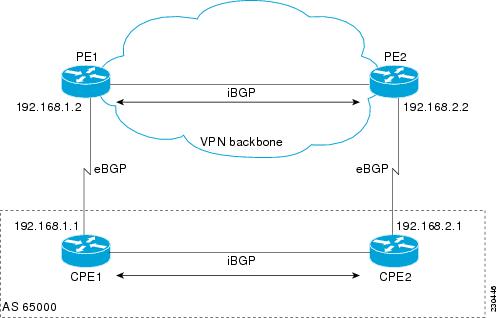
Table 1 Feature Information for BGP per Neighbor SoO Configuration
Feature Name
Releases
Feature Information
BGP per Neighbor SoO Configuration
12.2(33)SB
12.2(33)SRB
12.4(11)T
15.0(1)SY
The BGP per neighbor SOO configuration feature simplifies the configuration of the site-of-origin (SoO) parameter. In earlier releases, the SoO parameter is configured using an inbound route map that sets the SoO value during the update process. The per neighbor SoO configuration introduces two new commands that can be configured in submodes under router configuration mode to set the SoO value.
The following commands were introduced by this feature:
neighborsoo, and
soo.