The BGP (Border Gateway Protocol) Link Bandwidth feature is used to advertise the bandwidth of an autonomous system exit link as an extended community. This feature is configured for links between directly connected external BGP (eBGP) neighbors. The link bandwidth extended community attribute is propagated to iBGP peers when extended community exchange is enabled. This feature is used with BGP multipath features to configure load balancing over links with unequal bandwidth.
Your software release may not support all the features documented in this module. For the latest caveats and feature information, see
Bug Search Tool and the release notes for your platform and software release. To find information about the features documented in this module, and to see a list of the releases in which each feature is supported, see the feature information table at the end of this module.
Use Cisco Feature Navigator to find information about platform support and Cisco software image support. To access Cisco Feature Navigator, go to
www.cisco.com/go/cfn. An account on Cisco.com is not required.
Prerequisites for BGP Link Bandwidth
BGP load balancing or multipath load balancing must be configured before BGP Link Bandwidth feature is enabled.
BGP extended community exchange must be enabled between iBGP neighbors to which the link bandwidth attribute is to be advertised.
Cisco Express Forwarding or distributed Cisco Express Forwarding must be enabled on all participating routers.
Restrictions for BGP Link Bandwidth
The BGP Link Bandwidth feature can be configured only under IPv4 and VPNv4 address family sessions.
BGP can originate the link bandwidth community only for directly connected links to eBGP neighbors.
Both iBGP and eBGP load balancing are supported in IPv4 and VPNv4 address families. However, eiBGP load balancing is supported only in VPNv4 address families.
Information About BGP Link Bandwidth
BGP Link Bandwidth Overview
The BGP Link Bandwidth feature is used to enable multipath load balancing for external links with unequal bandwidth capacity. This feature is enabled under an IPv4 or VPNv4 address family session by entering the bgpdmzlink-bw command. This feature supports iBGP, eBGP multipath load balancing, and eiBGP multipath load balancing in Multiprotocol Label Switching (MPLS) VPNs. When this feature is enabled, routes learned from directly connected external neighbor are propagated through the internal BGP (iBGP) network with the bandwidth of the source external link.
The link bandwidth extended community indicates the preference of an autonomous system exit link in terms of bandwidth. This extended community is applied to external links between directly connected eBGP peers by entering the neighbordmzlink-bw command. The link bandwidth extended community attribute is propagated to iBGP peers when extended community exchange is enabled with the neighborsend-community command.
Link Bandwidth Extended Community Attribute
The link bandwidth extended community attribute is a 4-byte value that is configured for a link on the demilitarized zone (DMZ) interface that connects two single hop eBGP peers. The link bandwidth extended community attribute is used as a traffic sharing value relative to other paths while traffic is being forwarded. Two paths are designated as equal for load balancing if the weight, local-pref, as-path length, Multi Exit Discriminator (MED), and Interior Gateway Protocol (IGP) costs are the same.
Benefits of the BGP Link Bandwidth Feature
The BGP Link Bandwidth feature allows BGP to be configured to send traffic over multiple iBGP or eBGP learned paths where the traffic that is sent is proportional to the bandwidth of the links that are used to exit the autonomous system. The configuration of this feature can be used with eBGP and iBGP multipath features to enable unequal cost load balancing over multiple links. Unequal cost load balancing over links with unequal bandwidth was not possible in BGP before the BGP Link Bandwidth feature was introduced.
Configures BGP to include the link bandwidth attribute for routes learned from the external interface specified IP address.
This command must be configured for each eBGP link that is to be configured as a multipath. Enabling this command allows the bandwidth of the external link to be propagated through the link bandwidth extended community.
(Optional) Displays the current state of the routing table.
The output displays traffic share values, including the weights of the links that are used to direct traffic proportionally to the bandwidth of each link.
Configuration Examples for BGP Link Bandwidth
Example: BGP Link Bandwidth Configuration
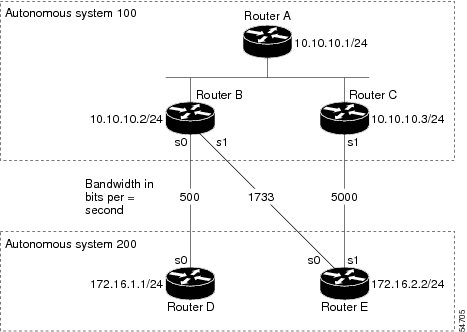
In the following examples, the BGP Link Bandwidth feature is configured so BGP will distribute traffic proportionally to the bandwidth of each external link. The figure below shows two external autonomous systems connected by three links that each carry a different amount of bandwidth (unequal cost links). Multipath load balancing is enabled and traffic is balanced proportionally.
Note
The BGP Link Bandwidth feature functions for simple topologies that have a single path toward the exit points.
Caution
The BGP Link Bandwidth feature might not function properly if load balancing is required toward the exit points.
Figure 1. BGP Link Bandwidth Configuration
Router A Configuration
In the following example, Router A is configured to support iBGP multipath load balancing and to exchange the BGP extended community attribute with iBGP neighbors:
In the following example Router B is configured to support multipath load balancing, to distribute Router D and Router E link traffic proportionally to the bandwidth of each link, and to advertise the bandwidth of these links to iBGP neighbors as an extended community:
In the following example Router C is configured to support multipath load balancing and to advertise the bandwidth of the link with Router E to iBGP neighbors as an extended community:
The examples in this section show the verification of this feature on Router A, Router B, and Router C.
Router B
In the following example, the
showipbgp command is entered on Router B to verify that two unequal cost best paths have been installed into the BGP routing table. The bandwidth for each link is displayed with each route.
RouterB# show ip bgp 192.168.1.0
BGP routing table entry for 192.168.1.0/24, version 48
Paths: (2 available, best #2)
Multipath: eBGP
Advertised to update-groups:
1 2
200
172.16.1.1 from 172.16.1.2 (192.168.1.1)
Origin incomplete, metric 0, localpref 100, valid, external, multipath, best
Extended Community: 0x0:0:0
DMZ-Link Bw 278 kbytes
200
172.16.2.2 from 172.16.2.2 (192.168.1.1)
Origin incomplete, metric 0, localpref 100, valid, external, multipath, best
Extended Community: 0x0:0:0
DMZ-Link Bw 625 kbytes
Router A
In the following example, the
showipbgp command is entered on Router A to verify that the link bandwidth extended community has been propagated through the iBGP network to Router A. Exit links are located on Router B and Router C. The output shows that a route for each exit link to autonomous system 200 has been installed as a best path in the BGP routing table.
RouterA# show ip bgp 192.168.1.0
BGP routing table entry for 192.168.1.0/24, version 48
Paths: (3 available, best #3)
Multipath: eBGP
Advertised to update-groups:
1 2
200
172.16.1.1 from 172.16.1.2 (192.168.1.1)
Origin incomplete, metric 0, localpref 100, valid, external, multipath
Extended Community: 0x0:0:0
DMZ-Link Bw 278 kbytes
200
172.16.2.2 from 172.16.2.2 (192.168.1.1)
Origin incomplete, metric 0, localpref 100, valid, external, multipath, best
Extended Community: 0x0:0:0
DMZ-Link Bw 625 kbytes
200
172.16.3.3 from 172.16.3.3 (192.168.1.1)
Origin incomplete, metric 0, localpref 100, valid, external, multipath, best
Extended Community: 0x0:0:0
DMZ-Link Bw 2500 kbytes
Router A
In the following example, the
showiproute command is entered on Router A to verify the multipath routes that are advertised and the associated traffic share values:
RouterA# show ip route 192.168.1.0
Routing entry for 192.168.1.0/24
Known via "bgp 100", distance 200, metric 0
Tag 200, type internal
Last update from 172.168.1.1 00:01:43 ago
Routing Descriptor Blocks:
* 172.168.1.1, from 172.168.1.1, 00:01:43 ago
Route metric is 0, traffic share count is 13
AS Hops 1, BGP network version 0
Route tag 200
172.168.2.2, from 172.168.2.2, 00:01:43 ago
Route metric is 0, traffic share count is 30
AS Hops 1, BGP network version 0
Route tag 200
172.168.3.3, from 172.168.3.3, 00:01:43 ago
Route metric is 0, traffic share count is 120
AS Hops 1, BGP network version 0
Route tag 200
Where to Go Next
For information about the BGP Multipath Load Sharing for Both eBGP and iBGP in an MPLS-VPN feature, see the “BGP Multipath Load Sharing for Both eBGP and iBGP in an MPLS-VPN” module in the
IP Routing: BGP Configuration Guide.
For information about the iBGP Multipath Load Sharing feature, see the “iBGP Multipath Load Sharing” module in the
IP Routing: BGP Configuration Guide .
IP Switching Cisco Express Forwarding Configuration Guide
Standards
Standard
Title
No new or modified standards are supported by this feature, and support for existing standards has not been modified by this feature.
—
MIBs
MIB
MIBs Link
No new or modified MIBs are supported by this feature, and support for existing MIBs has not been modified by this feature.
To obtain lists of supported MIBs by platform and Cisco IOS release, and to download MIB modules, go to the Cisco MIB website on Cisco.com at the following URL:
The Cisco Support and Documentation website provides online resources to download documentation, software, and tools. Use these resources to install and configure the software and to troubleshoot and resolve technical issues with Cisco products and technologies. Access to most tools on the Cisco Support and Documentation website requires a Cisco.com user ID and password.
The following table provides release information about the feature or features described in this module. This table lists only the software release that introduced support for a given feature in a given software release train. Unless noted otherwise, subsequent releases of that software release train also support that feature.
Use Cisco Feature Navigator to find information about platform support and Cisco software image support. To access Cisco Feature Navigator, go to
www.cisco.com/go/cfn. An account on Cisco.com is not required.
Table 1 Feature Information for BGP Link Bandwidth
Feature Name
Releases
Feature Information
BGP Link Bandwidth
12.2(2)T
12.2(14)S
This feature advertises the bandwidth of an autonomous system exit link as an extended community. The link bandwidth extended community attribute is propagated to iBGP peers when extended community exchange is enabled.
The following commands were introduced or modified:
routerbgp,address-familyipv4,address-familyipv4,
bgpdmzlink-bw,neighbor,
showipbgp,
showiproute.