Interchassis Asymmetric Routing Support for Zone-Based Firewall and NAT
The Interchassis Asymmetric Routing Support for Zone-Based Firewall and NAT feature supports the forwarding of packets from a standby redundancy group to the active redundancy group for packet handling. If this feature is not enabled, the return TCP packets forwarded to the router that did not receive the initial synchronization (SYN) message are dropped because they do not belong to any known existing session.
This module provides an overview of asymmetric routing and describes how to configure asymmetric routing
Your software release may not support all the features documented in this module. For the latest feature information and caveats, see the release notes for your platform and software release. To find information about the features documented in this module, and to see a list of the releases in which each feature is supported, see the Feature Information Table at the end of this document.
Use Cisco Feature Navigator to find information about platform support and Cisco software image support. To access Cisco Feature Navigator, go to
www.cisco.com/go/cfn. An account on Cisco.com is not required.
Restrictions for Interchassis Asymmetric Routing Support for Zone-Based Firewall and NAT
Asymmetric routing over Multiprotocol Label Switching (MPLS) and VPN is not supported.
LANs that use virtual IP addresses and virtual MAC (VMAC) addresses do not support asymmetric routing.
VPN routing and forwarding (VRF) is not supported.
Information About Interchassis Asymmetric Routing Support for Zone-Based Firewall and NAT
Asymmetric Routing Overview
Asymmetric routing occurs when packets from TCP or UDP connections flow in different directions through different routes. In asymmetric routing, packets that belong to a single TCP or UDP connection are forwarded through one interface in a redundancy group (RG), but returned through another interface in the same RG. In asymmetric routing, the packet flow remains in the same RG. When you configure asymmetric routing, packets received on the standby RG are redirected to the active RG for processing. If asymmetric routing is not configured, the packets received on the standby RG may be dropped.
Asymmetric routing determines the RG for a particular traffic flow. The state of the RG is critical in determining the handling of packets. If an RG is active, normal packet processing is performed. In case the RG is in a standby state and you have configured asymmetric routing and the
asymmetric-routing always-divert enable command, packets are diverted to the active RG. Use the
asymmetric-routing always-divert enable command to always divert packets received from the standby RG to the active RG.
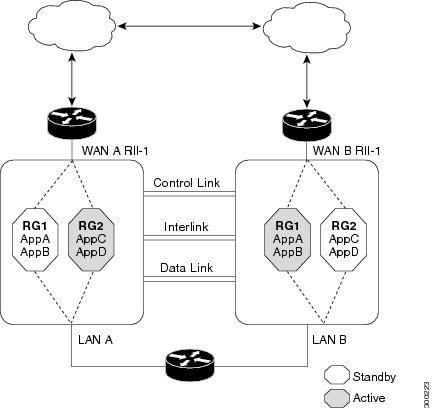
The figure below shows an asymmetric routing scenario with a separate asymmetric-routing interlink interface to divert packets to the active RG.
Figure 1. Asymmetric Routing Scenario
The following rules apply to asymmetric routing:
1:1 mapping exists between the redundancy interface identifier (RII) and the interface.
1:n mapping exists between the interface and an RG. (An interface can have multiple RGs.)
1:n mapping exists between an RG and applications that use it. (Multiple applications can use the same RG).
1:1 mapping exists between an RG and the traffic flow. The traffic flow must map only to a single RG. If a traffic flow maps to multiple RGs, an error occurs.
1:1 or 1:n mapping can exist between an RG and an asymmetric-routing interlink as long as the interlink has sufficient bandwidth to support all the RG interlink traffic.
Asymmetric routing consists of an interlink interface that handles all traffic that is to be diverted. The bandwidth of the asymmetric-routing interlink interface must be large enough to handle all expected traffic that is to be diverted. An IPv4 address must be configured on the asymmetric-routing interlink interface, and the IP address of the asymmetric routing interface must be reachable from this interface.
Note
We recommend that the asymmetric-routing interlink interface be used for interlink traffic only and not be shared with high availability (HA) control or data interfaces because the amount of traffic on the asymmetric-routing interlink interface could be quite high.
Asymmetric Routing Support in Firewalls
For intrabox asymmetric routing support, the firewall does a stateful Layer 3 and Layer 4 inspection of Internet Control Message Protocol (ICMP), TCP, and UDP packets. The firewall does a stateful inspection of TCP packets by verifying the window size and order of packets. The firewall also requires the state information from both directions of the traffic for stateful inspection. The firewall does a limited inspection of ICMP information flows. It verifies the sequence number associated with the ICMP echo request and response. The firewall does not synchronize any packet flows to the standby redundancy group (RG) until a session is established for that packet. An established session is a three-way handshake for TCP, the second packet for UDP, and informational messages for ICMP. All ICMP flows are sent to the active RG.
The firewall does a stateless verification of policies for packets that do not belong to the ICMP, TCP, and UDP protocols.
The firewall depends on bidirectional traffic to determine when a packet flow should be aged out and diverts all inspected packet flows to the active RG. Packet flows that have a pass policy and that include the same zone with no policy or a drop policy are not diverted.
Note
The firewall does not support the
asymmetric-routing always-divert enable command that diverts packets received on the standby RG to the active RG. By default, the firewall forces all packet flows to be diverted to the active RG.
Asymmetric Routing in NAT
By default, when asymmetric routing is configured, Network Address Translation (NAT) processes non-ALG packets on the standby RG, instead of forwarding them to the active. The NAT-only configuration (that is when the firewall is not configured) can use both the active and standby RGs for processing packets. If you have a NAT-only configuration and you have configured asymmetric routing, the default asymmetric routing rule is that NAT will selectively process packets on the standby RG. You can configure the
asymmetric-routing always-divert enable
command to divert packets received on the standby RG to the active RG. Alternatively, if you have configured the firewall along with NAT, the default asymmetric routing rule is to always divert the packets to the active RG.
When NAT receives a packet on the standby RG and if you have not configured the diverting of packets, NAT does a lookup to see if a session exists for that packet. If a session exists and there is no ALG associated for that session, NAT processes the packet on the standby RG. The processing of packets on the standby RG when a session exists significantly increases the bandwidth of the NAT traffic.
ALGs are used by NAT to identify and translate payload and to create child flows. ALGs require a two-way traffic to function correctly. NAT must divert all traffic to the active RG for any packet flow that is associated with an ALG. This is accomplished by checking if ALG data that is associated with the session is found on the standby RG. If ALG data exits, the packet is diverted for asymmetric routing.
Asymmetric Routing in a WAN-LAN Topology
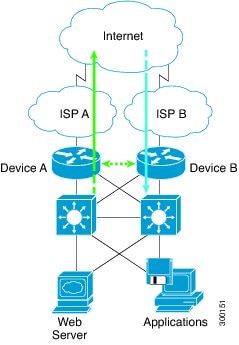
Asymmetric routing supports only a WAN-LAN topology. In a WAN-LAN topology, devices are connected through LAN interfaces on the inside and WAN interfaces on the outside. There is no control on the routing of return traffic received through WAN links. Asymmetric routing controls the routing of return traffic received through WAN links in a WAN-LAN topology. The figure below shows a WAN-LAN topology.
Figure 2. Asymmetric Routing in a WAN-LAN Topology
How to Configure Interchassis Asymmetric Routing Support for Zone-Based Firewall and NAT
Configuring a Redundancy Application Group and a Redundancy Group Protocol
Redundancy groups consist of the following configuration elements:
The amount by which the priority will be decremented for each object.
Enables the integration of the failover protocol running on the control interface with the Bidirectional Forwarding Detection (BFD) protocol to achieve failure detection in milliseconds.
Configuring Data, Control, and Asymmetric Routing Interfaces
In this task, you configure the following redundancy group (RG) elements:
The interface that is used as the control interface.
The interface that is used as the data interface.
The interface that is used for asymmetric routing.
This is an optional task. Perform this task only if you are configuring asymmetric routing for Network Address Translation (NAT).
Note
Asymmetric routing, data, and control must be configured on separate interfaces for zone-based firewall. However, for Network Address Translation (NAT), asymmetric routing, data, and control can be configured on the same interface.
Establishes an asymmetric flow diversion tunnel for each RG.
Step 7
end
Example:
Device(config-if)# end
Exits interface configuration mode and enters privileged EXEC mode.
Configuring Dynamic Inside Source Translation with Asymmetric Routing
The following configuration is a sample dynamic inside source translation with asymmetric routing. You can configure asymmetric routing with the following types of NAT configurations—dynamic outside source, static inside and outside source, and Port Address Translation (PAT) inside and outside source translations. For more information on different types of NAT configurations, see the “Configuring NAT for IP Address Conservation” chapter.
The Cisco Support and Documentation website provides online resources to download documentation, software, and tools. Use these resources to install and configure the software and to troubleshoot and resolve technical issues with Cisco products and technologies. Access to most tools on the Cisco Support and Documentation website requires a Cisco.com user ID and password.
Feature Information for Interchassis Asymmetric Routing Support for Zone-Based Firewall and NAT
The following table provides release information about the feature or features described in this module. This table lists only the software release that introduced support for a given feature in a given software release train. Unless noted otherwise, subsequent releases of that software release train also support that feature.
Use Cisco Feature Navigator to find information about platform support and Cisco software image support. To access Cisco Feature Navigator, go to
www.cisco.com/go/cfn. An account on Cisco.com is not required.
Table 1 Feature Information for Interchassis Asymmetric Routing Support for Zone-Based Firewall and NAT
Feature Name
Releases
Feature Information
Interchassis Asymmetric Routing Support for Zone-Based Firewall and NAT
Cisco IOS XE Release 3.5S
The Interchassis Asymmetric Routing Support for Zone-Based Firewall and NAT feature supports the forwarding of packets from a standby redundancy group to the active redundancy group for packet handling.
The following commands were introduced or modified:
asymmetric-routing,redundancy asymmetric-routing enable.