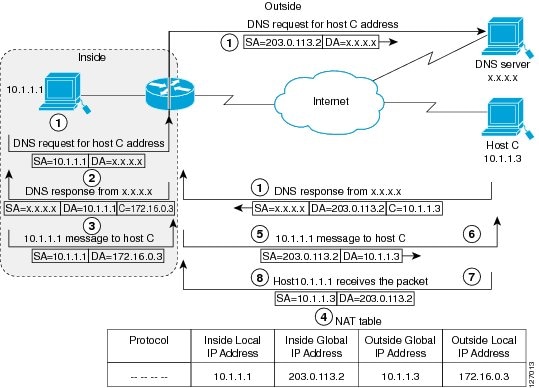
This module describes how to configure Network Address Translation (NAT) for IP address conservation and how to configure inside and outside source addresses. This module also provides information about the benefits of configuring NAT for IP address conservation.
NAT enables private IP internetworks that use nonregistered IP addresses to connect to the Internet. NAT operates on a router, usually connecting two networks, and translates the private (not globally unique) addresses in the internal network into legal addresses before packets are forwarded onto another network. NAT can be configured to advertise only one address for the entire network to the outside world. This ability provides additional security by effectively hiding the entire internal network behind that one address.
NAT is also used at the enterprise edge to allow internal users access to the Internet and to allow Internet access to internal devices such as mail servers.
Your software release may not support all the features documented in this module. For the latest feature information and caveats, see the release notes for your platform and software release. To find information about the features documented in this module, and to see a list of the releases in which each feature is supported, see the Feature Information Table at the end of this document.
Use Cisco Feature Navigator to find information about platform support and Cisco software image support. To access Cisco Feature Navigator, go to
www.cisco.com/go/cfn. An account on Cisco.com is not required.
Prerequisites for Configuring NAT for IP Address Conservation
All access lists required for use with the configuration tasks described in this module should be configured prior to beginning a configuration task. For information about how to configure an access list, see the
IP Access List Sequence Numbering document.
Note
If you specify an access list with a NAT command, NAT will not support the
permitipanyany command that is commonly used in an access list.
NAT Requirements
Before configuring NAT in your network, you should know interfaces on which NAT will be configured and for what purposes. The following requirements will help you decide how to configure and use NAT:
Define the NAT inside and outside interfaces if:
Users exist off multiple interfaces.
Multiple interfaces connect to the Internet.
Define what you need NAT to accomplish:
Allow internal users to access the Internet.
Allow the Internet to access internal devices such as a mail server.
Allow overlapping networks to communicate.
Allow networks with different address schemes to communicate.
Allow the use of an application level gateway.
Redirect TCP traffic to another TCP port or address.
Use NAT during a network transition.
Restrictions for Configuring NAT for IP Address Conservation
When you configure Network Address Translation (NAT) on an interface, that interface becomes optimized for NAT packet flow. Any nontranslated packet that flows through the NAT interface goes through a series of checks to determine whether the packet needs to be translated or not. These checks result in increased latency for nontranslated packet flows and thus negatively impact the packet processing latency of all packet flows through the NAT interface. We highly recommend that a NAT interface must be used only for NAT-only traffic. Any non-NAT packets must be separated and these packets should go through an interface that does not have NAT configured on it. You can use Policy-Based Routing (PBR) for separating non-NAT traffic.
NAT Virtual Interfaces (NVIs) are not supported in the Cisco IOS XE software.
NAT is not practical if large numbers of hosts in the stub domain communicate outside of the domain.
Some applications use embedded IP addresses in such a way that translation by a NAT device is impractical. These applications may not work transparently or at all through a NAT device.
By default, support for the Session Initiation Protocol (SIP) is enabled on port 5060. Therefore, NAT-enabled devices interpret all packets on this port as SIP call messages. If other applications in the system use port 5060 to send packets, the NAT service may corrupt the packet as it attempts to interpret the packet as a SIP call message.
NAT hides the identity of hosts, which may be an advantage or a disadvantage depending on the desired result.
A device configured with NAT must not advertise the local networks to the outside. However, routing information that NAT receives from the outside can be advertised in the stub domain as usual.
If you specify an access list to use with a NAT command, NAT does not support the permit ip any any command that is commonly used in the access list.
An access list with a port range is not supported on the Cisco ASR 1000 Series Aggregation Services Routers.
NAT configuration is not supported on the access side of the Intelligent Services Gateway (ISG).
Using the physical interface address of a device as an address pool is not supported. NAT can share the physical interface address of a device only by using the NAT interface overload configuration. A device uses the ports of its physical interface and NAT must receive communication about the ports that it can safely use for translation. This communication happens only when the NAT interface overload is configured.
The output of show ip nat statistics command displays information about all IP address pools and NAT mappings that you have configured. If your NAT configuration has a high number of IP address pools and NAT mappings (for example 1000 to 4000), the update rate of the pool and mapping statistics in the show ip nat statistics is very slow.
Information About Configuring NAT for IP Address Conservation
Benefits of Configuring NAT for IP Address Conservation
NAT allows organizations to resolve the problem of IP address depletion when they have existing networks and need to access the Internet. Sites that do not yet possess Network Information Center (NIC)-registered IP addresses must acquire them, and if more than 254 clients are present or planned, the scarcity of Class B addresses becomes a serious issue. Cisco IOS XE NAT addresses these issues by mapping thousands of hidden internal addresses to a range of easy-to-get Class C addresses.
Sites that already have registered IP addresses for clients on an internal network may want to hide those addresses from the Internet so that hackers cannot directly attack the clients. With client addresses hidden, a degree of security is established. Cisco IOS XE NAT gives LAN administrators complete freedom to expand Class A addressing, which is drawn from the reserve pool of the Internet Assigned Numbers Authority (RFC 1597). This expansion occurs within the organization without concern for addressing changes at the LAN/Internet interface.
The Cisco IOS XE software can selectively or dynamically perform NAT. This flexibility allows the network administrator to use a mix of RFC 1597 and RFC 1918 addresses or registered addresses. NAT is designed for use on a variety of routers for IP address simplification and conservation. In addition, Cisco IOS XE NAT allows the selection of which internal hosts are available for NAT.
A significant advantage of NAT is that it can be configured without requiring changes to hosts or routers other than those few routers on which NAT will be configured.
Two key problems facing the Internet are depletion of IP address space and scaling in routing. NAT is a feature that allows the IP network of an organization to appear from the outside to use different IP address space than what it is actually using. Thus, NAT allows an organization with nonglobally routable addresses to connect to the Internet by translating those addresses into globally routable address space. NAT also allows a graceful renumbering strategy for organizations that are changing service providers or voluntarily renumbering into classless interdomain routing (CIDR) blocks. NAT is described in RFC 1631.
How NAT Works
A router configured with NAT will have at least one interface to the inside network and one to the outside network. In a typical environment, NAT is configured at the exit router between a stub domain and the backbone. When a packet leaves the domain, NAT translates the locally significant source address into a globally unique address. When a packet enters the domain, NAT translates the globally unique destination address into a local address. If more than one exit point exists, each NAT must have the same translation table. If NAT cannot allocate an address because it has run out of addresses, it drops the packet and sends an Internet Control Message Protocol (ICMP) host unreachable packet to the destination.
Uses of NAT
NAT can be used for the following applications:
When you want to connect to the Internet, but not all of your hosts have globally unique IP addresses. NAT enables private IP internetworks that use nonregistered IP addresses to connect to the Internet. NAT is configured on the router at the border of a stub domain (referred to as the
insidenetwork) and a public network such as the Internet (referred to as the
outsidenetwork). NAT translates internal local addresses to globally unique IP addresses before sending packets to the outside network. As a solution to the connectivity problem, NAT is practical only when relatively few hosts in a stub domain communicate outside of the domain at the same time. When this is the case, only a small subset of the IP addresses in the domain must be translated into globally unique IP addresses when outside communication is necessary, and these addresses can be reused when they are no longer in use.
When you must change your internal addresses. Instead of changing the internal addresses, which can be a considerable amount of work, you can translate them by using NAT.
When you want to do basic load sharing of TCP traffic. You can map a single global IP address to many local IP addresses by using the TCP load distribution feature.
NAT Inside and Outside Addresses
The term
inside in a NAT context refers to networks owned by an organization that must be translated. When NAT is configured, hosts within this network will have addresses in one space (known as the
local address space) that will appear to those outside the network as being in another space (known as the
global address space).
Similarly, the term
outside refers to those networks to which the stub network connects, and which are generally not under the control of an organization. Hosts in outside networks can also be subject to translation, and can thus have local and global addresses.
NAT uses the following definitions:
Inside local address—The IP address that is assigned to a host on the inside network. The address is probably not a legitimate IP address assigned by the NIC or service provider.
Inside global address—A legitimate IP address (assigned by the NIC or service provider) that represents one or more inside local IP addresses to the outside world.
Outside local address—The IP address of an outside host as it appears to the inside network. Not necessarily a legitimate address, it is allocated from the address space routable on the inside.
Outside global address—The IP address assigned to a host on the outside network by the owner of the host. The address is allocated from a globally routable address or network space.
You can translate your own IP addresses into globally unique IP addresses when communicating outside of your network. You can configure static or dynamic inside source translation as follows:
Statictranslation establishes a one-to-one mapping between your inside local address and an inside global address. Static translation is useful when a host on the inside must be accessible by a fixed address from the outside.
Dynamictranslation establishes a mapping between an inside local address and a pool of global addresses.
In Cisco IOS Release 15.1(3)T and later releases, when you configure the
traceroute command, NAT returns the same inside global IP address for all inside local IP addresses.
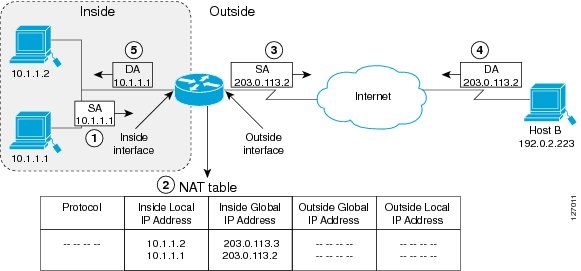
The figure below illustrates a router that is translating a source address inside a network to a source address outside the network.
Figure 1. NAT Inside Source Translation
The following process describes the inside source address translation, as shown in the figure above:
The user at host 10.1.1.1 opens a connection to Host B in the outside network.
The first packet that the router receives from host 10.1.1.1 causes the router to check its NAT table and based on your NAT configuration, the following scenarios are possible:
If a static translation entry is configured, the router goes to Step 3.
If no translation entry exists, the router determines that the source address (SA) 10.1.1.1 must be translated dynamically, selects a legal, global address from the dynamic address pool, and creates a translation entry in the NAT table. This type of translation entry is called a
simpleentry.
The router replaces the inside local source address of host 10.1.1.1 with the global address of the translation entry and forwards the packet.
Host B receives the packet and responds to host 10.1.1.1 by using the inside global IP destination address (DA) 203.0.113.2.
When the router receives the packet with the inside global IP address, it performs a NAT table lookup by using the inside global address as a key. It then translates the address to the inside local address of host 10.1.1.1 and forwards the packet to host 10.1.1.1.
Host 10.1.1.1 receives the packet and continues the conversation. The router performs Steps 2 to 5 for each packet that it receives.
Overloading of Inside Global Addresses
You can conserve addresses in the inside global address pool by allowing a router to use one global address for many local addresses and this type of NAT configuration is called overloading. When overloading is configured, the router maintains enough information from higher-level protocols (for example, TCP or UDP port numbers) to translate the global address back to the correct local address. When multiple local addresses map to one global address, the TCP or UDP port numbers of each inside host distinguish between local addresses.
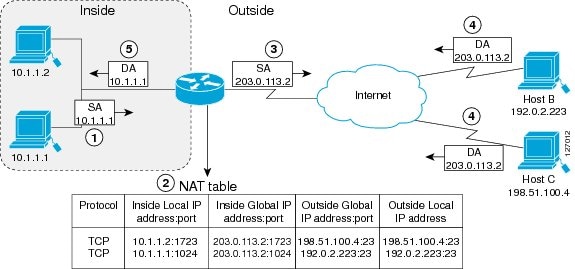
The figure below illustrates a NAT operation when an inside global address represents multiple inside local addresses. The TCP port numbers act as differentiators.
Figure 2. NAT Overloading Inside Global Addresses
The router performs the following process in overloading inside global addresses, as shown in the figure above. Both Host B and Host C believe that they are communicating with a single host at address 203.0.113.2. They are actually communicating with different hosts; the port number is the differentiator. In fact, many inside hosts can share the inside global IP address by using many port numbers.
The user at host 10.1.1.1 opens a connection to Host B.
The first packet that the router receives from host 10.1.1.1 causes the router to check its NAT table and based on your NAT configuration the following scenarios are possible:
If no translation entry exists, the router determines that the address 10.1.1.1 must be translated, and sets up a translation of the inside local address 10.1.1.1 to a legal global address.
If overloading is enabled and another translation is active, the router reuses the global address from that translation and saves enough information that can be used to translate the global address back, as an entry in the NAT table. This type of translation entry is called an
extendedentry.
The router replaces the inside local source address 10.1.1.1 with the selected global address and forwards the packet.
Host B receives the packet and responds to host 10.1.1.1 by using the inside global IP address 203.0.113.2.
When the router receives the packet with the inside global IP address, it performs a NAT table lookup by using the protocol, the inside global address and port, and the outside address and port as keys; translates the address to the inside local address 10.1.1.1 and forwards the packet to host 10.1.1.1.
Host 10.1.1.1 receives the packet and continues the conversation. The router performs Steps 2 to 5 for each packet it receives.
Types of NAT
NAT operates on a router—generally connecting only two networks—and translates the private (inside local) addresses within the internal network into public (inside global) addresses before any packets are forwarded to another network. This functionality gives you the option to configure NAT so that it will advertise only a single address for your entire network to the outside world. Doing this effectively hides the internal network from the world, giving you some additional security.
The types of NAT include:
Static address translation (static NAT)—Allows one-to-one mapping between local and global addresses.
Dynamic address translation (dynamic NAT)—Maps unregistered IP addresses to registered IP addresses from a pool of registered IP addresses.
Overloading—Maps multiple unregistered IP addresses to a single registered IP address (many to one) using different ports. This method is also known as Port Address Translation (PAT). By using overloading, thousands of users can be connected to the Internet by using only one real global IP address.
TCP Load Distribution for NAT
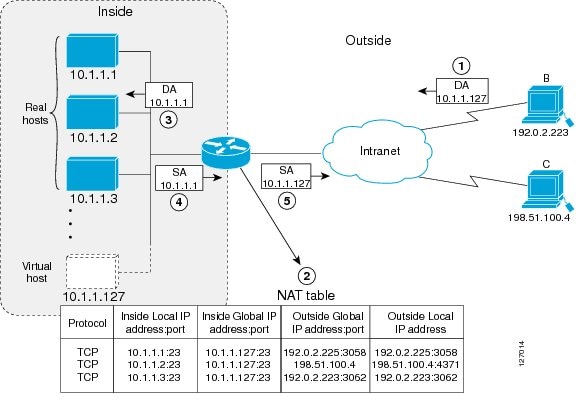
Your organization may have multiple hosts that must communicate with a heavily-used host. By using NAT, you can establish a virtual host on the inside network that coordinates load sharing among real hosts. DAs that match an access list are replaced with addresses from a rotary pool. Allocation is done on a round-robin basis and only when a new connection is opened from the outside to the inside. Non-TCP traffic is passed untranslated (unless other translations are in effect). The figure below illustrates this feature.
Figure 3. NAT TCP Load Distribution
The router performs the following process when translating rotary addresses:
The user on Host B (192.0.2.223) opens a connection to the virtual host at 10.1.1.127.
The router receives the connection request and creates a new translation, allocating the next real host (10.1.1.1) for the inside local IP address.
The router replaces the destination address with the selected real host address and forwards the packet.
Host 10.1.1.1 receives the packet and responds.
The router receives the packet and performs a NAT table lookup by using the inside local address and port number, and the outside address and port number as keys. The router then translates the source address to the address of the virtual host and forwards the packet.
The next connection request will cause the router to allocate 10.1.1.2 for the inside local address.
Static IP Address Support
A public wireless LAN provides users of mobile computing devices with wireless connections to a public network, such as the Internet.
The NAT Static IP Address Support feature extends the capabilities of public wireless LAN providers to support users configured with a static IP address. By configuring a router to support users with a static IP address, public wireless LAN providers extend their services to a greater number of potential users, which can lead to greater user satisfaction and additional revenue.
Users with static IP addresses can use services of the public wireless LAN provider without changing their IP address. NAT entries are created for static IP clients and a routable address is provided.
RADIUS
RADIUS is a distributed client/server system that secures networks against unauthorized access. Communication between a network access server (NAS) and a RADIUS server is based on UDP. Generally, the RADIUS protocol is considered a connectionless service. Issues related to server availability, retransmission, and timeouts are handled by RADIUS-enabled devices rather than the transmission protocol.
RADIUS is a client/server protocol. The RADIUS client is typically a NAS, and the RADIUS server is usually a daemon process running on a UNIX or Windows NT machine. The client passes user information to designated RADIUS servers and acts on the response that is returned. RADIUS servers receive user connection requests, authenticate the user, and then return the configuration information necessary for the client to deliver the service to the user. A RADIUS server can act as a proxy client to other RADIUS servers or other kinds of authentication servers.
Denial-of-Service Attacks
A denial-of-service (DoS) attack typically involves the misuse of standard protocols or connection processes with the intent to overload and disable a target, such as a router or web server. DoS attacks can come from a malicious user or from a computer infected with a virus or worm. An attack that comes from many different sources at once, such as when a virus or worm has infected many computers, is known as a distributed DoS attack. Such distributed DoS attacks can spread rapidly and involve thousands of systems.
Viruses and Worms That Target NAT
Viruses and worms are malicious programs designed to attack computer and networking equipment. Although viruses are typically embedded in discrete applications and run only when executed, worms self-propagate and can quickly spread on their own. Although a specific virus or worm may not expressly target NAT, it might use NAT resources to propagate itself. The Rate Limiting NAT Translation feature can be used to limit the impact of viruses and worms that originate from specific hosts, access control lists, and VPN routing and forwarding (VRF) instances.
How to Configure NAT for IP Address Conservation
The tasks described in this section configure NAT for IP address conservation. No single task in this section is required; however, at least one of the tasks must be performed. More than one of the tasks may need to be performed.
Configuring Static Translation of Inside Source Addresses
Configure static translation of inside source addresses when you want to allow one-to-one mapping between your inside local address and an inside global address. Static translation is useful when a host on the inside must be accessible by a fixed address from the outside.
With the fix for CSCtl04702, if the static inside source address matches the inside global address, the output of the
showipaliases command displays both the addresses. The static inside source address is displayed as an interface address, and the inside global address is displayed as a dynamic address. Before the fix, if the static inside source address matched the inside global address, the output of the
showipaliases command displayed only the static inside source address.
Note
You must configure different IP addresses for the interface on which NAT is configured and for the inside addresses that are configured by using the
ip nat inside source static command.
SUMMARY STEPS
1.enable
2.configure terminal
3.ipnatinsidesourcestatic local-ipglobal-ip
4.interface typenumber
5.ipaddress ip-address mask [secondary]
6.ipnatinside
7.exit
8.interface typenumber
9.ipaddress ip-address mask [secondary]
10.ipnatoutside
11.end
DETAILED STEPS
Command or Action
Purpose
Step 1
enable
Example:
Device> enable
Enables privileged EXEC mode.
Enter your password if prompted.
Step 2
configure terminal
Example:
Device# configure terminal
Enters global configuration mode.
Step 3
ipnatinsidesourcestatic local-ipglobal-ip
Example:
Device(config)# ip nat inside source static 10.10.10.1 172.16.131.1
Establishes static translation between an inside local address and an inside global address.
Step 4
interface typenumber
Example:
Device(config)# interface ethernet 1
Specifies an interface and enters interface configuration mode.
Step 5
ipaddress ip-address mask [secondary]
Example:
Device(config-if)# ip address 10.114.11.39 255.255.255.0
Sets a primary IP address for an interface.
Step 6
ipnatinside
Example:
Device(config-if)# ip nat inside
Marks the interface as connected to the inside.
Step 7
exit
Example:
Device(config-if)# exit
Exits interface configuration mode and returns to global configuration mode.
Step 8
interface typenumber
Example:
Device(config)# interface ethernet 0
Specifies a different interface and enters interface configuration mode.
Step 9
ipaddress ip-address mask [secondary]
Example:
Device(config-if)# ip address 172.31.232.182 255.255.255.240
Sets a primary IP address for an interface.
Step 10
ipnatoutside
Example:
Device(config-if)# ip nat outside
Marks the interface as connected to the outside.
Step 11
end
Example:
Device(config-if)# end
Exits interface configuration mode and returns to privileged EXEC mode.
Configuring Dynamic Translation of Inside Source Addresses
Dynamic translation establishes a mapping between an inside local address and a pool of global addresses. Dynamic translation is useful when multiple users on a private network need to access the Internet. The dynamically configured pool IP address may be used as needed and is released for use by other users when access to the Internet is no longer required.
Defines a standard access list permitting those addresses that are to be translated.
Step 5
ipnatinsidesourcelistaccess-list-numberpoolname
Example:
Device(config)# ip nat inside source list 1 pool net-208
Establishes dynamic source translation, specifying the access list defined in the prior step.
Step 6
interfacetypenumber
Example:
Device(config)# interface ethernet 1
Specifies an interface and enters interface configuration mode.
Step 7
ipaddressip-addressmask
Example:
Device(config-if)# ip address 10.114.11.39 255.255.255.0
Sets a primary IP address for the interface.
Step 8
ipnatinside
Example:
Device(config-if)# ip nat inside
Marks the interface as connected to the inside.
Step 9
exit
Example:
Device(config-if)# exit
Exits interface configuration mode and returns to global configuration mode.
Step 10
interfacetypenumber
Example:
Device(config)# interface ethernet 0
Specifies an interface and enters interface configuration mode.
Step 11
ipaddressip-addressmask
Example:
Device(config-if)# ip address 172.16.232.182 255.255.255.240
Sets a primary IP address for the interface.
Step 12
ipnatoutside
Example:
Device(config-if)# ip nat outside
Marks the interface as connected to the outside.
Step 13
end
Example:
Device(config-if)# end
Exits interface configuration mode and returns to privileged EXEC mode.
Using NAT to Allow Internal Users Access to the Internet
Perform this task to allow your internal users access to the Internet and conserve addresses in the inside global address pool using overloading of global addresses.
Defines a standard access list permitting those addresses that are to be translated.
The access list must permit only those addresses that are to be translated. (Remember that there is an implicit “deny all” at the end of each access list.) Use of an access list that is too permissive can lead to unpredictable results.
By default, dynamic address translations time out after some period of nonuse. You can change the default values on timeouts, if necessary. When overloading is not configured, simple translation entries time out after 24 hours. Configure the
ipnattranslationtimeoutseconds command to change the timeout value for dynamic address translations that do not use overloading.
Changing the Timeouts When Overloading Is Configured
If you have configured overloading, you can control the translation entry timeout, because each translation entry contains more context about the traffic using it.
Based on your configuration, you can change the timeouts described in this section. If you need to quickly free your global IP address for a dynamic configuration, you should configure a shorter timeout than the default timeout, by using the
ip nat translation timeout command. However, the configured timeout should be longer than the other timeouts configured by using the commands specified in the following task. If a TCP session is not properly closed by a finish (FIN) packet from both sides or during a reset, you should change the default TCP timeout by using the
ip nat translation tcp-timeout
command.
SUMMARY STEPS
1.enable
2.configure terminal
3.ipnattranslationseconds
4.ipnattranslationudp-timeoutseconds
5.ipnattranslationdns-timeoutseconds
6.ipnattranslationtcp-timeoutseconds
7.ipnattranslationfinrst-timeoutseconds
8.ipnattranslationicmp-timeoutseconds
9.ipnattranslationsyn-timeoutseconds
10.end
DETAILED STEPS
Command or Action
Purpose
Step 1
enable
Example:
Router> enable
Enables privileged EXEC mode.
Enter your password if prompted.
Step 2
configure terminal
Example:
Router# configure terminal
Enters global configuration mode.
Step 3
ipnattranslationseconds
Example:
Router(config)# ip nat translation 300
(Optional) Changes the amount of time after which NAT translations time out.
The default timeout is 24 hours and it applies to the aging time for half-entries.
Step 4
ipnattranslationudp-timeoutseconds
Example:
Router(config)# ip nat translation udp-timeout 300
(Optional) Changes the UDP timeout value.
Step 5
ipnattranslationdns-timeoutseconds
Example:
Router(config)# ip nat translation dns-timeout 45
(Optional) Changes the Domain Name System (DNS) timeout value.
Step 6
ipnattranslationtcp-timeoutseconds
Example:
Router(config)# ip nat translation tcp-timeout 2500
(Optional) Changes the TCP timeout value.
The default is 24 hours.
Step 7
ipnattranslationfinrst-timeoutseconds
Example:
Router(config)# ip nat translation finrst-timeout 45
(Optional) Changes the finish and reset timeout value.
finrst-timeout--The aging time after a TCP session receives both finish-in (FIN-IN) and finish-out (FIN-OUT) or after the reset of a TCP session.
Step 8
ipnattranslationicmp-timeoutseconds
Example:
Router(config)# ip nat translation icmp-timeout 45
(Optional) Changes the ICMP timeout value.
Step 9
ipnattranslationsyn-timeoutseconds
Example:
Router(config)# ip nat translation syn-timeout 45
(Optional) Changes the synchronous (SYN) timeout value.
The synchronous timeout or the aging time is used only when a SYN is received on a TCP session. When a synchronous acknowledgment (SYNACK) is received, the timeout changes to TCP timeout.
Step 10
end
Example:
Router(config)# end
(Optional) Exits global configuration mode and returns to privileged EXEC mode.
Allowing Overlapping Networks to Communicate Using NAT
The tasks in this section are grouped because they perform the same action but are executed differently depending on the type of translation that is implemented—static or dynamic:
Perform the task that applies to the translation type that is implemented.
Configuring Static Translation of Overlapping Networks
Configure static translation of overlapping networks if your IP addresses in the stub network are legitimate IP addresses belonging to another network and you want to communicate with those hosts or routers using static translation.
SUMMARY STEPS
1.enable
2.configure terminal
3.ipnatinsidesourcestaticlocal-ipglobal-ip
4.interfacetypenumber
5.ipaddressip-addressmask
6.ipnatinside
7.exit
8.interfacetypenumber
9.ipaddressip-addressmask
10.ipnatoutside
11.end
DETAILED STEPS
Command or Action
Purpose
Step 1
enable
Example:
Device> enable
Enables privileged EXEC mode.
Enter your password if prompted.
Step 2
configure terminal
Example:
Device# configure terminal
Enters global configuration mode.
Step 3
ipnatinsidesourcestaticlocal-ipglobal-ip
Example:
Device(config)# ip nat inside source static 192.168.121.33 10.2.2.1
Establishes static translation between an inside local address and an inside global address.
Step 4
interfacetypenumber
Example:
Device(config)# interface ethernet 1
Specifies an interface and enters interface configuration mode.
Step 5
ipaddressip-addressmask
Example:
Device(config-if)# ip address 10.114.11.39 255.255.255.0
Sets a primary IP address for the interface.
Step 6
ipnatinside
Example:
Device(config-if)# ip nat inside
Marks the interface as connected to the inside.
Step 7
exit
Example:
Device(config-if)# exit
Exits interface configuration mode and returns to global configuration mode.
Step 8
interfacetypenumber
Example:
Device(config)# interface ethernet 0
Specifies an interface and enters interface configuration mode.
Step 9
ipaddressip-addressmask
Example:
Device(config-if)# ip address 172.16.232.182 255.255.255.240
Sets a primary IP address for the interface.
Step 10
ipnatoutside
Example:
Device(config-if)# ip nat outside
Marks the interface as connected to the outside.
Step 11
end
Example:
Device(config-if)# end
(Optional) Exits interface configuration mode and returns to privileged EXEC mode.
What to Do Next
When you have completed the required configuration, go to the “Monitoring and Maintaining NAT” module.
Configuring Dynamic Translation of Overlapping Networks
Configure dynamic translation of overlapping networks if your IP addresses in the stub network are legitimate IP addresses belonging to another network and you want to communicate with those hosts or routers using dynamic translation.
Defines a standard access list permitting those addresses that are to be translated.
The access list must permit only those addresses that are to be translated. (Remember that there is an implicit “deny all” at the end of each access list.) Use of an access list that is too permissive can lead to unpredictable results.
Step 5
ipnatoutsidesourcelistaccess-list-numberpoolname
Example:
Device(config)# ip nat outside source list 1 pool net-10
Establishes dynamic outside source translation, specifying the access list defined in Step 4.
Step 6
interfacetypenumber
Example:
Device(config)# interface ethernet 1
Specifies an interface and enters interface configuration mode.
Step 7
ipaddressip-addressmask
Example:
Device(config-if)# ip address 10.114.11.39 255.255.255.0
Sets a primary IP address for the interface.
Step 8
ipnatinside
Example:
Device(config-if)# ip nat inside
Marks the interface as connected to the inside.
Step 9
exit
Example:
Device(config-if)# exit
Exits interface configuration mode and returns to global configuration mode.
Step 10
interfacetypenumber
Example:
Device(config)# interface ethernet 0
Specifies an interface and enters interface configuration mode.
Step 11
ipaddressip-addressmask
Example:
Device(config-if)# ip address 172.16.232.182 255.255.255.240
Sets a primary IP address for the interface.
Step 12
ipnatoutside
Example:
Device(config-if)# ip nat outside
Marks the interface as connected to the outside.
Step 13
end
Example:
Device(config-if)# end
(Optional) Exits interface configuration mode and returns to privileged EXEC mode.
Configuring Server TCP Load Balancing
Perform this task to configure server TCP load balancing by way of destination address rotary translation. The commands specified in the task allow you to map one virtual host to many real hosts. Each new TCP session opened with the virtual host will be translated into a session with a different real host.
Device(config)# ip nat inside source static 192.168.201.6 192.168.201.21 route-map isp2
Enables route mapping with static NAT configured on the NAT inside interface.
Step 4
exit
Example:
Device(config)# exit
Exits global configuration mode and returns to privileged EXEC mode.
Step 5
showipnattranslations [verbose]
Example:
Device# show ip nat translations
(Optional) Displays active NAT.
Enabling NAT Route Maps Outside-to-Inside Support
The NAT Route Maps Outside-to-Inside Support feature enables you to configure a Network Address Translation (NAT) route map configuration that will allow IP sessions to be initiated from the outside to the inside. Perform this task to enable the NAT Route Maps Outside-to-Inside Support feature.
Device(config)# ip nat inside source route-map MAP-B pool POOL-B reversible
Enables outside-to-inside initiated sessions to use route maps for destination-based NAT.
Step 7
end
Example:
Device(config)# end
(Optional) Exits global configuration mode and returns to privileged EXEC mode.
Configuring NAT of External IP Addresses Only
When you configure NAT of external IP addresses, NAT can be configured to ignore all embedded IP addresses for any application and traffic type. Traffic between a host and the traffic outside an enterprise’s network flows through the internal network. A device configured for NAT translates the packet to an address that can be routed inside the internal network. If the intended destination is outside an enterprise’s network, the packet gets translated back to an external address and is sent out.
Note
When you configure the ip nat outside source static command to add static routes for outside local addresses, there is a delay in the translation of packets and packets are dropped. Packets are dropped because a shortcut is not created for the initial synchronization (SYN) packet when NAT is configured for static translation. To avoid dropped packets, configure either the
ip nat outside source static add-route command or the
ip route
command.
Benefits of configuring NAT of external IP addresses only are:
Allows an enterprise to use the Internet as its enterprise backbone network.
Allows the use of network architecture that requires only the header translation.
Gives the end client a usable IP address at the starting point. This address is the address used for IPsec connections and for traffic flows.
Supports public and private network architecture with no specific route updates.
Device(config)# ip nat outside source static network 10.1.1.1 192.168.251.0/24 no-payload
Disables network packet translation on the outside host device.
Step 9
exit
Example:
Device(config)# exit
Exits global configuration mode and returns to privileged EXEC mode.
Step 10
showipnattranslations [verbose]
Example:
Device# show ip nat translations
Displays active NAT.
Configuring the NAT Default Inside Server Feature
The NAT Default Inside Server feature helps forward packets from the outside to a specified inside local address. Traffic that does not match any existing dynamic translations or static port translations is redirected, and packets are not dropped.
Dynamic mapping and interface overload can be configured for gaming devices. For online games, outside traffic comes on a different UDP port. If a packet is destined for an interface from outside an enterprise’s network and there is no match in the NAT table for the fully extended entry or the static port entry, the packet is forwarded to the gaming device using a simple static entry.
Note
You can use this feature to configure gaming devices with an IP address that is different from that of the PC. To avoid unwanted traffic or DoS attacks, use access lists.
For traffic going from the PC to the outside, it is better to use a route map so that extended entries are created.
(Optional) Enables the use of telnet to the device from the outside.
Step 5
exit
Example:
Device(config)# exit
Exits global configuration mode and returns to privileged EXEC mode.
Step 6
showipnattranslations [verbose]
Example:
Device# show ip nat translations
(Optional) Displays active NAT.
Reenabling RTSP on a NAT Router
The Real Time Streaming Protocol (RTSP) is a client/server multimedia presentation control protocol that supports multimedia application delivery. Some of the applications that use RTSP include Windows Media Services (WMS) by Microsoft, QuickTime by Apple Computer, and RealSystem G2 by RealNetworks.
When the RTSP protocol passes through a NAT router, the embedded address and port must be translated for the connection to be successful. NAT uses Network Based Application Recognition (NBAR) architecture to parse the payload and translate the embedded information in the RTSP payload.
RTSP is enabled by default. Use the
ipnatservicertspportport-number command to reenable RTSP on a NAT router if this configuration has been disabled.
Configuring Support for Users with Static IP Addresses
Configuring support for users with static IP addresses enables those users to establish an IP session in a public wireless LAN environment.
Before You Begin
Before configuring support for users with static IP addresses, you must first enable NAT on your router and configure a RADIUS server host.
Configures an interface and enters interface configuration mode.
Step 4
ipnatinside
Example:
Device(config-if)# ip nat inside
Marks the interface as connected to the inside.
Step 5
exit
Example:
Device(config-if)# exit
Exits interface configuration mode and returns to global configuration mode.
Step 6
ipnatallow-static-host
Example:
Device(config)# ip nat allow-static-host
Enables static IP address support.
Dynamic Address Resolution Protocol (ARP) learning will be disabled on this interface, and NAT will control the creation and deletion of ARP entries for the static IP host.
Device(config)# ip nat pool pool1 172.16.0.0 172.16.0.254 netmask 255.255.255.0 accounting WLAN-ACCT
Specifies an existing RADIUS profile name to be used for authentication of the static IP host.
Step 8
ipnatinsidesourcelistaccess-list-numberpoolname
Example:
Device(config)# ip nat inside source list 1 pool net-208
Specifies the access list and pool to be used for static IP support.
The specified access list must permit all traffic.
Step 9
access-listaccess-list-numberdenyipsource
Example:
Device(config)# access-list 1 deny ip 192.168.196.51
Removes the traffic of the device from NAT.
The
source argument is the IP address of the device that supports the NAT Static IP Support feature.
Step 10
end
Example:
Device(config)# end
(Optional) Exits global configuration mode and returns to privileged EXEC mode.
Step 11
showipnattranslationsverbose
Example:
Device# show ip nat translations verbose
(Optional) Displays active NAT translations and additional information for each translation table entry, including how long ago the entry was created and used.
Examples
The following is sample output from the
showipnattranslationsverbose command:
Device# show ip nat translations verbose
--- 172.16.0.0 10.1.1.1 --- ---
create 00:05:59, use 00:03:39, left 23:56:20, Map-Id(In): 1, flags: none wlan-flags: Secure ARP added, Accounting Start sent Mac-Address:0010.7bc2.9ff6 Input-IDB:Ethernet1/2, use_count: 0, entry-id:7, lc_entries: 0
Configuring the Rate Limiting NAT Translation Feature
A specific host, access control list, or VRF instance generating an unexpectedly high number of NAT requests may be the source of a malicious virus or worm attack.
Device(config)# ip nat translation max-entries 300
Configures the maximum number of NAT entries allowed from the specified source.
The maximum number of allowed NAT entries is 2147483647, although a typical range for a NAT rate limit is 100 to 300 entries.
When you configure a NAT rate limit for all VRF instances, each VRF instance is limited to the maximum number of NAT entries that you specify.
When you configure a NAT rate limit for a specific VRF instance, you can specify a maximum number of NAT entries for the named VRF instance that is greater than or less than that allowed for all VRF instances.
Step 5
end
Example:
Device(config)# end
Exits global configuration mode and returns to privileged EXEC mode.
Step 6
showipnatstatistics
Example:
Device# show ip nat statistics
(Optional) Displays current NAT usage information, including NAT rate limit settings.
After setting a NAT rate limit, use the
showipnatstatistics command to verify the current NAT rate limit settings.
Configuration Examples for Configuring NAT for IP Address Conservation
Example: Configuring Static Translation of Inside Source Addresses
The following example shows how inside hosts addressed from the 10.114.11.0 network are translated to the globally unique 172.31.233.208/28 network. Further, packets from outside hosts addressed from the 10.114.11.0 network (the true 10.114.11.0 network) are translated to appear to be from the 10.0.1.0/24 network.
ip nat pool net-208 172.31.233.208 172.31.233.223 prefix-length 28
ip nat pool net-10 10.0.1.0 10.0.1.255 prefix-length 24
ip nat inside source list 1 pool net-208
ip nat outside source list 1 pool net-10
!
interface ethernet 0
ip address 172.31.232.182 255.255.255.240
ip nat outside
!
interface ethernet 1
ip address 10.114.11.39 255.255.255.0
ip nat inside
!
access-list 1 permit 10.114.11.0 0.0.0.255
The following example shows NAT configured on the provider edge (PE) router with a static route to the shared service for the vrf1 and vrf2 VPNs. NAT is configured as inside source static one-to-one translation.
ip nat pool outside 10.4.4.1 10.4.4.254 netmask 255.255.255.0
ip nat outside source list 1 pool mypool
access-list 1 permit 172.16.18.0 0.0.0.255
ip nat inside source static 192.168.121.33 10.2.2.1 vrf vrf1
ip nat inside source static 192.169.121.33.10.2.2.2 vrf vrf2
Example: Configuring Dynamic Translation of Inside Source Addresses
The following example shows how inside hosts addressed from either the 192.168.1.0 or the 192.168.2.0 network are translated to the globally unique 172.31.233.208/28 network:
ip nat pool net-208 172.31.233.208 172.31.233.223 prefix-length 9
ip nat inside source list 1 pool net-208
!
interface ethernet 0
ip address 172.31.232.182 255.255.255.240
ip nat outside
!
interface ethernet 1
ip address 192.168.1.94 255.255.255.0
ip nat inside
!
access-list 1 permit 192.168.1.0 0.0.0.255
access-list 1 permit 192.168.2.0 0.0.0.255
The following example shows how only traffic local to the provider edge (PE) device running NAT is translated:
ip nat inside source list 1 interface e 0 vrf vrf1 overload
ip nat inside source list 1 interface e 0 vrf vrf2 overload
!
ip route vrf vrf1 0.0.0.0 0.0.0.0 192.168.1.1
ip route vrf vrf2 0.0.0.0 0.0.0.0 192.168.1.1
!
access-list 1 permit 10.1.1.1.0 0.0.0.255
!
ip nat inside source list 1 interface e 1 vrf vrf1 overload
ip nat inside source list 1 interface e 1 vrf vrf2 overload
!
ip route vrf vrf1 0.0.0.0 0.0.0.0 172.16.1.1 global
ip route vrf vrf2 0.0.0.0 0.0.0.0 172.16.1.1 global
access-list 1 permit 10.1.1.0 0.0.0.255
Example: Using NAT to Allow Internal Users Access to the Internet
The following example shows how to create a pool of addresses that is named net-208. The pool contains addresses from 172.31.233.208 to 172.31.233.233. Access list 1 allows packets with SA from 192.168.1.0 to 192.168.1.255. If no translation exists, packets matching access list 1 are translated to an address from the pool. The router allows multiple local addresses (192.168.1.0 to 192.168.1.255) to use the same global address. The router retains port numbers to differentiate the connections.
ip nat pool net-208 172.31.233.208 172.31.233.233 netmask 255.255.255.240
access-list 1 permit 192.168.1.0 0.0.0.255
ip nat inside source list 1 pool net-208 overload
interface ethernet 1
ip address 192.168.201.1 255.255.255.240
ip nat inside
!
interface ethernet 0
ip address 192.168.201.29 255.255.255.240
ip nat outside
!
Example: Allowing Overlapping Networks to Communicate Using NAT
Example: Configuring Server TCP Load Balancing
In the following example, the goal is to define a virtual address, connections to which are distributed among a set of real hosts. The pool defines addresses of real hosts. The access list defines the virtual address. If a translation does not already exist, TCP packets from serial interface 0 (the outside interface), whose destination matches the access list, are translated to an address from the pool.
ip nat pool real-hosts 192.168.15.2 192.168.15.15 prefix-length 28 type rotary
access-list 2 permit 192.168.15.1
ip nat inside destination list 2 pool real-hosts
interface ethernet 0
ip address 192.168.15.129 255.255.255.240
ip nat inside
!
interface serial 0
ip address 192.168.15.17 255.255.255.240
ip nat outside
!
Example: Enabling Route Maps on Inside Interfaces
ip nat inside source static 192.168.201.6 192.168.201.21
!
Example: Enabling NAT Route Maps Outside-to-Inside Support
The following example shows how to configure route map A and route map B to allow outside-to-inside translation for a destination-based Network Address Translation (NAT):
ip nat pool POOL-A 192.168.201.4 192.168.201.6 netmask 255.255.255.128
ip nat pool POOL-B 192.168.201.7 192.168.201.9 netmask 255.255.255.128
ip nat inside source route-map MAP-A pool POOL-A reversible
ip nat inside source route-map MAP-B pool POOL-B reversible
Example: Configuring NAT of External IP Addresses Only
ip nat inside source static network 10.1.1.1 192.168.2510/24 no-payload
ip nat inside source static tcp 10.1.1.1 2000 192.168.1.1 2000 no-payload
ip nat inside source static 10.1.1.1 192.168.1.1 no-payload
ip nat outside source static 10.1.1. 192.168.1.1 no-payload
ip nat outside source static tcp 10.1.1.1 20000 192.168.1.1 20000 no-payload
ip nat outside source static network 10.1.1.1 192.168.251.0/24 no-payload
Example: Configuring Support for Users with Static IP Addresses
interface ethernet 1
ip nat inside
!
ip nat allow-static-host
ip nat pool pool1 172.16.0.0 172.16.0.254 netmask 255.255.255.0 accounting WLAN-ACCT
ip nat inside source list 1 pool net-208
access-list 1 deny ip 192.168.196.51
The following example shows how to enable static IP address support for the router at 192.168.196.51:
interface ethernet 1
ip nat inside
ip nat allow-static-host
ip nat pool net-208 172.16.1.1 172.16.1.10 netmask 255.255.255.0 accounting WLAN-ACCT
ip nat inside source list 1 pool net-208
access-list 1 deny ip 192.168.196.51
Example: Creating a RADIUS Profile for NAT Static IP Support
The following example shows how to create a RADIUS profile for use with the NAT Static IP Support feature:
aaa new-model
aaa new-model
!
aaa group server radius WLAN-RADIUS
server 172.16.88.1 auth-port 1645 acct-port 1645
server 172.16.88.1 auth-port 1645 acct-port 1646
!
aaa accounting network WLAN-ACCT start-stop group WLAN-RADIUS
aaa session-id common
ip radius source-interface Ethernet3/0
radius-server host 172.31.88.1 auth-port 1645 acct-port 1646
radius-server key cisco
Example: Configuring the Rate Limiting NAT Translation Feature
The following example shows how to limit the maximum number of allowed NAT entries to 300:
ip nat translation max-entries 300
The following example shows how to limit the VRF instance named “vrf1” to 150 NAT entries:
ip nat translation max-entries vrf vrf1 150
The following example shows how to limit each VRF instance to 200 NAT entries:
ip nat translation max-entries all-vrf 200
The following example shows how to limit the VRF instance named “vrf2” to 225 NAT entries, but limit all other VRF instances to 100 NAT entries each:
ip nat translation max-entries all-vrf 100
ip nat translation max-entries vrf vrf2 225
The following example shows how to limit the access control list named “vrf3” to 100 NAT entries:
ip nat translation max-entries list vrf3 100
The following example shows how to limit the host at IP address 10.0.0.1 to 300 NAT entries:
The Cisco Support and Documentation website provides online resources to download documentation, software, and tools. Use these resources to install and configure the software and to troubleshoot and resolve technical issues with Cisco products and technologies. Access to most tools on the Cisco Support and Documentation website requires a Cisco.com user ID and password.
Feature Information for Configuring NAT for IP Address Conservation
The following table provides release information about the feature or features described in this module. This table lists only the software release that introduced support for a given feature in a given software release train. Unless noted otherwise, subsequent releases of that software release train also support that feature.
Use Cisco Feature Navigator to find information about platform support and Cisco software image support. To access Cisco Feature Navigator, go to
www.cisco.com/go/cfn. An account on Cisco.com is not required.
Table 1 Feature Information for Configuring NAT for IP Address Conservation
Feature Name
Releases
Feature Information
Destination-Based NAT Using Route Maps
Cisco IOS XE Release 2.1
The Destination-Based NAT Using Route Maps feature adds support for destination-based NAT using route maps.
NAT Duplicate Inside Global Address
Cisco IOS XE Release 2.1
The Cisco IOS XE software supports the NAT Duplicate Inside Global Addresses feature.
NAT Host Number Preservation
Cisco IOS XE Release 2.1
For ease of network management, some sites prefer to translate prefixes rather than addresses. These sites want the translated address to have the same host number as the original address. The two prefixes must be of the same length. The NAT Host Number Preservation feature can be enabled by configuring dynamic translation with the address pool of the type, match-host.
The NAT Performance Enhancement—Translation Table Optimization feature provides greater structure for storing translation table entries and an optimized lookup in the table for associating table entries to IP connections.
NAT Route Maps Outside-to- Inside Support
Cisco IOS XE Release 2.2
The NAT Route Maps Outside-to- Inside Support feature enables the deployment of a NAT route map configuration that will allow IP sessions to be initiated from the outside to the inside.
NAT Static IP Support
Cisco IOS XE Release 2.1
The NAT Static IP Support feature provides support for users with static IP addresses, enabling those users to establish an IP session in a public wireless LAN environment.
NAT Timers
Cisco IOS XE Release 2.1
The NAT Timers feature allows you to change the amount of time after which NAT translations time out.
NAT Translation of External IP Addresses Only
Cisco IOS XE Release 2.1
You can use the NAT Translation of External IP Address Only feature to configure NAT to ignore all embedded IP addresses for any application and traffic type.
Rate Limiting NAT Translation
Cisco IOS XE Release 2.1
The Rate Limiting NAT Translation feature provides the ability to limit the maximum number of concurrent Network Address Translation (NAT) operations on a router. In addition to giving users more control over how NAT addresses are used, the Rate Limiting NAT Translation feature can be used to limit the effects of viruses, worms, and denial-of-service attacks.