- Configuring LAN Interfaces
- Fast EtherChannel
- Configuring Serial Interfaces
- Lossless Compression R1 ATM Cell Switching and External BITS Clocking Source
- Network Analysis Module (NM-NAM)
- Minimal Disruptive Restart of VIP Cards
- Rate Based Satellite Control Protocol
- Configuring Virtual Interfaces
- Implementing Tunnels
- Dynamic Layer 3 VPNs with Multipoint GRE Tunnels
- MPLS VPN over mGRE
- IP Tunnel MIBs
- IF-MIBs
- Managing Dial Shelves
- Router-Shelf Redundancy for the Cisco AS5800
- Route-Switch-Controller Handover Redundancy on the Cisco AS5850
- Route Processor Redundancy Plus (RPR+)
- Synchronous Ethernet (SyncE) ESMC and SSM
- IPv6 GRE Tunnels in CLNS Networks
- ISATAP Tunnel Support for IPv6
- IP over IPv6 Tunnels
- IPv6 Automatic 6to4 Tunnels
- IPv6 over IPv4 GRE Tunnels
- IPv6 Automatic IPv4-Compatible Tunnels
- Manually Configured IPv6 over IPv4 Tunnels
Contents
- IPv6 Automatic IPv4-Compatible Tunnels
- Finding Feature Information
- Information About IPv6 Automatic IPv4-Compatible Tunnels
- Overlay Tunnels for IPv6
- Automatic IPv4-Compatible IPv6 Tunnels
- How to Configure IPv6 Automatic IPv4-Compatible Tunnels
- Configuring IPv4-Compatible IPv6 Tunnels
- Configuration Examples for IPv6 Automatic IPv4-Compatible Tunnels
- Example: Configuring IPv4-Compatible IPv6 Tunnels
- Additional References
- Feature Information for IPv6 Automatic IPv4-Compatible Tunnels
IPv6 Automatic IPv4-Compatible Tunnels
This feature provides support for IPv6 automatic IPv4-compatible tunnels. Automatic IPv4-compatible tunnels use IPv4-compatible IPv6 addresses.
- Finding Feature Information
- Information About IPv6 Automatic IPv4-Compatible Tunnels
- How to Configure IPv6 Automatic IPv4-Compatible Tunnels
- Configuration Examples for IPv6 Automatic IPv4-Compatible Tunnels
- Additional References
- Feature Information for IPv6 Automatic IPv4-Compatible Tunnels
Finding Feature Information
Your software release may not support all the features documented in this module. For the latest caveats and feature information, see Bug Search Tool and the release notes for your platform and software release. To find information about the features documented in this module, and to see a list of the releases in which each feature is supported, see the feature information table at the end of this module.
Use Cisco Feature Navigator to find information about platform support and Cisco software image support. To access Cisco Feature Navigator, go to www.cisco.com/go/cfn. An account on Cisco.com is not required.
Information About IPv6 Automatic IPv4-Compatible Tunnels
Overlay Tunnels for IPv6
Overlay tunneling encapsulates IPv6 packets in IPv4 packets for delivery across an IPv4 infrastructure (a core network or the figure below). By using overlay tunnels, you can communicate with isolated IPv6 networks without upgrading the IPv4 infrastructure between them. Overlay tunnels can be configured between border devices or between a border device and a host; however, both tunnel endpoints must support both the IPv4 and IPv6 protocol stacks. IPv6 supports the following types of overlay tunneling mechanisms:
Manual
Generic routing encapsulation (GRE)
IPv4-compatible
6to4
Intrasite Automatic Tunnel Addressing Protocol (ISATAP)
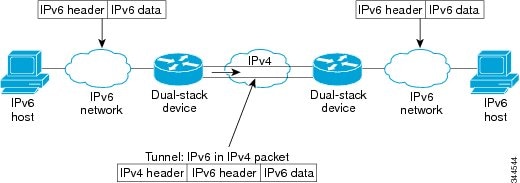
 Note | Overlay tunnels reduce the maximum transmission unit (MTU) of an interface by 20 octets (assuming that the basic IPv4 packet header does not contain optional fields). A network that uses overlay tunnels is difficult to troubleshoot. Therefore, overlay tunnels that connect isolated IPv6 networks should not be considered a final IPv6 network architecture. The use of overlay tunnels should be considered as a transition technique toward a network that supports both the IPv4 and IPv6 protocol stacks or just the IPv6 protocol stack. |
Use the table below to help you determine which type of tunnel that you want to configure to carry IPv6 packets over an IPv4 network.
|
Tunneling Type |
Suggested Usage |
Usage Notes |
|---|---|---|
|
Manual |
Simple point-to-point tunnels that can be used within a site or between sites. |
Can carry IPv6 packets only. |
|
GRE- and IPv4- compatible |
Simple point-to-point tunnels that can be used within a site or between sites. |
Can carry IPv6, Connectionless Network Service (CLNS), and many other types of packets. |
|
IPv4- compatible |
Point-to-multipoint tunnels. |
Uses the ::/96 prefix. We do not recommend using this tunnel type. |
|
6to4 |
Point-to-multipoint tunnels that can be used to connect isolated IPv6 sites. |
Sites use addresses from the 2002::/16 prefix. |
|
6RD |
IPv6 service is provided to customers over an IPv4 network by using encapsulation of IPv6 in IPv4. |
Prefixes can be from the SP’s own address block. |
|
ISATAP |
Point-to-multipoint tunnels that can be used to connect systems within a site. |
Sites can use any IPv6 unicast addresses. |
Individual tunnel types are discussed in detail in this document. We recommend that you review and understand the information about the specific tunnel type that you want to implement. When you are familiar with the type of tunnel you need, see the table below for a summary of the tunnel configuration parameters that you may find useful.
|
Tunneling Type |
Tunnel Configuration Parameter |
|||
|---|---|---|---|---|
|
Tunnel Mode |
Tunnel Source |
Tunnel Destination |
Interface Prefix or Address |
|
|
Manual |
ipv6ip |
An IPv4 address, or a reference to an interface on which IPv4 is configured. |
An IPv4 address. |
An IPv6 address. |
|
GRE/IPv4 |
gre ip |
An IPv4 address. |
An IPv6 address. |
|
|
IPv4- compatible |
ipv6ip auto-tunnel |
Not required. These are all point-to-multipoint tunneling types. The IPv4 destination address is calculated, on a per-packet basis, from the IPv6 destination. |
Not required. The interface address is generated as ::tunnel-source/96. |
|
|
6to4 |
ipv6ip 6to4 |
An IPv6 address. The prefix must embed the tunnel source IPv4 address. |
||
|
6RD |
ipv6ip 6rd |
An IPv6 address. |
||
|
ISATAP |
ipv6ip isatap |
An IPv6 prefix in modified eui-64 format. The IPv6 address is generated from the prefix and the tunnel source IPv4 address. |
Automatic IPv4-Compatible IPv6 Tunnels
Automatic IPv4-compatible tunnels use IPv4-compatible IPv6 addresses. IPv4-compatible IPv6 addresses are IPv6 unicast addresses that have zeros in the high-order 96 bits of the address, and an IPv4 address in the low-order 32 bits. They can be written as 0:0:0:0:0:0:A.B.C.D or ::A.B.C.D, where "A.B.C.D" represents the embedded IPv4 address.
The tunnel destination is automatically determined by the IPv4 address in the low-order 32 bits of IPv4-compatible IPv6 addresses. The host or router at each end of an IPv4-compatible tunnel must support both the IPv4 and IPv6 protocol stacks. IPv4-compatible tunnels can be configured between border-routers or between a border-router and a host. Using IPv4-compatible tunnels is an easy method to create tunnels for IPv6 over IPv4, but the technique does not scale for large networks.
How to Configure IPv6 Automatic IPv4-Compatible Tunnels
Configuring IPv4-Compatible IPv6 Tunnels
Perform this task to configure IPv4-compatible IPv6 tunnels.
With an IPv4-compatible tunnel, the tunnel destination is automatically determined by the IPv4 address in the low-order 32 bits of IPv4-compatible IPv6 addresses. The host or router at each end of an IPv4-compatible tunnel must support both the IPv4 and IPv6 protocol stacks.
1.
enable
2.
configure
terminal
3.
interface
tunnel
tunnel-number
4.
tunnel
source
{ip-address| interface-t ype interface-number}
5.
tunnel
mode
ipv6ip
auto-tunnel
DETAILED STEPS
Configuration Examples for IPv6 Automatic IPv4-Compatible Tunnels
Example: Configuring IPv4-Compatible IPv6 Tunnels
The following example configures an IPv4-compatible IPv6 tunnel that allows Border Gateway Protocol (BGP) to run between a number of routers without having to configure a mesh of manual tunnels. Each router has a single IPv4-compatible tunnel, and multiple BGP sessions can run over each tunnel, one to each neighbor. Ethernet interface 0 is used as the tunnel source. The tunnel destination is automatically determined by the IPv4 address in the low-order 32 bits of an IPv4-compatible IPv6 address. Specifically, the IPv6 prefix 0:0:0:0:0:0 is concatenated to an IPv4 address (in the format 0:0:0:0:0:0:A.B.C.D or ::A.B.C.D) to create the IPv4-compatible IPv6 address. Ethernet interface 0 is configured with a global IPv6 address and an IPv4 address (the interface supports both the IPv6 and IPv4 protocol stacks).
Multiprotocol BGP is used in the example to exchange IPv6 reachability information with the peer 10.67.0.2. The IPv4 address of Ethernet interface 0 is used in the low-order 32 bits of an IPv4-compatible IPv6 address and is also used as the next-hop attribute. Using an IPv4-compatible IPv6 address for the BGP neighbor allows the IPv6 BGP session to be automatically transported over an IPv4-compatible tunnel.
interface tunnel 0
 tunnel source Ethernet 0
 tunnel mode ipv6ip auto-tunnel
interface ethernet 0
 ip address 10.27.0.1 255.255.255.0
 ipv6 address 3000:2222::1/64
router bgp 65000
 no synchronization
 no bgp default ipv4-unicast
neighbor ::10.67.0.2 remote-as 65002
address-family ipv6
 neighbor ::10.67.0.2 activate
 neighbor ::10.67.0.2 next-hop-self
 network 2001:2222:d00d:b10b::/64
Additional References
Related Documents
Related Topic |
Document Title |
|---|---|
|
IPv6 addressing and connectivity |
IPv6 Configuration Guide |
|
Cisco IOS commands |
|
|
IPv6 commands |
|
|
Cisco IOS IPv6 features |
Standards and RFCs
Standard/RFC |
Title |
|---|---|
|
RFCs for IPv6 |
IPv6 RFCs |
MIBs
|
MIB |
MIBs Link |
|---|---|
|
|
To locate and download MIBs for selected platforms, Cisco IOS releases, and feature sets, use Cisco MIB Locator found at the following URL: |
Technical Assistance
Description |
Link |
|---|---|
|
The Cisco Support and Documentation website provides online resources to download documentation, software, and tools. Use these resources to install and configure the software and to troubleshoot and resolve technical issues with Cisco products and technologies. Access to most tools on the Cisco Support and Documentation website requires a Cisco.com user ID and password. |
Feature Information for IPv6 Automatic IPv4-Compatible Tunnels
The following table provides release information about the feature or features described in this module. This table lists only the software release that introduced support for a given feature in a given software release train. Unless noted otherwise, subsequent releases of that software release train also support that feature.
Use Cisco Feature Navigator to find information about platform support and Cisco software image support. To access Cisco Feature Navigator, go to www.cisco.com/go/cfn. An account on Cisco.com is not required.
Feature Name |
Releases |
Feature Information |
|---|---|---|
|
IPv6 Tunneling: Automatic IPv4-Compatible Tunnels |
12.0(22)S 12.2(14)S 12.2(28)SB 12.2(33)SRA 12.2(18)SXE 12.2(2)T 15.0(1)S |
Automatic IPv4-compatible tunnels use IPv4-compatible IPv6 addresses. The following commands were introduced or modified: tunnel destination, tunnel mode ipv6ip, tunnel source. |