Monitoring Traffic Interception
This chapter describes how to use traffic interception to monitor your WAAS devices and contains the following sections:
• Verifying WCCPv2 Interception
•Verifying Inline Interception
Verifying WCCPv2 Interception
This section describes several Cisco IOS and WAAS WCCP commands that are available to verify if WCCP interception is working correctly.
This section contains the following topics:
•show ip wccp IOS Command Output
•show wccp WAAS Command Outputs
show ip wccp IOS Command Output
The show ip wccp IOS command output provides an WCCP inventory that includes the number of routers, WAEs or service group, packets redirected, and forwarding and return method. This command is most commonly used to verify if WCCP interception is working correctly.
The command syntax is as follows:
show ip wccp [service_group#] [detail]
The following examples show how to use the command both with and without the optional argument and keyword.
Figure 2-1 highlights the area of the show ip wccp IOS command output that show that there is one intercepting router and one WAE registered to Service Group 61.
Figure 2-1 Command Output Sample 1: show ip wccp
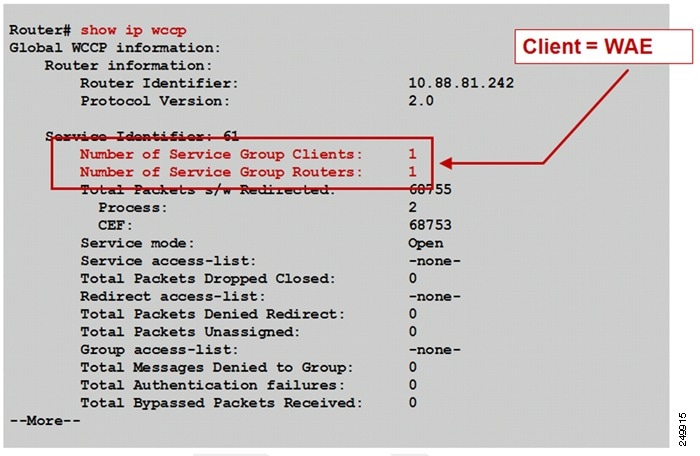
Figure 2-2 highlights the area of the show ip wccp IOS command output that shows that the Total Packets s/w Redirect counter is incrementing on software-based platforms (for example, Cisco ISR).
Figure 2-2 Command Output Sample 2: show ip wccp
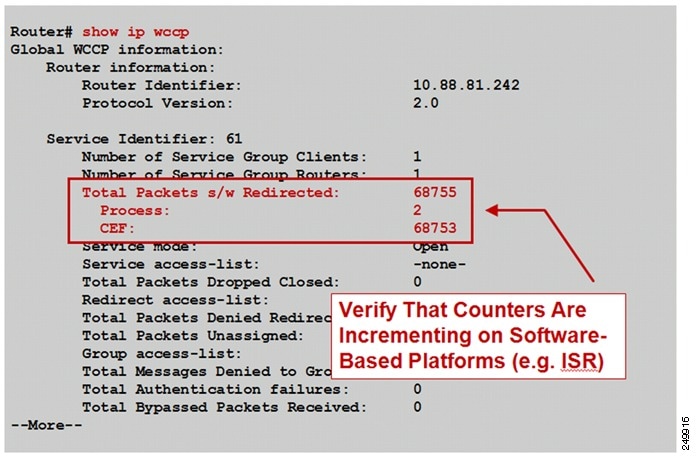
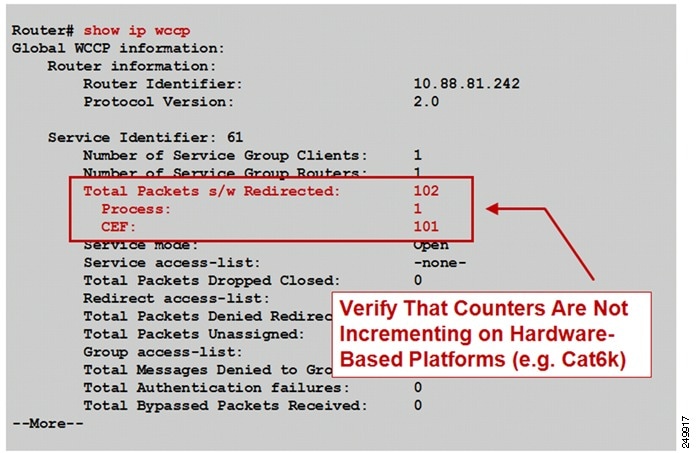
Figure 2-3 highlights the area of the show ip wccp IOS command output that shows that the Total Packets s/w Redirect counter is not incrementing on hardware-based platforms (for example, Cisco Catalyst 6500 Series Switches).
Figure 2-3 Command Output Sample 3: show ip wccp
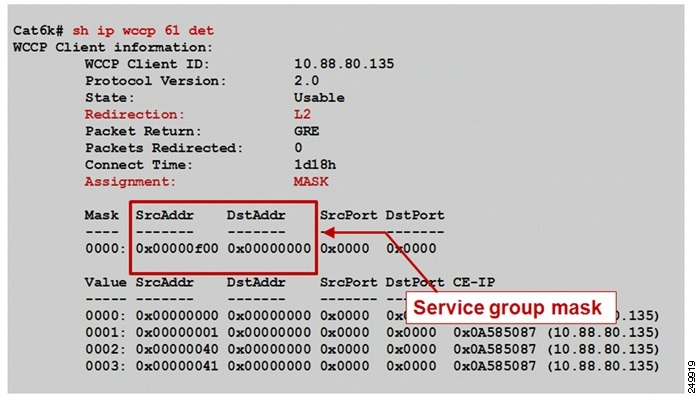
The show ip wccp service_group# detail IOS command output provides information about the state, redirection and return methods used, connect time, and so forth. Figure 2-4 shows an example output from a software-based platform where the default redirection and assignment methods are used.
Figure 2-4 Command Output Sample 1: show ip wccp service_group# detail
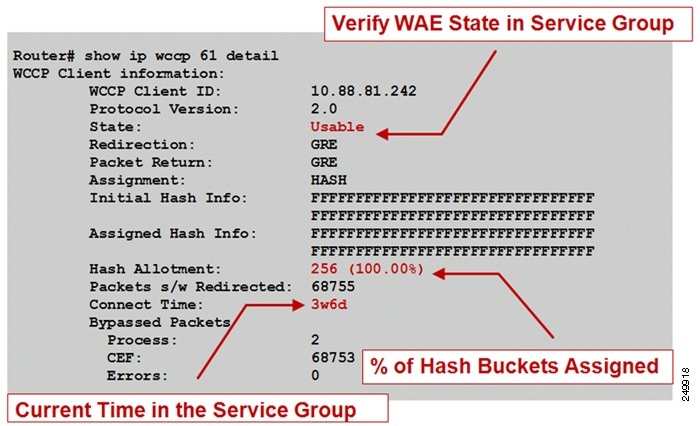
Figure 2-5 shows an example output from a hardware-based platform that is configured for Layer 2 redirect and mask assignment. The CLI output is slightly different, reflecting these configured parameters.
Figure 2-5 Command Output Sample 2: show ip wccp service_group# detail
show wccp WAAS Command Outputs
You can use the show wccp WAAS commands that are available from the WAE CLI to verify that WCCP is configured and operating properly.
This section contains the following topics:
•show wccp services Command Output
•show wccp status Command Output
•show wccp routers Command Output
•show wccp statistics Command Output
show wccp services Command Output
You can use the show wccp services command to display which WCCP services are configured.
WAE# show wccp services
Services Enabled on this WAE:
TCP Promiscuous 61
TCP Promiscuous 62
show wccp status Command Output
The show wccp status command displays the enabled state of WCCP and the configured service IDs.
WAE# show wccp status
WCCP Interception :
Configured State : Enabled
Services Enabled on this WAE:
TCP Promiscuous 61
TCP Promiscuous 62
show wccp routers Command Output
The show wccp routers command displays information about the routers seen and not seen by the WAE.
WAE# show wccp routers
Router Information for Service Id: 61
Routers Seeing this Wide Area Engine(1)
Router Id Sent To
10.43.228.165 10.43.228.65
Routers not Seeing this Wide Area Engine
10.10.10.45 -Redirect Method Mismatch-
Routers Notified of from other WAE's
-NONE-
Router Information for Service Id: 62
Routers Seeing this Wide Area Engine(1)
Router Id Sent To
10.43.228.165 10.43.228.65
Routers not Seeing this Wide Area Engine
10.10.10.45 -Redirect Method Mismatch
Routers Notified of from other WAE's
-None-
show wccp statistics Command Output
The show wccp statistics displays WCCP generic routing encapsulation packet-related information. You know that WCCP redirection is working if either of the first two lines of output is incrementing:
WAE# show wccp statistics
Transparent GRE packets received: 0
Transparent non-GRE packets received: 212389542
Transparent non-GRE non-WCCP packets received: 0
Total packets accepted: 158369766
Invalid packets received: 0
Packets received with invalid service: 0
Packets received on a disabled service: 0
Packets received too small: 0
...
Verifying Inline Interception
This section describes how to use the show interface command to verify inline interception configuration and proper operation.
This section contains the following topics:
•show interface inlineGroup Command Output
•show interface InlinePort Command Output
show interface inlineGroup Command Output
You can use the show interface InlineGroup command to display the inline group information and the slot and inline group number for the selected interface.
WAE612# show interface InlineGroup 1/0
Interface is in intercept operating mode.
Standard NIC mode is off.
Disable bypass mode is off.
VLAN IDs configured for inline interception: All
Watchdog timer is enabled.
Timer frequency: 1600 ms.
Autoreset frequency 500 ms.
The watchdog timer will expire in 1221 ms.
The inline interface operates in two modes:
•Intercept operating mode—Packets are passed to WAAS for potential optimization.
•Bypass operating mode—Mechanical bypass between ports in InlineGroup during a failure or administrative shutdown (not applicable on Cisco AppNav Controller Interface Modules).
show interface InlinePort Command Output
You can use the show interface InlinePort command to display the inline port information for the selected interface.
WAE# show interface InlinePort 1/0 lan
Ethernet Address : 50:3d:e5:9c:8f:45
Internet Address : --
Netmask : --
Admin State : Up
Operation State : Running
Maximum Transfer Unit Size : 1500
Input Errors : 0
Input Packets Dropped : 0
Packets Received : 4074292
Output Errors : 0
Output Packets Dropped : 0
Load Interval : 30
Input Throughput : 12538 bits/sec, 13 packets/sec
Output Throughput : 23235 bits/sec, 11 packets/sec
Packets Sent : 3334662
Auto-negotiation : On
Full Duplex : Yes
Speed : 1000 Mbps
For more information about troubleshooting WCCP, see the WAAS Troubleshooting Guide available on Cisco DocWiki.
 Feedback