Configure Isolated Private VLANs on Catalyst Switches

Available Languages
Contents
Introduction
This document describes how to configure isolated Private VLANs (PVLANs), on Cisco Catalyst 9000 Series switches that run Cisco IOS XE Software.
Prerequisites
Requirements
Cisco recommends that you have knowledge of these topics:
- VLAN Configuration
- 802.1Q trunking
- Basic Cisco IOS XE Command Line Interface (CLI)
Components Used
This document is based on these software and hardware versions; however, PVLAN is not limited to these versions. Validate PVLAN support, command syntax, and restrictions for the specific platform and Cisco IOS XE release before deployment:
-
Cisco Catalyst 9300 Series Switches that run Cisco IOS XE Software Release 17.X and 26.X
The information in this document was created from the devices in a specific lab environment. All of the devices used in this document started with a cleared (default) configuration. If your network is live, ensure that you understand the potential impact of any command.
Conventions
Refer to Cisco Technical Tips Conventions for more information on document conventions.
Background Information
In some situations, you need to prevent Layer 2 connectivity between end devices on a switch without the placement of the devices in different IP subnets. PVLANs provide Layer 2 isolation between ports that belong to the same IP subnet. This design is useful when hosts must reach a default gateway, firewall, load balancer, or shared service, but must not communicate directly with other isolated hosts in the same VLAN and also helps to preserve IP subnets.
A PVLAN separates a Layer 2 broadcast domain into a primary VLAN and one or more secondary VLANs. You can assign a specific set of ports within a PVLAN and thereby control access among the ports at Layer 2. You can configure PVLANs and normal VLANs on the same switch.
There are three types of PVLAN ports: promiscuous, isolated, and community.
PVLAN Port Types
| Port Type |
Description |
Broadcast, Unknown Unicast, and Multicast Behavior |
|---|---|---|
| Promiscuous |
Communicates with all ports in the associated PVLAN domain. This port commonly connects to a default gateway, firewall, router, load balancer, or shared service. |
A promiscuous port can receive traffic from isolated and community ports. Broadcast, unknown unicast, and multicast traffic sourced from a promiscuous port can be forwarded to the associated secondary VLAN ports. Broadcast traffic from secondary VLAN ports can be forwarded to the promiscuous port. |
| Isolated |
Communicates only with promiscuous ports. It does not communicate with other isolated ports in the same PVLAN. |
Broadcast, unknown unicast, and multicast traffic sourced from an isolated port is forwarded only toward associated promiscuous ports. It is not forwarded to other isolated ports or community ports. Broadcast traffic from other isolated ports is not received by an isolated port. |
| Community |
Communicates with ports in the same community and with promiscuous ports. |
Broadcast, unknown unicast, and multicast traffic sourced from a community port is forwarded to other ports in the same community VLAN and to associated promiscuous ports. It is not forwarded to isolated ports or ports in other community VLANs. |
PVLAN VLAN Types
| VLAN Type |
Description |
|---|---|
| Primary VLAN |
Carries traffic from promiscuous ports and maps to secondary VLANs. |
| Isolated VLAN |
Secondary VLAN used for host isolation. Isolated ports in this VLAN cannot communicate with each other at Layer 2. |

Note: PVLANs control Layer 2 forwarding within the same primary VLAN domain. Isolated ports remain in the same IP subnet as the primary VLAN, but Layer 2 traffic between isolated hosts is blocked. This includes broadcast traffic such as Address Resolution Protocol (ARP), between isolated hosts. Isolated hosts can still resolve and reach the default gateway or other services connected through an associated promiscuous port.
Rules and Limitations
This section provides some rules and limitations for which you must watch when you implement PVLANs.
-
PVLANs cannot include VLANs 1 or 1002–1005.
-
PVLANs are supported in transparent mode for VTP 1, 2 and 3. Private VLANS are also supported on server mode with VTP 3.
-
Configure Layer 3 VLAN interfaces (SVIs) only for primary VLANs.
-
You can only designate a VLAN as a PVLAN if that VLAN has no current access port assignments. Remove any ports in that VLAN before you make the VLAN a PVLAN.
Note: For detailed PVLAN restrictions, including platform specific limitations and EtherChannel support with PVLAN trunk modes, refer to the Private VLAN restrictions in the Cisco IOS XE VLAN Configuration Guide for the target Catalyst platform: Catalyst 9500 Series, Restrictions for Private VLANs and Catalyst 9300 Series, Restrictions for Private VLANs
Configure
Example 1: Isolated PVLAN on One Cisco IOS XE Switch
- Host 1 connects to TenGigabitEthernet1/1/7.
- Host 2 connects to TenGigabitEthernet1/1/8.
- A firewall, router, or shared service connects to TenGigabitEthernet1/1/5.
- VLAN 100 is the primary VLAN.
- VLAN 101 is the isolated VLAN.
- Isolated hosts use 10.1.1.1 as the default gateway.
| Host |
Switch |
Interface |
VLAN Role |
IP Address |
|---|---|---|---|---|
| Host1 |
9300-2 |
Te1/1/7 |
Isolated, VLAN 101 |
10.1.1.99/24 |
| Host2 |
9300-2 |
Te1/1/8 |
Isolated, VLAN 101 |
10.1.1.100/24 |
| Gateway |
9300-2 |
Te1/1/5 |
Promiscuous |
10.1.1.1/24 |
Network Diagram
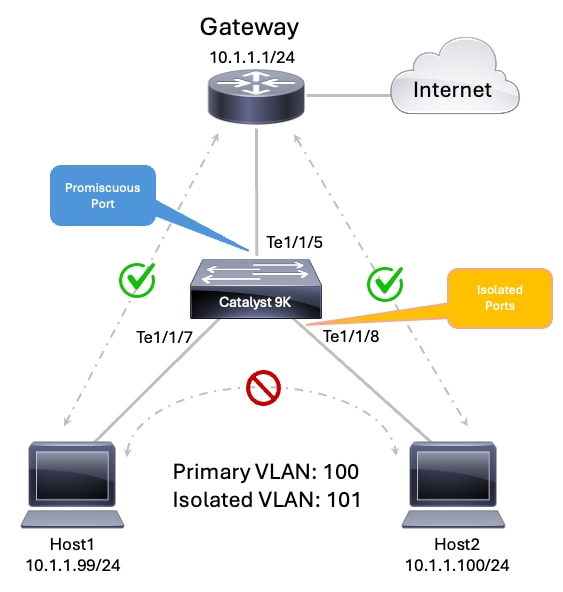 PVLAN Topology
Step 1. Configure VTP Transparent Mode
9300-2#configure terminal
Enter configuration commands, one per line.  End with CNTL/Z.
9300-2(config)#vtp mode transparent
Setting device to VTP Transparent mode for VLANS.
9300-2(config)#end
Step 2. Configure the Primary and Isolated VLANs
9300-2#configure terminal Enter configuration commands, one per line. End with CNTL/Z. 9300-2(config)#vlan 100 9300-2(config-vlan)#name PVLAN_PRIMARY_100 9300-2(config-vlan)#private-vlan primary 9300-2(config-vlan)#private-vlan association 101 9300-2(config-vlan)#exit 9300-2(config)# 9300-2(config)#vlan 101 9300-2(config-vlan)#name PVLAN_ISOLATED_101 9300-2(config-vlan)#private-vlan isolated 9300-2(config-vlan)#exit 9300-2(config)#endNote: The command private-vlan association <vlan-id> is used to bind the isolated VLAN to the primary VLAN.
Step 3. Configure Isolated Host Ports
9300-2#configure terminal Enter configuration commands, one per line. End with CNTL/Z. 9300-2(config)#interface TenGigabitEthernet1/1/7 9300-2(config-if)#description Isolated Host 1 9300-2(config-if)#switchport 9300-2(config-if)#switchport mode private-vlan host 9300-2(config-if)#switchport private-vlan host-association 100 101 9300-2(config-if)#spanning-tree portfast 9300-2(config-if)#exit 9300-2(config)# 9300-2(config)#interface TenGigabitEthernet1/1/8 9300-2(config-if)#description Isolated Host 2 9300-2(config-if)#switchport 9300-2(config-if)#switchport mode private-vlan host 9300-2(config-if)#switchport private-vlan host-association 100 101 9300-2(config-if)#spanning-tree portfast 9300-2(config-if)#exit 9300-2(config)#endStep 4. Configure the Promiscuous Port
9300-2#configure terminal
Enter configuration commands, one per line.  End with CNTL/Z.
9300-2(config)#interface TenGigabitEthernet1/1/5
9300-2(config-if)#description Firewall Router or Shared Service
9300-2(config-if)#switchport
9300-2(config-if)#switchport mode private-vlan promiscuous
9300-2(config-if)#switchport private-vlan mapping 100 101
9300-2(config-if)#exit
9300-2(config)#end
Layer 3 Configuration
PVLANs provide Layer 2 isolation inside the same IP subnet. Layer 3 connectivity is still required when isolated hosts need to reach networks outside the local subnet, such as the Internet, data center services, or upstream routed networks.
There are two common methods to provide Layer 3 connectivity for isolated PVLAN hosts:
- Configure the Primary VLAN Switched Virtual Interface (SVI) on the switch.
- Connect the default gateway directly to a promiscuous port.
Note: Choose one Layer 3 gateway method for a PVLAN subnet. Use either the primary VLAN SVI on the switch or an external gateway connected to a promiscuous port.
Method 1: Configure the Primary VLAN SVI
Use this method when the Cisco IOS XE switch provides the default gateway for the isolated hosts.
In a PVLAN design, the Layer 3 SVI must be configured only for the primary VLAN. The isolated VLAN is a secondary VLAN and does not provide Layer 3 gateway service.
In this example:
-
VLAN 100 is the primary VLAN.
-
VLAN 101 is the isolated secondary VLAN.
-
interface Vlan100 provides the default gateway.
-
Hosts in isolated VLAN 101 use 10.1.1.1/24 as their default gateway.
9300-2#configure terminal
Enter configuration commands, one per line.  End with CNTL/Z.
9300-2(config)#interface Vlan100
9300-2(config-if)#description Primary PVLAN Gateway
9300-2(config-if)#ip address 10.1.1.1 255.255.255.0
9300-2(config-if)#private-vlan mapping 101
9300-2(config-if)#no shutdown
9300-2(config-if)#exit
9300-2(config)#end
Key Points
- Configure the SVI only for the primary VLAN.
- Map the isolated secondary VLAN to the primary VLAN SVI with private-vlan mapping command.
- Do not configure the isolated VLAN as an SVI for gateway service:
- Isolated hosts remain in the same IP subnet as the primary VLAN SVI.
- Isolated hosts can reach the primary VLAN SVI.
- Isolated hosts cannot communicate directly with other isolated hosts at Layer 2.
Note: Configure Layer 3 SVI only for primary VLANs. VLAN interfaces for isolated and community VLANs are inactive with an isolated or community VLAN configuration.
Method 2: Connect the Gateway to a Promiscuous Port
Use this method when an external device provides the default gateway for the isolated hosts. The external device can be a router, firewall, or another Layer 3 gateway device.
In this design, the Cisco IOS XE switch does not need an SVI for the PVLAN subnet. Instead, the external gateway connects to a promiscuous port. The promiscuous port maps the primary VLAN to the isolated secondary VLAN, which allows isolated hosts to reach the external gateway.
In this example:
- VLAN 100 is the primary VLAN.
- VLAN 101 is the isolated secondary VLAN.
- The external gateway connects to TenGigabitEthernet1/1/5.
- The external gateway IP address is 10.1.1.1/24.
- Isolated hosts use 10.1.1.1 as their default gateway.
9300-2#configure terminal
Enter configuration commands, one per line.  End with CNTL/Z.
9300-2(config)#interface TenGigabitEthernet1/1/5
9300-2(config-if)#description Firewall Router or Shared Service
9300-2(config-if)#switchport
9300-2(config-if)#switchport mode private-vlan promiscuous
9300-2(config-if)#switchport private-vlan mapping 100 101
9300-2(config-if)#exit
9300-2(config)#end
Key Points
- No SVI is required on the switch for the PVLAN subnet when the gateway connects directly to a promiscuous port.
- The external gateway interface must use an IP address in the same subnet as the isolated hosts.
- The promiscuous port must map the primary VLAN to the isolated VLAN.
- Isolated hosts can reach the external gateway through the promiscuous port.
- Isolated hosts still cannot communicate directly with each other.
Verification
Verify the PVLAN Association with the show vlan private-vlan command:
9300-2#show vlan private-vlan

Primary Secondary Type              Ports
------- --------- ----------------- ------------------------------------------
100 101 isolated Te1/1/5, Te1/1/7, Te1/1/8Note: In the show vlan private-vlan output, the Type column identifies the secondary VLAN type, such as isolated or community. It does not identify the operational role of each interface listed in the Ports column. The Ports column lists interfaces associated with the primary and secondary VLAN pair, including isolated host ports and promiscuous ports mapped to that secondary VLAN.
Verify the Host port operational state with the show interface <interface-id> switchport command, in this scenario TenGigabitEthernet1/1/7 and TenGigabitEthernet1/1/8:
9300-2#show interface TenGigabitEthernet1/1/7 switchport
Name: Te1/1/7
Switchport: Enabled
Administrative Mode: private-vlan host
Operational Mode: private-vlan host
Administrative Trunking Encapsulation: dot1q
Operational Trunking Encapsulation: native
Negotiation of Trunking: Off
Access Mode VLAN: 1 (default)
Trunking Native Mode VLAN: 1 (default)
Administrative Native VLAN tagging: enabled
Voice VLAN: none
Administrative private-vlan host-association: 100 (PVLAN_PRIMARY_100) 101 (PVLAN_ISOLATED_101)
Administrative private-vlan mapping: none
Administrative private-vlan trunk native VLAN: none
Administrative private-vlan trunk Native VLAN tagging: enabled
Administrative private-vlan trunk encapsulation: dot1q
Administrative private-vlan trunk normal VLANs: none
Administrative private-vlan trunk associations: none
Administrative private-vlan trunk mappings: none
Operational private-vlan: 100 (PVLAN_PRIMARY_100) 101 (PVLAN_ISOLATED_101)
Trunking VLANs Enabled: ALL
Pruning VLANs Enabled: 2-1001
Capture Mode Disabled
Capture VLANs Allowed: ALL

Protected: false
Unknown unicast blocked: disabled
Unknown multicast blocked: disabled
Vepa Enabled: false
App Interface: false
Appliance trust: none

9300-2#show interface TenGigabitEthernet1/1/8 switchport
Name: Te1/1/8
Switchport: Enabled
Administrative Mode: private-vlan host
Operational Mode: private-vlan host
Administrative Trunking Encapsulation: dot1q
Operational Trunking Encapsulation: native
Negotiation of Trunking: Off
Access Mode VLAN: 1 (default)
Trunking Native Mode VLAN: 1 (default)
Administrative Native VLAN tagging: enabled
Voice VLAN: none
Administrative private-vlan host-association: 100 (PVLAN_PRIMARY_100) 101 (PVLAN_ISOLATED_101)
Administrative private-vlan mapping: none
Administrative private-vlan trunk native VLAN: none
Administrative private-vlan trunk Native VLAN tagging: enabled
Administrative private-vlan trunk encapsulation: dot1q
Administrative private-vlan trunk normal VLANs: none
Administrative private-vlan trunk associations: none
Administrative private-vlan trunk mappings: none
Operational private-vlan: 100 (PVLAN_PRIMARY_100) 101 (PVLAN_ISOLATED_101)
Trunking VLANs Enabled: ALL
Pruning VLANs Enabled: 2-1001
Capture Mode Disabled
Capture VLANs Allowed: ALL

Protected: false
Unknown unicast blocked: disabled
Unknown multicast blocked: disabled
Vepa Enabled: false
App Interface: false
Appliance trust: none
Verify the Promiscuous port operational state, in this case TenGigabitEthernet1/1/5:
9300-2#show interface TenGigabitEthernet1/1/5 switchport
Name: Te1/1/5
Switchport: Enabled
Administrative Mode: private-vlan promiscuous
Operational Mode: private-vlan promiscuous
Administrative Trunking Encapsulation: dot1q
Operational Trunking Encapsulation: native
Negotiation of Trunking: Off
Access Mode VLAN: 1 (default)
Trunking Native Mode VLAN: 1 (default)
Administrative Native VLAN tagging: enabled
Voice VLAN: none
Administrative private-vlan host-association: none
Administrative private-vlan mapping: 100 (PVLAN_PRIMARY_100) 101 (PVLAN_ISOLATED_101)
Administrative private-vlan trunk native VLAN: none
Administrative private-vlan trunk Native VLAN tagging: enabled
Administrative private-vlan trunk encapsulation: dot1q
Administrative private-vlan trunk normal VLANs: none
Administrative private-vlan trunk associations: none
Administrative private-vlan trunk mappings: none
Operational private-vlan: 100 (PVLAN_PRIMARY_100) 101 (PVLAN_ISOLATED_101)
Trunking VLANs Enabled: ALL
Pruning VLANs Enabled: 2-1001
Capture Mode Disabled
Capture VLANs Allowed: ALL

Protected: false
Unknown unicast blocked: disabled
Unknown multicast blocked: disabled
Vepa Enabled: false
App Interface: false
Appliance trust: none
Now, verify that the isolated hosts can reach the gateway 10.1.1.1/24 but cannot ping between each other 10.1.1.99/24 and 10.1.1.100/24
Traffic Behavior
| Source |
Destination |
Expected Result |
|---|---|---|
| Host 1 |
Host 2 |
Fails |
| Host 2 |
Host 1 |
Fails |
| Host 1 |
Default gateway |
Succeeds |
| Host 2 |
Default gateway |
Succeeds |
| Promiscuous Port |
Isolated hosts |
Succeeds |
| Traffic Results |
|
While checking the MAC address table you can observe two BLOCKED entries. These entries are expected for isolated PVLAN hosts. They represent the Layer 2 isolation rule in the secondary VLAN, the switch prevents those MAC addresses from being used for direct isolated-to-isolated forwarding.
The isolated host MAC addresses appear twice because PVLAN forwarding uses both the primary VLAN and the secondary VLAN context:
- In secondary VLAN 101, the MAC is blocked for direct isolated VLAN forwarding.
- In primary VLAN 100, the MAC is available for PVLAN forwarding through the promiscuous path.
9300-2#show mac address-table dynamic
          Mac Address Table
-------------------------------------------

Vlan    Mac Address       Type        Ports
----    -----------       --------    -----
   1    000c.000c.000c    DYNAMIC     Te1/1/3
   1    f87a.41a8.c1b5    DYNAMIC     Te1/1/1
   1    f87a.41a8.c1ba    DYNAMIC     Te1/1/6
   1    f87a.41a8.c1d1    DYNAMIC     Te1/1/6
 101 000a.000a.000a BLOCKED Te1/1/7 101 000b.000b.000b BLOCKED Te1/1/8 100 000a.000a.000a DYNAMIC pv Te1/1/7 100 000b.000b.000b DYNAMIC pv Te1/1/8 100 9077.ee3c.7b02 DYNAMIC Te1/1/5
Total Mac Addresses for this criterion: 9
Example 2: PVLAN Across Multiple Cisco IOS XE Switches
-
SW1 and SW2 are Catalyst 9000 Cisco IOS XE switches.
-
No SVI is configured for the PVLAN subnet.
-
An external gateway provides Layer 3 connectivity.
-
The external gateway IP address is 10.1.1.1/24.
-
The external gateway connects to a promiscuous port on SW2.
-
VLAN 100 is the primary VLAN.
-
VLAN 101 is the isolated secondary VLAN.
-
VLAN 102 is the community secondary VLAN.
-
SW1 and SW2 connect through a standard 802.1Q trunk.
-
Isolated hosts can reach only the promiscuous gateway.
-
Community hosts in VLAN 102 can communicate with each other and with the promiscuous gateway.
-
Isolated hosts cannot communicate with community hosts.
| Host |
Switch |
Interface |
PVLAN Role |
VLAN Association |
IP Address |
Default Gateway |
|---|---|---|---|---|---|---|
| Host3 |
SW1 / 9300-1 |
TenGigabitEthernet1/1/3 |
Community host |
Primary VLAN 100, Community VLAN 102 |
10.1.1.97/24 |
10.1.1.1 |
| Host4 |
SW2 / 9300-2 |
TenGigabitEthernet1/1/3 |
Community host |
Primary VLAN 100, Community VLAN 102 |
10.1.1.98/24 |
10.1.1.1 |
| Host1 |
SW2 / 9300-2 |
TenGigabitEthernet1/1/7 |
Isolated host |
Primary VLAN 100, Isolated VLAN 101 |
10.1.1.99/24 |
10.1.1.1 |
| Host2 |
SW2 / 9300-2 |
TenGigabitEthernet1/1/8 |
Isolated host |
Primary VLAN 100, Isolated VLAN 101 |
10.1.1.100/24 |
10.1.1.1 |
| External Gateway |
SW2 / 9300-2 |
TenGigabitEthernet1/1/5 |
Promiscuous (gateway facing device) |
Primary VLAN 100 mapped to VLANs 101 and 102 |
10.1.1.1/24 |
Not applicable |
Network Diagram
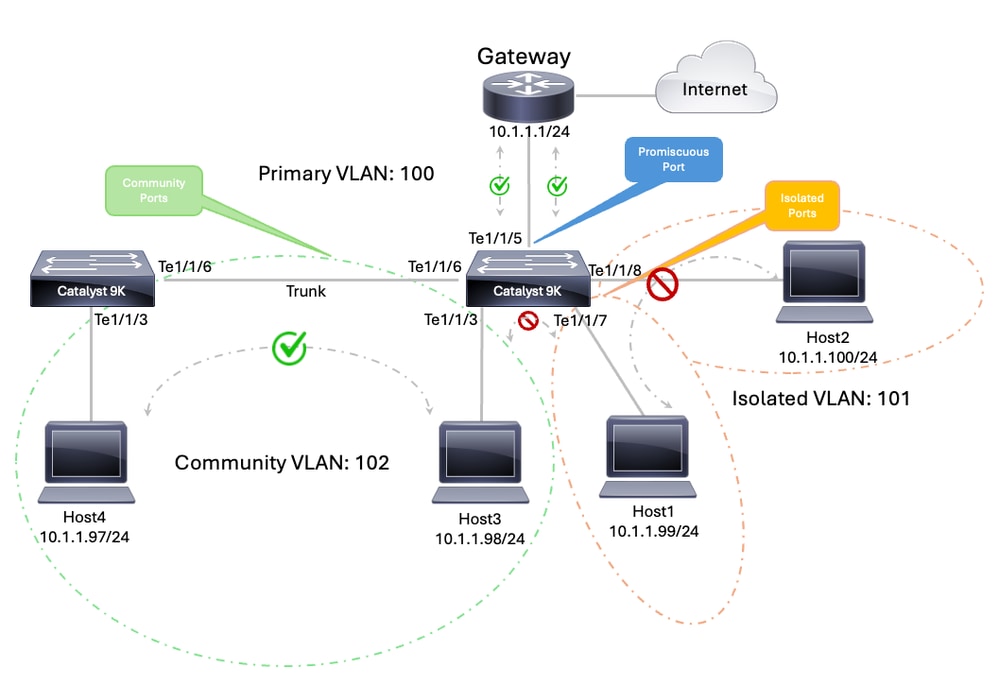 PVLAN Across Switches
VLAN and Interface Plan
| Device |
Interface |
Role |
|---|---|---|
| SW1 |
TenGigabitEthernet1/1/3 |
Community host, VLAN 102 |
| SW1 |
TenGigabitEthernet1/1/6 |
Trunk to SW2 |
| SW2 |
TenGigabitEthernet1/1/3 |
Community host, VLAN 102 |
| SW2 |
TenGigabitEthernet1/1/7 |
Isolated host, VLAN 101 |
| SW2 |
TenGigabitEthernet1/1/8 |
Isolated host, VLAN 101 |
| SW2 |
TenGigabitEthernet1/1/6 |
Trunk to SW1 |
| SW2 |
TenGigabitEthernet1/1/5 |
Promiscuous port to external gateway 10.1.1.1/24 |
Note: Private VLANs can be taken across multiple switches with these methods Standard Trunk Ports, Isolated Private VLAN Trunk Ports or Promiscuous Private VLAN Trunk Ports. Please refer to the Private VLANs Across Multiple Switches documentation guide for further information.
| SW1 - 9300-1 - Running Configuration | SW2 - 9300-2 - Running Configuration |
|
|
Note: In this example, as both switches are using VTP in transparent mode PVLANs must be manually configured on every switch.
Note: Private VLANs are supported in transparent mode for VTP 1, 2 and 3. Private VLANS are also supported on server mode with VTP 3.
Verification
| SW1 - 9300-1 - Status | SW2 - 9300-2 - Status |
|
|
Traffic Behavior
| Source |
Destination |
Expected Result |
|---|---|---|
| SW2 isolated host on Te1/1/7 |
SW2 isolated host on Te1/1/8 |
Fails |
| SW2 isolated host on Te1/1/7 |
SW1 community host on Te1/1/3 |
Fails |
| SW2 isolated host on Te1/1/7 |
External gateway 10.1.1.1 |
Succeeds |
| SW1 community host on Te1/1/3 |
SW2 community host on Te1/1/3 |
Succeeds |
| SW1 community host on Te1/1/3 |
External gateway 10.1.1.1 |
Succeeds |
| SW2 community host on Te1/1/3 |
SW2 isolated host on Te1/1/7 |
Fails |
|
Note: Internet reachability depends on upstream routing and NAT design implementation. It is included only to show that the external gateway provides routed connectivity.
Related Information
- Configuring Private VLANs
- Cisco Catalyst 9300 Series Switches Configuration Guides
- Cisco Technical Support & Downloads
Revision History
| Revision | Publish Date | Comments |
|---|---|---|
5.0 |
12-Aug-2026
|
Recertification - Updated Tech Content. |
4.0 |
12-Sep-2024
|
Updated SEO, and Formatting. |
3.0 |
13-Sep-2023
|
Removed broken links from the Related Information section. |
2.0 |
26-Jun-2023
|
Recertification |
1.0 |
24-Feb-2003
|
Initial Release |
 Feedback