排除Catalyst 9800无线LAN控制器上的SSID广播问题
简介
本文档介绍如何对Cisco Catalyst 9800无线LAN控制器(WLC)上的SSID广播问题进行故障排除。
使用的组件
本文档中的信息基于以下软件和硬件版本:
- Cisco Catalyst 9800系列无线LAN控制器
- 软件版本17.15.4d和26.1.1
- C9130AXI-D
本文档中的信息都是基于特定实验室环境中的设备编写的。本文档中使用的所有设备最初均采用原始(默认)配置。如果您的网络处于活动状态,请确保您了解所有命令的潜在影响。
概述
如果SSID没有从AP广播,首先检查AP无线电运行状态。如果无线电状态是UP,并且SSID仍然不可见,请验证SSID是否正确推送到AP,并在AP级别验证其运行状态。
在AP上,执行以下命令:
#show dot11 wlan
Radio Vap SSID State Auth Assoc Switching DHCP
0 0 Power UP Central Central Central Local
0 1 guestTest UP Central Central Central Local
0 2 DOWN Central Central Central Local
1 0 Power UP Central Central Central Local
1 1 guestTest UP Central Central Central Local
1 2 DOWN Central Central Central Local
2 0 Power UP Central Central Central Local
2 1 guestTest UP Central Central Central Local
2 2 DOWN Central Central Central Local
对于Flex AP:
#show flexconnect wlan
Flexconnect WLANs:
Radio Vap SSID State Auth Assoc Switching
0 0 Power UP Central Local Central
0 1 GuestTest UP Central Local Central
0 2 DOWN Central Local Central
0 3 DOWN Central Local Central
0 4 DOWN Central Local Central
1 0 Power UP Central Local Central
1 1 GuestTest UP Central Local Central
1 2 DOWN Central Local Central
1 3 DOWN Central Local Central
1 4 DOWN Central Local Central
SSID广播故障的常见原因
SSID不广播的最常见原因包括:
AP运行状态因以下原因关闭:
-
电源不足
-
管制范围不匹配
-
AP不支持国家/地区代码
-
Wi-Fi 7 AP无管制范围支持
-
天线未连接
标记/配置文件配置问题
-
策略配置文件配置不匹配
- 误配置的标记
-
AP处于本地模式,但在策略配置文件中未启用本地交换。
-
Flex配置文件中缺少VLAN
其他问题
在某些情况下,即使AP无线电操作状态为UP,并且没有明显的配置错误,SSID仍然无法广播,原因如下:
-
客户端设备上不受支持的通道或通道宽度
-
AP不传输信标
AP运行状态关闭
情形 1:国家/地区代码配置不正确
验证在WLC上为相应国家/地区正确配置了国家/地区代码。AP必须广播SSID。国家/地区代码规定了管制范围,该范围定义了特定地区允许的法律信道、带宽和传输功率水平。
如果没有定义的国家/地区代码,AP无法确定其法律允许使用的频率,因此它会保持其无线电处于禁用状态以确保合规性。
从GUI
Configuration > Wireless > Access Points > Country
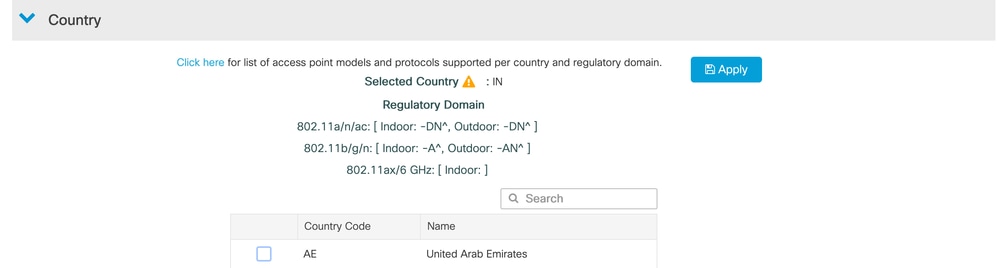
如果未配置目标国家/地区,请从可用列表中选择并添加该国家/地区。
从CLI
#show wireless country configured CLI示例:
#show wireless country configured
Configured Country..........................   IN - India
Configured Country Codes
        IN  - India                               802.11a Indoor,Outdoor/ 802.11b Indoor,Outdoor/ 802.11g Indoor,Outdoor/
如果未配置正确的国家/地区,请按如下所示进行配置:
#conf t
#wireless country
验证AP加入配置文件中的国家/地区代码

注意:此配置特别适用于具有 — ROW管制域的AP。
对于-ROW AP,必须配置AP加入配置文件中的国家/地区代码,以确保符合本地RF法规。
从GUI
导航至:
Configuration > Tags & Profiles > AP Join > Select AP Join Profile > General > Country Code
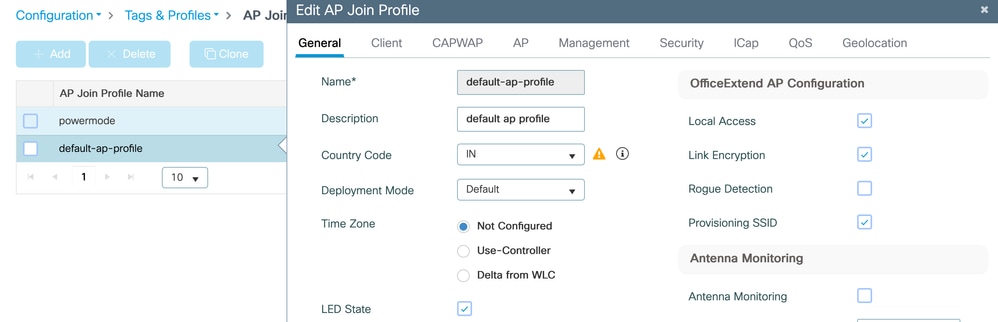

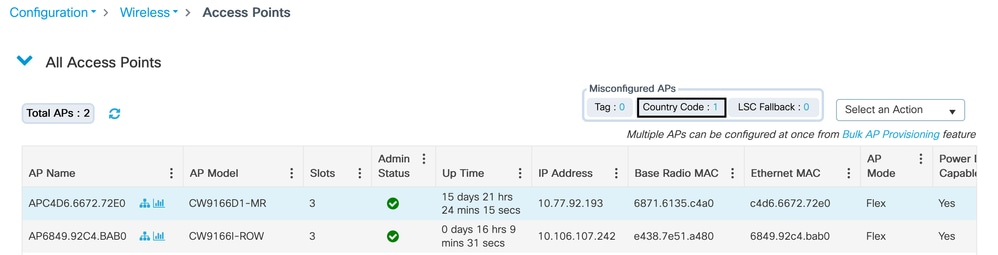
提示:如果国家/地区代码不匹配,也可以从以下位置进行验证:
WLC GUI >无线>接入点
方案 2:国家/地区不受支持
验证目标国家/地区是否支持AP管制域。
请参阅以下工具:
AP通道查找(Wi-Fi 6/6E/7和Meraki AP)
情形 3:Wi-Fi 7个AP
首先,使用https://apchannels.cisco.com/验证特定国家/地区和最低软件版本的AP支持
CW917x系列AP使用单个SKU/PID,并且可以在全球运行,因为监管实施不是基于硬件的。
这些AP使用以下方法之一确定国家/地区代码:
-
GPS/GNSS地理定位
-
从附近的AP进行基于接近度的发现
-
从Meraki控制面板迁移
-
管制激活文件
验证AP上的国家/地区代码
#show ap摘要

#show ap name  config general | inc Country

#show ap name AP8C88.814F.04E0 config general | include Country
Country Code : Multiple Countries : IN,RO,SR,UA,US
Regulatory Domain Allowed by Country : 802.11bg:-AE^ 802.11a:-ABDEN^ 802.11 6GHz:-BE
AP Country Code : US - United States
Country Code Resolution Method : Regulatory Activation File
如果未配置国家/地区代码,请参阅本指南:https://www.cisco.com/c/en/us/td/docs/wireless/access_point/technical-reference/global-use-ap-dg.html
场景 4:AP电源不足
AP需要最低功率才能使无线电保持运行。电源要求因AP型号而异。
验证:
-
产品手册中的AP电源要求
-
交换机或馈电器提供的电源
注意:如果使用馈电器,请确保它是受支持的型号。
检查AP接收的电源
APB811.4B52.CB38#show cdp inline_power

Power_Requested(mW) Power_Available(mW) Power_request-ID Power_management-ID

              22500               22500            34980                  10
检查交换机接口提供的电源
Switch#show power inline 示例输出:
Switch#show power inline tenGigabitEthernet 3/0/7

Interface Admin  Oper       Power   Device              Class Max

                            (Watts)

--------- ------ ---------- ------- ------------------- ----- ----

Te3/0/7   auto   on         22.5    AIR-AP2802I-D-K9    4     60.0
如果AP未获得足够的电源,也可以通过AP控制台日志进行确认。
示例日志:
Jun 10 15:06:54 MarineTower-AP1 powerd: send ipc_socket_process: 7

Jun 10 15:06:54 MarineTower-AP1 powerd: ps: Power mode: Degraded/Reduced Power, power_detection: DC_adapter(FALSE), PoE+/802.3at(30000 mWatt)

Jun 10 15:06:54 MarineTower-AP1 powerd: ps: End: System running on low power @ 30000 mWatt from port0

Jun 10 15:17:09 MarineTower-AP1 kernel: [*06/10/2025 15:17:09.6554] systemd[1]: Starting Check /tmp directory space...
场景 5:天线未连接(外部AP)
对于外部AP,必须连接天线,客户端才能检测并连接到SSID。使用各AP型号的安装指南验证支持的天线型号。
要从AP CLI进行验证,请执行以下操作:
#show controllers dot11Radio <0-3> antenna
标记/配置文件配置问题
情形 1:WLAN未映射到AP使用的策略标记
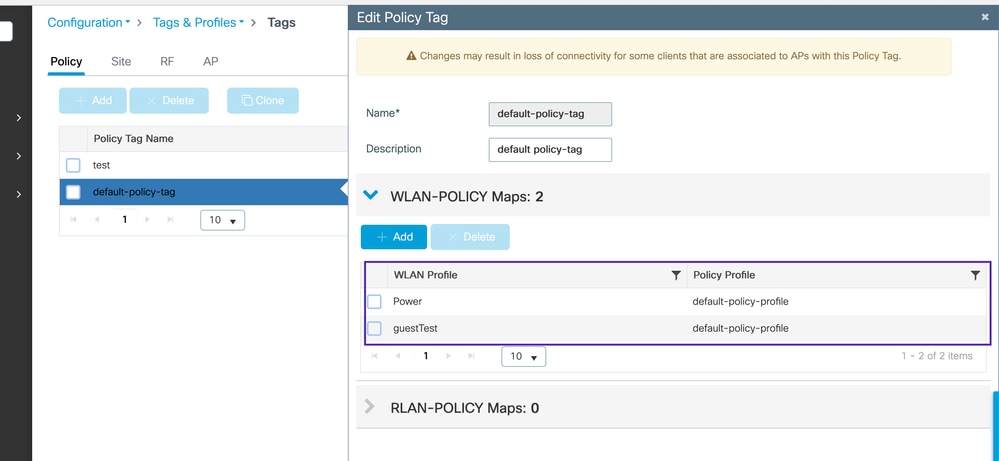
在Catalyst 9800控制器上,AP仅在WLAN包含在分配给AP的策略标记中时才广播SSID。策略标签将WLAN绑定到策略配置文件。
Configurations > Tags & Profiles > Tags > Policy > Policy Tag
方案 2:误配置的标记
验证AP标记是否配置正确,以及标记所引用的配置文件是否缺失。
CLI命令
#show ap name APB811.4B52.CB38 tag info
示例输出:
#show ap name APB811.4B52.CB38 tag info
AP Name            : APB811.4B52.CB38
AP Mac             : b811.4b52.cb38
Applied Tags :
-------------------------------------------
Tag Type             Tag Name
-----------------------------------------
RF Tag               default-rf-tag
Site Tag             default-site-tag
Policy Tag           default-policy-tag

Tag/Profile Type          Misconfigured
-----------------------------------------
RF Tag                       No
Policy Tag                   No
Site Tag                     Yes
Flex profile                 No
AP join profile              No
2.4GHz Rf Profile            No
5 GHz Rf Profile             No
6 GHz Rf Profile             No
2.4GHz slot 0 Radio Profile  No
5 GHz slot 1 Radio Profile   No
5 GHz slot 2 Radio Profile   No
6 GHz slot 2 Radio Profile   No
6 GHz slot 3 Radio Profile   No
AP Country Misconfig         No

Resolved Tags :
-------------------------------------------
Tag Source         : AP
Tag Type             Tag Name
-----------------------------------------
RF Tag               default-rf-tag
Site Tag             flex-qos
Policy Tag           default-policy-tag
Configuration > Wireless > Access Point
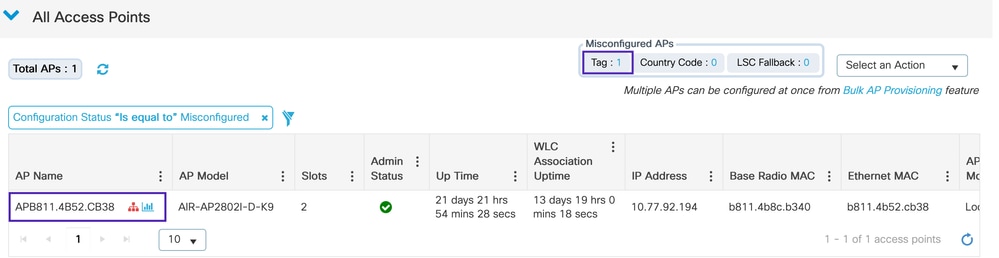
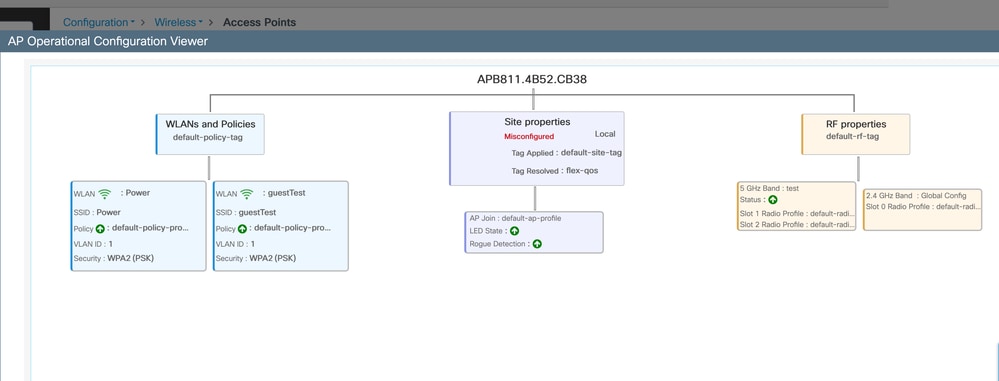
在本示例中,站点标签标记为配置错误。AP尝试将标记解析为flex-qos,但该标记在WLC上不再存在。
使用WLC上的有效标记重新配置AP可解决此问题。
验证核对表
-
确保WLC上存在映射到标签的配置文件
-
验证是否已将正确的标记映射到预期配置
情形 3:本地模式AP配置错误
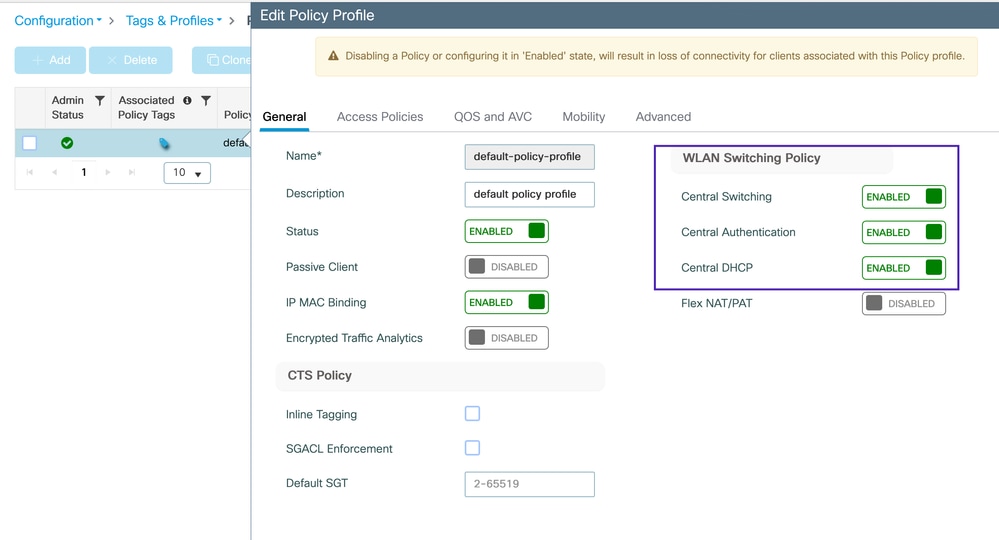
对于本地模式AP,请确保为中央交换、中央身份验证和中央DHCP配置策略配置文件。在此模式下,WLC通过CAPWAP控制隧道将配置(包括SSID、安全设置)推送到AP。
Configuration > Tags & Profiles > Policy
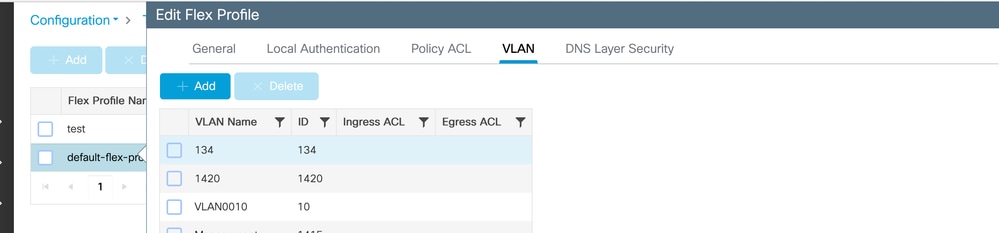
场景 4:Flex配置文件中未定义有效VLAN
使用Flex AP时,请确保在Flex配置文件和策略配置文件中都配置了VLAN。请注意,如果VLAN不在Flex配置文件中,则会在WLC GUI事件中生成警告消息。
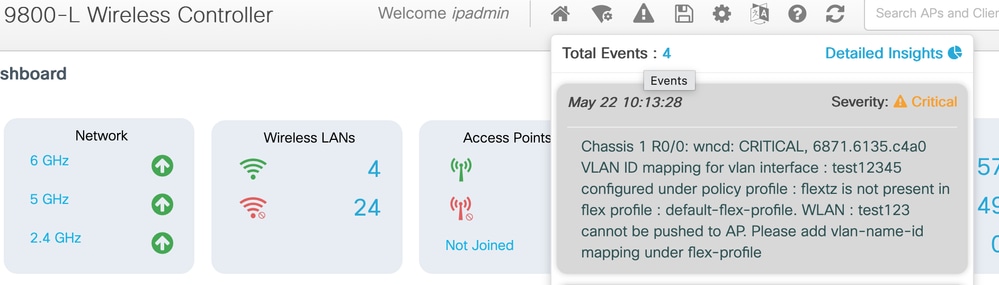
Configuration > Tags & Profiles > Flex
其他问题
不支持的通道或通道宽度
某些客户端设备不支持特定信道或信道宽度,具体取决于客户端供应商和硬件功能。
- 某些客户端设备并不支持所有无线通道,具体取决于制造商。在这种情况下,客户端无法检测AP信标,即使AP在这些信道上广播。
- 必须验证客户端设备的功能,并确保信道和信道宽度配置与这些设备兼容。
- 配置不匹配会导致漫游困难和“粘性客户端”问题,因为客户端无法从AP接收重要的信标帧或探测响应。
AP未发送信标
您可以在客户端设备上使用此命令验证客户端是否正在监听信标:
netsh wlan show networks mode=Bssid此命令显示客户端检测到的所有BSSID。如果输出显示除目标AP BSSID之外的所有其他BSSID,则表明该AP可能未传输信标。
要识别AP上的WLAN BSSID,请通过SSH连接到AP并执行:
show controllers dot11 <0-3> wlan 示例输出:
WLANs and stats:

====================

radio vap id               mac           ssid state

    1      0 90:E9:5E:85:FF:6F       Guest_test  UP

    1      1 90:E9:5E:85:FF:6E       Guest_BYOD  UP

    1      2 90:E9:5E:85:FF:6D       PSK_Client  UP

    1      3 90:E9:5E:85:FF:6C       test123     UP

    1      5 90:E9:5E:85:FF:6A        test123    UP
下一步是执行OTA捕获,进一步验证AP是否正在发送信标。
修订历史记录
| 版本 | 发布日期 | 备注 |
|---|---|---|
3.0 |
19-Aug-2026
|
已修复格式问题 |
2.0 |
14-Aug-2026
|
修复格式问题 |
1.0 |
14-Aug-2026
|
初始版本 |

 反馈
反馈