Catalyst 9000交换机上的网络延迟和丢包故障排除

简介
本文档介绍用于排除Cisco Catalyst 9000系列交换机上的网络延迟和丢包问题的详细方法。
先决条件
要求
Cisco建议您深入了解网络概念,包括TCP/IP、VLAN和生成树协议(STP)。 了解Cisco Catalyst 9000系列交换机和Cisco IOS® XE CLI至关重要。还需要熟悉网络监控工具以及配置和诊断的访问权限。
使用的组件
本文档中的信息基于所有版本的Cisco Catalyst 9000交换机。本文档不限于任何特定软件或硬件版本。
本文档中的信息都是基于特定实验室环境中的设备编写的。本文档中使用的所有设备最初均采用原始(默认)配置。如果您的网络处于活动状态,请确保您了解所有命令的潜在影响。
背景信息
本文档面向网络管理员和工程师,提供在企业网络环境中有效识别、隔离和解决这些问题的指导。网络延迟和丢包会对企业环境中的性能和可靠性产生负面影响。这些问题通常由网络拥塞、配置错误或环境因素引起。Cisco Catalyst 9000系列交换机设计为高性能和恢复能力。本文档提供有针对性的故障排除步骤,帮助网络专业人员使用这些交换机识别和解决延迟和丢包问题。
了解网络延迟和丢包
网络延迟
网络延迟是数据从源到目的地穿越网络时所经历延迟的度量。最常见的是,延迟表示为往返时间(RTT),即数据包从源传输到目的地并返回所需的时间。
延迟通常以毫秒(ms)来衡量。
影响:高延迟会降低应用性能,尤其是对于TCP等依赖于及时确认来有效发送数据的协议。
丢包
当网络设备由于拥塞、缓冲区溢出、配置错误或硬件故障而无法将数据包转发到其预定目的地时,就会发生丢包。丢包通常以特定时间间隔内丢失数据包的百分比来衡量。
影响:丢包会降低吞吐量,导致重新传输,并可能中断应用的可靠性。
预期延迟基准
| 网络类型 |
典型RTT |
| 同一VLAN(接入层) |
< 1毫秒 |
| 园区核心遍历 |
1 - 5毫秒 |
| 城域广域网 |
5 - 30毫秒 |
| 互联网/广域网 |
30 - 150毫秒 |

注意:网络跃点之间的地理距离会增加RTT并导致更高的延迟。
测量网络延迟
首先要透彻了解您的网络及其拓扑。当您的网络设计具有确定性变量和最小的不可预测性时,识别和解决延迟和丢包问题的过程变得非常简单。
测量网络延迟通常使用两种主要工具。
ping
它返回为输出是否可到达目标以及有关数据包丢失和RTT的统计信息。一旦识别出有问题的跃点,您可以尝试在它们之间直接ping并检查设备以查找问题。
Switch#ping 8.8.8.8
Type escape sequence to abort.
Sending 5, 100-byte ICMP Echos to 8.8.8.8, timeout is 2 seconds:
!.!!.
Success rate is 60 percent (3/5), round-trip min/avg/max = 12/15/22 ms     <===== 2 dropped out of 5 packets, Average RTT 15 ms
Traceroute
Traceroute显示从源到目的地的路由路径中的所有跳数以及每一跳的RTT结果。例如,traceroute可以显示延迟存在或开始的网络位置(路由路径中的哪个跃点)。下一个traceroute输出中显示了此类示例。
Switch#traceroute 8.8.8.81 2 ms 2 ms 2 ms [10.10.10.10]
Type escape sequence to abort. Tracing the route to 8.8.8.8
2 2 ms 1 ms 1 ms [20.20.20.20]
3 7 ms 45 ms 40 ms [30.30.30.30] <===== High latency at this hop
4 7 ms 3 ms 1 ms [40.40.40.40]
Note: The IP addresses shown for each hop are provided for demonstration purposes only.
此输出表明第3跳可能存在延迟,证据是第2跳和第3跳之间的RTT显着增加。第3跳和第4跳之间的相对较小的时间差表明,此问题只局限于20.20.20.20和30.30.30之间的网段。
延迟和丢包的常见原因
第1层(物理层)问题
第1层问题是网络延迟和丢包的常见来源。在物理层验证以下方面非常重要:
- 检验是否所有接口都正确配置了双工和速度设置。
- 检查接口的CRC和输入错误,这些错误可能指示物理层问题。
- 网络电缆、光纤连接、SFP模块或交换机端口故障也会导致数据包延迟和丢弃。
Switch#show interface gi1/0/1
GigabitEthernet1/0/1 is up, line protocol is up
  Hardware is Gigabit Ethernet, address is 70b3.171d.c101
  MTU 1500 bytes, BW 1000000 Kbit/sec, DLY 10 usec,
  Full-duplex, 1000Mb/s, media type is 10/100/1000BaseTX
  ...
  5 minute input rate 2000 bits/sec, 5 packets/sec
  5 minute output rate 3000 bits/sec, 8 packets/sec
     250000 packets input, 22000000 bytes, 0 no buffer
     Received 300 broadcasts (200 multicasts)
     0 runts, 0 giants, 0 throttles
     85 input errors, 85 CRC, 0 frame, 0 overrun, 0 ignored     <===== Input errors and CRC
     0 watchdog, 0 multicast, 0 pause input
  ...
     260000 packets output, 23000000 bytes, 0 underruns
     5 output errors, 0 collisions, 0 interface resets
     0 unknown protocol drops
     0 babbles, 0 late collision, 0 deferred
     0 lost carrier, 0 no carrier, 0 pause output

Switch# show interfaces counters errors
Port        Align-Err  FCS-Err    Xmit-Err  Rcv-Err  UnderSize  OutDiscards
Gi1/0/1     0          0         0         0       0          0
Gi1/0/2     0          0          0         0        0          0
...
输出丢弃
当交换机接口的传输队列已满且无法转发其他数据包时,就会发生输出丢弃。当数据包在队列中等待时,这会导致延迟增加;如果队列溢出,还会导致丢包,从而影响应用性能和网络可靠性。
Switch#show interface gi1/0/1
GigabitEthernet1/0/1 is up, line protocol is up
  Hardware is Gigabit Ethernet, address is 70b3.171d.c101
  MTU 1500 bytes, BW 1000000 Kbit/sec, DLY 10 usec,
  Full-duplex, 1000Mb/s, media type is 10/100/1000BaseTX
...
  Last input never, output never, output hang never
  Last clearing of "show interface" counters 2d00h
  Input queue: 0/2000/0/0 (size/max/drops/flushes); Total output drops: 4216760900
  Queueing strategy: fifo
  Output queue: 0/40 (size/max)
  5 minute input rate 389946000 bits/sec, 84175 packets/sec
  5 minute output rate 694899000 bits/sec, 106507 packets/sec
     7885666654 packets input, 4677291827948 bytes, 0 no buffer
...
Total output drops计数器显示大量丢弃的数据包,表明此接口上出现拥塞或队列溢出。这会导致延迟和数据包丢失增加,从而影响网络和应用性能。
STP稳定性
STP不稳定性可显着导致网络延迟和丢包。在稳定的网络中,拓扑变化必须最小。频繁的拓扑更改可能表示根本问题,并可能中断正常的转发操作。
最大限度减少STP相关延迟的关键考虑事项:
拓扑更改(TCN):过多的STP拓扑更改可能导致频繁刷新交换机(CAM)表的MAC地址,导致广播流量增加和延迟增加,因为交换机会在重新填充表之前泛洪未知单播数据包。
边缘端口配置:确保所有边缘端口都配置了PortFast。启用PortFast可防止在客户端或服务器连接或断开连接时生成STP拓扑更改通知(TCN),从而减少不必要的CAM表老化并提高稳定性。
根网桥规划:手动规划和分配STP根网桥和优先级,以维护可预测的网络拓扑并最大程度减少不必要的拓扑更改。
当拓扑发生变化时(例如端口转换状态),交换机向根网桥发送TCN BPDU。然后,根网桥将TCN BPDU传播到所有交换机,提示它们将其MAC地址老化时间从默认值(300秒)缩短到“转发延迟”值(通常为15秒)。 这会导致刷新最近空闲的条目,从而导致更多的未知单播和增加整个网络的泛洪。
Switch#show spanning-tree detail | include ieee|from|occur|is exec

VLAN0705 is executing the ieee compatible Spanning Tree protocol
  Number of topology changes 6233 last change occurred 00:00:03 ago <===== Topology Changes
          from GigabitEthernet1/0/25 <===== From Gi1/0/25
MAC抖动/第2层环路
MAC抖动/第2层环路通过在不同端口上持续更新具有相同源MAC的MAC地址表而导致网络延迟和丢包。这种持续的变化会中断流量转发,导致中断和数据包丢失。第2层环路使问题恶化,因为它会导致广播数据包无休止地循环,从而触发更多的MAC抖动,并进一步降低网络性能。实施诸如STP之类的环路预防协议对于保持网络稳定运行和避免这些问题至关重要。
要配置MAC移动通知,请在全局配置模式下使用命令mac address-table notification mac-move。
Mac Flapping logs:
%MAC_MOVE-SW1-4-NOTIF: Host 8c45.0021.0b17 in vlan 152 is flapping between port Po2 and port Po1
%MAC_MOVE-SW1-4-NOTIF: Host 8c45.0021.0b17 in vlan 152 is flapping between port Po2 and port Po1
%MAC_MOVE-SW1-4-NOTIF: Host 8c45.0021.0b17 in vlan 152 is flapping between port Po1 and port Po2
%MAC_MOVE-SW1-4-NOTIF: Host b0f1.ec27.69ea in vlan 154 is flapping between port Po9 and port Po8
流量控制
当流量控制启用且交换机端口的接收缓冲区接近容量时,交换机将发送暂停帧以暂时停止传入流量。由于数据传输间歇性暂停,此过程可能会增加延迟。反之,如果未启用流量控制或上游设备不支持暂停帧,则传入流量可能会超过缓冲区容量,从而导致缓冲区溢出和数据包丢弃。
必须仔细配置流量控制,考虑流量路径中所有设备的功能。使用不当或配置错误可能导致延迟和丢包增加,从而对应用性能造成负面影响。
Switch#show interfaces gigabitEthernet 1/0/1

GigabitEthernet1/0/1 is up, line protocol is up (connected)

input flow-control is on, output flow-control is unsupported      <===== Input Flow Control is ON
Input queue: 0/2000/0/0 (size/max/drops/flushes); Total output drops: 6530
5 minute input rate 8000 bits/sec, 8 packets/sec

5 minute output rate 0 bits/sec, 0 packets/s
0 watchdog, 5014620 multicast, 1989 pause input <===== Pause Input
0 unknown protocol drops
0 babbles, 0 late collision,
0 deferred
0 lost carrier, 0 no carrier, 0 pause output

Switch#show controllers ethernet-controller gigabitEthernet 1/0/1
Transmit        GigabitEthernet1/0/1     Receive
0 MacUnderrun frames                0 MacOverrun frames
0 Pause frames                      1878 Pause frames       <===== Pause frames in RX
CPU 利用率
高CPU利用率可能导致网络延迟和丢包增加。当CPU负载较重时,交换机无法有效处理控制平面流量、路由更新或管理功能。这可能会延迟数据包转发,导致ARP或生成树等协议超时,并导致数据包丢失,尤其是需要CPU干预的流量。
Switch#show processes cpu sorted
CPU utilization for five seconds: 95%/8%; one minute: 92%; five minutes: 90%      <===== CPU utilization 93%
 PID Runtime(ms)     Invoked      uSecs   5Sec   1Min   5Min TTY Process
 439 3560284 554004 6426 54.81% 55.37% 48.39% 0 SISF Main Thread   438 2325444 675817 3440 22.67% 28.17% 27.15% 0 SISF Switcher Th
 104      548861       84846       6468 10.76%  8.17%  7.51%   0 Crimson flush tr
 119      104155      671081        155  1.21%  1.27%  1.26%   0 IOSXE-RP Punt Se
内存利用率
高内存使用率会导致CPU和控制平面进程过载,进而导致延迟和丢包。这种过载会延迟路由更新、QoS策略和缓冲区管理的处理,导致数据包处理管道拥塞。因此,数据包可能会被丢弃或延迟。因此,高内存利用率会降低交换机管理流量的效率,从而影响网络性能。
Switch#show platform resources

Resource                 Usage                   Max             Warning         Critical        State
----------------------------------------------------------------------------------------------------
Control Processor       25.00%                   100%            90%             95%             W
  DRAM                   3656MB(94%)             866MB           90%             95%             W

High memory logs:
%PLATFORM-4-ELEMENT_WARNING:Switch 2 R0/0: smand:  1/RP/0: Used Memory value 94% exceeds warning level 90%
%PLATFORM-4-ELEMENT_WARNING:Switch 2 R0/0: smand:  1/RP/0: Used Memory value 94% exceeds warning level 90%
%PLATFORM-4-ELEMENT_WARNING:Switch 2 R0/0: smand:  1/RP/0: Used Memory value 94% exceeds warning level 90%
ICMP重定向和不可达消息
当数据包到达第3层接口并从同一接口路由出去时,交换机将生成ICMP重定向消息以通知源主机同一子网中下一跳更有效。这会导致原始数据包两次通过vLAN,从而增加带宽使用量。此外,ICMP重定向数据包本身会消耗带宽,并需要CPU处理,这可能导致出现CPU中断和延迟增加。如果发生许多此类重定向(尤其是在流量繁重时),CPU负载可能会显着增加,从而可能导致丢包。
频繁生成和处理ICMP不可达消息也会增加CPU利用率,从而影响网络性能。大量ICMP不可达流量会消耗CPU资源,这可能导致延迟和丢包。
为了缓解这些影响,思科建议使用no ip unreachables和no ip redirects命令在交换机虚拟接口(SVI)和第3层接口上禁用ICMP不可达消息和ICMP重定向。此最佳实践可减少CPU负载并增强网络稳定性。
Switch#show ip traffic | in unreachable
...
  Rcvd: 194943 format errors, 369707 checksum errors, 3130 redirects, 734412 unreachable
  Sent: 29265 redirects, 14015958 unreachable, 196823 echo, 786959149 echo reply
...

Switch#show platform hardware fed active qos queue stats internal cpu policer

           CPU Queue Statistics
============================================================================================
                                              (default) (set)     Queue        Queue
QId PlcIdx  Queue Name                Enabled   Rate     Rate      Drop(Bytes)  Drop(Frames)
--------------------------------------------------------------------------------------------
0    11     DOT1X Auth                  Yes     1000      1000     0            0
1    1      L2 Control                  Yes     2000      2000     0            0
2    14     Forus traffic               Yes     4000      4000     3296567      2336
3    0      ICMP GEN                    Yes     750       750      0            0
4    2      Routing Control             Yes     5500      5500     1085196      12919
5    14     Forus Address resolution    Yes     4000      4000     51723336     760639
6    0      ICMP Redirect               Yes     750       750      8444220485535  6978564145
...
流量风暴
当过多的广播、组播或单播数据包泛洪LAN,使交换机资源无法承受并且降低网络性能时,就会发生流量风暴。
交换机上的风暴控制监控物理接口上的广播、组播和单播流量,并将其与配置的阈值进行比较。当流量超过这些限制时,交换机将临时阻止过多的流量,以防止网络降级。这样可以保护交换机资源并维护整体网络稳定性和性能。
Switch#show interfaces counters

Port            InOctets   InUcastPkts   InMcastPkts   InBcastPkts
Gi1/0/1        125487955     550123004    250123555     105234788
Gi1/0/2           500123        100123         5123          1024
Gi1/0/3           250123         50123         1024           512


Switch#show platform hardware fed switch active qos queue stats internal cpu policer

                         CPU Queue Statistics
============================================================================================
                                              (default) (set)     Queue        Queue
QId PlcIdx  Queue Name                Enabled   Rate     Rate      Drop(Bytes)  Drop(Frames)
--------------------------------------------------------------------------------------------
11   13     L2 LVX Data Pack            Yes     1000      1000     0            0
12   0      BROADCAST                   Yes     750       750      32529067     186363
13   10     Openflow                    Yes     250       250      0            0
14   13     Sw forwarding               Yes     1000      1000     48317658492  245507344
15   8      Topology Control            Yes     13000     16000    0            0
CAM与ARP老化时间
CAM(MAC地址表)老化时间与地址解析协议(ARP)老化时间也可能导致网络延迟和丢包。发生这种情况的原因是,存储MAC地址到端口映射的CAM表通常比ARP表(存储IP到MAC地址映射,默认值为4小时)更快老化条目(默认值为5分钟)。 当MAC地址在CAM表中老化,但仍存在于ARP表中时,交换机不再知道要转发该MAC地址的单播流量的特定端口。因此,交换机将单播流量泛洪到VLAN中的所有端口,导致网络拥塞和潜在的数据包丢失。
CAM与ARP老化时间如何导致延迟和丢包
- 当CAM表条目在ARP条目之前过期时,交换机将泛洪单播数据包,因为它缺少MAC到端口的映射。
- 这种泛洪会增加CPU负载和不必要地消耗带宽,导致网络延迟和丢包。
- 这种不匹配还可能导致低效的转发和增加的控制平面处理。
Switch#show mac address-table aging-time
Global Aging Time:  300 <===== MAC aging
Vlan    Aging Time
----    ----------

Switch#show ip arp
Protocol  Address          Age (min)  Hardware Addr   Type   Interface
Internet  192.168.95.1          124   Incomplete      ARPA             <===== Arp age
...

Switch#show interface vlan1
Vlan1 is up, line protocol is up , Autostate Enabled
  Hardware is Ethernet SVI, address is 10b3.d6f0.1347 (bia 10b3.d6f0.1347)
  MTU 1500 bytes, BW 1000000 Kbit/sec, DLY 10 usec,
     reliability 255/255, txload 1/255, rxload 1/255
  Encapsulation ARPA, loopback not set
  Keepalive not supported
  ARP type: ARPA, ARP Timeout 04:00:00
  Last input never, output never, output hang never

Configuring MAC Aging and ARP Timeout:

Switch#confure terminal
Enter configuration commands, one per line.  End with CNTL/Z.

Switch(config)#mac-address-table aging-time ?
  <0-0>         Enter 0 to disable aging
  <10-1000000>  Aging time in seconds

Switch(config)#mac-address-table aging-time 14400 ?
  routed-mac  Set RM Aging interval
  vlan        VLAN Keyword


Switch(config)#interface vlan 1
Switch(config-if)#arp timeout 300

Switch(config-if)#do show interface vlan 1

Vlan1 is up, line protocol is up , Autostate Enabled
  Hardware is Ethernet SVI, address is 10b3.d6f0.1347 (bia 10b3.d6f0.1347)
  MTU 1500 bytes, BW 1000000 Kbit/sec, DLY 10 usec,
     reliability 255/255, txload 1/255, rxload 1/255
  Encapsulation ARPA, loopback not set
  Keepalive not supported
  ARP type: ARPA, ARP Timeout 00:05:00
  Last input never, output never, output hang never
monitor session
当带有多个源端口和目的端口的交换机上配置了活动监控器(SPAN)会话时,会导致网络延迟和丢包。
Example:

Session 1
---------
Type                   : Local Session
Source Ports           :
    Both               : Po101,Po105,Po109,Po125,Po161,Po170   <===== Multiple source ports
Destination Ports      : Te9/8
Egress SPAN Replication State:
Operational mode       : Centralized
Configured mode        : Centralized (default)

Session 2
---------
Type                   : Local Session
Source Ports           :
    Both               : Po161,Po170
Destination Ports      : Te9/1
Egress SPAN Replication State:
Operational mode       : Centralized
Configured mode        : Centralized (default)
SPAN的工作原理
SPAN(交换端口分析器)是一种硬件辅助功能,可将流量从源端口镜像到目标端口,而不涉及CPU查找。Supervisor模块上的复制ASIC处理数据包镜像,而转发引擎将镜像数据包重定向到目标端口。镜像数据包的交换时间与常规流量相同。
多个源端口和目的端口的影响:
在之前的示例中,交换机必须将流量从所有源接口复制到目标接口。例如,接口Po170的流量被镜像并转发到两个不同的目的地。此复制会增加转发引擎上的负载,并可能导致交换机背板拥塞。
- 如果端口通道传输了3 GBPS的流量,则将此流量复制到多个目标会导致超过15 GBPS的镜像流量。
- 复制ASIC上的负载随源接口上的流量速率成比例增加。
- 在较低的流量速率下,延迟影响可以降至最低,但随着流量的增加,延迟和拥塞可能会变得显着。
ASIC级异常
使用这些命令可检查接口到ASIC的映射,其中显示了接口所在的ASIC实例。
Switch#show platform software fed switch active ifm mappings
Interface                 IF_ID    Inst Asic Core Port SubPort Mac  Cntx LPN  GPN  Type Active

GigabitEthernet2/0/12     0x13       1     0    1     11     0      20    17   12   108  NIF   Y      <===== ASIC Instance 1 (Asic 0/Core 1)
确定ASIC实例后,运行下一个命令以查看该ASIC的转发ASIC丢弃异常。
Switch#show platform hardware fed switch active fwd-asic drops exceptions asic

Example output snippet for ASIC instance 1:

****EXCEPTION STATS ASIC INSTANCE 1 (asic/core 0/1)****
=================================================================================
 Asic/core |                NAME                  |   prev       |  current  |  delta

=================================================================================
0       1  NO_EXCEPTION                         2027072618   2028843223    1770605
0       1  ROUTED_AND_IP_OPTIONS_EXCEPTION     735          735            0
0       1  PKT_DROP_COUNT                      14556203    14556203        0
0       1  BLOCK_FORWARD                      14556171    14556171         0
0       1  IGR_EXCEPTION_L5_ERROR              1            1              0
...
软件 Bug
软件漏洞有时可能直接或间接导致意外和意外行为。这些Bug可能导致网络延迟、丢包或其他性能下降等问题。为了解决这些问题,通常的第一步是重新加载交换机,这样可以清除瞬态故障并恢复正常运行。此外,定期应用最新的固件和软件更新,使设备保持最新状态也至关重要。这些更新通常包括对已知错误的修复以及增强设备稳定性和性能的改进,有助于防止与软件缺陷相关的问题。
案例研究
问题详细资料
用户在尝试通过vLAN传输大量数据时(例如大容量文件传输时),会间歇性丢失网络连接。尽管多次尝试成功,这些中断仍表现为数据传输的间歇性故障,严重影响网络可靠性和应用性能。通过重新加载交换机可暂时解决此问题。
拓扑
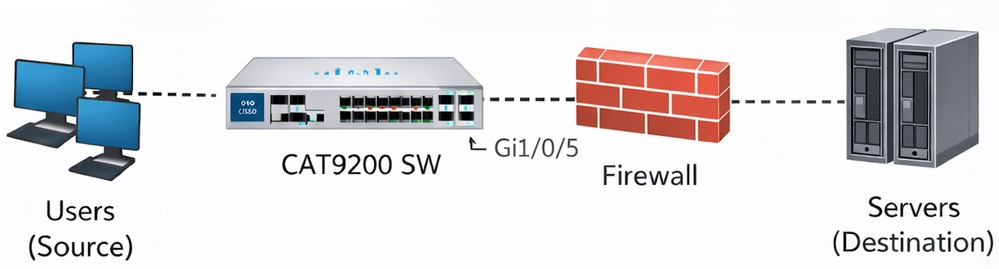
观察到的症状
- 在多次成功尝试后,源与目标之间的文件传输间歇性失败。
- 在故障期间,交换机将失去与防火墙的连接。
- 802.1X身份验证在整个事件中保持可操作性。
- 在发生事件期间,交换机通过控制台保持响应。
- 防火墙的已连接端口仅在故障期间显示广播流量。
- 接口Gi1/0/5上的诊断测试(DiagGoldPktTest)始终失败,表明存在数据路径问题。
已执行的故障排除
- 检查接口计数器和平台级别的缓冲区统计信息。
- 交换机接口Gi1/0/5显示从防火墙收到的802.3x暂停帧的数量非常大。
- 输出丢弃和暂停帧统计信息受到密切监控。
- 检查平台软件转发引擎队列统计信息,以确定缓冲区行为。
- 检查交换机接口上的流量控制设置。
相关接口统计信息
Switch#show interfaces GigabitEthernet 1/0/5


GigabitEthernet1/0/5 is up, line protocol is up (connected)

input flow-control is on, output flow-control is unsupported                <===== Input Flow-control is ON

Input queue: 0/2000/0/0 (size/max/drops/flushes); Total output drops: 78444
5 minute input rate 8000 bits/sec, 8 packets/sec

5 minute output rate 0 bits/sec, 0 packets/s   <===== Output rate is 0
0 watchdog, 5014620 multicast, 1989 pause input
0 unknown protocol drops
0 babbles, 0 late collision,
...

Switch#show controllers ethernet-controller GigabitEthernet 1/0/5

Transmit        GigabitEthernet1/0/5.     Receive
0 MacUnderrun frames                0 MacOverrun frames
0 Pause frames                           1878 Pause frames                   <===== Pause Frames In RX
...


Switch#diagnostic start switch 1 test DiagGoldPktTest port 5

Switch#show diagnostic result switch 1 test DiagGoldPktTest detail


Test results: (. = Pass, F = Fail, U = Untested)
______________________________________________________
1) DiagGoldPktTest:
 Port 1 2 3 4 5 6 7 8 9 10 11 12 13 14 15 16 17 18 19 20 21 22 23 24

      U U U U F U U U U U U U U U U U U U U U U U U U.                       <===== DiagGoldPktTest Failed For Port 5
Port 25 26 27 28
----------------
U U U U


Switch#show flowcontrol interface GigabitEthernet 1/0/

Port Send FlowControl           Receive FlowControl RxPause TxPause
        admin   oper              admin  Oper
------------ -------- -------- -------- -------- ------- -------
Gi1/0/5 Unsupp. Unsupp.         on     on.         13256          0          <===== Pause Frames In RX

Switch#show platform hardware fed switch active qos queue stats interface GigabitEthernet 1/0/5

Asic:0 Core:0 DATA Port:8 Hardware Drop Counters

--------------------------------------------------------------
Q   Drop-TH0     Drop-TH1      Drop-TH2      SBufDrop          QebDrop

   (Bytes)        (Bytes)       (Bytes)       (Bytes)              (Bytes)

--------------------------------------------------------------
0     0               0         18106020           0                0
确定的根本原因
由于防火墙向交换机接口发送了过多的802.3x暂停帧,因此根本原因被确定为缓冲区锁定。以太网暂停帧指示交换机停止发送以使接收设备从拥塞中恢复。但是,当重复发送暂停帧或延长暂停时间时:
- 接口的交换机缓冲区的输出队列变为完全饱和。
- 交换机继续接受发往暂停接口的传入数据包,这些数据包在输出队列中累积。
- 队列饱和会导致输出丢弃和流量黑洞。
- 在这种情况下,缓冲区被锁定,即使暂停帧速率降低,转发也不会恢复。
- 需要交换机重新加载才能清除锁定的缓冲区状态。
此行为记录在Cisco bug CSCwm14612中,该漏洞描述了过多的暂停帧如何导致接口错误地保持缓冲区,从而导致输出丢弃。
分辨率
已使用以下命令在受影响的交换机接口上禁用输入流控制:
Switch#configure terminal
Switch(config)#interface GigabitEthernet 1/0/5
Switch(config-if)#flowcontrol receive off
结论
Cisco C9200L交换机和防火墙之间的间歇性网络连接故障和丢包是由802.3x暂停帧过多触发软件队列锁定引起的。禁用交换机接口上的输入流控制可防止队列饱和并锁定,从而解决了此问题。
相关信息
修订历史记录
| 版本 | 发布日期 | 备注 |
|---|---|---|
1.0 |
20-Mar-2026
|
初始版本 |
 反馈
反馈