将SWA与SMA集成

简介
本文档介绍将安全网络设备(SWA)集成到安全管理设备(SMA)的过程。
先决条件
要求
建议掌握下列主题的相关知识:
- 访问SWA的图形用户界面(GUI)。
- 对SWA的管理访问。
- 对SMA的管理访问。
使用的组件
本文档不限于特定的软件和硬件版本。
本文档中的信息都是基于特定实验室环境中的设备编写的。本文档中使用的所有设备最初均采用原始(默认)配置。如果您的网络处于活动状态,请确保您了解所有命令的潜在影响。
开始使用前
1.确保SMA和SWA均已获得许可。
2.检查SWA和SMA的兼容性矩阵,请使用此链接:SWA-SMA-ESA兼容性矩阵。
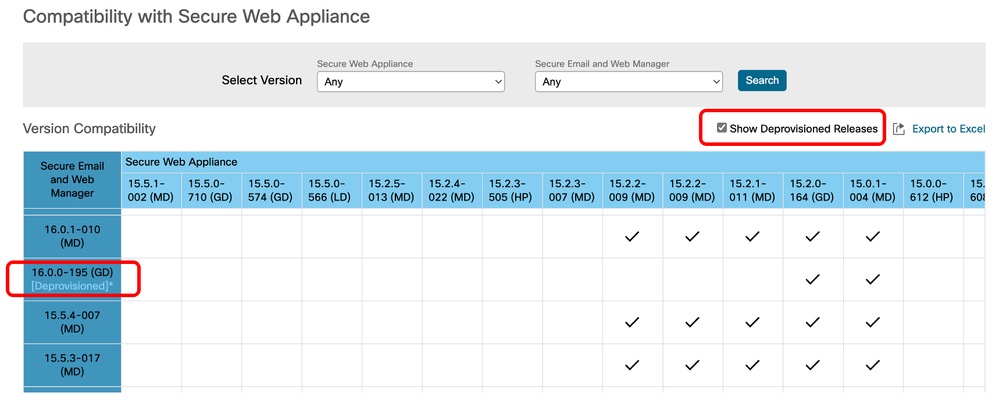 映像 — 取消调配的版本
将SWA集成到SMA的步骤
步骤1.从SWA导出配置文件 |
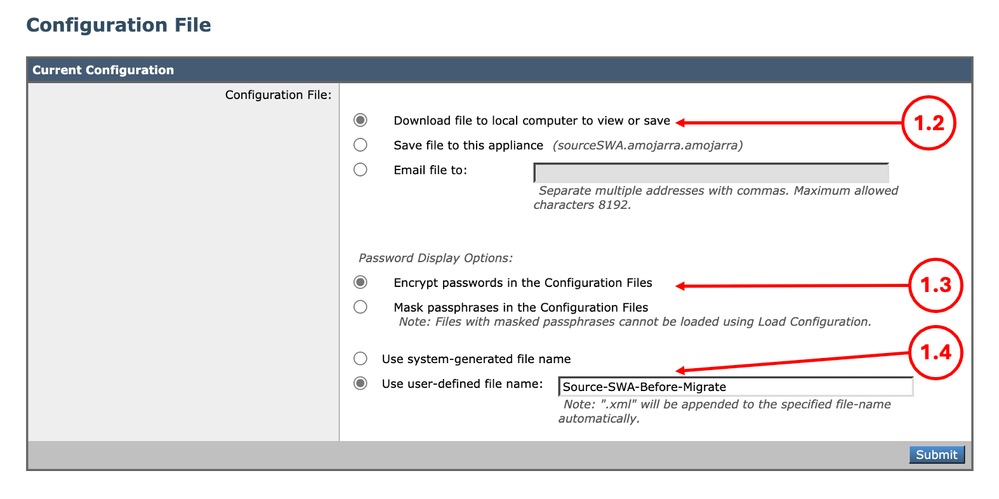
1.1.从GUI导航到系统管理,然后选择配置文件。 1.2.确保选中“将文件下载到本地计算机以查看或保存”。 1.3.在“配置文件”中选择“加密密码”。 1.4.(可选)选择配置文件的名称。 1.5.单击Submit。
|
步骤2.创建配置管理器 |
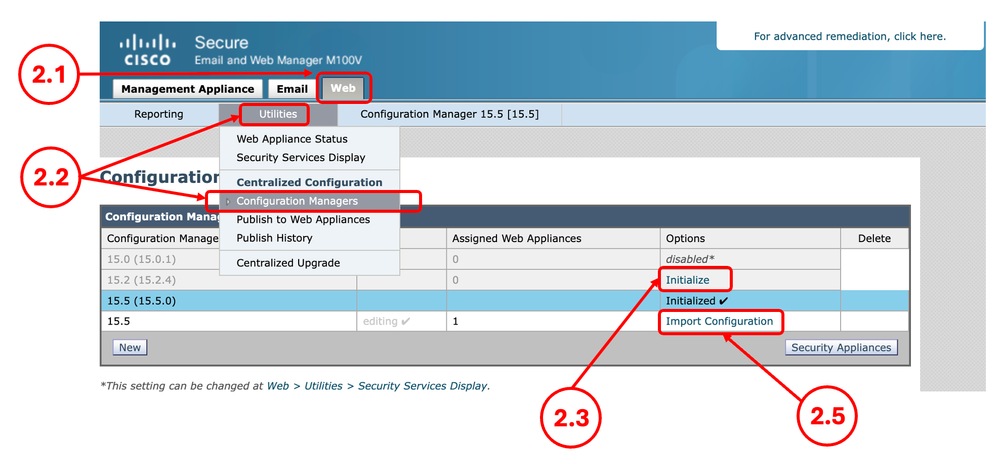
2.1.在SMA GUI中,单击Web选项卡。 2.2.从Utilities中选择Configuration Manager。 2.3.如果配置管理器尚未初始化,请单击所需配置管理器的初始化链接,否则跳到步骤2.5。 2.4.选择使用默认设置,然后选择初始化。 2.5.为所需的Configuration Manager选择Import Configuration。
2.6.从选择配置源中选择Web配置文件。 2.7.选择您在第1步中导出的配置文件。
2.8.选择导入。 2.9.确定更改。 |
步骤3.配置管理器设置 |
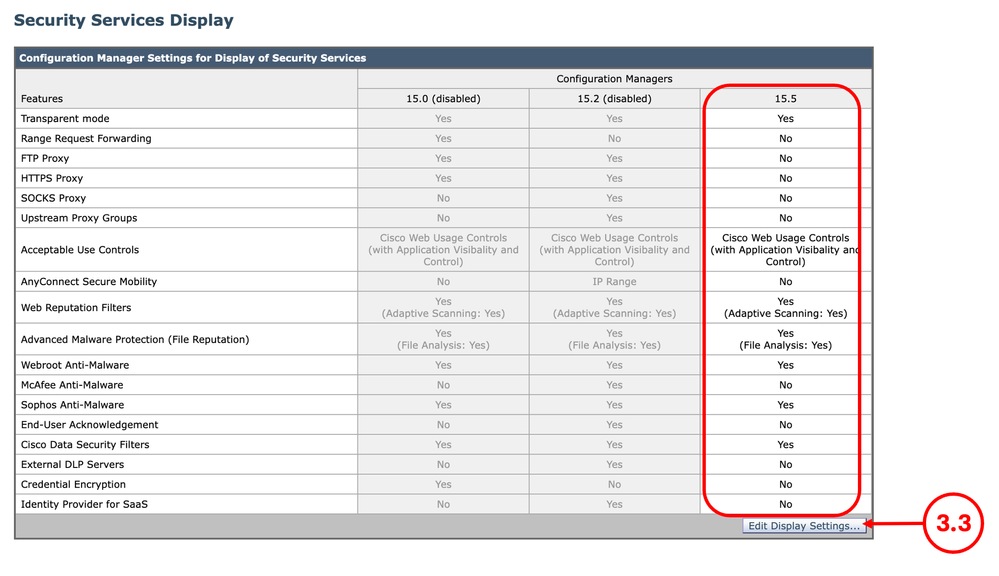
3.1.在SMA GUI中,单击Web选项卡。 3.2.从实用程序中选择安全服务显示。 3.3.确保所需功能配置正确,您可以在编辑显示设置中启用或禁用这些功能。 3.4.如果您进行了任何更改,请提交并提交。
|
步骤4.添加Web设备 |
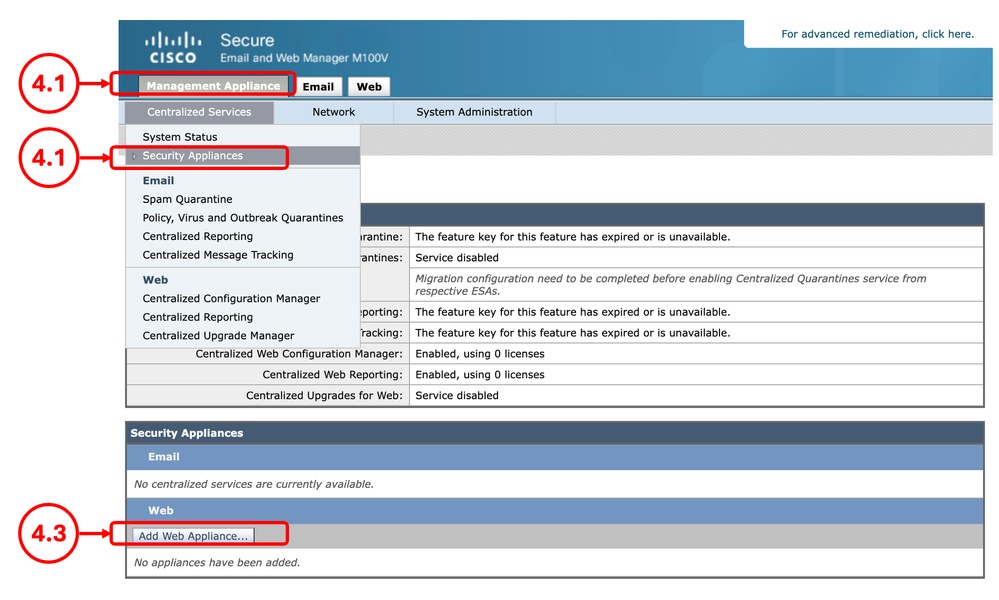
4.1.在SMA GUI中,单击Management Appliance选项卡。 4.2.从Centralized Services中选择Security Appliances。 4.3.选择添加Web设备。
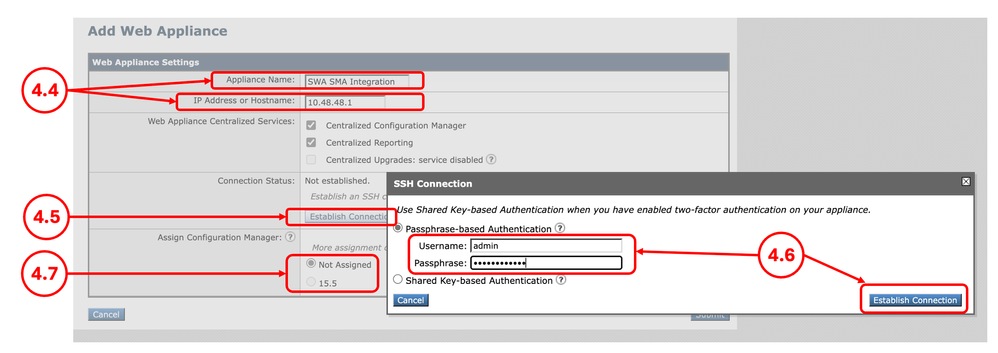
4.4.输入设备名称和IP地址或主机名。 4.5.选择建立连接。 4.6.输入用户名和密码,然后选择建立连接。 4.7.分配Configuration Manager。
4.8.提交并提交更改。 |
步骤5.验证集成 |
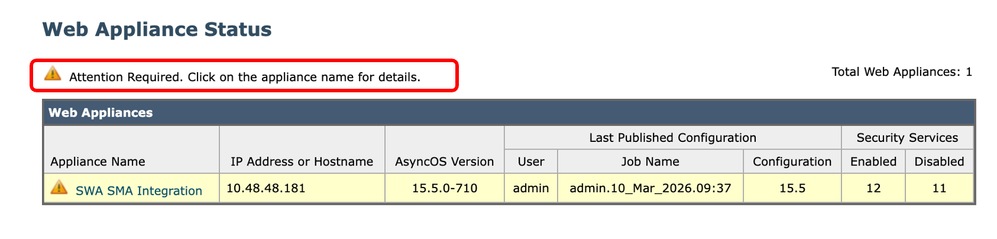
5.1.从SMA GUI中,单击Web选项卡。 5.2.从实用程序中选择Web设备状态。 5.3.如果您看到警告消息Attention Required,请点击设备名称了解详细信息。单击SWA的名称,然后查看详细信息。
|

修复错误
集中服务已禁用
当您尝试选择集中服务时,如果复选框处于非活动状态,请点击问号(?),指南将引导您通过路径来启用该服务。
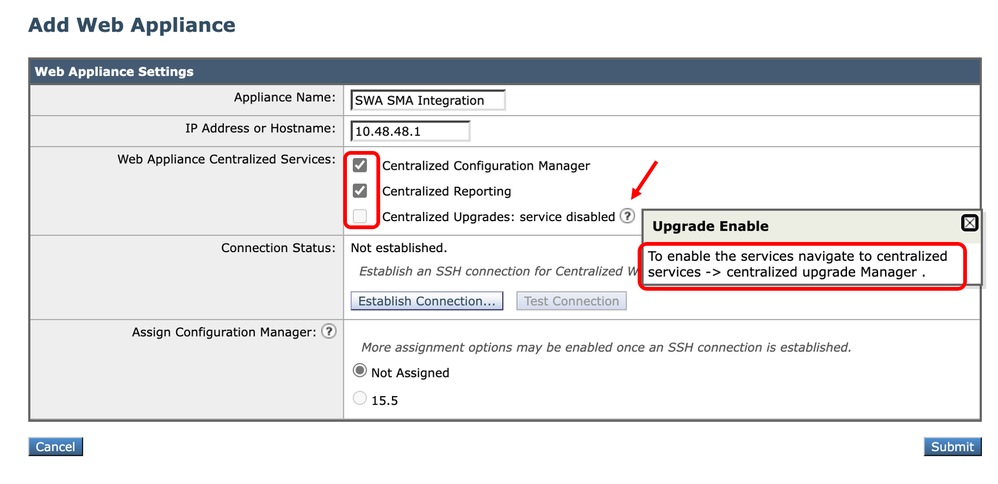 映像 — 集中服务已禁用
IP身份验证失败
当您将SWA集成到SMA时,如果您收到此错误,请确保IP地址或主机名以及凭证正确。
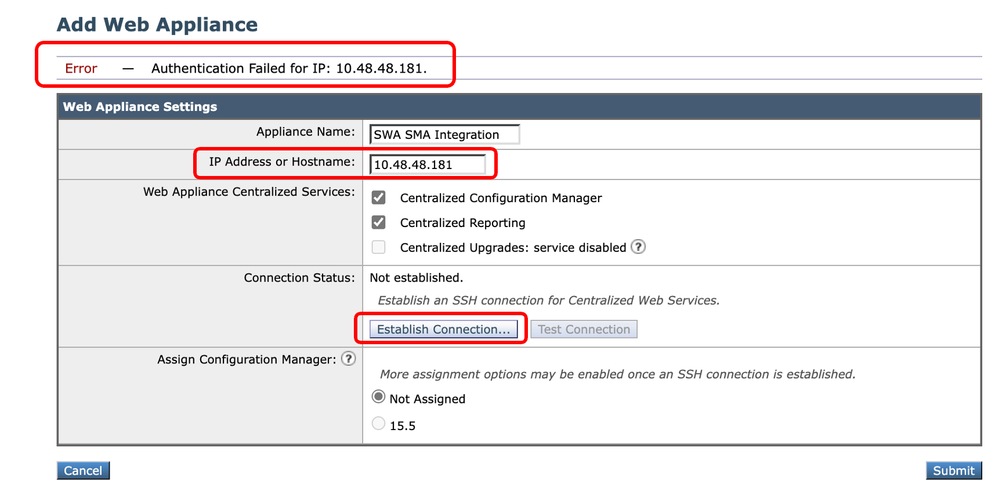 映像 — 身份验证失败
SWA中禁用集中网络报告
如果SMA配置了集中网络报告,并且您在第4步中将SWA集成到SMA时将该功能分配到SWA,则需要启用Cisco Centralized Web Reporting:
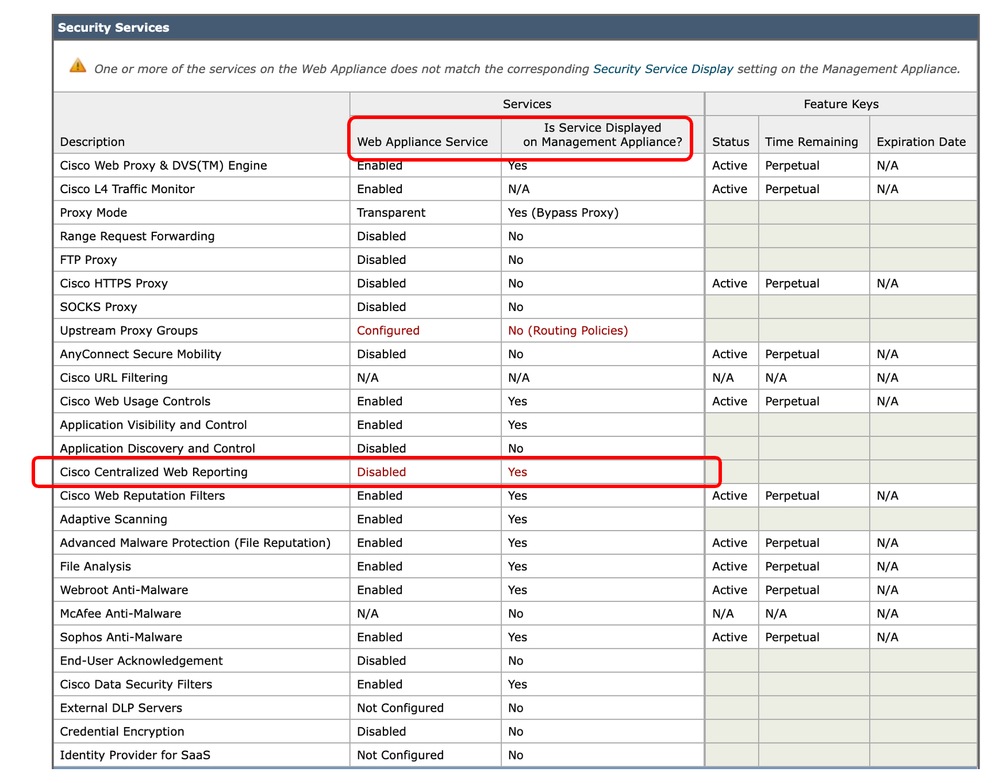 图像 — 在SWA中禁用集中网络报告
要解决此问题,请从CLI连接到SWA并键入reportingconfig并选择CENTRALIZED,完成向导以启用集中报告并提交更改。
SWA_CLI> reportingconfig

Choose the operation you want to perform:
- COUNTERS - Limit counters recorded by the reporting system.
- WEBTRACKINGQUERYTIMEOUT - Timeout value for Webtracking Queries.
- AVERAGEOBJECTSIZE - Average HTTP Object Size used for Bandwidth Savings Calculation.
- WEBEVENTBUCKETING - Enable or Disable web transaction event bucketing.
- CTROBSERVABLE - Enable or Disable CTR observable based indexing.
- CENTRALIZED - Enable/Disable Centralized Reporting for this Secure Web Appliance.
[]> CENTRALIZED

Reporting service status: Local Reporting enabled.  (Show usernames in reports.)

Do you want to enable Centralized Reporting for this appliance? [N]> Y

Do you want to anonymize usernames in reports? [N]> N

Reporting service status: Centralized Reporting enabled.  (Show usernames in reports.)


Choose the operation you want to perform:
- COUNTERS - Limit counters recorded by the reporting system.
- WEBTRACKINGQUERYTIMEOUT - Timeout value for Webtracking Queries.
- AVERAGEOBJECTSIZE - Average HTTP Object Size used for Bandwidth Savings Calculation.
- WEBEVENTBUCKETING - Enable or Disable web transaction event bucketing.
- CTROBSERVABLE - Enable or Disable CTR observable based indexing.
- CENTRALIZED - Enable/Disable Centralized Reporting for this Secure Web Appliance.
[]>

SWA_CLI> commit
此SWA上的URL类别列表早于SMA发布的列表
如果您将配置发布到SWA并收到指示SWA和SMA中的URL类别列表不相同的错误,请确保两台设备都可以连接到Cisco更新服务器,并且updater_logs中没有错误:
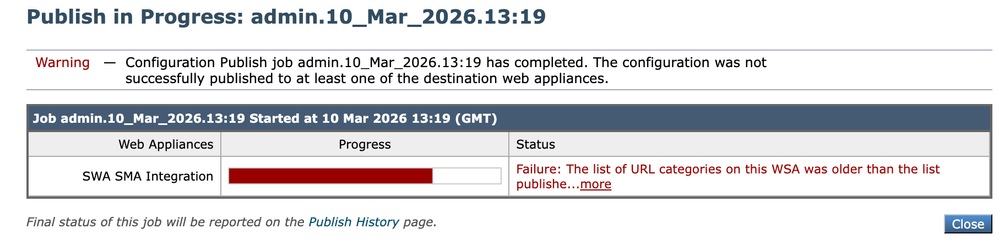 图像 — URL类别列表不匹配
要强制SWA或SMA下载更新,请从CLI键入updatenow。
要查看与更新相关的SMA或SMA日志,请从CLI键入grep并选择与updater_logs关联的编号,并完成向导。
主机密钥似乎已更改
如果您将SWA集成到SMA并收到“Error that the host key has been changed”(主机密钥已更改),这是因为SMA在其密钥存储中存储了同一IP地址的不同主机密钥。
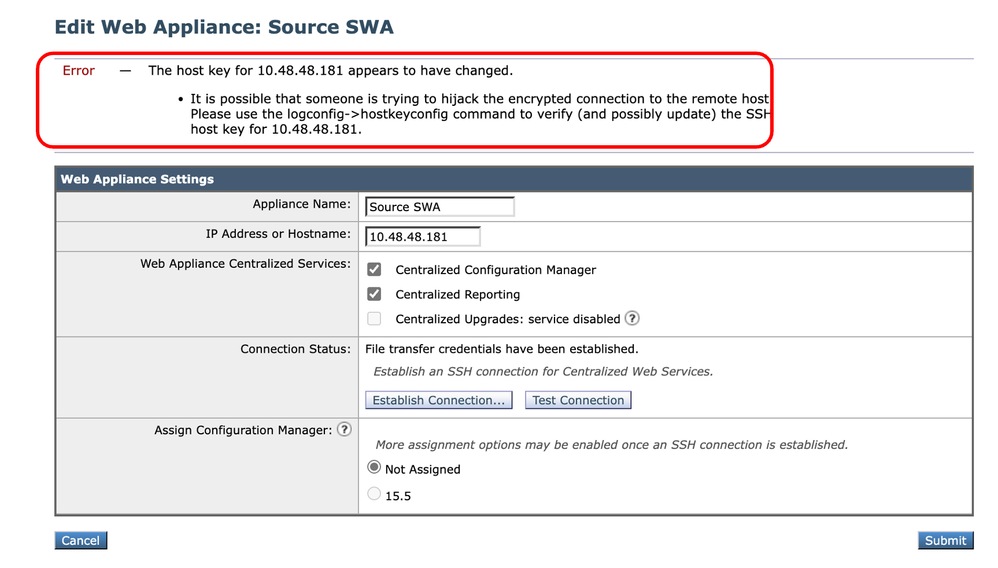 图像 — 主机密钥似乎已更改
要解决此错误,请登录SMA的CLI,运行logconfig并输入HOSTKEYCONFIG。键入DELETE,然后按Enter。然后,选择与SWA关联的号码,然后按enter,直到完成向导。
提交更改:
SMA_CLI> logconfig

Currently configured logs:
    Log Name            Log Type                      Retrieval           Interval
 ---------------------------------------------------------------------------------
 1. aggregatord_logs    Aggregatord Logs              Manual Download     None
 2. authentication      Authentication Logs           Manual Download     None
...

Choose the operation you want to perform:
- NEW - Create a new log.
- EDIT - Modify a log subscription.
- DELETE - Remove a log subscription.
- DELETELOGFILE - Delete log files
- SETUP - General settings.
- LOGHEADERS - Configure headers to log.
- HOSTKEYCONFIG - Configure SSH host keys.
[]> HOSTKEYCONFIG

Currently installed host keys:
1. 10.48.48.182 ssh-rsa AAAAAAAAAAAAAAAAAAAAAAAAAAAAAAAA...ZhW4gEXWE=
2. 10.48.48.181 ssh-rsa BBBBBBBBBBBBBBBBBBBBBBBBBBBBBBBb...4p74b9Q9k=

Choose the operation you want to perform:
- NEW - Add a new key.
- EDIT - Modify a key.
- DELETE - Remove a key.
- SCAN - Automatically download a host key.
- PRINT - Display a key.
- HOST - Display system host keys.
- FINGERPRINT - Display system host key fingerprints.
- USER - Display system user keys.
- REGENERATESCPKEYS - Regenerate SSH Keys for SCP Log Subscription Retrieval.
[]> DELETE

Enter the number of the key you wish to delete.
[]> 2

Currently installed host keys:
1. 10.62.131.143 ssh-rsa AAAAAAAAAAAAAAAAAAAAAAAAAAAAAAAA...ZhW4gEXWE=

...
SMA_CLI> commit
相关信息
修订历史记录
| 版本 | 发布日期 | 备注 |
|---|---|---|
3.0 |
22-Oct-2026
|
重新认证 — 更新的格式 |
2.0 |
29-Jul-2026
|
首次公开发布 |
1.0 |
24-Mar-2026
|
初始版本 |
 反馈
反馈