更改FTD管理器访问数据接口

简介
本文档介绍更改安全防火墙威胁防御(FTD)管理器访问数据接口的步骤。
先决条件
要求
- 基本的产品知识。
- 熟悉数据接口上的FTD管理和管理。
使用的组件
本文档中的信息都是基于特定实验室环境中的设备编写的。本文档中使用的所有设备最初均采用原始(默认)配置。如果您的网络处于活动状态,请确保您了解所有命令的潜在影响。
本文档中的信息基于以下软件和硬件版本:
- Secure Firewall 4200
- 安全防火墙威胁防御(FTD)10.0.x、7.6.4
- 安全防火墙管理中心(FMC)10.0.x
初始配置
1. FMC使用主用和备用IP地址10.62.113.125和10.62.113.126,通过名为nameif outside1的数据接口Ethernet1/1管理高可用性(HA)的FTD:
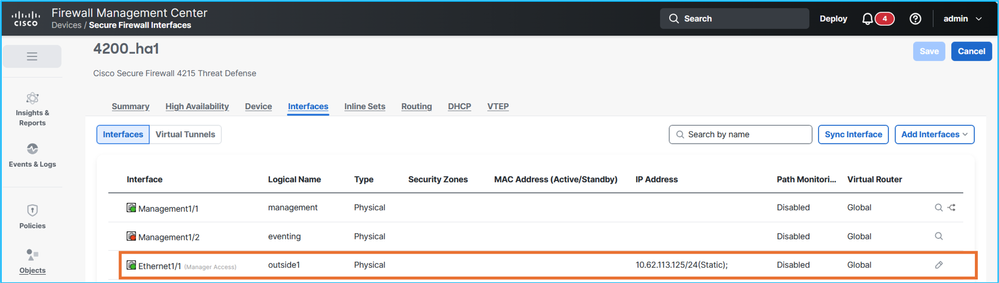
FTD CLISH验证:
> show network management-data-interface

Physical Interface               Name of the Interface
Ethernet1/1              outside1

> show network
===============[ System Information ]===============
Hostname                  : CSF4215-3
..
DNS from router           : enabled
Management port           : 8305
IPv4 Default route
  Gateway                 : data-interfaces
…
======[ System Information - Data Interfaces ]======
DNS Servers               : 192.0.2.100
Interfaces                : Ethernet1/1

==================[ Ethernet1/1 ]===================

State                     : Enabled
Link                      : Up
Name                      : outside1
MTU                       : 1500
MAC Address               : 40:F4:9F:3D:5A:0E
----------------------[ IPv4 ]----------------------
Configuration             : Manual
Address                   : 10.62.113.125
Netmask                   : 255.255.255.0
Gateway                   : 10.62.113.1
…
2.sftunnel连接在FTD HA单元和FMC之间建立:
> sftunnel-status-brief
PEER:fmc.example.org
        SFTunnel Status:-
                Channel A: Connected
                Channel B: Connected
        Peer channel Channel-A is valid  type (CONTROL), using 'tap_nlp', connected to '198.51.100.23' via '169.254.1.3'
        Peer channel Channel-B is valid  type (EVENT), using 'tap_nlp', connected to '198.51.100.23' via '169.254.1.3'
        Registration: Completed.
        IPv4 Connection to peer 'fmc.example.org' Start Time: Fri Jul 17 08:22:31 2026 UTC
        Heartbeat Send Time:     Fri Jul 17 08:52:42 2026 UTC
        Heartbeat Received Time: Fri Jul 17 08:53:03 2026 UTC
        Last disconnect time   : Fri Jul 17 08:22:16 2026 UTC
        Last disconnect reason : Process shutdown due to stop request from PM
3. FTD依赖DNS解析来连接到FMC。管理器基于完全限定域名(FQDN)进行配置:
> show managers
Type                      : Manager
Host                      : fmc.example.org
Display name              : fmc.example.org
Version                   : 10.0.1 (Build 1)
Identifier                : 6d86efc4-c095-11f0-9244-48f1a7894b18
Registration              : Completed
Management type           : Configuration and analytics

> show network
===============[ System Information ]===============
Hostname                  : KSEC-FPR-4215-3
Domains                   : example.org
DNS Servers               : 192.0.2.100
DNS from router           : enabled
Management port           : 8305
IPv4 Default route
  Gateway                 : data-interfaces
…
DNS服务器可通过outside1接口访问。
4.sftunnel连接通过Lina引擎建立:
> show conn all port 8305
26 in use, 32 most used
Inspect Snort:
        preserve-connection: 0 enabled, 0 in effect, 0 most enabled, 0 most in effect

TCP nlp_int_tap  10.62.113.125(169.254.1.3):8305 outside1  198.51.100.23:45647, idle 0:00:03, bytes 2129062, flags UIO
TCP nlp_int_tap  10.62.113.125(169.254.1.3):37141 outside1  198.51.100.23:8305, idle 0:00:04, bytes 148581, flags UxIO
配置步骤
目标是将管理器访问从当前的outside1移到目标outside2接口。主用和备用outside2 IP地址分别为10.62.114.51/24和10.62.114.52/24。
请注意,FTD版本7.7.0或更高版本支持冗余管理器访问数据接口,允许配置和部署多个管理器访问接口。低于7.7.0的版本不支持此功能。
因此,会跳过特定步骤或包含不同的操作。
- 建议通过控制台访问FTD:
- 对于Firepower 4100/9300,您可以使用SSH连接到机箱,然后使用connect module x console命令连接到本地FTD控制台,其中x是插槽/安全模块ID。
- 如果Firepower 4100/9300在多实例(MI)模式下运行FTD,则可以使用SSH连接到机箱,然后使用connect module x telnet命令连接到本地FTD控制台,其中x是插槽/安全模块ID。然后使用connect ftd <ftd_id> 命令连接到FTD实例。
- 对于处于MI模式的安全防火墙3100/4200,您可以使用SSH连接到机箱,然后使用connect ftd <identifier> 命令连接到FTD控制台。
- 部署挂起策略。
- 强烈建议进行FTD和FMC备份。如果是FTD HA,请备份两台设备。
- 配置目标接口名称、IP地址、安全区域和其他接口相关设置(如果适用)。
- 配置目标接口备用IP地址。
- 如果FTD软件版本为7.7.0或更高版本,请在目标接口上启用管理器访问,并根据需要调整管理访问网络:
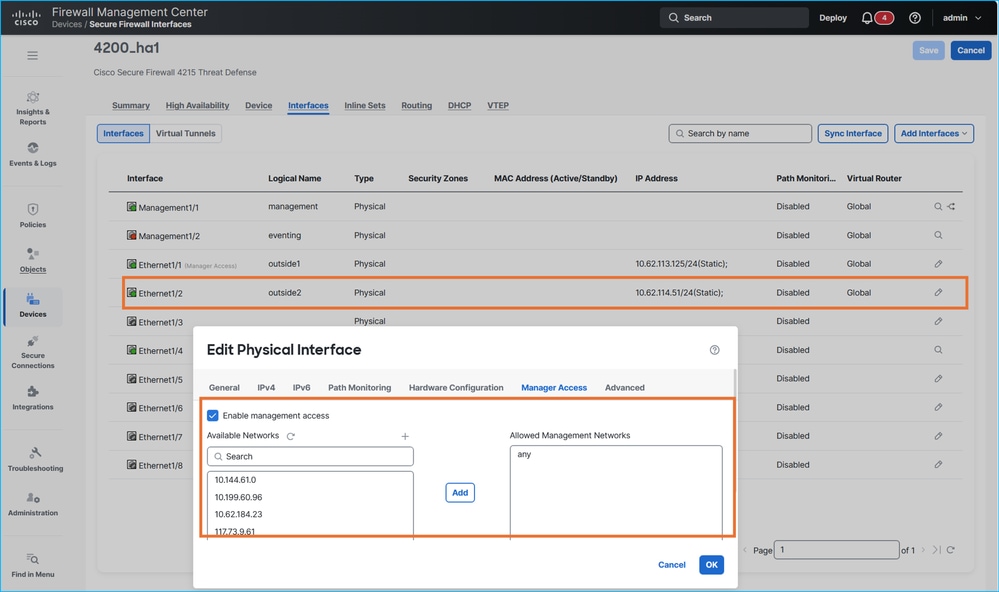
请注意,低于7.7.0的FTD版本不支持冗余管理器访问数据接口。尝试配置第二个Manager访问接口会导致以下错误消息:
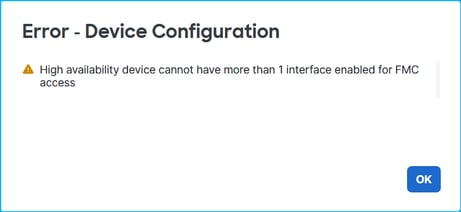
对于低于7.7.0的FTD版本,请确保跳过步骤7和步骤8。
7.部署策略并验证FTD CLISH上的设置。在本示例中,名称为outside2的Ethernet1/2接口的IP地址分别为10.62.114.51和10.62.114.52:
> show ip
System IP Addresses:
Interface                Name                   IP address      Subnet mask     Method
Ethernet1/1              outside1               10.62.113.125   255.255.255.0   manual <- source interface
Ethernet1/2              outside2               10.62.114.51    255.255.255.0   manual <- target interface
Ethernet1/4              fover                  10.9.0.21       255.255.255.0   unset
outside2接口已添加到sftunnel配置中:
> show running-config sftunnel
sftunnel interface outside2 <- target interface
sftunnel interface outside1 <- source interface
sftunnel port 8305
sftunnel route-map FMC_GEN_19283746_RBD_DUAL_WAN_RMAP_91827346
虽然网络地址转换(NAT)表中安装了其他规则,但使用outside1接口的规则:
> show nat detail
Manual NAT Policies Implicit (Section 0)
1 (nlp_int_tap) to (outside1) source static nlp_server__sftunnel_0.0.0.0_intf5 interface  destination static 0_0.0.0.0_5 0_0.0.0.0_5 service tcp 8305 8305
    translate_hits = 1448, untranslate_hits = 1448
    Source - Origin: 169.254.1.3/32, Translated: 10.62.113.125/24
    Destination - Origin: 0.0.0.0/0, Translated: 0.0.0.0/0
    Service - Protocol: tcp Real: 8305 Mapped: 8305
2 (nlp_int_tap) to (outside2) source static nlp_server__sftunnel_0.0.0.0_intf6 interface  destination static 0_0.0.0.0_9 0_0.0.0.0_9 service tcp 8305 8305
    translate_hits = 0, untranslate_hits = 0
    Source - Origin: 169.254.1.3/32, Translated: 10.62.114.51/24
    Destination - Origin: 0.0.0.0/0, Translated: 0.0.0.0/0
    Service - Protocol: tcp Real: 8305 Mapped: 8305
3 (nlp_int_tap) to (outside1) source static nlp_server__sftunnel_::_intf5 interface ipv6  destination static 0_::_6 0_::_6 service tcp 8305 8305
    translate_hits = 0, untranslate_hits = 0
    Source - Origin: fd00:0:0:1::3/128, Translated:
    Destination - Origin: ::/0, Translated: ::/0
    Service - Protocol: tcp Real: 8305 Mapped: 8305
4 (nlp_int_tap) to (outside2) source static nlp_server__sftunnel_::_intf6 interface ipv6  destination static 0_::_10 0_::_10 service tcp 8305 8305
    translate_hits = 0, untranslate_hits = 0
    Source - Origin: fd00:0:0:1::3/128, Translated:
    Destination - Origin: ::/0, Translated: ::/0
    Service - Protocol: tcp Real: 8305 Mapped: 8305
5 (nlp_int_tap) to (outside1) source dynamic nlp_client_0_intf5 interface
    translate_hits = 653, untranslate_hits = 0
    Source - Origin: 169.254.1.3/32, Translated: 10.62.113.125/24
6 (nlp_int_tap) to (outside2) source dynamic nlp_client_0_intf6 interface
    translate_hits = 0, untranslate_hits = 0
    Source - Origin: 169.254.1.3/32, Translated: 10.62.114.51/24
7 (nlp_int_tap) to (outside1) source dynamic nlp_client_0_ipv6_intf5 interface ipv6
    translate_hits = 0, untranslate_hits = 0
    Source - Origin: fd00:0:0:1::3/128, Translated:
8 (nlp_int_tap) to (outside2) source dynamic nlp_client_0_ipv6_intf6 interface ipv6
    translate_hits = 0, untranslate_hits = 0
    Source - Origin: fd00:0:0:1::3/128, Translated:
8.检验高可用性状态和接口监控:
> show monitor-interface
        This host: Primary - Active
                Interface management (203.0.113.130): Normal (Monitored)
                Interface outside1 (10.62.113.125): Normal (Monitored)
                Interface outside2 (10.62.114.51): Normal (Monitored)
        Other host: Secondary - Standby Ready
                Interface management (203.0.113.131): Normal (Monitored)
                Interface outside1 (10.62.113.126): Normal (Monitored)
                Interface outside2 (10.62.114.52): Normal (Monitored)
9.如果计划通过outside2接口管理FTD,请确保允许访问平台设置的SSH Access部分。
10.进行必要的更改,以允许通过目标接口连接到域名服务器(DNS)和FMC:
- 如果FMC和FTD之间的连接需要域名解析(DNS),请确保FTD可以通过目标接口到达用于访问DNS服务器的下一跳。在传输路径中还必须允许DNS解析。
- 确保FTD可以通过目标接口到达用于到达FMC的下一跳。
- 确保在目标接口的传输路径中允许通过TCP端口8305实现FMC和FTD之间的双向连接。必须允许双向连接。
在这种情况下,需要将IP 10.62.114.1用作目标接口上的默认网关。使用Internet控制消息协议(ICMP)可到达下一跳IP地址:
> ping 10.62.114.1
Please use 'CTRL+C' to cancel/abort...
Sending 5, 100-byte ICMP Echos to 10.62.114.1, timeout is 2 seconds:
!!!!!
Success rate is 100 percent (5/5), round-trip min/avg/max = 1/2/10 ms
如果ICMP在传输路径或下一跳中被管理性阻止,请确保下一跳的介质访问控制(MAC)地址在show arp命令的输出中可见并且有效:
> show arp
        fover 10.9.0.22 4c01.f7e9.e111 13275
        outside1 10.62.113.1 c02c.1782.2cbf 1
        outside1 10.62.113.126 4c01.f7e9.e10e 5453
        outside2 10.62.114.1 c02c.1782.2cbf 0
        outside2 10.62.114.52 4c01.f7e9.e10f 5453
11.根据FTD版本执行以下步骤:
- 版本 7.7.0 或更高版本:在FMC上,禁用通过源接口(outside1)的管理器访问,调整路由,包括到DNS服务器的路由(如果使用DNS访问FMC)和通过目标接口(outside2)的FMC。例如,配置特定静态路由或配置目标接口上的默认网关。
- 低于7.7.0的版本:在FMC上,禁用源接口(outside1)上的管理器访问,启用目标接口(outside2)上的管理器访问,调整路由,包括到DNS服务器的路由(如果使用DNS来访问FMC)和通过目标接口(outside2)上的FMC。例如,配置特定静态路由或配置目标接口上的默认网关。
12.部署策略。
13.验证FTD CLISH:
> show route 0.0.0.0

Routing entry for 0.0.0.0 0.0.0.0, supernet
  Known via "static", distance 1, metric 0, candidate default path
  Routing Descriptor Blocks:
  * 10.62.114.1, via outside2 <- default route over outside2
      Route metric is 0, traffic share count is 1


> show running-config sftunnel
sftunnel interface outside2 <- sftunnel is enabled only over outside2
sftunnel port 8305


> show nat detail
Manual NAT Policies Implicit (Section 0)
1 (nlp_int_tap) to (outside2) source static nlp_server__sftunnel_0.0.0.0_intf6 interface  destination static 0_0.0.0.0_9 0_0.0.0.0_9 service tcp 8305 8305
    translate_hits = 3, untranslate_hits = 3
    Source - Origin: 169.254.1.3/32, Translated: 10.62.114.51/24
    Destination - Origin: 0.0.0.0/0, Translated: 0.0.0.0/0
    Service - Protocol: tcp Real: 8305 Mapped: 8305
2 (nlp_int_tap) to (outside2) source static nlp_server__sftunnel_::_intf6 interface ipv6  destination static 0_::_10 0_::_10 service tcp 8305 8305
    translate_hits = 0, untranslate_hits = 0
    Source - Origin: fd00:0:0:1::3/128, Translated:
    Destination - Origin: ::/0, Translated: ::/0
    Service - Protocol: tcp Real: 8305 Mapped: 8305
3 (nlp_int_tap) to (outside2) source dynamic nlp_client_0_intf6 interface
    translate_hits = 407, untranslate_hits = 0
    Source - Origin: 169.254.1.3/32, Translated: 10.62.114.51/24
4 (nlp_int_tap) to (outside2) source dynamic nlp_client_0_ipv6_intf6 interface ipv6
    translate_hits = 0, untranslate_hits = 0
    Source - Origin: fd00:0:0:1::3/128, Translated:


> show conn all port 8305
31 in use, 42 most used
Inspect Snort:
        preserve-connection: 0 enabled, 0 in effect, 0 most enabled, 0 most in effect

TCP nlp_int_tap  10.62.114.51(169.254.1.3):56853 outside2  198.51.100.23:8305, idle 0:00:06, bytes 33008, flags UxIO  <- connectivity over outside2
TCP nlp_int_tap  10.62.114.51(169.254.1.3):32905 outside2  198.51.100.23:8305, idle 0:00:00, bytes 1595942, flags UxIO <- connectivity over outside2
14.如果需要更改“show network” CLISH命令输出中的DNS服务器,请配置新的DNS服务器:
> configure network dns servers 192.0.2.184
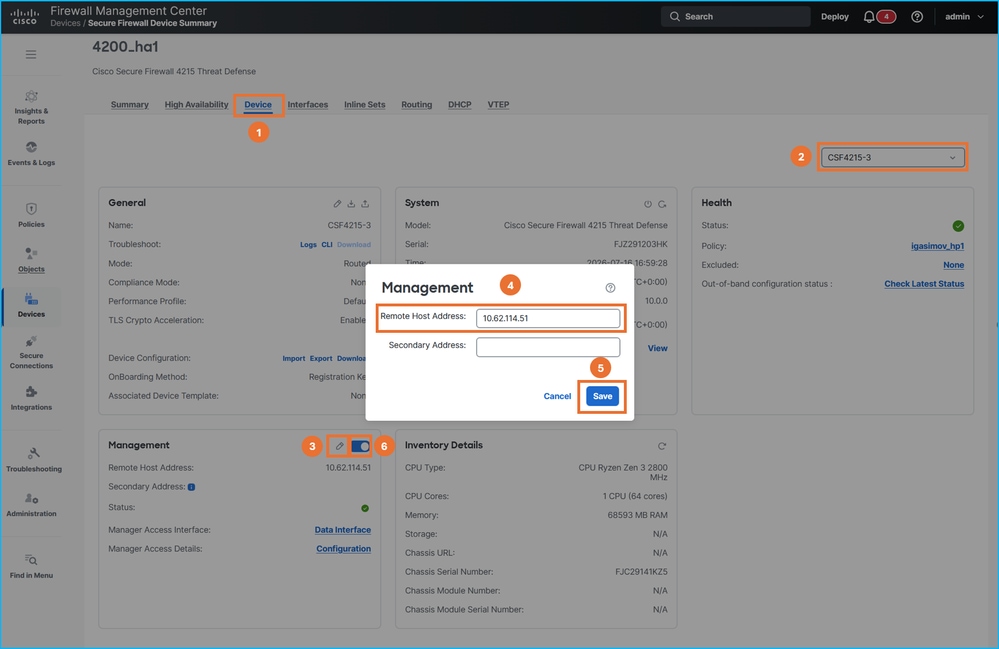
15.在FMC上,将FTD管理IP地址更改为outside2 IP地址,然后使用滑块禁用并重新启用连接。对HA中的两台设备重复此步骤:
16.检验所有FTD上的sftunnel连接:
> sftunnel-status-brief
PEER:198.51.100.23
        SFTunnel Status:-
                Channel A: Connected
                Channel B: Connected
        Peer channel Channel-A is valid  type (CONTROL), using 'tap_nlp', connected to '198.51.100.23' via '169.254.1.3'
        Peer channel Channel-B is valid  type (EVENT), using 'tap_nlp', connected to '198.51.100.23' via '169.254.1.3'
        Registration: Completed.
        IPv4 Connection to peer '198.51.100.23' Start Time: Thu Jul 16 16:37:14 2026 UTC
        Heartbeat Send Time:     Thu Jul 16 16:38:13 2026 UTC
        Heartbeat Received Time: Thu Jul 16 16:39:13 2026 UTC
        Last disconnect time   : Thu Jul 16 16:37:11 2026 UTC
        Last disconnect reason : Both control and event channel connections with peer went down

> show conn all port 8305
32 in use, 42 most used
Inspect Snort:
        preserve-connection: 0 enabled, 0 in effect, 0 most enabled, 0 most in effect

TCP nlp_int_tap  10.62.114.51(169.254.1.3):8305 outside2  198.51.100.23:36383, idle 0:00:00, bytes 235757, flags UIO  <- new connection over different source port
TCP nlp_int_tap  10.62.114.51(169.254.1.3):8305 outside2  198.51.100.23:50963, idle 0:00:01, bytes 12319, flags UIO <- new connection over different source port
17.如果需要更改平台设置中的DNS服务器,请进行相应的配置更改并部署策略。
管理连接故障排除
使用以下命令进行验证:
- show network — 显示管理接口的配置。
- sftunnel-status-brief — 显示sftunnel连接状态。
- show run sftunnel — 显示防火墙引擎(Lina)中的sftunnel配置。
- show conn all port 8305 — 显示通过Lina引擎的sftunnel连接。
要排除管理连接故障,请参阅官方指南中的排除管理连接故障部分。
参考
修订历史记录
| 版本 | 发布日期 | 备注 |
|---|---|---|
1.0 |
07-Aug-2026
|
初始版本 |
 反馈
反馈