firepower# show chassis-management-url

https://KSEC-FPR9K-1.cisco.com:443//
注意:在6.3 FTD之后的版本中,使用命令show chassis detail。
Firepower-module1# show chassis detail
Chassis URL : https://FP4100-5:443//
Chassis IP : 10.62.148.187
Chassis IPv6 : ::
Chassis Serial Number : JAD19500BAB
Security Module : 1
如果两个机箱的名称相同,请使用以下命令更改一个机箱的名称:
KSEC-FPR9K-1-A# scope system
KSEC-FPR9K-1-A /system # set name FPR9K-1new
Warning: System name modification changes FC zone name and redeploys them non-disruptively
KSEC-FPR9K-1-A /system* # commit-buffer
FPR9K-1-A /system # exitFPR9K-1new-A#
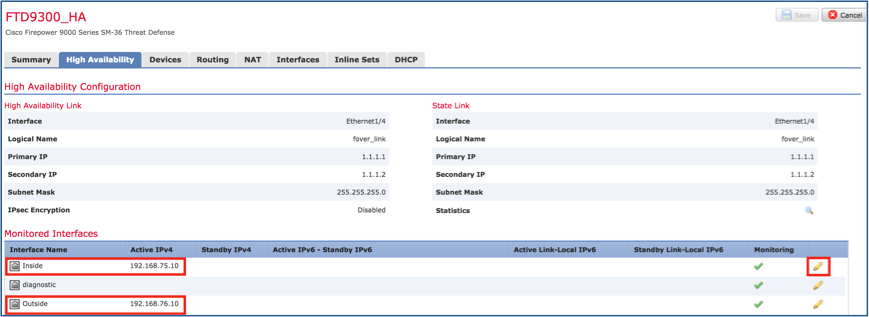
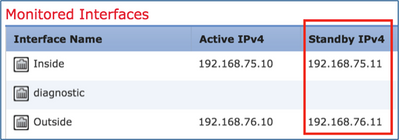
> show high-availability config Failover On Failover unit Primary Failover LAN Interface: FOVER Port-channel3 (up) Reconnect timeout 0:00:00 Unit Poll frequency 1 seconds, holdtime 15 seconds Interface Poll frequency 5 seconds, holdtime 25 seconds Interface Policy 1 Monitored Interfaces 2 of 1291 maximum MAC Address Move Notification Interval not set failover replication http Version: Ours 9.18(4)210, Mate 9.18(4)210 Serial Number: Ours FLM1949C5RR, Mate FLM2108V9YG Last Failover at: 08:46:30 UTC Jul 18 2024 This host: Primary - Active Active time: 1999 (sec) slot 0: UCSB-B200-M3-U hw/sw rev (0.0/9.18(4)210) status (Up Sys) Interface diagnostic (0.0.0.0): Normal (Waiting) Interface Inside (192.168.75.10): Link Down (Shutdown) Interface Outside (192.168.76.10): Normal (Not-Monitored) slot 1: snort rev (1.0) status (up) slot 2: diskstatus rev (1.0) status (up) Other host: Secondary - Standby Ready Active time: 1466 (sec) slot 0: UCSB-B200-M3-U hw/sw rev (0.0/9.18(4)210) status (Up Sys) Interface diagnostic (0.0.0.0): Normal (Waiting) Interface Inside (192.168.75.11): Link Down (Shutdown) Interface Outside (192.168.76.11): Normal (Not-Monitored) slot 1: snort rev (1.0) status (up) slot 2: diskstatus rev (1.0) status (up)
firepower# show failover state

               State          Last Failure Reason      Date/Time
This host  -   Primary
               Active         None
Other host -   Secondary
               Standby Ready  Comm Failure             18:32:56 EEST Jul 21 2016

====Configuration State===
	Sync Done
====Communication State===
	Mac set

firepower#
步骤5.从主设备(LINA CLI)验证配置设置:
> show running-config failover
failover
failover lan unit primary
failover lan interface FOVER Port-channel3
failover replication http
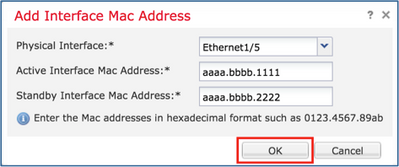
failover mac address Ethernet1/4 aaaa.bbbb.1111 aaaa.bbbb.2222
failover mac address Port-channel2.202 aaaa.bbbb.3333 aaaa.bbbb.4444
failover link FOVER Port-channel3
failover interface ip FOVER 172.16.51.1 255.255.255.0 standby 172.16.51.2

> show running-config interface
!
interface Port-channel2
no nameif
no security-level
no ip address
!
interface Port-channel2.202
vlan 202
nameif Outside
cts manual
propagate sgt preserve-untag
policy static sgt disabled trusted
security-level 0
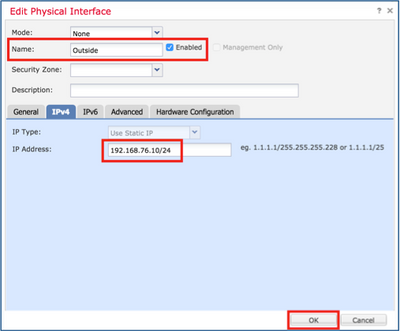
ip address 192.168.76.10 255.255.255.0 standby 192.168.76.11
!
interface Port-channel3
description LAN/STATE Failover Interface
!
interface Ethernet1/1
management-only
nameif diagnostic
security-level 0
no ip address
!
interface Ethernet1/4
shutdown
nameif Inside
security-level 0
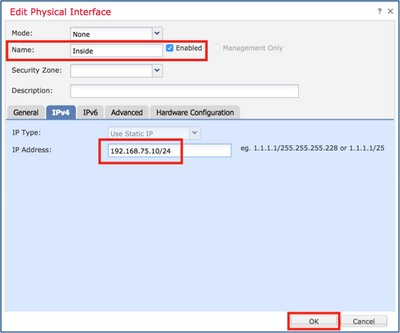
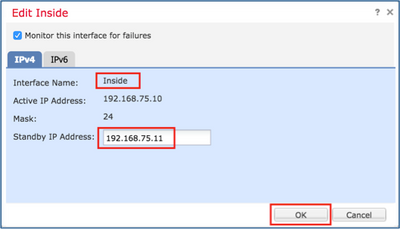
ip address 192.168.75.10 255.255.255.0 standby 192.168.75.11
>
任务 4. 调换故障切换角色
任务要求:
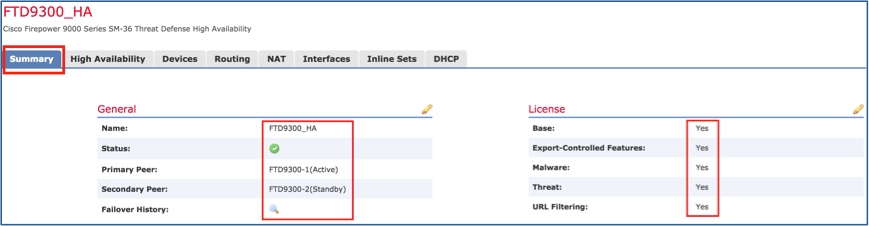
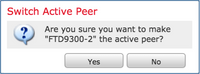
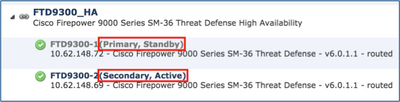
从 FMC 上将故障切换角色从主/主用、辅助/备用切换到主/备用、和辅助/主用.
解决方案:
步骤1.选择图标。
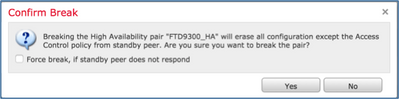
步骤2.确认操作。
您可以使用show failover history命令输出:
在新的Active
在新备用路由器上
> show failover history ========================================================================== 从状态到状态原因 ==========================================================================
世界协调时2024年7月18日09:27:11 Active Drain Active Applying Config其他设备要激活 (通过config命令设置)
世界协调时2024年7月18日09:27:11 Active Applying Config Active Config Applied Other unit deses me Active (通过config命令设置)
世界协调时2024年7月18日09:27:11 Active Config Applied Active Other Unit deses me Active (通过config命令设置)
> show failover history ========================================================================== 从状态到状态原因 ==========================================================================
! interface Port-channel2 shutdown no nameif 无安全级别 no ip address ! interface Port-channel3 shutdown no nameif 无安全级别 no ip address ! interface Ethernet1/1 仅管理 shutdown no nameif 无安全级别 no ip address ! interface Ethernet1/4 shutdown no nameif 无安全级别 no ip address ! ftp mode passive ngips conn-match vlan-id object-group-search access-control access-group CSM_FW_ACL_ global access-list CSM_FW_ACL_ remark rule-id 9998:预过滤器策略:默认隧道和优先级策略 access-list CSM_FW_ACL_ remark rule-id 9998:规则:默认隧道操作规则 access-list CSM_FW_ACL_ advanced permit ipinip any any rule-id 9998 access-list CSM_FW_ACL_ advanced permit udp any eq 3544 any range 1025 65535 rule-id 9998 access-list CSM_FW_ACL_ advanced permit udp any range 1025 65535 any eq 3544 rule-id 9998 access-list CSM_FW_ACL_ advanced permit 41 any any rule-id 9998 access-list CSM_FW_ACL_ advanced permit gre any any rule-id 9998 access-list CSM_FW_ACL_ remark rule-id 268439552:访问策略:acp_simple — 必填 access-list CSM_FW_ACL_ remark rule-id 268439552:L7规则:rule1 access-list CSM_FW_ACL_ advanced permit ip any any rule-id 268439552 ! tcp-map UM_STATIC_TCP_MAP tcp-options range 6 7 allow tcp-options range 9 18 allow tcp-options range 20 255 allow urgent-flag allow ! 无传呼机 no logging message 106015 no logging message 313001 no logging message 313008 no logging message 106023 no logging message 710003 no logging message 106100 no logging message 302015 no logging message 302014 no logging message 302013 no logging message 302018 no logging message 302017 no logging message 302016 no logging message 302021 no logging message 302020 不执行故障切换 <省略部分输出>
> configure high-availability disable ?
Optional parameter to clear interfaces (clear-interfaces) optional parameter to clear interfaces (clear-interfaces) (clear-interfaces)
<cr>
> configure high-availability disable
High-availability will be disabled. Do you really want to continue?
Please enter 'YES' or 'NO': yes
Successfully disabled high-availability.
结果:
主设备(非备用)
辅助设备(非主用)
> INFO: This unit is currently in standby state. By disabling failover, this unit will remain in standby state.
> show failover Failover Off (pseudo-Standby) Failover unit Primary Failover LAN Interface: FOVER Port-channel3 (up) Reconnect timeout 0:00:00 Unit Poll frequency 1 seconds, holdtime 15 seconds Interface Poll frequency 5 seconds, holdtime 25 seconds Interface Policy 1 Monitored Interfaces 0 of 1291 maximum MAC Address Move Notification Interval not set failover replication http
> show ip System IP Addresses: Interface Name IP address Subnet mask Method Port-channel3 FOVER 172.16.51.1 255.255.255.0 unset Current IP Addresses: Interface Name IP address Subnet mask Method Port-channel3 FOVER 172.16.51.1 255.255.255.0 unset
> show failover Failover Off Failover unit Secondary Failover LAN Interface: not Configured Reconnect timeout 0:00:00 Unit Poll frequency 1 seconds, holdtime 15 seconds Interface Poll frequency 5 seconds, holdtime 25 seconds Interface Policy 1 Monitored Interfaces 4 of 1291 maximum MAC Address Move Notification Interval not set
> show ip System IP Addresses: Interface Name IP address Subnet mask Method Port-channel2.202 NET202 172.16.202.1 255.255.255.0 CONFIG Port-channel2.203 NET203 172.16.203.1 255.255.255.0 CONFIG Ethernet1/4 NET204 172.16.204.1 255.255.255.0 CONFIG Current IP Addresses: Interface Name IP address Subnet mask Method Port-channel2.202 NET202 172.16.202.1 255.255.255.0 CONFIG Port-channel2.203 NET203 172.16.203.1 255.255.255.0 CONFIG Ethernet1/4 NET204 172.16.204.1 255.255.255.0 CONFIG
主(非备用)
辅助(非活动)
> show running-config : 已储存
: :序列号(S):FLM1949C5RR :Hardware:FPR4K-SM-24,73853 MB RAM,CPU Xeon E5系列2200 MHz,2 CPU(48核) : NGFW版本7.2.8 ! hostname Firepower-module1 enable password ***** encrypted strong-encryption-disable no asp inspect-dp ack-passthrough service-module 0 keepalive-timeout 4 service-module 0 keepalive-counter 6 名称 no mac-address auto
! interface Port-channel2 shutdown no nameif 无安全级别 no ip address < — 删除IP ! interface Port-channel3 说明LAN/STATE故障切换接口 ! interface Ethernet1/1 仅管理 shutdown no nameif 无安全级别 no ip address ! interface Ethernet1/4 shutdown no nameif 无安全级别 no ip address ! ftp mode passive ngips conn-match vlan-id no object-group-search access-control access-group CSM_FW_ACL_ global access-list CSM_FW_ACL_ remark rule-id 9998:预过滤器策略:默认隧道和优先级策略 access-list CSM_FW_ACL_ remark rule-id 9998:规则:默认隧道操作规则 access-list CSM_FW_ACL_ advanced permit ipinip any any rule-id 9998 access-list CSM_FW_ACL_ advanced permit udp any eq 3544 any range 1025 65535 rule-id 9998 access-list CSM_FW_ACL_ advanced permit udp any range 1025 65535 any eq 3544 rule-id 9998 access-list CSM_FW_ACL_ advanced permit 41 any any rule-id 9998 access-list CSM_FW_ACL_ advanced permit gre any any rule-id 9998 access-list CSM_FW_ACL_ remark rule-id 268434433:访问策略:acp_simple — 默认 access-list CSM_FW_ACL_ remark rule-id 268434433:L4规则:默认操作规则 access-list CSM_FW_ACL_ advanced permit ip any any rule-id 268434433 ! tcp-map UM_STATIC_TCP_MAP tcp-options range 6 7 allow tcp-options range 9 18 allow tcp-options range 20 255 allow tcp-options md5 clear urgent-flag allow ! 无传呼机 no logging message 106015 no logging message 313001 no logging message 313008 no logging message 106023 no logging message 710003 no logging message 106100 no logging message 302015 no logging message 302014 no logging message 302013 no logging message 302018 no logging message 302017 no logging message 302016 no logging message 302021 no logging message 302020 不执行故障切换 failover lan unit primary failover lan interface FOVER Port-channel3 故障切换复制http failover link FOVER Port-channel3 failover interface ip FOVER 172.16.51.1 255.255.255.0 standby 172.16.51.2 no monitor-interface service-module
<省略部分输出>
> show running-config : 已储存
: :序列号(S):FLM2108V9YG :Hardware:FPR4K-SM-24,73853 MB RAM,CPU Xeon E5系列2200 MHz,2 CPU(48核) : NGFW版本7.2.8 ! hostname Firepower-module1 enable password ***** encrypted strong-encryption-disable no asp inspect-dp ack-passthrough service-module 0 keepalive-timeout 4 service-module 0 keepalive-counter 6 名称 no mac-address auto
! interface Port-channel2 no nameif 无安全级别 no ip address ! interface Port-channel2.202 vlan 202 nameif NET202 cts manual propagate sgt preserve-untag 策略静态sgt已禁用,受信任 安全级别0 ip address 172.16.202.1 255.255.255.0 standby 172.16.202.2 ! interface Port-channel2.203 vlan 203 nameif NET203 cts manual propagate sgt preserve-untag 策略静态sgt已禁用,受信任 安全级别0 ip address 172.16.203.1 255.255.255.0 standby 172.16.203.2 ! interface Port-channel3 no nameif 无安全级别 no ip address ! interface Ethernet1/1 仅管理 nameif diagnostic cts manual propagate sgt preserve-untag 策略静态sgt已禁用,受信任 安全级别0 no ip address ! interface Ethernet1/4 nameif NET204 cts manual propagate sgt preserve-untag 策略静态sgt已禁用,受信任 安全级别0 ip address 172.16.204.1 255.255.255.0 standby 172.16.204.2 ! ftp mode passive ngips conn-match vlan-id no object-group-search access-control access-group CSM_FW_ACL_ global access-list CSM_FW_ACL_ remark rule-id 9998:预过滤器策略:默认隧道和优先级策略 access-list CSM_FW_ACL_ remark rule-id 9998:规则:默认隧道操作规则 access-list CSM_FW_ACL_ advanced permit ipinip any any rule-id 9998 access-list CSM_FW_ACL_ advanced permit udp any eq 3544 any range 1025 65535 rule-id 9998 access-list CSM_FW_ACL_ advanced permit udp any range 1025 65535 any eq 3544 rule-id 9998 access-list CSM_FW_ACL_ advanced permit 41 any any rule-id 9998 access-list CSM_FW_ACL_ advanced permit gre any any rule-id 9998 access-list CSM_FW_ACL_ remark rule-id 268434433:访问策略:acp_simple — 默认 access-list CSM_FW_ACL_ remark rule-id 268434433:L4规则:默认操作规则 access-list CSM_FW_ACL_ advanced permit ip any any rule-id 268434433 ! tcp-map UM_STATIC_TCP_MAP tcp-options range 6 7 allow tcp-options range 9 18 allow tcp-options range 20 255 allow tcp-options md5 clear urgent-flag allow ! 无传呼机 no logging message 106015 no logging message 313001 no logging message 313008 no logging message 106023 no logging message 710003 no logging message 106100 no logging message 302015 no logging message 302014 no logging message 302013 no logging message 302018 no logging message 302017 no logging message 302016 no logging message 302021 no logging message 302020 mtu NET202 1500 mtu NET203 1500 mtu diagnostic 1500 mtu NET204 1500 不执行故障切换 monitor-interface NET202 monitor-interface NET203 no monitor-interface service-module
> configure high-availability disable
High-availability will be disabled. Do you really want to continue?
Please enter 'YES' or 'NO': YES
Successfully disabled high-availability.
> configure high-availability disable clear-interfaces
High-availability will be disabled. Do you really want to continue?
Please enter 'YES' or 'NO': yes
Successfully disabled high-availability.

> configure high-availability disable clear-interfaces High-availability will be disabled. Do you really want to continue? Please enter 'YES' or 'NO': YES Successfully disabled high-availability.
> configure high-availability suspend
Please ensure that no deployment operation is in progress before suspending high-availability.
Please enter 'YES' to continue if there is no deployment operation in progress and 'NO' if you wish to abort: YES
Successfully suspended high-availability.
第 2 步: 验证主设备上的更改:
> show high-availability configFailover Off
Failover unit Primary
Failover LAN Interface: fover_link Ethernet1/4 (up)
Reconnect timeout 0:00:00
Unit Poll frequency 1 seconds, holdtime 15 seconds
Interface Poll frequency 5 seconds, holdtime 25 seconds
Interface Policy 1
Monitored Interfaces 1 of 1041 maximum
MAC Address Move Notification Interval not set
failover replication http
步骤3.辅助单元上的结果:
> show high-availability config
Failover Off (pseudo-Standby)
Failover unit Secondary
Failover LAN Interface: fover_link Ethernet1/4 (up)
Reconnect timeout 0:00:00
Unit Poll frequency 1 seconds, holdtime 15 seconds
Interface Poll frequency 5 seconds, holdtime 25 seconds
Interface Policy 1
Monitored Interfaces 1 of 1041 maximum
MAC Address Move Notification Interval not set
failover replication http
步骤4.恢复主设备上的HA:
> configure high-availability resume
Successfully resumed high-availablity.

> .

	No Active mate detected
!!!!!!!!!!!!!!!!!!!!!!!!!!!!!!!!!!!!!!!!!!!!!!!!!!!!!!!!!!!!!!!!!!!!!!!!!!!!!!!!!!!!!!!!!!!!!!!!!!!!!!!!!!!!!!!!!!!!!!!!!!!!!!!!!!!!!!!!!!!!!!!!!!!!!!!!!!
Beginning configuration replication: Sending to mate.
End Configuration Replication to mate

>
> show high-availability configFailover On
Failover unit Primary
Failover LAN Interface: fover_link Ethernet1/4 (up)
Reconnect timeout 0:00:00
Unit Poll frequency 1 seconds, holdtime 15 seconds
Interface Poll frequency 5 seconds, holdtime 25 seconds
Interface Policy 1
Monitored Interfaces 1 of 1041 maximum
MAC Address Move Notification Interval not set
failover replication http
步骤5.恢复HA后辅助设备上的结果:
> ..

	Detected an Active mate
Beginning configuration replication from mate.


WARNING: Failover is enabled but standby IP address is not configured for this interface.
WARNING: Failover is enabled but standby IP address is not configured for this interface.
End configuration replication from mate.

>
> show high-availability configFailover On
Failover unit Secondary
Failover LAN Interface: fover_link Ethernet1/4 (up)
Reconnect timeout 0:00:00
Unit Poll frequency 1 seconds, holdtime 15 seconds
Interface Poll frequency 5 seconds, holdtime 25 seconds
Interface Policy 1
Monitored Interfaces 1 of 1041 maximum
MAC Address Move Notification Interval not set
failover replication http
>
> configure high-availability suspend
Please ensure that no deployment operation is in progress before suspending high-availability.
Please enter 'YES' to continue if there is no deployment operation in progress and 'NO' if you wish to abort: YES
Successfully suspended high-availability.
firepower# show failover | include Failover
Failover Off (pseudo-Standby)
Failover unit Secondary
Failover LAN Interface: FOVER Ethernet1/1 (up)
startup-config仍然启用故障切换:
firepower# show startup | include failoverfailover
failover lan unit secondary
failover lan interface FOVER Ethernet1/1
failover replication http
failover link FOVER Ethernet1/1
failover interface ip FOVER 192.0.2.1 255.255.255.0 standby 192.0.2.2
failover ipsec pre-shared-key *****
从 CLISH 重启设备(reboot 命令):
> reboot
This command will reboot the system.  Continue?
Please enter 'YES' or 'NO': YES

Broadcast message from root@
Threat Defense System: CMD=-stop, CSP-ID=cisco-ftd.6.2.2.81__ftd_001_JMX2119L05CYRIBVX1, FLAG=''
Cisco FTD stopping ...
设备启动后,由于故障切换处于启用状态,设备会进入故障切换协商阶段并尝试检测远程对等体:
User enable_1 logged in to firepower
Logins over the last 1 days: 1.
Failed logins since the last login: 0.
Type help or '?' for a list of available commands.
firepower> .

        Detected an Active mate
firepower# reload
System config has been modified. Save? [Y]es/[N]o: Y <-- Be careful. This disables the failover in the startup-config
Cryptochecksum: 31857237 8658f618 3234be7c 854d583a
8781 bytes copied in 0.940 secs
Proceed with reload? [confirm]
firepower# show startup | include failoverno failover
failover lan unit secondary
failover lan interface FOVER Ethernet1/1
failover replication http
failover link FOVER Ethernet1/1
failover interface ip FOVER 192.0.2.1 255.255.255.0 standby 192.0.2.2
failover ipsec pre-shared-key *****
设备启动后将禁用故障切换:
firepower# show failover | include FailFailover Off
Failover unit Secondary
Failover LAN Interface: FOVER Ethernet1/1 (up)










 反馈
反馈