排除IOS XE上的Netflow故障

简介
本文档介绍如何对Cisco IOS® XE技术上的Netflow进行故障排除。
先决条件
要求
Cisco 建议您了解以下主题:
- Netflow
- 思科IOS XE
有关这些主题的详细信息,请参阅:
Flexible Netflow概述
配置Flexible NetFlow(Catalyst 9300交换机)
配置Flexible NetFlow(Catalyst 9400交换机)
配置Flexible NetFlow(Catalyst 9500交换机)
配置Flexible NetFlow(Catalyst 9600交换机)
使用的组件
本文档中的信息基于Cisco IOS XE软件。
本文档中的信息都是基于特定实验室环境中的设备编写的。本文档中使用的所有设备最初均采用原始(默认)配置。如果您的网络处于活动状态,请确保您了解所有命令的潜在影响。
排除Cisco路由器上的NetFlow故障
网络图
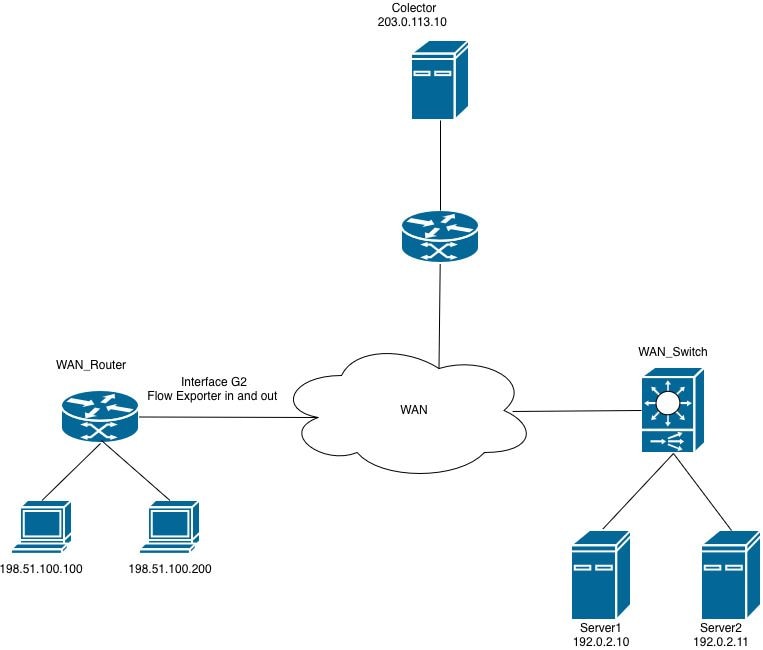 路由器上的Netflow
收集器未从路由器接收NetFlow导出数据包(CFLIPS)
收集器未从接口GigabitEthernet2上的路由器接收信息。
步骤1.检验导出器配置。
- 收集器IP地址
- 来源接口
- UDP 端口
- 导出协议(NetFlow v9/IPFIX)
WAN_Router#show running-config | section flow exporter
flow exporter Netflow_Exporter
destination 203.0.113.10
source Loopback0
transport udp 9996
template data timeout 60
步骤2.检验接口状态。
确认GigabitEthernet2运行正常:
- 接口处于up/up状态
- 已配置正确的IP地址
- 无过多错误或丢弃
WAN_Router#show interface gigabitEthernet 2 | include up|error|drop
GigabitEthernet2 is up, line protocol is up
Full Duplex, 1000Mbps, link type is auto, media type is Virtual
output flow-control is unsupported, input flow-control is unsupported
Input queue: 0/375/0/0 (size/max/drops/flushes); Total output drops: 0
0 input errors, 0 CRC, 0 frame, 0 overrun, 0 ignored
0 output errors, 0 collisions, 0 interface resets
0 unknown protocol drops
步骤3.检验与收集器的连通性。
从源接口测试连接:
WAN_Router#ping 203.0.113.10 source Loopback 0
Type escape sequence to abort.
Sending 5, 100-byte ICMP Echos to 203.0.113.10, timeout is 2 seconds:
Packet sent with a source address of 198.51.100.10
!!!!!
Success rate is 100 percent (5/5), round-trip min/avg/max = 1/2/5 ms
WAN_Router#

WAN_Router#traceroute 203.0.113.10 source Loopback 0 numeric
Type escape sequence to abort.
Tracing the route to 203.0.113.10
VRF info: (vrf in name/id, vrf out name/id)
1 X.X.X.X 2 msec 1 msec 1 msec
2 Y.Y.Y.Y 2 msec 2 msec 1 msec
3 Z.Z.Z.Z 2 msec * 2 msec
WAN_Router#
步骤4.检验导出器统计信息。
检验路由器是否正在生成并向配置的收集器地址发送NetFlow导出数据包。
验证:
- 成功发送数据包
- 已成功发送模板
- 无传输故障
- 无套接字错误
WAN_Router#show flow exporter statistics
Flow Exporter Netflow_Exporter:
Packet send statistics:
Successfully sent: 41 (3780 bytes)

Client send statistics:
Client: Flow Monitor MONITOR_INGRESS
Records added: 35
- sent: 35
Bytes added: 1750
- sent: 1750

Client: Flow Monitor MONITOR_EGRESS
Records added: 35
- sent: 35
Bytes added: 1750
- sent: 1750
步骤5.检验流创建。
验证流条目是否在流监控器缓存中填充和维护。
验证:
- 活动流存在于流监控器缓存中。
- 缓存条目正在增加,表示正在记录流量。
- 流条目将在预期的超时间隔内过期(过期)。

注意:如果缓存中未观察到流,请检查流监控并记录配置,因为问题可能与导出功能无关。
WAN_Router#show flow monitor MONITOR_EGRESS cache
Cache type: Normal (Platform cache)
Cache size: 200000
Current entries: 14
High Watermark: 27

Flows added: 3032
Flows aged: 3018
- Active timeout ( 60 secs) 200
- Inactive timeout ( 30 secs) 2818

IPV4 SOURCE ADDRESS: 198.51.100.200
IPV4 DESTINATION ADDRESS: 192.0.2.11
TRNS SOURCE PORT: 57188
TRNS DESTINATION PORT: 1967
INTERFACE OUTPUT: Gi2
IP TOS: 0x00
IP PROTOCOL: 17
counter bytes long: 80
counter packets long: 1
timestamp abs first: 22:09:34.067
timestamp abs last: 22:09:34.067
根据输出可以确定:
- 流监控器MONITOR_EGRESS运行正常,并且使用流条目主动填充缓存。
- 缓存运行状况已确认 — 正在按预期速度添加和删除(过期)条目。
- 由于非活动超时(短持续时间或低频率流量的预期行为),相当一部分流量(3018的2818过期)即将到期。
- 显示的缓存条目代表从源198.51.100.200(端口57188)到目标192.0.2.11(端口1967)的一个单数据包UDP流(协议17),通过接口GigabitEthernet2退出。
步骤6.检验监控器附件。
确认已将流监控器应用到正确的接口。
WAN_Router#show running-config interface gigabitEthernet 2
Building configuration...

Current configuration : 217 bytes
!
interface GigabitEthernet2
ip flow monitor MONITOR_EGRESS output
ip address x.x.x.x 255.255.255.252
ip ospf network point-to-point
ip ospf 1 area 0
negotiation auto
end
步骤7.检验ACL或安全策略。
验证没有已配置的ACL或安全策略正在过滤或丢弃发往收集器的NetFlow导出数据包:
WAN_Router#show running-config | include access-group
WAN_Router#
步骤8.捕获路由器上的流量。
- 发出show ip route <collector_IP>命令检验到收集器的路由路径。确定路由器用来转发NetFlow导出流量的出口接口。
- 创建一个ACL,允许源IP地址与已配置的NetFlow导出器源接口匹配且目标IP地址与收集器匹配的UDP数据包。将此ACL应用于数据包捕获,以过滤相关流量。
WAN_Router#show running-config | sec flow exporter
flow exporter Netflow_Exporter
destination 203.0.113.10
source Loopback0
transport udp 9996
template data timeout 60
WAN_Router#show ip route 203.0.113.10
Routing entry for 203.0.113.10/32
Known via "ospf 1", distance 110, metric 22, type intra area
Last update from x.x.x.x on GigabitEthernet2, 02:12:27 ago
Routing Descriptor Blocks:
* x.x.x.x, from 203.0.113.10, 02:12:27 ago, via GigabitEthernet2
Route metric is 22, traffic share count is 1

WAN_Router#show running-config interface Loopback0
Building configuration...

Current configuration : 87 bytes
!
interface Loopback0
ip address 198.51.100.10 255.255.255.255
ip ospf 1 area 0
end

WAN_Router(config)#ip access-list extended netflow
WAN_Router(config-ext-nacl)#permit udp host 198.51.100.10 host 203.0.113.10
WAN_Router(config-ext-nacl)#end
!
WAN_Router#monitor capture netflow interface gigabitEthernet 2 out access-list netflow buffer size 10
WAN_Router#monitor capture netflow start
Started capture point : netflow

WAN_Router#show monitor capture netflow buffer brief
-------------------------------------------------------------------------------------
#    size     timestamp      source                destination     dscp   protocol
-------------------------------------------------------------------------------------
0    166      0.000000      198.51.100.10      -> 203.0.113.10      0 BE   UDP
1    166      0.055997      198.51.100.10      -> 203.0.113.10      0 BE   UDP
2    166      7.562019      198.51.100.10      -> 203.0.113.10      0 BE   UDP
3    166      7.617024      198.51.100.10      -> 203.0.113.10      0 BE   UDP
4    166      9.719009      198.51.100.10      -> 203.0.113.10      0 BE   UDP
5    166      9.776013      198.51.100.10      -> 203.0.113.10      0 BE   UDP
注意:捕获的数据可以作为.pcap文件存储在bootflash中,也可以作为十六进制转储提取到文本文件中,然后可以导入数据包分析工具(如Wireshark)进行详细检查。
在软件上配置并捕获嵌入式数据包
WAN_Router#show monitor capture netflow buffer dump
0
0000: AABBCC00 18005254 00B62209 08004500 ......RT.."...E.
0010: 009863EA 0000FF11 F121C633 640ACB00 ..c......!.3d...
0020: 710AC027 270C0084 F2E70009 0002086E q..''..........n
0030: 9B7A6A2F 2ED40000 07CE0000 01000102 .zj/............
0040: 0068C000 020BC633 64C80011 07AFDCA1 .h.....3d.......
0050: 00000002 00000000 00000034 00000000 ...........4....
0060: 00000001 0000019E C84E6CDC 0000019E .........Nl.....
0070: C84E6CDC C000020B C63364C8 0011007B .Nl......3d....{
0080: DCA10000 00020000 00000000 002C0000 .............,..
0090: 00000000 00010000 019EC84E 6CF00000 ...........Nl...
00A0: 019EC84E 6CF0 ...Nl.
根据数据包捕获分析,NetFlow导出数据包(cflow)将从路由器传输到已配置的收集器。 数据包捕获Netflow
如果导出器统计信息指示传输成功,但收集器未收到任何数据包,则问题可能出在路由器和收集器之间的网络路径上,而不是NetFlow导出器配置本身。
要隔离问题,请执行以下验证:
- 验证网络路径 — 检查沿途应用的所有ACL,确保配置的NetFlow UDP端口未被拒绝或过滤。
- 验证防火墙策略 — 如果导出器和收集器之间的路径中存在防火墙,请确认适用的安全策略允许指定端口上的NetFlow导出UDP流量。
- 确认收集器应用程序状态 — 验证收集器服务或进程是否正在运行并主动侦听预期的UDP端口。
NetFlow导出器无法向VRF感知拓扑中的收集器传输流数据
收集器未从接口GigabitEthernet2接收流导出数据。虽然已验证到收集器的可访问性,但流记录未成功传送。
步骤1: 检验流量是否正在获知。
验证监控器是否正在接收流量并创建流条目。
WAN_Router#show flow monitor MONITOR_INGRESS cache
Cache type: Normal (Platform cache)
Cache size: 200000
Current entries: 7
High Watermark: 9

Flows added: 65
Flows aged: 58
- Active timeout ( 60 secs) 4
- Inactive timeout ( 30 secs) 54

IPV4 SOURCE ADDRESS: x.x.x.x
IPV4 DESTINATION ADDRESS: 224.0.0.5
TRNS SOURCE PORT: 0
TRNS DESTINATION PORT: 0
INTERFACE INPUT: Gi2
IP TOS: 0xC0
IP PROTOCOL: 89
counter bytes long: 100
counter packets long: 1
timestamp abs first: 01:54:53.144
timestamp abs last: 01:54:53.144
步骤2.检验导出统计信息。
检查导出器操作。
WAN_Router#show flow exporter statistics
Flow Exporter Netflow_Exporter:
Packet send statistics :
Successfully sent: 0 (0 bytes)

Client send statistics:
Client: Flow Monitor MONITOR_INGRESS
Records added: 0
Bytes added: 0
输出表明流监控器MONITOR_INGRESS正在成功收集和缓存流数据;但是,流导出器Netflow_Exporter不会向收集器传输任何记录。
步骤3.检验路由表中收集器的可达性。
验证到收集器IP地址的路由是否存在于相应的路由表中。这可能是全局路由表,也可能是VRF特定的路由表,具体取决于网络拓扑。
WAN_Router#show ip route 203.0.113.10
% Network not in table

WAN_Router#show ip cef 203.0.113.10
0.0.0.0/0
no route
WAN_Router#show ip vrf
Name           Default RD         Interfaces
A             <not set>           Lo0
                                  Gi1
                                  Gi2

WAN_Router#show ip route vrf A 203.0.113.10

Routing Table: A
Routing entry for 203.0.113.10/32
Known via "ospf 1", distance 110, metric 22, type intra area
Last update from x.x.x.x on GigabitEthernet2, 00:37:34 ago
Routing Descriptor Blocks:
* x.x.x.x, from 203.0.113.10, 00:37:34 ago, via GigabitEthernet2
Route metric is 22, traffic share count is 1

WAN_Router#ping vrf A 203.0.113.10 source loopback0
Type escape sequence to abort.
Sending 5, 100-byte ICMP Echos to 203.0.113.10, timeout is 2 seconds:
Packet sent with a source address of 198.51.100.10
!!!!!
Success rate is 100 percent (5/5), round-trip min/avg/max = 1/1/3 ms
WAN_Router
步骤4.检验流导出器配置。
检查导出器配置以确认指定了适当的VRF,确保导出器可感知VRF。
WAN_Router#show running-config | sec flow exporter
flow exporter Netflow_Exporter
destination 203.0.113.10
source Loopback0
transport udp 9996
template data timeout 60
WAN_Router#
导出失败的根本原因是流导出器配置中没有VRF定义。在感知VRF的网络中,必须使用适当的VRF明确配置流导出器,以确保导出数据包通过正确的路由表转发到收集器。
此处显示了用于确认导出器是否按预期运行的更正配置和验证步骤。
WAN_Router#show running-config | section flow exporter
flow exporter Netflow_Exporter
destination 203.0.113.10 vrf A
source Loopback0
transport udp 9996
template data timeout 60
步骤5.检验导出数据包是否正在从路由器退出。
在出口接口上启用数据包捕获,并使用相关的show命令确认正在将NetFlow导出数据包发送到收集器。
WAN_Router#show monitor capture netflow parameter
monitor capture netflow interface GigabitEthernet2 OUT
monitor capture netflow access-list netflow
monitor capture netflow buffer size 10
monitor capture netflow limit pps 1000
WAN_Router#show flow exporter statistics
Flow Exporter Netflow_Exporter:
Packet send statistics :
Successfully sent: 7 (576 bytes)

Client send statistics:
Client: Flow Monitor MONITOR_INGRESS
Records added: 9
- sent: 9
Bytes added: 450
- sent: 450

WAN_Router#show monitor capture netflow buffer brief
--------------------------------------------------------------------------------
#   size   timestamp      source               destination      dscp    protocol
--------------------------------------------------------------------------------
0    114    0.000000     198.51.100.10     -> 203.0.113.10         0 BE UDP
1    118    31.873947    198.51.100.10     -> 203.0.113.10         0 BE UDP
2    166    32.955004    198.51.100.10     -> 203.0.113.10         0 BE UDP
3    166    43.580963    198.51.100.10     -> 203.0.113.10         0 BE UDP
4    166    53.061993    198.51.100.10     -> 203.0.113.10         0 BE UDP
5    114    62.480978    198.51.100.10     -> 203.0.113.10         0 BE UDP
排除思科交换机上的NetFlow故障
网络图
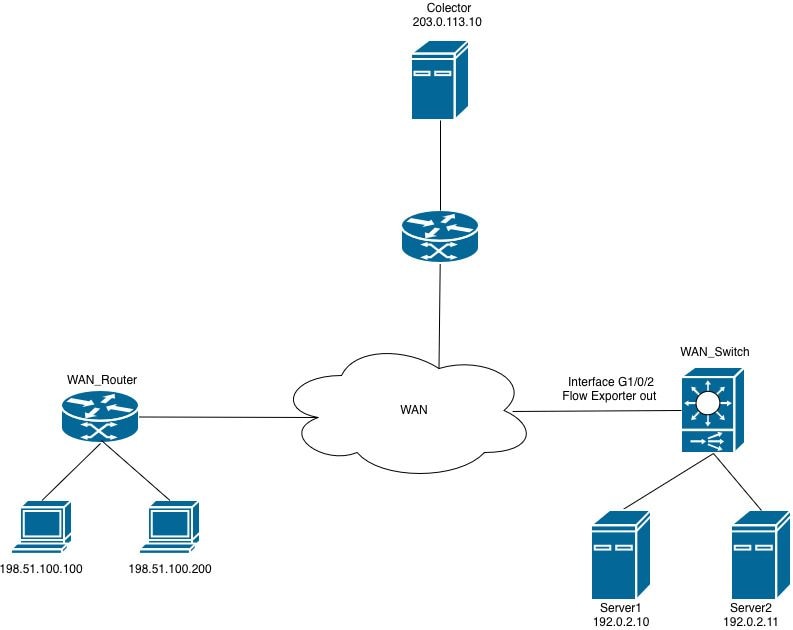 交换机上的Netflow
流监控器无法应用于接口
当尝试将Flexible NetFlow(FNF)流监控器连接到出口方向的接口时,路由器将拒绝配置并生成错误消息。
WAN_Switch(config-if)#interface TwentyFiveGigE1/0/1
WAN_Switch(config-if)#ip flow monitor MONITOR_INGRESS input
% Flow Monitor: Failed to add monitor to interface: Invalid set of fields in monitor record for wired interface
步骤1.检验监控器配置。
WAN_Switch#show running-config | section flow monitor
flow monitor MONITOR_INGRESS
exporter Netflow_Exporter
cache timeout inactive 30
cache timeout active 60
record INGRESS
步骤2.检查特定于方向的字段的流记录配置。导致此问题的最常见字段是:匹配应用程序名称。
WAN_Switch#show running-config | section flow record
flow record INGRESS
match ipv4 version
match ipv4 protocol
match application name
match ipv4 destination address
match ipv4 source address
match transport destination-port
match transport source-port
match interface input
match flow direction
collect timestamp absolute first
collect timestamp absolute last
collect counter bytes long
collect counter packets long
Flexible NetFlow(FNF)流记录中的match application name字段用于应用可视性与可控性(AVC)部署,以根据生成流的应用来识别和分类流量。
此字段利用基于网络的应用识别(NBAR)引擎执行深度数据包检测(DPI)并识别与每个流关联的应用。该字段使路由器能够在应用层(第7层)对流量进行分类,而不是仅仅依赖于端口号或IP地址。
在仅使用Flexible NetFlow(FNF)且未启用AVC功能的部署中,此字段与接口配置不兼容,并阻止将流监控器连接到受监控接口。
注意:在Catalyst 9500H和Catalyst 9600平台上,AVC功能不可用。对于基于AVC的流量监控,Catalyst 9300系列是支持的平台。
3.从流记录配置中删除不受支持的字段,然后将流监控器重新应用到接口。
WAN_Switch(config)#interface twentyFiveGigE 1/0/1
WAN_Switch(config-if)#no ip flow monitor MONITOR_INGRESS in
WAN_Switch(config)#no flow monitor MONITOR_INGRESS
WAN_Switch(config)#flow record INGRESS
WAN_Switch(config-flow-record)#no match flow direction
<snip>
注意:修改流记录后,重新应用流监控器配置,并将流监控器连接到接口以完成配置更改。
步骤4.在应用配置更改后,确认流监控器运行正常。
WAN_Switch#show flow monitor MONITOR_INGRESS statistics
Cache type: Normal (Platform cache)
Cache size: 10000
Current entries: 1

Flows added: 1
Flows aged: 0

WAN_Switch#show flow monitor MONITOR_INGRESS cache
Cache type: Normal (Platform cache)
Cache size: 10000
Current entries: 1

Flows added: 1
Flows aged: 0

IPV4 SOURCE ADDRESS: x.x.x.x
IPV4 DESTINATION ADDRESS: y.y.y.y
TRNS SOURCE PORT: 0
TRNS DESTINATION PORT: 0
INTERFACE INPUT: Twe1/0/1
FLOW DIRECTION: Input
IP VERSION: 4
IP PROTOCOL: 89
counter bytes long: 708
counter packets long: 7
timestamp abs first: 20:38:23.408
timestamp abs last: 20:39:12.408
修订历史记录
| 版本 | 发布日期 | 备注 |
|---|---|---|
1.0 |
18-Jun-2026
|
初始版本 |
 反馈
反馈