Installatiemodi wijzigen op de draadloze Catalyst 9800-controller
Inhoud
Inleiding
In dit document wordt beschreven hoe u kunt wisselen tussen de verschillende typen installatiemodi op een Catalyst 9800 Wireless Controller (WLC).
Voorwaarden
Vereisten
Cisco raadt kennis van de volgende onderwerpen aan:
-
Catalyst 9800 draadloze LAN-controllers en toegangspunten (AP's)
- Catalyst 9800 Wireless LAN-controllers, softwaresets
Gebruikte componenten
De informatie in dit document is gebaseerd op deze software- en hardwareversie:
- C9800-L versie 17.15.5
De informatie in dit document is gebaseerd op de apparaten in een specifieke laboratoriumomgeving. Alle apparaten die in dit document worden beschreven, hadden een opgeschoonde (standaard)configuratie. Als uw netwerk live is, moet u zorgen dat u de potentiële impact van elke opdracht begrijpt.
Achtergrondinformatie
Gebruik dit document om te leren hoe u kunt converteren tussen de verschillende typen installatiemodi op een Catalyst 9800 Wireless Controller (WLC) via de Command Line Interface (CLI).
Deze procedure kan ook worden gebruikt om de 9800 WLC te upgraden.
Er zijn twee manieren waarop u Cisco IOS® XE kunt uitvoeren op een Catalyst 9800 WLC, in de bundel en in de installatiemodus.
Installatiemodus
De installatiemodus maakt gebruik van vooraf geëxtraheerde .pkg-bestanden uit het binaire bestand in Flash om de controller op te starten en verschillende kritieke architecturale functies te ontgrendelen die niet beschikbaar zijn in de bundelmodus. De controller gebruikt het packages.conf bestand dat is gemaakt van de extractie als opstartvariabele. In deze modus ervaart de controller snellere opstarttijden en verbruikt hij minder RAM dan in de bundelmodus.
Bundelmodus
Het systeem werkt in de bundelmodus als de controller opstart met de binaire afbeelding (.bin) als opstartvariabele. In deze modus extraheert de controller het .bin-bestand in het RAM en wordt vanaf daar uitgevoerd.
In deze modus wordt meer geheugen gebruikt dan in de installatiemodus, omdat de pakketten die uit het opstarten worden gehaald, naar het RAM worden gekopieerd.
Voordat u begint
Controleer de werkingsmodus van de 9800 WLC om te bepalen welke procedure u moet uitvoeren om tussen de modi te converteren.
Voer de opdracht show version | include Installation mode uit om de huidige installatiemodus te bekijken.
WLC#show version | include Installation mode
Installation mode is INSTALL
Configureren
Van installatie naar bundelmodus
CLI-procedure
Stap 1. Zorg ervoor dat u voldoende ruimte in Flash hebt om een nieuwe afbeelding uit te vouwen.
WLC#show bootflash:
...
277 42838080 Oct 08 2025 14:22:06.0000000000 +00:00 wlc9500C-rpboot.2025-10-05_08.14_prabhask.SSA.pkg
279 19921673 Dec 13 2025 19:27:45.0000000000 +00:00 system-report_20251213-192546-Pacific.tar.gz
235937792 bytes available (5746528256 bytes used)
Stap 2. Ruim oude installatiebestanden op in geval van onvoldoende ruimte en om oude toegevoegde pakketten weg te gooien.
WLC#install remove inactive
install_remove: START Mon Jun 08 22:31:01 Central 2026
install_remove: Removing IMG
Cleaning up unnecessary package files
No path specified, will use booted path /tmp/sw/isos/packages.conf
Cleaning /bootflash
Scanning boot directory for packages ... done.
Preparing packages list to delete ...
[R0]: /bootflash/C9800-L-universalk9_wlc.17.15.05.SPA.bin File is in use, will not delete.
[R0]: /bootflash/C9800-L-universalk9_wlc.17.15.05.SPA.conf File is in use, will not delete.
The following files will be deleted:
[R0]: /bootflash/packages.conf
[R0]: /bootflash/C9800-L-universalk9_wlc.17.12.04.Cisco bug ID CSCwn02956.SPA.apsp.bin
[R0]: /bootflash/C9800-L-rommon.1612-3r.pkg
[R0]: /bootflash/C9800-L-universalk9_wlc.17.15.03.SPA.bin
[R0]: /bootflash/C9800-L-mono-universalk9_wlc.17.15.03.SPA.pkg
[R0]: /bootflash/C9800-L-universalk9_wlc.17.15.03.SPA.conf
[R0]: /bootflash/C9800-L-rpboot.17.15.03.SPA.pkg
[R0]: /bootflash/C9800-L-universalk9_wlc.17.09.06.SPA.bin
[R0]: /bootflash/C9800-L-mono-universalk9_wlc.17.09.06.SPA.pkg
[R0]: /bootflash/C9800-L-rpboot.17.09.06.SPA.pkg
[R0]: /bootflash/C9800-L-universalk9_wlc.17.09.06.SPA.conf
[R0]: /bootflash/C9800-L-universalk9_wlc.17.15.03.Cisco bug ID CSCwp18505
[R0]: /bootflash/C9800-L-mono-universalk9_wlc.17.12.04.SPA.pkg
[R0]: /bootflash/C9800-L-rpboot.17.12.04.SPA.pkg
[R0]: /bootflash/C9800-L-mono-universalk9_wlc.17.15.05.SPA.pkg
[R0]: /bootflash/C9800-L-rpboot.17.15.05.SPA.pkg
Do you want to remove the above files? [y/n]y
Deleting file /bootflash/packages.conf ... done.
Deleting file /bootflash/C9800-L-universalk9_wlc.17.12.04.Cisco bug ID CSCwn02956
Deleting file /bootflash/C9800-L-rommon.1612-3r.pkg ... done.
Deleting file /bootflash/C9800-L-universalk9_wlc.17.15.03.SPA.bin ... done.
Deleting file /bootflash/C9800-L-mono-universalk9_wlc.17.15.03.SPA.pkg ... done.
Deleting file /bootflash/C9800-L-universalk9_wlc.17.15.03.SPA.conf ... done.
Deleting file /bootflash/C9800-L-rpboot.17.15.03.SPA.pkg ... done.
Deleting file /bootflash/C9800-L-universalk9_wlc.17.09.06.SPA.bin ... done.
Deleting file /bootflash/C9800-L-mono-universalk9_wlc.17.09.06.SPA.pkg ... done.
Deleting file /bootflash/C9800-L-rpboot.17.09.06.SPA.pkg ... done.
Deleting file /bootflash/C9800-L-universalk9_wlc.17.09.06.SPA.conf ... done.
Deleting file /bootflash/C9800-L-universalk9_wlc.17.15.03.Cisco bug ID CSCwp18505
Deleting file /bootflash/C9800-L-mono-universalk9_wlc.17.12.04.SPA.pkg ... done.
Deleting file /bootflash/C9800-L-rpboot.17.12.04.SPA.pkg ... done.
Deleting file /bootflash/C9800-L-mono-universalk9_wlc.17.15.05.SPA.pkg ... done.
Deleting file /bootflash/C9800-L-rpboot.17.15.05.SPA.pkg ... done.
Deleting /flash/.images/17.15.02.0.4538.1732779336 ... /flash/.images/17.15.05.0.8370.1771573356 done.
Deleting /flash/.images/17.12.04.0.31.1732211533 ... /flash/.images/17.15.05.0.8370.1771573356 done.
Deleting /flash/.images/17.15.03.0.5635.1742971301 ... /flash/.images/17.15.05.0.8370.1771573356 done.
SUCCESS: Files deleted.
--- Starting Post_Remove_Cleanup ---
Performing REMOVE_POSTCHECK on all members
Finished Post_Remove_Cleanup
SUCCESS: install_remove Mon Jun 08 22:31:17 Central 2026
WLC#dir bootflash: | i bytes
26458804224 bytes total (18033250304 bytes free)
Stap 3. Kopieer de nieuwe afbeelding naar Flash.
WLC#copy tftp: bootflash:
Address or name of remote host []? 10.152.200.238
Source filename []? C9800-L-universalk9_wlc.17.15.05.SPA.bin
Destination filename [C9800-L-universalk9_wlc.17.15.05.SPA.bin]?
Accessing tftp://10.152.200.238/C9800-L-universalk9_wlc.17.15.05.SPA.bin...
Loading C9800-L-universalk9_wlc.17.15.05.SPA.bin from 10.152.200.238 (via Vlan210): !!!!!!!!!!!!!!!!!!!!!!!!!!!!!!!!!!!!!!!!!!
Stap 4. Bevestig dat het image naar Flash is gekopieerd en controleer de integriteit van het image.
WLC#dir bootflash:*.bin
Directory of bootflash:/*.bin
Directory of bootflash:/
 95 -rw- 1635303343 Jun 5 2026 23:24:36 +00:00 C9800-L-universalk9_wlc.17.15.05.SPA.bin.SPA.bin

WLC#verify /md5 bootflash:C9800-L-universalk9_wlc.17.15.05.SPA.bin
........................................................................
........................................................................
........................................................................
........................................................................Done!
verify /md5 (bootflash:C9800-L-universalk9_wlc.17.15.05.SPA.bin) = 9fb93d840278a5de2b454ade1016ddce
Vergelijk het resultaat met de MD5-controlesom in de Release Details voor het doelimage op de Cisco Software Download Site, de waarden moeten exact overeenkomen.
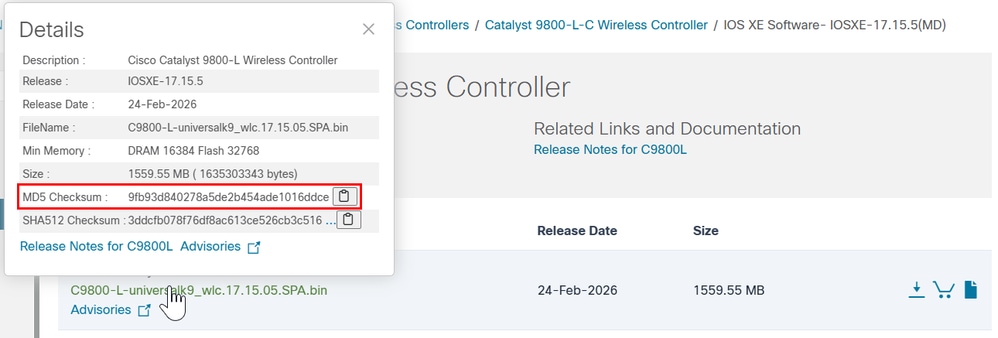
Stap 5. Controleer de huidige opstartvariabele. Als de variabele is ingesteld op packages.conf, wordt de WLC momenteel uitgevoerd in de installatiemodus. Als u wilt converteren naar de bundelmodus, verwijdert u de bestaande opstartvariabele en stelt u de .bin-afbeelding in als de nieuwe opstartvariabele. U moet de configuratie na deze wijzigingen opslaan; anders blijft de nieuwe opstartvariabele niet bestaan na een herladen.
WLC#show bootvar
BOOT variable = bootflash:packages.conf,12;
CONFIG_FILE variable =
BOOTLDR variable does not exist
Configuration register is 0x2102
WLC#conf t
WLC(config)#no boot system
WLC(config)#do write
WLC(config)#boot system bootflash:C9800-L-universalk9_wlc.17.15.05.SPA.bin
WLC(config)#do write
WLC(config)#end
Stap 6. Voer deze opdracht uit om te controleren of de opstartvariabele is bootflash:ingesteld.
De uitvoer wordt nu weergegeven BOOT variable = bootflash:
WLC#show bootvar
BOOT variable = bootflash:C9800-L-universalk9_wlc.17.15.05.SPA.bin,12;
CONFIG_FILE variable does not exist
BOOTLDR variable does not exist
Configuration register is 0x102

Standby not ready to show bootvar
Stap 7. Laad de controller opnieuw om op te starten in de bundelmodus.
WLC#reload
Reload command is being issued on Active unit, this will reload the whole stack
Proceed with reload? [confirm]
Stap 8. Controleer het WLC-initialisatieproces om te bevestigen dat het in de bundelmodus wordt opgestart.
...
32768K bytes of non-volatile configuration memory.
16777216K bytes of physical memory.
26251263K bytes of eUSB flash at bootflash:.
0K bytes of Cloud S3 Storage at cloudfs:.

Base Ethernet MAC Address : FF:FF:FF:FF:FF:FF

Installation mode is BUNDLE
GUI-procedure
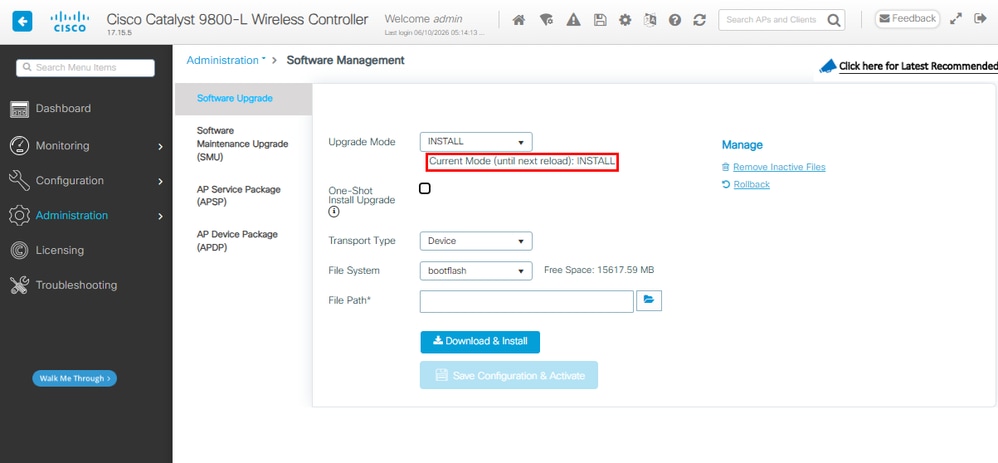
Stap 1. Controleer de huidige modus. Ga naar Beheer > Softwarebeheer > Software-upgrade, bevestig dat de upgrademodus aangeeft dat het systeem zich momenteel in de installatiemodus bevindt.
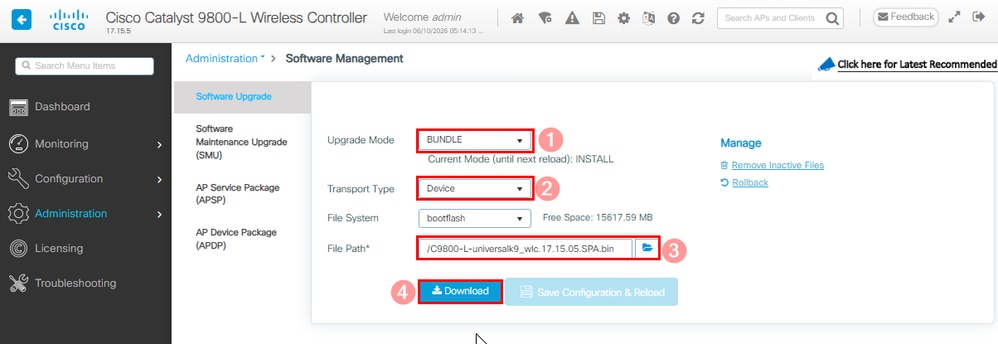
Stap 2. Klik op de vervolgkeuzelijst die beschikbaar is in de upgrademodus en selecteer Bundel. Kies vervolgens het transporttype en selecteer het bestandspad voor het .bin-bestand gevolgd door Downloaden.
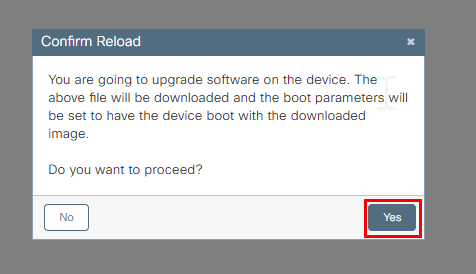
Stap 3. Bevestig de toestemming voor het opnieuw laden van het systeem. Op dit moment wordt de conversie naar bundelmodus gestart.
Stap 4. Controleer de upgrade aan de rechterkant van de statussectie en het pop-upvenster Logboeken weergeven.
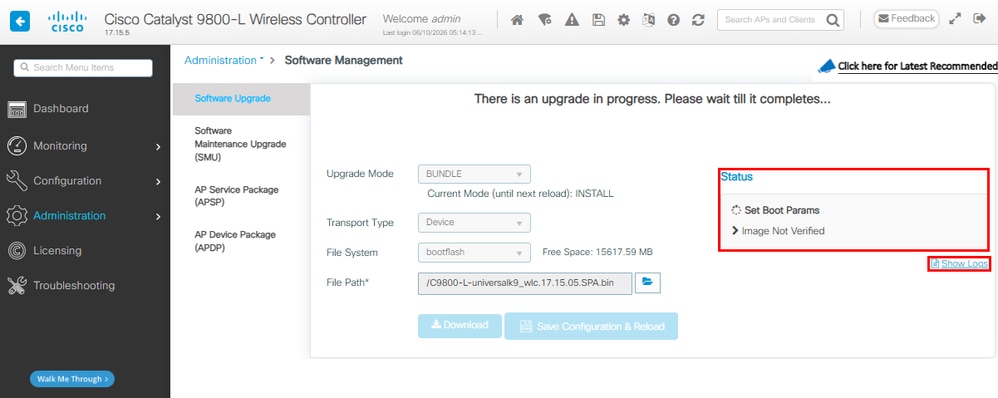
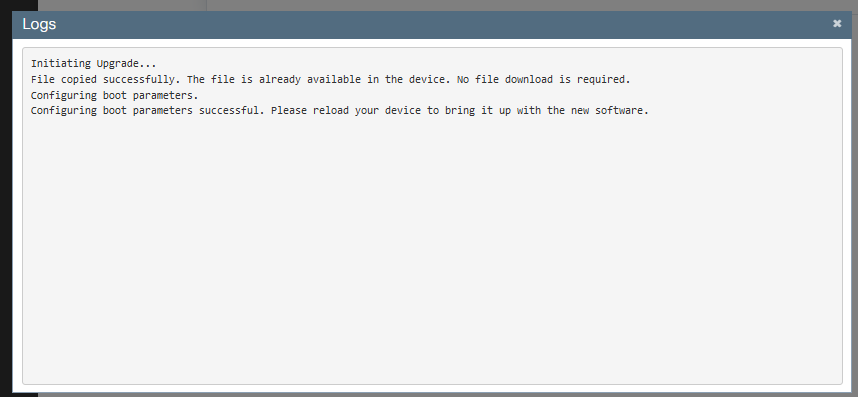
Stap 5. Verifieer het image.
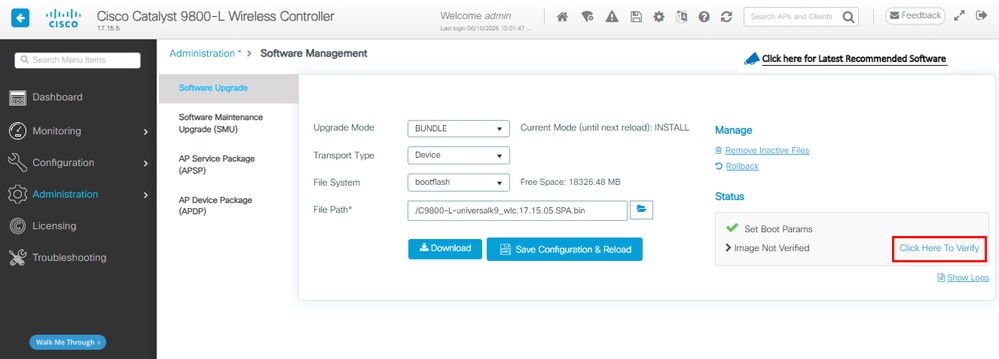
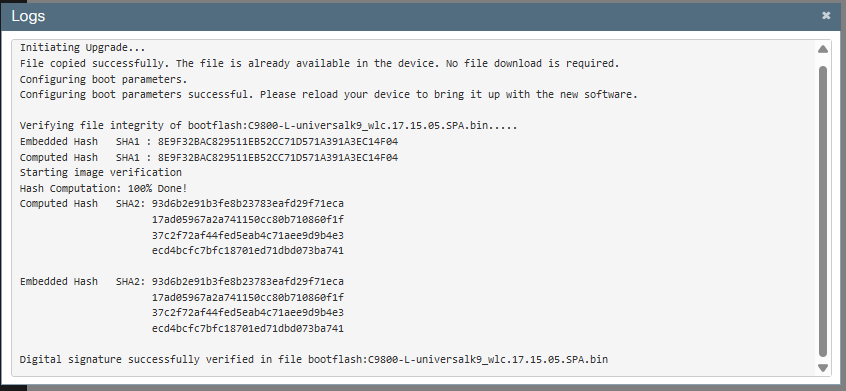
Stap 6. Configuratie opslaan en opnieuw laden bevestigen.
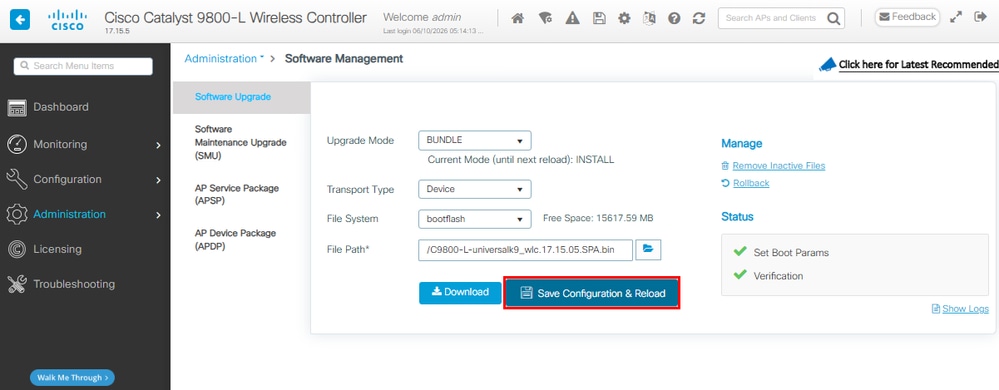
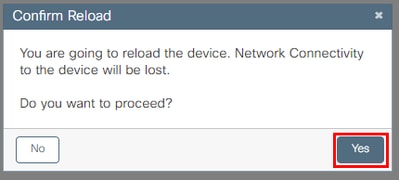
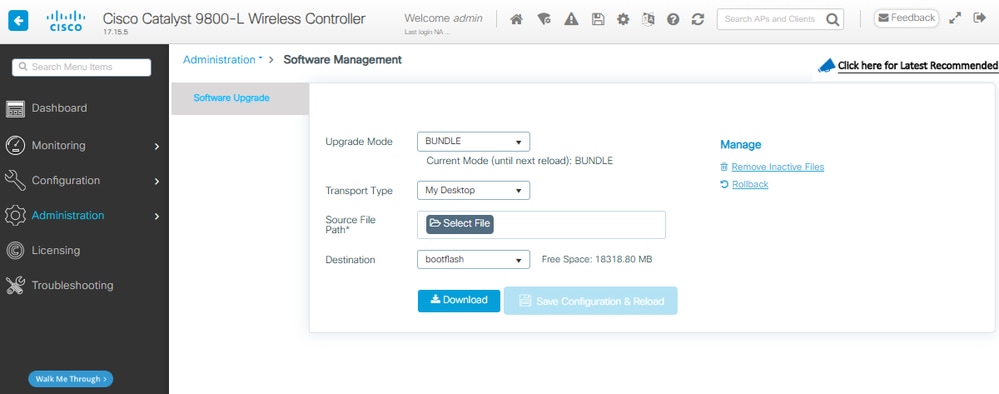
Stap 7. Controleer de WLC-herlading en ga, zodra de GUI beschikbaar is, naar Beheer > Softwarebeheer > Software-upgrade. Merk op dat de upgrademodus aangeeft dat het systeem momenteel in de bundelmodus werkt.
Van bundel naar installatiemodus
CLI-procedure
Stap 1. Zorg ervoor dat u voldoende ruimte in Flash hebt om een nieuwe afbeelding uit te vouwen.
WLC#dir bootflash: | i bytes free
26458804224 bytes total (9501368320 bytes free)
Stap 2. Ruim oude installatiebestanden op in geval van onvoldoende ruimte en om oude toegevoegde pakketten weg te gooien.
WLC#install remove inactive
install_remove: START Tue Jun 09 21:21:34 Central 2026
install_remove: Removing IMG
Cleaning up unnecessary package files
No path specified, will use booted path /tmp/sw/isos/packages.conf

Cleaning /bootflash
Scanning boot directory for packages ... done.
Preparing packages list to delete ...
[R0]: /bootflash/packages.conf File is in use, will not delete.
[R0]: /bootflash/C9800-L-universalk9_wlc.17.15.05.SPA.bin File is in use, will not delete.
[R0]: /bootflash/C9800-L-universalk9_wlc.17.15.05.SPA.conf File is in use, will not delete.

The following files will be deleted:
[R0]: /bootflash/C9800-L-mono-universalk9_wlc.17.15.05.SPA.pkg
[R0]: /bootflash/C9800-L-rpboot.17.15.05.SPA.pkg

Do you want to remove the above files? [y/n]y

Deleting file /bootflash/C9800-L-mono-universalk9_wlc.17.15.05.SPA.pkg ... done.
Deleting file /bootflash/C9800-L-rpboot.17.15.05.SPA.pkg ... done.
SUCCESS: Files deleted.

--- Starting Post_Remove_Cleanup ---
Performing REMOVE_POSTCHECK on all members
Finished Post_Remove_Cleanup
SUCCESS: install_remove Tue Jun 09 21:22:08 Central 2026

WLC#dir bootflash: | i bytes free
26458804224 bytes total (19666468864 bytes free)
Stap 3. Kopieer de nieuwe afbeelding naar Flash.
WLC#copy tftp: flash:
Address or name of remote host []? 10.152.200.238
Source filename []? C9800-L-universalk9_wlc.17.15.05.SPA.bin
Destination filename [C9800-L-universalk9_wlc.17.15.05.SPA.bin]?
Accessing tftp://10.152.200.238/C9800-L-universalk9_wlc.17.15.05.SPA.bin...
Loading C9800-L-universalk9_wlc.17.15.05.SPA.bin from 10.152.200.238 (via Vlan210): !!!!!!!!!!!!!!!!!!!!!!!!!!!!!!!!!!!!!!!!!!
Stap 4. Bevestig dat het image naar Flash is gekopieerd en controleer de integriteit van het image.
WLC#dir bootflash:*.bin
Directory of bootflash:/*.bin
Directory of bootflash:/
 95 -rw- 1635303343 Jun 5 2026 23:24:36 +00:00 C9800-L-universalk9_wlc.17.15.05.SPA.bin.SPA.bin

WLC#verify /md5 bootflash:C9800-L-universalk9_wlc.17.15.05.SPA.bin
........................................................................
........................................................................
........................................................................
........................................................................Done!
verify /md5 (bootflash:C9800-L-universalk9_wlc.17.15.05.SPA.bin) = 9fb93d840278a5de2b454ade1016ddce
Vergelijk het resultaat met de MD5-controlesom in de Release Details voor het doelimage op de Cisco Software Download Site, de waarden moeten exact overeenkomen.
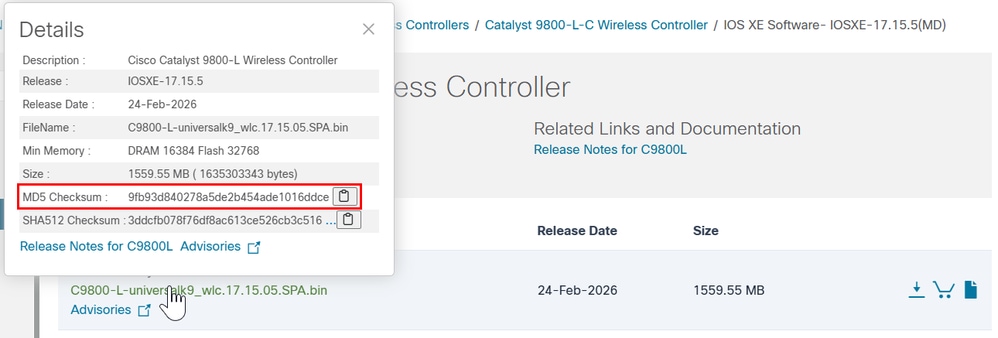
Stap 5. Controleer de huidige opstartvariabele. Als de variabele naar een .bin-bestand verwijst, wordt het systeem momenteel uitgevoerd in de bundelmodus. Handmatige configuratie van de opstartvariabele is niet vereist in deze stap; het installatieproces wordt tijdens de upgrade automatisch bijgewerkt naar bootflash:packages.conf.
WLC#show bootvar
BOOT variable = bootflash:C9800-L-universalk9_wlc.17.15.05.SPA.bin,12;
CONFIG_FILE variable does not exist
BOOTLDR variable does not exist
Configuration register is 0x102
Standby not ready to show bootvar
Stap 6. Software installeert image naar Flash. Gebruik de opdracht CLI install add file bootflash: voor het converteren van de bundel naar de installatiemodus.
WLC#install add file bootflash:C9800-L-universalk9_wlc.17.15.05.SPA.bin activate commit
Stap 7. Type y (yes) voor de toestemming voor het opnieuw laden van het systeem. Nadat de installatie is voltooid, laadt de controller opnieuw.
install_add_activate_commit: START Mon Jun 08 22:53:20 Central 2026
install_add: START Mon Jun 08 22:53:20 Central 2026
install_add: Adding IMG
--- Starting initial file syncing ---
Copying bootflash:C9800-L-universalk9_wlc.17.15.05.SPA.bin from Chassis 1/R0 to Chassis 1/R0
Info: Finished copying to the selected Chassis
Finished initial file syncing

--- Starting Add ---
Performing Add on all members
Checking status of Add on [1/R0]
Add: Passed on [1/R0]
Image added. Version: 17.15.05.0.8370

Finished Add

install_activate: START Mon Jun 08 22:53:59 Central 2026
install_activate: Activating IMG
Following packages shall be activated:
/bootflash/C9800-L-mono-universalk9_wlc.17.15.05.SPA.pkg
/bootflash/C9800-L-rpboot.17.15.05.SPA.pkg

This operation may require a reload of the system. Do you want to proceed? [y/n]y

--- Starting Activate ---
Performing Activate on all members
[1] Activate package(s) on Chassis 1/R0
[1] Finished Activate on Chassis 1/R0
Checking status of Activate on [1/R0]
Activate: Passed on [1/R0]
Finished Activate

--- Starting Commit ---
Performing Commit on all members
[1] Commit package(s) on Chassis 1/R0
[1] Finished Commit on Chassis 1/R0
Checking status of Commit on [1/R0]
Commit: Passed on [1/R0]
Finished Commit operation

SUCCESS: install_add_activate_commit Mon Jun 08 22:55:34 Central 2026

Initializing Hardware ...
Stap 8. Controleer het WLC-initialisatieproces om te bevestigen dat het in de installatiemodus wordt opgestart.
...
32768K bytes of non-volatile configuration memory.
16777216K bytes of physical memory.
26251263K bytes of eUSB flash at bootflash:.
0K bytes of Cloud S3 Storage at cloudfs:.

Base Ethernet MAC Address : FF:FF:FF:FF:FF:FF

Installation mode is INSTALL
GUI-procedure
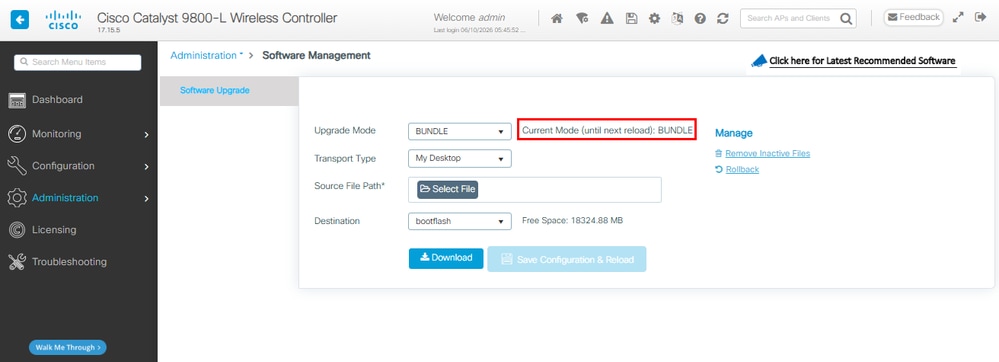
Stap 1. Controleer de huidige modus. Navigeer naar Beheer > Softwarebeheer > Software-upgrade, bevestig dat de upgrademodus aangeeft dat het systeem zich momenteel in de bundelmodus bevindt.
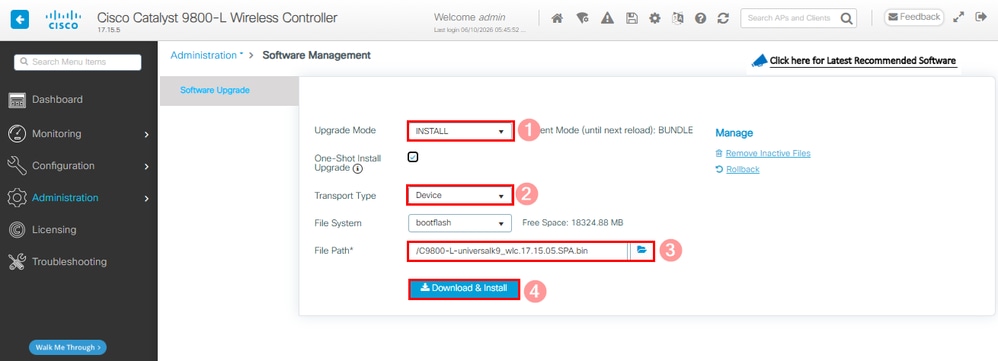
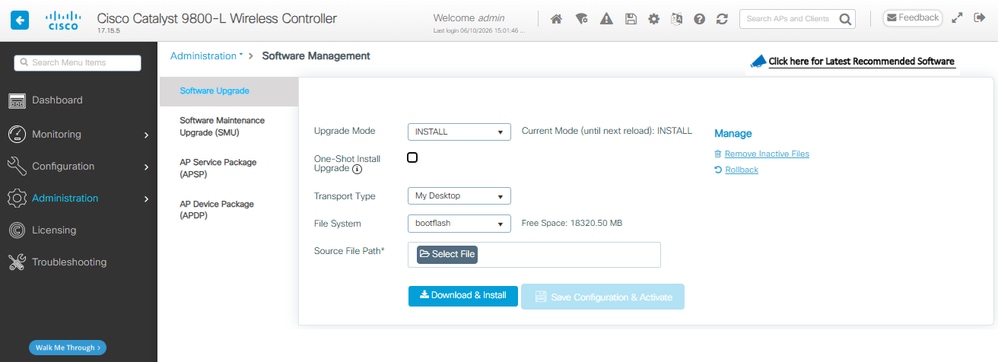
Stap 2. Klik op de vervolgkeuzelijst die beschikbaar is in de upgrademodus en selecteer Installeren. Kies vervolgens het transporttype en selecteer het bestandspad voor het .bin-bestand gevolgd door Downloaden en installeren.
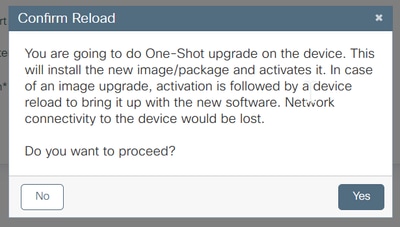
Stap 3. Bevestig de toestemming voor het opnieuw laden van het systeem. Op dit moment wordt de Conversion to Install Mode gestart.
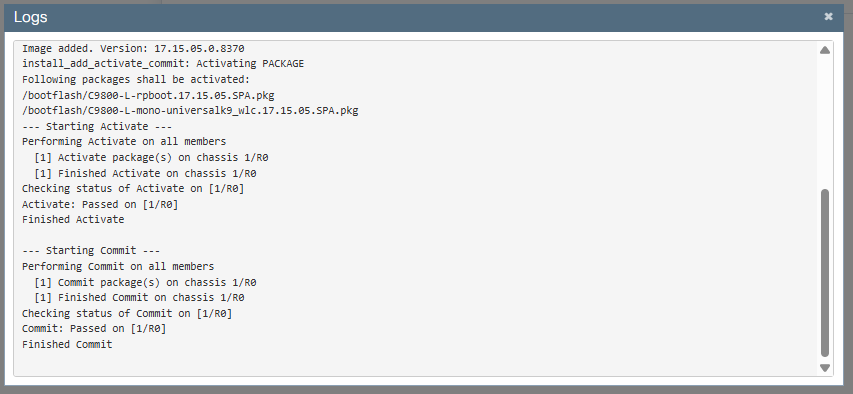
Stap 4. Controleer de upgrade aan de rechterkant van de statussectie en het pop-upvenster Logboeken weergeven.
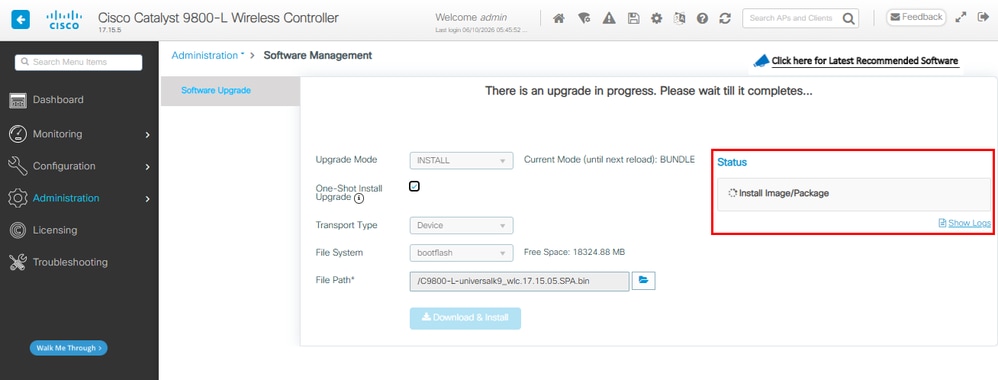
Het systeem wordt opnieuw geladen als onderdeel van commit of change.
Stap 5. Controleer de WLC-herlading en ga, zodra de GUI beschikbaar is, naar Beheer > Softwarebeheer > Software-upgrade. Merk op dat de upgrademodus aangeeft dat het systeem momenteel in de installatiemodus werkt.
Verifiëren
Gebruik deze sectie om te controleren of uw configuratie goed werkt.
Nadat de controller opnieuw is opgestart, kunt u de huidige installatiemodus van de controller controleren. Voer de opdracht show version uit om te bevestigen dat de conversie succesvol is.
Installatiemodus
WLC#show version | include System image|Installation mode|IOS XE Software
Cisco IOS XE Software, Version 17.15.05
System image file is "bootflash:packages.conf"
Installation mode is INSTALL
Bundelmodus
WLC#show version | include System image|Installation mode|IOS XE Software
Cisco IOS XE Software, Version 17.15.05
System image file is "bootflash:/C9800-L-universalk9_wlc.17.15.05.SPA.bin"
Installation mode is BUNDLE
Problemen oplossen
Er is momenteel geen specifieke informatie beschikbaar om problemen met deze configuratie op te lossen.
Gerelateerde informatie
- Installatiehandleiding voor Cisco Catalyst 9800-CL Cloud Wireless Controller
- TAC Aanbevolen IOS XE-builds voor draadloze LAN-controllers
- Handleiding voor eindgebruikers
- Cisco Technical Support en downloads
Revisiegeschiedenis
| Revisie | Publicatiedatum | Opmerkingen |
|---|---|---|
3.0 |
11-Jun-2026
|
Alt-tekst toegevoegd.
Bijgewerkte stijlvereisten en opmaak. |
2.0 |
30-Nov-2023
|
hercertificering |
1.0 |
15-Apr-2021
|
Eerste vrijgave |

 Feedback
Contact Cisco
- Een ondersteuningscase openen

- (Vereist een Cisco-servicecontract)